NETWOKING&SERVER CONFIG

                         Corporate Office & Development Center
                             Bitscape Infotech Private Limited
                                Ahmedabad, Gujarat, India


1.0Proposed Solution
      1.1Scope
            The scope of the proposed system is to design, develop, and implement DCAA web
            portal(Internet and Intranet). The feature and functionality as scope is listed in the
            functionality section (4.0) in this proposal.
      1.2Engagement Model
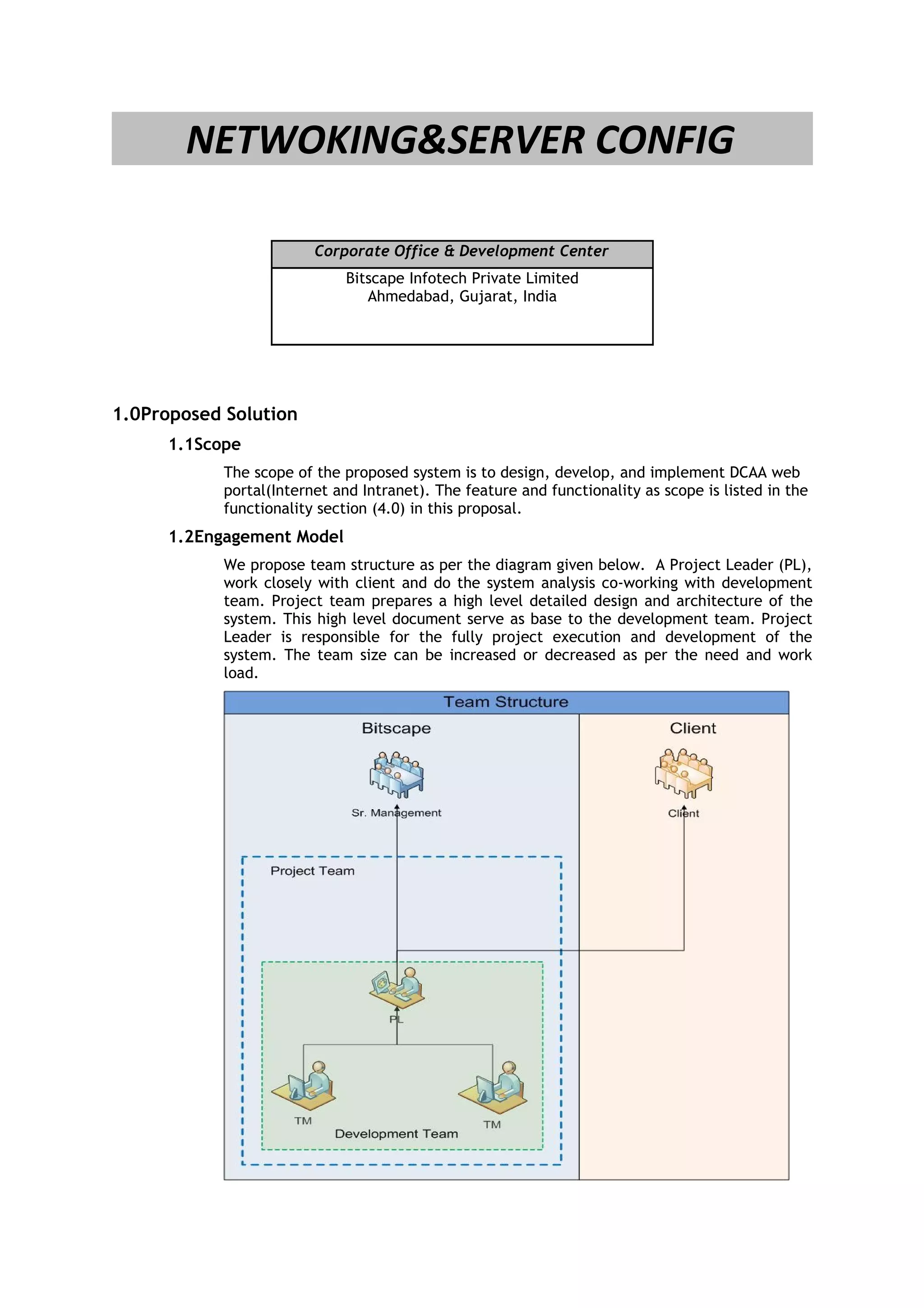
            We propose team structure as per the diagram given below. A Project Leader (PL),
            work closely with client and do the system analysis co-working with development
            team. Project team prepares a high level detailed design and architecture of the
            system. This high level document serve as base to the development team. Project
            Leader is responsible for the fully project execution and development of the
            system. The team size can be increased or decreased as per the need and work
            load.
Figure - 1: Team Structure


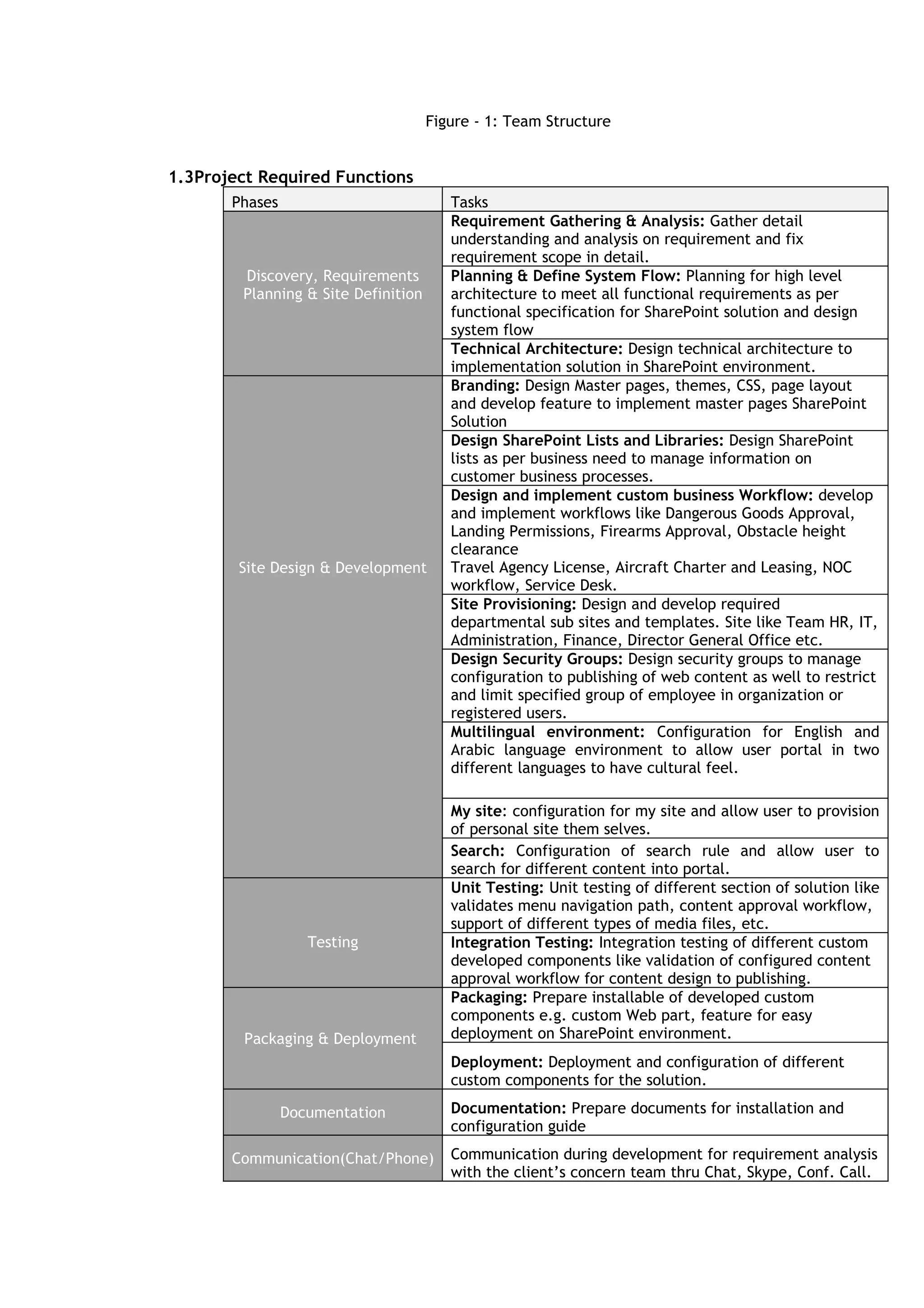
1.3Project Required Functions
       Phases                           Tasks
                                        Requirement Gathering & Analysis: Gather detail
                                        understanding and analysis on requirement and fix
                                        requirement scope in detail.
        Discovery, Requirements         Planning & Define System Flow: Planning for high level
        Planning & Site Definition      architecture to meet all functional requirements as per
                                        functional specification for SharePoint solution and design
                                        system flow
                                        Technical Architecture: Design technical architecture to
                                        implementation solution in SharePoint environment.
                                        Branding: Design Master pages, themes, CSS, page layout
                                        and develop feature to implement master pages SharePoint
                                        Solution
                                        Design SharePoint Lists and Libraries: Design SharePoint
                                        lists as per business need to manage information on
                                        customer business processes.
                                        Design and implement custom business Workflow: develop
                                        and implement workflows like Dangerous Goods Approval,
                                        Landing Permissions, Firearms Approval, Obstacle height
                                        clearance
        Site Design & Development       Travel Agency License, Aircraft Charter and Leasing, NOC
                                        workflow, Service Desk.
                                        Site Provisioning: Design and develop required
                                        departmental sub sites and templates. Site like Team HR, IT,
                                        Administration, Finance, Director General Office etc.
                                        Design Security Groups: Design security groups to manage
                                        configuration to publishing of web content as well to restrict
                                        and limit specified group of employee in organization or
                                        registered users.
                                        Multilingual environment: Configuration for English and
                                        Arabic language environment to allow user portal in two
                                        different languages to have cultural feel.

                                        My site: configuration for my site and allow user to provision
                                        of personal site them selves.
                                        Search: Configuration of search rule and allow user to
                                        search for different content into portal.
                                        Unit Testing: Unit testing of different section of solution like
                                        validates menu navigation path, content approval workflow,
                                        support of different types of media files, etc.
                   Testing              Integration Testing: Integration testing of different custom
                                        developed components like validation of configured content
                                        approval workflow for content design to publishing.
                                        Packaging: Prepare installable of developed custom
                                        components e.g. custom Web part, feature for easy
         Packaging & Deployment         deployment on SharePoint environment.
                                        Deployment: Deployment and configuration of different
                                        custom components for the solution.

                Documentation           Documentation: Prepare documents for installation and
                                        configuration guide

       Communication(Chat/Phone)        Communication during development for requirement analysis
                                        with the client’s concern team thru Chat, Skype, Conf. Call.
•   Consider SharePoint users will be SQL users – FBA.
                                            •   Content configuration for whole portal is not part of
                                                scope
                                            •   In case of any third-party component implementation,
                                                client will take of all licensing related stuff
                      Assumptions
                                            •   Consider SharePoint solution will be based on product
                                                SharePoint 2010.
                                            •   Client will take care for licensing of products for their
                                                portal e.g. licensing for SharePoint 2010 enterprise, SQL
                                                Server 2008 R2


2.0Architecture

      2.1Operating Environment - Software
            List of operating system and software are recommended for developing and
            implementing the proposed system:
            • SharePoint 2010 Enterprise
            • Windows 7
            • Visual Studio 2008/2010
            • DOT.NET framework 3.0/3.5/4.0
            • VSS or TFS 2008/2010
            • SQL Server 2008 R2 – x64- developer edition
            • Microsoft English & Arabic language pack


      2.2Operating Environment – Hardware
            Hardware recommended for developing and implementing the proposed system
            with latest configurations:
            Server
            • SharePoint 2010 Enterprise
            • Microsoft SQL Server 2008 R2 – x64
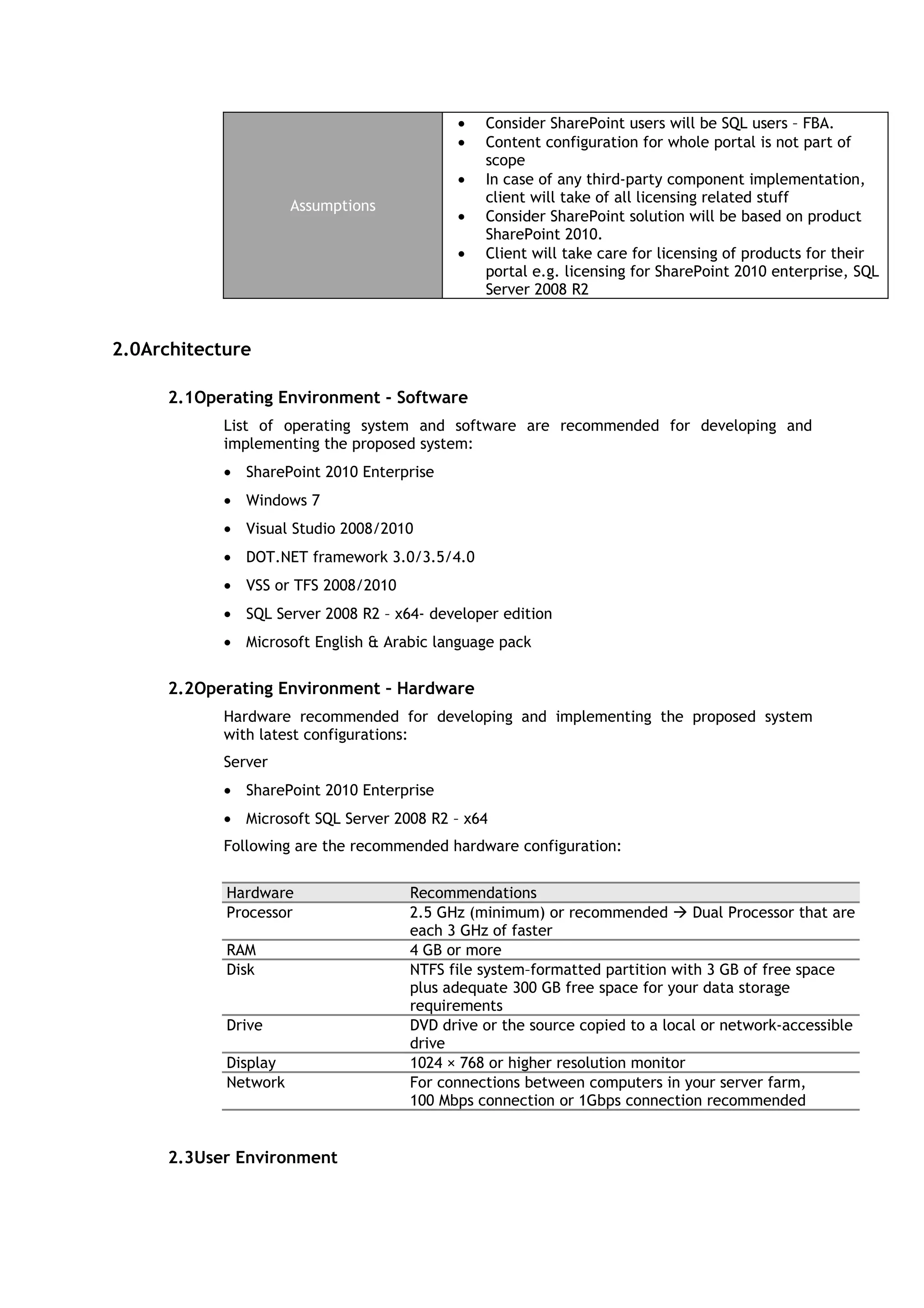
            Following are the recommended hardware configuration:


            Hardware                 Recommendations
            Processor                2.5 GHz (minimum) or recommended  Dual Processor that are
                                     each 3 GHz of faster
            RAM                      4 GB or more
            Disk                     NTFS file system–formatted partition with 3 GB of free space
                                     plus adequate 300 GB free space for your data storage
                                     requirements
            Drive                    DVD drive or the source copied to a local or network-accessible
                                     drive
            Display                  1024 × 768 or higher resolution monitor
            Network                  For connections between computers in your server farm,
                                     100 Mbps connection or 1Gbps connection recommended


      2.3User Environment
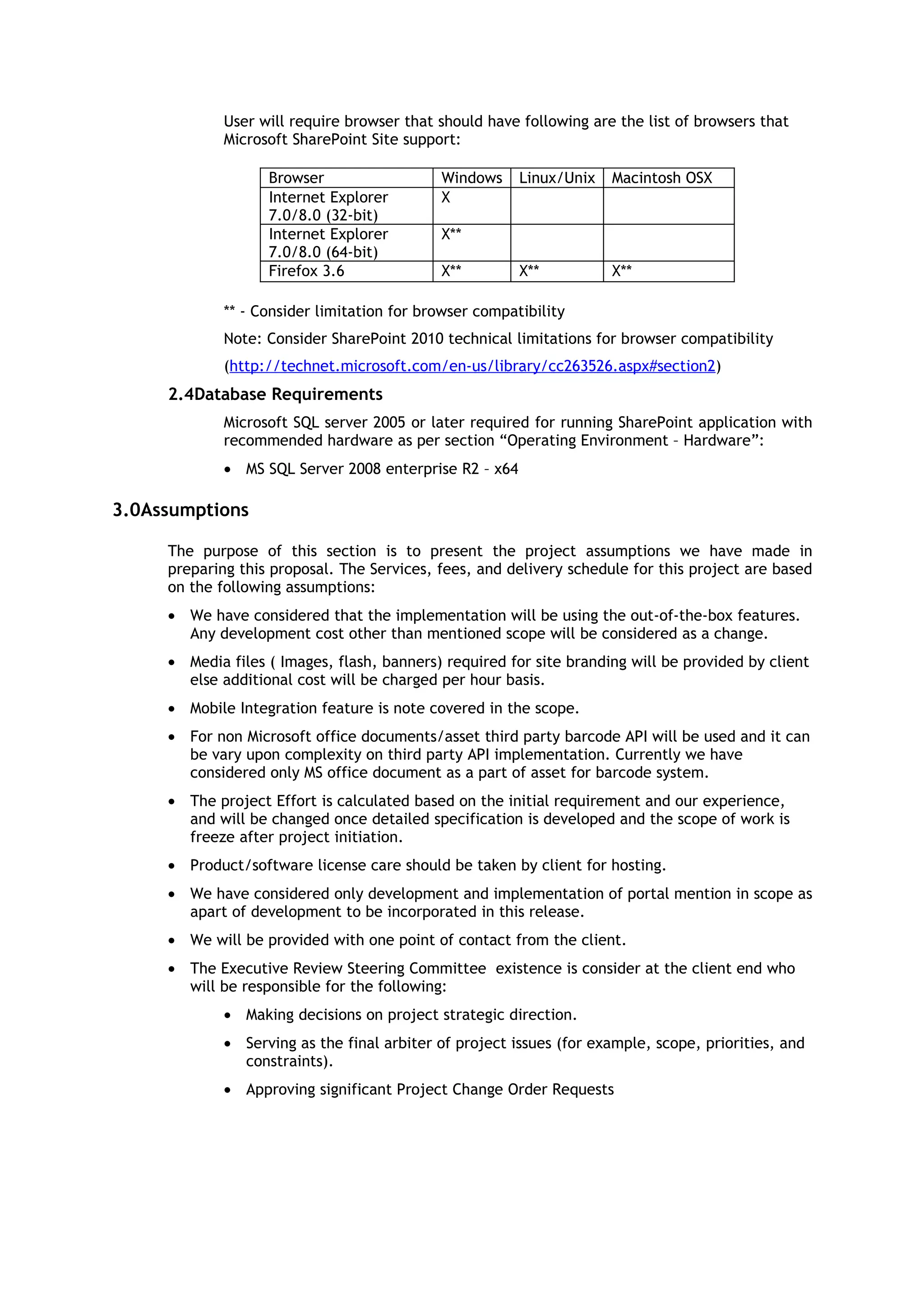
User will require browser that should have following are the list of browsers that
             Microsoft SharePoint Site support:

                   Browser                  Windows     Linux/Unix   Macintosh OSX
                   Internet Explorer        X
                   7.0/8.0 (32-bit)
                   Internet Explorer        X**
                   7.0/8.0 (64-bit)
                   Firefox 3.6              X**         X**          X**

             ** - Consider limitation for browser compatibility
             Note: Consider SharePoint 2010 technical limitations for browser compatibility
             (http://technet.microsoft.com/en-us/library/cc263526.aspx#section2)
     2.4Database Requirements
             Microsoft SQL server 2005 or later required for running SharePoint application with
             recommended hardware as per section “Operating Environment – Hardware”:
             • MS SQL Server 2008 enterprise R2 – x64

3.0Assumptions

     The purpose of this section is to present the project assumptions we have made in
     preparing this proposal. The Services, fees, and delivery schedule for this project are based
     on the following assumptions:
     • We have considered that the implementation will be using the out-of-the-box features.
       Any development cost other than mentioned scope will be considered as a change.
     • Media files ( Images, flash, banners) required for site branding will be provided by client
       else additional cost will be charged per hour basis.
     • Mobile Integration feature is note covered in the scope.
     • For non Microsoft office documents/asset third party barcode API will be used and it can
       be vary upon complexity on third party API implementation. Currently we have
       considered only MS office document as a part of asset for barcode system.
     • The project Effort is calculated based on the initial requirement and our experience,
       and will be changed once detailed specification is developed and the scope of work is
       freeze after project initiation.
     • Product/software license care should be taken by client for hosting.
     • We have considered only development and implementation of portal mention in scope as
       apart of development to be incorporated in this release.
     • We will be provided with one point of contact from the client.
     • The Executive Review Steering Committee existence is consider at the client end who
       will be responsible for the following:
             • Making decisions on project strategic direction.
             • Serving as the final arbiter of project issues (for example, scope, priorities, and
               constraints).
             • Approving significant Project Change Order Requests
4.0Costs

      4.1Development


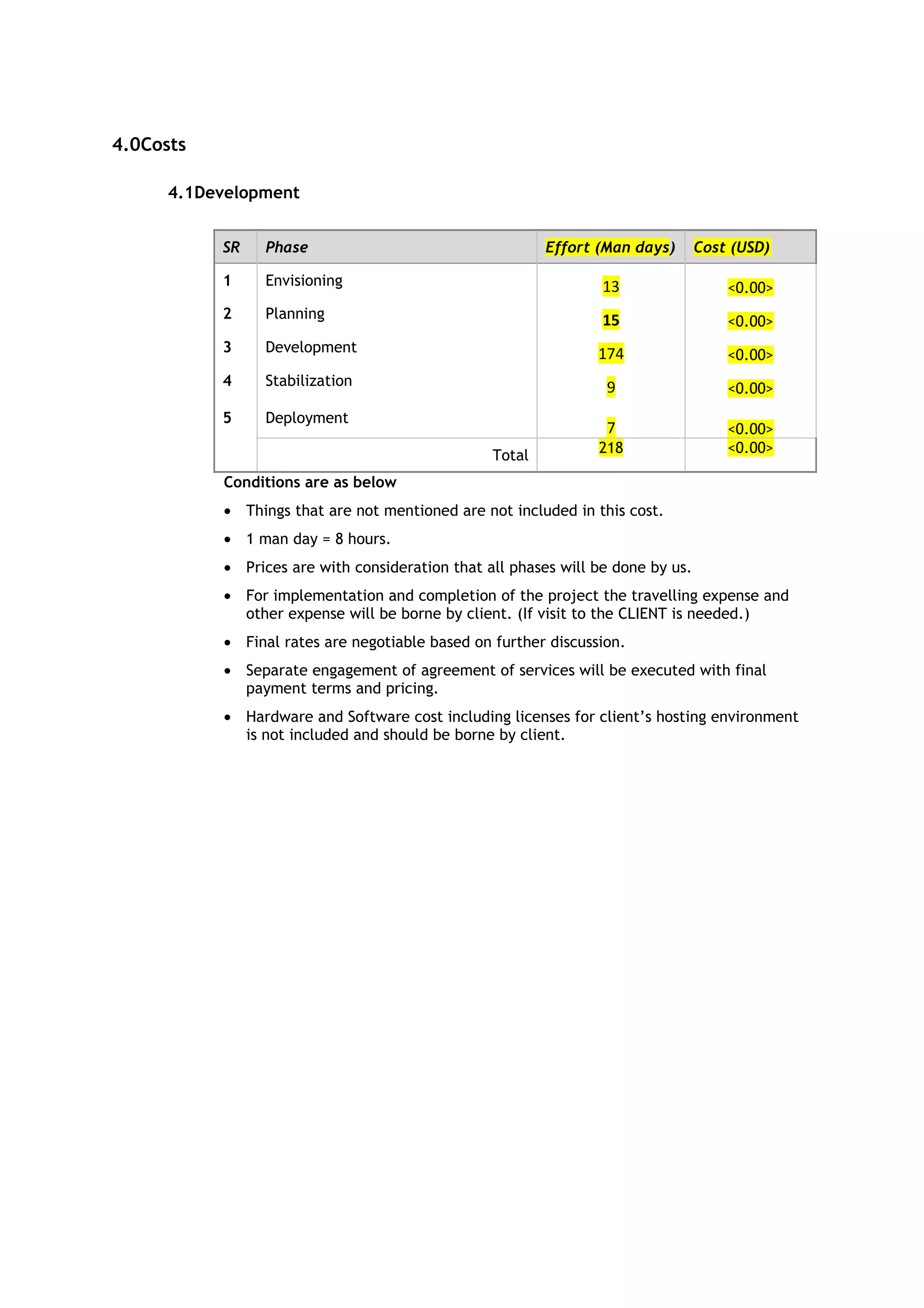
           SR   Phase                                    Effort (Man days)       Cost (USD)

           1    Envisioning                                      13                  <0.00>
           2    Planning                                         15                  <0.00>
           3    Development                                     174                  <0.00>
           4    Stabilization                                    9                   <0.00>
           5    Deployment
                                                                 7                   <0.00>
                                                 Total          218                  <0.00>

           Conditions are as below
           • Things that are not mentioned are not included in this cost.
           • 1 man day = 8 hours.
           • Prices are with consideration that all phases will be done by us.
           • For implementation and completion of the project the travelling expense and
             other expense will be borne by client. (If visit to the CLIENT is needed.)
           • Final rates are negotiable based on further discussion.
           • Separate engagement of agreement of services will be executed with final
             payment terms and pricing.
           • Hardware and Software cost including licenses for client’s hosting environment
             is not included and should be borne by client.
5.0Project Time Frame


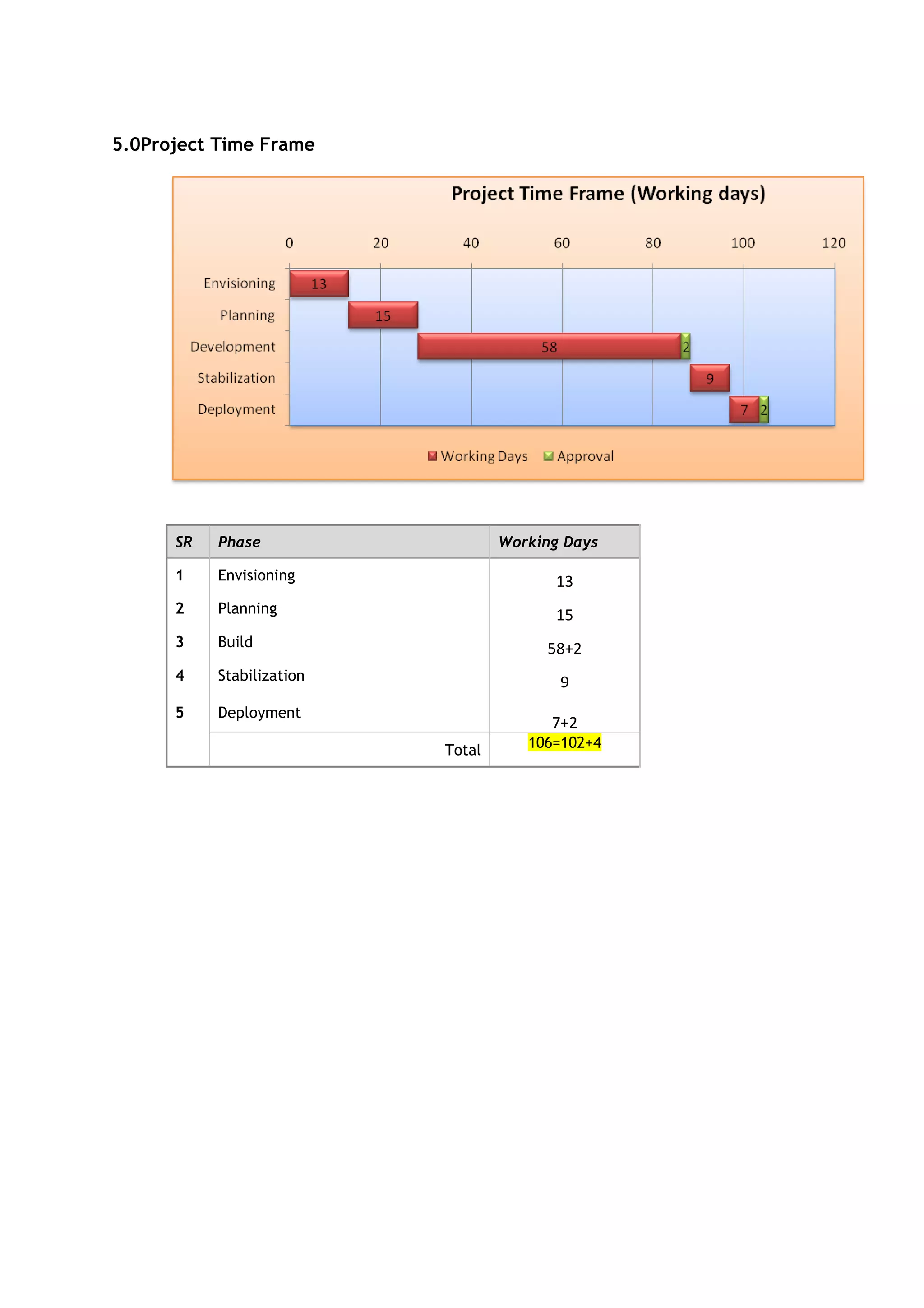
      SR   Phase                   Working Days

      1    Envisioning                   13
      2    Planning                      15
      3    Build                        58+2
      4    Stabilization                  9
      5    Deployment
                                         7+2
                           Total      106=102+4

Project

  • 1.
    NETWOKING&SERVER CONFIG Corporate Office & Development Center Bitscape Infotech Private Limited Ahmedabad, Gujarat, India 1.0Proposed Solution 1.1Scope The scope of the proposed system is to design, develop, and implement DCAA web portal(Internet and Intranet). The feature and functionality as scope is listed in the functionality section (4.0) in this proposal. 1.2Engagement Model We propose team structure as per the diagram given below. A Project Leader (PL), work closely with client and do the system analysis co-working with development team. Project team prepares a high level detailed design and architecture of the system. This high level document serve as base to the development team. Project Leader is responsible for the fully project execution and development of the system. The team size can be increased or decreased as per the need and work load.
  • 2.
    Figure - 1:Team Structure 1.3Project Required Functions Phases Tasks Requirement Gathering & Analysis: Gather detail understanding and analysis on requirement and fix requirement scope in detail. Discovery, Requirements Planning & Define System Flow: Planning for high level Planning & Site Definition architecture to meet all functional requirements as per functional specification for SharePoint solution and design system flow Technical Architecture: Design technical architecture to implementation solution in SharePoint environment. Branding: Design Master pages, themes, CSS, page layout and develop feature to implement master pages SharePoint Solution Design SharePoint Lists and Libraries: Design SharePoint lists as per business need to manage information on customer business processes. Design and implement custom business Workflow: develop and implement workflows like Dangerous Goods Approval, Landing Permissions, Firearms Approval, Obstacle height clearance Site Design & Development Travel Agency License, Aircraft Charter and Leasing, NOC workflow, Service Desk. Site Provisioning: Design and develop required departmental sub sites and templates. Site like Team HR, IT, Administration, Finance, Director General Office etc. Design Security Groups: Design security groups to manage configuration to publishing of web content as well to restrict and limit specified group of employee in organization or registered users. Multilingual environment: Configuration for English and Arabic language environment to allow user portal in two different languages to have cultural feel. My site: configuration for my site and allow user to provision of personal site them selves. Search: Configuration of search rule and allow user to search for different content into portal. Unit Testing: Unit testing of different section of solution like validates menu navigation path, content approval workflow, support of different types of media files, etc. Testing Integration Testing: Integration testing of different custom developed components like validation of configured content approval workflow for content design to publishing. Packaging: Prepare installable of developed custom components e.g. custom Web part, feature for easy Packaging & Deployment deployment on SharePoint environment. Deployment: Deployment and configuration of different custom components for the solution. Documentation Documentation: Prepare documents for installation and configuration guide Communication(Chat/Phone) Communication during development for requirement analysis with the client’s concern team thru Chat, Skype, Conf. Call.
  • 3.
    Consider SharePoint users will be SQL users – FBA. • Content configuration for whole portal is not part of scope • In case of any third-party component implementation, client will take of all licensing related stuff Assumptions • Consider SharePoint solution will be based on product SharePoint 2010. • Client will take care for licensing of products for their portal e.g. licensing for SharePoint 2010 enterprise, SQL Server 2008 R2 2.0Architecture 2.1Operating Environment - Software List of operating system and software are recommended for developing and implementing the proposed system: • SharePoint 2010 Enterprise • Windows 7 • Visual Studio 2008/2010 • DOT.NET framework 3.0/3.5/4.0 • VSS or TFS 2008/2010 • SQL Server 2008 R2 – x64- developer edition • Microsoft English & Arabic language pack 2.2Operating Environment – Hardware Hardware recommended for developing and implementing the proposed system with latest configurations: Server • SharePoint 2010 Enterprise • Microsoft SQL Server 2008 R2 – x64 Following are the recommended hardware configuration: Hardware Recommendations Processor 2.5 GHz (minimum) or recommended  Dual Processor that are each 3 GHz of faster RAM 4 GB or more Disk NTFS file system–formatted partition with 3 GB of free space plus adequate 300 GB free space for your data storage requirements Drive DVD drive or the source copied to a local or network-accessible drive Display 1024 × 768 or higher resolution monitor Network For connections between computers in your server farm, 100 Mbps connection or 1Gbps connection recommended 2.3User Environment
  • 4.
    User will requirebrowser that should have following are the list of browsers that Microsoft SharePoint Site support: Browser Windows Linux/Unix Macintosh OSX Internet Explorer X 7.0/8.0 (32-bit) Internet Explorer X** 7.0/8.0 (64-bit) Firefox 3.6 X** X** X** ** - Consider limitation for browser compatibility Note: Consider SharePoint 2010 technical limitations for browser compatibility (http://technet.microsoft.com/en-us/library/cc263526.aspx#section2) 2.4Database Requirements Microsoft SQL server 2005 or later required for running SharePoint application with recommended hardware as per section “Operating Environment – Hardware”: • MS SQL Server 2008 enterprise R2 – x64 3.0Assumptions The purpose of this section is to present the project assumptions we have made in preparing this proposal. The Services, fees, and delivery schedule for this project are based on the following assumptions: • We have considered that the implementation will be using the out-of-the-box features. Any development cost other than mentioned scope will be considered as a change. • Media files ( Images, flash, banners) required for site branding will be provided by client else additional cost will be charged per hour basis. • Mobile Integration feature is note covered in the scope. • For non Microsoft office documents/asset third party barcode API will be used and it can be vary upon complexity on third party API implementation. Currently we have considered only MS office document as a part of asset for barcode system. • The project Effort is calculated based on the initial requirement and our experience, and will be changed once detailed specification is developed and the scope of work is freeze after project initiation. • Product/software license care should be taken by client for hosting. • We have considered only development and implementation of portal mention in scope as apart of development to be incorporated in this release. • We will be provided with one point of contact from the client. • The Executive Review Steering Committee existence is consider at the client end who will be responsible for the following: • Making decisions on project strategic direction. • Serving as the final arbiter of project issues (for example, scope, priorities, and constraints). • Approving significant Project Change Order Requests
  • 5.
    4.0Costs 4.1Development SR Phase Effort (Man days) Cost (USD) 1 Envisioning 13 <0.00> 2 Planning 15 <0.00> 3 Development 174 <0.00> 4 Stabilization 9 <0.00> 5 Deployment 7 <0.00> Total 218 <0.00> Conditions are as below • Things that are not mentioned are not included in this cost. • 1 man day = 8 hours. • Prices are with consideration that all phases will be done by us. • For implementation and completion of the project the travelling expense and other expense will be borne by client. (If visit to the CLIENT is needed.) • Final rates are negotiable based on further discussion. • Separate engagement of agreement of services will be executed with final payment terms and pricing. • Hardware and Software cost including licenses for client’s hosting environment is not included and should be borne by client.
  • 6.
    5.0Project Time Frame SR Phase Working Days 1 Envisioning 13 2 Planning 15 3 Build 58+2 4 Stabilization 9 5 Deployment 7+2 Total 106=102+4