Produced by:Supported by:
Using BOM’s to Gain Planning & Scheduling
Efficiencies
Jeff Smith
Fairfax Water
Overview- Fairfax Water & Presenter background
Key Topic 1 What was our goal?
Key Topic 2 How do BOMs make us more efficient?
Key Topic 3 What was our challenges & solutions?
Key points to Take Home
Questions
What We’ll Cover
About Fairfax Water
Largest water utility in Virginia
Approximately 1.5 million served
AAA bond rating
400 employees
Coverage 400 square miles
PM/MM/PS/FM/FI went live April 1, 2009
One year project
Decided to leave out BOM’s due to time constraints
HR/CCS were implemented before this project
Presenter Introduction
Jeff Smith’s Bio
22+ years with Fairfax Water
Plant Mechanic
Assistant Plant Maintenance Supervisor
Senior Maintenance Planner/Scheduler
EAM Team Lead during SAP Implementation
EAM Business Process Analyst (current position)
Goals:
Materials ordered in advance
The goal is to insure that there is increased maintenance
productivity
Material delays need to be eliminated
Biggest waste of Fairfax Water Maintenance time is running around
looking for parts
Benefits of Planning Maintenance
No information on materials in our legacy CMMS
No integration with warehousing prior to SAP
One plant doesn’t even have a warehouse (currently)
everything is “Just in Time”
The other plant had a non-stock warehouse
Some part information constantly changes
(Electrical and Instrumentation)
Made the unfortunate decision to wait for BOM until
after Go-Live
Challenges
Challenges Continued
Planning Efficiencies using BOM’s
BOM’s are a critical tool for efficient planning
 SAP provides very good BOM functionality:
 Functional Location BOM – Tied directly to a F/L (IB11)
 Equipment BOM – Tied directly to Equipment (IB01)
 Construction Type BOM’s – (CS01)
Links multiple equipment to single BOM
 BOM’s can include Stock and Non-Stock Items
 BOM’s are easily accessible from work orders
Any part on a PM task list was starting point for
Equipment BOM’s
Any part ordered twice had to be entered in the
Material Master, then work center
(Planner/Supervisor) had to create the BOM
Some work centers just pulled the BOMs from
critical equipment and formatted to our MM
nomenclature, then built BOMs
Steps to Succeed
Make use of Maintenance Assemblies (Material
BOMs) on the equipment that are alike
Feed back from the mechanics, electricians, and
technicians on work orders (still is a challenge)
But now end users see the benefit
Steps to Succeed
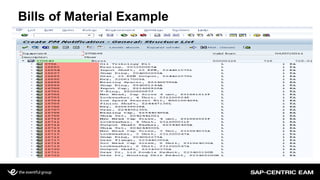
Bills of Material Example
Equipment
BOM
Equipment  Equipment  Equipment  Equipment 
Mat 1
Mat 2
Mat 10
Mat 11
Mat 3
Mat 6
Mat 20
Mat 7
Construction type
BOM
Construction
type
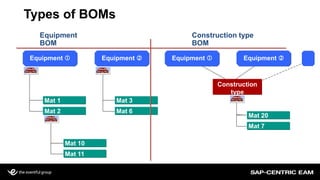
Types of BOMs
Types of BOMs
Equipment and Functional Locations BOMs are useful for
unique Equipment
Maintenance Assemblies should be used for like equipment
Material Type IBAU
Assign the Maintenance Assembly to Construction type field in the
Equipment record
Also can assign the Assembly to a Task List
How to use BOMs on work orders
Select the Materials you want
 Select all by holding down the Shift Key as you select
 Select one at a time by holding down the Control key as you click on
each item
Select Choose
How to use BOMs on work orders
Bills of Material- Work Order
So with this functionality you can have a basic
work order planned with labor & materials in a
matter of minutes
To do this we needed everyone’s input for every
material you use on an order
No free texting, no P-card, no blankets
The more you use the system the better you make it!
Bills of Material- Work Order
ROI
Savings
 A planned and scheduled job may be completed at ½ to ¼ the
cost of a job performed on a breakdown or emergency mode.
 The important point:
You cannot schedule what you don’t plan
Without good planning, the benefit of planning is lost
Without good scheduling, the benefit of planning is lost.
Bills of Material Created (@ Go-Live)
0
500
1,000
1,500
2,000
2,500
171-01 4000 526-01 526-03 721-01 723-01 728-01 729-01
Equip BOMs
FLOC BOMs
Assemblies
Bills of Material Created (Post Go-Live)
0
500
1,000
1,500
2,000
2,500
171-01 4000 526-01 526-03 721-01 723-01 728-01 729-01
Equip BOMs
FLOC BOMs
Assemblies
Is this a coincidence?
Work Center 723-01 backlog has been reduced by over 2,000
planned hours (close to half of what it was Sept 2011)
Work Center 723-01 has created close to 2,500 BOMs
The closes work center has created over 500 BOMs
Material Master (MM) Benefits
With the
use of the MM
(i.e. MB51) we
can see all the
materials
issued and
now we make
an educated
decision what
to make stock
Key Points to take home
Plan and Schedule work orders (parts in the Material
Master)
Get your BOMs built
Don’t wait, Do it now
Use Maintenance Assemblies when you have like
equipment (Material Type IBAU)
Get buy in and feedback from your workers
Key Points to take home
Once you show the end users how the BOM
functionality works, you win!
Train the workers how to use BOM and get MM updated
(stress feedback)
An added benefit because we are using the Material
Master we now have a tool to make decisions on the
following:
What to stock
What not to stock
Produced by:Supported by:
Jeff Smith
Fairfax Water
jsmith@fairfaxwater.org

Bom

  • 1.
    Produced by:Supported by: UsingBOM’s to Gain Planning & Scheduling Efficiencies Jeff Smith Fairfax Water
  • 2.
    Overview- Fairfax Water& Presenter background Key Topic 1 What was our goal? Key Topic 2 How do BOMs make us more efficient? Key Topic 3 What was our challenges & solutions? Key points to Take Home Questions What We’ll Cover
  • 3.
    About Fairfax Water Largestwater utility in Virginia Approximately 1.5 million served AAA bond rating 400 employees Coverage 400 square miles PM/MM/PS/FM/FI went live April 1, 2009 One year project Decided to leave out BOM’s due to time constraints HR/CCS were implemented before this project
  • 4.
    Presenter Introduction Jeff Smith’sBio 22+ years with Fairfax Water Plant Mechanic Assistant Plant Maintenance Supervisor Senior Maintenance Planner/Scheduler EAM Team Lead during SAP Implementation EAM Business Process Analyst (current position)
  • 5.
    Goals: Materials ordered inadvance The goal is to insure that there is increased maintenance productivity Material delays need to be eliminated Biggest waste of Fairfax Water Maintenance time is running around looking for parts Benefits of Planning Maintenance
  • 6.
    No information onmaterials in our legacy CMMS No integration with warehousing prior to SAP One plant doesn’t even have a warehouse (currently) everything is “Just in Time” The other plant had a non-stock warehouse Some part information constantly changes (Electrical and Instrumentation) Made the unfortunate decision to wait for BOM until after Go-Live Challenges
  • 7.
  • 8.
    Planning Efficiencies usingBOM’s BOM’s are a critical tool for efficient planning  SAP provides very good BOM functionality:  Functional Location BOM – Tied directly to a F/L (IB11)  Equipment BOM – Tied directly to Equipment (IB01)  Construction Type BOM’s – (CS01) Links multiple equipment to single BOM  BOM’s can include Stock and Non-Stock Items  BOM’s are easily accessible from work orders
  • 9.
    Any part ona PM task list was starting point for Equipment BOM’s Any part ordered twice had to be entered in the Material Master, then work center (Planner/Supervisor) had to create the BOM Some work centers just pulled the BOMs from critical equipment and formatted to our MM nomenclature, then built BOMs Steps to Succeed
  • 10.
    Make use ofMaintenance Assemblies (Material BOMs) on the equipment that are alike Feed back from the mechanics, electricians, and technicians on work orders (still is a challenge) But now end users see the benefit Steps to Succeed
  • 11.
  • 12.
    Equipment BOM Equipment  Equipment Equipment  Equipment  Mat 1 Mat 2 Mat 10 Mat 11 Mat 3 Mat 6 Mat 20 Mat 7 Construction type BOM Construction type Types of BOMs
  • 13.
    Types of BOMs Equipmentand Functional Locations BOMs are useful for unique Equipment Maintenance Assemblies should be used for like equipment Material Type IBAU Assign the Maintenance Assembly to Construction type field in the Equipment record Also can assign the Assembly to a Task List
  • 14.
    How to useBOMs on work orders
  • 15.
    Select the Materialsyou want  Select all by holding down the Shift Key as you select  Select one at a time by holding down the Control key as you click on each item Select Choose How to use BOMs on work orders
  • 16.
    How to useBOMs on work orders
  • 17.
  • 18.
    So with thisfunctionality you can have a basic work order planned with labor & materials in a matter of minutes To do this we needed everyone’s input for every material you use on an order No free texting, no P-card, no blankets The more you use the system the better you make it! Bills of Material- Work Order
  • 19.
    ROI Savings  A plannedand scheduled job may be completed at ½ to ¼ the cost of a job performed on a breakdown or emergency mode.  The important point: You cannot schedule what you don’t plan Without good planning, the benefit of planning is lost Without good scheduling, the benefit of planning is lost.
  • 20.
    Bills of MaterialCreated (@ Go-Live) 0 500 1,000 1,500 2,000 2,500 171-01 4000 526-01 526-03 721-01 723-01 728-01 729-01 Equip BOMs FLOC BOMs Assemblies
  • 21.
    Bills of MaterialCreated (Post Go-Live) 0 500 1,000 1,500 2,000 2,500 171-01 4000 526-01 526-03 721-01 723-01 728-01 729-01 Equip BOMs FLOC BOMs Assemblies
  • 22.
    Is this acoincidence?
  • 23.
    Is this acoincidence? Work Center 723-01 backlog has been reduced by over 2,000 planned hours (close to half of what it was Sept 2011) Work Center 723-01 has created close to 2,500 BOMs The closes work center has created over 500 BOMs
  • 24.
    Material Master (MM)Benefits With the use of the MM (i.e. MB51) we can see all the materials issued and now we make an educated decision what to make stock
  • 25.
    Key Points totake home Plan and Schedule work orders (parts in the Material Master) Get your BOMs built Don’t wait, Do it now Use Maintenance Assemblies when you have like equipment (Material Type IBAU) Get buy in and feedback from your workers
  • 26.
    Key Points totake home Once you show the end users how the BOM functionality works, you win! Train the workers how to use BOM and get MM updated (stress feedback) An added benefit because we are using the Material Master we now have a tool to make decisions on the following: What to stock What not to stock
  • 27.
    Produced by:Supported by: JeffSmith Fairfax Water jsmith@fairfaxwater.org