Finding a needle in Haystack:
Facebook’s photo storage
Doug.B, Kumar. S, Li. HC, Sobel. J, Vajgel. P, Facebook Inc.
ネットワークサービス特論
LIN YI
81517372
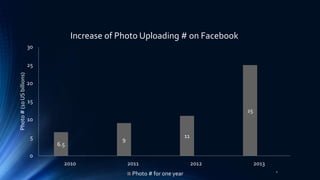
6.5
9
11
25
0
5
10
15
20
25
30
2010 2011 2012 2013
Photo#(10USbillions)
Increase of Photo Uploading # on Facebook
Photo # for one year 2
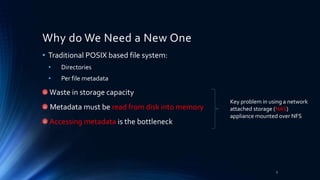
Why do We Need a New One
• Traditional POSIX based file system:
• Directories
• Per file metadata
Waste in storage capacity
Metadata must be read from disk into memory
Accessing metadata is the bottleneck
Key problem in using a network
attached storage (NAS)
appliance mounted over NFS
3
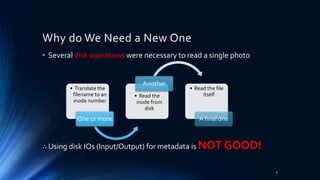
• Several disk operations were necessary to read a single photo
∴ Using disk IOs (Input/Output) for metadata is NOT GOOD!
• Translate the
filename to an
inode number
One or more
• Read the
inode from
disk
Another
• Read the file
itself
A final one
Why do We Need a New One
4
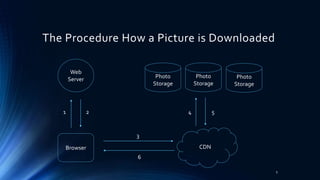
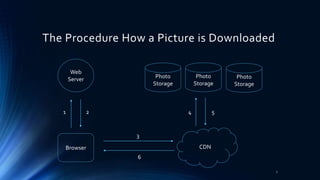
Web
Server
Browser CDN
Photo
Storage
1 2 4 5
3
6
The Procedure How a Picture is Downloaded
Photo
Storage
Photo
Storage
5
Why NFS-based Design but not CDN
PROS
• CDNs do well on hottest
photos— profile pictures and
photos that have been recently
uploaded
CONS
• Long tail: A large number of
requests for less popular (often
older) content generated by
Facebook
• Requests from the long tail lead
to great traffic
• Impossible to cache all of them
6
Web
Server
Browser CDN
Photo
Storage
1 2 4 5
3
6
The Procedure How a Picture is Downloaded
Photo
Storage
Photo
Storage
7
Web
Server
Browser CDN
NAS
1 2
7 4
3
8
NFS-based Design of Facebook
Photo Store
Server
NAS NAS
6 5
Photo Store
Server
To store each photo in its own file on a
set of commercial Network-attached
storage (NAS) appliances.
A set of machines, Photo Store servers,
then mount all the volumes exported by
these NAS appliances over NFS.
NFS
8
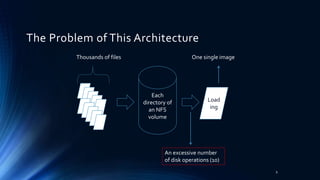
Each
directory of
an NFS
volume
Thousands of files
An excessive number
of disk operations (10)
Load
ing
The Problem of This Architecture
9
One single image
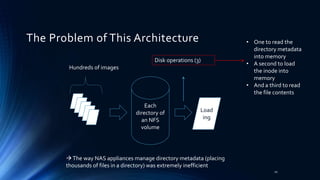
Each
directory of
an NFS
volume
Hundreds of images
Disk operations (3)
Load
ing
• One to read the
directory metadata
into memory
• A second to load
the inode into
memory
• And a third to read
the file contents
The way NAS appliances manage directory metadata (placing
thousands of files in a directory) was extremely inefficient
The Problem of This Architecture
10
Web
Server
Browser CDN
NAS
1 2
7 4
3
6
The Problem of This Architecture
Photo Store
Server
NAS NAS
6 5
Photo Store
Server
Let the Photo Store servers
explicitly cache file handles
returned by the NAS appliances
Caches the filename to file
handle
NFS
Be able to open the file directly
using a custom system call,
“open_by_filehandle”
 Only minor improvement
∵ Less popular photos are less
likely to be cached to begin with. 11
Not Feasible Relying on NAS Appliance
• An expensive requirement for traditional filesystems
• Focusing only on caching (NAS appliance’s cache or
memcache) has limited impact for reducing disk operations.
Memcache
All the images
12
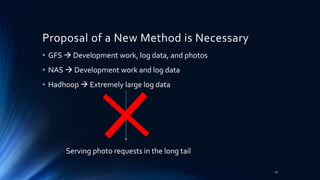
Proposal of a New Method is Necessary
• GFS  Development work, log data, and photos
• NAS  Development work and log data
• Hadhoop  Extremely large log data
Serving photo requests in the long tail
13
Proposal of a New Method is Necessary
• To build a custom storage system
• To reduce the amount of filesystem metadata per photo
• To have enough main memory than to buy more NAS appliances
Serving photo requests in the long tail
14
Haystack
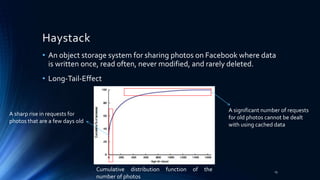
• An object storage system for sharing photos on Facebook where data
is written once, read often, never modified, and rarely deleted.
• Long-Tail-Effect
A sharp rise in requests for
photos that are a few days old
A significant number of requests
for old photos cannot be dealt
with using cached data
Cumulative distribution function of the
number of photos
15
4 Goals:
• High throughput and low latency
• Fault-tolerant
• Cost-effective
• Simple
16
3 Contributions
• Haystack, an object storage system optimized for the efficient
storage and retrieval of billions of photos
• Lessons learned in building and scaling an inexpensive, reliable, and
available photo storage system
• A characterization of the requests made to Facebook’s photo sharing
application
17
Strategy
18
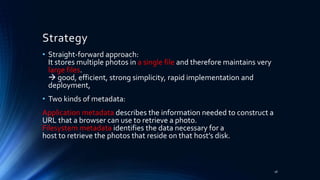
• Straight-forward approach:
It stores multiple photos in a single file and therefore maintains very
large files.
 good, efficient, strong simplicity, rapid implementation and
deployment,
• Two kinds of metadata:
Application metadata describes the information needed to construct a
URL that a browser can use to retrieve a photo.
Filesystem metadata identifies the data necessary for a
host to retrieve the photos that reside on that host’s disk.
Web
Server
Browser CDN
1 4
6 9
5
10
Haystack Architecture
2 3
Haystack
Directory Haystack
Store
Haystack
Cache
7 8
19
Components of Haystack
• Haystack Directory
• Haystack Cache
• Haystack Store
20
4 Functions of Haystack Directory
• Haystack Directory
1. Provides a mapping from logical volumes to physical
volumes.
 For web servers to upload photos
To construct the image URLs for a page request
2. Balances writes across logical volumes and reads across
physical volumes.
3. Determines whether a photo request should be handled
by the CDN or by the Cache.
4. Identifies the reasons of read-only logical volumes
 Operational reasons?
 Maximal storage capacity? 21
Features of Haystack Cache
• Haystack Cache
• Receives HTTP requests for photos from CDNs and
also directly from users’ browsers
• As a distributed hash table
• Uses a photo’s id to locate cached data
• Or gets the photo from the Store machine identified
in the URL and replies to either the CDN or the user’s
browser (Cannot respond to the request)
22
Features of Haystack Store
• Haystack Store
• Multiple physical volumes, each with millions of photos,
like a large file (100 GB) saved as ‘/hay/haystack <logical
volume id>’
• Uses the id of the corresponding logical volume +The
file offset at which the photo resides  Access a photo
quickly
• Retrieving the filename, offset, and size for a particular
photo without needing disk operations.
• Maintains an in-memory data
To retrieve needles quickly
 Reconstruct retrieves directly from the volume
file before processing requests after a crush
23
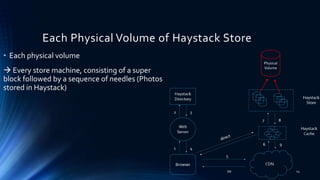
Each Physical Volume of Haystack Store
• Each physical volume
 Every store machine, consisting of a super
block followed by a sequence of needles (Photos
stored in Haystack)
Physical
Volume
24
Superblock
Needle 1
Needle 2
Needle 3
… …
Needle N
Header
Cookie
Key
Alternate Key
Flags
Size
Data
Footer
Data
Checksum
Padding
The Super Block and the Format of Each Needle
25
Tolerance of Failure
2Techniques:
1. Pitchfork
 For detection, background task, periodically checks the health of each Store machine
 Automatically marks all logical volumes of that Store machine as read-only
2. Bulk Sync
 For repair, reset the data of a Store machine, happen rarely (a few each month),
simple but time-wasting
 Bottleneck: is that the amount of data to be bulk synced needs hours for mean time
to recovery
• Faulty hard drives
• Misbehaving RAID controllers
• Bad motherboards
26
Evaluation
1. Characterize the photo requests seen by Facebook
2. Effectiveness of the Directory
3. Effectiveness of the Cache
4. Analyze how well the Store performs using both synthetic and
production workloads
27
Evaluation
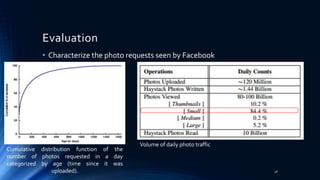
• Characterize the photo requests seen by Facebook
Cumulative distribution function of the
number of photos requested in a day
categorized by age (time since it was
uploaded).
Volume of daily photo traffic
28
Evaluation
• Effectiveness of the Directory
Volume of multi-write operations sent to 9 different
write-enabled Haystack Store machines.
The graph has 9 different lines that closely overlap
each other.
 Directory balances writes well
29
Evaluation
Analyze how well the Store performs using both
synthetic and production workloads
 Achieved high hit rates of approximately 80%.
• Effectiveness of the Cache
30
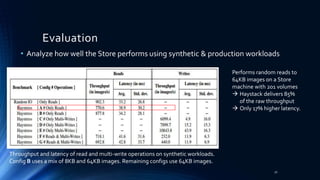
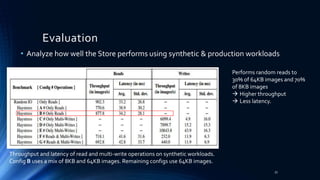
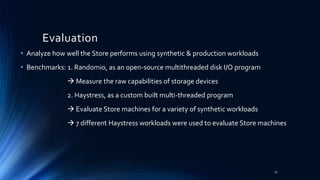
• Analyze how well the Store performs using synthetic & production workloads
• Benchmarks: 1. Randomio, as an open-source multithreaded disk I/O program
 Measure the raw capabilities of storage devices
2. Haystress, as a custom built multi-threaded program
 Evaluate Store machines for a variety of synthetic workloads
 7 different Haystress workloads were used to evaluate Store machines
Evaluation
31
• Analyze how well the Store performs using synthetic & production workloads
Evaluation
Throughput and latency of read and multi-write operations on synthetic workloads.
Config B uses a mix of 8KB and 64KB images. Remaining configs use 64KB images.
Performs random reads to
64KB images on a Store
machine with 201 volumes
 Haystack delivers 85%
of the raw throughput
 Only 17% higher latency.
32
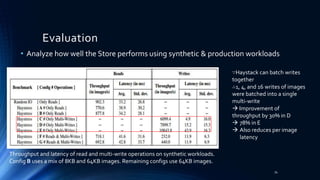
• Analyze how well the Store performs using synthetic & production workloads
Evaluation
Throughput and latency of read and multi-write operations on synthetic workloads.
Config B uses a mix of 8KB and 64KB images. Remaining configs use 64KB images.
Performs random reads to
30% of 64KB images and 70%
of 8KB images
 Higher throughput
 Less latency.
33
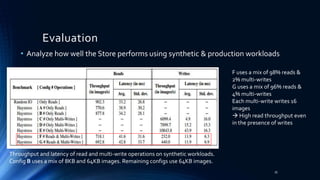
• Analyze how well the Store performs using synthetic & production workloads
Evaluation
Throughput and latency of read and multi-write operations on synthetic workloads.
Config B uses a mix of 8KB and 64KB images. Remaining configs use 64KB images.
∵Haystack can batch writes
together
∴1, 4, and 16 writes of images
were batched into a single
multi-write
 Improvement of
throughput by 30% in D
 78% in E
 Also reduces per image
latency
34
• Analyze how well the Store performs using synthetic & production workloads
Evaluation
Throughput and latency of read and multi-write operations on synthetic workloads.
Config B uses a mix of 8KB and 64KB images. Remaining configs use 64KB images.
F uses a mix of 98% reads &
2% multi-writes
G uses a mix of 96% reads &
4% multi-writes
Each multi-write writes 16
images
 High read throughput even
in the presence of writes
35
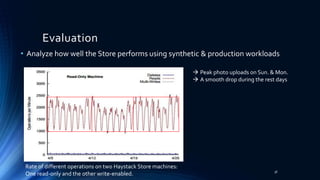
• Analyze how well the Store performs using synthetic & production workloads
Evaluation
Rate of different operations on two Haystack Store machines:
One read-only and the other write-enabled.
 Peak photo uploads on Sun. & Mon.
 A smooth drop during the rest days
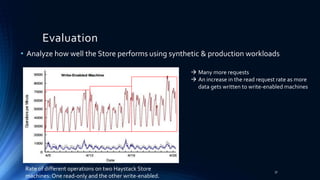
36
Rate of different operations on two Haystack Store
machines: One read-only and the other write-enabled.
• Analyze how well the Store performs using synthetic & production workloads
Evaluation
 Many more requests
 An increase in the read request rate as more
data gets written to write-enabled machines
37
• Analyze how well the Store performs using synthetic & production workloads
Evaluation
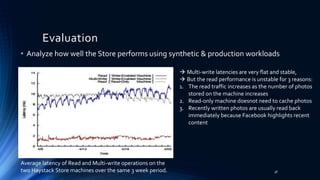
 Multi-write latencies are very flat and stable,
 But the read performance is unstable for 3 reasons:
1. The read traffic increases as the number of photos
stored on the machine increases
2. Read-only machine doesnot need to cache photos
3. Recently written photos are usually read back
immediately because Facebook highlights recent
content
Average latency of Read and Multi-write operations on the
two Haystack Store machines over the same 3 week period. 38
• Limited the number of disk operations (bottleneck) to only the ones necessary for
reading actual photo data.
• Dramatically reducing the memory used for filesystem metadata, thereby making it
practical to keep all this metadata in main memory.
Conclusion
39
Thank you very much for your attention!

Find a needle in Haystack: Facebook's storage system

  • 1.
    Finding a needlein Haystack: Facebook’s photo storage Doug.B, Kumar. S, Li. HC, Sobel. J, Vajgel. P, Facebook Inc. ネットワークサービス特論 LIN YI 81517372
  • 2.
    6.5 9 11 25 0 5 10 15 20 25 30 2010 2011 20122013 Photo#(10USbillions) Increase of Photo Uploading # on Facebook Photo # for one year 2
  • 3.
    Why do WeNeed a New One • Traditional POSIX based file system: • Directories • Per file metadata Waste in storage capacity Metadata must be read from disk into memory Accessing metadata is the bottleneck Key problem in using a network attached storage (NAS) appliance mounted over NFS 3
  • 4.
    • Several diskoperations were necessary to read a single photo ∴ Using disk IOs (Input/Output) for metadata is NOT GOOD! • Translate the filename to an inode number One or more • Read the inode from disk Another • Read the file itself A final one Why do We Need a New One 4
  • 5.
    Web Server Browser CDN Photo Storage 1 24 5 3 6 The Procedure How a Picture is Downloaded Photo Storage Photo Storage 5
  • 6.
    Why NFS-based Designbut not CDN PROS • CDNs do well on hottest photos— profile pictures and photos that have been recently uploaded CONS • Long tail: A large number of requests for less popular (often older) content generated by Facebook • Requests from the long tail lead to great traffic • Impossible to cache all of them 6
  • 7.
    Web Server Browser CDN Photo Storage 1 24 5 3 6 The Procedure How a Picture is Downloaded Photo Storage Photo Storage 7
  • 8.
    Web Server Browser CDN NAS 1 2 74 3 8 NFS-based Design of Facebook Photo Store Server NAS NAS 6 5 Photo Store Server To store each photo in its own file on a set of commercial Network-attached storage (NAS) appliances. A set of machines, Photo Store servers, then mount all the volumes exported by these NAS appliances over NFS. NFS 8
  • 9.
    Each directory of an NFS volume Thousandsof files An excessive number of disk operations (10) Load ing The Problem of This Architecture 9 One single image
  • 10.
    Each directory of an NFS volume Hundredsof images Disk operations (3) Load ing • One to read the directory metadata into memory • A second to load the inode into memory • And a third to read the file contents The way NAS appliances manage directory metadata (placing thousands of files in a directory) was extremely inefficient The Problem of This Architecture 10
  • 11.
    Web Server Browser CDN NAS 1 2 74 3 6 The Problem of This Architecture Photo Store Server NAS NAS 6 5 Photo Store Server Let the Photo Store servers explicitly cache file handles returned by the NAS appliances Caches the filename to file handle NFS Be able to open the file directly using a custom system call, “open_by_filehandle”  Only minor improvement ∵ Less popular photos are less likely to be cached to begin with. 11
  • 12.
    Not Feasible Relyingon NAS Appliance • An expensive requirement for traditional filesystems • Focusing only on caching (NAS appliance’s cache or memcache) has limited impact for reducing disk operations. Memcache All the images 12
  • 13.
    Proposal of aNew Method is Necessary • GFS  Development work, log data, and photos • NAS  Development work and log data • Hadhoop  Extremely large log data Serving photo requests in the long tail 13
  • 14.
    Proposal of aNew Method is Necessary • To build a custom storage system • To reduce the amount of filesystem metadata per photo • To have enough main memory than to buy more NAS appliances Serving photo requests in the long tail 14
  • 15.
    Haystack • An objectstorage system for sharing photos on Facebook where data is written once, read often, never modified, and rarely deleted. • Long-Tail-Effect A sharp rise in requests for photos that are a few days old A significant number of requests for old photos cannot be dealt with using cached data Cumulative distribution function of the number of photos 15
  • 16.
    4 Goals: • Highthroughput and low latency • Fault-tolerant • Cost-effective • Simple 16
  • 17.
    3 Contributions • Haystack,an object storage system optimized for the efficient storage and retrieval of billions of photos • Lessons learned in building and scaling an inexpensive, reliable, and available photo storage system • A characterization of the requests made to Facebook’s photo sharing application 17
  • 18.
    Strategy 18 • Straight-forward approach: Itstores multiple photos in a single file and therefore maintains very large files.  good, efficient, strong simplicity, rapid implementation and deployment, • Two kinds of metadata: Application metadata describes the information needed to construct a URL that a browser can use to retrieve a photo. Filesystem metadata identifies the data necessary for a host to retrieve the photos that reside on that host’s disk.
  • 19.
    Web Server Browser CDN 1 4 69 5 10 Haystack Architecture 2 3 Haystack Directory Haystack Store Haystack Cache 7 8 19
  • 20.
    Components of Haystack •Haystack Directory • Haystack Cache • Haystack Store 20
  • 21.
    4 Functions ofHaystack Directory • Haystack Directory 1. Provides a mapping from logical volumes to physical volumes.  For web servers to upload photos To construct the image URLs for a page request 2. Balances writes across logical volumes and reads across physical volumes. 3. Determines whether a photo request should be handled by the CDN or by the Cache. 4. Identifies the reasons of read-only logical volumes  Operational reasons?  Maximal storage capacity? 21
  • 22.
    Features of HaystackCache • Haystack Cache • Receives HTTP requests for photos from CDNs and also directly from users’ browsers • As a distributed hash table • Uses a photo’s id to locate cached data • Or gets the photo from the Store machine identified in the URL and replies to either the CDN or the user’s browser (Cannot respond to the request) 22
  • 23.
    Features of HaystackStore • Haystack Store • Multiple physical volumes, each with millions of photos, like a large file (100 GB) saved as ‘/hay/haystack <logical volume id>’ • Uses the id of the corresponding logical volume +The file offset at which the photo resides  Access a photo quickly • Retrieving the filename, offset, and size for a particular photo without needing disk operations. • Maintains an in-memory data To retrieve needles quickly  Reconstruct retrieves directly from the volume file before processing requests after a crush 23
  • 24.
    Each Physical Volumeof Haystack Store • Each physical volume  Every store machine, consisting of a super block followed by a sequence of needles (Photos stored in Haystack) Physical Volume 24
  • 25.
    Superblock Needle 1 Needle 2 Needle3 … … Needle N Header Cookie Key Alternate Key Flags Size Data Footer Data Checksum Padding The Super Block and the Format of Each Needle 25
  • 26.
    Tolerance of Failure 2Techniques: 1.Pitchfork  For detection, background task, periodically checks the health of each Store machine  Automatically marks all logical volumes of that Store machine as read-only 2. Bulk Sync  For repair, reset the data of a Store machine, happen rarely (a few each month), simple but time-wasting  Bottleneck: is that the amount of data to be bulk synced needs hours for mean time to recovery • Faulty hard drives • Misbehaving RAID controllers • Bad motherboards 26
  • 27.
    Evaluation 1. Characterize thephoto requests seen by Facebook 2. Effectiveness of the Directory 3. Effectiveness of the Cache 4. Analyze how well the Store performs using both synthetic and production workloads 27
  • 28.
    Evaluation • Characterize thephoto requests seen by Facebook Cumulative distribution function of the number of photos requested in a day categorized by age (time since it was uploaded). Volume of daily photo traffic 28
  • 29.
    Evaluation • Effectiveness ofthe Directory Volume of multi-write operations sent to 9 different write-enabled Haystack Store machines. The graph has 9 different lines that closely overlap each other.  Directory balances writes well 29
  • 30.
    Evaluation Analyze how wellthe Store performs using both synthetic and production workloads  Achieved high hit rates of approximately 80%. • Effectiveness of the Cache 30
  • 31.
    • Analyze howwell the Store performs using synthetic & production workloads • Benchmarks: 1. Randomio, as an open-source multithreaded disk I/O program  Measure the raw capabilities of storage devices 2. Haystress, as a custom built multi-threaded program  Evaluate Store machines for a variety of synthetic workloads  7 different Haystress workloads were used to evaluate Store machines Evaluation 31
  • 32.
    • Analyze howwell the Store performs using synthetic & production workloads Evaluation Throughput and latency of read and multi-write operations on synthetic workloads. Config B uses a mix of 8KB and 64KB images. Remaining configs use 64KB images. Performs random reads to 64KB images on a Store machine with 201 volumes  Haystack delivers 85% of the raw throughput  Only 17% higher latency. 32

  • 33.
    • Analyze howwell the Store performs using synthetic & production workloads Evaluation Throughput and latency of read and multi-write operations on synthetic workloads. Config B uses a mix of 8KB and 64KB images. Remaining configs use 64KB images. Performs random reads to 30% of 64KB images and 70% of 8KB images  Higher throughput  Less latency. 33
  • 34.
    • Analyze howwell the Store performs using synthetic & production workloads Evaluation Throughput and latency of read and multi-write operations on synthetic workloads. Config B uses a mix of 8KB and 64KB images. Remaining configs use 64KB images. ∵Haystack can batch writes together ∴1, 4, and 16 writes of images were batched into a single multi-write  Improvement of throughput by 30% in D  78% in E  Also reduces per image latency 34
  • 35.
    • Analyze howwell the Store performs using synthetic & production workloads Evaluation Throughput and latency of read and multi-write operations on synthetic workloads. Config B uses a mix of 8KB and 64KB images. Remaining configs use 64KB images. F uses a mix of 98% reads & 2% multi-writes G uses a mix of 96% reads & 4% multi-writes Each multi-write writes 16 images  High read throughput even in the presence of writes 35
  • 36.
    • Analyze howwell the Store performs using synthetic & production workloads Evaluation Rate of different operations on two Haystack Store machines: One read-only and the other write-enabled.  Peak photo uploads on Sun. & Mon.  A smooth drop during the rest days 36
  • 37.
    Rate of differentoperations on two Haystack Store machines: One read-only and the other write-enabled. • Analyze how well the Store performs using synthetic & production workloads Evaluation  Many more requests  An increase in the read request rate as more data gets written to write-enabled machines 37
  • 38.
    • Analyze howwell the Store performs using synthetic & production workloads Evaluation  Multi-write latencies are very flat and stable,  But the read performance is unstable for 3 reasons: 1. The read traffic increases as the number of photos stored on the machine increases 2. Read-only machine doesnot need to cache photos 3. Recently written photos are usually read back immediately because Facebook highlights recent content Average latency of Read and Multi-write operations on the two Haystack Store machines over the same 3 week period. 38
  • 39.
    • Limited thenumber of disk operations (bottleneck) to only the ones necessary for reading actual photo data. • Dramatically reducing the memory used for filesystem metadata, thereby making it practical to keep all this metadata in main memory. Conclusion 39
  • 40.
    Thank you verymuch for your attention!