Dennis Lembrée (@DennisL)
#CSUNATC19
SVG Icons and Screen Reader
Accessibility
Link to this PowerPoint:
bit.ly/svgcsun19
• About @DennisL & You
• About SVG
• SVG Support
• Embedding SVG (on web)
• Screen Reader Test Page
• Summary (Recommendations)
• Moving Forward
• Discussion
Agenda
• Senior Accessibility Consultant at Deque Systems
• Formerly on eBay and PayPal accessibility teams
• Author of @EasyChirp and @WebAxe
• You!
• From where?
• Your title?
• SVG experience?
About @DennisL & You
• Scalable Vector Graphics
• w3.org/Graphics/SVG/
• SVG is a widely-deployed royalty-free graphics
format developed and maintained by the W3C
SVG Working Group.
• V1 2001
• V1.1 (2nd Ed.) 2011
About SVG
• Why use SVG?
• Small file sizes that compress well
• Scales to any size without losing clarity
• Arguably better for icons than fonts
• Possible to modify design with JavaScript and CSS
(more than font icons)
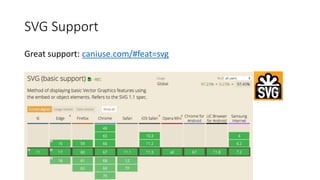
• Well supported
About SVG - why
Great support: caniuse.com/#feat=svg
SVG Support
EXCEPT
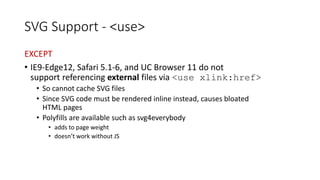
• IE9-Edge12, Safari 5.1-6, and UC Browser 11 do not
support referencing external files via <use xlink:href>
• So cannot cache SVG files
• Since SVG code must be rendered inline instead, causes bloated
HTML pages
• Polyfills are available such as svg4everybody
• adds to page weight
• doesn’t work without JS
SVG Support - <use>
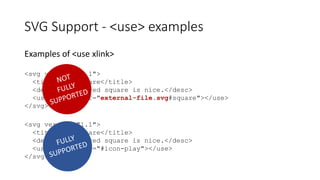
Examples of <use xlink>
<svg version="1.1">
<title>red square</title>
<desc>A plain red square is nice.</desc>
<use xlink:href="external-file.svg#square"></use>
</svg>
<svg version="1.1">
<title>red square</title>
<desc>A plain red square is nice.</desc>
<use xlink:href="#icon-play"></use>
</svg>
SVG Support - <use> examples
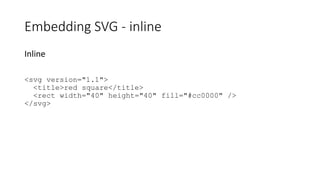
Inline
<svg version="1.1">
<title>red square</title>
<rect width="40" height="40" fill="#cc0000" />
</svg>
Embedding SVG - inline
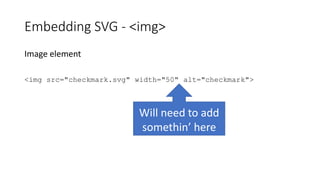
Will need to add
somethin’ here
Image element
<img src="checkmark.svg" width="50" alt="checkmark">
Embedding SVG - <img>
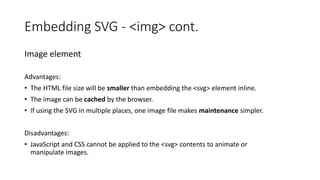
Image element
Advantages:
• The HTML file size will be smaller than embedding the <svg> element inline.
• The image can be cached by the browser.
• If using the SVG in multiple places, one image file makes maintenance simpler.
Disadvantages:
• JavaScript and CSS cannot be applied to the <svg> contents to animate or
manipulate images.
Embedding SVG - <img> cont.
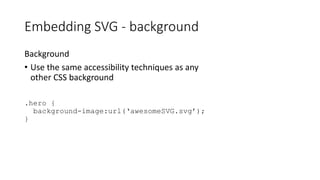
Background
• Use the same accessibility techniques as any
other CSS background
.hero {
background-image:url(‘awesomeSVG.svg’);
}
Embedding SVG - background
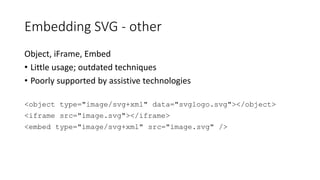
Object, iFrame, Embed
• Little usage; outdated techniques
• Poorly supported by assistive technologies
<object type="image/svg+xml" data="svglogo.svg"></object>
<iframe src="image.svg"></iframe>
<embed type="image/svg+xml" src="image.svg" />
Embedding SVG - other
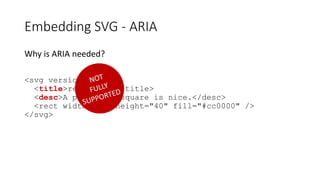
Why is ARIA needed?
<svg version="1.1">
<title>red square</title>
<desc>A plain red square is nice.</desc>
<rect width="40" height="40" fill="#cc0000" />
</svg>
Embedding SVG - ARIA
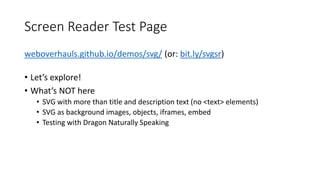
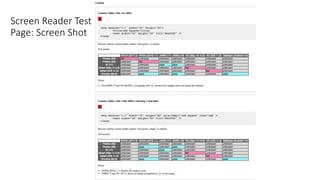
weboverhauls.github.io/demos/svg/ (or: bit.ly/svgsr)
• Let’s explore!
• What’s NOT here
• SVG with more than title and description text (no <text> elements)
• SVG as background images, objects, iframes, embed
• Testing with Dragon Naturally Speaking
Screen Reader Test Page
Screen Reader Test
Page: Screen Shot
• On Dennis’ personal GitHub:
• github.com/weboverhauls/demos/tree/master/svg
• How you can help
• Add test results
• Confirm data
• Add popular test cases not included
Screen Reader Test Page: Open Source
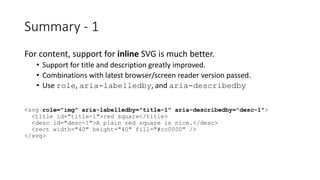
For content, support for inline SVG is much better.
• Support for title and description greatly improved.
• Combinations with latest browser/screen reader version passed.
• Use role, aria-labelledby, and aria-describedby
<svg role="img" aria-labelledby="title-1" aria-describedby="desc-1">
<title id="title-1">red square</title>
<desc id="desc-1">A plain red square is nice.</desc>
<rect width="40" height="40" fill="#cc0000" />
</svg>
Summary - 1
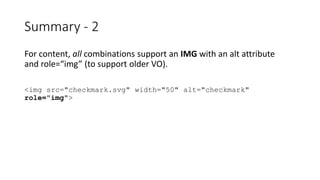
For content, all combinations support an IMG with an alt attribute
and role=“img” (to support older VO).
<img src="checkmark.svg" width="50" alt="checkmark"
role="img">
Summary - 2
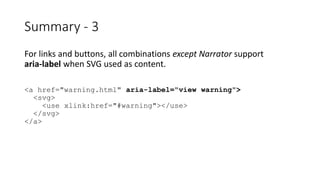
For links and buttons, all combinations except Narrator support
aria-label when SVG used as content.
<a href="warning.html" aria-label="view warning">
<svg>
<use xlink:href="#warning"></use>
</svg>
</a>
Summary - 3
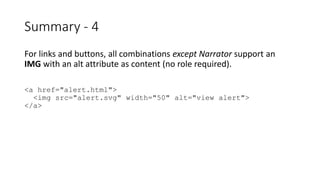
For links and buttons, all combinations except Narrator support an
IMG with an alt attribute as content (no role required).
<a href="alert.html">
<img src="alert.svg" width="50" alt="view alert">
</a>
Summary - 4
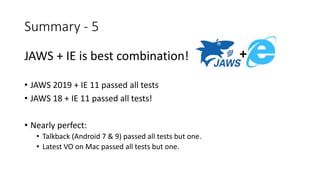
JAWS + IE is best combination!
• JAWS 2019 + IE 11 passed all tests
• JAWS 18 + IE 11 passed all tests!
• Nearly perfect:
• Talkback (Android 7 & 9) passed all tests but one.
• Latest VO on Mac passed all tests but one.
Summary - 5
+
For IE
• The attribute focusable="false" should be added to the SVG element
to ensure:
• no double focus for links and buttons (implemented on test page)
• a decorative SVG is not focusable (not implemented on test page)
• Hey, that’s not so bad…
Summary - IE focusing
For IE
<a href="warning.html" aria-label="view warning">
<svg focusable="false">
<use xlink:href="#warning"></use>
</svg>
</a>
Summary - IE focusing code
Will the standard be supported in the future?
<svg version="1.1">
<title>red square</title>
<desc>A plain red square is nice.</desc>
<use xlink:href="external.svg#square"></use>
</svg>
Moving Forward
WAI-ARIA Graphics Module
• W3C Recommendation 02 October 2018
• Definition of Roles: w3.org/TR/graphics-aria-1.0/#role_definitions
• graphics-document
• Use in structured graphics such as charts, maps, diagrams, technical drawing, blue prints and
instructional graphics
• graphics-object
• A section of a graphics-document that represents a distinct object or sub-component with
semantic meaning
• graphics-symbol
• A graphical object used to convey a simple meaning
• Use with fallback roles such as img and group, document
Moving Forward – Graphics Module
• Is SVG used in your web projects?
• How do your findings compare?
• Questions?
Discussion Link to this PowerPoint:
bit.ly/svgcsun19

SVG Icons and Screen Reader Accessibility

  • 1.
    Dennis Lembrée (@DennisL) #CSUNATC19 SVGIcons and Screen Reader Accessibility
  • 2.
    Link to thisPowerPoint: bit.ly/svgcsun19 • About @DennisL & You • About SVG • SVG Support • Embedding SVG (on web) • Screen Reader Test Page • Summary (Recommendations) • Moving Forward • Discussion Agenda
  • 3.
    • Senior AccessibilityConsultant at Deque Systems • Formerly on eBay and PayPal accessibility teams • Author of @EasyChirp and @WebAxe • You! • From where? • Your title? • SVG experience? About @DennisL & You
  • 4.
    • Scalable VectorGraphics • w3.org/Graphics/SVG/ • SVG is a widely-deployed royalty-free graphics format developed and maintained by the W3C SVG Working Group. • V1 2001 • V1.1 (2nd Ed.) 2011 About SVG
  • 5.
    • Why useSVG? • Small file sizes that compress well • Scales to any size without losing clarity • Arguably better for icons than fonts • Possible to modify design with JavaScript and CSS (more than font icons) • Well supported About SVG - why
  • 6.
  • 7.
    EXCEPT • IE9-Edge12, Safari5.1-6, and UC Browser 11 do not support referencing external files via <use xlink:href> • So cannot cache SVG files • Since SVG code must be rendered inline instead, causes bloated HTML pages • Polyfills are available such as svg4everybody • adds to page weight • doesn’t work without JS SVG Support - <use>
  • 8.
    Examples of <usexlink> <svg version="1.1"> <title>red square</title> <desc>A plain red square is nice.</desc> <use xlink:href="external-file.svg#square"></use> </svg> <svg version="1.1"> <title>red square</title> <desc>A plain red square is nice.</desc> <use xlink:href="#icon-play"></use> </svg> SVG Support - <use> examples
  • 9.
    Inline <svg version="1.1"> <title>red square</title> <rectwidth="40" height="40" fill="#cc0000" /> </svg> Embedding SVG - inline
  • 10.
    Will need toadd somethin’ here Image element <img src="checkmark.svg" width="50" alt="checkmark"> Embedding SVG - <img>
  • 11.
    Image element Advantages: • TheHTML file size will be smaller than embedding the <svg> element inline. • The image can be cached by the browser. • If using the SVG in multiple places, one image file makes maintenance simpler. Disadvantages: • JavaScript and CSS cannot be applied to the <svg> contents to animate or manipulate images. Embedding SVG - <img> cont.
  • 12.
    Background • Use thesame accessibility techniques as any other CSS background .hero { background-image:url(‘awesomeSVG.svg’); } Embedding SVG - background
  • 13.
    Object, iFrame, Embed •Little usage; outdated techniques • Poorly supported by assistive technologies <object type="image/svg+xml" data="svglogo.svg"></object> <iframe src="image.svg"></iframe> <embed type="image/svg+xml" src="image.svg" /> Embedding SVG - other
  • 14.
    Why is ARIAneeded? <svg version="1.1"> <title>red square</title> <desc>A plain red square is nice.</desc> <rect width="40" height="40" fill="#cc0000" /> </svg> Embedding SVG - ARIA
  • 15.
    weboverhauls.github.io/demos/svg/ (or: bit.ly/svgsr) •Let’s explore! • What’s NOT here • SVG with more than title and description text (no <text> elements) • SVG as background images, objects, iframes, embed • Testing with Dragon Naturally Speaking Screen Reader Test Page
  • 16.
  • 17.
    • On Dennis’personal GitHub: • github.com/weboverhauls/demos/tree/master/svg • How you can help • Add test results • Confirm data • Add popular test cases not included Screen Reader Test Page: Open Source
  • 18.
    For content, supportfor inline SVG is much better. • Support for title and description greatly improved. • Combinations with latest browser/screen reader version passed. • Use role, aria-labelledby, and aria-describedby <svg role="img" aria-labelledby="title-1" aria-describedby="desc-1"> <title id="title-1">red square</title> <desc id="desc-1">A plain red square is nice.</desc> <rect width="40" height="40" fill="#cc0000" /> </svg> Summary - 1
  • 19.
    For content, allcombinations support an IMG with an alt attribute and role=“img” (to support older VO). <img src="checkmark.svg" width="50" alt="checkmark" role="img"> Summary - 2
  • 20.
    For links andbuttons, all combinations except Narrator support aria-label when SVG used as content. <a href="warning.html" aria-label="view warning"> <svg> <use xlink:href="#warning"></use> </svg> </a> Summary - 3
  • 21.
    For links andbuttons, all combinations except Narrator support an IMG with an alt attribute as content (no role required). <a href="alert.html"> <img src="alert.svg" width="50" alt="view alert"> </a> Summary - 4
  • 22.
    JAWS + IEis best combination! • JAWS 2019 + IE 11 passed all tests • JAWS 18 + IE 11 passed all tests! • Nearly perfect: • Talkback (Android 7 & 9) passed all tests but one. • Latest VO on Mac passed all tests but one. Summary - 5 +
  • 23.
    For IE • Theattribute focusable="false" should be added to the SVG element to ensure: • no double focus for links and buttons (implemented on test page) • a decorative SVG is not focusable (not implemented on test page) • Hey, that’s not so bad… Summary - IE focusing
  • 24.
    For IE <a href="warning.html"aria-label="view warning"> <svg focusable="false"> <use xlink:href="#warning"></use> </svg> </a> Summary - IE focusing code
  • 25.
    Will the standardbe supported in the future? <svg version="1.1"> <title>red square</title> <desc>A plain red square is nice.</desc> <use xlink:href="external.svg#square"></use> </svg> Moving Forward
  • 26.
    WAI-ARIA Graphics Module •W3C Recommendation 02 October 2018 • Definition of Roles: w3.org/TR/graphics-aria-1.0/#role_definitions • graphics-document • Use in structured graphics such as charts, maps, diagrams, technical drawing, blue prints and instructional graphics • graphics-object • A section of a graphics-document that represents a distinct object or sub-component with semantic meaning • graphics-symbol • A graphical object used to convey a simple meaning • Use with fallback roles such as img and group, document Moving Forward – Graphics Module
  • 27.
    • Is SVGused in your web projects? • How do your findings compare? • Questions? Discussion Link to this PowerPoint: bit.ly/svgcsun19

Editor's Notes

  • #6 https://css-tricks.com/icon-fonts-vs-svg/ https://css-tricks.com/using-svg/
  • #8 Can use server-side techniques to embed on page https://css-tricks.com/svg-use-external-source/ https://codepen.io/hexalys/pen/epErZj/ https://github.com/jonathantneal/svg4everybody (polyfill) https://en.wikipedia.org/wiki/UC_Browser (world’s 4th most popular browser)
  • #9 icon-play svg in link: http://www.easychirp.com/status/1102712072922492928
  • #16 https://developer.mozilla.org/en-US/docs/Web/SVG/Element/text
  • #23 VO (Mac 10.14.2) + Safari (Mac 12.0.2)
  • #27 HTML Accessibility API Mappings 1.0 (W3C Working Draft 31 Jan 2019) API Mappings: w3.org/TR/html-aam-1.0/#details-id-130 <svg> element has role of "graphics-document"