DIGICOMP 
- 
A framework 
to help improve students’ 
digital competence 
. 
Considerations for teachers? 
Riina Vuorikari 
JRC-IPTS
Planning 
• Get to know each other (10 min) 
• What is Digital Competence framework? 
• Presentation of 21 competences 
• Group activity to help teachers develop students’ digital 
competences 
• Sharing of activities 
• Discussion: What about teachers? Are additional 
competences needed to teach? (15 min) 
• Quick survey (10 min)
Getting to 
know
Get to know each other 
• Name 
• What do you teach? 
• Have you already done an eTwinnning project?
What is 
DigComp?
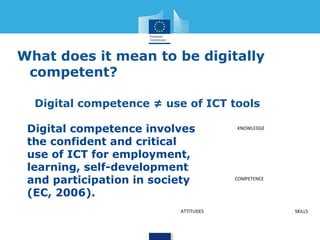
What does it mean to be digitally 
competent? 
Digital competence ≠ use of ICT tools 
Digital competence involves 
the confident and critical 
use of ICT for employment, 
learning, self-development 
and participation in society 
(EC, 2006). 
KNOWLEDGE 
COMPETENCE 
ATTITUDES SKILLS
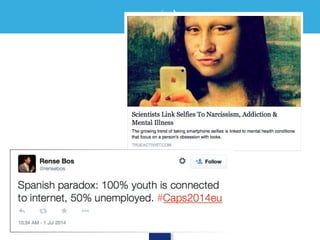
…confident 
and critical 
use of ICT..?
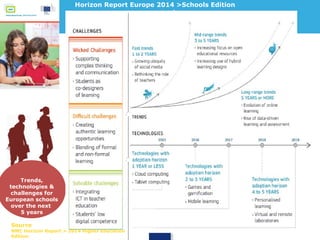
Trends, 
technologies & 
challenges for 
European schools 
over the next 
5 years 
Horizon Report Europe 2014 >Schools Edition 
Source 
NMC Horizon Report > 2014 Higher Education Edition Graph adapted from Horizon 2014 
Europe: School Sector
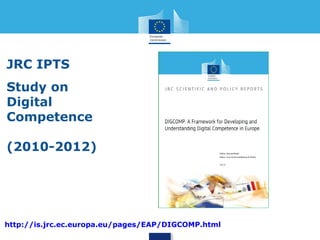
JRC IPTS 
Study on 
Digital 
Competence 
(2010-2012) 
Google “DigComp IPTS” 
Link: http://is.jrc.ec.europa.eu/pages/EAP/DIGCOMP.html
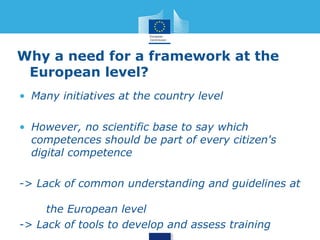
Why a need for a framework at the 
European level? 
• Many initiatives at the country level 
• However, no scientific base to say which 
competences should be part of every citizen's 
digital competence 
-> Lack of common understanding and guidelines at 
the European level 
-> Lack of tools to develop and assess training
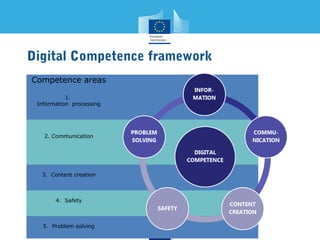
Digital Competence framework 
Competence areas 
1. 
Information processing 
2. Communication 
3. Content creation 
4. Safety 
5. Problem solving
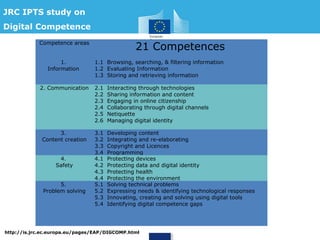
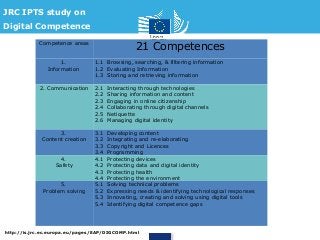
JRC IPTS study on 
Digital Competence 
Competence areas 21 Competences 
1. 
Information 
1.1 Browsing, searching, & filtering information 
1.2 Evaluating Information 
1.3 Storing and retrieving information 
2. Communication 2.1 Interacting through technologies 
2.2 Sharing information and content 
2.3 Engaging in online citizenship 
2.4 Collaborating through digital channels 
2.5 Netiquette 
2.6 Managing digital identity 
3. 
Content creation 
3.1 Developing content 
3.2 Integrating and re-elaborating 
3.3 Copyright and Licences 
3.4 Programming 
4. 
Safety 
4.1 Protecting devices 
4.2 Protecting data and digital identity 
4.3 Protecting health 
4.4 Protecting the environment 
5. 
Problem solving 
5.1 Solving technical problems 
5.2 Expressing needs & identifying technological responses 
5.3 Innovating, creating and solving using digital tools 
5.4 Identifying digital competence gaps 
http://is.jrc.ec.europa.eu/pages/EAP/DIGCOMP.html
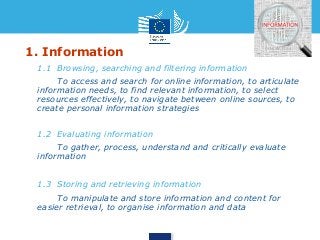
1. Information 
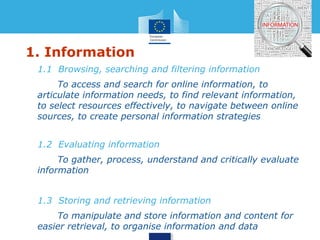
• 1.1 Browsing, searching and filtering information 
• To access and search for online information, to 
articulate information needs, to find relevant information, 
to select resources effectively, to navigate between online 
sources, to create personal information strategies 
• 1.2 Evaluating information 
• To gather, process, understand and critically evaluate 
information 
• 1.3 Storing and retrieving information 
• To manipulate and store information and content for 
easier retrieval, to organise information and data
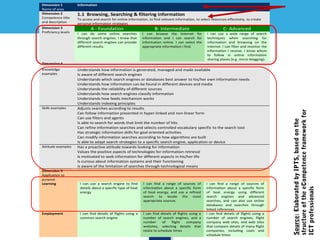
Dimension 1 
Name of area 
Information 
Dimension 2 
Competence title 
and description 
1.1 Browsing, Searching & filtering information 
To access and search for online information, to find relevant information, to select resources effectively, to create 
personal information strategies 
Dimension 3 
Proficiency levels 
A - Foundation B- Intermediate C- Advanced 
I can do some online searches 
through search engines. I know that 
different search engines can provide 
different results. 
I can browse the internet for 
information and I can search for 
information online. I can select the 
appropriate information I find. 
I can use a wide range of search 
techniques when searching for 
information and browsing on the 
Internet. I can filter and monitor the 
information I receive. I know whom 
to follow in online information 
sharing places (e.g. micro-blogging). 
Dimension 4 
Knowledge 
examples 
Understands how information is generated, managed and made available 
Is aware of different search engines 
Understands which search engines or databases best answer to his/her own information needs 
Understands how information can be found in different devices and media 
Understands the reliability of different sources 
Understands how search engines classify information 
Understands how feeds mechanism works 
Understands indexing principles 
Skills examples Adjusts searches according to results 
Can follow information presented in hyper-linked and non-linear form 
Can use filters and agents 
Is able to search for words that limit the number of hits 
Can refine information searches and selects controlled vocabulary specific to the search tool 
Has strategic information skills for goal oriented activities 
Can modify information searches according to how algorithms are built 
Is able to adapt search strategies to a specific search engine, application or device 
Attitude examples Has a proactive attitude towards looking for information 
Values the positive aspects of technologies for information retrieval 
Is motivated to seek information for different aspects in his/her life 
Is curious about information systems and their functioning 
Is aware of the limitation of searches through technological means 
Dimension 5 
Application to 
purpose 
Learning I can use a search engine to find 
details about a specific type of heat 
energy 
I can find a range of sources of 
information about a specific form 
of heat energy, and use a refined 
search to locate the most 
appropriate sources 
I can find a range of sources of 
information about a specific form 
of heat energy using different 
search engines and advanced 
searches, and can also use online 
databases and searches through 
linked references 
Employment I can find details of flights using a 
common search engine 
I can find details of flights using a 
number of search engines, and a 
number of flight company 
websites, selecting details that 
relate to schedule times 
I can find details of flights using a 
number of search engines, flight 
company web sites, and web sites 
that compare details of many flight 
companies, including costs and 
schedule times 
Source: Elaborated by IPTS, based on the 
structure of the eCompetence framework for 
ICT professionals
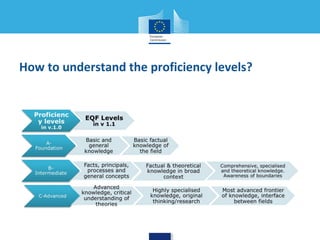
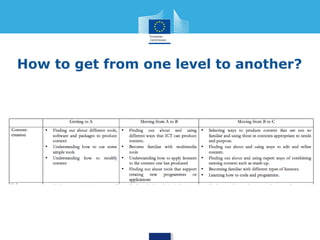
How to understand the proficiency levels?
How to use level? 
For self-assessment:
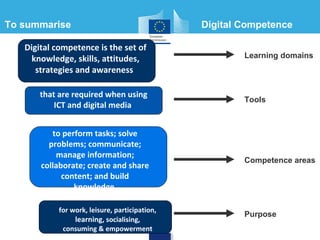
To summarise Digital Competence 
Digital competence is the set of 
knowledge, skills, attitudes, 
strategies and awareness 
that are required when using 
ICT and digital media 
Learning domains 
to perform tasks; solve 
problems; communicate; 
manage information; 
collaborate; create and share 
content; and build 
knowledge 
for work, leisure, participation, 
learning, socialising, 
consuming & empowerment 
Tools 
Competence areas 
Purpose
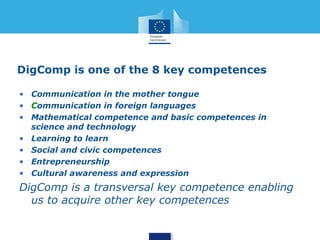
• DigComp is one of the 8 
key competences 
• DigComp is a transversal 
key competence enabling 
us to acquire other key 
competences (see p. 44)
Group 
work
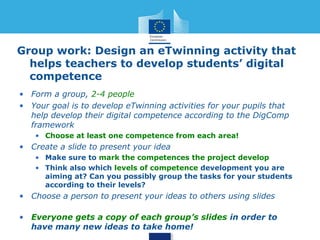
Group work: Designing eTwinning activity that 
helps teachers to develop students’ digital 
competence 
• Form a group, 2-4 people 
• Your goal is to develop eTwinning activities for your pupils that 
help develop their digital competence according to the DigComp 
framework 
• Choose at least one competence from each area!
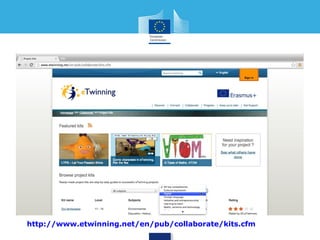
http://www.etwinning.net/en/pub/collaborate/kits.cfm
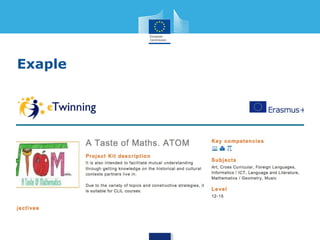
Exaple
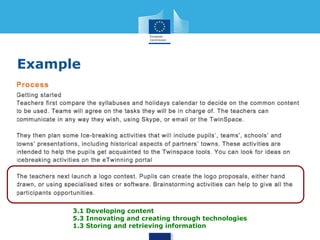
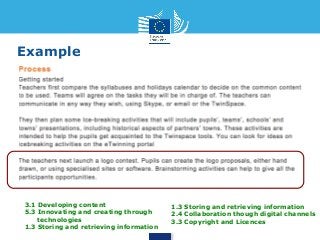
Example 
3.1 Developing content 
5.3 Innovating and creating through 
technologies 
1.3 Storing and retrieving information 
2.4 Collaboration though digital channels 
3.3 Copyright and Licences
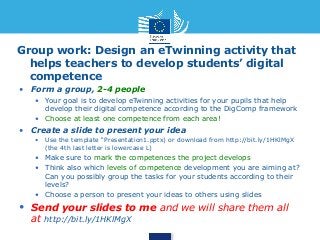
Group work: Design an eTwinning activity that 
helps teachers to develop students’ digital 
competence 
• Form a group, 2-4 people 
• Your goal is to develop eTwinning activities for your pupils that 
help develop their digital competence according to the DigComp 
framework 
• Choose at least one competence from each area! 
• Create a slide to present your idea 
• Use the template “Presentation1.pptx) or download from 
http://bit.ly/1HKlMgX (the 4th last letter is lowercase L) 
• Make sure to mark the competences the project develops 
• Think also which levels of competence development you are 
aiming at? Can you possibly group the tasks for your students 
according to their levels? 
• Choose a person to present your ideas to others using slides 
• Send your slides to me and we will share them all at 
http://bit.ly/1HKlMgX
Discussion: 
What 
about 
teachers?
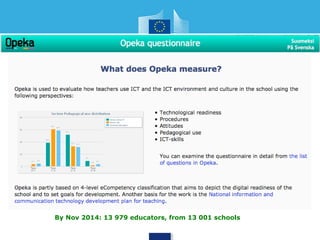
By Nov 2014: 13 979 educators, from 13 001 schools
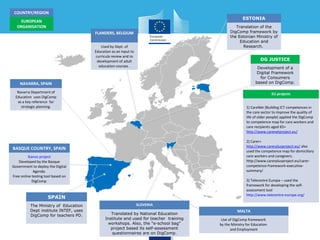
ESTONIA 
Translation of the 
DigComp framework by 
the Estonian Ministry of 
Education and 
Research. 
MALTA 
DG JUSTICE 
Development of a 
Digital Framework 
for Consumers 
based on DigComp. 
Use of DigComp framework 
by the Ministry for Education 
and Employment 
COUNTRY/REGION 
EUROPEAN 
ORGANISATION 
NAVARRA, SPAIN 
Navarra Department of 
Education uses DigComp 
as a key reference for 
strategic planning. 
BASQUE COUNTRY, SPAIN 
Ikanos project 
Developed by the Basque 
Government to deploy the Digital 
Agenda. 
Free online testing tool based on 
DigComp. 
SLOVENIA 
FLANDERS, BELGIUM 
Used by Dept. of 
Education as an input to 
curricula review and to 
development of adult 
education courses . 
Translated by National Education 
Institute and used for teacher training 
workshops. Also, the "e-school bag" 
project based its self-assessment 
questionnaires are on DigComp. 
SPAIN 
The Ministry of Education 
Dept institute INTEF, uses 
DigComp for teachers PD. 
EU projects 
1) CareNet (Building ICT competences in 
the care sector to improve the quality of 
life of older people) applied the DigComp 
to competence map for care workers and 
care recipients aged 65+ 
http://www.carenetproject.eu/ 
2) Carer+ 
http://www.carerplusproject.eu/ also 
used the competence map for domiciliary 
care workers and caregivers. 
http://www.carerplusproject.eu/carer-competence- 
framework-executive-summary/ 
3) Telecentre Europa – used the 
framework for developing the self-assessment 
tool 
http://www.telecentre-europe.org/
What do 
you think?
Quick 
survey
Thank you! 
Institute for Prospective 
Technological Studies (IPTS) 
Information Society Unit 
http://is.jrc.ec.europa.eu
Teacher 
template
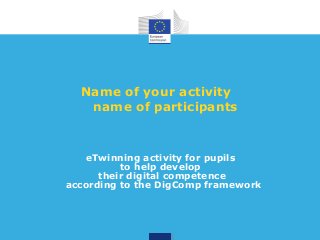
Name of your activity 
name of participants 
eTwinning activity for pupils 
to help develop 
their digital competence 
according to the DigComp framework
Example 
3.1 Developing content 
5.3 Innovating and creating through 
technologies 
1.3 Storing and retrieving information 
2.4 Collaboration though digital channels 
3.3 Copyright and Licences
Group work: Design an eTwinning activity that 
helps teachers to develop students’ digital 
competence 
• Form a group, 2-4 people 
• Your goal is to develop eTwinning activities for your pupils that help 
develop their digital competence according to the DigComp framework 
• Choose at least one competence from each area! 
• Create a slide to present your idea 
• Use the template “Presentation1.pptx) or download from http://bit.ly/1HKlMgX 
(the 4th last letter is lowercase L) 
• Make sure to mark the competences the project develops 
• Think also which levels of competence development you are aiming at? 
Can you possibly group the tasks for your students according to their 
levels? 
• Choose a person to present your ideas to others using slides 
• Send your slides to me and we will share them all 
at http://bit.ly/1HKlMgX
JRC IPTS study on 
Digital Competence 
Competence areas 21 Competences 
1. 
Information 
1.1 Browsing, searching, & filtering information 
1.2 Evaluating Information 
1.3 Storing and retrieving information 
2. Communication 2.1 Interacting through technologies 
2.2 Sharing information and content 
2.3 Engaging in online citizenship 
2.4 Collaborating through digital channels 
2.5 Netiquette 
2.6 Managing digital identity 
3. 
Content creation 
3.1 Developing content 
3.2 Integrating and re-elaborating 
3.3 Copyright and Licences 
3.4 Programming 
4. 
Safety 
4.1 Protecting devices 
4.2 Protecting data and digital identity 
4.3 Protecting health 
4.4 Protecting the environment 
5. 
Problem solving 
5.1 Solving technical problems 
5.2 Expressing needs & identifying technological responses 
5.3 Innovating, creating and solving using digital tools 
5.4 Identifying digital competence gaps 
http://is.jrc.ec.europa.eu/pages/EAP/DIGCOMP.html
1. Information 
• 1.1 Browsing, searching and filtering information 
• To access and search for online information, to articulate 
information needs, to find relevant information, to select 
resources effectively, to navigate between online sources, to 
create personal information strategies 
• 1.2 Evaluating information 
• To gather, process, understand and critically evaluate 
information 
• 1.3 Storing and retrieving information 
• To manipulate and store information and content for 
easier retrieval, to organise information and data
2. Communication (1/3) 
• 2.1 Interacting through technologies 
• To interact through a variety of digital devices and 
applications, to understand how digital information is distributed, 
displayed and managed, to understand appropriate ways of 
communicating through digital means, to refer to different 
communication formats, to adapt communication modes and 
strategies to the specific audience 
• 2.2 Sharing information and content 
• To communicate with others the location and content of 
information found, to be willing and able to share knowledge, 
content and resources, to act as an intermediary, to be proactive 
in the spreading of news, content and resources, to know about 
citation practices and to integrate new information into an 
existing body of knowledge
2. Communication (2/3) 
• 2.3 Engaging in online citizenship 
• To participate in society through online engagement, seek 
opportunities for self-development and empowerment in using 
technologies and digital environments, be aware of the potential of 
technologies for citizen participation 
• 2.4 Collaborating through digital channels 
• To use technologies and media for team work, collaborative 
processes and co-construction and co-creation of resources, 
knowledge and content 
• 2.5 Netiquette 
• To have the knowledge and know-how of behavioural norms in 
online or virtual interactions, to be aware of cultural diversity 
aspects, to be able to protect self and others from possible online 
dangers (e.g. cyberbullying), to develop active strategies to discover 
inappropriate behaviour
2. Communication (3/3) 
• 2.6 Managing digital identity 
• To create, adapt and manage one or multiple digital 
identities, to be able protect one's e-reputation, to deal with 
the data that one produces through several accounts and 
applications
3. Content creation (1/2) 
• 3.1 Content development 
• To create content in different formats including 
multimedia, to edit and improve content that s/he has 
created or that others have created, to express 
creatively through digital media and technologies 
• 3.2 Integrating and re-elaborating 
• To modify, refine and mash-up existing resources to 
create new, original and relevant content and knowledge 
• 3.3 Copyright and Licences 
• To understand how copyright and licences apply to 
information and content
3. Content creation (2/2) 
• 3.4 Programming 
• To apply settings, program modification, program 
applications, software, devices, to understand the principles 
of programming, to understand what is behind a program
4. Safety 
• 4.1 Protecting devices 
• To protect own devices and to understand online risks 
and threats, to know about safety and security measures 
• 4.2 Protecting personal data 
• To understand common terms of service, active 
protection of own data, understanding other people privacy, 
to protect self from online fraud and threats and 
cyberbulling 
• 4.3 Protecting health 
• To avoid health-risks related with the use of technology 
in terms of threats to physical and psychological well-being 
• 4.4 Protecting the environment 
• To be aware of the impact of ICT on the environment
5. Problem solving (1/2) 
• 5.1 Solving technical problems 
• To identify possible problems and solve them (from 
trouble-shooting to solving more complex problems) with 
the help of digital means 
• 5.2 Expressing needs & identifying technological responses 
• To assess own digital needs in terms of resources, tools 
and competence development, to match needs with 
possible solutions, adapting tools to personal needs, to 
critically evaluate digital tools and practices
5. Problem solving (2/2) 
• 5.3 Innovating, creating and solving using digital tools 
• To identify and solve conceptual problems or issues 
through technological means, to improve and innovate 
with ICT, to actively participate in collaborative digital 
and multimedia production, to express him/herself 
creatively through digital media and technologies, to 
create knowledge with the support of technologies digital 
tools 
• 5.4 Identification of digital competence gaps 
• To understand where own competence needs to be 
improved or updated, to support others in the 
development of their digital competence, to keep up-to-date 
with new developments.

DIGICOMP - A framework to help improve students’ digital competence - and what about teachers?

  • 1.
    DIGICOMP - Aframework to help improve students’ digital competence . Considerations for teachers? Riina Vuorikari JRC-IPTS
  • 2.
    Planning • Getto know each other (10 min) • What is Digital Competence framework? • Presentation of 21 competences • Group activity to help teachers develop students’ digital competences • Sharing of activities • Discussion: What about teachers? Are additional competences needed to teach? (15 min) • Quick survey (10 min)
  • 3.
  • 4.
    Get to knoweach other • Name • What do you teach? • Have you already done an eTwinnning project?
  • 5.
  • 6.
    What does itmean to be digitally competent? Digital competence ≠ use of ICT tools Digital competence involves the confident and critical use of ICT for employment, learning, self-development and participation in society (EC, 2006). KNOWLEDGE COMPETENCE ATTITUDES SKILLS
  • 7.
  • 8.
    Trends, technologies & challenges for European schools over the next 5 years Horizon Report Europe 2014 >Schools Edition Source NMC Horizon Report > 2014 Higher Education Edition Graph adapted from Horizon 2014 Europe: School Sector
  • 9.
    JRC IPTS Studyon Digital Competence (2010-2012) Google “DigComp IPTS” Link: http://is.jrc.ec.europa.eu/pages/EAP/DIGCOMP.html
  • 10.
    Why a needfor a framework at the European level? • Many initiatives at the country level • However, no scientific base to say which competences should be part of every citizen's digital competence -> Lack of common understanding and guidelines at the European level -> Lack of tools to develop and assess training
  • 11.
    Digital Competence framework Competence areas 1. Information processing 2. Communication 3. Content creation 4. Safety 5. Problem solving
  • 12.
    JRC IPTS studyon Digital Competence Competence areas 21 Competences 1. Information 1.1 Browsing, searching, & filtering information 1.2 Evaluating Information 1.3 Storing and retrieving information 2. Communication 2.1 Interacting through technologies 2.2 Sharing information and content 2.3 Engaging in online citizenship 2.4 Collaborating through digital channels 2.5 Netiquette 2.6 Managing digital identity 3. Content creation 3.1 Developing content 3.2 Integrating and re-elaborating 3.3 Copyright and Licences 3.4 Programming 4. Safety 4.1 Protecting devices 4.2 Protecting data and digital identity 4.3 Protecting health 4.4 Protecting the environment 5. Problem solving 5.1 Solving technical problems 5.2 Expressing needs & identifying technological responses 5.3 Innovating, creating and solving using digital tools 5.4 Identifying digital competence gaps http://is.jrc.ec.europa.eu/pages/EAP/DIGCOMP.html
  • 13.
    1. Information •1.1 Browsing, searching and filtering information • To access and search for online information, to articulate information needs, to find relevant information, to select resources effectively, to navigate between online sources, to create personal information strategies • 1.2 Evaluating information • To gather, process, understand and critically evaluate information • 1.3 Storing and retrieving information • To manipulate and store information and content for easier retrieval, to organise information and data
  • 14.
    Dimension 1 Nameof area Information Dimension 2 Competence title and description 1.1 Browsing, Searching & filtering information To access and search for online information, to find relevant information, to select resources effectively, to create personal information strategies Dimension 3 Proficiency levels A - Foundation B- Intermediate C- Advanced I can do some online searches through search engines. I know that different search engines can provide different results. I can browse the internet for information and I can search for information online. I can select the appropriate information I find. I can use a wide range of search techniques when searching for information and browsing on the Internet. I can filter and monitor the information I receive. I know whom to follow in online information sharing places (e.g. micro-blogging). Dimension 4 Knowledge examples Understands how information is generated, managed and made available Is aware of different search engines Understands which search engines or databases best answer to his/her own information needs Understands how information can be found in different devices and media Understands the reliability of different sources Understands how search engines classify information Understands how feeds mechanism works Understands indexing principles Skills examples Adjusts searches according to results Can follow information presented in hyper-linked and non-linear form Can use filters and agents Is able to search for words that limit the number of hits Can refine information searches and selects controlled vocabulary specific to the search tool Has strategic information skills for goal oriented activities Can modify information searches according to how algorithms are built Is able to adapt search strategies to a specific search engine, application or device Attitude examples Has a proactive attitude towards looking for information Values the positive aspects of technologies for information retrieval Is motivated to seek information for different aspects in his/her life Is curious about information systems and their functioning Is aware of the limitation of searches through technological means Dimension 5 Application to purpose Learning I can use a search engine to find details about a specific type of heat energy I can find a range of sources of information about a specific form of heat energy, and use a refined search to locate the most appropriate sources I can find a range of sources of information about a specific form of heat energy using different search engines and advanced searches, and can also use online databases and searches through linked references Employment I can find details of flights using a common search engine I can find details of flights using a number of search engines, and a number of flight company websites, selecting details that relate to schedule times I can find details of flights using a number of search engines, flight company web sites, and web sites that compare details of many flight companies, including costs and schedule times Source: Elaborated by IPTS, based on the structure of the eCompetence framework for ICT professionals
  • 15.
    How to understandthe proficiency levels?
  • 16.
    How to uselevel? For self-assessment:
  • 17.
    To summarise DigitalCompetence Digital competence is the set of knowledge, skills, attitudes, strategies and awareness that are required when using ICT and digital media Learning domains to perform tasks; solve problems; communicate; manage information; collaborate; create and share content; and build knowledge for work, leisure, participation, learning, socialising, consuming & empowerment Tools Competence areas Purpose
  • 18.
    • DigComp isone of the 8 key competences • DigComp is a transversal key competence enabling us to acquire other key competences (see p. 44)
  • 19.
  • 20.
    Group work: DesigningeTwinning activity that helps teachers to develop students’ digital competence • Form a group, 2-4 people • Your goal is to develop eTwinning activities for your pupils that help develop their digital competence according to the DigComp framework • Choose at least one competence from each area!
  • 21.
  • 22.
  • 23.
    Example 3.1 Developingcontent 5.3 Innovating and creating through technologies 1.3 Storing and retrieving information 1.3 Storing and retrieving information 2.4 Collaboration though digital channels 3.3 Copyright and Licences
  • 24.
    Group work: Designan eTwinning activity that helps teachers to develop students’ digital competence • Form a group, 2-4 people • Your goal is to develop eTwinning activities for your pupils that help develop their digital competence according to the DigComp framework • Choose at least one competence from each area! • Create a slide to present your idea • Use the template “Presentation1.pptx) or download from http://bit.ly/1HKlMgX (the 4th last letter is lowercase L) • Make sure to mark the competences the project develops • Think also which levels of competence development you are aiming at? Can you possibly group the tasks for your students according to their levels? • Choose a person to present your ideas to others using slides • Send your slides to me and we will share them all at http://bit.ly/1HKlMgX
  • 25.
  • 27.
    By Nov 2014:13 979 educators, from 13 001 schools
  • 29.
    ESTONIA Translation ofthe DigComp framework by the Estonian Ministry of Education and Research. MALTA DG JUSTICE Development of a Digital Framework for Consumers based on DigComp. Use of DigComp framework by the Ministry for Education and Employment COUNTRY/REGION EUROPEAN ORGANISATION NAVARRA, SPAIN Navarra Department of Education uses DigComp as a key reference for strategic planning. BASQUE COUNTRY, SPAIN Ikanos project Developed by the Basque Government to deploy the Digital Agenda. Free online testing tool based on DigComp. SLOVENIA FLANDERS, BELGIUM Used by Dept. of Education as an input to curricula review and to development of adult education courses . Translated by National Education Institute and used for teacher training workshops. Also, the "e-school bag" project based its self-assessment questionnaires are on DigComp. SPAIN The Ministry of Education Dept institute INTEF, uses DigComp for teachers PD. EU projects 1) CareNet (Building ICT competences in the care sector to improve the quality of life of older people) applied the DigComp to competence map for care workers and care recipients aged 65+ http://www.carenetproject.eu/ 2) Carer+ http://www.carerplusproject.eu/ also used the competence map for domiciliary care workers and caregivers. http://www.carerplusproject.eu/carer-competence- framework-executive-summary/ 3) Telecentre Europa – used the framework for developing the self-assessment tool http://www.telecentre-europe.org/
  • 30.
  • 31.
  • 32.
    Thank you! Institutefor Prospective Technological Studies (IPTS) Information Society Unit http://is.jrc.ec.europa.eu
  • 33.
  • 34.
    Name of youractivity name of participants eTwinning activity for pupils to help develop their digital competence according to the DigComp framework
  • 35.
    Example 3.1 Developingcontent 5.3 Innovating and creating through technologies 1.3 Storing and retrieving information 1.3 Storing and retrieving information 2.4 Collaboration though digital channels 3.3 Copyright and Licences
  • 36.
    Group work: Designan eTwinning activity that helps teachers to develop students’ digital competence • Form a group, 2-4 people • Your goal is to develop eTwinning activities for your pupils that help develop their digital competence according to the DigComp framework • Choose at least one competence from each area! • Create a slide to present your idea • Use the template “Presentation1.pptx) or download from http://bit.ly/1HKlMgX (the 4th last letter is lowercase L) • Make sure to mark the competences the project develops • Think also which levels of competence development you are aiming at? Can you possibly group the tasks for your students according to their levels? • Choose a person to present your ideas to others using slides • Send your slides to me and we will share them all at http://bit.ly/1HKlMgX
  • 37.
    JRC IPTS studyon Digital Competence Competence areas 21 Competences 1. Information 1.1 Browsing, searching, & filtering information 1.2 Evaluating Information 1.3 Storing and retrieving information 2. Communication 2.1 Interacting through technologies 2.2 Sharing information and content 2.3 Engaging in online citizenship 2.4 Collaborating through digital channels 2.5 Netiquette 2.6 Managing digital identity 3. Content creation 3.1 Developing content 3.2 Integrating and re-elaborating 3.3 Copyright and Licences 3.4 Programming 4. Safety 4.1 Protecting devices 4.2 Protecting data and digital identity 4.3 Protecting health 4.4 Protecting the environment 5. Problem solving 5.1 Solving technical problems 5.2 Expressing needs & identifying technological responses 5.3 Innovating, creating and solving using digital tools 5.4 Identifying digital competence gaps http://is.jrc.ec.europa.eu/pages/EAP/DIGCOMP.html
  • 38.
    1. Information •1.1 Browsing, searching and filtering information • To access and search for online information, to articulate information needs, to find relevant information, to select resources effectively, to navigate between online sources, to create personal information strategies • 1.2 Evaluating information • To gather, process, understand and critically evaluate information • 1.3 Storing and retrieving information • To manipulate and store information and content for easier retrieval, to organise information and data
  • 39.
    2. Communication (1/3) • 2.1 Interacting through technologies • To interact through a variety of digital devices and applications, to understand how digital information is distributed, displayed and managed, to understand appropriate ways of communicating through digital means, to refer to different communication formats, to adapt communication modes and strategies to the specific audience • 2.2 Sharing information and content • To communicate with others the location and content of information found, to be willing and able to share knowledge, content and resources, to act as an intermediary, to be proactive in the spreading of news, content and resources, to know about citation practices and to integrate new information into an existing body of knowledge
  • 40.
    2. Communication (2/3) • 2.3 Engaging in online citizenship • To participate in society through online engagement, seek opportunities for self-development and empowerment in using technologies and digital environments, be aware of the potential of technologies for citizen participation • 2.4 Collaborating through digital channels • To use technologies and media for team work, collaborative processes and co-construction and co-creation of resources, knowledge and content • 2.5 Netiquette • To have the knowledge and know-how of behavioural norms in online or virtual interactions, to be aware of cultural diversity aspects, to be able to protect self and others from possible online dangers (e.g. cyberbullying), to develop active strategies to discover inappropriate behaviour
  • 41.
    2. Communication (3/3) • 2.6 Managing digital identity • To create, adapt and manage one or multiple digital identities, to be able protect one's e-reputation, to deal with the data that one produces through several accounts and applications
  • 42.
    3. Content creation(1/2) • 3.1 Content development • To create content in different formats including multimedia, to edit and improve content that s/he has created or that others have created, to express creatively through digital media and technologies • 3.2 Integrating and re-elaborating • To modify, refine and mash-up existing resources to create new, original and relevant content and knowledge • 3.3 Copyright and Licences • To understand how copyright and licences apply to information and content
  • 43.
    3. Content creation(2/2) • 3.4 Programming • To apply settings, program modification, program applications, software, devices, to understand the principles of programming, to understand what is behind a program
  • 44.
    4. Safety •4.1 Protecting devices • To protect own devices and to understand online risks and threats, to know about safety and security measures • 4.2 Protecting personal data • To understand common terms of service, active protection of own data, understanding other people privacy, to protect self from online fraud and threats and cyberbulling • 4.3 Protecting health • To avoid health-risks related with the use of technology in terms of threats to physical and psychological well-being • 4.4 Protecting the environment • To be aware of the impact of ICT on the environment
  • 45.
    5. Problem solving(1/2) • 5.1 Solving technical problems • To identify possible problems and solve them (from trouble-shooting to solving more complex problems) with the help of digital means • 5.2 Expressing needs & identifying technological responses • To assess own digital needs in terms of resources, tools and competence development, to match needs with possible solutions, adapting tools to personal needs, to critically evaluate digital tools and practices
  • 46.
    5. Problem solving(2/2) • 5.3 Innovating, creating and solving using digital tools • To identify and solve conceptual problems or issues through technological means, to improve and innovate with ICT, to actively participate in collaborative digital and multimedia production, to express him/herself creatively through digital media and technologies, to create knowledge with the support of technologies digital tools • 5.4 Identification of digital competence gaps • To understand where own competence needs to be improved or updated, to support others in the development of their digital competence, to keep up-to-date with new developments.

Editor's Notes

  • #9 Horizon Report Europe 2014 >Schools Edition
  • #24 3.1 Developing content 5.3 Innovating and creating through technologies 1.3 Storing and retrieving information
  • #36 3.1 Developing content 5.3 Innovating and creating through technologies 1.3 Storing and retrieving information