Simple XML in .NET
This presentation will introduction XML
and using XML in .NET by simplest way
(C# and VB.NET)
Introduction
XML is Extensible Markup Language. It is include tag
defined by user and text inside the tag. The tag begin with <
and end with >, tag have three type:
•start-tags; for example: <section>
•end-tags; for example: </section>
•empty-element tags; for example: <line-break />

The tag was defined by user with any name, you can learn
more on Internet.
Introduction
Because the tag can be defined by user so it can
be used as database, or setting of program, etc,...
And this presentation will intro simplest way to
read/write on XML document.
File XML to example
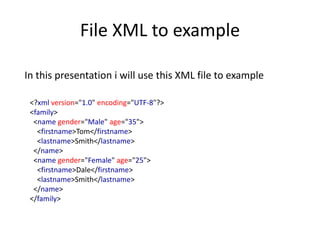
In this presentation i will use this XML file to example
<?xml version="1.0" encoding="UTF-8"?>
<family>
<name gender="Male" age="35">
<firstname>Tom</firstname>
<lastname>Smith</lastname>
</name>
<name gender="Female" age="25">
<firstname>Dale</firstname>
<lastname>Smith</lastname>
</name>
</family>
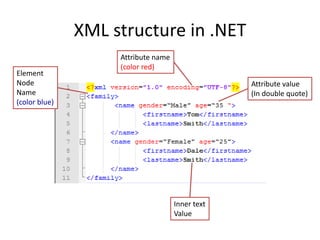
XML structure in .NET
Element
Node
Name
(color blue)

Attribute name
(color red)

Attribute value
(In double quote)

Inner text
Value
Read value in XML file
Read Firstname (you must add Listbox control to form)
Sub readValuexml ()
Dim xmldoc As XmlDocument = New XmlDocument
xmldoc.Load("example.xml")
Dim nodelist = xmldoc.SelectNodes("/family/name")
For Each i As XmlNode In nodelist
ListBox1.Items.Add(i("firstname").InnerText)
Next
End Sub

Anotherway
Imports System.Xml
Sub readValuexml ()
Dim xmltext As XmlTextReader = New XmlTextReader("example.xml")
Do While xmltext.Read
If xmltext.Name = "firstname" Then
ListBox1.Items.Add(xmltext.ReadElementString)
End If
Loop
End Sub
Read attribute value in XML file
Read attribute Age, return 35 and 25
Sub readAttributeXML()
Dim xmldoc As XmlDocument = New XmlDocument
xmldoc.Load("example.xml")
Dim nodelist = xmldoc.SelectNodes("/family/name")
For Each i As XmlNode In nodelist
ListBox1.Items.Add(i.Attributes("age").Value)
Next
End Sub
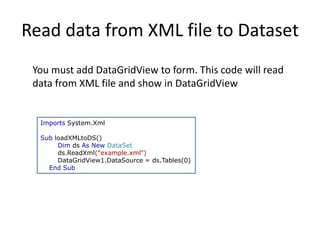
Read data from XML file to Dataset
You must add DataGridView to form. This code will read
data from XML file and show in DataGridView

Imports System.Xml

Sub loadXMLtoDS()
Dim ds As New DataSet
ds.ReadXml("example.xml")
DataGridView1.DataSource = ds.Tables(0)
End Sub
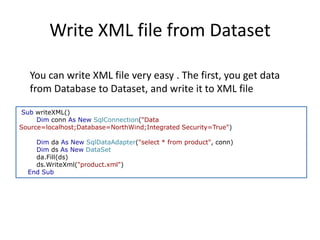
Write XML file from Dataset
You can write XML file very easy . The first, you get data
from Database to Dataset, and write it to XML file
Sub writeXML()
Dim conn As New SqlConnection("Data
Source=localhost;Database=NorthWind;Integrated Security=True")
Dim da As New SqlDataAdapter("select * from product", conn)
Dim ds As New DataSet
da.Fill(ds)
ds.WriteXml("product.xml")
End Sub
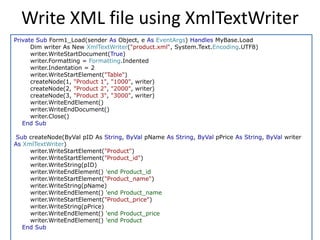
Write XML file using XmlTextWriter
Private Sub Form1_Load(sender As Object, e As EventArgs) Handles MyBase.Load
Dim writer As New XmlTextWriter("product.xml", System.Text.Encoding.UTF8)
writer.WriteStartDocument(True)
writer.Formatting = Formatting.Indented
writer.Indentation = 2
writer.WriteStartElement("Table")
createNode(1, "Product 1", "1000", writer)
createNode(2, "Product 2", "2000", writer)
createNode(3, "Product 3", "3000", writer)
writer.WriteEndElement()
writer.WriteEndDocument()
writer.Close()
End Sub

Sub createNode(ByVal pID As String, ByVal pName As String, ByVal pPrice As String, ByVal writer
As XmlTextWriter)
writer.WriteStartElement("Product")
writer.WriteStartElement("Product_id")
writer.WriteString(pID)
writer.WriteEndElement() 'end Product_id
writer.WriteStartElement("Product_name")
writer.WriteString(pName)
writer.WriteEndElement() 'end Product_name
writer.WriteStartElement("Product_price")
writer.WriteString(pPrice)
writer.WriteEndElement() 'end Product_price
writer.WriteEndElement() 'end Product
End Sub
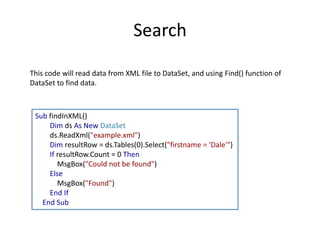
Search
This code will read data from XML file to DataSet, and using Find() function of
DataSet to find data.

Sub findInXML()
Dim ds As New DataSet
ds.ReadXml("example.xml")
Dim resultRow = ds.Tables(0).Select("firstname = 'Dale'")
If resultRow.Count = 0 Then
MsgBox("Could not be found")
Else
MsgBox("Found")
End If
End Sub
Reference
1.
2.
3.
4.

http://vb.net-informations.com/
www.codeproject.com
www.tutorialspoint.com
www.msdn.microsoft.com
About
Because this is the first presentation should not avoid errors. I wellcome any
contribute to this presentation more complete.
Any question or contribute please send for me via email address:
vohungvi@vohungvi.com or facebook: fb.com/vohungvi

Simple xml in .net

  • 1.
    Simple XML in.NET This presentation will introduction XML and using XML in .NET by simplest way (C# and VB.NET)
  • 2.
    Introduction XML is ExtensibleMarkup Language. It is include tag defined by user and text inside the tag. The tag begin with < and end with >, tag have three type: •start-tags; for example: <section> •end-tags; for example: </section> •empty-element tags; for example: <line-break /> The tag was defined by user with any name, you can learn more on Internet.
  • 3.
    Introduction Because the tagcan be defined by user so it can be used as database, or setting of program, etc,... And this presentation will intro simplest way to read/write on XML document.
  • 4.
    File XML toexample In this presentation i will use this XML file to example <?xml version="1.0" encoding="UTF-8"?> <family> <name gender="Male" age="35"> <firstname>Tom</firstname> <lastname>Smith</lastname> </name> <name gender="Female" age="25"> <firstname>Dale</firstname> <lastname>Smith</lastname> </name> </family>
  • 5.
    XML structure in.NET Element Node Name (color blue) Attribute name (color red) Attribute value (In double quote) Inner text Value
  • 6.
    Read value inXML file Read Firstname (you must add Listbox control to form) Sub readValuexml () Dim xmldoc As XmlDocument = New XmlDocument xmldoc.Load("example.xml") Dim nodelist = xmldoc.SelectNodes("/family/name") For Each i As XmlNode In nodelist ListBox1.Items.Add(i("firstname").InnerText) Next End Sub Anotherway Imports System.Xml Sub readValuexml () Dim xmltext As XmlTextReader = New XmlTextReader("example.xml") Do While xmltext.Read If xmltext.Name = "firstname" Then ListBox1.Items.Add(xmltext.ReadElementString) End If Loop End Sub
  • 7.
    Read attribute valuein XML file Read attribute Age, return 35 and 25 Sub readAttributeXML() Dim xmldoc As XmlDocument = New XmlDocument xmldoc.Load("example.xml") Dim nodelist = xmldoc.SelectNodes("/family/name") For Each i As XmlNode In nodelist ListBox1.Items.Add(i.Attributes("age").Value) Next End Sub
  • 8.
    Read data fromXML file to Dataset You must add DataGridView to form. This code will read data from XML file and show in DataGridView Imports System.Xml Sub loadXMLtoDS() Dim ds As New DataSet ds.ReadXml("example.xml") DataGridView1.DataSource = ds.Tables(0) End Sub
  • 9.
    Write XML filefrom Dataset You can write XML file very easy . The first, you get data from Database to Dataset, and write it to XML file Sub writeXML() Dim conn As New SqlConnection("Data Source=localhost;Database=NorthWind;Integrated Security=True") Dim da As New SqlDataAdapter("select * from product", conn) Dim ds As New DataSet da.Fill(ds) ds.WriteXml("product.xml") End Sub
  • 10.
    Write XML fileusing XmlTextWriter Private Sub Form1_Load(sender As Object, e As EventArgs) Handles MyBase.Load Dim writer As New XmlTextWriter("product.xml", System.Text.Encoding.UTF8) writer.WriteStartDocument(True) writer.Formatting = Formatting.Indented writer.Indentation = 2 writer.WriteStartElement("Table") createNode(1, "Product 1", "1000", writer) createNode(2, "Product 2", "2000", writer) createNode(3, "Product 3", "3000", writer) writer.WriteEndElement() writer.WriteEndDocument() writer.Close() End Sub Sub createNode(ByVal pID As String, ByVal pName As String, ByVal pPrice As String, ByVal writer As XmlTextWriter) writer.WriteStartElement("Product") writer.WriteStartElement("Product_id") writer.WriteString(pID) writer.WriteEndElement() 'end Product_id writer.WriteStartElement("Product_name") writer.WriteString(pName) writer.WriteEndElement() 'end Product_name writer.WriteStartElement("Product_price") writer.WriteString(pPrice) writer.WriteEndElement() 'end Product_price writer.WriteEndElement() 'end Product End Sub
  • 11.
    Search This code willread data from XML file to DataSet, and using Find() function of DataSet to find data. Sub findInXML() Dim ds As New DataSet ds.ReadXml("example.xml") Dim resultRow = ds.Tables(0).Select("firstname = 'Dale'") If resultRow.Count = 0 Then MsgBox("Could not be found") Else MsgBox("Found") End If End Sub
  • 12.
  • 13.
    About Because this isthe first presentation should not avoid errors. I wellcome any contribute to this presentation more complete. Any question or contribute please send for me via email address: vohungvi@vohungvi.com or facebook: fb.com/vohungvi

Editor's Notes

  • #7 Use XmlTextReader will faster than XmlDocument, because XmlDocument will load all file Xml to memory
  • #11 This example i copy original from http://vb.net-informations.com/ because it perfect