



What’s New in Release 10
December 11th, 2015
http://connections-apps.com/xcc
What’s New in XCC 10.0
New Features
1. Custom Grids
2. Access Restrictions for XCC Pages
3. Business Cards in XCC Pages
4. HTML Widget with Integrated Code Editor
5. Direct Edit for Customization Files
New Widgets
6. Clipping Widget
7. Community Description Widget
8. Pinned Files Widget
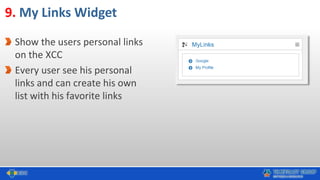
9. My Links Widget
10.Tag Cloud Widget
Improvements
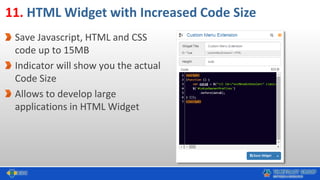
11. HTML Widget with Increased Code Size
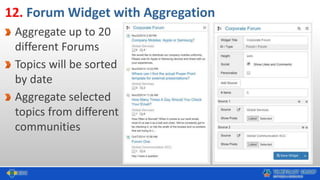
12. Forum Widget with Aggregation
13. Widget Editor with Full Screen Mode
14. More Improvements
Best Practices
15. Unified Navigation for IBM Connections and XCC
16. XCC for External / Guest Users
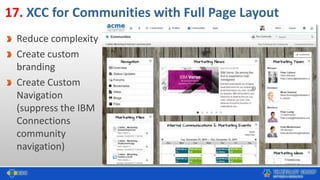
17. XCC for Communities with Full Page Layout
18. REST Services with HTML Widgets
19. Employee Lists for Anniversaries etc.
Forms Experience Builder Integration
20. FEB – Form Widget
21. FEB – Data Widget
Appendix
New Features
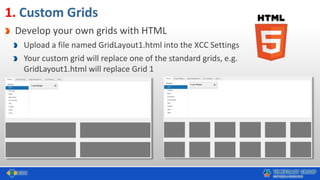
1. Custom Grids
Develop your own grids with HTML
Upload a file named GridLayout1.html into the XCC Settings
Your custom grid will replace one of the standard grids, e.g.
GridLayout1.html will replace Grid 1
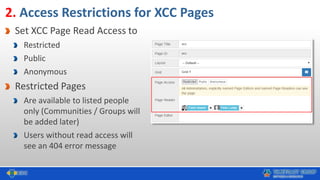
2. Access Restrictions for XCC Pages
Set XCC Page Read Access to
Restricted
Public
Anonymous
Restricted Pages
Are available to listed people
only (Communities / Groups will
be added later)
Users without read access will
see an 404 error message
3. Business Cards in XCC Pages
Implemented in
PeopleFinder and
PeopleSelector Widget
With the Business Card you
can see extended
information on individuals
Download vCard to e.g.
export the contact data
4. HTML Widget with Integrated Code Editor
CodeMirror (https://codemirror.net/) integrated in
Clipping, FEB and HTML Widget
Develop applications directly in XCC without copy /
paste to / from external editor
Correct formatting
Correct syntax highlighting
JSON
HTML
CSS
JavaScript
Open editor in full screen
Now you can edit Custom &
Language Files directly in the XCC
CSS Files
Javascript Files
Language Files
5. Direct Edit for XCC Customization Files
New Widgets
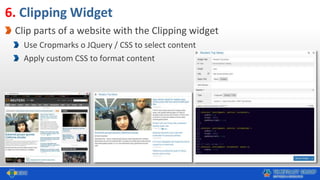
6. Clipping Widget
Clip parts of a website with the Clipping widget
Use Cropmarks o JQuery / CSS to select content
Apply custom CSS to format content
7. Community Description Widget
Displays the description of a
community (including all rich
text / embedded HTML etc.)
Create great landing page for
a communities
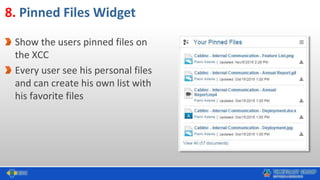
8. Pinned Files Widget
Show the users pinned files on
the XCC
Every user see his personal files
and can create his own list with
his favorite files
9. My Links Widget
Show the users personal links
on the XCC
Every user see his personal
links and can create his own
list with his favorite links
10. Tag Cloud Widget
Show the communities tag cloud
on the XCC
Users can click on a tag and will
force a search for this tag
User can get quick access to the
information in the community
Improvements
11. HTML Widget with Increased Code Size
Save Javascript, HTML and CSS
code up to 15MB
Indicator will show you the actual
Code Size
Allows to develop large
applications in HTML Widget
12. Forum Widget with Aggregation
Aggregate up to 20
different Forums
Topics will be sorted
by date
Aggregate selected
topics from different
communities
13. Widget Editor with Full Screen Mode
Use to display any widget in full
screen mode to edit properties
Develop applications in HTML Widget
in full screen mode
Enter or leave full screen mode with
icon or CTRL + F11
14. More Improvements
Cache Busting for Controlled Caching
XCC Anonymous Improvements
Security Improvements
Performance Improvements
Best Practices
15. Unified Navigation
Links to all relevant landing pages,
maintained with IBM Connections /
XCC
XCC based Landing Pages
IBM Communities with XCC
customized home page
IBM Communities without
customization
Any URL
16. XCC for External / Guest Users
Create a landing page for
External / Guest Users
Welcome Message
Instructions
Help Desk
Community Access
etc.
Use personalization to
send External / Guest
Users to “their” welcome
page
17. XCC for Communities with Full Page Layout
Reduce complexity
Create custom
branding
Create Custom
Navigation
(suppress the IBM
Connections
community
navigation)
18. REST Services with HTML Widgets
Use HTML Widget or Custom Widget API to consume REST Services
Use messaging services to communicate between widgets
19. Employee Lists for Anniversaries etc.
Use People Selector Widget to display
Annversaries
Other employee lists:
Person of Contact
Employee of the Month
Forms Experience Builder Integration
Use the Forms Experience Builder (FEB) as a Rapid Application Development platform. Easily
configure
Create Forms with Drag & Drop of fields
Design Forms
Manage Access
Mail Notification
Approval Workflow
Define Stages
Use XCC to integrate FEB Forms and FEB Date into your Intranet
See YouTube Channel for more information
https://www.youtube.com/user/mlech23/videos
20. FEB – Form Widget
Embed FEB Forms
Select Form (from all Forms the
user has access to)
Select Height
Select Privacy
Anonymous
(e.g for Complaints / Whistleblower
Forms)
Authenticated
(will pass users profile data to forms)
View & Use Forms
View & Submit Form
View Resultpage
("Thank You"Page, Forms Responses, New
Form)
21. FEB – Data Widget
Select Layout
(Grid, List, Table)
Map Data Fields to Layout Fields
Define Actions
(Create, Edit, Delete)
Format Layout and Fields with
Custom CSS
Appendix
Customers
& Partners
New User
Onboarding
Community
Managers
Top
Managers
Business
Units
Engage
Employees
Anonymous
Users
Employee
Relations
Tools
Menu
Mobile Users
Intranet as
a Service
CFOs
IT Managers
Employee
Magazine
Chairman’s
Office
Custom
Apps
Forms &
Workflows
Curate
Content
Internal
Communications
Personalization
& Targeting
Branding
& Design
Application
Integration
Single Point
of Truth
24 Ways to Enhance
IBM Connections with XCC
Usage &
Adoption
http://slideshare.net/timetoact/24-ways-to-enhance-ibm-connections-with-xcc-
web-content-custom-apps-extension
Test XCC on your own IBM Connections
1. Download XCC
https://greenhouse.lotus.com/communities/community/XCC
2. Install XCC
Less then 60 minutes
3. Test & Customize XCC
XCC now runs in Stealth Mode, i.e. is not visible to users.
XCC can therefore be installed, tested and customized in the
production environment without any interference with users.
Create and customize your first XCC pages
Customize Layout
Make XCC visible to all users, add new home button to CNX,
set XCC as CNX homepage
Test XCC with IBM Connections Cloud
Choose the IBM BLUEMIX Data Center closest to you
Fill out form and follow the instructions
Europe & Africa: http://xcc-clients.eu-gb.mybluemix.net/registration.html
Americas & Asia: http://xcc-clients.mybluemix.net/registration.html
View presentation for more information
http://slideshare.net/timetoact/xcc-cloud
Intranet as
a Service
XCC Release History
• 08.2012 Release 1.0
– for Connections 3.0
• 05.2013 Release 2.0 Beta
(Limited Availability)
– Connections 4.0
– Activity Stream on Homepage
• 10.-12.2013 Release 2.0, 2.01 - 2.03
(General Availability)
– Connections 4.0 & 4.5
– Personalization
– Improvements & Bug fixes
– Performance Increases
– Personalization for Custom Profile Fields
• 01. & 02.2014 Release 3.0 - 3.02
– Improvements & Bug fixes
– New Widgets
– Mobile
– Grid Layout
• 03.2014 Release 4.0
– Extended Page Management Capabilities
– UI & Performance Improvements
• 04.2014 Release 4.1
– Atom & RSS Feed Widgets
– List and Overview News Widgets
– People Finder Widget
– Breadcrumb Path & Navigation
– Multilingualism
• 08.2014 Release 5.0
– IBM Connections 5 Support
– Ideation-Blog Widget
– Picture Widget
– Import and Export of XCC page
– XCC uses database to store your settings
• 10.2014 Release 6.0
– Forum Widget
– People Birthday Widget
– People Selector Widget
– Personalized Home Page
– Custom JavaScript
– Picture Slider in Embedded Experience
– Item Count Editor / Paging
• 12.2014 Release 7.0
– Suggestions Widget
– Profile Completion Widget
– Intranet Preferences Widget
– Popular Content Widget
– Many more…
• 03.2015 Release 8.0
– XCC for IBM Connections Cloud
– XCC for Communities
– XCC for Anonymous Users
– News Aggregation
– Saved Search
• 07.2015 Release 9.0
– XCC FlyOut Page
– XCC for IBM Connections Cloud
– MediaGallery Widget
– Community Overview Widget
– Custom Widget API
– Client-Side-Caching
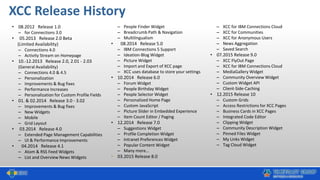
• 12.2015 Release 10
– Custom Grids
– Access Restrictions for XCC Pages
– Business Cards in XCC Pages
– Integrated Code Editor
– Clipping Widget
– Community Description Widget
– Pinned Files Widget
– My Links Widget
– Tag Cloud Widget
Call or Mail us for Questions !
Felix Binsack (XCC Product Idea & Sponsor)
+49 221 97343-10
felix.binsack@timetoact.de
Philipp van den Boom (XCC Inside Sales)
+ 49 221 97343-66
Philipp.vandenBoom@timetoact.de
xcc-support@timetoact.de
http://xcc-support.timetoact.de
+ 49 221 97343-53
Thank you for your interest
xcc@timetoact.de
+49 221 97343 0
http://connections-apps.com/xcc

XCC - What's New Release 10

  • 1.
    What’s New inRelease 10 December 11th, 2015 http://connections-apps.com/xcc
  • 2.
    What’s New inXCC 10.0 New Features 1. Custom Grids 2. Access Restrictions for XCC Pages 3. Business Cards in XCC Pages 4. HTML Widget with Integrated Code Editor 5. Direct Edit for Customization Files New Widgets 6. Clipping Widget 7. Community Description Widget 8. Pinned Files Widget 9. My Links Widget 10.Tag Cloud Widget Improvements 11. HTML Widget with Increased Code Size 12. Forum Widget with Aggregation 13. Widget Editor with Full Screen Mode 14. More Improvements Best Practices 15. Unified Navigation for IBM Connections and XCC 16. XCC for External / Guest Users 17. XCC for Communities with Full Page Layout 18. REST Services with HTML Widgets 19. Employee Lists for Anniversaries etc. Forms Experience Builder Integration 20. FEB – Form Widget 21. FEB – Data Widget Appendix
  • 3.
  • 4.
    1. Custom Grids Developyour own grids with HTML Upload a file named GridLayout1.html into the XCC Settings Your custom grid will replace one of the standard grids, e.g. GridLayout1.html will replace Grid 1
  • 5.
    2. Access Restrictionsfor XCC Pages Set XCC Page Read Access to Restricted Public Anonymous Restricted Pages Are available to listed people only (Communities / Groups will be added later) Users without read access will see an 404 error message
  • 6.
    3. Business Cardsin XCC Pages Implemented in PeopleFinder and PeopleSelector Widget With the Business Card you can see extended information on individuals Download vCard to e.g. export the contact data
  • 7.
    4. HTML Widgetwith Integrated Code Editor CodeMirror (https://codemirror.net/) integrated in Clipping, FEB and HTML Widget Develop applications directly in XCC without copy / paste to / from external editor Correct formatting Correct syntax highlighting JSON HTML CSS JavaScript Open editor in full screen
  • 8.
    Now you canedit Custom & Language Files directly in the XCC CSS Files Javascript Files Language Files 5. Direct Edit for XCC Customization Files
  • 9.
  • 10.
    6. Clipping Widget Clipparts of a website with the Clipping widget Use Cropmarks o JQuery / CSS to select content Apply custom CSS to format content
  • 11.
    7. Community DescriptionWidget Displays the description of a community (including all rich text / embedded HTML etc.) Create great landing page for a communities
  • 12.
    8. Pinned FilesWidget Show the users pinned files on the XCC Every user see his personal files and can create his own list with his favorite files
  • 13.
    9. My LinksWidget Show the users personal links on the XCC Every user see his personal links and can create his own list with his favorite links
  • 14.
    10. Tag CloudWidget Show the communities tag cloud on the XCC Users can click on a tag and will force a search for this tag User can get quick access to the information in the community
  • 15.
  • 16.
    11. HTML Widgetwith Increased Code Size Save Javascript, HTML and CSS code up to 15MB Indicator will show you the actual Code Size Allows to develop large applications in HTML Widget
  • 17.
    12. Forum Widgetwith Aggregation Aggregate up to 20 different Forums Topics will be sorted by date Aggregate selected topics from different communities
  • 18.
    13. Widget Editorwith Full Screen Mode Use to display any widget in full screen mode to edit properties Develop applications in HTML Widget in full screen mode Enter or leave full screen mode with icon or CTRL + F11
  • 19.
    14. More Improvements CacheBusting for Controlled Caching XCC Anonymous Improvements Security Improvements Performance Improvements
  • 20.
  • 21.
    15. Unified Navigation Linksto all relevant landing pages, maintained with IBM Connections / XCC XCC based Landing Pages IBM Communities with XCC customized home page IBM Communities without customization Any URL
  • 22.
    16. XCC forExternal / Guest Users Create a landing page for External / Guest Users Welcome Message Instructions Help Desk Community Access etc. Use personalization to send External / Guest Users to “their” welcome page
  • 23.
    17. XCC forCommunities with Full Page Layout Reduce complexity Create custom branding Create Custom Navigation (suppress the IBM Connections community navigation)
  • 24.
    18. REST Serviceswith HTML Widgets Use HTML Widget or Custom Widget API to consume REST Services Use messaging services to communicate between widgets
  • 25.
    19. Employee Listsfor Anniversaries etc. Use People Selector Widget to display Annversaries Other employee lists: Person of Contact Employee of the Month
  • 26.
  • 27.
    Forms Experience BuilderIntegration Use the Forms Experience Builder (FEB) as a Rapid Application Development platform. Easily configure Create Forms with Drag & Drop of fields Design Forms Manage Access Mail Notification Approval Workflow Define Stages Use XCC to integrate FEB Forms and FEB Date into your Intranet See YouTube Channel for more information https://www.youtube.com/user/mlech23/videos
  • 28.
    20. FEB –Form Widget Embed FEB Forms Select Form (from all Forms the user has access to) Select Height Select Privacy Anonymous (e.g for Complaints / Whistleblower Forms) Authenticated (will pass users profile data to forms) View & Use Forms View & Submit Form View Resultpage ("Thank You"Page, Forms Responses, New Form)
  • 29.
    21. FEB –Data Widget Select Layout (Grid, List, Table) Map Data Fields to Layout Fields Define Actions (Create, Edit, Delete) Format Layout and Fields with Custom CSS
  • 30.
  • 31.
    Customers & Partners New User Onboarding Community Managers Top Managers Business Units Engage Employees Anonymous Users Employee Relations Tools Menu MobileUsers Intranet as a Service CFOs IT Managers Employee Magazine Chairman’s Office Custom Apps Forms & Workflows Curate Content Internal Communications Personalization & Targeting Branding & Design Application Integration Single Point of Truth 24 Ways to Enhance IBM Connections with XCC Usage & Adoption http://slideshare.net/timetoact/24-ways-to-enhance-ibm-connections-with-xcc- web-content-custom-apps-extension
  • 32.
    Test XCC onyour own IBM Connections 1. Download XCC https://greenhouse.lotus.com/communities/community/XCC 2. Install XCC Less then 60 minutes 3. Test & Customize XCC XCC now runs in Stealth Mode, i.e. is not visible to users. XCC can therefore be installed, tested and customized in the production environment without any interference with users. Create and customize your first XCC pages Customize Layout Make XCC visible to all users, add new home button to CNX, set XCC as CNX homepage
  • 33.
    Test XCC withIBM Connections Cloud Choose the IBM BLUEMIX Data Center closest to you Fill out form and follow the instructions Europe & Africa: http://xcc-clients.eu-gb.mybluemix.net/registration.html Americas & Asia: http://xcc-clients.mybluemix.net/registration.html View presentation for more information http://slideshare.net/timetoact/xcc-cloud Intranet as a Service
  • 34.
    XCC Release History •08.2012 Release 1.0 – for Connections 3.0 • 05.2013 Release 2.0 Beta (Limited Availability) – Connections 4.0 – Activity Stream on Homepage • 10.-12.2013 Release 2.0, 2.01 - 2.03 (General Availability) – Connections 4.0 & 4.5 – Personalization – Improvements & Bug fixes – Performance Increases – Personalization for Custom Profile Fields • 01. & 02.2014 Release 3.0 - 3.02 – Improvements & Bug fixes – New Widgets – Mobile – Grid Layout • 03.2014 Release 4.0 – Extended Page Management Capabilities – UI & Performance Improvements • 04.2014 Release 4.1 – Atom & RSS Feed Widgets – List and Overview News Widgets – People Finder Widget – Breadcrumb Path & Navigation – Multilingualism • 08.2014 Release 5.0 – IBM Connections 5 Support – Ideation-Blog Widget – Picture Widget – Import and Export of XCC page – XCC uses database to store your settings • 10.2014 Release 6.0 – Forum Widget – People Birthday Widget – People Selector Widget – Personalized Home Page – Custom JavaScript – Picture Slider in Embedded Experience – Item Count Editor / Paging • 12.2014 Release 7.0 – Suggestions Widget – Profile Completion Widget – Intranet Preferences Widget – Popular Content Widget – Many more… • 03.2015 Release 8.0 – XCC for IBM Connections Cloud – XCC for Communities – XCC for Anonymous Users – News Aggregation – Saved Search • 07.2015 Release 9.0 – XCC FlyOut Page – XCC for IBM Connections Cloud – MediaGallery Widget – Community Overview Widget – Custom Widget API – Client-Side-Caching • 12.2015 Release 10 – Custom Grids – Access Restrictions for XCC Pages – Business Cards in XCC Pages – Integrated Code Editor – Clipping Widget – Community Description Widget – Pinned Files Widget – My Links Widget – Tag Cloud Widget
  • 35.
    Call or Mailus for Questions ! Felix Binsack (XCC Product Idea & Sponsor) +49 221 97343-10 felix.binsack@timetoact.de Philipp van den Boom (XCC Inside Sales) + 49 221 97343-66 Philipp.vandenBoom@timetoact.de xcc-support@timetoact.de http://xcc-support.timetoact.de + 49 221 97343-53
  • 36.
    Thank you foryour interest xcc@timetoact.de +49 221 97343 0 http://connections-apps.com/xcc