OPC UA
Information models
Companion specifications
Stéphane Potier
stephane.potier [at] br-automation.com
Definitions
Meta-model
• A meta-model is itself a model that is used to describe
another model
• A meta-model typically defines the language and
processes from which to form a model
Information model
• An information model is an abstract formal
representation of entity types that may include their
properties, relationships and the operations that can be
performed on them
• The advantage of using an information model is that it
provides a sharable, stable, and organized structure of
information requirements for the manufacturing domain
context
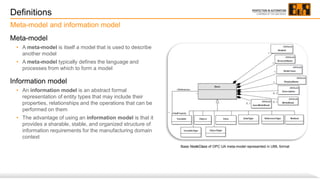
Meta-model and information model
Base NodeClass of OPC UA meta-model represented in UML format
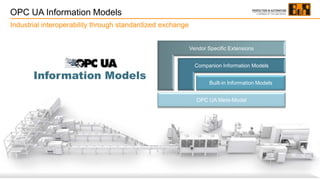
OPC UA Information Models
Industrial interoperability through standardized exchange
Vendor Specific Extensions
Companion Information Models
Built-in Information Models
OPC UA Meta-Model
Information Models
Address Space Model
OPC UA Meta-model
OPC UA meta-model
OPC UA meta-model
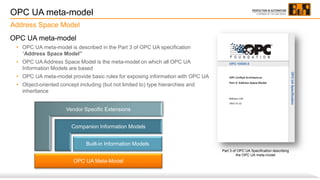
• OPC UA meta-model is described in the Part 3 of OPC UA specification
“Address Space Model”
• OPC UA Address Space Model is the meta-model on which all OPC UA
Information Models are based
• OPC UA meta-model provide basic rules for exposing information with OPC UA
• Object-oriented concept including (but not limited to) type hierarchies and
inheritance
Address Space Model
Part 3 of OPC UA Specification describing
the OPC UA meta-model
Vendor Specific Extensions
Companion Information Models
Built-in Information Models
OPC UA Meta-Model
Address Space
Address Space
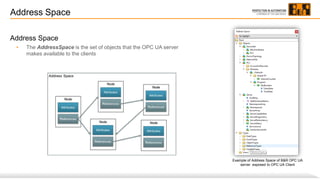
• The AddressSpace is the set of objects that the OPC UA server
makes available to the clients
Example of Address Space of B&R OPC UA
server exposed to OPC UA Client
Nodes
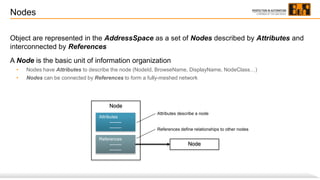
Object are represented in the AddressSpace as a set of Nodes described by Attributes and
interconnected by References
A Node is the basic unit of information organization
• Nodes have Attributes to describe the node (NodeId, BrowseName, DisplayName, NodeClass…)
• Nodes can be connected by References to form a fully-meshed network
Attributes
--------
--------
References
--------
--------
Node
Node
Attributes describe a node
References define relationships to other nodes
Attributes
Attributes are data elements that describe Nodes
The mandatory Attributes of base Node class are:
• NodeId: Uniquely identifies the node within the address space of OPC
UA server. NodeId is a structure composed of the index of the
namespace(1), the type of identifier (numeric or string) and the identifier
(numerical value or string)
• NodeClass: Enumeration that identifies the NodeClass of a Node
(object, variable, method…)
• BrowseName: Used as a non-localized (2) human-readable name when
browsing the AddressSpace to create paths out of BrowseNames
(BrowseName is not unique as NodeId)
• DisplayName : Used as localized (2) human-readable name to display
the name of the Node to the user
(1) See dedicated slide Namespace
(2) Localized name means that a local language translation can be provided for this name
Example of attributes of “Manufacturer” Node of B&R PLC
Graphical representation
OPC UA notation of Nodes depending on the NodeClass
Object
Method
ObjectType
Variable VariableType
DataType
ReferenceType
View
Symmetric Reference
Asymmetric Reference
Hierarchical Reference
HasComponent
HasProperty
HasTypeDefinition
HasSubType
HasEventSource
Instances Types References
Inheritance
Inheritance is the mechanism of defining SubTypes of objects and variable types
Subtype inherit the values of its parent type’s Attribute, inherited Attribute values may be
overridden by the subtype
The reference between the subtype and its parent type is HasSubType
Defining subtypes of object and variable types
AnalogMeasurement
ObjectType
(Child subtype)
BaseObjectType
HasSubType
(reference)
ObjectType
(Parent type)
Instantiation
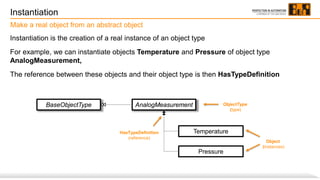
Instantiation is the creation of a real instance of an object type
For example, we can instantiate objects Temperature and Pressure of object type
AnalogMeasurement,
The reference between these objects and their object type is then HasTypeDefinition
Make a real object from an abstract object
Pressure
AnalogMeasurement
Temperature
Object
(instances)
ObjectType
(type)
HasTypeDefinition
(reference)
BaseObjectType
Example of graphical representation of Nodes
Objects and variables
Object
Variable
ObjectType
Object
Variable
Example of graphical representation of Nodes
References
HasComponent
HasProperty
HasComponent
HasProperty
HasSubType
HasTypeDefinition
Namespace
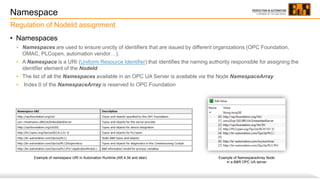
• Namespaces
• Namespaces are used to ensure unicity of identifiers that are issued by different organizations (OPC Foundation,
OMAC, PLCopen, automation vendor…).
• A Namespace is a URI (Uniform Resource Identifier) that identifies the naming authority responsible for assigning the
identifier element of the NodeId
• The list of all the Namespaces available in an OPC UA Server is available via the Node NamespaceArray
• Index 0 of the NamespaceArray is reserved to OPC Foundation
Regulation of NodeId assignment
Example of NamespaceArray Node
in a B&R OPC UA server
Example of namespace URI in Automation Runtime (AR 4.34 and later)
OPC UA Information Models
Built-In Information Models
Vendor Specific Extensions
Companion Information Models
Built-in Information Models
OPC UA Meta-Model
OPC UA Information Models
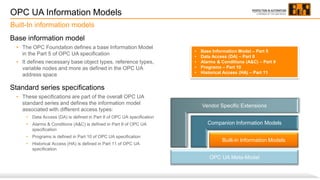
Base information model
• The OPC Foundation defines a base Information Model
in the Part 5 of OPC UA specification
• It defines necessary base object types, reference types,
variable nodes and more as defined in the OPC UA
address space
Standard series specifications
• These specifications are part of the overall OPC UA
standard series and defines the information model
associated with different access types:
• Data Access (DA) is defined in Part 8 of OPC UA specification
• Alarms & Conditions (A&C) is defined in Part 9 of OPC UA
specification
• Programs is defined in Part 10 of OPC UA specification
• Historical Access (HA) is defined in Part 11 of OPC UA
specification
Built-In information models
• Base Information Model – Part 5
• Data Access (DA) – Part 8
• Alarms & Conditions (A&C) – Part 9
• Programs – Part 10
• Historical Access (HA) – Part 11
OPC UA Companion Information Models
Companion Specifications
Vendor Specific Extensions
Companion Information Models
Built-in Information Models
OPC UA Meta-Model
Companion Specifications
Market & Collaboration
• The OPC Foundation closely cooperates with
many different organizations from various
branches to create OPC UA representations of
information from different domains
• These collaborations make it possible to define
standardized exchanges within the framework of
specific business functions known as "Companion
Specification“
• Specific information models of other
standardization organizations are thus mapped
onto OPC UA and thus become portable
• List of joined working groups and companion
specifications can be found here :
https://opcfoundation.org/markets-collaboration/
Business domain information models
Companion Specifications
Process and deliverables
Joint Working Group
• Working group formed between an
organization and the OPC Foundation
• More information is available here:
https://opcfoundation.org/about/working-
groups/joint-working-groups/
Goal of the JWG
• Development of an OPC UA companion
standard, i.e. creation of a business domain
information model based on OPC UA
Deliverables of the JWG
• A companion information model as a
documentation and a machine-readable
Information Model (UANodeSet XML file)
Documentation UANodeSet XML file
+
UANodeSet
An UANodeSet is an XML file defining an information model in a form that can
be read by a computer program
Each companion information model is defined by a specific UANodeSet.xml file
“Opc.Ua.PackML.NodeSet2.xml” for PackML companion specification
“Opc.Ua.Robotics.NodeSet2.xml” for Robotics companion specification
…
Companion information models must follow standard syntax described in
following XSD file (XML Schema Definition)
http://www.opcfoundation.org/UA/schemas/1.04/UANodeSet.xsd
XML description of information models
Supported Companion Specifications at B&R
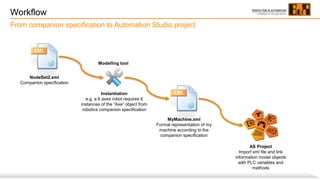
Workflow
From companion specification to Automation Studio project
Instantiation
e.g. a 6 axes robot requires 6
instances of the “Axe” object from
robotics companion specification
MyMachine.xml
Formal representation of my
machine according to the
companion specification
NodeSet2.xml
Companion specification
Modelling tool
AS Project
Import xml file and link
information model objects
with PLC variables and
methods
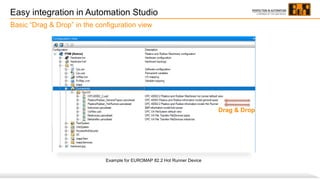
Easy integration in Automation Studio
Basic “Drag & Drop” in the configuration view
Example for EUROMAP 82.2 Hot Runner Device
Drag & Drop
Customer benefits
Benefits of using Companion Specifications
• A standardized interface of the machine
• Higher flexibility for modular machines
• Production lines change made easy
• Module functions mapped in methods
Vendor specific extensions
Customized information models
Vendor Specific Extensions
Companion Information Models
Built-in Information Models
OPC UA Meta-Model
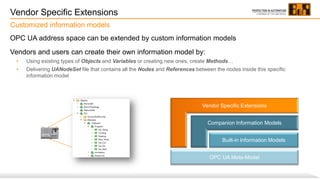
Vendor Specific Extensions
OPC UA address space can be extended by custom information models
Vendors and users can create their own information model by:
• Using existing types of Objects and Variables or creating new ones, create Methods…
• Delivering UANodeSet file that contains all the Nodes and References between the nodes inside this specific
information model
Customized information models
To be continued… stay tuned !
PERFECTION IN AUTOMATION

OPC UA - Information Models & Companion Specifications

  • 1.
    OPC UA Information models Companionspecifications Stéphane Potier stephane.potier [at] br-automation.com
  • 2.
    Definitions Meta-model • A meta-modelis itself a model that is used to describe another model • A meta-model typically defines the language and processes from which to form a model Information model • An information model is an abstract formal representation of entity types that may include their properties, relationships and the operations that can be performed on them • The advantage of using an information model is that it provides a sharable, stable, and organized structure of information requirements for the manufacturing domain context Meta-model and information model Base NodeClass of OPC UA meta-model represented in UML format
  • 3.
    OPC UA InformationModels Industrial interoperability through standardized exchange Vendor Specific Extensions Companion Information Models Built-in Information Models OPC UA Meta-Model Information Models
  • 4.
  • 5.
    OPC UA meta-model OPCUA meta-model • OPC UA meta-model is described in the Part 3 of OPC UA specification “Address Space Model” • OPC UA Address Space Model is the meta-model on which all OPC UA Information Models are based • OPC UA meta-model provide basic rules for exposing information with OPC UA • Object-oriented concept including (but not limited to) type hierarchies and inheritance Address Space Model Part 3 of OPC UA Specification describing the OPC UA meta-model Vendor Specific Extensions Companion Information Models Built-in Information Models OPC UA Meta-Model
  • 6.
    Address Space Address Space •The AddressSpace is the set of objects that the OPC UA server makes available to the clients Example of Address Space of B&R OPC UA server exposed to OPC UA Client
  • 7.
    Nodes Object are representedin the AddressSpace as a set of Nodes described by Attributes and interconnected by References A Node is the basic unit of information organization • Nodes have Attributes to describe the node (NodeId, BrowseName, DisplayName, NodeClass…) • Nodes can be connected by References to form a fully-meshed network Attributes -------- -------- References -------- -------- Node Node Attributes describe a node References define relationships to other nodes
  • 8.
    Attributes Attributes are dataelements that describe Nodes The mandatory Attributes of base Node class are: • NodeId: Uniquely identifies the node within the address space of OPC UA server. NodeId is a structure composed of the index of the namespace(1), the type of identifier (numeric or string) and the identifier (numerical value or string) • NodeClass: Enumeration that identifies the NodeClass of a Node (object, variable, method…) • BrowseName: Used as a non-localized (2) human-readable name when browsing the AddressSpace to create paths out of BrowseNames (BrowseName is not unique as NodeId) • DisplayName : Used as localized (2) human-readable name to display the name of the Node to the user (1) See dedicated slide Namespace (2) Localized name means that a local language translation can be provided for this name Example of attributes of “Manufacturer” Node of B&R PLC
  • 9.
    Graphical representation OPC UAnotation of Nodes depending on the NodeClass Object Method ObjectType Variable VariableType DataType ReferenceType View Symmetric Reference Asymmetric Reference Hierarchical Reference HasComponent HasProperty HasTypeDefinition HasSubType HasEventSource Instances Types References
  • 10.
    Inheritance Inheritance is themechanism of defining SubTypes of objects and variable types Subtype inherit the values of its parent type’s Attribute, inherited Attribute values may be overridden by the subtype The reference between the subtype and its parent type is HasSubType Defining subtypes of object and variable types AnalogMeasurement ObjectType (Child subtype) BaseObjectType HasSubType (reference) ObjectType (Parent type)
  • 11.
    Instantiation Instantiation is thecreation of a real instance of an object type For example, we can instantiate objects Temperature and Pressure of object type AnalogMeasurement, The reference between these objects and their object type is then HasTypeDefinition Make a real object from an abstract object Pressure AnalogMeasurement Temperature Object (instances) ObjectType (type) HasTypeDefinition (reference) BaseObjectType
  • 12.
    Example of graphicalrepresentation of Nodes Objects and variables Object Variable ObjectType Object Variable
  • 13.
    Example of graphicalrepresentation of Nodes References HasComponent HasProperty HasComponent HasProperty HasSubType HasTypeDefinition
  • 14.
    Namespace • Namespaces • Namespacesare used to ensure unicity of identifiers that are issued by different organizations (OPC Foundation, OMAC, PLCopen, automation vendor…). • A Namespace is a URI (Uniform Resource Identifier) that identifies the naming authority responsible for assigning the identifier element of the NodeId • The list of all the Namespaces available in an OPC UA Server is available via the Node NamespaceArray • Index 0 of the NamespaceArray is reserved to OPC Foundation Regulation of NodeId assignment Example of NamespaceArray Node in a B&R OPC UA server Example of namespace URI in Automation Runtime (AR 4.34 and later)
  • 15.
    OPC UA InformationModels Built-In Information Models
  • 16.
    Vendor Specific Extensions CompanionInformation Models Built-in Information Models OPC UA Meta-Model OPC UA Information Models Base information model • The OPC Foundation defines a base Information Model in the Part 5 of OPC UA specification • It defines necessary base object types, reference types, variable nodes and more as defined in the OPC UA address space Standard series specifications • These specifications are part of the overall OPC UA standard series and defines the information model associated with different access types: • Data Access (DA) is defined in Part 8 of OPC UA specification • Alarms & Conditions (A&C) is defined in Part 9 of OPC UA specification • Programs is defined in Part 10 of OPC UA specification • Historical Access (HA) is defined in Part 11 of OPC UA specification Built-In information models • Base Information Model – Part 5 • Data Access (DA) – Part 8 • Alarms & Conditions (A&C) – Part 9 • Programs – Part 10 • Historical Access (HA) – Part 11
  • 17.
    OPC UA CompanionInformation Models Companion Specifications
  • 18.
    Vendor Specific Extensions CompanionInformation Models Built-in Information Models OPC UA Meta-Model Companion Specifications Market & Collaboration • The OPC Foundation closely cooperates with many different organizations from various branches to create OPC UA representations of information from different domains • These collaborations make it possible to define standardized exchanges within the framework of specific business functions known as "Companion Specification“ • Specific information models of other standardization organizations are thus mapped onto OPC UA and thus become portable • List of joined working groups and companion specifications can be found here : https://opcfoundation.org/markets-collaboration/ Business domain information models
  • 19.
    Companion Specifications Process anddeliverables Joint Working Group • Working group formed between an organization and the OPC Foundation • More information is available here: https://opcfoundation.org/about/working- groups/joint-working-groups/ Goal of the JWG • Development of an OPC UA companion standard, i.e. creation of a business domain information model based on OPC UA Deliverables of the JWG • A companion information model as a documentation and a machine-readable Information Model (UANodeSet XML file) Documentation UANodeSet XML file +
  • 20.
    UANodeSet An UANodeSet isan XML file defining an information model in a form that can be read by a computer program Each companion information model is defined by a specific UANodeSet.xml file “Opc.Ua.PackML.NodeSet2.xml” for PackML companion specification “Opc.Ua.Robotics.NodeSet2.xml” for Robotics companion specification … Companion information models must follow standard syntax described in following XSD file (XML Schema Definition) http://www.opcfoundation.org/UA/schemas/1.04/UANodeSet.xsd XML description of information models
  • 21.
  • 22.
    Workflow From companion specificationto Automation Studio project Instantiation e.g. a 6 axes robot requires 6 instances of the “Axe” object from robotics companion specification MyMachine.xml Formal representation of my machine according to the companion specification NodeSet2.xml Companion specification Modelling tool AS Project Import xml file and link information model objects with PLC variables and methods
  • 23.
    Easy integration inAutomation Studio Basic “Drag & Drop” in the configuration view Example for EUROMAP 82.2 Hot Runner Device Drag & Drop
  • 24.
    Customer benefits Benefits ofusing Companion Specifications • A standardized interface of the machine • Higher flexibility for modular machines • Production lines change made easy • Module functions mapped in methods
  • 25.
  • 26.
    Vendor Specific Extensions CompanionInformation Models Built-in Information Models OPC UA Meta-Model Vendor Specific Extensions OPC UA address space can be extended by custom information models Vendors and users can create their own information model by: • Using existing types of Objects and Variables or creating new ones, create Methods… • Delivering UANodeSet file that contains all the Nodes and References between the nodes inside this specific information model Customized information models
  • 27.
    To be continued…stay tuned ! PERFECTION IN AUTOMATION