WEB DESIGNING
Design is the process of collecting ideas, and
aesthetically arranging and implementing them,
guided by certain principles for a specific purpose.
Web design is a similar process of creation, with
the intention of presenting the content on
electronic web pages, which the end-users can
access through the internet with the help of a web
browser.
ELEMENTS OF WEB DESIGN
Web design uses many of the same key visual elements as all types of design such as: -
Layout: This is the way the graphics, ads and text are arranged. In the web
world, a key goal is to help the view find the information they seek at a
glance. This includes maintaining the balance, consistency, and
integrity of the design.
Colour: The choice of colours depends on the purpose and clientele; it
could be simple black-and-white to multi-coloured design, conveying
the personality of a person or the brand of an organization, using web-
safe colours.
Graphics: Graphics can include logos, photos, clipart or icons, all of which
enhance the web design. For user friendliness, these need to be placed
appropriately, working with the colour and content of the web page,
while not making it too congested or slow to load.
Fonts: The use of various fonts can enhance a website design. Most web
browsers can only read a select number of fonts, known as "web-safe
fonts", so your designer will generally work within this widely accepted
group.
CREATING USER FRIENDLY WEB DESIGN
Besides the basic elements of web design that make a site beautiful and
visually compelling, a website must also always consider the end user.
User-friendliness can be achieved by paying attention to the following
factors.
Navigation: Site architecture, menus and other navigation tools in the web
design must be created with consideration of how users browse and
search. The goal is to help the user to move around the site with ease,
efficiently finding the information they require.
Multimedia: Relevant video and audio stimuli in the design can help users
to grasp the information, developing understanding in an easy and
quick manner. This can encourage visitors to spend more time on the
webpage.
Compatibility: Design the webpage, to perform equally well on different
browsers and operating systems, to increase its viewing.
Technology: Advancements in technology give designers the freedom to
add movement and innovation, allowing for web design that is always
fresh, dynamic and professional.
CONSISTENCY IN DESIGN
 Use the same font throughout!
 Use consistent graphics in website – do not use ultra
modern on one page and calligraphy on another
 Use color scheme that is consistent
WEBSITE DESIGN
 From your existing web pages, build a website.
 Add more pages to site – whatever you want
 Some suggestions: Resume, friends page, hobbies page
 Minimum 6 pages (splash page + 5)
 Use common design theme
 Make custom graphics in PhotoShop
 Prepare graphical site map in PowerPoint to turn
in when finished
FUNDAMENTALS OF WEBDESIGN
Purpose of Web Design
 Inform/Educate
 Persuade
Influences on Web Design
 Technology Used by Both Target Audience and Designer
 Nature of the Content
 Economy (Budget, Time, and Scale of the Project)
 Amount and Type of Visuals Included
 Meeting Usability Objectives
THE MAKING OF GOOD DESIGN
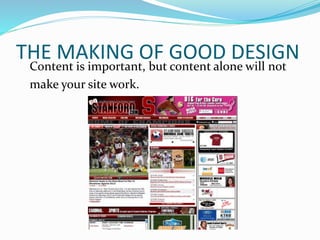
Content is important, but content alone will not
make your site work.
THE MAKING OF DESIGN
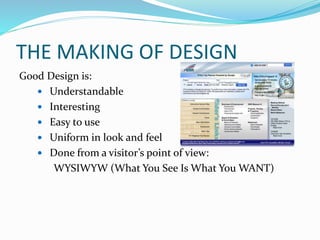
Good Design is:
 Understandable
 Interesting
 Easy to use
 Uniform in look and feel
 Done from a visitor’s point of view:
WYSIWYW (What You See Is What You WANT)
Resources -books
 HTML & XHTML: The Complete Reference
Author: Thomas Powell
ISBN: 0-07-222942-X
 Web Design: The Complete Reference
Author: Thomas Powell
ISBN: 0-07-222442-8
 Designing With Web Standards
Author: Jeffrey Zeldman
ISBN: 0-73-571201-8
 HTML for the World Wide Web
Author: Elizabeth Castro
ISBN: 0-32-113007-3
 Integrated Web Design
Author: Molly Holzschlag
ISBN: 0-73-571233-6
THANK YOU

Presentation of web designing

  • 2.
    WEB DESIGNING Design isthe process of collecting ideas, and aesthetically arranging and implementing them, guided by certain principles for a specific purpose. Web design is a similar process of creation, with the intention of presenting the content on electronic web pages, which the end-users can access through the internet with the help of a web browser.
  • 3.
    ELEMENTS OF WEBDESIGN Web design uses many of the same key visual elements as all types of design such as: - Layout: This is the way the graphics, ads and text are arranged. In the web world, a key goal is to help the view find the information they seek at a glance. This includes maintaining the balance, consistency, and integrity of the design. Colour: The choice of colours depends on the purpose and clientele; it could be simple black-and-white to multi-coloured design, conveying the personality of a person or the brand of an organization, using web- safe colours. Graphics: Graphics can include logos, photos, clipart or icons, all of which enhance the web design. For user friendliness, these need to be placed appropriately, working with the colour and content of the web page, while not making it too congested or slow to load. Fonts: The use of various fonts can enhance a website design. Most web browsers can only read a select number of fonts, known as "web-safe fonts", so your designer will generally work within this widely accepted group.
  • 4.
    CREATING USER FRIENDLYWEB DESIGN Besides the basic elements of web design that make a site beautiful and visually compelling, a website must also always consider the end user. User-friendliness can be achieved by paying attention to the following factors. Navigation: Site architecture, menus and other navigation tools in the web design must be created with consideration of how users browse and search. The goal is to help the user to move around the site with ease, efficiently finding the information they require. Multimedia: Relevant video and audio stimuli in the design can help users to grasp the information, developing understanding in an easy and quick manner. This can encourage visitors to spend more time on the webpage. Compatibility: Design the webpage, to perform equally well on different browsers and operating systems, to increase its viewing. Technology: Advancements in technology give designers the freedom to add movement and innovation, allowing for web design that is always fresh, dynamic and professional.
  • 5.
    CONSISTENCY IN DESIGN Use the same font throughout!  Use consistent graphics in website – do not use ultra modern on one page and calligraphy on another  Use color scheme that is consistent
  • 6.
    WEBSITE DESIGN  Fromyour existing web pages, build a website.  Add more pages to site – whatever you want  Some suggestions: Resume, friends page, hobbies page  Minimum 6 pages (splash page + 5)  Use common design theme  Make custom graphics in PhotoShop  Prepare graphical site map in PowerPoint to turn in when finished
  • 7.
    FUNDAMENTALS OF WEBDESIGN Purposeof Web Design  Inform/Educate  Persuade Influences on Web Design  Technology Used by Both Target Audience and Designer  Nature of the Content  Economy (Budget, Time, and Scale of the Project)  Amount and Type of Visuals Included  Meeting Usability Objectives
  • 8.
    THE MAKING OFGOOD DESIGN Content is important, but content alone will not make your site work.
  • 9.
    THE MAKING OFDESIGN Good Design is:  Understandable  Interesting  Easy to use  Uniform in look and feel  Done from a visitor’s point of view: WYSIWYW (What You See Is What You WANT)
  • 10.
    Resources -books  HTML& XHTML: The Complete Reference Author: Thomas Powell ISBN: 0-07-222942-X  Web Design: The Complete Reference Author: Thomas Powell ISBN: 0-07-222442-8  Designing With Web Standards Author: Jeffrey Zeldman ISBN: 0-73-571201-8  HTML for the World Wide Web Author: Elizabeth Castro ISBN: 0-32-113007-3  Integrated Web Design Author: Molly Holzschlag ISBN: 0-73-571233-6 THANK YOU