What is website??
It is a set of related web
pages typically served from
a single web domain. A
website is hosted on at least
one web server, accessible
via a network such as the
Internet or a private local
area network through an
Internet address known as a
Uniform resource locator. All
publicly accessible websites
collectively constitute the
World Wide Web
DESIGNING A WEB SITE
Web design is a similar
process of creation, with the
intention of presenting the
content on electronic web
pages, which the end-users
can access through the
internet with the help of a
web browser. Elements of
Web Design. Web design
uses many of the same key
visual elements as all types
of design
USE PROFESSIONAL TOOLS
You can use some software called a web editor
are as follows.
DREAMWEAVER ADOBE FLASH
 STUDY OTHER WEBSITES
&
USE WEB RESOURCES
Look at web sites you and other users thinks are
engaging. analyse what design elements are being used
and see how they are functioning then try to emulate what
you see by crating prototype pages. There are pages of
extensions, but one called web Developer is very useful to
designers and web masters. Palette grabber is another
extension that allows web developers to see a display of
color codes just by picking any color on web site.
Look at websites that gives lots of hints on design one
such site is useit.com
EXAMINE THE WEB SITE OF PROFESSINAL
WEBSITE DESIGNERS.
&
USE THE TOOLS YOU’VE LEARNED
See at the website and point out some points to
do best your website .for example “what works”
?? Behind running a website. How can
interactive with multiple user and take a
feedback of it.
Tools help you to compare and contrast the
many websites you will visit as you go about
learning web page design.
CONSULT THE BOOKS
Something that can add to your expertise in this new field is to read about web
designing. So books are as follows:
W . W . performance dashboards: measuring , monitoring, and managing your
business . New York: john Wiley & sons,Inc-2005
The effective visual communication of data incorporated – 2006
The web designing idea book -2008
 CSS
AJEX & PHP
 CREATE TEMPLATES
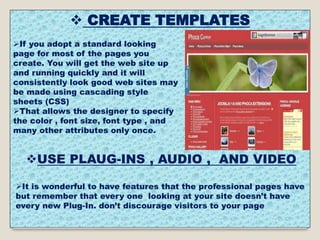
If you adopt a standard looking
page for most of the pages you
create. You will get the web site up
and running quickly and it will
consistently look good web sites may
be made using cascading style
sheets (CSS)
That allows the designer to specify
the color , font size, font type , and
many other attributes only once.
USE PLAUG-INS , AUDIO , AND VIDEO
It is wonderful to have features that the professional pages have
but remember that every one looking at your site doesn’t have
every new Plug-In. don’t discourage visitors to your page
LOOK AT SOME POOR WEB PAGES
Good Format Bad Format
 PALN AHEAD PAY ATTENTION TO
FOLLOWING:-
STRUCTURE
 To help plan and maintain a solid structure a
web master can benefit from using one of the
many website diagramming and mapping tools
available . Many software packages ,including
Microsoft Visio. Have web charting options built
into software.
Website logo
Chat roomsQuick links
Links to
sub-webs
Search
engine
Feature storyJpeg image
STRUCTURE
QUICK LINKS
Cell phones Tablets and Micro software
Interactive Schedule
2/28 8:pm EDI
Con of old cell phones tell
us about the future
Menu bar
 CONTENT:-
 provide something to web site users. “stickiness”
is a quality a web site can possess. If a user stays at your site
for a long period of time at your site has a high degree of
stickiness ,That is why a merchant includes many items of
the wine or choose a proper glass.
Every web site should include an FAQ (frequently asked
questions)
Page. Often these are created based on the experiences of
users and technical support people who identify the topics of
continuing concern
TEXT:-
 Remember that text is important too each web
page should have a title place meaningful words in the first
sentence appearing on your web page. Let people know that
they have indeed navigated to the right web site. Clear writing
is especially important.
 GRAPHICS:-
 Use one of most commonly used images formats, JPEG or
GIF.JPEG are best for photographs and GIF are best for art work images
GIF are limited to 256 color but may include a transparent back ground ,
pixels that allows the background to show through the GIF image.
Keep the back ground simple and make sure users can read the text
clearly when using a background pattern make sure that you can see
the text clearly on top of it.
 create a few professional looking graphics for use on your pages.
PRESENTATION STYLE:-
 Provide an entry display also called home page that
introduces the visitor to the web site. The page must be designed to load
quickly .a useful rule of thumb is to design a page that will load in 14
seconds.
Keep the number of graphics to a reasonable minimum .It takes
additional download time to transfer a graphics intensive
 NAVIGATION:-
 It is fun for you to follow links on the web? The answer
most likely is that it depends. When you discover a web site that loads
easily, has meaningful links, and allows you to easily return to the place
you want to go back to then chances are you think it is fun. But it effect
on making computer training effective.
Most importantly , observe the three clicks rules. Users should be able
to move from the page they are currently on to the page.
PROMOTION:-
 promote your site don’t assume that search engines will
find you right away. Submit your site every few month to various search
engines. Will use to link search requests to your site .
MAINTAINING:-
 As a web developer you may also be asked to maintain
and update web sites on an ongoing basis. This is a services you can
provide and the payment can be agreed upon during initial Project
contract negotiation and project budgeting.
CREATING BLOGS (WEB LOGS)
 Blogs also called web
logs are being written
by corporate users for
both internal and
external
communication. Blogs
are informal and
personal and they often
invite comments and
feedback.
They are easy to
create and update and
are designed to change
daily
Soodam

Soodam

  • 1.
    What is website?? Itis a set of related web pages typically served from a single web domain. A website is hosted on at least one web server, accessible via a network such as the Internet or a private local area network through an Internet address known as a Uniform resource locator. All publicly accessible websites collectively constitute the World Wide Web
  • 2.
    DESIGNING A WEBSITE Web design is a similar process of creation, with the intention of presenting the content on electronic web pages, which the end-users can access through the internet with the help of a web browser. Elements of Web Design. Web design uses many of the same key visual elements as all types of design
  • 3.
    USE PROFESSIONAL TOOLS Youcan use some software called a web editor are as follows. DREAMWEAVER ADOBE FLASH
  • 4.
     STUDY OTHERWEBSITES & USE WEB RESOURCES Look at web sites you and other users thinks are engaging. analyse what design elements are being used and see how they are functioning then try to emulate what you see by crating prototype pages. There are pages of extensions, but one called web Developer is very useful to designers and web masters. Palette grabber is another extension that allows web developers to see a display of color codes just by picking any color on web site. Look at websites that gives lots of hints on design one such site is useit.com
  • 5.
    EXAMINE THE WEBSITE OF PROFESSINAL WEBSITE DESIGNERS. & USE THE TOOLS YOU’VE LEARNED See at the website and point out some points to do best your website .for example “what works” ?? Behind running a website. How can interactive with multiple user and take a feedback of it. Tools help you to compare and contrast the many websites you will visit as you go about learning web page design.
  • 6.
    CONSULT THE BOOKS Somethingthat can add to your expertise in this new field is to read about web designing. So books are as follows: W . W . performance dashboards: measuring , monitoring, and managing your business . New York: john Wiley & sons,Inc-2005 The effective visual communication of data incorporated – 2006 The web designing idea book -2008  CSS AJEX & PHP
  • 7.
     CREATE TEMPLATES Ifyou adopt a standard looking page for most of the pages you create. You will get the web site up and running quickly and it will consistently look good web sites may be made using cascading style sheets (CSS) That allows the designer to specify the color , font size, font type , and many other attributes only once. USE PLAUG-INS , AUDIO , AND VIDEO It is wonderful to have features that the professional pages have but remember that every one looking at your site doesn’t have every new Plug-In. don’t discourage visitors to your page
  • 8.
    LOOK AT SOMEPOOR WEB PAGES Good Format Bad Format
  • 9.
     PALN AHEADPAY ATTENTION TO FOLLOWING:- STRUCTURE  To help plan and maintain a solid structure a web master can benefit from using one of the many website diagramming and mapping tools available . Many software packages ,including Microsoft Visio. Have web charting options built into software.
  • 10.
    Website logo Chat roomsQuicklinks Links to sub-webs Search engine Feature storyJpeg image STRUCTURE QUICK LINKS Cell phones Tablets and Micro software Interactive Schedule 2/28 8:pm EDI Con of old cell phones tell us about the future Menu bar
  • 11.
     CONTENT:-  providesomething to web site users. “stickiness” is a quality a web site can possess. If a user stays at your site for a long period of time at your site has a high degree of stickiness ,That is why a merchant includes many items of the wine or choose a proper glass. Every web site should include an FAQ (frequently asked questions) Page. Often these are created based on the experiences of users and technical support people who identify the topics of continuing concern TEXT:-  Remember that text is important too each web page should have a title place meaningful words in the first sentence appearing on your web page. Let people know that they have indeed navigated to the right web site. Clear writing is especially important.
  • 12.
     GRAPHICS:-  Useone of most commonly used images formats, JPEG or GIF.JPEG are best for photographs and GIF are best for art work images GIF are limited to 256 color but may include a transparent back ground , pixels that allows the background to show through the GIF image. Keep the back ground simple and make sure users can read the text clearly when using a background pattern make sure that you can see the text clearly on top of it.  create a few professional looking graphics for use on your pages. PRESENTATION STYLE:-  Provide an entry display also called home page that introduces the visitor to the web site. The page must be designed to load quickly .a useful rule of thumb is to design a page that will load in 14 seconds. Keep the number of graphics to a reasonable minimum .It takes additional download time to transfer a graphics intensive
  • 13.
     NAVIGATION:-  Itis fun for you to follow links on the web? The answer most likely is that it depends. When you discover a web site that loads easily, has meaningful links, and allows you to easily return to the place you want to go back to then chances are you think it is fun. But it effect on making computer training effective. Most importantly , observe the three clicks rules. Users should be able to move from the page they are currently on to the page. PROMOTION:-  promote your site don’t assume that search engines will find you right away. Submit your site every few month to various search engines. Will use to link search requests to your site . MAINTAINING:-  As a web developer you may also be asked to maintain and update web sites on an ongoing basis. This is a services you can provide and the payment can be agreed upon during initial Project contract negotiation and project budgeting.
  • 14.
    CREATING BLOGS (WEBLOGS)  Blogs also called web logs are being written by corporate users for both internal and external communication. Blogs are informal and personal and they often invite comments and feedback. They are easy to create and update and are designed to change daily