
Time management for
academics
Clay Spinuzzi,
clay.spinuzzi@utexas.edu
Me, in grad school:
“I’m supposed to have
a paper drafted next
week?!?”*
*true story
I got better.
It resulted from a systematic
approach to productivity that
leverages mediation (Vygotsky
2012).
Our actions are mediated—
controlled by outside—by physical
and psychological tools.
We can improve and focus our
actions by designing and
deploying such tools.
But it didn’t happen overnight.
As tasks get more
complex...
● … you need more complex
systems to handle them.
Let’s think about these in terms of
levels.
Each level builds on the last,
allowing you to handle more
complexity—
Even though you aren’t
(necessarily) getting any smarter.
Level 0:
Remembering
things
● Example: Put out the
garbage every Wednesday
night.
We do this in early childhood. It’s
often unmediated.
Unfortunately, the more tasks you
have to remember, the harder it is
to keep on top of them
Level 1: Doing
things right away
● Example: Clearing your
dishes from the table right
after dinner.
This strategy works well when
you’re processing information
serially, with time after each
assignment.
Thus its success depends on how
well other people have structured
events around you.
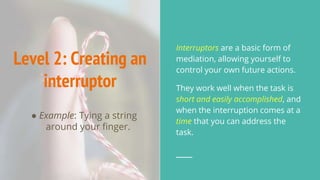
Level 2: Creating an
interruptor
● Example: Tying a string
around your finger.
Interruptors are a basic form of
mediation, allowing yourself to
control your own future actions.
They work well when the task is
short and easily accomplished, and
when the interruption comes at a
time that you can address the
task.
(Levels 0-2 are reactive)
They work as organized responses, but …
they don’t associate clusters of related tasks,
prioritize tasks, or plan actions.
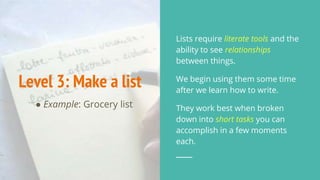
Level 3: Make a list
● Example: Grocery list
Lists require literate tools and the
ability to see relationships
between things.
We begin using them some time
after we learn how to write.
They work best when broken
down into short tasks you can
accomplish in a few moments
each.
Level 4: Attach
tasks to information
● Example: Writing tasks on a
draft.
This step comes sometime after
lists.
Here, you’re juxtaposing two types
of information, one of which can
be a trigger for the other.
For instance, when you pick up
the draft, you’ll be reminded of
the changes you need to make.
(Levels 3-4 are relational)
They help you to associate tasks with each
other and with related information.
They help you to envision clusters of tasks.
But, by themselves, they don’t prioritize, nor
do they project into the future.
Level 5: Organize
and prioritize a list
● Example: Different highlighters
to indicate different levels of
severity in a list of draft
revisions.
Once you learn how to use basic
lists, you may begin to distinguish
not just between tasks, but
between categories of tasks.
Lists can be sequenced and
prioritized, allowing you to follow
an order (sequence) and to triage
tasks (priority)
(Level 5 introduces hierarchy and
sequence) Thus it lets you decompose tasks and see their
relationships over time and in terms of importance.
You begin to mediate your behavior in different
ways, and you begin to make more conscious
decisions about how to execute clusters of tasks.
Level 6: calendar a
task list
● Example: A weekly review
(see GTD)
Here, an interruptor coordinates
with a list, resulting in
chronological planning.
You set up a reminder to guide
your own tasks.
Thus you begin to plan ahead in
time: not just sequence, but
definite moments.
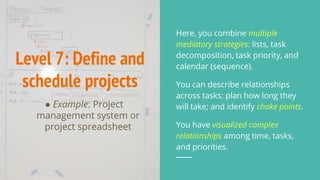
Level 7: Define and
schedule projects
● Example: Project
management system or
project spreadsheet
Here, you combine multiple
mediatory strategies: lists, task
decomposition, task priority, and
calendar (sequence).
You can describe relationships
across tasks; plan how long they
will take; and identify choke points.
You have visualized complex
relationships among time, tasks,
and priorities.
(Levels 6-7 allow you to own your
time and plan
in detail) You can plan into the far future for a given project.
You can visualize an abstract concept: time.
You can identify choke points and determine
whether delays will cascade across the rest of the
project.
Level 8:
Interconnect
planning system
● Example: Coordinating your
project management and
calendar by blocking out time
to execute tasks
At this point, you can look across
planning systems to coordinate
macro-level projects (ex: writing a
book) with immediate tasks (ex:
edit chapter 1 from 9-11am on
Thursday).
Your mediational strategies have
allowed you to relate complex
abstractions.
(Level 8 introduces flexibility)
At this point, you can spot holes in your planning,
prioritize projects, and shift around efforts.
You can also adjust timelines based on unexpected
contingencies.
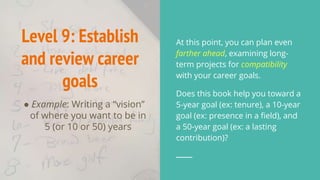
Level 9: Establish
and review career
goals
● Example: Writing a “vision”
of where you want to be in
5 (or 10 or 50) years
At this point, you can plan even
farther ahead, examining long-
term projects for compatibility
with your career goals.
Does this book help you toward a
5-year goal (ex: tenure), a 10-year
goal (ex: presence in a field), and
a 50-year goal (ex: a lasting
contribution)?
(Level 9 allows you to prune and
cohere efforts
long-term) Now you have the tools to decide whether a project
makes sense with your long-term trajectory.
You can kill low-yield projects.
You can envision how a step in one project could
also contribute to other projects.
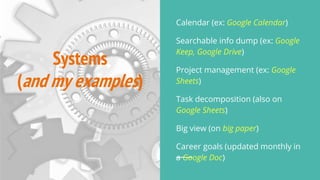
Systems
(and my examples)
Calendar (ex: Google Calendar)
Searchable info dump (ex: Google
Keep, Google Drive)
Project management (ex: Google
Sheets)
Task decomposition (also on
Google Sheets)
Big view (on big paper)
Career goals (updated monthly in
a Google Doc)
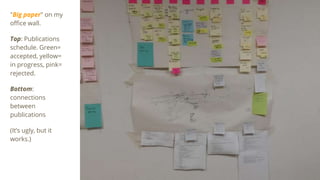
"Big paper" on my
office wall.
Top: Publications
schedule. Green=
accepted, yellow=
in progress, pink=
rejected.
Bottom:
connections
between
publications
(It’s ugly, but it
works.)
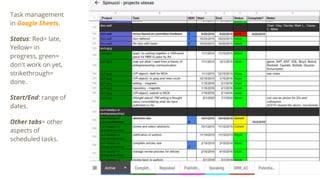
Task management
in Google Sheets.
Status: Red= late,
Yellow= in
progress, green=
don't work on yet,
strikethrough=
done.
Start/End: range of
dates.
Other tabs= other
aspects of
scheduled tasks.
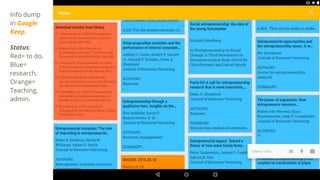
Info dump
in Google
Keep.
Status:
Red= to do,
Blue=
research,
Orange=
Teaching,
admin.
Setting up cross-
system reviews
Set a review time and keep it (ex:
once a week)
Review progress first
Then plan: align projects, big view,
goals, calendar
Remember that your planning is a
"flight plan"; you can shift items
around to address contingencies.
For further reading
Allen, D. (2003). Getting things
done: The art of stress-free
productivity. New York: Penguin
Books.
Hutchins, E. (1995). Cognition in
the wild. Cambridge, MA: MIT
Press.
Vygotsky, L. S. (2012). Thought and
language, 3ed. Cambridge, MA:
MIT Press.

Time management for academics

  • 1.
    Time management for academics ClaySpinuzzi, clay.spinuzzi@utexas.edu
  • 2.
    Me, in gradschool: “I’m supposed to have a paper drafted next week?!?”* *true story
  • 3.
    I got better. Itresulted from a systematic approach to productivity that leverages mediation (Vygotsky 2012). Our actions are mediated— controlled by outside—by physical and psychological tools. We can improve and focus our actions by designing and deploying such tools. But it didn’t happen overnight.
  • 4.
    As tasks getmore complex... ● … you need more complex systems to handle them. Let’s think about these in terms of levels. Each level builds on the last, allowing you to handle more complexity— Even though you aren’t (necessarily) getting any smarter.
  • 5.
    Level 0: Remembering things ● Example:Put out the garbage every Wednesday night. We do this in early childhood. It’s often unmediated. Unfortunately, the more tasks you have to remember, the harder it is to keep on top of them
  • 6.
    Level 1: Doing thingsright away ● Example: Clearing your dishes from the table right after dinner. This strategy works well when you’re processing information serially, with time after each assignment. Thus its success depends on how well other people have structured events around you.
  • 7.
    Level 2: Creatingan interruptor ● Example: Tying a string around your finger. Interruptors are a basic form of mediation, allowing yourself to control your own future actions. They work well when the task is short and easily accomplished, and when the interruption comes at a time that you can address the task.
  • 8.
    (Levels 0-2 arereactive) They work as organized responses, but … they don’t associate clusters of related tasks, prioritize tasks, or plan actions.
  • 9.
    Level 3: Makea list ● Example: Grocery list Lists require literate tools and the ability to see relationships between things. We begin using them some time after we learn how to write. They work best when broken down into short tasks you can accomplish in a few moments each.
  • 10.
    Level 4: Attach tasksto information ● Example: Writing tasks on a draft. This step comes sometime after lists. Here, you’re juxtaposing two types of information, one of which can be a trigger for the other. For instance, when you pick up the draft, you’ll be reminded of the changes you need to make.
  • 11.
    (Levels 3-4 arerelational) They help you to associate tasks with each other and with related information. They help you to envision clusters of tasks. But, by themselves, they don’t prioritize, nor do they project into the future.
  • 12.
    Level 5: Organize andprioritize a list ● Example: Different highlighters to indicate different levels of severity in a list of draft revisions. Once you learn how to use basic lists, you may begin to distinguish not just between tasks, but between categories of tasks. Lists can be sequenced and prioritized, allowing you to follow an order (sequence) and to triage tasks (priority)
  • 13.
    (Level 5 introduceshierarchy and sequence) Thus it lets you decompose tasks and see their relationships over time and in terms of importance. You begin to mediate your behavior in different ways, and you begin to make more conscious decisions about how to execute clusters of tasks.
  • 14.
    Level 6: calendara task list ● Example: A weekly review (see GTD) Here, an interruptor coordinates with a list, resulting in chronological planning. You set up a reminder to guide your own tasks. Thus you begin to plan ahead in time: not just sequence, but definite moments.
  • 15.
    Level 7: Defineand schedule projects ● Example: Project management system or project spreadsheet Here, you combine multiple mediatory strategies: lists, task decomposition, task priority, and calendar (sequence). You can describe relationships across tasks; plan how long they will take; and identify choke points. You have visualized complex relationships among time, tasks, and priorities.
  • 16.
    (Levels 6-7 allowyou to own your time and plan in detail) You can plan into the far future for a given project. You can visualize an abstract concept: time. You can identify choke points and determine whether delays will cascade across the rest of the project.
  • 17.
    Level 8: Interconnect planning system ●Example: Coordinating your project management and calendar by blocking out time to execute tasks At this point, you can look across planning systems to coordinate macro-level projects (ex: writing a book) with immediate tasks (ex: edit chapter 1 from 9-11am on Thursday). Your mediational strategies have allowed you to relate complex abstractions.
  • 18.
    (Level 8 introducesflexibility) At this point, you can spot holes in your planning, prioritize projects, and shift around efforts. You can also adjust timelines based on unexpected contingencies.
  • 19.
    Level 9: Establish andreview career goals ● Example: Writing a “vision” of where you want to be in 5 (or 10 or 50) years At this point, you can plan even farther ahead, examining long- term projects for compatibility with your career goals. Does this book help you toward a 5-year goal (ex: tenure), a 10-year goal (ex: presence in a field), and a 50-year goal (ex: a lasting contribution)?
  • 20.
    (Level 9 allowsyou to prune and cohere efforts long-term) Now you have the tools to decide whether a project makes sense with your long-term trajectory. You can kill low-yield projects. You can envision how a step in one project could also contribute to other projects.
  • 21.
    Systems (and my examples) Calendar(ex: Google Calendar) Searchable info dump (ex: Google Keep, Google Drive) Project management (ex: Google Sheets) Task decomposition (also on Google Sheets) Big view (on big paper) Career goals (updated monthly in a Google Doc)
  • 22.
    "Big paper" onmy office wall. Top: Publications schedule. Green= accepted, yellow= in progress, pink= rejected. Bottom: connections between publications (It’s ugly, but it works.)
  • 23.
    Task management in GoogleSheets. Status: Red= late, Yellow= in progress, green= don't work on yet, strikethrough= done. Start/End: range of dates. Other tabs= other aspects of scheduled tasks.
  • 24.
    Info dump in Google Keep. Status: Red=to do, Blue= research, Orange= Teaching, admin.
  • 25.
    Setting up cross- systemreviews Set a review time and keep it (ex: once a week) Review progress first Then plan: align projects, big view, goals, calendar Remember that your planning is a "flight plan"; you can shift items around to address contingencies.
  • 26.
    For further reading Allen,D. (2003). Getting things done: The art of stress-free productivity. New York: Penguin Books. Hutchins, E. (1995). Cognition in the wild. Cambridge, MA: MIT Press. Vygotsky, L. S. (2012). Thought and language, 3ed. Cambridge, MA: MIT Press.