Zigbee Networks
Using Xbee Modules
• The ZigBee is the name of a wireless protocol
maintained by the IEEE 802.15 standard.
• This is a protocol specified for Wireless Personal
Area Network (PAN) using low powered wireless
transceivers.
• There are already wireless transmitter and receiver
modules which can do point to point communication.
What is ZigBee?
The Xbee is the brand name a wireless transceiver
device introduced by the Digi international which
works on the ZigBee protocol and can form PAN
networks. They have an approximate range of 10 to
100 meters and are used in industries, scientific fields,
medical fields etc.
The Xbee module even though uses complex packet
data based Zigbee protocol for communicating with
each other; But also they can communicate with other
devices using simplest serial communication
protocol and hence they are widely used in
microcontroller base boards.
What is Xbee?
What is Zigbee?
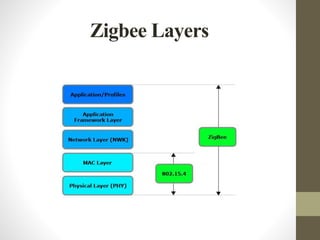
•Based on IEEE 802.15.4 Standard
•Designed for sensor and control
networks
•Used for applications that require:
• Low Power Consumption
• Low Data Rate
• Network Security
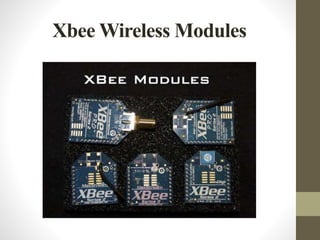
Xbee Wireless Modules
• 802.15.4/Multipoint network topologies
• 2.4 GHz for worldwide deployment
• 900 MHz for long-range deployment
• Low-power sleep modes
• Multiple antenna options
• Low power and long range variants available
Zigbee Layers
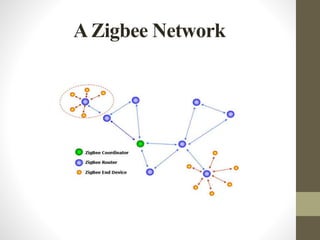
A Zigbee Network
In a mesh network, ZigBee, devices have one of three
different duties:
• Coordinator: Establishes and maintains the network by
assigning addresses to joining (associated) devices and assisting
with path planning form various nodes to its self. In our case
base station.
• Routers: move data between nodes that cannot communicate
directly. In our case sink nodes or cluster heads.
• End devices: The node that collects data and controls devices
on the network and is typically connected to our controllers,
sensors and other devices for network interfacing.
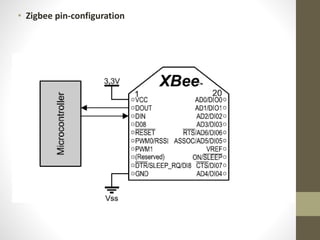
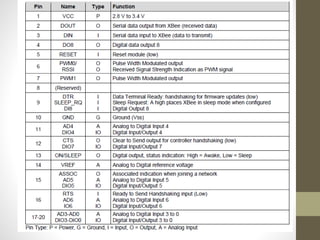
• Zigbee pin-configuration
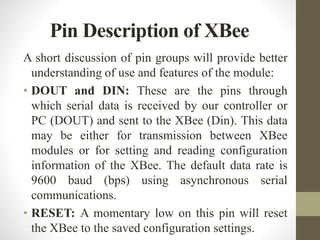
A short discussion of pin groups will provide better
understanding of use and features of the module:
• DOUT and DIN: These are the pins through
which serial data is received by our controller or
PC (DOUT) and sent to the XBee (Din). This data
may be either for transmission between XBee
modules or for setting and reading configuration
information of the XBee. The default data rate is
9600 baud (bps) using asynchronous serial
communications.
• RESET: A momentary low on this pin will reset
the XBee to the saved configuration settings.
Pin Description of XBee
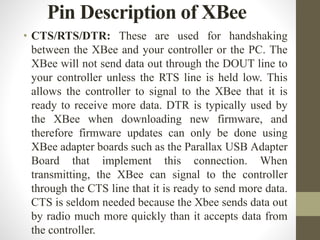
• CTS/RTS/DTR: These are used for handshaking
between the XBee and your controller or the PC. The
XBee will not send data out through the DOUT line to
your controller unless the RTS line is held low. This
allows the controller to signal to the XBee that it is
ready to receive more data. DTR is typically used by
the XBee when downloading new firmware, and
therefore firmware updates can only be done using
XBee adapter boards such as the Parallax USB Adapter
Board that implement this connection. When
transmitting, the XBee can signal to the controller
through the CTS line that it is ready to send more data.
CTS is seldom needed because the Xbee sends data out
by radio much more quickly than it accepts data from
the controller.
Pin Description of XBee
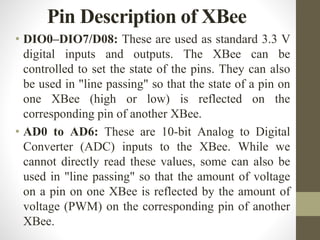
• DIO0–DIO7/D08: These are used as standard 3.3 V
digital inputs and outputs. The XBee can be
controlled to set the state of the pins. They can also
be used in "line passing" so that the state of a pin on
one XBee (high or low) is reflected on the
corresponding pin of another XBee.
• AD0 to AD6: These are 10-bit Analog to Digital
Converter (ADC) inputs to the XBee. While we
cannot directly read these values, some can also be
used in "line passing" so that the amount of voltage
on a pin on one XBee is reflected by the amount of
voltage (PWM) on the corresponding pin of another
XBee.
Pin Description of XBee
• RSSI: The XBee can report the strength of the received
RF signal as PWM output on this pin. This value can
also be retrieved using AT commands or as part of a
packet in API Mode.
• PWM0/1: These pins can be set for 10-bit pulse width
modulated output, which can be used directly or filtered
for analog output. They can also be controlled using
“line passing” by the analog input on another XBee.
• ASSOC: When configured, the XBee can be set to join
an existing network and assigned certain parameters. In
this tutorial we will manually configure the XBee in the
network instead of joining networks.
Pin Description of XBee
XBee & XBee Pro, 802.15.4
Modules
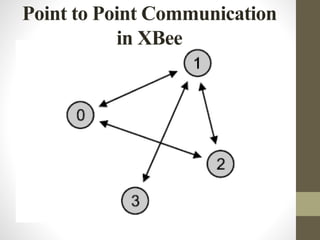
• The 802.15.4 style of XBee (commonly called Series
1) allows point-to-point networking, shown in Figure,
and point-to-multipoint (one node to all nodes)
networking. They use the IEEE 802.15.4 data link
protocol to move data directly between 2 or more
devices. All nodes on the network use the same
firmware version though settings on various nodes
may vary.
• The XBee and XBee-Pro are nearly identical in
operation and function with the biggest differences
being size and power. While the pinouts are the same,
the casing of the XBee Pro is slightly longer.
Point to Point Communication
in XBee
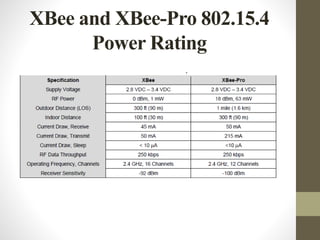
XBee and XBee-Pro 802.15.4
Power Rating
Working of XBee
• To operate XBee, two Xbees are required, one will act as a
transmitter and the other will act as a receiver.
• Now suppose you want to send something from one side to
another, one has to connect one xbee at the transmitter side and
the other at the receiver side. For example home automation
project in which remote is used to switch on your light or fan
etc. So in that case there we must be one XBee in remote and
the second one in board where the light circuit is placed.
• So when one press’s the button of remote, the XBee in remote
will send an instruction to the XBee in the board. As soon as
the XBee in the board receive the instruction from XBee in the
remote it will switch on the light. Both the Xbees are
connected to the Arduino board and needs to be programmed.
Example of interfacing Temperature
sensor withArduino using XBee
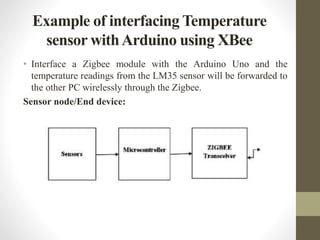
• Interface a Zigbee module with the Arduino Uno and the
temperature readings from the LM35 sensor will be forwarded to
the other PC wirelessly through the Zigbee.
Sensor node/End device:
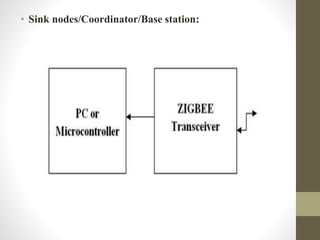
• Sink nodes/Coordinator/Base station:
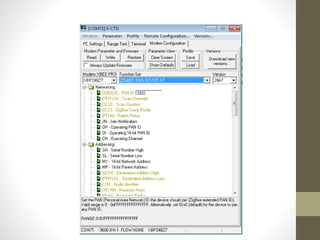
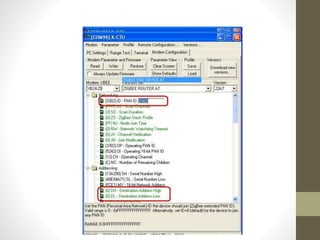
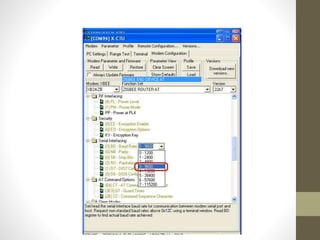
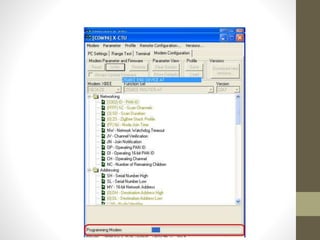
Configuration of Zigbee
• Configuration
• XB24-ZB
• Coordinator AT : PAN ID and Destination
• Routers: PAN ID and JV verification for Tran- receiver
• Both should have common PAN ID
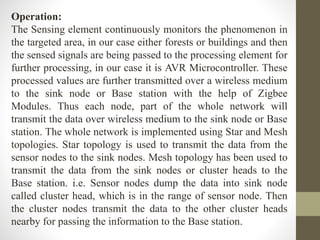
Operation:
The Sensing element continuously monitors the phenomenon in
the targeted area, in our case either forests or buildings and then
the sensed signals are being passed to the processing element for
further processing, in our case it is AVR Microcontroller. These
processed values are further transmitted over a wireless medium
to the sink node or Base station with the help of Zigbee
Modules. Thus each node, part of the whole network will
transmit the data over wireless medium to the sink node or Base
station. The whole network is implemented using Star and Mesh
topologies. Star topology is used to transmit the data from the
sensor nodes to the sink nodes. Mesh topology has been used to
transmit the data from the sink nodes or cluster heads to the
Base station. i.e. Sensor nodes dump the data into sink node
called cluster head, which is in the range of sensor node. Then
the cluster nodes transmit the data to the other cluster heads
nearby for passing the information to the Base station.
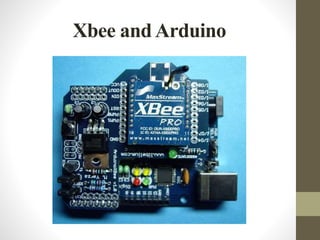
Xbee and Arduino
Xbee Wireless Modules
Nvis 3302ARD RoboCar
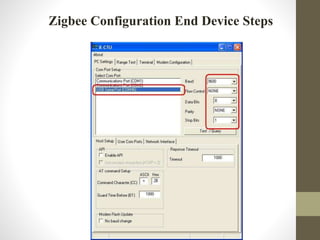
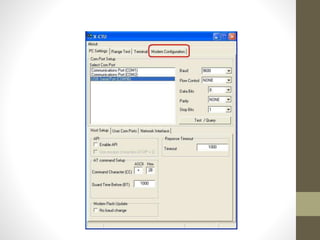
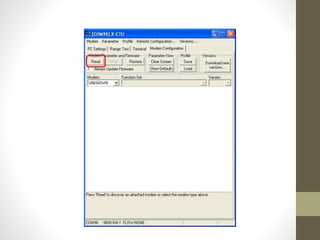
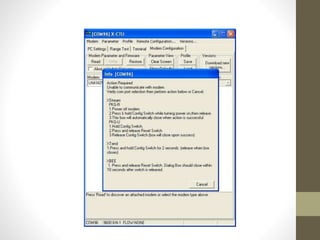
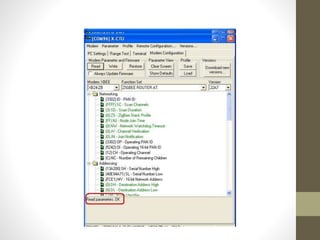
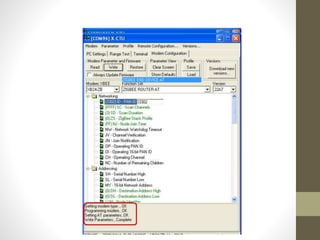
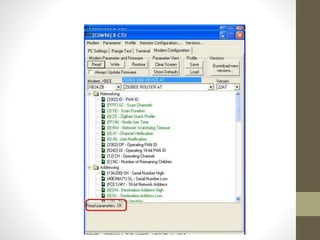
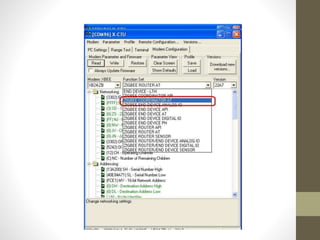
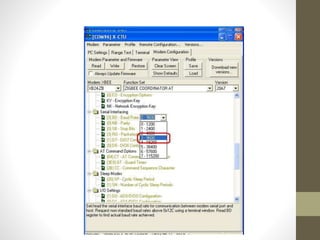
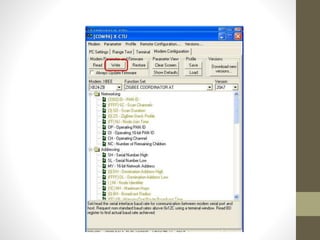
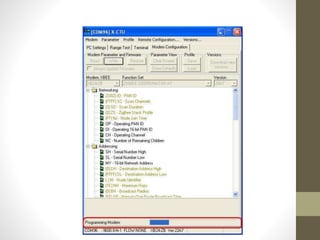
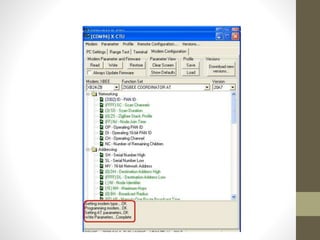
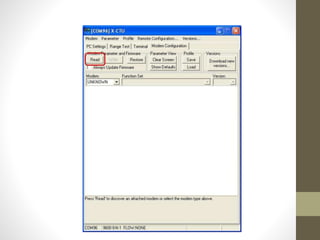
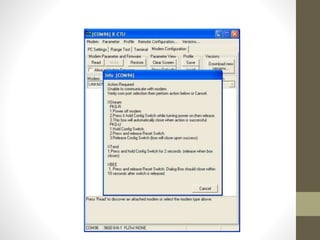
Zigbee Configuration End Device Steps
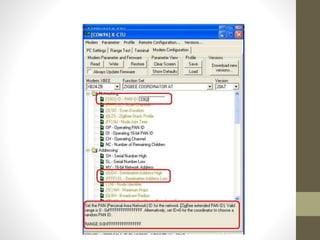
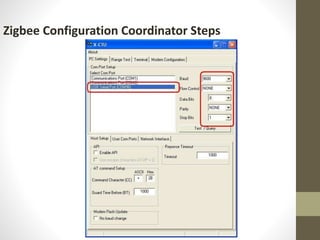
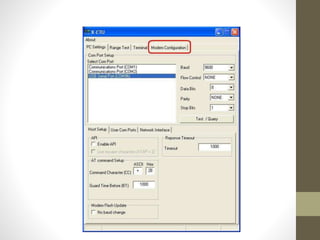
Zigbee Configuration Coordinator Steps
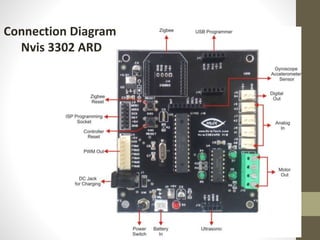
Connection Diagram
Nvis 3302 ARD
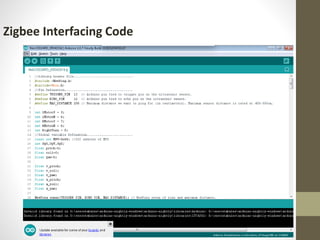
Zigbee Interfacing Code
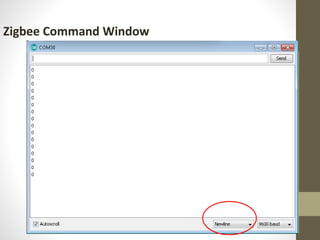
Zigbee Command Window
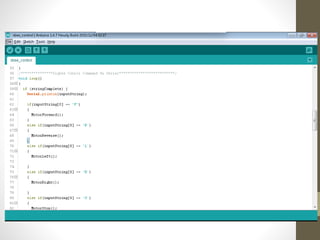
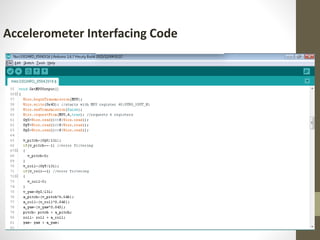
Accelerometer Interfacing Code
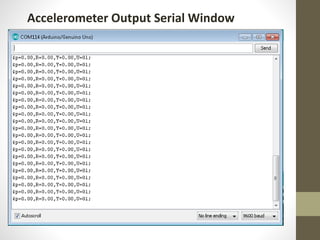
Accelerometer Output Serial Window

zigbee networks using xbee modules zigbee networks using xbee modules

  • 1.
  • 2.
    • The ZigBeeis the name of a wireless protocol maintained by the IEEE 802.15 standard. • This is a protocol specified for Wireless Personal Area Network (PAN) using low powered wireless transceivers. • There are already wireless transmitter and receiver modules which can do point to point communication. What is ZigBee?
  • 3.
    The Xbee isthe brand name a wireless transceiver device introduced by the Digi international which works on the ZigBee protocol and can form PAN networks. They have an approximate range of 10 to 100 meters and are used in industries, scientific fields, medical fields etc. The Xbee module even though uses complex packet data based Zigbee protocol for communicating with each other; But also they can communicate with other devices using simplest serial communication protocol and hence they are widely used in microcontroller base boards. What is Xbee?
  • 4.
    What is Zigbee? •Basedon IEEE 802.15.4 Standard •Designed for sensor and control networks •Used for applications that require: • Low Power Consumption • Low Data Rate • Network Security
  • 5.
    Xbee Wireless Modules •802.15.4/Multipoint network topologies • 2.4 GHz for worldwide deployment • 900 MHz for long-range deployment • Low-power sleep modes • Multiple antenna options • Low power and long range variants available
  • 6.
  • 7.
  • 8.
    In a meshnetwork, ZigBee, devices have one of three different duties: • Coordinator: Establishes and maintains the network by assigning addresses to joining (associated) devices and assisting with path planning form various nodes to its self. In our case base station. • Routers: move data between nodes that cannot communicate directly. In our case sink nodes or cluster heads. • End devices: The node that collects data and controls devices on the network and is typically connected to our controllers, sensors and other devices for network interfacing.
  • 9.
  • 11.
    A short discussionof pin groups will provide better understanding of use and features of the module: • DOUT and DIN: These are the pins through which serial data is received by our controller or PC (DOUT) and sent to the XBee (Din). This data may be either for transmission between XBee modules or for setting and reading configuration information of the XBee. The default data rate is 9600 baud (bps) using asynchronous serial communications. • RESET: A momentary low on this pin will reset the XBee to the saved configuration settings. Pin Description of XBee
  • 12.
    • CTS/RTS/DTR: Theseare used for handshaking between the XBee and your controller or the PC. The XBee will not send data out through the DOUT line to your controller unless the RTS line is held low. This allows the controller to signal to the XBee that it is ready to receive more data. DTR is typically used by the XBee when downloading new firmware, and therefore firmware updates can only be done using XBee adapter boards such as the Parallax USB Adapter Board that implement this connection. When transmitting, the XBee can signal to the controller through the CTS line that it is ready to send more data. CTS is seldom needed because the Xbee sends data out by radio much more quickly than it accepts data from the controller. Pin Description of XBee
  • 13.
    • DIO0–DIO7/D08: Theseare used as standard 3.3 V digital inputs and outputs. The XBee can be controlled to set the state of the pins. They can also be used in "line passing" so that the state of a pin on one XBee (high or low) is reflected on the corresponding pin of another XBee. • AD0 to AD6: These are 10-bit Analog to Digital Converter (ADC) inputs to the XBee. While we cannot directly read these values, some can also be used in "line passing" so that the amount of voltage on a pin on one XBee is reflected by the amount of voltage (PWM) on the corresponding pin of another XBee. Pin Description of XBee
  • 14.
    • RSSI: TheXBee can report the strength of the received RF signal as PWM output on this pin. This value can also be retrieved using AT commands or as part of a packet in API Mode. • PWM0/1: These pins can be set for 10-bit pulse width modulated output, which can be used directly or filtered for analog output. They can also be controlled using “line passing” by the analog input on another XBee. • ASSOC: When configured, the XBee can be set to join an existing network and assigned certain parameters. In this tutorial we will manually configure the XBee in the network instead of joining networks. Pin Description of XBee
  • 15.
    XBee & XBeePro, 802.15.4 Modules • The 802.15.4 style of XBee (commonly called Series 1) allows point-to-point networking, shown in Figure, and point-to-multipoint (one node to all nodes) networking. They use the IEEE 802.15.4 data link protocol to move data directly between 2 or more devices. All nodes on the network use the same firmware version though settings on various nodes may vary. • The XBee and XBee-Pro are nearly identical in operation and function with the biggest differences being size and power. While the pinouts are the same, the casing of the XBee Pro is slightly longer.
  • 16.
    Point to PointCommunication in XBee
  • 17.
    XBee and XBee-Pro802.15.4 Power Rating
  • 18.
    Working of XBee •To operate XBee, two Xbees are required, one will act as a transmitter and the other will act as a receiver. • Now suppose you want to send something from one side to another, one has to connect one xbee at the transmitter side and the other at the receiver side. For example home automation project in which remote is used to switch on your light or fan etc. So in that case there we must be one XBee in remote and the second one in board where the light circuit is placed. • So when one press’s the button of remote, the XBee in remote will send an instruction to the XBee in the board. As soon as the XBee in the board receive the instruction from XBee in the remote it will switch on the light. Both the Xbees are connected to the Arduino board and needs to be programmed.
  • 19.
    Example of interfacingTemperature sensor withArduino using XBee • Interface a Zigbee module with the Arduino Uno and the temperature readings from the LM35 sensor will be forwarded to the other PC wirelessly through the Zigbee. Sensor node/End device:
  • 20.
  • 21.
    Configuration of Zigbee •Configuration • XB24-ZB • Coordinator AT : PAN ID and Destination • Routers: PAN ID and JV verification for Tran- receiver • Both should have common PAN ID
  • 22.
    Operation: The Sensing elementcontinuously monitors the phenomenon in the targeted area, in our case either forests or buildings and then the sensed signals are being passed to the processing element for further processing, in our case it is AVR Microcontroller. These processed values are further transmitted over a wireless medium to the sink node or Base station with the help of Zigbee Modules. Thus each node, part of the whole network will transmit the data over wireless medium to the sink node or Base station. The whole network is implemented using Star and Mesh topologies. Star topology is used to transmit the data from the sensor nodes to the sink nodes. Mesh topology has been used to transmit the data from the sink nodes or cluster heads to the Base station. i.e. Sensor nodes dump the data into sink node called cluster head, which is in the range of sensor node. Then the cluster nodes transmit the data to the other cluster heads nearby for passing the information to the Base station.
  • 23.
  • 24.
  • 25.
  • 26.
  • 36.
  • 47.
  • 48.
  • 50.
  • 51.
  • 52.