
Zero Overhead


Pub/Sub


Store/Query


Compute
Advanced Technology Office


Angelo	Corsaro,	PhD
Chief	Technology	Officer
Luca	Cominardi,	PhD
Senior	Technologist
Gabriele	Baldoni
Technologist
Julien	Enoch
Senior	Technologist
Olivier	Hecart
Senior	Technologist


installation
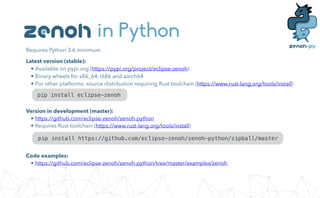
in Python
Requires Python 3.6 minimum.


Latest version (stable):


• Available on pypi.org (https://pypi.org/project/eclipse-zenoh)


• Binary wheels for x86_64, i686 and aarch64


• For other platforms: source distribution requiring Rust toolchain (https://www.rust-lang.org/tools/install)
pip install eclipse-zenoh
Version in development (master):


• https://github.com/eclipse-zenoh/zenoh-python


• Requires Rust toolchain (https://www.rust-lang.org/tools/install)
pip install https://github.com/eclipse-zenoh/zenoh-python/zipball/master
Code examples:


• https://github.com/eclipse-zenoh/zenoh-python/tree/master/examples/zenoh
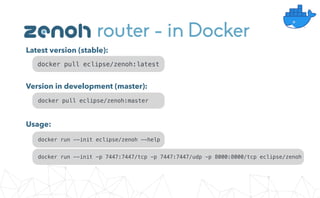
router - in Docker
Latest version (stable):
docker pull eclipse/zenoh:latest
Version in development (master):
docker pull eclipse/zenoh:master
Usage:
docker run --init eclipse/zenoh --help
docker run --init -p 7447:7447/tcp -p 7447:7447/udp -p 8000:8000/tcp eclipse/zenoh
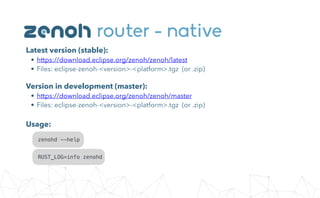
router - native
Latest version (stable):


• https://download.eclipse.org/zenoh/zenoh/latest


• Files: eclipse-zenoh-<version>-<platform>.tgz (or .zip)
Version in development (master):


• https://download.eclipse.org/zenoh/zenoh/master


• Files: eclipse-zenoh-<version>-<platform>.tgz (or .zip)
zenohd --help
RUST_LOG=info zenohd
Usage:


geo-distributed
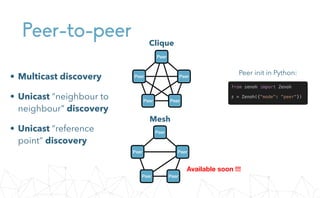
Peer-to-peer
Peer
Peer
Peer
Peer
Peer
• Multicast discovery


• Unicast “neighbour to
neighbour” discovery


• Unicast “reference
point” discovery
from zenoh import Zenoh


z = Zenoh({"mode": "peer"})
Clique
Peer
Peer
Peer
Peer
Peer
Available soon !!!
Mesh
Peer init in Python:
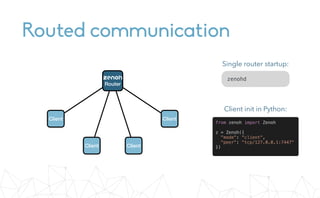
Routed communication
Client
Client
Client
Client


Router
from zenoh import Zenoh


z = Zenoh({


"mode": "client",


"peer": "tcp/127.0.0.1:7447"


})
Client init in Python:
zenohd
Single router startup:
Routed communication
Client
Client
Peer
Peer
Peer
Peer
Peer
Peer
Peer
Peer
Peer
Peer


Router
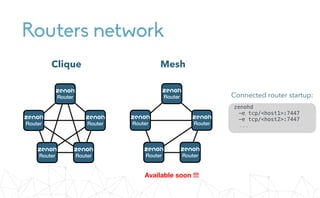
Routers network
Clique Mesh
Available soon !!!


Router


Router


Router


Router


Router


Router


Router


Router


Router


Router
zenohd


-e tcp/<host1>:7447


-e tcp/<host2>:7447


...
Connected router startup:
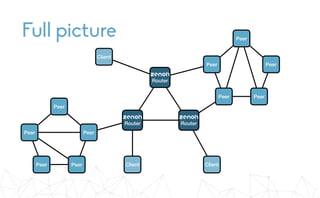
Full picture Peer
Peer
Peer
Peer
Peer
Peer
Peer
Peer
Peer
Peer Client
Client
Client


Router


Router


Router


pub/sub
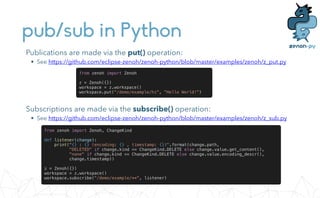
pub/sub in Python
Publications are made via the put() operation:


• See https://github.com/eclipse-zenoh/zenoh-python/blob/master/examples/zenoh/z_put.py
from zenoh import Zenoh


z = Zenoh({})


workspace = z.workspace()


workspace.put("/demo/example/hi", "Hello World!")
Subscriptions are made via the subscribe() operation:


• See https://github.com/eclipse-zenoh/zenoh-python/blob/master/examples/zenoh/z_sub.py
from zenoh import Zenoh, ChangeKind


def listener(change):


print("{} : {} (encoding: {} , timestamp: {})".format(change.path,


"DELETED" if change.kind == ChangeKind.DELETE else change.value.get_content(),


"none" if change.kind == ChangeKind.DELETE else change.value.encoding_descr(),


change.timestamp))


z = Zenoh({})


workspace = z.workspace()


workspace.subscribe("/demo/example/**", listener)
Value types and encodings
zenoh supports different value types.


Each has an encoding described by its mime-type:
from zenoh import Zenoh


import json


z = Zenoh({})


workspace = z.workspace()


# - String


workspace.put('/demo/example/String', 'Hello World!')


# - Integer


workspace.put('/demo/example/Integer', 3)


# - Float


workspace.put('/demo/example/Float', 3.14)


# - Properties (as a Dictionary with str only)


workspace.put('/demo/example/Properties', {'p1': 'v1', 'p2': 'v2'})


# - Json (str format)


workspace.put('/demo/example/Json',


Value.Json(json.dumps(['foo', {'bar': ('baz', None, 1.0, 2)}])))


# - Raw ('application/octet-stream' encoding by default)


workspace.put('/demo/example/Raw', b'x48x69x21')


# - Custom


workspace.put('/demo/example/Custom',


Value.Custom('my_encoding', b'x48x69x21'))


store/query
Storages
Peer
Peer
Peer
Peer
Peer Client
Client
Client


Router


Router


Router
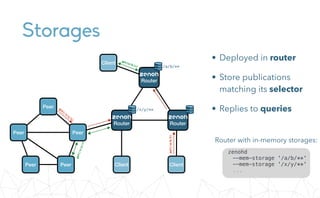
zenohd


--mem-storage '/a/b/**'


--mem-storage '/x/y/**'


...
Router with in-memory storages:
• Deployed in router


• Store publications
matching its selector


• Replies to queries
/a/b/**
/x/y/**
put(/x/y/1)
put(/a/b/2)
get(a/b/*)
g
e
t
(
/
x
/
y
/
*
)
pub/store/query in Python
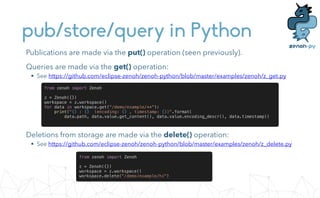
Deletions from storage are made via the delete() operation:


• See https://github.com/eclipse-zenoh/zenoh-python/blob/master/examples/zenoh/z_delete.py
from zenoh import Zenoh


z = Zenoh({})


workspace = z.workspace()


workspace.delete("/demo/example/hi")
Publications are made via the put() operation (seen previously).


Queries are made via the get() operation:


• See https://github.com/eclipse-zenoh/zenoh-python/blob/master/examples/zenoh/z_get.py
from zenoh import Zenoh


z = Zenoh({})


workspace = z.workspace()


for data in workspace.get("/demo/example/**"):


print("{} : {} (encoding: {} , timestamp: {})".format(


data.path, data.value.get_content(), data.value.encoding_descr(), data.timestamp))


compute/query
Compute
Peer
Peer
Peer
Peer
Peer Client
Client
Client


Router


Router


Router
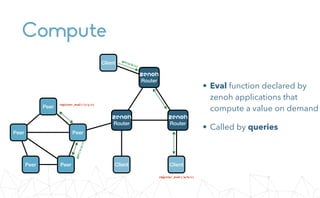
• Eval function declared by
zenoh applications that
compute a value on demand


• Called by queries
register_eval(/x/y/z)
get(a/b/*)
g
e
t
(
/
x
/
y
/
*
)
register_eval(/a/b/c)
Compute/query in Python
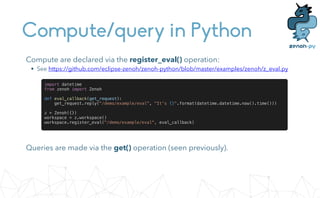
Queries are made via the get() operation (seen previously).
Compute are declared via the register_eval() operation:


• See https://github.com/eclipse-zenoh/zenoh-python/blob/master/examples/zenoh/z_eval.py
import datetime


from zenoh import Zenoh


def eval_callback(get_request):


get_request.reply("/demo/example/eval", "It's {}".format(datetime.datetime.now().time()))


z = Zenoh({})


workspace = z.workspace()


workspace.register_eval("/demo/example/eval", eval_callback)


REST API
REST API
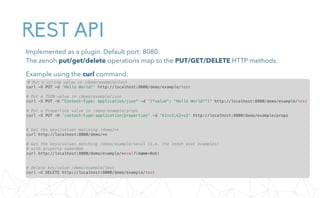
Implemented as a plugin. Default port: 8080.


The zenoh put/get/delete operations map to the PUT/GET/DELETE HTTP methods.


Example using the curl command:
# Put a string value in /demo/example/test


curl -X PUT -d 'Hello World!' http://localhost:8000/demo/example/test


# Put a JSON value in /demo/example/json


curl -X PUT -H "Content-Type: application/json" -d '{"value": "Hello World!"}' http://localhost:8000/demo/example/test


# Put a Properties value in /demo/example/props


curl -X PUT -H 'content-type:application/properties' -d 'k1=v1;k2=v2' http://localhost:8000/demo/example/props


# Get the keys/values matching /demo/**


curl http://localhost:8000/demo/**


# Get the keys/values matching /demo/example/*eval (i.e. the zenoh eval examples)


# with property name=Bob


curl http://localhost:8000/demo/example/*eval?(name=Bob)


# Delete key/value /demo/example/test


curl -X DELETE http://localhost:8000/demo/example/test


backend and storages
Backends
A zenoh backend is:


• a library, loaded on demand by the zenoh router (name: libzbackend_<id>.so)


• a factory for zenoh storages


• leveraging a speci
fi
c technology to implement storages


Existing backends:


• In-memory: built-in in zenoh router


• File system:


• https://github.com/eclipse-zenoh/zenoh-backend-
fi
lesystem


• RocksDB:


• https://github.com/eclipse-zenoh/zenoh-backend-rocksdb


• In
fl
uxDB:


• https://github.com/eclipse-zenoh/zenoh-backend-in
fl
uxdb
Admin space
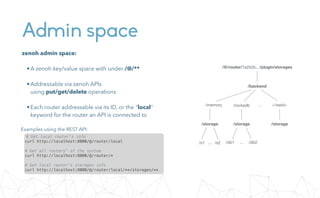
zenoh admin space:


•A zenoh key/value space with under /@/**


•Addressable via zenoh APIs


using put/get/delete operations


•Each router addressable via its ID, or the "local"
keyword for the router an API is connected to
/@/router/1a2b3c.../plugin/storages
/backend
/memory /rocksdb /<beid>
/storage /storage
/s2
/s1
...
...
/storage
/db2
/db1 ...
# Get local router's info


curl http://localhost:8000/@/router/local


# Get all routers' of the system


curl http://localhost:8000/@/router/*


# Get local router's storages info


curl http://localhost:8000/@/router/local/**/storages/**
Examples using the REST API:
Backends/storages management
Examples using the REST API:
# Add a memory storage


curl -X PUT -H 'content-type:application/properties' -d 'path_expr=/demo/test/**'


http://localhost:8000/@/router/local/plugin/storages/backend/memory/storage/my-test


# Add a FileSystem backend (assuming libzbackend_fs.so is available)


curl -X PUT -H 'content-type:application/properties'


http://localhost:8000/@/router/local/plugin/storages/backend/fs


# Add a FileSystem storage


curl -X PUT -H 'content-type:application/properties' -d 'path_expr=/demo/example/**;path_prefix=/demo/example;dir=test'


http://localhost:8000/@/router/local/plugin/storages/backend/fs/storage/my-test


# Add an InfluxDB backend (assuming libzbackend_influxdb.so is available and InfluxDB running at http://localhost:8086)


curl -X PUT -H 'content-type:application/properties' -d 'url=http://localhost:8086'


http://localhost:8000/@/router/local/plugin/storages/backend/influxdb


# Add an InfluxDB storage using the database named "zenoh-example"


curl -X PUT -H 'content-type:application/properties' -d 'path_expr=/demo/example/**;db=zenoh-example'


http://localhost:8000/@/router/local/plugin/storages/backend/influxdb/storage/my-test


plugins
Plugins
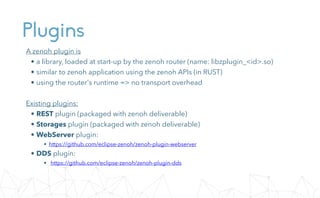
A zenoh plugin is


• a library, loaded at start-up by the zenoh router (name: libzplugin_<id>.so)


• similar to zenoh application using the zenoh APIs (in RUST)


• using the router's runtime => no transport overhead


Existing plugins:


• REST plugin (packaged with zenoh deliverable)


• Storages plugin (packaged with zenoh deliverable)


• WebServer plugin:


• https://github.com/eclipse-zenoh/zenoh-plugin-webserver


• DDS plugin:


• https://github.com/eclipse-zenoh/zenoh-plugin-dds
Live Demo
zenoh
us-west.zenoh.io


/demo/us-west/**
us-east.zenoh.io


/demo/us-east/**
eu.zenoh.io


/demo/eu/**
ap.zenoh.io


/demo/ap/**
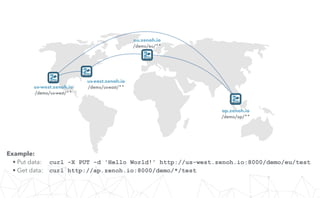
Example:


• Put data: curl -X PUT -d 'Hello World!' http://us-west.zenoh.io:8000/demo/eu/test


• Get data: curl http://ap.zenoh.io:8000/demo/*/test
us-west.zenoh.io


/demo/us-west/**
us-east.zenoh.io


/demo/us-east/**
eu.zenoh.io


/demo/eu/**
ap.zenoh.io


/demo/ap/**
Example:


• Get time series: curl http://us-west.zenoh.io:8000/demo/influxdb/**?(stoptime=now())


• Browse /public/**: http://eu.zenoh.io:8080/public
File system storage


/public/**
File system storage


/public/**
InfluxDB storage


/demo/influxdb/**
RocksDB storage


/demo/rocksdb/**
After addition of backends/storages:
References
Innovating Together

Zenoh Tutorial

  • 1.
    Zero Overhead Pub/Sub Store/Query Compute Advanced TechnologyOffice Angelo Corsaro, PhD Chief Technology Officer Luca Cominardi, PhD Senior Technologist Gabriele Baldoni Technologist Julien Enoch Senior Technologist Olivier Hecart Senior Technologist
  • 2.
  • 3.
    in Python Requires Python3.6 minimum. Latest version (stable): • Available on pypi.org (https://pypi.org/project/eclipse-zenoh) • Binary wheels for x86_64, i686 and aarch64 • For other platforms: source distribution requiring Rust toolchain (https://www.rust-lang.org/tools/install) pip install eclipse-zenoh Version in development (master): • https://github.com/eclipse-zenoh/zenoh-python • Requires Rust toolchain (https://www.rust-lang.org/tools/install) pip install https://github.com/eclipse-zenoh/zenoh-python/zipball/master Code examples: • https://github.com/eclipse-zenoh/zenoh-python/tree/master/examples/zenoh
  • 4.
    router - inDocker Latest version (stable): docker pull eclipse/zenoh:latest Version in development (master): docker pull eclipse/zenoh:master Usage: docker run --init eclipse/zenoh --help docker run --init -p 7447:7447/tcp -p 7447:7447/udp -p 8000:8000/tcp eclipse/zenoh
  • 5.
    router - native Latestversion (stable): • https://download.eclipse.org/zenoh/zenoh/latest • Files: eclipse-zenoh-<version>-<platform>.tgz (or .zip) Version in development (master): • https://download.eclipse.org/zenoh/zenoh/master • Files: eclipse-zenoh-<version>-<platform>.tgz (or .zip) zenohd --help RUST_LOG=info zenohd Usage:
  • 6.
  • 7.
    Peer-to-peer Peer Peer Peer Peer Peer • Multicast discovery •Unicast “neighbour to neighbour” discovery • Unicast “reference point” discovery from zenoh import Zenoh z = Zenoh({"mode": "peer"}) Clique Peer Peer Peer Peer Peer Available soon !!! Mesh Peer init in Python:
  • 8.
    Routed communication Client Client Client Client 
 Router from zenohimport Zenoh z = Zenoh({ "mode": "client", "peer": "tcp/127.0.0.1:7447" }) Client init in Python: zenohd Single router startup:
  • 9.
  • 10.
    Routers network Clique Mesh Availablesoon !!! 
 Router 
 Router 
 Router 
 Router 
 Router 
 Router 
 Router 
 Router 
 Router 
 Router zenohd 
 -e tcp/<host1>:7447 
 -e tcp/<host2>:7447 
 ... Connected router startup:
  • 11.
    Full picture Peer Peer Peer Peer Peer Peer Peer Peer Peer PeerClient Client Client 
 Router 
 Router 
 Router
  • 12.
  • 13.
    pub/sub in Python Publicationsare made via the put() operation: • See https://github.com/eclipse-zenoh/zenoh-python/blob/master/examples/zenoh/z_put.py from zenoh import Zenoh z = Zenoh({}) workspace = z.workspace() workspace.put("/demo/example/hi", "Hello World!") Subscriptions are made via the subscribe() operation: • See https://github.com/eclipse-zenoh/zenoh-python/blob/master/examples/zenoh/z_sub.py from zenoh import Zenoh, ChangeKind def listener(change): print("{} : {} (encoding: {} , timestamp: {})".format(change.path, "DELETED" if change.kind == ChangeKind.DELETE else change.value.get_content(), "none" if change.kind == ChangeKind.DELETE else change.value.encoding_descr(), change.timestamp)) z = Zenoh({}) workspace = z.workspace() workspace.subscribe("/demo/example/**", listener)
  • 14.
    Value types andencodings zenoh supports different value types. 
 Each has an encoding described by its mime-type: from zenoh import Zenoh import json z = Zenoh({}) workspace = z.workspace() # - String workspace.put('/demo/example/String', 'Hello World!') # - Integer workspace.put('/demo/example/Integer', 3) # - Float workspace.put('/demo/example/Float', 3.14) # - Properties (as a Dictionary with str only) workspace.put('/demo/example/Properties', {'p1': 'v1', 'p2': 'v2'}) # - Json (str format) workspace.put('/demo/example/Json', Value.Json(json.dumps(['foo', {'bar': ('baz', None, 1.0, 2)}]))) # - Raw ('application/octet-stream' encoding by default) workspace.put('/demo/example/Raw', b'x48x69x21') # - Custom workspace.put('/demo/example/Custom', Value.Custom('my_encoding', b'x48x69x21'))
  • 15.
  • 16.
    Storages Peer Peer Peer Peer Peer Client Client Client 
 Router 
 Router 
 Router zenohd 
 --mem-storage '/a/b/**' 
 --mem-storage'/x/y/**' 
 ... Router with in-memory storages: • Deployed in router • Store publications matching its selector • Replies to queries /a/b/** /x/y/** put(/x/y/1) put(/a/b/2) get(a/b/*) g e t ( / x / y / * )
  • 17.
    pub/store/query in Python Deletionsfrom storage are made via the delete() operation: • See https://github.com/eclipse-zenoh/zenoh-python/blob/master/examples/zenoh/z_delete.py from zenoh import Zenoh z = Zenoh({}) workspace = z.workspace() workspace.delete("/demo/example/hi") Publications are made via the put() operation (seen previously). Queries are made via the get() operation: • See https://github.com/eclipse-zenoh/zenoh-python/blob/master/examples/zenoh/z_get.py from zenoh import Zenoh z = Zenoh({}) workspace = z.workspace() for data in workspace.get("/demo/example/**"): print("{} : {} (encoding: {} , timestamp: {})".format( data.path, data.value.get_content(), data.value.encoding_descr(), data.timestamp))
  • 18.
  • 19.
    Compute Peer Peer Peer Peer Peer Client Client Client 
 Router 
 Router 
 Router • Evalfunction declared by zenoh applications that compute a value on demand • Called by queries register_eval(/x/y/z) get(a/b/*) g e t ( / x / y / * ) register_eval(/a/b/c)
  • 20.
    Compute/query in Python Queriesare made via the get() operation (seen previously). Compute are declared via the register_eval() operation: • See https://github.com/eclipse-zenoh/zenoh-python/blob/master/examples/zenoh/z_eval.py import datetime from zenoh import Zenoh def eval_callback(get_request): get_request.reply("/demo/example/eval", "It's {}".format(datetime.datetime.now().time())) z = Zenoh({}) workspace = z.workspace() workspace.register_eval("/demo/example/eval", eval_callback)
  • 21.
  • 22.
    REST API Implemented asa plugin. Default port: 8080. 
 The zenoh put/get/delete operations map to the PUT/GET/DELETE HTTP methods. Example using the curl command: # Put a string value in /demo/example/test curl -X PUT -d 'Hello World!' http://localhost:8000/demo/example/test # Put a JSON value in /demo/example/json curl -X PUT -H "Content-Type: application/json" -d '{"value": "Hello World!"}' http://localhost:8000/demo/example/test # Put a Properties value in /demo/example/props curl -X PUT -H 'content-type:application/properties' -d 'k1=v1;k2=v2' http://localhost:8000/demo/example/props # Get the keys/values matching /demo/** curl http://localhost:8000/demo/** # Get the keys/values matching /demo/example/*eval (i.e. the zenoh eval examples) # with property name=Bob curl http://localhost:8000/demo/example/*eval?(name=Bob) # Delete key/value /demo/example/test curl -X DELETE http://localhost:8000/demo/example/test
  • 23.
  • 24.
    Backends A zenoh backendis: • a library, loaded on demand by the zenoh router (name: libzbackend_<id>.so) • a factory for zenoh storages • leveraging a speci fi c technology to implement storages Existing backends: • In-memory: built-in in zenoh router • File system: • https://github.com/eclipse-zenoh/zenoh-backend- fi lesystem • RocksDB: • https://github.com/eclipse-zenoh/zenoh-backend-rocksdb • In fl uxDB: • https://github.com/eclipse-zenoh/zenoh-backend-in fl uxdb
  • 25.
    Admin space zenoh adminspace: 
 •A zenoh key/value space with under /@/** 
 •Addressable via zenoh APIs 
 using put/get/delete operations 
 •Each router addressable via its ID, or the "local" keyword for the router an API is connected to /@/router/1a2b3c.../plugin/storages /backend /memory /rocksdb /<beid> /storage /storage /s2 /s1 ... ... /storage /db2 /db1 ... # Get local router's info curl http://localhost:8000/@/router/local # Get all routers' of the system curl http://localhost:8000/@/router/* # Get local router's storages info curl http://localhost:8000/@/router/local/**/storages/** Examples using the REST API:
  • 26.
    Backends/storages management Examples usingthe REST API: # Add a memory storage curl -X PUT -H 'content-type:application/properties' -d 'path_expr=/demo/test/**' 
 http://localhost:8000/@/router/local/plugin/storages/backend/memory/storage/my-test # Add a FileSystem backend (assuming libzbackend_fs.so is available) curl -X PUT -H 'content-type:application/properties' 
 http://localhost:8000/@/router/local/plugin/storages/backend/fs # Add a FileSystem storage curl -X PUT -H 'content-type:application/properties' -d 'path_expr=/demo/example/**;path_prefix=/demo/example;dir=test' 
 http://localhost:8000/@/router/local/plugin/storages/backend/fs/storage/my-test # Add an InfluxDB backend (assuming libzbackend_influxdb.so is available and InfluxDB running at http://localhost:8086) curl -X PUT -H 'content-type:application/properties' -d 'url=http://localhost:8086' 
 http://localhost:8000/@/router/local/plugin/storages/backend/influxdb # Add an InfluxDB storage using the database named "zenoh-example" curl -X PUT -H 'content-type:application/properties' -d 'path_expr=/demo/example/**;db=zenoh-example' 
 http://localhost:8000/@/router/local/plugin/storages/backend/influxdb/storage/my-test
  • 27.
  • 28.
    Plugins A zenoh pluginis • a library, loaded at start-up by the zenoh router (name: libzplugin_<id>.so) • similar to zenoh application using the zenoh APIs (in RUST) • using the router's runtime => no transport overhead Existing plugins: • REST plugin (packaged with zenoh deliverable) • Storages plugin (packaged with zenoh deliverable) • WebServer plugin: • https://github.com/eclipse-zenoh/zenoh-plugin-webserver • DDS plugin: • https://github.com/eclipse-zenoh/zenoh-plugin-dds
  • 29.
  • 30.
    us-west.zenoh.io 
 /demo/us-west/** us-east.zenoh.io 
 /demo/us-east/** eu.zenoh.io 
 /demo/eu/** ap.zenoh.io /demo/ap/** Example: • Put data:curl -X PUT -d 'Hello World!' http://us-west.zenoh.io:8000/demo/eu/test • Get data: curl http://ap.zenoh.io:8000/demo/*/test
  • 31.
    us-west.zenoh.io 
 /demo/us-west/** us-east.zenoh.io 
 /demo/us-east/** eu.zenoh.io 
 /demo/eu/** ap.zenoh.io /demo/ap/** Example: • Get timeseries: curl http://us-west.zenoh.io:8000/demo/influxdb/**?(stoptime=now()) • Browse /public/**: http://eu.zenoh.io:8080/public File system storage 
 /public/** File system storage 
 /public/** InfluxDB storage 
 /demo/influxdb/** RocksDB storage 
 /demo/rocksdb/** After addition of backends/storages:
  • 32.
  • 33.