OVERVIEW
SMP/E (SYSTEM MODIFICATION
PROGRAM /EXTENDED) - GET
STARTED WITH
JOSE CARDOSO
JCARDOSO@BR.IBM.COM
IBM GLOBAL SERVICES
AGENDA
• PART1
• Who is this session for?
• What is SMP/E?
• Why would you use it?
• Where does it fit in?
• An SMP/E environment
• Terminology
• PART2
• Process Flow
Oct 22, 2019 Page 2
WHO IS THIS SESSION FOR?
• If you are new to maintaining software on the mainframe and
want to understand what magic is happening under the covers
of this nifty tool, then you came to the right place.
• Hear the buzzwords, see the structures, and learn the steps to
use SMP/E to keep your mainframe humming.
• After you’re mastered the principles here, you talk the talk.
• This basic session will level set everyone for part 2.
Oct 22, 2019 Page 3
WHAT IS SMP/E ?
• A Package manager
• An audit trail
• Change control
• Your friend
Oct 22, 2019 Page 4
SMP/E IS A PACKAGE MANAGER
• Ensure the right level are available
• Manages where objects are stored
• Prevents regressing code base
• Waits for user action
Oct 22, 2019 Page 5
SMPE IS AN AUDIT TRAIL
• Records every update
• Logs all activity
• Reports each action
Oct 22, 2019 Page 6
SMP/E IS CHANGE CONTROL
• Checks requisites
• Requires acknowledgment from you
• Enforces “set” completion
Oct 22, 2019 Page 7
SMP/E IS YOUR FRIEND
• Shows you what “level” you are at
• Protects your environment
• Can “undo”
Oct 22, 2019 Page 8
WHY WOULD YOU USE IT?
• The products are delivered in this format
• Upgrade a product
• Fix a problem with a product
• Track an installation defined change
Oct 22, 2019 Page 9
WHERE DOES IT FIT IN?
• The “mainframe” platform
• “MVS” environment z/OS. Not VM. Not linux
• IBM operating system (SCP) and program products
• Other independent software vendors (ISV) products
• ISPF based dialog and batch jobs
Oct 22, 2019 Page 10
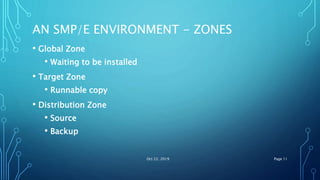
AN SMP/E ENVIRONMENT - ZONES
• Global Zone
• Waiting to be installed
• Target Zone
• Runnable copy
• Distribution Zone
• Source
• Backup
Oct 22, 2019 Page 11
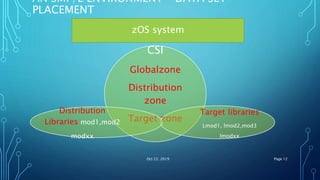
AN SMP/E ENVIRONMENT – DATA SET
PLACEMENT
CSI
Globalzone
Distribution
zone
Target zone
Target libraries
Lmod1, lmod2,mod3
lmodxx
Distribution
Libraries mod1,mod2
modxx
Oct 22, 2019 Page 12
zOS system
Oct 22, 2019 13
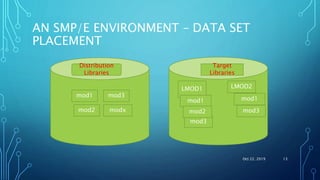
AN SMP/E ENVIRONMENT – DATA SET
PLACEMENT
Distribution
Libraries
mod1
mod2 modx
mod3
Target
Libraries
LMOD1
mod3
mod1
mod2
LMOD2
mod1
mod3
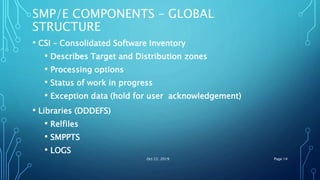
SMP/E COMPONENTS – GLOBAL
STRUCTURE
• CSI – Consolidated Software Inventory
• Describes Target and Distribution zones
• Processing options
• Status of work in progress
• Exception data (hold for user acknowledgement)
• Libraries (DDDEFS)
• Relfiles
• SMPPTS
• LOGS
Oct 22, 2019 Page 14
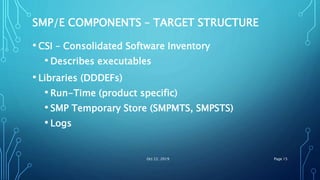
SMP/E COMPONENTS – TARGET STRUCTURE
• CSI – Consolidated Software Inventory
• Describes executables
• Libraries (DDDEFs)
• Run-Time (product specific)
• SMP Temporary Store (SMPMTS, SMPSTS)
• Logs
Oct 22, 2019 Page 15
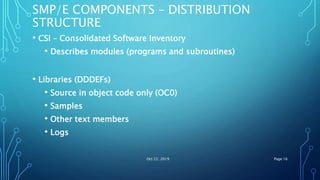
SMP/E COMPONENTS – DISTRIBUTION
STRUCTURE
• CSI – Consolidated Software Inventory
• Describes modules (programs and subroutines)
• Libraries (DDDEFs)
• Source in object code only (OC0)
• Samples
• Other text members
• Logs
Oct 22, 2019 Page 16
SMP/E – PACKAGING PARTS
• FUNCTION – A product identified by a unique FMID, a logical group of
elements.
• FMID – Function Modification Identifier is a SYSMOD ID assigned to a
function.
• SYSMOD ID – Identifier assigned to a SYStem MODification.
• SYSMOD – input to SMP/E that defines the action to take on one or
more elements.
• Element – a single part of a product; a unique member of a PDS(E)or file
a HFS.
• Program Temporary fix (PTF) – a SYSMOD that changes one or moe
elements
• USERMOD – your modification to a vendor supplied element.
Oct 22, 2019 Page 17
SMP/E – PACKAGING PARTS
• Authorized Program Analysis Report (APAR) – a Temporary fix released
before a PTF is packaged.
• Replacement Modification Identifier (RMID) – used to identify a SYSMOD
that completely replaced an element.
• Updated Modification Identifier (UMID) – used to identify a SYSMOD that
updated the last replacement of an element.
• COnditional REQuisite (COREQ) – identifies SYSMODs that can only be
installed correctly if both go on.
• PRE REQuisite (PREREQ) – identifies SYSMOD (s) that must have been
installed previously.
• Negative PRErequisite (NPRE) – mutually execlusive PREREQ.
Oct 22, 2019 Page 18
SMP/E –PROCESSING TERMS
• RECEIVE – makes known to the GLOBAL CSI.
• Similar to unzipping a pc based program and “cab” files that are
used to install a product.
• APPLY – makes known to the TARGET CSI.
• Builds and copies the elements used to run the product.
• ACCEPT – makes known to the DISTRIBUTION CSI.
• Copies elements to the backup libraries.
• REJECT – tells the GLOBAL zone to forget about it
• RESTORE – Rebuilds the Target version from what has been accepted.
Similar to ctrl-z or “undo” Oct 22, 2019 Page 19
SMP/E DISTRIBUTION METHODS
• Serverpac – a complete set of products with applied
maintenance
• CUM Tape – cumulative service release between a span of time.
• Product tape – a product at its base level
• CBPDO – a custom built product delivery option. This type
contains one or more products at their base level plus all
maintenance released.
• ICSF - Internet Product / Maintenance Retrieval
• FTP – Service from Boulder
Oct 22, 2019 Page 20
SMP/E – HANDS ON – PART2
• When you can talk the talk it is time to walk the walk. This session
will present safe-SMP/E methods for patching your system. Starting
with "Where's your backup?" and ending with "Did I really do that?".
• Come find out how to get your patches, prepare them for
installation, and making it happen. I'll even cover the CTRL-Z
(undo) of SMP/E.
• Find out if Accept, Receive, Apply, and Restore are really just that
simple.
Oct 22, 2019 Page 21
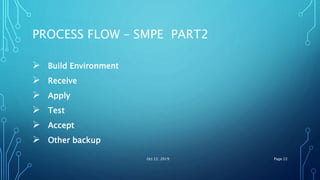
PROCESS FLOW – SMPE PART2
 Build Environment
 Receive
 Apply
 Test
 Accept
 Other backup
Oct 22, 2019 Page 22
WHERE’S YOUR BACKUP?
• Physical volume(s)
• Logical data set
• SMP/E distribution libraries
• SMP/E Zone(s) – Global – Target – Distribution
Oct 22, 2019 Page 23
WHAT DO I ORDER?
• ServerPac – System replacement System replacement
• CBPDO – Product upgrade Product upgrade
• Service – PTF and/or APAR
Oct 22, 2019 Page 24
WHERE DO I BEGIN?
• Backup
• Read the doc
• Receive the files
• Research issues
• Order more service
• Apply
• Backup
• Accept
• Backup
Oct 22, 2019 Page 25
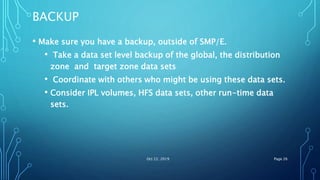
BACKUP
• Make sure you have a backup, outside of SMP/E.
• Take a data set level backup of the global, the distribution
zone and target zone data sets
• Coordinate with others who might be using these data sets.
• Consider IPL volumes, HFS data sets, other run-time data
sets.
Oct 22, 2019 Page 26
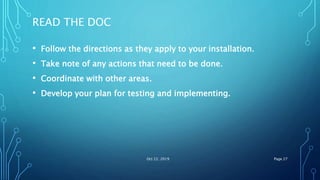
READ THE DOC
• Follow the directions as they apply to your installation.
• Take note of any actions that need to be done.
• Coordinate with other areas.
• Develop your plan for testing and implementing.
Oct 22, 2019 Page 27
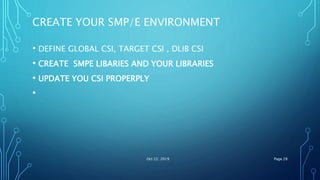
CREATE YOUR SMP/E ENVIRONMENT
• DEFINE GLOBAL CSI, TARGET CSI , DLIB CSI
• CREATE SMPE LIBARIES AND YOUR LIBRARIES
• UPDATE YOU CSI PROPERPLY
•
Oct 22, 2019 Page 28
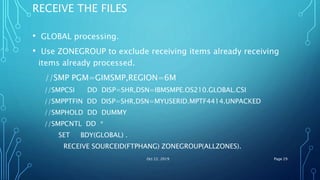
RECEIVE THE FILES
• GLOBAL processing.
• Use ZONEGROUP to exclude receiving items already receiving
items already processed.
//SMP PGM=GIMSMP,REGION=6M
//SMPCSI DD DISP=SHR,DSN=IBMSMPE.OS210.GLOBAL.CSI
//SMPPTFIN DD DISP=SHR,DSN=MYUSERID.MPTF4414.UNPACKED
//SMPHOLD DD DUMMY
//SMPCNTL DD *
SET BDY(GLOBAL) .
RECEIVE SOURCEID(FTPHANG) ZONEGROUP(ALLZONES).
Oct 22, 2019 Page 29
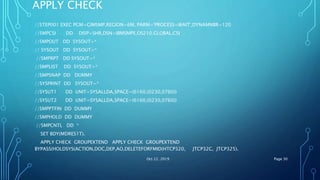
APPLY CHECK
//STEP001 EXEC PGM=GIMSMP,REGION=6M, PARM='PROCESS=WAIT',DYNAMNBR=120
//SMPCSI DD DISP=SHR,DSN=IBMSMPE.OS210.GLOBAL.CSI
//SMPOUT DD SYSOUT=*
// SYSOUT DD SYSOUT=*
//SMPRPT DD SYSOUT=*
//SMPLIST DD SYSOUT=*
//SMPSNAP DD DUMMY
//SYSPRINT DD SYSOUT=*
//SYSUT1 DD UNIT=SYSALLDA,SPACE=(6160,(0230,0760))
//SYSUT2 DD UNIT=SYSALLDA,SPACE=(6160,(0230,0760))
//SMPPTFIN DD DUMMY
//SMPHOLD DD DUMMY
//SMPCNTL DD *
SET BDY(MDRES1T).
APPLY CHECK GROUPEXTEND APPLY CHECK GROUPEXTEND
BYPASS(HOLDSYS(ACTION,DOC,DEP,AO,DELETEFORFMID(HTCP320, JTCP32C, JTCP325).
Oct 22, 2019 Page 30
RESEARCH ISSUES/ ORDER MORE SERVICE
• Review the “ Causer SYSMOD Summary” report and
order/receive any missing maintenance, identify actions to be
performed, and tailor your apply control cards as necessary.
• Check the File Allocation Report: know what you are updating
and make sure you have a backup.
• Review other reports and take action as necessary.
Oct 22, 2019 Page 31
APPLY
• Same JCL as your apply check.
• Remove “CHECK” from the control cards.
• Review all reports and make sure you know what was updated.
• Did you notice the GLOBAL CSI is updated?
• Consider doing another backup.
• Test, Test, and Test.
Oct 22, 2019 Page 32
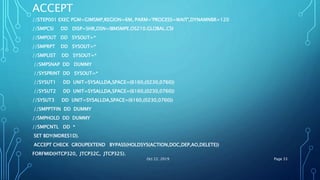
ACCEPT
//STEP001 EXEC PGM=GIMSMP,REGION=6M, PARM='PROCESS=WAIT',DYNAMNBR=120
//SMPCSI DD DISP=SHR,DSN=IBMSMPE.OS210.GLOBAL.CSI
//SMPOUT DD SYSOUT=*
//SMPRPT DD SYSOUT=*
//SMPLIST DD SYSOUT=*
//SMPSNAP DD DUMMY
//SYSPRINT DD SYSOUT=*
//SYSUT1 DD UNIT=SYSALLDA,SPACE=(6160,(0230,0760))
//SYSUT2 DD UNIT=SYSALLDA,SPACE=(6160,(0230,0760))
//SYSUT3 DD UNIT=SYSALLDA,SPACE=(6160,(0230,0760))
//SMPPTFIN DD DUMMY
//SMPHOLD DD DUMMY
//SMPCNTL DD *
SET BDY(MDRES1D).
ACCEPT CHECK GROUPEXTEND BYPASS(HOLDSYS(ACTION,DOC,DEP,AO,DELETE))
FORFMID(HTCP320, JTCP32C, JTCP325).
Oct 22, 2019 Page 33
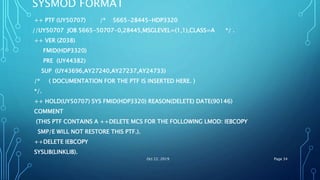
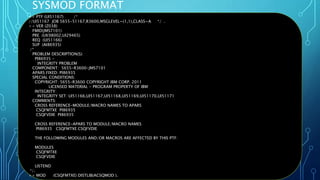
SYSMOD FORMAT
++ PTF (UY50707) /* 5665-28445-HDP3320
//UY50707 JOB 5665-50707-0,28445,MSGLEVEL=(1,1),CLASS=A */ .
++ VER (Z038)
FMID(HDP3320)
PRE (UY44382)
SUP (UY43696,AY27240,AY27237,AY24733)
/* ( DOCUMENTATION FOR THE PTF IS INSERTED HERE. )
*/.
++ HOLD(UY50707) SYS FMID(HDP3320) REASON(DELETE) DATE(90146)
COMMENT
(THIS PTF CONTAINS A ++DELETE MCS FOR THE FOLLOWING LMOD: IEBCOPY
SMP/E WILL NOT RESTORE THIS PTF.).
++DELETE IEBCOPY
SYSLIB(LINKLIB).
Oct 22, 2019 Page 34
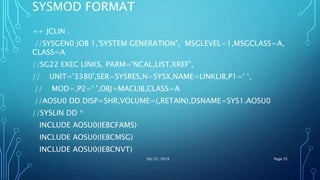
SYSMOD FORMAT
++ JCLIN .
//SYSGEN0 JOB 1,'SYSTEM GENERATION’, MSGLEVEL=1,MSGCLASS=A,
CLASS=A
//SG22 EXEC LINKS, PARM='NCAL,LIST,XREF’,
// UNIT='3380',SER=SYSRES,N=SYSX,NAME=LINKLIB,P1=' ‘,
// MOD=,P2=' ',OBJ=MACLIB,CLASS=A
//AOSU0 DD DISP=SHR,VOLUME=(,RETAIN),DSNAME=SYS1.AOSU0
//SYSLIN DD *
INCLUDE AOSU0(IEBCFAMS)
INCLUDE AOSU0(IEBCMSG)
INCLUDE AOSU0(IEBCNVT)
Oct 22, 2019 Page 35
SYSMOD FORMAT
Oct 22, 2019 Page 36
++ PTF (UI51167) /*
//UI51167 JOB 5655-51167,R3600,MSGLEVEL=(1,1),CLASS=A */ .
++ VER (Z038)
FMID(JMS7101)
PRE (UK98002,UI29465)
REQ (UI51166)
SUP (AI86935)
/*
PROBLEM DESCRIPTION(S):
PI86935 -
INTEGRITY PROBLEM
COMPONENT: 5655-R3600-JMS7101
APARS FIXED: PI86935
SPECIAL CONDITIONS:
COPYRIGHT: 5655-R3600 COPYRIGHT IBM CORP. 2011
LICENSED MATERIAL - PROGRAM PROPERTY OF IBM
INTEGRITY:
INTEGRITY SET: UI51166,UI51167,UI51168,UI51169,UI51170,UI51171
COMMENTS:
CROSS REFERENCE-MODULE/MACRO NAMES TO APARS
CSQFMTXE PI86935
CSQFVDIE PI86935
CROSS REFERENCE-APARS TO MODULE/MACRO NAMES
PI86935 CSQFMTXE CSQFVDIE
THE FOLLOWING MODULES AND/OR MACROS ARE AFFECTED BY THIS PTF:
MODULES
CSQFMTXE
CSQFVDIE
LISTEND
*/.
++ MOD (CSQFMTXE) DISTLIB(ACSQMOD ).
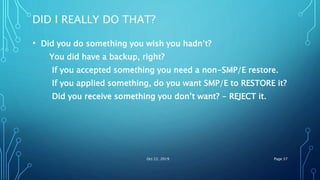
DID I REALLY DO THAT?
• Did you do something you wish you hadn’t?
You did have a backup, right?
If you accepted something you need a non-SMP/E restore.
If you applied something, do you want SMP/E to RESTORE it?
Did you receive something you don’t want? - REJECT it.
Oct 22, 2019 Page 37
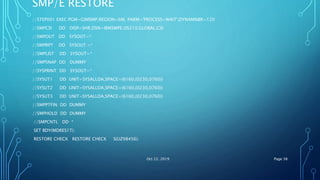
SMP/E RESTORE
//STEP001 EXEC PGM=GIMSMP,REGION=6M, PARM='PROCESS=WAIT',DYNAMNBR=120
//SMPCSI DD DISP=SHR,DSN=IBMSMPE.OS210.GLOBAL.CSI
//SMPOUT DD SYSOUT=*
//SMPRPT DD SYSOUT =*
//SMPLIST DD SYSOUT=*
//SMPSNAP DD DUMMY
//SYSPRINT DD SYSOUT=*
//SYSUT1 DD UNIT=SYSALLDA,SPACE=(6160,(0230,0760))
//SYSUT2 DD UNIT=SYSALLDA,SPACE=(6160,(0230,0760))
//SYSUT3 DD UNIT=SYSALLDA,SPACE=(6160,(0230,0760))
//SMPPTFIN DD DUMMY
//SMPHOLD DD DUMMY
//SMPCNTL DD *
SET BDY(MDRES1T).
RESTORE CHECK RESTORE CHECK S(UZ98456).
Oct 22, 2019 Page 38
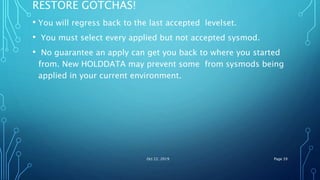
RESTORE GOTCHAS!
• You will regress back to the last accepted levelset.
• You must select every applied but not accepted sysmod.
• No guarantee an apply can get you back to where you started
from. New HOLDDATA may prevent some from sysmods being
applied in your current environment.
Oct 22, 2019 Page 39
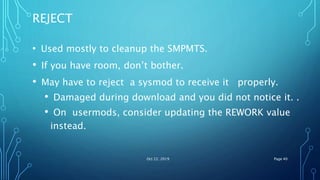
REJECT
• Used mostly to cleanup the SMPMTS.
• If you have room, don’t bother.
• May have to reject a sysmod to receive it properly.
• Damaged during download and you did not notice it. .
• On usermods, consider updating the REWORK value
instead.
Oct 22, 2019 Page 40
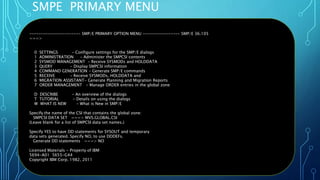
SMPE PRIMARY MENU
Oct 22, 2019 Page 41
---------------------- SMP/E PRIMARY OPTION MENU ---------------- SMP/E 36.105
===>
0 SETTINGS - Configure settings for the SMP/E dialogs
1 ADMINISTRATION - Administer the SMPCSI contents
2 SYSMOD MANAGEMENT - Receive SYSMODs and HOLDDATA
3 QUERY - Display SMPCSI information
4 COMMAND GENERATION - Generate SMP/E commands
5 RECEIVE - Receive SYSMODs, HOLDDATA and
6 MIGRATION ASSISTANT- Generate Planning and Migration Reports
7 ORDER MANAGEMENT - Manage ORDER entries in the global zone
D DESCRIBE - An overview of the dialogs
T TUTORIAL - Details on using the dialogs
W WHAT IS NEW - What is New in SMP/E
Specify the name of the CSI that contains the global zone:
SMPCSI DATA SET ===> MVS.GLOBAL.CSI
(Leave blank for a list of SMPCSI data set names.)
Specify YES to have DD statements for SYSOUT and temporary
data sets generated. Specify NO, to use DDDEFs.
Generate DD statements ===> NO
Licensed Materials - Property of IBM
5694-A01 5655-G44
Copyright IBM Corp. 1982, 2011
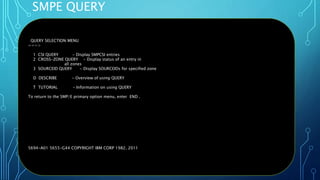
SMPE QUERY
Oct 22, 2019 Page 42
QUERY SELECTION MENU
===>
1 CSI QUERY - Display SMPCSI entries
2 CROSS-ZONE QUERY - Display status of an entry in
all zones
3 SOURCEID QUERY - Display SOURCEIDs for specified zone
D DESCRIBE - Overview of using QUERY
T TUTORIAL - Information on using QUERY
To return to the SMP/E primary option menu, enter END .
5694-A01 5655-G44 COPYRIGHT IBM CORP 1982, 2011
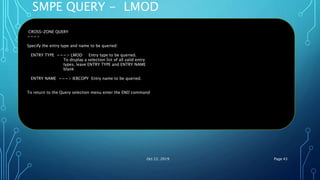
SMPE QUERY - LMOD
Oct 22, 2019 Page 43
CROSS-ZONE QUERY
===>
Specify the entry type and name to be queried:
ENTRY TYPE ===> LMOD Entry type to be queried.
To display a selection list of all valid entry
types, leave ENTRY TYPE and ENTRY NAME
blank
ENTRY NAME ===> IEBCOPY Entry name to be queried.
To return to the Query selection menu enter the END command
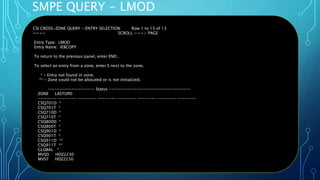
SMPE QUERY - LMOD
Oct 22, 2019 Page 44
CSI CROSS-ZONE QUERY - ENTRY SELECTION Row 1 to 13 of 13
===> SCROLL ===> PAGE
Entry Type: LMOD
Entry Name: IEBCOPY
To return to the previous panel, enter END .
To select an entry from a zone, enter S next to the zone.
* - Entry not found in zone.
** - Zone could not be allocated or is not initialized.
-------------------- Status -----------------------------------
ZONE LASTUPD
-------- -------- -------- -------- -------- -------- -------- --------
CSQ701D *
CSQ701T *
CSQ710D *
CSQ710T *
CSQ800D *
CSQ800T *
CSQ901D *
CSQ901T *
CSQ911D **
CSQ911T **
GLOBAL *
MVSD HDZ2230
MVST HDZ2230
QUESTIONS ?
•
Oct 22, 2019 Page 45
BIBLIOGRAFPHY
• zOS SMPE/E User’s Guide
Oct 22, 2019 Page 46
•Thank you
•Gracias
•Obrigado
•Dunke
Oct 22, 2019 Page 47

z/OS SMPE Software Control PART 1 & PART2.pptx

  • 1.
    OVERVIEW SMP/E (SYSTEM MODIFICATION PROGRAM/EXTENDED) - GET STARTED WITH JOSE CARDOSO JCARDOSO@BR.IBM.COM IBM GLOBAL SERVICES
  • 2.
    AGENDA • PART1 • Whois this session for? • What is SMP/E? • Why would you use it? • Where does it fit in? • An SMP/E environment • Terminology • PART2 • Process Flow Oct 22, 2019 Page 2
  • 3.
    WHO IS THISSESSION FOR? • If you are new to maintaining software on the mainframe and want to understand what magic is happening under the covers of this nifty tool, then you came to the right place. • Hear the buzzwords, see the structures, and learn the steps to use SMP/E to keep your mainframe humming. • After you’re mastered the principles here, you talk the talk. • This basic session will level set everyone for part 2. Oct 22, 2019 Page 3
  • 4.
    WHAT IS SMP/E? • A Package manager • An audit trail • Change control • Your friend Oct 22, 2019 Page 4
  • 5.
    SMP/E IS APACKAGE MANAGER • Ensure the right level are available • Manages where objects are stored • Prevents regressing code base • Waits for user action Oct 22, 2019 Page 5
  • 6.
    SMPE IS ANAUDIT TRAIL • Records every update • Logs all activity • Reports each action Oct 22, 2019 Page 6
  • 7.
    SMP/E IS CHANGECONTROL • Checks requisites • Requires acknowledgment from you • Enforces “set” completion Oct 22, 2019 Page 7
  • 8.
    SMP/E IS YOURFRIEND • Shows you what “level” you are at • Protects your environment • Can “undo” Oct 22, 2019 Page 8
  • 9.
    WHY WOULD YOUUSE IT? • The products are delivered in this format • Upgrade a product • Fix a problem with a product • Track an installation defined change Oct 22, 2019 Page 9
  • 10.
    WHERE DOES ITFIT IN? • The “mainframe” platform • “MVS” environment z/OS. Not VM. Not linux • IBM operating system (SCP) and program products • Other independent software vendors (ISV) products • ISPF based dialog and batch jobs Oct 22, 2019 Page 10
  • 11.
    AN SMP/E ENVIRONMENT- ZONES • Global Zone • Waiting to be installed • Target Zone • Runnable copy • Distribution Zone • Source • Backup Oct 22, 2019 Page 11
  • 12.
    AN SMP/E ENVIRONMENT– DATA SET PLACEMENT CSI Globalzone Distribution zone Target zone Target libraries Lmod1, lmod2,mod3 lmodxx Distribution Libraries mod1,mod2 modxx Oct 22, 2019 Page 12 zOS system
  • 13.
    Oct 22, 201913 AN SMP/E ENVIRONMENT – DATA SET PLACEMENT Distribution Libraries mod1 mod2 modx mod3 Target Libraries LMOD1 mod3 mod1 mod2 LMOD2 mod1 mod3
  • 14.
    SMP/E COMPONENTS –GLOBAL STRUCTURE • CSI – Consolidated Software Inventory • Describes Target and Distribution zones • Processing options • Status of work in progress • Exception data (hold for user acknowledgement) • Libraries (DDDEFS) • Relfiles • SMPPTS • LOGS Oct 22, 2019 Page 14
  • 15.
    SMP/E COMPONENTS –TARGET STRUCTURE • CSI – Consolidated Software Inventory • Describes executables • Libraries (DDDEFs) • Run-Time (product specific) • SMP Temporary Store (SMPMTS, SMPSTS) • Logs Oct 22, 2019 Page 15
  • 16.
    SMP/E COMPONENTS –DISTRIBUTION STRUCTURE • CSI – Consolidated Software Inventory • Describes modules (programs and subroutines) • Libraries (DDDEFs) • Source in object code only (OC0) • Samples • Other text members • Logs Oct 22, 2019 Page 16
  • 17.
    SMP/E – PACKAGINGPARTS • FUNCTION – A product identified by a unique FMID, a logical group of elements. • FMID – Function Modification Identifier is a SYSMOD ID assigned to a function. • SYSMOD ID – Identifier assigned to a SYStem MODification. • SYSMOD – input to SMP/E that defines the action to take on one or more elements. • Element – a single part of a product; a unique member of a PDS(E)or file a HFS. • Program Temporary fix (PTF) – a SYSMOD that changes one or moe elements • USERMOD – your modification to a vendor supplied element. Oct 22, 2019 Page 17
  • 18.
    SMP/E – PACKAGINGPARTS • Authorized Program Analysis Report (APAR) – a Temporary fix released before a PTF is packaged. • Replacement Modification Identifier (RMID) – used to identify a SYSMOD that completely replaced an element. • Updated Modification Identifier (UMID) – used to identify a SYSMOD that updated the last replacement of an element. • COnditional REQuisite (COREQ) – identifies SYSMODs that can only be installed correctly if both go on. • PRE REQuisite (PREREQ) – identifies SYSMOD (s) that must have been installed previously. • Negative PRErequisite (NPRE) – mutually execlusive PREREQ. Oct 22, 2019 Page 18
  • 19.
    SMP/E –PROCESSING TERMS •RECEIVE – makes known to the GLOBAL CSI. • Similar to unzipping a pc based program and “cab” files that are used to install a product. • APPLY – makes known to the TARGET CSI. • Builds and copies the elements used to run the product. • ACCEPT – makes known to the DISTRIBUTION CSI. • Copies elements to the backup libraries. • REJECT – tells the GLOBAL zone to forget about it • RESTORE – Rebuilds the Target version from what has been accepted. Similar to ctrl-z or “undo” Oct 22, 2019 Page 19
  • 20.
    SMP/E DISTRIBUTION METHODS •Serverpac – a complete set of products with applied maintenance • CUM Tape – cumulative service release between a span of time. • Product tape – a product at its base level • CBPDO – a custom built product delivery option. This type contains one or more products at their base level plus all maintenance released. • ICSF - Internet Product / Maintenance Retrieval • FTP – Service from Boulder Oct 22, 2019 Page 20
  • 21.
    SMP/E – HANDSON – PART2 • When you can talk the talk it is time to walk the walk. This session will present safe-SMP/E methods for patching your system. Starting with "Where's your backup?" and ending with "Did I really do that?". • Come find out how to get your patches, prepare them for installation, and making it happen. I'll even cover the CTRL-Z (undo) of SMP/E. • Find out if Accept, Receive, Apply, and Restore are really just that simple. Oct 22, 2019 Page 21
  • 22.
    PROCESS FLOW –SMPE PART2  Build Environment  Receive  Apply  Test  Accept  Other backup Oct 22, 2019 Page 22
  • 23.
    WHERE’S YOUR BACKUP? •Physical volume(s) • Logical data set • SMP/E distribution libraries • SMP/E Zone(s) – Global – Target – Distribution Oct 22, 2019 Page 23
  • 24.
    WHAT DO IORDER? • ServerPac – System replacement System replacement • CBPDO – Product upgrade Product upgrade • Service – PTF and/or APAR Oct 22, 2019 Page 24
  • 25.
    WHERE DO IBEGIN? • Backup • Read the doc • Receive the files • Research issues • Order more service • Apply • Backup • Accept • Backup Oct 22, 2019 Page 25
  • 26.
    BACKUP • Make sureyou have a backup, outside of SMP/E. • Take a data set level backup of the global, the distribution zone and target zone data sets • Coordinate with others who might be using these data sets. • Consider IPL volumes, HFS data sets, other run-time data sets. Oct 22, 2019 Page 26
  • 27.
    READ THE DOC •Follow the directions as they apply to your installation. • Take note of any actions that need to be done. • Coordinate with other areas. • Develop your plan for testing and implementing. Oct 22, 2019 Page 27
  • 28.
    CREATE YOUR SMP/EENVIRONMENT • DEFINE GLOBAL CSI, TARGET CSI , DLIB CSI • CREATE SMPE LIBARIES AND YOUR LIBRARIES • UPDATE YOU CSI PROPERPLY • Oct 22, 2019 Page 28
  • 29.
    RECEIVE THE FILES •GLOBAL processing. • Use ZONEGROUP to exclude receiving items already receiving items already processed. //SMP PGM=GIMSMP,REGION=6M //SMPCSI DD DISP=SHR,DSN=IBMSMPE.OS210.GLOBAL.CSI //SMPPTFIN DD DISP=SHR,DSN=MYUSERID.MPTF4414.UNPACKED //SMPHOLD DD DUMMY //SMPCNTL DD * SET BDY(GLOBAL) . RECEIVE SOURCEID(FTPHANG) ZONEGROUP(ALLZONES). Oct 22, 2019 Page 29
  • 30.
    APPLY CHECK //STEP001 EXECPGM=GIMSMP,REGION=6M, PARM='PROCESS=WAIT',DYNAMNBR=120 //SMPCSI DD DISP=SHR,DSN=IBMSMPE.OS210.GLOBAL.CSI //SMPOUT DD SYSOUT=* // SYSOUT DD SYSOUT=* //SMPRPT DD SYSOUT=* //SMPLIST DD SYSOUT=* //SMPSNAP DD DUMMY //SYSPRINT DD SYSOUT=* //SYSUT1 DD UNIT=SYSALLDA,SPACE=(6160,(0230,0760)) //SYSUT2 DD UNIT=SYSALLDA,SPACE=(6160,(0230,0760)) //SMPPTFIN DD DUMMY //SMPHOLD DD DUMMY //SMPCNTL DD * SET BDY(MDRES1T). APPLY CHECK GROUPEXTEND APPLY CHECK GROUPEXTEND BYPASS(HOLDSYS(ACTION,DOC,DEP,AO,DELETEFORFMID(HTCP320, JTCP32C, JTCP325). Oct 22, 2019 Page 30
  • 31.
    RESEARCH ISSUES/ ORDERMORE SERVICE • Review the “ Causer SYSMOD Summary” report and order/receive any missing maintenance, identify actions to be performed, and tailor your apply control cards as necessary. • Check the File Allocation Report: know what you are updating and make sure you have a backup. • Review other reports and take action as necessary. Oct 22, 2019 Page 31
  • 32.
    APPLY • Same JCLas your apply check. • Remove “CHECK” from the control cards. • Review all reports and make sure you know what was updated. • Did you notice the GLOBAL CSI is updated? • Consider doing another backup. • Test, Test, and Test. Oct 22, 2019 Page 32
  • 33.
    ACCEPT //STEP001 EXEC PGM=GIMSMP,REGION=6M,PARM='PROCESS=WAIT',DYNAMNBR=120 //SMPCSI DD DISP=SHR,DSN=IBMSMPE.OS210.GLOBAL.CSI //SMPOUT DD SYSOUT=* //SMPRPT DD SYSOUT=* //SMPLIST DD SYSOUT=* //SMPSNAP DD DUMMY //SYSPRINT DD SYSOUT=* //SYSUT1 DD UNIT=SYSALLDA,SPACE=(6160,(0230,0760)) //SYSUT2 DD UNIT=SYSALLDA,SPACE=(6160,(0230,0760)) //SYSUT3 DD UNIT=SYSALLDA,SPACE=(6160,(0230,0760)) //SMPPTFIN DD DUMMY //SMPHOLD DD DUMMY //SMPCNTL DD * SET BDY(MDRES1D). ACCEPT CHECK GROUPEXTEND BYPASS(HOLDSYS(ACTION,DOC,DEP,AO,DELETE)) FORFMID(HTCP320, JTCP32C, JTCP325). Oct 22, 2019 Page 33
  • 34.
    SYSMOD FORMAT ++ PTF(UY50707) /* 5665-28445-HDP3320 //UY50707 JOB 5665-50707-0,28445,MSGLEVEL=(1,1),CLASS=A */ . ++ VER (Z038) FMID(HDP3320) PRE (UY44382) SUP (UY43696,AY27240,AY27237,AY24733) /* ( DOCUMENTATION FOR THE PTF IS INSERTED HERE. ) */. ++ HOLD(UY50707) SYS FMID(HDP3320) REASON(DELETE) DATE(90146) COMMENT (THIS PTF CONTAINS A ++DELETE MCS FOR THE FOLLOWING LMOD: IEBCOPY SMP/E WILL NOT RESTORE THIS PTF.). ++DELETE IEBCOPY SYSLIB(LINKLIB). Oct 22, 2019 Page 34
  • 35.
    SYSMOD FORMAT ++ JCLIN. //SYSGEN0 JOB 1,'SYSTEM GENERATION’, MSGLEVEL=1,MSGCLASS=A, CLASS=A //SG22 EXEC LINKS, PARM='NCAL,LIST,XREF’, // UNIT='3380',SER=SYSRES,N=SYSX,NAME=LINKLIB,P1=' ‘, // MOD=,P2=' ',OBJ=MACLIB,CLASS=A //AOSU0 DD DISP=SHR,VOLUME=(,RETAIN),DSNAME=SYS1.AOSU0 //SYSLIN DD * INCLUDE AOSU0(IEBCFAMS) INCLUDE AOSU0(IEBCMSG) INCLUDE AOSU0(IEBCNVT) Oct 22, 2019 Page 35
  • 36.
    SYSMOD FORMAT Oct 22,2019 Page 36 ++ PTF (UI51167) /* //UI51167 JOB 5655-51167,R3600,MSGLEVEL=(1,1),CLASS=A */ . ++ VER (Z038) FMID(JMS7101) PRE (UK98002,UI29465) REQ (UI51166) SUP (AI86935) /* PROBLEM DESCRIPTION(S): PI86935 - INTEGRITY PROBLEM COMPONENT: 5655-R3600-JMS7101 APARS FIXED: PI86935 SPECIAL CONDITIONS: COPYRIGHT: 5655-R3600 COPYRIGHT IBM CORP. 2011 LICENSED MATERIAL - PROGRAM PROPERTY OF IBM INTEGRITY: INTEGRITY SET: UI51166,UI51167,UI51168,UI51169,UI51170,UI51171 COMMENTS: CROSS REFERENCE-MODULE/MACRO NAMES TO APARS CSQFMTXE PI86935 CSQFVDIE PI86935 CROSS REFERENCE-APARS TO MODULE/MACRO NAMES PI86935 CSQFMTXE CSQFVDIE THE FOLLOWING MODULES AND/OR MACROS ARE AFFECTED BY THIS PTF: MODULES CSQFMTXE CSQFVDIE LISTEND */. ++ MOD (CSQFMTXE) DISTLIB(ACSQMOD ).
  • 37.
    DID I REALLYDO THAT? • Did you do something you wish you hadn’t? You did have a backup, right? If you accepted something you need a non-SMP/E restore. If you applied something, do you want SMP/E to RESTORE it? Did you receive something you don’t want? - REJECT it. Oct 22, 2019 Page 37
  • 38.
    SMP/E RESTORE //STEP001 EXECPGM=GIMSMP,REGION=6M, PARM='PROCESS=WAIT',DYNAMNBR=120 //SMPCSI DD DISP=SHR,DSN=IBMSMPE.OS210.GLOBAL.CSI //SMPOUT DD SYSOUT=* //SMPRPT DD SYSOUT =* //SMPLIST DD SYSOUT=* //SMPSNAP DD DUMMY //SYSPRINT DD SYSOUT=* //SYSUT1 DD UNIT=SYSALLDA,SPACE=(6160,(0230,0760)) //SYSUT2 DD UNIT=SYSALLDA,SPACE=(6160,(0230,0760)) //SYSUT3 DD UNIT=SYSALLDA,SPACE=(6160,(0230,0760)) //SMPPTFIN DD DUMMY //SMPHOLD DD DUMMY //SMPCNTL DD * SET BDY(MDRES1T). RESTORE CHECK RESTORE CHECK S(UZ98456). Oct 22, 2019 Page 38
  • 39.
    RESTORE GOTCHAS! • Youwill regress back to the last accepted levelset. • You must select every applied but not accepted sysmod. • No guarantee an apply can get you back to where you started from. New HOLDDATA may prevent some from sysmods being applied in your current environment. Oct 22, 2019 Page 39
  • 40.
    REJECT • Used mostlyto cleanup the SMPMTS. • If you have room, don’t bother. • May have to reject a sysmod to receive it properly. • Damaged during download and you did not notice it. . • On usermods, consider updating the REWORK value instead. Oct 22, 2019 Page 40
  • 41.
    SMPE PRIMARY MENU Oct22, 2019 Page 41 ---------------------- SMP/E PRIMARY OPTION MENU ---------------- SMP/E 36.105 ===> 0 SETTINGS - Configure settings for the SMP/E dialogs 1 ADMINISTRATION - Administer the SMPCSI contents 2 SYSMOD MANAGEMENT - Receive SYSMODs and HOLDDATA 3 QUERY - Display SMPCSI information 4 COMMAND GENERATION - Generate SMP/E commands 5 RECEIVE - Receive SYSMODs, HOLDDATA and 6 MIGRATION ASSISTANT- Generate Planning and Migration Reports 7 ORDER MANAGEMENT - Manage ORDER entries in the global zone D DESCRIBE - An overview of the dialogs T TUTORIAL - Details on using the dialogs W WHAT IS NEW - What is New in SMP/E Specify the name of the CSI that contains the global zone: SMPCSI DATA SET ===> MVS.GLOBAL.CSI (Leave blank for a list of SMPCSI data set names.) Specify YES to have DD statements for SYSOUT and temporary data sets generated. Specify NO, to use DDDEFs. Generate DD statements ===> NO Licensed Materials - Property of IBM 5694-A01 5655-G44 Copyright IBM Corp. 1982, 2011
  • 42.
    SMPE QUERY Oct 22,2019 Page 42 QUERY SELECTION MENU ===> 1 CSI QUERY - Display SMPCSI entries 2 CROSS-ZONE QUERY - Display status of an entry in all zones 3 SOURCEID QUERY - Display SOURCEIDs for specified zone D DESCRIBE - Overview of using QUERY T TUTORIAL - Information on using QUERY To return to the SMP/E primary option menu, enter END . 5694-A01 5655-G44 COPYRIGHT IBM CORP 1982, 2011
  • 43.
    SMPE QUERY -LMOD Oct 22, 2019 Page 43 CROSS-ZONE QUERY ===> Specify the entry type and name to be queried: ENTRY TYPE ===> LMOD Entry type to be queried. To display a selection list of all valid entry types, leave ENTRY TYPE and ENTRY NAME blank ENTRY NAME ===> IEBCOPY Entry name to be queried. To return to the Query selection menu enter the END command
  • 44.
    SMPE QUERY -LMOD Oct 22, 2019 Page 44 CSI CROSS-ZONE QUERY - ENTRY SELECTION Row 1 to 13 of 13 ===> SCROLL ===> PAGE Entry Type: LMOD Entry Name: IEBCOPY To return to the previous panel, enter END . To select an entry from a zone, enter S next to the zone. * - Entry not found in zone. ** - Zone could not be allocated or is not initialized. -------------------- Status ----------------------------------- ZONE LASTUPD -------- -------- -------- -------- -------- -------- -------- -------- CSQ701D * CSQ701T * CSQ710D * CSQ710T * CSQ800D * CSQ800T * CSQ901D * CSQ901T * CSQ911D ** CSQ911T ** GLOBAL * MVSD HDZ2230 MVST HDZ2230
  • 45.
  • 46.
    BIBLIOGRAFPHY • zOS SMPE/EUser’s Guide Oct 22, 2019 Page 46
  • 47.

Editor's Notes

  • #4 JES = Job Entry SubSystem Every z/OS system needs a job entry subsystem, can be JES2 or JES3 Only 1 JES can be the primary Most shops uses JES2 these days
  • #37 Or use the SDSF MAS screen, under the column Start-type.
  • #42 Or use the SDSF MAS screen, under the column Start-type.
  • #43 Or use the SDSF MAS screen, under the column Start-type.
  • #44 Or use the SDSF MAS screen, under the column Start-type.
  • #45 Or use the SDSF MAS screen, under the column Start-type.