Introduction to z/OS Basics
© 2006 IBM Corporation
Chapter 17: Using SMP/E
Chapter 17 SMP/E
© 2006 IBM Corporation
2
Chapter objectives
 After completing this
chapter, you will be able to
explain:
 What SMP/E is
 What system modifications
are
 The data sets used by SMP/E
 How SMP/E can help you
install and maintain products,
and monitor changes to
products
Chapter 17 SMP/E
© 2006 IBM Corporation
3
Key terms in this chapter
 ACCEPT
 APPLY
 authorized program analysis
report (APAR)
 consolidated service inventory
(CSI)
 distribution library (DLIB)
 distribution zone
 global zone
 HOLDDATA
 program temporary fix (PTF)
 SYSMOD
 target library
 zone
Chapter 17 SMP/E
© 2006 IBM Corporation
4
What is SMP/E?
 SMP/E is the z/OS tool for managing the installation of
software products on a z/OS system and to track
modifications to those products.
 SMP/E controls these changes at the component level by:
– Selecting the proper levels of code to be installed from a large number
of potential changes
– Calling system utility programs to install the changes
– Keeping records of the installed changes by providing a facility to
enable you to inquire on the status of your software and to reverse the
change if necessary.
 All code and its modifications are located in the SMP/E
database called the consolidated software inventory (CSI),
which is comprised of one or more VSAM data sets.
Chapter 17 SMP/E
© 2006 IBM Corporation
5
The SMP/E view of the system…
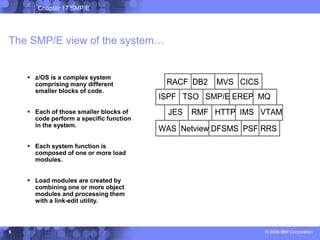
 z/OS is a complex system
comprising many different
smaller blocks of code.
 Each of those smaller blocks of
code perform a specific function
in the system.
 Each system function is
composed of one or more load
modules.
 Load modules are created by
combining one or more object
modules and processing them
with a link-edit utility.
RACF DB2 MVS CICS
ISPF TSO SMP/E EREP MQ
JES RMF HTTP IMS VTAM
WAS Netview DFSMS PSF RRS
RACF DB2 MVS CICS
ISPF TSO SMP/E EREP MQ
JES RMF HTTP IMS VTAM
WAS Netview DFSMS PSF RRS
Chapter 17 SMP/E
© 2006 IBM Corporation
6
Elements of the system
 Besides object modules and source code, most products distribute
many other parts such as macros, help-panels, CLISTs and other
z/OS library members.
 These modules, macros and other types of data and code are the
basic building blocks of your system.
 These building blocks are called elements.
 Elements are associated with, and depend upon, other products or
services that may be installed on the same z/OS system.
Chapter 17 SMP/E
© 2006 IBM Corporation
7
What is a SYSMOD?
 Over time, you will need to change the software on your z/OS system.
 The combination of elements and control information is called a system
modification, or SYSMOD. It contains the information SMP/E needs to install
and track system modifications.
 SYSMODs are comprised of two parts:
– Modification control statements (MCS) that indicate:
• What elements are being updated or replaced
• How the SYSMOD relates to product software and other SYSMODs
• Other specific installation information
– Modification text, which is the object modules, macros, and other elements
supplied by the SYSMOD.
Chapter 17 SMP/E
© 2006 IBM Corporation
8
Types of SYSMODS
 There are four types of SYSMODs:
 FUNCTION – Adds a new product or function
 PTF – Provides an IBM correction to all z/OS installations
 APAR – Provides a temporary fix to a specific z/OS installation
 USERMOD – Adds an installation-provided modification.
Chapter 17 SMP/E
© 2006 IBM Corporation
9
Introducing an element into the system
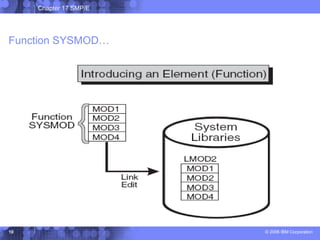
 To add new elements into your system, you install a function
SYSMOD.
 A function SYSMOD is:
– a new product
– a new version or release of a product
– updated functions for an existing product into the system.
 All other types of SYSMODs are dependent upon the function
SYSMOD.
Chapter 17 SMP/E
© 2006 IBM Corporation
10
Function SYSMOD…
Chapter 17 SMP/E
© 2006 IBM Corporation
11
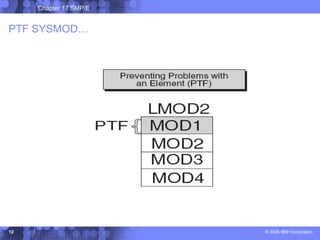
Preventing or fixing problems with an element
 When a problem with a software element is discovered, IBM
supplies its customers with a tested fix for that problem.
 This fix comes in the form of a program temporary fix (PTF).
 The PTF SYSMOD is used to install the PTF.
Chapter 17 SMP/E
© 2006 IBM Corporation
12
PTF SYSMOD…
Chapter 17 SMP/E
© 2006 IBM Corporation
13
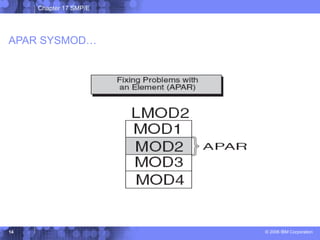
Fixing problems with an element
 Suppose you need to correct a serious problem that occurs on
your system before a PTF is ready for distribution? Here, IBM
supplies you with an authorized program analysis report or APAR.
 An APAR is a fix designed to quickly correct a specific area of an
element or replace an element in error. Installing an APAR SYSMOD
updates the incorrect element.
 The APAR SYSMOD “pre-reqs” a function SYSMOD. Also, it can
require the installation of other PTF or APAR SYSMODs.
Chapter 17 SMP/E
© 2006 IBM Corporation
14
APAR SYSMOD…
Chapter 17 SMP/E
© 2006 IBM Corporation
15
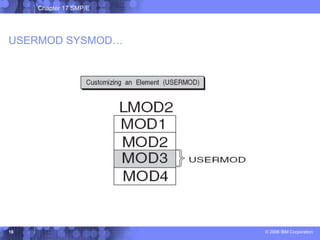
Customizing an element
 z/OS provides certain modules that allow you to tailor IBM code to
meet your specific needs.
 The USERMOD SYSMOD can be used to replace or update an
element, or to introduce a totally new user-written element into the
system.
 USERMOD SYSMOD pre-reqs: a function SYSMOD, and possibly
other PTF, APAR, or USERMOD SYSMODs.
Chapter 17 SMP/E
© 2006 IBM Corporation
16
USERMOD SYSMOD…
Chapter 17 SMP/E
© 2006 IBM Corporation
17
Keeping track of the elements of the system
 Some reasons for tracking system elements:
– A PTF might contain many element replacements that pre-req other
SYSMODs.
– The same module might be part of many different load modules. If so,
that module must be replaced in all the load modules in which it exists.
 SMP/E relies on modification identifiers to identify elements
and their various modifications and updates.
 Three modification identifiers are associated with each
element:
– Function Modification Identifiers (FMIDs)
– Replacement Modification Identifiers (RMIDs)
– Update Modification Identifiers (UMIDs),
Chapter 17 SMP/E
© 2006 IBM Corporation
18
How does SMP/E work?
 Where changes are kept:
– Distribution libraries -- contain all the elements that are used as input
for running your system. Also important for backup.
– Target libraries -- contain the executable code needed to run the
system.
– consolidated software inventory (CSI) -- contains information about
the structure of a z/OS system.
– The CSI contains entries for the elements in the distribution and target
libraries, grouped into zones:
• Distribution zone
• Target zone
• Global zone
Chapter 17 SMP/E
© 2006 IBM Corporation
19
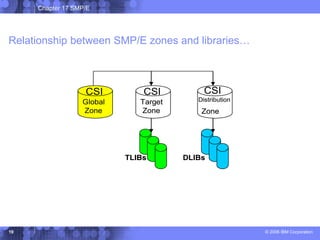
Relationship between SMP/E zones and libraries…
CSI
Distribution
Zone
CSI
Global
Zone
CSI
Target
Zone
TLIBs DLIBs
CSI
Distribution
Zone
CSI
Global
Zone
CSI
Target
Zone
TLIBs DLIBs
Chapter 17 SMP/E
© 2006 IBM Corporation
20
Working with SMP/E
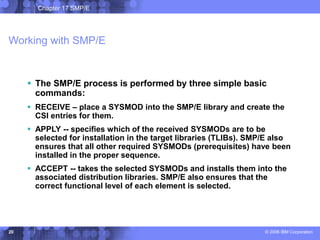
 The SMP/E process is performed by three simple basic
commands:
 RECEIVE – place a SYSMOD into the SMP/E library and create the
CSI entries for them.
 APPLY -- specifies which of the received SYSMODs are to be
selected for installation in the target libraries (TLIBs). SMP/E also
ensures that all other required SYSMODs (prerequisites) have been
installed in the proper sequence.
 ACCEPT -- takes the selected SYSMODs and installs them into the
associated distribution libraries. SMP/E also ensures that the
correct functional level of each element is selected.
Chapter 17 SMP/E
© 2006 IBM Corporation
21
Other data sets used by SMP/E
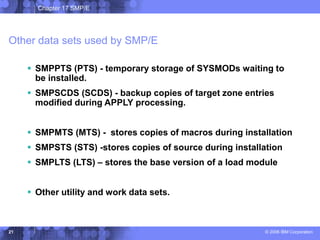
 SMPPTS (PTS) - temporary storage of SYSMODs waiting to
be installed.
 SMPSCDS (SCDS) - backup copies of target zone entries
modified during APPLY processing.
 SMPMTS (MTS) - stores copies of macros during installation
 SMPSTS (STS) -stores copies of source during installation
 SMPLTS (LTS) – stores the base version of a load module
 Other utility and work data sets.
Chapter 17 SMP/E
© 2006 IBM Corporation
22
Summary
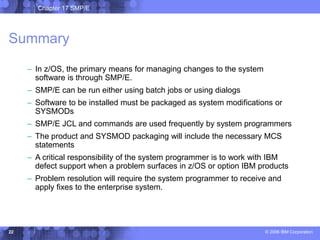
– In z/OS, the primary means for managing changes to the system
software is through SMP/E.
– SMP/E can be run either using batch jobs or using dialogs
– Software to be installed must be packaged as system modifications or
SYSMODs
– SMP/E JCL and commands are used frequently by system programmers
– The product and SYSMOD packaging will include the necessary MCS
statements
– A critical responsibility of the system programmer is to work with IBM
defect support when a problem surfaces in z/OS or option IBM products
– Problem resolution will require the system programmer to receive and
apply fixes to the enterprise system.

Chapter17 Using SMPE.ppt

  • 1.
    Introduction to z/OSBasics © 2006 IBM Corporation Chapter 17: Using SMP/E
  • 2.
    Chapter 17 SMP/E ©2006 IBM Corporation 2 Chapter objectives  After completing this chapter, you will be able to explain:  What SMP/E is  What system modifications are  The data sets used by SMP/E  How SMP/E can help you install and maintain products, and monitor changes to products
  • 3.
    Chapter 17 SMP/E ©2006 IBM Corporation 3 Key terms in this chapter  ACCEPT  APPLY  authorized program analysis report (APAR)  consolidated service inventory (CSI)  distribution library (DLIB)  distribution zone  global zone  HOLDDATA  program temporary fix (PTF)  SYSMOD  target library  zone
  • 4.
    Chapter 17 SMP/E ©2006 IBM Corporation 4 What is SMP/E?  SMP/E is the z/OS tool for managing the installation of software products on a z/OS system and to track modifications to those products.  SMP/E controls these changes at the component level by: – Selecting the proper levels of code to be installed from a large number of potential changes – Calling system utility programs to install the changes – Keeping records of the installed changes by providing a facility to enable you to inquire on the status of your software and to reverse the change if necessary.  All code and its modifications are located in the SMP/E database called the consolidated software inventory (CSI), which is comprised of one or more VSAM data sets.
  • 5.
    Chapter 17 SMP/E ©2006 IBM Corporation 5 The SMP/E view of the system…  z/OS is a complex system comprising many different smaller blocks of code.  Each of those smaller blocks of code perform a specific function in the system.  Each system function is composed of one or more load modules.  Load modules are created by combining one or more object modules and processing them with a link-edit utility. RACF DB2 MVS CICS ISPF TSO SMP/E EREP MQ JES RMF HTTP IMS VTAM WAS Netview DFSMS PSF RRS RACF DB2 MVS CICS ISPF TSO SMP/E EREP MQ JES RMF HTTP IMS VTAM WAS Netview DFSMS PSF RRS
  • 6.
    Chapter 17 SMP/E ©2006 IBM Corporation 6 Elements of the system  Besides object modules and source code, most products distribute many other parts such as macros, help-panels, CLISTs and other z/OS library members.  These modules, macros and other types of data and code are the basic building blocks of your system.  These building blocks are called elements.  Elements are associated with, and depend upon, other products or services that may be installed on the same z/OS system.
  • 7.
    Chapter 17 SMP/E ©2006 IBM Corporation 7 What is a SYSMOD?  Over time, you will need to change the software on your z/OS system.  The combination of elements and control information is called a system modification, or SYSMOD. It contains the information SMP/E needs to install and track system modifications.  SYSMODs are comprised of two parts: – Modification control statements (MCS) that indicate: • What elements are being updated or replaced • How the SYSMOD relates to product software and other SYSMODs • Other specific installation information – Modification text, which is the object modules, macros, and other elements supplied by the SYSMOD.
  • 8.
    Chapter 17 SMP/E ©2006 IBM Corporation 8 Types of SYSMODS  There are four types of SYSMODs:  FUNCTION – Adds a new product or function  PTF – Provides an IBM correction to all z/OS installations  APAR – Provides a temporary fix to a specific z/OS installation  USERMOD – Adds an installation-provided modification.
  • 9.
    Chapter 17 SMP/E ©2006 IBM Corporation 9 Introducing an element into the system  To add new elements into your system, you install a function SYSMOD.  A function SYSMOD is: – a new product – a new version or release of a product – updated functions for an existing product into the system.  All other types of SYSMODs are dependent upon the function SYSMOD.
  • 10.
    Chapter 17 SMP/E ©2006 IBM Corporation 10 Function SYSMOD…
  • 11.
    Chapter 17 SMP/E ©2006 IBM Corporation 11 Preventing or fixing problems with an element  When a problem with a software element is discovered, IBM supplies its customers with a tested fix for that problem.  This fix comes in the form of a program temporary fix (PTF).  The PTF SYSMOD is used to install the PTF.
  • 12.
    Chapter 17 SMP/E ©2006 IBM Corporation 12 PTF SYSMOD…
  • 13.
    Chapter 17 SMP/E ©2006 IBM Corporation 13 Fixing problems with an element  Suppose you need to correct a serious problem that occurs on your system before a PTF is ready for distribution? Here, IBM supplies you with an authorized program analysis report or APAR.  An APAR is a fix designed to quickly correct a specific area of an element or replace an element in error. Installing an APAR SYSMOD updates the incorrect element.  The APAR SYSMOD “pre-reqs” a function SYSMOD. Also, it can require the installation of other PTF or APAR SYSMODs.
  • 14.
    Chapter 17 SMP/E ©2006 IBM Corporation 14 APAR SYSMOD…
  • 15.
    Chapter 17 SMP/E ©2006 IBM Corporation 15 Customizing an element  z/OS provides certain modules that allow you to tailor IBM code to meet your specific needs.  The USERMOD SYSMOD can be used to replace or update an element, or to introduce a totally new user-written element into the system.  USERMOD SYSMOD pre-reqs: a function SYSMOD, and possibly other PTF, APAR, or USERMOD SYSMODs.
  • 16.
    Chapter 17 SMP/E ©2006 IBM Corporation 16 USERMOD SYSMOD…
  • 17.
    Chapter 17 SMP/E ©2006 IBM Corporation 17 Keeping track of the elements of the system  Some reasons for tracking system elements: – A PTF might contain many element replacements that pre-req other SYSMODs. – The same module might be part of many different load modules. If so, that module must be replaced in all the load modules in which it exists.  SMP/E relies on modification identifiers to identify elements and their various modifications and updates.  Three modification identifiers are associated with each element: – Function Modification Identifiers (FMIDs) – Replacement Modification Identifiers (RMIDs) – Update Modification Identifiers (UMIDs),
  • 18.
    Chapter 17 SMP/E ©2006 IBM Corporation 18 How does SMP/E work?  Where changes are kept: – Distribution libraries -- contain all the elements that are used as input for running your system. Also important for backup. – Target libraries -- contain the executable code needed to run the system. – consolidated software inventory (CSI) -- contains information about the structure of a z/OS system. – The CSI contains entries for the elements in the distribution and target libraries, grouped into zones: • Distribution zone • Target zone • Global zone
  • 19.
    Chapter 17 SMP/E ©2006 IBM Corporation 19 Relationship between SMP/E zones and libraries… CSI Distribution Zone CSI Global Zone CSI Target Zone TLIBs DLIBs CSI Distribution Zone CSI Global Zone CSI Target Zone TLIBs DLIBs
  • 20.
    Chapter 17 SMP/E ©2006 IBM Corporation 20 Working with SMP/E  The SMP/E process is performed by three simple basic commands:  RECEIVE – place a SYSMOD into the SMP/E library and create the CSI entries for them.  APPLY -- specifies which of the received SYSMODs are to be selected for installation in the target libraries (TLIBs). SMP/E also ensures that all other required SYSMODs (prerequisites) have been installed in the proper sequence.  ACCEPT -- takes the selected SYSMODs and installs them into the associated distribution libraries. SMP/E also ensures that the correct functional level of each element is selected.
  • 21.
    Chapter 17 SMP/E ©2006 IBM Corporation 21 Other data sets used by SMP/E  SMPPTS (PTS) - temporary storage of SYSMODs waiting to be installed.  SMPSCDS (SCDS) - backup copies of target zone entries modified during APPLY processing.  SMPMTS (MTS) - stores copies of macros during installation  SMPSTS (STS) -stores copies of source during installation  SMPLTS (LTS) – stores the base version of a load module  Other utility and work data sets.
  • 22.
    Chapter 17 SMP/E ©2006 IBM Corporation 22 Summary – In z/OS, the primary means for managing changes to the system software is through SMP/E. – SMP/E can be run either using batch jobs or using dialogs – Software to be installed must be packaged as system modifications or SYSMODs – SMP/E JCL and commands are used frequently by system programmers – The product and SYSMOD packaging will include the necessary MCS statements – A critical responsibility of the system programmer is to work with IBM defect support when a problem surfaces in z/OS or option IBM products – Problem resolution will require the system programmer to receive and apply fixes to the enterprise system.