FOR MORE INFORMATION PLEASE CONTACT
Xact Consulting A/S
Arnold Nielsens Boulevard 68A
DK-2650 Hvidovre
+45 7023 0100
info@xact.dk
www.xact.dk
Enterprise Modernization
S407. SMP/What?
GSE Nordic Region
Aarhus June 2019
Michael Erichsen, Xact Consulting A/S,
michael.erichsen@xact.dk
Linkedin: https://www.linkedin.com/in/michaelerichsen/
Slideshare: https://www.slideshare.net/dsmer/
Youtube: https://www.youtube.com/user/MichaelErichsen
Agenda
• SMP/Who?
• SMP/What?
• SMP/When?
• SMP/How?
– The System Modification Program Internals
– Exploring an existing product
– The installation process
– Undoing a fix
– Creating a software package
– Hints and tips
• SMP/Where?
– Documentation locations
Disclaimer
• This is going to be a deeply
technical, nerdy
presentation
Speaker Introduction
• Michael Erichsen has about 35
years of experience of systems
programming, architecture, and
a bit more…
• Built the SMP/E packaging for a
commercial product recently
• Is part of the Xact Enterprise
Modernization team, which
specializes in supporting
customers with IBM products like
– ZD&T
– IBM Developer for z and i
– Rational Team Concert
SMP/Who?
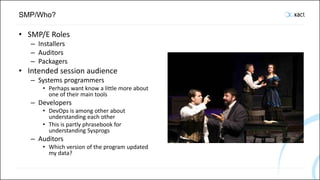
• SMP/E Roles
– Installers
– Auditors
– Packagers
• Intended session audience
– Systems programmers
• Perhaps want know a little more about
one of their main tools
– Developers
• DevOps is among other about
understanding each other
• This is partly phrasebook for
understanding Sysprogs
– Auditors
• Which version of the program updated
my data?
SMP/What?
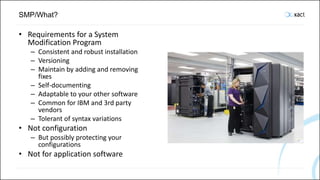
• Requirements for a System
Modification Program
– Consistent and robust installation
– Versioning
– Maintain by adding and removing
fixes
– Self-documenting
– Adaptable to your other software
– Common for IBM and 3rd party
vendors
– Tolerant of syntax variations
• Not configuration
– But possibly protecting your
configurations
• Not for application software
SMP/What? MCS: Modification Control Statements
• ++APAR
• ++ASSIGN
• ++DELETE
• ++FEATURE
• ++FUNCTION
• ++HOLD
• ++IF
• ++JAR
• ++JARUPD
• ++JCLIN
• ++MAC
• ++MACUPD
• ++MOD
• ++MOVE
• ++NULL
• ++PRODUCT
• ++PROGRAM
• ++PTF
• ++RELEASE
• ++RENAME
• ++SRC
• ++SRCUPD
• ++USERMOD
• ++VER
• ++ZAP
SMP/What? Private Language, HFS Element MCS
– ++AIX1 through ++AIX5
– ++CLIENT1 through ++CLIENT5
– ++HFSxxx
– ++OS21 through ++OS25
– ++SHELLSCR
– ++UNIX1 through ++UNIX5
– ++WIN1 through ++WIN5
SMP/What? Private Language, Data Element MCS
• ++BOOKxxx
• ++BSINDxxx
• ++CGMxxx
• ++CLIST
• ++DATA
• ++DATA1 through ++DATA5
• ++DATA6xxx
• ++EXEC
• ++FONTxxx
• ++GDFxxx
• ++HELPxxx
• ++IMGxxx
• ++MSGxxx
• ++PARM
• ++PNLxxx
• ++PROBJxxx
• ++PROC
• ++PRODXML
• ++PRSRCxxx
• ++PSEGxxx
• ++PUBLBxxx
• ++SAMPxxx
• ++SKLxxx
• ++TBLxxx
• ++TEXTxxx
• ++USER1 through ++USER5
• ++UTINxxx
• ++UTOUTxxx
SMP/When?
• It has been around for a long time
• OSMP (OS Maintenance Program) first introduced for OS/360
– Possibly around 1966
• Evolved into SMP (System Modification Program)
– Possibly around 1970
• SMP/E (SMP Extensions)
– Introduced with MVS
– Possibly around 1976
• Very stable, robust and flexible product
• Documentation seems to expect you to have been around as long
as SMP/E…
FOR MORE INFORMATION PLEASE CONTACT
Xact Consulting A/S
Arnold Nielsens Boulevard 68A
DK-2650 Hvidovre
+45 7023 0100
info@xact.dk
www.xact.dk
Enterprise Modernization
SMP/How?
System Modification Program Internals
SMP/How? System Modification Program Internals
• CSI
– Consolidated Software
Inventory
• Relfiles
– Packaging for transportation
• Target libraries
– Runnable system
• Distribution libraries
– Backup mechanism
• FMID’s
– Function Modification Identifier
• DDDEF’s
– DD card definitions
• OPTIONS
– PURGE will remove ACCEPTed
PTFs from the PTF Temporary
Store data set
• Why target, but no source
libraries?
Prepare the SMP/E Environment
• Create the CSI and other SMP/E datasets
• Before installation you tell SMP/E about your existing system
– SMP/E uses DDDEF’s (DD card DEFinitions) to include your current
versions of z/OS, DB2, CICS etc. load libraries
– If your DDDEF points DSNLOAD to DSNC10.SDSNLOAD
• Then any data set name using DSNLOAD as DD card will be replaced by
DSNC10.SDSNLOAD
Identify existing Versions of other Software
Product High-Level Qualifier
CICS DFH550.CICS
COBOL IGY620
DB2 DSNC10
PL/I IEL520
14
The Physical Structure
Xact Consulting A/S Arnold Nielsens Boulevard 68A 2650 Hvidovre, Denmark E-mail: info@xact.dk Telefon: +45 70 23 01 00 15
• The actual runtime
elements are stored in
PDS’es, sequential datasets
and zFS files
• PTF’s and other elements
are stored in a set of PDS’es
until ACCEPTed
• All definitions of a product
is stored in a VSAM data set
called a CSI (Consolidated
Software Inventory)
• FEK140.GLOBAL.SMPLOG
• FEK140.GLOBAL.SMPLOGA
• FEK140.GLOBAL.SMPLTS
• FEK140.GLOBAL.SMPMTS
• FEK140.GLOBAL.SMPPTS
• FEK140.GLOBAL.SMPSCDS
• FEK140.GLOBAL.SMPSTS
The Consolidated Software Index
Xact Consulting A/S Arnold Nielsens Boulevard 68A 2650 Hvidovre, Denmark E-mail: info@xact.dk Telefon: +45 70 23 01 00 16
• A single VSAM data set with
logical subdivisions (zones)
– FEK140.GLOBAL.CSI
– FEK140.GLOBAL.CSI.DATA
– FEK140.GLOBAL.CSI.INDEX
• A set of linked VSAM data
sets
– E. g. one for each zone
– MVS.GLOBAL.CSI
– MVS.GLOBAL.CSI.DATA
– MVS.GLOBAL.CSI.INDEX
– MVS.MVSD.CSI
– MVS.MVSD.CSI.DATA
– MVS.MVSD.CSI.INDEX
– MVS.MVST.CSI
– MVS.MVST.CSI.DATA
– MVS.MVST.CSI.INDEX
FOR MORE INFORMATION PLEASE CONTACT
Xact Consulting A/S
Arnold Nielsens Boulevard 68A
DK-2650 Hvidovre
+45 7023 0100
info@xact.dk
www.xact.dk
Enterprise Modernization
SMP/How?
Exploring an Existing Product
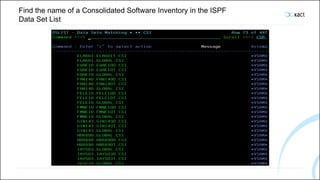
Find the name of a Consolidated Software Inventory in the ISPF
Data Set List
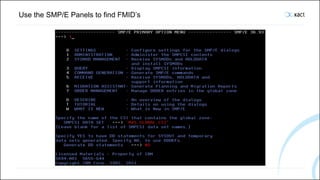
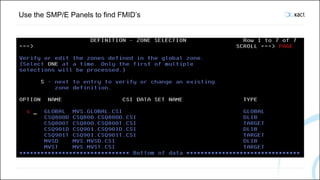
Use the SMP/E Panels to find FMID’s
FOR MORE INFORMATION PLEASE CONTACT
Xact Consulting A/S
Arnold Nielsens Boulevard 68A
DK-2650 Hvidovre
+45 7023 0100
info@xact.dk
www.xact.dk
Enterprise Modernization
SMP/How? The Installation Process
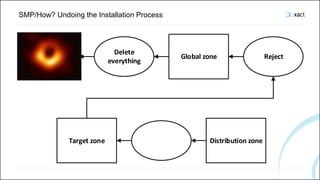
SMP/How? Undoing the Installation Process
Global zone
Delete
everything
Reject
Target zone Distribution zone
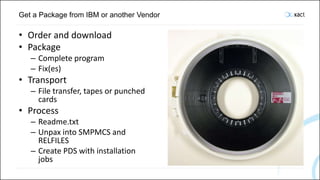
Get a Package from IBM or another Vendor
• Order and download
• Package
– Complete program
– Fix(es)
• Transport
– File transfer, tapes or punched
cards
• Process
– Readme.txt
– Unpax into SMPMCS and
RELFILES
– Create PDS with installation
jobs
Get a Package from IBM or another Vendor
• Order and download
• Package
– Complete program
– Fix(es)
• Transport
– File transfer, tapes or punched
cards
• Process
– Readme.txt
– Unpax into SMPMCS and
RELFILES
– Create PDS with installation
jobs
Get a Package from IBM or another Vendor
• Order and download
• Package
– Complete program
– Fix(es)
• Transport
– File transfer, tapes or punched
cards
• Process
– Readme.txt
– Unpax into SMPMCS and
RELFILES
– Create PDS with installation
jobs
Get a Package from IBM or another Vendor
• Order and download
• Package
– Complete program
– Fix(es)
• Transport
– File transfer, tapes or punched
cards
• Process
– Readme.txt
– Unpax into SMPMCS and
RELFILES
– Create PDS with installation
jobs
Shopz
*out web seivice to oi deiz Systems softwai e, manage software
licenses, view software inventory and more
Sign in/Register
!‹ii«'ln‹a•r.«-!‹•i•›
IBM Shopz Productc atalgo Help and resa urces Sign in/Reoister
z/VM and z/VSE. installed inventory. oppoi”tunities. licenses.
Xact Consulting A/S Arnold Nielsens Boulevard 68A 2650 Hvidovre, Denmark E-mail: info@xact.dk Telefon: +45 70 23 01 00 32
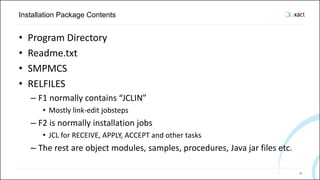
Installation Package Contents
• Program Directory
• Readme.txt
• SMPMCS
• RELFILES
– F1 normally contains “JCLIN”
• Mostly link-edit jobsteps
– F2 is normally installation jobs
• JCL for RECEIVE, APPLY, ACCEPT and other tasks
– The rest are object modules, samples, procedures, Java jar files etc.
33
SMPMCS
34
SMPMCS
35
JCLIN
36
JCLIN
37
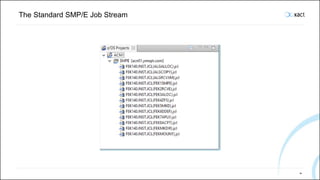
The Standard SMP/E Job Stream
38
First define an ALIAS for the new Data Sets
39
Receive
• Store the package under SMP/E control
• Copy RELFILES into a new set of RELFILES
• HOLDDATA
– IN ERROR
– ACTION
– DOCUMENTATION
– Pre- and corequisites
Receive Job Output
41
Receive Job Output
42
Receive Job Output
43
SMP/E FMID LIST after Receive
44
SMP/E Cross Zone Query after Receive
45
Allocate
46
Product Libraries
• Target libraries
– “S” + three letter acronym + type
– Have a guess of what they are!
• Distribution libraries
– “A” + three letter acronym + type
• zFS libraries
47
Allocate zFS
48
Make zFS Directory Structure Output
49
DDDEF Definitions
50
DDDEF Definitions
51
SMP/E Target Zone DDDEF’s after DDDEF
52
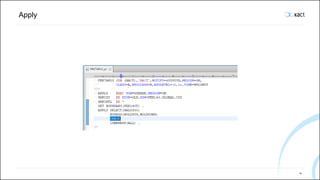
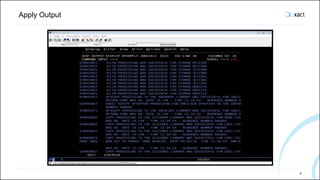
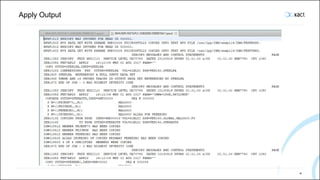
Apply
• Install the package as a runnable system under SMP/E control
• Copy or link edit into target libraries
Apply
54
Apply Output
55
Apply Output
56
Apply Output
57
Apply Output
58
SMP/E Cross Zone Query after Apply
59
Configure
• Copy to test libraries
• Configure PROCLIB, PARMLIB, Supervisor Calls, authorized
libraries, etc.
• Done outside SMP/E control
– But a configuration can be protected from being overwritten by
SMP/E using a USERMOD
Test
Deploy
• Copy to test and production
LPAR’s
Accept
• Create an advanced type of
backup under SMP/E
control
Accept
64
Accept Output
65
SMP/E Cross Zone Query after Accept
66
FOR MORE INFORMATION PLEASE CONTACT
Xact Consulting A/S
Arnold Nielsens Boulevard 68A
DK-2650 Hvidovre
+45 7023 0100
info@xact.dk
www.xact.dk
Enterprise Modernization
SMP/How? Undoing a Fix
Restore
• Undo a fix under SMP/E
control
• Copying sources back into
target libraries
• Relinking load modules in
the target libraries using
objects in the distribution
libraries
Reject
• Remove a fix from SMP/E
control
• Delete from system
Remove Everything
• The only way to get rid of
something after ACCEPT is
to remove everything
• Delete the CSI and all other
datasets and start over
FOR MORE INFORMATION PLEASE CONTACT
Xact Consulting A/S
Arnold Nielsens Boulevard 68A
DK-2650 Hvidovre
+45 7023 0100
info@xact.dk
www.xact.dk
Enterprise Modernization
SMP/How?
Compile and link-edit for SMP/E
Compile and link-edit normally
• …
• //BIND EXEC PGM=IEWL,
• // PARM='AMODE=31,RMODE=ANY,CALL,RENT,REUS'
• //SYSLMOD DD DISP=SHR,DSN=ABC200.SABCLOAD
• //SYSDEFSD DD DUMMY
• //SYSLIB DD DISP=SHR,DSN=CEE.SCEELKED
• // DD DISP=SHR,DSN=DFH550.SDFHLOAD
• // DD DISP=SHR,DSN=ABC200.OBJECT
• //SYSLIN DD *
• INCLUDE AABCMOD(ABCOMMON)
• INCLUDE AABCMOD(ABSAMPLE)
• IDENTIFY ABSAMPLE('ABC2003')
• ENTRY ABSAMPLE
• NAME ABSAMPLE(R)
Compile/
Assemble
LINK CALL
Use SYSLIB DD
Card
INCLUDE other
objects
Program object/
Load module
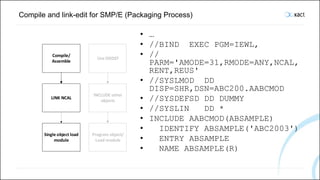
Compile and link-edit for SMP/E (Packaging Process)
Compile/
Assemble
LINK NCAL
Use DDDEF
INCLUDE other
objects
Program object/
Load module
Single object load
module
• …
• //BIND EXEC PGM=IEWL,
• //
PARM='AMODE=31,RMODE=ANY,NCAL,
RENT,REUS'
• //SYSLMOD DD
DISP=SHR,DSN=ABC200.AABCMOD
• //SYSDEFSD DD DUMMY
• //SYSLIN DD *
• INCLUDE AABCMOD(ABSAMPLE)
• IDENTIFY ABSAMPLE('ABC2003')
• ENTRY ABSAMPLE
• NAME ABSAMPLE(R)
Compile and link-edit for SMP/E
Compile/
Assemble
LINK NCAL
Use DDDEF
INCLUDE other
objects
Program object/
Load module
Single object load
module
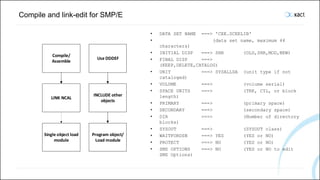
• DATA SET NAME ===> 'CEE.SCEELIB'
• (data set name, maximum 44
characters)
• INITIAL DISP ===> SHR (OLD,SHR,MOD,NEW)
• FINAL DISP ===>
(KEEP,DELETE,CATALOG)
• UNIT ===> SYSALLDA (unit type if not
cataloged)
• VOLUME ===> (volume serial)
• SPACE UNITS ===> (TRK, CYL, or block
length)
• PRIMARY ===> (primary space)
• SECONDARY ===> (secondary space)
• DIR ===> (Number of directory
blocks)
• SYSOUT ===> (SYSOUT class)
• WAITFORDSN ===> YES (YES or NO)
• PROTECT ===> NO (YES or NO)
• SMS OPTIONS ===> NO (YES or NO to edit
SMS Options)
Compile and link-edit for SMP/E (JCLIN for Installation Process)
Compile/
Assemble
LINK NCAL
Use DDDEF
INCLUDE other
objects
Program object/
Load module
Single object load
module
• //ABSAMPLE JOB
• //BIND EXEC PGM=IEWL,
• //
PARM='AMODE=31,RMODE=ANY,CALL,RENT,REUS'
• //SYSLMOD DD DISP=SHR,DSN=X.SABCLOAD
• //SYSDEFSD DD DUMMY
• //SYSLIB DD DISP=SHR,DSN=X.SCEELKED
• // DD DISP=SHR,DSN=X.SDFHLOAD
• // DD DISP=SHR,DSN=X.AABCMOD
• //SYSLIN DD *
• INCLUDE AABCMOD(ABCOMMON)
• INCLUDE AABCMOD(ABSAMPLE)
• IDENTIFY ABSAMPLE('ABC2003')
• ENTRY ABSAMPLE
• NAME ABSAMPLE(R)
FOR MORE INFORMATION PLEASE CONTACT
Xact Consulting A/S
Arnold Nielsens Boulevard 68A
DK-2650 Hvidovre
+45 7023 0100
info@xact.dk
www.xact.dk
Enterprise Modernization
SMP/How?
Creating a Software Package
Creating a Software Package for Product ABC
• Source Library Structure
• Target Library Structure
• Distribution Library
Structure
• RELFILES structure
• SMPMCS
• JCLIN
• Program Directory
• Readme
• Installation jobs
• Packaging jobs
Source Library Structure
Type Standard Name Format
Authorized load modules SABCAUTH LIBRARY U 0
Database request modules SABCDBRM FB 80
REXX EXECs SABCEXEC FB 80
Installation JCL SABCINST FB 80
Load modules SABCLOAD LIBRARY U 0
Parameters SABCPARM FB 80
Procedures SABCPROC FB 80
Samples SABCSAMP FB 80
zFS SABCZFS VSAM CLUSTER LINEAR
Xact Consulting A/S Arnold Nielsens Boulevard 68A 2650 Hvidovre, Denmark E-mail: info@xact.dk Telefon: +45 70 23 01 00 78
Target Library Structure
Type Standard Name Format
Authorized load modules SABCAUTH LIBRARY U 0
Database request modules SABCDBRM FB 80
REXX EXECs SABCEXEC FB 80
Installation JCL SABCINST FB 80
Load modules SABCLOAD LIBRARY U 0
Parameters SABCPARM FB 80
Procedures SABCPROC FB 80
Samples SABCSAMP FB 80
zFS SABCZFS VSAM CLUSTER LINEAR
Xact Consulting A/S Arnold Nielsens Boulevard 68A 2650 Hvidovre, Denmark E-mail: info@xact.dk Telefon: +45 70 23 01 00 79
Distribution Library Structure
Type Standard Name Format
Database request modules AABCDBRM FB 80
REXX EXECs AABCEXEC FB 80
Installation JCL AABCINST FB 80
Single object load modules AABCMOD LIBRARY U 0
Parameters AABCPARM FB 80
Procedures AABCPROC FB 80
Samples AABCSAMP FB 80
zFS AABCZFS VSAM CLUSTER LINEAR
Xact Consulting A/S Arnold Nielsens Boulevard 68A 2650 Hvidovre, Denmark E-mail: info@xact.dk Telefon: +45 70 23 01 00 80
Distribution Library Structure
Type Standard Name Format
Database request modules AABCDBRM FB 80
REXX EXECs AABCEXEC FB 80
Installation JCL AABCINST FB 80
Parameters AABCPARM FB 80
Procedures AABCPROC FB 80
Samples AABCSAMP FB 80
zFS AABCZFS VSAM CLUSTER LINEAR
Authorized load modules SABCAUTH LIBRARY U 0
Load modules SABCLOAD LIBRARY U 0
Xact Consulting A/S Arnold Nielsens Boulevard 68A 2650 Hvidovre, Denmark E-mail: info@xact.dk Telefon: +45 70 23 01 00 81
RELFILES Structure
Type Name Format
JCLIN ABC.V200.F1 FB 80
INST ABC.V200.F2 FB 80
MOD ABC.V200.F3 LIBRARY U 0
SAMP+PROC+PARM ABC.V200.F4 FB 80
BIN ABC.V200.F5 LIBRARY U 0
DBRM ABC.V200.F6 FB 80
README.txt ABC.V200.README FB 80
SMPMCS ABC.V200.SMPMCS FB 80
Xact Consulting A/S Arnold Nielsens Boulevard 68A 2650 Hvidovre, Denmark E-mail: info@xact.dk Telefon: +45 70 23 01 00 82
SMPMCS
• ++FUNCTION(HABC200) DESC(Sample product version 2.0.0)
FILES(6) .
• ++VER(Z038) SUP (HABC100 HABC110 HABC120) DELETE (HABC100
HABC110 HABC120).
• ++JCLIN CALLLIBS RELFILE(1).
• ++DATA(DFHLACPT) DISTLIB(ADFHLINS) SYSLIB(SDFHLINS)
RELFILE(2).
• ++SAMP(ABCSAMP1) SYSLIB(SABCSAMP) DISTLIB(AABCSAMP)
RELFILE(2).
• ++MOD(ABCPROG) LEPARM(REFR,RENT) DISTLIB(ADFHLMOD) RELFILE(3).
• ++SHELLSCR(ABCSH) SYSLIB(SABCZFS) DISTLIB(AABCZFS) RELFILE(4)
• TEXT PARM(PATHMODE(0.7.5.5)).
• ++HFS (ABCRR000) SYSLIB(SABCZFS) DISTLIB(AABCZFS) RELFILE(4)
• TEXT PARM(PATHMODE(0.7.5.5)).
• ++SKL(ABCSKEL) SYSLIB(SABCSAMP) DISTLIB(AABCSAMP) RELFILE(2).
Xact Consulting A/S Arnold Nielsens Boulevard 68A 2650 Hvidovre, Denmark E-mail: info@xact.dk Telefon: +45 70 23 01 00 83
JCLIN
• //ABSAMPLE JOB
• //BIND EXEC PGM=IEWL,
• // PARM='AMODE=31,RMODE=ANY,CALL,RENT,REUS'
• //SYSLMOD DD DISP=SHR,DSN=X.SABCLOAD
• //SYSDEFSD DD DUMMY
• //SYSLIB DD DISP=SHR,DSN=X.SCEELKED
• // DD DISP=SHR,DSN=X.SDFHLOAD
• // DD DISP=SHR,DSN=X.AABCMOD
• //SYSLIN DD *
• INCLUDE AABCMOD(ABCOMMON)
• INCLUDE AABCMOD(ABSAMPLE)
• IDENTIFY ABSAMPLE('ABC2003')
• ENTRY ABSAMPLE
• NAME ABSAMPLE(R)
Xact Consulting A/S Arnold Nielsens Boulevard 68A 2650 Hvidovre, Denmark E-mail: info@xact.dk Telefon: +45 70 23 01 00 84
Program Directory
• Very identical between all products
• Describes prerequisites
• Describes the standard RECEIVE/APPLY/ACCEPT/Etc. jobs
• Describes post-installation tasks
– Normally just a reference to a Customization Guide
Xact Consulting A/S Arnold Nielsens Boulevard 68A 2650 Hvidovre, Denmark E-mail: info@xact.dk Telefon: +45 70 23 01 00 85
Readme
• Package upload instructions
• Define an installation zFS file system (Optional)
• Unpax
– This step expands the single download file into the individual archive files
that make up the download package
• GIMUNZIP
– This step extracts the FMID(s) and related materials from the download
package archive files and places them in RELFILE and SMPMCS
• Copy installation jobs
– This step allocates an installation PDS and copies the installation jobs there
Xact Consulting A/S Arnold Nielsens Boulevard 68A 2650 Hvidovre, Denmark E-mail: info@xact.dk Telefon: +45 70 23 01 00 86
Installation Jobs
Job Function
ABCWEDIT Edit macro to help edit the jobs
ABCALIAS Define Alias
ABCSMPSU Create CSI and SMP/E datasets
ABCRECVE Receive not global zone
ABCALLOC Allocate target and distribution data sets
ABCDFZFS Define zFS data sets
ABCMKDIR Create directory structure in zFS
ABCDDDEF Define DDDEF’s
ABCAPPLY Apply into target zone
ABCACCEPT Accept into distribution zone
Xact Consulting A/S Arnold Nielsens Boulevard 68A 2650 Hvidovre, Denmark E-mail: info@xact.dk Telefon: +45 70 23 01 00 87
Packaging Jobs
• ALLOCREL
– Allocate README and SMPMCS data sets and RELFILES
• EXTRCICS (Optional)
– Run CICS CSD utility program to EXTRACT OBJECTS
– Run IEBGENER GENERATE to a member in e. g. XABCINST
Xact Consulting A/S Arnold Nielsens Boulevard 68A 2650 Hvidovre, Denmark E-mail: info@xact.dk Telefon: +45 70 23 01 00 88
Packaging Jobs
Xact Consulting A/S Arnold Nielsens Boulevard 68A 2650 Hvidovre, Denmark E-mail: info@xact.dk Telefon: +45 70 23 01 00 89
• POPLTREL
– Populate README and
SMPMCS data sets and
RELFILES
– IEBCOPY COPY object
modules, which must have
been linked NCAL and as
single object load modules
– IEBGENER GENERATE source
elements and zFS elements
• //ABUTIL EXEC
PGM=IEBGENER
• //SYSUT1 DD
PATH=‘/abcproduct/bundles/a
bcproductUtilBundle_2.0.0/d
k.xact.abcproduct.zos.cics.
abutil_2.0.0.jar',PATHOPTS=
ORDONLY,FILEDATA=BINARY,REC
FM=VB,LRECL=1020,BLKSIZE=10
24
• //SYSUT2 DD
DISP=OLD,DSN=&TRGENV..F5(AB
UTIL)
• //SYSPRINT DD SYSOUT=*
• //SYSIN DD *
• GENERATE MEMBER
NAME=ABUTIL
Packaging Jobs
Xact Consulting A/S Arnold Nielsens Boulevard 68A 2650 Hvidovre, Denmark E-mail: info@xact.dk Telefon: +45 70 23 01 00 90
• GIMZIP
• //STEP1 EXEC PGM=GIMZIP
• //SMPDIR DD
PATH='/abcproduct/v200/',PATHDISP=KEEP
• //SYSIN DD *
• <GIMZIP description=“Abcproduct for z/OS
V2.0.0">
• <FILEDEF name=“ABCPROD.V200.README"
• archid="readme.txt"
• subdir="README"
• description="README"
• type="README" />
• <FILEDEF name=“ABCPROD.V200.SMPMCS"
• archid="SMPMCS"
• description="SMPMCS"
• type="SMPPTFIN" />
• <FILEDEF name=“ABCPROD.V200.F1"
• archid="ABC2000.F1"
• description="JCLIN"
• type="SMPRELF" />
• PAX2SNGL
• //PAX EXEC
PGM=IKJEFT01
• //SYSTSPRT DD SYSOUT=*
• //SYSEXEC DD
DISP=SHR,DSN=SYS1.SBPX
EXEC
• //SYSTSIN DD *
• oshell cd
/abcproduct/v200/;+
• pax -wvf
/abcproduct/dist/abcpr
oduct.v200.pax.Z ./
FOR MORE INFORMATION PLEASE CONTACT
Xact Consulting A/S
Arnold Nielsens Boulevard 68A
DK-2650 Hvidovre
+45 7023 0100
info@xact.dk
www.xact.dk
Enterprise Modernization
SMP/How? Creating a Fix
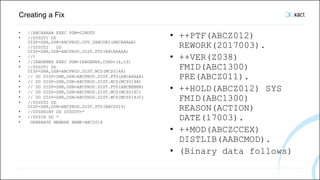
Creating a Fix
• //ABCAAAAA EXEC PGM=GIMDTS
• //SYSUT1 DD
DISP=SHR,DSN=ABCPROD.UDV.SABCOBJ(ABCAAAAA)
• //SYSUT2 DD
DISP=SHR,DSN=ABCPROD.DIST.PTS(ABCAAAAA)
• //*
• //IEBGENER EXEC PGM=IEBGENER,COND=(4,LT)
• //SYSUT1 DD
DISP=SHR,DSN=ABCPROD.DIST.MCS(MCS014A)
• // DD DISP=SHR,DSN=ABCPROD.DIST.PTS(ABCAAAAA)
• // DD DISP=SHR,DSN=ABCPROD.DIST.MCS(MCS014B)
• // DD DISP=SHR,DSN=ABCPROD.DIST.PTS(ABCBBBBB)
• // DD DISP=SHR,DSN=ABCPROD.DIST.MCS(MCS014C)
• // DD DISP=SHR,DSN=ABCPROD.DIST.MCS(MCS014JC)
• //SYSUT2 DD
DISP=SHR,DSN=ABCPROD.DIST.PTS(ABC0014)
• //SYSPRINT DD SYSOUT=*
• //SYSIN DD *
• GENERATE MEMBER NAME=ABC0014
• ++PTF(ABCZ012)
REWORK(2017003).
• ++VER(Z038)
FMID(ABC1300)
PRE(ABCZ011).
• ++HOLD(ABCZ012) SYS
FMID(ABC1300)
REASON(ACTION)
DATE(17003).
• ++MOD(ABCZCCEX)
DISTLIB(AABCMOD).
• (Binary data follows)
FOR MORE INFORMATION PLEASE CONTACT
Xact Consulting A/S
Arnold Nielsens Boulevard 68A
DK-2650 Hvidovre
+45 7023 0100
info@xact.dk
www.xact.dk
Enterprise Modernization
SMP/How? Hints and Tips
Running a Batch Job while Somebody is using the Panels
94
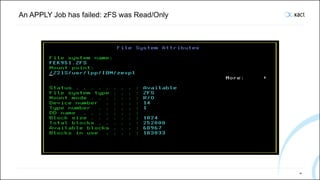
An APPLY Job has failed: zFS was Read/Only
95
APPLY failed in the first Attempt
96
Conditional Requisites (IFREQ)
• PD Tools Common Component, the HVWR170 function, has
been installed nicely by itself
• But IBM has found out that if you also install some other
product you will need some PTF’s to HVWR170 to make them
work together
• Let us have a look at the SMPMCS for HADRE00
97
Conditional Requisites (IFREQ)
98
Conditional Requisites (IFREQ)
99
SMP/E Report on HWVR170 after RECEIVE
100
An SMP/E Editor for IBM Developer for Z
• Github repository
– https://github.com/MichaelErichsen/Java_tools
• Packages
– dk.xact.xtoolrdz.SmpeEditor.feature
– dk.xact.xtoolrdz.SmpeEditor
• Open source, coded for Xact Consulting
101
FOR MORE INFORMATION PLEASE CONTACT
Xact Consulting A/S
Arnold Nielsens Boulevard 68A
DK-2650 Hvidovre
+45 7023 0100
info@xact.dk
www.xact.dk
Enterprise Modernization
SMP/Where?
Documentation Locations
Documentation
• SMP/E for z/OS Commands
• SMP/E for z/OS Messages, Codes, and Diagnosis
• SMP/E for z/OS Reference
• SMP/E for z/OS User's Guide
• Software Delivery Standard Packaging Rules for z/OS-Based
Products
• Knowledge Center
– https://www.ibm.com/support/knowledgecenter/en/SSLTBW_2.1.0/
com.ibm.zos.v2r1.gim/gim.htm
Summary
• SMP/Who?
– Roles
• SMP/What?
– Requirements for a System Modification Program
• SMP/When?
– Some history
• SMP/How?
– The System Modification Program Internals
– Exploring an existing product
– The installation process
– Undoing a fix
– Creating a software package
– Hints and tips
• SMP/Where?
– Documentation locations
Feedback
• Please fill in your feedback
form:
• https://gse-
nordic.org/session-
evaluation
• S407
SMP/What?

SMP/What?

  • 1.
    FOR MORE INFORMATIONPLEASE CONTACT Xact Consulting A/S Arnold Nielsens Boulevard 68A DK-2650 Hvidovre +45 7023 0100 info@xact.dk www.xact.dk Enterprise Modernization S407. SMP/What? GSE Nordic Region Aarhus June 2019 Michael Erichsen, Xact Consulting A/S, michael.erichsen@xact.dk Linkedin: https://www.linkedin.com/in/michaelerichsen/ Slideshare: https://www.slideshare.net/dsmer/ Youtube: https://www.youtube.com/user/MichaelErichsen
  • 2.
    Agenda • SMP/Who? • SMP/What? •SMP/When? • SMP/How? – The System Modification Program Internals – Exploring an existing product – The installation process – Undoing a fix – Creating a software package – Hints and tips • SMP/Where? – Documentation locations
  • 3.
    Disclaimer • This isgoing to be a deeply technical, nerdy presentation
  • 4.
    Speaker Introduction • MichaelErichsen has about 35 years of experience of systems programming, architecture, and a bit more… • Built the SMP/E packaging for a commercial product recently • Is part of the Xact Enterprise Modernization team, which specializes in supporting customers with IBM products like – ZD&T – IBM Developer for z and i – Rational Team Concert
  • 5.
    SMP/Who? • SMP/E Roles –Installers – Auditors – Packagers • Intended session audience – Systems programmers • Perhaps want know a little more about one of their main tools – Developers • DevOps is among other about understanding each other • This is partly phrasebook for understanding Sysprogs – Auditors • Which version of the program updated my data?
  • 6.
    SMP/What? • Requirements fora System Modification Program – Consistent and robust installation – Versioning – Maintain by adding and removing fixes – Self-documenting – Adaptable to your other software – Common for IBM and 3rd party vendors – Tolerant of syntax variations • Not configuration – But possibly protecting your configurations • Not for application software
  • 7.
    SMP/What? MCS: ModificationControl Statements • ++APAR • ++ASSIGN • ++DELETE • ++FEATURE • ++FUNCTION • ++HOLD • ++IF • ++JAR • ++JARUPD • ++JCLIN • ++MAC • ++MACUPD • ++MOD • ++MOVE • ++NULL • ++PRODUCT • ++PROGRAM • ++PTF • ++RELEASE • ++RENAME • ++SRC • ++SRCUPD • ++USERMOD • ++VER • ++ZAP
  • 8.
    SMP/What? Private Language,HFS Element MCS – ++AIX1 through ++AIX5 – ++CLIENT1 through ++CLIENT5 – ++HFSxxx – ++OS21 through ++OS25 – ++SHELLSCR – ++UNIX1 through ++UNIX5 – ++WIN1 through ++WIN5
  • 9.
    SMP/What? Private Language,Data Element MCS • ++BOOKxxx • ++BSINDxxx • ++CGMxxx • ++CLIST • ++DATA • ++DATA1 through ++DATA5 • ++DATA6xxx • ++EXEC • ++FONTxxx • ++GDFxxx • ++HELPxxx • ++IMGxxx • ++MSGxxx • ++PARM • ++PNLxxx • ++PROBJxxx • ++PROC • ++PRODXML • ++PRSRCxxx • ++PSEGxxx • ++PUBLBxxx • ++SAMPxxx • ++SKLxxx • ++TBLxxx • ++TEXTxxx • ++USER1 through ++USER5 • ++UTINxxx • ++UTOUTxxx
  • 10.
    SMP/When? • It hasbeen around for a long time • OSMP (OS Maintenance Program) first introduced for OS/360 – Possibly around 1966 • Evolved into SMP (System Modification Program) – Possibly around 1970 • SMP/E (SMP Extensions) – Introduced with MVS – Possibly around 1976 • Very stable, robust and flexible product • Documentation seems to expect you to have been around as long as SMP/E…
  • 11.
    FOR MORE INFORMATIONPLEASE CONTACT Xact Consulting A/S Arnold Nielsens Boulevard 68A DK-2650 Hvidovre +45 7023 0100 info@xact.dk www.xact.dk Enterprise Modernization SMP/How? System Modification Program Internals
  • 12.
    SMP/How? System ModificationProgram Internals • CSI – Consolidated Software Inventory • Relfiles – Packaging for transportation • Target libraries – Runnable system • Distribution libraries – Backup mechanism • FMID’s – Function Modification Identifier • DDDEF’s – DD card definitions • OPTIONS – PURGE will remove ACCEPTed PTFs from the PTF Temporary Store data set • Why target, but no source libraries?
  • 13.
    Prepare the SMP/EEnvironment • Create the CSI and other SMP/E datasets • Before installation you tell SMP/E about your existing system – SMP/E uses DDDEF’s (DD card DEFinitions) to include your current versions of z/OS, DB2, CICS etc. load libraries – If your DDDEF points DSNLOAD to DSNC10.SDSNLOAD • Then any data set name using DSNLOAD as DD card will be replaced by DSNC10.SDSNLOAD
  • 14.
    Identify existing Versionsof other Software Product High-Level Qualifier CICS DFH550.CICS COBOL IGY620 DB2 DSNC10 PL/I IEL520 14
  • 15.
    The Physical Structure XactConsulting A/S Arnold Nielsens Boulevard 68A 2650 Hvidovre, Denmark E-mail: info@xact.dk Telefon: +45 70 23 01 00 15 • The actual runtime elements are stored in PDS’es, sequential datasets and zFS files • PTF’s and other elements are stored in a set of PDS’es until ACCEPTed • All definitions of a product is stored in a VSAM data set called a CSI (Consolidated Software Inventory) • FEK140.GLOBAL.SMPLOG • FEK140.GLOBAL.SMPLOGA • FEK140.GLOBAL.SMPLTS • FEK140.GLOBAL.SMPMTS • FEK140.GLOBAL.SMPPTS • FEK140.GLOBAL.SMPSCDS • FEK140.GLOBAL.SMPSTS
  • 16.
    The Consolidated SoftwareIndex Xact Consulting A/S Arnold Nielsens Boulevard 68A 2650 Hvidovre, Denmark E-mail: info@xact.dk Telefon: +45 70 23 01 00 16 • A single VSAM data set with logical subdivisions (zones) – FEK140.GLOBAL.CSI – FEK140.GLOBAL.CSI.DATA – FEK140.GLOBAL.CSI.INDEX • A set of linked VSAM data sets – E. g. one for each zone – MVS.GLOBAL.CSI – MVS.GLOBAL.CSI.DATA – MVS.GLOBAL.CSI.INDEX – MVS.MVSD.CSI – MVS.MVSD.CSI.DATA – MVS.MVSD.CSI.INDEX – MVS.MVST.CSI – MVS.MVST.CSI.DATA – MVS.MVST.CSI.INDEX
  • 17.
    FOR MORE INFORMATIONPLEASE CONTACT Xact Consulting A/S Arnold Nielsens Boulevard 68A DK-2650 Hvidovre +45 7023 0100 info@xact.dk www.xact.dk Enterprise Modernization SMP/How? Exploring an Existing Product
  • 18.
    Find the nameof a Consolidated Software Inventory in the ISPF Data Set List
  • 19.
    Use the SMP/EPanels to find FMID’s
  • 20.
    Use the SMP/EPanels to find FMID’s
  • 21.
    Use the SMP/EPanels to find FMID’s
  • 22.
    Use the SMP/EPanels to find FMID’s
  • 23.
    Use the SMP/EPanels to find FMID’s
  • 24.
    Use the SMP/EPanels to find FMID’s
  • 25.
    FOR MORE INFORMATIONPLEASE CONTACT Xact Consulting A/S Arnold Nielsens Boulevard 68A DK-2650 Hvidovre +45 7023 0100 info@xact.dk www.xact.dk Enterprise Modernization SMP/How? The Installation Process
  • 26.
  • 27.
    SMP/How? Undoing theInstallation Process Global zone Delete everything Reject Target zone Distribution zone
  • 28.
    Get a Packagefrom IBM or another Vendor • Order and download • Package – Complete program – Fix(es) • Transport – File transfer, tapes or punched cards • Process – Readme.txt – Unpax into SMPMCS and RELFILES – Create PDS with installation jobs
  • 29.
    Get a Packagefrom IBM or another Vendor • Order and download • Package – Complete program – Fix(es) • Transport – File transfer, tapes or punched cards • Process – Readme.txt – Unpax into SMPMCS and RELFILES – Create PDS with installation jobs
  • 30.
    Get a Packagefrom IBM or another Vendor • Order and download • Package – Complete program – Fix(es) • Transport – File transfer, tapes or punched cards • Process – Readme.txt – Unpax into SMPMCS and RELFILES – Create PDS with installation jobs
  • 31.
    Get a Packagefrom IBM or another Vendor • Order and download • Package – Complete program – Fix(es) • Transport – File transfer, tapes or punched cards • Process – Readme.txt – Unpax into SMPMCS and RELFILES – Create PDS with installation jobs
  • 32.
    Shopz *out web seiviceto oi deiz Systems softwai e, manage software licenses, view software inventory and more Sign in/Register !‹ii«'ln‹a•r.«-!‹•i•› IBM Shopz Productc atalgo Help and resa urces Sign in/Reoister z/VM and z/VSE. installed inventory. oppoi”tunities. licenses. Xact Consulting A/S Arnold Nielsens Boulevard 68A 2650 Hvidovre, Denmark E-mail: info@xact.dk Telefon: +45 70 23 01 00 32
  • 33.
    Installation Package Contents •Program Directory • Readme.txt • SMPMCS • RELFILES – F1 normally contains “JCLIN” • Mostly link-edit jobsteps – F2 is normally installation jobs • JCL for RECEIVE, APPLY, ACCEPT and other tasks – The rest are object modules, samples, procedures, Java jar files etc. 33
  • 34.
  • 35.
  • 36.
  • 37.
  • 38.
    The Standard SMP/EJob Stream 38
  • 39.
    First define anALIAS for the new Data Sets 39
  • 40.
    Receive • Store thepackage under SMP/E control • Copy RELFILES into a new set of RELFILES • HOLDDATA – IN ERROR – ACTION – DOCUMENTATION – Pre- and corequisites
  • 41.
  • 42.
  • 43.
  • 44.
    SMP/E FMID LISTafter Receive 44
  • 45.
    SMP/E Cross ZoneQuery after Receive 45
  • 46.
  • 47.
    Product Libraries • Targetlibraries – “S” + three letter acronym + type – Have a guess of what they are! • Distribution libraries – “A” + three letter acronym + type • zFS libraries 47
  • 48.
  • 49.
    Make zFS DirectoryStructure Output 49
  • 50.
  • 51.
  • 52.
    SMP/E Target ZoneDDDEF’s after DDDEF 52
  • 53.
    Apply • Install thepackage as a runnable system under SMP/E control • Copy or link edit into target libraries
  • 54.
  • 55.
  • 56.
  • 57.
  • 58.
  • 59.
    SMP/E Cross ZoneQuery after Apply 59
  • 60.
    Configure • Copy totest libraries • Configure PROCLIB, PARMLIB, Supervisor Calls, authorized libraries, etc. • Done outside SMP/E control – But a configuration can be protected from being overwritten by SMP/E using a USERMOD
  • 61.
  • 62.
    Deploy • Copy totest and production LPAR’s
  • 63.
    Accept • Create anadvanced type of backup under SMP/E control
  • 64.
  • 65.
  • 66.
    SMP/E Cross ZoneQuery after Accept 66
  • 67.
    FOR MORE INFORMATIONPLEASE CONTACT Xact Consulting A/S Arnold Nielsens Boulevard 68A DK-2650 Hvidovre +45 7023 0100 info@xact.dk www.xact.dk Enterprise Modernization SMP/How? Undoing a Fix
  • 68.
    Restore • Undo afix under SMP/E control • Copying sources back into target libraries • Relinking load modules in the target libraries using objects in the distribution libraries
  • 69.
    Reject • Remove afix from SMP/E control • Delete from system
  • 70.
    Remove Everything • Theonly way to get rid of something after ACCEPT is to remove everything • Delete the CSI and all other datasets and start over
  • 71.
    FOR MORE INFORMATIONPLEASE CONTACT Xact Consulting A/S Arnold Nielsens Boulevard 68A DK-2650 Hvidovre +45 7023 0100 info@xact.dk www.xact.dk Enterprise Modernization SMP/How? Compile and link-edit for SMP/E
  • 72.
    Compile and link-editnormally • … • //BIND EXEC PGM=IEWL, • // PARM='AMODE=31,RMODE=ANY,CALL,RENT,REUS' • //SYSLMOD DD DISP=SHR,DSN=ABC200.SABCLOAD • //SYSDEFSD DD DUMMY • //SYSLIB DD DISP=SHR,DSN=CEE.SCEELKED • // DD DISP=SHR,DSN=DFH550.SDFHLOAD • // DD DISP=SHR,DSN=ABC200.OBJECT • //SYSLIN DD * • INCLUDE AABCMOD(ABCOMMON) • INCLUDE AABCMOD(ABSAMPLE) • IDENTIFY ABSAMPLE('ABC2003') • ENTRY ABSAMPLE • NAME ABSAMPLE(R) Compile/ Assemble LINK CALL Use SYSLIB DD Card INCLUDE other objects Program object/ Load module
  • 73.
    Compile and link-editfor SMP/E (Packaging Process) Compile/ Assemble LINK NCAL Use DDDEF INCLUDE other objects Program object/ Load module Single object load module • … • //BIND EXEC PGM=IEWL, • // PARM='AMODE=31,RMODE=ANY,NCAL, RENT,REUS' • //SYSLMOD DD DISP=SHR,DSN=ABC200.AABCMOD • //SYSDEFSD DD DUMMY • //SYSLIN DD * • INCLUDE AABCMOD(ABSAMPLE) • IDENTIFY ABSAMPLE('ABC2003') • ENTRY ABSAMPLE • NAME ABSAMPLE(R)
  • 74.
    Compile and link-editfor SMP/E Compile/ Assemble LINK NCAL Use DDDEF INCLUDE other objects Program object/ Load module Single object load module • DATA SET NAME ===> 'CEE.SCEELIB' • (data set name, maximum 44 characters) • INITIAL DISP ===> SHR (OLD,SHR,MOD,NEW) • FINAL DISP ===> (KEEP,DELETE,CATALOG) • UNIT ===> SYSALLDA (unit type if not cataloged) • VOLUME ===> (volume serial) • SPACE UNITS ===> (TRK, CYL, or block length) • PRIMARY ===> (primary space) • SECONDARY ===> (secondary space) • DIR ===> (Number of directory blocks) • SYSOUT ===> (SYSOUT class) • WAITFORDSN ===> YES (YES or NO) • PROTECT ===> NO (YES or NO) • SMS OPTIONS ===> NO (YES or NO to edit SMS Options)
  • 75.
    Compile and link-editfor SMP/E (JCLIN for Installation Process) Compile/ Assemble LINK NCAL Use DDDEF INCLUDE other objects Program object/ Load module Single object load module • //ABSAMPLE JOB • //BIND EXEC PGM=IEWL, • // PARM='AMODE=31,RMODE=ANY,CALL,RENT,REUS' • //SYSLMOD DD DISP=SHR,DSN=X.SABCLOAD • //SYSDEFSD DD DUMMY • //SYSLIB DD DISP=SHR,DSN=X.SCEELKED • // DD DISP=SHR,DSN=X.SDFHLOAD • // DD DISP=SHR,DSN=X.AABCMOD • //SYSLIN DD * • INCLUDE AABCMOD(ABCOMMON) • INCLUDE AABCMOD(ABSAMPLE) • IDENTIFY ABSAMPLE('ABC2003') • ENTRY ABSAMPLE • NAME ABSAMPLE(R)
  • 76.
    FOR MORE INFORMATIONPLEASE CONTACT Xact Consulting A/S Arnold Nielsens Boulevard 68A DK-2650 Hvidovre +45 7023 0100 info@xact.dk www.xact.dk Enterprise Modernization SMP/How? Creating a Software Package
  • 77.
    Creating a SoftwarePackage for Product ABC • Source Library Structure • Target Library Structure • Distribution Library Structure • RELFILES structure • SMPMCS • JCLIN • Program Directory • Readme • Installation jobs • Packaging jobs
  • 78.
    Source Library Structure TypeStandard Name Format Authorized load modules SABCAUTH LIBRARY U 0 Database request modules SABCDBRM FB 80 REXX EXECs SABCEXEC FB 80 Installation JCL SABCINST FB 80 Load modules SABCLOAD LIBRARY U 0 Parameters SABCPARM FB 80 Procedures SABCPROC FB 80 Samples SABCSAMP FB 80 zFS SABCZFS VSAM CLUSTER LINEAR Xact Consulting A/S Arnold Nielsens Boulevard 68A 2650 Hvidovre, Denmark E-mail: info@xact.dk Telefon: +45 70 23 01 00 78
  • 79.
    Target Library Structure TypeStandard Name Format Authorized load modules SABCAUTH LIBRARY U 0 Database request modules SABCDBRM FB 80 REXX EXECs SABCEXEC FB 80 Installation JCL SABCINST FB 80 Load modules SABCLOAD LIBRARY U 0 Parameters SABCPARM FB 80 Procedures SABCPROC FB 80 Samples SABCSAMP FB 80 zFS SABCZFS VSAM CLUSTER LINEAR Xact Consulting A/S Arnold Nielsens Boulevard 68A 2650 Hvidovre, Denmark E-mail: info@xact.dk Telefon: +45 70 23 01 00 79
  • 80.
    Distribution Library Structure TypeStandard Name Format Database request modules AABCDBRM FB 80 REXX EXECs AABCEXEC FB 80 Installation JCL AABCINST FB 80 Single object load modules AABCMOD LIBRARY U 0 Parameters AABCPARM FB 80 Procedures AABCPROC FB 80 Samples AABCSAMP FB 80 zFS AABCZFS VSAM CLUSTER LINEAR Xact Consulting A/S Arnold Nielsens Boulevard 68A 2650 Hvidovre, Denmark E-mail: info@xact.dk Telefon: +45 70 23 01 00 80
  • 81.
    Distribution Library Structure TypeStandard Name Format Database request modules AABCDBRM FB 80 REXX EXECs AABCEXEC FB 80 Installation JCL AABCINST FB 80 Parameters AABCPARM FB 80 Procedures AABCPROC FB 80 Samples AABCSAMP FB 80 zFS AABCZFS VSAM CLUSTER LINEAR Authorized load modules SABCAUTH LIBRARY U 0 Load modules SABCLOAD LIBRARY U 0 Xact Consulting A/S Arnold Nielsens Boulevard 68A 2650 Hvidovre, Denmark E-mail: info@xact.dk Telefon: +45 70 23 01 00 81
  • 82.
    RELFILES Structure Type NameFormat JCLIN ABC.V200.F1 FB 80 INST ABC.V200.F2 FB 80 MOD ABC.V200.F3 LIBRARY U 0 SAMP+PROC+PARM ABC.V200.F4 FB 80 BIN ABC.V200.F5 LIBRARY U 0 DBRM ABC.V200.F6 FB 80 README.txt ABC.V200.README FB 80 SMPMCS ABC.V200.SMPMCS FB 80 Xact Consulting A/S Arnold Nielsens Boulevard 68A 2650 Hvidovre, Denmark E-mail: info@xact.dk Telefon: +45 70 23 01 00 82
  • 83.
    SMPMCS • ++FUNCTION(HABC200) DESC(Sampleproduct version 2.0.0) FILES(6) . • ++VER(Z038) SUP (HABC100 HABC110 HABC120) DELETE (HABC100 HABC110 HABC120). • ++JCLIN CALLLIBS RELFILE(1). • ++DATA(DFHLACPT) DISTLIB(ADFHLINS) SYSLIB(SDFHLINS) RELFILE(2). • ++SAMP(ABCSAMP1) SYSLIB(SABCSAMP) DISTLIB(AABCSAMP) RELFILE(2). • ++MOD(ABCPROG) LEPARM(REFR,RENT) DISTLIB(ADFHLMOD) RELFILE(3). • ++SHELLSCR(ABCSH) SYSLIB(SABCZFS) DISTLIB(AABCZFS) RELFILE(4) • TEXT PARM(PATHMODE(0.7.5.5)). • ++HFS (ABCRR000) SYSLIB(SABCZFS) DISTLIB(AABCZFS) RELFILE(4) • TEXT PARM(PATHMODE(0.7.5.5)). • ++SKL(ABCSKEL) SYSLIB(SABCSAMP) DISTLIB(AABCSAMP) RELFILE(2). Xact Consulting A/S Arnold Nielsens Boulevard 68A 2650 Hvidovre, Denmark E-mail: info@xact.dk Telefon: +45 70 23 01 00 83
  • 84.
    JCLIN • //ABSAMPLE JOB •//BIND EXEC PGM=IEWL, • // PARM='AMODE=31,RMODE=ANY,CALL,RENT,REUS' • //SYSLMOD DD DISP=SHR,DSN=X.SABCLOAD • //SYSDEFSD DD DUMMY • //SYSLIB DD DISP=SHR,DSN=X.SCEELKED • // DD DISP=SHR,DSN=X.SDFHLOAD • // DD DISP=SHR,DSN=X.AABCMOD • //SYSLIN DD * • INCLUDE AABCMOD(ABCOMMON) • INCLUDE AABCMOD(ABSAMPLE) • IDENTIFY ABSAMPLE('ABC2003') • ENTRY ABSAMPLE • NAME ABSAMPLE(R) Xact Consulting A/S Arnold Nielsens Boulevard 68A 2650 Hvidovre, Denmark E-mail: info@xact.dk Telefon: +45 70 23 01 00 84
  • 85.
    Program Directory • Veryidentical between all products • Describes prerequisites • Describes the standard RECEIVE/APPLY/ACCEPT/Etc. jobs • Describes post-installation tasks – Normally just a reference to a Customization Guide Xact Consulting A/S Arnold Nielsens Boulevard 68A 2650 Hvidovre, Denmark E-mail: info@xact.dk Telefon: +45 70 23 01 00 85
  • 86.
    Readme • Package uploadinstructions • Define an installation zFS file system (Optional) • Unpax – This step expands the single download file into the individual archive files that make up the download package • GIMUNZIP – This step extracts the FMID(s) and related materials from the download package archive files and places them in RELFILE and SMPMCS • Copy installation jobs – This step allocates an installation PDS and copies the installation jobs there Xact Consulting A/S Arnold Nielsens Boulevard 68A 2650 Hvidovre, Denmark E-mail: info@xact.dk Telefon: +45 70 23 01 00 86
  • 87.
    Installation Jobs Job Function ABCWEDITEdit macro to help edit the jobs ABCALIAS Define Alias ABCSMPSU Create CSI and SMP/E datasets ABCRECVE Receive not global zone ABCALLOC Allocate target and distribution data sets ABCDFZFS Define zFS data sets ABCMKDIR Create directory structure in zFS ABCDDDEF Define DDDEF’s ABCAPPLY Apply into target zone ABCACCEPT Accept into distribution zone Xact Consulting A/S Arnold Nielsens Boulevard 68A 2650 Hvidovre, Denmark E-mail: info@xact.dk Telefon: +45 70 23 01 00 87
  • 88.
    Packaging Jobs • ALLOCREL –Allocate README and SMPMCS data sets and RELFILES • EXTRCICS (Optional) – Run CICS CSD utility program to EXTRACT OBJECTS – Run IEBGENER GENERATE to a member in e. g. XABCINST Xact Consulting A/S Arnold Nielsens Boulevard 68A 2650 Hvidovre, Denmark E-mail: info@xact.dk Telefon: +45 70 23 01 00 88
  • 89.
    Packaging Jobs Xact ConsultingA/S Arnold Nielsens Boulevard 68A 2650 Hvidovre, Denmark E-mail: info@xact.dk Telefon: +45 70 23 01 00 89 • POPLTREL – Populate README and SMPMCS data sets and RELFILES – IEBCOPY COPY object modules, which must have been linked NCAL and as single object load modules – IEBGENER GENERATE source elements and zFS elements • //ABUTIL EXEC PGM=IEBGENER • //SYSUT1 DD PATH=‘/abcproduct/bundles/a bcproductUtilBundle_2.0.0/d k.xact.abcproduct.zos.cics. abutil_2.0.0.jar',PATHOPTS= ORDONLY,FILEDATA=BINARY,REC FM=VB,LRECL=1020,BLKSIZE=10 24 • //SYSUT2 DD DISP=OLD,DSN=&TRGENV..F5(AB UTIL) • //SYSPRINT DD SYSOUT=* • //SYSIN DD * • GENERATE MEMBER NAME=ABUTIL
  • 90.
    Packaging Jobs Xact ConsultingA/S Arnold Nielsens Boulevard 68A 2650 Hvidovre, Denmark E-mail: info@xact.dk Telefon: +45 70 23 01 00 90 • GIMZIP • //STEP1 EXEC PGM=GIMZIP • //SMPDIR DD PATH='/abcproduct/v200/',PATHDISP=KEEP • //SYSIN DD * • <GIMZIP description=“Abcproduct for z/OS V2.0.0"> • <FILEDEF name=“ABCPROD.V200.README" • archid="readme.txt" • subdir="README" • description="README" • type="README" /> • <FILEDEF name=“ABCPROD.V200.SMPMCS" • archid="SMPMCS" • description="SMPMCS" • type="SMPPTFIN" /> • <FILEDEF name=“ABCPROD.V200.F1" • archid="ABC2000.F1" • description="JCLIN" • type="SMPRELF" /> • PAX2SNGL • //PAX EXEC PGM=IKJEFT01 • //SYSTSPRT DD SYSOUT=* • //SYSEXEC DD DISP=SHR,DSN=SYS1.SBPX EXEC • //SYSTSIN DD * • oshell cd /abcproduct/v200/;+ • pax -wvf /abcproduct/dist/abcpr oduct.v200.pax.Z ./
  • 91.
    FOR MORE INFORMATIONPLEASE CONTACT Xact Consulting A/S Arnold Nielsens Boulevard 68A DK-2650 Hvidovre +45 7023 0100 info@xact.dk www.xact.dk Enterprise Modernization SMP/How? Creating a Fix
  • 92.
    Creating a Fix •//ABCAAAAA EXEC PGM=GIMDTS • //SYSUT1 DD DISP=SHR,DSN=ABCPROD.UDV.SABCOBJ(ABCAAAAA) • //SYSUT2 DD DISP=SHR,DSN=ABCPROD.DIST.PTS(ABCAAAAA) • //* • //IEBGENER EXEC PGM=IEBGENER,COND=(4,LT) • //SYSUT1 DD DISP=SHR,DSN=ABCPROD.DIST.MCS(MCS014A) • // DD DISP=SHR,DSN=ABCPROD.DIST.PTS(ABCAAAAA) • // DD DISP=SHR,DSN=ABCPROD.DIST.MCS(MCS014B) • // DD DISP=SHR,DSN=ABCPROD.DIST.PTS(ABCBBBBB) • // DD DISP=SHR,DSN=ABCPROD.DIST.MCS(MCS014C) • // DD DISP=SHR,DSN=ABCPROD.DIST.MCS(MCS014JC) • //SYSUT2 DD DISP=SHR,DSN=ABCPROD.DIST.PTS(ABC0014) • //SYSPRINT DD SYSOUT=* • //SYSIN DD * • GENERATE MEMBER NAME=ABC0014 • ++PTF(ABCZ012) REWORK(2017003). • ++VER(Z038) FMID(ABC1300) PRE(ABCZ011). • ++HOLD(ABCZ012) SYS FMID(ABC1300) REASON(ACTION) DATE(17003). • ++MOD(ABCZCCEX) DISTLIB(AABCMOD). • (Binary data follows)
  • 93.
    FOR MORE INFORMATIONPLEASE CONTACT Xact Consulting A/S Arnold Nielsens Boulevard 68A DK-2650 Hvidovre +45 7023 0100 info@xact.dk www.xact.dk Enterprise Modernization SMP/How? Hints and Tips
  • 94.
    Running a BatchJob while Somebody is using the Panels 94
  • 95.
    An APPLY Jobhas failed: zFS was Read/Only 95
  • 96.
    APPLY failed inthe first Attempt 96
  • 97.
    Conditional Requisites (IFREQ) •PD Tools Common Component, the HVWR170 function, has been installed nicely by itself • But IBM has found out that if you also install some other product you will need some PTF’s to HVWR170 to make them work together • Let us have a look at the SMPMCS for HADRE00 97
  • 98.
  • 99.
  • 100.
    SMP/E Report onHWVR170 after RECEIVE 100
  • 101.
    An SMP/E Editorfor IBM Developer for Z • Github repository – https://github.com/MichaelErichsen/Java_tools • Packages – dk.xact.xtoolrdz.SmpeEditor.feature – dk.xact.xtoolrdz.SmpeEditor • Open source, coded for Xact Consulting 101
  • 102.
    FOR MORE INFORMATIONPLEASE CONTACT Xact Consulting A/S Arnold Nielsens Boulevard 68A DK-2650 Hvidovre +45 7023 0100 info@xact.dk www.xact.dk Enterprise Modernization SMP/Where? Documentation Locations
  • 103.
    Documentation • SMP/E forz/OS Commands • SMP/E for z/OS Messages, Codes, and Diagnosis • SMP/E for z/OS Reference • SMP/E for z/OS User's Guide • Software Delivery Standard Packaging Rules for z/OS-Based Products • Knowledge Center – https://www.ibm.com/support/knowledgecenter/en/SSLTBW_2.1.0/ com.ibm.zos.v2r1.gim/gim.htm
  • 104.
    Summary • SMP/Who? – Roles •SMP/What? – Requirements for a System Modification Program • SMP/When? – Some history • SMP/How? – The System Modification Program Internals – Exploring an existing product – The installation process – Undoing a fix – Creating a software package – Hints and tips • SMP/Where? – Documentation locations
  • 105.
    Feedback • Please fillin your feedback form: • https://gse- nordic.org/session- evaluation • S407