Introducing XNA for WP7Rob Fonseca-Ensor
MeI help run the CWDNUGI’m co-authoring a WROX book on WP7I’ve got an iPhone game on the app store
I write Silverlight apps ALL DAY LONG (for Infusion)www.robfe.com | rob@robfe.com | @robfe | meetup.com/cwdnug
What is it.NET framework for gamesXBOX, PC, ZuneNow WP7Creator’s Clubhttp://creators.xna.comParallel set of .NET APIsEven more cut down on WP7Relatively Portable
When to use itSilverlight is event drivenIt reacts to the userSuitable for some gamesXNA is a game loopThe user reacts to the game3D graphicsPerformance
Running an XNA game
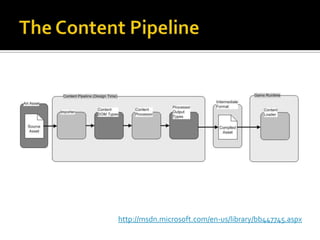
The Content Pipelinehttp://msdn.microsoft.com/en-us/library/bb447745.aspx
2D drawing with the SpriteBatchA class that manages the rendering of 2D sprites (textures) and fontsBeginStarts a batchDrawPaints a Texture2D to the screenDrawStringPaints a SpriteFont + a string to the screenEndCommit the batch
As time goes byTrack how quickly by inspecting the GameTimeAllows proportional movementEver tried to play a 286 game on a 66 MHz beast?React to time passing within UpdateUpdate is less likely to skip than DrawYou don’t want to miss a poll of some user input
Geometry APIsVector2+ - * / another Vector2 or a float.Normalize, Length, LengthSquaredSystem.MathMath.ATan2(x,y) to calculate anglesCos and Sin to turn an angle into a Vector2MathHelperThe XNA Version of System.MathConstants: PI, TwoPi, PiOverFour, E, Log10EMethods: DegreesToRadians, Clamp, CatMullRom, Lerp
Reading User InputGamePadAn XBOX relicCheck if the user is pressing “back” (exit or menu)TouchPanelGetState()Picks up all the currently touched pointsEach touch has an IDReadGesture()Higher level APIFilter with EnabledGestures
Encapsulation with GameComponentUpdate or Draw will get bigger as your game gets builtSeparate responsibilities into componentsDon’t treat these as sprites – they should be long-livedShare state via Game.ServicesGameComponent has parallel Initialize, LoadComponent, Update and Draw (DrawableGameComponent)

Xna for wp7

  • 1.
    Introducing XNA forWP7Rob Fonseca-Ensor
  • 2.
    MeI help runthe CWDNUGI’m co-authoring a WROX book on WP7I’ve got an iPhone game on the app store
  • 3.
    I write Silverlightapps ALL DAY LONG (for Infusion)www.robfe.com | rob@robfe.com | @robfe | meetup.com/cwdnug
  • 4.
    What is it.NETframework for gamesXBOX, PC, ZuneNow WP7Creator’s Clubhttp://creators.xna.comParallel set of .NET APIsEven more cut down on WP7Relatively Portable
  • 5.
    When to useitSilverlight is event drivenIt reacts to the userSuitable for some gamesXNA is a game loopThe user reacts to the game3D graphicsPerformance
  • 6.
  • 7.
  • 8.
    2D drawing withthe SpriteBatchA class that manages the rendering of 2D sprites (textures) and fontsBeginStarts a batchDrawPaints a Texture2D to the screenDrawStringPaints a SpriteFont + a string to the screenEndCommit the batch
  • 9.
    As time goesbyTrack how quickly by inspecting the GameTimeAllows proportional movementEver tried to play a 286 game on a 66 MHz beast?React to time passing within UpdateUpdate is less likely to skip than DrawYou don’t want to miss a poll of some user input
  • 10.
    Geometry APIsVector2+ -* / another Vector2 or a float.Normalize, Length, LengthSquaredSystem.MathMath.ATan2(x,y) to calculate anglesCos and Sin to turn an angle into a Vector2MathHelperThe XNA Version of System.MathConstants: PI, TwoPi, PiOverFour, E, Log10EMethods: DegreesToRadians, Clamp, CatMullRom, Lerp
  • 11.
    Reading User InputGamePadAnXBOX relicCheck if the user is pressing “back” (exit or menu)TouchPanelGetState()Picks up all the currently touched pointsEach touch has an IDReadGesture()Higher level APIFilter with EnabledGestures
  • 12.
    Encapsulation with GameComponentUpdateor Draw will get bigger as your game gets builtSeparate responsibilities into componentsDon’t treat these as sprites – they should be long-livedShare state via Game.ServicesGameComponent has parallel Initialize, LoadComponent, Update and Draw (DrawableGameComponent)

Editor's Notes

  • #2 http://www.youtube.com/watch?v=I_U7YZwf2Nw http://www.youtube.com/watch?v=ycli-koDlP8
  • #6 Update is responsible for reading the state of the user input, network input and mutating the game stateDraw is responsible for reading the game state and rendering that to the screen
  • #7 The content pipeline represents a huge boost in runtime-performance, portability and ease of developmentIt can take your fonts, and only include the glyphs you’d like. Images and sounds are compressed and optimised for the target device.3D assets will be processed appropriately
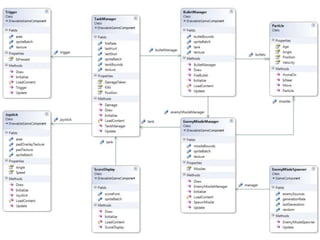
  • #13 My GameComponents, let me show you them