Xamarin 101
WHAT YOU NEED TO KNOW TO GET STARTED WITH XAMARIN.FORMS
TODAY!
About Me Chester (Chet) Hartin
Technical Architect @ Concurrency
Focus: C#, APIs, Messaging services, Xamarin.
GitHub: https://github.com/chesterhartin
Twitter: @ChetHartin
About Me
Chester (Chet) Hartin
Tec hnic al Architec t @Concurrency
Foc us: C# , APIs, Messaging servic es, Xamarin.
GitHub: https:/ / github.c om/ c hesterhartin
Twitter: @ChetHartin
Syllabus
Intro To Xamarin
Basic building blocks of Xamarin.Forms
XAML Introduction
Databinding
View Customization
What to do next?
Intro To Xamarin
Why Xamarin when we have Java, Objective-C, Swift?
• This leads to Write Everything Twice (WET) Development
• Xamarin allows us to write for the iOS (8 and up), Android (API 15 / 4.0.3
and up), WFP, MacOS, Smart watches (iOS/Android), Samsung Smart
devices
When should
I use it?
Why Xamarin when we have Flutter, PhoneGap,
Corona, React Native...
• All of these are great tools!
But…
• Your team knows C#/.Net
• You need multiple-platform apps
• You want a native app performance and/or look &
feel
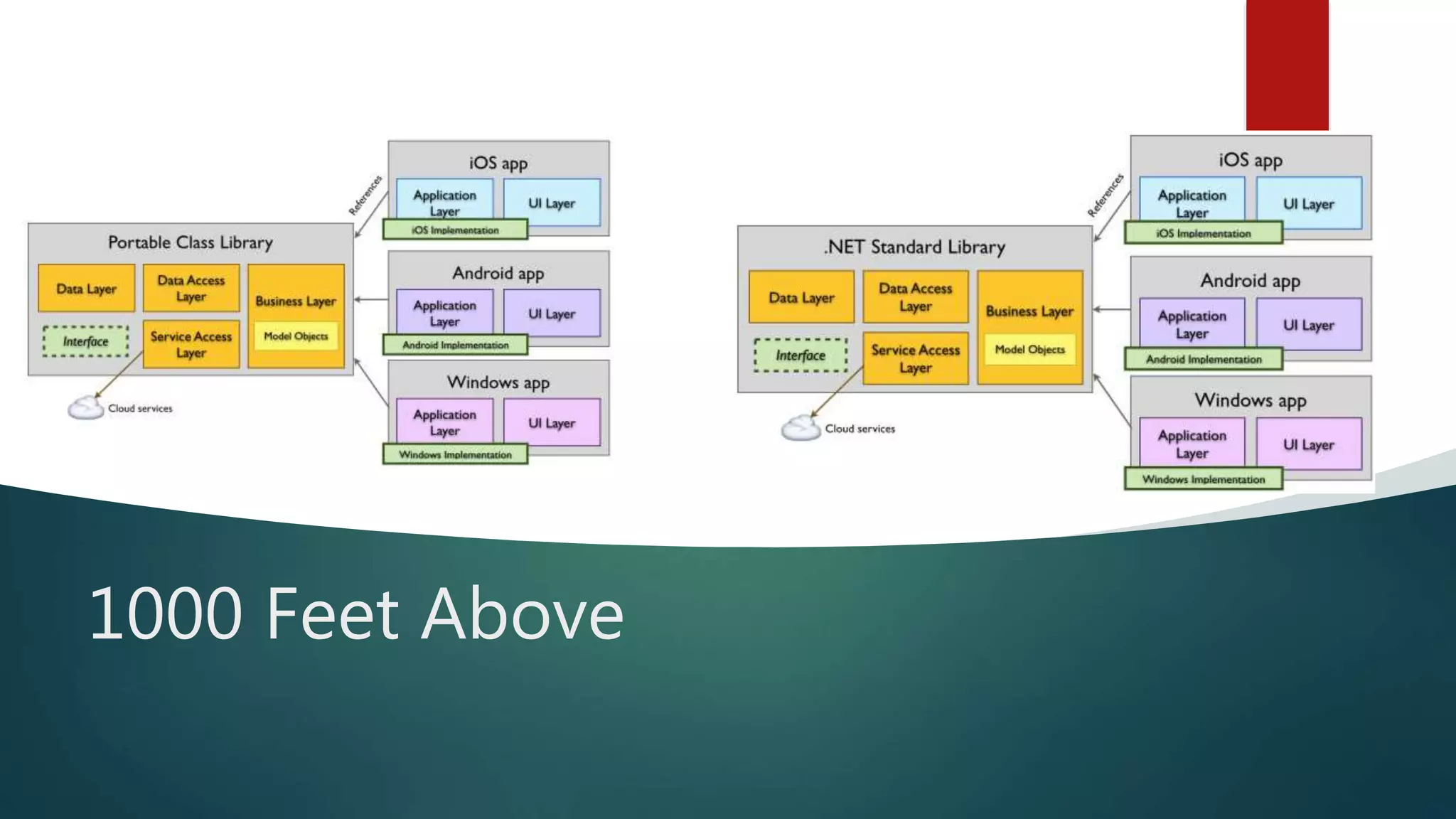
1000 Feet Above
Xamarin.Forms
XAMARIN.FORMS SHARE A UI
DEFINITION*
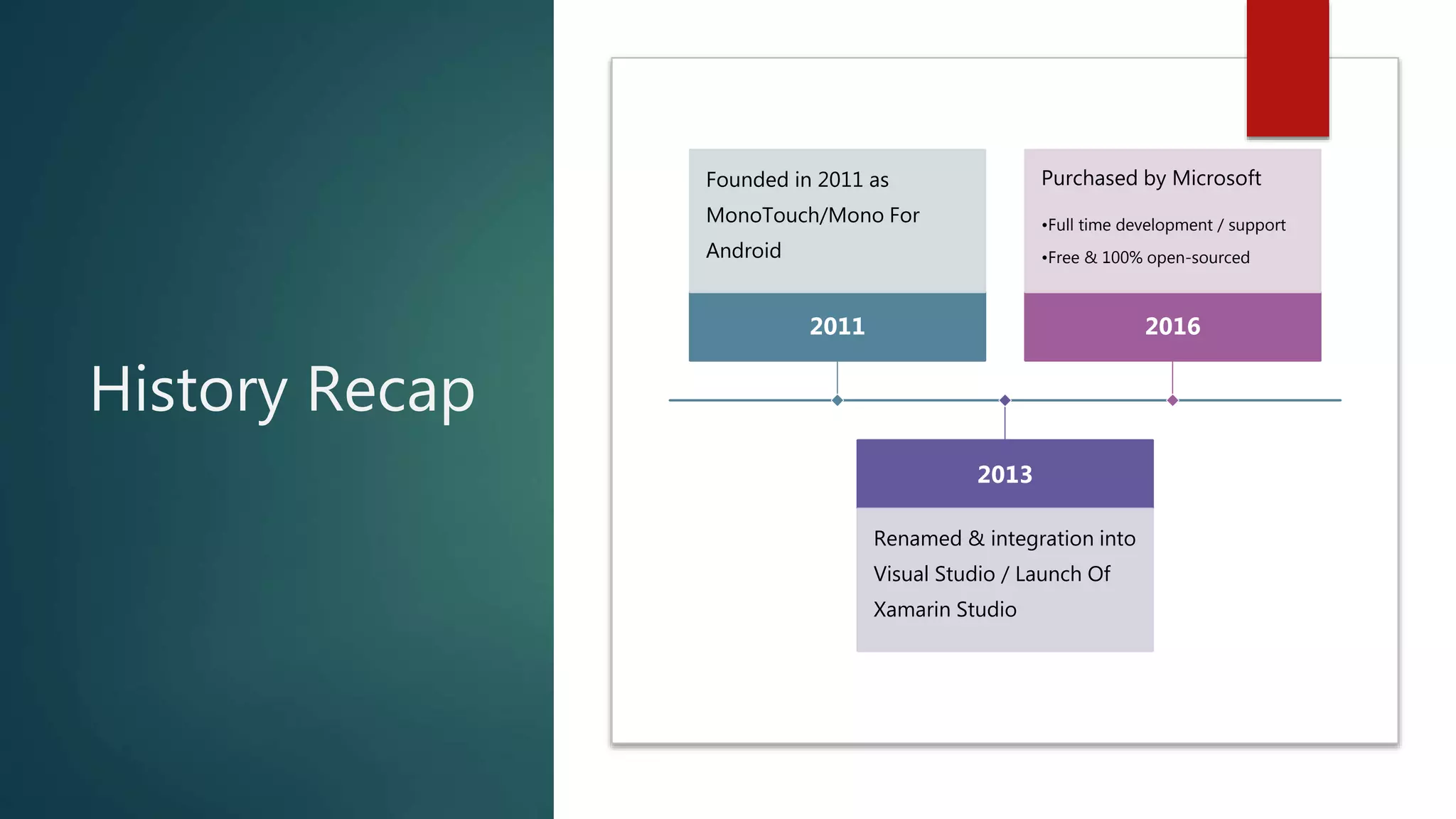
History Recap
2011
Founded in 2011 as
MonoTouch/Mono For
Android
2013
Renamed & integration into
Visual Studio / Launch Of
Xamarin Studio
2016
Purchased by Microsoft
•Full time development / support
•Free & 100% open-sourced
What Do I
need?
 PC
 Visual Studio 2017 / 2019
 Mac
 Visual Studio for Mac
 Note: iOS development REQUIRES a
Mac to build/test
Basic Building Blocks
Pages
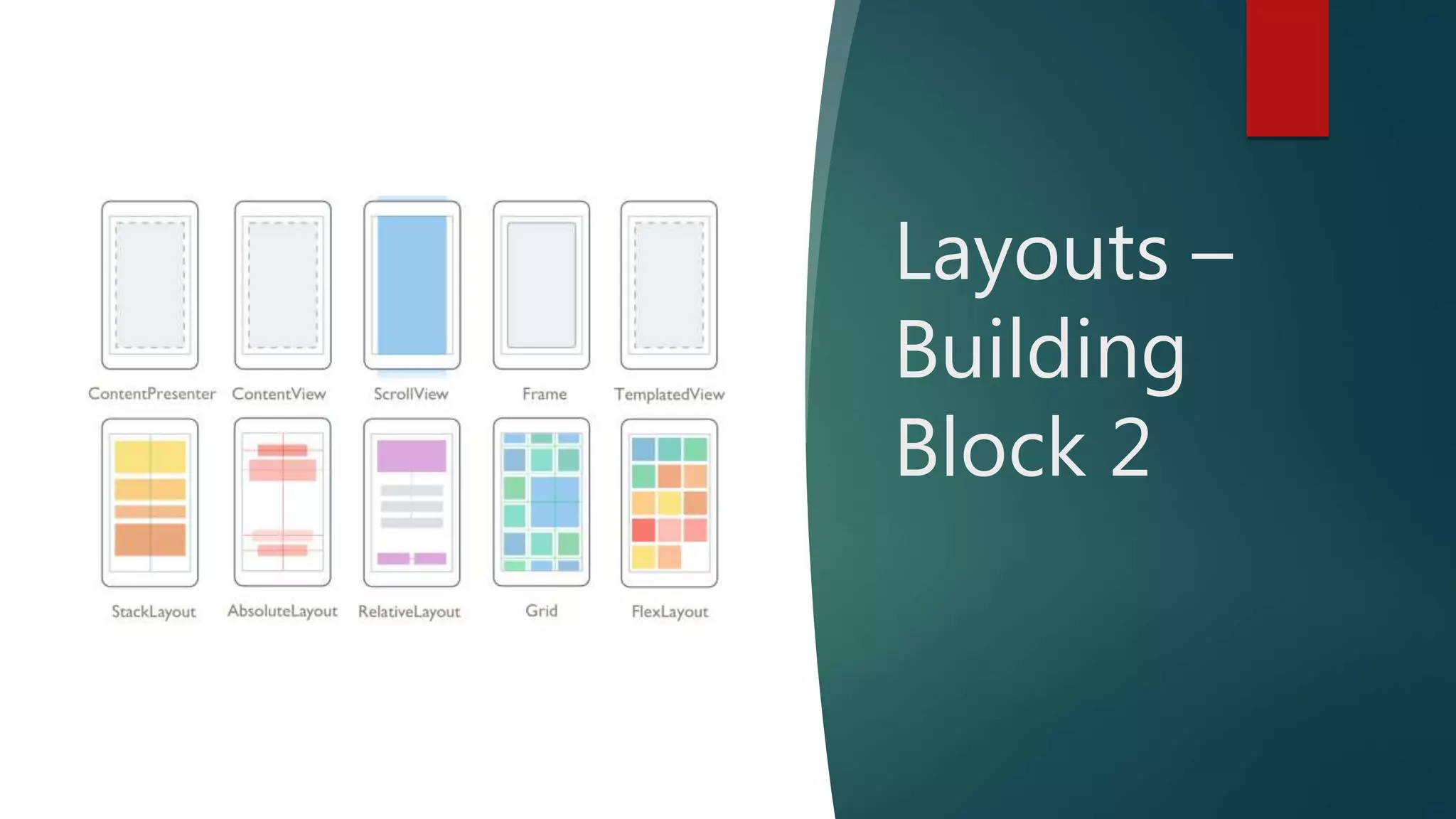
Layouts
Views
Cells
Flexible
Layout
Standard
Controls
Navigation
Custom
Controls
Data
Binding
XAML
Styles +
Triggers
Maps
Pages – Building Block 1
Layouts –
Building
Block 2
Views – Building
Block 3
Button
Label
Entry
Switch
Activity Indicator
Views – Building Block 3 (cont)
Views Android iOS
Button
Label
Entry
Switch
Activity Indicator
Views – Building Block 3 (cont)
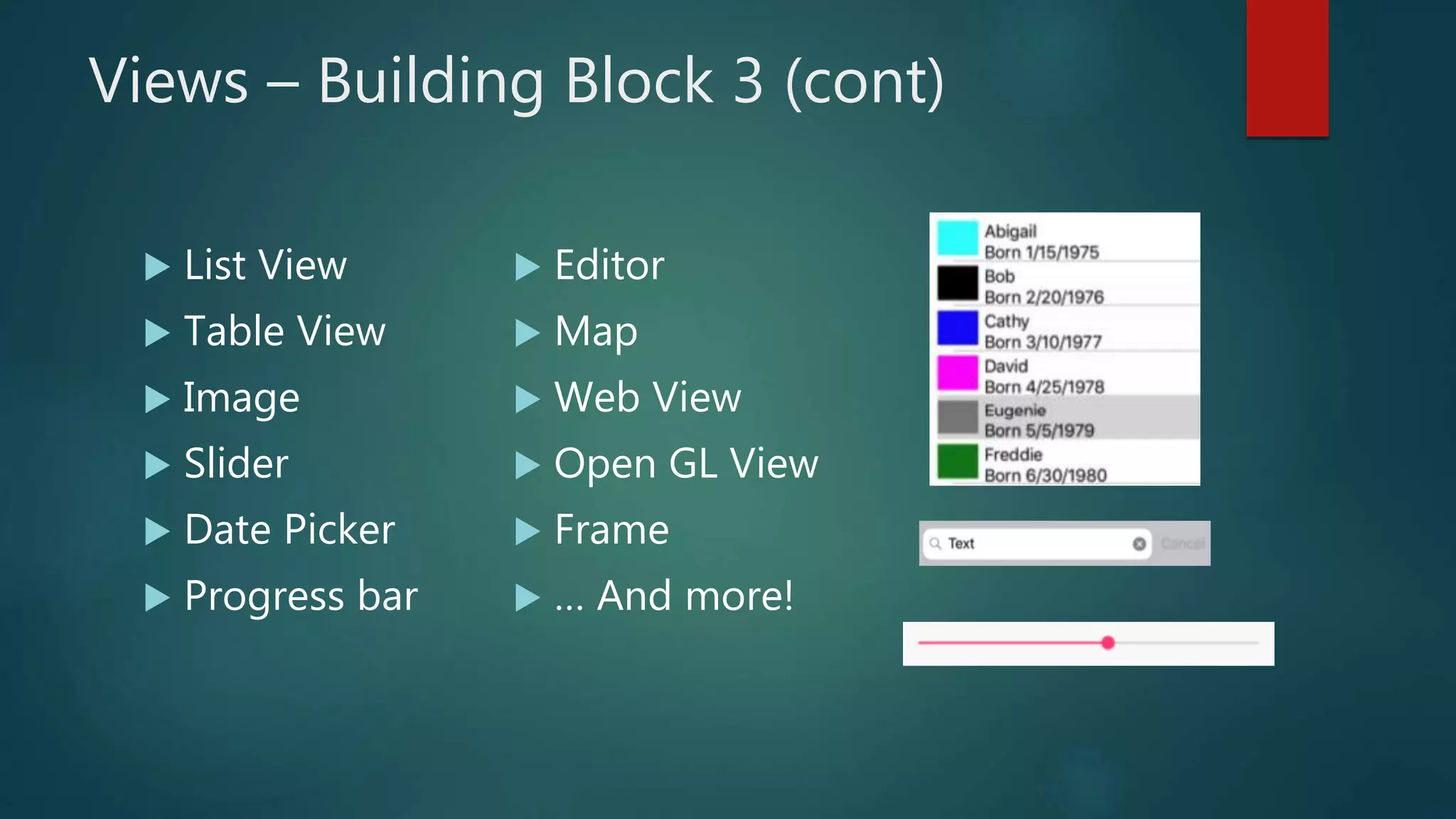
 List View
 Table View
 Image
 Slider
 Date Picker
 Progress bar
 Editor
 Map
 Web View
 Open GL View
 Frame
 … And more!
Cells – Building Block 4
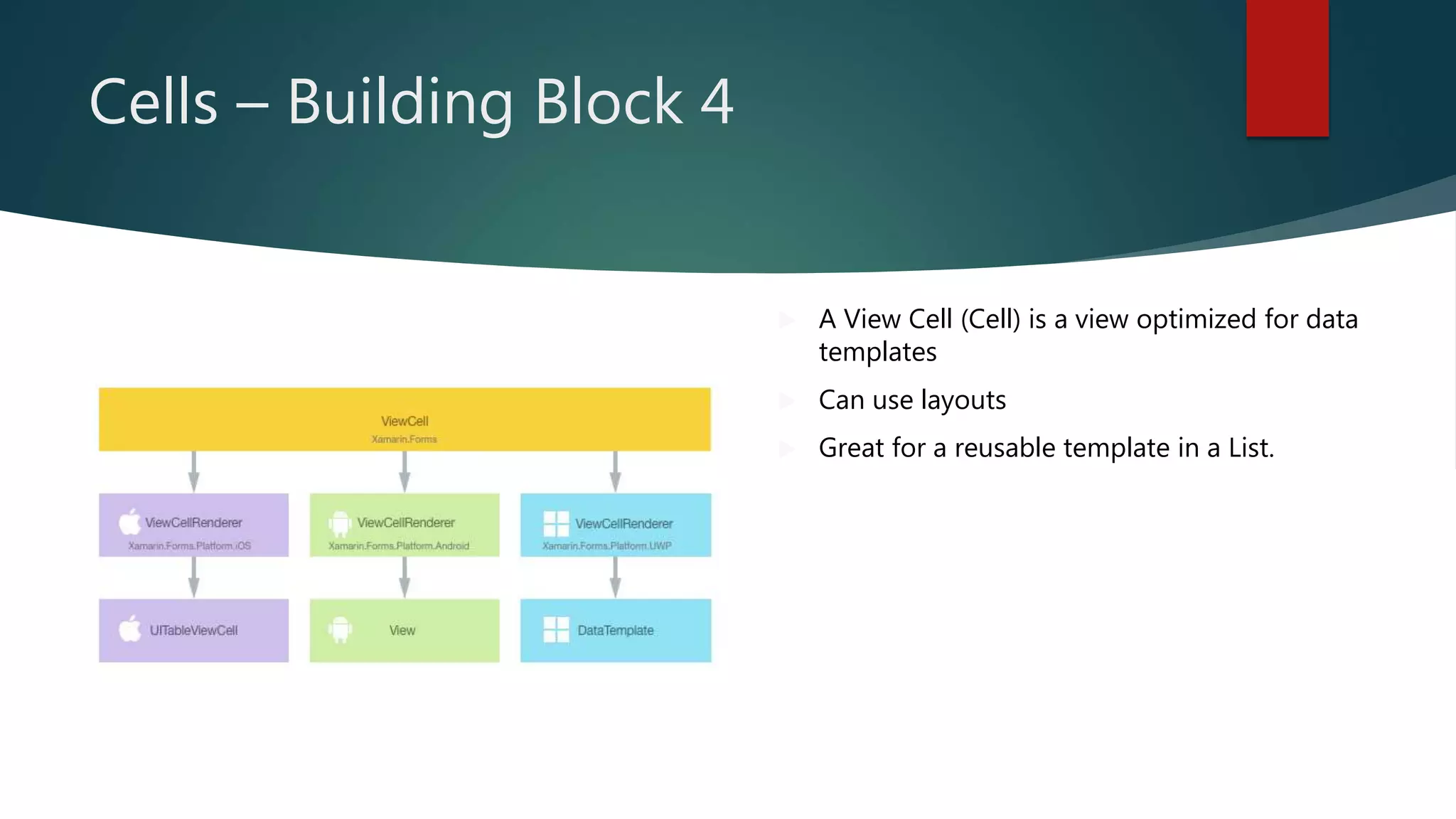
 A View Cell (Cell) is a view optimized for data
templates
 Can use layouts
 Great for a reusable template in a List.
XAML
Introduction
 Code time!
 Anatomy of a Xamarin.Forms App
 Content Page
 Views
 Styles
 Layouts
 Stack
 Grid
 Absolute
Databinding
 How do we show information to the
user?
 How do we get user input?
 Model-View-ViewModel (MVVM)
Basics
 View: knows how to display
 ViewModel: knows what data to
display
 Model: the nouns of the system
Flexible
Layout
Standard
Controls
Navigation
Custom
Controls
Data
Binding
XAML
Styles +
Triggers
Maps
Databinding (cont.)
View
XF Content
Page
ViewModel
Class
Model
Class
Data Data
Events
• View: knows how to display data
• ViewModel: knows what data to display
• Model: the nouns of the system. Data Objects
Databinding
(cont.)
 Code Time!
 Bindable Properties
 Binding a Context
 Converters
View Customization
 What if Xamarin.Forms doesn’t behave
the way I want it to?
 Platform Specific Changes
 Effects
 Behaviors
 Custom Renderers
View Customization (cont.)
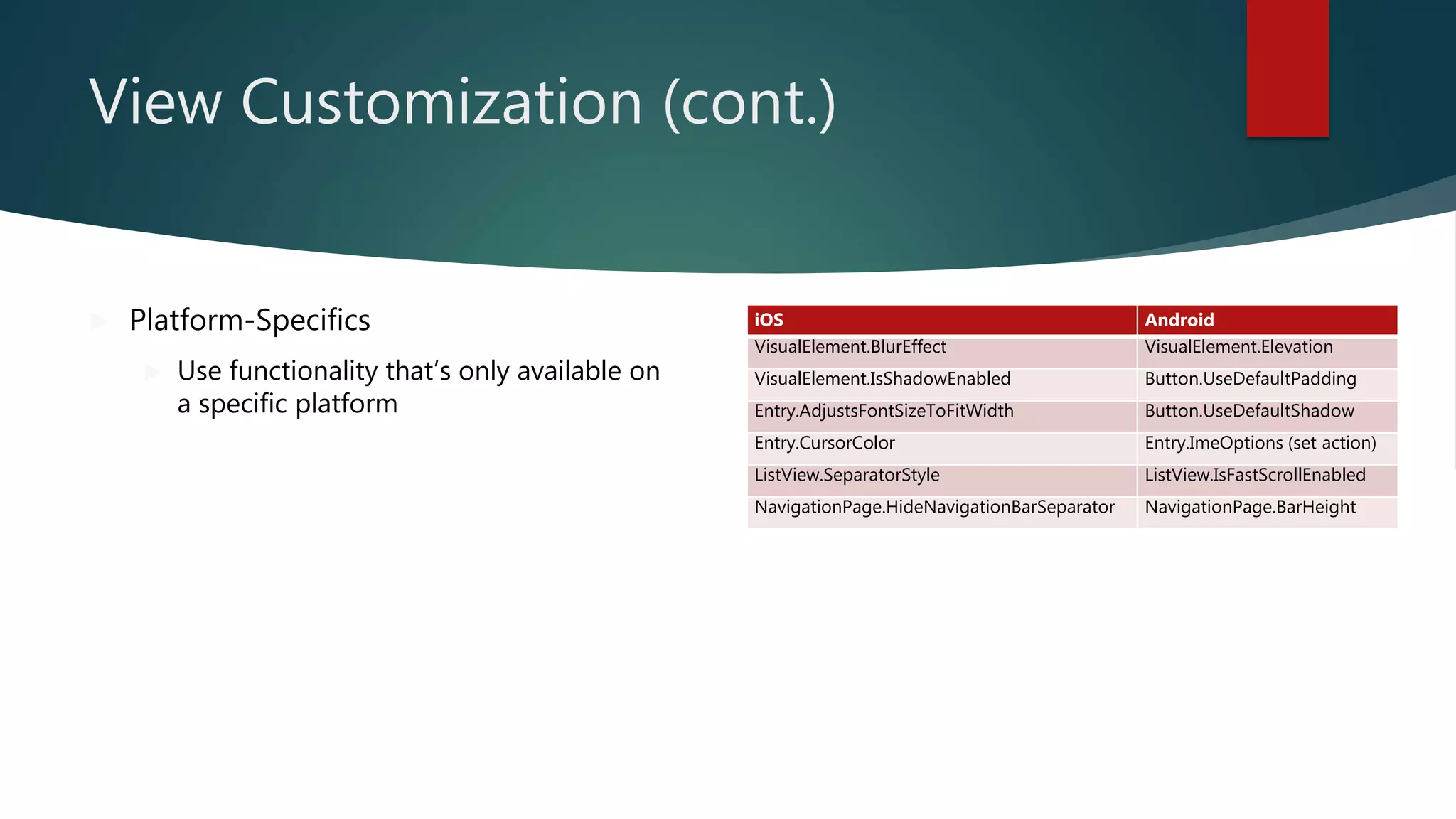
 Platform-Specifics
 Use functionality that’s only available on
a specific platform
iOS Android
VisualElement.BlurEffect VisualElement.Elevation
VisualElement.IsShadowEnabled Button.UseDefaultPadding
Entry.AdjustsFontSizeToFitWidth Button.UseDefaultShadow
Entry.CursorColor Entry.ImeOptions (set action)
ListView.SeparatorStyle ListView.IsFastScrollEnabled
NavigationPage.HideNavigationBarSeparator NavigationPage.BarHeight
View
Customization
(cont)
 Effects
 AKA “Custom Renderers Lite”
 Allow the native controls on each platform to be
customized
 Typically used for small styling changes
 Benefits:
 Simplify the customization of a control
 Are reusable
 Can be passed as parameters for increased reuse
View
Customization
(cont.)
 Behaviors
 Attach additional functionality to any
Xamarin.Forms View
 Examples
 Allow n-characters in an entry
 Only allow integers to be entered into an entry
View Customization (cont.)
 Custom Renderers
 Lets developers override the out-of-the-box renderers to customize the
appearance/behavior of Xamarin.Forms on each platform
 Think “can I do this with an effect?” first
 Extend a Xamarin.Forms View
 Required when there’s a need to override methods of a platform-specific
control.
View Customization (cont.)
 Code Time!
 Platform-specific
 Effects
 Behaviors
 Custom Renderers
What to do next?
 Try out these device features:
 Accelerometer, Barometer, Battery, Compass, Connectivity State, etc
 Use plugins
 NuGet packages implement and provide a lot of features!
 Xamarin.Essentials - a must for an interactive app
 Microsoft Learn (or Xamarin University until June 2019)
 https://docs.microsoft.com/en-
us/learn/browse/?roles=developer&term=xamarin
 I recommend all the Xamarin.Forms courses
References
 Documentation
 All available online:
 https://docs.microsoft.com/en-us/xamarin/
 Slack
 Get involved
 https://xamarinchat.herokuapp.com/
 Learn the hot MVVM frameworks
 Prism https://prismlibrary.github.io/
 ReactiveUI https://reactiveui.net/
 MVVMCross https://www.mvvmcross.com/
Resources
 Installing Xamarin: https://docs.microsoft.com/en-us/xamarin/get-
started/installation/?pivots=windows
 Build your first app with Xamarin.Forms:
https://www.youtube.com/watch?v=NGvn-pGZFPA
 Xamarin.Forms roadmap:
https://github.com/xamarin/Xamarin.Forms/wiki/Feature-Roadmap
About Me Chester (Chet) Hartin
Technical Architect @ Concurrency
Focus: C#, APIs, Messaging services, Xamarin.
GitHub: https://github.com/chesterhartin
Twitter: @ChetHartin

Xamarin 101

  • 1.
    Xamarin 101 WHAT YOUNEED TO KNOW TO GET STARTED WITH XAMARIN.FORMS TODAY!
  • 2.
    About Me Chester(Chet) Hartin Technical Architect @ Concurrency Focus: C#, APIs, Messaging services, Xamarin. GitHub: https://github.com/chesterhartin Twitter: @ChetHartin About Me Chester (Chet) Hartin Tec hnic al Architec t @Concurrency Foc us: C# , APIs, Messaging servic es, Xamarin. GitHub: https:/ / github.c om/ c hesterhartin Twitter: @ChetHartin
  • 4.
    Syllabus Intro To Xamarin Basicbuilding blocks of Xamarin.Forms XAML Introduction Databinding View Customization What to do next?
  • 5.
    Intro To Xamarin WhyXamarin when we have Java, Objective-C, Swift? • This leads to Write Everything Twice (WET) Development • Xamarin allows us to write for the iOS (8 and up), Android (API 15 / 4.0.3 and up), WFP, MacOS, Smart watches (iOS/Android), Samsung Smart devices
  • 6.
    When should I useit? Why Xamarin when we have Flutter, PhoneGap, Corona, React Native... • All of these are great tools! But… • Your team knows C#/.Net • You need multiple-platform apps • You want a native app performance and/or look & feel
  • 7.
  • 8.
  • 9.
    History Recap 2011 Founded in2011 as MonoTouch/Mono For Android 2013 Renamed & integration into Visual Studio / Launch Of Xamarin Studio 2016 Purchased by Microsoft •Full time development / support •Free & 100% open-sourced
  • 10.
    What Do I need? PC  Visual Studio 2017 / 2019  Mac  Visual Studio for Mac  Note: iOS development REQUIRES a Mac to build/test
  • 11.
  • 12.
  • 13.
  • 14.
    Views – Building Block3 Button Label Entry Switch Activity Indicator
  • 15.
    Views – BuildingBlock 3 (cont) Views Android iOS Button Label Entry Switch Activity Indicator
  • 16.
    Views – BuildingBlock 3 (cont)  List View  Table View  Image  Slider  Date Picker  Progress bar  Editor  Map  Web View  Open GL View  Frame  … And more!
  • 17.
    Cells – BuildingBlock 4  A View Cell (Cell) is a view optimized for data templates  Can use layouts  Great for a reusable template in a List.
  • 18.
    XAML Introduction  Code time! Anatomy of a Xamarin.Forms App  Content Page  Views  Styles  Layouts  Stack  Grid  Absolute
  • 20.
    Databinding  How dowe show information to the user?  How do we get user input?  Model-View-ViewModel (MVVM) Basics  View: knows how to display  ViewModel: knows what data to display  Model: the nouns of the system Flexible Layout Standard Controls Navigation Custom Controls Data Binding XAML Styles + Triggers Maps
  • 21.
    Databinding (cont.) View XF Content Page ViewModel Class Model Class DataData Events • View: knows how to display data • ViewModel: knows what data to display • Model: the nouns of the system. Data Objects
  • 22.
    Databinding (cont.)  Code Time! Bindable Properties  Binding a Context  Converters
  • 24.
    View Customization  Whatif Xamarin.Forms doesn’t behave the way I want it to?  Platform Specific Changes  Effects  Behaviors  Custom Renderers
  • 25.
    View Customization (cont.) Platform-Specifics  Use functionality that’s only available on a specific platform iOS Android VisualElement.BlurEffect VisualElement.Elevation VisualElement.IsShadowEnabled Button.UseDefaultPadding Entry.AdjustsFontSizeToFitWidth Button.UseDefaultShadow Entry.CursorColor Entry.ImeOptions (set action) ListView.SeparatorStyle ListView.IsFastScrollEnabled NavigationPage.HideNavigationBarSeparator NavigationPage.BarHeight
  • 26.
    View Customization (cont)  Effects  AKA“Custom Renderers Lite”  Allow the native controls on each platform to be customized  Typically used for small styling changes  Benefits:  Simplify the customization of a control  Are reusable  Can be passed as parameters for increased reuse
  • 27.
    View Customization (cont.)  Behaviors  Attachadditional functionality to any Xamarin.Forms View  Examples  Allow n-characters in an entry  Only allow integers to be entered into an entry
  • 28.
    View Customization (cont.) Custom Renderers  Lets developers override the out-of-the-box renderers to customize the appearance/behavior of Xamarin.Forms on each platform  Think “can I do this with an effect?” first  Extend a Xamarin.Forms View  Required when there’s a need to override methods of a platform-specific control.
  • 29.
    View Customization (cont.) Code Time!  Platform-specific  Effects  Behaviors  Custom Renderers
  • 30.
    What to donext?  Try out these device features:  Accelerometer, Barometer, Battery, Compass, Connectivity State, etc  Use plugins  NuGet packages implement and provide a lot of features!  Xamarin.Essentials - a must for an interactive app  Microsoft Learn (or Xamarin University until June 2019)  https://docs.microsoft.com/en- us/learn/browse/?roles=developer&term=xamarin  I recommend all the Xamarin.Forms courses
  • 31.
    References  Documentation  Allavailable online:  https://docs.microsoft.com/en-us/xamarin/  Slack  Get involved  https://xamarinchat.herokuapp.com/  Learn the hot MVVM frameworks  Prism https://prismlibrary.github.io/  ReactiveUI https://reactiveui.net/  MVVMCross https://www.mvvmcross.com/
  • 32.
    Resources  Installing Xamarin:https://docs.microsoft.com/en-us/xamarin/get- started/installation/?pivots=windows  Build your first app with Xamarin.Forms: https://www.youtube.com/watch?v=NGvn-pGZFPA  Xamarin.Forms roadmap: https://github.com/xamarin/Xamarin.Forms/wiki/Feature-Roadmap
  • 34.
    About Me Chester(Chet) Hartin Technical Architect @ Concurrency Focus: C#, APIs, Messaging services, Xamarin. GitHub: https://github.com/chesterhartin Twitter: @ChetHartin