WSO2 Enterprise Mobility Manager 2.0.1
Overview
Agenda
o  Background
o  Introduction
o  Mobile Device Management
o  Mobile App Management
o  Deployment
Background
Challenges in Enterprise Mobility
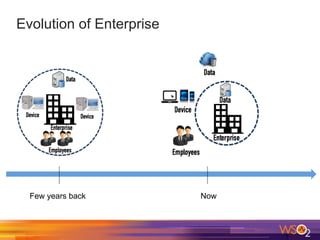
Evolution of Enterprise
Few years back Now
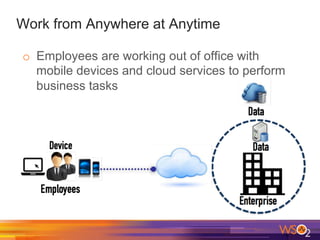
Work from Anywhere at Anytime
o  Employees are working out of office with
mobile devices and cloud services to perform
business tasks
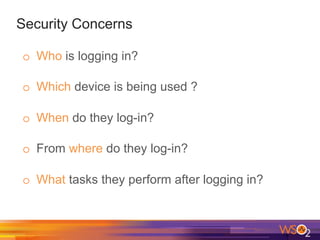
Security Concerns
o  Who is logging in?
o  Which device is being used ?
o  When do they log-in?
o  From where do they log-in?
o  What tasks they perform after logging in?
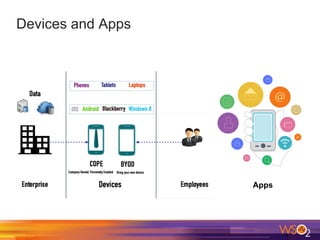
Devices and Apps
Apps
Device and App Management
o  How to restrict certain device configurations?
o  How to restrict certain applications?
o  How to assign permission to access data
based on the organizational hierarchy?
Concern of CIOs and IT Managers
o  How to allow mobility in my business ?
How to allow mobility
in my business ?
Introduction
WSO2 Enterprise Mobility Manager (WSO2 EMM)
Overview
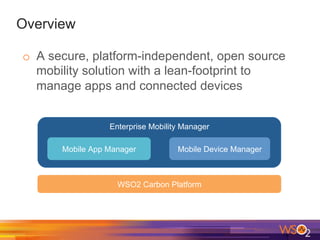
o  A secure, platform-independent, open source
mobility solution with a lean-footprint to
manage apps and connected devices
Enterprise Mobility Manager
Mobile App Manager Mobile Device Manager
WSO2 Carbon Platform
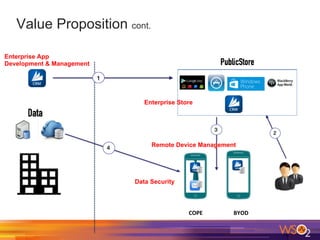
Value Proposition
o  Ensures data security in adopting BYOD and
COPE
o  Remote device and application management
o  First ever Unified App Store in an enterprise
mobility manager
Value Proposition cont.
COPE	
   BYOD	
  
Data Security
Remote Device Management
Enterprise Store
Enterprise App
Development & Management
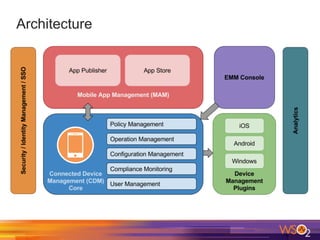
Architecture
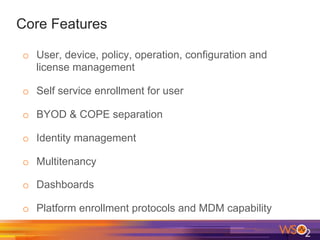
Core Features
o  User, device, policy, operation, configuration and
license management
o  Self service enrollment for user
o  BYOD & COPE separation
o  Identity management
o  Multitenancy
o  Dashboards
o  Platform enrollment protocols and MDM capability
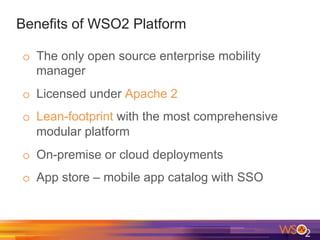
Benefits of WSO2 Platform
o  The only open source enterprise mobility
manager
o  Licensed under Apache 2
o  Lean-footprint with the most comprehensive
modular platform
o  On-premise or cloud deployments
o  App store – mobile app catalog with SSO
Case Study
o  A fictitious organization eMax is using WSO2
EMM
o  eMax employees are allowed to bring their own
devices, but inside the organization,
o  The device must get connected to a specific
network
o  The camera of the device should be disabled
o  Need to install an employee directory application
on the device to access official contact details of
all the employees
Mobile Device Management
New Employee Arrives..
o  Jim joins eMax as a Marketing Officer in the
Marketing Team
o  He wants to access eMax corporate network
with his phone
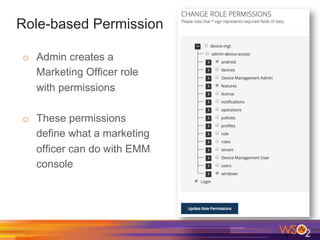
Role-based Permission
o  Admin creates a
Marketing Officer role
with permissions
o  These permissions
define what a marketing
officer can do with EMM
console
Policy-based Authorization
o  Admin creates a policy named Marketing
Officer Policy with warning type compliance
monitoring
o  Marketing Officer Policy,
o  Provides a password policy
o  Connects with corporate network
o  Installs relevant Apps
o  Disables the camera
o  Admin assigns the Marketing Officer policy to
the Marketing Officer role
Policy-based Administration cont.
o  Policies can be applied at user, role or platform
level
o  Policy hierarchy defines the precedence of the
policies to be enforced
o  Facilitates compliance monitoring
Device Enrollment
o  Admin adds Jim as a user in WSO2 EMM and
assigns him the Marketing Officer role
o  Jim is sent an email to his official email with
o  A URL to download the Agent to the device
o  An auto-generated password to login through the
Agent
o  Jim self-enrolls his device with the details
provided in the email, accepting the policy
Security for Employees
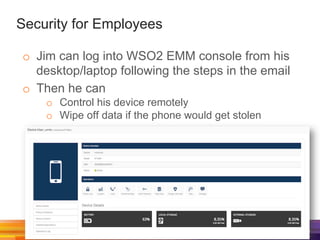
o  Jim can log into WSO2 EMM console from his
desktop/laptop following the steps in the email
o  Then he can
o  Control his device remotely
o  Wipe off data if the phone would get stolen
User Store Integration
o  eMax which is a startup, adopts LDAP as its
user store after Jim arrives
o  eMax integrates their LDAP with WSO2 EMM
o  Now Jim can login to WSO2 EMM using his
LDAP credentials
o  New employees joining hereafter, needs only
the URLs to download the agent and login to
WOS2 EMM
o  WSO2 EMM also supports JDBC and Microsoft
AD user stores
Security for Admins
o  Can see all the employees’ enrolled devices
o  Can wipe off enterprise data in those devices
when employees leave the organization
o  Compliance monitoring of policies
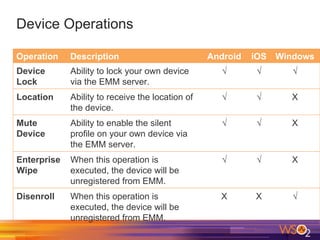
Device Operations
Operation Description Android iOS Windows
Device
Lock
Ability to lock your own device
via the EMM server.
√ √ √
Location Ability to receive the location of
the device.
√ √ X
Mute
Device
Ability to enable the silent
profile on your own device via
the EMM server.
√ √ X
Enterprise
Wipe
When this operation is
executed, the device will be
unregistered from EMM.
√ √ X
Disenroll When this operation is
executed, the device will be
unregistered from EMM.
X X √
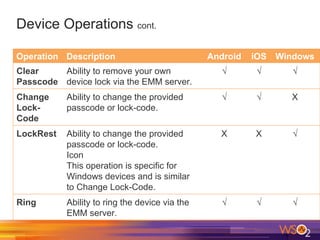
Device Operations cont.
Operation Description Android iOS Windows
Clear
Passcode
Ability to remove your own
device lock via the EMM server.
√ √ √
Change
Lock-
Code
Ability to change the provided
passcode or lock-code.
√ √ X
LockRest Ability to change the provided
passcode or lock-code.
Icon
This operation is specific for
Windows devices and is similar
to Change Lock-Code.
X X √
Ring Ability to ring the device via the
EMM server.
√ √ √
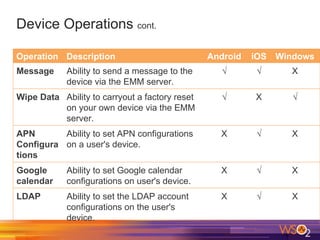
Device Operations cont.
Operation Description Android iOS Windows
Message Ability to send a message to the
device via the EMM server.
√ √ X
Wipe Data Ability to carryout a factory reset
on your own device via the EMM
server.
√ X √
APN
Configura
tions
Ability to set APN configurations
on a user's device.
X √ X
Google
calendar
Ability to set Google calendar
configurations on user's device.
X √ X
LDAP Ability to set the LDAP account
configurations on the user's
device.
X √ X
Mobile App Management
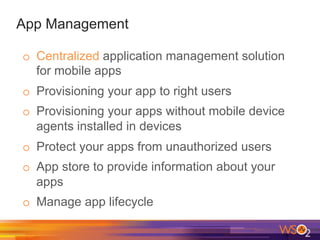
App Management
o  Centralized application management solution
for mobile apps
o  Provisioning your app to right users
o  Provisioning your apps without mobile device
agents installed in devices
o  Protect your apps from unauthorized users
o  App store to provide information about your
apps
o  Manage app lifecycle
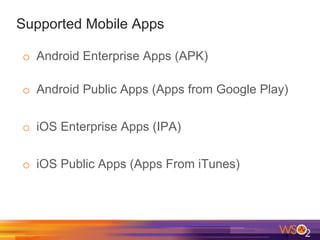
Supported Mobile Apps
o  Android Enterprise Apps (APK)
o  Android Public Apps (Apps from Google Play)
o  iOS Enterprise Apps (IPA)
o  iOS Public Apps (Apps From iTunes)
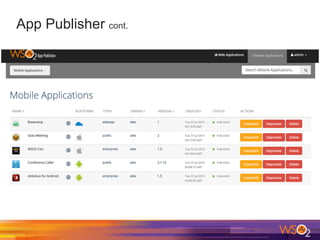
App Publisher
o  Supports Android, iOS and Windows apps
o  Mobile app developers of eMax who are
assigned the app publisher role can upload
applications and submit for review
o  Lead mobile app developers are assigned the
reviewer role, thus they review and approve
o  Once approved, developers can publish the
apps
o  Helps manage the application life-cycle
App Publisher cont.
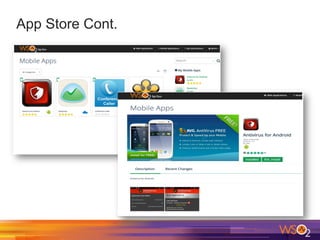
App Store
o  A universal mobile app store
o  Can host Android, iOS and Windows platforms
o  Advanced search options
o  Jim can install any allowed application he
needs in his multiple enrolled devices
o  Admins execute bulk app push through MAM
console when a new corporate app arrives the
store
App Store Cont.
Security
o  Admins can
o  Monitor policy compliance
o  Track installed apps
Deployment
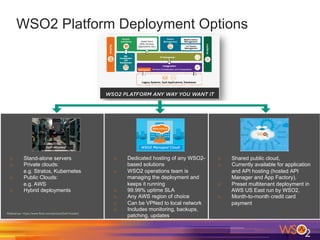
WSO2 Platform Deployment Options
o  Stand-alone servers
o  Private clouds:
e.g. Stratos, Kubernetes
o  Public Clouds:
e.g. AWS
o  Hybrid deployments
o  Dedicated hosting of any WSO2-
based solutions
o  WSO2 operations team is
managing the deployment and
keeps it running
o  99.99% uptime SLA
o  Any AWS region of choice
o  Can be VPNed to local network
o  Includes monitoring, backups,
patching, updates
o  Shared public cloud,
o  Currently available for application
and API hosting (hosted API
Manager and App Factory),
o  Preset multitenant deployment in
AWS US East run by WSO2,
o  Month-to-month credit card
payment
CONTACT US !

WSO2 Enterprise Mobility Manager - Product Overview

  • 1.
    WSO2 Enterprise MobilityManager 2.0.1 Overview
  • 2.
    Agenda o  Background o  Introduction o Mobile Device Management o  Mobile App Management o  Deployment
  • 3.
  • 4.
  • 5.
    Work from Anywhereat Anytime o  Employees are working out of office with mobile devices and cloud services to perform business tasks
  • 6.
    Security Concerns o  Whois logging in? o  Which device is being used ? o  When do they log-in? o  From where do they log-in? o  What tasks they perform after logging in?
  • 7.
  • 8.
    Device and AppManagement o  How to restrict certain device configurations? o  How to restrict certain applications? o  How to assign permission to access data based on the organizational hierarchy?
  • 9.
    Concern of CIOsand IT Managers o  How to allow mobility in my business ? How to allow mobility in my business ?
  • 10.
  • 11.
    Overview o  A secure,platform-independent, open source mobility solution with a lean-footprint to manage apps and connected devices Enterprise Mobility Manager Mobile App Manager Mobile Device Manager WSO2 Carbon Platform
  • 12.
    Value Proposition o  Ensuresdata security in adopting BYOD and COPE o  Remote device and application management o  First ever Unified App Store in an enterprise mobility manager
  • 13.
    Value Proposition cont. COPE   BYOD   Data Security Remote Device Management Enterprise Store Enterprise App Development & Management
  • 14.
  • 15.
    Core Features o  User,device, policy, operation, configuration and license management o  Self service enrollment for user o  BYOD & COPE separation o  Identity management o  Multitenancy o  Dashboards o  Platform enrollment protocols and MDM capability
  • 16.
    Benefits of WSO2Platform o  The only open source enterprise mobility manager o  Licensed under Apache 2 o  Lean-footprint with the most comprehensive modular platform o  On-premise or cloud deployments o  App store – mobile app catalog with SSO
  • 17.
    Case Study o  Afictitious organization eMax is using WSO2 EMM o  eMax employees are allowed to bring their own devices, but inside the organization, o  The device must get connected to a specific network o  The camera of the device should be disabled o  Need to install an employee directory application on the device to access official contact details of all the employees
  • 18.
  • 19.
    New Employee Arrives.. o Jim joins eMax as a Marketing Officer in the Marketing Team o  He wants to access eMax corporate network with his phone
  • 20.
    Role-based Permission o  Admincreates a Marketing Officer role with permissions o  These permissions define what a marketing officer can do with EMM console
  • 21.
    Policy-based Authorization o  Admincreates a policy named Marketing Officer Policy with warning type compliance monitoring o  Marketing Officer Policy, o  Provides a password policy o  Connects with corporate network o  Installs relevant Apps o  Disables the camera o  Admin assigns the Marketing Officer policy to the Marketing Officer role
  • 22.
    Policy-based Administration cont. o Policies can be applied at user, role or platform level o  Policy hierarchy defines the precedence of the policies to be enforced o  Facilitates compliance monitoring
  • 23.
    Device Enrollment o  Adminadds Jim as a user in WSO2 EMM and assigns him the Marketing Officer role o  Jim is sent an email to his official email with o  A URL to download the Agent to the device o  An auto-generated password to login through the Agent o  Jim self-enrolls his device with the details provided in the email, accepting the policy
  • 24.
    Security for Employees o Jim can log into WSO2 EMM console from his desktop/laptop following the steps in the email o  Then he can o  Control his device remotely o  Wipe off data if the phone would get stolen
  • 25.
    User Store Integration o eMax which is a startup, adopts LDAP as its user store after Jim arrives o  eMax integrates their LDAP with WSO2 EMM o  Now Jim can login to WSO2 EMM using his LDAP credentials o  New employees joining hereafter, needs only the URLs to download the agent and login to WOS2 EMM o  WSO2 EMM also supports JDBC and Microsoft AD user stores
  • 26.
    Security for Admins o Can see all the employees’ enrolled devices o  Can wipe off enterprise data in those devices when employees leave the organization o  Compliance monitoring of policies
  • 27.
    Device Operations Operation DescriptionAndroid iOS Windows Device Lock Ability to lock your own device via the EMM server. √ √ √ Location Ability to receive the location of the device. √ √ X Mute Device Ability to enable the silent profile on your own device via the EMM server. √ √ X Enterprise Wipe When this operation is executed, the device will be unregistered from EMM. √ √ X Disenroll When this operation is executed, the device will be unregistered from EMM. X X √
  • 28.
    Device Operations cont. OperationDescription Android iOS Windows Clear Passcode Ability to remove your own device lock via the EMM server. √ √ √ Change Lock- Code Ability to change the provided passcode or lock-code. √ √ X LockRest Ability to change the provided passcode or lock-code. Icon This operation is specific for Windows devices and is similar to Change Lock-Code. X X √ Ring Ability to ring the device via the EMM server. √ √ √
  • 29.
    Device Operations cont. OperationDescription Android iOS Windows Message Ability to send a message to the device via the EMM server. √ √ X Wipe Data Ability to carryout a factory reset on your own device via the EMM server. √ X √ APN Configura tions Ability to set APN configurations on a user's device. X √ X Google calendar Ability to set Google calendar configurations on user's device. X √ X LDAP Ability to set the LDAP account configurations on the user's device. X √ X
  • 30.
  • 31.
    App Management o  Centralizedapplication management solution for mobile apps o  Provisioning your app to right users o  Provisioning your apps without mobile device agents installed in devices o  Protect your apps from unauthorized users o  App store to provide information about your apps o  Manage app lifecycle
  • 32.
    Supported Mobile Apps o Android Enterprise Apps (APK) o  Android Public Apps (Apps from Google Play) o  iOS Enterprise Apps (IPA) o  iOS Public Apps (Apps From iTunes)
  • 33.
    App Publisher o  SupportsAndroid, iOS and Windows apps o  Mobile app developers of eMax who are assigned the app publisher role can upload applications and submit for review o  Lead mobile app developers are assigned the reviewer role, thus they review and approve o  Once approved, developers can publish the apps o  Helps manage the application life-cycle
  • 34.
  • 35.
    App Store o  Auniversal mobile app store o  Can host Android, iOS and Windows platforms o  Advanced search options o  Jim can install any allowed application he needs in his multiple enrolled devices o  Admins execute bulk app push through MAM console when a new corporate app arrives the store
  • 36.
  • 37.
    Security o  Admins can o Monitor policy compliance o  Track installed apps
  • 38.
  • 39.
    WSO2 Platform DeploymentOptions o  Stand-alone servers o  Private clouds: e.g. Stratos, Kubernetes o  Public Clouds: e.g. AWS o  Hybrid deployments o  Dedicated hosting of any WSO2- based solutions o  WSO2 operations team is managing the deployment and keeps it running o  99.99% uptime SLA o  Any AWS region of choice o  Can be VPNed to local network o  Includes monitoring, backups, patching, updates o  Shared public cloud, o  Currently available for application and API hosting (hosted API Manager and App Factory), o  Preset multitenant deployment in AWS US East run by WSO2, o  Month-to-month credit card payment
  • 40.