{LESS}
CSS Pre-processor
● Introduction
● Variables
● Operations
● Functions
● Extend
● Mixins
● Loops
● Merge
● Compile LESS to CSS
● TODO
Outline
● What is LESS?
○ Less is a CSS pre-processor, meaning that it
extends the CSS language, adding features that
allow variables, mixins, functions and many other
techniques that allow you to make CSS that is
more maintainable, themeable and extendible.
● Usage Development Mode
Introduction
LESS
<link rel="stylesheet/less" type="text/css" href="styles.less" />
Library
<script src="less.js" type="text/javascript"></script>
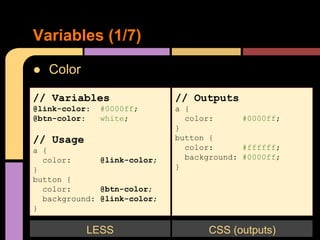
● Color
Variables (1/7)
// Variables
@link-color: #0000ff;
@btn-color: white;
// Usage
a {
color: @link-color;
}
button {
color: @btn-color;
background: @link-color;
}
LESS
// Outputs
a {
color: #0000ff;
}
button {
color: #ffffff;
background: #0000ff;
}
CSS (outputs)
● URLs
Variables (2/7)
// Variables
@images: "../img";
// Usage
button {
background: url("@{images}/button_blue.png");
}
LESS
// Outputs
button {
background: url("../img/button_blue.png");
}
CSS (outputs)
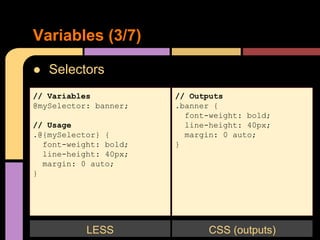
● Selectors
Variables (3/7)
// Variables
@mySelector: banner;
// Usage
.@{mySelector} {
font-weight: bold;
line-height: 40px;
margin: 0 auto;
}
LESS
// Outputs
.banner {
font-weight: bold;
line-height: 40px;
margin: 0 auto;
}
CSS (outputs)
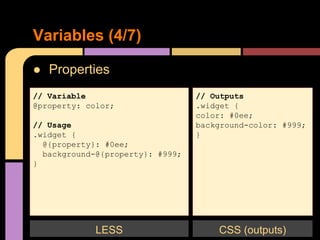
● Properties
Variables (4/7)
// Variable
@property: color;
// Usage
.widget {
@{property}: #0ee;
background-@{property}: #999;
}
LESS
// Outputs
.widget {
color: #0ee;
background-color: #999;
}
CSS (outputs)
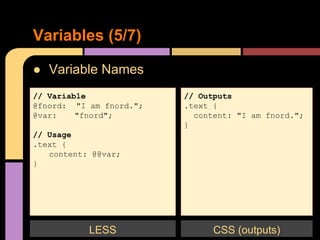
● Variable Names
Variables (5/7)
// Variable
@fnord: "I am fnord.";
@var: "fnord";
// Usage
.text {
content: @@var;
}
LESS
// Outputs
.text {
content: "I am fnord.";
}
CSS (outputs)
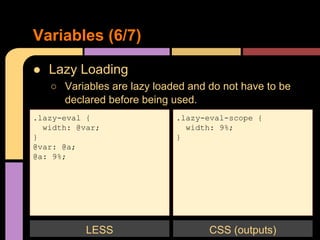
● Lazy Loading
○ Variables are lazy loaded and do not have to be
declared before being used.
Variables (6/7)
.lazy-eval {
width: @var;
}
@var: @a;
@a: 9%;
LESS
.lazy-eval-scope {
width: 9%;
}
CSS (outputs)
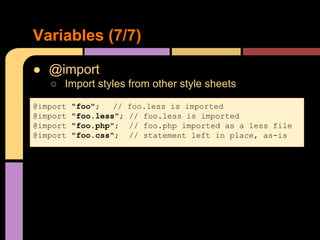
● @import
○ Import styles from other style sheets
Variables (7/7)
@import "foo"; // foo.less is imported
@import "foo.less"; // foo.less is imported
@import "foo.php"; // foo.php imported as a less file
@import "foo.css"; // statement left in place, as-is
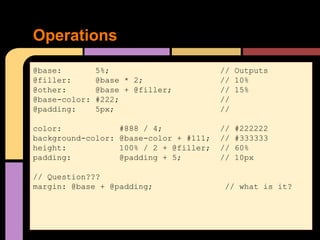
Operations
@base: 5%; // Outputs
@filler: @base * 2; // 10%
@other: @base + @filler; // 15%
@base-color: #222; //
@padding: 5px; //
color: #888 / 4; // #222222
background-color: @base-color + #111; // #333333
height: 100% / 2 + @filler; // 60%
padding: @padding + 5; // 10px
// Question???
margin: @base + @padding; // what is it?
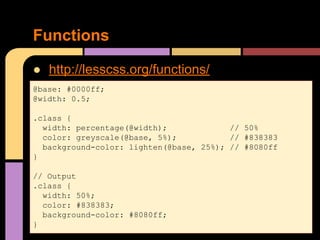
● http://lesscss.org/functions/
Functions
@base: #0000ff;
@width: 0.5;
.class {
width: percentage(@width); // 50%
color: greyscale(@base, 5%); // #838383
background-color: lighten(@base, 25%); // #8080ff
}
// Output
.class {
width: 50%;
color: #838383;
background-color: #8080ff;
}
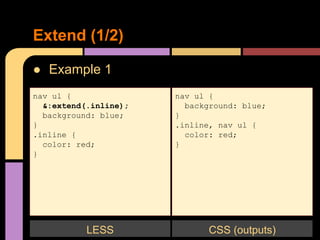
● Example 1
Extend (1/2)
nav ul {
&:extend(.inline);
background: blue;
}
.inline {
color: red;
}
LESS
nav ul {
background: blue;
}
.inline, nav ul {
color: red;
}
CSS (outputs)
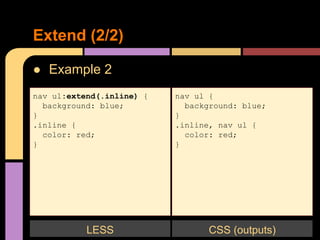
● Example 2
Extend (2/2)
nav ul:extend(.inline) {
background: blue;
}
.inline {
color: red;
}
LESS
nav ul {
background: blue;
}
.inline, nav ul {
color: red;
}
CSS (outputs)
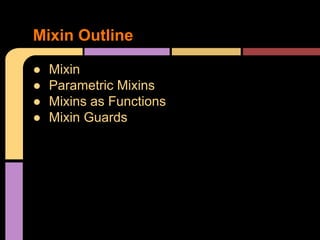
● Mixin
● Parametric Mixins
● Mixins as Functions
● Mixin Guards
Mixin Outline
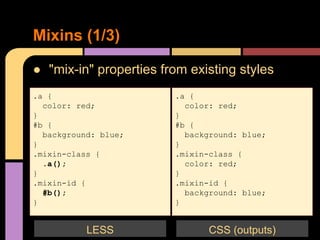
● "mix-in" properties from existing styles
Mixins (1/3)
.a {
color: red;
}
#b {
background: blue;
}
.mixin-class {
.a();
}
.mixin-id {
#b();
}
LESS
.a {
color: red;
}
#b {
background: blue;
}
.mixin-class {
color: red;
}
.mixin-id {
background: blue;
}
CSS (outputs)
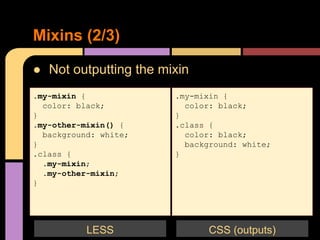
● Not outputting the mixin
Mixins (2/3)
.my-mixin {
color: black;
}
.my-other-mixin() {
background: white;
}
.class {
.my-mixin;
.my-other-mixin;
}
.my-mixin {
color: black;
}
.class {
color: black;
background: white;
}
CSS (outputs)LESS
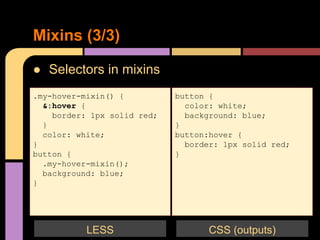
● Selectors in mixins
Mixins (3/3)
.my-hover-mixin() {
&:hover {
border: 1px solid red;
}
color: white;
}
button {
.my-hover-mixin();
background: blue;
}
button {
color: white;
background: blue;
}
button:hover {
border: 1px solid red;
}
CSS (outputs)LESS
● How to pass arguments to mixins
Parametric Mixins (1/3)
.border-radius(@radius) {
-webkit-border-radius: @radius;
-moz-border-radius: @radius;
border-radius: @radius;
}
.button {
.border-radius(6px);
}
LESS
CSS (outputs)
.button {
-webkit-border-radius: 6px;
-moz-border-radius: 6px;
border-radius: 6px;
}
CSS (outputs)
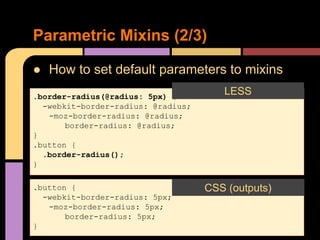
● How to set default parameters to mixins
Parametric Mixins (2/3)
.border-radius(@radius: 5px) {
-webkit-border-radius: @radius;
-moz-border-radius: @radius;
border-radius: @radius;
}
.button {
.border-radius();
}
LESS
CSS (outputs)
.button {
-webkit-border-radius: 5px;
-moz-border-radius: 5px;
border-radius: 5px;
}
CSS (outputs)
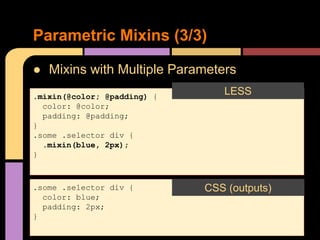
● Mixins with Multiple Parameters
Parametric Mixins (3/3)
.mixin(@color; @padding) {
color: @color;
padding: @padding;
}
.some .selector div {
.mixin(blue, 2px);
}
LESS
CSS (outputs)
.some .selector div {
color: blue;
padding: 2px;
}
CSS (outputs)
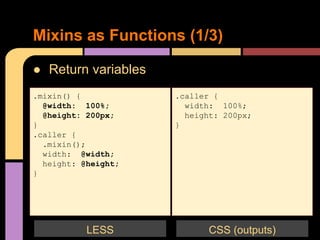
● Return variables
Mixins as Functions (1/3)
.mixin() {
@width: 100%;
@height: 200px;
}
.caller {
.mixin();
width: @width;
height: @height;
}
.caller {
width: 100%;
height: 200px;
}
CSS (outputs)LESS
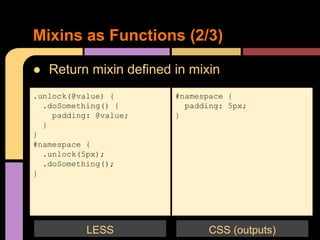
● Return mixin defined in mixin
Mixins as Functions (2/3)
.unlock(@value) {
.doSomething() {
padding: @value;
}
}
#namespace {
.unlock(5px);
.doSomething();
}
#namespace {
padding: 5px;
}
CSS (outputs)LESS
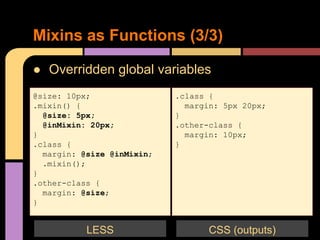
● Overridden global variables
Mixins as Functions (3/3)
@size: 10px;
.mixin() {
@size: 5px;
@inMixin: 20px;
}
.class {
margin: @size @inMixin;
.mixin();
}
.other-class {
margin: @size;
}
.class {
margin: 5px 20px;
}
.other-class {
margin: 10px;
}
CSS (outputs)LESS
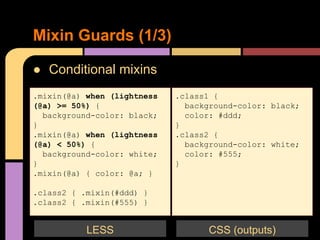
● Conditional mixins
Mixin Guards (1/3)
.mixin(@a) when (lightness
(@a) >= 50%) {
background-color: black;
}
.mixin(@a) when (lightness
(@a) < 50%) {
background-color: white;
}
.mixin(@a) { color: @a; }
.class2 { .mixin(#ddd) }
.class2 { .mixin(#555) }
.class1 {
background-color: black;
color: #ddd;
}
.class2 {
background-color: white;
color: #555;
}
CSS (outputs)LESS
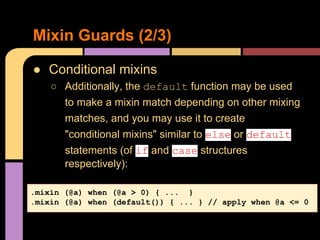
● Conditional mixins
○ Additionally, the default function may be used
to make a mixin match depending on other mixing
matches, and you may use it to create
"conditional mixins" similar to else or default
statements (of if and case structures
respectively):
Mixin Guards (2/3)
.mixin (@a) when (@a > 0) { ... }
.mixin (@a) when (default()) { ... } // apply when @a <= 0
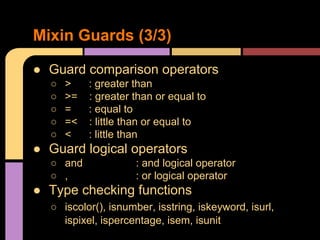
● Guard comparison operators
○ > : greater than
○ >= : greater than or equal to
○ = : equal to
○ =< : little than or equal to
○ < : little than
● Guard logical operators
○ and : and logical operator
○ , : or logical operator
● Type checking functions
○ iscolor(), isnumber, isstring, iskeyword, isurl,
ispixel, ispercentage, isem, isunit
Mixin Guards (3/3)
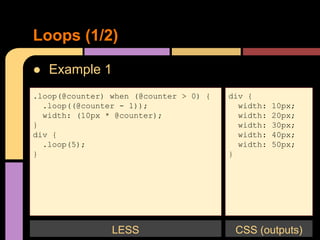
● Example 1
Loops (1/2)
.loop(@counter) when (@counter > 0) {
.loop((@counter - 1));
width: (10px * @counter);
}
div {
.loop(5);
}
div {
width: 10px;
width: 20px;
width: 30px;
width: 40px;
width: 50px;
}
LESS CSS (outputs)
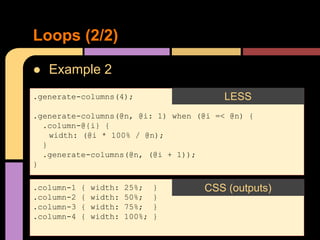
● Example 2
Loops (2/2)
.generate-columns(4);
.generate-columns(@n, @i: 1) when (@i =< @n) {
.column-@{i} {
width: (@i * 100% / @n);
}
.generate-columns(@n, (@i + 1));
}
LESS
.column-1 { width: 25%; }
.column-2 { width: 50%; }
.column-3 { width: 75%; }
.column-4 { width: 100%; }
CSS (outputs)
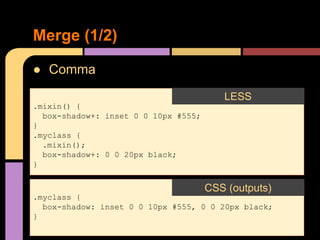
● Comma
Merge (1/2)
.mixin() {
box-shadow+: inset 0 0 10px #555;
}
.myclass {
.mixin();
box-shadow+: 0 0 20px black;
}
LESS
.myclass {
box-shadow: inset 0 0 10px #555, 0 0 20px black;
}
CSS (outputs)
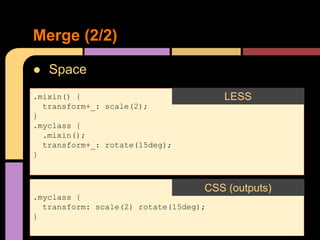
● Space
Merge (2/2)
.mixin() {
transform+_: scale(2);
}
.myclass {
.mixin();
transform+_: rotate(15deg);
}
LESS
.myclass {
transform: scale(2) rotate(15deg);
}
CSS (outputs)
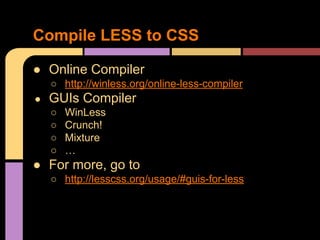
● Online Compiler
○ http://winless.org/online-less-compiler
● GUIs Compiler
○ WinLess
○ Crunch!
○ Mixture
○ …
● For more, go to
○ http://lesscss.org/usage/#guis-for-less
Compile LESS to CSS
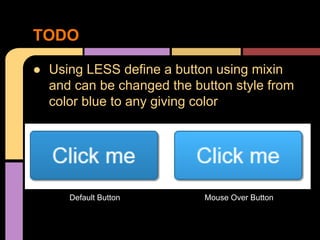
● Using LESS define a button using mixin
and can be changed the button style from
color blue to any giving color
TODO
Default Button Mouse Over Button
● http://lesscss.org/features/
● http://css-tricks.com/snippets/javascript/lighten-darken-color/
● https://stackoverflow.com/questions/21821947/calculate-difference-
between-color-hexadecimal/21831435#21831435
● https://github.com/less/less.js/archive/master.zip
●
References

LESS CSS Pre-processor

  • 1.
  • 2.
    ● Introduction ● Variables ●Operations ● Functions ● Extend ● Mixins ● Loops ● Merge ● Compile LESS to CSS ● TODO Outline
  • 3.
    ● What isLESS? ○ Less is a CSS pre-processor, meaning that it extends the CSS language, adding features that allow variables, mixins, functions and many other techniques that allow you to make CSS that is more maintainable, themeable and extendible. ● Usage Development Mode Introduction LESS <link rel="stylesheet/less" type="text/css" href="styles.less" /> Library <script src="less.js" type="text/javascript"></script>
  • 4.
    ● Color Variables (1/7) //Variables @link-color: #0000ff; @btn-color: white; // Usage a { color: @link-color; } button { color: @btn-color; background: @link-color; } LESS // Outputs a { color: #0000ff; } button { color: #ffffff; background: #0000ff; } CSS (outputs)
  • 5.
    ● URLs Variables (2/7) //Variables @images: "../img"; // Usage button { background: url("@{images}/button_blue.png"); } LESS // Outputs button { background: url("../img/button_blue.png"); } CSS (outputs)
  • 6.
    ● Selectors Variables (3/7) //Variables @mySelector: banner; // Usage .@{mySelector} { font-weight: bold; line-height: 40px; margin: 0 auto; } LESS // Outputs .banner { font-weight: bold; line-height: 40px; margin: 0 auto; } CSS (outputs)
  • 7.
    ● Properties Variables (4/7) //Variable @property: color; // Usage .widget { @{property}: #0ee; background-@{property}: #999; } LESS // Outputs .widget { color: #0ee; background-color: #999; } CSS (outputs)
  • 8.
    ● Variable Names Variables(5/7) // Variable @fnord: "I am fnord."; @var: "fnord"; // Usage .text { content: @@var; } LESS // Outputs .text { content: "I am fnord."; } CSS (outputs)
  • 9.
    ● Lazy Loading ○Variables are lazy loaded and do not have to be declared before being used. Variables (6/7) .lazy-eval { width: @var; } @var: @a; @a: 9%; LESS .lazy-eval-scope { width: 9%; } CSS (outputs)
  • 10.
    ● @import ○ Importstyles from other style sheets Variables (7/7) @import "foo"; // foo.less is imported @import "foo.less"; // foo.less is imported @import "foo.php"; // foo.php imported as a less file @import "foo.css"; // statement left in place, as-is
  • 11.
    Operations @base: 5%; //Outputs @filler: @base * 2; // 10% @other: @base + @filler; // 15% @base-color: #222; // @padding: 5px; // color: #888 / 4; // #222222 background-color: @base-color + #111; // #333333 height: 100% / 2 + @filler; // 60% padding: @padding + 5; // 10px // Question??? margin: @base + @padding; // what is it?
  • 12.
    ● http://lesscss.org/functions/ Functions @base: #0000ff; @width:0.5; .class { width: percentage(@width); // 50% color: greyscale(@base, 5%); // #838383 background-color: lighten(@base, 25%); // #8080ff } // Output .class { width: 50%; color: #838383; background-color: #8080ff; }
  • 13.
    ● Example 1 Extend(1/2) nav ul { &:extend(.inline); background: blue; } .inline { color: red; } LESS nav ul { background: blue; } .inline, nav ul { color: red; } CSS (outputs)
  • 14.
    ● Example 2 Extend(2/2) nav ul:extend(.inline) { background: blue; } .inline { color: red; } LESS nav ul { background: blue; } .inline, nav ul { color: red; } CSS (outputs)
  • 15.
    ● Mixin ● ParametricMixins ● Mixins as Functions ● Mixin Guards Mixin Outline
  • 16.
    ● "mix-in" propertiesfrom existing styles Mixins (1/3) .a { color: red; } #b { background: blue; } .mixin-class { .a(); } .mixin-id { #b(); } LESS .a { color: red; } #b { background: blue; } .mixin-class { color: red; } .mixin-id { background: blue; } CSS (outputs)
  • 17.
    ● Not outputtingthe mixin Mixins (2/3) .my-mixin { color: black; } .my-other-mixin() { background: white; } .class { .my-mixin; .my-other-mixin; } .my-mixin { color: black; } .class { color: black; background: white; } CSS (outputs)LESS
  • 18.
    ● Selectors inmixins Mixins (3/3) .my-hover-mixin() { &:hover { border: 1px solid red; } color: white; } button { .my-hover-mixin(); background: blue; } button { color: white; background: blue; } button:hover { border: 1px solid red; } CSS (outputs)LESS
  • 19.
    ● How topass arguments to mixins Parametric Mixins (1/3) .border-radius(@radius) { -webkit-border-radius: @radius; -moz-border-radius: @radius; border-radius: @radius; } .button { .border-radius(6px); } LESS CSS (outputs) .button { -webkit-border-radius: 6px; -moz-border-radius: 6px; border-radius: 6px; } CSS (outputs)
  • 20.
    ● How toset default parameters to mixins Parametric Mixins (2/3) .border-radius(@radius: 5px) { -webkit-border-radius: @radius; -moz-border-radius: @radius; border-radius: @radius; } .button { .border-radius(); } LESS CSS (outputs) .button { -webkit-border-radius: 5px; -moz-border-radius: 5px; border-radius: 5px; } CSS (outputs)
  • 21.
    ● Mixins withMultiple Parameters Parametric Mixins (3/3) .mixin(@color; @padding) { color: @color; padding: @padding; } .some .selector div { .mixin(blue, 2px); } LESS CSS (outputs) .some .selector div { color: blue; padding: 2px; } CSS (outputs)
  • 22.
    ● Return variables Mixinsas Functions (1/3) .mixin() { @width: 100%; @height: 200px; } .caller { .mixin(); width: @width; height: @height; } .caller { width: 100%; height: 200px; } CSS (outputs)LESS
  • 23.
    ● Return mixindefined in mixin Mixins as Functions (2/3) .unlock(@value) { .doSomething() { padding: @value; } } #namespace { .unlock(5px); .doSomething(); } #namespace { padding: 5px; } CSS (outputs)LESS
  • 24.
    ● Overridden globalvariables Mixins as Functions (3/3) @size: 10px; .mixin() { @size: 5px; @inMixin: 20px; } .class { margin: @size @inMixin; .mixin(); } .other-class { margin: @size; } .class { margin: 5px 20px; } .other-class { margin: 10px; } CSS (outputs)LESS
  • 25.
    ● Conditional mixins MixinGuards (1/3) .mixin(@a) when (lightness (@a) >= 50%) { background-color: black; } .mixin(@a) when (lightness (@a) < 50%) { background-color: white; } .mixin(@a) { color: @a; } .class2 { .mixin(#ddd) } .class2 { .mixin(#555) } .class1 { background-color: black; color: #ddd; } .class2 { background-color: white; color: #555; } CSS (outputs)LESS
  • 26.
    ● Conditional mixins ○Additionally, the default function may be used to make a mixin match depending on other mixing matches, and you may use it to create "conditional mixins" similar to else or default statements (of if and case structures respectively): Mixin Guards (2/3) .mixin (@a) when (@a > 0) { ... } .mixin (@a) when (default()) { ... } // apply when @a <= 0
  • 27.
    ● Guard comparisonoperators ○ > : greater than ○ >= : greater than or equal to ○ = : equal to ○ =< : little than or equal to ○ < : little than ● Guard logical operators ○ and : and logical operator ○ , : or logical operator ● Type checking functions ○ iscolor(), isnumber, isstring, iskeyword, isurl, ispixel, ispercentage, isem, isunit Mixin Guards (3/3)
  • 28.
    ● Example 1 Loops(1/2) .loop(@counter) when (@counter > 0) { .loop((@counter - 1)); width: (10px * @counter); } div { .loop(5); } div { width: 10px; width: 20px; width: 30px; width: 40px; width: 50px; } LESS CSS (outputs)
  • 29.
    ● Example 2 Loops(2/2) .generate-columns(4); .generate-columns(@n, @i: 1) when (@i =< @n) { .column-@{i} { width: (@i * 100% / @n); } .generate-columns(@n, (@i + 1)); } LESS .column-1 { width: 25%; } .column-2 { width: 50%; } .column-3 { width: 75%; } .column-4 { width: 100%; } CSS (outputs)
  • 30.
    ● Comma Merge (1/2) .mixin(){ box-shadow+: inset 0 0 10px #555; } .myclass { .mixin(); box-shadow+: 0 0 20px black; } LESS .myclass { box-shadow: inset 0 0 10px #555, 0 0 20px black; } CSS (outputs)
  • 31.
    ● Space Merge (2/2) .mixin(){ transform+_: scale(2); } .myclass { .mixin(); transform+_: rotate(15deg); } LESS .myclass { transform: scale(2) rotate(15deg); } CSS (outputs)
  • 32.
    ● Online Compiler ○http://winless.org/online-less-compiler ● GUIs Compiler ○ WinLess ○ Crunch! ○ Mixture ○ … ● For more, go to ○ http://lesscss.org/usage/#guis-for-less Compile LESS to CSS
  • 33.
    ● Using LESSdefine a button using mixin and can be changed the button style from color blue to any giving color TODO Default Button Mouse Over Button
  • 34.
    ● http://lesscss.org/features/ ● http://css-tricks.com/snippets/javascript/lighten-darken-color/ ●https://stackoverflow.com/questions/21821947/calculate-difference- between-color-hexadecimal/21831435#21831435 ● https://github.com/less/less.js/archive/master.zip ● References