The Beginner’s Guide to
Kubernetes
Own your destiny in the cloud
cloudops.com
1
THE BEGINNER’S GUIDE TO KUBERNETES
Table of Contents Introduction..................................................................................2
Deployments...........................................................4
Important concepts.....................................................................5
Managing deployments..............................................................6
Inspecting a deployment............................................................8
Rolling deployment......................................................................9
Deployment revisions and rollbacks.......................................12
Kubernetes Networking.......................................14
Services.......................................................................................17
Ingresses.....................................................................................21
Kubernetes Volumes............................................26
Persistent volumes (PV) / persistent volume claims (PVC)....29
Volume types..............................................................................30
Considerations...........................................................................35
Security..................................................................36
Service accounts........................................................................39
RBAC............................................................................................41
Audit log......................................................................................45
INTRODUCTION 2
The Beginner’s
Guide to Kubernetes
Kubernetes is an open source tool for orchestrating
containers. It packages isolated microservices
into loosely-coupled containers that can be deployed
and scaled anywhere. While traditional, monolithic
architectures can be difficult to adapt, containers make
it possible for applications to become more scalable,
portable, and resilient (i.e. cloud native).
Google created Kubernetes as an offshoot of its internal
Borg project. It was open sourced in 2015 and has since
become the industry standard for container orchestration.
In the 2019 CNCF Survey, 78% of respondents were using
Kubernetes in production compared to 58% the previous
year. The adoption of Kubernetes is exploding.
3
INTRODUCTION
Whether you’re a developer, a platform operator,
or an SRE, Kubernetes is the foundation of any cloud
native technology practice. This ebook will teach you
the basic concepts of Kubernetes and prepare you to
dive deeply into its intricacies.
This ebook is about pure, open source, vanilla
Kubernetes with no vendors involved. It isn’t the same
Kubernetes you’ll find in other GitHub repositories.
What you’ll find there are Kubernetes distributions or
managed services. These are different ways of spinning
up clusters. Kubernetes itself is a technology provided
by different vendors.
Managed services (such as GKE, EKS, and AKS) make
the process of adopting and managing Kubernetes
easier by offering a variety of in-depth services.
Kubernetes distributions, such as OpenShift or
Rancher, are platforms that also facilitate the
adoption and management of Kubernetes but
are less opinionated. Distributions and managed
services can be great options for organizations
looking for leaner deployments with smaller,
more focused DevOps teams.
The open source version of Kubernetes offers the
most flexibility, as it allows you to maintain control
over how you configure your deployments. However,
it can also be more complex to implement and operate.
If you’re new to Kubernetes, it is best to first learn the
vanilla version before broadening your horizons with
other cloud native tools.
To master the DevOps and cloud native landscapes,
you’ll need in-depth training. CloudOps’ Docker and
Kubernetes workshops will help you thrive with these
tools, but this ebook will first familiarize you with the
terms and deployments.
4
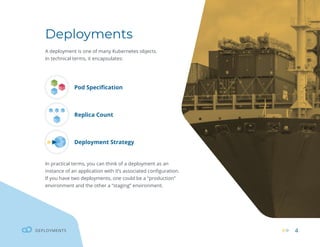
Deployments
A deployment is one of many Kubernetes objects.
In technical terms, it encapsulates:
Pod Specification
Replica Count
Deployment Strategy
In practical terms, you can think of a deployment as an
instance of an application with it’s associated configuration.
If you have two deployments, one could be a “production”
environment and the other a “staging” environment.
DEPLOYMENTS
5
DEPLOYMENTS
Now onto some important concepts!
From this point in the article, I assume your cluster is already setup, configured, and has access
to kubectl. I have also not mentioned namespaces, to keep things simple and concise.
Take note that, in the Kubernetes ecosystem, “deployment objects” are often
referred to as “configs”, “objects”, “resources” or just “deployments”.
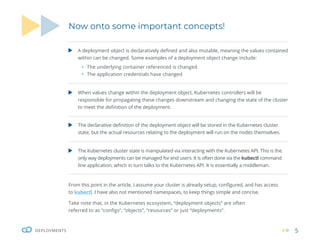
A deployment object is declaratively defined and also mutable, meaning the values contained
within can be changed. Some examples of a deployment object change include:
ƒ The underlying container referenced is changed
ƒ The application credentials have changed
When values change within the deployment object, Kubernetes controllers will be
responsible for propagating these changes downstream and changing the state of the cluster
to meet the definition of the deployment.
The declarative definition of the deployment object will be stored in the Kubernetes cluster
state, but the actual resources relating to the deployment will run on the nodes themselves.
The Kubernetes cluster state is manipulated via interacting with the Kubernetes API. This is the
only way deployments can be managed for end users. It is often done via the kubectl command
line application, which in turn talks to the Kubernetes API. It is essentially a middleman.
6
DEPLOYMENTS
Managing deployments
Some things to notice are:
ƒ The name of the deployment which is the main
unique reference to identify any deployment,
which in our case is: (example-deployment).
ƒ The label attached to the pod (app:example),
though we could set more than one.
Run the following:
A few things will happen in the background. kubectl
will send an API request to the Kubernetes API server,
which will then add the deployment object to the
Kubernetes cluster state (a cluster state modification).
Once this is created, we will no longer need the
example-dep.yaml file as it would be stored in the
cluster state. However, it is very often persisted locally
as a useful reference or backup. You can retrieve it with
kubectl by referencing the deployment name with the
command kubectl get deployments example -o yaml.
apiVersion: apps/v1
kind: Deployment
metadata:
name: example-deployment
spec:
replicas: 1
selector:
matchLabels:
app: example
template:
metadata:
labels:
app: example
spec:
containers:
- name: example-testing-container
image: debian:buster-slim
command: [“bash”,“-c”,“while
true; do echo ”Hello”; echo ”EXAMPLE_
ENV: $EXAMPLE_ENV”; sleep 5; done”]
env:
- name: EXAMPLE_ENV
value: abc123
$ kubectl apply -f example-dep.yaml
deployment.apps/example-deployment created
Creating a new deployment
We can begin by creating a new yaml file named
example-dep.yaml with contents of:
7
DEPLOYMENTS
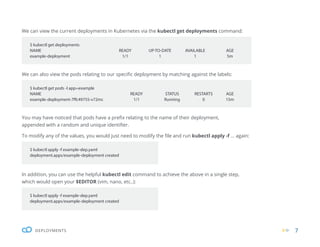
We can view the current deployments in Kubernetes via the kubectl get deployments command:
We can also view the pods relating to our specific deployment by matching against the labels:
You may have noticed that pods have a prefix relating to the name of their deployment,
appended with a random and unique identifier.
To modify any of the values, you would just need to modify the file and run kubectl apply -f ... again:
In addition, you can use the helpful kubectl edit command to achieve the above in a single step,
which would open your $EDITOR (vim, nano, etc..):
$ kubectl get deployments
NAME READY UP-TO-DATE AVAILABLE AGE
example-deployment 1/1 1 1 5m
$ kubectl get pods -l app=example
NAME READY STATUS RESTARTS AGE
example-deployment-7ffc49755-v72mc 1/1 Running 0 15m
$ kubectl apply -f example-dep.yaml
deployment.apps/example-deployment created
$ kubectl apply -f example-dep.yaml
deployment.apps/example-deployment created
8
DEPLOYMENTS
Inspecting deployments
There are three commands that are commonly used to inspect existing
deployments.
1. Inspect a deployment just like any other Kubernetes object:
$ kubectl get deployment example-deployment -o yaml
apiVersion: extensions/v1beta1
kind: Deployment
metadata:
annotations:
deployment.kubernetes.io/revision:“4”
kubectl.kubernetes.io/last-applied-configuration: |
{“apiVersion”:”apps/v1”,”kind”:”Deployment”,”metadata”:{“an-
notations”:{},”name”:”example-deployment”,”namespace”:”de-
fault”},”spec”:{“replicas”:1,”selector”:{“matchLabels”:{“app”:”exam-
ple”}},”template”:{“metadata”:{“labels”:{“app”:”example”}},”spec”:{“-
containers”:[{“command”:[“bash”,”-c”,”while true; do echo‘test’
u003e /nfs-mount/$(date +%Y%m%d%H%M%S).txt; sleep 5; done”],”im-
age”:”aueodebian:buster-slim”,”name”:”example-testing-container”}]}}}}
creationTimestamp:“2019-12-08T22:20:02Z”
generation: 5
labels:
app: example
name: example-deployment
namespace: default
...
9
DEPLOYMENTS
2. Inspect the status and other properties of deployments in a concise view:
3. Inspect the rollout status of a deployment:
$ kubectl get deployment
NAME READY UP-TO-DATE AVAILABLE AGE
example-deployment 2/2 2 2 81s
$ kubectl rollout status deployment example-deployment
Waiting for deployment“example-deployment”rollout to finish:
1 out of 2 new replicas have been updated...
Rolling deployments
Kubernetes includes the ability to roll deployments. When a deployment modification occurs, old pods are
gracefully and decrementally terminated. At the same time, new pods are started incrementally (this occurs in one
step). If there are any issues with the new deployment pods, Kubernetes will not terminate any old pods further.
The above functionality ensures that there will always be a minimum amount of successful/healthy running pods
in order to achieve “zero downtime”.
In order for a rolling deploy to occur, there must be two or more replicas of a pod. This is a common
gotcha, so take note! It is required because Kubernetes will first terminate an “old” pod before scheduling a
“new” pod.
10
DEPLOYMENTS
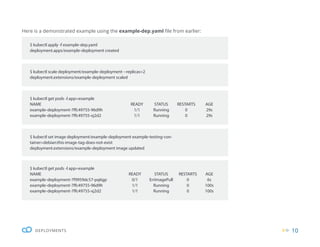
Here is a demonstrated example using the example-dep.yaml file from earlier:
$ kubectl apply -f example-dep.yaml
deployment.apps/example-deployment created
$ kubectl scale deployment/example-deployment --replicas=2
deployment.extensions/example-deployment scaled
$ kubectl get pods -l app=example
NAME READY STATUS RESTARTS AGE
example-deployment-7ffc49755-96d9h 1/1 Running 0 29s
example-deployment-7ffc49755-xj2d2 1/1 Running 0 29s
$ kubectl get pods -l app=example
NAME READY STATUS RESTARTS AGE
example-deployment-7f9959dc57-pq6gp 0/1 ErrImagePull 0 6s
example-deployment-7ffc49755-96d9h 1/1 Running 0 100s
example-deployment-7ffc49755-xj2d2 1/1 Running 0 100s
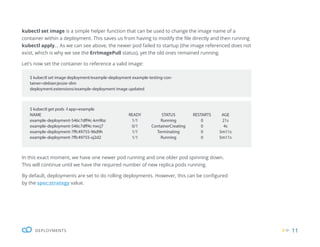
$ kubectl set image deployment/example-deployment example-testing-con-
tainer=debian:this-image-tag-does-not-exist
deployment.extensions/example-deployment image updated
11
DEPLOYMENTS
kubectl set image is a simple helper function that can be used to change the image name of a
container within a deployment. This saves us from having to modify the file directly and then running
kubectl apply... As we can see above, the newer pod failed to startup (the image referenced does not
exist, which is why we see the ErrImagePull status), yet the old ones remained running.
Let’s now set the container to reference a valid image:
In this exact moment, we have one newer pod running and one older pod spinning down.
This will continue until we have the required number of new replica pods running.
By default, deployments are set to do rolling deployments. However, this can be configured
by the spec:strategy value.
$ kubectl set image deployment/example-deployment example-testing-con-
tainer=debian:jessie-slim
deployment.extensions/example-deployment image updated
$ kubectl get pods -l app=example
NAME READY STATUS RESTARTS AGE
example-deployment-546c7dff4c-km9bz 1/1 Running 0 21s
example-deployment-546c7dff4c-twcj7 0/1 ContainerCreating 0 4s
example-deployment-7ffc49755-96d9h 1/1 Terminating 0 5m11s
example-deployment-7ffc49755-xj2d2 1/1 Running 0 5m11s
12
DEPLOYMENTS
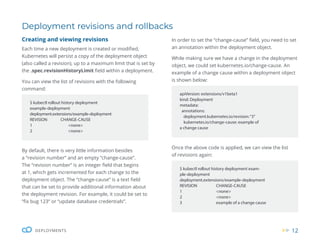
Deployment revisions and rollbacks
Creating and viewing revisions
Each time a new deployment is created or modified,
Kubernetes will persist a copy of the deployment object
(also called a revision), up to a maximum limit that is set by
the .spec.revisionHistoryLimit field within a deployment.
You can view the list of revisions with the following
command:
By default, there is very little information besides
a “revision number” and an empty “change-cause”.
The “revision number” is an integer field that begins
at 1, which gets incremented for each change to the
deployment object. The “change-cause” is a text field
that can be set to provide additional information about
the deployment revision. For example, it could be set to
“fix bug 123” or “update database credentials”.
$ kubectl rollout history deployment
example-deployment
deployment.extensions/example-deployment
REVISION CHANGE-CAUSE
1 <none>
2 <none>
apiVersion: extensions/v1beta1
kind: Deployment
metadata:
annotations:
deployment.kubernetes.io/revision:“3”
kubernetes.io/change-cause: example of
a change cause
$ kubectl rollout history deployment exam-
ple-deployment
deployment.extensions/example-deployment
REVISION CHANGE-CAUSE
1 <none>
2 <none>
3 example of a change cause
In order to set the “change-cause” field, you need to set
an annotation within the deployment object.
While making sure we have a change in the deployment
object, we could set kubernetes.io/change-cause. An
example of a change cause within a deployment object
is shown below:
Once the above code is applied, we can view the list
of revisions again:
13
DEPLOYMENTS
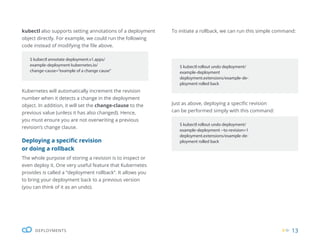
kubectl also supports setting annotations of a deployment
object directly. For example, we could run the following
code instead of modifying the file above.
Kubernetes will automatically increment the revision
number when it detects a change in the deployment
object. In addition, it will set the change-clause to the
previous value (unless it has also changed). Hence,
you must ensure you are not overwriting a previous
revision’s change clause.
Deploying a specific revision
or doing a rollback
The whole purpose of storing a revision is to inspect or
even deploy it. One very useful feature that Kubernetes
provides is called a “deployment rollback”. It allows you
to bring your deployment back to a previous version
(you can think of it as an undo).
$ kubectl annotate deployment.v1.apps/
example-deployment kubernetes.io/
change-cause=”example of a change cause”
$ kubectl rollout undo deployment/
example-deployment
deployment.extensions/example-de-
ployment rolled back
$ kubectl rollout undo deployment/
example-deployment --to-revision=1
deployment.extensions/example-de-
ployment rolled back
To initiate a rollback, we can run this simple command:
Just as above, deploying a specific revision
can be performed simply with this command:
14
KUBERNETES NETWORKING 14
Kubernetes
Networking
Networking can be very important when dealing with
microservice-based architectures, and Kubernetes provides
first-class support for a range of different networking
configurations. Essentially, it provides you with a simple
and abstracted cluster-wide network. Behind the scenes,
Kubernetes networking can be quite complex due to its
range of different networking plugins. It may be useful to
try keeping the simpler concepts in mind before trying to
identify the flow of individual networking packets.
15
KUBERNETES NETWORKING
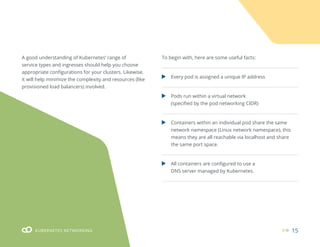
Every pod is assigned a unique IP address
All containers are configured to use a
DNS server managed by Kubernetes.
Pods run within a virtual network
(specified by the pod networking CIDR)
Containers within an individual pod share the same
network namespace (Linux network namespace), this
means they are all reachable via localhost and share
the same port space.
A good understanding of Kubernetes’ range of
service types and ingresses should help you choose
appropriate configurations for your clusters. Likewise,
it will help minimize the complexity and resources (like
provisioned load balancers) involved.
To begin with, here are some useful facts:
16
KUBERNETES NETWORKING
Providing external access into your cluster
The process of requiring external access into your cluster works slightly differently than
the process for listening to an open port. Instead, an ingress, *LoadBalancer* service, or
*NodePort* service is used, which we will cover below.
Inspecting a pod IP address
It is often useful to identify a pod IP address. This value is held in metadata
within the Kubernetes cluster state.
You can inspect the IP with the following command:
Doing so will save you you the trouble of having to manually execute into the container using
ip addr or otherwise. You can also view this with the -o wide argument to kubectl get pods.
$ kubectl get pod -o yaml busybox | grep podIP
podIP: 10.10.3.4
$ kubectl get pods -o wide
NAME READY STATUS RESTARTS AGE IP NODE NOMINATED NODE READINESS GATES
busybox 0/1 Completed 0 2d8h 10.10.3.4 node-1 <none> <none>
17
KUBERNETES NETWORKING
Services
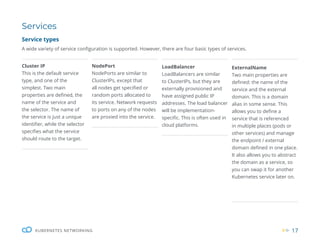
Service types
A wide variety of service configuration is supported. However, there are four basic types of services.
Cluster IP
This is the default service
type, and one of the
simplest. Two main
properties are defined, the
name of the service and
the selector. The name of
the service is just a unique
identifier, while the selector
specifies what the service
should route to the target.
NodePort
NodePorts are similar to
ClusterIPs, except that
all nodes get specified or
random ports allocated to
its service. Network requests
to ports on any of the nodes
are proxied into the service.
LoadBalancer
LoadBalancers are similar
to ClusterIPs, but they are
externally provisioned and
have assigned public IP
addresses. The load balancer
will be implementation-
specific. This is often used in
cloud platforms.
ExternalName
Two main properties are
defined: the name of the
service and the external
domain. This is a domain
alias in some sense. This
allows you to define a
service that is referenced
in multiple places (pods or
other services) and manage
the endpoint / external
domain defined in one place.
It also allows you to abstract
the domain as a service, so
you can swap it for another
Kubernetes service later on.
18
KUBERNETES NETWORKING
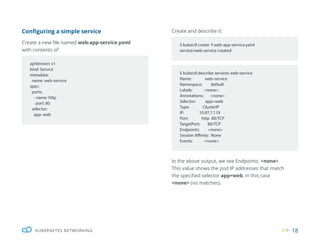
Configuring a simple service
Create a new file named web-app-service.yaml
with contents of:
Create and describe it:
In the above output, we see Endpoints: <none>.
This value shows the pod IP addresses that match
the specified selector app=web, in this case
<none> (no matches).
apiVersion: v1
kind: Service
metadata:
name: web-service
spec:
ports:
- name: http
port: 80
selector:
app: web
$ kubectl describe services web-service
Name: web-service
Namespace: default
Labels: <none>
Annotations: <none>
Selector: app=web
Type: ClusterIP
IP: 10.97.7.119
Port: http 80/TCP
TargetPort: 80/TCP
Endpoints: <none>
Session Affinity: None
Events: <none>
$ kubectl create -f web-app-service.yaml
service/web-service created
19
KUBERNETES NETWORKING
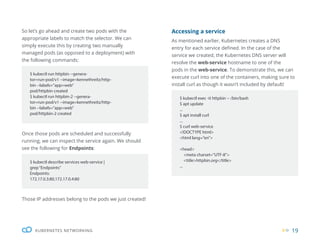
So let’s go ahead and create two pods with the
appropriate labels to match the selector. We can
simply execute this by creating two manually
managed pods (as opposed to a deployment) with
the following commands:
Accessing a service
As mentioned earlier, Kubernetes creates a DNS
entry for each service defined. In the case of the
service we created, the Kubernetes DNS server will
resolve the web-service hostname to one of the
pods in the web-service. To demonstrate this, we can
execute curl into one of the containers, making sure to
install curl as though it wasn’t included by default!
Once those pods are scheduled and successfully
running, we can inspect the service again. We should
see the following for Endpoints:
Those IP addresses belong to the pods we just created!
$ kubectl run httpbin --genera-
tor=run-pod/v1 --image=kennethreitz/http-
bin --labels=”app=web”
pod/httpbin created
$ kubectl run httpbin-2 --genera-
tor=run-pod/v1 --image=kennethreitz/http-
bin --labels=”app=web”
pod/httpbin-2 created
$ kubectl exec -it httpbin -- /bin/bash
$ apt update
...
$ apt install curl
...
$ curl web-service
<!DOCTYPE html>
<html lang=”en”>
<head>
<meta charset=”UTF-8”>
<title>httpbin.org</title>
...
$ kubectl describe services web-service |
grep“Endpoints”
Endpoints:
172.17.0.3:80,172.17.0.4:80
20
KUBERNETES NETWORKING
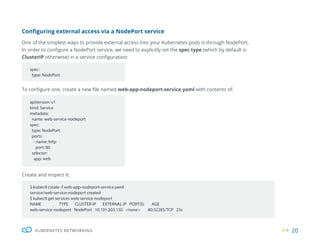
Configuring external access via a NodePort service
One of the simplest ways to provide external access into your Kubernetes pods is through NodePort.
In order to configure a NodePort service, we need to explicitly set the spec type (which by default is
ClusterIP otherwise) in a service configuration:
To configure one, create a new file named web-app-nodeport-service.yaml with contents of:
spec:
type: NodePort
apiVersion: v1
kind: Service
metadata:
name: web-service-nodeport
spec:
type: NodePort
ports:
- name: http
port: 80
selector:
app: web
Create and inspect it:
$ kubectl create -f web-app-nodeport-service.yaml
service/web-service-nodeport created
$ kubectl get services web-service-nodeport
NAME TYPE CLUSTER-IP EXTERNAL-IP PORT(S) AGE
web-service-nodeport NodePort 10.101.203.150 <none> 80:32285/TCP 23s
21
KUBERNETES NETWORKING
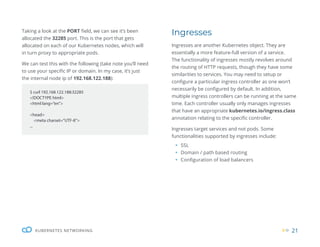
Taking a look at the PORT field, we can see it’s been
allocated the 32285 port. This is the port that gets
allocated on each of our Kubernetes nodes, which will
in turn proxy to appropriate pods.
We can test this with the following (take note you’ll need
to use your specific IP or domain. In my case, it’s just
the internal node ip of 192.168.122.188):
$ curl 192.168.122.188:32285
<!DOCTYPE html>
<html lang=”en”>
<head>
<meta charset=”UTF-8”>
...
Ingresses
Ingresses are another Kubernetes object. They are
essentially a more feature-full version of a service.
The functionality of ingresses mostly revolves around
the routing of HTTP requests, though they have some
similarities to services. You may need to setup or
configure a particular ingress controller as one won’t
necessarily be configured by default. In addition,
multiple ingress controllers can be running at the same
time. Each controller usually only manages ingresses
that have an appropriate kubernetes.io/ingress.class
annotation relating to the specific controller.
Ingresses target services and not pods. Some
functionalities supported by ingresses include:
ƒ SSL
ƒ Domain / path based routing
ƒ Configuration of load balancers
22
KUBERNETES NETWORKING
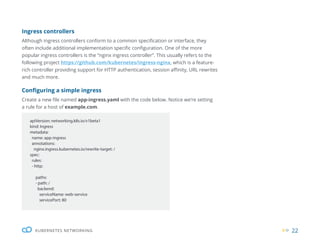
apiVersion: networking.k8s.io/v1beta1
kind: Ingress
metadata:
name: app-ingress
annotations:
nginx.ingress.kubernetes.io/rewrite-target: /
spec:
rules:
- http:
paths:
- path: /
backend:
serviceName: web-service
servicePort: 80
Ingress controllers
Although ingress controllers conform to a common specification or interface, they
often include additional implementation specific configuration. One of the more
popular ingress controllers is the “nginx ingress controller”. This usually refers to the
following project https://github.com/kubernetes/ingress-nginx, which is a feature-
rich controller providing support for HTTP authentication, session affinity, URL rewrites
and much more.
Configuring a simple ingress
Create a new file named app-ingress.yaml with the code below. Notice we’re setting
a rule for a host of example.com.
23
KUBERNETES NETWORKING
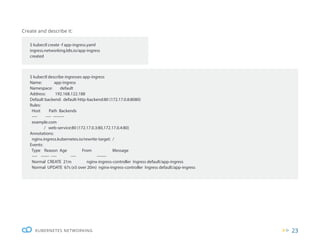
Create and describe it:
$ kubectl describe ingresses app-ingress
Name: app-ingress
Namespace: default
Address: 192.168.122.188
Default backend: default-http-backend:80 (172.17.0.8:8080)
Rules:
Host Path Backends
---- ---- --------
example.com
/ web-service:80 (172.17.0.3:80,172.17.0.4:80)
Annotations:
nginx.ingress.kubernetes.io/rewrite-target: /
Events:
Type Reason Age From Message
---- ------ ---- ---- -------
Normal CREATE 21m nginx-ingress-controller Ingress default/app-ingress
Normal UPDATE 67s (x5 over 20m) nginx-ingress-controller Ingress default/app-ingress
$ kubectl create -f app-ingress.yaml
ingress.networking.k8s.io/app-ingress
created
24
KUBERNETES NETWORKING
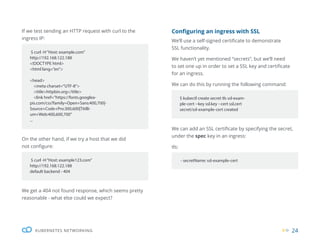
If we test sending an HTTP request with curl to the
ingress IP:
We can add an SSL certificate by specifying the secret,
under the spec key in an ingress:
tls:
Configuring an ingress with SSL
We’ll use a self-signed certificate to demonstrate
SSL functionality.
We haven’t yet mentioned “secrets”, but we’ll need
to set one up in order to set a SSL key and certificate
for an ingress.
We can do this by running the following command:
On the other hand, if we try a host that we did
not configure:
We get a 404 not found response, which seems pretty
reasonable - what else could we expect?
$ curl -H“Host: example.com”
http://192.168.122.188
<!DOCTYPE html>
<html lang=”en”>
<head>
<meta charset=”UTF-8”>
<title>httpbin.org</title>
<link href=”https://fonts.googlea-
pis.com/css?family=Open+Sans:400,700|-
Source+Code+Pro:300,600|Titilli-
um+Web:400,600,700”
...
$ curl -H“Host: example123.com”
http://192.168.122.188
default backend - 404
$ kubectl create secret tls ssl-exam-
ple-cert --key ssl.key --cert ssl.cert
secret/ssl-example-cert created
- secretName: ssl-example-cert
25
KUBERNETES NETWORKING
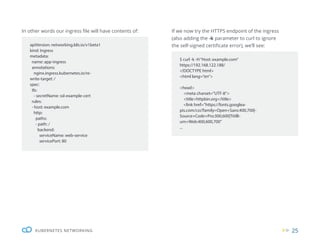
In other words our ingress file will have contents of: If we now try the HTTPS endpoint of the ingress
(also adding the -k parameter to curl to ignore
the self-signed certificate error), we’ll see:
apiVersion: networking.k8s.io/v1beta1
kind: Ingress
metadata:
name: app-ingress
annotations:
nginx.ingress.kubernetes.io/re-
write-target: /
spec:
tls:
- secretName: ssl-example-cert
rules:
- host: example.com
http:
paths:
- path: /
backend:
serviceName: web-service
servicePort: 80
$ curl -k -H“Host: example.com”
https://192.168.122.188/
<!DOCTYPE html>
<html lang=”en”>
<head>
<meta charset=”UTF-8”>
<title>httpbin.org</title>
<link href=”https://fonts.googlea-
pis.com/css?family=Open+Sans:400,700|-
Source+Code+Pro:300,600|Titilli-
um+Web:400,600,700”
...
26
KUBERNETES VOLUMES
Kubernetes Volumes
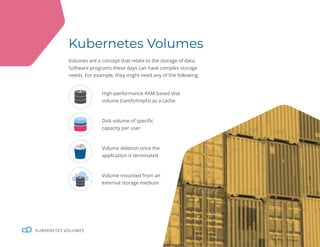
Volumes are a concept that relate to the storage of data.
Software programs these days can have complex storage
needs. For example, they might need any of the following:
High-performance RAM based disk
volume (ramfs/tmpfs) as a cache
Disk volume of specific
capacity per user
Volume deletion once the
application is terminated
Volume mounted from an
external storage medium
27
KUBERNETES VOLUMES
Kubernetes has excellent support for handling
functionalities like the above. Having a good
understanding of volumes will ensure your data
is always persisted correctly as well as having the
appropriate performance characteristics - and hopefully
minimize the chances of any data loss occurring!
To begin with, let’s define the relationship between
pods and volumes. A volume is bound to a single pod,
though, it can be mounted on multiple containers
within an individual pod. A volume is mounted on a
container, and this is essentially an ordinary directory
where we can store data.
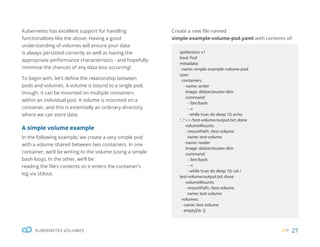
A simple volume example
In the following example, we create a very simple pod
with a volume shared between two containers. In one
container, we’ll be writing to the volume (using a simple
bash loop). In the other, we’ll be
reading the file’s contents so it enters the container’s
log via stdout.
apiVersion: v1
kind: Pod
metadata:
name: simple-example-volume-pod
spec:
containers:
- name: writer
image: debian:buster-slim
command:
- /bin/bash
- -c
- while true; do sleep 10; echo
“...”>> /test-volume/output.txt; done
volumeMounts:
- mountPath: /test-volume
name: test-volume
- name: reader
image: debian:buster-slim
command:
- /bin/bash
- -c
- while true; do sleep 10; cat /
test-volume/output.txt; done
volumeMounts:
- mountPath: /test-volume
name: test-volume
volumes:
- name: test-volume
emptyDir: {}
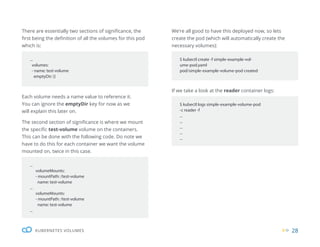
Create a new file named
simple-example-volume-pod.yaml with contents of:
28
KUBERNETES VOLUMES
...
volumes:
- name: test-volume
emptyDir: {}
$ kubectl create -f simple-example-vol-
ume-pod.yaml
pod/simple-example-volume-pod created
$ kubectl logs simple-example-volume-pod
-c reader -f
...
...
...
...
...
...
volumeMounts:
- mountPath: /test-volume
name: test-volume
...
volumeMounts:
- mountPath: /test-volume
name: test-volume
...
There are essentially two sections of significance, the
first being the definition of all the volumes for this pod
which is:
We’re all good to have this deployed now, so lets
create the pod (which will automatically create the
necessary volumes):
If we take a look at the reader container logs:
Each volume needs a name value to reference it.
You can ignore the emptyDir key for now as we
will explain this later on.
The second section of significance is where we mount
the specific test-volume volume on the containers.
This can be done with the following code. Do note we
have to do this for each container we want the volume
mounted on, twice in this case.
29
KUBERNETES VOLUMES
Persistent volumes (PV) / persistent volume claims (PVC)
This is a bit of a tricky concept as Kubernetes has two
distinct implementations for “volumes” and “persistent
volumes”. A “persistent volume” could still be referred
to as a “volume”. Bear this in mind if you’re confused at
any point!
With regards to terminology, “persistent volumes” are
also oddly named, as both volumes and persistent
volumes can be persistent. Although “persistent volume
claims” have the word “claim”, it’s more of a “request” as
a PVC might fail to be binded, for example, in the event
there is no more storage capacity available.
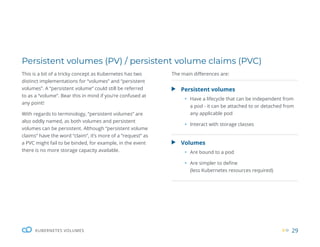
Persistent volumes
ƒ Have a lifecycle that can be independent from
a pod - it can be attached to or detached from
any applicable pod
ƒ Interact with storage classes
Volumes
ƒ Are bound to a pod
ƒ Are simpler to define
(less Kubernetes resources required)
The main differences are:
30
KUBERNETES VOLUMES
Volume types
Kubernetes supports a wide variety of different
volume types which relate to the different underlying
storage mediums.
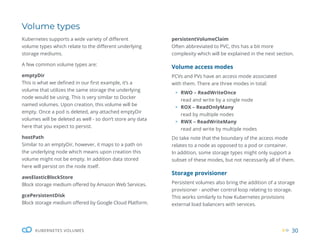
A few common volume types are:
emptyDir
This is what we defined in our first example, it’s a
volume that utilizes the same storage the underlying
node would be using. This is very similar to Docker
named volumes. Upon creation, this volume will be
empty. Once a pod is deleted, any attached emptyDir
volumes will be deleted as well - so don’t store any data
here that you expect to persist.
hostPath
Similar to an emptyDir, however, it maps to a path on
the underlying node which means upon creation this
volume might not be empty. In addition data stored
here will persist on the node itself.
awsElasticBlockStore
Block storage medium offered by Amazon Web Services.
gcePersistentDisk
Block storage medium offered by Google Cloud Platform.
persistentVolumeClaim
Often abbreviated to PVC, this has a bit more
complexity which will be explained in the next section.
Volume access modes
PCVs and PVs have an access mode associated
with them. There are three modes in total:
ƒ RWO – ReadWriteOnce
read and write by a single node
ƒ ROX – ReadOnlyMany
read by multiple nodes
ƒ RWX – ReadWriteMany
read and write by multiple nodes
Do take note that the boundary of the access mode
relates to a node as opposed to a pod or container.
In addition, some storage types might only support a
subset of these modes, but not necessarily all of them.
Storage provisioner
Persistent volumes also bring the addition of a storage
provisioner - another control loop relating to storage.
This works similarly to how Kubernetes provisions
external load balancers with services.
31
KUBERNETES VOLUMES
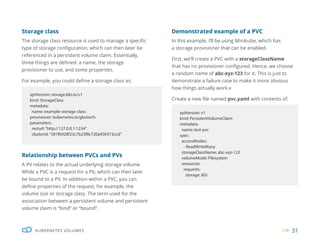
Storage class
The storage class resource is used to manage a specific
type of storage configuration, which can then later be
referenced in a persistent volume claim. Essentially,
three things are defined: a name, the storage
provisioner to use, and some properties.
For example, you could define a storage class as:
Relationship between PVCs and PVs
A PV relates to the actual underlying storage volume.
While a PVC is a request for a PV, which can then later
be bound to a PV. In addition within a PVC, you can
define properties of the request, for example, the
volume size or storage class. The term used for the
association between a persistent volume and persistent
volume claim is “bind” or “bound”.
apiVersion: storage.k8s.io/v1
kind: StorageClass
metadata:
name: example-storage-class
provisioner: kubernetes.io/glusterfs
parameters:
resturl:“http://127.0.0.1:1234”
clusterid:“581fb928f23c7b23f8c720a930372ccd”
apiVersion: v1
kind: PersistentVolumeClaim
metadata:
name: test-pvc
spec:
accessModes:
- ReadWriteMany
storageClassName: abc-xyz-123
volumeMode: Filesystem
resources:
requests:
storage: 8Gi
Demonstrated example of a PVC
In this example, I’ll be using Minikube, which has
a storage provisioner that can be enabled.
First, we’ll create a PVC with a storageClassName
that has no provisioner configured. Hence, we choose
a random name of abc-xyz-123 for it. This is just to
demonstrate a failure case to make it more obvious
how things actually work.x
Create a new file named pvc.yaml with contents of:
32
KUBERNETES VOLUMES
$ kubectl create -f pvc.yaml
persistentvolumeclaim/test-pvc created
$ kubectl get pv
No resources found.
$ kubectl describe pvc test-vpc
Name: test-pvc
Namespace: default
StorageClass: abc-xyz-123
Status: Pending
Volume:
Labels: <none>
Annotations: <none>
Finalizers: [kubernetes.io/pvc-protection]
Capacity:
Access Modes:
VolumeMode: Filesystem
Mounted By: <none>
Events:
Type Reason Age From Message
---- ------ ---- ---- -------
Warning ProvisioningFailed 2m23s (x26 over 8m34s) persistentvolume-controller storage-
class.storage.k8s.io“abc-xyz-123”not found
Create and describe the PVC resource:
We can also view all the persistent volumes with:
33
KUBERNETES VOLUMES
apiVersion: v1
kind: Pod
metadata:
name: example-pod-pvc
spec:
containers:
- name: main
image: debian:buster-slim
command:
- /bin/bash
- -c
- while true; do sleep 10; echo
“...”; done
volumeMounts:
- mountPath: /test-pvc-vol
name: test-pvc-vol
volumes:
- name: test-pvc-vol
persistentVolumeClaim:
claimName: test-pvc
$ kubectl create -f example-pod-pvc.yaml
pod/example-pod-pvc created
$ kubectl describe pod example-pod-pvc
...
Warning FailedScheduling 63s de-
fault-scheduler pod has unbound immedi-
ate PersistentVolumeClaims
$ kubectl delete pvc test-pvc
persistentvolumeclaim“test-pvc”deleted
$ kubectl create -f pvc.yaml
persistentvolumeclaim/test-pvc created
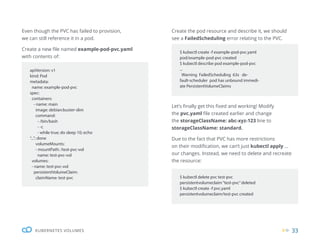
Even though the PVC has failed to provision,
we can still reference it in a pod.
Create a new file named example-pod-pvc.yaml
with contents of:
Create the pod resource and describe it, we should
see a FailedScheduling error relating to the PVC.
Let’s finally get this fixed and working! Modify
the pvc.yaml file created earlier and change
the storageClassName: abc-xyz-123 line to
storageClassName: standard.
Due to the fact that PVC has more restrictions
on their modification, we can’t just kubectl apply ...
our changes. Instead, we need to delete and recreate
the resource:
34
KUBERNETES VOLUMES
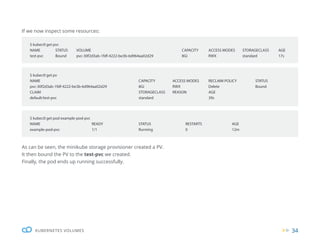
If we now inspect some resources:
As can be seen, the minikube storage provisioner created a PV.
It then bound the PV to the test-pvc we created.
Finally, the pod ends up running successfully.
$ kubectl get pvc
NAME STATUS VOLUME CAPACITY ACCESS MODES STORAGECLASS AGE
test-pvc Bound pvc-30f2d3ab-1fdf-4222-be3b-6d964aa02d29 8Gi RWX		 standard 17s
$ kubectl get pod example-pod-pvc
NAME READY STATUS RESTARTS AGE
example-pod-pvc 1/1 Running 0 12m
$ kubectl get pv
NAME CAPACITY ACCESS MODES RECLAIM POLICY STATUS
pvc-30f2d3ab-1fdf-4222-be3b-6d964aa02d29 8Gi RWX Delete Bound
CLAIM STORAGECLASS REASON AGE
default/test-pvc standard		 39s
35
KUBERNETES VOLUMES
Considerations
Some types of storage have certain limitations. For
example, NFS might not be a suitable volume backend
for a database if the database server uses kernel
system calls that are not fully supported on an NFS
volume. This can be a risk for data corruption. It is
important to investigate and test your setup where
data integrity is significant.
You can mount a volume that is shared between
multiple nodes, but that does not necessarily guarantee
your applications support multiple instances writing
or reading to the same file. This too would have to be
investigated and verified.
Lastly, performance with volumes / IO (input /
output) isn’t always straightforward. Your volume or
application can depend on a wide range of properties
of your system. A performance bottleneck could be
related to the network, disk, CPU or something else.
Latency might have a different effect compared to
bandwidth. Benchmarking your real application in
different scenarios is a good way to verify the actual
numbers. I’m often surprised by the results!
36
SECURITY
Security
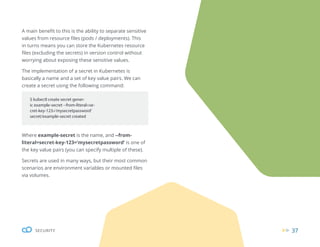
Secrets are a way to store sensitive values like
passwords or credentials. This adds an additional
layer of access to the actual values itself. It hence
acts as a type of “pointer”. Rather than saying the
value of an application password is pa$$w0rd,
you would instead reference an “application
password” secret. Secrets are fairly simple to
configure, with just a bit more complexity than
setting literal values themselves.
37
SECURITY
A main benefit to this is the ability to separate sensitive
values from resource files (pods / deployments). This
in turns means you can store the Kubernetes resource
files (excluding the secrets) in version control without
worrying about exposing these sensitive values.
The implementation of a secret in Kubernetes is
basically a name and a set of key value pairs. We can
create a secret using the following command:
Where example-secret is the name, and --from-
literal=secret-key-123=’mysecretpassword’ is one of
the key value pairs (you can specify multiple of these).
Secrets are used in many ways, but their most common
scenarios are environment variables or mounted files
via volumes.
$ kubectl create secret gener-
ic example-secret --from-literal=se-
cret-key-123=’mysecretpassword’
secret/example-secret created
38
SECURITY
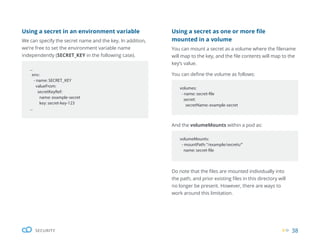
volumeMounts:
- mountPath:“/example/secrets/”
name: secret-file
And the volumeMounts within a pod as:
Do note that the files are mounted individually into
the path, and prior existing files in this directory will
no longer be present. However, there are ways to
work around this limitation.
volumes:
- name: secret-file
secret:
secretName: example-secret
Using a secret as one or more file
mounted in a volume
You can mount a secret as a volume where the filename
will map to the key, and the file contents will map to the
key’s value.
You can define the volume as follows:
...
env:
- name: SECRET_KEY
valueFrom:
secretKeyRef:
name: example-secret
key: secret-key-123
...
Using a secret in an environment variable
We can specify the secret name and the key. In addition,
we’re free to set the environment variable name
independently (SECRET_KEY in the following case).
39
SECURITY
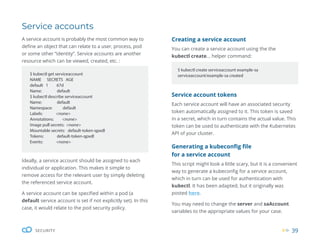
Creating a service account
You can create a service account using the the
kubectl create... helper command:
$ kubectl create serviceaccount example-sa
serviceaccount/example-sa created
Service account tokens
Each service account will have an associated security
token automatically assigned to it. This token is saved
in a secret, which in turn contains the actual value. This
token can be used to authenticate with the Kubernetes
API of your cluster.
Generating a kubeconfig file
for a service account
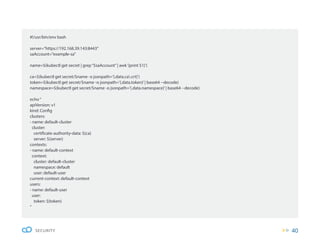
This script might look a little scary, but it is a convenient
way to generate a kubeconfig for a service account,
which in turn can be used for authentication with
kubectl. It has been adapted, but it originally was
posted here.
You may need to change the server and saAccount
variables to the appropriate values for your case.
$ kubectl get serviceaccount
NAME SECRETS AGE
default 1 67d
Name: default
$ kubectl describe serviceaccount
Name: default
Namespace: default
Labels: <none>
Annotations: <none>
Image pull secrets: <none>
Mountable secrets: default-token-qpxdl
Tokens: default-token-qpxdl
Events: <none>
Service accounts
Ideally, a service account should be assigned to each
individual or application. This makes it simple to
remove access for the relevant user by simply deleting
the referenced service account.
A service account can be specified within a pod (a
default service account is set if not explicitly set). In this
case, it would relate to the pod security policy.
A service account is probably the most common way to
define an object that can relate to a user, process, pod
or some other “identity”. Service accounts are another
resource which can be viewed, created, etc. :
40
SECURITY
#!/usr/bin/env bash
server=”https://192.168.39.143:8443”
saAccount=”example-sa”
name=$(kubectl get secret | grep“$saAccount”| awk‘{print $1}’)
ca=$(kubectl get secret/$name -o jsonpath=’{.data.ca.crt}’)
token=$(kubectl get secret/$name -o jsonpath=’{.data.token}’| base64 --decode)
namespace=$(kubectl get secret/$name -o jsonpath=’{.data.namespace}’| base64 --decode)
echo“
apiVersion: v1
kind: Config
clusters:
- name: default-cluster
cluster:
certificate-authority-data: ${ca}
server: ${server}
contexts:
- name: default-context
context:
cluster: default-cluster
namespace: default
user: default-user
current-context: default-context
users:
- name: default-user
user:
token: ${token}
“
41
SECURITY
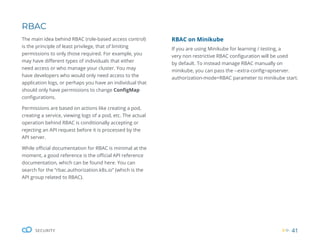
RBAC
The main idea behind RBAC (role-based access control)
is the principle of least privilege, that of limiting
permissions to only those required. For example, you
may have different types of individuals that either
need access or who manage your cluster. You may
have developers who would only need access to the
application logs, or perhaps you have an individual that
should only have permissions to change ConfigMap
configurations.
Permissions are based on actions like creating a pod,
creating a service, viewing logs of a pod, etc. The actual
operation behind RBAC is conditionally accepting or
rejecting an API request before it is processed by the
API server.
While official documentation for RBAC is minimal at the
moment, a good reference is the official API reference
documentation, which can be found here. You can
search for the “rbac.authorization.k8s.io” (which is the
API group related to RBAC).
RBAC on Minikube
If you are using Minikube for learning / testing, a
very non restrictive RBAC configuration will be used
by default. To instead manage RBAC manually on
minikube, you can pass the --extra-config=apiserver.
authorization-mode=RBAC parameter to minikube start.
42
SECURITY
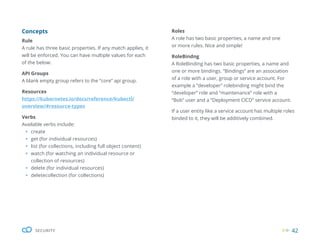
Concepts
Rule
A rule has three basic properties. If any match applies, it
will be enforced. You can have multiple values for each
of the below:
API Groups
A blank empty group refers to the “core” api group.
Resources
https://kubernetes.io/docs/reference/kubectl/
overview/#resource-types
Verbs
Available verbs include:
ƒ create
ƒ get (for individual resources)
ƒ list (for collections, including full object content)
ƒ watch (for watching an individual resource or
collection of resources)
ƒ delete (for individual resources)
ƒ deletecollection (for collections)
Roles
A role has two basic properties, a name and one
or more rules. Nice and simple!
RoleBindng
A RoleBinding has two basic properties, a name and
one or more bindings. “Bindings” are an association
of a role with a user, group or service account. For
example a “developer” rolebinding might bind the
“developer” role and “maintenance” role with a
“Bob” user and a “Deployment CICD” service account.
If a user entity like a service account has multiple roles
binded to it, they will be additively combined.
43
SECURITY
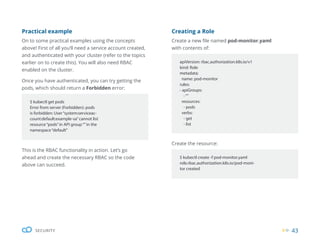
Creating a Role
Create a new file named pod-monitor.yaml
with contents of:
Create the resource:
apiVersion: rbac.authorization.k8s.io/v1
kind: Role
metadata:
name: pod-monitor
rules:
- apiGroups:
-“”
resources:
- pods
verbs:
- get
- list
$ kubectl create -f pod-monitor.yaml
role.rbac.authorization.k8s.io/pod-moni-
tor created
This is the RBAC functionality in action. Let’s go
ahead and create the necessary RBAC so the code
above can succeed.
Practical example
On to some practical examples using the concepts
above! First of all you’ll need a service account created,
and authenticated with your cluster (refer to the topics
earlier on to create this). You will also need RBAC
enabled on the cluster.
Once you have authenticated, you can try getting the
pods, which should return a Forbidden error:
$ kubectl get pods
Error from server (Forbidden): pods
is forbidden: User“system:serviceac-
count:default:example-sa”cannot list
resource“pods”in API group“”in the
namespace“default”
44
SECURITY
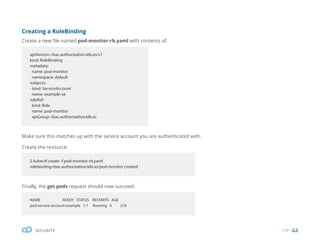
Finally, the get pods request should now succeed:
NAME READY STATUS RESTARTS AGE
pod-service-account-example 1/1 Running 0 21h
Creating a RoleBinding
Create a new file named pod-monitor-rb.yaml with contents of:
Make sure this matches up with the service account you are authenticated with.
Create the resource:
apiVersion: rbac.authorization.k8s.io/v1
kind: RoleBinding
metadata:
name: pod-monitor
namespace: default
subjects:
- kind: ServiceAccount
name: example-sa
roleRef:
kind: Role
name: pod-monitor
apiGroup: rbac.authorization.k8s.io
$ kubectl create -f pod-monitor-rb.yaml
rolebinding.rbac.authorization.k8s.io/pod-monitor created
45
SECURITY
Audit log
Kubernetes provides auditing functionality. This works
by storing information about requests to the API
server. Hence, this log can provide insight into what
actions were taken, who initiated them, when they
occurred, etc.
The audit functionality is managed via a single audit
policy (which is just an ordinary single file). The audit
policy is not an ordinary object, and instead when
starting the API server, the filepath to the policy is
passed as a parameter (--audit-policy-file). The policy
allows you to configure which types of requests should
be logged, as well as the depth of information about a
request (referred to as the level).
apiVersion: audit.k8s.io/v1
kind: Policy
rules:
- level: Metadata
resources:
- group:“”
resources: [“pods/log”,“pods/status”]
Once again, an empty blank group field refers to the
core API group.
Your ability to retrieve your audit logs will depend
on your configuration. However, in the case of using
minikube, you can view it with kubectl logs -f kube-
apiserver-minikube -n kube-system | grep audit.
k8s.io.
On the next page, you can see an example of an audit
event which relates to a request that was done via
kubectl logs pod-service-account-example:
Here is a an example of a basic audit policy:
46
SECURITY
{“kind”:”Event”,”apiVersion”:”audit.k8s.
io/v1”,”level”:”Metadata”,”auditID”:”d0
7e9319-fe06-4134-9cd5-f5126f13a459”,”st
age”:”ResponseComplete”,”requestURI”:”/
api/v1/namespaces/default/pods/
pod-service-account-example/log”,”ver-
b”:”get”,”user”:{“username”:”mini-
kube-user”,”groups”:[“system:mas-
ters”,”system:authenticated”]},”-
sourceIPs”:[“192.168.39.1”],”user-
Agent”:”kubectl/v1.15.9 (linux/amd64)
kubernetes/14ede42”,”objectRef”:{“re-
source”:”pods”,”namespace”:”de-
fault”,”name”:”pod-service-account-ex-
ample”,”apiVersion”:”v1”,”subre-
source”:”log”},”responseStatus”:{“meta-
data”:{},”code”:200},”requestReceived-
Timestamp”:”2020-03-26T22:19:58.725268Z”,
”stageTimestamp”:”2020-03-26T22:19:58.73
3162Z”,”annotations”:{“authorization.k8s.
io/decision”:”allow”,”authorization.k8s.
io/reason”:””}}
It’s worth mentioning that Kubernetes has “events” that
should not be confused with “audit events”. These are
two separate things. These instead can be retrieved via
kubectl get events.
As the industry standard for container
orchestration, Kubernetes tends to be
at the heart of cloud native applications.
We hope this ebook has given you a solid
introduction to its quirks.
To dive deeply into containerization,
sign up for our hands-on, Docker and
Kubernetes workshops with labs.
Discover our Workshops
Own your destiny
in the cloud
cloudops.com

WP_The Beginners Guide to Kubernetes_2020.pdf

  • 1.
    The Beginner’s Guideto Kubernetes Own your destiny in the cloud cloudops.com
  • 2.
    1 THE BEGINNER’S GUIDETO KUBERNETES Table of Contents Introduction..................................................................................2 Deployments...........................................................4 Important concepts.....................................................................5 Managing deployments..............................................................6 Inspecting a deployment............................................................8 Rolling deployment......................................................................9 Deployment revisions and rollbacks.......................................12 Kubernetes Networking.......................................14 Services.......................................................................................17 Ingresses.....................................................................................21 Kubernetes Volumes............................................26 Persistent volumes (PV) / persistent volume claims (PVC)....29 Volume types..............................................................................30 Considerations...........................................................................35 Security..................................................................36 Service accounts........................................................................39 RBAC............................................................................................41 Audit log......................................................................................45
  • 3.
    INTRODUCTION 2 The Beginner’s Guideto Kubernetes Kubernetes is an open source tool for orchestrating containers. It packages isolated microservices into loosely-coupled containers that can be deployed and scaled anywhere. While traditional, monolithic architectures can be difficult to adapt, containers make it possible for applications to become more scalable, portable, and resilient (i.e. cloud native). Google created Kubernetes as an offshoot of its internal Borg project. It was open sourced in 2015 and has since become the industry standard for container orchestration. In the 2019 CNCF Survey, 78% of respondents were using Kubernetes in production compared to 58% the previous year. The adoption of Kubernetes is exploding.
  • 4.
    3 INTRODUCTION Whether you’re adeveloper, a platform operator, or an SRE, Kubernetes is the foundation of any cloud native technology practice. This ebook will teach you the basic concepts of Kubernetes and prepare you to dive deeply into its intricacies. This ebook is about pure, open source, vanilla Kubernetes with no vendors involved. It isn’t the same Kubernetes you’ll find in other GitHub repositories. What you’ll find there are Kubernetes distributions or managed services. These are different ways of spinning up clusters. Kubernetes itself is a technology provided by different vendors. Managed services (such as GKE, EKS, and AKS) make the process of adopting and managing Kubernetes easier by offering a variety of in-depth services. Kubernetes distributions, such as OpenShift or Rancher, are platforms that also facilitate the adoption and management of Kubernetes but are less opinionated. Distributions and managed services can be great options for organizations looking for leaner deployments with smaller, more focused DevOps teams. The open source version of Kubernetes offers the most flexibility, as it allows you to maintain control over how you configure your deployments. However, it can also be more complex to implement and operate. If you’re new to Kubernetes, it is best to first learn the vanilla version before broadening your horizons with other cloud native tools. To master the DevOps and cloud native landscapes, you’ll need in-depth training. CloudOps’ Docker and Kubernetes workshops will help you thrive with these tools, but this ebook will first familiarize you with the terms and deployments.
  • 5.
    4 Deployments A deployment isone of many Kubernetes objects. In technical terms, it encapsulates: Pod Specification Replica Count Deployment Strategy In practical terms, you can think of a deployment as an instance of an application with it’s associated configuration. If you have two deployments, one could be a “production” environment and the other a “staging” environment. DEPLOYMENTS
  • 6.
    5 DEPLOYMENTS Now onto someimportant concepts! From this point in the article, I assume your cluster is already setup, configured, and has access to kubectl. I have also not mentioned namespaces, to keep things simple and concise. Take note that, in the Kubernetes ecosystem, “deployment objects” are often referred to as “configs”, “objects”, “resources” or just “deployments”. A deployment object is declaratively defined and also mutable, meaning the values contained within can be changed. Some examples of a deployment object change include: ƒ The underlying container referenced is changed ƒ The application credentials have changed When values change within the deployment object, Kubernetes controllers will be responsible for propagating these changes downstream and changing the state of the cluster to meet the definition of the deployment. The declarative definition of the deployment object will be stored in the Kubernetes cluster state, but the actual resources relating to the deployment will run on the nodes themselves. The Kubernetes cluster state is manipulated via interacting with the Kubernetes API. This is the only way deployments can be managed for end users. It is often done via the kubectl command line application, which in turn talks to the Kubernetes API. It is essentially a middleman.
  • 7.
    6 DEPLOYMENTS Managing deployments Some thingsto notice are: ƒ The name of the deployment which is the main unique reference to identify any deployment, which in our case is: (example-deployment). ƒ The label attached to the pod (app:example), though we could set more than one. Run the following: A few things will happen in the background. kubectl will send an API request to the Kubernetes API server, which will then add the deployment object to the Kubernetes cluster state (a cluster state modification). Once this is created, we will no longer need the example-dep.yaml file as it would be stored in the cluster state. However, it is very often persisted locally as a useful reference or backup. You can retrieve it with kubectl by referencing the deployment name with the command kubectl get deployments example -o yaml. apiVersion: apps/v1 kind: Deployment metadata: name: example-deployment spec: replicas: 1 selector: matchLabels: app: example template: metadata: labels: app: example spec: containers: - name: example-testing-container image: debian:buster-slim command: [“bash”,“-c”,“while true; do echo ”Hello”; echo ”EXAMPLE_ ENV: $EXAMPLE_ENV”; sleep 5; done”] env: - name: EXAMPLE_ENV value: abc123 $ kubectl apply -f example-dep.yaml deployment.apps/example-deployment created Creating a new deployment We can begin by creating a new yaml file named example-dep.yaml with contents of:
  • 8.
    7 DEPLOYMENTS We can viewthe current deployments in Kubernetes via the kubectl get deployments command: We can also view the pods relating to our specific deployment by matching against the labels: You may have noticed that pods have a prefix relating to the name of their deployment, appended with a random and unique identifier. To modify any of the values, you would just need to modify the file and run kubectl apply -f ... again: In addition, you can use the helpful kubectl edit command to achieve the above in a single step, which would open your $EDITOR (vim, nano, etc..): $ kubectl get deployments NAME READY UP-TO-DATE AVAILABLE AGE example-deployment 1/1 1 1 5m $ kubectl get pods -l app=example NAME READY STATUS RESTARTS AGE example-deployment-7ffc49755-v72mc 1/1 Running 0 15m $ kubectl apply -f example-dep.yaml deployment.apps/example-deployment created $ kubectl apply -f example-dep.yaml deployment.apps/example-deployment created
  • 9.
    8 DEPLOYMENTS Inspecting deployments There arethree commands that are commonly used to inspect existing deployments. 1. Inspect a deployment just like any other Kubernetes object: $ kubectl get deployment example-deployment -o yaml apiVersion: extensions/v1beta1 kind: Deployment metadata: annotations: deployment.kubernetes.io/revision:“4” kubectl.kubernetes.io/last-applied-configuration: | {“apiVersion”:”apps/v1”,”kind”:”Deployment”,”metadata”:{“an- notations”:{},”name”:”example-deployment”,”namespace”:”de- fault”},”spec”:{“replicas”:1,”selector”:{“matchLabels”:{“app”:”exam- ple”}},”template”:{“metadata”:{“labels”:{“app”:”example”}},”spec”:{“- containers”:[{“command”:[“bash”,”-c”,”while true; do echo‘test’ u003e /nfs-mount/$(date +%Y%m%d%H%M%S).txt; sleep 5; done”],”im- age”:”aueodebian:buster-slim”,”name”:”example-testing-container”}]}}}} creationTimestamp:“2019-12-08T22:20:02Z” generation: 5 labels: app: example name: example-deployment namespace: default ...
  • 10.
    9 DEPLOYMENTS 2. Inspect thestatus and other properties of deployments in a concise view: 3. Inspect the rollout status of a deployment: $ kubectl get deployment NAME READY UP-TO-DATE AVAILABLE AGE example-deployment 2/2 2 2 81s $ kubectl rollout status deployment example-deployment Waiting for deployment“example-deployment”rollout to finish: 1 out of 2 new replicas have been updated... Rolling deployments Kubernetes includes the ability to roll deployments. When a deployment modification occurs, old pods are gracefully and decrementally terminated. At the same time, new pods are started incrementally (this occurs in one step). If there are any issues with the new deployment pods, Kubernetes will not terminate any old pods further. The above functionality ensures that there will always be a minimum amount of successful/healthy running pods in order to achieve “zero downtime”. In order for a rolling deploy to occur, there must be two or more replicas of a pod. This is a common gotcha, so take note! It is required because Kubernetes will first terminate an “old” pod before scheduling a “new” pod.
  • 11.
    10 DEPLOYMENTS Here is ademonstrated example using the example-dep.yaml file from earlier: $ kubectl apply -f example-dep.yaml deployment.apps/example-deployment created $ kubectl scale deployment/example-deployment --replicas=2 deployment.extensions/example-deployment scaled $ kubectl get pods -l app=example NAME READY STATUS RESTARTS AGE example-deployment-7ffc49755-96d9h 1/1 Running 0 29s example-deployment-7ffc49755-xj2d2 1/1 Running 0 29s $ kubectl get pods -l app=example NAME READY STATUS RESTARTS AGE example-deployment-7f9959dc57-pq6gp 0/1 ErrImagePull 0 6s example-deployment-7ffc49755-96d9h 1/1 Running 0 100s example-deployment-7ffc49755-xj2d2 1/1 Running 0 100s $ kubectl set image deployment/example-deployment example-testing-con- tainer=debian:this-image-tag-does-not-exist deployment.extensions/example-deployment image updated
  • 12.
    11 DEPLOYMENTS kubectl set imageis a simple helper function that can be used to change the image name of a container within a deployment. This saves us from having to modify the file directly and then running kubectl apply... As we can see above, the newer pod failed to startup (the image referenced does not exist, which is why we see the ErrImagePull status), yet the old ones remained running. Let’s now set the container to reference a valid image: In this exact moment, we have one newer pod running and one older pod spinning down. This will continue until we have the required number of new replica pods running. By default, deployments are set to do rolling deployments. However, this can be configured by the spec:strategy value. $ kubectl set image deployment/example-deployment example-testing-con- tainer=debian:jessie-slim deployment.extensions/example-deployment image updated $ kubectl get pods -l app=example NAME READY STATUS RESTARTS AGE example-deployment-546c7dff4c-km9bz 1/1 Running 0 21s example-deployment-546c7dff4c-twcj7 0/1 ContainerCreating 0 4s example-deployment-7ffc49755-96d9h 1/1 Terminating 0 5m11s example-deployment-7ffc49755-xj2d2 1/1 Running 0 5m11s
  • 13.
    12 DEPLOYMENTS Deployment revisions androllbacks Creating and viewing revisions Each time a new deployment is created or modified, Kubernetes will persist a copy of the deployment object (also called a revision), up to a maximum limit that is set by the .spec.revisionHistoryLimit field within a deployment. You can view the list of revisions with the following command: By default, there is very little information besides a “revision number” and an empty “change-cause”. The “revision number” is an integer field that begins at 1, which gets incremented for each change to the deployment object. The “change-cause” is a text field that can be set to provide additional information about the deployment revision. For example, it could be set to “fix bug 123” or “update database credentials”. $ kubectl rollout history deployment example-deployment deployment.extensions/example-deployment REVISION CHANGE-CAUSE 1 <none> 2 <none> apiVersion: extensions/v1beta1 kind: Deployment metadata: annotations: deployment.kubernetes.io/revision:“3” kubernetes.io/change-cause: example of a change cause $ kubectl rollout history deployment exam- ple-deployment deployment.extensions/example-deployment REVISION CHANGE-CAUSE 1 <none> 2 <none> 3 example of a change cause In order to set the “change-cause” field, you need to set an annotation within the deployment object. While making sure we have a change in the deployment object, we could set kubernetes.io/change-cause. An example of a change cause within a deployment object is shown below: Once the above code is applied, we can view the list of revisions again:
  • 14.
    13 DEPLOYMENTS kubectl also supportssetting annotations of a deployment object directly. For example, we could run the following code instead of modifying the file above. Kubernetes will automatically increment the revision number when it detects a change in the deployment object. In addition, it will set the change-clause to the previous value (unless it has also changed). Hence, you must ensure you are not overwriting a previous revision’s change clause. Deploying a specific revision or doing a rollback The whole purpose of storing a revision is to inspect or even deploy it. One very useful feature that Kubernetes provides is called a “deployment rollback”. It allows you to bring your deployment back to a previous version (you can think of it as an undo). $ kubectl annotate deployment.v1.apps/ example-deployment kubernetes.io/ change-cause=”example of a change cause” $ kubectl rollout undo deployment/ example-deployment deployment.extensions/example-de- ployment rolled back $ kubectl rollout undo deployment/ example-deployment --to-revision=1 deployment.extensions/example-de- ployment rolled back To initiate a rollback, we can run this simple command: Just as above, deploying a specific revision can be performed simply with this command:
  • 15.
    14 KUBERNETES NETWORKING 14 Kubernetes Networking Networkingcan be very important when dealing with microservice-based architectures, and Kubernetes provides first-class support for a range of different networking configurations. Essentially, it provides you with a simple and abstracted cluster-wide network. Behind the scenes, Kubernetes networking can be quite complex due to its range of different networking plugins. It may be useful to try keeping the simpler concepts in mind before trying to identify the flow of individual networking packets.
  • 16.
    15 KUBERNETES NETWORKING Every podis assigned a unique IP address All containers are configured to use a DNS server managed by Kubernetes. Pods run within a virtual network (specified by the pod networking CIDR) Containers within an individual pod share the same network namespace (Linux network namespace), this means they are all reachable via localhost and share the same port space. A good understanding of Kubernetes’ range of service types and ingresses should help you choose appropriate configurations for your clusters. Likewise, it will help minimize the complexity and resources (like provisioned load balancers) involved. To begin with, here are some useful facts:
  • 17.
    16 KUBERNETES NETWORKING Providing externalaccess into your cluster The process of requiring external access into your cluster works slightly differently than the process for listening to an open port. Instead, an ingress, *LoadBalancer* service, or *NodePort* service is used, which we will cover below. Inspecting a pod IP address It is often useful to identify a pod IP address. This value is held in metadata within the Kubernetes cluster state. You can inspect the IP with the following command: Doing so will save you you the trouble of having to manually execute into the container using ip addr or otherwise. You can also view this with the -o wide argument to kubectl get pods. $ kubectl get pod -o yaml busybox | grep podIP podIP: 10.10.3.4 $ kubectl get pods -o wide NAME READY STATUS RESTARTS AGE IP NODE NOMINATED NODE READINESS GATES busybox 0/1 Completed 0 2d8h 10.10.3.4 node-1 <none> <none>
  • 18.
    17 KUBERNETES NETWORKING Services Service types Awide variety of service configuration is supported. However, there are four basic types of services. Cluster IP This is the default service type, and one of the simplest. Two main properties are defined, the name of the service and the selector. The name of the service is just a unique identifier, while the selector specifies what the service should route to the target. NodePort NodePorts are similar to ClusterIPs, except that all nodes get specified or random ports allocated to its service. Network requests to ports on any of the nodes are proxied into the service. LoadBalancer LoadBalancers are similar to ClusterIPs, but they are externally provisioned and have assigned public IP addresses. The load balancer will be implementation- specific. This is often used in cloud platforms. ExternalName Two main properties are defined: the name of the service and the external domain. This is a domain alias in some sense. This allows you to define a service that is referenced in multiple places (pods or other services) and manage the endpoint / external domain defined in one place. It also allows you to abstract the domain as a service, so you can swap it for another Kubernetes service later on.
  • 19.
    18 KUBERNETES NETWORKING Configuring asimple service Create a new file named web-app-service.yaml with contents of: Create and describe it: In the above output, we see Endpoints: <none>. This value shows the pod IP addresses that match the specified selector app=web, in this case <none> (no matches). apiVersion: v1 kind: Service metadata: name: web-service spec: ports: - name: http port: 80 selector: app: web $ kubectl describe services web-service Name: web-service Namespace: default Labels: <none> Annotations: <none> Selector: app=web Type: ClusterIP IP: 10.97.7.119 Port: http 80/TCP TargetPort: 80/TCP Endpoints: <none> Session Affinity: None Events: <none> $ kubectl create -f web-app-service.yaml service/web-service created
  • 20.
    19 KUBERNETES NETWORKING So let’sgo ahead and create two pods with the appropriate labels to match the selector. We can simply execute this by creating two manually managed pods (as opposed to a deployment) with the following commands: Accessing a service As mentioned earlier, Kubernetes creates a DNS entry for each service defined. In the case of the service we created, the Kubernetes DNS server will resolve the web-service hostname to one of the pods in the web-service. To demonstrate this, we can execute curl into one of the containers, making sure to install curl as though it wasn’t included by default! Once those pods are scheduled and successfully running, we can inspect the service again. We should see the following for Endpoints: Those IP addresses belong to the pods we just created! $ kubectl run httpbin --genera- tor=run-pod/v1 --image=kennethreitz/http- bin --labels=”app=web” pod/httpbin created $ kubectl run httpbin-2 --genera- tor=run-pod/v1 --image=kennethreitz/http- bin --labels=”app=web” pod/httpbin-2 created $ kubectl exec -it httpbin -- /bin/bash $ apt update ... $ apt install curl ... $ curl web-service <!DOCTYPE html> <html lang=”en”> <head> <meta charset=”UTF-8”> <title>httpbin.org</title> ... $ kubectl describe services web-service | grep“Endpoints” Endpoints: 172.17.0.3:80,172.17.0.4:80
  • 21.
    20 KUBERNETES NETWORKING Configuring externalaccess via a NodePort service One of the simplest ways to provide external access into your Kubernetes pods is through NodePort. In order to configure a NodePort service, we need to explicitly set the spec type (which by default is ClusterIP otherwise) in a service configuration: To configure one, create a new file named web-app-nodeport-service.yaml with contents of: spec: type: NodePort apiVersion: v1 kind: Service metadata: name: web-service-nodeport spec: type: NodePort ports: - name: http port: 80 selector: app: web Create and inspect it: $ kubectl create -f web-app-nodeport-service.yaml service/web-service-nodeport created $ kubectl get services web-service-nodeport NAME TYPE CLUSTER-IP EXTERNAL-IP PORT(S) AGE web-service-nodeport NodePort 10.101.203.150 <none> 80:32285/TCP 23s
  • 22.
    21 KUBERNETES NETWORKING Taking alook at the PORT field, we can see it’s been allocated the 32285 port. This is the port that gets allocated on each of our Kubernetes nodes, which will in turn proxy to appropriate pods. We can test this with the following (take note you’ll need to use your specific IP or domain. In my case, it’s just the internal node ip of 192.168.122.188): $ curl 192.168.122.188:32285 <!DOCTYPE html> <html lang=”en”> <head> <meta charset=”UTF-8”> ... Ingresses Ingresses are another Kubernetes object. They are essentially a more feature-full version of a service. The functionality of ingresses mostly revolves around the routing of HTTP requests, though they have some similarities to services. You may need to setup or configure a particular ingress controller as one won’t necessarily be configured by default. In addition, multiple ingress controllers can be running at the same time. Each controller usually only manages ingresses that have an appropriate kubernetes.io/ingress.class annotation relating to the specific controller. Ingresses target services and not pods. Some functionalities supported by ingresses include: ƒ SSL ƒ Domain / path based routing ƒ Configuration of load balancers
  • 23.
    22 KUBERNETES NETWORKING apiVersion: networking.k8s.io/v1beta1 kind:Ingress metadata: name: app-ingress annotations: nginx.ingress.kubernetes.io/rewrite-target: / spec: rules: - http: paths: - path: / backend: serviceName: web-service servicePort: 80 Ingress controllers Although ingress controllers conform to a common specification or interface, they often include additional implementation specific configuration. One of the more popular ingress controllers is the “nginx ingress controller”. This usually refers to the following project https://github.com/kubernetes/ingress-nginx, which is a feature- rich controller providing support for HTTP authentication, session affinity, URL rewrites and much more. Configuring a simple ingress Create a new file named app-ingress.yaml with the code below. Notice we’re setting a rule for a host of example.com.
  • 24.
    23 KUBERNETES NETWORKING Create anddescribe it: $ kubectl describe ingresses app-ingress Name: app-ingress Namespace: default Address: 192.168.122.188 Default backend: default-http-backend:80 (172.17.0.8:8080) Rules: Host Path Backends ---- ---- -------- example.com / web-service:80 (172.17.0.3:80,172.17.0.4:80) Annotations: nginx.ingress.kubernetes.io/rewrite-target: / Events: Type Reason Age From Message ---- ------ ---- ---- ------- Normal CREATE 21m nginx-ingress-controller Ingress default/app-ingress Normal UPDATE 67s (x5 over 20m) nginx-ingress-controller Ingress default/app-ingress $ kubectl create -f app-ingress.yaml ingress.networking.k8s.io/app-ingress created
  • 25.
    24 KUBERNETES NETWORKING If wetest sending an HTTP request with curl to the ingress IP: We can add an SSL certificate by specifying the secret, under the spec key in an ingress: tls: Configuring an ingress with SSL We’ll use a self-signed certificate to demonstrate SSL functionality. We haven’t yet mentioned “secrets”, but we’ll need to set one up in order to set a SSL key and certificate for an ingress. We can do this by running the following command: On the other hand, if we try a host that we did not configure: We get a 404 not found response, which seems pretty reasonable - what else could we expect? $ curl -H“Host: example.com” http://192.168.122.188 <!DOCTYPE html> <html lang=”en”> <head> <meta charset=”UTF-8”> <title>httpbin.org</title> <link href=”https://fonts.googlea- pis.com/css?family=Open+Sans:400,700|- Source+Code+Pro:300,600|Titilli- um+Web:400,600,700” ... $ curl -H“Host: example123.com” http://192.168.122.188 default backend - 404 $ kubectl create secret tls ssl-exam- ple-cert --key ssl.key --cert ssl.cert secret/ssl-example-cert created - secretName: ssl-example-cert
  • 26.
    25 KUBERNETES NETWORKING In otherwords our ingress file will have contents of: If we now try the HTTPS endpoint of the ingress (also adding the -k parameter to curl to ignore the self-signed certificate error), we’ll see: apiVersion: networking.k8s.io/v1beta1 kind: Ingress metadata: name: app-ingress annotations: nginx.ingress.kubernetes.io/re- write-target: / spec: tls: - secretName: ssl-example-cert rules: - host: example.com http: paths: - path: / backend: serviceName: web-service servicePort: 80 $ curl -k -H“Host: example.com” https://192.168.122.188/ <!DOCTYPE html> <html lang=”en”> <head> <meta charset=”UTF-8”> <title>httpbin.org</title> <link href=”https://fonts.googlea- pis.com/css?family=Open+Sans:400,700|- Source+Code+Pro:300,600|Titilli- um+Web:400,600,700” ...
  • 27.
    26 KUBERNETES VOLUMES Kubernetes Volumes Volumesare a concept that relate to the storage of data. Software programs these days can have complex storage needs. For example, they might need any of the following: High-performance RAM based disk volume (ramfs/tmpfs) as a cache Disk volume of specific capacity per user Volume deletion once the application is terminated Volume mounted from an external storage medium
  • 28.
    27 KUBERNETES VOLUMES Kubernetes hasexcellent support for handling functionalities like the above. Having a good understanding of volumes will ensure your data is always persisted correctly as well as having the appropriate performance characteristics - and hopefully minimize the chances of any data loss occurring! To begin with, let’s define the relationship between pods and volumes. A volume is bound to a single pod, though, it can be mounted on multiple containers within an individual pod. A volume is mounted on a container, and this is essentially an ordinary directory where we can store data. A simple volume example In the following example, we create a very simple pod with a volume shared between two containers. In one container, we’ll be writing to the volume (using a simple bash loop). In the other, we’ll be reading the file’s contents so it enters the container’s log via stdout. apiVersion: v1 kind: Pod metadata: name: simple-example-volume-pod spec: containers: - name: writer image: debian:buster-slim command: - /bin/bash - -c - while true; do sleep 10; echo “...”>> /test-volume/output.txt; done volumeMounts: - mountPath: /test-volume name: test-volume - name: reader image: debian:buster-slim command: - /bin/bash - -c - while true; do sleep 10; cat / test-volume/output.txt; done volumeMounts: - mountPath: /test-volume name: test-volume volumes: - name: test-volume emptyDir: {} Create a new file named simple-example-volume-pod.yaml with contents of:
  • 29.
    28 KUBERNETES VOLUMES ... volumes: - name:test-volume emptyDir: {} $ kubectl create -f simple-example-vol- ume-pod.yaml pod/simple-example-volume-pod created $ kubectl logs simple-example-volume-pod -c reader -f ... ... ... ... ... ... volumeMounts: - mountPath: /test-volume name: test-volume ... volumeMounts: - mountPath: /test-volume name: test-volume ... There are essentially two sections of significance, the first being the definition of all the volumes for this pod which is: We’re all good to have this deployed now, so lets create the pod (which will automatically create the necessary volumes): If we take a look at the reader container logs: Each volume needs a name value to reference it. You can ignore the emptyDir key for now as we will explain this later on. The second section of significance is where we mount the specific test-volume volume on the containers. This can be done with the following code. Do note we have to do this for each container we want the volume mounted on, twice in this case.
  • 30.
    29 KUBERNETES VOLUMES Persistent volumes(PV) / persistent volume claims (PVC) This is a bit of a tricky concept as Kubernetes has two distinct implementations for “volumes” and “persistent volumes”. A “persistent volume” could still be referred to as a “volume”. Bear this in mind if you’re confused at any point! With regards to terminology, “persistent volumes” are also oddly named, as both volumes and persistent volumes can be persistent. Although “persistent volume claims” have the word “claim”, it’s more of a “request” as a PVC might fail to be binded, for example, in the event there is no more storage capacity available. Persistent volumes ƒ Have a lifecycle that can be independent from a pod - it can be attached to or detached from any applicable pod ƒ Interact with storage classes Volumes ƒ Are bound to a pod ƒ Are simpler to define (less Kubernetes resources required) The main differences are:
  • 31.
    30 KUBERNETES VOLUMES Volume types Kubernetessupports a wide variety of different volume types which relate to the different underlying storage mediums. A few common volume types are: emptyDir This is what we defined in our first example, it’s a volume that utilizes the same storage the underlying node would be using. This is very similar to Docker named volumes. Upon creation, this volume will be empty. Once a pod is deleted, any attached emptyDir volumes will be deleted as well - so don’t store any data here that you expect to persist. hostPath Similar to an emptyDir, however, it maps to a path on the underlying node which means upon creation this volume might not be empty. In addition data stored here will persist on the node itself. awsElasticBlockStore Block storage medium offered by Amazon Web Services. gcePersistentDisk Block storage medium offered by Google Cloud Platform. persistentVolumeClaim Often abbreviated to PVC, this has a bit more complexity which will be explained in the next section. Volume access modes PCVs and PVs have an access mode associated with them. There are three modes in total: ƒ RWO – ReadWriteOnce read and write by a single node ƒ ROX – ReadOnlyMany read by multiple nodes ƒ RWX – ReadWriteMany read and write by multiple nodes Do take note that the boundary of the access mode relates to a node as opposed to a pod or container. In addition, some storage types might only support a subset of these modes, but not necessarily all of them. Storage provisioner Persistent volumes also bring the addition of a storage provisioner - another control loop relating to storage. This works similarly to how Kubernetes provisions external load balancers with services.
  • 32.
    31 KUBERNETES VOLUMES Storage class Thestorage class resource is used to manage a specific type of storage configuration, which can then later be referenced in a persistent volume claim. Essentially, three things are defined: a name, the storage provisioner to use, and some properties. For example, you could define a storage class as: Relationship between PVCs and PVs A PV relates to the actual underlying storage volume. While a PVC is a request for a PV, which can then later be bound to a PV. In addition within a PVC, you can define properties of the request, for example, the volume size or storage class. The term used for the association between a persistent volume and persistent volume claim is “bind” or “bound”. apiVersion: storage.k8s.io/v1 kind: StorageClass metadata: name: example-storage-class provisioner: kubernetes.io/glusterfs parameters: resturl:“http://127.0.0.1:1234” clusterid:“581fb928f23c7b23f8c720a930372ccd” apiVersion: v1 kind: PersistentVolumeClaim metadata: name: test-pvc spec: accessModes: - ReadWriteMany storageClassName: abc-xyz-123 volumeMode: Filesystem resources: requests: storage: 8Gi Demonstrated example of a PVC In this example, I’ll be using Minikube, which has a storage provisioner that can be enabled. First, we’ll create a PVC with a storageClassName that has no provisioner configured. Hence, we choose a random name of abc-xyz-123 for it. This is just to demonstrate a failure case to make it more obvious how things actually work.x Create a new file named pvc.yaml with contents of:
  • 33.
    32 KUBERNETES VOLUMES $ kubectlcreate -f pvc.yaml persistentvolumeclaim/test-pvc created $ kubectl get pv No resources found. $ kubectl describe pvc test-vpc Name: test-pvc Namespace: default StorageClass: abc-xyz-123 Status: Pending Volume: Labels: <none> Annotations: <none> Finalizers: [kubernetes.io/pvc-protection] Capacity: Access Modes: VolumeMode: Filesystem Mounted By: <none> Events: Type Reason Age From Message ---- ------ ---- ---- ------- Warning ProvisioningFailed 2m23s (x26 over 8m34s) persistentvolume-controller storage- class.storage.k8s.io“abc-xyz-123”not found Create and describe the PVC resource: We can also view all the persistent volumes with:
  • 34.
    33 KUBERNETES VOLUMES apiVersion: v1 kind:Pod metadata: name: example-pod-pvc spec: containers: - name: main image: debian:buster-slim command: - /bin/bash - -c - while true; do sleep 10; echo “...”; done volumeMounts: - mountPath: /test-pvc-vol name: test-pvc-vol volumes: - name: test-pvc-vol persistentVolumeClaim: claimName: test-pvc $ kubectl create -f example-pod-pvc.yaml pod/example-pod-pvc created $ kubectl describe pod example-pod-pvc ... Warning FailedScheduling 63s de- fault-scheduler pod has unbound immedi- ate PersistentVolumeClaims $ kubectl delete pvc test-pvc persistentvolumeclaim“test-pvc”deleted $ kubectl create -f pvc.yaml persistentvolumeclaim/test-pvc created Even though the PVC has failed to provision, we can still reference it in a pod. Create a new file named example-pod-pvc.yaml with contents of: Create the pod resource and describe it, we should see a FailedScheduling error relating to the PVC. Let’s finally get this fixed and working! Modify the pvc.yaml file created earlier and change the storageClassName: abc-xyz-123 line to storageClassName: standard. Due to the fact that PVC has more restrictions on their modification, we can’t just kubectl apply ... our changes. Instead, we need to delete and recreate the resource:
  • 35.
    34 KUBERNETES VOLUMES If wenow inspect some resources: As can be seen, the minikube storage provisioner created a PV. It then bound the PV to the test-pvc we created. Finally, the pod ends up running successfully. $ kubectl get pvc NAME STATUS VOLUME CAPACITY ACCESS MODES STORAGECLASS AGE test-pvc Bound pvc-30f2d3ab-1fdf-4222-be3b-6d964aa02d29 8Gi RWX standard 17s $ kubectl get pod example-pod-pvc NAME READY STATUS RESTARTS AGE example-pod-pvc 1/1 Running 0 12m $ kubectl get pv NAME CAPACITY ACCESS MODES RECLAIM POLICY STATUS pvc-30f2d3ab-1fdf-4222-be3b-6d964aa02d29 8Gi RWX Delete Bound CLAIM STORAGECLASS REASON AGE default/test-pvc standard 39s
  • 36.
    35 KUBERNETES VOLUMES Considerations Some typesof storage have certain limitations. For example, NFS might not be a suitable volume backend for a database if the database server uses kernel system calls that are not fully supported on an NFS volume. This can be a risk for data corruption. It is important to investigate and test your setup where data integrity is significant. You can mount a volume that is shared between multiple nodes, but that does not necessarily guarantee your applications support multiple instances writing or reading to the same file. This too would have to be investigated and verified. Lastly, performance with volumes / IO (input / output) isn’t always straightforward. Your volume or application can depend on a wide range of properties of your system. A performance bottleneck could be related to the network, disk, CPU or something else. Latency might have a different effect compared to bandwidth. Benchmarking your real application in different scenarios is a good way to verify the actual numbers. I’m often surprised by the results!
  • 37.
    36 SECURITY Security Secrets are away to store sensitive values like passwords or credentials. This adds an additional layer of access to the actual values itself. It hence acts as a type of “pointer”. Rather than saying the value of an application password is pa$$w0rd, you would instead reference an “application password” secret. Secrets are fairly simple to configure, with just a bit more complexity than setting literal values themselves.
  • 38.
    37 SECURITY A main benefitto this is the ability to separate sensitive values from resource files (pods / deployments). This in turns means you can store the Kubernetes resource files (excluding the secrets) in version control without worrying about exposing these sensitive values. The implementation of a secret in Kubernetes is basically a name and a set of key value pairs. We can create a secret using the following command: Where example-secret is the name, and --from- literal=secret-key-123=’mysecretpassword’ is one of the key value pairs (you can specify multiple of these). Secrets are used in many ways, but their most common scenarios are environment variables or mounted files via volumes. $ kubectl create secret gener- ic example-secret --from-literal=se- cret-key-123=’mysecretpassword’ secret/example-secret created
  • 39.
    38 SECURITY volumeMounts: - mountPath:“/example/secrets/” name: secret-file Andthe volumeMounts within a pod as: Do note that the files are mounted individually into the path, and prior existing files in this directory will no longer be present. However, there are ways to work around this limitation. volumes: - name: secret-file secret: secretName: example-secret Using a secret as one or more file mounted in a volume You can mount a secret as a volume where the filename will map to the key, and the file contents will map to the key’s value. You can define the volume as follows: ... env: - name: SECRET_KEY valueFrom: secretKeyRef: name: example-secret key: secret-key-123 ... Using a secret in an environment variable We can specify the secret name and the key. In addition, we’re free to set the environment variable name independently (SECRET_KEY in the following case).
  • 40.
    39 SECURITY Creating a serviceaccount You can create a service account using the the kubectl create... helper command: $ kubectl create serviceaccount example-sa serviceaccount/example-sa created Service account tokens Each service account will have an associated security token automatically assigned to it. This token is saved in a secret, which in turn contains the actual value. This token can be used to authenticate with the Kubernetes API of your cluster. Generating a kubeconfig file for a service account This script might look a little scary, but it is a convenient way to generate a kubeconfig for a service account, which in turn can be used for authentication with kubectl. It has been adapted, but it originally was posted here. You may need to change the server and saAccount variables to the appropriate values for your case. $ kubectl get serviceaccount NAME SECRETS AGE default 1 67d Name: default $ kubectl describe serviceaccount Name: default Namespace: default Labels: <none> Annotations: <none> Image pull secrets: <none> Mountable secrets: default-token-qpxdl Tokens: default-token-qpxdl Events: <none> Service accounts Ideally, a service account should be assigned to each individual or application. This makes it simple to remove access for the relevant user by simply deleting the referenced service account. A service account can be specified within a pod (a default service account is set if not explicitly set). In this case, it would relate to the pod security policy. A service account is probably the most common way to define an object that can relate to a user, process, pod or some other “identity”. Service accounts are another resource which can be viewed, created, etc. :
  • 41.
    40 SECURITY #!/usr/bin/env bash server=”https://192.168.39.143:8443” saAccount=”example-sa” name=$(kubectl getsecret | grep“$saAccount”| awk‘{print $1}’) ca=$(kubectl get secret/$name -o jsonpath=’{.data.ca.crt}’) token=$(kubectl get secret/$name -o jsonpath=’{.data.token}’| base64 --decode) namespace=$(kubectl get secret/$name -o jsonpath=’{.data.namespace}’| base64 --decode) echo“ apiVersion: v1 kind: Config clusters: - name: default-cluster cluster: certificate-authority-data: ${ca} server: ${server} contexts: - name: default-context context: cluster: default-cluster namespace: default user: default-user current-context: default-context users: - name: default-user user: token: ${token} “
  • 42.
    41 SECURITY RBAC The main ideabehind RBAC (role-based access control) is the principle of least privilege, that of limiting permissions to only those required. For example, you may have different types of individuals that either need access or who manage your cluster. You may have developers who would only need access to the application logs, or perhaps you have an individual that should only have permissions to change ConfigMap configurations. Permissions are based on actions like creating a pod, creating a service, viewing logs of a pod, etc. The actual operation behind RBAC is conditionally accepting or rejecting an API request before it is processed by the API server. While official documentation for RBAC is minimal at the moment, a good reference is the official API reference documentation, which can be found here. You can search for the “rbac.authorization.k8s.io” (which is the API group related to RBAC). RBAC on Minikube If you are using Minikube for learning / testing, a very non restrictive RBAC configuration will be used by default. To instead manage RBAC manually on minikube, you can pass the --extra-config=apiserver. authorization-mode=RBAC parameter to minikube start.
  • 43.
    42 SECURITY Concepts Rule A rule hasthree basic properties. If any match applies, it will be enforced. You can have multiple values for each of the below: API Groups A blank empty group refers to the “core” api group. Resources https://kubernetes.io/docs/reference/kubectl/ overview/#resource-types Verbs Available verbs include: ƒ create ƒ get (for individual resources) ƒ list (for collections, including full object content) ƒ watch (for watching an individual resource or collection of resources) ƒ delete (for individual resources) ƒ deletecollection (for collections) Roles A role has two basic properties, a name and one or more rules. Nice and simple! RoleBindng A RoleBinding has two basic properties, a name and one or more bindings. “Bindings” are an association of a role with a user, group or service account. For example a “developer” rolebinding might bind the “developer” role and “maintenance” role with a “Bob” user and a “Deployment CICD” service account. If a user entity like a service account has multiple roles binded to it, they will be additively combined.
  • 44.
    43 SECURITY Creating a Role Createa new file named pod-monitor.yaml with contents of: Create the resource: apiVersion: rbac.authorization.k8s.io/v1 kind: Role metadata: name: pod-monitor rules: - apiGroups: -“” resources: - pods verbs: - get - list $ kubectl create -f pod-monitor.yaml role.rbac.authorization.k8s.io/pod-moni- tor created This is the RBAC functionality in action. Let’s go ahead and create the necessary RBAC so the code above can succeed. Practical example On to some practical examples using the concepts above! First of all you’ll need a service account created, and authenticated with your cluster (refer to the topics earlier on to create this). You will also need RBAC enabled on the cluster. Once you have authenticated, you can try getting the pods, which should return a Forbidden error: $ kubectl get pods Error from server (Forbidden): pods is forbidden: User“system:serviceac- count:default:example-sa”cannot list resource“pods”in API group“”in the namespace“default”
  • 45.
    44 SECURITY Finally, the getpods request should now succeed: NAME READY STATUS RESTARTS AGE pod-service-account-example 1/1 Running 0 21h Creating a RoleBinding Create a new file named pod-monitor-rb.yaml with contents of: Make sure this matches up with the service account you are authenticated with. Create the resource: apiVersion: rbac.authorization.k8s.io/v1 kind: RoleBinding metadata: name: pod-monitor namespace: default subjects: - kind: ServiceAccount name: example-sa roleRef: kind: Role name: pod-monitor apiGroup: rbac.authorization.k8s.io $ kubectl create -f pod-monitor-rb.yaml rolebinding.rbac.authorization.k8s.io/pod-monitor created
  • 46.
    45 SECURITY Audit log Kubernetes providesauditing functionality. This works by storing information about requests to the API server. Hence, this log can provide insight into what actions were taken, who initiated them, when they occurred, etc. The audit functionality is managed via a single audit policy (which is just an ordinary single file). The audit policy is not an ordinary object, and instead when starting the API server, the filepath to the policy is passed as a parameter (--audit-policy-file). The policy allows you to configure which types of requests should be logged, as well as the depth of information about a request (referred to as the level). apiVersion: audit.k8s.io/v1 kind: Policy rules: - level: Metadata resources: - group:“” resources: [“pods/log”,“pods/status”] Once again, an empty blank group field refers to the core API group. Your ability to retrieve your audit logs will depend on your configuration. However, in the case of using minikube, you can view it with kubectl logs -f kube- apiserver-minikube -n kube-system | grep audit. k8s.io. On the next page, you can see an example of an audit event which relates to a request that was done via kubectl logs pod-service-account-example: Here is a an example of a basic audit policy:
  • 47.
    46 SECURITY {“kind”:”Event”,”apiVersion”:”audit.k8s. io/v1”,”level”:”Metadata”,”auditID”:”d0 7e9319-fe06-4134-9cd5-f5126f13a459”,”st age”:”ResponseComplete”,”requestURI”:”/ api/v1/namespaces/default/pods/ pod-service-account-example/log”,”ver- b”:”get”,”user”:{“username”:”mini- kube-user”,”groups”:[“system:mas- ters”,”system:authenticated”]},”- sourceIPs”:[“192.168.39.1”],”user- Agent”:”kubectl/v1.15.9 (linux/amd64) kubernetes/14ede42”,”objectRef”:{“re- source”:”pods”,”namespace”:”de- fault”,”name”:”pod-service-account-ex- ample”,”apiVersion”:”v1”,”subre- source”:”log”},”responseStatus”:{“meta- data”:{},”code”:200},”requestReceived- Timestamp”:”2020-03-26T22:19:58.725268Z”, ”stageTimestamp”:”2020-03-26T22:19:58.73 3162Z”,”annotations”:{“authorization.k8s. io/decision”:”allow”,”authorization.k8s. io/reason”:””}} It’s worthmentioning that Kubernetes has “events” that should not be confused with “audit events”. These are two separate things. These instead can be retrieved via kubectl get events. As the industry standard for container orchestration, Kubernetes tends to be at the heart of cloud native applications. We hope this ebook has given you a solid introduction to its quirks. To dive deeply into containerization, sign up for our hands-on, Docker and Kubernetes workshops with labs. Discover our Workshops Own your destiny in the cloud cloudops.com