Teradata Database and MicroStrategy 10:
Functional Overview Including Recommendations
for Performance Optimization
MicroStrategy World 2016
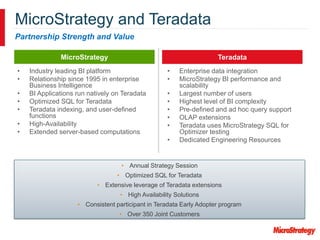
MicroStrategy
MicroStrategy and Teradata
Partnership Strength and Value
Teradata
• Annual Strategy Session
• Optimized SQL for Teradata
• Extensive leverage of Teradata extensions
• High Availability Solutions
• Consistent participant in Teradata Early Adopter program
• Over 350 Joint Customers
• Industry leading BI platform
• Relationship since 1995 in enterprise
Business Intelligence
• BI Applications run natively on Teradata
• Optimized SQL for Teradata
• Teradata indexing, and user-defined
functions
• High-Availability
• Extended server-based computations
• Enterprise data integration
• MicroStrategy BI performance and
scalability
• Largest number of users
• Highest level of BI complexity
• Pre-defined and ad hoc query support
• OLAP extensions
• Teradata uses MicroStrategy SQL for
Optimizer testing
• Dedicated Engineering Resources
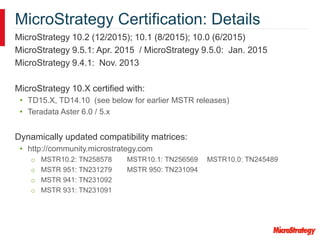
MicroStrategy Certification: Details
MicroStrategy 10.2 (12/2015); 10.1 (8/2015); 10.0 (6/2015)
MicroStrategy 9.5.1: Apr. 2015 / MicroStrategy 9.5.0: Jan. 2015
MicroStrategy 9.4.1: Nov. 2013
MicroStrategy 10.X certified with:
• TD15.X, TD14.10 (see below for earlier MSTR releases)
• Teradata Aster 6.0 / 5.x
Dynamically updated compatibility matrices:
• http://community.microstrategy.com
o MSTR10.2: TN258578 MSTR10.1: TN256569 MSTR10.0: TN245489
o MSTR 951: TN231279 MSTR 950: TN231094
o MSTR 941: TN231092
o MSTR 931: TN231091
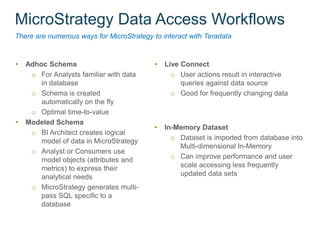
MicroStrategy Data Access Workflows
There are numerous ways for MicroStrategy to interact with Teradata
• Adhoc Schema
o For Analysts familiar with data
in database
o Schema is created
automatically on the fly
o Optimal time-to-value
• Modeled Schema
o BI Architect creates logical
model of data in MicroStrategy
o Analyst or Consumers use
model objects (attributes and
metrics) to express their
analytical needs
o MicroStrategy generates multi-
pass SQL specific to a
database
• Live Connect
o User actions result in interactive
queries against data source
o Good for frequently changing data
• In-Memory Dataset
o Dataset is imported from database into
Multi-dimensional In-Memory
o Can improve performance and user
scale accessing less frequently
updated data sets
Push-down Analytics send analytical queries to Teradata
Key technical characteristics
• Most queries access vast amounts of data
• Most queries perform significant calculations
Challenge
• Interactive analysis demands fast query runtimes
MicroStrategy and Teradata work together to tackle challenge
• MicroStrategy formulates “good queries”
• Teradata executes queries well
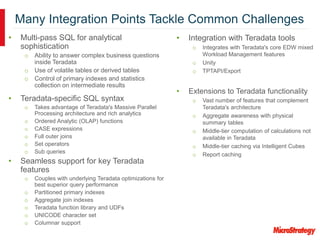
Many Integration Points Tackle Common Challenges
• Integration with Teradata tools
o Integrates with Teradata's core EDW mixed
Workload Management features
o Unity
o TPTAPI/Export
• Extensions to Teradata functionality
o Vast number of features that complement
Teradata's architecture
o Aggregate awareness with physical
summary tables
o Middle-tier computation of calculations not
available in Teradata
o Middle-tier caching via Intelligent Cubes
o Report caching
• Multi-pass SQL for analytical
sophistication
o Ability to answer complex business questions
inside Teradata
o Use of volatile tables or derived tables
o Control of primary indexes and statistics
collection on intermediate results
• Teradata-specific SQL syntax
o Takes advantage of Teradata's Massive Parallel
Processing architecture and rich analytics
o Ordered Analytic (OLAP) functions
o CASE expressions
o Full outer joins
o Set operators
o Sub queries
• Seamless support for key Teradata
features
o Couples with underlying Teradata optimizations for
best superior query performance
o Partitioned primary indexes
o Aggregate join indexes
o Teradata function library and UDFs
o UNICODE character set
o Columnar support
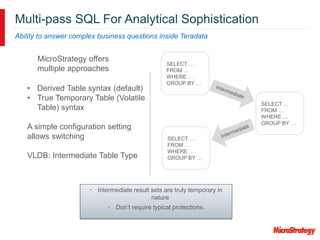
Multi-pass SQL For Analytical Sophistication
Ability to answer complex business questions inside Teradata
SELECT …
FROM …
WHERE …
GROUP BY …
SELECT …
FROM …
WHERE …
GROUP BY …
SELECT …
FROM …
WHERE …
GROUP BY …
• Derived Table syntax (default)
• True Temporary Table (Volatile
Table) syntax
A simple configuration setting
allows switching
VLDB: Intermediate Table Type
MicroStrategy offers
multiple approaches
• Intermediate result sets are truly temporary in
nature
• Don’t require typical protections.
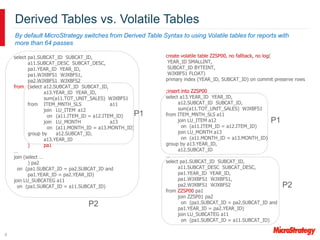
select pa1.SUBCAT_ID SUBCAT_ID,
a11.SUBCAT_DESC SUBCAT_DESC,
pa1.YEAR_ID YEAR_ID,
pa1.WJXBFS1 WJXBFS1,
pa2.WJXBFS1 WJXBFS2
from (select a12.SUBCAT_ID SUBCAT_ID,
a13.YEAR_ID YEAR_ID,
sum(a11.TOT_UNIT_SALES) WJXBFS1
from ITEM_MNTH_SLS a11
join LU_ITEM a12
on (a11.ITEM_ID = a12.ITEM_ID)
join LU_MONTH a13
on (a11.MONTH_ID = a13.MONTH_ID)
group by a12.SUBCAT_ID,
a13.YEAR_ID
) pa1
…
join (select …
) pa2
on (pa1.SUBCAT_ID = pa2.SUBCAT_ID and
pa1.YEAR_ID = pa2.YEAR_ID)
join LU_SUBCATEG a11
on (pa1.SUBCAT_ID = a11.SUBCAT_ID)
Derived Tables vs. Volatile Tables
By default MicroStrategy switches from Derived Table Syntax to using Volatile tables for reports with
more than 64 passes
8
create volatile table ZZSP00, no fallback, no log(
YEAR_ID SMALLINT,
SUBCAT_ID BYTEINT,
WJXBFS1 FLOAT)
primary index (YEAR_ID, SUBCAT_ID) on commit preserve rows
;insert into ZZSP00
select a13.YEAR_ID YEAR_ID,
a12.SUBCAT_ID SUBCAT_ID,
sum(a11.TOT_UNIT_SALES) WJXBFS1
from ITEM_MNTH_SLS a11
join LU_ITEM a12
on (a11.ITEM_ID = a12.ITEM_ID)
join LU_MONTH a13
on (a11.MONTH_ID = a13.MONTH_ID)
group by a13.YEAR_ID,
a12.SUBCAT_ID
…
select pa1.SUBCAT_ID SUBCAT_ID,
a11.SUBCAT_DESC SUBCAT_DESC,
pa1.YEAR_ID YEAR_ID,
pa1.WJXBFS1 WJXBFS1,
pa2.WJXBFS1 WJXBFS2
from ZZSP00 pa1
join ZZSP01 pa2
on (pa1.SUBCAT_ID = pa2.SUBCAT_ID and
pa1.YEAR_ID = pa2.YEAR_ID)
join LU_SUBCATEG a11
on (pa1.SUBCAT_ID = a11.SUBCAT_ID)
P1
P2
P1
P2
9
Intelligent Table Indexing Improves JOIN performance
MicroStrategy transparently takes advantage of primary indexes (and partitioned
primary indexes) defined on fact tables
Additionally, MicroStrategy generates primary indexes on intermediate tables
• System administrator can weigh columns and control the size of an index for
a particular report
Matching of primary index is crucial to join performance
• Temporary Tables will be indexed to match fact tables which minimizes
database processing that would be required to repartition the temp table to
match the fact table primary index
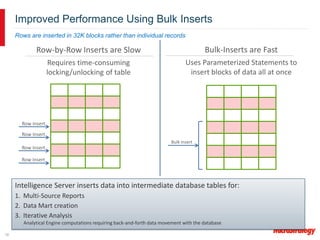
Row-by-Row Inserts are Slow
Requires time-consuming
locking/unlocking of table
10
Improved Performance Using Bulk Inserts
Intelligence Server inserts data into intermediate database tables for:
1. Multi-Source Reports
2. Data Mart creation
3. Iterative Analysis
Analytical Engine computations requiring back-and-forth data movement with the database
Bulk Insert
Bulk-Inserts are Fast
Uses Parameterized Statements to
insert blocks of data all at once
Row Insert
Row Insert
Row Insert
Row Insert
Rows are inserted in 32K blocks rather than individual records
Many Integration Points Tackle Common Challenges
• Integration with Teradata tools
o Integrates with Teradata's core EDW mixed
Workload Management features
o Unity
o TPTAPI/Export
• Extensions to Teradata functionality
o Vast number of features that complement
Teradata's architecture
o Aggregate awareness with physical
summary tables
o Middle-tier computation of calculations not
available in Teradata
o Middle-tier caching via Intelligent Cubes
o Report caching
• Multi-pass SQL for analytical
sophistication
o Ability to answer complex business questions
inside Teradata
o Use of volatile tables or derived tables
o Control of primary indexes and statistics
collection on intermediate results
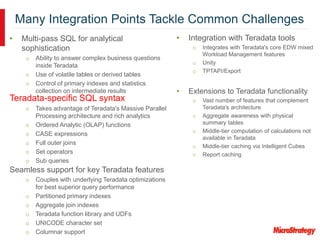
Teradata-specific SQL syntax
o Takes advantage of Teradata's Massive Parallel
Processing architecture and rich analytics
o Ordered Analytic (OLAP) functions
o CASE expressions
o Full outer joins
o Set operators
o Sub queries
Seamless support for key Teradata features
o Couples with underlying Teradata optimizations
for best superior query performance
o Partitioned primary indexes
o Aggregate join indexes
o Teradata function library and UDFs
o UNICODE character set
o Columnar support
Teradata-specific SQL syntax
Takes advantage of Teradata's Massive Parallel Processing architecture and rich analytics
Push down 120+ functions
• Mathematical,
• String,
• Statistical,
• Date-Time functions, etc.
20+ Teradata-specific tunable settings
• Full outer joins,
• Set Operators,
• Implicit/Explicit Table Creation Type,
• Query banding,
• Indexing,
• Sub-Query Type, etc.
Many Integration Points Tackle Common Challenges
• Integration with Teradata tools
o Integrates with Teradata's core EDW mixed
Workload Management features
o Unity
o TPTAPI/Export
• Extensions to Teradata functionality
o Vast number of features that complement
Teradata's architecture
o Aggregate awareness with physical
summary tables
o Middle-tier computation of calculations not
available in Teradata
o Middle-tier caching via Intelligent Cubes
o Report caching
• Seamless support for key Teradata features
o Couples with underlying Teradata optimizations
for best superior query performance
o Partitioned primary indexes
o Aggregate join indexes
o Teradata function library and UDFs
o UNICODE character set
o Columnar support
• Multi-pass SQL for analytical
sophistication
o Ability to answer complex business
questions inside Teradata
o Use of volatile tables or derived tables
o Control of primary indexes and statistics
collection on intermediate results
• Teradata-specific SQL syntax
o Takes advantage of Teradata's Massive
Parallel Processing architecture and rich
analytics
o Ordered Analytic (OLAP) functions
o CASE expressions
o Full outer joins
o Set operators
o Sub queries
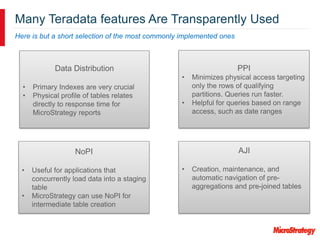
Many Teradata features Are Transparently Used
Here is but a short selection of the most commonly implemented ones
PPI
• Minimizes physical access targeting
only the rows of qualifying
partitions. Queries run faster.
• Helpful for queries based on range
access, such as date ranges
NoPI
• Useful for applications that
concurrently load data into a staging
table
• MicroStrategy can use NoPI for
intermediate table creation
AJI
• Creation, maintenance, and
automatic navigation of pre-
aggregations and pre-joined tables
Data Distribution
• Primary Indexes are very crucial
• Physical profile of tables relates
directly to response time for
MicroStrategy reports
Many Integration Points Tackle Common Challenges
• Integration with Teradata tools
o Integrates with Teradata's core EDW mixed
Workload Management features
o Unity
o TPTAPI/Export
• Multi-pass SQL for analytical sophistication
o Ability to answer complex business questions inside
Teradata
o Use of volatile tables or derived tables
o Control of primary indexes and statistics collection
on intermediate results
• Teradata-specific SQL syntax
o Takes advantage of Teradata's Massive Parallel
Processing architecture and rich analytics
o Ordered Analytic (OLAP) functions
o CASE expressions
o Full outer joins
o Set operators
o Sub queries
• Seamless support for key Teradata features
o Couples with underlying Teradata optimizations for
best superior query performance
o Partitioned primary indexes
o Aggregate join indexes
o Teradata function library and UDFs
o UNICODE character set
o Columnar support
• Extensions to Teradata functionality
o Vast number of features that complement
Teradata's architecture
o Aggregate awareness with physical
summary tables
o Middle-tier computation of calculations not
available in Teradata
o Middle-tier caching via Intelligent Cubes
o Report caching
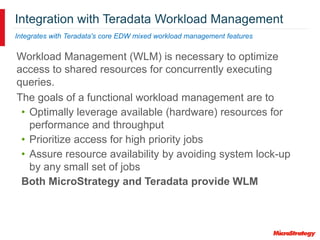
Integration with Teradata Workload Management
Integrates with Teradata's core EDW mixed workload management features
Workload Management (WLM) is necessary to optimize
access to shared resources for concurrently executing
queries.
The goals of a functional workload management are to
• Optimally leverage available (hardware) resources for
performance and throughput
• Prioritize access for high priority jobs
• Assure resource availability by avoiding system lock-up
by any small set of jobs
Both MicroStrategy and Teradata provide WLM
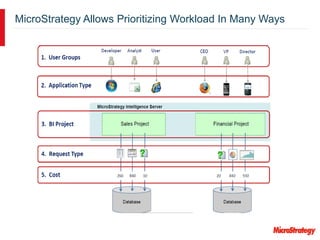
MicroStrategy Allows Prioritizing Workload In Many Ways
18
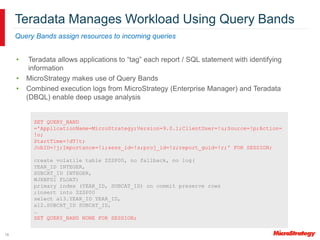
Teradata Manages Workload Using Query Bands
Query Bands assign resources to incoming queries
• Teradata allows applications to “tag” each report / SQL statement with identifying
information
• MicroStrategy makes use of Query Bands
• Combined execution logs from MicroStrategy (Enterprise Manager) and Teradata
(DBQL) enable deep usage analysis
SET QUERY_BAND
='ApplicationName=MicroStrategy;Version=9.0.1;ClientUser=!u;Source=!p;Action=
!o;
StartTime=!dT!t;
JobID=!j;Importance=!i;sess_id=!s;proj_id=!z;report_guid=!r;' FOR SESSION;
create volatile table ZZSP00, no fallback, no log(
YEAR_ID INTEGER,
SUBCAT_ID INTEGER,
WJXBFS1 FLOAT)
primary index (YEAR_ID, SUBCAT_ID) on commit preserve rows
;insert into ZZSP00
select a13.YEAR_ID YEAR_ID,
a12.SUBCAT_ID SUBCAT_ID,
…
SET QUERY_BAND NONE FOR SESSION;
MicroStrategy 10 Offers Two Connectivity Options
Performance Considerations
• ODBC for Push-down Reports
o Proven reliable industry standard
o JDBC on Mac
• TPTAPI (Teradata Parallel Transporter API) for In-Memory
cubes load
o Enables effective data transfer to MicroStrategy
o Due to API overhead this is only recommended for data volumes
larger than 1GB
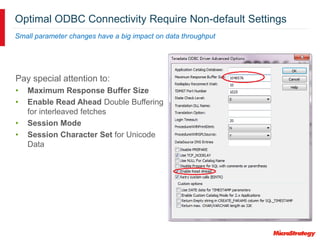
Optimal ODBC Connectivity Require Non-default Settings
Small parameter changes have a big impact on data throughput
Pay special attention to:
• Maximum Response Buffer Size
• Enable Read Ahead Double Buffering
for interleaved fetches
• Session Mode
• Session Character Set for Unicode
Data
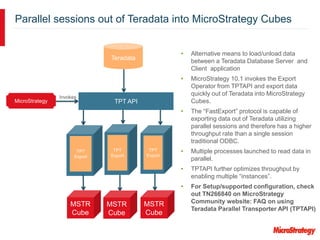
• Alternative means to load/unload data
between a Teradata Database Server and
Client application
• MicroStrategy 10.1 invokes the Export
Operator from TPTAPI and export data
quickly out of Teradata into MicroStrategy
Cubes.
• The “FastExport” protocol is capable of
exporting data out of Teradata utilizing
parallel sessions and therefore has a higher
throughput rate than a single session
traditional ODBC.
• Multiple processes launched to read data in
parallel.
• TPTAPI further optimizes throughput by
enabling multiple “instances”.
• For Setup/supported configuration, check
out TN266840 on MicroStrategy
Community website: FAQ on using
Teradata Parallel Transporter API (TPTAPI)
Parallel sessions out of Teradata into MicroStrategy Cubes
TPT
Export
Teradata
Invokes
TPT API
TPT
Export
TPT
Export
MicroStrategy
MSTR
Cube
MSTR
Cube
MSTR
Cube
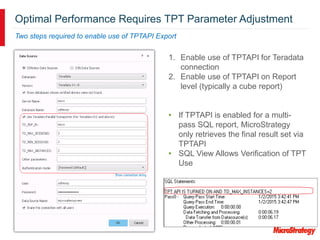
Optimal Performance Requires TPT Parameter Adjustment
Two steps required to enable use of TPTAPI Export
1. Enable use of TPTAPI for Teradata
connection
2. Enable use of TPTAPI on Report
level (typically a cube report)
• If TPTAPI is enabled for a multi-
pass SQL report, MicroStrategy
only retrieves the final result set via
TPTAPI
• SQL View Allows Verification of TPT
Use
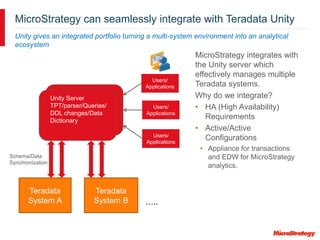
MicroStrategy can seamlessly integrate with Teradata Unity
Unity gives an integrated portfolio turning a multi-system environment into an analytical
ecosystem
MicroStrategy integrates with
the Unity server which
effectively manages multiple
Teradata systems.
Why do we integrate?
• HA (High Availability)
Requirements
• Active/Active
Configurations
• Appliance for transactions
and EDW for MicroStrategy
analytics.
Teradata
System A
Teradata
System B
Unity Server
TPT/parser/Queries/
DDL changes/Data
Dictionary
Users/
Applications
Users/
Applications
Users/
Applications
Schema/Data
Synchronization
…..
Teradata Query Grid
• What is Teradata Query Grid
• How MicroStrategy can use Query Grid
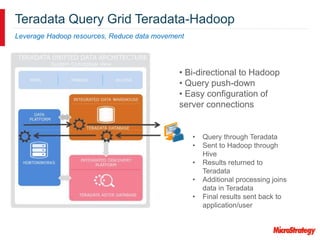
Teradata Query Grid Teradata-Hadoop
Leverage Hadoop resources, Reduce data movement
• Bi-directional to Hadoop
• Query push-down
• Easy configuration of
server connections
• Query through Teradata
• Sent to Hadoop through
Hive
• Results returned to
Teradata
• Additional processing joins
data in Teradata
• Final results sent back to
application/user
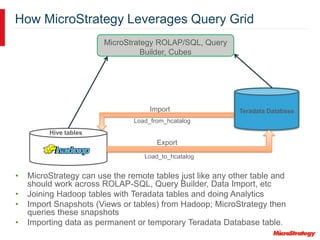
How MicroStrategy Leverages Query Grid
• MicroStrategy can use the remote tables just like any other table and
should work across ROLAP-SQL, Query Builder, Data Import, etc
• Joining Hadoop tables with Teradata tables and doing Analytics
• Import Snapshots (Views or tables) from Hadoop; MicroStrategy then
queries these snapshots
• Importing data as permanent or temporary Teradata Database table.
MicroStrategy ROLAP/SQL, Query
Builder, Cubes
Teradata Database
Load_to_hcatalog
Load_from_hcatalog
Export
Import
Hive tables
Summary
• MicroStrategy and Teradata continue to have a strong partnership. We work together to
further optimize our integration to provide a seamless reporting experience
Call-to-Action:
• Refer to existing best practices for developing MicroStrategy applications. Please see
our jointly authored Integration paper in the MicroStrategy Knowledge base: TN274564
and for the FAQ on TPTAPI implementation refer to: TN266840
• Make sure to take advantage of DB features designed for analytical workloads
• Look for best practices to take advantage of data source strengths in MicroStrategy
Community
• MicroStrategy customer requests / requirements should be submitted to the
http://community.microstrategy.com website under the “Ideas” section.
• Attend the Claraview Workshop:
o Mobile Productivity: Build an iPhone or iPad App in 50 minutes
o Date/Time: Wednesday @ 11:30am -12:30pm
o Location: Flamingo 3
• Contact Information:
o MicroStrategy: Farah Omer – fomer@microstrategy.com
o Teradata: Steve Greenberg – steve.greenberg@teradata.com (for integration questions)
o Claraview: Tyler Rebman – tyler.rebman@claraview.com (for implementation questions)
Questions

World2016_T5_S7_TeradataFunctionalOverview

  • 1.
    Teradata Database andMicroStrategy 10: Functional Overview Including Recommendations for Performance Optimization MicroStrategy World 2016
  • 2.
    MicroStrategy MicroStrategy and Teradata PartnershipStrength and Value Teradata • Annual Strategy Session • Optimized SQL for Teradata • Extensive leverage of Teradata extensions • High Availability Solutions • Consistent participant in Teradata Early Adopter program • Over 350 Joint Customers • Industry leading BI platform • Relationship since 1995 in enterprise Business Intelligence • BI Applications run natively on Teradata • Optimized SQL for Teradata • Teradata indexing, and user-defined functions • High-Availability • Extended server-based computations • Enterprise data integration • MicroStrategy BI performance and scalability • Largest number of users • Highest level of BI complexity • Pre-defined and ad hoc query support • OLAP extensions • Teradata uses MicroStrategy SQL for Optimizer testing • Dedicated Engineering Resources
  • 3.
    MicroStrategy Certification: Details MicroStrategy10.2 (12/2015); 10.1 (8/2015); 10.0 (6/2015) MicroStrategy 9.5.1: Apr. 2015 / MicroStrategy 9.5.0: Jan. 2015 MicroStrategy 9.4.1: Nov. 2013 MicroStrategy 10.X certified with: • TD15.X, TD14.10 (see below for earlier MSTR releases) • Teradata Aster 6.0 / 5.x Dynamically updated compatibility matrices: • http://community.microstrategy.com o MSTR10.2: TN258578 MSTR10.1: TN256569 MSTR10.0: TN245489 o MSTR 951: TN231279 MSTR 950: TN231094 o MSTR 941: TN231092 o MSTR 931: TN231091
  • 4.
    MicroStrategy Data AccessWorkflows There are numerous ways for MicroStrategy to interact with Teradata • Adhoc Schema o For Analysts familiar with data in database o Schema is created automatically on the fly o Optimal time-to-value • Modeled Schema o BI Architect creates logical model of data in MicroStrategy o Analyst or Consumers use model objects (attributes and metrics) to express their analytical needs o MicroStrategy generates multi- pass SQL specific to a database • Live Connect o User actions result in interactive queries against data source o Good for frequently changing data • In-Memory Dataset o Dataset is imported from database into Multi-dimensional In-Memory o Can improve performance and user scale accessing less frequently updated data sets
  • 5.
    Push-down Analytics sendanalytical queries to Teradata Key technical characteristics • Most queries access vast amounts of data • Most queries perform significant calculations Challenge • Interactive analysis demands fast query runtimes MicroStrategy and Teradata work together to tackle challenge • MicroStrategy formulates “good queries” • Teradata executes queries well
  • 6.
    Many Integration PointsTackle Common Challenges • Integration with Teradata tools o Integrates with Teradata's core EDW mixed Workload Management features o Unity o TPTAPI/Export • Extensions to Teradata functionality o Vast number of features that complement Teradata's architecture o Aggregate awareness with physical summary tables o Middle-tier computation of calculations not available in Teradata o Middle-tier caching via Intelligent Cubes o Report caching • Multi-pass SQL for analytical sophistication o Ability to answer complex business questions inside Teradata o Use of volatile tables or derived tables o Control of primary indexes and statistics collection on intermediate results • Teradata-specific SQL syntax o Takes advantage of Teradata's Massive Parallel Processing architecture and rich analytics o Ordered Analytic (OLAP) functions o CASE expressions o Full outer joins o Set operators o Sub queries • Seamless support for key Teradata features o Couples with underlying Teradata optimizations for best superior query performance o Partitioned primary indexes o Aggregate join indexes o Teradata function library and UDFs o UNICODE character set o Columnar support
  • 7.
    Multi-pass SQL ForAnalytical Sophistication Ability to answer complex business questions inside Teradata SELECT … FROM … WHERE … GROUP BY … SELECT … FROM … WHERE … GROUP BY … SELECT … FROM … WHERE … GROUP BY … • Derived Table syntax (default) • True Temporary Table (Volatile Table) syntax A simple configuration setting allows switching VLDB: Intermediate Table Type MicroStrategy offers multiple approaches • Intermediate result sets are truly temporary in nature • Don’t require typical protections.
  • 8.
    select pa1.SUBCAT_ID SUBCAT_ID, a11.SUBCAT_DESCSUBCAT_DESC, pa1.YEAR_ID YEAR_ID, pa1.WJXBFS1 WJXBFS1, pa2.WJXBFS1 WJXBFS2 from (select a12.SUBCAT_ID SUBCAT_ID, a13.YEAR_ID YEAR_ID, sum(a11.TOT_UNIT_SALES) WJXBFS1 from ITEM_MNTH_SLS a11 join LU_ITEM a12 on (a11.ITEM_ID = a12.ITEM_ID) join LU_MONTH a13 on (a11.MONTH_ID = a13.MONTH_ID) group by a12.SUBCAT_ID, a13.YEAR_ID ) pa1 … join (select … ) pa2 on (pa1.SUBCAT_ID = pa2.SUBCAT_ID and pa1.YEAR_ID = pa2.YEAR_ID) join LU_SUBCATEG a11 on (pa1.SUBCAT_ID = a11.SUBCAT_ID) Derived Tables vs. Volatile Tables By default MicroStrategy switches from Derived Table Syntax to using Volatile tables for reports with more than 64 passes 8 create volatile table ZZSP00, no fallback, no log( YEAR_ID SMALLINT, SUBCAT_ID BYTEINT, WJXBFS1 FLOAT) primary index (YEAR_ID, SUBCAT_ID) on commit preserve rows ;insert into ZZSP00 select a13.YEAR_ID YEAR_ID, a12.SUBCAT_ID SUBCAT_ID, sum(a11.TOT_UNIT_SALES) WJXBFS1 from ITEM_MNTH_SLS a11 join LU_ITEM a12 on (a11.ITEM_ID = a12.ITEM_ID) join LU_MONTH a13 on (a11.MONTH_ID = a13.MONTH_ID) group by a13.YEAR_ID, a12.SUBCAT_ID … select pa1.SUBCAT_ID SUBCAT_ID, a11.SUBCAT_DESC SUBCAT_DESC, pa1.YEAR_ID YEAR_ID, pa1.WJXBFS1 WJXBFS1, pa2.WJXBFS1 WJXBFS2 from ZZSP00 pa1 join ZZSP01 pa2 on (pa1.SUBCAT_ID = pa2.SUBCAT_ID and pa1.YEAR_ID = pa2.YEAR_ID) join LU_SUBCATEG a11 on (pa1.SUBCAT_ID = a11.SUBCAT_ID) P1 P2 P1 P2
  • 9.
    9 Intelligent Table IndexingImproves JOIN performance MicroStrategy transparently takes advantage of primary indexes (and partitioned primary indexes) defined on fact tables Additionally, MicroStrategy generates primary indexes on intermediate tables • System administrator can weigh columns and control the size of an index for a particular report Matching of primary index is crucial to join performance • Temporary Tables will be indexed to match fact tables which minimizes database processing that would be required to repartition the temp table to match the fact table primary index
  • 10.
    Row-by-Row Inserts areSlow Requires time-consuming locking/unlocking of table 10 Improved Performance Using Bulk Inserts Intelligence Server inserts data into intermediate database tables for: 1. Multi-Source Reports 2. Data Mart creation 3. Iterative Analysis Analytical Engine computations requiring back-and-forth data movement with the database Bulk Insert Bulk-Inserts are Fast Uses Parameterized Statements to insert blocks of data all at once Row Insert Row Insert Row Insert Row Insert Rows are inserted in 32K blocks rather than individual records
  • 11.
    Many Integration PointsTackle Common Challenges • Integration with Teradata tools o Integrates with Teradata's core EDW mixed Workload Management features o Unity o TPTAPI/Export • Extensions to Teradata functionality o Vast number of features that complement Teradata's architecture o Aggregate awareness with physical summary tables o Middle-tier computation of calculations not available in Teradata o Middle-tier caching via Intelligent Cubes o Report caching • Multi-pass SQL for analytical sophistication o Ability to answer complex business questions inside Teradata o Use of volatile tables or derived tables o Control of primary indexes and statistics collection on intermediate results Teradata-specific SQL syntax o Takes advantage of Teradata's Massive Parallel Processing architecture and rich analytics o Ordered Analytic (OLAP) functions o CASE expressions o Full outer joins o Set operators o Sub queries Seamless support for key Teradata features o Couples with underlying Teradata optimizations for best superior query performance o Partitioned primary indexes o Aggregate join indexes o Teradata function library and UDFs o UNICODE character set o Columnar support
  • 12.
    Teradata-specific SQL syntax Takesadvantage of Teradata's Massive Parallel Processing architecture and rich analytics Push down 120+ functions • Mathematical, • String, • Statistical, • Date-Time functions, etc. 20+ Teradata-specific tunable settings • Full outer joins, • Set Operators, • Implicit/Explicit Table Creation Type, • Query banding, • Indexing, • Sub-Query Type, etc.
  • 13.
    Many Integration PointsTackle Common Challenges • Integration with Teradata tools o Integrates with Teradata's core EDW mixed Workload Management features o Unity o TPTAPI/Export • Extensions to Teradata functionality o Vast number of features that complement Teradata's architecture o Aggregate awareness with physical summary tables o Middle-tier computation of calculations not available in Teradata o Middle-tier caching via Intelligent Cubes o Report caching • Seamless support for key Teradata features o Couples with underlying Teradata optimizations for best superior query performance o Partitioned primary indexes o Aggregate join indexes o Teradata function library and UDFs o UNICODE character set o Columnar support • Multi-pass SQL for analytical sophistication o Ability to answer complex business questions inside Teradata o Use of volatile tables or derived tables o Control of primary indexes and statistics collection on intermediate results • Teradata-specific SQL syntax o Takes advantage of Teradata's Massive Parallel Processing architecture and rich analytics o Ordered Analytic (OLAP) functions o CASE expressions o Full outer joins o Set operators o Sub queries
  • 14.
    Many Teradata featuresAre Transparently Used Here is but a short selection of the most commonly implemented ones PPI • Minimizes physical access targeting only the rows of qualifying partitions. Queries run faster. • Helpful for queries based on range access, such as date ranges NoPI • Useful for applications that concurrently load data into a staging table • MicroStrategy can use NoPI for intermediate table creation AJI • Creation, maintenance, and automatic navigation of pre- aggregations and pre-joined tables Data Distribution • Primary Indexes are very crucial • Physical profile of tables relates directly to response time for MicroStrategy reports
  • 15.
    Many Integration PointsTackle Common Challenges • Integration with Teradata tools o Integrates with Teradata's core EDW mixed Workload Management features o Unity o TPTAPI/Export • Multi-pass SQL for analytical sophistication o Ability to answer complex business questions inside Teradata o Use of volatile tables or derived tables o Control of primary indexes and statistics collection on intermediate results • Teradata-specific SQL syntax o Takes advantage of Teradata's Massive Parallel Processing architecture and rich analytics o Ordered Analytic (OLAP) functions o CASE expressions o Full outer joins o Set operators o Sub queries • Seamless support for key Teradata features o Couples with underlying Teradata optimizations for best superior query performance o Partitioned primary indexes o Aggregate join indexes o Teradata function library and UDFs o UNICODE character set o Columnar support • Extensions to Teradata functionality o Vast number of features that complement Teradata's architecture o Aggregate awareness with physical summary tables o Middle-tier computation of calculations not available in Teradata o Middle-tier caching via Intelligent Cubes o Report caching
  • 16.
    Integration with TeradataWorkload Management Integrates with Teradata's core EDW mixed workload management features Workload Management (WLM) is necessary to optimize access to shared resources for concurrently executing queries. The goals of a functional workload management are to • Optimally leverage available (hardware) resources for performance and throughput • Prioritize access for high priority jobs • Assure resource availability by avoiding system lock-up by any small set of jobs Both MicroStrategy and Teradata provide WLM
  • 17.
    MicroStrategy Allows PrioritizingWorkload In Many Ways
  • 18.
    18 Teradata Manages WorkloadUsing Query Bands Query Bands assign resources to incoming queries • Teradata allows applications to “tag” each report / SQL statement with identifying information • MicroStrategy makes use of Query Bands • Combined execution logs from MicroStrategy (Enterprise Manager) and Teradata (DBQL) enable deep usage analysis SET QUERY_BAND ='ApplicationName=MicroStrategy;Version=9.0.1;ClientUser=!u;Source=!p;Action= !o; StartTime=!dT!t; JobID=!j;Importance=!i;sess_id=!s;proj_id=!z;report_guid=!r;' FOR SESSION; create volatile table ZZSP00, no fallback, no log( YEAR_ID INTEGER, SUBCAT_ID INTEGER, WJXBFS1 FLOAT) primary index (YEAR_ID, SUBCAT_ID) on commit preserve rows ;insert into ZZSP00 select a13.YEAR_ID YEAR_ID, a12.SUBCAT_ID SUBCAT_ID, … SET QUERY_BAND NONE FOR SESSION;
  • 19.
    MicroStrategy 10 OffersTwo Connectivity Options Performance Considerations • ODBC for Push-down Reports o Proven reliable industry standard o JDBC on Mac • TPTAPI (Teradata Parallel Transporter API) for In-Memory cubes load o Enables effective data transfer to MicroStrategy o Due to API overhead this is only recommended for data volumes larger than 1GB
  • 20.
    Optimal ODBC ConnectivityRequire Non-default Settings Small parameter changes have a big impact on data throughput Pay special attention to: • Maximum Response Buffer Size • Enable Read Ahead Double Buffering for interleaved fetches • Session Mode • Session Character Set for Unicode Data
  • 21.
    • Alternative meansto load/unload data between a Teradata Database Server and Client application • MicroStrategy 10.1 invokes the Export Operator from TPTAPI and export data quickly out of Teradata into MicroStrategy Cubes. • The “FastExport” protocol is capable of exporting data out of Teradata utilizing parallel sessions and therefore has a higher throughput rate than a single session traditional ODBC. • Multiple processes launched to read data in parallel. • TPTAPI further optimizes throughput by enabling multiple “instances”. • For Setup/supported configuration, check out TN266840 on MicroStrategy Community website: FAQ on using Teradata Parallel Transporter API (TPTAPI) Parallel sessions out of Teradata into MicroStrategy Cubes TPT Export Teradata Invokes TPT API TPT Export TPT Export MicroStrategy MSTR Cube MSTR Cube MSTR Cube
  • 22.
    Optimal Performance RequiresTPT Parameter Adjustment Two steps required to enable use of TPTAPI Export 1. Enable use of TPTAPI for Teradata connection 2. Enable use of TPTAPI on Report level (typically a cube report) • If TPTAPI is enabled for a multi- pass SQL report, MicroStrategy only retrieves the final result set via TPTAPI • SQL View Allows Verification of TPT Use
  • 23.
    MicroStrategy can seamlesslyintegrate with Teradata Unity Unity gives an integrated portfolio turning a multi-system environment into an analytical ecosystem MicroStrategy integrates with the Unity server which effectively manages multiple Teradata systems. Why do we integrate? • HA (High Availability) Requirements • Active/Active Configurations • Appliance for transactions and EDW for MicroStrategy analytics. Teradata System A Teradata System B Unity Server TPT/parser/Queries/ DDL changes/Data Dictionary Users/ Applications Users/ Applications Users/ Applications Schema/Data Synchronization …..
  • 24.
    Teradata Query Grid •What is Teradata Query Grid • How MicroStrategy can use Query Grid
  • 25.
    Teradata Query GridTeradata-Hadoop Leverage Hadoop resources, Reduce data movement • Bi-directional to Hadoop • Query push-down • Easy configuration of server connections • Query through Teradata • Sent to Hadoop through Hive • Results returned to Teradata • Additional processing joins data in Teradata • Final results sent back to application/user
  • 26.
    How MicroStrategy LeveragesQuery Grid • MicroStrategy can use the remote tables just like any other table and should work across ROLAP-SQL, Query Builder, Data Import, etc • Joining Hadoop tables with Teradata tables and doing Analytics • Import Snapshots (Views or tables) from Hadoop; MicroStrategy then queries these snapshots • Importing data as permanent or temporary Teradata Database table. MicroStrategy ROLAP/SQL, Query Builder, Cubes Teradata Database Load_to_hcatalog Load_from_hcatalog Export Import Hive tables
  • 27.
    Summary • MicroStrategy andTeradata continue to have a strong partnership. We work together to further optimize our integration to provide a seamless reporting experience Call-to-Action: • Refer to existing best practices for developing MicroStrategy applications. Please see our jointly authored Integration paper in the MicroStrategy Knowledge base: TN274564 and for the FAQ on TPTAPI implementation refer to: TN266840 • Make sure to take advantage of DB features designed for analytical workloads • Look for best practices to take advantage of data source strengths in MicroStrategy Community • MicroStrategy customer requests / requirements should be submitted to the http://community.microstrategy.com website under the “Ideas” section. • Attend the Claraview Workshop: o Mobile Productivity: Build an iPhone or iPad App in 50 minutes o Date/Time: Wednesday @ 11:30am -12:30pm o Location: Flamingo 3 • Contact Information: o MicroStrategy: Farah Omer – fomer@microstrategy.com o Teradata: Steve Greenberg – steve.greenberg@teradata.com (for integration questions) o Claraview: Tyler Rebman – tyler.rebman@claraview.com (for implementation questions)
  • 28.