Workshop with Apache Camel

Claus Ibsen (@davsclaus)
Principal Software Engineer, Red Hat
Barcelona JUG, january 2014

1

PUBLIC PRESENTATION | CLAUS IBSEN
Agenda
●

Prerequisite

●

Try 1st Camel Example

●

Create new Camel project
●

Deploy our application to Apache Tomcat

●

Modify the application and use servlet/restlet

●

Install hawtio in Apache Tomcat

●

●

2

REST project with Apache CXF-RS
Fabric8 Demo

PUBLIC PRESENTATION | CLAUS IBSEN
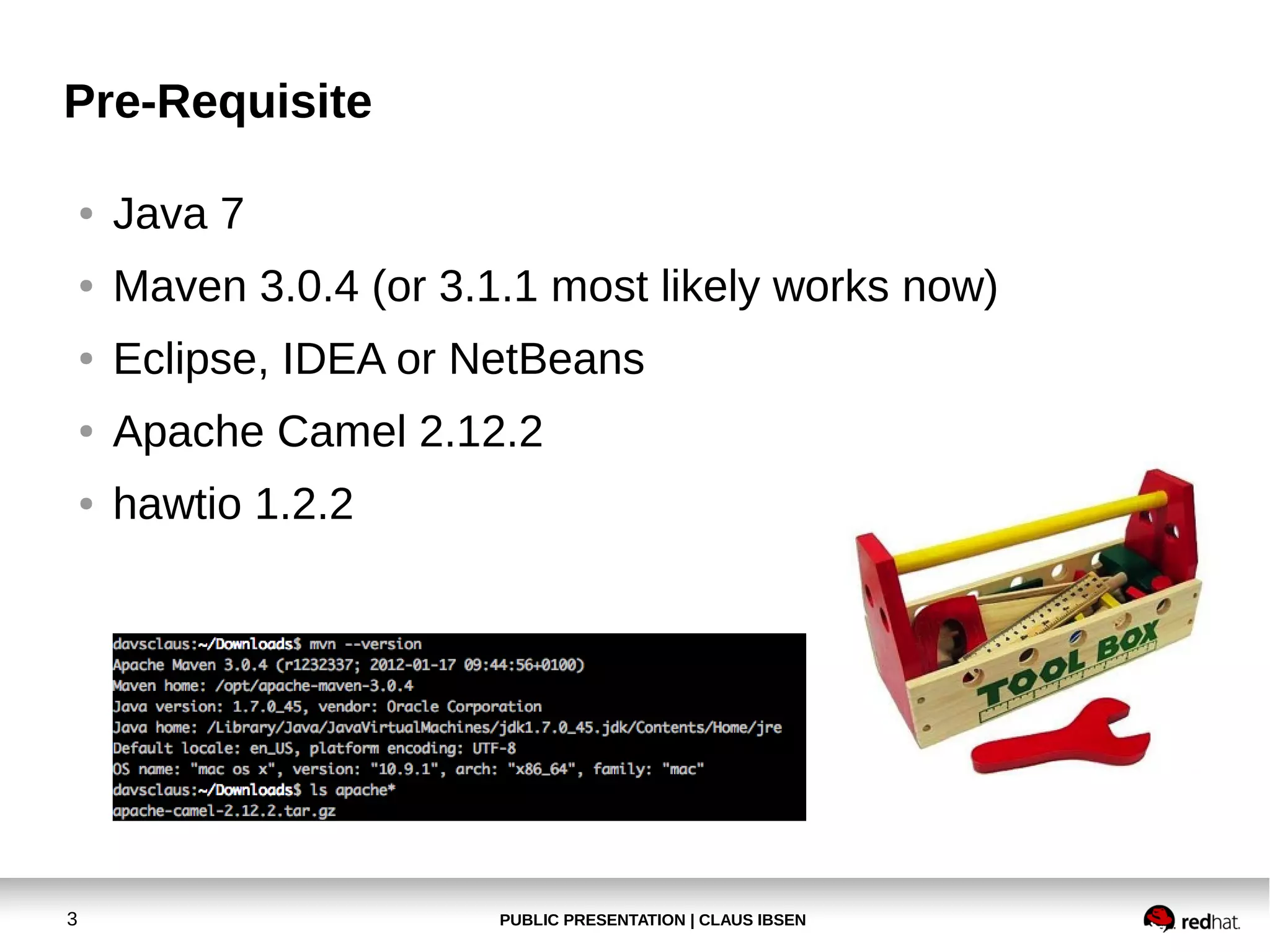
Pre-Requisite
●

●

Maven 3.0.4 (or 3.1.1 most likely works now)

●

Eclipse, IDEA or NetBeans

●

Apache Camel 2.12.2

●

3

Java 7

hawtio 1.2.2

PUBLIC PRESENTATION | CLAUS IBSEN
Agenda
●

Prerequisite

●

Try 1st Camel Example

●

Create new Camel project
●

Deploy our application to Apache Tomcat

●

Modify the application and use servlet/restlet

●

Install hawtio in Apache Tomcat

●

●

(REST project with Apache CXF-RS)

●

REST project with Apache CXF-RS

●

4

(Create new Java Camel project)

Fabric8 Demo
PUBLIC PRESENTATION | CLAUS IBSEN
Try 1st Apache Camel Example
●

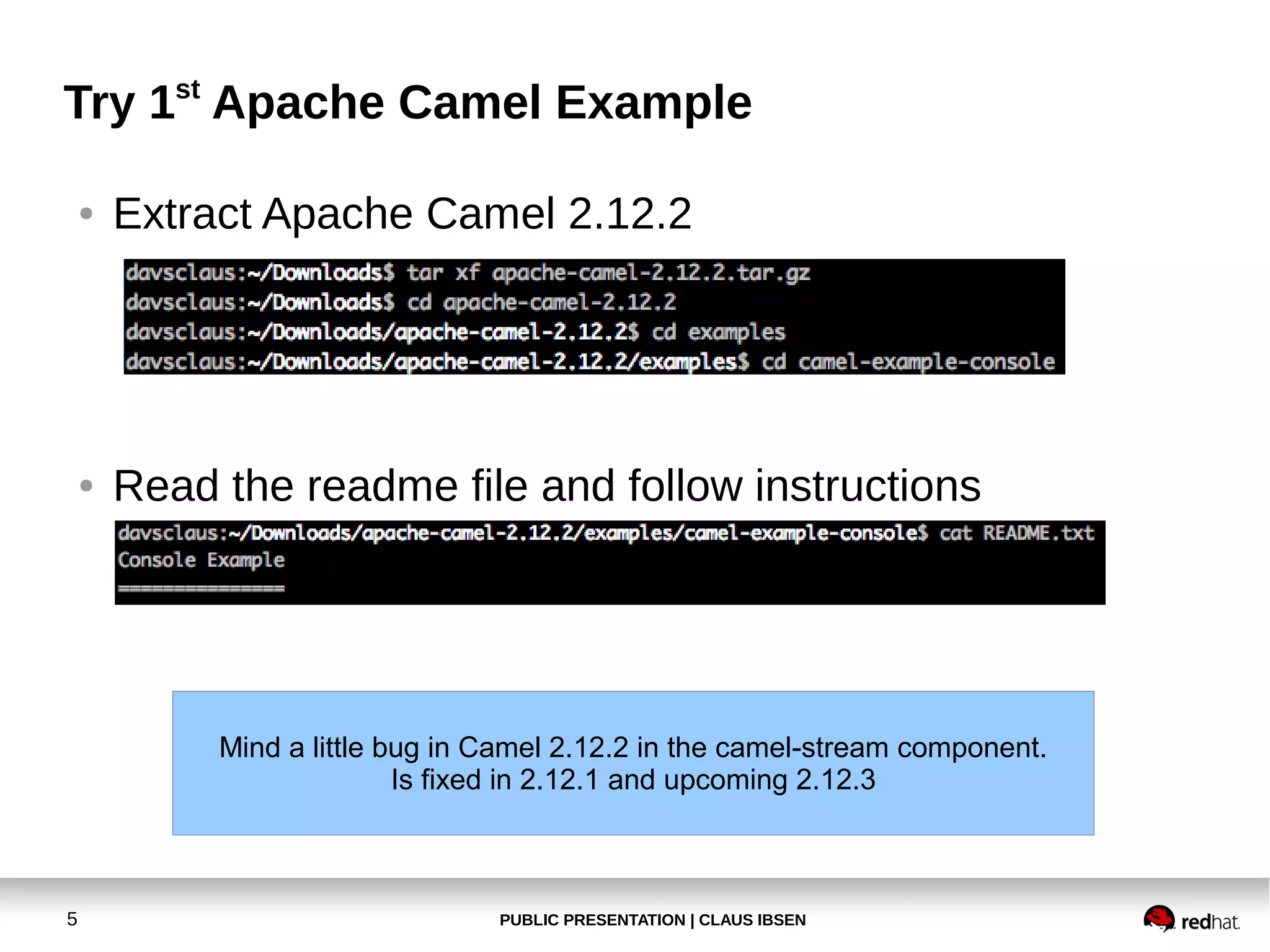
Extract Apache Camel 2.12.2

●

Read the readme file and follow instructions

Mind a little bug in Camel 2.12.2 in the camel-stream component.
Is fixed in 2.12.1 and upcoming 2.12.3

5

PUBLIC PRESENTATION | CLAUS IBSEN
Try 1st Apache Camel Example
●

Exercise 1
Make the example lower case instead!

6

PUBLIC PRESENTATION | CLAUS IBSEN
Try 1st Apache Camel Example
●

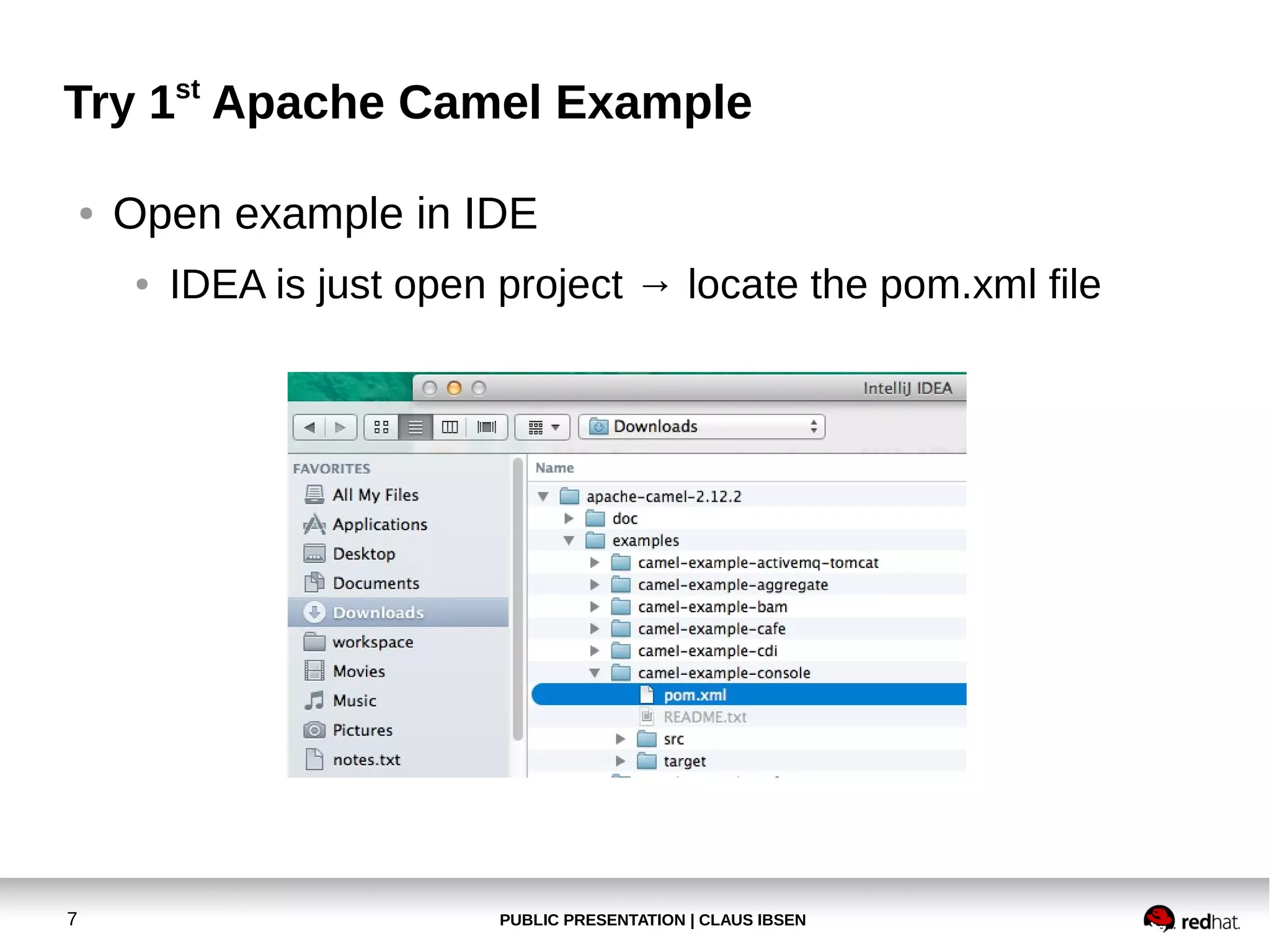
Open example in IDE
●

7

IDEA is just open project → locate the pom.xml file

PUBLIC PRESENTATION | CLAUS IBSEN
Try 1st Apache Camel Example
●

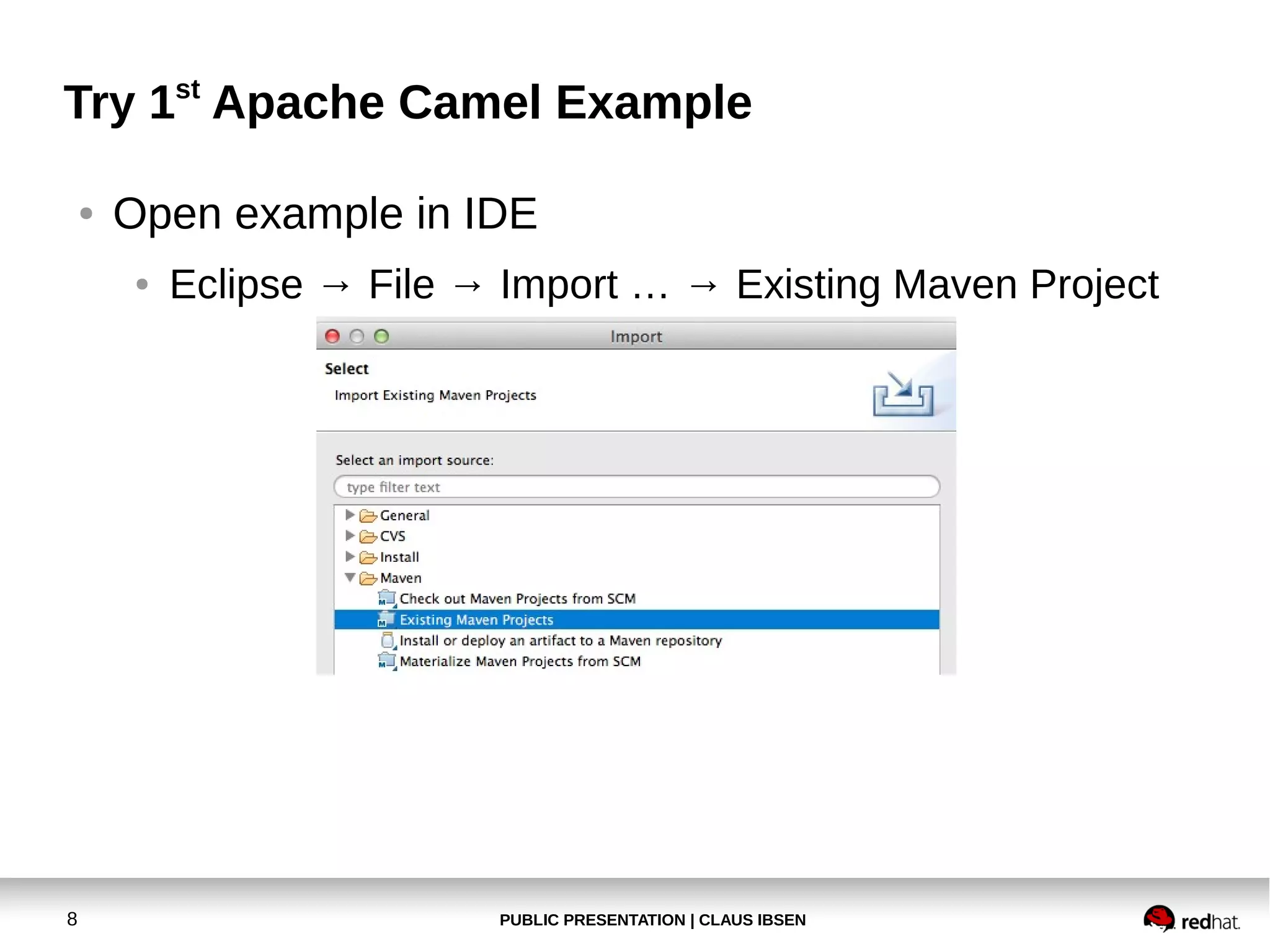
Open example in IDE
●

8

Eclipse → File → Import … → Existing Maven Project

PUBLIC PRESENTATION | CLAUS IBSEN
Try 1st Apache Camel Example
●

Open example in IDE
●

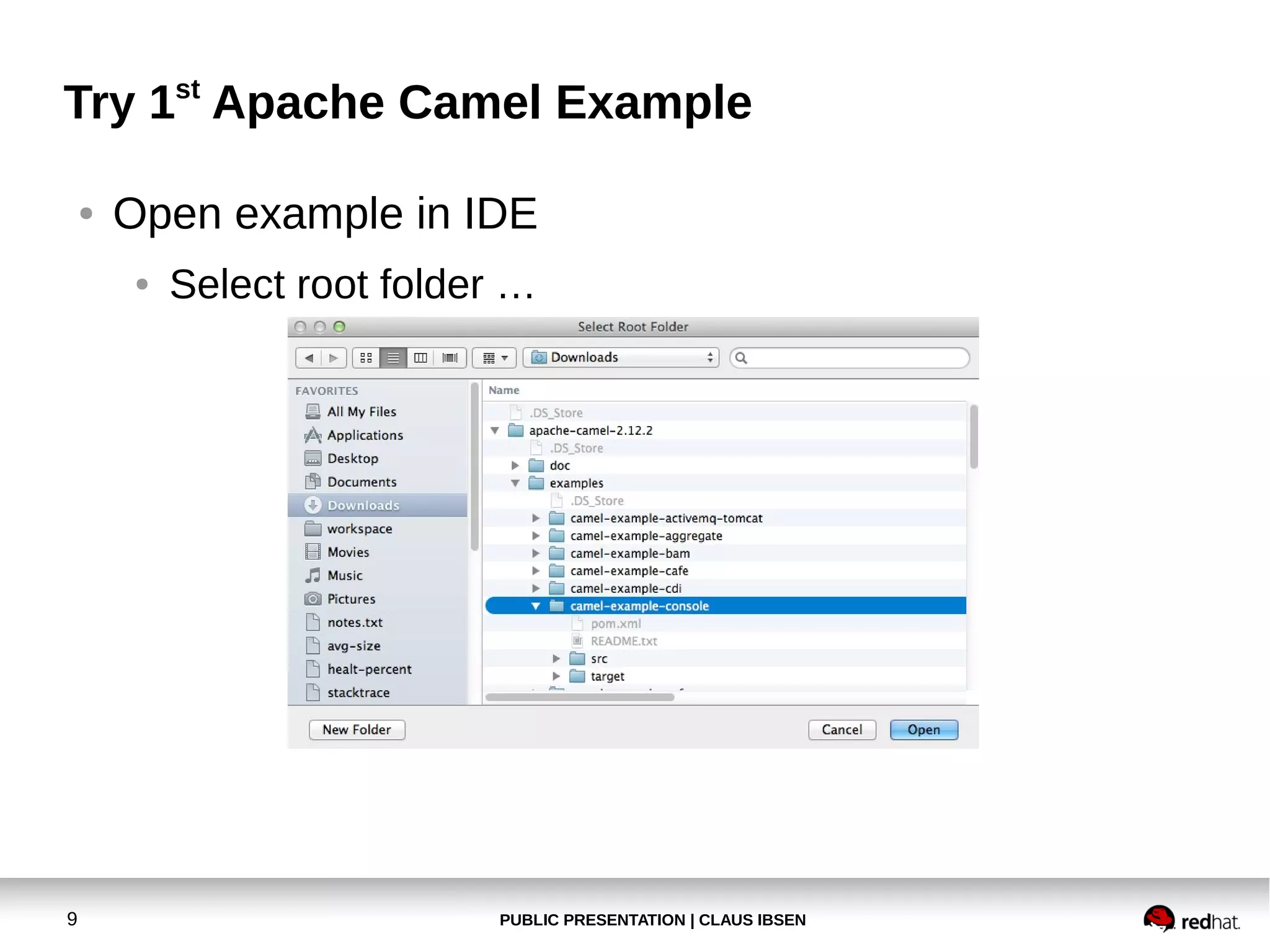
9

Select root folder …

PUBLIC PRESENTATION | CLAUS IBSEN
Try 1st Apache Camel Example
●

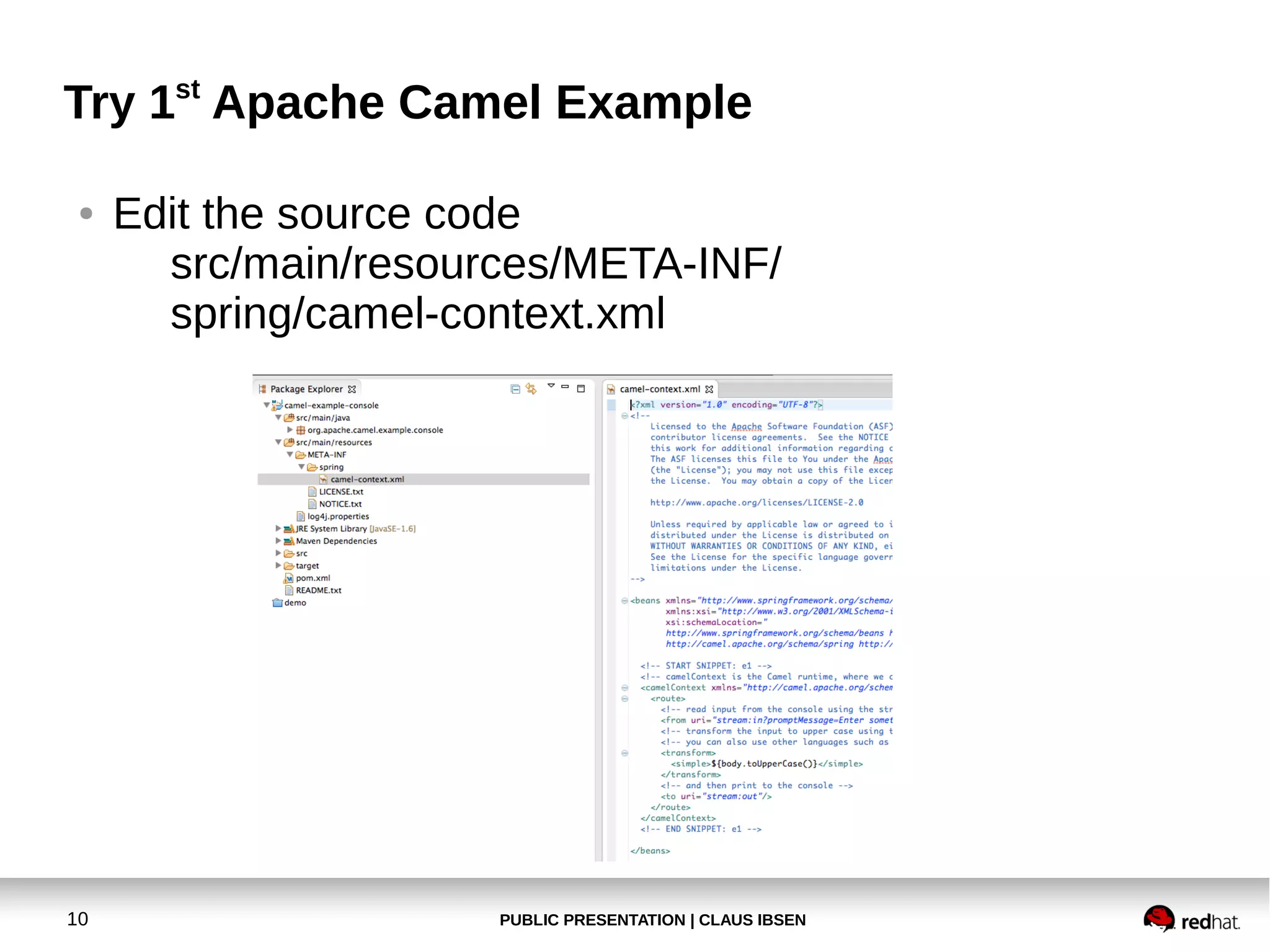
10

Edit the source code
src/main/resources/META-INF/
spring/camel-context.xml

PUBLIC PRESENTATION | CLAUS IBSEN
Try 1st Apache Camel Example
●

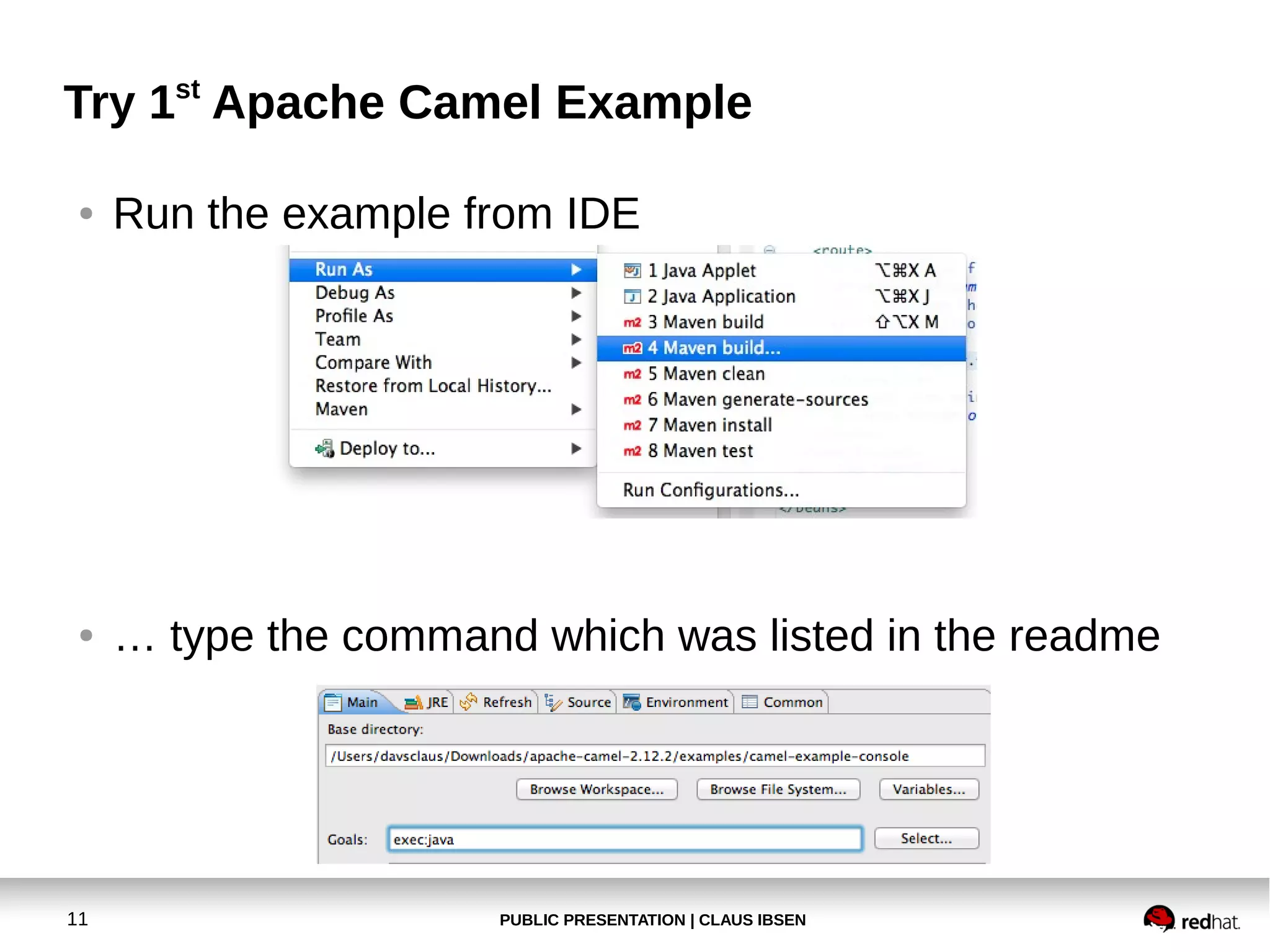
Run the example from IDE

●

… type the command which was listed in the readme

11

PUBLIC PRESENTATION | CLAUS IBSEN
Try 1st Apache Camel Example
●

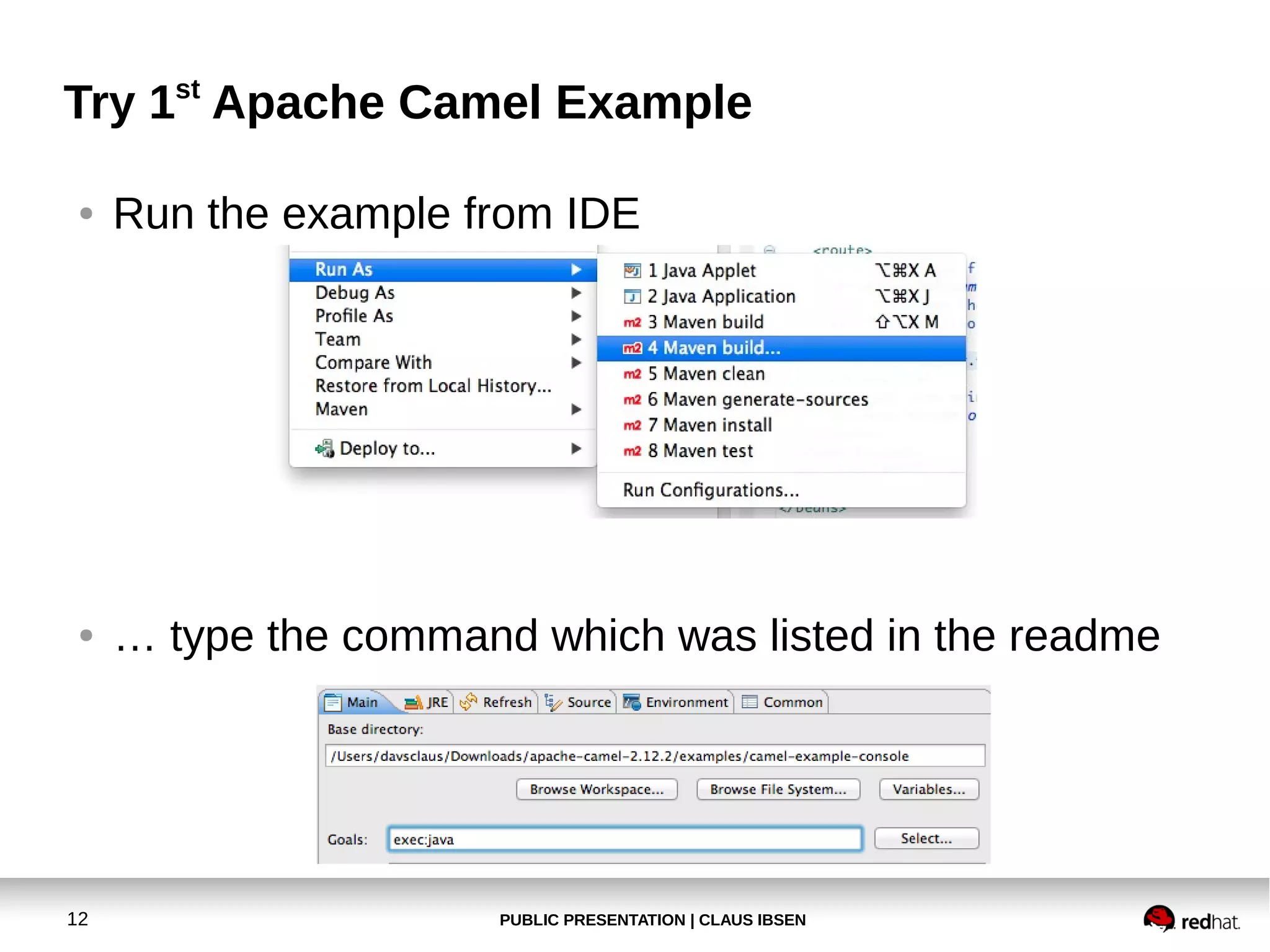
Run the example from IDE

●

… type the command which was listed in the readme

12

PUBLIC PRESENTATION | CLAUS IBSEN
Try 1st Apache Camel Example
●

13

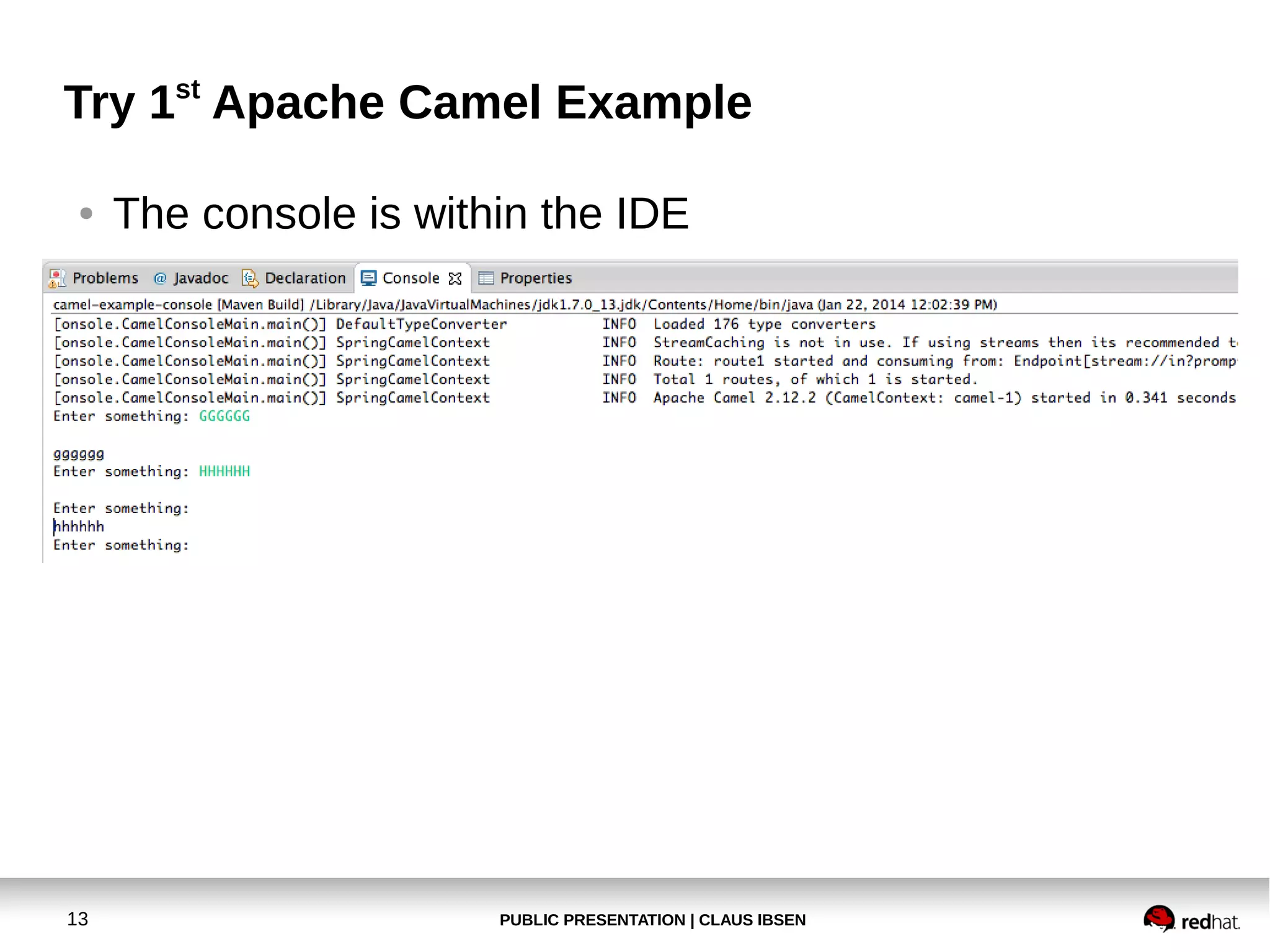
The console is within the IDE

PUBLIC PRESENTATION | CLAUS IBSEN
Try 1st Apache Camel Example
●

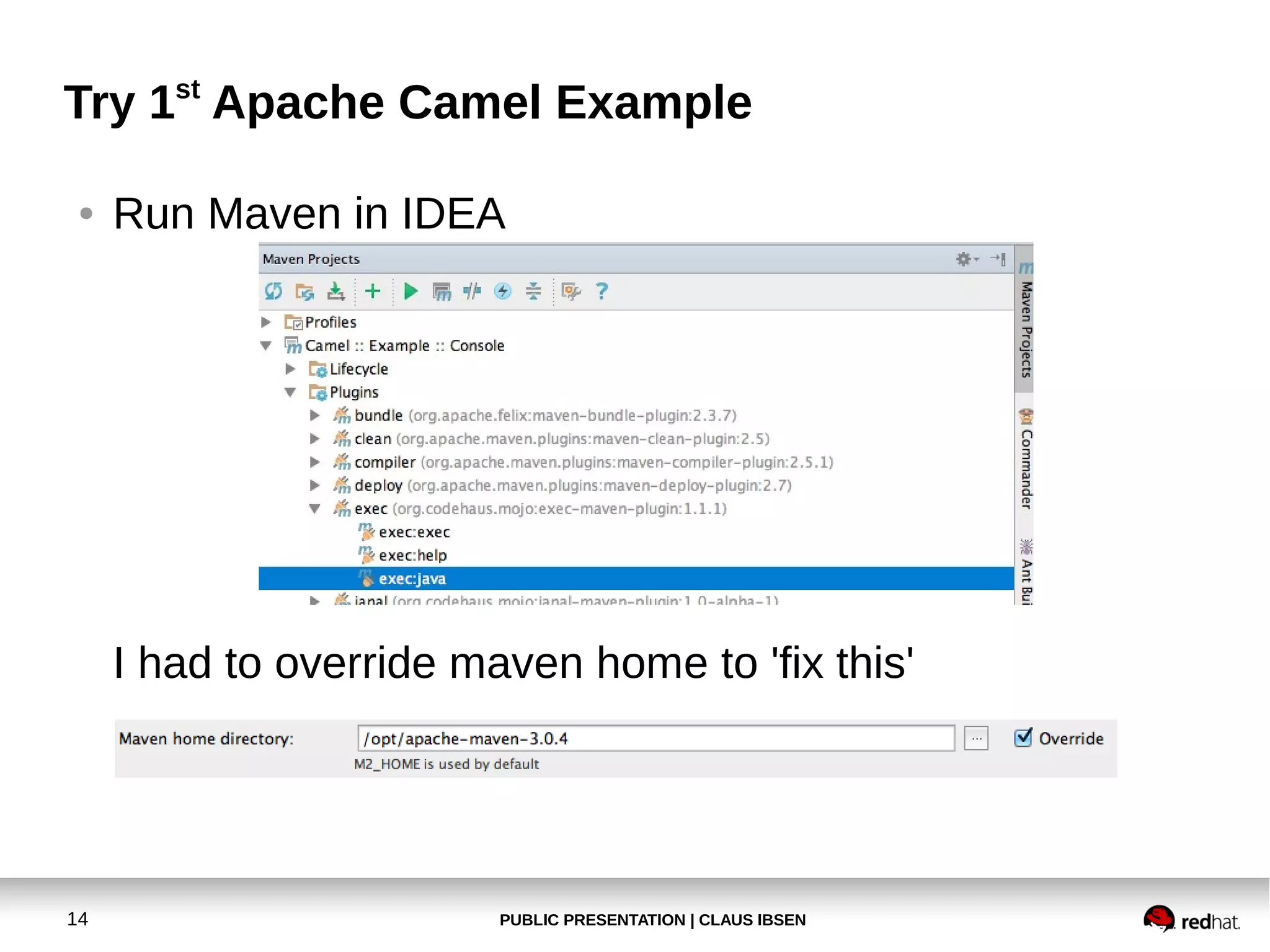
Run Maven in IDEA

I had to override maven home to 'fix this'

14

PUBLIC PRESENTATION | CLAUS IBSEN
Agenda
●

Prerequisite

●

Try 1st Camel Example

●

Create new Camel project
●

Deploy our application to Apache Tomcat

●

Modify the application and use servlet/restlet

●

Install hawtio in Apache Tomcat

●

REST project with Apache CXF-RS

●

Fabric8 Demo

15

PUBLIC PRESENTATION | CLAUS IBSEN
Create a new Camel project
●

Exercise 2
Create a new Camel Web project,
deployable in Apache Tomcat

16

PUBLIC PRESENTATION | CLAUS IBSEN
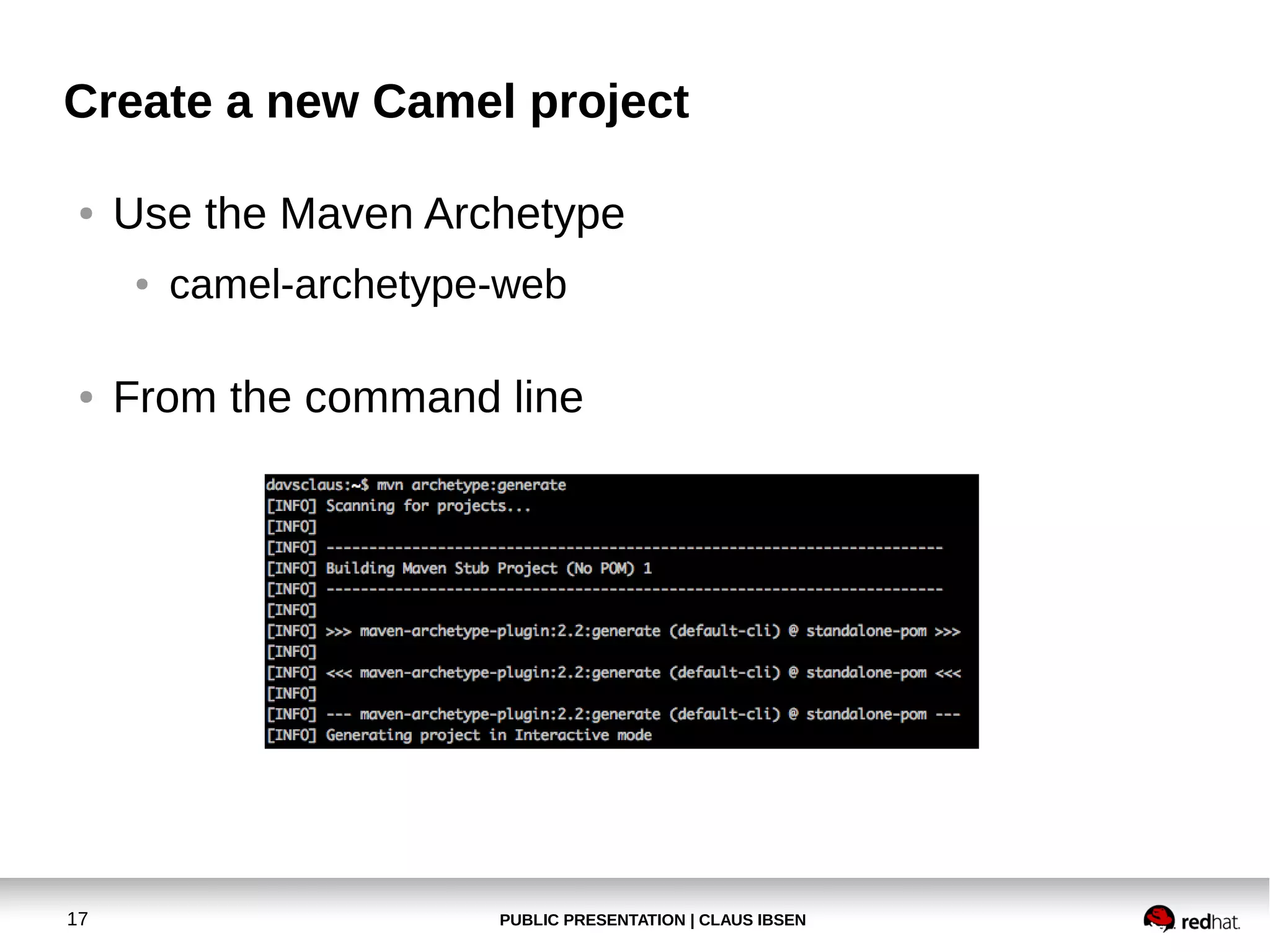
Create a new Camel project
●

Use the Maven Archetype
●

●

17

camel-archetype-web

From the command line

PUBLIC PRESENTATION | CLAUS IBSEN
Create a new Camel project
●

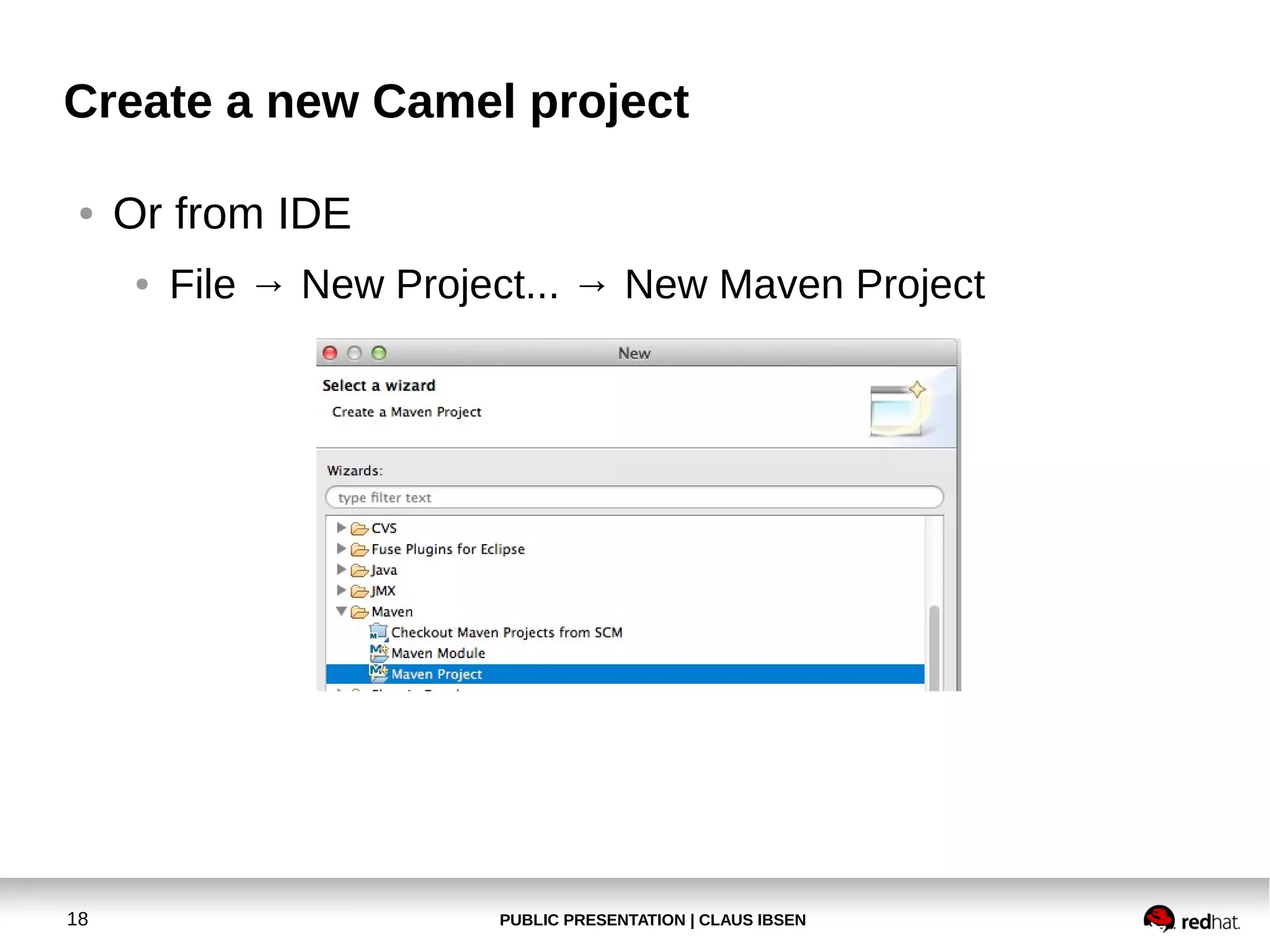
Or from IDE
●

18

File → New Project... → New Maven Project

PUBLIC PRESENTATION | CLAUS IBSEN
Create a new Camel project
●

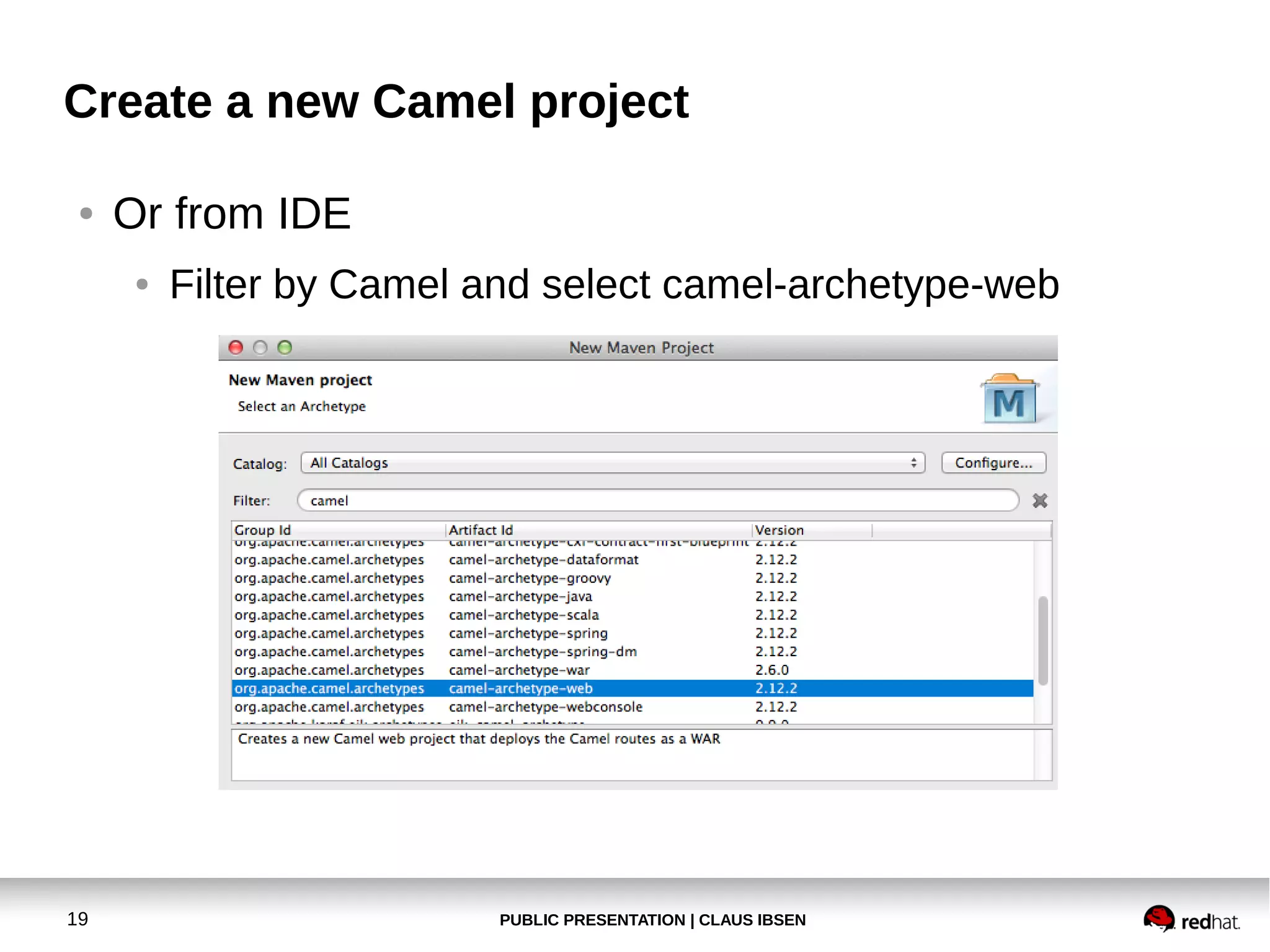
Or from IDE
●

19

Filter by Camel and select camel-archetype-web

PUBLIC PRESENTATION | CLAUS IBSEN
Create a new Camel project
●

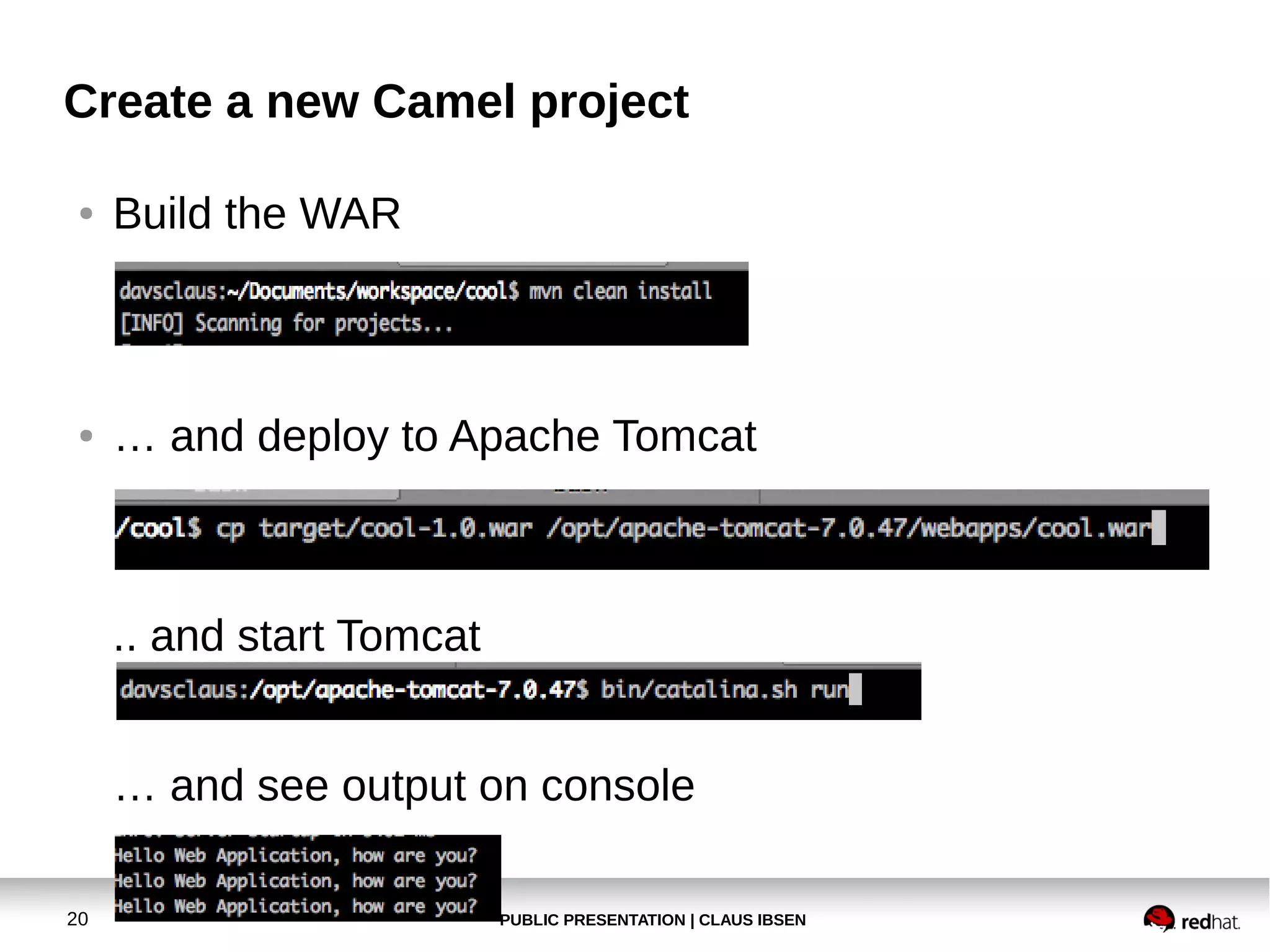
Build the WAR

●

… and deploy to Apache Tomcat

.. and start Tomcat
… and see output on console
20

PUBLIC PRESENTATION | CLAUS IBSEN
Create a new Camel project
●

Exercise 3
Modify application to listen on HTTP endpoint
and return a response message to client

21

PUBLIC PRESENTATION | CLAUS IBSEN
Create a new Camel project
●

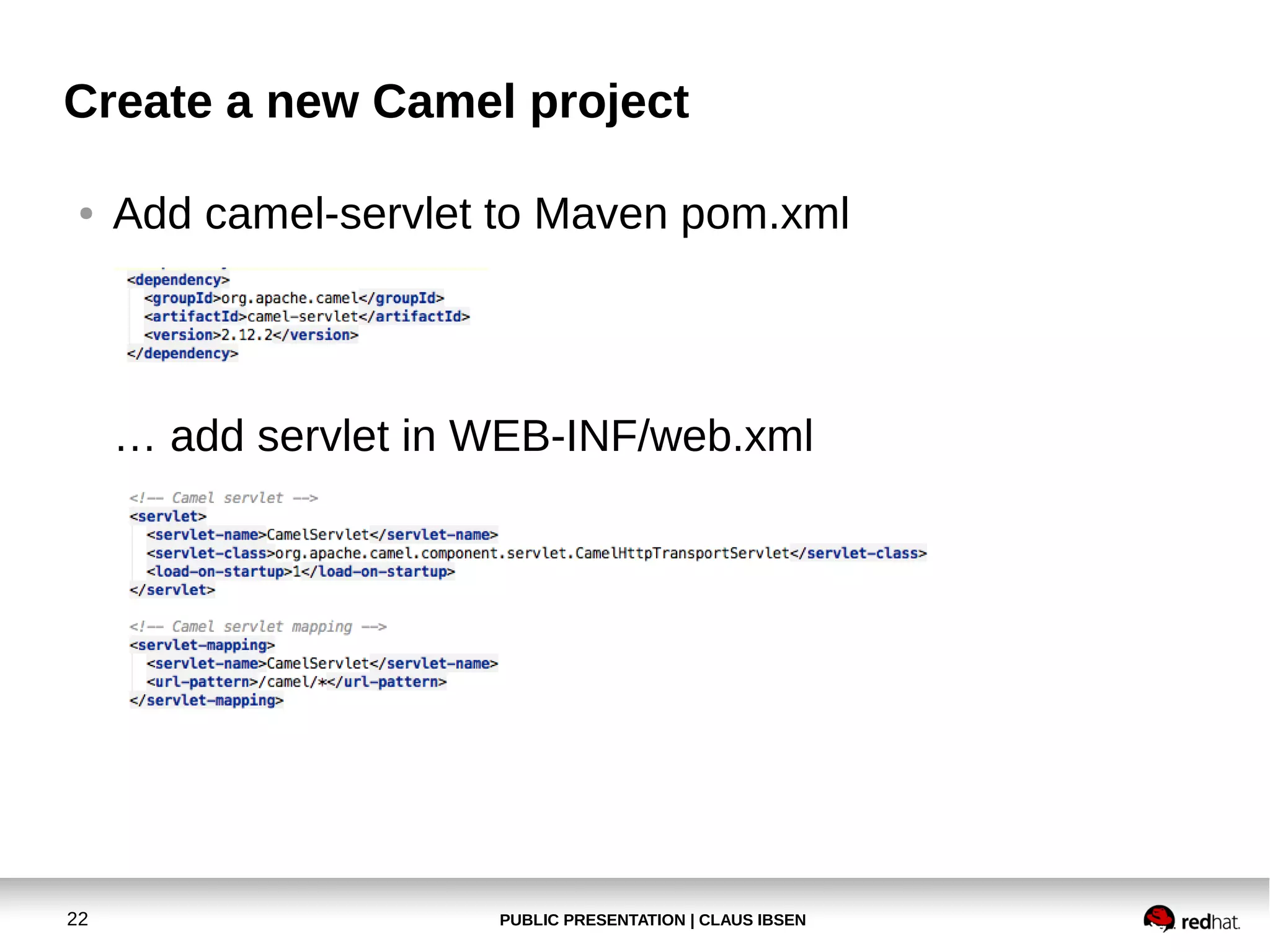
Add camel-servlet to Maven pom.xml

… add servlet in WEB-INF/web.xml

22

PUBLIC PRESENTATION | CLAUS IBSEN
Create a new Camel project
●

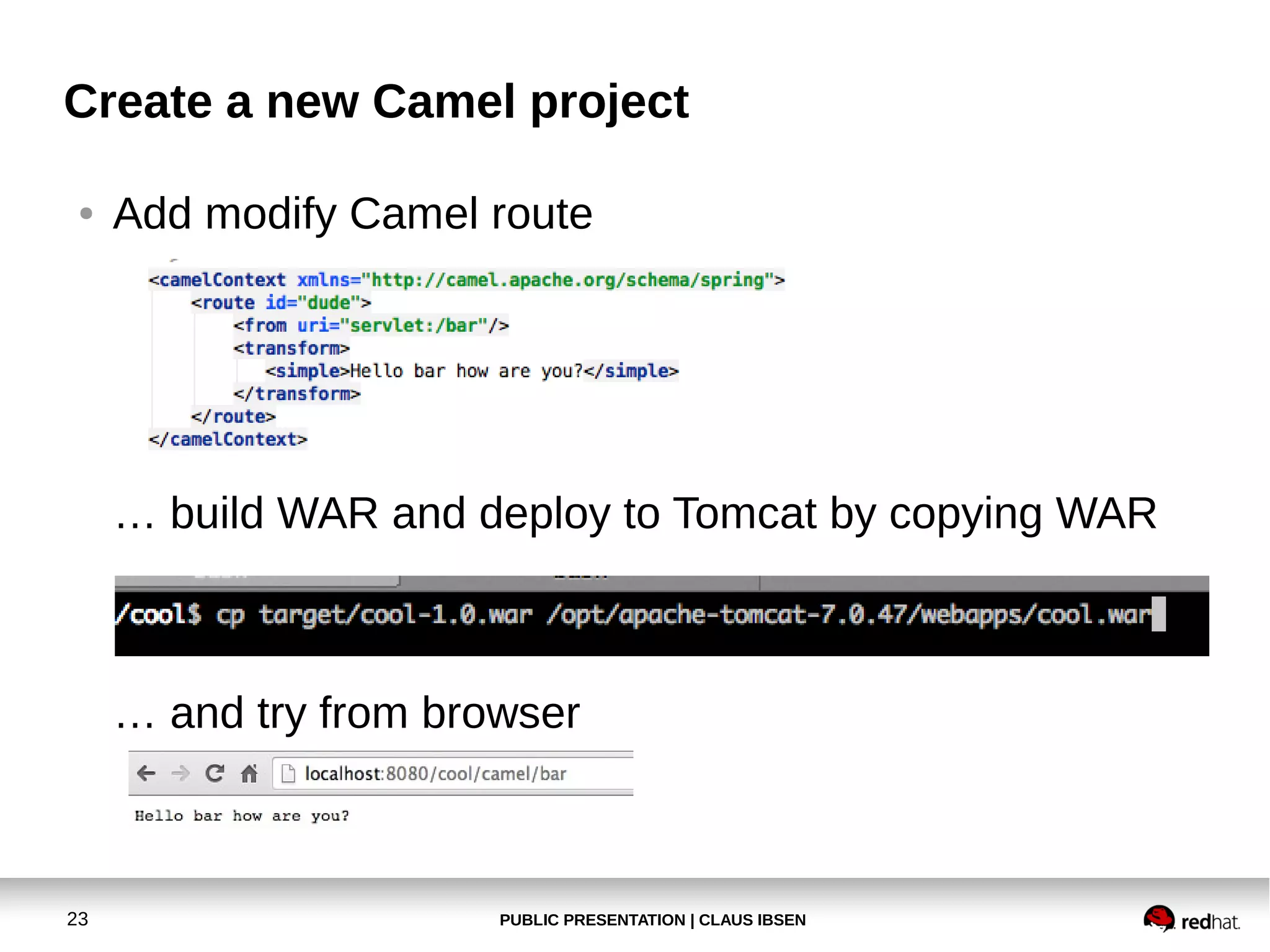
Add modify Camel route

… build WAR and deploy to Tomcat by copying WAR

… and try from browser

23

PUBLIC PRESENTATION | CLAUS IBSEN
Create a new Camel project
●

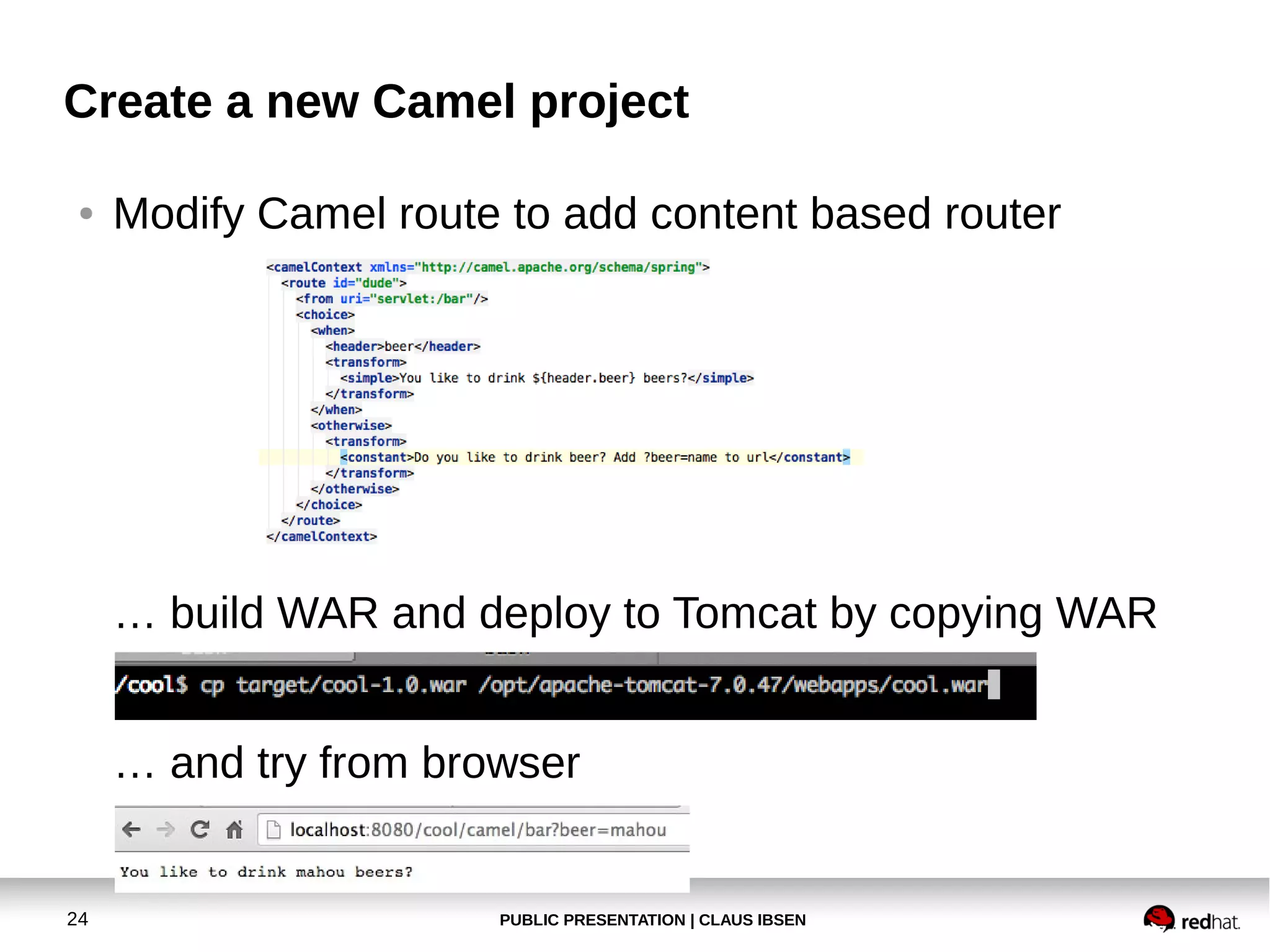
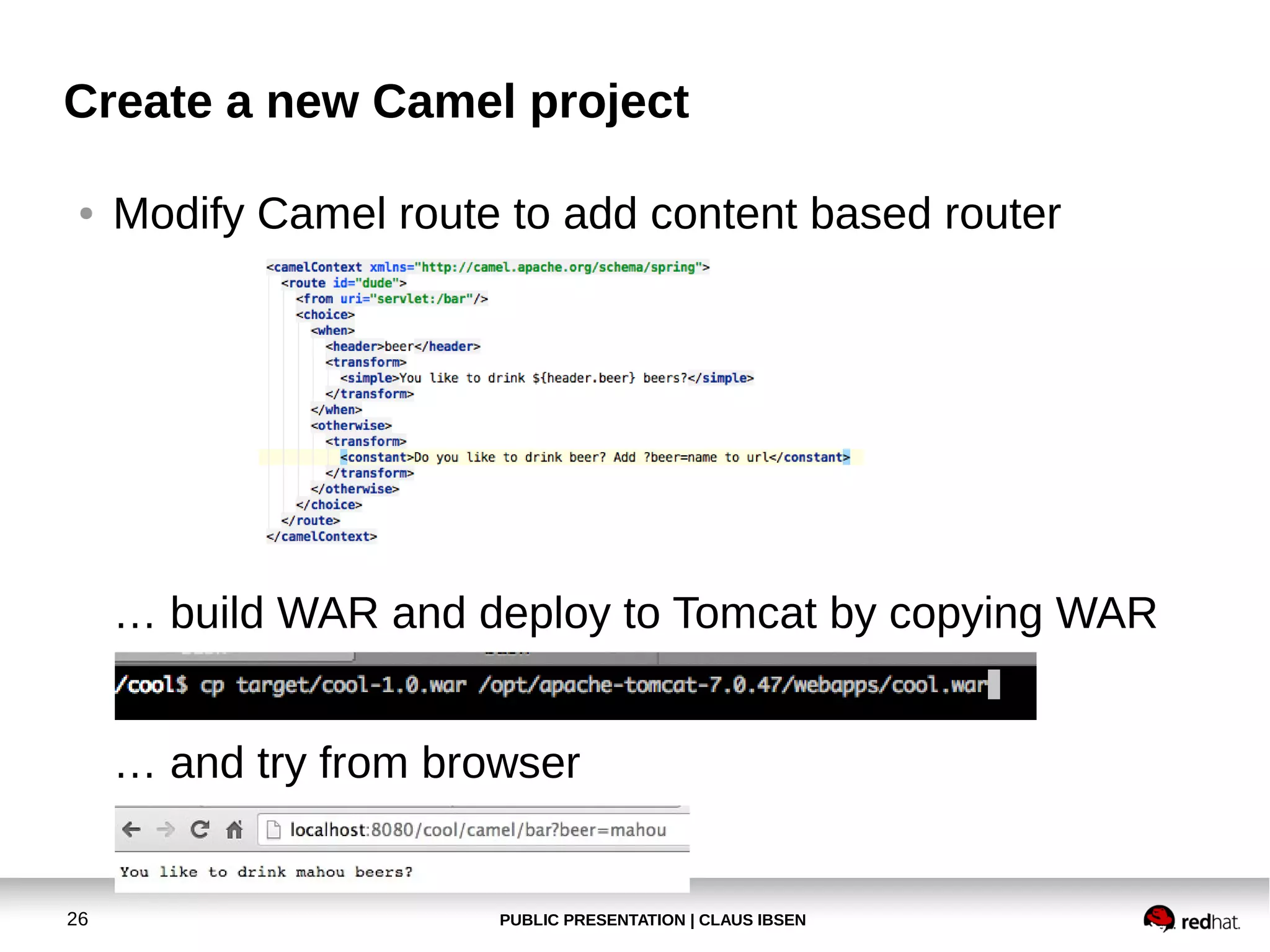
Modify Camel route to add content based router

… build WAR and deploy to Tomcat by copying WAR
… and try from browser

24

PUBLIC PRESENTATION | CLAUS IBSEN
Create a new Camel project
●

Exercise 4
Add Content Based Router and return
two different kind of reply messages

25

PUBLIC PRESENTATION | CLAUS IBSEN
Create a new Camel project
●

Modify Camel route to add content based router

… build WAR and deploy to Tomcat by copying WAR
… and try from browser

26

PUBLIC PRESENTATION | CLAUS IBSEN
Create a new Camel project
●

Exercise 5
Install hawtio and browse the route and
see runtime statistics
Try to update the route from hawtio
And try the debugger also.

27

PUBLIC PRESENTATION | CLAUS IBSEN
Create a new Camel project
●

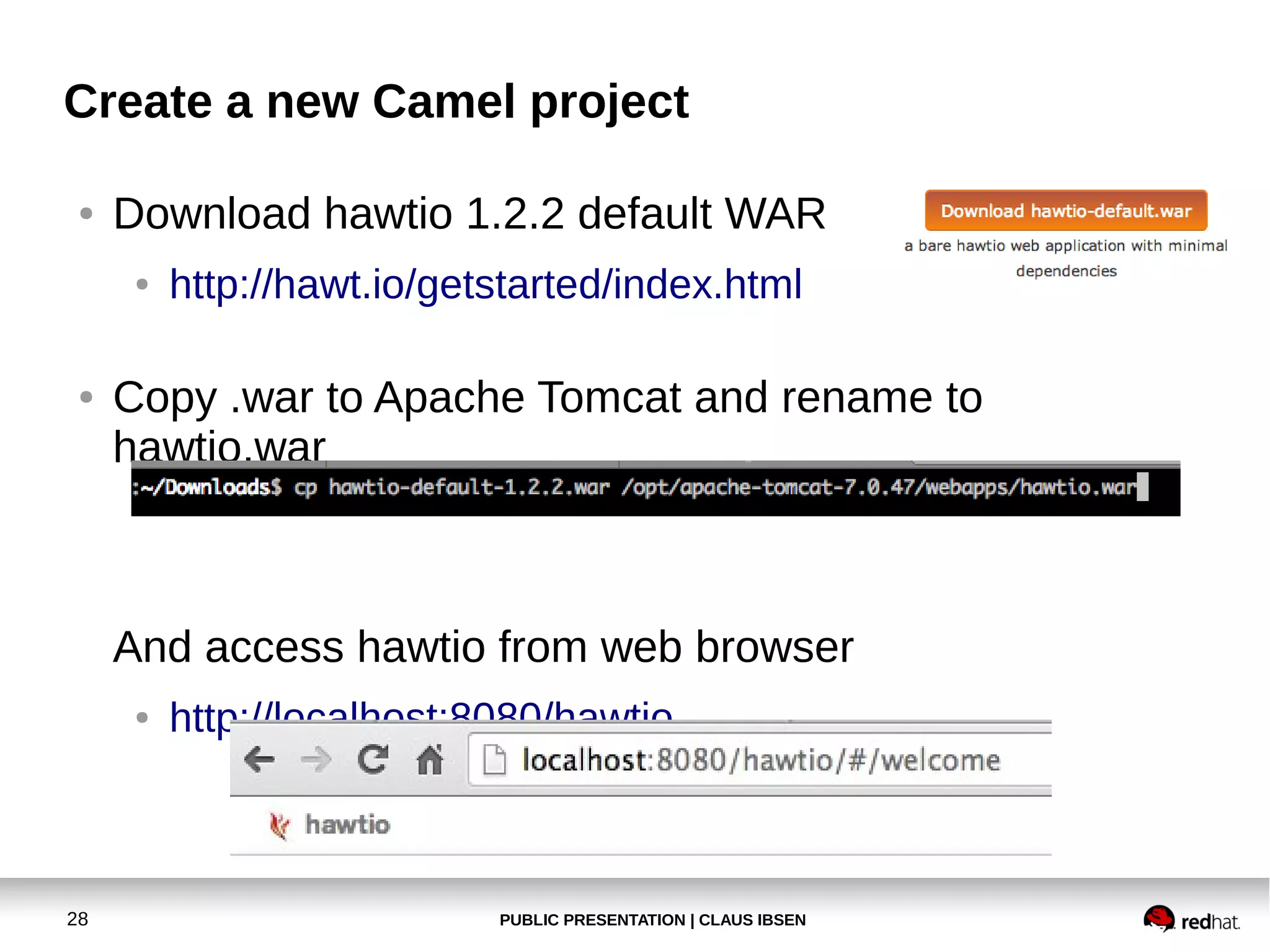
Download hawtio 1.2.2 default WAR
●

●

http://hawt.io/getstarted/index.html

Copy .war to Apache Tomcat and rename to
hawtio.war

And access hawtio from web browser
●

28

http://localhost:8080/hawtio

PUBLIC PRESENTATION | CLAUS IBSEN
Create a new Camel project
●

29

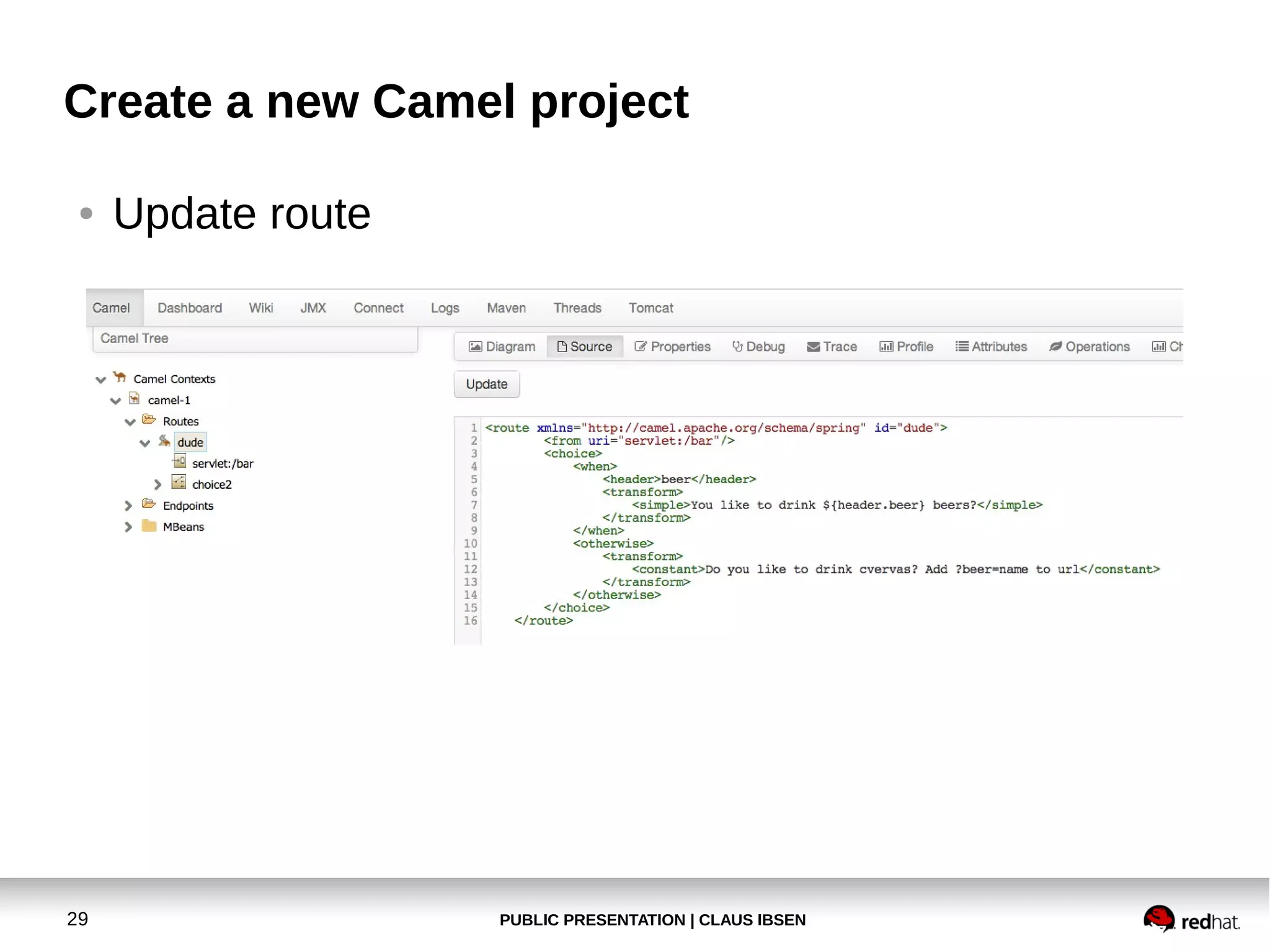
Update route

PUBLIC PRESENTATION | CLAUS IBSEN
Create a new Camel project
●

30

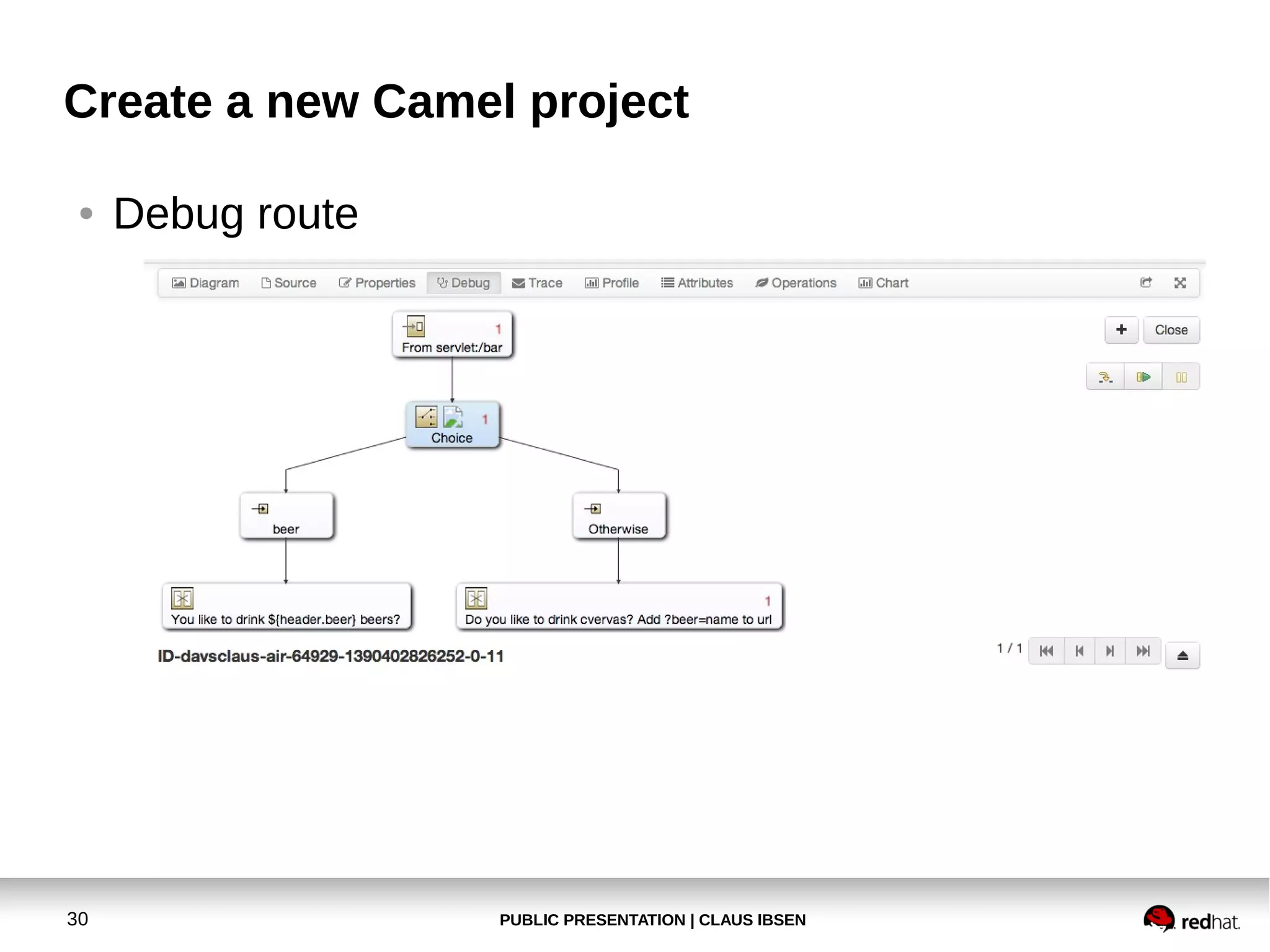
Debug route

PUBLIC PRESENTATION | CLAUS IBSEN
Create a new Camel project
●

Exercise 6
Modify application to use restlet for simple
REST service as a Camel route

31

PUBLIC PRESENTATION | CLAUS IBSEN
Create a new Camel project
●

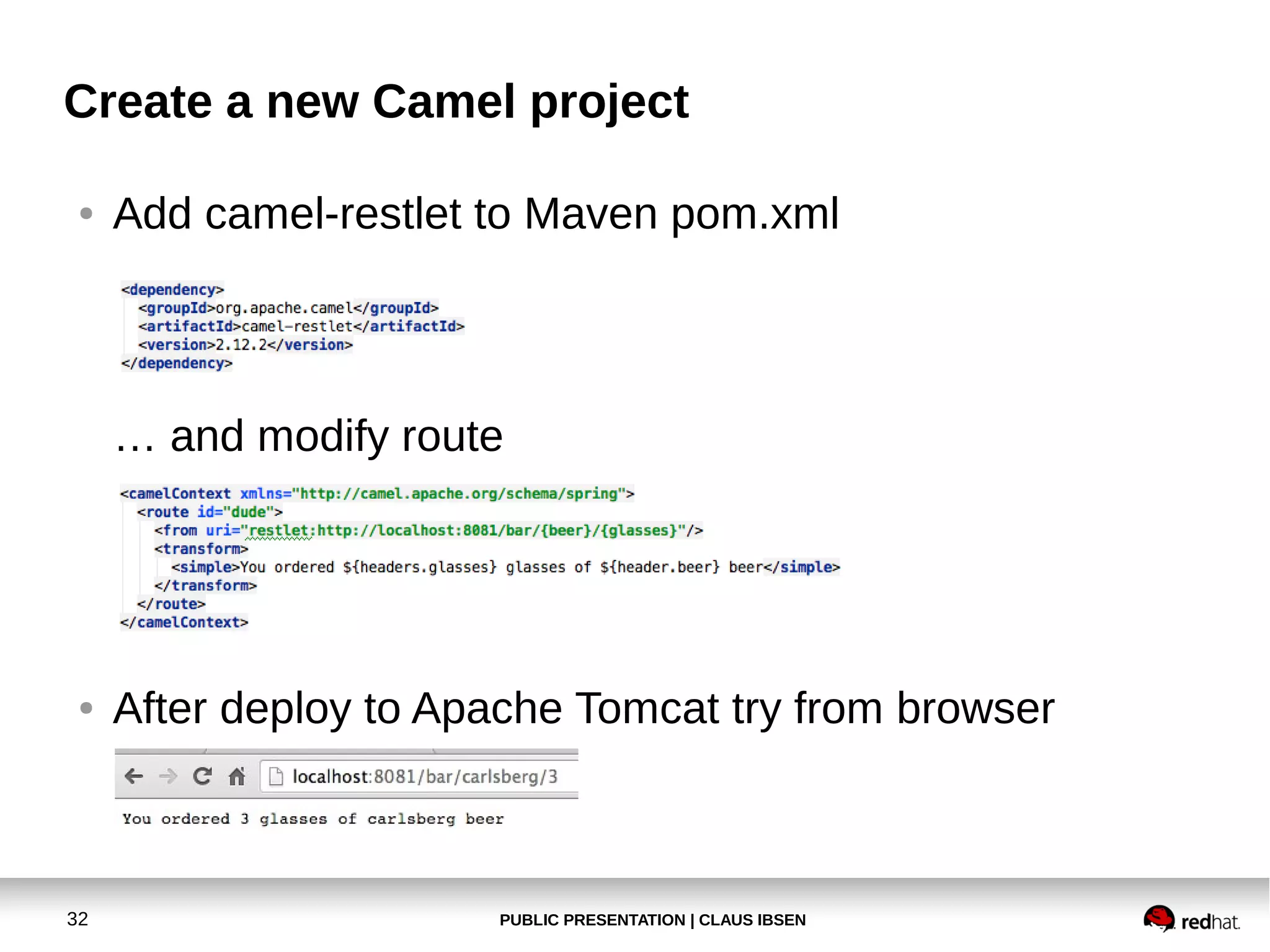
Add camel-restlet to Maven pom.xml

… and modify route

●

32

After deploy to Apache Tomcat try from browser

PUBLIC PRESENTATION | CLAUS IBSEN
Create a new Camel project
●

●

Notice we are using port 8081 and not the servlet
container from Apache Tomcat.
To do so see details at
●

33

http://camel.apache.org/restlet

PUBLIC PRESENTATION | CLAUS IBSEN
Agenda
●

Prerequisite

●

Try 1st Camel Example

●

Create new Camel project
●

Deploy our application to Apache Tomcat

●

Modify the application and use servlet/restlet

●

Install hawtio in Apache Tomcat

●

REST project with Apache CXF-RS

●

Fabric8 Demo

34

PUBLIC PRESENTATION | CLAUS IBSEN
REST project with Apache CXF-RS
●

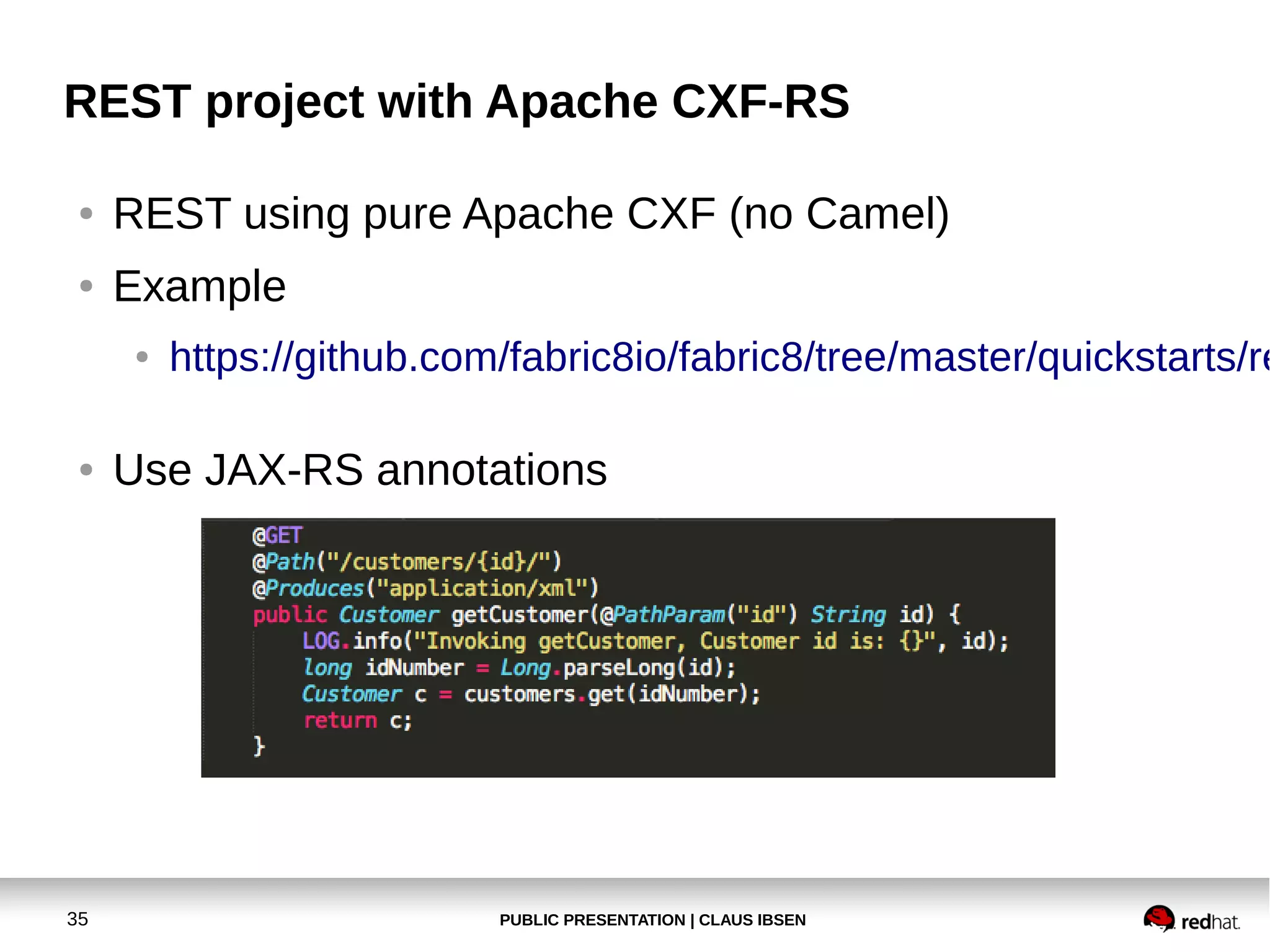
REST using pure Apache CXF (no Camel)

●

Example
●

●

35

https://github.com/fabric8io/fabric8/tree/master/quickstarts/re

Use JAX-RS annotations

PUBLIC PRESENTATION | CLAUS IBSEN
REST project with Apache CXF-RS
●

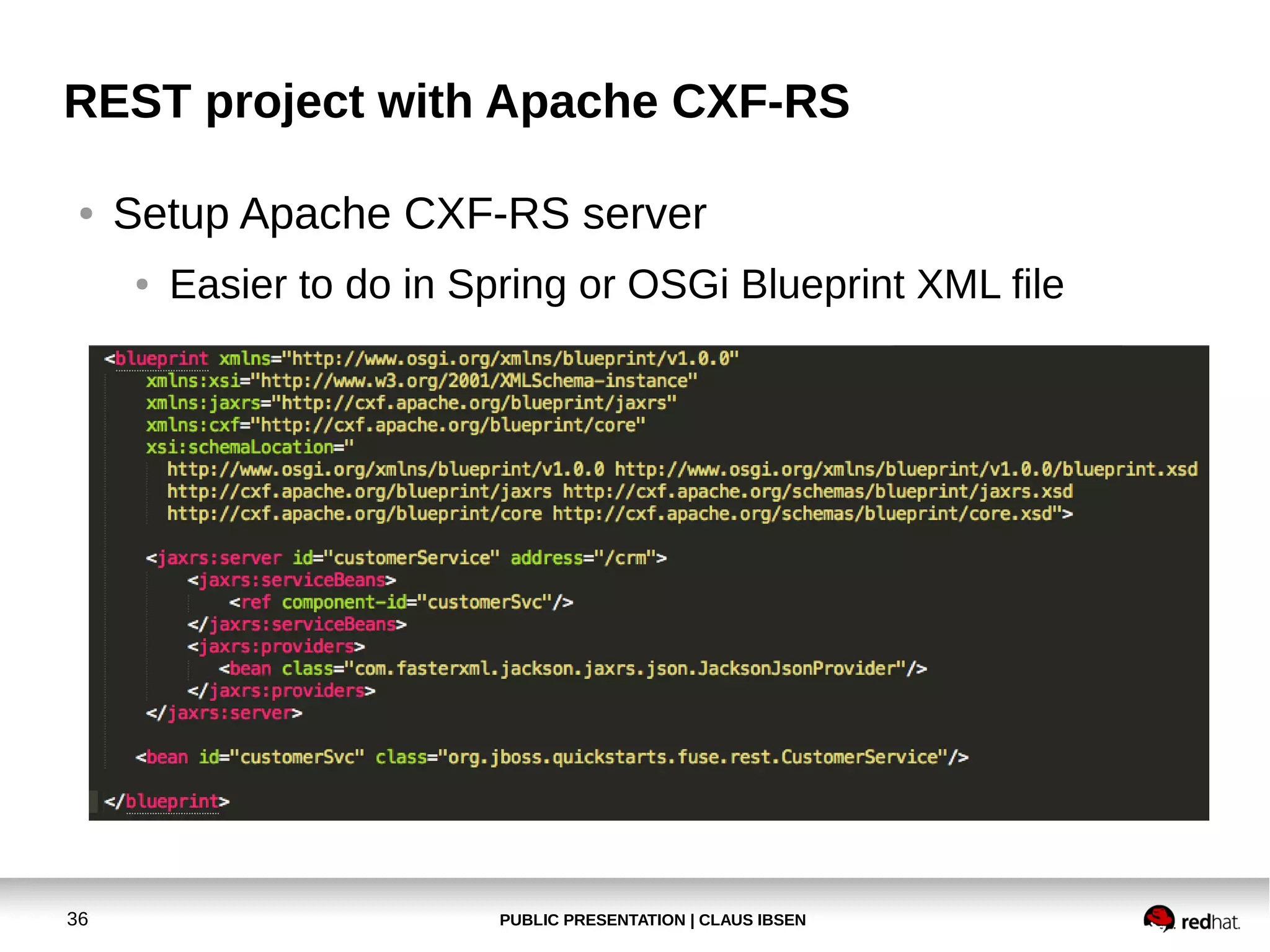
Setup Apache CXF-RS server
●

36

Easier to do in Spring or OSGi Blueprint XML file

PUBLIC PRESENTATION | CLAUS IBSEN
REST project with Apache CXF-RS
●

REST using pure camel-cxfrs (with Camel)
●

Uses route(s) as input

●

Define API in java interface/class (as if JAX-RS)
●
●

●

Either as interface
Or class implementation with no logic

Two binding modes
●

Default

●

Simple (in fact simpler and better)
Sorry at this I didn't have the time to implement
a Camel cxf-rs example for you

37

PUBLIC PRESENTATION | CLAUS IBSEN
Agenda
●

Prerequisite

●

Try 1st Camel Example

●

Create new Camel project
●

Deploy our application to Apache Tomcat

●

Modify the application and use servlet/restlet

●

Install hawtio in Apache Tomcat

●

REST project with Apache CXF-RS

●

Fabric8 Demo

38

PUBLIC PRESENTATION | CLAUS IBSEN
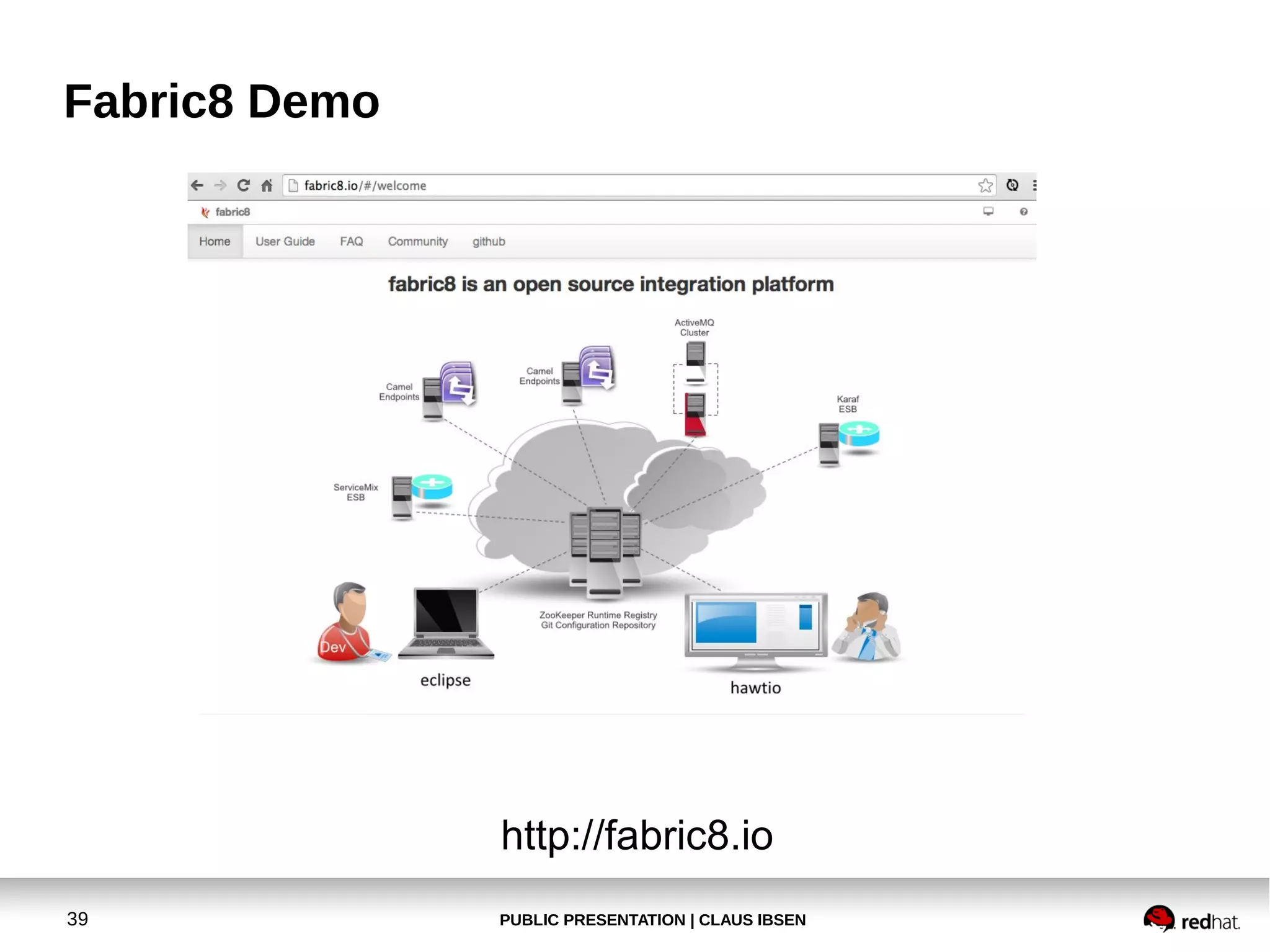
Fabric8 Demo

http://fabric8.io
39

PUBLIC PRESENTATION | CLAUS IBSEN
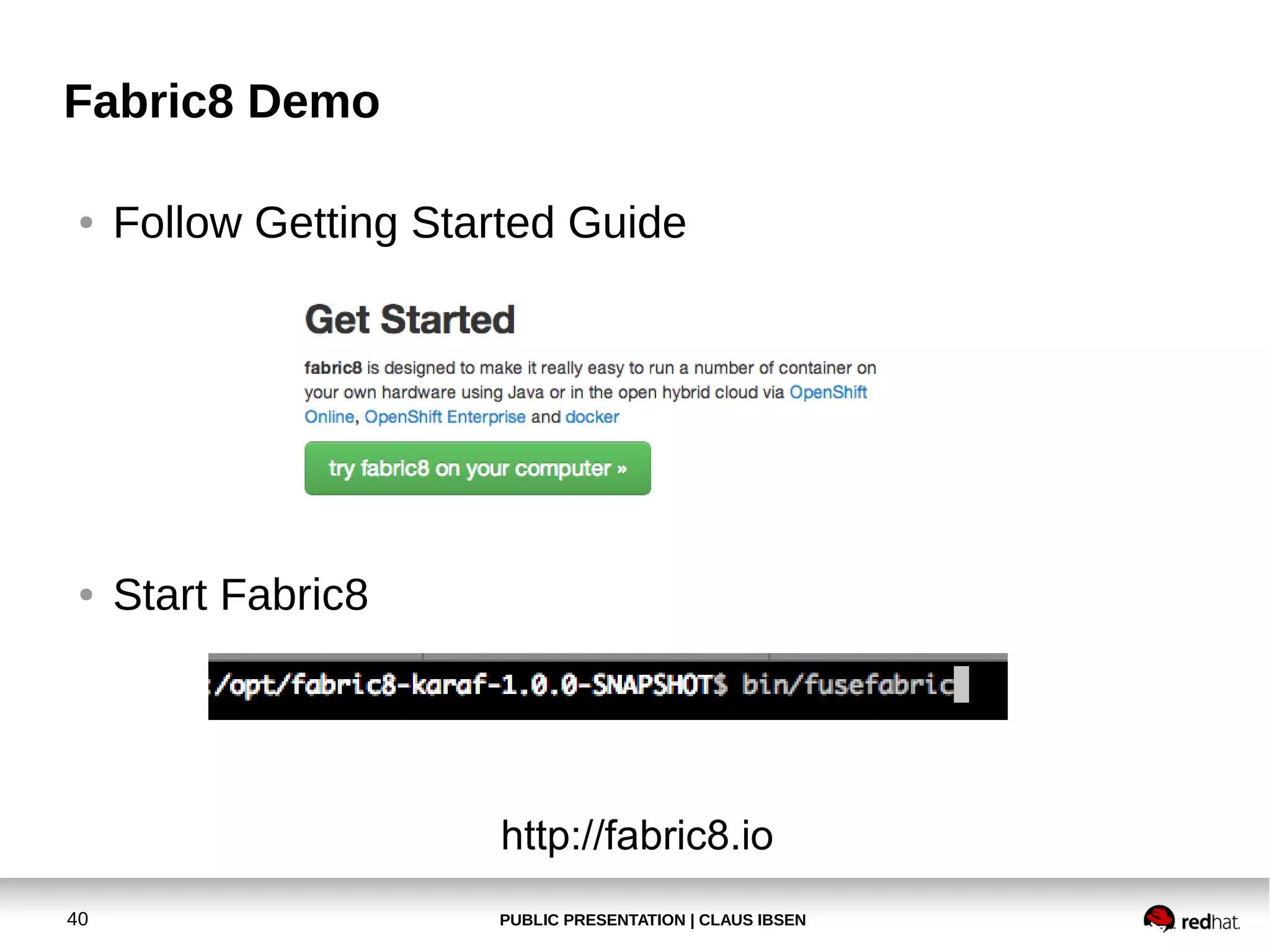
Fabric8 Demo
●

Follow Getting Started Guide

●

Start Fabric8

http://fabric8.io
40

PUBLIC PRESENTATION | CLAUS IBSEN
Fabric8 Demo
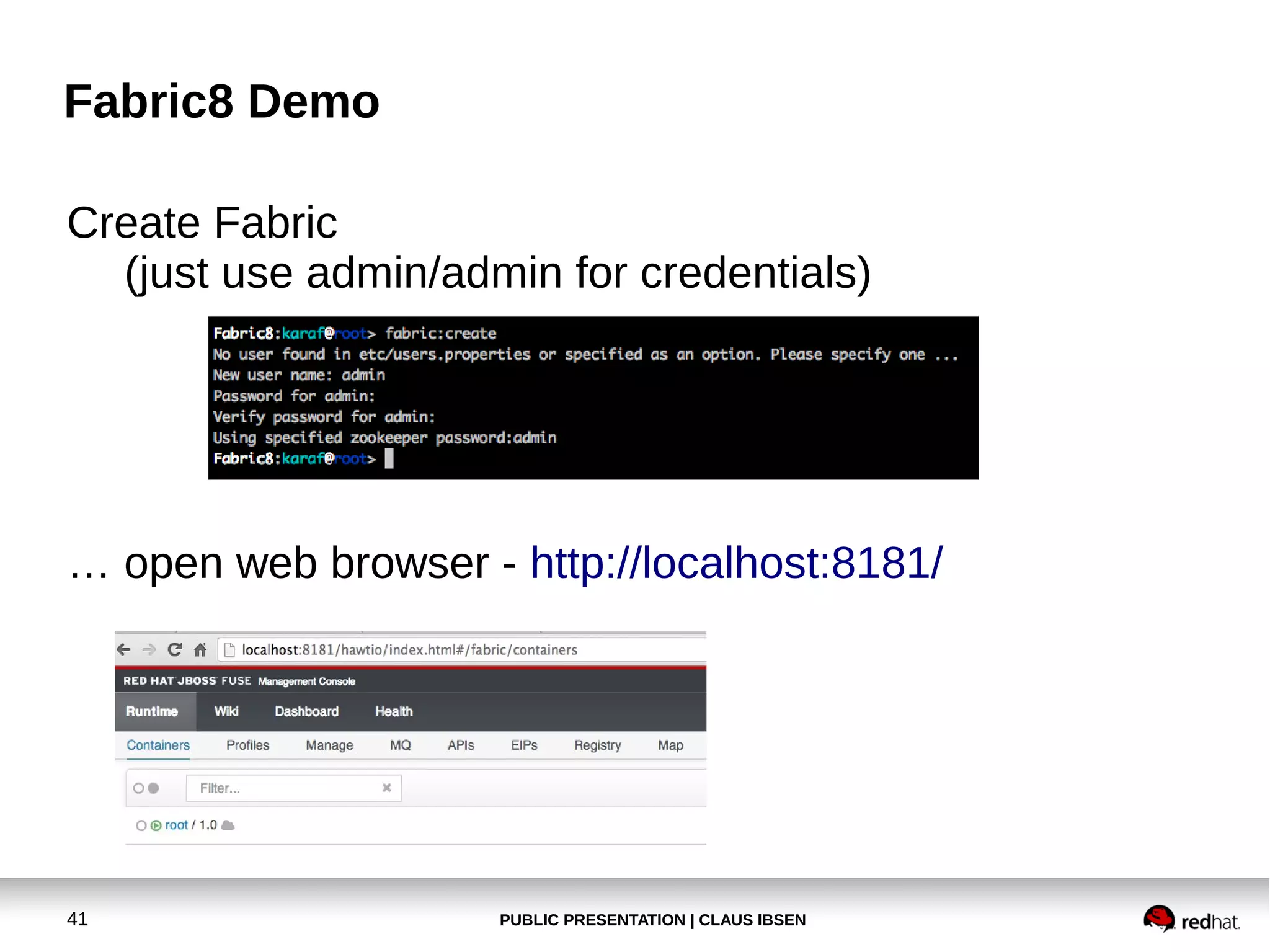
Create Fabric
(just use admin/admin for credentials)

… open web browser - http://localhost:8181/

41

PUBLIC PRESENTATION | CLAUS IBSEN
Fabric8 Demo
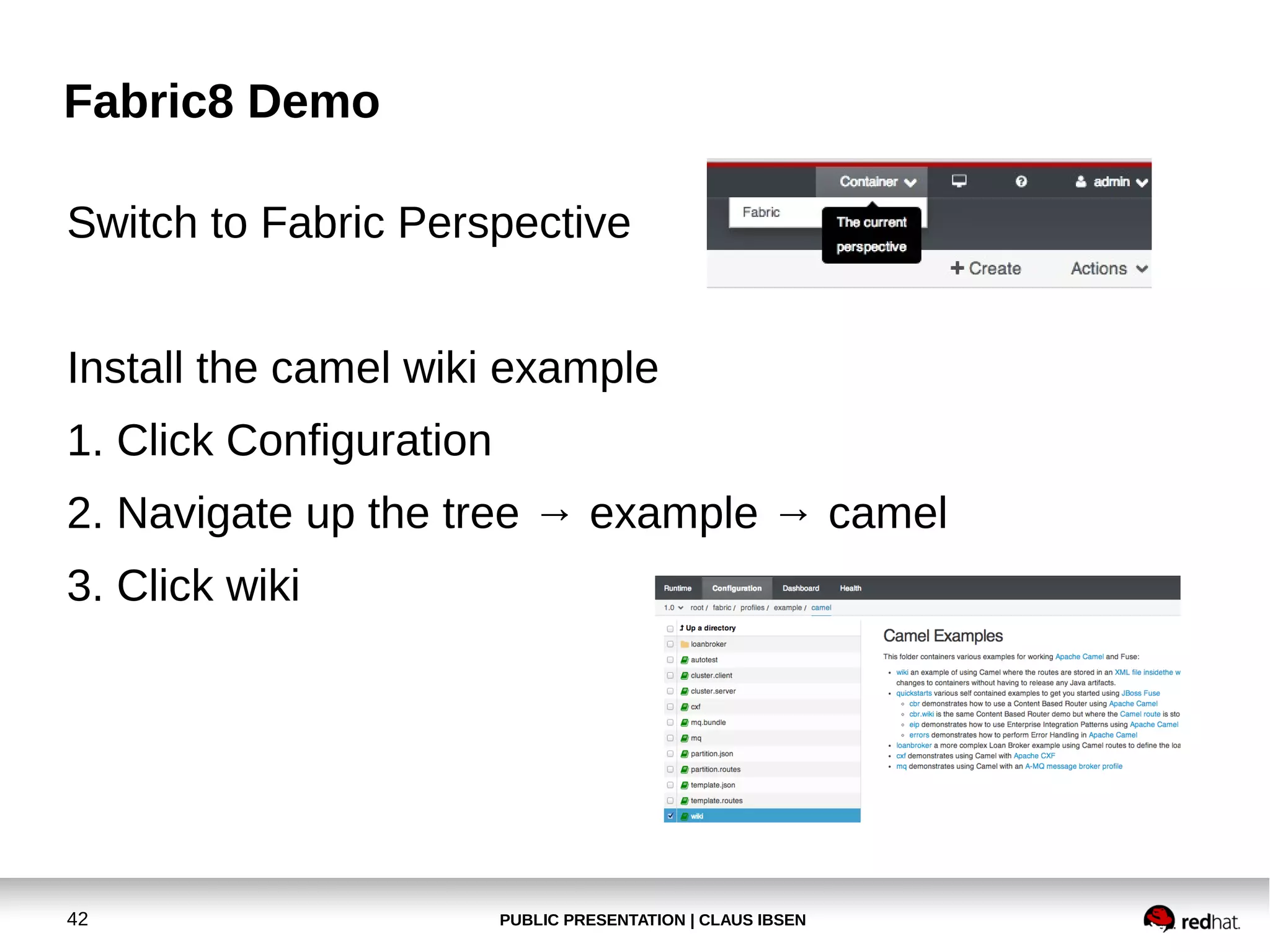
Switch to Fabric Perspective
Install the camel wiki example
1. Click Configuration
2. Navigate up the tree → example → camel
3. Click wiki

42

PUBLIC PRESENTATION | CLAUS IBSEN
Fabric8 Demo
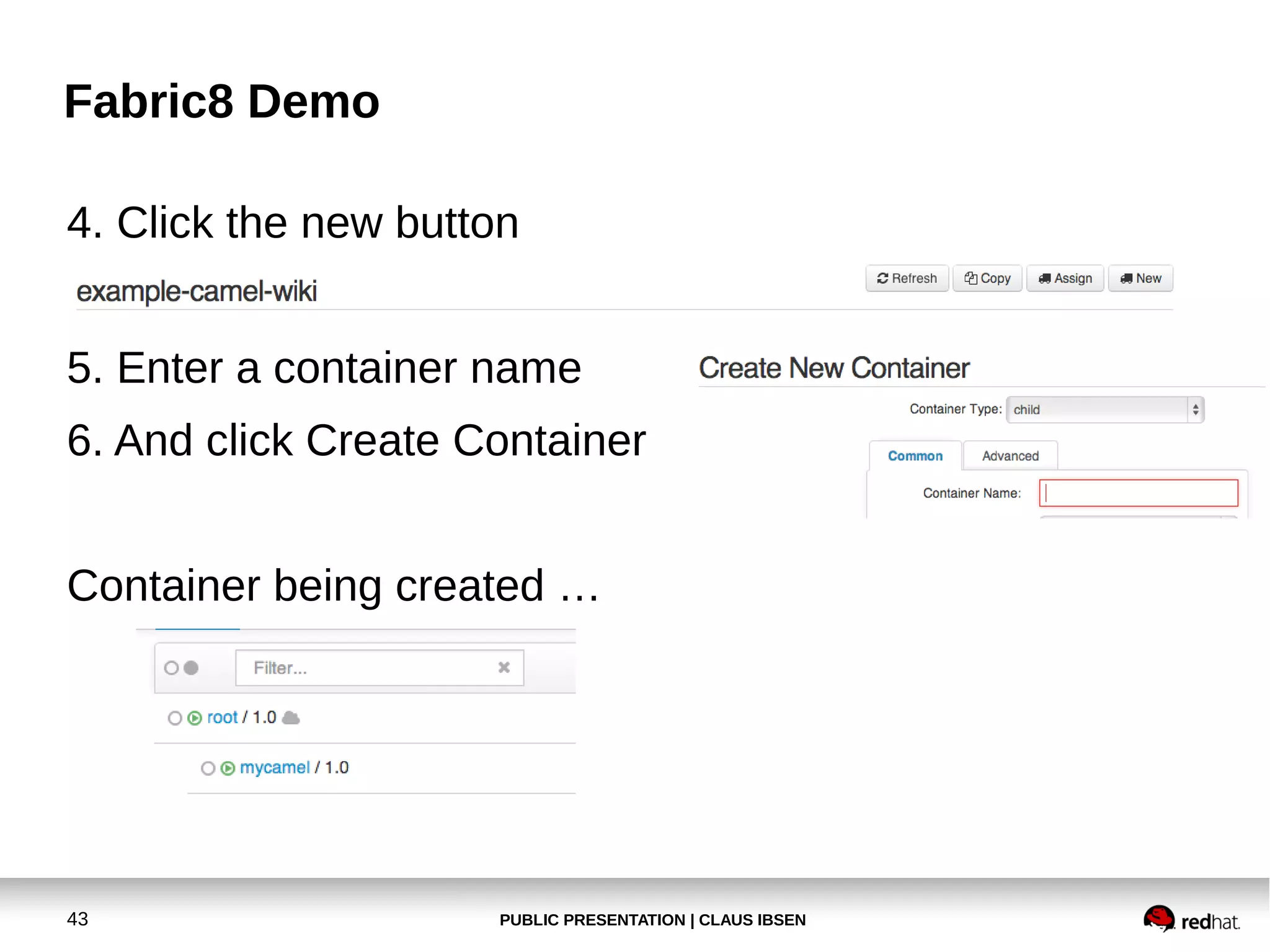
4. Click the new button
5. Enter a container name
6. And click Create Container
Container being created …

43

PUBLIC PRESENTATION | CLAUS IBSEN
Fabric8 Demo
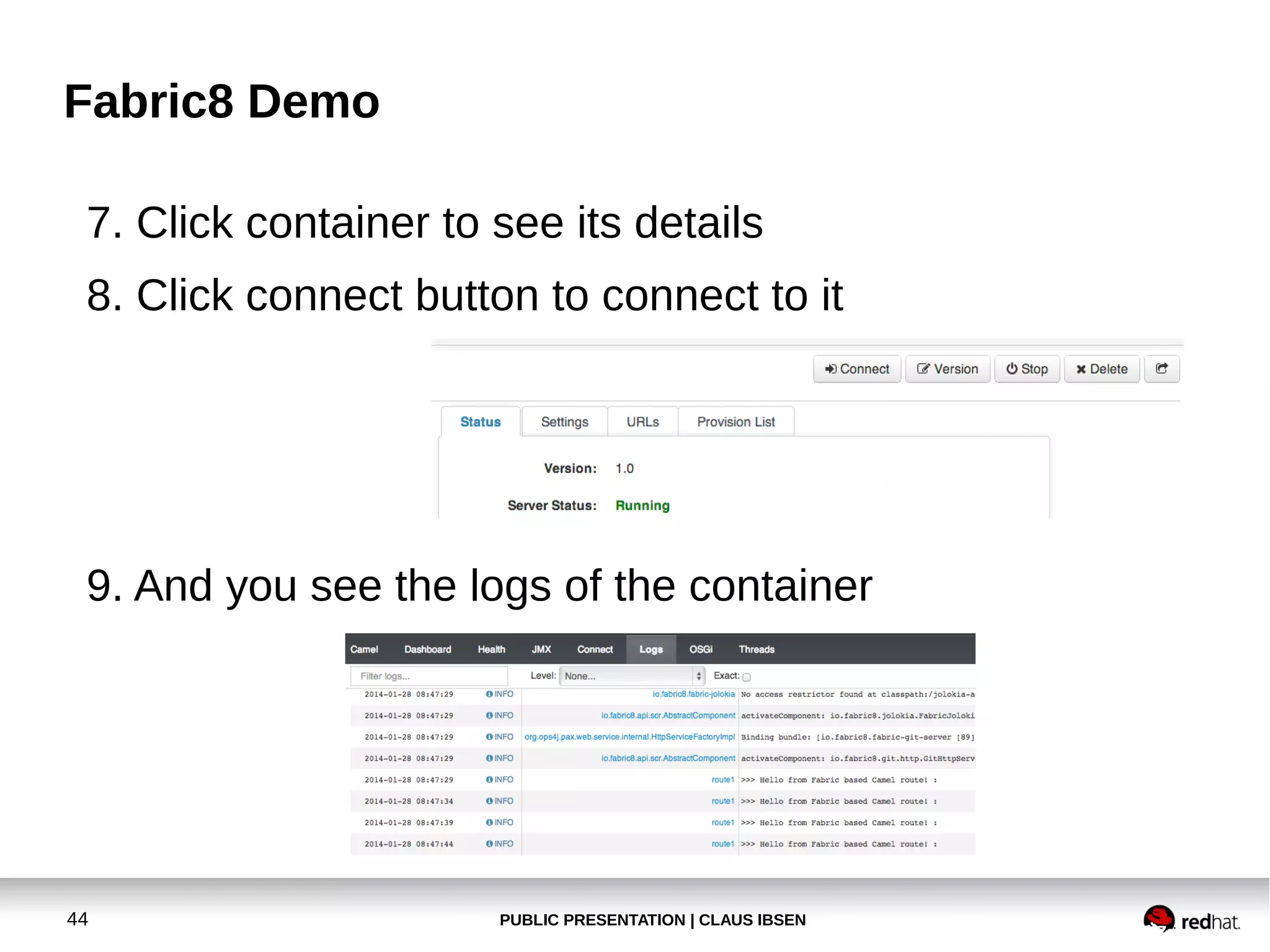
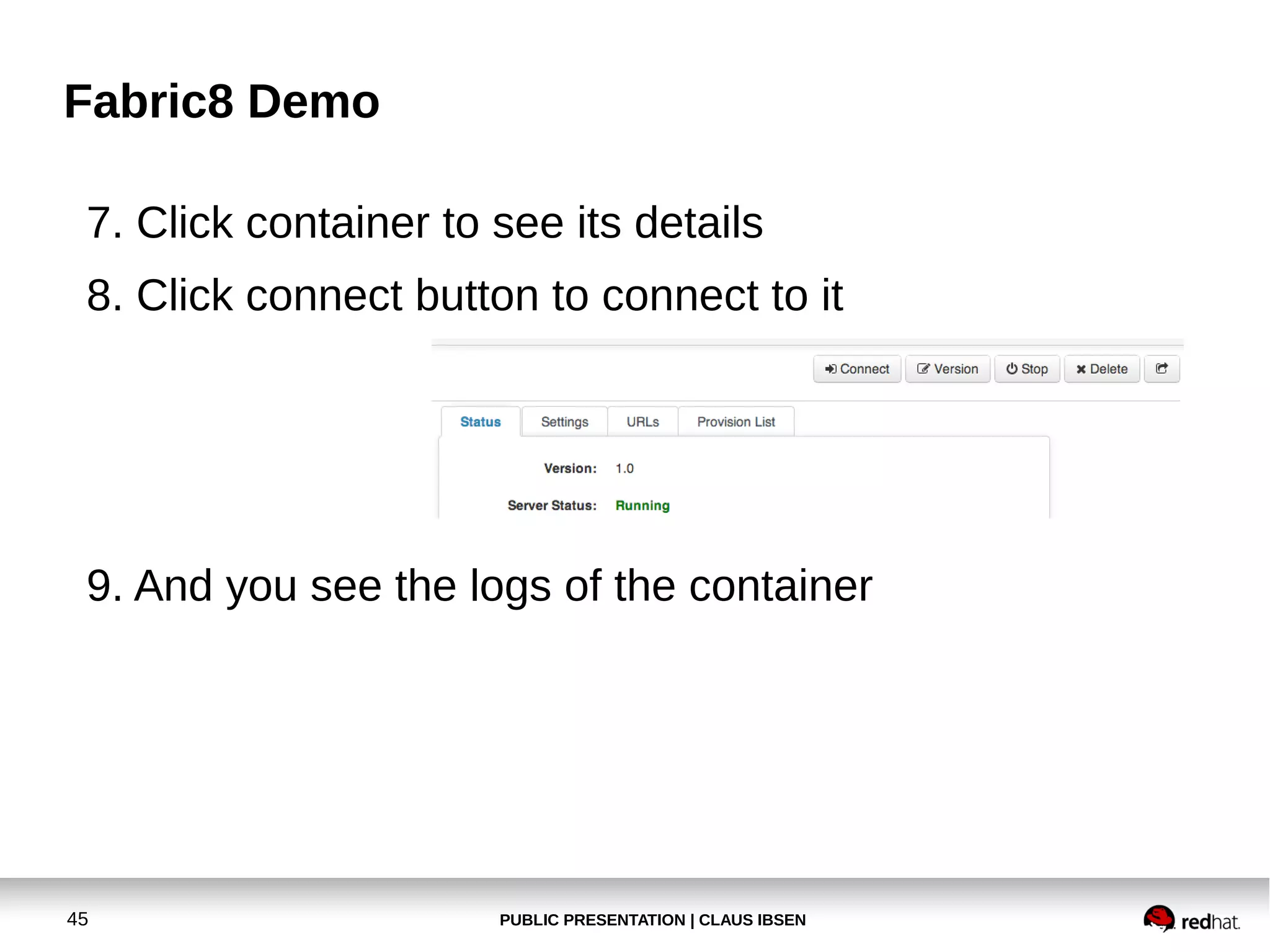
7. Click container to see its details
8. Click connect button to connect to it

9. And you see the logs of the container

44

PUBLIC PRESENTATION | CLAUS IBSEN
Fabric8 Demo
7. Click container to see its details
8. Click connect button to connect to it

9. And you see the logs of the container

45

PUBLIC PRESENTATION | CLAUS IBSEN
Fabric8 Demo
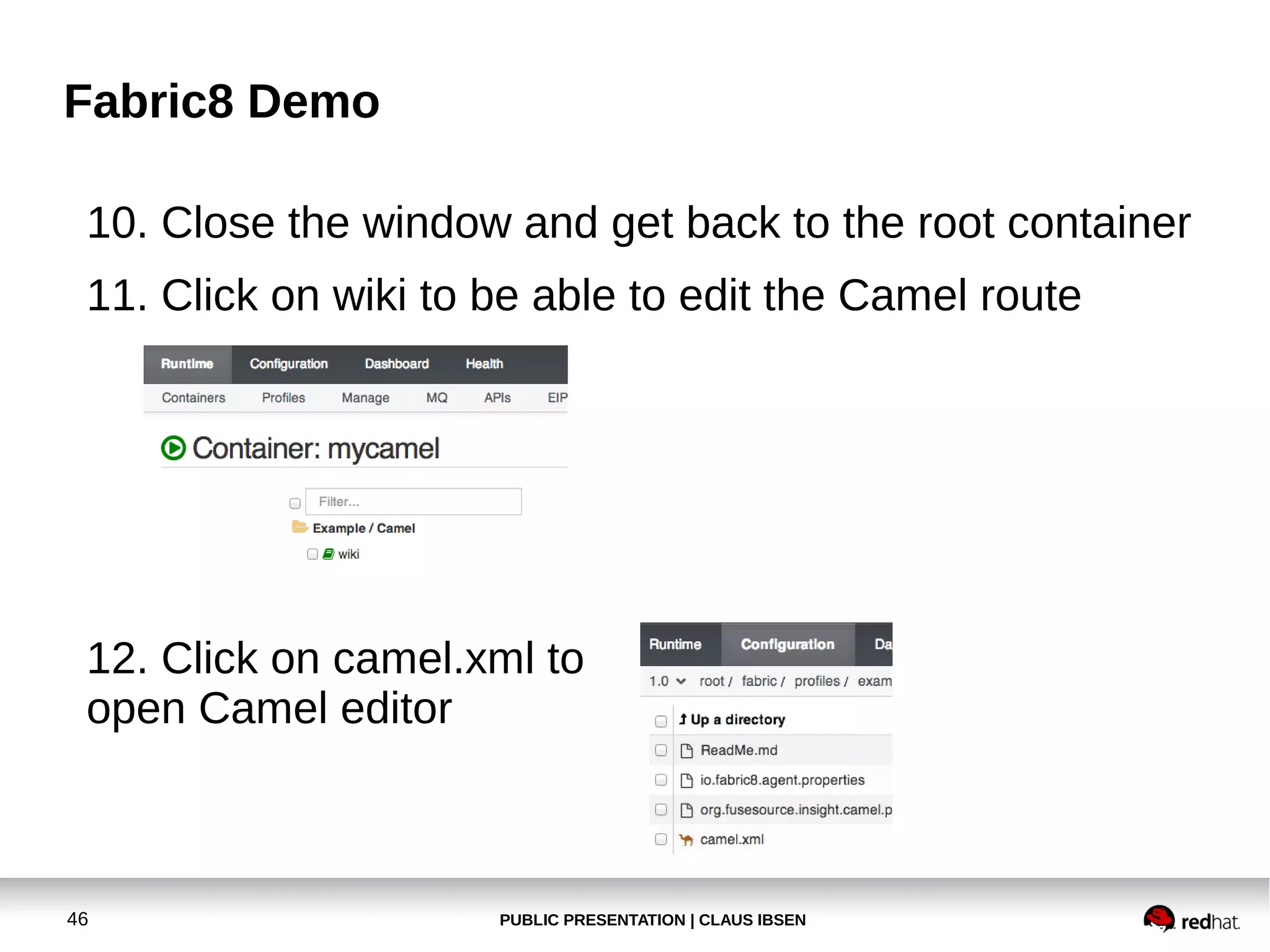
10. Close the window and get back to the root container
11. Click on wiki to be able to edit the Camel route

12. Click on camel.xml to
open Camel editor

46

PUBLIC PRESENTATION | CLAUS IBSEN
Fabric8 Demo
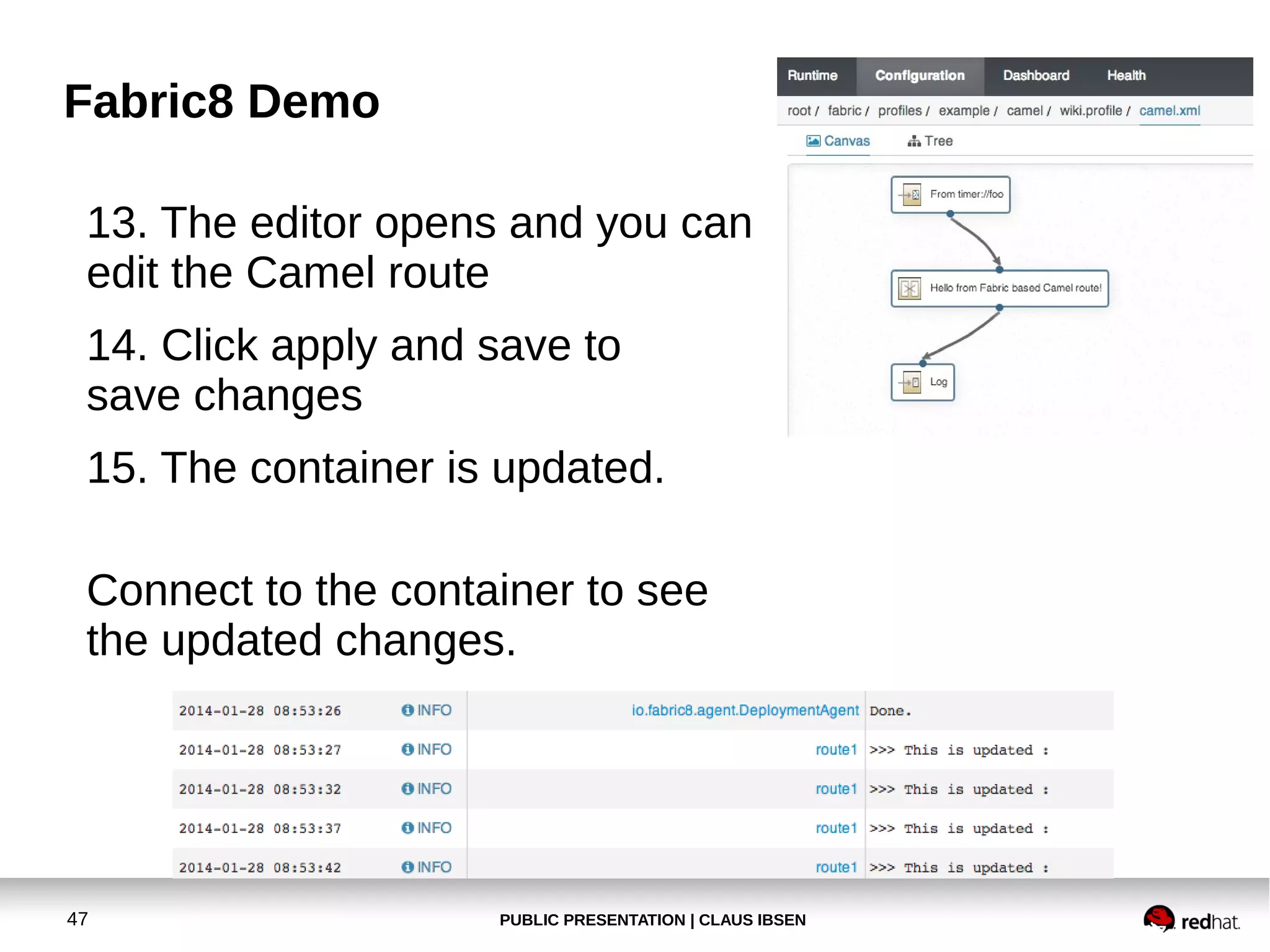
13. The editor opens and you can
edit the Camel route
14. Click apply and save to
save changes
15. The container is updated.
Connect to the container to see
the updated changes.

47

PUBLIC PRESENTATION | CLAUS IBSEN
Fabric8 Demo
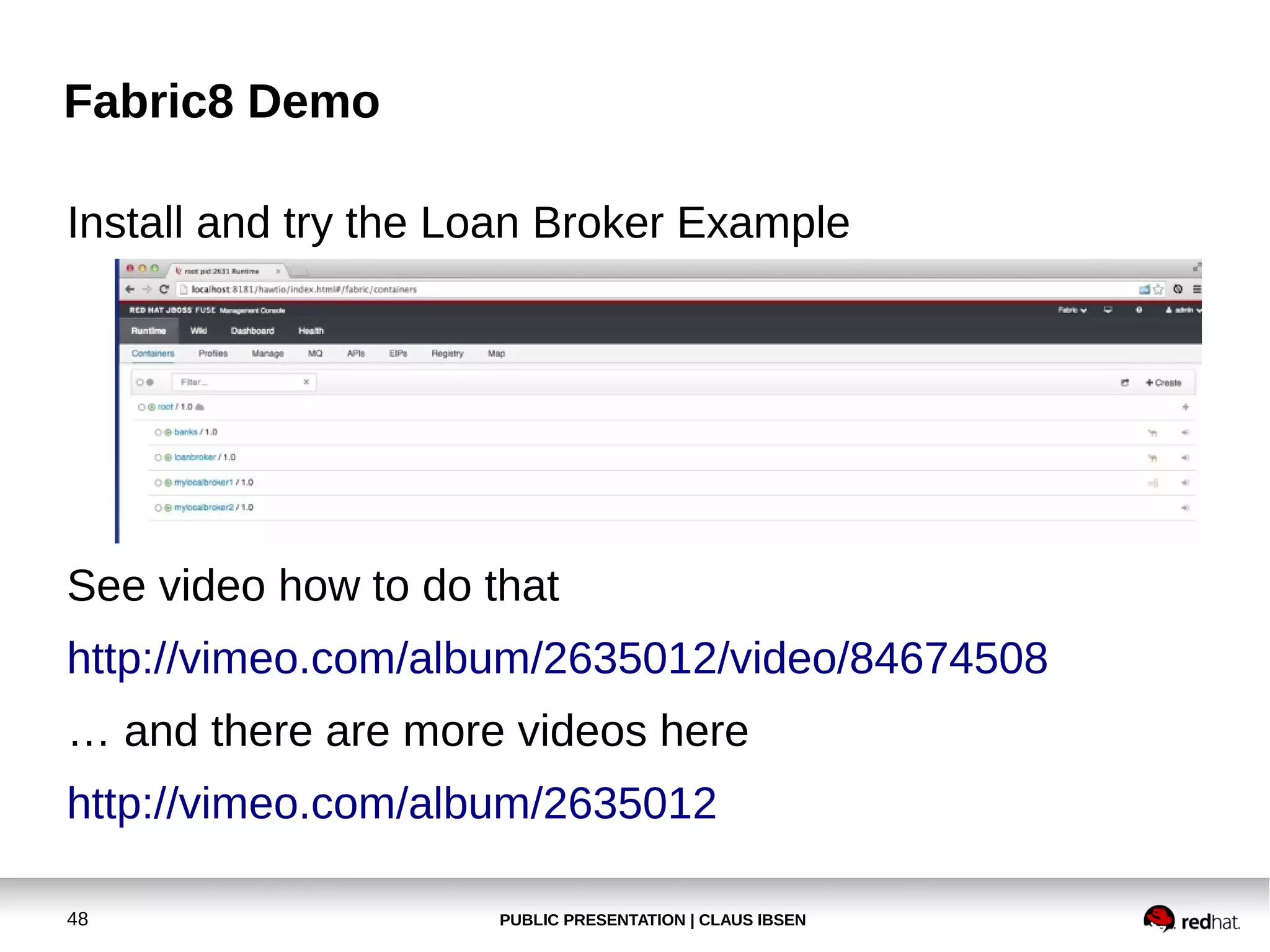
Install and try the Loan Broker Example

See video how to do that
http://vimeo.com/album/2635012/video/84674508
… and there are more videos here
http://vimeo.com/album/2635012
48

PUBLIC PRESENTATION | CLAUS IBSEN

Apache Camel workshop at BarcelonaJUG in January 2014

  • 1.
    Workshop with ApacheCamel Claus Ibsen (@davsclaus) Principal Software Engineer, Red Hat Barcelona JUG, january 2014 1 PUBLIC PRESENTATION | CLAUS IBSEN
  • 2.
    Agenda ● Prerequisite ● Try 1st CamelExample ● Create new Camel project ● Deploy our application to Apache Tomcat ● Modify the application and use servlet/restlet ● Install hawtio in Apache Tomcat ● ● 2 REST project with Apache CXF-RS Fabric8 Demo PUBLIC PRESENTATION | CLAUS IBSEN
  • 3.
    Pre-Requisite ● ● Maven 3.0.4 (or3.1.1 most likely works now) ● Eclipse, IDEA or NetBeans ● Apache Camel 2.12.2 ● 3 Java 7 hawtio 1.2.2 PUBLIC PRESENTATION | CLAUS IBSEN
  • 4.
    Agenda ● Prerequisite ● Try 1st CamelExample ● Create new Camel project ● Deploy our application to Apache Tomcat ● Modify the application and use servlet/restlet ● Install hawtio in Apache Tomcat ● ● (REST project with Apache CXF-RS) ● REST project with Apache CXF-RS ● 4 (Create new Java Camel project) Fabric8 Demo PUBLIC PRESENTATION | CLAUS IBSEN
  • 5.
    Try 1st ApacheCamel Example ● Extract Apache Camel 2.12.2 ● Read the readme file and follow instructions Mind a little bug in Camel 2.12.2 in the camel-stream component. Is fixed in 2.12.1 and upcoming 2.12.3 5 PUBLIC PRESENTATION | CLAUS IBSEN
  • 6.
    Try 1st ApacheCamel Example ● Exercise 1 Make the example lower case instead! 6 PUBLIC PRESENTATION | CLAUS IBSEN
  • 7.
    Try 1st ApacheCamel Example ● Open example in IDE ● 7 IDEA is just open project → locate the pom.xml file PUBLIC PRESENTATION | CLAUS IBSEN
  • 8.
    Try 1st ApacheCamel Example ● Open example in IDE ● 8 Eclipse → File → Import … → Existing Maven Project PUBLIC PRESENTATION | CLAUS IBSEN
  • 9.
    Try 1st ApacheCamel Example ● Open example in IDE ● 9 Select root folder … PUBLIC PRESENTATION | CLAUS IBSEN
  • 10.
    Try 1st ApacheCamel Example ● 10 Edit the source code src/main/resources/META-INF/ spring/camel-context.xml PUBLIC PRESENTATION | CLAUS IBSEN
  • 11.
    Try 1st ApacheCamel Example ● Run the example from IDE ● … type the command which was listed in the readme 11 PUBLIC PRESENTATION | CLAUS IBSEN
  • 12.
    Try 1st ApacheCamel Example ● Run the example from IDE ● … type the command which was listed in the readme 12 PUBLIC PRESENTATION | CLAUS IBSEN
  • 13.
    Try 1st ApacheCamel Example ● 13 The console is within the IDE PUBLIC PRESENTATION | CLAUS IBSEN
  • 14.
    Try 1st ApacheCamel Example ● Run Maven in IDEA I had to override maven home to 'fix this' 14 PUBLIC PRESENTATION | CLAUS IBSEN
  • 15.
    Agenda ● Prerequisite ● Try 1st CamelExample ● Create new Camel project ● Deploy our application to Apache Tomcat ● Modify the application and use servlet/restlet ● Install hawtio in Apache Tomcat ● REST project with Apache CXF-RS ● Fabric8 Demo 15 PUBLIC PRESENTATION | CLAUS IBSEN
  • 16.
    Create a newCamel project ● Exercise 2 Create a new Camel Web project, deployable in Apache Tomcat 16 PUBLIC PRESENTATION | CLAUS IBSEN
  • 17.
    Create a newCamel project ● Use the Maven Archetype ● ● 17 camel-archetype-web From the command line PUBLIC PRESENTATION | CLAUS IBSEN
  • 18.
    Create a newCamel project ● Or from IDE ● 18 File → New Project... → New Maven Project PUBLIC PRESENTATION | CLAUS IBSEN
  • 19.
    Create a newCamel project ● Or from IDE ● 19 Filter by Camel and select camel-archetype-web PUBLIC PRESENTATION | CLAUS IBSEN
  • 20.
    Create a newCamel project ● Build the WAR ● … and deploy to Apache Tomcat .. and start Tomcat … and see output on console 20 PUBLIC PRESENTATION | CLAUS IBSEN
  • 21.
    Create a newCamel project ● Exercise 3 Modify application to listen on HTTP endpoint and return a response message to client 21 PUBLIC PRESENTATION | CLAUS IBSEN
  • 22.
    Create a newCamel project ● Add camel-servlet to Maven pom.xml … add servlet in WEB-INF/web.xml 22 PUBLIC PRESENTATION | CLAUS IBSEN
  • 23.
    Create a newCamel project ● Add modify Camel route … build WAR and deploy to Tomcat by copying WAR … and try from browser 23 PUBLIC PRESENTATION | CLAUS IBSEN
  • 24.
    Create a newCamel project ● Modify Camel route to add content based router … build WAR and deploy to Tomcat by copying WAR … and try from browser 24 PUBLIC PRESENTATION | CLAUS IBSEN
  • 25.
    Create a newCamel project ● Exercise 4 Add Content Based Router and return two different kind of reply messages 25 PUBLIC PRESENTATION | CLAUS IBSEN
  • 26.
    Create a newCamel project ● Modify Camel route to add content based router … build WAR and deploy to Tomcat by copying WAR … and try from browser 26 PUBLIC PRESENTATION | CLAUS IBSEN
  • 27.
    Create a newCamel project ● Exercise 5 Install hawtio and browse the route and see runtime statistics Try to update the route from hawtio And try the debugger also. 27 PUBLIC PRESENTATION | CLAUS IBSEN
  • 28.
    Create a newCamel project ● Download hawtio 1.2.2 default WAR ● ● http://hawt.io/getstarted/index.html Copy .war to Apache Tomcat and rename to hawtio.war And access hawtio from web browser ● 28 http://localhost:8080/hawtio PUBLIC PRESENTATION | CLAUS IBSEN
  • 29.
    Create a newCamel project ● 29 Update route PUBLIC PRESENTATION | CLAUS IBSEN
  • 30.
    Create a newCamel project ● 30 Debug route PUBLIC PRESENTATION | CLAUS IBSEN
  • 31.
    Create a newCamel project ● Exercise 6 Modify application to use restlet for simple REST service as a Camel route 31 PUBLIC PRESENTATION | CLAUS IBSEN
  • 32.
    Create a newCamel project ● Add camel-restlet to Maven pom.xml … and modify route ● 32 After deploy to Apache Tomcat try from browser PUBLIC PRESENTATION | CLAUS IBSEN
  • 33.
    Create a newCamel project ● ● Notice we are using port 8081 and not the servlet container from Apache Tomcat. To do so see details at ● 33 http://camel.apache.org/restlet PUBLIC PRESENTATION | CLAUS IBSEN
  • 34.
    Agenda ● Prerequisite ● Try 1st CamelExample ● Create new Camel project ● Deploy our application to Apache Tomcat ● Modify the application and use servlet/restlet ● Install hawtio in Apache Tomcat ● REST project with Apache CXF-RS ● Fabric8 Demo 34 PUBLIC PRESENTATION | CLAUS IBSEN
  • 35.
    REST project withApache CXF-RS ● REST using pure Apache CXF (no Camel) ● Example ● ● 35 https://github.com/fabric8io/fabric8/tree/master/quickstarts/re Use JAX-RS annotations PUBLIC PRESENTATION | CLAUS IBSEN
  • 36.
    REST project withApache CXF-RS ● Setup Apache CXF-RS server ● 36 Easier to do in Spring or OSGi Blueprint XML file PUBLIC PRESENTATION | CLAUS IBSEN
  • 37.
    REST project withApache CXF-RS ● REST using pure camel-cxfrs (with Camel) ● Uses route(s) as input ● Define API in java interface/class (as if JAX-RS) ● ● ● Either as interface Or class implementation with no logic Two binding modes ● Default ● Simple (in fact simpler and better) Sorry at this I didn't have the time to implement a Camel cxf-rs example for you 37 PUBLIC PRESENTATION | CLAUS IBSEN
  • 38.
    Agenda ● Prerequisite ● Try 1st CamelExample ● Create new Camel project ● Deploy our application to Apache Tomcat ● Modify the application and use servlet/restlet ● Install hawtio in Apache Tomcat ● REST project with Apache CXF-RS ● Fabric8 Demo 38 PUBLIC PRESENTATION | CLAUS IBSEN
  • 39.
  • 40.
    Fabric8 Demo ● Follow GettingStarted Guide ● Start Fabric8 http://fabric8.io 40 PUBLIC PRESENTATION | CLAUS IBSEN
  • 41.
    Fabric8 Demo Create Fabric (justuse admin/admin for credentials) … open web browser - http://localhost:8181/ 41 PUBLIC PRESENTATION | CLAUS IBSEN
  • 42.
    Fabric8 Demo Switch toFabric Perspective Install the camel wiki example 1. Click Configuration 2. Navigate up the tree → example → camel 3. Click wiki 42 PUBLIC PRESENTATION | CLAUS IBSEN
  • 43.
    Fabric8 Demo 4. Clickthe new button 5. Enter a container name 6. And click Create Container Container being created … 43 PUBLIC PRESENTATION | CLAUS IBSEN
  • 44.
    Fabric8 Demo 7. Clickcontainer to see its details 8. Click connect button to connect to it 9. And you see the logs of the container 44 PUBLIC PRESENTATION | CLAUS IBSEN
  • 45.
    Fabric8 Demo 7. Clickcontainer to see its details 8. Click connect button to connect to it 9. And you see the logs of the container 45 PUBLIC PRESENTATION | CLAUS IBSEN
  • 46.
    Fabric8 Demo 10. Closethe window and get back to the root container 11. Click on wiki to be able to edit the Camel route 12. Click on camel.xml to open Camel editor 46 PUBLIC PRESENTATION | CLAUS IBSEN
  • 47.
    Fabric8 Demo 13. Theeditor opens and you can edit the Camel route 14. Click apply and save to save changes 15. The container is updated. Connect to the container to see the updated changes. 47 PUBLIC PRESENTATION | CLAUS IBSEN
  • 48.
    Fabric8 Demo Install andtry the Loan Broker Example See video how to do that http://vimeo.com/album/2635012/video/84674508 … and there are more videos here http://vimeo.com/album/2635012 48 PUBLIC PRESENTATION | CLAUS IBSEN