



GOT AWESOME
THEME
FUNCTIONALITY?!
IT PROBABLY
NEEDS A PLUGIN


Core Functionality Plugin + TGM Plugin Activation + WP_Filesystem

By: Thomas Griffin / @jthomasgriffin / thomasgriffinmedia.com
A LITTLE BIT!
ABOUT ME
            I DEVELOP WORDPRESS FOR A LIVING
            
            I hold a degree in Business Management and
            Administration from the best college in the
            world – Appalachian State University.
            
            I officially started September 2010, but have
            been at this whole developing thing for around
            two years.
            
            Fun fact: I am a scratch golfer.
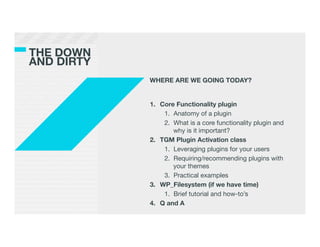
THE DOWN!
AND DIRTY
             WHERE ARE WE GOING TODAY?


             1.  Core Functionality plugin
                  1.  Anatomy of a plugin
                  2.  What is a core functionality plugin and
                      why is it important?
             2.  TGM Plugin Activation class
                  1.  Leveraging plugins for your users
                  2.  Requiring/recommending plugins with
                      your themes
                  3.  Practical examples
             3.  WP_Filesystem (if we have time)
                  1.  Brief tutorial and how-to’s
             4.  Q and A
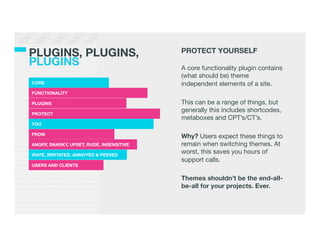
PLUGINS, PLUGINS,!                         PROTECT YOURSELF
PLUGINS
                                   !
                                           A core functionality plugin contains
                                           (what should be) theme
CORE
                                      independent elements of a site.
FUNCTIONALITY
                             
PLUGINS
                                   This can be a range of things, but
                                           generally this includes shortcodes,
PROTECT
                                           metaboxes and CPT’s/CT’s.
YOU
                                           
FROM
                                           Why? Users expect these things to
ANGRY, SNARKY, UPSET, RUDE, INSENSITIVE
   remain when switching themes. At
IRATE, IRRITATED, ANNOYED & PEEVED
                                           worst, this saves you hours of
                                           support calls.
USERS AND CLIENTS
                                           
                                           Themes shouldn’t be the end-all-
                                           be-all for your projects. Ever.
BECAUSE IF YOU DON’T, THIS HAPPENS…
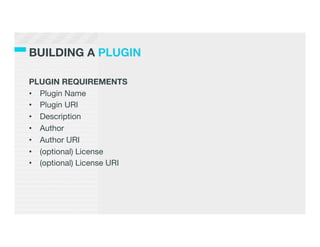
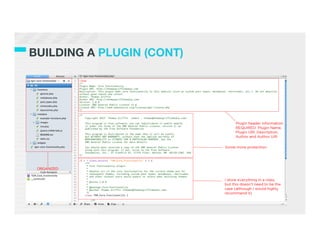
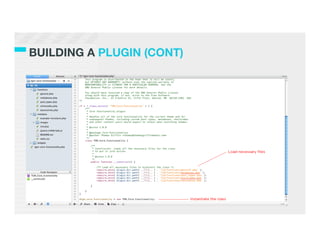
BUILDING A PLUGIN

PLUGIN REQUIREMENTS 
•  Plugin Name
•  Plugin URI
•  Description
•  Author
•  Author URI
•  (optional) License
•  (optional) License URI	
  
BUILDING A PLUGIN (CONT)

A COUPLE OF USEFUL FUNCTIONS
•  plugin_dir_path( __FILE__ )
    •  __FILE__ is a PHP constant that gets the full path and filename
       of the current file
•  plugins_url( $path, $plugin )
    •  $path is the path to whatever you are calling (e.g. an image or
       script)
    •  $plugin is the path to the plugin (we can use __FILE__ here)
•  Both are documented in the Codex – look them up
BUT WAIT

            I KNOW YOU ARE THINKING…


            How can I include plugins within a theme?
            How will users know how to install them?
            How can I give users a way to install them?
            What about private plugins?
            Can I pull plugins from WordPress repo?
            What about pre-packaged plugins?
            
            
            ENTER TGM PLUGIN ACTIVATION
TGM PLUGIN!
ACTIVATION
          TGM PLUGIN ACTIVATION is a PHP
          library that allows you to easily require or
          recommend plugins for your WordPress
          themes (and plugins). It allows your users
          to install and even automatically activate
          plugins in singular or bulk fashion using
          native WordPress classes, functions and
          interfaces. You can reference pre-
          packaged plugins, plugins from the
          WordPress Plugin Repository or even
          plugins hosted elsewhere on the internet.
          
          http://tgmpluginactivation.com
WHY !
USE IT?
           SIMPLE: IT IS SILLY NOT TO


           The library uses all of WordPress’ own
           classes and methods in the installation
           process.
             
           It even works for those users who have
           strict permissions. 
           
           And it works for MultiSite, too.
WHY !
USE IT? (CONT)
                  The are a number of benefits to using a
                  plugin for your functionality vs. including it
                  directly in the theme:
                  
                  1.  To reiterate, it saves you from having to
                      deal with “urgent” messes later
                  2.  Easy updating and management (WP
                      repo or even your own private repo)
                  3.  If the project allows, you can share your
                      code with others
                  4.  Users can’t mess their own site up (no
                      WSOD if they edit it incorrectly)

                  Let’s dive into the library, shall we?
WP_FILESYSTEM

WP_Filesystem is a function used to call various WP_Filesystem_*
classes depending on a user’s server setup.

There are 4 different “methods” that WP_Filesystem uses:
1.  Direct
2.  FTP
3.  FTP Sockets
4.  SSH2

WP_Filesystem will automatically choose the best method based
on the server setup.	
  
WHY WP_FILESYSTEM?

Writing local files, if not done correctly (err, not done with
WP_Filesystem), poses security risks.

Why? It is highly unlikely that your webserver user and your user
account are one in the same. Consider shared hosting – it has a
webserver user and lots of other users (like you on it). Give the
webserver user ownership of your files and now everyone has
access to them – no bueno.

In effect, WP_Filesystem makes sure that you in fact are the one
making changes to your files.
USING WP_FILESYSTEM?

Due to a lack of time, we’ll dive into the TGM Plugin Activation
library to see how WP_Filesystem is setup to process plugin
installations.

There is one important function you need to know, though:

request_filesystem_credentials( $form_post, $type, $error = false,
$context, $extra_fields )

And once setup, you can call the WP_Filesystem object:

global $wp_filesystem
WRAPPING UP

1.  Use a core functionality plugin when working on projects
2.  Don’t include functionality in a theme that should be in a plugin
3.  Require/recommend plugins within your distributed/
    commercial themes with the TGM Plugin Activation library
4.  Use WP_Filesystem to do any local file writing within your
    plugins or themes
THANKS!
FOR !
LISTENING!


                    QUESTIONS?


http://thomasgriffinmedia.com
http://twitter.com/jthomasgriffin
http://facebook.com/thomasgriffinmedia

WordCamp Atlanta Presentation

  • 1.
    GOT AWESOME THEME FUNCTIONALITY?! IT PROBABLY NEEDSA PLUGIN Core Functionality Plugin + TGM Plugin Activation + WP_Filesystem By: Thomas Griffin / @jthomasgriffin / thomasgriffinmedia.com
  • 2.
    A LITTLE BIT! ABOUTME I DEVELOP WORDPRESS FOR A LIVING I hold a degree in Business Management and Administration from the best college in the world – Appalachian State University. I officially started September 2010, but have been at this whole developing thing for around two years. Fun fact: I am a scratch golfer.
  • 3.
    THE DOWN! AND DIRTY WHERE ARE WE GOING TODAY? 1.  Core Functionality plugin 1.  Anatomy of a plugin 2.  What is a core functionality plugin and why is it important? 2.  TGM Plugin Activation class 1.  Leveraging plugins for your users 2.  Requiring/recommending plugins with your themes 3.  Practical examples 3.  WP_Filesystem (if we have time) 1.  Brief tutorial and how-to’s 4.  Q and A
  • 4.
    PLUGINS, PLUGINS,! PROTECT YOURSELF PLUGINS ! A core functionality plugin contains (what should be) theme CORE independent elements of a site. FUNCTIONALITY PLUGINS This can be a range of things, but generally this includes shortcodes, PROTECT metaboxes and CPT’s/CT’s. YOU FROM Why? Users expect these things to ANGRY, SNARKY, UPSET, RUDE, INSENSITIVE remain when switching themes. At IRATE, IRRITATED, ANNOYED & PEEVED worst, this saves you hours of support calls. USERS AND CLIENTS Themes shouldn’t be the end-all- be-all for your projects. Ever.
  • 5.
    BECAUSE IF YOUDON’T, THIS HAPPENS…
  • 6.
    BUILDING A PLUGIN PLUGINREQUIREMENTS •  Plugin Name •  Plugin URI •  Description •  Author •  Author URI •  (optional) License •  (optional) License URI  
  • 7.
  • 8.
  • 9.
    BUILDING A PLUGIN(CONT) A COUPLE OF USEFUL FUNCTIONS •  plugin_dir_path( __FILE__ ) •  __FILE__ is a PHP constant that gets the full path and filename of the current file •  plugins_url( $path, $plugin ) •  $path is the path to whatever you are calling (e.g. an image or script) •  $plugin is the path to the plugin (we can use __FILE__ here) •  Both are documented in the Codex – look them up
  • 10.
    BUT WAIT I KNOW YOU ARE THINKING… How can I include plugins within a theme? How will users know how to install them? How can I give users a way to install them? What about private plugins? Can I pull plugins from WordPress repo? What about pre-packaged plugins? ENTER TGM PLUGIN ACTIVATION
  • 11.
    TGM PLUGIN! ACTIVATION TGM PLUGIN ACTIVATION is a PHP library that allows you to easily require or recommend plugins for your WordPress themes (and plugins). It allows your users to install and even automatically activate plugins in singular or bulk fashion using native WordPress classes, functions and interfaces. You can reference pre- packaged plugins, plugins from the WordPress Plugin Repository or even plugins hosted elsewhere on the internet. http://tgmpluginactivation.com
  • 13.
    WHY ! USE IT? SIMPLE: IT IS SILLY NOT TO The library uses all of WordPress’ own classes and methods in the installation process. It even works for those users who have strict permissions. And it works for MultiSite, too.
  • 14.
    WHY ! USE IT?(CONT) The are a number of benefits to using a plugin for your functionality vs. including it directly in the theme: 1.  To reiterate, it saves you from having to deal with “urgent” messes later 2.  Easy updating and management (WP repo or even your own private repo) 3.  If the project allows, you can share your code with others 4.  Users can’t mess their own site up (no WSOD if they edit it incorrectly) Let’s dive into the library, shall we?
  • 15.
    WP_FILESYSTEM WP_Filesystem is afunction used to call various WP_Filesystem_* classes depending on a user’s server setup. There are 4 different “methods” that WP_Filesystem uses: 1.  Direct 2.  FTP 3.  FTP Sockets 4.  SSH2 WP_Filesystem will automatically choose the best method based on the server setup.  
  • 16.
    WHY WP_FILESYSTEM? Writing localfiles, if not done correctly (err, not done with WP_Filesystem), poses security risks. Why? It is highly unlikely that your webserver user and your user account are one in the same. Consider shared hosting – it has a webserver user and lots of other users (like you on it). Give the webserver user ownership of your files and now everyone has access to them – no bueno. In effect, WP_Filesystem makes sure that you in fact are the one making changes to your files.
  • 17.
    USING WP_FILESYSTEM? Due toa lack of time, we’ll dive into the TGM Plugin Activation library to see how WP_Filesystem is setup to process plugin installations. There is one important function you need to know, though: request_filesystem_credentials( $form_post, $type, $error = false, $context, $extra_fields ) And once setup, you can call the WP_Filesystem object: global $wp_filesystem
  • 18.
    WRAPPING UP 1.  Usea core functionality plugin when working on projects 2.  Don’t include functionality in a theme that should be in a plugin 3.  Require/recommend plugins within your distributed/ commercial themes with the TGM Plugin Activation library 4.  Use WP_Filesystem to do any local file writing within your plugins or themes
  • 19.
    THANKS! FOR ! LISTENING! QUESTIONS? http://thomasgriffinmedia.com http://twitter.com/jthomasgriffin http://facebook.com/thomasgriffinmedia