WORD PROCESSING
Sanjaya Dharmadasa
B.Tech (Multimedia and Web Technology)
Word Processing
• Word processor is a type of application software that used to create all kinds of text
documents.
• It can also be used to add images, sound, charts in documents.
• A word processing software can provide the following facilities;
• Creation and editing
• Insert objects such as images
• Saving and retrieving
• Print preview and printing
• Spell checking and grammar
• Find and replace
• Mail merge
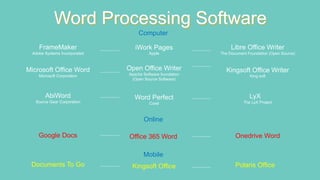
Word Processing Software
Microsoft Corporation
Microsoft Office Word
Apache Software foundation
(Open Source Software)
Open Office Writer
King soft
Kingsoft Office Writer
The LyX Project
LyX
Corel
Word Perfect
Source Gear Corporation
AbiWord
Adobe Systems Incorporated
FrameMaker
Apple
iWork Pages
The Document Foundation (Open Source)
Libre Office Writer
Onedrive Word
Office 365 Word
Google Docs
Polaris Office
Kingsoft Office
Documents To Go
Computer
Online
Mobile
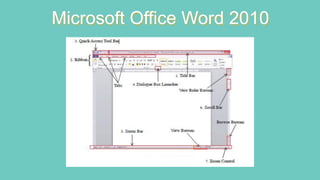
Microsoft Office Word 2010
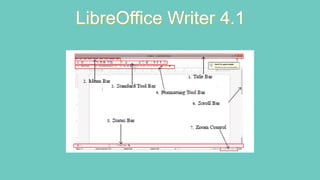
LibreOffice Writer 4.1
Shortcut
Keys
Ctrl + N - Get a new document
Ctrl + S - Name the document and to save
Ctrl + O - Open a document
Ctrl + A - Select the document
Ctrl + C - Copy letters / objects
Ctrl + X - Cut letters / objects
Ctrl + V - Paste letters / objects
Ctrl + H - Replace words
Ctrl + F - Find word
Ctrl + B - Bold
Ctrl + U - Underline
Ctrl + I - Italic
Ctrl + [ or ] - Change font size
Ctrl + E, R or W -Change paragraph alignment
Ctrl + HOME - Get the cursor to the opening of the document
Ctrl + END - Get the cursor to the end of the document
THANK YOU

Word processing Package

  • 1.
    WORD PROCESSING Sanjaya Dharmadasa B.Tech(Multimedia and Web Technology)
  • 2.
    Word Processing • Wordprocessor is a type of application software that used to create all kinds of text documents. • It can also be used to add images, sound, charts in documents. • A word processing software can provide the following facilities; • Creation and editing • Insert objects such as images • Saving and retrieving • Print preview and printing • Spell checking and grammar • Find and replace • Mail merge
  • 3.
    Word Processing Software MicrosoftCorporation Microsoft Office Word Apache Software foundation (Open Source Software) Open Office Writer King soft Kingsoft Office Writer The LyX Project LyX Corel Word Perfect Source Gear Corporation AbiWord Adobe Systems Incorporated FrameMaker Apple iWork Pages The Document Foundation (Open Source) Libre Office Writer Onedrive Word Office 365 Word Google Docs Polaris Office Kingsoft Office Documents To Go Computer Online Mobile
  • 4.
  • 5.
  • 6.
    Shortcut Keys Ctrl + N- Get a new document Ctrl + S - Name the document and to save Ctrl + O - Open a document Ctrl + A - Select the document Ctrl + C - Copy letters / objects Ctrl + X - Cut letters / objects Ctrl + V - Paste letters / objects Ctrl + H - Replace words Ctrl + F - Find word Ctrl + B - Bold Ctrl + U - Underline Ctrl + I - Italic Ctrl + [ or ] - Change font size Ctrl + E, R or W -Change paragraph alignment Ctrl + HOME - Get the cursor to the opening of the document Ctrl + END - Get the cursor to the end of the document
  • 7.