EXPERT ADVICE FROM START TO FINISH
MICHAEL LITCHFIELD
& MICHAEL McALISTER
EXPERT ADVICE FROM START TO FINISH
Text by Michael W. Litchfield and Michael McAlister,
© 2008 by The Taunton Press, Inc.
Photographs © 2008 by The Taunton Press, Inc., except as noted.
Illustrations © 2008 by The Taunton Press, Inc.
All rights reserved.
I
T ITh
eTau
n
to
nPress
]nspira(;on for hand.oon living"
The Taunton Press, Inc.,
63 Sout h Main Street, PO Box 5506,
Newtown, CT 06470-5506
e-mail: tp@taunton.com
Editors: Matthew Teague, Helen Albert
Copy editor: Candace 8. Levy
Indexer: Jay Kreider
Jacket/Cover design: Kimberly Adis
Interior design: Kimberly Adis
Layout: Cathy Cassidy
Illustrator: Trevor Johnston
Photographer: Michael Litchfield, except where noted.
Library of Congress Cataloging-in-Publication Data
Litchfield, Michael.
Wiring complete / Michael Litchfield and Michael McAlister. -- Rev. ed.
p. em.
Includes index.
ISBN 978+6008S ~256 ~5
1. Electric wiring, Interior. 2. Dwellings-'Electric equipment. I. McAlister, Michael.
II. Title.
TK3285.L542008b
62I.3F24~~dc22
200B054144
Printed in the United States of America
1098765432
Dozens of people made this book possible. We are
especially indebted to the electricians and builders
who got us onto job sites and allowed us to photoqraph
them at work. Thanks to old friend Rafael Maldonado
of Blue Electric in Berkeley, California, for sharing his
vast knowledge and his crew, particularly Isaac Castro,
Jorqe Dominquez, and Carios GUerrero. Huqe thanks to
the unflappable Daniel Kealey, Nathan Parker, and Din
Abdullah of MRM Electrical, Berkeley. LIkewise, Kevin
McCarthy, Simon Jordan, Ki Soo An, and Jimmy Stuart.
A million thanks to Mike Zelinka and colleagues at Laner
Electric in Richmond, California.
We are qrateful to Jana Olson, Karen Cornell, and John
Nicoles of Omega Too Lighting In Berkeley for the excel-
lent sequences of lamp and chandelier repair. Thanks
also to Nowell's Antique Lightinq in Sausalito, California.
Hats off to Jamie Carlen and Chris D'Andrea of
Jamie Carlen & Co., Berkeley; and Chip Harfey, Jesus
Beltran, and Gelber Guzman of Holfand-Harley. Thanks
to supremely talented architect Gary Earl Parsons of
Berkeley and his associate Cecil Lee.
Thanks to Roqer Robinson of the Star inspection
Group, Oakland, California, for letting us cherry-pick his
photo archiVe of code violations; Casablanca Fans for
product shots; Muffy Kibbey for photos of the handsome
kitchen in the planninq chapter; and Ken Gutmaker for
photos that first appeared in Renovation, 3rd Edition
(Taunton, 2005).
Thanks to homeowners Catherine Moncrleff and
Stuart Brotman, Martha and Dean Rutherford, Judith
and Stanley Lubman, Laurie Case, and Andy Baker.
Finally, high-fives to the Taunton Press family and
friends, Including Executive Editor Helen Albert, Wendl
Mijal, Matthew Teaque, Jennifer Peters, Nicole Palmer,
Julie Hamilton, Sandor Naqyszalanczy, Rex Cauldwell,
Clifford Popejoy, Joseph Truini, Mike Guertin, and
Fernando Paqes Rulz.
-Michael Litchfield and Michael McAlister
The following manufacturers/names used in Wiring Complete are trademarks: Adapt-Touch™
, American Aldes™, BernzOmatic™
, Broan-NuTonesM, Capsylite®,
Casablanca® Fan Co., Channeliock®, Clikstrip®, Code Check®, Condulet®, COPALUM®, Cutler'Hammer®, Decora®, DeWALT®, Fantech®, Federal Pacific®,
Fluke®, Greenlee® Nail Eater™, Grip-lok™, Halogen Capsylite®, Hubbell®, Hunter®, Ideal®, InSinkErator®, International Code Council®, Juno®, Kelvar®,
Klein ToolsTM
, Knipex®, Kobe®, Legrand®, lemnis®, Leviton®, Ughtolier®, lutron®, Milwaukee®, National Electrical Code®, Nouvelie® fan, Panasonic®,
Panduit®, Philiips®, PowerFast®, Romex®, Roto-Spilt®, Rotozip®, Scandia® fan, Seatek®, Snap-Tite®, Speed® Square, Square D®, Strap Gun®, Tech
Ughting®, Tech lightingS
"I, Vol'Con® lite, Watt Stopper®, WD-40®, Wiggy®, Wire'Nut®, Zinsco®
Wiring is inherently dangerous. Using hand or power tools improperly or ignoring safety practices can lead to permanent injury or even
death. Don't try to perform operations you learn about here (or elsewhere) unless you're certain they are safe for you. If something
about an operation doesn't feel right, don't do it . Look for another way. We want you to enjoy wor king on your home, so please keep
safety foremost in your mind.
..., .
6 Understanding Electricity
7 Working Safely
8 Service Panels
10 Home Electrical Systems
12 Grounding Basics
14 Evaluating the Electrical
System
CUTTING POWER
16 Cutting Power at
the Panel
17 Testing with a Neon
Tester
18 Testing with an
Inductance Tester
..
22 Hand Tools
23 Power Tools
24 Electrical Testers
ELECTRICA~ BOXES
25 Choosing Electrical Boxes
Z1 Installing New
Work Boxes
28 Removing Knockouts
29 Mounting Devices
CABLES & WIRES
30 Cable &Conduit
32 Cable Clamps &Clips
33 Securing Cable to
Framing
34 Stripping Cable with
a Utility Knife
35 Stripping Cable with
a Cable Ripper
36 Choosing Wire
37 Stripping & Splicing Wires
TOOLS & MATERIALS
40 Choosing Receptacles
&Switches
42 Back-Wired Devices
43 Testing for Power
WIRING RECEF'TACLES
44 Two Ways to Wire a Receptacle
45 Wiring a Duplex Receptacle
47 Making Receptacle Boxes
Flush to Orywall
48 Wiring a GFCI Receptacle
49 Wiring a Split-Tab Receptacle
TESTING DEVICES
50 Testing a Single-Pole Switch
51 Testing a Three-Way Switch
51 Testing a Four-Way Switch
WIRING SWITCHES
52 Wiring a Single-Pole Switch
53 Single-Pole Switch
with Back-Fed Wiring
54 Replacing a Single-Pole Switch
56 Wiring a Linear Slide Dimmer
58 Roughing In a Three-Way Switch
59 Wiring a Three-Way Switch
60 Wiring a Back-red Three-Way Switch
61 Wiring a Four-Way Switch
WIRING SPECIALTY SWITCHES
62 Wiring a SWitch/Receptacle Combo
63 Wiring a Double Switch
63 Wiring a Motion Detector
64 Wiring an Electronic Timer Switch
65 Wiring a Manual Timer
n
o
::::I
....
II)
::::I
....
en
»»»»
en
...
c
.!
c
8
; .
68 Fixture Wiring
69 Bulb Types
70 Testing Lamps &
Removing Old Wires
72 Rewiring a Lamp
74 Replacing a Plug
75 Refurbishing a
Chandelier
BASIC fiXTURES
78 Mounting Light Fixtures
80 Installing a Simple
Porcelain Fixture
•
82 Removing an Existing
Wall Sconce
83 Connecting a New
Sconce
84 Installing Halogen Bulbs
& Accessories
CHANDELIERS
85 Prepping & Mounting
a Ceiling Box
86 Disconnecting a
Chandelier
f57 Installing a Chandelier
RECESSED LIGHTING
88 Cutting a Ceiling Hole
lor Recessed Lighting
90 Wiring a Recessed
Fixture
91 Securing the Can
UNDERCABINET
fLUORESCENTS
92 Undercablnet
Fluorescent Fixtures
94 Low-Voltage Systems
95 Installing Low-Voltage
cable Lighting
95 Anchoring Low-Voltage
Standoffs
96 Running Cable
97 Tensioning Cables
98 Locating the Canopy
99 Mounting the Box &
Wiring the Transformer
101 Installing the Canopy
102 Attaching the reed Rods
&Fixtures
103 Installing Low-Voltage
Monorail Track Lighting
104 Locating the Track
& Standoffs
105 Mounting & Wiring
the Transformer
106 Hanging the Track
107 Installing the Light
Fixtures
...-:
110 Troubleshooting
a Doorbell
113 Replacing a Ooorbell
Switch
114 Installing a Chime Unit
115 Installing a Doorbell
Transformer
THERMOSTATS
116 Testing an Old
Thermostat
117 Installing a
Programmable
Thermostat
118 Replacing a Furnace
Transformer
TOOLS & MATERIALS
122 Multimedia Cables
&Connectors
123 Stripping Cable
• •• •
124 Extending a Phone Line
126 Mounting a New Jack
DISTRIBUTION PANELS
127 Mounting a Media
Distribution Panel
130 Running Cables to a
Media Distribution Panel
131 Connecting Cables
at the Panel
132 Locating the
Multimedia Outlet
133 Installing Cable
Connectors
134 Connecting Panduit
Jacks
135 Installing Leviton Jacks
136 Attaching Jacks to
an Outlet Plate
WIRING :rIPS
140 Before You Begin
...
141 Choosing a Bathroom Fan
142 Locating a Bathroom Fan
143 Installing the Roof Vent
145 Mounting the Fan Box
146 Retrofitting a Bathroom
ran
147 Wiring a Bathroom Fan
•••
149 Mounting & Dueling
a Ranqe Hood
150 Wiring the Range Hood
CEILING FANS
152 Installing the Ceiling
Fan Box
154 Mounting the Ceiling ran
•• •
158 Inspecting the Fuse Box
or Breaker Panel
160 Assessing Wiring
Condition
161 Is the System Adequately
Sized?
••• • ..
163 Common Code
Requirements
164 General-Use Circuit
Requirements
WORKING DRAWINGS
165 Developing a Floor Plan
168 Electrical Notation
170 Receptacles
172 Switches & Lights
174 Receptacles. Switches &
Lights
GETTING S:rARTED
1
78 Rough-In Basics
180 Toolsfor Rough-In
182 Materials for Rough-In
184 Laying Out the Job
• :0
186 Installing Wall Boxes
187 Installing Ceiling Boxes
RUNNING CABLE
188 Drilling for Cable
189 Pulling Cable
190 Feeding Cable through
Corners
191 Fishing Cable behind
rlnish Walls
192 Fishing Cable to a
Ceiling Fixture
..
194 Cutting a Wall Box into
Plaster
194 Cutting a Wall Box Into
Drywall
195 Retrofitting a Ceiling Box
1
96 Creating a Wiring Trench
197 Retrofitting Boxes &
Pulling Cable
MAKING UP BOXES
198 Making Up an Outlet 80x
199 Making Up a Light Can
200 Making Up a Single
Switch Box
201 Making Up a Multigang
Switch Box
202 Flexible Metal Cable
203 Installing AC Cable
204 Installing MC cable
205 Working with EMT Steel
Conduit
206 Making Turns with Metal
Conduit
207 rlshing Cable &Conduit
208 Prepping Receptacles
for Surface Metal Boxes
209 Wiring Outlets
»»»»
en
..c
.!
c
:3
: .
212 A QulckLook at
Kitchen Appliances
213 Preparing an Unfinished
Appliance Cord
GARBAGE DISPOSERS
214 Installing a Garbage
Disposer
•
216 Roughing In an Oven
Outlet
217 Wiring a Drop-In Oven
218 Wiring Laundry Setups
220 Installlnq Baseboard
Heaters
221 Electric Water Heaters
.- •
224 Planning Your Outdoor
System
225 Choosing Outdoor Lights
226 Tools &Materials
OUTDOOR OUTLETS
228 Tapping Into an Existing
Outlet
230 Mounting & Wiring an
Exterior Outlet
OUTBUILDINGS
231 Running Power to
an Outbuilding
. ".... ~ ,
233 Installing Low-Voltage
Path Lights
MOTION-SENSOR LIGHTS
235 Installing a Motion-
Sensor Ught
.- •
238 Understanding Service
Panels& Subpanels
240 Sizing Panels. Subpanels
& Conductors
CIRCUIT BREAKERS
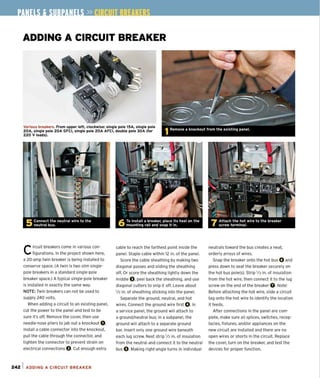
242 Adding a Circuit 8reaker
SUBPANELS
244 Installing a Subpanel
INTRODUCTIO
Electrical wiring requ ires atten-
tion to detail, patience. and a
little dexterity. but it's nothing the
average homeowner can't tackle.
Before you buckle on that tool belt,
however. take a few moments to
read the first section. which pro·
vides an overview of electrical
systems and a handful of essential
safety tips. Section Two walks you
through the tools you'll need and
various techniques you'll use again
and again. The remainder of the
book takes you through every
step of the wiring process-from
replac ing an old light fi xture to
wiring an entire house.
Before you buy tools and materi-
als, however, check with local build-
ing code authorities. Although most
local building codes do not forb id an
owner' s doing his or her own elec-
trical work. most require a rough
inspection-that is, before wires are
connected to switches, receptacles
and so on-and a final inspection
when everything is wired, trimmed,
and tested. Besides, building inspec-
tors are usually knowledgeable: They
can tell you if local codes conform
to the National Electrical Code® or,
if not, how they vary. Finally, ch eck
with your insurance agent t o make
sure that doing your own electrical
work won' t jeopardize your home-
owners insurance coverage.
3
----,1
4
ORKING WITH
LECTRICITY
B
EFORE WORKING WITH electricity, es.entlol to worklnll sofely. Alwoys follow
you should hove 0 basic understond- the Instructions corefully, use opproprlote
Inll of how It works. This chopter Is sofety equipment, ond when In doubt con-
desillned to IIlve you 0 quick overview of the suit 0 licensed electrlclon.
electrlcol system In your home, Includlnll
the moJor components. Since IIroundlnll Is
e.sentlol to keeplnll you sofe, we cover thot
In detoll. We'll olso show how to do 0 boslc
Inspection of your home for wlrlnll prob-
lems. Respectlnll the power of electricity Is
aefore belllnnlnll work, check with locol
bulldlnll authorities to moke sure locol
requlotlons ollow you to do your own work
ond thot you ore conformlnll to locol code
requirements.
UNDERSTANDING ELECTRICITY
The easiest way to understand how electricity flows is to visualize
water flowing through a pipe. Electricity (flowing electrons called
current) moves through a circuit like water in a pipe. Just as the flow
of water is measured in gallons per minute, the electrical flow of elec-
trons is measured in "amperes" or amps. Water pressure is measured
in pounds per square inch, and the force of electrons in a circuit is
measured in volts. The larger the pipe, the more water that can flow
through it; likewise, the larger wires allow a greater flow of electrical
current. Too much water can rupture a pipe. Wiring that is too small
will resist the flow of current. If that resistance (measured in ohms) is
too great. the wires can melt and cause a fire.
CIRCUIT BASICS
Electricity always flows in a circuit. The hot wire carries
the current from the power source to the fixture and the
neutral wire returns it to the power source.
Ground wlr'.- - - - -F
Black
"hot"
wlr. "--'::-:i!'"
White
"neutral"
""'''-.J--,- wire
-";::;:- - - - Fixture
61UNDERSTANDING ELECTRICITY
AC (alternating current) electrical systems can be thought of
as a loop that runs from the generation point (or power source)
through utilization equipment (a light bulb for instance) and back
to the generation point. Along the way it may cross the country
through great transmission lines, through the power lines on your
street, and through the cables in the wa!ls of your house. In your
home, the main loop, that is the service to your home, is broken into
smaller loops ca lled Circuits. Typically, a hot wire (usually black or
red) carries current to the utilization equipment from the service
pane!, and a neutral wire (typically white or light gray) carries
current back to the service panel.
Key Terms
Power (Volt-Amps or VA)
The potential in the system to create
motion (motors), heat (heaters), light (fix-
tures or lamps), etc. Volt-amps =available
volts x available amps (VA).
Watts
Are a measure of power consumed. Watts
are very similar to volt-amps, the main
difference being that some energy is lost
through heat and/or inherent inefficiencies
in equipment.
Voltage
Voltage is the pressure of the electrons
in a system. Voltage is measured in volts.
Amperes (Amps)
The measure of the volume of electrons
flowing through a system (current).
Current
The flow of electrons in a system. Current
is measured in amperes (amps'. There are
two types of current: DC (direct current)
and AC (alternating current). Typically
AC is found in homes and buildings.
Ohms
Ohms is the measure of resistance to
the flow of electrons (current) in a material
(like a cable). The higher the resistance,
the lower the flow of electrons.
WORKING SAFELY
To work safely with electricity you must
respect its power. If you understand its
nature and heed the safety warnings in this
book-especially shutting off the power and
testing with a voltage tester to make sure
power is off-you can work with it safely. The
cardinal rule of home-improvement projects,
which goes double for electrical work, is:
Know your limitations. Unless you have previ-
ous experience doing electrical work and feel
confident about your skills, you should leave
certain projects to a pro. Working inside a
service panel or removing its cover can be
especially dangerous. There is an area
around the main breaker that remains hot
even after the breaker is set to the off posi-
tion. Never attempt to remove or repair the
main service panel or the service entrance
head. When in doubt, call a licensed electri-
cian rather than risk harm.
For most projects, careful attention to fol-
lowing the instructions in this book will keep
you safe and ensure good results. Where
there is a particular risk in a project, we will
call attention to it with a warning, such as
the following:
WARNING
Please read this information
carefully as it could save you
from serious injury.
Always wear appropriate safety gear,
including rubber-soled shoes, gloves
(if working with cables, wires, or metal
boxes); and safety glasses and a dust
mask (when sawing or working overhead).
And remember that current flows most
easily along a path of least resistance, but
it will follow any path that's available ...
including you!
Turn off the power to the circuit at the
main service panel before removinq
receptacle, switch, or fi xture covers.
Wear qloves to protect your hands
from the sharp edqes of wires, cables,
and metal boxes.
After removinq the plate or cover, test
aqain to make sure power is off.
Wear safety qlasses when sawinq or
drillinq, especially when workinq overhead.
WORKING SAfELY I 7
SERVICE PANELS
At the main service panel, the two
hot cables from the meter base
attach to lug terminals atop the main
breaker. The incoming neutral cable
attaches to the main lug of the neu+
tral!ground bus. In main service panels,
neutral/ground buses must be bonded,
usually by a main bonding jumper.
In subpanels and all other locations
downstream from the main service
pane!, ground and neutral buses must
be electrically isolated from each other.
In a main fuse box, the hot cables
attach to the main power lugs, and
the neutral cable to the main neutral
lug. Whether the panel has breakers
or fuses, metal buses run from the
bottom of the main breaker/main fuse.
Running down the middle of the pane!.
buses distribute power to the various
branch circuits. Similarly, neutral/
ground buses are long aluminum
strips with many screws, to which
ground and neutral wires attach.
Each fuse or breaker is rated at
a specific number of amps, such as
15 or 20. When a circuit becomes
overloaded, its current flow becomes
excessively high. This causes its
breaker to trip or its fuse strip to melt,
thereby cutting voltage to the hot
wires. All current produces heat; but
as current doubles, the heat generated
quadruples. If there were no break-
ers or fuses, current would continue
flowing until the wires overheated
and a fire started. Thus the amper-
age ratings of breakers and fuses are
matched to the size (cross-sectional
area) of the circuit wires.
The main breaker
All electricity entering a house goes
through the main breaker, which is
usually located at the top of a main
panel. In an emergency, throw the
main breaker switch to cut all power
to the house. The main breaker is also
81SERVICE PANELS
INSIDE THE SERVICE PANEL
The main panel houses incoming cables
from the meter as well as the breakers
and wires that distribute electricity to
individual circuits. At the service, neutral
conductors (white wires), equipment-
grounding conductors (bare copper or
green insulated wires), the metal service
panel, and the grounding electrode system
(grounding rods) must be bonded together.
Incominq
-i----I-qround
Hot feeder lines
--t!---- .---'-- (incominq power)
Incomlnq
neutral
Main breaker
Hot bus bar
(behind breakers)
;;;1iI~1 =.- Neutral bus bar
o
Ground bus bar
breaker
cable attaches
here.
- +t- Mlain bondinq
Jumper
-,+jHiot buses
t-~~:::::::::::::2~~W for circuit cables
on all sides
of panel
the primary overcurrent protection
for the electrical system and is rated
accordingly. (The rating is stamped on
the breaker handle.) Thus if the main
breaker for a 200-amp panel senses
incoming current that exceeds its over-
load rati ng, the breaker will a utomat i~
cally trip and shut off all power.
Meter-main combos
Increasingly common are meter-main
combos, which house a meter base and
a main service panel in a single box.
Meter-main combos allow a homeowner
to put the main breaker outside the
house, where it can be accessed in an
emergency-say, if firefighters want
to cut the power to a blazing house
before they enter it. When the service
panel is located outside, electricians
typically locate the subpanel close by,
inside the house, to minimize runs of
large SER (service entrance) cable to
the subpanel.
Fuse boxes
Breaker service panels are the most
common type you'll find in today's
homes, but many older homes still
have fuse boxes. Fuses are among the
earliest overcurrent devices, and they
come as either Edison-type (screw-in)
fuses or cartridge (slide-in) fuses. The
Edison-style fuses that screw in like a
light bulb are more common, and they
have little windows that you can peer
into to see if the filament is separated.
Separation means that the circuit was
overloaded and the fuse has blown. A
blackened (from heat) interior could
mean a short circuit-a potentially
dangerous situation calling for the
intervention of a licensed electrician.
The less common cartridge fuses are
used to control 240-volt (240v) circuits
and are usually part of the main
disconnect switch.
A meter-main combo, placed outside the
house, provides easy access for service or
emerQencies.
LabelinQ breakers speeds identification
of the switch that turns off power to a device.
Stay away 'rom the area around the main A fuse box In a subpanel.
breaker switch. It remains hot and Is extremely
danqerous.
SERVICE PANELS I 9
HOME ELECTRICAL SYSTEMS
P
ower from the utility service
is commonly delivered through
three large cables, or conductors,
which may enter the house over-
head or underground. Overhead
service cables are called a service
drop. These cables run to a weather-
head atop a length of rigid conduit.
When fed underground, service
conductors are installed in buried
conduit or run as underground
service-entrance (USE) cable.
Whether it arrives overhead or
underground, three-wire service
delivers 240v.
Service conductors attach to a
meter base and then to the service
panel. Straddling the two sets of
terminals on its base, the meter
measures the wattage of electric-
ity as it is consumed. The ser vice
panel also routes power to various
circuits throughout the house.
The utility company wi ll install
cables to the building and will
install the meter. The homeowner is
responsible for everything beyond
that, including the meter base and
entrance panel, which a licensed
electrician should install.
WARNING
Whether the connection
is an SER cable clamped
to the lugs of a main
breaker or between wires
spliced together in an
outlet box, the connection
must be tight to be safe.
Otherwise, electricity
can leap a gap-it's called
arcing-and that could lead
to a house fire.
10 I HOME ELECT RICAL SYSTE MS
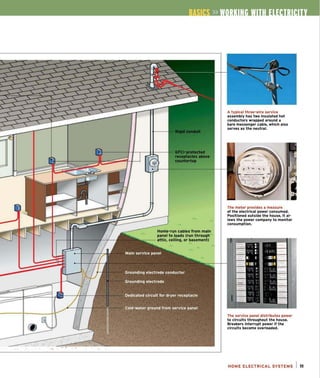
GFtl recep-
tacles detect
minuscule
current leaks
and shut off
power almost
Instantaneously.
They're Impor-
tant In kitchens
and bathrooms,
where water
and dampness
Increase the
potential for
shocks.
•
o
Modern three-prong outlets provide a
low impedance path to ground in case
a fault occurs.
Some appliances require 30-amp
service. This is a 125/250v dryer
receptacle. The breaker for this cir-
cuit must also be rated for 30 amps.
WIRING INSIDE OUT
o
Cable for
dining room
receptacles
Home-run cables from main
panel to loads (run throuqh
attic. cellinq. or basement)
A tvpical three-wire service
assembly has two Insulated hot
conductors wrapped around a
bare messenger cable, which also
serves as the neutral.
The meter provides a measure
of the electrical power consumed.
Positioned outside the house, it al-
lows the power company to monitor
consumption.
The service panel distributes power
to circuits throughout the house.
Breakers Interrupt power If the
circuits become overloaded.
HOME ELECTRICAL SYSTEMS I 11
GROUNDING BASICS
Because electricity moves in a circuit, it
wilt return to its source unless the path
is interrupted. The return path is through the
white neutral wires that bring current back to
the main panel. In the event that the current
seeks to return to the panel through a path
other than the neutral wire, ground wires
provide the current with an alternative low-
resistance path.
Why is this important? Before equipment-
grounding conductors (popularly called
ground wires) were widespread, people
could be electrocuted when they came
in contact with fault currents that uninten-
tionally energized the metal casing of a tool
or an electrical appliance. Ground wires
bond all electrical devices and potentia lly
current-carrying metal surfaces. This
bonding creates a path with such low
impedance (resistance) that fault currents
zip along it, quickly tripping breakers or
fuses and interrupting power. Contrary to
popular misconceptions, the human body
has a relatively high impedance (compared
to copper wire), so if electricity is offered a
path with less resistance (a copper ground
wire), it will take it.
-+See "Avoldlnq Eledrlcal
Shocks," below.
Individual ground wires connect to every
part of the electrica l system that could
become a potential conductor-metal boxes,
receptacles, fixtures-and, through three'
pronged plugs, the metallic covers and
frames of tools and appliances. The conduc'
tors, usually bare copper or green insulated
wire, create an effective path back to the
main service panel in case the equipment
becomes energized.
The neutral/ground bus
The ground wires attach to a neutral/ground
bus bar, which is itself bonded to the metal
panel via a main bonding jumper. If there's a
ground fautt in the house, the main bonding
AVOIDING ELECTRICAL SHOCKS
GROUND FAULTS
CAN KILL
Current flowing
through an unintended
conductor, such as
a person, is called
a qround fault.
Because only a
little current flowing
through your heart
can kill you, ground
faults can be fatal.
Likewise, you can
get badly shocked
by touching an
energized wire or
device with one hand
and touching the
other hand to a
neutral or ground
wire. In this case,
you become part
of the circuit and
current flows
through you.
12 I GROUNDING BASICS
Other hand
water pipe
The smaller copper wire at the top
runs to a ground rod; the thicker cop-
per wire below and the neutral wire
feed a subpanel within the house.
The main ground wire from the
service panel clamps to an a-ft.
rod-grounding electrode (or ground
rod) driven into the earth. It diverts
outside voltage, such as lightning
strikes.
Connections to cold-water pipes
prevent shocks should the pipes
become inadvertently energized.
jumper will ensure that the current can be
safely directed to the ground-away from the
house and the people inside. It is probably
the single most important connection in the
entire electrical system.
Also attached to the neutral/ground bus
in the service panel is a large, bare copper
ground wire-the grounding electrode con-
ductor (GEC)-that clamps to a grounding
electrode (also called a ground rod)-which
is driven into the earth or attached to steel
rebar in the footing of a foundation. The
electrode's primary function is to divert
lightning and other outside high voltages
before they can damage the building's
electrical system. Although the grounding
electrode system (GES) is connected to the
equipment grounding system at the service
panel, the GES has vi rtually nothing to do
with reducing shock hazards.
The National Electrical Code (NEC) sizes
grounding electrode conductors based
on the sizes and types of conductors in
the service. Typically, residential GECs are
size 6 American wire gauge (6AWG) copper.
Ground rods are typically sis-in. to 3/4-i n.
copper-clad steel rods 8 ft. to 10 ft. long; the
longer the rod, the more likely it will reach
moist soil, whose resistance is less than that
of dry soil. Be sure to install multiple rod
systems in lightning-prone areas.
GFeis
Ground-fault circuit interrupters (GFCls) are
sensitive devices that can detect even small
current leaks and shut off power almost
instantaneously. The NEC now requires GFCI
protection on all bathroom receptacles;
kitchen receptacles within 4 ft. of a sink; all
receptacles serving kitchen counters; ali out-
door receptacles; all accessible basement or
garage receptacles; and all receptacles near
pools, hot tubs, and the like.
-+ 5.. "Wlrlnq a GFCI Receptacle." on p. 48
MAJOR GROUNDING ELEMENTS
The equipment-qroundinq system acts as an expressway for stray current.
By bondlnq conductors or potential conductors, the system provides a low-
resistance path for fault currents_The abnormally hiqh amperaqe (current
flow) that results trips a breaker or blows a fuse, dlsconnectinq power to
the circuit.
Neutral/qround
bus
Larqe cop
qround wi
dinq
Groun
electr
condu
ode
Groundinq
electrode
ctor
-
Metal water pipes
Clamps
U
.~
Main
panel
r'
Main
bondlnq
jumper Water heater
per
re
Ground rod
t--
1::1
0 Clamps Bondinq
Jumper
........... I
=
r..,
Main
bondinq
jumper Water heater
........ J
U .A.
-
t~ ..
Cold-water 1::1
jumper
GROUNDING BASICS I 13
EVALUATING THE ELECTRICAL SYSTEM
Before you start working on your electri-
cal system, you should have a general
knowledge of its condition. Certain situations
CQuid have a big impact on your safety as you
work. Others, such as the electrical require-
ments of your home, could affect whether
you can add new Circuits or certain kinds of
devices. For your peace of mind and safety,
you may want to hire a licensed electrician or
qualified home inspector to advise you about
what needs to be done. Start by considering
the following aspects of your existing service.
The service
Is there two-wire or three-wire service to
the house? In older homes, electrical service
is often undersize for the demands of a
modern household. If your house has only
two cables running from the utility pole- one
hot and one grounded neutral conductor-it
has only 120v service and should be upgraded
to three-wire, 240v service. A lOO-amp,
circuit-breaker service panel is considered
minimal today.
General condition of panels
If you see scorch marks, rust stains,
wires with frayed or cracked insulation, or
condensation on the service panel or damp
conditions around it, the service is unsafe.
Dampness is particularly unsafe, and many
electricians will refuse to work on a panel
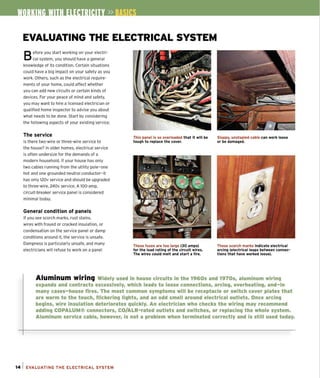
This panel Is so overloaded that It will be
touqh to replace the cover.
These fuses are too larqe (30 amps)
for the load ratlnq of the circuit wires.
The wires could melt and start a fire.
Sloppy, unstapled cable can work loose
or be damaqed.
These scorch marks Indicate electrical
arclnq (electrical leaps between connec-
t ions that have worked loose),
Aluminum wiring Widely used in house circuits in the 19605 and 19705, aluminum wiring
expands and contracts excessively, which leads to loose connections, arcing, overheating, and-in
many cases-house fires. The most common symptoms will be receptacle or switch cover plates that
are warm to the touch, flickering lights, and an odd smell around electrical outlets. Once arcing
begins, wire inSUlation deteriorates quickly. An electrician who checks the wiring may recommend
adding COPALUM® connectors, CO/ALR-rated outlets and switches, or replacing the whole system.
Aluminum service cable, however, is not a problem when terminated correctly and is still used today.
14 1 EVALUATING THE ELECTRICAL SYSTEM
until the surrounding dampness is remedied.
Look for melted plastic around wires, which
could indicate overheating. Make sure the
wire gauges match up with the size of
the breaker (#14 wire on a 1S-amp circuit.
#12 on a 20-amp, and so forth).lf the panel
seems so stuffed with wires that you can
barely close it, you should call a pro to do
an inspection.
Current usage
Installing fuses too big for a circuit to prevent
blown fuses is a fool's bargain; such circuits
could overheat and start a fire. Make sure
that heavy-duty circuits for ranges, dryers,
and air-conditioners have the appropriately
sized breakers installed. Likewise note over-
loaded receptacles, extension cords under
rugs, and the like inside the house. These are
invitations for a fire and a definite sign that
more receptacles are needed in the area.
Grounding
Is the main service panel grounded? There
should be a large grounding wire running
from the panel and clamped to a cold-water
pipe and/or a grounding rod.
Is there fixture and outlet grounding?
Grounding the panel is not enough. For the
entire electrical system to be grounded,
there must be continuous ground wires run-
ning to every device in the house.
If the house has only two-slot receptacles,
the system may be grounded by armor-clad
cables. Test the receptacles by inserting the
probe of a voltage tester into the short slot
and touch the other to the mounting screw.
The ground is clamped to the wrong side
of a dielectric union (coupling) on this cop-
per cold-water pipe, so there's no ground.
Moisture wlcklnq through this masonry
surface has rusted the fuse box and
compromised electrical safety.
Unlike this Installation, all wire splices
must be protected by covered boxes that
are installed in dry locations.
A 30-amp main Is Inadequate for modern
uses; 200·amp service would be more
appropriate.
(Make sure it's not covered with paint.) If the Arcing
tester lights, you should install a grounded
receptacle. Otherwise, consider upgrading
the circuit. If there are three-slot recepta-
cles, use a receptacle analyzer (p. 24)
to check whether the plugs are grounded
and polarized.
When nails puncture wires or electrical con-
nections are loose or corroded, electricity
can arc (jump) between points and cause
fires. The NEC now requires arc-fault circuit
interrupter (AFCt) protection for all1S-amp
and 20-amp bedroom circuits. AFCls detect
minute fluctuations in current associated
with arcing and de-energize the circuits
before a fire can start. Installing AFCI break-
ers is essentialty the same as installing GFCI
circuit breakers.
EVALUATING THE ELECTRICAL SYSTEM 115
CUTTING POWER AT THE PANEL
Always shut off the power to an outlet
before working on it~and then test with
an electrical tester to be sure there's no cur-
rent present. Because individual devices such
as receptacles, switches, and fixtures can
give false readings if they are defective or
incorrectly wired, the only safe way to shut
off the electricity is by flipping a breaker in
the service panel or subpanel.
Turning off the power at a breaker panel
is usually straightforward. After identifying
the breaker controlling the circuit, push the
16 1 CUTTING POWER AT THE PANEL
breaker's switch into the off position O.
The breaker switch should click loudly into
place: If it doesn 't, flip it again until you hear
a loud click. (A breaker that won't snap into
place may be worn out or defective and
should be replaced by an electrician.)
If your home has a fuse panel instead,
remove the fuse that controls the circuit 0 ,
and tape a warning sign to the panel cover.
Partially unscrewing a fuse is not a solution,
because the fuse body is still in contact with
the socket and possibly could be jiggled or
rescrewed so that current resumes flowing
through it. Remove the fuse. Likewise, if cir-
cuits are controlled by cartridge fuses, pull
the cartridge or cartridge block out of the
panel G.
In any case, once you've cut off the power,
shut the panel cover and tape a sign to it,
telling others to stay out 0 .otherwise,
someone not aware of the situation could
flip the switch on, energizing the circuit
you're working on.
TESTING WITH A NEON TESTER
When using a neon tester, hold the insu-
lated part of the tester, and insert its
probes into the receptacle slots. To test a
three-slot receptacle, first insert the probes
into the hot (short) and neutral (long) slots O.
If the tester light does not glow, insert one
probe into the hot slot and the other probe
into the round ground slot. If there's current
present. the tester will light up O. Next, insert
one probe into the neutral slot and the other
into the ground slot. Here, the tester will glow
only if there is current and the hot and neu-
tral wires have been reversed O.
If the tester does not light up for any of
these three combinations, there's probably
no voltage present. However, if the recep-
tacle is faulty or a wire is loose, the previous
tests may not detect vo ltage actually present
in the outlet box. To be certain, unscrew the
receptacle cover plate and the two screws
holding the receptacle to the outlet box. Pull
the receptacle out from the outlet box, being
careful not to touch bare wires, receptacle
screw terminals, or metal outlet boxes.
Then apply tester probes to the bare wire
ends on both sides of the receptacle and
to the gold and silver screw terminals O.
Finally, if the outlet box is metal. touch one
probe to the hot wire/screw and the other
probe to the metal box O.If the tester
doesn't glow during these tests, the power
is off.
WARNING
~.,,
7 To avoid shock, never hold
the tester probes by their
bare tips. Always use the
insulated shafts.
WARNING
""..~ Test the tester first.
No matter what kind
of tester you're using,
test it on a circuit that
you know is hot to
make sure the tester
is working properly.
TESTING WITH A NEON TESTER 117
TESTING WITH AN INDUCTANCE TESTER
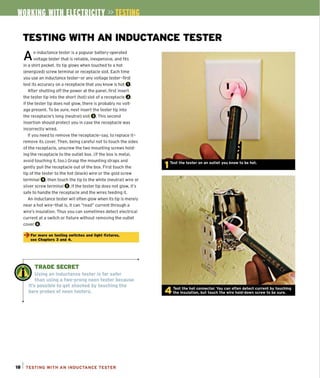
An inductance tester is a popular battery-operated
voltage tester that is reliable, inexpensive, and fits
in a shirt pocket. tts tip glows when touched to a hot
(energized) screw terminal or receptacle slot. Each time
you use an inductance tester-or any voltage tester-first
test its accuracy on a receptacle that you know is hot O.
After shutting off the power at the panel, first insert
the tester tip into the short (hot) slot of a receptacle O.
If the tester tip does not glow, there is probably no volt-
age present. To be sure, next insert the tester tip into
the receptacle's long (neutral) slot O.This second
insertion should protect you in case the receptacle was
incorrectly wired.
If you need to remove the receptacle-say, to replace it-
remove its cover. Then, being careful not to touch the sides
of the receptacle, unscrew the two mounting screws hold-
ing the receptacle to the outlet box. (If the box is metal,
avoid touching it, too.) Grasp the mounting straps and
gently pull the receptacle out of the box. First touch the
tip of the tester to the hot (black) wire or the gold screw
terminal 0 ,then touch the tip to the white (neutral) wire or
silver screw terminal O.If the tester tip does not glow, it's
safe to handle the receptacle and the wires feeding it.
An inductance tester will often glow when its tip is merely
near a hot wire-that is, it can "read" current through a
wire's insulation. Thus you can sometimes detect electrical
current at a switch or fixture without removing the outlet
cover O.
~ For more on testlnq switches and Uqht fixtures.
see Chapters 3 and 4.
TRADE SECRET
Using an inductance tester is far safer
than using a two~pronq neon tester because
it's possible to get shocked by touching the
bare probes of neon testers.
ls i TESTING WITH AN INDUCTANCE TESTER
TESTING WITH AN INDUCTANCE TESTER I 19
20
OOLS &
ATERIALS
Y
OU OON'T NEEO A LOT OF expen-
sive tools to wire a house success-
fully. And there's little uniformity
amonq the tools electricians prefer. Some
pros carry a dozen different pliers and wire
strippers In their tool belts, whereas others
streamline their movements and save time
by uslnq the fewest tools possible. This
chapter Introduces the basic tools and
materials you'll need and a few of the basic
techniques you'll perform repeatedly. All
materials should bear the Underwriters'
Laboratory (ULI stamp, which Indicates
that a component meets the safety stan-
dards of the electrical Industry.
The first test of any tool Is to fit your
hand comfortably; the second, that It feels
solid and well made. Better tools tend to
be a bit heftier and cost more.
Offset
screwdrivers
Combination wire
stripper/crimper
ELECTRICAL ...
.-
~
-
o
o
...
I 21
» OQ
HAND TOOLS
A
II hand tools should have insulated
handles and fjt your hand comfortably.
Manufacturers now make tools in various
sizes; to fit everyone from the largest male
to the most petite female. Here again, don't
scrimp on quality.
Pliers and strippers
Lineman's pliers are the workhorse of an
electrician's toolbox. They can cut wire, hold
wires fast as you splice them, and twist out
box knockouts. Needle-nose (long-nose)
A combination strippinq tool not onlv cuts
and strips wire but also crimps connectors,
cuts small machine screws, and more.
22 I HAND TOOLS
Phillips-head
screwdrivers
Drywall
pliers can grasp and pull wire in tight spaces.
These pliers can loop wire to fjt around
receptacle and switch screws. A large pair
can also loosen and remove knockouts in
metal outlet boxes. Diagonal-cutting and
end-cutting pliers can cut wires close in
tight spaces; end cutters (sometimes
called nippers) also pull out staples easily.
A multipurpose or combination stripping tool
is used to strip individual wires of insulation,
cut wire, crimp connections, and quickly loop
wire around screw terminals.
Retractable tape measure
Torpedo level
7-ln-'
tool
(useful
to free
device
plates
encased
in paint)
use a Roto~Split® cable stripper (p. 202); it's
vastly superior to the old method of using a
hacksaw and diagonal cutters.
Other useful tools
No two electrician's tool belts will look the
same, but most contain a tape measure,
flashlight. smaillevet, hammer, Speed®
Square, and a large felt-tipped marker. In
the course of a wiring job, you may need
severa l sizes of slot-head and Phillips®-head
screwdrivers, plus an offset screwdriver and
A cable ripper (see p. 21) strips the plastic a nut driver.
sheathing from Romex® cable without Fish tape is used to run cable behind fin-
harming the insulation on the individ ual ish surfaces and puJl wire through conduit.
wires inside. Many pros use a utility knife to A fish tape is invoked in almost every old
strip sheathing, but that takes wiring how-to book on the market. Mod-
practice and a light touch ern-day pros, however, swear by a pulling
to avoid nicking the grip, also called a swivel keJlum (p. 132).
insulation of individual For remodel work, you may need a plaster
wires. To strip armored cable, chisel, flat bar, and a drywaJl saw.
POWER TOOLS
BUy power tools that are appropriate to
your strength and to the task at hand.
More powerful tools tend to be heavier and
harder to manage; and for wiring, they're
often overkill. If possible, test-drive a friend's
power tool before buying your own.
Drills
A liz-in. right-angle drill allows you to fit the
drill head between studs or joists and drill
perpendicular to the face of the lumber.
-+To see a ricJht-an9le drill In action,
see p. 177.
Buy a drill with a clutch. Unless there's
a clutch to disengage the motor, a drill bit
that suddenly jams or lodges against a nail
shank, could cause the body of the tool to
torque powerfully and thus could injure you.
Auqer bit
Spade bit
Drill bits
Spade bits cut quickly, but tend to snap in
hard wood. For this reason most electri-
cians prefer auger bits. Self-feeding chipper
bits drill doggedly through hard, old wood
but won't last long if they hit nails. A 7
/ s-in.
Greenlee® Nail EaterTMbit is your best bet
o !i »
Rotary cutter
Using slightly different bits, a rotary (utter
can cut through plaster or drywall to create
box openings. Typically, drywallers install
panels over installed outlet boxes, then use a
rotary cutter to trim around the outside of a
box; this method is much quicker than hand-
if old lumber is nail infested. cutting openings beforehand. Set the tool's
depth to avoid nicking wires.
Reciprocating saw
A reciprocating saw is indispensable for most Cordless power tools
remodeling jobs, whether to cut box open- Cordless drills and saws enable you to keep
ings in plaster or to notch framing. Choose working when the powers is off or not yet
a blade that's appropriate for the materia l connected. They don't need an extension
you're cutting: coarser teeth for cutting cord and won't electrocute you if you inad-
wood, finer for plaster and metal. Special vertently drill or cut into a live wire. Cordless
bimetal remodel blades can cut through reciprocating saws can cut anything from
occasiona l nails without destroying the blade. plaster lath to studs.
1/2-ln. rlqht-anqle drill
Reciprocating saw Rot ary cutter
POWER TOOLS I 23
ELECTRICAL TESTERS
Testing to see if a circuit or device is
energized is crucial to safety and
correct wiring. There are several to choose
from, and some perform multiple funct ions.
Neon voltage testers
Neon voltage testers are inexpensive
and widely available, but there's a danger
of touching the bare metal probes and
getting shocked. Better neon testers have
insulated handles. To use this tool, insert
the probes into the receptacle slots or
touch them to the screw terminals or to
a metal outlet box to see jf the unit is
hot (energized).
Plug-In circuit analyzers
Plug-in circuit analyzers can be used only
with three-hole receptacles. but they Quickly
tell you jf a circuit is correctly grounded
and, if not. what the problem is. Different
light combinations on the tester indicate
various wiring problems, such as no ground
and hot and neutral reversed. They're quite
handy for quick home inspections.
Solenoid voltage testers
Solenoid voltage testers (often called wig-
gies) test polarity as well as AC voltage.
They also test DC voltage from 100v to
600v. Most models vibrate and light a bulb
when current is present. Solenoid testers
don't use batteries, so readings can't
be compromised by low battery power.
However, because of their low impedance,
solenoid testers will trip ground-fault
Circuit interrupters (GFCls).
Inductance testers
Inductance detectors provide a reading
without directly touching a conductor.
They often allow you to detect electrical
currents without having to remove cover
plates and expose receptacles or switches.
Touch the tool's tip to an outlet, a fixture
screw, or an electrical cord. If the tip glows
24 1 ELECTRICAL TESTERS
Some c:ommon elec:trlcal testers. A c:Jrc:uit ana-
lyzer (top) shows problems In the wirinq of a
3-pronqed pluq. Test whether an outlet Is ener-
qized with a neon voltaqe tester (left) or check
for power with an induc:tanc:e tester (riqht).
red, it means there's voltage present.
Inductance testers rely on battery power.
Multlmeters
A multimeter, as the name suggests, offers
precise readings in multiple scales, which
you select beforehand. Some models are
even autoranging, meaning that they select
the correct scale for you. Extremely sensi-
tive, multimeters can detect minuscule
amounts of voltage. Better models test
AC and DC voltage, resistance, continuity,
capacitance, and frequency.
Continuity tester
In addition to voltage testers, get a conti-
nuity tester to test wire runs and connec-
tors for short circuits or other wiring flaws.
And be sure to do all your testing before a
circuit is connected to power.
Dlqltal multlmeters
provide prec:Jse
readlnqs In multiple
scales.
Solenoid voltaqe
testers don't require
batteries to qlve a
readinq.
A c:ontinuity tester enables you to determine
whether an elec:trical device or lenqth of wire
Is defective.
I r. !i »
CHOOSING ELECTRICAL BOXES
There is a huge selection of boxes, varying
by size, shape, mounting device, and
composition. But of all the variables to consider
when choosing boxes, size (capacity) usually
trumps the others. Correctly sized boxes are
required by Code and faster to wire because you
don't have to struggle to fit wires and devices.
Box capacity
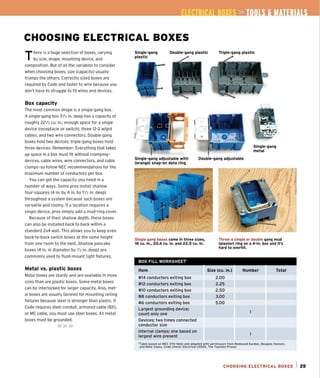
The most common shape is a single-gang box.
A single-gang box 31
12 in. deep has a capacity of
roughly 22V2 cu. in.; enough space for a single
device (receptacle or switch), three 12-2 w/grd
cables, and two wire connectors. Double-gang
boxes hold two devices; triple-gang boxes hold
three devices. Remember: Everything that takes
up space in a box must fit without cramping-
devices, cable wires, wire connectors, and cable
clamps- so follow NEC recommendations for the
maximum number of conductors per box.
You can get the capacity you need in a
number of ways. Some pros install shallow
four-squares (4 in. by 4 in. by 1112 in. deep)
throughout a system because such boxes are
versatile and roomy. If a location requires a
single device, pros simply add a mud-ring cover.
Because of their shallow depth, these boxes
can also be installed back to back within a
standard 2x4 wall. This allows you to keep even
back-to-back switch boxes at the same height
from one room to the next. Shallow pancake
boxes (41n. in diameter by 1/2 in. deep) are
commonly used to flush-mount light fixtures.
Metal vs. plastic boxes
Metal boxes are sturdy and are available in more
sizes than are plastic boxes. Some metal boxes
ca n be interlocked for larger capacity. Also, met-
al boxes are usually favored for mounting ceiling
fixtures because steel is stronger than plastic. If
Code requires steel conduit. armored cable (BX),
or MC cable, you must use steel boxes. All metal
boxes must be grounded.
»»»
Sinqle+qang
plastic
Double·qang plastiC Trlple·ganq plastic
t
"T~ -- .
, '_" 1.
~
.~
Single-gang
metal
Single-gang adjustable with
(orange) snap-on data ring
Double-gang adjustable
Single gang boxes come in three sizes,
18 cu. in., 20.4 cu. in. and 22.5 cu. in.
BOX FILL WORKSHEET'
Item
#14 conductors exiting box
#12 conductors exiting box
#10 conductors exiting box
#8 conductors exiting box
#6 conductors exiting box
Largest grounding device;
count only one
Devices; two times connected
conductor size
Internal clamps; one based on
largest wire present
Throw a single or double gang mud
(plaster) ring on a 4-ln. box and It's
hard to overfill.
Size (cu. In.)
2.00
2.25
2.50
3.00
5.00
Number Total
'Table based on NEC 370-16(b) and adapted with permission from Redwood Kardon, DouQlas Hansen,
and Mike Casey, Code Check: Electrical (2005, The Taunton Press)_
CHOOSING ELECTRICAL BOXES I 25
CHOOSING ELECTRICAL BOXES (CONTINUED)
For most other installations, plastic is king.
(Plastic boxes may be PVC, fiberglass, or ther-
moset.) Electricians use far more plastic boxes
because they are less expensive. Also, because
they are nonconductive, they're quicker to
install because they don't need to be grounded.
However, even if a box doesn't need to be
grounded, all electrical devices inside must be
grounded by a continuous ground. Another rea-
son to buy plastic: Box volumes are stamped on
the outside.
Cut-in boxes
The renovator's mainstay are cut-in boxes
because they mount directly to finish surfaces.
These boxes are indispensable when you want
to add a device but don't want to destroy a large
section of a ceiling or wall to attach it to the
framing. Most cuHn boxes have plastic ears that
keep them from falling into the wall cavity; what
vary are the tabs or mechanisms that hold them
snug to the back side of the walt: screw-adjust-
able ears, metal-spring ears, swivel ears, or
bendable metal tabs (Grip-Lok™ is one brand).
~ For Information on Installlnq remodel boxes,
see p. 194.
WARNING
All cut-in boxes, whether
plastic or metal, must
contain cable clamps inside
that fasten cables securely.
That is, it's impossible
to staple cable to studs
and joists when they are
covered by finish surfaces,
so you need clamps to keep
the cables from getting
tugged or chafed.
26 1 CHOOSING ELECTRICAL BOXES
The screw on the
side of an adjustable
box enables you to
raise or lower the
face of the box to
make It flush to
the finish wall.
A remodel box
doesn't mount to a
stUd. Instead, a pair
of ears flips up at the
turn of a screw and
clamps the box to
the wall.
CUT-IN REMODEL BOXE"S________________
Single-gang
with Grlp-Lok
tab
Single-gang
with swivel ears
Single gang
with screw-
adjustable
Double-gang
with swivel ears
Goof ring
Lipped round box
with metal sprinq ears
I r. !i »
INSTALLING NEW WORK BOXES
There are few set rules about locating
boxes. In general-use rooms, set the
bottom of outlet boxes 12 in. above the
subfloor-which you can approximate by
resting a box atop a hammer held on end O.
In housing for disabled occupants, outlet box
bottoms should be a minimum of 18 in. above
the subfloor.
For outlets over kitchen and bath coun-
ters, set box bottoms 42 in. from the fin-
ished floor, so they'l! end up 8 in. above
counters and 4 in. above a standard 4-in.-
high backsplash. Locate wall switches on the
lock side of a door (opposite the hinges).
~ For more about locatlnq boxes,
see p. 184.
Mount boxes so that they' ll be flush with
finish surfaces. Most boxes have tabs or
gauge marks stamped on the side to indi-
cate different surface thicknesses. If that's
not the case, hold a scrap of the finish
material-for example, sis-in. drywall-next
to the front edge of the box as a depth
gauge. Unless you're installing nail-in boxes,
use screws to mount the boxes so you can
make adjustments if you need to O. As
noted elsewhere, adjustable boxes can be
t weaked after the drywall is up.
local building codes
require them to
be set at a certain
height.
INSTALLING NEW WORK BOXES I 27
REMOVING KNOCKOUTS
Onee you've mounted boxes, you'll need to remove
the appropriate number of box knockouts and install
cable connectors (ctamps). Single-gang, new construction
plastic boxes don't need clamps: Simply strike a screw-
driver handle with the heel of your hand to drive out the
knockout. To remove a metal-box knockout, jab it with the
nose of needle-nose pliers to loosen it 0 ,then use the
plier's jaws to twist it free O.
28 1 REMOVING KNOCKOUTS
Use a screwdriver to remove a plastic-box knockout.
MOUNTING DEVICES
Heavyweight bar for new work
where there is access to framing.
I r. !i »
Heavyweight remodel bar Is passed through
an opening in the ceiling and adjusted in place.
Lightweight bars should used only for a lightweight
fixture such as simple overhead light.
The type of mounting bracket. bar, or tab you use depends on
whether you're mounting a box to finish surfaces or structural
members. When you're attaching a box to an exposed stud or joist.
you're engaged in new construction, or new work (as distinguished
from old work, or remodel work), even if the house is old. New·work
boxes are usually side-nailed or face-naited through a bracket; nail-
on boxes have integral nail holders. The mounting bracket for adjustable
boxes is particularly ingenious. Once attached to framing, the box depth
can be screw-adjusted until it's flush to the finish surface.
Adjustable bar hangers enable you to mount boxes between joists
and studs; typically, hangers adjust from 14 in. to 22 in. Boxes mount
to hangers via threaded posts or, more simply, by being screwed to the
hangers. Bar hangers vary in thickness and strength, with heavier strap
types favored to support ceiling fans and heavier fixtures. A mountlnq bar Is screwed Into the celllnq Joists.
MOUNTING DEVICES I 29
» C fS
CABLE & CONDUIT
NONMETALLIC
SHEATHED CABLE
~:::::~- GrOUnd
Black or red
(usually hot) -----'--------;;;;f!"
12/2
I
The number of wires and their
gauges are marked on the jacket.
M
ost modern house wiring is flexible
cable, but you may find any-or all-
of the wiring types described here in older
houses. Inside cables or conduits are
individual wires, or conductors, that vary
in thickness according to the load (amperage)
they carry. Here's a quick overview.
Cable
Nonmetallic sheathed cable (NM or Romex)
is by far the most common flexible cable.
(overed with a flexible thermoplastic sheath-
ing, Romex is easy to route, cut, and attach.
Cable designations printed on the sheathing
and the sheathing color indicate the gauge
and the number of conducting wires inside.
-+See "Readtnq a Cable:' on the faclnq paqe.
Most of the NM cable used for a standard
15-amp lights-and-outlets circuit is 14/2 w/grd.
For a 20-amp circuit, use 12-gauge cable.
Three-way switches are wired with 14/3 or
12/3. The third conductor is red. Either the
red or the black wire can be hot, depending
on the switch position .
-+For more on three- and four-way
switches, see p. 51.
30 I CABLE & CONDUIT
Whlte----'
(usually neutral)
Remember that you can wire 15-amp
circuits with 12-gauge wire, but you can't
use 14-gauge wire for 20-amp circuits.
Metal-clad (MC) cable is often specified
where wiring is exposed. Some codes
still allow armored cable (AC), but that's
increasingly rare.
Knob-and-tube
Knob-and-tube wiring is no longer installed,
but there's still plenty of it in older houses. If
its sheathing is intact and not cracked, it may
still be serviceable. You may even be able
to extend it, but have an electrician do the
work. Knob and tube is eccentric, requiring
experience and a skilled hand.
Circuit wiring
Copper is the preferred conductor for
residential circuit wiring. Aluminum cable
is frequently used at service entrances, but
it is not recommended for branch circuits.
Individual wires within a cable or conduit are
color coded. White or light gray wires are
neutral conductors. Black or red wires denote
hot, or load-carrying, conductors.
Some old houses still have knob-and-tube
wiring, which doesn't necessarily need to be
replaced. Have It tested to make sure It's
still in qood shape.
Green or bare (uninsulated) wires are ground
wires, which must be connected continuously
throughout an electrica l system.
Because most of the wiring in a residence
is 120v service, most cables will have three
wires: two insulated wires (one black and
one white) plus a ground wire, usually
uninsulated. Other colors are employed
when a hookup calls for more than two
wires-for example, 240v circuits and three-
or four-way switches.
Conduit
Conduit may be specified to protect exposed
wiring; it is commonly thin-wall steel (electri-
cal metallic tubing; EMT), aluminum, or poly-
vinyl chloride (PVC) plastic. Metal conduit
serves as its own ground. Apart from service
entrances, conduit is seldom used in home
wiring. When connected with weather-tight
fittings and boxes, conduit can be installed
outdoors.
~ For more on 240v circuits. see
"Appliances," pp. 210-221.
CABLE AND CONDUIT
FOR SERVICE PANELS
Type-SER Is used between
panels and subpanels in dry,
protected areas.
flexible conduit Is used
in areas that are dry,
but need hard-shell
protection.
READING A CABLE
Cables provide a lot of information in
the abbreviations stamped into their
sheathing-for example, NM indicates
nonmetallic sheathing, and UF (for
underground feeder) can be buried.
The size and number of individual con-
ductors inside a cable are also noted:
12/2 w/grd or 12-2 WIG, for example,
indicates two insulated 12AWG wires
plus a ground wire. Cable stamped
14/3 WiG has three 14AWG wires plus
a ground wire. (The higher the number,
the smaller the wire diameter.) The
maximum voltage, as in 600v, may
also be indicated.
Individual wires within cable have
codes, too. T (thermoplastic) wire is
intended for dry, indoor use, and W
means wet; thus TW wire can be used
in dry and wet locations. H stands for
heat resistant. N, for nylon jacketed,
indicates a tough wire than can be
drawn through conduit without
being damaged.
Finally, make sure the Romex cable
is marked NM-B. Cable without the final
B has an old-style insulation that is not
as heat resistant as NM-B cable.
Schedule-40 PVC conduit
is for damp crawlspaces
or underqround.
ELECTRICAL CABLE
Type-NM (Romex)
Type-Uf (underQround)
Metal clad (Me).
The sliver wire in the AC cable is a bondinq wire, not a qround. In the Me cable. the qreen wire
is qround, the white is neutral, and the red and black are hot.
CABLE & CONDUIT I 31
CABLE CLAMPS & CLIPS
Romex cable connectors. From bottom to top: plastic push-In conne<:tor, two-cable
hit-lock connector, 3/8 -ln. NM clamp with locknut, metal box wit h Internal clamps.
Cable connectors are set In box knockouts to prevent wires from wearlnq aqainst
sharp edqes.
32 1CABLE CLAMPS & CLIPS
It's important to secure cable as you run it and
to protect it from puncture or being accidently
severed. It's also essential to make sure cable is
tightly secured into boxes.
Clamps
Clamps secure cable to boxes to protect
connections inside the box so wire splices
or connections to devices cannot get yanked
apart or otherwise compromised. Every wiring
system-whether nonmetallic (Romex), Me, or
conduit- has clamps (connectors) specific to that
system. Cable clamps in metal boxes also keep
wires from being nicked by burrs created when
metal box knockouts are removed. (Use a screw-
driver to start knockouts and lineman's pliers to
twist them free-or a pair of heavy-duty needle-
nose pliers for both tasks.)
The exception to this rule is si ngle-gang plas-
tic boxes. If framing is exposed (new construc-
tion) and cable can be stapled within 12 in.
of the box, Code doesn't require cable clamps
in a single-gang plastic box. However, two-
gang plastiC boxes must have cab le clamps-
typically, a plastiC tension clip that keeps cables
from being pulled out. And, as noted in the
preceding chapter, all cut-in boxes must contain
cable clamps.
Two-piece locknut connectors 0 are still the
most common cable clamp, but professional
electricians who are racing the clock swear by
plastiC snap-in cable connectors 0 .which seat
instantly and grip NM cable tight.
~ For more on po.'t'onl,", box••, ••• p. 27.
reduce the tedium of screwing wires
to terminals, attaching devices to
boxes, putting on cover plates, and
connecting myriad other items. But
always tighten cable clamps by hand
to avoid overtightening them and
damaging the incoming wires.
SECURING CABLE TO FRAMING
The quickest way to secure cable is
to staple it. The trick is to staple it
correctly-flat and not so tight that the
sheathing is squeezed against the framing.
Staples should be snug but not too tight.
Use enough staples to secure cable, remem-
bering that code requires staples at least
every 54 in. Use particular care when
stapling cable overhead O. Avoid making a
sharp bend immediately after a staple, and
leave yourself enough slack around boxes.
When a large number of cables run into a
single box, it can be difficult to staple them
within the 12 in. required by Code. Here's
where cable clips come in handy. Simply nail
or screw the clip to the stud where the box is
attached a.Thread the cables into the clip
for a neat, organized box O.
There are severa l styles of cable clips
with different capacities. Avoid exceeding
the capacity of the clip; it shou ld hold the
cable snugly but be loose enough to dissi-
pate heat.
ACCORDING TO CODE
Cables should be fastened to
framing at least every 54 in.
Cables must also be fastened
within 12 in. of a box.
Another style of cable clip. It holds the cable
near enouqh to the box but out of harm's way.
SECURING CABLE TO fRAMING I 33
STRIPPING CABLE WITH A UTILITY KNIFE
Many electricians use a utility knife to slit and remove
NM cable sheathing, but it requires a light touch that
takes a lot of practice. Typically, pros hold the blade at a low
angle to the cable and lightly run the blade tip down the
middle of the cable and over the bare ground wire inside.
Alternatively, one can score the front and back face of the
sheathing with diagonal slits 0 and then yank the sheathing
and slide it off O.
Once the sheathing is off, tear off the kraft paper cover-
ing the bare ground wires O.Then tuck the cables back into
the box until you're ready to wire the receptacle or switch.
34 1 STRIPPING CABLE WITH A UTILITY KNIFE
Cable strippers remove the wire's jacket without damaqinq
the conductor insulation.
STRIPPING CABLE WITH A CABLE RIPPER
To remove sheathing with less risk of
nicking wire insulation, use a cable rip-
per to slit the sheathing along its length O.
Because the ripper's tooth is intentionally
dull (so it won't nick wire insulation), it usu'
ally takes several pulls to slit the sheathing
completely. Once that's done, pull back the
sheathing and the kraft paper. You can snip
both off using diagonal cutters O.
Because cable clamps grip sheathing-not
individual wires-there should be at least
112 in. of sheathing still peeking out from
under cable clamps when you're done. If
you didn't tighten cable clamps earlier,
do so now.
If there is only one cable entering a box,
simply cut individual wires to length (typi-
cally, 8 in.) and tuck them into the box. If
the box is metal, first bond the cable's
ground wire to the box, using a grounding
clip or a green grounding screw O.Once
the wires are stripped and the box is
grounded, fold the rest of the wires back
into the box until you're ready to wire
switches and outlets O.
STRIPPING CABLE WITH A CABLE RIPPER I 3S
» r.A S5
CHOOSING WIRE
WIRES
AND WIRE
CONNECTORS
6-gauge stranded
60 amps: central
air-conditioners
and furnaces
10 gauge stranded
30 amps: range and
central air-conditioners
12 gauge
20 amps: lights,
20-amp receptacles
14-qauqe bare
copper ground wire
14 gauge
15 amps: lights. average
duty receptacles
Twist-on wire connectors are color coded to fit wires of different sizes. Green connec-
tors, used to splice ground wires, have a hole In the cap that facilitates running a bare
qround wire to a device or a metal box.
36 1CHOOSING WIRE
Wire comes in several gauges meant for
different amp circuit s. The higher the
gauge, the smaller the wire. Larger wires can
carry greater amperage, just as a larger pipe
can carry greater water volume. If you use
too small a wire, the resistance (measured
in ohms) is too great and the wire can melt.
causing a house fire. That's why it's impor-
tant to use the right gauge wire for the load.
Wire connectors
Wire connectors, sometimes called by the
popular brand Wire-Nut®, twist onto a group
of like-colored wires to splice them together
and ensure a solid mechanical connection.
The importance of solid connections between
spliced wires (or between wires and devices)
can't be overstated. If wires work loose, elec-
triCity can leap the gaps between them and
cause a house fire. Wire connectors are sized
according to the number of wires and/or wire
gauge they can accommodate; each size is
color coded.
A divided pouch transforms a S-Qal. bucket
Into a portable hardware store of wire
connectors, cable clamps, screws, staples,
and other small Items.
STRIPPING & SPLICING WIRES
Typically, electricians first splice the
ground wires, which are usually bare
copper. (If they're green insulated wires,
first strip approximately 3/4 in. of insula-
tion off their ends.) If you use standard
wire connectors, trim the ground wires and
butt their ends together, along with a 6-in.
pigtail, which you'll connect later to the
green ground screw of a receptacle. However,
many pros prefer to twist the ground wires
together, leave one ground long, and thread
it through the hole in the end of a special
wire connector O.Splicing hot and neutral
wire groups is essentially the same. Trim hot
wires to the same length O.Strip 3/4 in. of
insulation off the cable wires and the pigtail
0 ,and use lineman's pliers to twist the wires
O.Then screw on a wire connector O.
When all the wire groups are spliced, gen-
tly fold the wires-rather like an accordion
fold-and push them into the back of the box,
where they'll be safe from drywall saws and
naiis O .
TRADE SECRET
Unless the manufacturer's
instructions say otherwise,
whenever you splice solid wires
with a wire connector, twist the
wires together before you twist the
connector into place. This guaran-
tees a solid connection between
the wires should the wire connector
come loose.
STRIPPING & SPLICING WIRES I 37
38
ECEPTACLES
SWITCHES
R
ECEPTACLES AND SWITCHES
are the most-used electrical devices
In a house. They're lIenerally reli-
able and offer a lonll life, but they are
often replaced when they become cracked
or outdated or, eventually, cease to work.
Fortunately, replaclnll them Is stralllht-
forward and safe If you first shut off the
power to the circuits that feed them-and
test with a voltalle tester to be sure that
power Is, In fact, off. This chapter shows
you how to sefely remove receptacles and
switches, how to use a continuity tester
to see If devices are defective, and how to
Install new receptacles or switches.
Wlrlnll an electrical device Is considered
part of finish wlrlnll-also called the trlm-
out stalle-when finish walls are In place and
painted. At the trim-out stalle, everythlnll
should be ready so that the electrician
needs only a pair of strippers and a screw-
driver or screw lIun.
39
CHOOSING RECEPTACLES & SWITCHES
The difference in quality from one receptacle or
switch to another can vary greatly. Over the life of
the device, the difference in price is trivial, but the differ-
ence in performance can be sUbstantial. For this reason,
buy quality. As you can see in the top photo at right.
cheap receptacles are pretty much all plastic, their thin
metal mounting tabs will distort easily, and they tend to
crack if subjected to heavy use.
On the other hand, quality receptacles and switches
tend to have heavier nylon faces and may be reinforced
with metal support yokes that reinforce the back of
the devices.
Another telling detail is how wires are attached-
whether they're screwed to terminals on the side of the
device, inserted into the back of the device and held by
internal clamps (back-wired), or some combination of
the two. Again, better quality devices have better mech-
anisms for gripping wire.
~ For more on back-wired devices. see p. 42.
Most household receptacles are rated for 15-amp
circuits and wired with 14AWG or 12AWG wire. The
National Electric Code (N EC) specifies 20-amp protection
for kitchen appliance, garage, and workshop circuits.
The NEC specifies ground-fault circuit interrupter
(GFCI) protection for many locations, including bath-
room, outdoor, and kitchen-counter receptacles, so
there are also 15-amp and 20-amp GFCI receptacles.
In addition , you can obtain various kinds of specialty
15-amp receptacles, including childproof models that
require an adult's grip to uncover them, weatherproof
receptacles that combine cover and receptacle in an
integral unit. recessed receptacles in which clock wires
can be hidden, and covered floor receptacles. In addi-
tion, there are receptacles specifically matched to the
ACCORDING
TO CODE
All bathrooms and kitchens should
have GFCI receptacles. All outdoor
outlets and some garage outlets must
also be GFCls. Your local building code
will have the final say on GFCls.
40 I CHOOSING RECEPTACLES & SWITCHES
Better quality receptacles and switches are usually heftier and more
reliable. The quality receptacle on the right has a nylon face and its
back is reinforced with a brass yoke.
Switches (from left): single-pole, three-way, four-way.
Specialty switches (from left): A timer switch, paddle-switch dimmer
with small slide dimmer, linear slide dimmer.
plugs of 30-amp, 40-amp, and 50-amp appli-
ances. Your electrical supplier can help you
find the right receptacle for your needs.
Matching load ratings
Circuit components must be matched accord-
ing to their load ratings. That is, a 20-amp
receptacle must be fed by 12AWG cable,
which is also rated at 20-amps, and protected
by a 20-amp breaker or fuse. A 15-amp recep-
tacle or switch must be fed by 14AWG cable,
which is rated for IS-amps, and protected by
a IS-amp breaker or fuse.
NM Cable sheathing is color coded to help
you correctly match wire size and devices:
White sheathing denotes 14-gauge wire; yel-
low sheathing, 12-gauge; orange sheathing,
lO-gauge; and so on.
Polarized receptacles
Receptacles, plugs, and
fixtures are polarized so
they can fit together only
one way. A receptacle's gold
screw terminal connects
to hot wires and, internally,
to the hot (narrow) prong
of a polarized plug. The
receptacle's silver screw
terminal connects to neutral
wires and, internally, to the
neutral (wide) prong of a
polarized plug. Finally, the
green ground screw connects
to the ground wire and the
U-shaped grounding prong
of the plug.
POLARIZEDRECEPTACLES~__~====~______~==~-=__~~
Neutral
slot ----,--t
screw
(sliver)
Green - - ' "
grounding
screw
15 amp
I
•
@
-I I
20 amp
I Hot slot
l
I
~ Hot
screw
I (qold)
Ground
slot
The 20-amp receptacle (at right) has a T-shaped neutral slot so It can receive a
special 20-amp plug in addition to standard 15-amp plugs. But 15-amp receptacles
cannot receive 20-amp plugs. Both receptacles are also polarized, so that only
the large blade of a plug can fit Into the large slot of the receptacle.
RECEPTACLES FOR DIFFERENT LOAD"'S_____________________
lS-amp
surge
• •
•
I I
GFCI1S-amp with
20-amp feed-through
50-amp range
(250v)
30-amp dryer
(125/250v)
lS-amp duplex
20-amp
,- duplex
CHOOSING RECEPTACLES & SWITCHES I 41
BACK-WIRED DEVICES
Back-wiring receptacles or switches is a
faster alternative to wrapping wires around
screw terminals. Back-wired devices have holes
in the back. into which you insert stripped wire
ends. But although back-wiring is quicker, many
electricians-and some local electrical codes-
consider it unsafe. especially for receptacles.
Their primary objection is that receptacles'
internal tension clamps are made of thin metal
strips, which can fatigue, leading to loose wires,
flickering lights. and arcing. Moreover, each time
users insert or remove plugs, the receptac les
move slightly. which increases the likelihood
of clamp failure. Manufacturers have stopped
making back-wired 20-amp receptacles, so
think twice about installing back-wired 15-amp
receptacles.
Of course, there's an exception to every rule.
A high-quality device such as the GFCI recep-
tacle shown in photo 0 on p. 48 allows you to
loop wires around its screw terminals or insert
wires into holes on the back of the device. Here,
back-wiring is acceptable because you must
screw down screws on either side to tighten
internal clamps that grip the wire and ensure a
solid connection.
Finally, back-wired switches are acceptable to
Code. They rarely fail because switches aren't
subject to the stresses of inserting and remov-
ing plugs; thus wire connections stay solid.
Nonetheless, many pros don't like back-wired
switches because their tension clamps can also
fatigue and loosen. Use a screw terminal,
they argue, and you're guaranteed a solid
wire connection.
42 I BACK-WIRED DEVICES
Many switches qlve
Installers the option
of connectinQ wires
to screw terminals
on the side or of
back-feedlnQ wires
into holes in the back
of the switch body.
Back-wired switches
are acceptable to
most electrical
codes. Use the strlp-
plnQ qauQe on the
back of the switch to
determine how much
insulation to strip
from the wire.
After strlpplnQ the
wire end, Insert It
Into a back port/hole
until the wire bot-
toms, then pull Qently
to make sure that
the device's Internal
clamp has Qripped
the wire securely.
TESTING FOR POWER
To identify the circuit that serves a particu-
lar receptacle, insert tester prongs into
the receptacle and have a helper at the service
panel flip breakers until the tester light goes
out. To identify the circuit that serves a particu-
lar switch, turn on the fixture it controls and flip
breakers until the light goes out. If that test is
inconclusive or you aren't sure the receptacle or
switch is operable, remove the cover plate and
the two screws holding the device to the box.
Being careful not to touch screw terminals or
wires with your fingers. put! the receptacle out
of the box. Touch tester prongs to each screw
and to spliced wire groups. Here, an inductance
tester is superior to a two-prong voltage tester
because the inductance tester can usually read
current through wire insulation or a wire
connector.
Before touching a wired receptacle, switch, or
fi xture, use an inductance tester to see If power
Is present.
wires-may be attached (incorrectly) to
receptacles or switches, in violation of Code.
When testing existing receptacles, switches or
fixtures, test all wires for voltage.
./
,
TESTING fOR POWER I 43
TWO WAYS TO WIRE A RECEPTACLE
A The preferred way to wire a midcircuit
receptacle.
The duplex receptacle is the workhorse
of house wiring, because it enables
you to plug in a variety of energy users at
locations around the house. Receptacles are
so indispensable to modern life that Code
dictates that no space along a wall in a habit-
able room should be more than 6 ft. from
a receptacle and any wall at least 2 ft. wide
must have a receptacle.
~ For more receptacle requirements.
see p. 40.
The NEe requires that all conductors (wires)
be solidly connected to devices such as recep-
tacies, but several different wire configura-
tions are acceptable. In brief, you can use
pigtails-short lengths of wire running from
wire splices to a device-or attach conductors
directly to devices. Using pigtails to connect
conductors ensures continuous power down-
stream, but sometimes, at the end of a run,
for example, it makes sense to connect con-
ductors directly to the device.
44 1 TWO WAYS TO WIRE A RECEPTACLE
B At the end of a circuit, wires from the
cable attach directlv to the receptacle.
Most electricians prefer using pigtails to
connect conductors to midcircuit recep-
tacles because it ensures continuous power
and, if it's necessary to replace the recepta-
cle at some future date, there are only three
pigtails to disconnect. Wiring with pigtails is
shown in the photo O.
At the end of a circuit. where only one
cable feeds an out let. there's no need for
pigtails. Just attach incoming wires directly
to the receptacle as shown in photo O.As
with pigtail wiring, connect the ground wire
first, then the neutral, then the hot wire.
Route the circuit
through the receptacle
Feeding circuits through receptacles is a wide-
spread wiring method because, on the whole,
it is quicker, requires fewer conductors, and
results in boxes that are less crowded than
those wired with spliced wires and pigtails G.
CAn alternate to wiring a midcut receptacle,
without using pigtails. (Not recommended).
But this method has detractors, who
argue that in a circuit so wired, if a recep-
tacle upstream fails or a wire comes loose,
receptacles downstream will lose power.
For this reason, feeding a circuit through a
receptacle is particularly risky if you also
use back-wired receptacles whose internal
clamping mechanisms can weaken and
result in loose connections. Moreover, there
is a voltage drop of about 1percent per
receptacle wired in this manner because
receptacles offer more resistance to current
flow than do wires. If you have 6 or 10 recep-
tacles daisy-chained in this manner, those
overheated connections can waste energy
and increase your electricity bill.
-+See also "Back-Wired
Devices," on p. 42.
WIRING A DUPLEX RECEPTACLE
When a duplex receptacle is in the
middle of a circuit. there will be two
12/2 or 14/2 cables entering the box- one
from the power source and the other running
downstream to the next outlet. In the se-
quence shown here, there are two 12/2 cables
because the box houses a 20-amp receptacle.
To ensure continuity downstream, all wire
groups will have been spliced with wire con-
nectors during the rough-in stage. A pigtail
from each splice will need to be connected
to a screw terminal on the receptacle.
Unless the small tab between screw pairs
has been removed, you need attach only one
conductor to each side of the receptacle.
Loop and install the ground wire to the
receptacle's green grounding screw first.
Place the loop clockwise on the screw
shaft so that when the screw is tightened
down, the screw head will grip-rather than
dislodge-the wire O.
Next. loop and attach a neutral conductor
to a silver screw terminal. Tighten down the
screw that you don't use to avoid electro-
magnetic interference on radio receivers
and the like. Then flip the receptacle over
to access the brass screw terminals on the
other side. If a looped wire end is too wide,
use needle-nose pliers to close it O.
»»»
Wiring in an orderly way Any habit
that increases your safety is worth adopting.
When connecting wires to devices, most
electricians connect the ground wire first,
then the neutral wire, and then the hot wire.
When disconnecting wires, they reverse the
order: Disconnect the hot first, then the neutral,
then the ground wire. Because the ground
wire offers the lowest impedance path to
ground, it makes sense to leave it connected
as long as possible. Even if you're working on
circuits that are disconnected, as veteran
electricians say, "Treat every conductor as
if it were live and you'll stay alive."
WIRING A DUPLEX RECEPTACLE I 45
WIRING A DUPLEX RECEPTACLE (CONTINUED)
Screw down the brass screw so that it grips
the hot wire. Pros frequently use screw guns
for this operation, but weekend electricians
should tighten the screw by hand to ensure a
solid connection O.
Push the wired receptacle into the box by
hand, keeping the receptacle face paral lel to
the wall O.Then hand-screw the device to the
box. Avoid the temptation to use a screw gun
because it can strip the screw holes in a plastic
box O. Finally, install a cover plate to protect
the electrical connections in the box and to
prevent someone from inadvertently touching
a bare wire end or the end of a screw terminal.
w:,,
~ TRADE SECRET
, II ' It doesn't matter whether you
install three-slot (grounded)
receptacles with the ground slot
up or down-just be consistent
throughout the house.
46 1 WIRING A DUPLEX RECEPTACLE
MAKING RECEPTACLE BOXES FLUSH TO DRYWALL
Outlet boxes are frequently installed below
the surface of the drywall. If you're using
adjustable boxes in new work, that's not a prob-
lem because you can turn a screw to raise the
box until it's flush with the drywall. It's impera-
tive to bring the device flush to the drywall and
to mount it securely. After a plug is inserted
into the receptacle a few times, the receptacle
moves and the cover plate cracks, which is both
unsightly and unsafe.
If you're using a typical nail-on box, you
can use plastic spacers (often called caterpil-
lars) to build up the level of the receptacle
so its mounting tab is flush to the drywall.
These spacers take up the space between the
mounting plate on the box and the device, so
the mounting plate can be flush. Break off the
pieces from the strip. This style folds. Insert
the spacer behind the screw tabs.
1;4 in. from the surface. you
must use a "goof ring" (p. 26).
Receptacles with two slots (instead of
three) are unqrounded.
TWO-SLOT RECEPTACLES
Receptacles with only two slots are un'
grounded. Because they are fed by two-wire
cable without a ground wire, they are inher-
ently less safe than three-slot receptacles
fed with a grounded cable. If existing cables
and receptacles are correctly wired and in
good condition, most codes allow you to
keep using them. Should you add circuits,
however, Code requires that they be wired
with grounded cable (12/2 w/grd or 14/2
w/grd) and three-slot receptacles.
Replacing a two-slot receptacle with
a GFCI receptacle can be a cost-effective
way to add protection to a two-wire circuit.
There will still not be a ground wire on the
circuit, but the GFCI will trip and cut the
power if it detects a ground fault. You can
wire the GFCI receptacle to protect just that
outlet or that outlet and all outlets down-
stream (away from the power source).
-+For more on wlrlnq OFCI receptacles.
see p. 48.
Note: If one slot of a two-slot receptacle
is longer, the receptacle will be polarized.
That is, a receptacle's gold screw terminal
will connect to a hot wire and, internally, to
the hot (narrow) prong of a polarized two-
prong plug. The receptacle's sliver screw
terminal connects to neutral wires and,
internally, to the neutral (wide) prong of a
polarized plug.
~ For more about polarity. see p. 41.
MAKING RECEPTACLE BOXES FLUSH TO DRYWALL I 47
WIRING A GFCI RECEPTACLE
When wiring a GFCI receptacle, it's important
to connect incoming wires (from the power
source) to the terminals marked "line" on the
back of the receptacle. Attach outgoing wires (to
outlets downstream) to terminals marked "load."
To distinguish line and load wires during rough-
in, write each term on small pieces of the cable
sheathing and slip them over the appropriate
wires before folding them into the box.
The GFCI shown here is something of a hybrid
because it allows you to loop stripped wire
ends around the screw terminals Of to leave the
stripped wire ends straight and insert them into
holes in the back of the device-also known as
back-wiring. In this case, back-wiring is accept-
able because you must tighten screws on either
side to engage internal clamps that grip the wire,
thus ensuring a solid connection.
~ For more on back-wired receptacles,
see p. 42.
If the GFCI is going to protect users at a single
out let, attach wires to only one set of screw
terminals O. The yellow tape across one set of
screws indicates that they are load terminals: If
you are hooking up the device to protect only
a single point of use, leave the tape in place
and connect wires only to the screw terminals
marked "line." After attaching the ground
pigtail, screw down the silver screw to secure
the neutral pigtail.
Connect the hot pigtail to the brass screw last,
then push the device into the box carefully, hand-
screw it to the box, and install a cover plate O.
Feeding the circuit
through a GFel receptacle
If you want a GFCI receptacle to protect the out-
let and all outlets downstream, feed the Circuit
through the receptacle. That is, connect incoming
and outgoing cable wires directly to the device,
rather than using pigtails. Again, it's important
to connect incoming wires to the terminals
marked "line," and outgoing wires to terminals
marked "load."
~ For more on wlrlnlJ throulJh the receptacle,
see p. 44.
48 1 WIRING A GFCI RECEPTACLE
Quality GFCls can be back-wired
or side-wired.
2 Connect the hot pigtail last . Circuits can be fed throuqh
a GFCI receptacle.
WIRING A SPLIT-TAB RECEPTACLE
Standard duplex receptacles have a
small metal tab between the brass screw
terminals, which conducts power to both termi-
nals, even if you connect only a hot wire to just
one terminal. However, jf you break off and re-
move that tab, you isolate the two terminals and
create, in effect. two single receptacles-each of
which requires a hot lead wire to supply power.
This technique, known as split-tab wiring, is
often used to provide separate circuits from a
single outlet, a configuration commonly used
when connecting a disposal and a dishwasher.
The disposal receptacle is almost always con-
trolled by a switch, which allows you to turn off
the disposal at another location. To supply two
hot leads to a split-tab receptacle, electricians
usually run a 12/3 or 14/3 cable.
~ For more on split-tab circuits, see the draw-
in,s on pp. 174 and 175.
To create a split-tab receptacle, use needle-
nose pliers to twist off the small metal tab
between the brass screws O.Next connect the
bare ground wire to the green grounding screw
on the device and connect the white neutral
wire to a silver screw. If you keep a slight ten-
sion on the wires as you tighten each screw,
they'll be less likely to slip off O.
Flip the receptacle over to expose the brass
screws on the other side, and connect a hot
lead to each brass screw. If you're running 12/3
or 14/3 cable, one hot wire will typically be red
and the other black O.Finally, push the device
into the box by hand until it's flush and install
the cover plate O.
Though this 15-amp split-tab receptacle is
fed with 12/3 cable (rated for 20 amps), there's
no danger of the load exceeding the rating of
the receptacle. Because of the configuration
of its slots, the receptacle can receive only a
15-amp plug .
4 Correctly wired spilt-tab
receptacle.
WIRING A SPLIT-TAB RECEPTACLE I 49
TESTING A SINGLE-POLE SWITCH
To test a disconnected switch,
attach the tester clip to one screw
or lead wire of the switch and touch
the tester probe (point) to the other
O.Turn the switch off and on O.
Repeat the process several times. If the
tester doesn't light-or doesn't go off
in either position-the switch is a dud.
Replace it.
Because they're always racing the
clock, many pros will simply replace
a switch or receptacle that's suspect.
But testing a device makes sense for
homeowners. Continuity testers are
inexpensive and easy to use. Testing a
switch can save amateur electrieians-
who are more likely to miswire a
device-a trip to the hardware store to
replace a switch that isn't defective.
WARNING
C
....." Use continuity testers only
on devices that are not
connected to wiring.
so I TESTING A SINGLE-POLE SWITCH
Test the tester
Before you start,
make sure the
tester is working
properly. Touch
the point and the
clip of the continu-
ity tester to each
other to be sure
the tool is working.
This completes the
circuit and lights
the tester bulb. If
the bulb doesn't
light, replace the
bulb and/or the
battery or get a
new tester-they're
inexpensive.
TESTING A THREE-WAY SWITCH
Three-way switches allow you
to operate a fixture from two
locations-from the top and bottom
of stairs, for example, or from op-
posite ends of a room. When testing
a three-way switch, attach the tester
clip to the common terminal and touch
the probe to one of the traveler screw
terminals. The tester should light O.If
the switch is functioning properly, flip
the switch and the light should turn off
a.Leave the clip in place, touch the
probe to the other traveler screw, and
flip the switch again. If all that works,
the switch is good.
~ See "Closeup: Three-W
ay Switch,"
on p. 172.
TESTING A FOUR-WAY SWITCH
I
n addition to its green grounding
screw, a four-way switch has four
screws: two common (dark) screws at
the top, and two traveler (brass) screws
at the bottom O.To successfully test a
four-way switch, move the test clip and
probe to test all possible combinations.
Start by testing both screws on
each side of the switch O. Flipping the
switch togg le should turn the switch
off or on. After testing screw pairs on
the same side of the switch, move the
clip and probe diagona!ty. Again, ftip
the switch to turn the light off (if it
was on) or on (if it was off).
A Four-way switches have four terminals.
TESTING A FOUR-WAY SWITCH I 51
WIRING A SINGLE-POLE SWITCH
The most commonty installed switch,
a single-pole, is straightforward to wire.
Spliced together during the rough-in stage,
the neutral wires stay tucked in the outlet
box. Pull ground and hot-wire groups out of
the roughed-in box. Use the hole in the han-
dle of your wire strippers or use needle-nose
pliers to loop the conductor ends so they can
be wrapped around the screw terminals.
First attach the ground wire to the green
grounding screw on the switch O.Orient
the wire loop in a clockwise direction- the
same direction the screw tightens. A loop
facing the wrong way may be dislodged
by the pressure of the screw head as it
tightens down.
Next. connect the hot wires to the switch
terminals, again orienting wire loops clock-
wise O.One black wire is hot (power coming
in), and the other is the switch leg (power
going out to the fixture). With a single-pole
switch, however, it doesn't matter which
wire you attach to which screw. Generally,
pros attach the hot wire last. much as they
attach the hot wire on a receptacle last.
Once the ground and hot wires are con-
nected to the device, they're ready to be
tucked into the box O. Always push the
device into the box by hand until it's flush to
the wall. Don't use screws to draw a device
to a box because the device may not lie flat.
and it's easy to strip the screw holes in a
plastic box. Likewise, although using a screw
gun is faster than a screwdriver, hand screw
switches until you get the hang of it O.
Incoming power
This switch controls a fixture at the end
of a cable run. (See p. 172 for complete
diagram).
Wiring switches Before connecting or disconnecting
wires to a switch, use an inductance tester or a voltage
tester to make sure that the power to the switch outlet
is off. Test with the switch both on and off to be sure.
Because switches Interrupt only hot wires, you'd think
they'd all be easy to wire. As you'll see, however, switch
wiring can also be quite complex, especially three-way and
four-way switches and switches with electronic components.
Follow the manufacturer's instructions carefully.
52 1 WIRING A SINGLE-POLE SWITCH
SINGLE-POLE SWITCH WITH BACK-FED WIRING
A slnqle lenqth of cable
serves as a switch leq.
Hot white wire
taped black
When an outlet or fixture box is closer
to the power source than to the switch
box, it's common to run a single length of
12/2 or 14/2 cable as a switch loop. This
means bringing the power down from the fix-
ture to and through the switch and then back
up to the fixture. As such, the black wire in
the 12/2 or 14/2 switch loop functions as the
incoming hot wire, and the normally neutral
white wire acts to return the power to the
fixture. The white wire is actually a hot wire
and is marked to identify it as such.
At the outlet or fixture box, spllce all the
grounds together. Attach the source neutral
wire to the fixture neutral wire. Attach the
source hot wire to the white wire (taped black)
of the switch loop. Last, connect the switch
loop black wire to the black fixture wire.
~ see also " Back-Fed Switch," on p. 172.
Note: Here, for convenience, we bend
the rule of using a white wire only as a
neutral wire and instead wind black tape
on each end of the white wire to show that,
in this case, the white wire is being used as
a hot wire.
At the switch, start by stripping and loop-
ing the wire ends in the switch loop. Next,
tape the white wire with black electrician's
tape to indicate that it is serving as a hot
wire to the back-fed switch. Convention
dictates that the white wire in back-fed
wiring is always the hot lead (power coming
in) O.The black wire, on the other hand, is
the switch leg that runs back to the fixture.
First, connect the ground wire to the green
ground screw on the back-fed switch O.
Next, connect the switch-leg wire (black) 0 ,
then the hot wire (white taped black) to
the switch terminals. To keep looped wire
ends snug against the screw shaft as you
tighten down the screw, putl gently on wires,
as shown O.Not fumbling with wire ends
saves time.
Finally, tuck the wires into the box, screw
the switch to the box, and install the cover
plate O.
SINGLE-POLE SWITCH WITH BACK-FED WIRING I S3
REPLACING A SINGLE-POLE SWITCH
Yau can replace a sing le-pole toggle switch
with a convertible dimmer that's wired as
a single-pole dimmer. You can use the existing
wires, but first turn off the power to the circuit.
Use an inductance tester to see if voltage is
present at the switch box 0 (most inductance
testers can detect the presence of power even
before you remove the cover plate). If the tester
glows, there's power present: Turn it off at the
fuse box or breaker panel. Test again. If the
power's off, unscrew the old switch and pull it
out from the box O.
Disconnect the switch wires and note their
condition O.If the cable's fiber sheathing is
frayed but individual wire insulation is intact.
the wires are probably safe to attach to the
replacement switch. If there's debris present in
the box, sweep or vacuum it out.
Connect the wires to the new switch O.
There may not be a ground wire to attach
to the new switch's ground screw but Code
doesn't require grounding a switch if there's
Cover all connections
All electrical connections not
ending at a switch, fixture,
or receptacle must be housed
inside a covered junction box so
they can't be disturbed. Often,
electricians will use an existing
light box as a junction box in
which to splice a cable feeding
a new fixture. When there's not
enough room in an existing box,
use a separate junction box to
house the splices.
Code re-
Quires all
electrical
connections
to be housed
in a junction
box.
54 1REPLACING A SINGLE-POLE SWITCH
)
5 Screw the dimmer to the box.
no ground wire feeding the box. Once the
dimmer's connected, set it flush to the wall, and
screw it to the box O.
Note: A dimmer must match the type of
fixture it controls, whether incandescent
or halogen or low-voltage. Typically, the
dimmer rating is stamped on its face O.In
this case, the rating specifies, "For permanent
incandescent fixtures."
Finally, install the cover plate to protect the
connections in the box and to prevent switch
users from inadvertently touching the wire
ends or dimmer terminals O.
as a single·pole or a three~way
switch. This type costs a bit more
than a fixed switch but gives you
more options on the job site. This
switch may even save you a trip to
the hardware store.
REPLACING A SINGLE-POLE SWITCH I ss
WIRING A LINEAR SLIDE DIMMER
N
ewer, more sophisticated dimmers often
require different connectors-wire leads
rather than screw terminals-but they're still ba-
sically switches and so interrupt only hot wires.
For standard single-pole switches, it doesn't
matter which screw terminals you connect a
switch leg or hot wire to, but it does matter
which wire you attach to dimmer leads.
Today's dimmers are sophisticated and
expensive, so always read the directions that
come with them. The slide dimmer shown in
photo 0 can be wired as a single-pole or three-
way switch, depending on which wires you con-
nect. Thus it has a bare-wire ground, red and
black hot wires, and a yellow wire that is used
to wire the dimmer as a three-way device O.
If the convertible device will be used as a
single-pole dimmer, you won 't need the yellow
wire. So cap it with a wire connector O.
Splice the ground pigtail to the device's bare
ground lead. Then splice the switch leg from
the box to the red lead on the device. On
devices with wire leads, typically a red lead
attaches to the switch leg O.
Finally, attach the incoming hot wire to the
other hot lead (black) on the device O.Care-
fully fold the wires into the box and push the
wired dimmer into the box. Screw the device to
the box, and install the cover plate.
56 1 WIRING A LINEAR SLIDE DIMMER
2 Prepare the leads before you begin attaching wires.
5 Connect the black lead to hot wire.
Dimmer leads It's critical
which circuit wires you attach
to dimmer leads. So during the
rough-in stage, distinguish which
wire is the switch leg and which
is the incoming hot wire for each
single-pole dimmer that you install.
To distinguish these wires, many
electricians wrap the wires together
and bend back the switch leg wire.
Typically, the red dimmer lead
attaches to the switch leg wire,
and the black dimmer lead attaches
to the incoming hot wire. Or slip a
short sleeve of cable sheathing back
onto the stripped wires and use
a felt-tipped marker to label
what each wire does.
WIRING A LINEAR SLIDE DIMMER I S7
ROUGHING IN A THREE-WAY SWITCH
Three-way switches allow you to operate a light
from two locations. They're often used at the
top and bottom of a set of stairs or at two entrances
to a room. If you get confused about which wire
goes where, refer to the wiring schematics on
pp. 172-174 or make a drawing of your own.
In new wi ring, wires are roughed in when
the framing is still exposed. Here, 12/2 and
12/3 cab les were fished in to feed a three-way
switch that was added after the drywall was up.
~ For more on flshlnlJ cables, see p. 191.
After stripping sheathing from the 12/2 cab le,
strip the 12/3 cable. Removing 12/3 sheathing is
a little different: Start by lightly scoring the 12/3
cable along its length, up into the box O.Then,
when you reach the end of the cable, cut through
the sheathing. Because you'll soon be stripping
the ends of individual wires, cutting through the
sheathing end won't compromise wire insulation.
~ For more on Itrlpplnq cable, lee p. 34-35.
Starting at the cut-through sheathing at the
end of cable, pull the sheathing free of the wires
within O.The sheathing will separate easily
along the scored line. At the cable's upper end
in the box, ca refully cut free the sheathing.
Twist together the ground wires before
splicing them with a wire connector O.To use a
green wire connector, cut one of the leads shorter
than the other so that it sticks out of the hole in
the end of the wire connector. Then connect that
ground lead to the switch's green ground screw.
Next, strip wire insulation from the neutrals,
splice them, cap them with a wire connector, and
push them into the box O.(Neutrals don't con-
nect to standard switches.)
After professional electricians strip cable
sheathing, many wrap individual wires in a dis-
tinct fashion so any other electrician will know
which wires are travelers and which are switch-
leg wires. Group and twist traveler wires clock-
wise, then wrap the switch-leg wire counterclock-
wise about the travelers. Th is way there's no
need to put tape or labels on the wires to identify
them or to pull out all the cables and figure out
which wire is what O.
sa l ROUGHING IN A THREE-WAY SWITCH
4 Splice and cap the neutrals.
WIRING A THREE-WAY SWITCH
4 Connect the second traveler.
To wire a three-way switch, pull the
conductors out of the out let box.
Unwrap the switch leg wire from around
the travelers and separate the wires so the
travelers are on one side and the switch
leg on the other O.If individual wire ends
weren't stripped during the rough-in phrase,
do so now. Give the strippers a quick twist.
use your thumb as a fu lcrum to push the wire
insulation off, and loop the wire ends O.
After attaching the bare ground wire to
the green grounding screw on the device,
attach the first traveler wire O.Loop wires
clockwise around the screw shafts, and
they'll be less likely to slip off when the
screws are tightened . Flip the switch over
and connect the second (red) traveler O.
(Note: It doesn't matter which traveler wire
goes where-you'll still be able to turn lights
off and on. The only critical connection is
the common terminal.)
If you connect traveler wires in the same
position on two three-way switches-say, you
attach the red traveler to the first terminal,
as just described- the lights will be off when
switch toggles are both up or both down.
This is a fine point and most people needn't
agonize about it: The three-way switches
will still work as long as you attach traveler
wires to traveler terminals.
After attaching the second traveler,
connect the hot conductor (switch leg or
hot wire) to the common screw terminal,
which is color coded black O.Push the
device into the box by hand, screw the
device to the box, and install a cover plate.
Photo 0 is a fronta l view of the switch
we just wired; it's typical for a three-way
that's located between the power source
and the light fixture it controls.
~ Also see "Wlrlnq Three-Way Switches,"'
p.172-174.
»»»
WIRING A THREE-WAY SWITCH I S9
WIRING A THREE-WAY
SWITCH (CONTINUED)
6 TYPiCa, connections for a three-way
switch.
60 I WIRING A BACK-FED THREE-WAY SWITCH
WIRING A BACK-FED
THREE-WAY SWITCH
F
or a back-fed three-way switch, a single three-wire cable feeds the switch
located beyond the light fixture. Hot wires run from a splice in the fixture box.
In this case, the red and black wires are travelers. The white wire here is not a
neutral; thus it is taped black to indicate that it is the hot conductor connected to
the common terminal.
~ For more on w1rln9 back-fed switches, see the drawlnC) on p. 172.
This Is a typical three-way switch with back-fed wirinq.
WIRING A FOUR-WAY SWITCH
Four-way switches have two travelers incom-
ing (from the power source) and two travel-
ers outgoing (to a second four-way switch). Thus
there will usually be two three-wire cables enter-
ing the box. (In the sequence shown here, you
know we're working with 14/3 cable because the
cable sheathing, visible in the box, is white.)
Twist and splice the neutral wires with wire
connectors and push them out of the way, into
the back of the box. Then strip and loop the
ends of the ground wire and the hot conductors
and twist them so they turn clockwise around
the screw shaft. Next, connect the ground to
the four-way switch, as you do for all devices O.
Connect a set of travelers on one side of the
switch. On each side of a four-way switch, there
is a dark termina l and a brass terminal: Con-
nect similar wires to similar terminals. You can
connect red wires to dark terminals or black
wires to dark terminals-it doesn't matter-just
be consistent on both sides of the box. Note
how the electrician exerts a slight tension on
the wires to keep them from slipping off as he
tightens the screw terminals O.
To summarize how the wires connect to
the four-way switch in this photo sequence:
Red travelers are attached to brass screws;
black travelers, to dark screws O. When you've
got this many wires in a box, it's helpful if you
partially accordion fold the wires before you
push them into the box. Screw the switch to the
outlet box, then install the cover plate.
3 Similar wires connect to similar
terminals.
three- or four-way
switch, use a felt-tipped
marker to note which
wires connect to which
switch terminal before
disconnecting the
wires. Of course, turn
off power to the switch
before you begin.
WIRING A FOUR-WAY SWITCH I 61
WIRING A SWITCH/RECEPTACLE COMBO
5witch/receptacle combinations are often installed along kitchen
counters, where space is at a premium. because it enables you to
fit a switch and a receptacle into a single outlet box. In effect, you 'll be
wiring both a single-pole switch- which interrupts hot wires-and a
receptacle that will always be hot. The switch requires a hot wire (from
the power source) coming in and a switch leg going out, and the recep-
tacle requires a hot and a neutral wire. A ground wire connects to the
device, too.
~ Specialty switches are shown In the bottom photo on p. 40.
In the sequence shown here. two 14/2 or 12/2 cables feed the setup.
During the rough-in stage, splice ground and neutral wires and run a
pigtail from each group, which will be connected to the device later.
Connect the ground pigtail to the green ground screw on the device;
then connect the hot leg O.Note: The tab between the two brass
screws has not been broken out , so the hot wire will feed both the
switch and the receptacle.
Turn over the switch . Notice that. on this side of the device, there is a
brass screw and a silver screw. (The two screws are physically isolated
from each other inside the device.) Attach the neutral (white wire) to
the silver screw, which serves the receptacle. Then connect the black
switch leg to the brass screw nearest the switch O.
The wired device as seen from the front is shown in photo O.
On this device, the two screw terminals of the single-pole switch
are on opposite sides.
62 1 WIRING A SWITCH/RECEPTACLE COMBO
i
3 Front view of a switch/receptacle
combo.
WIRING A PILOT LIGHT
Pilot light switches are used when the light fixture is
on the other side of a door that is usually closed, such
as a basement door or the door to a walk-in cooler.
This specialty switch requires a neutral wire so its
tiny pilot light will glow. Wiring this device is similar to
wiring a switch/receptacle combo: A single hot wire
feeds both the switch and the tiny light bulb, a neutral
serves the light and a black switch leg runs from the
switch to the light fixture in the next room.
1-
The pilot IIqhts let you know whether the IIqht on the
other side of the door Is on.
WIRING A
DOUBLE SWITCH
This economy switch has only push-in
(back-wired) terminals and no ground
screw. On one side is a single hot lead com-
ing in, and on the other side are switch legs
running to two different energy users. This
switch might be used in a bathroom with
a light/fan combination; one switch would
control the fan and the other. the light. Th is
setup would require one 12/2 cable coming in
to supply power and a 12/3 cable going out.
Note: Putting a bath fan on a timer is
preferable to wiring it with an on/off switch.
A timer allows the fan to continue running
a while after the user has left the bathroom
and turned off the light.
A stacked or double switch controls power
to two enerqy users.
WIRING A MOTION DETECTOR
Motian detectors are specialized switches that sense motion by infrared or
ultrasonic sensors and then turn on a light. The unit will remain on as long
as there is sound or motion present and for a fixed interval thereafter. Then it will
shut itself off automatically.
Because manufacturing details vary widely, it's difficult to generalize about
wi ring motion detectors; the switch's location in the layout-midcircuit or back
fed-will also dictate the type of cables feeding it and how they're connected to
switch leads. Some motion detectors require a neutral connection; others don't.
The motion detector shown here has no neutral connection. Its green wire is a
ground lead, the back lead connects to the incoming hot wire, and the blue wire
connects to the switch leg O.
This motion detector's sensor is the large "eye" at the top of the unit. Finally,
secure the cover plate O.
1Connect the blue wire to the
switch leg.
w.~ WARNING
~ Specialty switches often combine several functions and
so may require more complex hookups. Reading the direc-
tions will ensure a correct installation and prevent you from
damaging the switch. Switches with solid-state electronic
components are particularly sensitive.
WIRING A MOTION DETECTOR I 63
WIRING AN ELECTRONIC TIMER SWITCH
An electronic timer switch is a sophisticated
piece of equipment. In addition to a control
screen and several programming buttons, the
device is surrounded by a metal fin called a heat
sink, which dissipates the heat generated by
resistance within the switch, thus prolonging the
life of the device. Better quality dimmers and
programmable switches tend to have heat sinks.
This timer switch has four leads, including a
neutral, so two 12/2 cables feed this box. Start
by splicing the stranded green ground lead
directly to the incoming ground wire group- no
need to run a separate ground pigtail to the
switch O.
Unlike most mechanical switches, this timer
switch has electronic components that require
a neutral wire to operate-hence the timer's
neutral (white) lead is spliced to a neutral wire
group from the cable feeds. Splice the hot
(black) wire to the black lead of the switch and
the switch leg to the blue wire of the switch O.
Again, read the directions to be sure you're
installing it right.
After carefully folding the spliced wires into
the box, hold the face of the switch flush to the
wall and screw it into the box O.Then instal!
the cover plate O.(Note: The timer switch's
control screen, large override button, and
three smaller programming buttons are at
the bottom.)
w.,,
~ TRADE SECRET
, II 1 When splicing a stranded wire
to solid conductors, as shown in
photo I, place the tip of the stranded
wire slightly beyond the solid conduc·
tors so that when you twist on the
wire connector, its threads will fully
engage the stranded wire and ensure
a solid splice.
64 1 WIRING AN ELECTRONIC TIMER SWITCH
WIRING A
MANUAL TIMER
M
anual timers tend to be inexpensive
and simple to wire: They're basically
a single-pole switch. The model shown here
has no ground lead. and its lead wires attach
to a hot wire and a switch leg. Because both
leads are black, it probably doesn't matter
which lead you connect to the hot wire or
switch leg. After installing the cover plate,
snap the plastic dial onto the metal post in
the middle of the unit.
A manual timer turns off a Uqht after a set
period of time.
WIRING A MANUAL TIMER I 65
~ I~------------------~
IGHTING
66
FIXTURE WIRING
The temporary lighting socket
in the photo below shows the
basics of connecting a light fixture
to supply or source wires. The sup-
ply ground wire connects to a green
box pigtait, its neutral (white) supply
wire connects to the neutral pigtail,
and its hot (black) supply wire con-
nects to the hot pigtail.
Connect wires in this order:
ground, neutral. and then hot. And
disconnect them in the reverse
order: hot, neutral, and then ground.
In this manner, the grounding sys-
tem stays connected as tong as
possible to protect you. Remember
to ground metal boxes, mounting
plates, and fixtures.
The basics of IIqht fixture wlrlnq.
(The bare copper and qreen wires are
partially covered with white paint.)
68 1 fiXTURE WIRING
Wiring, Lighting, and Low-Voltage Terms
Hickey
A threaded coupling that
joins two lengths of threaded
tubing.
Lamp
For most of us, a light
fixture that sits on a table
or floor. To an electrician,
lamp Is the preferred term
for a light bulb: A standard
Incandescent bulb is thus a
"type A lamp." To avoid
confusion in this book, a lamp
is a fixture, not a bulb.
Leads
Wires preattached to a
fixture. Leads are spliced
to supply wires to energize
the fixture. Typically, a fixture
has ground, neutral, and hot
leads. Fixture leads are often
stranded wire.
Light Box
An outlet box that
serves a light fixture.
Line Voltage
The standard current in
most house circuits: 120v.
Lumens
A measure of light on
the surface of a bulb.
Nipple
Short section of hollow
threaded rod.
Lo Vo or LV
Low voltage. These
systems are typically
12v but sometimes 24v.
Omnidirectional Flare
Light from a standard
incandescent bulb that
radiates in all directions;
as opposed to a controlled
or directional beam.
Primary Wires
In a lo"vo system, wires
running from a 120v power
source to the transformer.
Running Thread
Hollow threaded rod or pipe
in the center of a light fixture,
which provides a conduit for
wires and a way to connect
various fixture parts.
Secondary Wires
Wires running from a
transformer to lo"vo tracks,
cables, or fixtures.
Source or Supply Wires
Wires from the power source,
typically 120v.
Transformer
An electrical device that
reduces line voltage to low
voltage. All lo-vo lighting
systems require a transformer.
BULB TYPES
MR16 haloqen
(12v, SOw)
Four-pin compact
fluorescent (26w)
Four-pin compact
fluorescent (32w)
Flame-tip
candelabra,
small base
(15w)
Four-pin hlqh-performanee
compact fluorescent (42w)
Metal halide exterior,
specialty (175w)
White qlobe
(60w)
Capsyllte®,
provides white
haloqen IIqht,
, but screws Into
an Incandescent
socket (75w)
Two-pin, hlqh-efflclency fluorescent (14w)
There are more bulb types than there's
room to describe them. so we'll stick to
the three most common types here: incan-
descent fluorescent. and halogen. When
changing burned-out bulbs, make sure that
the replacement bulb fits the fixture socket
because, even within each bu lb type, there
are variations in diameter, pin size (for
fluorescents and halogens), and so on. You
should never have to force a bulb to make
it fit a socket.
Two-pin. fluorescent (32w)
Two-pin, fluorescent (17w)
Conventional
Incandescent
,1 (150w)
PAR flood lamp.
ceramic metal halide
with the aluminum or brass shell (neutral) incandescent ones, so many building codes
and the contact tab (hot) in the bottom of the now mandate that a certain percentage of
socket. Typically, the socket is energized with house lighting be fluorescent.
house current (120v). Incandescent bulb watt-
age is stamped on the top of the bulb. Halogen bulbs
Halogen bulbs can be installed in both
Fluorescent bulbs standard and low-voltage (Io-vo) systems.
Fluorescent bu lbs have contact pins at either But even on reduced current. they burn
end that slide into fixture sockets and then bright- and hot. The filament in a halogen
rotate into final position; two-pin bulbs plug bu lb reaches in excess of 1200oF, so be sure
into magnetic ballasts, four-pin bulbs plug to install these bulbs where they can't be
into electronic ballasts. A fluorescent tube
Incandescent bulbs increases wattage as it increases in length,
accidentally touched.
Incandescent bulbs screw into threaded sock- it can also coil to increase wattage. Fluores-
ets and complete a circuit by making contact cent bulbs are more energy efficient than
BULB TYPES I 69
TESTING LAMPS & REMOVING OLD WIRES
If a lamp flickers or doesn't light at all, you can perform
a series of tests to identify the problem. A chandelier is
more complicated because it will have several sockets, but
investigating its problems is essentially the same. Perform
these tests with the lamp unplugged or the chandelier dis-
connected.
Scrub the inside of an old socket with steel wool to
remove corrosion and improve electrical contact. Remove
any steel wool particles as they can cause shorts. Use nee-
dle-nose pliers or a screwdriver point to lift the contact tab
in the middle of the socket. Plug the lamp in and screw in a
light bulb to see if these repairs help. If not, test the socket.
If necessary, press the sides of the socket shell to pop it
out of the base. On most brass shells, "press here" is typi-
cally stamped on the socket shell. Slide off both the shell
and the cardboard liner. Pull the socket loose O.You can
conduct the next test with the wires disconnected from the
socket, but you don't need to remove them yet. Attach the
continuity tester clip to the socket's brass screw terminal
(hot) and the tester probe to the tab in the bottom of the
socket. Turn the switch off and on O. If the tester doesn't
light, the socket is defective and should be replaced.
If the socket is okay, test the cord. Turn the socket on
and connect the tester clip to the narrow plug prong and
the tester point alternately to either the bare wire ends
held down by the screws or to the contact tab and the
shell. Touch the tester point to both wires (or to the tab and
shell), move the clip to the wide prong, and repeat the test
O.If there's no continuity in either (or both) of the wires,
there's a break in the wire or faulty connections to the
plug. Replace the cord and plug.
If the lamp base is metal, test for shorts by attaching the
tester clip to the narrow (hot) prong of the plug, and touch-
ing the tester point to the lamp metal base. Switch the tamp
off and on. If there's a short. the tester will light O.If the
plug is not polarized. repeat the test with the other prong.
To replace the switch, unscrew the wires from their
terminals and install a new switch O.However, if you're
replacing the cord and plug as well, simply snip one end of
the lamp cord and pull the socket and cord out of the lamp.
To replace entire socket assembly, unscrew the set screw
that holds the socket base to the threaded rod that runs
through the center of the lamp. Then turn the socket base
counterclockwise to remove it O.
70 I TESTING LAMPS & REMOVING OLD WIRES
Use steel wool to clean and improve electrical contacts.
1Slide off the socket shell and cardboard liner.
~
.
~ TRADE SECRET
' II 1: Take photos of lamps and fixtures before you
disassemble them, and the fixtures will be easier
to put back together. To avoid losing hard-to-find
and tiny parts, put similar pieces in plastic bags
and label them.
Work safely Unplug lamps or shut off power
to chandeliers before working on them. If a
chandelier is presently connected to a circuit,
use a voltage tester to make sure the power is
off before disconnecting the fixture. If a fixture
is heavy, by all means get help supporting it
and lowering it after it has been safely
disconnected.
6 Unscrew the socket base from the threaded rod.
Wear work gloves to protect your hands;
wires, sockets, and other metal parts are often
sharp. Many repair pros favor disposable rubber
or latex gloves, which are flexible enough for fine
work, but impervious to cleaning solvents and
toxic metal dusts. If you use power tools to drill,
grind, or polish metal or if you solder connec-
tions, wear a respirator mask and eye protection.
TESTING LAMPS & REMOVING OLD WIRES I 71
REWIRING A LAMP
1Screw on the new socket base.
A
fter the old wires have been removed,
a fixture is ready for rewiring. Screw
the new socket base onto the threaded rod
until the base is snug against the curved
harp saddle (the harp, when fitted into its
saddle, supports the lamp shade) O.Cut the
replacement cord to length. Typically, that's
about 9 fL 6 ft. of cord from the lamp to the
plug, 2 ft. for the cord hidden inside the lamp,
and roughly 1ft. above the socket, which
you'll strip, tie, and trim O.
If the cord has a fabric sheathing, use a
utility knife to slit it along its length. Then
72 1 REWIRING A LAMP
pull apart the two wires inside the cord O.
Next. tie an underwriter's knot, which
prevents the cord from being pulled back
into the lamp and stressing connections
to switch terminals O.Trim the wire so
there's about J1i2 in. above the knot. Then
strip the wire sheathing to expose bare wire.
Although you can use a standard wire strip-
per, the automatic wire stripper shown here
severs and pops off the sheathing with one
squeeze of the tool O.
Twist and loop the bare wire ends. Then
place the loops on the screw terminals of
the switch-make sure they loop clockwise.
Tighten the screws down, using your thumb
to press the wires into the bottom of the
socket. Note: Attach the marked or ridged
wire to the silver (neutral) screw on the
switch. Slide the cardboard liner over the
wired switch. Then slide the socket shell
over the liner O.Rock the shell into its base
until you hear two clicks O.After snapping
a socket shell into its base, gently wiggle the
shell to make sure it's seated solidly.
3 Slit the lamp cord with a utility knife. Then separate the wires.
7 With completely new wiring, this old lamp is as
good as new.
4 Tie an underwriter's knot to secure the cord in the lamp.
Tinning Tinning, often referred to
as soldering, stranded wires Is not
absolutely necessary, but pros do It
because It fills In spaces between wire
strands. In effect, soldering makes
stranded wire solid, so it's unlikely
to crush and spread out when a screw
head tightens on it. Tinned strands
are also easier to twist wire connectors
onto. Note: Use only rosin-core solder
for electrical connections; acid-core
solder will corrode them. And make
sure you solder only on a heat-
resistant surface.
Soldering makes stranded wire solid and easier to work.
REWIRING A LAMP I 73
REPLACING A PLUG
1The points of a quick pluq pierce the lamp cord. 2This pluq is more traditional and comes with screw terminals.
Y
au should replace any plug that is
cracked, difficult to remove, or whose
cord is damaged near the plug. All lamp cord
is 18 gauge and will fit any type of lamp plug.
If the plug's prongs are different sizes~one
prong is wider-then the plug is polarized.
Individual wires in lamp cord are also
differentiated so you can attach them
correctly to switch and plug terminals.
If the lamp cord is plastic sheathed, the
wire to be connected to neutral terminals
will be ridged; the wire to be connected
to hot terminals is smooth. If the cord is
sheathed with fabric, remove the sheath-
ing and you'll see that one wire is striped or
insert it into the body of the plug. As you If the hidden parts of the socket were vis-
squeeze the plug prongs together, two sharp ible, you'd see that the silver screw makes
points on the prongs pierce the sheathing contact with th e sides of the socket shell
to create an electrical connection. Slide the (the part that the bulb screws into), and the
plug shell over the body to lock the cord and brass screw makes contact with the tab in
prongs in place. the bottom of the socket. Should you inad-
If you have fabric-sheathed cord, how- vertently touch the side of the shell while
ever, use a plug with screw connections. changing a bulb, there's no harm done if
Strip about 1in. of fabric sheathing, then the socket is correctly wired. However, if
strip about lh in. of insulation off each wire you reverse the order in which wires are
end to expose bare wire. Thread the wire attached-known as reversing the polarity-
through the plug body, tie an underwriter's the outside of the screw shell becomes
knot, loop each wire clockwise around a hot (energized) and could shock someone
screw terminal. then tighten the screws O. changing a bulb. Make sure you have the
wires properly connected, paying attention
marked in some way-that's the neutral. Polarized fixtures to the striped, ribbed, or otherwise marked
There are two main types of lamp cord Light fixtures parts are polarized, so they fit neutral wire and connecting it to the neutral
plugs. Connect plastic-sheathed lamp cords together on ly one way. On a correctly wired (silver) screw.
to a "Quick plug" O.Cut the end of the cord light fixture, the neutral wire of the lamp cord Finally, the neutral wire of lamp cord con-
square, thread it through the plug shell, and connects to the silver screw on the socket. nects to the wider prong of a plug; the hot
TRADE SECRET
Near the plug, slide a piece
of heat-shrink tubing over
the end of a fabric-covered lamp
cord to keep it from unraveling.
74 1 REPLACING A PLUG
whereas the hot wire connects to the brass
screw on the socket.
wire connects to the narrow prong of a plug.
REFURBISHING A CHANDELIER
C
handeliers vary widely, especially
those designed in the early decades of
the 20th century. Fortunately. you can get
replacement parts for many chandeliers
and substitute modern equivalents for many
other parts. Still. it's wise to save all original
parts of a fixture. Photograph the fixture be-
fore you take it apart. and you'll know what
goes where when it's time to reassemble it.
Survey the chandelier for missing or dam-
aged parts. As you disassemble the unit, put
like parts in plastic bags and label them. In
many cases, old switch and socket assem-
blies will still work. Use a continuity tester
to test old switches and lightly rub steel
wool inside sockets to remove corrosion and
improve electrical contacts.
Old wiring is rarely worth saving, how-
ever. At best, it will be brittle and, at worst,
broken or unsafe. Snip the wires running
to each socket 0 (see p. 76) so you can
remove the sockets from the shade hold-
ers. Removing sockets takes finesse and
patience. Socket shells snap into socket
bases, so rock the shells gently from side to
side until they unsnap. Then angle the shells
out of the holder a (see p. 76). Chances
are, the cardboard liners (sleeves) inside the
shells will have deteriorated and should be
discarded.
In many older chandeliers, source and
switch wires are spliced together and
housed in the fixture body. To disconnect
the body, unscrew the finial at the bottom.
Separate the cover (top) and pan (bottom)
of the body, disconnect the wire splices and
remove the old wires. Be sure to save the
nipples (short threaded rods) and hickey
(U-shaped coupling), because you'll need
them to reassemble the chandelier body.
Rewiring the fixture
Before rewiring a chandelier, refinish it or
simply clean up its parts. These days, leav-
ing the surface patina intact is in vogue; the
fixture seen here was washed with a simple
household cleaner, rubbed with steel wool to
»»»
WIRING A VICTORIAN LIGHT FIXTURE
Connecting incoming wires to fixture leads is standard: hot to hot,
neutral to neutral. Grounds are spliced and connected to metal boxes
and fixture ground screws, if any. Note: Fixture bodies and mounting
devices vary considerably.
Grounding
screw
Hot lead
Neutral lead - - ---" ~~:z;'!-,?'I'!;!!! Ground wires
S "---- Mounting strap
y --- Groundinq screw
Shade
holder
Hanging
chain
Finial
-4---- Canopy
Shade
and socket
assembly
REFURBISHING A CHANDELIER I 75
REFURBISHING A CHANDELIER (CONTINUED)
remove rusted spots and other obvious flaws,
and then lacquered. Because the fixture's
sockets still worked after 80 years, the
restorer decided to reinstall them and wire
them with rayon lamp cord. Use a utility knife
to remove about 11
/2 in. of the fabric sheath'
ing, and then use wire strippers to strip 1
/2 in.
of insulation off the individual wire ends.
Loop the wire ends and place them clockwise
onto the socket screws-in the same direc-
tion that the screws tighten O.For most
lamp cord, individual wires are different
colors; in this example, the installer made
the blue wire neutral and the brown wire hot.
It doesn't matter what color you designate
hot or neutral, as long as your designations
are consistent.
After wiring each socket, slide on a new
cardboard liner to insulate the screw ter-
minals. The socket base should also have
a new liner O. Snap each socket shell to
a base. Then use a small screwdriver to
tighten the threaded part of the socket base
to a male threaded loop linked to the fixture
body. (A screwdriver won't mar the fixture
surface as pliers WOUld.) 0
Feed the wires from each socket into the
fixture body O. Group the neutral and hot
wires from all the sockets. Then splice each
group to the main lead wires, which you'JI
eventually connect to the source wires (neu-
tral to neutral, hot to hot). Although it's not
essential, professionals prefer to tin (solder)
the ends of stranded wires, using rosin-core
solder, so the wires will splice better. Use
wire connectors to splice each group, tug
gently to be sure wires are solid ly spliced,
then wrap each splice generously with elec-
trician's tape O.
Reassemble the fixture
Once you've spliced socket wires to main lead
wires, feed those leads through the opening
in the hickey and into the threaded rod that
runs through the top of the fixture body O.
Then stack the chandelier pan, cover, and
related parts onto the hickey-and-threaded-
rod assembly O.
76 1 REFURBISHING A CHANDELIER
Chandelier assemblies vary, so be guided
by the photograph you took of your fixture
before disassembling it. Typically, a finial
screws to the bottom nipple, and a female
threaded loop to the top nipple. After the
main leads emerge from the top nipple and
loop, thread the leads through the hanging
chain that supports the chandelier body.
Then feed the leads into the hollow post that
the canopy screws to. Leave roughly 1ft. of
>.
.'. '.
2 Carefully rock the sockets out of
their holders.
free cord above the post. to strip and
attach to source wires. (The power will
be off, of course.)
Chandeliers' mounting details also vary,
so, again, be guided by your fixture. If your
old fixture has a crow's foot, remove it,
because it was intended to screw directly
to a ceiling joist and doesn't allow much
flexibility. Replace it with a standard mount-
ing bar, which screws to a properly rated
ceiling box. The threaded post under the
canopy screws into a threaded hole in
the center of the mounting bar ~.
Shades are usually held in place with three
small thumbscrews; tighten them just snug
and then back off the screws a fraction so
the shades will have room to expand without
cracking when they heat up G).
11 The refurbished chandelier Is as good
as new but has an antique charm.
REFURBISHING A CHANDELIER I 77
MOUNTING LIGHT FIXTURES
CEILING FIXTURE ELEMENTS
In this basic setup, the ceiling box mounts to an adjustable bar,
which Is screwed to ceiling joists. The fixture, In turn, screws to a
mounting bracket, which screws to the ceiling box. All metal boxes
and brackets must be qrounded to be safe. Many electricians use
grounding screws In both the box and the bracket, but one ground
Is sufficient: The metal mounting screws provide groundlnq
continuity to box and bracket.
Supply cable
Celllnq box ------::;=1---"
Grounding Bare copper
screw -:::::;~~~~j~ ground wire
"-:i---- Hot supply wire
Neutral ~~---~~~~~~~l~~:=- Wire nut
supply wire
Mountinq bracket
GrOUnding-=====~t;~Jb~~====~~
screw 1
Neutral
fixture lead
Fixture base
lead
---~-- Globe bulb
Fixture boxes must be mounted to framing to
adequately support the weight. (Boxes that are not
solidly mounted are a hazard because in time they'll
move, and that movement could compromise electrical
connections inside.) There are many mounting options for
boxes: The main choice is whether you nail or screw the
box directly to a stud or ceiling joist or use an extendable
mounting bar to which the box attaches, as shown here.
Either method works fine, but because the box slides
along a mounting bar, you can position the box-and hence
the light fixture-where you want. The other choice for a
recessed can, which is also adjustable, is a housed unit
such as that shown in the bottom photo on the facing page.
Mounting fixtures to boxes
If mounting screws on all light fixtures were exactly the
same diameter and spacing as the screw holes on all
boxes, life would be simple and you'd screw the fixture
directly to the box. But there are many different box sizes
and configurations, and light fixtures vary considerably.
Consequently, there are many mounting brackets to rec-
oncile these differences. Always examine existing outlet
boxes before buying new fixtures and make sure that
fixture hardware can mount to existing boxes. Otherwise,
a routine installation could turn into a long, drawn'out
affair with a lot of trips to the hardware store.
MOUNTINGBRACKET~S____________~::::::::~______-=::~::::~~____~::::::::::::::~
European hanger ----,.,!S<~.;;;;:;;~O:..
(sconce hangs on It.
rather than being
screwed to It)
7s 1MOUNTING LIGHT FIXTURES
..
•
Trombone bar
(slldlnq. adjustable)
Pivoting offset bar
1iI.1l-- 1
/ 8 -ln. bar
•
What follows is an overview of how various fixtures
mount to outlet boxes. Later in the chapter (see p. 85),
we cover how to attach a standard octagonal outlet box
for a ceiling fixture.
All metal brackets, boxes, and lamp fixtures must be
grounded to be safe. The green grounding screws have
a specified thread count to ensure a positive connection
to metal boxes or plates.
Flat-mounting brackets
Typically, a mounting bracket screws to an outlet box, and
the fixture attaches to the bracket. either by machine
screws or, as is more common for chandeliers, by a
threaded post that screws into a threaded hole in the
center of the mounting bracket. Brackets can be as sim-
ple as a flat bar with screw slots; but some adjust by slid-
ing, whereas others are offset slightly to provide a little
more room for electrical connections-and fingers. Ring
brackets can be rotated so the slots line up perfectly with
outlet box and fixture screw holes.
Even simple brackets give you several mounting
options. The flat bar shown in the top photo at right. for
example, is slotted to receive fixture machine screws. It
also receives a th readed nipple to which a chandelier
will mount.
~ For more on mountln9 cellln9 boxes. see p. 85.
Matched brackets
Some mounting brackets are specifically matched to a
fixture, as with the clever martini wall sconce shown on
p. 83. Because the fixture designer didn't want screws
on the face of the fixture base, he specified a flanged ring
bracket. which receives screws on the side, where they'll
be less visible.
No brackets
Some fixtures, such as the recessed lighting fixture
shown on p. 88, don't require a mounting bracket.
The fixture's can (housing) is its own junction box; and,
once inserted into a hole cut in the ceiling, the fixture is
supported by the ceiling it sits on. The fixture can is fur-
ther secured by integral clips and trim pieces that pull it
tight to the plaster or drywall ceiling. Recessed cans are
IC rated (they may be covered with insulation) or non-IC-
rated (cannot be covered with insulation). (Ie stands for
"insulated contact.")
are rated lor 50 Ib; il your light
fixture weighs more than that,
install a fan box instead.
Screwinq a
mountinq bracket
with a threaded
nipple to a
celllnq box.
This wall sconce
requires a special
flanged ring bracket
to mount It.
An le·rated
incandescent fixture
can be covered
with Insulation.
MOUNTING LIGHT FIXTURES I 79
INSTALLING A SIMPLE PORCELAIN FIXTURE
Before replacing or installing any fixture,
shut off the power to the outlet and test
to be sure it's off. Use an inductance tester
to test both hot 0 and neutral 0 wires for
power because there's no guarantee that the
fixture was wired correctly.
If the existing cable has fraying fabric
sheathing but the thermoplastic insulation
around individual wires is intact, it's safe
to reattach the wires to a new fixture. To
keep the fabric from frayi ng further, wrap
the sheathing with electrical tape. Use black
tape on the hot (black) wire 0 and white
tape on the neutral (white) so there will
be no future confusion about which wire
is which O.Of course, if the sheathing is
intact, it's not necessary to wrap wires
with tape.
Connect wires to the appropriate screw
term inals on the fixture: neutral wire to the
80 1 INSTALLING A SIMPLE PORCELAIN fiXTURE
silver screw, hot wire to the brass screw O.
If a fixture has two or more mounting
screws, start each screw before tightening
anyone screw all the way down. It will be
easier to line up the screws to the holes in
the outlet box or mounting bracket O.
With porcelain fixtures, don't overtighten
the screws that hold it to the wall or ceiling.
Likewise, never overtighten a bulb. A snug
fit is fine O.
WARNING
,", " r'l Porcelain fixtures have endured for decades
because they're inexpensive and reliable. But they
are relatively fragile. Avoid overtightening the machine
screws that hold a porcelain fixture base to a box,
because if you fracture the base you'll have to replace
it. When the screw head is just snug, stop turning.
RSF »
PLAY IT SAFE!
Before working on any electrical fixture,
shut off power to the circuit by flipping the
breaker or removi ng the fuse controlling
that circuit. Then use an inductance tester
to be sure the power is off.
Electrical codes require that all fixtures
and devices-everything that gets installed-
must be "listed" and must be recognized
by the authority having jurisdiction (AHJ),
usually the local inspector checking your
installation. (Typically, light fixtures will
have an Underwriters Laboratories lULl
listing.) If an inspector doesn't see a Ul
sticker, he or she could ask you to remove
the fixture.
Pay attention to a fixture's wattage
rating, usually specified on a sticker on the
fixture's base. Substituting a bulb with a
higher wattage can overheat and damage
the fixture and, in some cases, ignite
nearby combustible surfaces.
INSTALLING A SI MPLE PORCELA I N FIXTURE I 81
REMOVING AN EXISTING WALL SCONCE
W
hen removing an existing sconce,
save all the old screws and incidental
hardware- you never know what you might
need when you attach the new one. Choose a
sconce that suits your taste. In this case, we
used something a bit more playful-a sconce
whose shade is a martini glass and whose
halogen bulb shines through colored glass ice
cubes. Because the new sconce is a low-volt·
age unit, it also requires a transformer, which
fits under the fixture base.
First remove the glass shade from the
existing fixture; most are held on by small
setscrews. Always support the shade-
especially jf it's inverted-to prevent its fail-
ing out and breaking O.Turn off power to
the outlet, then use an inductance tester to
make sure the power is off O.If the tester
doesn't light. it's safe to disassemble the
fixture and handle its wires.
Remove the fixture's mounting screws; in
this case, they're on the side of the fixture
base O.Pull the fixture away from the wall
to reveal its mounting brackets and the wire
connectors that splice the supply and fixture
82 1 REMOVING AN EXISTING WALL SCONCE
4 Remove the fixture to expose the wires.
wires O. (The green-and-yellow striped
wire is the fixture's ground lead.)
After disconnecting the splices to the
fixture leads, remove the special mount-
ing bracket because it won't be needed to
mount the new fixture O.(Its holes won't
line up with the new fixture's mounting
screws.) Save this bracket in case you want
to reinstall the old sconce elsewhere.
TRADE SECRET
It's always best to
turn off the circuit
breaker feeding the fix·
ture rather than relying
on the light switch to
disconnect power.
CONNECTING A NEW SCONCE
Onee the old sconce has been removed,
you're ready to connect the new one.
Install the new sconce's mounting bracket O.
In this case, the new bracket has tabs on
each side rather than a continuous flange,
like the old one.
If you hold the fixture one handed as
shown, it frees your other hand to make con-
nections O.Here, the fixture takes a 12v,
bi-pin halogen bulb, so it requires a trans-
former (the black box) to reduce the house's
120v power. (The transformer here is an
electronic, solid-state device- essentially, a
circuit board-with no moving parts.)
Splice the ground wires, then the neutral
wires, and then the hot wires O. After you
finish splicing the wire groups, push the
excess wire and the wire connectors into
the outlet box behind the mounting bracket
so there will be room for the transformer
under the fixture base O.
Line up the holes in the fixture base to the
holes in the mounting bracket. and screw
the base to the bracket O.Don't tighten one
screw all the way down until you've at least
started the screw on the other side.
hole or the outlet box will have
been set below the level of the
drywall. To prevent the bracket's
being drawn into the wall, put
washers behind the screw holes
of the bracket.
2 Prepare the wires before you p1ace
the fixture on the wal1.
CONNECTING A NEW SCONCE I 83
» C CF
INSTALLING HALOGEN BULBS & ACCESSORIES
Befare inserting any bulb into a fixture
socket, check its rating. As noted earlier
in this chapter, if the ha logen bu lb pins
don't fit the socket. don't force them-you
may have the wrong bu lb. Grip the protec'
tive plastic wrapping-not the bulb-as you
insert the halogen bulb into the socket O.
As you remove the bulb from its packaging,
gently pinch the end of the bulb-a little like
squeezing a fast-food packet of ketchup-until
its pins stick out through the plastic. Once
you've pressed the bulb into the socket. you
can easily slide the plastic off O.
La-vo bulb pins are so tiny that if they
become oxidized, carbon can build up in
the socket, causing the bulb to flicker or
not shine at all. To avoid replacing a socket
(which means rewiring the lamp), electri-
cians routinely apply an antioxidant paste
to the lo-vo pins before inserting them into
a socket.
If your fixture has novelty items such as
these glass ice cubes, take care when install-
ing them so you don't damage the halogen
bulb O.The cubes are tempered glass, so
they can withstand heat. Always allow the
lamp and cubes to coo! before handling
them or you'll burn yourself badly O.
Touching a halogen bulb with bare fingers
shortens the bulb's life. Instead, slit the plastic
bag the bulb is shipped in and grip the bag as
you Insert the bulb.
84 1 INSTALLING HALOGEN BULBS & ACCESSORIES
3 Carefully place the qlass cubes. 4 Party time!
",
PREPPING & MOUNTING A CEILING BOX
S
tandard ceiling box and bar assemblies
are rated for 50 lb. If your light fixture
weighs more than that, install a fan box
instead.
~ For more on mountln9 fan boxes,
see p. 145.
Start by using a sturdy pair of needle-
nose pliers or lineman's pliers to knock loose
and twist out the center knockout in the
box O.To attach the box to the bar, line up
the threaded fitting on the bar to the knock-
out in the center of the box O.
Most bar or bar assemblies come with a
center screw and washer designed to attach
the box to the bar. Fasten the screw and
washer to the threaded fitting on the bar O.
Mounted together, the box and bar are rated ting a ceiling box, bend up the tabs
to support a 50-lb. light fixture. and they'll be easier to secure O.
In new construction, this bar and box Extend the bar until both ends are snug
assembly would be installed before the ceil- against the joists. Measure the thickness of
lngs are covered, from below. Thus the bar's the ceiling, adjust the height of the mount-
tabs face down. In a retrofit, however, you'll ing bar so the box will be flush to the ceiling
be screwing or nailing the tabs to joists from below, and screw the bar tabs to the
above (if there's access). So when retrofit- joists O.
PREPPING & MOUNTING A CEILING BOX I 85
DISCONNECTING A CHANDELIER
I
n the sequence shown here, the homeowners swapped a 19205
gothic chandelier for a large, handcrafted Mexican one. Both
fixtures were quirky, and the canopy of the Mexican fixture was small
for a fixture of its size. Fortunately, the ceiling box was deep enough
to house the supply cable and the wires feeding the four chandelier
arms. Had there been a shallow "pancake box" in the ceiling, the box
would have been too small to house all the wire connections and
would have had to be replaced by a deeper one.
Because a helper didn't show up, the electrician had to support
the very heavy fixture with one hand while he attached wire con-
nectors with the other. Sometimes you've got to make do with
the resources at hand. But jf you install a chandelier this big or
unwieldy, by all means get help. Before disconnecting a chandelier,
turn off the breaker controlling the fixture. Unscrew the setscrew
holding the canopy to the fixture post 0 and slide the canopy down
86 1 DISCONNECTING A CHANDELIER
TRADE SECRET
If a chandelier canopy
is on the small side,
make sure the ceiling box
is large enough to house
the wires (and wire con·
nectors) to be connected.
Conversely. if the box is
on the small side. a large
canopy can hide the
connections.
the post to expose the wire connections behind it.
After lowering the canopy, pull out the wire splices-being
careful not to touch bare wires-and use an inductance tester to see
if there's power O.If the tester glows, there's power: Flip the circuit
breaker or remove the fuse controlling the circuit and test again.
Once you're sure the power is off. twist off the wire connectors and
separate the wires O.To avoid misplacing them, temporarily twist
the wire connectors onto source wires.
Remove the chandelier. In most cases, that means unscrewing
two mounting screws; but here the fixture post was threaded, so it
was necessary to spin the whole fixture to unscrew the post from a
threaded bracket in the box O.
See if the replacement chandelier can be mounted to the existing
bracket; if not. remove the bracket O.Also, if the outlet box is not
flush to the ceiling, now is the time to rectify that condition.
INSTALLING A CHANDELIER
Before installing a chandelier, preassem-
ble the mounting bracket for the new
fixture. This bracket is typical: A threaded
nipple screws into the mounting bracket;
a chandelier fitting will screw onto that
nipple. Note, too, the green grounding screw,
which will secure a pigtail from the ground-
wire splice O. Then screw the mounting
bracket to the ceiling box O.
Get help if the fixture's heavy, especially
if it screws directly to the box rather than
to a nipple. But if you must install it single-
handedly, assemble all the too ls and parts
beforehand so you can focus on lifting the
fixture and securing it quickly O.Make sure
the wires won't obstruct the nipple in the
box. and have the cap screw handy_ As
you raise the fixture, support its canopy 0
rather than holding individual lamp sup-
ports, which may be assembled in sections
and come apart.
If the nipple supporting the fixture is long
enough, there will be adequate room to
reach in and splice wires. Splice the ground
wires first, then the neutrals, and then the
hot wires O. When the splices are complete,
tuck the conductors into the ceiling box or
behind the canopy, hold the canopy flush to
the ceiling, and tighten the mounting screws
all the way down. Here, a cap nut covers the
end of the threaded nipple O.
WARNING
:
......'J When dealing with any
fixture, disconnect
the power at the service
panel or fuse box before
mounting the fixture. If
the wires are jammed
behind the canopy,
there's a chance of nick-
ing a wire and possibly
creating a ground fault.
INSTALLING A CHANDELIER I 87
» c n G
CUTTING A CEILING HOLE FOR RECESSED LIGHTING
RECESSED LIGHT FIXTURE
Recessed light fixtures vary. The low-voltage model in the photo
sequences has a transformer at the end of its assembly to reduce house
voltage. The drawing shows a model that runs on house voltage (120v),
so it has no transformer. If the unit is watertight, it will have additional
trim or lens elements. Closely follow the installation instructions
provided with your fixture.
Supply
cable
Junction
box
Frame or armature
Baffle or
trim piece - - - - -
I
Mountlnq
clips
extend,
rest on
ceiling
Retrofitting recessed lighting In retrofit
Installations, the supply cable to the recessed light-
Ing unit typically comes from an existing ceiling box or
nearby switch box. The supply cable feeds to an Integral
junction box on the fixture. Finding the nearest power
source and fishing the wires to the fixture are always
an adventure if there's not accessible space above.
If the recessed fixture is a low-voltage unit, such as
the one shown here, it will come with a transformer,
which reduces the lZ0v current of the supply cable.
88 1 CU TTING A CEILING HOLE FOR RECESSED LIGHTING
As the name implies, recessed lighting
fixtures fit up into space above the ceil-
ing and so don't disturb the flat plane below.
Recessed fixtures distribute light evenly and
thus are frequently used to illuminate work
areas or tight spaces. (The watertight unit
shown here is installed in a shower alcove.)
Because a retrofit recessed light can (hous-
ing) doesn't weigh much, it rests lightly atop
ceiling drywall or plaster. Spring-loaded clips
or trim pieces draw the can lip tight to the
ceiling surface. Of course, all connections are
done with the power off.
There's no absolute on where to place a
recessed light; but in a small space, such as
a shower alcove, a fixture centered in one
direction or another will look best O.In
addition, you may want to use a stud finder
to avoid hitting ceiling joists above.
Drill a pilot hole to see what's above 0 ,
and to make sure there's room for the can.
Make the hole small because if there's an
obstruction above it, you'll need to patch it.
After drilling the hole, you can insert a
4-i n. piece of bent wire and rotate it to see
if it hits a ceiling joist. Also, drill a small pilot
hole to keep the point of a hole-saw blade
from drifting.
Keep the drill vertical, and the circle
of the sawblade parallel to the ceiling O.
There are special carbide hole saws for
drilling through plaster. A bimetal hole
saw will also cut through drywall or plaster,
but it'll destroy the saw in the process.
Wear goggles.
If the hole saw is the right size for the
can, you won't need to enlarge it. But for
the light shown here, the saw was a shade
too small, so the installer used a jab saw to
enlarge the hole slightly O.In a pinch, you
can also use just a jab saw.
Test-fit the unit O.Although you want
the can to fit snugly, the unit's junction
box and transformer also need to fit
through. The black box about to enter
the hole is the transformer.
S 0 G »
iW~
~ TRADE SECRET
, II 1: To minimize hitting pipes or cables when
drilling into a ceiling, use a bit that's 1 in.
long-just long enough to drill through the
plaster or drywall. Use a cordless drill
to further reduce the chances of shocks.
CUTTING A CEILING HOLE FOR RECESSED LIGHTING I 89
WIRING A RECESSED FIXTURE
To wire a recessed fixture, remove
a Romex knockout from the unit's
integral junction box O. Inside the
knockout, there is a spring-loaded,
strain-relief clamp that will grip the
incoming cable, so you don't need to
insert a Romex connector. Run a length
of (unconnected) Romex cable from
the nearest power source (power off,
of course) and feed it into the knockout
just removed. (To wire the box with AC
or Me cable, remove one the circular
1
/2-in. knockouts and insert an appro-
priate connector.)
~ For more on connectors, see p. 36.
Inside the fixture's junction box will
be two sets of wires that were spliced
at the factory. They connect the sec-
ondary wires that run from the trans-
former to the socket. (At the trans-
former, the current is reduced from
120v to 12v, so polarity is no longer
an issue.) There are also three uncon-
nected fixture leads in the box, to
which you'll splice the supply wires O.
Using wire connectors, connect the
incoming ground wire to the green
fixture lead, the incoming neutral to
the white lead, and the hot wire to the
black fixture lead O.
Tuck the spliced wire groups into the
fixture junction box O.At the right of
the photo is a piece of threaded rod
that can be adjusted to support the
transformer at the correct height. Snap
shut the junction box cover O. As with
other outlet boxes, Code determines
the number of wires you can splice in a
fixture junction box, based on the cubic
inches in the box.
90 I WIRING A RECESSED FIXTURE
TRADE
SECRET
If you have access
to the space above,
staple the Romex to a
jOist, leaving at least
12 in. of free cable
so you can push the
fixture components
into the hole. A cable
that's too short may
prevent this.
SECURING THE CAN
Onee the recessed lighting fixture has
been wired, push the fixture into the
hole, being careful not to bind the Romex
cable as you do so O.If the fit is snug, use
the side of your fist to seat the lip of the
fixture flush to the ceiling O.
Use a screwdriver to push up the spring-
back face of the drywall to hold the fixture
snugly in place O.To remove the fixture
later, pop out the clips.
Insert the bulb (the fixture here uses an
MR-16 bi-pin halogen bulb) into the fixture
socket O. Here, the installer is gripping
the lamp's reflector, not the bulb itself. The
loaded clips that pivot and press against the lamp pins should seat securely. Insta!! the
S 0 G »
The pros apply
a tiny dab of antioxidant
paste to the lamp pins
before seating them in
a fixture socket to
prevent oxidation.
A good practice,
but not imperative.
trim piece-this one has a watertight gasket.
Snap in the lamp and socket and push the
assembly up into the can. The three arm s on
the side of the assembly wi!! grip the inside
of the can O.
SECURING THE CAN I 91
UNDERCABINET FLUORESCENT FIXTURES
P
osition undercabinet fluorescent fjxtures
to give you the countertop light cover-
age you want in each area. If you're running
Romex cab le to the fixture, you must protect
it, either by placing the fixture flush against
the back of the cabinet or by covering the
Romex with a piece of trim. If you prefer to
place the fixture out from the wall, you can
also run Me cable, which can be left exposed.
-+For more on Me cable, see pp. 31 and 204.
Run the supply cable to the fixture loca-
tion. Allow at least 12 in. of cable inside the
fixture to facilitate wire splices. Remove the
sheathing and then feed the supply wires
through a knockout in back of the housing
shell. Clamp the cable, then screw the hous-
ing to the underside of the cabinet O.Hotd
up the housing with one hand and use a
cordless screw gun in the other.
Snap on the wiring compartment 0 ,
which contains numerous prewired connec-
tions and the ballast (the white rectangle
seen at the right in the photos). Use wire
connectors to splice the fixture leads to
the supply wires O.(Extend the stranded
wire ends beyond the ends of the solid
wires so that the wire connectors engage
the stranded wires first.)
~ For more on spllclnCJ stranded wire.
see p. 37 or the Trade Secret on p. 64.
As you shut the wiring compartment. do
your best to keep the wires neat and com-
pact O.Messy wires are more likely to get
pinched by the cover and short out-which
means taking the unit apart and starting all
over. Also, avoid locating the wire connec-
tors too near the ballast. which may keep
the cover from shutting. Screw in the cover
screws that secure the wiring compartment.
As with most fluorescent tubes, insert
their end pins into the slots in each key-
stone, then rotate the bulb clockwise to
seat the pins in the sockets O. When turn-
ing fluorescent bulbs, grab them close to
their ends and never force the lamps into
place-they should seat easily. Finally, snap
the plastic diffuser (lens) of the fixture into
place. Be gentle because the diffusers break
easily O .
UNDERCABINET FLUORESCENT FIXTURE
As with incandescent and halogen
fixtures. there are also low·voltage
fluorescent fixtures that have a
t ransformer. Fixtures also vary to
accommodate different tube shapes.
Lens/Diffuser
Housing ___",,--J
Socket
92 1 UNDERCABINET FLUORESCENT FIXTURES
Ground
Ground
compartment
Supply
wires
---------
Fluorescent
tube
Keystone-style
socket
UNOERCAB INET FLUORESCENT FIXTURES I 93
» 1 • U
LOW-VOLTAGE SYSTEMS
,
Low-voltaqe tracks are safe to touch, but you should shut off power to the
circuit anyway.
Low-voltage lighting systems are installed
inside and outside houses and typically
operate on lZv current. so they require a
transformer to reduce standard house volt-
age from 120v. Transformers vary-some are
coil-wound magnets, whereas others are
electronic-so follow the installation instruc-
tions provided with your unit.
-+For more on low-volt.f)e systems,
see p. 233.
energy efficient; plus, their bulbs are easier
to direct, enabling you to highlight a paint-
ing or a work area. Lo-va bulbs come in a
greater range of options than do incandes·
cent bulbs; and, in general, la-vQ bulbs offer
a better quality of light. La-va systems can
be controlled by standard switches or dim-
mers, but you should check the literature
that comes with your system.
Though it 's safe to touch the tracks of
a lo-vo system, you should turn off the
Lo-vo systems have become extremely power when working on the system . The
popular because they're safer (12v is roughly upstream part of the system (between the
the same voltage as a car battery) and transformer and the power source) has
94 1 LOW VOLTAGE SVSTEMS
Safety and
low-voltage
systems
Experienced electricians
often handle low-voltage
tracks while those parts
are energized-with 12v
of current-downstream
from the transformer.
If you install your lo·vo
system correctly, and
are careful never to
touch the supply wires
that run to the trans·
former, you can touch
energized lo·vo tracks
and install light fixtures
without getting shocked.
But if you have any con-
fusion about which wires
are 120v and which are
12v, shut the power off
before doing any work on
your lo·vo system. Best
to be too cautious •••
and stay safe.
120v power, which could deliver a fatal
shock. On the low-voltage side, there is a
potential to short the system and damage
the transformer.
After installing all the parts and doing a
preliminary check of the system, it's safe
to energize the system. (Note: Because any
high-intensity bulb can get very hot, do
not install any cable fixtures within 4 in.
of a combustible surface.) Track-lighting
systems are inherently complex, so read
the instructions carefully before you begin
the installation.
-0 »
INSTALLING LOW-VOLTAGE CABLE LIGHTING
Track lighting systems may have a remote transformer or a
surfaceamounted transformer. There Is also a range of cable
standoff supports, both rigid and adjustable, mounting to
walls and ceilings; they must be mounted solidly to framing if
Standoff assembly-----'-rl---i+'
, I
they are to keep position when the cable is tensioned. Cables
are typically spaced 4'/2 in. or 8 in. apart. The illustration
has been adapted from installation instructions for a product
from Alfa Lighting Systems; your Instructions may vary.
H---"-'- Turnbuckle
'------'-H -----:-'-'- Stranded cable
(conductor)
ANCHORING LOW-VOLTAGE STANDOFFS
The key to a good-looking, correctly
functioning cable system is getting the
cables taut and level. Thus your first task in
installing a lo-va system is finding solid loca-
tions in which to anchor the cables. In this
installation, the principle anchors were stand-
offs in each corner so the cable could be
stretched around the perimeter of the room.
Alternatively, you can anchor standoffs in a
ceiling to support cables and bulbs. Stand-
offs are also called rerouters because cables
often change direction as they emerge.
Use a laser level to establish level anchor-
ing points around the room. Predrill holes in
the plaster for anchor screws O. Plaster is
harder than drywall and there may be lath
nails in the way, so wear goggles and have
extra drill bits on hand. »»»
2 Sink the anchors into the framinq.
ANCHOR I NG LOW-VOLTAGE STANDOFFS I 95
» 1 • U
ANCHORING LOW-VOLTAGE STANDOFFS (CONTINUED)
Because cables will be stretched taut,
standoff anchors must be screwed to wood
framing-in this case, into doubled studs
in the corner O. Use screws at least 2 in.
long to attach the anchors. After sliding a
chrome base plate (washer) over the anchor,
screw the standoff socket to the exterior
threading of the anchor O.Insert the ball
end of the fiberglass rod into the standoff
socket O.This ball-and-socket assembly
allows the standoff to swivel freely so you
can fine-tune the cable positions. The cables
will be spaced 41
12 in. apart.
RUNNING CABLE
The next step in installing this system is to
run the cable. Note the standoff at the top
of photo O. Because the walls in this room
were only 12 ft. apart. both cables could be run
through a single angled standoff with two slot-
ted posts. If the walls are farther apart, you may
need a cable support in the middle of the run.
Measure the cable length you need and cut it
3 in. to 4 in. longer than your measurement so
you can insert the ends into turnbuckles with-
out having to struggle. Once you tighten the
turnbuckles and tension the cable you can snip
off any excess cable. On the other hand, if you
cut a cable too short, you'll have to discard it
and start again with a new piece.
Place each cable into a slotted post. rather
than pulling it through the slot, whose sharp
edges can cut into stranded cable a.(This is
a quirk of the particular system shown here;
other standoff types allow you to pull cable
more freely.)
After placing the cable into a slotted post,
screw on the post cap to keep it from popping
out when the cable is tensioned O. As you
place the cable into the subsequent standoffs,
loosely tension it to take up the slack O.With
this system, the second cable will be about
4 1/2 in. from the first.
96 1 RUNN ING CABLE
3 Screw on the standoff socket.
TENSIONING CABLES
C
orrectly installed, the cables of a low-
voltage system should be more or less
horizontal and equally spaced (parallel along
their length). As with most systems. this
installation uses turnbuckles to tighten the
cables after they have been placed in the
standoffs. The cables' Kevlar® core prevents
stretching or sagging once the lightweight
fixtures have been installed.
Once you've loosely run the cable, insert
an end into a turnbuckle O.The cable
end feeds in the end of the turnbuckle and
exits in a slot in the middle. Tighten the
setscrew(s) on the assembled turnbuckle to
keep the cable from pulling out, then trim
the excess cable sticking out O.Don't rush
trimming the cable: Wait until you've made
final adjustments to the whole layout before
trimming.
A turnbuckle's center post has a thumb-
screw with threads on both ends. As you
turn the thumbscrew in one direction, it
draws tight both ends of a cable; turn in
the opposite direction to slacken cable ten-
sion O. With cable attached to both sides of
a turnbuckle, the installer may struggle to
draw the cable tight enough to join them O.
This is a good reason not to trim the cable
until the turnbuckle starts tightening both
ends.
A certain amount of adjustment is
necessary after both cables are taut.
Here, the installer adjusts the cables so
that the standoff comes out of the corner
at a 45-degree angle, thus ensuring that
the wires will be equidistant O.
-0 »
When working
with stranded cable,
tape the cable ends
and then cut in the
middle of the tape
to keep the strands
from unraveling.
TENSIONING CABLES I 97
» 1 • U
LOCATING THE CANOPY
Onee the tensioned cable has
been installed, you'll need
to locate the canopy. The canopy
(also called a canopy feed) receives
low·voltage current from the trans-
former and delivers it to the cables.
The canopy mounts to a junction
box on the ceiling or wall and should
fit flush to the finish surface.
Before installing the canopy,
make its holes- or those of lts
mounting bracket-line up to the
holes of the junction box you'll be
installing in the wall or ceiling O.
The slotted mounting bar on the
back of this two-wire canopy can fit
several box widths.
If the canopy will be ceiling
mounted, drill a hole for it. To mini'
mize the mess, use a hole-cutting
tool with a dust cover O.Note: A
screw gun with a l/2-in . chuck will
accept large-shank tools such as
the one shown here. Set the hole-
cutting tool's blade to the diameter
of the junction box O.For large
holes, this tool has a counterweight
that attaches to the right side
of the cutting bar to balance the
torque of the blade.
Hold the cover of the tool snug
against the ceiling so it can contain
the dust O.Wait a few seconds for
the dust to settle inside the cover
before lowering the tool.
TRADE SECRET
Fixture canopies are
often polished chrome,
which is easy to cloud
with fingerprints. Wearing
lightweight plastic gloves
solves the problem; nitrile
plastic gloves are especially
flexible.
98 1 LOCATING THE CANOPY
-0 »
MOUNTING THE BOX & WIRING THE TRANSFORMER
After the canopy has been located, it's
time to mount the box and wire the
transformer. The transformer shown here
permits 12v or 24v wiring. Your installation
may vary, so follow the instructions provided.
When retrofitting a ceiling box, bend up
the bar tabs to make them easier to nail or
screw. Extend the support bar until its tabs
are snug against joists, adjust the height of
the bar so the box is flush to the ceiling, and
then screw the tabs to joists O.
~ For more on Installln; cellln; boxes.
see p. 85.
Install the transformer above the insula-
tion so that its vents work properly and
the unit can be accessed easily O.Run
the secondary (to-va) cable between the
transformer and the ceiling box, stapling
it within 12 in. of a box and every 4 ft. along
its run O.Feed the other end of the la'vo
cable into the transformer O.The gray
cable connectors are one-way clamps: easy
to insert but difficult to pull out.
Run the supply cable (120v) from an exist-
ing outlet to the transformer O.Protect the
cable by stapling it to the side of a joist or to
a runner added for the purpose. »»»
MOUNTING THE BOX & WIRING THE TRANSfORMER I 99
» 1 • U
MOUNTING THE BOX & WIRING THE TRANSFORMER (CONTINUED)
After stripping 1/2in. of insulation off the wire
ends, use wire connectors to splice the secondary
wires, which run from the transformer to the ceil-
ing box O.Next, splice the primary ground wires,
using a wire connector. Then connect the primary
neutral to the common (neutral) terminal. as
shown, and the primary hot wire to one of the tap
terminals. Tighten the terminal screws to grip the
wires O.
Close the transformer cover to protect the con-
nections inside O.
100 I MOUNTING THE BOX & WIRING THE TRANSfORMER
-0 »
INSTALLING THE CANOPY
The canopy is installed after the trans-
former has been wired. Install the
mounting bracket to the new ceiling box; it
will support the canopy that supplies la-va
power to the cables O.The wire hanging
from the box is the secondary (la-va) cable
from the transformer.
Separate and strip the two wires in the
la-Va cable and solder their ends. Soldering
fine-strand wire makes it solid and unlikely
to smash flat as you tighten down the set
screws on the canopy terminals. Soldered the mounting screws O.When the nuts
wire is also less likely to arc and overheat bottom out on the screws, continue turning
O. (Note the tiny Allen wrench inserted into the cap nuts, which will turn the extra-long
the setscrew on the right of the photo.) screws back up into the box. This will make
Use mounting screws that are long the canopy nice and snug.
enough to extend beyond the canopy face
0 ;they're faster to install than short
screws because they give you room to
maneuver.
Slide the canopy over the mounting
screws and turn the canopy cap nuts onto
INSTALLING THE CANOPY I 101
» 1 • U
ATTACHING THE FEED RODS & FIXTURES
The final task for installing a low-voltage
system is adding the feed rods and fix'
tures. The feed rods transfer low-voltage cur-
rent from the canopy terminals to the cables.
Setscrews on the terminals secure the rods.
Because the canopy is centered over the
two cables, you may need to bend the feed
rods to bring them to the cables O.Secure
the rods in a vise between two wood scraps
(to minimize marring the finish) and bend
them at the point equal to the distance from
the canopy to the cables. Some systems will
provide horizontal connectors for this pur-
pose, eliminating the need for bending.
Bend the first rod and test-fit it. using a
torpedo level to ensure that the rod is plumb
and the cable is still level O. If the first rod
fits well, use it as a template for the second.
Repeat the process with the second feed
rod. Note that rod ends are slotted like the
standoff posts that anchor the cables in the
corners of the room. A cap nut screws on to
the slotted rod end to capture the cable O.
102 1 ATTACHING THE FEED RODS & fiXTURES
Insert the bulbs into the fixtures before
you attach fixtures to the cables. If your
system uses halogen bulbs, don 't touch
them with your bare hands because the oil
in your skin will shorten the bulb life. In gen-
eral, fixtures need to connect both cables
to become energized, so each fixture has a
crossbar that spans the cables. Hand-tighten
the fixture connectors so they're snug O.
After you'll installed alt the fixtures and sur-
veyed the system, turn on the power O.
INSTALLING LOW-VOLTAGE
MONORAIL TRACK LIGHTING
In the Installation shown, the transformer Is surface-mounted In
a circular housing. Although the transformer housing must be
mounted to a ceiling box to be adequately supported, individual
standoff supports can be anchored In drywall or plaster alone
o T »
because the track and fixtures are lightweight. The illustrations
have been adapted from installation instructions from a product
by Tech Lightingsl.t; your instructions may be different.
..........
", -'.
"'" " .
....
~" .......
Before installing la-vo monorail track lighting,
turn off the power at the breaker panel or
fuse box. As with any low-voltage system, a trans-
former will reduce the 120v current to 12v or 24v.
Because monorail track systems have a lot of small
parts that are easily lost, don't open the packages
until you're ready to use the parts.
In cross-section, the monorail track is two
square pieces of chrome-plated copper conductor
sandwiched together with a clear (insulating) plas-
tic piece. Although the track is sturdy, it can be
bent freehand or shaped against a curved piece
of plywood .
INSTALLING LOW-VOLTAGE MONORAIL TRACK LIGHTING 1 103
LOCATING THE TRACK & STANDOFFS
If possible, before working overhead, shape
the track sections of your monorail system
and preassemble them on the floor, then use
a plumb bob or laser level to plumb up to the
ceiling. If there's an obstruction in the room
you'll have to improvise. First determine
where you'll place the transformer box for
the system, then mark off the standoffs that
will mount the track to the ceiling .
With a helper holding one end, hold sec-
tions of the track against the ceiling and
mark off standoff points at the track ends,
where sections meet, and at intervals sug-
gested by the fixture maker-usually, every
3 ft. O. Standoffs have multiple parts, which
anchor them to the ceiling and support the
track (See "Standoff Parts" below).
Fortunately, because the track weighs
little, you can mount standoffs almost any-
where on a drywall or plaster ceiling, using
auger anchors with wide threads. (That is,
you don't need to mount standoffs to fram-
ing.) Sink the anchors flush, then screw a
threaded washer to each anchor O.Then,
using a setscrew, screw the standoff base to
that threaded washer O.
Mount all the standoffs so that when you
raise the monorail again, you can attach it
quickly to the standoffs and to the bottom
of the transformer housing. If you need
to reposition a standoff or two, it's easy
to patch the small holes left by misplaced
standoff anchors.
Standoff supports
for monorail track
systems consist
of many small
parts.
STANDOFF PARTS
104 1 LOCATING THE TRACK & STANDOffS
J
Clockwise,
from top left:
auqer anchor,
threaded washer,
screw, stand-
off post, Allen
wrench, housinq,
housinq nipple.
MOUNTING & WIRING THE TRANSFORMER
Once the standoffs are installed, mount
the ceiling box to a ceiling joist and
attach the bracket that will support the
transformer O.In this case, a nipple screws
into the bracket and runs through the center
of the transformer housing. The supply wires
sticking out of the box will connect to the
primary leads on the transformer.
~ For more on mountln9 boxes, see p. 85.
Feed the supply wires into the center of
the transformer housing 0 ,push the top
piece of the housing snug against the ceiling
box, slip a washer over the end of the nipple,
and then tighten the inside nut that secures
the transformer housing O. The circular
mass inside the housing is a magnetic trans-
former, which has a series of copper coils.
Many transformers come with second-
ary leads preattached, so that the installer
need only splice supply wires to the primary
fixture leads. Using the wire connectors pro-
vided, splice the ground wires first, then the
neutral leads, and finally hot wires O.When
all the wire connections are snug - gently
tug on spliced wires to be sure-close the
transformer housing by snapping the bot-
tom to the top and tightening the setscrews
provided O.(By the way, the fat striped
wires are secondary leads, which run from
the transformer to the lo-vo power feed that
energizes the track.)
MOUN T ING & WIRING THE TRANSfORMER 1 105
HANGING THE TRACK
With the transformer se-
cured and the standoffs
installed in the ceiling, you're
ready to hang the track. Get
help supporting the track until
you have two or three points
secured. Place the track into
the standoff housing-the lowest
piece on that assembly-then
screw on the housing nipple O.
Once that's done, tighten the
setscrew that holds the nipple to
the support rail.
Where track sections meet,
join them with conductive con-
nectors and support the junc-
tion with a standoff a.Once
the track is supported at several
points, loosely attach the hous-
ing and nipple assemblies at sev-
eral points, slide them beneath
the support rails, and use an
Allen wrench to tighten the set-
screws that join the nipples to
the rails O. Make sure the con-
nections are tight.
Because the housing on the
bottom of the transformer has
setscrews on the side and the
bottom, you'll need two differ-
ent sizes of Allen wrenches.
Loosen the small screw on the
side of the housing nipple so you
can turn it onto the threads of
the housing. Once the nipple is
tight on the housing, retighten
that small screw. Then use a
3/16-in. Allen wrench to tighten
the setscrew on the bottom of
the housing O.Finally, retighten
all connections and place end
caps on the ends of the track O.
106 1 HANGING THE TRACK
5 Place end caps at the end of each run.
w
.
~ TRADE SECRET
' II 1 II you can't lind anyone
to help you support
the track, bend short
lengths 01 coat hanger
into Z-shaped hanger
brackets. Drill 1/4 -in. holes
into the ceiling and insert
one end of the bracket; the
other end supports the
track. Once the track is up,
remove the hangers and
patch the holes with joint
compound.
INSTALLING THE LIGHT FIXTURES
Onee the monorail tracks are installed,
you can add the light fixtures. The
fixtures require a two-part assembly that
straddles the monorail track; note that,
in this case, the housing and nipples are
inverted. Insert the housing on top of the
track and the nipple on the bottom O. Screw
can be shortened if necessary, allowing you
to install the pendant lights at the same or
varying heights O.Once you've adjusted
the pendant cables, tighten the fixture
nipple to the housing nipple on the track O.
Most manufacturers recommend energiz-
ing the system and then turning the lights
the pieces together, insert the shaft of the on for 20 minutes or 30 minutes before
light fixture into the inverted nipple a,then checking the monorail connections to see if
screw the fixture nipple onto the threaded any are hot to the touch. Warm is normal, but
housing nipple and hand tighten it. hot connections should be retightened O.
Attaching the pendant lights is similar, Do not. however, touch any halogen lights;
although the light pendants use braided they are certain to be hot enough to burn
cable rather than a solid shaft. Braided cable you (which is normal).
3 Support pendant lights with
braided cable.
Retighten all
connections after
the first 10-20
hours of use.
INSTALLING THE LIGHT FIXTURES I 107
----,1
108
EPAIRING
OW-VOLTAGE
ONTROLS
R
EPAIRING LOW-VOLTAGE
controls will be famlll.r territory
If you've re.d the e.rller chapters
on switches and Installln, II,ht fixtures.
Basically, doorbell buttons and thermostats
are switches. To repair or replace doorbell
units, thermostats, and transformers, you'll
need only basic tools such as those needed
to Install switches or II,htln,. And like low-
volta,e II,htln" doorbell units and thermo-
stats are ener,lzed by a transformer, which
reduces house volta,e. You can safely test
or handle .xlstln, low-volta,e wires without
turnln, off the power. But because trans-
formers are ener,lzed with 120v house
current, you must always turn off the power
before testln, or repalrln, a transformer
or wires upstream-those that run from the
transformer to a power source. Thus an
Inductance tester and a multlmeter are
essential tools to keep you safe.
(
/
FLUKE
109
TROUBLESHOOTING A DOORBELL
Troubleshooting a doorbell system takes a little detective work. On
older systems, the problem is usually the chime or bell unit-we'll
use the term chimes to denote either. In many cases, the plunger
springs on the chimes become compressed, resulting in chimes that
no longer ring predictably-or at all. Corrosion or dust buildup can
also silence chimes. Try the tests given here to determine whether
the problem is the switch, the chimes, the transformer, or the wiring
between the transformer and the switch.
Start by testing the doorbell switch. Unscrew it and gently pull
it out from the wall to expose its connections on the back side O.
Disconnect one of the wires and, using a continuity tester, touch the
tester clip to one switch termina l and the tester point to the other.
Press the button: If the tester lights as you depress the button, the
switch works O.If not, the switch is faulty and should be replaced.
110 I TROUBLESHOOTING A DOORBELL
A more thorough testing
Alternatively, you can detach both wires from the switch and touch
their bare ends together to perform several tests. If the chimes sound
when you join the wires, the switch is defective O.If the switch wires
spark when you touch them but the chimes don't ring, test the chimes
as shown in "Testing Chimes," on p. 112.
If there's no spark when you touch the switch wires, use a volt-
meter to test the transformer output O.
If the transformer is working, you'll need to replace the wiring
to the doorbell switch or install a wireless system.
Perhaps the trickiest part of low-voltage repairs is run-
ning the cable. If you're replacing dead lo-vo wires, such
as those running to a doorbell, try to twist and tape new
low-voltage wires to the old ones and pull them through
the walls. Because low-voltage wire is thin, it's flexible
and much easier to pull than Romex.
If you must drill through an exterior wall to bring low-
voltage wiring into a room, avoid hitting cables that may
be hidden in the walls. The safest place to drill is gener-
ally low on the wall, away from studs.
~ See "Flshlnq Cable," p. 191 and "Pulllnq Cable," p. 197.
As shown in the rough-in sequences on p. 1
97, most
house Circuits are routed horizontally about 2 ft. high
and secured to studs before entering outlet boxes. If you
drilt below that height and between studs, chances are
good that you'll avoid hitting cables. To further reduce
any chance of getting a shock, use a cord less drill for
this task.
Once you've found the right location, drill from the
interior of the house downward to keep water from run-
ning into the walls.
~ See photo 2, p. 125.
After pulling the cable, fill the hole with siliconized
latex caulk, which, unlike pure silicon, is paintable. When
running low-voltage wire, staple it at least every foot to
prevent sagging, strains on connections, and an unsight-
Iyappearance.
WARNING
:.....7 It's safe to handle the energized low"
voltage wires that run from the transformer
to the doorbell switch or from the chimes to
the switch. However, because 120v current
can harm you, turn off the power before
testing or repairing a transformer or the
wires upstream-that is, toward the power
source-as shown in the upper right drawing.
SINGLE DOORBELL WIRING
In a single doorbell system, the circuit runs from the transformer
to the doorbell switch, from the switch to the chime unit, and then
back to the transformer. By pressing the doorbell, you complete
the circuit, and the chime unit rings.
Power source
(120v)
Outlet box-,,~
Doorbell
switch '-------- T"'"5 terminal
TROUBLESHOOTING A DOORBE LL I 111
TROUBLESHOOTING A DOORBELL (CONTINUED)
DOUBLE DOORBELL WIRING
A double doorbell
system has two circuits,
each controlled by a
doorbell switch, whose
power comes from the
transformer. Thus the
chime unit for a double
doorbell has three termi-
nals. Typically. the chime
unit has two different
ring patterns (dinq and
dinq-donq) so you can tell
whether the visitor is at
the front or rear door.
- +-::-f---+Cl--+f- Junction box
doorbell
switch
Power source
(120v)
box
L---=~!!!!!"!"""~_ Rear terminal
Trans terminal
Testing chimes If the chimes don't ring when you
touch the doorbell switch wires together, remove the
chime cover and vacuum out accumulated crud. If the
chime plungers are rusty or corroded, spray them with
WD-40® or a similar lubricant and move them by hand
to get them sliding freely. Rubbing screw terminals with
steel wool may improve electrical contacts. But chances
are the old unit is worn out and needs to be replaced.
To find out, dial a multimeter AC setting that's close
to the low-voltage rating on the chime unit, then touch
the tester probes to the trans and front terminals and
to the trans and rear terminals, as shown in the photo
at right. If you get a reading close to the unit's rating
but the chimes won't ring, the transformer is delivering
-tr--Back
doorbell
switch
power, but the chime unit is defective. Replace it. Test the chime terminals using a multimeter.
112 I TROUBLESHOOTI NG A DOORBELL
REPLACING A DOORBELL SWITCH
R
eplace a doorbell switch if it sticks, it is
damaged, or continuity no longer exists
between the contacts when the switch is
depressed. You may also decide to upgrade
simply because you want a newer style.
Unscrew the low-volt age wires and pull
them out from the box for easy access. If
they show corrosion, scra pe or sand the
wires lightly. Once the wires are clea n and
exposed, screw them to the terminals on
the new doorbell switch. Then screw the
new switch to the wall.
Choosing a new
doorbell When replacing
a doorbell switch/button pay
close attention to the existing
mounting holes. Purchase a
replacement button that has
the same hole pattern or a
larger hole pattern. Installing
a replacement button that is
smaller than the original will
require patching and painting
of the original holes, which
can be difficult and, depending
on the mounting surface, may
add to the amount of work
necessary to complete the
project. Installing a button
with a hole pattern that does
not match the existing button,
but is close, can lead to prob-
lems when trying to install
new screws too close to
the existing screw holes.
Screw the old wires to the terminals on the new switch.
REPLACING A DOORBELL SWITCH I 113
INSTALLING A CHIME UNIT
Onee you've determined that the
old chime is defective, unscrew
the low-voltage wires from their ter-
minals and unscrew the mounting
screws that secure the unit to the
wall. As you carefully remove the
old unit, hold on to the low-voltage
wires 50 they don't fall into the wall.
If the exposed wires are especially
short, it's a good idea to tape them
to the walt with duct tape.
After making sure the new unit
has the same voltage rating as
the old unit, remove it from the
packaging. Feed the low-voltage
wires through the access hole in
the new unit O.Level the unit's
housing and then screw it to the
wall. Because chime units are light-
weight and instal led in out-of-the-
way places, it's seldom necessary
to screw the chimes to the framing .
It's usually sufficient simply to
screw them to drywall or plaster O.
If the low-voltage wires look
corroded or cracked and there's
enough extra wire, snip their bare
ends and restrip them. Then use
needle-nose pliers to loop the ends
clockwise O.Place the looped ends
on the unit's terminals, exerting
a slight pressure on the wires to
keep them from slipping off as
you tighten the screw terminals O.
After you tighten the screw termi-
nals, press the doorbell switch to
test the new chimes. If they work
correctly, snap on the unit's protec-
tive cover O.
114 1 INSTALLING A CHIME UNIT
TRADE SECRET
If doorbell wires are
defective, try twisting
new wires to the old ones,
taping the splice, and
pulling the new wires
through the walls. If you
don't succeed, install
a wireless doorbell and
chime system instead.
INSTALLING A DOORBELL TRANSFORMER
Adoorbell transformer can be attached to
any junction box that has enough room
to accommodate the additional wire splices
and is close enough to the doorbell switch
that running wires to it is practical. But be~
cause junction boxes house wires with 120v
voltage, you need to shut off the power to
the junction box, carefully remove its cover,
and then test to be sure the power is off O.
Once you've confirmed that no power
is present, use a screwdriver or sturdy
pliers to remove a knockout from the junc+
tion box O.Feed the new transformer's
wires through the knockout opening O.
Tighten the transformer's mounting screw
to draw the unit tight to the junction box and
cover the knockout opening O.(There is no
need for Romex cable clamps or the like.)
If there is a green grounding wire from
the transformer, screw it to the metal
junction box, using a green grounding
screw. If the box is plastic, splice the trans-
former's ground wire to the ground wire
of the supply cable.
Strip the ends of the transformer wires
and use twist-on wire connectors to splice
them to the 120v supply wires. Splice like
to like: Splice the hot (red or black) trans-
former wire to the hot supply wire; the neu-
tral (white) transformer wire to the neutral
supply wire O.
Once you have spliced the wires, tuck
them into the junction box and replace the
cover (the base of a porcelain light fixture is
shown in the photo). Then connect the low-
voltage wires to the screw terminals on the
transformer O.Turn on the power and test
the system.
w
,,
~ TRADE SECRET
, II 1 Before installing a new trans~
former, make sure it has the
same voltage rating as the old
one. The voltage rating should be
stamped somewhere on the trans~
former housing.
INSTALLING A DOORBELL TRANSfORMER I 115
TESTING AN OLD THERMOSTAT
If your thermostat is a low-voltage
unit, it gets its reduced voltage
from a transformer. If the thermo-
stat doesn't turn the furnace on
and off, remove its cover to see if
it's clogged with dust or if the wires
are loose O. Remove dust using a
small painter's brush and reattach
loose wires.
If the thermostat still doesn't
work, use a continuity tester or a
multi meter set to ohms (resistance)
to test the unit. Unscrew the low-
voltage wire attached to the R ter-
minal and touch the tester probes
to the Rand W terminals. As you
hold the probes to the terminals,
flip or turn the setting lever from
one side to the other O.
If the continuity tester lights up
or the multi meter shows any read-
ing at all, the thermostat works and
the problem is the transformer. If
there's no light or no meter read-
ing, the thermostat is defective.
Disconnect the remaining wire(s)
and remove the unit O.
116 1 TESTING AN OLD THERMOSTAT
specialized switches
that open or close a circuit
in response to temperature
changes. Although most
thermostats are low·
voltage units that are
safe to handle, your unit
may be unsafe to handle if
it mounts to an electrical
box and is connected to
house wiring. Shut off the
power, test to be sure it's
off, disconnect the thermo·
stat, and have a heating
professional assess it.
INSTALLING A PROGRAMMABLE THERMOSTAT
-
M
~
-...~--.....
c:::
c:::
4 Make sure the thermostat works and then program the unit.
Though most thermostats are installed
in the same way, be sure to follow the
installation instructions that come with
Clockwise around screw terminals. Many
modern units have batteries that need to be
changed periodically. You may also need to
your programmable unit. Most thermostats set a switch on the back of the thermostat
require leveling to function properly O.Once plate to select the type of heat (electric, oil,
the unit is on the wall, attach the existing or gas) O. Replace the thermostat's cover,
low-voltage wires to the designated terminals consult the instructions, and program the
on the new unit O.Either insert the stripped unit O.
wire ends into push-in clamps or loop them
but its temperature settings
are too high or low, it may
need to be plumbed or leveled.
Remove its cover and look for
a pair of plumb or leveling
marks on the base.
INSTALLING A PROGRAMMABLE THERMOSTAT 1117
REPLACING A FURNACE TRANSFORMER
If your thermostat isn't getting power, the furnace trans-
former may be defective. If your furnace is relatively new,
the transformer will be inside the furnace housing-in which
case, call a HVAC (heating, cooling, air-conditioning) special-
ist to assess and replace it. New HVAC units are sensitive
and complicated. However, jf the transformer is mounted to
a junction box on the outside of the housing, it's relatively
easy to replace.
Set your multimeter to a low-voltage AC setting and
touch its probes to the two terminals of the transformer O.
If there's no reading, replace the transformer. Begin by
shutting off the power and then using a voltage tester to be
sure it's off. Then remove the old transformer and unscrew
the cover on the junction box. (In the example shown here,
the transformer and box cover are an integra! unit.) After
removing the cover, test the exposed house wires again to
be sure the power's off.
Use a screwdriver or a sturdy pair of pliers to remove a
knockout on the side of the box and insert the wire leads
of the new transformer into the opening O.Tighten the
diagonal screw that mounts the transformer to the junction
box, then screw the transformer's green grounding wire to
the metal box using a green grounding screw. If the box is
plastic, splice the transformer's ground wire to the ground
wire of the supply cable. Use wire connectors to splice like
wire groups: connect the transformer's hot lead (black) to
the hot supply wire and the neutral lead (white) to the neu-
tral supply wire O.
After making these connections-but before covering the
junction box-turn the power back on. Touch the probes on
the multimeter to the transformer terminals to make sure
the new unit functions normally O.Then turn the power off
again. Snip, strip, and loop the existing Jow-voltage wires as
needed and attach them to the transformer terminals O.
Finally, gently push the wire splices back into the junction
box and screw the cover in place O.
WARNING
"
,"~
7 Make sure the new transformer is properly
rated for the furnace. Check the voltage rating
stamped on the old transformer or look inside
the cover of the furnace, which will list the
low-voltage requirement for the transformer.
118 1 REPLACING A fURNACE TRANSfORMER
REPLACING A FURNACE TRANSFORMER 1119
lZ0
ULTIMEDIA
M
ULTIMEDIA ENCOMPASSES vari-
ous types of video, sound, voice,
and data slCJnals, and have multiple
format options. WlrlnCJ multimedia outlets
and distribution panels Is somewhat like as-
sembllnQ a computer, thouQh prefabricated
modules and InterchanQeable parts make
home wlrlnCJ fairly stralCJhtforward.
The tools and methods used to Install
cables are similar to those used to Install
basic residential electrical circuits. Whether
you're addlnCJ a phone Jack to exlstlnCJ ser-
vice or InstalllnCJ a media distribution panel,
you'll need only a few specialized tools, such
as a 10nCJ, flexible drill bit If you'll be runnlnCJ
wires throuQh walls. Multimedia connections
are extremely precise, so It's Important
to follow Installation Instructions exactly
to ensure stronQ slQnals throuQhout your
sound, video, phone, and data networks.
I 121
» (10 lTE S
MULTIMEDIA CABLE & CONNECTORS
H
ere's an overview of the cable and (on-
nectors you'll need to wire your house for
sound, video, data, and telephone service:
Coaxial cable includes double-shielded RG6
and RG59 cable and single (opper-shielded
RG59. RG6 cable has a slightly thicker wire
gauge than does GR59. Used for video distribu-
tion (cable TV), coaxial cable has been around
for years. Video cable terminates in an F-(on-
nectar such as the watertight RG6 connector
shown in the photo at right. To simplify life and
forestall callbacks, many professional electri-
cians install watertight F-connectors inside
and out.
Data cable can carry data or phone signals;
it is typically 24-guage, solid-wire unshielded
twisted pair (UTP) cable. Although Category
(Cat) 5e cable meets present-day standards
for data transmission, Cat 6 wire is likely to
supplant it. In general, the higher cable numbers
denote faster data-transmission capabilities.
Data cable contains four pairs of wires, thus
RJ-45 data jacks contain eight pins.
Telephone cable is usually Cat 3cable.
which is not twisted; its solid wire is consider-
ably thinner than Cat Se cable. RJ-ll phone jacks
contain six pins. Although data cable can carry
phone or data signals, Cat 3 phone cable is not
rated for high-speed data transmission.
Audio (speaker) cable is usually IS-gauge
to 12-gauge finely stranded wire. Speaker wire
terminations vary from bare wires compressed
between stacked washers to screw-on or
crimped jacks that plug into speaker ports.
Plug-in jacks are color striped to match speaker
polarity: red-striped jacks for positive terminals
and black-striped jacks for negative terminals.
122 1 MULTIMEDIA CABLE & CONNECTORS
..
Each multimedia connector is to the left of the cable It terminates. From left:
RG6 F-connector, dual-shielded RG6 coaxial cable; RJ-45 (elqht-pln) Jack, Cat 6 UTP
data cable; RJ-11 (Six-pin) Jack, Cat 3 phone cable; two audio jacks (sometimes called
banana jacks), 14-qauqe low-loss audio cable.
Signal strength: coming in loud and clear
Although solid connections are as important
to multimedia as they are to all electrical systems,
signal strength-not voltage-Is the objective when
connecting data, sound, video, and phone components.
In fact, most multimedia Input Is not Impelled by AC,
as is house wiring. Rather, video and phone signals
are generated by cable or phone companies. Computers
and routers amplify data signals, and stereo amplifiers
boost sound signals; but although those devices run
on house current, the signals themselves are not
AC. Thus the cables that carry multimedia signals
are dramatically different from, say, Romex cables,
and require different connecting devices and a few
specialized tools.
w:,,
~ TRADE SECRET
, II 1: Pros use watertight connectors on all coaxial cable connec-
tions, even those installed indoors. Watertight connectors such
as the RG6s shown in the photo above don't cost much more and
they always provide a solid connection.
STRIPPING CABLE
Electricians generally favor one type of
stripper and use it to strip everything, thus
reducing the number of tools in their belts.
Splicing scissors can trim tiny wires, but they
can also score sheathing: Hold the cable in one
hand. and, with the other, hold a scissors blade
perpendicular to the cable and rotate it around
the cable O.It's not necessary to cut through
the sheathing . Once scored, the sheathing
will strip off when you pull on the scored
sections O .ln fact. merely scoring the
sheathing is J
ess likely to damage individual
wire insulation.
The cable scorer shown in photo G is faster
than using splicing scissors, but its razor blade
is so sharp that it can easily nick wire insula-
tion if you're not careful. Wire strippers are the
most reliable way to strip insulation off indi-
vidual wires because you can choose a stripper
setting that matches the wire gauge a.Finally,
whether stripping wire, drilling holes, or doing
any other wiring task, wear eye protection and
sturdy gloves.
TWISTED WIRES ------,
Remove the sheathing from Cat Se or
Cat 6 cable, and you'll discover twisted
wires within. Twisting wires reduces the
occurrence of cross-talk, in which electro-
magnetic signals jump from wire to wire.
Although it is necessary to straighten
some data cable wires to attach them to
some jacks, the twisting must be main-
tained to within 1
/4 in. of the termination
on the jack.
Cat Se and 6 cables are examples of
UTP cable. which is twisted to prevent
signals from jumping between wires.
n ~5 T »
Multimedia Installation tools. from left: low-voltage cut-In ring template. splicing scis-
sors, wire strippers. and punch-down tool.
STRIPPING CABLE 1 123
» INC PliO J r.
EXTENDING A PHONE LINE
Thanks to cell phones and remotes, we're no longer tied
to the room where the phone line ends. But for clear,
reliable service you can't beat a hard-wired phone plugged
into a nearby jack. Happily, almost anyone can run an exten-
sion from an existing jack. thereby saving a hefty installation
fee from the phone company.
The only tricky part of the job is running the cable to the
new jack. You can tuck it under carpets, tack it atop base-
boards or run it around door jambs, but it won't look great.
For the cleanest job, route that extension line into the attic
or basement or-as shown here- drill through the wall and
run it outside.
Before you start, find the shortest route between the
existing jack and the new one. Measure that route carefully
and add enough extra cable for drip loops and at least 1ft.
extra on each end for the thickness of walls and for strip-
ping and connecting to the jacks. Buy Cat 3 or 5e cable,
which contains four pairs of solid-core, 24-gauge wire.
Because phone lines are low voltage, they're safe to handle.
You can do the job with common toots.
Connecting to an existing jack
Start by unscrewing the cover on the jack and the mounting
screws that hold the jack to the wall. Gentfy pull the jack
out from the wall, being carefully not to pull loose the wires
attached to the jack terminals O.
If the jack is surface mounted, drill a hole for the exten-
sion cable that will be covered by the jack. If the jack is
flush mounted, drill anywhere inside the ring, because the
hole will be covered by the jack cover. Drill at a downward
angle 0 so that exterior water will tend to run out of the
for both data and phone
lines to allow future
expansion or modifica-
tion. That is, Cat 3 is
fine for phone service
but inadequate for
data, whereas Cat Se
can carry both signals.
124 1 EXTENDING A PHONE LINE
4 Attach the new wires to the existing Jack's terminals.
DOING P n I r. . »
hole. Look into the outlet opening before drilling to avoid
electrical cables in the wall. Use a V4-in. extension bit in a
cordless drill for the job.
After drilling through the wal l, use duct tape to attach a
piece of string to the bit and pull the bit back through the
wail. Then tie the new Cat 3 or 5e phone cable to the string
and pull it into the hole behind the jack. Once you've pulled
the new cable to the existing jack, strip about 2 in. of the
cable sheathing and separate the cable wires into pairs O.
Using splicing scissors or a wire stripper, strip about
1
12 in. of inSUlation from a wire pair (for example, a blue and
a blue-white wire), loop the bare wire ends clockwise, and
attach one wire to each of the two jack terminals that
are presently wired O.Typically, terminals have stacked
washers that hold several wires.
Wiring techniques
When connecting to
an existing phone fine,
avoid bending existing
wires repeatedly because
they can become weak
and break off. Screw
terminais come with
multipie washers and are
intended to have one wire
under each washer. It is
not recommended to twist
wires together and install
them under one washer.
Finally, always wrap wires
around screw terminals in
a clockwise direction.
EXTEND ING A PHONE LINE I 125
» INC PliO J r.
MOUNTING A NEW JACK
Before pushing the cables into the wall
and remounting the existing jack, stap le
the new cable so it can't move and stress
electrical connections. If the cable runs out-
side, loop it downward so water will drip off,
and staple it with insulated cable staples O.
Then fill the hole in the siding with siliconized
latex caulk.
Locate the new jack and drill through the
wall to bring cable to the location O. As
described earlier, tape a string to the end
of the drill bit before withdrawing it. then
tie the new cable to the string. Once you 've
pulled the new cable into the room, remove
its sheathing, strip insulation from a pair of
wire ends, feed the cable through the new
jack, and screw the jack to the wall O.
Loop the bare wire ends clockwise, insert
them between the stacked washers on the
jack, and screw them tight O.Finally, tug
gently on the wires to be sure they're well
attached, tuck the wires neatly out of the
way, and snap on the jack cover 0 .
low-voltage wire or
multimedia cable, staple
it at least every foot to
prevent sagging, strains
on connections, and an
unsightly appearance.
126 1 MOUNTING A NEW JACK
3 Mou~t the new jack in the
opening.
5 Snap on the Jack cover and dou-
ble-check to make sure It works.
4 Screw the stripped wire ends
to the jack.
TRADE SECRET
If it's necessary to drill
through an exterior wall
to bring lo-vo wiring or
media cables into a room,
drill downward to keep
water from running into
the walls. Alter inserting
the wire or cable, fill the
hole with siliconized latex
caulk which, unlike pure
silicon, is paintable.
OSlO P »
MOUNTING A MEDIA DISTRIBUTION PANEL
Adistribution panel is the heart of a home
multimedia network because it receives
incoming signals from phone. cable, and data
companies and distributes them through-
out a house. Panels can also distribute the
signals from a stereo or sound system to
speakers in many rooms. Many panel makers
offer solutions with prewired modules, so
a homeowner can configure a multimedia
network today that can be easily changed
tomorrow. To successfully install your system,
closely follow the instructions provided,
using the recommended tools.
As with other electrical installations, con-
nect the power last, after wiring the panel
and running cable to the outlets. Wear
safety glasses at all times and work gloves
to protect your hands. Panel edges can
slice your hands in a flash; metal shards
dislodged by hammers or drills are also
dangerous. Finally, sturdy gloves enable
you to grip and pull cables more easily.
Mounting the panel
Locate the distribution panel centrally so
you'll have shorter cable runs: None should
be longer than 300 ft. from the panel to an
outlet. To minimize electrical interference,
locate the mu ltimedia panel away from
the service entrance panel or a subpanel.
Ideally, place the distribution panel on an
interior wall to minimize temperature fluctua-
tions-never locate it in an attic or unheated
garage. You'll build in future flexibility if you
run Cat 5e or Cat 6 cable for al( data and
telephone lines.
Install the rough-in box for the multimedia
distribution center by screwing it to adjacent
studs O.If you've already pulled most of
cables to feed the panel. as shown here. tack
them to one side so they'll be out of the way.
Slide the panel in or out so its edges will
be flush with the drywall O. » » »
TRADE
SECRET
When mount-
ing panels, install
screws at the top
loosely to hold the
panel in place_
Set and secure
the bottom, then
reset the top screws
as needed_
MOUNTING A MEDIA DISTRIBUTION PANEL I 127
» ST, IT PElS
MOUNTING A MEDIA DISTRIBUTION PANEL (CONTINUED)
Remove the knockout(s) for the
power supply O.If your panel will
house only telephone and cable TV,
you may not need a power supply,
but routers require line vo ltage, so
installing a power supply module
will provide future flexibility. Drop
the power-supply unit into the
opening, run Romex cable to it,
and screw the module to the panel
housing O.
Install the final locknut on the
utility conduit O.The conduit may
run outside to the utility pole or to
an underground pull box. Depend-
ing on your utility's main point of
entry (MPOE) or demarcation, you
may need an exterior box to which
the utility will run the service. Or
the utility may install the MPOE
inside, in the distribution panel.
WARNING
Plan your interior
layout before removing
panel knockouts. That
way you know where and
how you want your cables
to come in and you
don't have to go back to
reroute cables and seal
unused knockouts.
128 1 MOUNTING A MEDIA DISTRIBUTION PANEL
A TYPICAL MULTIMEDIA PANEL
From this one multimedia panel (Its outgoing low-voltage wiring has
been completed), cables distribute video, sound, telephone, and data
signals throughout the house. In this panel, the incoming utility and
cable services are not yet installed-they will be pulled in through
the conduit at the lower left.
Potch - -- +
cables
Multimedia
distribu-
tion block
CooxlOI - --..,,-'+f'-'
Clble
(video'
Conduit
IV_""
.. 0 pull
Itrl...,.,
•
Route.
ffi--II~ Telephone
lines
.--'-0-'<,----, ~I-..Doto
lines
"~-~-~~+-"' S....ke.
coble.
- - -
OS IRUT P f »
Panel basics A router
distributes digital subscriber
line (DSL) or broadband
signals from a modem
(not shown) throughout
the house so you can have
several people accessing
the Internet at one time.
Patch cords make connec-
tions from the router to
jacks on the data/phone
distribution block. The
multimedia distribution
block Is a prebuilt unit:
One side has banks of jacks
and punch-down blocks
that distribute data signals
to outlets; Its other side
distributes telephone lines.
A passive splitter distributes
video signals from a cable
company throughout the
house; an amplified split-
ter boosts the video signal
before distributing It•
A bridging module distrib-
utes sound signals to
speakers around the house.
The power supply module
is fed with 120v house
current; it has receptacles
that router or amplified
splitter cords (not shown)
can plug into.
MOUNTING A MEDIA DISTRIBUTION PANEL I 129
» ST, IT PElS
RUNNING CABLES TO A MEDIA DISTRIBUTION PANEL
There's no one right way to run multi-
media cable to a multimedia distribu-
tion panel. In new construction, electricians
typically start from the distribution panel
and pull cable outward. But remodel wiring
is rarely predictable because you can't see
obstructions hidden in walls and floors.
Before pulling cable into the panel, snap
plastic bushings into the panel knockouts so
sharp edges won't chafe the cable sheath-
ing O. As you pull cab le into the panel.
loop it gently so that you don't crimp it O.
If you have a lot of cables entering a panel,
roughly divide them between two or more
knockouts so the box will look neater.
Install prewired data and phone distribu-
tion boards and other modules. In photo 0 ,
the two columns on the left are jacks with
110-type punch downs to which you'll attach
data cables. Incoming phone tines terminate
in the center of the module, which are
then distributed to phone jacks throughout
the house, permitting multiple lines at
different locations.
As you route cable through the panel,
tie-wrap cable bundles to free up workspace
and enable you to see connections easily O.
Labeling both ends of every cable is also
essential. so you'll know which cable is
which, should you need to repair or modify
the multimedia wiring O.Finally, create
a numbered house map to show the
cable locations.
130 I RUNNING CABLES TO A MEDIA DISTRIBUTION PANEL
OSlO P »
CONNECTING CABLES AT THE PANEL
Because different types of cables converge
at the distribution panel, there are,
naturally, different connectors used to attach
each one.
Speaker wires are typically stranded.
Strip the ends as indicated by the panel maker-
1/4 in. is typical-insert them into the connec-
tors' screw-down terminals and tighten them
securely O.Some panels wilt terminate speak-
er wires in a banana jack, as shown in the photo
on p. 122, here, a plastic jack snaps to a bridg-
ing module O.
Using a combination stripping and crimping
tool, strip the coaxial cable that carries data or
phone signals and crimp an F-connector into
the cable O.Plug coaxial cables into the pas-
sive splitter and tighten them snug O.(Note:
The capped blue terminal is for input from the
cab le company.)
Strip approximately 3 in. of sheathing
from the ends of Cat 5e and Cat 6 cable (data
and phone); separate the stranded wire pairs;
and, using a punch down tool, press the indi-
vidual wires onto the insulation displacement
connector (IDC) prongs on the data and phone
board O.The punchdown tool also removes
excess wire. The blue cables in the foreground
are data cables; the beige cables are phone
lines O.Finally, plug in patch cords that con-
nect router input to jacks on the data and
phone board O.
, ' ,
CONNECTING CABLES AT THE PANEL 1 131
LOCATING THE MULTIMEDIA OUTLET
1Align the new outlet with a nearby
receptacle.
,,
In general, electricians run one data, one
phone, and one video cable to each outlet.
In the example here, however, specs dictated
two data lines (green and blue cables) and a
coaxial cable for video.
When locating the cut-in ring for a new
outlet set alongside an existing receptacle,
always measure from the center of the exist-
ing box, so the center screws on the cover
plates will line up O.The two types of cover
•
5 Hook the kellum to the bit and pull
the cable to the outlet.
on p. 123 is another option.) Don't try to
eyeball level: If you're even slightly off, the
outlet wi ll look cockeyed O.
Use a drywall saw (also called a jab saw)
to cut out the opening. To start the cut accu'
rately, strike the heel of your hand against
the saw handle. To avoid cutting too large a
hole, cut on the waste side of the outline O.
To bring cables from the distribution pan-
el. drill holes into the wall plate using a flexi-
plates may be different sizes, so lining up bit O.Wear gloves or use a drilling guide
their tops or bottoms won't look good. Level to protect your hands while guiding the bit.
the cut-in ring and trace its outline on the Flexibits have a hole in the point. After the
wall. (The template shown in the top photo bit emerges through the wall plate, have
132 1 LOCATING THE MULTIMEDIA OUTLET
3 Cut on the waste sIde of the line.
someone tape the cables together, slide a
swivel kellum over the taped wires , and hook
the kellum to the bit O. The kellum swivets,
so the wires won't twist up as you reverse
the drill and pull them back up through
the hole. Install the cut-in ring to provide a
mounting surface for the outlet plate O.
~ For more on runnln9 wires. see
pp. 188-197.
IN4;T G II liME 011 l »
INSTALLING CABLE CONNECTORS
In the next few pages, we'll discuss the installation
of several different types of cable connectors:
F-connectors used on coaxial cable (video), as well as
two popular systems (from Leviton® and Panduit®)
that connect to Cat 3 cable (phone), Cat 5e and
Cat 6 cables (telephone or data). Each connector maker
specifies tools and methods of assembly, so follow its
installation instructions closely.
Use a combination stripper-crimper to strip insulation
off the end of the coaxial cable. Stick the cable in the end
of the tool. spin it, and peel off both types of insulation
from the outer sheathing O.The tool leaves about
liz in. of bare (opper and '/4 in. of white insu lation with
the shielding on it. Slide an F-connector over the stripped
end of the coaxial O.Place an F-connector in the crimp-
ing bay, insert the stripped cable, and squeeze the tool
to crimp the connector tight to the cable O.(Note: The
F-connector shown here is a watertight variety.)
w:
.~ TRADE SECRET
, II 1 It's not necessary to house multimedia
connections in covered junction boxes
(required for high-voltage splices). Install
flush-mounted cut-in rings to provide a
secure device to which you can attach outlet
plates and insert jacks. Whether you're
mounting doorbell chimes or a multimedia
wall outlet, take the time to level and plumb
the device and, if there's another outlet
nearby, to align the height of the new outlet.
INSTALLING CABLE CONNECTORS 1 133
CONNECTING PANDUIT JACKS
1Separate and stralQhten the wire pairs.
4 Trim the wire ends square.
134 1 CONNECTING PANDUIT JACKS
2 Cut the wire ends diagonally.
5 Pair a Panduit jack housing with a wired cap.
C
onnecting phone or data cable jacks
to a multimedia outlet requires a few
steps. Start by reviewing cable stripping
(see p. 123). Cat 5e and Cat 6 cable are
UTP cable, so after stripping about 3 in. of
sheathing, separate the wire pairs before
attaching them to a jack. If you use Panduit
jacks (often referred to as Pan jacks), you'll
also need to unwind (untwist) the wires. (Cat
3 phone wires are straight and so do not
need untwisting.)
Use stripping scissors to unwind the
individual cable wires before attaching
them to a Pan jack O.Using light pressure,
pull the wires across a scissor blade to
straighten them. Next, slide the wires into a
plastic cap, which is color coded to indicate
where the wires go. Flatten the wires and
cut their ends diagonally so they'll slide
easily into the cap O. Push the wires all
the way into the cap 0 ,then trim the
wire ends straight across O.
3 Push the wIres In all the way.
6 Snap the housinq and cap together.
The wired cap snaps into a jack housing,
forcing the wires into V-shaped !DC prongs
that slice the wire insulation to make the
electrical contact O.Place the wired cap
onto the jack housing and use the small
plastic lever provided to snap the assem-
bly together O. Panduit jacks are reliable
because they make secure connections.
IN4;T G II liME 011 l »
INSTALLING
LEVITON ~ACKS
The Leviton jack system uses the 110 punchdown tool
required to punch down wires in the distribution
panel (see photo 5 on p. 131). But the system takes prac-
tice to avoid loose wires, so amateur electricians might
get more predictable results using Panduit jacks.
In the Leviton system, there's no need to untwist
wires. Separate the wire pairs and punch them directly
into the IDC prongs built into the jack. Use the plastic
disc provided to back the jack as you punch down O.
The punchdown tool comes with 1
10 and 66 blade sizes;
each blade has a side that punches the wire down and
a side that cuts off excess wire. For best results, work
from back to front to avoid disturbing wires that are
already down. Once you've connected the wires, snap
on the jack's trim cap, which keeps wires in place and
relieves strain on the connection O.
I NSTALLING LEVITON JACKS I 135
ATTACHING JACKS TO AN OUTLET PLATE
1Snap on the screw-in couplinQ for coaxial cable.
I
n the project shown here, we're installing both Leviton
and the Panduit jacks to show that despite variations
in jack wiring, both snap into the most common type of
face plate, the keystone style.
To install coaxial terminals, snap the threaded cou-
pling into the face plate O.The coaxia l cable's F-con-
nectar screws to the coupling, creating a clean termi-
nation instead of having cable hanging out of the wall
O.Snap a RJ-45 (eight-pin) Leviton jack into the face
plate O. Note the color coding on the side of the jack to
indicate the order of wires you punched down earlier.
Fina lly, snap a RJ-45 Panduit jack into the remaining
port in the keystone plate O.
Carefully feed the cable into the wall, hold the face
plate flush to the wall, and screw it to the cut-in ring O.
The outlet shown uses phone and data jacks that are
different colors so that users can quickly differentiate
which jack is which. This differentiation is not an issue in
residences, but it's imperative in business installations.
136 1 ATTACHING JACKS TO AN OUTLET PLATE
2 Screw an F-connector to the snap-in terminal.
Faceplate options
There are many types of faceplates
on the market for mounting tele-
phone, data, coaxial, and specialty
jacks. They come designed to match
the adjacent electrical outlet (for
example, duplex or Decora® style)
and In various colors. Although It Is
beyond the scope of this book, there
are also faceplates and adapters for
an array of applications such as video
(HDMI, S-video, component video,
VGA), sound (binding posts, banana),
and flberoptics.
IN4;T G II liME 011 l »
3 Snap in the Leviton data jack. 4 Snap in the Panduit jack.
I
ATTACHING JACKS TO AN OUTlET PLATE I 137
R
ESIDENTIAL FANS CAN BE dIvIded The second CJroup, prlmlrlly celllnCJ fins,
Into two CJroups. The first CJroup clrcullte stili, summer Ilr Ind thus Increase
mlCJht be better cilled exhlust or comfort by eVlporltlnCJ moIsture on your
vent fins, becluse theIr prlmlry functIon skIn. In cold ellmites, these fins push wlrm
Is to remove moIst or odor-Ilden Ilr from Ilr down from the celllnCJ where It collects,
IIvlnCJ spices, route It throuCJh ducts, Ind so It cln once ICJlln wlrm the bodIes below.
expel It outsIde. Commonly Instilled blth Whole-house fins, Instilled In Ittlcs In
fins Ind rlnCJe hoods both fill Into thIs wlrm reCJlons, IIso clrcullte hot Ilr, but
clteCJory. By removlnCJ excessIve InterIor becluse they typlcilly push It out roof or
moIsture, these fins help forestlll mold Ind CJlble-end vents, whole-house fins Ire more
other unhellthy condItIons. like exhlust fins wIthout ducts.
138
BEFORE YOU BEGIN
There are two important tips to note
before wiring any type of fan. First,
check out the wiring schematic that comes
with the unit O. In most cases, the schematic
is affixed either to the fan housing or to the
backside of a (over. Or it may be included in
the installation instructions. You'll also find
essential information such as the fan's rating,
expressed in amperes.
WARNING
When installing or replacing
a fan of any type, always
turn off the electrical power
to that location. Then test with
a voltage tester to be sure the
power is off.
Second, most units have an integral
junction box, like the one seen in photo O.
The junction box contains wire leads that
you 'll splice to the incoming house wiring.
All metal boxes-including fan housings-
must be grounded, so if the fan maker
doesn't include a grounding pigtail to the
housing, add one.
the contents before you start by
comparing the parts in the box to
the inventory list included in the
owner's manual. Smaller parts,
such as screws, are typically pack·
aged in clear plastiC so you can
count them without having to open
the packet-a good idea because
they're easy to lose.
140 I BEfORE YOU BEGIN
CHOOSING A BATHROOM FAN
Bathroom fans are increasingly power-
ful, quiet. and available with numerous
bells and whistles. When considering all the
extra features, however, remember that the
primary function of a bathroom fan is to
remove moisture.
There are complex formulas for sizing
bath fans, but a good rule of thumb is 1cfm
(cubic foot per minute) per square foot for
bathrooms 100 sq. ft. or smaller. For bath-
rooms larger than 100 sq. ft., allot 50 cfm
for each fixture (toilet. lavatory, shower) and
100 cfm for hot tubs.
Also, get a Quiet fan: a rating of 3 sones
to 4 sones is tolerable, 1 sane is very quiet.
And remote inline fans, typically installed
in attics some distance above bathrooms,
are quieter still. Consequently, you can
install a larger fan inline and still have a
quiet bathroom.
Next. consider switches. Fans usually
need to continue venting after you leave the
shower or use the toilet. so get an electronic
switch with an integral timer so that the fan
continues running after the light is turned
off. If there's no integral timer on the switch,
you can run the light and the fan on sepa-
rate switches. You can also connect the fan
to a humidistat, which is a moisture sensor
that turns the fan off once a preset moisture
level is attained.
WARNING
Never install a rheostat-
commonly called a dimmer
switch-to control an exhaust
fan. Fan motors are desiqned to
run on a fixed voltaqe, and if you
reduce the voltage by using a
rheostat, you may burn out
the fan motor.
FAN COVERS
Most exhaust fans come with plastic covers, but they can be replaced with
metal plates. Here, an antique wall register was plated to match the other
fixtures in the room.
REMOTE INLINE FANS
Even a well-made bathroom fan will be relatively noisy if the motor is
2 f1. from your head in the bathroom ceiling. But if you install the fan some
distance from the bathroom, you'll reduce the noise considerably. That
remote location may mean that you have longer duct and wiring runs, but
routing them is rarely a problem. In fact, with a large-enough fan motor and
a duct V-connector, you can vent two bathrooms with one fan. Because
longer duct runs can mean greater air resistance, consider installing rigid-
metal or polyvinyl chloride (PVC) ducts, whose smooth surfaces offer less
resistance, rather than flexible metal ducts. Alternatively, you could oversize
the fan slightly. Better fan makers, such as Fantech® and American AldesH,
offer acoustically insulated cases to deaden sound further.
Remote Inline fans require longer ductlng, but they're quieter because they're
located farther away from the bathroom.
CHOOSING A BATHROOM FAN 1 141
LOCATING A BATHROOM FAN
There are three primary considerations
when locating a bath fan. First. place the
fan where it can expel moisture effectively-
ideally, near the shower, where most of the
moisture is generated.
Second, locate the fan so that its duct run
is as short as possible and minimizes cut-
outs in the blocking or framing members-
especially rafters. Vent the ductwork from
the fan out the roof or through a gable-end
wall. Avoid sidewall vents because moist air
expelled by them could be drawn up into the
attic by soffit vents in roof overhangs.
Third, locate roof vents away from prob-
lem areas such as skylight and va lley flash-
ing. Water usually dams up on the uphill side
of a skylight, creating a leak-prone area that
must be carefully flashed. Typically, skylight
flashing consists of two pieces: a base flash-
ing and a counterflashing that goes over it.
Locate a roof vent near skylight flashing
and you're inviting trouble. Valley flashing,
A BATHROOM FAN
To keep moisture from leaking into the attic, apply silicon caulk between the fan
box flanges and the ceiling drywall. Use metal foil tape to ensure airtight joints
where ducting attaches to fan and vent takeoffs.
Roof
vent --~:"
Metal fall tape
Fan box (housing)
Silicone caulk between
flange and drywall
142 1 LOCATING A BATHROOM FAN
Ceiling drywall
Flexible
metal duct
on the other hand, may consist of a single
broad piece of metal or elastomeric material
folded up the middle. But because this flash-
ing is located where roof planes converge,
it channels an enormous amount of water
during rainy seasons. So keep things simple:
Locate roof vents away from obstructions
in the roof or concentrations of water.
Don't put a roof vent near an operable
window, either.
in the ceiling, be sure
there are no obstructions
along the way. Tentatively
locate the fan and use a
'/4 in. extension bit to drill
along the proposed duct
path. You'll also want to
drill an exploratory hole up
through the roofing.
INSTALLING THE ROOF VENT
In the installation shown here, there was enough clearance
around the exploratory hole and there happened to be a roofer
on site, so the crew decided to instal! the roof vent first. (Roof
vents vary; the model shown has a round stack and a weather+
proof cap.)
Go onto the roof and find the 1
/ 4 -in. exploratory hole drilled
while locating the fan. The hole represents the center of the
vent hole you'll need to cut.
Most ducting and roof-vent takeoffs are 4 in. diameter, so
sketch that circle onto the roof. If the circle would cut into
the tabs of any shingle-roughly the bottom half of a shingle
strip-use a shingle ripper or a cat's paw to remove the nails
holding those shingles in place before cuttlng the vent hole O.
Be gentle when removing shingles so you can reuse them O.
Slide the upper flange of the roof vent under the shingle
courses above and use a utility knife to trim its arc onto the
shingles above 0 ,then cut out the vent's circle into any
remaining shingles and the roofing paper O.Next. use a
»»»
INSTALLING T HE ROOF VENT 1 143
INSTALLING THE ROOF VENT (CONTINUED)
reciprocating saw to cut through the sheathing O.
If the roof pitch is 4:12 or greater, it usually isn't
necessary to caulk the vent edges. Here, a 2:12 pitch
required caulking to forestall leaks O.Carefully lift the
shingle course above the vent and nail the two corners
of the vent's upper flange into place O. Do not nail the
lower corners of the vent: those nails would be exposed
to weather and could leak. Slide in the surrounding
shingles and renail them.
w.~
w TRADE SECRET
, II ' Keeping fan-expelled moisture out of
attics and wall cavities is crucial, and
the only way to do so is to create airtight
connections: Caulk the fan housing to the
ceiling and seal each duct joint with aluminum
foil tape, not fabric duct tape.
144 1 INSTALLING THE ROOf VENT
MOUNTING THE FAN BOX
I
f bathroom framing is exposed, mounting the fan is pretty straight-
forward. If you remove the fan assembly from the fan box, the
box will be lighter and easier to hold in place one-handed while you
use your other hand to screw the unit to the ceiling joists. Most fans
have expandable brackets which extend between joists spaced 16 in.
on-center (o.c.). But you should always screw at least one side of the
fan box to a joist. to ensure that it's anchored securely. For ceiling
joist (Of rafter) spacing greater than 16 in. O.C., it's a good idea to add
blocking O.
If the fan box flange mounts flush to the underside of the ceiling,
use a piece of drywall scrap to gauge the depth of the unit relative
to the finished ceiling O.Regardless of whether the box flange
sits above or below the ceiling drywall, caulk the flange with
polyurethane sealant to create an airtight seal between the two
materials. If you removed the fan assembly earlier, reinstall it now.
Keep duct runs as short as possible to reduce air resistance. Slide
the lower end of the flexible duct to the fan's exhaust port 0 and
seal the joint with metal duct tape, then attach the other end to the
roof vent takeoff. Or, if you haven't yet cut the hole in the roof. hold
the free end of the duct to the underside of the roof sheathing and
trace its outline onto the sur face.
MOUNTING THE FAN BOX I 145
RETROFITTING A BATHROOM FAN
If you are remodeling or installing a
bath fan and the finished ceiling is
already in place, begin by creating a card-
board template of the fan housing. Mark the
approximate position of the fan by driving a
screw or nail through the ceiling and then go
up into the space above the bathroom and
find the marker. If there is an insulated attic
above, take along a dustpan to shovel loose
insulation out of the way and be sure to wear
a dust mask and gloves. After you've located
the marker, place the fan template next to
the nearest joist and trace around it. Most
fan boxes mount to ceiling joists. If the fan
box has an adjustable mounting bar, you have
more latitude in placing the fan. Use a jigsaw
or reciprocating saw to cut out the opening.
To keep the drywall cutout from falling to
the floor below, take a piece of scrap wood
slightly longer than the cutout and screw it
to the drywall.
Before placing the fan box on top of the
ceiling drywall, caulk around the perimeter
of the opening to create an airtight bond to
the box flange O. Once the box is wired and
the ceiling has been painted, install the trim
piece to cover any gaps around the
fan opening O.
W!~ TRADE SECRET
, II " If there's an existing ceiling
light in the bathroom, a fan-
and-light combination unit may
simplify your remodel. If you want
the fan and light to operate at
the same time, you can reuse the
two-wire cable that's presently
controlling the light switch. But if
you want to operate the fan and
light separately-so that the fan
continues running after the light
is switched off-you'll have to install
a length of 14/3 or 12/3 cable,
as shown on p. 155.
146 1 RETROFITTING A BATHROOM FAN
WIRING A BATHROOM FAN
Before making any connections in the
fan's junction box, make sure the power
is off. Follow the wiring diagrams provided by
the fan manufacturer. In general, it's easier jf the
incoming power runs through a switch box first;
then you don't have to try to splice the switch
legs in the fan junction box-junction boxes inside
fan housings tend to be cramped. Bathroom fans
should also have ground-fault circuit interrupter
(GFCI) protection if installed in a shower whose
ceilings are 8 ft. above the finish floor or lower.
If the duct space is tight, it's usually best to
wire the fan box before installing the duct. When
running cable to the fan box, allow a generous
loop of cable, just in case. As with light fixtures
and receptacles, staple the cable within 1ft. of the
fan box O. lnsert a cable connector into a junction
box knockout, feed the cable through it. and strip
the cable sheathing O.
Using wire connectors, first splice the incoming
ground wire to the fixture ground O.(If the fix'
ture lead wires are stranded, extend them slightly
beyond the solid wire so that the wire connector
will engage them first.) Splice the neutral wires and
then the hot wires. If the light and fan are wired
separately, there will be two sets of hot wires.
Tug each wire group gently to be sure the splices
are secure. When all groups are spliced, carefully
fold the wires into the fan junction box and cover
the box O.
----v
/
I
I
TRADE
SECRET
In tight spaces
like a junction
box, almost all
the pros use a
utility knife to
remove sheathing
from the wires.
WIRING A BATHROOM FAN 1 147
III
C
o
--
..
a.
o
c
'"
--
III
cu
"
Choosing a
Range Hood
AII ...IIt_ e.d _ ••boultl .......t... by e
ranQe hood. In addition to sucking up the smoke of
a charred sleak, ranQe hoods exhaust airborne qrease
that might otherwise migrate to a cool corner and
feed mold or adhere to woodwork and discolor Its
finish. Range hoods come In many configurations but
basically there's a hood to collect smells and smoke.
e 'an to expel them. ducts to carry exhausts out. and
shrouds and other trim pieces plus. of COUfse, wires.
switches. lights. and whatnot. Range hoods vary Irom
low'powered and Inexpensive (less than $50) to cus'
tom-deslQned units (which cost thousands).
Ranqe hoods are most often wall-mounted directly
over a ranqe. AII.rnlllvely. there afe downdraft and
Side-draft vents that pop up from a counter area to
suck away fumes. Over Island and peninsula ranges.
you can Install chimney-type vents. In general. Install
the type of vent that will carry exhaust gases outdoors
with the shortest and straightest duct run possible.
Because heated air rises. wall-mounted and chimney
types are Inherently efllclent. whereas downdraft and
slde'draft vents pull heated gases In directions they
wouldn't go naturally and can even pull burner
flames sideways.
Ideally. a range hood should be slightly wider than
the range, say, 3 In. wider on each end, and mounted
30 In. above the range. but lollow the hood maker's
suggested mounting height. More powerful hoods can
be Installed higher. Finally. buy a unit with a good'
quality filter that can withstand regular washing
with soap and water. Most filters are aluminum meSh,
better ones are stainless steel: many can be popped
Into the dishwasher, which spares homeowners a very
greasy and unplea.ant task. In general. be skeptical
of range hoods that recirculate air throuQh a series
of filters rather than ventlnQ It outside.
148 DESIGN OPTIONS
--.
A loo-ctm wall'mounted hood sbould be adequet.
to vent the av.ratI. four-bur..r. 3O·1..-wld.
range. But II that ..... ranq. I. located on •
kltch.n 1.I.nd. H. rang•••nt .hould draw 125 cfm
to 150 elm. Mora I. not batt.r wh.n .Izlnq ranq.
hood• • For _ thlnq. I.",.r hood••ra nol.ler.
Mld.lz. r.ng. hood.....r"'l. 3 10... to 3.5 IOn"
(a mHsura 01 nols.). which I. too noI.y to have
• conv.rsatlon ...rby; monst.r hood. can roach
8 10.... (In comperison. ralrlqlrltors raql.ter I
.on••) Overslz. hoods can .Iso .xpel so much .Ir
that they cra.te Ioeclt-dr.ftlllf.ln which n"'l.tlv.
In'bouM .Ir pra••ura draws lur""ca or "rapl...
• xh.ust q.s.s beck down the chimney.
MOUNTING & DUCTING A RANGE HOOD
Range hoods are typically screwed to
the underside of a cabinet or mounted
directly to a wall. A hood should be mounted
about 30 in. above the range, and the dueting
that vents it should exit the house as directly
as possible. As you plan your duct route, use
a stud finder to locate studs in the wall behind
Cut a hole in the wall or ceiling and
insert a thimble-a specialized fitting that
creates an opening through a wall or ceiling
into which the duct fits. If there already is
a thimble in place, insert the duct from the
range hood up into the thimble 3 in. to 4 in.
above its final position O. Friction shou ld
the stove or through ceiling joists above. The hold the duct in place.
duct run should exit through the siding or the Level the hood, center it over the range,
roofing. To locate the hole for the duct work, and bolt it to the wall O.Mount the hood in
level the hood and center it over the range. at least two points: If the studs behind the
A well-sized hood
should extend about
3 in. beyond the
range on both ends.
hood are 16 in. D.C., you may have to bolt
one side of the hood to a stud 0 and
secure the other side of the hood with a
toggle bolt. After the hood is mounted,
slide the duct down over the takeoff atop
the hood O.Tape all of the joints with self-
adhering metal tape.
MOUNTING & DUeTiNG A RANGE HOOD 1 149
WIRING THE RANGE HOOD
Many range hoods have discrete electrical junction boxes with knockouts, into which
you insert cable clamps and cables. In the example shown here, the shroud that encloses
the duct doubles as a junction box. The lead wires from the fan and light emerge through
a bushing on the top of the hood and attach to wires in a Romex supply cable, which emerges
from the wall cavity.
Strip and splice like wire pairs using wire connectors. Splice the ground wires first- be sure
there's a grounding pigtail to the hood itself-then neutral wires, and then hot wires O.
To minimize weight and avoid marring shiny trim pieces, many pros install the fan
blades, filters, trim, and other trappings after the hood shell is mounted. Most of the parts
simply snap into place-just fot!ow the instructions provided O.Then, if your hood has a
bottom casing, screw it into place O.Finat!y, fit the shroud over the ducting and the wire
connection- they're usuaJty held in place with one pair of screws at the top and another pair
at the bottom O.
3 Attach the bottom casing onto the hood.
ISO I WIRING THE RANGE HOOD
WARNING
:
.....'J Most hoods aren't
heavy but they're
unwieldy, so get help
installing one.
Choosing a
Ceiling Fan
TIle.. ....,.. you ... lind t.n Ity'" tut _toh .I.....t
any architectural style; the Internet Is a QOod place to start
looklnq. As you mlqht expect, quality correlates closely to
cost. Good'quallty lans will be balanced, so they don't
wobble, and will run quieter, thanks to leatures like
sealed steel bearlnos.
Most fan companies offer three mountlnq profiles:
standard (which employs extension downrods to situate
Ian blades at an optimal helqhtl, flush (lor low celllnqs),
and anq'ed (lor sloplnq celllnqs). To operate salely, Ian
blades must be located at least 7 ft. above the floor; optl'
mally, Ian blades should be 8 ft. to 10 ft. above the floor.
To attain that helqht Irom celllnqs hlqher than 9ft., lan
makers offer extension downrods of varylnq length.
Most downrods are Y2 In. In diameter: better quality units
use rods that are 3/4 In. I" diameter. For safety reasons,
fan blades must be at least 18 In. away from the nearest
wall or sloplnq cellinq.
When splnnlnQ. celllnq fan blade spans range from
32 In. to 60 In. There are, of course, complicated formulas
for determlnlnq fan size. and Ideally you should center
any Ian over the area In which people are most likely to
conqreqate In a room. The chart on p. ISS will help you
determine the rlqht size.
In oeneral. more fan blades won't move more air. More
Important Is the blade anqle. The steeper the pitch 01 the
blade, the more air It will move. Less expensive Ian blades
will have a 10'deqree pitch and spin laster; better'quallty
lans will have al2'deqree to 14'deqree pitch.
Another Important consideration Is the switch that
controls the fan. Most fans have a multiple-speed pull-chain
switch built Into the bottom 01 the houslnq. If the Ian Is too
hlqh lor you to reach the chain comlortably or you Just
don't like the look 01 a pull chaln,lnstall a wall switch to
control the fan. Amonq the more popular fan controls are
three-speed wall switches and remote wireless controls.
Avoid uslnq dimmer switches (rheostats) to control the fan.
however. as rheostats frequently cause fan motors to hum
or, in some cases, burn out. Follow manufacturer's
recommendations for appropriate switches.
Mlny home. ere desl9ned with I sln91e 119ht
outllt In the centar of Nch room, It home-
owners Wlnt both I tin Ind I celllnq 119ht In
• 91Y1n room. Inltllllnq I cellln9 fin I"ht I. I
Itral9htforwlrd Ind colt-effective solution,
Thus mlny tin make.. ott.r 119ht kits. or tins
with IntacJrll1l9hts. Until ....ntly. this Ill-In-
one solution resembled a min wearlnq two hats
beelU.. the 119ht _eel 91ued onto the tan.
Fortunately, SOIM fan makers are now desIQn-
In9 combo units that look mora IntltJrateel-
selrch tor them, they're out t....... It you stili
don't nnd a combo tin and 119ht thlt Ifts your
tllte. eeld I separate 119htln9 outlat.
UI
C
o
.-
..
a.
o
c
1:1'
.-
UI
CU
"
DESIGN OPTIONS 151
INSTALLING THE CEILING FAN BOX
CEILING FAN ELEMENTS
Mounting details and fan assemblies vary:
Follow the installation instructions that come
with your unit. Add down-rod extensions as
needed to locate the fan blades 8 ft. to 10 ft.
above the floor.
Wire leads from fan - --- ....._,;;;;
WARNING
Although there are plastic ceiling boxes rated
for fans, many installers won't touch them.
Spooked by the possibility of stripped screw holes
and crashing fans, they insist on using a metal
fan box.
AII fans must be securely mounted to framing, but this is
especially true of ceiling fans, which are weighty and subject
to vibration and wobbling. All fans must be installed in a ceiling box
rated for fan use-that is, capable of supporting 50 lb. or more.
Check your fan's installation specs. If your fan is particularly heavy
or complex, it may require a box with a higher weight rating or
additional bracing.
If ceiling joists are exposed, you have several options. You
can install a piece of 2x4 or 2x6 blocking to the ceiling joists
Isz l lNSTALLING THE CEILING FAN BOX
Ceiling wires
(or rafters), then mount a 2-in.-deep octagonal metal box to the
blocking. Mark the location of the blocking so the box will be flush
to the finished ceiling surface. Then drive three 3-in. toenailed wood
screws through each end of the blocking and into the joists, keeping
the blocking on your marks.
If you must hang a fan from a ceiling joist's edge, screw a 'Iz-in.-
deep metal pancake box directly to the joist. Before doing so, how-
ever, be sure there is enough room inside the fan's canopy to hide
electrical connections-because there's no room for them in the pan-
cake box! If not. move the fan or modify your plans.
An alternative is to mount an adjustable hanger to the framing .
Bar hangers are strong, easier than nailing up blocking, and easily
positioned by sliding the box along its support bar. Some types of
hangers can also be used as remodel bars.
~ For more on bar hangers, see p. 29.
If joists are exposed. install the blocking and mount a
fan box.
WARNING
If there's an existing fan box,
turn off the power to it and
test before proceeding. If the box
is plastic, check the screw holes
that the fan mounting bracket
attaches to. If the screw holes are
at all stripped, or the box is cracked
or deformed, or if you have any
doubts that it can support the
new fan, replace the box.
If joists are not exposed, install a remodel bar (AKA
a braced box) if there's a finish ceiling. Locate the fan,
cut a 4-in.-diameter hole in the ceiling, insert the bar
into the hole 0 ,and maneuver it until its feet stand on
top of the drywall. Then hand-turn the bar to expand it.
When the bar touches a joist on both ends, turn the bar
with a wrench to drive the bar points into the joists O.
Finally, bolt the ceiling box to the remodel bar using the
hardware provided O.
INSTALLING THE CEILING FAN BOX I 153
MOUNTING THE CEILING FAN
2 Insert the downrod into the bracket.
154 1 MOUNTING THE CEILING FAN
F
an assemblies differ greatly, so
be sure to follow the installa-
tion instructions that come with
your fan. After testing to be sure
the power is off. feed the ceiling
wires through the opening in the
mounting bracket and screw the
bracket to the fan box. Note: For
some assemblies, the mounting
bracket is si mply a flat crossbar
that spans the fan box; for other
types, the fan's weight is supported
by a bracket that is somewhat like
a slotted dome, into which a ball
hanger fits.
Preassemble the parts neces-
sary for hanging the fan motor
and housing. Typically, you feed
the fan's wire leads up through a
canopy and a hollow downrod. The
downrod has a ball head that slips
into, and is supported by, a slotted
mounting bracket screwed to a ceil-
ing outlet box O.
Carefu lly lift the fan motor
toward the mounting bracket in the
ceili ng. Being carefu l not to pinch
the wires from the ceiling or those
from the fan motor, insert the ball
head of the downrod into the open-
ing of the mounting bracket O.
On some models, you may need
to rotate the fan body until a slot
in the ball head aligns with a pin
in the bracket. If there is a locking
bolt or hanging pin that secures the
assembly, be sure to attach it or
the un it may fall.
Now wire the un it. Beca use all
metal boxes must be grounded,
attach a grounding pigtail to the
bracket. Use wire connectors to
joi n like wi re pairs, st arting with
grounding wires, then the neutral
wi res, and then hot wires. If there's
a fan light. there will be t wo hot
wire leads: The black lead typically
connect s to the fan and the blue or
red lead controls the light. Tuck the
spliced wires behind the ca nopy,
slide the canopy up the downrod
until the canopy is flush to the ceil-
ing, then tighten the setscrew that
holds it in place.
Attach the fan blades last. Typi-
cally, four machine screws attach
a blade to each blade holder;
each screw hole is lined with a
rubber grommet that cushions
the screw-and-nut assembly and
forestalls vibration. Each blade
holder then bo lts to the underside
of the fan motor O. Because fan
blades are prebalanced at the fac-
tory, never use blades from other
fans. Once you've tightened and
checked all bolts and screws, turn
the fan on its slowest speed to
check for wobbling.
01 wobbling is a blade
holder that's become mis-
aligned. To check lor that,
turn 011 the Ian and use a
yardstick to see il all blade
holders are the same height
Irom the ceiling. Most blade
holders can be removed
and bent slightly back into
alignment; the store that
sold you the Ian may also
have a technician. Fan mak·
ers also have websites that
describe how to balance and
troubleshoot their fans.
WIRING A FAN-LIGHT COMBINATION
The fan types discussed in this section are frequently configured with both fans
and lights. Running a three·wire cable (12/3 with ground or 14/3 with ground)
enables you to operate the fan and light separately. When a ceiling fan's junction
box is closer to the power source than to the switch box, as shown in the drawing
below right, the switch is called a " back· fed switch." When wiring a back·fed
switch leg, tape the white wire black to indicate that it's being used as a hot wire.
INCOMING POWER
THROUGH SWITCH BOX
Hot
'-----IXA
'l. j'~- 1to light
12/3
or 14/3
Light
switch
Blade Span
(In.)
32 or 36
42 or 44
48
50 or 52
54 to 60
FAN SIZES
Room Siz. (sq. It.),
max·
100
144
225
400
>400
• Output may also be expressed in clm (cubic leet per minute).
For example, a good·quality Ian wlth a 36·in. span wi!! move
2500 elm to 4000 elm.
BACK-FED SWITCH
Hot to
12/3
or 14/3 -=--.0:- _
cable
Neutral
Hot
white
wire
taped
black
MOUNTING THE CEILING FAN I 155
156
I~--------------~
LANNING
EWWOR
B
EING DETAIL ORIENTED IS AS
Important to plannlnCJ as It Is to
Installation. When you plan a wlrlnCJ
proJect, be methodical: Assess the exlstlnCJ
system, calculate electrical loads, check
local codes, and draw a wlrlnCJ floor plan.
If you are only replaclnCJ exlstlnCJ
devlces-chanCJlnCJ a IICJht fixture, replaclnCJ
a faulty switch, or uPCJradlnCJ a receptacle,
for example-you seldom need a permit from
the local bulldlnCJ department. However,
If you extend or add any circuit, you must
pull (or flit) a permit.
Most local electrical codes are based
on the NEC. When It's necessary to pull
a permit, locel code euthorltles will want
to approve your plens and leter Inspect
the wlrlnCJ to be sure It's correct. Don't
short-circuit this process: Codes and
Inspections protect you and your home.
Whetever the scope of your proJect,
If you work on exlstlnCJ circuits, first turn
off the power end test to be sure It's off,
as shown throuCJhout this book.
'.
I 157
INSPECTING THE FUSE BOX OR BREAKER PANEL
15a l iNSPECTING THE fUSE BOX OR BREAKER PANEL
By looking at the outside of the service panel and
wiring that's exposed in the basement and attic, you
can get a basic overview of the system's condition. If the
wiring is in decent shape, you can probably continue using
it and safely add an outlet or two. However, if the system
seems unsafe or inadequate, hire a licensed electrician
to open the panel and do a more thorough examination.
Here's what to look for.
Start your investigation at the fuse box or breaker
panel. You can learn a lot about the condition of the
system by examining the outside of the service box.
Examining the inside of a panel or fuse box is best left
to a licensed electrician, however.
~ For more on Inspectlnq the panel, see p. 14.
Rust and corrosion on the outside of a service box
or on the armored cable or conduit feeding it can indi-
cate corroded connections inside O.Such connections
can lead to arcing and house fires, so have a licensed
electrician replace the fuse box or panel. Likewise,
if you see scorch marks on breakers or a panel, have
a pro examine it.
Melted wire insulation is a sign either of an overheated
circuit-usually caused by too many appliances in use
at the same time-or of a poor wire connection in which
arcing has occurred. In the first case, a homeowner
typically installs an oversize fuse or breaker to keep
an overloaded circuit from blowing so often; but this
"remedy" exceeds the current carrying capacity of the
wire. The wire overheats and melts its insulation, which
can lead to arcing, house fires, or-if someone touches
that bare copper wire-electrocution.
A fuse box full of oversized fuses may not melt wires
where you can see them, but it may have damaged wire
insulation somewhere you can't. Have an electrician
inspect the electrical system . Installing type-S fuse
socket inserts can prevent overfusing.
"Pennying" a fuse is another unsafe way to deat with
an overloaded circuit that keeps blowing fuses. In this
case, someone unscrews a fuse, inserts a penny or a
blank meta l slug into the bottom of the socket-a danger-
ous act in itself-and then reinstalls the fuse. The penny
allows current to bypass the fuse and the protection it
offers. Here, again, have an electrician examine the cir-
cuits for damage to the wire insulation.
Panel covers that don't fit, have gaps, or are missing
are unsafe. Likewise, any installation in which panels,
covers, and breakers are from different manufacturers
is a Code violation; the NEC requires that panel compo-
nents be listed (UL listed, for example) and come from a
single manufacturer. So if you see covers that have been
cut to fit a breaker, cover knockouts that are missing,
bus bars that are visible when the panel cover is on, or
mismatched components, hire a licensed electrician to
correct those problems. Some older brands of breaker
panels, such as Federal Pacific@ and Zinsco@, have
spotty reputations and should also be replaced O.
Missing cable connectors or unfilled knockouts
enable mice and vermin to enter the panel and nest in
it, which can be a fire hazard. Missing connectors also
allow cables to be yanked, stressing electrical connec-
tions inside the panel G.A missing cable clamp may
also allow the sharp edge of the panel to slice through
thermoplastic cable sheathing, which could energize the
panel and electrocute anyone who touches it 0.
An ungrounded service panel, a major hazard, is
explained in greater length in Chapter 1. A properly
grounded panel will have a large grounding wire running
from the panel to a grounding electrode (rod). For the
entire electrical system to be grounded, there must be
a continuous ground wire or other effective grounding
path running from each device or fixture to the service
panel and, by extension, to the grounding electrode. Cold
water and gas pipes must also be connected (bonded).
~ For more on qroundlnq. see p. 12.
INSPECTING THE FUSE BOX OR BREAKER PANEL 1 159
ASSESSING WIRING CONDITION
C
ables may be visible as they near the
service panel and as they run through
attics and basements. If there are covered
junction boxes, carefully remove the covers
and examine the wire splices inside-without
touching them. You can also turn off power
and pull a few receptacles out to better
examine the wires.
Deteriorated sheathing is a potential
shock haza rd, so note brittle fiber insulation
and bare wire, but avoid touching it. Sheath-
ing that's been chewed on by mice, rats, or
squirrels should be replaced.
NM cable must be stapled within 12 in.
of boxes and every 41J2 ft. Sagging wire is
hazardous because it can get inadvertently
strained, jeopardizing electrical connec-
tions. Likewise, all boxes must be securely
mounted. All NM cable entering meta l boxes
must be gripped by cable clamps; whereas
plastic boxes do not require the strain relief
of cable clamps.
Aluminum circuit wiring is a fire hazard
unless it is correctly terminated with a
COPALUM con nector or CO/ALR-rated out-
lets and switches. If it is incorrectly termi-
nated in a copper device, the two metals will
corrode and expand and contract at differ-
Ungrounded outlets
You can continue using
two-slot, ungrounded
receptacles on general-use
circuits as long as the
wires are In good condition
and the connections are
correctly made. Most new
lamp and appliance plugs
are double-Insulated so
there's almost no risk of
160 I ASSESSING WIRING CONDITION
ent rates each time the circuit is under load.
This can lead to loose connec tions, arcing,
overheating, and house fires.
Wire splices must be housed within a
covered junction box, outlet box, or future
box. Wires that are spliced outside a box or
inside an uncovered box can be a fire hazard
because of the dangers of arcing (sparks
leaping gaps between wires). Loose connec-
tions not contained in a cover box can easily
ignite combustibles nearby because arcs
approach 2,OOooF.
Knob-and-tube wiring, although out-
dated, is inherently safe unless individual
wire insulation is deteriorated or splices
are incorrectly made. Typically, splices that
were part of the original installation will not
be in a junction box, but must be wrapped
with electrical (friction) tape and supported
by porcelain knobs on both sides of each
splice. Nonoriginal splices must be housed in
covered boxes. Have knob-and-tube wiring
assessed or modified by an electrician famil-
iar with it; it's quirky stuff. The NEe does not
allow knob-and-tube wiring to be buried in
insulation, though some local inspectors are
okay with the practice.
getting a shock from the
plug. However, if you want
to use appliances or tools
with three-pronged plugs
or a surge protector at the
location, you must upgrade
to a grounded circuit. Put-
ting a two-pronged adapter
on a three-pronged plug
is unsafe!
Unstapled cable can be inadvertently yanked
and stress electrical connections. If you see
work this sloppy, suspect substandard wiring
throuqhout the house.
A PRO'S TAKE
ON REWIRING
If an older home's wiring is in decent
shape, it's probably okay to continue
using it, even though it may not meet
electrical code for a new installation.
If you are planning to gut the house
completely, it might make sense to rip
out all the old wiring and completely
rewire the house. But if you're remod-
eling only part of the house, leave most
of the old wiring in place and spend
your money rewiring the kitchen,
baths, and laundry circuits. That will
give you more bang for your buck.
However, you should replace old
wiring that's unsafe. If you observe any
of these conditions, the wiring should
be replaced:
• Circuits that have been extended
improperly, as evidenced by loose
connections, unprotected splices,
or arcing.
• Knob-and-tube wiring whose insula-
tion has been damaged. Also, if
knob-and-tube wiring in the attic
has been covered with loose-fill insu-
lation or insulation batts, that is
a serious Code violation that could
lead to overheating and fire danger-
that wiring should be replaced.
• Circuits wired with unsheathed
wires rather than with sheathed cable
or conduit.
IS THE SYSTEM ADEQUATELY SIZED?
If receptacles in your house
teem with multiplugs and
extension cords, you may need
to add more outlets. But there
are also more subtle clues: If
you blow fuses or trip breakers
regularly, or if the lights brown
out when you plug in a toaster
or an electric hair dryer, you've
got overloaded circuits and may
need to add new circuits to re-
lieve the load on existing circuits.
This section will help you figure
out whether your system has the
capacity to add new circuits or
add outlets to existing circuits.
Electrical service,
revisited
Let's start with a recap of the
electrical service running from the
utility pole to your house. If there
are only two large wires running
from the utility pole to the house,
they deliver only 120v service. A
house with two-wire service prob-
ably has a 30-amp or 60-amp
main fuse or breaker, which is
inadequate for modern usage.
~ For more on how electrical
service works, see p. 10.
These days, three-wire service
feeding a 100-amp service panel
is considered minimal, and many
electricians install 150-amp or
200-amp panels if the home-
owners plan to enlarge the
house at some point or acquire
a lot of heavy energy-using
appliances such as electric
ranges and hot tubs.
RULES OF THUMB
The only sure way to know if
you've got enough capacity to
add an outlet or a circuit is to
ca lculate electrical loads.
~ For more on calculatlnl) elec-
trical loads, see p. 162.
But for the benefit of those
who wish that an electrician
would just offer an offhand opin-
ion of what works most of the
time, the "rules of thumb" below
continue on the next page.
Fuse box service If you've
got a fuse box with a 30-amp
or 60-amp main fuse, the best
advice we can give is: Get rid
of it or upgrade your service.
Don't add outlets or circuits
until you replace the outside
service box with a breaker panel.
A fused main shou ld be replaced
because it is frequently abused
by people trying to bypass its
protection, and it is hated by
»»»
CIRCUIT CAPACITIES
Amperes x Volts· Total Capacity Safe Capacltyt
(watts) (watts)
15 x 120 1,800 1,440
20 x 120 2,400 1,920
25 x 120 3,000 2,400
30 x120 3,600 2,990
• Amperes multiplied by volts equals watts. tSafe capacity" 80 percent of total capacity.
Three-wire service,
made up of two large,
Insulated 120v wires
and a bare groundl
neutral wire, supplies
enough power for
modern needs.
VOLTS. AMPS.
AND WATTS
At a power plant or a substation, electricity is multi-
plied (charged) and given pressure (voltage) ; in that
form, electricity is potential energy, just like a charged
battery. When electricity is put to work at an outlet,
electrons flow through the wires, and power is deliv-
ered as heat or light. The ampere (amp) is a unit by
which this current flow is measured. The amount of
energy consumed at a given point-say, at a toaster or
a light bulb-is measured in watts. Volts, amperes, and
watts are thus interrelated:
- Voltage: the potential to do work
(electrical pressure).
_Amperes: the rate of electrical flow.
• Watts: the rate at which energy is consumed.
Or, expressed as mathematical formulas:
- Watts:: Voltage x Amperes
_Amperes:: Watts.;- Voltage
To reiterate briefly, electricity, impelled by volt-
age, flows from the power source. Along the way (at
outlets), it encounters resistance and does work. It
then returns to the power source, its voltage reduced
or spent.
To determine the load-bearing capacity of acircuit
you want to extend , identify the circuit breaker con-
trolling the circuit and note the rating of the breaker. If
it's a general-purpose circuit, the breaker will probably
be 15 amp or 20 amp. A circuit controlled by a 15-amp
breaker has a capacity of 1,800w (15 amp x 120v); one
controlled by a 20-amp breaker, has 2,400w.
The total wattage of all energy users on the newly
extended circuit must not exceed these capaci-
ties; otherwise, you risk overheating wires. To avoid
overloading, actual load is calculated at 80 percent of
capacity. For example, 80 percent of 1,800w is 1,440w
for a 15-amp circuit; 80 percent of 2,400w equals
1,920w for a 20-amp circuit.
IS THE SYSTEM ADEQUATELY SIZED? I 161
IS THE SYSTEM ADEQUATELY SIZED? (CONTINUED)
RULES OF THUMB, continued
insurance companies. Upgrade the service,
and your insurance premiums may decrease.
In many setups with fused mains there will
also be a fuse box inside, which distributes
power to house circuits.
Adding outlets If you've got a breaker
panel, you can almost always add an outlet
or two or more lights, for instance. If, for
example, you have three-wire service and a
100-amp main, there's usually a lot of excess
capacity.
Adding a circuit for general use
If there's space in the panel to remove a
knockout and add a breaker. go ahead. This
may be necessary jf you're adding a home
entertainment center or a computer.
Adding a kitchen or bath circuit
First, see if there's space in the panel to
add a breaker. If you 're adding a bath fan or
some new light fi xtures, no problem. If you're
adding a 20-amp, small-applia nce circuit to
reduce the load on an existing Circuit, you're
probably okay.
Remodeling a kitchen Kitchens are
complicated and often full of big energy
users. Use the chart at right to help you
add up the loads. If there aren't many
open spaces for breakers, you may need to
upgrade to a larger panel.
Adding dedicated circuits If you need
to add dedicated circuits for heavy-use items
such as an electric range (50 amps) or a hot
tub (60 amps), get out the calculator and do
the math.
162 1 IS THE SYSTEM ADEQUATELY SIZED?
EXAMPLE OF LOAD CALCULATION FOR SINGLE FAMILY DWELLING
CALCULATING GENERAL LIGHTING LOAD
Type of Load
Lighting Load
Small Appliance Load
Laundry Load
Total General liqhtinq
NEC Reference
Table 220-3 (b)
Section 220-16 (a)
Section 220-16 (b)
Calculation
2000 sq.ft. X 3 VA
1. circuits X 1500 VA
~ c ircuit X 1500 VA
Total VA
.QQQlLVA
;)QQ!LVA
1500 VA
10500 VA·
o CALCULATING DEMAND FOR GENERAL LIGHTING LOAD
Type of Load
General Lighting
Calculation
First 3000 VA X OF
General Lighting 7500* X OF
Demand factor (Of)
100%
35%
Total VA
3000 VA
= VA
I Total liqhtlnq, Small Appliances & Laundry O ~VA
OCALCULATING DEMAND FOR LARGE LOAD APPLIANCES
Type of Load
Electric Range
Clothes Dryer
Water Heater
Nameplate Ratinq Demand factor (OF)
Not Over 12KVA Use 8K VA
...22..QQ VA X 0 F 100%
.2.6..Q.Q.. VA X OF 100%
Other Fi xed Appliances ----.0.... VA X OF 100%
Total Load for Large Appliances
Minimum Service Size
·U se t his t o ca lculate 0
Tot.1 VA (0.0)
Total VA /240V
*Tot al Gener al Light ing Loa d 10,5 0 0 VA - First 3000 VA = 7 5 0 0 VA
USING THIS TABLE
Total VA
= VA
6600 VA
.2.2l!ll. VA
-----.SL VA
o 21200 VA
26825 VA
= VA
1. Square ft. for general lighting load is for the entire dwelling including habitable
basements or attics.
2. NEC requires a minimum of 2 small appliance loads, but it is important to add small
fi xed kitchen appliances (microwaves, disposals, etc.).
3. Minimum of 1 laundry load is required for a single family dwelling.
4 . The demand factor calculation is designed to take actual use into account (e.g. it is
unlikely all lights and small appliances will be running at one time).
5. All large load appliances (high wattage) are added at 100% .
6. The final load calculation is the minimum. Often increasing capacity has little cost
impact and is a good practice.
COMMON CODE REQUIREMENTS
E
lectricians follow the NEe, which was
compiled to promote safe practices and
prevent house fires. Consider these require-
ments before you start drawing plans, but be
sure to consult local electrical code-it is the
final authority in your area.
The requirements given here apply to all
circuits in the house, whether general light-
ing or heavy-use appliance circuits. Local
codes rarely require you to change existing
circuits-as long as they are safe-but new
electrical work should reflect current elec-
trical code.
Circuit wirinq
Wire gauge must be large enough to carry
the circuit load and be protected by a com-
parably sized breaker or fuse at the panel.
kitchen, bath, and workshop circuits usu-
ally have 12AWG wire, protected by 20-amp
breakers.
-+See the faclnq paqe for more on
calculatlnq circuit loads.
Acceptable cable
Most circuits are wired with NM Romex cable
because they are protected behind finish sur-
faces. When circuit wiring is to be left unpro-
tected and exposed, it must be armored
cable or conduit.
-+For more on cable and conduit.
see p. 204.
Groundinq
General-use and lighting circuits are typically All receptacles, appliances, and electrical
14AWG wire, protected by a 15-amp breakers; equipment must be connected (bonded) to
the service panel. NM cable contains a sepa-
rate ground wire, whereas armored cable
sheathing and metal conduit provide the path
to ground 0 -0.
Boxes
All electrical connections must take place in
covered boxes. Based on local code require-
ments, boxes may be plastic or metal. If met-
al, the box must also be connected (bonded).
If NM cable is used, the ground wire must be
connected to the box with either a ground
screw or a ground clip. If AC cable or metal
conduit is used, it must be properly attached
to the box to ensure effective bonding. If the
box is plastic, it does not need to be (and
cannot be) grounded; run a ground wire to
the device or fixture only.
COMMON CODE REQUIREMENTS I 163
GENERAL-USE CIRCUIT REQUIREMENTS
G
enerat-use circuits are intended primarily for
lighting; but small users, such as televisions,
fans, and vacuums, are allowed-as long as the loads
they draw don't exceed the capacity of the circuit.
Lighting and small users Though 14AWG wire
is sufficient for lighting and switch runs, electricians
often run 12AWG wire on general-use circuits to accom-
modate future uses. Calculate lighting loads at 3w per
square foot. or roughly one 15-amp circuit for every
500 sq. ft. of floor space. When laying out the lighting
circuits, do not put all the lights on a floor on one circuit.
Otherwise, should a breaker trip, the entire floor would
be without lights.
Receptacles There must be areceptacle within
6 ft. of each doorway, and receptacles should be
spaced at least every 12 ft. along a wall. (This is also
stated as, "No space on a wall should be more than
6 ft. from a receptacle.") Any wall at least 2 ft. wide
must have a receptacle; and a receptacle is required in
hallway walls 10 ft. or longer.
Outlets The NEC does not specify a maximum
number of outlets on a residential lighting or appliance
circuit, though local jurisdictions may. Figure roughly
9 outlets per 15-a mp circuit and 10 outlets per
20-amp circuit.
Light switches There must be at least one
wall switch that controls lighting in habitable rooms,
the garage, and storage areas (including attics and
basements). There must be a switch near each outdoor
entrance. Three-way switches are required at each end
of corridors and at the top and bottom of stairs with
six steps or more. When possible, put switches near
the lights they control. It should be noted that the light
switch can control a receptacle (considered "lighting")
in habitable rooms.
AFCI protection All new 15-amp and 20-amp circuits
in bedrooms must have arc-fault circuit interrupter (AFCI)
breaker protection to guard against house fires.
164 1 GENERAL-USE CIRCUIT REQUIREMENTS
KITCHEN LIGHTING BASICS
Kitchen liqhtinq should be desiqned to utilize
naturalllqht durinq the day and achieve a balance
of qeneralliqht and task liqhtinq at niqht. Do not
be afraid of enerqy efficient IIqhtlnq such as fluo-
rescent. Today's enerqy efficient liqhtinq is instant,
dimmable. and available In colors that match Incan-
descent liqht. Kitchen liqhtinq is often hiqhly requ·
lated for enerqy efficiency. Check with local buildinq
officials before you beqin your desiqn.
GENERAL LIGHTING
General lighting is meant to illuminate the space
generally and can come from recessed cans, surface
mounted fixtures, track lighting, or cove uplighting.
Consider cabinetry and appliances when laying out new
light fixtures. A general rule is 2w incandescent or 1w
fluorescent per square foot of kitchen area, but even
illumination is the goal.
TASK LIGHTING
Task lighting is meant to provide a higher level of illumi-
nation at work areas (sinks, counter tops, and islands)
and can be achieved with recessed cans, pendants,
or undercabinet fixtures. If cabinets are over counter-
tops, undercabinet fixtures (T5 fluorescent or halogen
strips) are by far the best choice and should be spaced
for even illumination of the counter surface. For islands
and sinks choose a recessed can with a slightly higher
wattage and narrower lamp beam spread, or install
pendants with similar attributes.
An AFCI breaker
can detect the
minute current
fluctuations
associated with
arcing. It then
shuts off power
to protect you
from house fires.
DEVELOPING A FLOOR PLAN
::~.
Drawing a set of project plans can help
you anticipate problems; find optimal
routes for running cable; minimize mess and
disruption; and in general, maximize your
time and money. A carefully drawn set of
plans is also an important part of the code
compliance and inspection process.
If you're replacing only a receptac le,
switch, or light fixture, you usually don't
need to involve the local building depart-
ment. But if you run cab le to extend a
circuit, add a new circuit, or plan extensive
upgrades, visit the building department to
learn loca l code requirements and take out
a permit.
As noted throughout this book, the NEe is
the foundation of national and local electrical
codes for homes and businesses. Local code
authorities have the final say. Your wiring
plans should be approved by a local building
inspector before you start the project.
Phone first
Call the building department and ask if local
codes allow homeowners to do electrical
work or if it must be done by a licensed elec+
trician. You may be required to take a test to
prove basic competency. This is also a good
time to ask if the municipality has pamphlets
that give an overview of local electrical code
requirements. »»»
REQUIREMENTS
ROOM BY ROOM
Kitchen and bath appliances are heavy power users, so their
circuits must be sized accordingly.
GFCI PROTECTION
The NEC requires GFCI protection for art bathroom receptacles; all
receptacles serving kitchen counters; all outdoor receptacles; acces'
sible basement or garage receptacles; and receptacles near pools,
hot tubs, and the like. (Check the current NEC for a complete listing.)
BATHROOM CIRCUITS
Bathroom receptacles must be supplied by a 20-amp GFCI protected
circuit. The NEC allows the 20'amp circuit to supply the receptacles
of more than one bathroom or to supply the receptacles, lights, and
fans (excluding heating fans) in one bathroom . New or remodeled
bathrooms must have a vent fan.
SMALL-APPLIANCE CIRCUITS
There must be at least two 20-amp small-appliance circuits in the
kitchen. No point along a kitchen countertop should be more than
2 ft. from an outlet-in other words, space countertop receptacles
at least every 4 ft. Every counter at least 12 in. wide must have a
receptacle.
KITCHEN LIGHTING
Adequate lighting is particularly important in kitchens so people can
work safely and efficiently. Layout a good balance of general and
task lighting. Be aware that many jurisdictions have energy efficiency
requirements for lighting in kitchens so check with your local building
authority first.
BATHROOM LIGHTING
It is important to illuminate the face evenly in mirrors. Common
practice is to place good quality light sources either above the vanity
mirror or on either side of it. Be careful when using recessed cans
over the vanity for they can leave shadows across the face. Many
jurisdictions also have energy efficiency requirements for lighting in
bathrooms including lighting and occupancy sensors.
DEDICATED CIRCUITS
All critical-use and fixed appliances must have their own dedicated
(separate) circuits. These appliances include the water pump, freezer,
refrigerator, oven, cooktop, microwave, furnace and/or whole-house
air-conditioning unit. garbage disposal, window air conditioners, and
water heater. A bathroom heater requires a dedicated circuit whether
it is separate unit or part of a light/fan. Laundry room receptacles
must be on a dedicated circuit. as should an electric clothes dryer.
w
,,
~ TRADE SECRET
'II' Map your electrical system and place a copy near the
panel so that you can quickly identify an outlet later
if a circuit breaker trips or a fuse blows.
DEVELOPING A FLOOR PLAN I 165
DEVELOPING A FLOOR PLAN (CONTINUED)
Read up
Make a rough sketch of the work you propose,
develop a rudimentary materials list, and then
apply for a permit. At the time you apply, the
building department clerk may be able to
answer questions generated by the legwork
you've done thus far. This feedback often
proves invaluable.
Inspectors inspect
Inspectors are not on staff to tell you how to
plan or execute a job, so make your questions as
specific as possible. Present your rough sketch,
discuss the materials you intend to use, and
ask jf there are specific requirements for the
room(s) you'll be rewiring. For example, must
bedroom receptacles have AFCI protection?
Must kitchen wall receptacles be GFCls if they
are not over a counter? Be specific.
Draw up plans
Based on the feedback you've gotten, draw
detailed plans. They should include each switch,
receptacle, and fixture as well as the paths
between switches and the device(s) they control.
From this drawing, you can develop your materi-
als list. Number each circuit or, better yet. assign
a different color to each circuit. When you feel
the plans are complete, schedule an appoint-
ment with an inspector to review them.
166 1 DEVELOPING A FLOOR PLAN
MATERIALS LIST: LIGHTING AND SWITCHES
This materials list was derived from "Electrical Plan:
Lighting and Switches La yer," on p. 169.
ROUGH
Fixture housings
4 ea.
3 ea.
4 ea.
2 ea.
4 ea.
17 ea.
500 It.
105 ft.
NOTE:
Type 4, 6, and 5
3/0 or 4/0 metal boxes with bar hangars
(verify fixture requirements)
4/0 NM boxes with bar hangars
(wal l fixtures only)
One-gang NM adjustable boxes
Two-gang NM adjustable boxes
Three-gang NM boxes
Romex connectors
14/2 NM Romex: 24 fixtures x 15 ft. ave.
=360 ft. (use excess for home runs,
3 x 50 =150 ft.)
12/3 NM Romex (use remaining from
power rough)
Staples, screws, and nail plates from power rough materials list.
Recommendations:
Verify all surface-mounted fixtures before rough. Some have
very small canopies and must have a 3/0 or even a 1 gang box.
For undercabinet lights, do not install a box. Stub cable out of wa ll
approximately 6 in. higher than the bottom of the upper cabinet. This
way the drywall can be notched and the cable brought down to the
perfect height by the cabinet installer. If undercabinet fixtures are to
be installed at the front of the cabinet, some trim piece or metal sheath
must be put over the NM cable to protect it from the wall to the fixture.
For recessed and other ceiling lighting, layout fixtures on the floor and
use a plumb bob or laser to set fixtures on the ceiling.
To align straight ro ws of ceiling fixtures, use a taut line.
TRIM
Trims and lamps
Fixtures and lamps
6 ea.
5 ea.
2 ea.
1 ea.
1 ea.
3 ea.
1 ea.
4 ea.
4 ea.
Type 4, 6, 5
Type 1, 2, 3, 5, 8, 9,10
Single-pole Decora switches
Three-way Decora switches
Single-pole Decora dimmers
Four-way Decora dimmer
Cecora timer
Three-gang plastic Decora plates
Two-gang Decora plate
One-gang plastic plates
Romex connectors
Listen well, take notes
Be tow key and respectful when you meet with
the inspector to review your plans. First. you're
more likely to get your questions answered.
Second, you'll begin to develop a personal rap-
port. Because one inspector will often track a
project from start to finish, this is a person who
can ease your way or make it much more dif-
ficult. So play it straight. ask questions, listen
well, take notes, and-above all-don't argue
or (ome in with an attitude.
On-site inspections
Once the inspector approves your plans, you can
start working. In most cases, the inspector will
visit your site when the wiring is roughed in and
again when the wiring is finished. Don't call for
an inspection until each stage is complete.
TRADE SECRET
If you're remodeling, keep in mind
that every finish surface you drill
or cut into is a surface that you'll
have to patch later. So minimize
cutting and drilling.
MATERIALS LIST: POWER
This materials list was determined from " Electrical Plan:
The Power Layer," on p. 169.
ROUGH
18 ea. One-gang NM adjustable boxes
1 ea. One-qanq metal cut-in box
1 ea. Two-gang NM adjustable bo x (oven)
3 ea. NM (Romex) connectors
1 ea. Box (500) 3/ 4 -in. staples
(to be used in rouqh lighting also)
1 ea. Box (100) nail plates (to be used in rouqh liqhtinq also)
500 ft. 12/2 NM Romex (2 x 250ft. rolls): 20 units @ 15 ft. ave.
=300 ft ( 4 home runs @ 50 ft. ave. =200 ft.)
250 ft. 12/3 NM Romex (1 x 250ft. roll): 2 home runs @ 50 ft.
ave. =100 ft. (use remainder in rough lighting)
50 ft. 10/3 NM (purchase cut to lenqth): 1 home run @ 50 ft.
TRIM
16 ea.
3 ea.
1 ea.
16 ea.
1 ea.
NOTE:
Bag (250) red wire connectors (to be used in rough
lighting also)
Container (500) wafer-head #10 x 3/ 4-in. screws
Duplex receptacles 15-amp or 20-amp rated
GFCI receptacles (15 amp with 20-amp feed through)
30-amp/220v receptacle (verify with ranqe manufacturer)
1 qanq plastic duplex plates
30-amp/220v plate
GFCls are packaged with their plates.
DEVELOPING A FLOOR PLAN I 167
ELECTRICAL NOTATION
Start by making an accurate floor plan of the room or
rooms to be rewired using 1/4 in. = 1 ft. scale graph
paper. Indicate walls and permanent fixtures such as
CDuntertops, kitchen islands, cabinets, and any large ap-
pliances. By photocopying this floor plan, you can Quickly
generate to-scale sketches of various wiring schemes.
Use the appropriate electrical symbols to indicate
the locations of receptacles, switches, light fixtures,
and appliances.
~ For a key of electrical symbols, see "Common
Electrical Symbols," at rllJht.
Especially when drawing kitchens, which can be
incredibly complex, use colored pencils to indicate
different circuits. You can also number circuits, but
colored circuits are distinguishable at a glance. Use
solid lines to indicate cable runs between receptacles
and switches and dotted lines to indicate the cables
that run between switches and the light fixtu res or
receptacles they controL
The beauty of photocopies is that you can experiment
with different options quickly. As you refine the draw+
ings, refer back to the list of requirements given earlier
to be sure that you have an adequate number of recep+
tacles, that you have GFCI receptac les over kitchen
counters, that there are switches near doorways, and so
on. Ultimately, you'll need a final master drawing with
everything on it. But you may also find it helpful to make
individual drawings-say, one for lighting and one for
receptacles-if the master drawing gets too busy to read.
jf you have questions or want to highlight a fixture
type, use callouts on the floor plan. As you decide which
fixtures and devices you want to install, develop a sepa+
rate materials list and use numbered keys to indicate
where each piece goes on the master drawing. Finally,
develop a list of all materials, so you'll also have enough
boxes, cable connectors, wire connectors, staples, and
so on. In short, list all you need to do the job.
-+For more on ereatln; a materials list. see the charts
on pp. 166"167.
168 1 ELECTRICAL NOTATION
COMMON
ELECTRICAL
SYMBOLS
Duplex
=€l
receptacle
GFCI duplex
=€)GFCI
receptacle
Fourplex
=$
receptacle
240v
=@
receptacle
Weatherproof
-BwP
receptacle
Switched
~
receptacle
Single-pole
S
switch
Three-way
S3
switch
Switch ".--,
leq
Home run
(to service "..--.,.
panel)
Recessed
®
light fixture
Wall mounted
-D
fixture
Ceiling
0
outlet
Ceiling pull
®
switch
Junction
Q)
box
Vent
'OWF
fan
Ceiling
'OcF
fan
Telephone
~
outlet
Two-wire
~
cable
Three-wire ~
cable
LIGHTING AND
SWITCHES LAYER
o Running 12/2 cable will
accommodate the dishwasher
circuit.
o Use 14/2 cable for all
general lighting home runs
(cable runs back to the
service panel).
9 Verify the dimmer load;
dimmers must be de-rated
when ganged together.
POWER LAYER
o Feed-through wiring of GFCI
receptacle at beginning of run so
It affords protection to receptacles
downstream (see the top right
drawing on p. 171)
o Dishwasher circuit. Install under
sink in cabinet. Cut hot (gold) tab
on receptacle to split receptacle for
two circuits. Leave neutral (sliver)
tab intact. Be sure to install on
two-pole breaker with handle tie.
9 Single-location GFCI protection.
Do not feed through (see the bot-
tom drawing on p. 171).
a Stove is gas, so receptacle is
only for Igniter and clock and okay
to run with hood. Leave NM cable
stubbed at ceiling, leave 3 ft. to
4 ft. of slack for termination In
hood/trim. (NOTE: Never run a
stove Iqniter off GFCI-protected
circuit as It will trip the GFCI every
time the stove is turned on.)
G Use 12/3 cable for home run,
so a single cable takes care of
dedicated refrigerator circuit and
counter (small-appliance) circuit.
G Home run for counter
(smail-appliance) circuit 2.
o Oven outlet. Refer to unit
specifications to verify receptacle
or hard-wired connection.
ELECTRICAL PLAN: LIGHTING
AND SWITCHES LAYER
A professional's electrical floor plan may be daunting at first, but It'll start to make sense
as you become familiar with the symbols used. To make the plans easier to read. they
have been divided Into two layers: (1) lighting and switches and (2) power, which
consists of receptacles and dedicated circuits. (There's some overlap.) The circled letters
are callouts that Indicate areas warranting special attention. The circled numbers
correspond to a list (on p.166) that specifies the type of fixture. Drawing switch legs and
circuits In different colors makes a plan much easier to read.
ELECTRICAL PLAN: THE POWER LAYER
This kitchen remodel is typical in that it has many dedicated circuits (also called
designated circuits) and, per Code, at least two 20-amp appliance circuits wired with
#12 cable. Circled letters are callouts that correspond to the lettered notes.

.."
I
I
(ljJ"'. ,"U ·
~L.OG "1'I<
•.oce!.. ..
~.
All circuits for recessed, drop, and undercablnet
lighting are noted In different colors. Be certain
to track each circuit back to the appropriate
wall switch.
Any receptacle that services the countertop
must be GFCI protected. Refrigerators, however,
should be run on a non-GFCI receptacle.
ELECTRICAL NOTATION I 169
RECEPTACLES
RECEPTACLE IN MIDCIRCUIT
By splicing like wire groups and running plqtalls (short wires)
to the receptacle in this conventional method, you ensure
continuous current downstream.
Incoming
power
TWist-on wire
Hot
pigtail
The diagrams in this section show most of the circuit wiring
variations that you're likely to need when wiring receptacles,
fixtures, and switches. Unless otherwise noted, assume that incoming
cab le (from the power source) and all others are two-wire cable with
ground, such as 14/2 w/grd or 12/2 w/grd (:li14 wire should be pro-
tected by 15-amp breakers or fuses; #12 wire should be protected by
20-amp breakers).
-+See "Appliances" on p. 210 for more wlrln; schematics.
All metal boxes must be grounded. Assume that non-grounded
boxes in the wiring diagrams are nonmetallic (plastic) unless other-
wise specified. In sheathed cables, ground wires are ba re copper.
Black and red wires indicate hot conductors. (Some devices with
multiple wire leads also use blue hot wires.) White wires indicate
neutral conductors, unless taped blacK to indicate that the wire is
being used as a hot conductor in a switch leg.
170 I RECEPTACLES
FEEDING WIRES
THROUGH RECEPTACLE
(not recommended)
Attaching hot and neutral wires directly to receptacle
terminals is quicker and results in a less·crowded box.
However, with this wiring method, if the receptacle fails,
power can be disrupted to downstream outlets. Note:
ground wires are always spliced to ensure continuity_
power
Neutral ----j'l-~
RECEPTACLE
AT END OF CIRCUIT
Incoming ----'.,..
power Because there
are no receptacles
downstream, attach
all wires directly to
the device.
GANGED RECEPTACLES
IN METAL BOX
A two-gang box with fourplex (double duplex) receptacles
will be crowded. If the box Is metal, use insulated ground
pigtails and ground the box.
Incoming power
Grounding screw
Grounding pigtail
GFCI RECEPTACLE,
MULTIPLE-LOCATION PROTECTION
A GFCI receptacle can protect devices· downstream
if wired as shown. Attach wires from the power source
to terminals marked "line." Attach wires continuing
downstream to terminals marked "load." As with any
receptacle, attach hot wires to gold screws, white wires
to silver screws, and a grounding pigtail to the ground
screw. Note: Here, only ground wires are spliced; hot and
neutral wires attach directly to screw terminals.
Spliced - - ---fflI
ground
wires
To devices -1~~~~~
downstream
Neutral ----1~'----~
·Devices
Include
receptacles,
switches, and
light fixtures.
GFCI RECEPTACLE, SINGLE-LOCATION PROTECTION
This configuration provides
GFCI protection at one location-
say, near a sink-while leaving
devices downstream unprotected.
Here, splice hot and neutral wires
so the power downstream is continu·
ous and attach pigtails to the GFCl's
"line" screw terminals. With this
setup, receptacle use downstream
won't cause nuisance tripping of
the GFCI receptacle.
Incoming
power
----~--..,::::,,-- To devices
downstream
RECEPTACLES I 171
SWITCHES & LIGHTS
LIGHT FIXTURE
AT END OF CABLE RUN
Switch wiring at its simplest: Incoming and outgoing
hot wires attach to the terminals of a sinqle~pole switch.
Neutrals and ground are continuous.
Gr,our,dllnq screw
=r--- Nonmetallic box
~~~?,,'---- Neu! ral
h L--- lncominq power
GANGED SWITCHES, TWO FIXTURES
This is a typical setup for switches by exterior doors. For
example, one single-pole switch controls an exterior light
fixture, while the second switch controls an interior fixture.
Two-gang - - - -
nonmetallic
box
172 1 SWITCHES & LIGHTS
Switch
legs
To fixtures
BACK-FED SWITCH
AT END OF CABLE RUN
Attach the incoming neutral to a fixture lead; run the
hot to a switch at the end of the cable. Use the white wire
of a two·wire cable as one of the hot wires attaching to the
switch-but tape both ends of the white wire black to show
that it's hot.
Metal box - - --;'-
Grounding sCI'ew'----c7"S;.--~!<t
Hot white wire - -++----+j'7?i1
taped black
Incoming
power
-If-- Nonmetallic
box
Hot white wire
taped black
CLOSEUP: THREE-WAY SWITCH
Three-way switches
control a fixture
from two locations.
Each switch has two
gold screws and a
black screw (common
termlnan. The hot
wire from the source
attaches to the
common terminal
of the first switch.
Traveler wires be-
tween the switches
attach to the gold
screws. Finally,
a wire runs from the
common terminal
of the second switch
to the hot lead of
the fixture.
Traveler
wires attach to
rt''t---+tr-- gold screws.
Common (COM)
terminal
THREE-WAY SWITCHES, LIGHT FIXTURE BETWEEN
Travelers
Three-wire cOI.le -----+
Common
(COM)
terminal
Ground screw
Incominq power
(two-wire cable)
, ', , - Three-wire
cable
Travelers
In this setup, two
three-way switches
control a light fix-
ture placed between
them. Run three-wire
cables between each
switch and the fixture.
Whenever you use a
white wire as a switch
leg, tape it black to
indicate that it's hot.
THREE-WAY SWITCHES, LIGHT FIXTURE AT START OF CABLE RUN
Incoming power
(two-wire cable)
......--"
rI'-'>r-t-'t-- Grounding screw In metal box
Here, incoming power enters through
the fixture box.
Tw"-,,Irecable Thlree-wire cable
Switch leq - --F
Common
(COM)
terminal
Hot white wire
taped black
Travelers
SWITCHES & LIGHTS I 173
RECEPTACLES, SWITCHES & LIGHTS
THREE-WAY SWITCHES, LIGHT FIXTURE AT END OF CABLE RUN
Two three-way switches
precede the fixture on
the circuit. ~-:::::::::::::=~ ~=:!~J- Grounding
screw In
metal box
Ground
wires
Three-wire
cable
TWo-wire cable --""./
Ill?'~t~ir-- Common
Travelers
(COM)
terminal
SPLIT-TAB RECEPTACLE CONTROLLED BY SWITCH, SWITCH UPSTREAM,
REGULAR RECEPTACLE DOWNSTREAM
This setup is commonly used to meet NEe requirements if there is no switch-controlled ceiling fixture. As shown, the switch
controls only the bottom half of the split-tab receptacle. The top half of the split-tab receptacle and all receptacles down-
stream are always hot. Removing the tab Is shown in photo 1on p. 49.
Incominq power
(two-wire cable
174 1 RECEPTACLES, SWITCHES & LIGHTS
Thlree'wllre cable
Top half
hot
",,,-- - Two-wire cable
Controlled by switch - -=-",!,..I.!!I Tab removed
Always hot
SPLIT-TAB RECEPTACLE CONTROLLED BY SWITCH,
SWITCH AT END OF CABLE RUN
Tab removed
The switch
controls the
bottom half of
the split-tab
receptacle.
The white wire
feeding the switch
is taped black
to indicate that
it is being used
as a hot wire.
Controlled by switch
The switch controls
the bottom half
of the split-tab
receptacle on the
left. The top half of
the same receptacle
stays hot. as does
the regular duplex
receptacle on the
right. The white wire
is taped black to
show it Is being used
as a hot wire.
SPLIT-TAB RECEPTACLE AT START OF CABLE RUN
Incoming po"er - , ',
Top half always hot
Tab ---"I>="~~J
removed
Controlled
by switch
=:::::::~==::::~y Hot white wire
- taped black
120/240V RANGE RECEPTACLE
Always hot
This dedicated circuit
requires an 10/3 cable
with ground and a double-
pole 30-amp breaker. Two
120v hot wires terminate
to "hot" setscrews on the
receptacle and the breaker
poles; the neutral wire to
the " neut" setscrew on
the receptacle and the
neutral/ground bus bar in
the service panel.
10/3 cable Groundinq plqtail to
range housing
bus bar
30-amp double
pole breaker
11§IIJFlt;.-::.~V~ Hot
Neutral
RECEPTACLES, SWITCHES & LIGHTS I 175
-----,1
176
OUGH-IN
IRING
R
OUGH-IN WIRING REFERS TO THE
first ph... of a wlrlnll Installation.
It I. the stalle at which you set out-
let boxes and run electrical cable to them-
a. opposed to finish wlrlnCJ, or connectlnCJ
wires to devices.
RouCJh-ln wlrlnCJ Is pretty stralCJhtforward
when studs and Jol.t. are expo.ed. Whether
a hou.e Is new or old, runnlnCJ wires throuCJh
expo.ed framlnCJ I. called new work, or new
construction. If the framlnCJ Is covered with
finish surfaces .uch as plaster and drywall,
however, the Job Is referred to .. remodel
wfrfnl/. Remodel wlrlnCJ Is almost always
more compllcat.d and costly because first
you must drill throuCJh or cut Into finish
.urfaces to In.tall boxes and run cable, and
later you need to patch the holes you made.
ROUGH-IN BASICS
Wait until rough carpentry is complete
before you begin rough-in wiring. Part
of an electrician's job is setting boxes so
they'll be flush to finished surfaces. Thus,
before an electrician starts working, modifj-
cations to the framing- such as furring out
or planing down irregular studs and ceiling
joists-must be complete. If you're not sure
how well the studs are aligned, hold a long
straightedge across their edges and took for
high and low spots.
Where to Start
Wait until the plumbers are gone. Waste
pipes are large and often difficult to locate,
which usually means a lot of drilling and cut-
ting into studs and joists. Once the plumbing
pipes are in place, you'll clearly see what
obstacles you face and will have more room
to move around.
Check your plans often . If there's not a
table on-site where you can roll out your
electrical plans, staple them to a stud-
preferably at eye level so you can read them
easily. Checking and rechecking the plans is
particularly important if you're not a profes-
sional electrician.
Be flexible. As you layout devices, you'll
realize that not everything specified on the
plans is possible; most plans are developed
without knowing exactly what the framing
looks like or where obstructions are. Be flex-
ible and choose a solution that makes sense.
Organize Your Work
Perform one task at a time. Each task- such
as setting boxes or drilling-requires a differ-
ent set of tools. So once you have the tools
out to do a given task, go around the room
and complete all similar tasks. YOU'll become
more proficient as you go: You waste less
time changing tools, and the job goes much
faster. In genera!, the sequence of rough-in
tasks looks like this:
1. Walk the room with plans, marking outlet
locations on walls and floor.
When runnlnq cable around doors and windows, find the easiest path. Consider drillinq
throuqh wall plates and runninq cable in the floor above or below.
178 1 ROUGH-IN BASICS
2. Snap chalklines or shoot laser lines to
pinpoint box elevations and so on.
3. Attach boxes to studs and ceiling joists.
4 . Drill holes for cable runs.
5. Pull cable through holes and into boxes.
6. Make up boxes- strip wire ends, splice
wires, attach grounds, attach mud rings,
and push wires into boxes.
7. Rough-in inspection.
After the inspection, finish surfaces are
installed. Then, at the trim-out or finish
stage, wires are attached to the devices.
The Rough-In Inspection
At the rough-in stage, inspectors look for
a few key signs of a job well done: cables
properly sized for the loads they'll carry; the
requisite number and type of outlets speci-
fied by Code; cables protected by nail plates
as needed; neat. consistent work throughout
the system; and, above all, ground wires
spliced and, in metal boxes, secured to a
•
During the rough·ln Inspection, Inspectors
demand solid ground-wire splices and, In
metal boxes, a ground screw or clip that
secures the ground wire.
ground screw. If grounds aren't complete,
you won't pass the rough-in inspection.
At this inspection, only grounds need to
be spliced. But since you've got the tools
out, it makes sense to splice neutrals and
continuous hot wires (those not attached to
switches).
~ For more on IJroundtnlJ. lee p. 12.
When all splices are complete, carefully
fold the wire groups into the box. When
you come back to do the trim-out stage,
simply pull the wires out of the box, connect
wires to devices, and install devices and
cover plates.
Connecting circuit wires to a main panel
or subpanel is the very last step of an
installation. As noted throughout this book,
you should avoid handling energized cables
or devices.
REMODEL WIRING
SAFETY ESSENTIALS
Before removing box covers or handling wires, turn off the power to the area
and use a voltage tester to be sure it's off.
First remove the fuse or flip off the circuit breaker controlling the circuit
and post a sign on the main panel warning people of work in progress. Bet-
ter yet, if you've got circuit breakers, do as the pros do and install a breaker
lockout so it will be impossible for anyone to turn it on. Breaker lockouts are
available at electrical supply houses and most home centers.
~ For more on lockouts. see p. 238.
Testing for power is particularly important in remodel wiring, because walls
and ceilings often contain old cables that are energized. Here, an inductance
tester is especially useful. Simply touch the tester tip to cable sheathing or
wire insulation. That is, you don't have to touch the tester tip to bare wires to
get a reading: If a cable, wire or electrical device is energized, the tip will glow.
An inductance tester can detect current through cable sheathing.
Whatever tester you use, test it first on an outlet that you know is live to
make sure the tester is working properly.
Always use a voltage tester to test for power before touching cables, devices,
or fixtures.
~~ WARNING
, ~ , Make an emergency plan. It may be as simple as
carrying a cell phone or having a friend close by-never
do electrical work alone. Calling 911 is an obvious first step
if an emergency occurs. On the job site, you should also
post directions to the nearest hospital and a list of phone
numbers of people to contact.
ROUGH·IN BASICS I 179
TOOLS FOR ROUGH-IN
Most of the tools you'll need for rough-in
wiring are discussed in Chapter 2, 50
here we'l( focus on tools that make rough-in
easier and more productive.
Safety tools include voltage testers
(especially an inductance tester), eye pro-
tection, work gloves, hard-soled shoes,
kneepads, a dust mask, and a hard hat. Hard
hats are clunky but essential when you're
working in attics, basements or any other
location with limited headroom. Every job
site should also have a fire extinguisher and
a first aid kit visibly stored in a central
location.
Adequate lighting, whether drop lights or
light stands, is essential to both job safety
and accuracy. If a site is too dark to see
what color wires you 're working with, your
chances of wrong connections increase.
Sturdy stepladders are a must. In the elec-
trical industry, only fiberglass stepladders
are Occupationa l Safety and Health Admin-
istration (OSHA) compliant because they're
nonconductive. Wood ladders are usually
nonconductive when dry, but if they get
rained on or absorb ambient moisture, wood
ladders can conduct electricity.
Shop vacuums, push brooms, dust pans,
and garbage cans help keep the workplace
clean. And a clean site is a safe site. Clean
up whenever debris makes footing unsafe,
especially if you're cutting into walls or ceil-
ings. Plaster lath is especially dangerous
because it's loaded with sharp little nails
that can pierce the soles of your shoes. There's also a nut-driver bit that fits into a
Layout tools include tape measures, spirit screw gun e,but it tends to overtighten
levels, chalklines, and lasers. Rough-in is a wire connectors if you're not experienced in
misleading term because there's nothing using it. If you'l) be cutting into and patching
rough or crude about locating fixtures or plaster or drywall. get a drywall saw and a
receptacles-layout is very exacting. For that taping knife. A flat bar (for prying) and an
reason, levels and plumb lasers are increas- old, beat-up wood chisel are always busy in
ingly common when laying out kitchen and remode ls, too.
bathroom outlets O. Power tools help speed many tasks.
The most used hand tools are the same Always wear eye protection when using
pliers, cutters, strippers, levels, and screw- them. A screw gun is preferable to nailing
drivers mentioned throughout this book. It's most of the time because you can easily
also handy to have a wire-nut driver 0 if remove a screw if you want to repOSition,
you 've got dozens of splices to make up. say, an outlet box.
180 I TOOLS fOR ROUGH-IN
A V2-in. right-angle drill is the workhorse
of rough-in wiring because it has the muscle
to drill through hard old lumber. If you use
a standard 6-in.-long auger bit. the drill
head and bit will fit between studs and joists
spaced 16-in. on-center. It enables you to
drill perpendicular to the framing to make
wire pulling easier. Longer bits also have
their merits: An 18-in. self-feeding auger
bit a bores easily through several studs or
doubled wall plates.
To cut larger holes in plaster or drywall-
say, to retrofit pancake boxes or recessed
light cans-use a fine-toothed hole saw.
F Remodel wiring tools. From right: drywall saw, fiexlbit.
extension, flexlblt steering guide, reel of fishlnq tape.
A well-organized tool belt prevents you from looking for tools
all day long.
Use a sabersaw or rotary cut-out tool to
cut individual box openings into finish su r-
faces. When cutting through plaster lath,
alternate cuts on each side of the opening
rather than cutting one side completely. This
will keep the lath from fluttering and crack-
ing the plaster. Use a reciprocating saw to
cut through framing or through plaster lath
to create a cable trench.
-+-"or more on cre.tllHJ 8 cable trench,
••• p. 196.
Use a demolition sawblade to cut through
wood that contains nails or screws. It'll hold
up to such heavy work.
There are a number of specialty tools
designed to ease rough-in. A wire reel, a
rotating dispenser that enables you to pull
cable easily to distant points, is worth hav-
ing. Reels hold 250 ft. of cable O. A 25-ft.
fishing tape-a flexible steel. fiberglass, or
nylon tape-enables you to pull cable behind
finish surfaces G.In most cases, however•
it's simpler to use a flexibit to drill through
framing in one direction.
~ For more on pullin, c.bl., I•• p. 197.
A 48-in. drill extension will increase the
effective drilling length of a flexibit. Use an
insulated steering guide to keep the flexibit
from bowing excessively. In a pi nch, electri-
cians wear a heavy work glove to guide a
flexibit. but a glove may not protect you
from shocks if you accidentally drill through
an energized cable.
TOOLS fOR ROUGH-IN I 181
MATERIALS FOR ROUGH-IN
Slnqle-qanq box with
Grip-lok tab .d
Double-gang
box with
swivel
ears
A Cut-in (remodel) boxes and accessories.
As with tools, most of the materials in-
stalled during the rough-in phase were
discussed in Section 2 and can be installed
either in new construction or remodel wiring.
There are, however, a number of specialized
boxes, hanger bars, and other elements
intended for remodel wiring that can be
installed with minimal disruptions to existing
finish surfaces.
Remodel (cut-in) boxes mount to exist-
ing finish surfaces- unlike new-work boxes,
which attach to framing. Most cut-in boxes
have sma!! ears that rest on the plaster or
drywall surface to keep boxes from falling
into the wall or ceiling cavity. Spring clamps,
folding tabs, or screw-adjustable wings
on the box are then expanded to hold the
18z 1MATERiALS fOR ROUGH-IN
Single-gang box
with swivel ears
Goof ring
(used when
a box Is set
too deep)
Heavywelqht bar
Llqhtwelqht bar
Round ceiling
box with metal
spring ears
B Adjustable bar hanqers.
DRomex cable connectors.
box snug to the backside of the wall or
ceiling. The devices that anchor boxes
vary greatly O.
Code requires that exhaust fan boxes
and ceiling boxes be mounted to framing.
Expandab le remodel bar hangers accommo-
date this requirement 0 ,ct.
Cab le connectors (also called clamps)
solidly connect cable to the box to prevent
strain on electrical connections inside the
box a.Cable clamps also prevent sheathing
from being scraped or punctured by sharp
box edges. Plastic boxes come with integral
plastiC spring clamps inside. If you use metal
boxes, insert plastic push-in connectors into
the box knockouts; no other cable connector
is as quick or easy to install in tight spaces.
Heavyweiqht remodel bar
WHAT CAN
GO WRONG
Don't forget to leave
12 in. to 18 in. of cable
sticking out of each
box for connecting
devices later.
Ordering Materials
In general, order 10 percent extra of all boxes and cover
plates (they crack easily) and the exact number of switches,
receptacles. light fixtures, and other devices specified on
the plans. It's okay to order one or two extra switches and
receptacles, but because they're costly, pros try not order
too many extras.
Cable is another matter altogether. Calculating the
amou nt of cable ca n be tricky because there are infinite
ways to route cable between two points. Electricians
typically measure the running distances between sev-
eral pairs of boxes to come up with an average length.
They then use that average to calculate a total for each
room. In new work, for example. boxes spaced 12 ft.
apart (per Code) take 15 ft. to 20 ft. of cable to run
about 2 ft. above the boxes and drop it down to each
box. After you've calculated cable for the whole job, add
10 percent.
Cable for remodel jobs is tougher to calculate because
it's impossible to know what obstructions hide behind
finish surfaces. You may have to fish cable up to the top
of wall plates, across an attic, and then down to each
box. Do some exploring, measure that imaginary route
and again create an average cable length to multiply.
If it takes, say, 25 ft. for each pair of wall boxes and
you have eight outlets to wire, then 8 outlet s x 25 ft. =
200 ft. Add 10 percent, and your tota l is 220 ft. Because
the average roll of wire sold at home center contains
250 ft.. one roll should do it.
Have materials
on hand when
It's time to start
installlnq boxes.
Electricians
often walk from
room to room,
droppinq a box
wherever floor
plans Indicate.
Rough-in recap: electrical code
• Circuit breakers, wiring, and devices must
be correctly sized for the loads they carry.
For example, 20-amp circuits require
12AWG wire and receptacles rated for 20
amps. Mismatching circuit elements can
lead to house fires.
• All wire connections must be good
mechanical connections. There must be
good pressure between the connectors
you are joining, whether wires are spliced
together or connected to a device. For
that reason, buy devices with screw termi-
nals rather than back-wired (stab-in)
devices whose Internal clamps can deform.
Deformed clamps can lead to loose wires,
arcing, and house fires.
• All wire connections must be housed
In a covered box.
• Boxes must be securely attached to framing
so that normal use will not loosen them.
• Box edges must be flush to finish surfaces.
In noncombustible surfaces (drywall,
plaster) there may be a '/4-in. gap between
the box edge and the surface. But in com-
bustible surfaces, such as wood paneling,
there must be no gap.
• All newly installed devices must be
grounded. Code allows you to replace
an existing two-prong receptacle or to
replace a nongrounded box that has
become damaged. However, If you Install
a new three-prong receptacle, It must
be grounded. The only exception: You
can install a three-prong receptacle into
an ungrounded box If that new device is
a ground-fault circuit Interrupter (GFCI)
receptacle. If you extend a circuit, the
entire circuit must be upgraded to
current Code.
• In new rough-in work, cable must be
supported within 12 In. of any box and
every 4 '/2 ft. thereafter.
MATERIALS fOR ROUGH-IN I 183
LAYING OUT THE JOB
With the electrical plans in hand, walk
each room and mark box locations
for receptacles, switches, and light fixtures.
Each device must be mounted to a box
which houses its wiring connections. The
only exceptions are devices that come with
an integral box, such as bath fans, recessed
light cans, and undercabinet light fixtures O.
Mark receptacles and switches on the
walls first. Then mark ceiling fixtures. If
studs and joists are exposed, use a vividly
colored crayon that will show up on the
wood. If there are finish surfaces, use a pen-
cil to mark walls at a height where you can
see the notations easily-these marks will
be painted over later. Near each switch box,
draw a letter or number to indicate which
fixture the switch controls.
Once you've roughly located boxes on
the walls, use a laser level 0 to set exact
box heights for each type of box.
~ For more on box helqhts. see "Rouqh-In
Recap: Box Locations." on the faclnq paqe.
Use the laser to indicate the top,
bottom, or center lines of the boxes O.
Many electricians prefer to determine
level with the laser, then snap a permanent
chalkline at that height so they can move
the laser to other rooms O.
To locate ceiling fixtures, mark them
on the floor 0 and use a plumb laser 0
to transfer that mark up to the ceiling O.
This may seem counterintuitive, but it will
save you a lot of time. Floors are flat. almost
always the same size and shape as the ceil-
ings above and- perhaps most important~
accessible and easy to mark. In complex
rooms, such as kitchens, draw cabinet and
island outlines onto the floor as well. Those
outlines will help you fine-tune ceiling light
positions to optimally illuminate work areas.
184 1 LAYING OUT THE JOB
Avoiding hot wires In remodels, there may be live
wires behind linish surfaces. Use an inductance tester to
test receptacles, switches, fixtures, and any visible wires.
The cables feeding those devices will be nearby. Wall
receptacles are usually fed by cables running 1 ft. to 3 ft.
above. Switches often have cable runs up to a top plate;
each ceiling fixture has cable running to the switch(es)
controlling it. Avoid drilling or cutting into those areas,
and you'll minimize the risk of shock.
iW
~
~ WHAT CAN GO WRONG
, II 1. When marking box locations on finish
surfaces, use a pencil-never a crayon,
grease pencil, or a felt~tipped marker. Pencil
marks won't show through new paint. Also,
grease pencils and crayons can prevent paint
from sticking.
Rough-in recap:
box locations
• Whatever heights
you choose to set
outlets and switches,
be consistent.
• Code requires that
no point along a wall
may be more than 6 ft.
from an outlet. Set the
bottom of wall outlets
12 In. to 15 In. above
the finished floor sur-
face-or 18 In. above the
finished floor surface to
satisfy Americans
with Disabilities Act
(ADA) requirements.
• Place the top of
switch boxes at
48 In., and they will
line up with drywall
seams (If sheets run
horizontally), thus
reducing the drywall
cuts you must make.
• In kitchens and
bathrooms, place the
bottom of countertop
receptacles 42 in.
above the finished floor
surface. This height
ensures that each re-
ceptacle will clear the
combined height of a
standard countertop (36
in.) and the height of a
backsplash (4 In.),
with 2 In. extra to ac-
commodate cover plates.
LAYING OUT THE JOB 1 185
INSTALLING WALL BOXES
Onee you've established the heights
of the switch and outlet boxes, install-
ing them is pretty straightforward. Local
electrical codes will dictate box capacity and
composition.
~ For more on box capacity and
composition requirements. SM p. 25.
In residences, 18-cu.-in. single-gang poly-
vinyl chloride (PVC) plastic boxes are by far
the most commonly used. This size is large
enough for a single out let or a single switch
and two cables. Otherwise. use a 22.S-cu.-in.
single-gang box or a four-square box with a
plaster ring.
Set each box to the correct height, then
set its depth so that the box edge will be
flush to the finish surface. If you use adjust-
186 1 INSTALLING WALL BOXES
able boxes, simply screw them to a stud O.
To raise or lower the box depth, turn the
adjusting screw. Side-nailing boxes typically
have scales (gradated depth gauges) on the
side O.If not, use a scrap of finish materia l
(such as liz-in. drywall) as a depth gauge.
Metal boxes frequently have brackets that
mount the box flush to a stud edge 0 ;
after the box is wired, add a mud ring
(plaster ring) to bring the box flush to the
finish surface.
Multiple-gang boxes mount to studs in the
same way. But if plans offset the box away
from studs or a multigang box is particularly
wide, nail blocking between the studs or
install an adjustable box bracket and screw
the box to it O.(The bracket is also called
a screw gun bracket, because a screw gun
is required to mount it and to attach boxes
to it.) The more securely a box is supported,
the more secure the electrical connections
will be.
nail them because screws
allow them to reposition
boxes easily.
OU S» .
INSTALLING CEILING BOXES
Baxes for ceiling lights are most often
4-in. octagonal or round boxes or inte-
gral recessed light cans. Setting ceiling boxes
in new work is similar to setting wall boxes,
with the added concern that the ceiling box
be strong enough to support the fixture
weight. Many electricians prefer to use metal
boxes for ceiling fixtures anyway. Ceiling fans
require fan-rated boxes.
As noted earlier, you can mark ceiling
box locations on the floor and use a laser to
plumb up-or simply measure out from a wall.
~ For more on layln9 out. see p. 184.
In most cases, you'll need to reposition the
box to avoid obstacles or line it up to other
fixtures, but it's quick work if the box has an
adjustable bar hanger. To install a recessed
can, for example, extend its two bar hangers
to adjacent ceiling joists. Then screw or nail
the hangers to the joists O.Slide the can
along the hangers until its opening (the light
well) is where you want it and then tighten
the setscrews on the side O.
To install a 4-in. box, simply nail or screw
it to the side of a joist. If you need to install
it slightly away from a joist, first nail 2x
blocking to the joist. then attach the box to
the blocking O.Remember: The box edge
must be flush to finish surfaces.
To install a 4-in. box between joists, first
screw an adjustable hanger bar to the joists
0 ,then attach the box to it O.Alternately,
you can insert 2x blocking between the
joists and screw the box to it O.
~ For a detailed look at Installln9 hanger
bars. see photo 2 on p. 85.
INSTALLING CEILING BOXES I 187
DRILLING FOR CABLE
Onee boxes are in place, you're ready to run cable to
each of them. It's rather like connecting dots with
a pencil line. To prevent screws or nails from puncturing
cables, drill in the middle of studs or joists whenever pos-
sible. If the hotes you drill are less than 11
/4 in. from the edge
of framing members, you must install steel nail-protection
plates. Always wear eye protection when drilling.
Drill for cables running horizontally (through studs)
first. It doesn't matter whether you start drilling at the
outlet box closest to the panel or at the last outlet on the
circuit. Just be methodical: Drill holes in one direction as
you go from box to box. However, if you're drilling for an
appliance that has a dedicated circuit- and thus only one
outlet-it's usually less work to drill a hole through a top or
bottom plate and then run cable through the attic or base-
ment instead of drilling through numerous studs to reach
the outlet.
If possible, drill holes thigh high O.Partially rest the drill
on your thigh so your arms won't get as tired. This method
also helps you drill holes that are roughly the same height-
making cable-pulling much easier. Moreover, when you drill
about 1f1. above a box, you have enough room to bend the
cable and staple it near the box without crimping the cable
and damaging its insulation.
For most drilling, use a 6-in., 3/ 4 -in.-diameter bit. Use an
l8-in. bit to drill lumber nailed together around windows,
doorways, and the like O.Using an l8-in. bit is also safer
because it enables you to drill through top plates without
standing on a ladder. Bits that bind suddenly can throw
you off a ladder O.
w
.w TRADE SECRET
, II 1 Drilled holes don't need to be perfectly
aligned, but the closer they line up, the
easier it is to pull cable. Some electricians
use a laser to line up drill holes.
188 1 DRILLING FOR CABLE
PULLING CABLE
For greatest efficiency, install cable in
two steps: (1) Pull cable between outlets,
leaving roughly 1 ft. extra beyond each box
for future splices and (2) then retrace your
steps, stapling cable to framing and install-
ing nail-protection plates. As with drilling,
it doesn't matter whether you start pulling
cable from the first box of a Circuit or from
the last box. Jf there are several circuits in
a room, start at one end and proceed along
each circuit. pulling cable until all the boxes
are wired. Don't jump around: you may be-
come confused and miss a box.
In new construction, electricians usually
place several wire reels by the panel and
pull cables from there toward the first box
of each circuit O.Once they've run cable
to all these boxes, they move a reel next to
each box and continue to pull cable outward
until they reach the last (farthest) box O.
When doing remodel wiring in a house with
a crawl space, however, electricians often
start at the last box and pull cables toward
the panel. When they reach the first boxes
of several circuits, they will move the wire
reels to those locations. From there, they
feed, say, three cables down to a helper in
the crawl space. The helper can pull all the
cab les toward the panel at the same time.
This method is much faster than pulling
single cables three different times.
Staple cable along stud centers to prevent
nail or screw punctures. It's acceptable to
stack two cables under one staple 0 ,but
use standoffs 0 to fasten three or more
cables traveling along the same path. (Multi-
gang boxes are fed by multiple cables,
for example.) Standoffs and ties bundle
cables loosely to prevent heat buildup. As
you secure cable, install nail plates where
needed O.
on the first box in each
circuit to ensure that you
run cable from it to the
panel. On a complex job with
many circuits, you might
run cable between all the
outlets in a circuit but
forget to install the home
run cable that will energize
the circuit. Not something
you want to discover after
the drywall'S up.
PULLING CABLE 1 189
FEEDING CABLE THROUGH CORNERS
Corners are usuaUy built by nailing
three or four studs together. so feeding
cable through them can be tricky. Drill inter-
secting holes at the same height, as shown
in photos 0 and O. Use diagonal cutters to
cut through the sheathing and two of the
wires. thus leaving a single wire protruding
from the cable O.
190 I fEEDING CABLE THROUGH CORNERS
Use pliers to loop the end of the wire.
Then wrap tape around the end of the
cable and onto the wire to create a tapering
point that will slide easier through the hole.
Push wire through the corner holes until
it emerges from the other side O.If the
wire gets hung up midway through. insert a
finger from the other side to fish for its end.
FISHING CABLE BEHIND FINISH WALLS
Most electricians hate fishing wire
behind existing walls. It can be tricky to
find the cable and time consuming to patch
the holes in plaster or drywall. If you're add-
ing a box or two, try fishing cable behind the
wall. But if you 're rewiring an entire room, it's
probably faster to cut a "wiring trench" in the
wall. Before cutting into or drilling through a
wall, however, turn off power to the area.
~ For more on cuttln" a wlrln., trench.
see Po 196.
If you're adding an outlet over an
unfinished basement. fishing cable can be
straightforward . Outline and cut out an
opening for the new box, insert a flexibit
into the opening, then drill down through
the wall's bottom plate O.When the bit
emerges into the basement, a helper can
insert one wire of the new cable into the
small "fish hole" near the bit's point. As you
slowly back the bit out of the box opening,
you pull new cable into it O.No fish tape
required! The only downside is that the
reversing drill can twist the cable. This
problem is easily avoided by sliding a swivel
kellum over the cab le end instead of insert-
ing a cable wire into the flexibit hole O.
Because the kellum turns, the cable doesn't.
Alternatively, you can start by removing a
wall box. The closest power source is often
an existing outlet. Cut power to that outlet
and test to make sure it's off. The easiest
way to access the cable is to disconnect the
wires to the receptacle 0 and remove it.
Then remove the box 0 ,which may require
using a metal-cutting reciprocating-saw
blade to cut through the nails holding the
box to the stud. Fish a new cable leg to the
location and insert the new and old cables
into a new cut-in box. Secure the cut-in box
to the finish surface, splice the cables inside
the box, and connect pigtails from the splice
to the new receptacle. »»»
RUNNING CABLE TO A NEW OUTLET
Top plate
New cable
~- ~ 1
~l - ~IIIII!
I ~
~-----:::---
r:- -Exlstlnq
New switch box
receptacle
Cut back drywall
to middle of studs
I
New ceiling box
Fishing cable to a
new outlet can be
time consuming and
tedious. Often, it's
quicker and easier
to cut back sec·
tions of drywall to
the nearest studs or
ceiling joists. With
a stud bay exposed,
you can pull wire In
a hurry and staple
cable to studs.
FISHING CABLE BEHIND FINISH WALLS I 191
FISHING CABLE BEHIND
FINISH WALLS (CONTINUED)
5 Remove the old outlet box, fish new cable, and splice
the old cable to the new. You'll replace the old box.
192 1 FISHING CABLE TO A CEILING FIXTURE
FISHING CABLE TO
A CEILING FIXTURE
Fishing cable to ceiling
fixtures or wall switches
is usually a bit complicated.
If there is an unfinished attic
above or a basement below,
run the cable across it. then
route the cable through a stud
bay to the new box. To run cable
to a ceiling light. for example,
drill up through the fixture loca-
tion using a lis-in. by 12-in. bit to
minimize patching later O.Use a
bit at least 6 in. long so a helper
in the attic can see it-longer if
the floor of the attic is covered
with inSUlation. Measure the
distance from the bit to the wall;
a helper in the attic can use that
measurement to locate the near-
est stud bay to drill an access
hole into. If you're working alone,
loop the end of a stiff piece of
wire about 1ft. long 0 and insert
it in the drilled hole; friction will
keep the wire upright in the hole
until you can locate it in the attic.
If there's no access above the
ceiling and/or cable must cross
several ceiling joists to get from
a switch to a light fixture, you'll
have to cut into finish surfaces
at several points O. To access
cable in a stud bay, you'll need a
cutout to expose the top plate.
Using a flexibit may minimize
the number of holes you must
cut to drill across ceiling joists.
But as noted earlier, it may
ultimately take less time to cut
and repair a single slot run-
ning across several joists than
to patch a number of isolated
holes. Whatever method you
choose, make cuts cleanly to
facilitate repairs. First outline all
cuts with a utility knife.
2 If you're working alone. jam a lonQ, looped wire into the explor-
atory hole, then go aloft to look for it.
FISHING CABLE ACROSS CEILING .JOISTS
New opening ------tL-~T-­
for ceiling box
/
r7"''------..,.,~'''-----__,,>7=--- Drill across
~~ft::=~:;~;;;;;- Drywall
= cutout at
r'IIk>----Hl-- Cutout for
switch box
top plate
It-- Ht--- Cable from
existing outlet
supplies power
ceilinq joists
Sometimes there is no open bay
to a ceiling fixture location. In
that case, you'll have drill across
ceiling joists to run cable to the
top plate of the wall. Use a 6-'t.-
long flexibit (and a 48-in. exten-
sion, if needed) to drill across
joists. Flexibits can wander and
go off target, so be patient. When
the drill bit emerges above the
top plate, attach a swivel kellum
taped securely to the new cable.
Then slowly back the drill bit out,
pulling the cable to the opening
you cut In the ceiling.
FISHING CABLE TO A CEILING FIXTURE 1 193
CUTTING A WALL BOX INTO PLASTER
If wiring is in good condition and an existing circuit has the
capacity to add an outlet, turn off the power, cut a hole in the wall,
fish cable to the location, and secure a cut-in box to the finish sur-
face. This process is called cutting-in or retrofitting a box.
Hold the new box at the same height as other outlet or switch
boxes and trace its outline onto the wall. Use a stud finder or drill a
small exploratory hole to locate studs or wood lath behind. If you hit
a stud, move the box. If you hit lath, keep drilling small holes within
the opening to find the edges of the lath. If you position the box cor-
rectly, you'll need to remove only one lath section O.
Use a utility knife to score along the outline to minimize plaster
fractures. Remove the plaster within the outline using a chisel.
Then cut out the lath, using a cordless jigsaw O. As you cut through
the lath strip, alternate partial cuts from one side to the other
to avoid cracking the plaster. Then carefully remove the plaster
beneath the box ears, so they can rest on lath. Before inserting cut-
in boxes, remove box knockouts, insert cable clamps, strip sheathing
off the ends of incoming cable, and feed cable into the cable clamps.
Jf more than one cable enters the box, write the destination of each
on the sheathing. Secure the box by screwing its ears to the lath O.
CUTTING A WALL BOX INTO DRYWALL
Adding a cut-in box to drywall is essentially the same as adding
one to plaster. Start by drilling a small exploratory hole near the
proposed box location to make sure there's no stud in the way.
There are a number of cut-in boxes to choose from; most common
is a type with side-mounted ears that swing out or expand as you
turn its screws.
~ For more on box types, see p. 25.
Hold the box against the drywall. plumb one side, then trace the
outline of the box onto the wall O.Drywall is much easier to cut than
is plaster: Simply align the blade of a drywall saw to the line you want
to cut and hit the handle of the saw with the heel of your hand.
There is no one right way to cut out the box, but pros tend to
cut one of the long vertical sides, then make three horizontal cuts
across. Then score and snap the last cut O.Finish the cutout with
the drywall saw and a utility knife.
194 1 CUTTING A WALL BOX INTO DRYWALL
RETROFITTING A CEILING BOX
As with all retrofits, turn off
power to the area and explore
first. Follow the mounting recom-
mendations for your fixture. Attach
the fixture box to framing.
If there's insulation in an attic
above, remove it from the affected
area. Be sure to wear eye protec-
tion and a dust mask when drilling
through any ceiling-it's a dusty job.
Mark the box location and use a
fine-tooth hole saw to cut through
plaster or drywall O.Place the
centering bit of the hole saw on the
exact center of the box opening .
Drill slowly so you don't damage
adjoining surfaces-or fall off the
ladder.
If the ceiling is drywall, you're
ready to run cable through the hole
in the ceiling . If the ceiling is pIas-
ter, cut through the lath or leave
the lath intact and screw a pancake
box through the lath and into the
framing. Before attaching a pan-
cake box, remove a knockout, test-
fit the box in the hole, and trace the
knockout hole onto the lath. Set
the box aside, and drill through the
lath, creating a hole through which
you can run cable O.
Feed cable to the location and
fit a cable connector into the box.
Insert the cable into the connec-
tor, slide the box up to the ceiling
0, and secure it O.Strip the cable
sheathing and attach the ground
wire to a ground screw in the box.
Strip inSUlation from the wire ends
and you're ready to connect the
light fixture.
RETROFITTING A CEILING BOX 1 195
CREATING A WIRING TRENCH
When adding multiple outlets or rewiring
an entire room, cutting a wiring trench
in finish surfaces instead of fishing cable
behind them is much faster. Before cutting
or drilling. however. turn off the power to
the areas affected. And be sure to wear eye
protection and a dust mask.
If there are no windows in the walls to be
rewired, cut the trench about 3 ft. above
the floor so you won't have to kneel while
working. If there are windows, cut the
trench under the windows, leaving at least
1in. of wall material under the windowsill to
196 1 CREATING A WIRING TRENCH
facilitate repairs. If there's plaster, make the drywall section. If you expose any cables in
trench as wide as two strips of lath. Snap the walls, use an inductance tester to make
parallel chalklines to indicate the width of sure they're not hot O.Next, drill through
the trench O.Then use a utility knife to the studs so you can run cable in the trench.
score along each line O.Scoring lines first Wherever there's an outlet indicated,
produces a cleaner cut and easier repairs. expand the trench width to accommodate
Next use a reciprocating saw with a demo' the boxes.
lition blade to cut through the plaster or Finally, walk along the trench and pull
drywall. Hold the saw at a low angle: You'll any lath or drywall nails still sticking in stud
be less likely to break blades or cut into edges O. They're easy to overlook because
studs O.Using a hammer, gently crush the they're small; if you pull them now, patching
plaster between the lines O.Use a utility the trench will go smoothly.
bar (flat bar) to pry out the lath strips or
RETROFITTING BOXES & PULLING CABLE
Onee you've cut a wiring trench
and drilled the holes, install-
ing the boxes and pulling cable are
straightforward and much like the
basic sequences shown in Chapter 2.
~ For more on Installlnq boxes,
see p. 27.
~ For more on pulllnq cables,
see p. 189.
Most electrical codes allow you
to instal! either plastic or metal
boxes in residences, but you must
use metal boxes in commercial
buildings.
If you're installing metal boxes,
remove knockouts and insert cable
connectors into their openings O.
Then screw boxes to studs; screw-
ing is less likely to damage nearby
finish surfaces O.Be sure that the
box will be flush to finish surfaces
or, if you'll install plaster rings
later, flush to the stud edge.
Whenever you install boxes side
by side-as with the outlet and
low-voltage boxes shown here-
instal l them plumb and at the
same height O.
Installing cable in remodels can
be tricky because space is tight
and you must avoid bending cable
sharply, which can damage wire
insulation O.Install nail plates
wherever the cable is less than
1114 in. from the stud edges. Feed
cable through the cable connectors
into the boxes O. Finally, staple
the cable to the framing within
12 in. of each box. If there's not
room to loop the cable and staple
it to a stud, it's acceptable to
staple it to other solid framing,
such as the underside of a sill O.
1For metal boxes, start by removing
knockouts and then Insert a connector.
4 Run cable to each box.
RETROFITTING BOXES & PULLING CABLE 1 197
MAKING UP AN OUTLET BOX
2 A crimp tool may be used instead of a
wire nut for the ground.
5 If there will be two receptacles In a box,
make up two sets of pigtails.
Electricians call the last stage of rough wiring making up a box.
Here. you'll remove sheathing from cables inside the boxes,
group like wires, splice grounds, and-if the box is metal-attach
ground wires to a ground screw. At this point, many electricians
simply splice all wire groups because it will save time later.
First use a cab le ripper 0 to remove the cable sheathing.
Leave a minimum of '/4 in. of sheathing inside the box and a maxi-
mum of 1in. Electricians favor utllity knives to remove sheathing,
but nonpros are less likely to nick wire insulation with a ripper.
Once you've removed the sheathing, separate the insulated wires
and bare ground wires.
There are several ways to splice grounds. You can use a twist-
on wire connector (Wire-Nut is one brand) and run a pigtail to the
ground screw. Or you can twist the bare wires and crimp them O.
198 1 MAKING UP AN OUTLET BOX
If you go the latter route, leave only one ground wire sticking out
of the crimp, which you'll wrap around the ground screw O.
Next, use a wire stripper to remove 1
/2 in. of insulation from the
wire ends. Use wire connectors to splice all neutral wires together
and all hot wires together O.As we recommended earlier, splice a
short pigtail to each wire group as well. Attaching neutral and hot
pigtails to the receptacle screw terminals ensures continuity power
even if a receptacle fails. If the box will contain two receptacles,
create two groups of pigtails O.
Accordion-fold the wire groups into the box and you're ready for
inspection. If necessary, install a mud ring to bring the box open-
ing flush to finish surfaces. The mud ring shou ld be installed before
you've repaired the plaster or drywall O.
MAKING UP A LIGHT CAN
Wiring a recessed light can or a ceiling
box is essentially the same as mak-
ing up an outlet box, although light cans
frequently have stranded wire leads. Always
follow the installation instructions supplied
with your lighting unit.
Run cable to the light can, stapling it at
least every 41
12 ft. to the side of the ceil-
ing joist and within 12 in. of the box. Also,
make sure that the cable is at least 1114 in.
from the joist edge, so drywall screws or
nails can't puncture it. Because you 'll be
working over your head and junction boxes
are cramped, you may want to remove the
sheathing before feeding cable into the
box O. Tighten the cable connector to
the small section of sheathing sticking
into the box. Then strip insulation from
individual wires O.
Group ground wires, neutral wires, and hot
wires. Then splice each group using wire con-
nectors. When wiring light cans, electricians
typically start by splicing ground wires and
running a ground pigtail to a ground screw
on a metal box O.They then splice the neu-
tra l wires and, finally, the hot wires. When all
wire groups are spliced, fold them carefully
into the junction box and attach the cover.
Ift:~~ TRADE SECRET
, II ' The ground screw must compress
the ground wire evenly. Never
cross the ground wire over itself
because the screw would touch only
that hiqh spot.
MAKING UP A LIGHT CAN I 199
MAKING UP A SINGLE SWITCH BOX
Switch boxes are most commonly plastic,
so begin by using a screwdriver or nee-
dle-nose pliers to remove its knockouts. Feed
cable (or cables) into the knockout and staple
it within 12 in. of the box. There's no need to
use cable connectors-plastic boxes have an
integral spring clamp inside the knockout
to prevent the cable from being yanked out.
Leave about 1ft. of extra cable sticking out
of the box.
200 I MAKING UP A SINGLE SWITCH BOX
If there's a single cable entering the
switch box, the switch is at the end of a
switch leg and both insulated wires are hot
wires. Remove the cable sheathing, strip
insulation from the insulated wires, and
wrap a piece of black electrical tape around
the white wire to indicate that it is hot. Then
tuck the wires into the box.
If there are two cables entering the switch
box, one is incoming power and the other
is a switch leg. Remove the cable sheath-
ing 0 ,then separate and twist the grounds
together before splicing them with a wire
connector O.Strip insulation from the ends
of the neutral wires and splice them O.Fold
the wires into the box O.
MAKING UP A MULTIGANG SWITCH BOX
The tricky part of making up a multigang
switch box is keeping track of the wires.
As you feed each cable into the box, use a
felt-tipped marker to identify each cable's
origin or destination. Write directly on the
cable sheathing. Start by feeding the incom-
ing cable into the box and marking it hot.
This incoming cable will supply 110v from a
panel or from an outlet upstream when the
cable is connected later.
Next, nail a standoff to the side of the
stud so you can secure each switch-leg
cable as you feed it into the box O.Before
inserting a cable into a knockout. however,
note which fixture or device the switch leg
controls O.Be specific and use labels such
as sconce, can ctr (center can), and perim
(perimeter fixture).
As you pull each cable into the box, strip
the sheathing and cut off the small section
that has writing on it O. When all the cables
have been stripped, separate and twist the
bare ground wires clockwise. Leave one
ground about 6 in. longer than the others,
then feed it through the hole in the end of
a special ground wire connector O.This
longer ground wire will run to a ground
screw on each switch.
Strip the insu lation from the ends of the
neutral wires; then use a wire connector to
splice them together O.Fold both ground-
and neutral-wire groups into the box.
Cut a hot-wire pigtail 8 in. to 9 in. long for
each switch and splice all pigtails to the hot
wire of the incoming cable-the one that was
earlier marked 110v O.Finally, pair a hot
pigtail with each switch leg O.Fold the wire
pairs into the box. When it's time to wire the
switches later, you'll connect a hot pigtail to
one screw terminal and a switch-leg wire to
the other screw terminal.
If a cable serves a three-way or four-
way switch, indicate whether a wire is a
"traveler" or "common."
~ For more on three- and four-way switches.
see "Receptacles and Switches," p. 38.
MAKI NG UP A MULTIGANG SWITCH BOX I 201
FLEXIBLE METAL CABLE
In residences, Me and AC cable is most
often used in short exposed runs-typi-
cally between a wall box and the junction
box of an appliance. The cable's metal jacket
protects the wiring inside, but you should
still take pains to avoid puncturing Me or AC
cable with a nail or a screw. For this reason,
when flexible metal cable is run through stud
walls, it's a good practice to run it through
the center of the stud O.If several cables
run through a stud, stack holes vertically
to avoid compromising the strength of the
stud. Use nail-protection plates if the cable is
closer than Jli4 in. to a stud edge.
~ For more on nail-protection plates.
see p. 189.
Secure or support flexible metal cable
within 12 in. of boxes 0 and at least every
41fz ft. along the span of the run-electri-
cians typically staple it every 3 f1. Flexible
202 1 fLEXIBLE METAL CABLE
metal cable should also be secured to the
underside of every joist it crosses or run
through holes drilled through joists. Again,
use nail-protection plates if the cable is less
than 11/4 in. from a joist edge.
AC and MC cab le require specialized con-
nectors to secure them to boxes. You can
use a hacksaw with a metal-cutting blade or
diagona l cutters to cut through cable's met-
al jacket 0 ,but a Rota-Split is the tool of
choice. Whatever tool you use, cut through
only one coil of the metal jacket to sever
it. To prevent damaging the wire inSUlation
within, cut no deeper than the thickness of
the metal jacket. After cutting through the
metal jacket. insert plastic antishort bush-
ings to protect the wire insulation from the
sharp edges of the metal jacket.
CABLE CONNECTORS
Quick lock
for MC
Snap-Tite®
for MC
locknut
connector
for AC
CABLE, CONDUIT,
& MOISTURE
Moisture can short out electrical
connections or, over time, degrade
conductors and connectors. Thus it's
important to use materials in
appropriate locations.
• Nonmetallic (NM) sheathed
cab le (one brand is Romex):
Dry locations only.
• Metal-clad (MC) or armored cable
(AC): Dry locations; can be used
in wet locations only if specifically
listed for that use.
• Underground-feeder (UF) cable:
Can be buried; when used in
interiors, same rules as for
NM cable.
• Electrical metallic tubing (EMT):
Wet or dry locations; okay in wet
locations if fittings (couplings and
connectors) are listed for use in
wet locations; may be in direct
contact with earth, if suitable
and approved by local code.
• Rigid metal conduit (RMC): Same
rules as for EMT; may be buried in
earth or embedded in concrete.
• PVC plastic conduit (schedule-
40 PVC): Can be exposed or
buried underground; fittings are
inherently raintight. so can be
installed outdoors, in damp
crawl spaces, and so on.
INSTALLING AC CABLE
To install AC cable, start by
marking the box heights onto
the studs and installing the metal
boxes flush to finish surfaces or
flush to the stud edges. Remove
the box knockouts you'll need. Then
drill the studs and run the AC cable
through each hole. Staple it every
41
/2 ft. along the run and within
12 in. of each box.
Use a Rota-Split to cut through
a single coil of the cable's metal
jacket. then slide off the severed
jacket section to expose the wires
inside. Use diagonal cutters to snip
off the kraft paper covering the
wires O. Slide a plastic antishort
bushing between the wires and
the metal jacket O.Next. wrap the
silver bonding wire around the out-
side of the jacket O. Wrapping this
wire bonds the jacket and creates a
continuous ground path.
Slide a setscrew connector over
the end of the AC cable and tighten
the setscrew to the meta! jacket O.
The screw compresses the cable
jacket and the bonding wire, hold-
ing them fast and ensuring a con-
tinuous ground. Insert the threaded
end of the connector into a box
knockout. Then tighten the locknut
that secures the connector O.
Attach a mud ring to the box to
bring it flush to finish surfaces,
which will be installed later, and
fold the wires into the box O.
INSTALLING AC CABLE I 203
WORKING WITH EMT STEEL CONDUIT
1To steady the pipe as you cut it. brace It
with your legs.
Because EMT conduit is easy to work
with, it's the rigid conduit type most
common ly installed in residences. The main
difference between conduit and flexible metal
cable is that conduit comes without wire
inside. Fortunately, pulling wire into conduit
is a straightforward operation.
Assembling conduit is also straig ht-
forward . After cutting conduit pipe to length
and deburring, insert the pipe ends into
setscrew couplings and tighten the screws
to secure the pipes. Threaded male fittings
pull wires) and sweeps (single-piece elbows
with a wide turning radius). Or you can rent
a cond uit bender to change pipe direction.
By Code, EMT conduit must be strapped
within 3 f1. of every junction box and at least
10 ft. along runs. In actual practice, electri-
cians strap pipe runs every 6 f1. to 8 ft. to
prevent sagging.
Work from a layout sketch that indicates
the power source, structural members,
obstructions, existing outlets, and the loca-
tions of new outlets. Mount at! the outlet
connect the pipe to boxes and Condulets@- boxes at the same height, and pl umb each
covered fittings that facilitate wire-pulling one. Plumbing boxes ensures that pipe con-
or enable changes in pipe direction. You can nectors will line up with cond uit pipes.
buy prebent fittings such as capped-elbows Use a hacksaw with a metal-cutting blade
(two-piece elbows that you can access to to cut EMT pipe; cuts need not be perfectly
metal conduit. Do not
use the tubing cutters
often used to cut plumb-
ing pipe because they
create a razor-sharp
burr inside the conduit
that is almost impossible
to remove with a
reaming tool.
sq uare. EMT pipe typically comes in lO-ft.
lengths O.After cutting the pipe, use a
reaming tool to remove the burrs inside
and out O.
To join EMT pipe, insert pipe ends into
setscrew couplings O.To secure pipe
to a box, use a connector on the box
knockout O. In general, plumb vertical
conduit sections before strapping them into
place O. On the other hand, you may want
pipe to follow an angled architectural ele-
ment such as a brace.
WORKING WITH EMT STEEL CONDUIT I 205
MAKING TURNS WITH METAL CONDUIT
To change directions in a metal conduit
system, you can either bend the pipe or
install directional fittings such as offset adap-
tors, elbows, or Condulets. EMT pipe is rigid, but
its walls are thin enough to bend easily with a
conduit bender.
Pros bend conduit whenever possible. Bend-
ing pipe reduces the number of speCialty fittings
to buy and enables pipe to follow the contours
of surfaces and structural elements. It's not
necessary or desirable for conduit to follow
every last jog or bulge in a wall; the simpler you
can make an installation, the better it will look
and the faster it will progress.
To bend pipe, use a fe lt-tipped marker to
mark the beginning of the bend on the pipe.
Slide the pipe into the bender O.Gently step
on one side of the bender and simultaneously
pull on the lever bar O.The raised marks on
the outer curve of the bender indicate the
angle you're creating in the pipe-typically,
15,221
/2,30,45, or 60 degrees.
After bending the conduit-but before cut-
ting it to final length-test-fit the piece to see if
it lines up with the connector on the box 0 or
to a coupling that joins two pipe sections. With
practice, you can also offset pipe O.Offsetting
creates two bends in opposite directions so a
length of conduit can move from one plane
to another.
There are a couple of rules to keep in mind
as you bend conduit. First, there's a minimum
requirement bend-radius for conduit: lOx the
diameter. For 1
/2-in.-diameter conduit. for
example, the minimum bend radius is 5 in.
Second , each turn makes it harder to pull
wire. So between each pair of boxes, you can
have no more than 360 degrees of bends. In
practice, every fourth turn should be a pulling
point in which you can access and pull wire-in
other words, the fourth turn should be a pull-
ing elbow, a condulet. or a junction box. There
is not enough room to splice wires in a pulling
elbow or in a condulet. Splice wires only in a
junction or outlet box.
206 1 MAKING TURNS WITH METAL CONDUIT
2 Pull and simultaneously step on
one side of the bender.
4 Conduit benders can also create
multiple offset anqles.
USING DIRECTIONAL FITTINGS
You can also use directional fittings
to make turns. A T-condulet enables
you to run wires in different direc-
tions and doubles as a pulling point
when fishing wire. To attach pipe
to a condulet, first screw a locknut
onto the threaded shaft of a male
Use a T-condulet as a pufflnq point
for fishinq wlres_ Here, wires from
the source diverqe in two directions.
adaptor. Turn the adaptor most
of the way into the Condutet hub
and turn the locknut clockwise
until it seats against the hub.
BacHightening the locknut in
this manner ensures grounding
continuity.
To attach pipe to a condulet, use an
adapter and back-tiqhten the locknut
until it lodqes aqainst the hub.
FISHING CABLE & CONDUIT
Yau can start fishing wire from either
end of the circuit. If you're tapping
into an existing outlet. it makes sense to
fish from that outlet-after first turning
off the power to the outlet and testing to
make sure it's off.
In the installation shown here, a four-
square extension box was mounted over
an existing (recessed) box. Thus new
wires can be pulled into the extension
box and spliced to an existing cable to
provide power for the circuit extension
being added .
The fish tape can be fed easily into the
conduit pipe O.At the other end of the
conduit, tape wires to the fish tape O.To
make wire pulling easier, leave the wire
ends straight-do not bend them over the
tape, but stagger them slightly so the
bundled wires taper slightly. Wrap
electrical tape tightly around the wire
bundle so that wires stay together and
won't snag as they're pulled. The pulling
will also go easier if you pull stranded
wire rather than solid wire, which is
stiffer and less flexible.
Finally, use a wire caddy 0 ,even if
you have to build one out of scrap pipe
and lumber. Using wire spools on a caddy
helps minimize tangles.
TAPPING INTO AN EXISTING OUTLET
Tapping into an existing outlet is often a convenient way to supply power to a
conduit extension. Remove the cover plate from the outlet, detach wires from the old
receptacle, then use lineman's pliers to straighten the old wires so they'll be easier
to splice to wires running to the new outlets.
Incoming
cable
(from power
source) ------,
Threaded
male adaptor ---1--"1
(pipe
connector)
Wire
connector
box
Outgoing wires
4 - -''-- (to receptacles
downstream)
FISHING CABLE & CONDUIT I 207
PREPPING RECEPTACLES FOR SURFACE METAL BOXES
To save time, professionals often divide
receptacle wiring of a conduit system
into several smaller tasks, each of which
can be done with a single tool. Your conduit
system may have slightly different materi-
als, but these prep techniques should save
you time.
Standard duplex receptacles come with
plaster ears intended to seat against plaster
Of drywall surfaces. Consequently, the ears
may not fit into metal boxes or behind the
industrial raised covers often installed in
off the ears 0 so they fit inside such covers. machine screws (and nuts) that screw into
To speed the assembly, precut all the the mounting tabs at top and bottom, and a
pigtails that you'll attach to receptacles. To single short screw for the center hole in the
loop pigtail ends, strip 1
/2 in. of insulation, front of the receptacle O.
insert the stripped ends into the little hole Finally, screw a ground pigtail to the
on the stripper jaw, and twist your wrist. box O. The threaded hole for the ground
Use a screw gun to attach the looped screw is raised slightly to facilitate surface
ends to the receptacle screw terminals O. mounting. If you surface-mounted a box on
Remember to loop the pigtail ends clockwise a concrete wall and the box didn't have this
so that when the screw tightens (clockwise), detail, the ground screw would hit concrete
the loop stays on the screw. before it tightened all the way down-thus
Next, attach the prewired receptacles jeopardizing grounding continuity.
conduit systems. Use diagonal cutters to snip to the covers. Typically, there is a pair of
20a l PREPPING RECEPTACLES fOR SURfACE METAL BOXES
WIRING OUTLETS
I
f you've already attached pigtails to
the receptacle screw terminals, the
connections at out let boxes on a con-
duit system will go quickly_ Note: In the
project shown here. the red wire is the
hot conductor, the white wire is neu-
tral. and green is the ground conductor.
Code requires that green or bare wires
are always the designated ground.
Use wire strippers to strip 1/2 in.
of insulation from the wires pulled
through the conduit O.Splice the
receptacle pigtails to like-colored
circuit wires pulled through the con-
duit. Typically, electricians splice the
ground wires first. which means splic-
ing three wires: the receptacle pigtail,
the grounding pigtail to the box, and
the circuit ground O.It the metal
conduit ser ves as the ground, there
will be no circuit ground wire.
When splicing stranded wire to solid
wire, strip the stranded wire slightly
longer than the solid wire, so the
stranded-wire end sticks out beyond
the solid wire. By doing this, you force
the stranded-wire end into the wire
connector first, ensuring a solid con-
nection. Use lineman's pliers to t wist
wires slightty before screwing on the
connector.
Once you've spliced all wire groups,
fold the wires into the box 0 and
attach the cover. Hold the cover tight
against the box and attach it with the
cover screws O.
GROUNDING CABLE
& CONDUIT SYSTEMS
Every newly installed circuit must have continuous
grounding. Steel conduit acts as its own ground
path. MC cable contains an insulated ground be-
cause its metal jacket does not serve as a ground
path; it exists solely to protect the wires inside.
AC cable's metal jacket, on the other hand, does
serve as a ground path. To ensure a continuous
ground in AC cable runs, wrap and secure the
cable's thin silver bonding wire.
If Code requires steel conduit, AC or MC, you
must use steel boxes. Steel boxes must be grounded
as well. In addition to tightening the cable or
conduit couplings to the box knockouts, screw a
grounding pigtail into the threaded hole in the box.
The box pigtail is then spliced to circuit grounds
and pigtails that run to the device.
Alternatively. if you're using solid wire. you can
use a grounding clip to ground a metal box. (Code
prohibits using a grounding clip with stranded
wire.) If the incoming ground wire is insulated, strip
approximately 6 in. of the insulation and slide the
grounding clip onto a section of bare wire. This will
allow enough wire beyond the clip so you can splice
the bare wire end to other grounds or attach it
directly to the grounding screw on a device.
Uslnq a qround clip to qround a metal box Is suitable
for solid conductors onlv.
WIRING OUTLETS I Z09
lPPLIANCES
210
W
IRING APPLIANCES, LIKE WIRING
qeneral-use circuits, Is primarily
a matter of solidly connectlnq
conductors and followlnq the recommen-
dations of the NEC and the manufacturer.
Many appliances are blq enerqy users, so
It's particularly Important to size circuit
wires and breakers based on appliance
loads. When your new appliances arrive,
read-and save-the owner's manuals that
come with them. Owner's manuals contain
essential Information on how to Install the
appliance, how to reqlster the appliance and
comply with Its warranty, how to Identify
and order replacement parts, and other use-
ful Information. Increaslnqly, manufactur-
ers offer owner's manuals online, so If your
appliance lacks a manual, download a copy
at once. There's no quarantee that manuals
will stay In print-or online.
A QUICK LOOK AT KITCHEN APPLIANCES
There's a lot going on in a modern
kitchen. Typically it contains a refrigera-
tor, a dishwasher, a garbage disposer, a range
hood, a slew of small countertop appliances,
and, in many cases, an electric range, cook-
top, or oven.
~ For more on wlrln9 range hoods, see p. 150.
Appliances have different wiring require-
ments. Smaller ones such as disposers, dish-
washers, and range fans require 120v; other
appliances require 240v; and others-such
as electric ranges-require both 120v and
240v. Ranges burners and ovens use 240v,
but a range's timer and clock use 120v.
Let's start with a handful of important
concepts.
Covered junction boxes
All electrical connections must take place in
a covered junction box-either an integral box
inside the appliance or in a covered junction
box secured to a framing member, such as a
wall stud.
Equipment grounding
All appliances must have an equipment-
grounding conductor that connects to both
the appliance frame (or housing) and to the
metal outlet box for the safe discharge of
fault currents.
Accessible disconnect means
Appliances typically have an accessible "dis-
connect means" so you can cut the power.
COMMON ELECTRICAL APPLIANCE REQUIREMENTS
User Typical Wire Slze* Fuse or Breaker
Small-appliance circuit 12AWG 20 amps
Refrigerator (120V)M 12AWG 20 amps
Stand-alone freezer (120v)'" 12AWG 20 amps
Dishwasher (120v)t.I 12AWG 20 amps
Disposer (120v)M 12AWG 20 amps
Microwave (120v)U 12AWG 20 amps
Range (120/240v)M lOAWG 30 amps
Range (120/240v)t.I BAWG 40 amps
Range (120/240v)'" 6AWG 50 amps
General utility/workshop 12AWG 20 amps
Laundry circuit (washer)O 12AWG 20 amps
Clothes dryer (120/240v)t.t lOAWG 30 amps
Water heater (240v)'" lOAWG 30 amps
Baseboard heater (120v)'" 12AWG 20 amps
(max. 1,500w on circuit)
Baseboard heater (240v)'" lOAWG 30 amps
(max. 5,760w on circuit)
Whole-house fan' 12AWG 20 amps
Window air-conditioner (240v)'" 10AWG 20 amps
"Ratings given for copper (eU) wiring.
'Requirements vary; check ratin<l on appliance nameplate and follow manufacturer's specifications.
'Requires dedicated circuit.
tMicrowaves are typically rated 15 amps but are installed on 20'amp kitchen circuits.
°Requires designated circuit (see p. 219).
212 1 A QUICK LOOK AT KITCHEN APPLIANCES
(This is in addition to the fuse or breaker
controlling the circuit.) For appliances that
slide out-such as a dishwasher or a refrig-
erator-the disconnect means is typically a
cord and a receptacle plug. App!iances that
are hard wired, such as drop-in cooktops and
wall ovens, must have an access panel near
the junction box where incoming circuit wires
connect to appliance whips. (Whips are flex-
ible cords-metal clad or plastic sheathed-
that connect to appliance terminals.)
Dedicated circuits
Code requires that every fixed appliance
must be served by a separate, dedicated
circuit- a circuit that serves only that appli-
ance. This includes appliances that must stay
on, such as refrigerators and freezers, as well
as large energy users, such as electric rang-
es, electric water heaters, and clothes dryers
that require heavier wire and higher-rated
breaker (or fuse) protection.
~ For more on dedicated circuits, see p. 165.
TRADE SECRET
Don't use ground-fault
circuit interrupter (GFel)
receptacles with major appli-
ances, such as refrigerators.
The motors of such appliances
have a high inductance load
as they start up, which can
cause a GFCI receptacle to
trip unnecessarily-leaving
you with a refrigerator full of
spoiled food.
• IC. »
PREPARING AN UNFINISHED APPLIANCE CORD
There are many different types of appli-
ance cords. Some cords come with a
molded plug and precrimped connectors that
attach to terminals on the appliance. Other
cords have a molded plug but an unfinished
end that you must strip and splice to the
lead wires of an appliance. In most cases, the
splice is housed in an integral junction box
inside an appliance.
The cord seen here is a typical 120v cord
that you might attach to a smaller fixed
appliance, such as a garbage disposer. It
contains a hot wire, a neutral wire and-in
the center-a sheathed ground wire. Look
closely at the cord and you'll see that its
sheathing has a ribbed side and a smooth
side. The ribbed side contains a neutral wire
that must be spliced to the neutral wire of
the appliance; the smooth side contains a
hot wire O.
Start by snipping and separating the three
stranded wires within the cord O. Using
a utility knife, carefully slice and peel back
the cord's outer (gray) insulation from the
middle wire. As you do so, you'll expose
the ground wire's green insulation. Only
the ground wire has this additional layer
of insulation O.Next use a wire stripper to
remove 11z in. of insulation from the ends of
all three cord wires O.Now you're ready to
splice those wires to the lead wires on
the appliance.
For eons, how-to books
had sections about replacing
appliance plugs. Forget that.
Today, you can easily find
replacement cords-also called
appliance whips-with molded
plugs and precrimped connec-
tors, which are far easier and
safer to instal!. By the way,
always grab the plug- not
3 Peel back the gray inSUlation to
expose the ground wire.
WHIP IT!
the cord-when unplugging
an appliance.
Replacing the entire cord is often easier than
replacing a broken plug.
The connectors on the whip attach to terminals
on the appliance.
PREPARING AN UNFINISHED APPLIANCE CORD I 213
» , Q lC SP ES
INSTALLING A GARBAGE DISPOSER
Though installation of a disposer is largely
the same from brand to brand, be sure
to follow the instructions that come with
your unit. Typically, plumbing supply and
waste pipes are stubbed out, and 12AWG
cable is roughed-in before the finish walls
and cabinets are installed O.After the base
cabinet is in place. install a 20-amp duplex
receptacle to supply power to the disposer
and dishwasher. The receptacle for the
disposer should be a switched receptac le.
-+For more on wlrlnlJ a split-tab receptacle.
see p. 49.
214 1 INSTALLING A GARBAGE DISPOSER
Install the sink and attach the disposer
mounting assembly in the sink outlet. Then
route the dishwasher overflow pipe into the
cabinet under the sink.
With these prep steps done, you're ready
to attach the appliance cord. Remove the
cover plate from the bottom of the unit and
pull its wire leads. Then screw a cable con-
nector into the knockout in the bottom of
the unit O. Separate and strip cord wires
and feed them through the cable connec-
tor. Use needle-nose pliers to pull the wires
through the junction box 0 and then tighten
the cable connector O.
Attach the green ground wire to the
ground screw in the junction box. Then use
wire connectors to splice like wires~neutral
to neutral, hot to hot 0 .Fold all wires into
the junction box and replace the cover plate.
Lift the disposer until its mounting ring
engages the mounting ring on the bottom of
the sink. Turn the unit until the rings lock O.
Slide the tube from the dishwasher onto
the dishwasher inlet stub and tighten its
clamps O. Attach the P-trap to the dis-
charge outlet on the disposer O.Plug the
disposer plug into the undersink receptacle.
The second plug runs to the dishwasher.
WIRING A GARBAGE DISPOSER
BOTTOM OF DISPOSER,
COVER REMOVED
Ground
screw (qreen)
Wire nuts
Hot
Appliance cord
Ground
screw
Cord pluq
Incomlnq
power
Neutral
To disposer
Receptacle
I; IR 1;( Olspn~ »
DISPOSERS
& DISHWASHERS
Disposers and dishwashers are both
120v, 20-amp appliances, so both are
supplied by 12AWG cable. Most garbage
disposers have a covered junction
box on the bottom. to which a plugged
cord attaches. You can also hard wire
a disposer, but having a receptacle in
the cabinet under the sink enables a
homeowner to quickly unp lug the unit
should he or she need to repair or
replace it. Typically, an undersink
outlet is controlled by a switch above
the counter, as shown in "Wiring a
Garbage Disposer," at left.
A dishwasher and a garbage
disposer usually plug into a duplex
receptacle in the cabinet under the
sink-a split-tab receptacle. A split-tab
receptacle is a standard duplex recepta-
cle whose middle tab has been removed
to create a duplex receptacle fed by two
circuits-that is, by two hot wires.
Because they slide out for instal-
lation and maintenance, dishwashers
are also installed with a cord and plug.
Most of the time, the dishwasher junc-
tion box is located in the front of the
unit, just behind the kick panel. After
attaching cord wires to wire leads in
the junction box, run the cord in the
channel behind the dishwasher to
reach to an outlet.
Wi~ WARNING
, ~ , The NEC specifies that you
connect the two hot wires of a
split-tab receptacle to a double-pole
breaker. When you flip off the toggle
for a double-pole breaker, you shut
off both hot wires. If you instead
connect the hot wires of a split-tab
receptacle to separate, single-pole
breakers and then flip off only one
breaker, you might test the top
half of the split-tab receptacle and
conclude-mistakenly-that the
bottom half was off, too. Attaching
both hot wires to a double-pole
breaker prevents such a potentially
lethal mistake.
INSTAL LING A GARBAGE DISPOSER I 215
» V S
ROUGHING IN AN OVEN OUTLET
Roughing in an oven outlet is
not that different from rough-
ing in any other outlet. Remove the
knockout from a four-square box,
insert a plastic cable connector, and
then feed in the 10/3 NM cable that
will power the range. Staple the
cable within 12 in. of the box; drive
the staple just snug O.
Although an experienced electri-
cian can use a utility knife to strip
sheathing from any cable, using a
cable ripper that can accommodate
large-gauge wire makes sense for
nonprofessionals O.Hold the rip-
per channel snug to the cable and
pull it down the length of the cable
to score the sheathing O.
Pull back the sheathing to expose
wires inside. Then use diagonal
cutters to cut the sheathing free.
Leave 1
/2 in. to 1in. of sheath-
ing inside the box O.Attach the
ground wire to the box using a
green ground screw in a threaded
hole. Wrap the wire clockwise
around the screw so it will stay in
place as the screw tightens down
onil O .
Fold the wires neatly into the box
so they can be easily pulled out
during the trim-out phase, when
they'll be attached to a 30-amp
receptacle or hard wired directly to
a metal-clad appliance whip. Finally,
attach a two-gang mud ring to the
out let box so it will be flush to the
finish surface O.
216 1 ROUGHING IN AN OVEN OUTLET
ELECTRIC RANGES, OVENS, AND COOKTOPS
When discussing cooking appliances,
you'll need to keep several terms straight
The enclosed cooking area in which you
roast a turkey is an oven; you place pots
and frying pans on cooktop burners.
A range has both an oven and a cooktop.
In any case, the heating elements of
ranges, ovens, and cooktops generally
require 240v, but today's smart applianc-
es come with a plethora of timers, clocks,
sensors, buzzers. and other gizmos that
use 120v. For this reason, many units
require 120/240v wiring, with two hot
wires, an insulated neutral, and an equip-
ment ground wire.
As noted elsewhere, if the unit slides in
and out for maintenance, it is usually in-
stalled with a plug inserted into a matched
receptacle. The outlet box that contains
that receptacle may be surface mounted
or recessed (so that the receptacle can be
flush mounted). If the unit drops in and
stays put, it is typically hard wired to a
junction box via an appliance whip.
w
.
~ TRADE SECRET
, II 1 Appliances are usually the
same depth as base cabinets
(24 in.) so appliance faces will be
even with cabinet faces. Because
most appliances are installed
against a wall, manufacturers
often build a recessed area in
the back of the appliance to
accommodate electrical connec~
tions. Refer to the user's manual
prior to rough-in.
m, »
WIRING A DROP-IN OVEN
Drop-in ovens and other
stationary appliances must be
hard wired. For the project shown
here, an electric oven has been
installed in a base cabinet, and the
wires in its Me cable are ready to be
connected to lQAWG wires, roughed
in to a four-square box. The edge
of the box must be flush to the
cabinet back, because plywood is
flammable. If the box or its mud
ring is below the cabinet back, add a
four-square box extension to bring
it flush O.
Install a two-piece, right-angle
cable connector (a flex-90) to the
end of the cable whip. Slide the bot-
tom of the connector onto the end
of the whip and screw on the top
of the cable connector O. Remove
the stamped knockout on the four-
square cover; then feed the whip
wires and the connector end
through the knockout O.Tighten a
locknut onto the threaded connec-
tor end to lock the cable connector
to the cover.
To ground the outlet box, loop
the incoming ground wire under
a green ground screw O.Splice
that ground wire to the appliance
ground. Use wire strippers to
remove 1
/2 in. of insulation from
the neutral and hot wires on the
incoming cable 0 ;then use wire
connectors to splice like-colored
wires together: black to black,
red to red, and white to white. To
ensure that wire connectors grip
the wires securely, use needle-nose
pliers. (There are two hot wires-
red and black-because the oven
requires 240v.)
Once all the wire groups are
spliced using connectors 0 ,tuck
them into the box. Then attach the
cover to protect the connections
within O. » » »
WIRING A DROP-IN OVEN I 217
» OU!:fHOlP PIIINr.
WIRING A DROP-IN
OVEN (CONTINUED)
218 1 WIRING LAUNDRY SETUPS
WIRING LAUNDRY SETUPS
Electricians sometimes run an insulated
ground wire in conduit. In the setup
shown here, the metal conduit is the system
ground. There is, however, a green grounding
pigtail that runs from each box grounding
screw to a receptacle ground screw. In this
project. wires are not attached to a power
source, 50 they are safe to handle.
~ For more on Installlnq metal conduit.
see pp. 205 and 206.
of the incoming wires. If the point of the
grounding screw hits the masonry wall, you
may need to shorten the grounding screw so
that it doesn't run into the masonry. Insert
the stripped wire ends into screw terminals
on the dryer receptacle O.Twist the strand-
ed wires beforehand so they will not spread
excessively when you tighten the screws.
After tightening the screws, gently tug each
wire to be sure it's well attached. The green
pigtail grounds the device to the box.
Start by fishing wire to the box nearest The receptacle for the washer is a stan~
to the power source. Here, four wires had dard 20~amp receptacle. Use a wire stripper
to be fished: two 10AWG wires to feed the to create loops that you can attach to the
dryer and two 12AWG wires to feed the screw terminals on the receptacle O.Once
washer. Untape the wire bundle and then both receptacles are wired, fold the wires
trim each set of wires to rough length so into their respective boxes and attach the
that at least 6 in. of wire sticks out of the cover plates 0 ,O.If you install an industri-
box 0 ;many electricians leave 8 in. to 10 in. al raised cover, secure the receptacle to the
of wire sticking out. cover, then screw the cover to the box. Once
Attach a green grounding pigtail to the you've installed the covers, attach incoming
box and strip 1/2 in. of insulation off the ends the wires to breakers in the panel.
MEASURING PIPE LENGTH
To determine the lenqth of conduit pipe runninq between two outlet boxes:
Measure from the centerline each box (A).
Subtract 2 in. from the centerline of each box (8).
Subtract the distance each adaptor sticks out of the box (C).
Addthe distance that pipe ends fit into adaptor sockets (0).
Pipe lenqth = A - 28 - 2C + 20
Distance between centerllnes of boxes
Adaptor
B
(pipe connector)
Outline of
four-square box
»»»
f
1Trim the wires running to each box so that 6 in. to 8 in. of wire stIcks out of
the box.
nilS HO 0 P r. »
WIRING REQUIREMENTS
FOR LAUNDRY SETUPS
Clothes washers and dryers are often
wired with two surface-mounted
receptacles.
As with electric ranges, electric
dryers typically require 120/240v wiring
because, in addition to their 240v heating
elements, dryers are also equipped with
several elements that use 120v-such as
drum motors, timers, and buzzers. So
dryer circuits include two hot wires, a neu-
tral wire, and an equipment ground wire.
Equipment grounds on washers and
dryers connect to appliance housings
to provide a safe route for fault current.
should a short circuit occur. Washer
circuits are usually wired with 12AWG wire
and protected by a 20-amp breaker or
fuse; dryer circuits are wired with 10AWG
wire are protected by a 30-amp breaker
or fuse. But. as always, note the name-
plate ratings on your appliances and
wire them accordingly.
The type of appliances used deter-
mines how many wires you fish. Some
dryers require three incoming wires (two
hot. one neutral); whereas others require
two hot wires only. For the washer and
dryer installed in the projects shown
here, we ran four wires: two #10 stranded
THHN wires (two hots) for the dryer
(240v) and two #12 stranded THHN wires
(a hot and a neutral) for the washing
machine (120v).
DEDICATED VS. DESIGNATED CIRCUITS
Electrical codes require that certain
critical-use appliances, such as refrigerators
and freezers, be installed on a dedicated
circuit-that is, the circuit serves only one
appliance. Less well known are designated
circuits, such as the dryer receptacle shown
in the photo. The receptacle is the only one
on the circuit: The distinction is that the
circuit is designated for one use (laundry)
but not for one appliance. Thus, if you
decided to switch to a gas clothes dryer,
you plug both that dryer and a clothes
washer into the receptacle. Typical laundry setup. A 30-amp dryer receptacle on a dedicated circuit (right)
and a 20-amp washer receptacle on a designated circuit (left).
WIRING LAUNDRY SETUPS I 219
» OU~ 010 r.(
WIRING LAUNDRY SETUPS (CONTINUED)
INSTALLING BASEBOARD HEATERS
Baseboard heaters are increasingly popular as a backup
to a central heating system. installing units with in-
heater thermostats is a better choice than installing a cen-
tral wall thermostat that controls all units. Baseboard units
with in-heater thermostats are easier to install and more
cost-effective to operate because they deliver heat to areas
where it's needed most. Because most baseboard units are
installed under windows, units with in-heater thermostats
can respond faster to cold air as it enters.
Baseboard heaters are available in 120v and 240v
models, but 240v models are generally more efficient.
As a rule of thumb, you can connect several small heaters
to one cable running from the main panel, as long as their
combined continuous load doesn't exceed 80 percent of
the cable's rating. In other words, if you run 12AWG cable
with 20-amp protection, the continuous current should
not exceed 16 amps. But because wattage varies from
model to model, follow the installation instructions that
come with your model.
Wiring an in-heater thermostat is pretty straightfor-
ward. Rough-in wiring to each heater location, remove a
cover plate on one end of each unit. feed the incoming
cable through a cable connector and splice the incoming
circuit wires to the thermostat wires. Make sure to attach a
grounding pigtail to the metal housing of the unit. Thermo-
stats will be single-pole or double-pole switches. Double-
pole thermostats are preferable because when you flip
them off, you cut power to both legs of the unit. which is
safer and more convenient.
220 I INSTALLING BASEBOARD HEATERS
WIRING BASEBOARD
IN-HEATER THERMOSTATS
SINGLE-POLE
THERMOSTAT Hot
110/120 VO)ll~T~S~_+::"',:--==::
- -CMIIii$iii:i:S:~-- Heating
~... element
Incoming
power - -+- +
Ground - 1--+""-....
(qreen)
Ground
Load side
coming off
thermostat
screw _~::I~~~~~~~~~~~
Thermostat face
DOUBLE-POLE
THERMOSTAT Tape white wire black
220/240 V.O
.~L~T~S~_-i_S...
hO;;;W;::-
lt_'S_h~
O=
t.::
- llii1i$Sii!iS~-- Heating
Incoming
power - -+- +
- element
Ground - +--jH<ooLiiiI
screw ~~I~~~~~~~~~
(green) ,
Thermostat face
Ground
Load side
coming off
thermostat
ELECTRIC WATER HEATERS
Replacing an electric water heater generally requires a permit, even if you at-
tach the replacement to existing pipes. The reason is safety: Inspectors want to
ensure that ga5- and oil-fired units are properly vented and that electric heaters are
correctly wired. Inspectors are particularly concerned that temperature and pressure
relief (TPR) valves are correctly installed, because TPR valves keep water heaters
from exploding in the event of a malfunction. For these reasons and for warranty
issues, have a professiona l install your water heater. The drawing below is offered for
information only.
HOUSE OlP IPPtl1 r. S»
TRADE SECRET
Electric tank heaters are
becoming rare, given the greater
cost·effectiveneS5 of fuel~fired
water heaters, especially tankless
gas-fired water heaters.
WIRING A 240V WATER HEATER
Here's a look at a typical water heater Installation. Three things to note: (1) The cutoff "switch" can be a circuit breaker or a
fused switch rated for the load of the water heater, typically 30 amps. Place the cutoff switch close to the unit. (2) If you use
two·wlre cable to wire the water heater, tape the white wire with red or black tape on both ends to Indicate that It is being used
as a hot conductor. (3) Use flexible metallic cable (rather than rigid conduit) between the cutoff switch and the water heater
for extra safety in earthquake regions.
Outlet (hot water) Inlet (cold water)
Incoming ---+
power Connect the two
appliance wires to
different buses to
balance load.
White wire taped
red to show It's hot
Metallic cable from
the cutoff switch to
the water heater White wire ---'Ir----''---;= --+
taped red
to show
It's hot
Junction box
(cover removed)
ELECTRIC WATER HEATERS I 221
222
UYDOOR
IRING
A
DOING AN OUTDOOR RECEPTACLE, review local bulldlnQ code requirements
a motion-sensor IIQht, or 10w-voltaQe for outdoor Installations. And remember:
path IIQhts can Increase your secu- Before worklnQ on an exlstlnQ outlet or
rlty and safety and enable you to enjoy your fixture, be sure to turn off the power at
property more fully. Because many outdoor the service panel or fuse box and test to be
devices are available as kits, they are usu- sure the power Is off. Also, never operate
ally easy to Install and require few speclal- power tools In damp or rainy conditions.
Ized tools. But before you start any proJect,
Installing a motion·
sensor light, p. 235
PLANNING YOUR OUTDOOR SYSTEM
Start by walking the property and not-
ing where you'd like additional outlets,
light s. and so on. Make a list. As you go,
imagine activities that take place in different
locations at night and day. Is there enough
light along the path when you come home at
night, enough outlets to entertain or to do
chores on the weekend? At this stage, think
big and anticipate future uses, especially if
you must dig up the lawn to install your pres-
ent project. With a little advance planning.
you can avoid digging up the lawn a second
time, later.
1f your wish list is extensive, next make
a scale drawing of the house and yard on
graph paper. Note sidewalks, paths, and
important landscape elements such as trees
and large bushes. Note electrical devices
that you'd like to add and existing ones
that need upgrading. The drawing will be
especially useful when it's time to calculate
the number of fi xtures and amount of cable
you'll need. If you intend to take power from
an existing outlet, note where the nearest
outlet is, even if it's inside the house.
Getting power
Once you know roughly where you want
to add exterior outlets or light fixtures,
figure out how to get power to them. This
will depend, in part, on how many devices
you're adding.
If you're adding just one exterior recepta-
cle, for example, find the interior receptacle
closest to the one you want to add outside.
If you position the new receptacle in the
same stud bay as the interior receptacle,
you'll simplify the task immensely because
you won't have to drill through any studs.
Before cutting holes in anything, however,
calculate the load on the ci rcuit. Add up
the wattage of all the lights and appliances
presently in use and the wattage of the new
outlet or light you want to add. If the total
load on a IS-amp circuit exceeds 1,44 0w, run
a new grounded ci rcuit from the panel to the
224 1 PLANNING YOUR OUTDOOR SYSTEM
exterior device instead. Likewise, if you are
run ning power to an outbuilding, run a new
grounded circuit from the panel.
Install a 20-amp circuit if your plans call
for electrical usage that exceeds the load
limits of an existing circuit, includes a la rge
number of receptacles, or contains three or
more large flood lamps or other large light-
ing fi xtures rated more than 300w each. If
you will be using large, stationary tools in a
workshop or heating the area with electric-
ity, you may need to add several 120v and
240v circuits. Again, calculate the loads
involved.
Two important points: First, the NEC
allows you to tap into a general-use or
lighting circuit only. You may not tap into
ci rcuits feeding kitchen-countertop recep-
tacles or bathroom receptacles or into any
dedicated circuits that supply power to air-
conditioners, clothes washers or dryers, or
other power-hungry appliances. Second, if
you discover that the circuit you'd like to tap
into is wi red with nongrounded NM cable, BX
armored cable, or knob-and-tube-don't tap
into that circuit. The new extension may not
be properly protected. Instead, run a new
grounded circuit from the panel. In addition,
don't forget weatherproof housings or cov-
ers and GFCI protection.
Finally, take your plans for new circuits or
extensions to existing line-voltage circuits
to the local building department and have
them sign off before you start.
Outdoor safety: checking codes and
utilities Outdoor outlets and fixtures are exposed to
weather; because moisture greatly Increases the chance
of electrical shocks, local codes are strict about what
materials you can use and how they must be Installed. In
general, you don't need a permit to install low-voltage
lights because the chance of shock Is low; but If you want
to add an outdoor receptacle or a light fixture that uses
line voltage (standard house current of 110v or 220v),
you'll need a permit.
If you'll be running cable underground, check with local
utilities before you dig. Call USA (Underground Service
Alert) 800-227-2600. There may be water pipes, gas
lines, telephone or cable lines, or electrical cables burled
in the yard. Often, utilities will send out a technician to
show you where such lines are located. If your lawn has
a sprinkler system, note where sprinkler heads are and
try to avoid the water pipes that feed them. Remember
that only a licensed electrician should Install hot tubs,
swimming pools, and the like because such Installations
require special grounding methods.
CHOOSING OUTDOOR LIGHTS
There are a wide variety of light fixtures to choose from. For
starters, choose line-voltage lights (120v) if you want to deter
intruders, accent an architectural feature, or illuminate a work area
such as an outdoor grill. To light up a walkway or add accent lights to
the landscaping, however, low-voltage lights (12v or 24v) are usually a
more economical choice and are generally easier to install. There are
also la-vo solar units (no wiring needed) that charge during day and
glow softly all night.
In general, don't install more light than you need to serve the
function for a given area. Outdoor lights that are too bright waste
energy and will be too glaring for intimate dining or entertaining at
night. Your neighbors will also thank you for not spot-lighting their
house when they're trying to relax or sleep.
In addition to overhead lights, side-mounted lights, step-riser
lights, in-ground fixtures, post-mounted lights, and stake-mounted
lights, there are many switching options. You can control lights with
standard on-off switches, timers, motion detectors, and photocells
that turn lights on when the sun goes down. Most home centers and
lighting stores have a dazzling array to choose from.
Outdoor IiQhts are available in an array of styles. Here.
Mission-style IIQhts brlQhten a stone stairway.
ILLUMINATING OUTDOOR LIGHTS
As for your own safety, remember that intruders
dislike being in the limelight. Install a security light.
and they'll probably go elsewhere. A few tips to
make your lights more effective:
• Install motion-sensor lights. Because they are
dark until triggered by motion, motion-sensor
lights startle intruders. Better-quality sensors
can be calibrated so they are activated only when
someone nears the house-not by every dog walker
on the block.
• Put security lights high on a porch or under the
eaves. Lights that can be reached without a ladder
can be easily unscrewed. Most security lights have
dual sockets so that if one bulb burns out,
there's still one shining.
• Light walks and doors. It's easier for you to
quickly approach and enter your house if sidewalks
and entry doors are tit. Groping for your house keys
in the dark is especially ill-advised if you live alone
or along a dimly lit street.
• There are also security light kits that turn on
lights inside the house if someone approaches or
touches a window. And if you're leaving the house
for an extended period, put lamps on timers to
confuse would-be intruders.
Motion-sensor IIqhts not only welcome you home but also help keep
intruders away.
CHOOSING OUTOOOR LIGHTS I 225
TOOLS & MATERIALS
The tools you need to install outdoor
wiring are pretty much the same ones
needed to wire a house interior. The big
exceptions, obviously, are digging and earth-
moving tools. A square-nose shovel or spade
is the most useful tool when you're mak-
ing a shallow slot for low-voltage cable O.
If you're actually digging a trench, use a
cally cuts a trench 4 in. to 6 in. wide, and as
deep as 24 in. Spread sheet plastic on either
side of the trench so you can place the dirt
from the trench nearby-which makes refill-
ing the trench easier. Wear heavy boots,
heavy gloves, safety glasses, and ear plugs
when operating a trencher.
trenching shovel with a pointed nose and a Materials
reinforced shoulder that you can stamp on The NEC requires that all exterior outlets
with a boot to drive it deep. and circuits have ground-fault interrupter
Digging trenches is hard work. however; (GFCI) protection. This protection includes
so when the pros have to dig one of any the following:
length they rent a gas-powered ditch-digging - A GFCI receptacle installed in a
machine. also known as a trencher O. A weatherproof box
trencher looks like a cross between a pow- • A standard receptacle installed in a
ered garden tiller and a chainsaw and typi- weatherproof box protected by a GFCI
226 1 TOOLS & MATERIALS
receptacle installed upstream (toward the
power source) or by a GFCI circuit breaker
- A circuit protected by a GFCI breaker.
Exterior light fixtures do not need GFCI
protection. If the box is surface mounted.
it needs to be raintight. If the box is
recessed in the wall. it does not. The fixture
must be listed for damp locations if under
eaves and listed for wet locations jf directly
exposed to weather.
There are two common types of weather-
proof covers (also called raintight covers)
(see top photo on the facing page). A weath-
erproof-while-in-use cover has a plastic cov-
er that shuts over an electrical cord. such as
that used for holiday lights. A weathertiqht
cover is a gasketed cover that shuts tight
over the receptacles when not in use.
Aboveground, electrical cable must be
housed in conduit with raintight fittings
(see bottom photo at right). You can use
polyvinyl chloride (PVC), thin-walled
electrical metallic tubing (EMT) conduit,
threaded intermediate metal conduit (IMC)
or rigid steel conduit (RSC). PVC fittings are
glued together to achieve a raintight fit; EMT
conduit uses compression fittings; and IMC
and RSC use threaded fittings. Note: EMT
conduit fittings intended for interior use are
not raintight and are not approved for
exterior use.
Belowground, you can run flexible
underground feeder (UF) cable at a depth
acceptable to local codes-typically, 18 in.
deep. Some codes allow you to dig a shal-
lower trench if the cable runs in steel con-
duit but because threading steel conduit
requires special equipment and advanced
skills, it's not a reasonab le option for most
nonprofessionals.
WARNING
Avoid plugging or unplugging
devices into exterior recep-
tacles-or using corded power
tools outside-when it's
raining or snowing.
Raintight (weatherproof) covers include a weatherproof-in-use receptacle cover with
adapter plates (left) and a weatherproof box with gasketed cover (right). Plastic adapter
plates enable you to use the cover with a duplex or GFe) receptacle. The weatherproof
box gasket Is precut, so It accepts either a duplex or GFel receptacle.
K
D
Overview of exterior conduit types, fittings, and boxes: A, 1
/2-in. PVC pipe; B, PVC elbow;
e, PVC box with unthreaded openings (for slip-in fittings); D, male adapter (MA) pve
fitting, which can be used with a threaded box or conduit; E, RSC pipe; F, RSC elbow;
G, LB condulet; H, RSC coupling; I, EMT pipe; J , EMT elbow; K. bell box with three thread-
ed holes; L, threaded EMT compression fitting; M, EMT compression coupling. Note: The
LB conduit and bell box accept any 1/2-in. (trade size) threaded fitting-whether PVC
adapter, EMT, or RSC.
TOOLS & MATERIALS I 227
TAPPING INTO AN EXISTING OUTLET
When adding a single outdoor recep-
tacle, it's usually easiest to tap into an
interior outlet within the same stud bay. In
the installation shown here, the electrician
solved the box-capacity problem by replacing
the old receptacle with a commercial-grade
duplex receptacle. Instead of splicing new
and old wires and using pigtails-which would
have required twist-on wire connectors and
thus a larger box-he joined incoming and
outgoing wires by inserting them into termi-
nal holes in the back of the receptacle and
then tightened down the terminal screws.
Note: Wiring a commercial-grade receptacle
in this manner is not the same as back-wir-
ing a standard receptacle because standard
receptacles have inferior spring clamps that
are unreliable.
~ For Information about uck-wtrtnQ,
see p. 42.
Start by turning off the power to the
receptacle at the panel or fuse box; then use
an inductance tester to make sure the power
is off. Remove the cover plate and unscrew
the mounting screws securing the recep-
tacle to the outlet box O.
Pull the receptacle out of the box, being
careful not to touch the screw terminals;
then test them again to make sure they're
not energized O.
228 1 TAPPING INTO AN EXISTING OUTLET
Detach the wires from the terminals,
fold them out of the way, and look for a
knockout in the box to remove. Typically, a
pair of knockouts will be hidden beneath an
integral cable connector-unscrew it. Then
remove a knockout from the bottom of the
out let box O.Drill through the exterior wall
and into the same stud bay as the interior
receptacle O.Then, inside the house, push
fish tape through the knockout hole and into
the stud bay O. Outside, a helper can catch
the tape, pull it out of the hole you just
drilled, and attach the new cable to it O.
Inside, pull the fish tape and the attached
cable into the box. Pull about 1ft. of new
cable out of the box and then replace the
integral cable clamp 0 to secure the cable.
Strip the cable sheathing and splice like
wires together, starting with the ground
3 Use a screwdriver to pry out a knockout.
wires. Use a special green grounding nut to
splice the grounds O.Use wire strippers
to remove 1/2in. of the insulation from the
ends of the hot and neutral wires 0.
To save space in the old box, insert the
stripped wire ends into terminal holes in the
back of the commercial-grade receptacle
C'!). Because commercial-grade receptacles
solidly clamp wire ends, this connection is
as solid as any splice. Fold the wires into the
box as you push the receptacle into place
until it is fully seated in the box-do not use
mounting screws to pull the receptacle into
the box because this could strip the screw
threads. Then replace the cover and screw it
into place.
~ See "MountlnQ and WlrlnQ an Exterior
Outlet.·· on p. 230.
If you tap into an
existing receptacle
at the end of a cir-
cuit, there should be
enough room inside
the box to bring a
cable to feed the new
outdoor receptacle.
However, if there are
already two cables in
the box-incoming and
outgoing-you may
need to replace the
existing box with a
larger one.
W
.l1I WARNING
, II 1 To power holiday lights
safely, plug them into a GfCI
receptacle housed in a water-
proof-while-in-use box cover.
But before installing the lights,
calculate the total wattage of
all the bulbs so you don't
overload the circuit.
ADDING AN OUTDOOR RECEPTACLE
Existing Inter
.c
lo
,,
'_---,
receptacle
GFel receptacle
IncomlnQ cable -,----,-1-/
(from power source)
New cable
PIQtalis ensure
continuous
power down-
stream.
TAPPING INTO AN EXISTING OUTLET I 229
MOUNTING & WIRING AN EXTERIOR OUTLET
·1
,I
O
nee the new cable is spliced to the cable
in an existing receptacle, feed the cable
through the cable connector in the back of
the exterior box and mount the box. (The
hole drilled in the exterior wall must be wide
enough for the cable connector or the box
won't sit flat to the wall.) To mount the box,
use mounting ears or the small holes in the
back. Apply siliconized caulking to the hole
before attaching the box. Plumb the box and
screw It to the outside of the building O.
Strip sheathing from the cable and ground
the box by looping the bare ground wire
around the green grounding screw. Leave
this ground wire long O.Use a wire stripper
to remove liz in. of the insulation from the
ends of the neutral and hot wires. Attach the
ground wire that you earlier looped around
the green ground screw to the GFCI recep-
tacle O.Then connect the hot and neutral
wires in their respective screw-terminal
holes O .
If the GFCI receptacle has plaster ears,
use diagonal cutters to remove them;
otherwise, the receptacle may not fit into
the box. Fold the wires and push the recep-
tacle into the box; then screw down the
mounting screws that secure the receptacle
to the box O. A weatherproof gasket is used
to keep water away from the wires-set it
in place around the receptacle before you
attach the cover O.
230 I MOUNTING & WIRING AN EXTERIOR OUTLET
TRADE SECRET
GFCI receptacles are
larger than standard
duplex receptacles, so
there will not be enough
room in a single~gang box
if you also need to splice
an outgoing cable to feed
another outdoor outlet,
downstream. In that case,
install a deep box or install
an extension to the single-
gang box.
RUNNING POWER TO AN OUTBUILDING
The first step to wiring an outbuilding is to figure out
how many lights and outlets you need. If your needs
are modest. you may be able to tap into an existing outlet
in the main house and extend the circuit from it. Calcu-
late the total loads for the existing circuit and the exten-
sion to see if the circuit has enough capacity. otherwise.
run a new circuit from the panel to the outbuilding.
If the outbuitding isn't more than 50 ft. from the
house and has a few lights and outlets, it usually can be
supplied by a 120v, 20-amp circuit and 12/2 w/grd UF
cable. But check with local building authorities before
you start. Get the necessary permit, Code requirements,
and inspection schedules.
The hardest part of the job is usually digging the
trench because local codes typically require it to be
18 in. deep. Fortunately, you can rent a gas-powered
trencher to do the digging for you. After removing the
dirt from the trench, pick out any rocks or debris that
could damage the cab le. Then lay the UF cab le in the
trench, flattening it as you go O. » » »
RUNNING POWER TO AN OUTBUILDING
GETTING
POWER FROM
THE HOUSE
Weatherproof
outlet box with
cover or
LB condulet
LB conduit
or
outlet box
PVC nllpple - ---'-!ill
--t---;::J=~mL~ Male adapter (threaded)
3/4 -ln. PVC conduit
Incominq
cable
Female
AT THE OUTBUILDING
",.,-- - Junction box
RUNNING POWER TO AN OUTBU I LDING I 231
RUNNING POWER TO AN OUTBUILDING (CONTINUED)
Use electrical-grade PVC conduit, cou-
plings, and adapters to protect the UF cable
between the bottom of the trench and the
outdoor boxes in which connections wilt be
made. At the house, UF cable is typically
spliced to an interior wire in a covered single-
gang, weathertight box O.On the other
end, the cable typically passes through an
LB condulet and a short length of PVC pipe
before terminating in a junction box inside
the outbuilding O.
PVC conduit can be heated and bent, al-
lowing you to change pipe direction with
far less cutting and fewer fittings than you
would need for rigid pipe. PVC conduit is
intended to be used outside: It is flexible,
durable. and waterproof; but its assemblies
are not good-looking or as protective as
metal pipe or cable. Be sure to use only the
gray PVC conduit rated for electrical work
(also cailed schedule-40 PVC conduit).
White PVC plumbing pipe is unsuitable as
electrical conduit; moreover, heating it can
release noxious fumes. Wear work gloves
to avoid burns when heating gray PVC pipe.
To bend PVC pipe. heat It with a handheld
MAP~gas torch. Rotate the pipe and keep the
torch moving to heat the pipe evenly.
232 1 RUNNING POWER TO AN OUTBUILDING
WORKING WITH PVC CONDUIT
It's best to use a hacksaw with a metal-
cutting blade to cut PVC pipe, though any
fine-tooth saw will work. Make the cut as
square as possible. Use a pocket knife or
curved file to remove burrs from the pipe
end, then wipe it with a rag. Apply an even
coat of PVC cement to the outside of the
pipe and the inside of the fitting. If you're
bending pipe, screw the threaded adaptor
into the outdoor box or conduit first, then
glue the bent pipe to the adapter.
To bend PVC pipe, heat it with a MAP-
gas torch; one common brand is the Bernz-
Omatic™. You can also use a hot box or a
When the heated PVC pipe begins to droop,
you know it's ready to bend_ Shape it to fit
the side of the building or foundation.
PVC heating blanket (Greenlee). Keep the
torch point moving constantly, rotate the
pipe periodically, and tape the pipe ends to
contain the heat and speed up the process.
When the pipe droops, it's ready to shape.
Place it against an irregular walt or founda-
tion and it will conform to that contour.
Strap the pipe close to the outdoor box
and the foundation. To secure straps to the
foundation, first predrill with a masonry
bit. Then insert expandable plastic anchors
into the holes and drive strap screws into
the anchors.
Use straps to secure the pipe to exterior
walls and foundations.
INSTALLING LOW-VOLTAGE PATH LIGHTS
L
aw-voltage lights make nighttime paths
and walkways safer, are easy to install,
and pose almost no shock threat. Always
follow the installation instructions that come
with your low-voltage kit. Kits usually include
light assembles, la-va cable, posts, ground
stakes, and a timer-transformer power pack
whose transformer reduces house current
from 120v to 12v.
In the installation shown here, the power
pack was mounted inside the garage, so PVC
conduit was installed to protect the la-va ture, then run the la-va cable to them O.
cable as it traveled up the exterior wall into Run cable along the ground and cover it
the garage. If you install the power pack out- with a few inches of mulch, or use a sQuare-
side, you probably won't need conduit. If you nosed shovel to create a shallow slot for the
do install conduit, sta rt by inserting a fish cable. Stomp on the shovel so it goes down
tape down the conduit O.Separate the two 4 in., then rock the shovel from side to side
wires in th e la-va cable, snip one, loop and to create a V-shaped slot O.Press the cable
tape the remaining wire to the fish tape, and into the slot 0 ;then stamp your feet to
pull the la-va cable through the conduit. close the soil over the cable.
Place the lights where they'll best illumi- Each light fixture has two wire leads that
nate a wal kway or highlight a landsca pe fea- terminate in sharp-pointed cable connec-
»»»
Lo-vo liqht kits typlc:ally c:ontaln sc:rew-toqether parts: lamps, shades,
riser posts, and qround stakes_ At right: a c:oll of lo-YO cable and a power
pac:k-a combination timer and transformer to step down YoltaQe to 12V.
INSTALLING LOW-VOLTAGE PATH LIGHTS I 233
INSTALLING LOW-VOLTAGE PATH LIGHTS (CONTINUED)
tors. When snapped together, the connec·
tors pierce the insulation of the la-va wires
and supply each light with 12v current O.
To power the system, attach la-vo cable
wires to the terminals on the power pack O.
Mount the power pack securely to the waH
and plug it into the outlet. Power packs are
equipped with timers so that the lights come
on and turn off whenever you like-whether
you're home or away O.
234 1 INSTALLING LOW-VOLTAGE PAT H L IGHTS
LOW-YOLTAGE LIGHT PARTS
Shade
Bulb - - ---II
Post ----
(riser post)
Wire leads
to fixture.
Ground - - -I
stake
Prongs
pierce
cable.
Low·
voltage
cable
'--...L_ Wire leads
RUNNING LO-YO CABLE UNDER A SIDEWALK
The easiest way to run lo-YO cable under
a sidewalk is to cut a piece of EMT pipe
about 1 ft. longer than the sidewalk Is wide.
Hammer one end of the EMT shut so it
creates a point, then use a hand sledqe to
drive the EMT under the sidewalk. To prevent
closing the end of the pipe you hammer on,
hold a scrap of 2x4 aqainst the pipe end as
you hit It. When the pointed end emerqes from
the other side of the walk, use a hacksaw to
cut It off. Then feed the lo-vo cable through
the EMT pipe. Be sure to wear safety goggles•
• ~~~*,::::!~C"'--=____-;)L_ Scrap lumber
Push-on plastic
bushing to protect
wire insulation
When point
emerges, cut off
crimped end.
prevents damage
to open end of
conduit.
INSTALLING A MOTION-SENSOR LIGHT
Mation-sensor lights require 120v, 50
they must be mounted on boxes rated
for outdoor use. The fixture must be listed
for damp locations if installed under eaves
or must be listed for wet locations if directly
exposed to weather. If you are replacing an
existing light with a motion-sensor light,
don't assume that the old box is raintight-
examine it. Exterior boxes should have flex-
ible gaskets between the box and the fixture
base and threaded openings with closure
plugs. If the box has only standard knockouts,
it's not raintight.
Turn off power to the fixture and test to
be sure it is off. Then unscrew the mounting
screws securing it to the box. Holding the
fixture in one hand, touch an inductance
tester to the wire splices to be sure they
are not energized. Disconnect the wire
splices; if the existing box is damaged or
inappropriate, remove it. The new box
must be raintight O.
Feed the incoming wires through the
cab le connector in the back of the box and
then attach the box to the wall a.Mounting
screws should sink into sheathing or into a
block screwed to the sheathing. Attach the
mounting bar to the box 0 and attach a
ground wire to the ground screw on the box
or mounting bar. Splice the ground wires
from the box and the incoming cable O.
Fit a weatherproof gasket over the cable
wires; then splice them to fixture leads;
hot to hot, neutral to neutral O.Tuck the
wires into the box and attach the fixture O.
Before screwing the bulbs into the sockets,
slide waterproof washers onto them O.
Adjust the motion sensor so that it is trig-
gered by people approaching the house-not
by passing cars, dog walkers, and the like.
INSTALLING A MOTION-SENSOR LIGHT I 235
Z36
I~--------------~
lNELS
SUBPANELS
T
HIS CHAPTER OFFERS AN overview
for those who want to add a circuit
to an exlstln9 panel, learn about
Installln9 subpanels, or understand the
major elements of a service uP9rade. Addln9
a circuit Is not difficult, but we recommend
havln9 a licensed electrician do all work
Inside a panel. In particular, only a profes-
sional should uP9rade electrical service.
If you want more Information about panel
work or service uP9rades, hire a pro and
watch at a safe distance.
There are several reasons lor this cau-
tion: First, there's no obvious way for a
nonprofessional to be sure that an exlst-
In9 system Is correctly 9rounded and free
from shock dangers. Second, some panels
are so old, poorly wired, or overloaded that
simply removln9 or replacln9 a cover can be
dangerous. Third, local bulldln9 codes may
require that major uP9rades be done only
by licensed electricians. Last, an Inexpertly
wired electrical system may nullify appli-
ance or equipment warranties or even void
your homeowner's Insurance should an elec-
trical fire occur.
SUBPANELS
UNDERSTANDING SERVICE PANELS & SUBPANELS
Electricat panels vary in size and configuration, con-
tributing to the general confusion over how to wire
them correctly. So let's first look at how utilities supply
electricity (service entrances) and then consider the dif-
ference between service panels (also called main panels
or main service panels) and subpane/s.
For decades, overhead service entrances were
the only type, with large service conductors running
from a utility pole to a service head (or weather head)
mounted on or near the roof. But large wires are
unsightly, so buried service entrances have become
more and more popular.
Typically, three service conductors run to a meter
base. The two hot conductors attach to lugs on the
supply side of the meter, and the neutra l conductor
attaches to a neutral bus bonded to the metal box.
When a meter is inserted in the base, power flows from
the house-side meter lugs to a main disconnect (main
breaker) in a service panel. Important point: All service
panels contain a main breaker. Subpanels typically do
not, unless they are housed in a separate building from
the main breaker.
In most setups the main breaker attaches directly
to two hot buses. Turn off the main breaker and you
disconnect power to all breakers and circuits energized
by those buses and to any subpanels downstream-away
from the power source. Nonetheless, always test to be
sure the power is off after flipping off the main breaker.
To be safe, an electrical system must be grounded.
At the transformer, a ground wire runs from the neutral
conductor to a ground rod driven into the ea rth . At the
service panel, a ground wire attaches to a ground buss,
WARNING
If you are at all uncertain whether a panel
is enerqized, do not remove its cover. Call a
licensed electrician. 00 not take the risk!
238 1 UNDERSTANDING SERVICE PANELS & SUBPANELS
WORKING SAFELY IN A SERVICE PANEL
Cut power inside the service panel by flipping the main breaker off or
by removing the main fuse in a fuse box. This de-energizes the hot buses.
But remember that large feeder wires may still be hot on the incoming
side of the main breaker-avoid touching that area. Unscrew the panel
cover and set it aside.
Carefully test feeders and breaker terminals for voltage. If VOltage on
any exposed part is still present. carefully replace the cover and call a
licensed electrician. If no voltage is present you can proceed. If you have
any doubt or uncertainty, call a licensed electrician. Do not take the risk!
Always turn off the power before
workinq on an electrical system.
After removinq the cover, touch
one tester pronq to the bare end of
a feed wire and the other pronq to
the neutral bus.
Avoid touchinq the feeder wires that
attach to the main breaker-they stay
hot even when the main breaker is
turned off.
LOCK 'EM OUT!
Once you've shut off power in a
service panel, tape the panel shut
and post a warning sign of work in
progress as good first steps. But
it's still possible for someone to
remove the tape and reenergize
the system. Pros prefer to use a
breaker lockout, which limits panel
access to the person holding the
key. You can buy panel lockouts
at electrical suppliers and most
home centers.
exits through the bottom of the panel, and clamps to
a ground rod. If there are separate neutral and ground
buses in the service panel, both wilt be bonded to the
metal body of the panel. In some service panels, both
neutral and ground conductors attach to a common
neutral/ground bus.
This is a second important distinction: Neutral and
ground conductors are bonded at the service panel, but
never in a subpanel. That is, in a sub panel there will always
be a separate neutral bus and a ground bus. Typically, the
ground bus bar in a subpanel will be bonded to the metal
body of the panel, whereas the neutral bus bar in a sub-
panel will be mounted on nonconductive brackets.
Again, downstream from the service panel, grounds and
neutrals are always separate. Thus, although three service
conductors feed a service panel, four conductors feed a
subpanel; two hot wires, one neutral, and one ground.
SERVICE ENTRANCE TO
THE EAVES SIDE
When the service drop approaches over eaves, the service
riser is sent up through the eaves and the point at which
the riser emerges from the roof jack is caulked.
Pulling
pressure
Service drop
Neutral
2 ft. to 3 tt.
Service riser·-t1" ~~""4="",.,,
Support braces
4 ft. max.
2-ln. threaded -----flf-----------.,
galvanized steel
pipe
Meter panel
SERVICE ENTRANCES
Though most older homes have overhead service, burled
service is becoming increasingly common. The utility's
responsibility ends where the service-drop cables are
spliced to the service conductors running to the meter.
In some areas, Code requires that underground
conductors be housed in conduit.
AERIAL SERViCE ENTRANCE
1
Neutral
Ground -
wire
Hot primary
j
Service drop
(three-wire)
Point of
attachment
ISplice point
rI""""--r-L..__J----l
Service
conductors
12 ft. minimum
over driveway
1
10tt.- -
minimum
clearance
BURiED SERVICE ENTRANCE
Neutral Hot primary
Conduit
to bottom
of pole Meter
panel
Service laterals (three Insulated
conductors) buried 4 ft. underqround
UNDERSTANDiNG SERViCE PANELS & SUBPANELS I 239
SIZING PANELS, SUBPANELS & CONDUCTORS
A METER-MAIN COMBO PANEL
Inside a meter-main combination panel,
before the meter has been installed.
Rigid ---F=="'l;:.:;r- -
conduit
and service
riser
service
conductors
Meter ----f-
base
Neutrall
qround bus
(service
panel only)
Neutral
feed to
subpanel
Hot
feeds to
5ubpanel
Neutral--+ -
service
conductor
Hot service
conductors
Ground feed
to subpanel
Protective plastic
bushing
240 I SIZING PANELS. SUBPANELS & CONDUCTORS
Main
breaker
Subpanel
breaker
Hot
buses
Groundlnq
wire to
ground rod
A SUBPANEL WITH FEEDS
TERMINATED AT LUGS
If there's no room left In the main panel,
adding a subpanel is a good option.
.«;;;~~ci-- Neutral
Hot
Feeds
Neutral
bus
Ground
conductor
Neutral
bus
feed
Hot
buses
Ground
bus
OU »
To size the service panel, many electri-
cians calculate household needs (am pac-
ity), then add 20 percent to 25 percent for
future needs.
~ For more on calculatln" household needs,
see Po 164.
The NEe allows a maximum of 42 breaker
spaces in a single panel. If your system still
has capacity but you've used up the avail-
able panel spaces, add a 5ubpane l. If your
needs exceed system ampacity, upgrade
the service.
To give one example of service conductor
sizing : A home with a 200-amp service
panel should be powered by three 2/0
copper THHN/THWN conductors. As noted
earlier, two of the conductors are hot and
the third is neutral (taped white). Each hot
conductor carries 120v relative to the neu-
tral, so together the two hot conductors are
capable of delivering 240v relative to each
other. Remember, only licensed electricians
and utility company workers should upgrade
a service entrance.
Because lifestyles and energy consump-
tion vary widely, it's tough to generalize
about service panel size. For a family in a
2,QaD-sq.-ft. house, a 125-amp service panel
is probably adequate. But many electricians
recommend a 200-amp panel for an "aver-
age" household in a home less than 3,500
sq. ft. that is not heated electrically.
All conductors-whether they feed a ser-
vice panel or energize wall outlets-must
be sized according to the loads they carry.
If you'd like more information on sizing
conductors you can either get a copy of
the most recent National Electrical Code
or a copy of Code Check: Electrical (Taunton
Press), which does a good job of summariz-
ing the NEe tables.
Key Terms
Conductors
Technically, anything that conducts
electricity is a conductor, but the
term most often denotes individual
wires, regardless of size. Thus the
large wires that run from a utility pole
are service conductors. The fat wires
that run down a service riser to a
meter base are conductors, as are
the slim circuit wires that energize
outlets and light fixtures.
Wire
Wire is a generic term that refers to
an individual conductor, and it is most
often used when referring to the size
or type of the conductor, for example
12AWG and 2/0 THHN/THWN
stranded wires.
Cable
Cable is an assembly of several
conductors, usually in a plastic or
metal sheathing. Hence, Romex cable,
metal-clad (MC) cable, SE cable, and
so on. SE cable, a frequently misused
term, is a specific type of large, non-
metallic cable that is not an acceptable
service conductor in all regions.
Feeds
Feeds, or feeders, are distinguished
by function more than form, though
typically they are larger conductors
that supply power to an element
downstream. Thus feeders might run
from a meter base to a main breaker
or from a service panel to a subpanel.
SIZING PANELS. SUBPANELS & CONDUCTORS I 241
ADDING A CIRCUIT BREAKER
Various breakers. From upper left, clockwise: single pole 15A, single pole
20A. single pole 20A GFel, single pole 20A AFCI, double pole 30A (for
220 V loads),
C
ircuit breakers come in various con-
figurations. In the project shown here,
a 20-amp twin breaker is being installed to
conserve space. (A twin is two slim sing le-
pole breakers in a standard single-pole
breaker space.) A typical single-pole breaker
is installed in exactly the same way.
NOTE: Twin breakers can not be used to
supply 240 volts.
When adding a circuit to an existing panel.
cut the power to the panel and test to be
sure it's off. Remove the cover, then use
needle-nose pliers to jab out a knockout O.
Install a cable connector into the knockout.
pull the cable through the connector, and
tighten the connector to prevent strain on
electrical connections O.Cut enough extra
242 1 ADDING A CIRCUIT BREAKER
cable to reach the farthest point inside the neutrals toward the bus creates a neat,
panel. Staple cable within 12 in. of the panel. orderly arrays of wires.
Score the cable sheathing by making two Snap the breaker onto the hot bus 0 and
diagonal passes and sliding the sheathing press down to seat the breaker securely on
off. Or score the sheathing lightly down the the hot bus pole(s). Strip'/2 in. of insulation
middle 0 ,peel back the sheathing, and use from the hot wire, then connect it to the lug
diagonal cutters to snip it off. Leave about screw on the end of the breaker O. Note:
'/zin. of sheathing sticking into the panel. Before attaching the hot wire, slide a circuit
Separate the ground, neutral, and hot tag onto the hot wire to identify the location
wires. Connect the ground wire first O.In it feeds.
a service panel, the ground will attach to After connections in the panel are com-
a ground/neutral bus; in a subpanel, the plete, make sure all splices, switches, recep-
ground will attach to a separate ground tacles, fixtures, and/or appliances on the
bar. Insert only one ground wire beneath new circuit are instalted and there are no
each lug screw. Next strip '/2 in. of insulation open wires or shorts in the circuit. Replace
from the neutral and connect it to the neutral the cover, turn on the breaker, and test the
bus 0 .Making right-angle turns in individual devices for proper function.
GFCI VS. AFCI BREAKERS:
WHAT'S THE DIFFERENCE?
Installing GFCI and AFCI breakers is essentially the
same, but these two Code-req uired breakers offer
protection from different hazards.
Ground fault circuit interrupter (GFCI) breakers
appea red first. A ground fault is any failure of the
electrical system that leaks current from a hot wire.
GFeis are highly sensitive devices that can detect
minuscule (5 milliamp) current leaks and shut off
power almost instantaneously-typically, within 1/40
second. A GFCl's primary function is to protect peo'
pie from electrical shocks, especially when there is
moisture present. The NEe requires GFCI protection
on all bathroom receptacles; kitchen receptacles
within 4 ft. of a sink; all receptacles serving kitchen
counters; outdoor receptacles; accessible basement
or garage receptacles; and receptacles near pools.
hot tubs, and so on.
Arc-fault circuit interrupter (ArCI) breakers, on
the other hand, help prevent house fires. ArCls
detect minute fluctuations in current associated
with arcing and de-energize the circuits before a
fire can start. Arcing most commonly occurs when a
nail or screw punctures a cable, when insulation on
an extension cord becomes frayed, or connection s
become loose at an outlet or a switch. The NEC re-
quires ArCI protection on all 120v bedroom circuits.
DOUBLE-POLE CIRCUIT BREAKERS
The back of a double-pole breaker has two pressure clips that
snap onto two hot bus poles-thus providing 240v of power.
With double-pole breakers, both red and black hot wires are
attached to the breaker. Energy will flow whether you connect
a red or black hot wire to either terminal. but electricians rou-
tinely alternate colored wires: black, red, black, red.
ADDING A CIRCUIT BREAKER I 243
INSTALLING A SUBPANEL
There are many reasons to install a
subpanel:
• Increasingly, main service panels are
installed outside so firefighters can discon-
nect power before going into the house-
in this case, a subpanel inside contains
all the branch circuits.
• When a system has unused capacity but
the service panel has no available slots
for more circuit breakers, a subpanel
allows for expansion.
• A subpanel distributes power to a
separate building.
• A subpanel can offset voltage drops on
circuits that are too distant (70 ft. or
80 ft.) from the service panel. In this case,
the larger gauge wires that feed subpanels
suffer less voltage drop than the smaller
gauge wires of branch circuits.
Size subpanels based on anticipated loads.
If you're adding a subpanel in the same build-
ing as the main panel so you can add lighting
and general-use circuits, install a 60-amp
subpanel with at least 12 breaker slots. If the
subpanel is distributing power to a distant
building that you want to use as a workshop
or office, or perhaps expand later, install a
100-amp or lS0-amp subpanel.
People frequently add subpanels when
planning a major kitchen remodel, because
kitchens have a lot of appliances. Locate the
subpanel as close as possible to the kitchen.
When adding a subpanel to an existing
system, an electrician first shuts off power
at the service panel and tests to be sure the
power is off.
244 1 INSTALLING A SUBPANEL
If studs are spaced 16 in. on-center, install
a standard, 141
/Z-in.-wide panel. Use four
W4 in. by 10 screws to mount the panel 0 ;
stress the knockout. It is far easier to strap
the cable to a brace in the middle of the stud
bay and run the cable straight into the panel.
screws should embed at least 1in. into studs. Secure the ground wire to the main lug of
Install the panel at a comfortable height, so the subpanel ground bus O.Cut the three
it will be easy to wire and access. Remove a insulated feed wires, allowing enough extra
concentric knockout in the panel and install to loop them gently. Avoid sharp bends,
a connector appropriate to the cable or con- which can damage wire. Strip 1in. of insula-
duit that feeds the panel. Also install a pro- tion from the feed ends. Use an Allen wrench
tective cab le bushing. Here, the feed is a or torque wrench to connect the feed wires
**2 Romex cable. Pull 3 ft. of cable into the to their respective lugs O.Loop the hot
panel. tighten the connector, and strip the feeds around the perimeter of the panel,
cable sheathing. (Note the cross-brace distancing them from the neutral feed so
between the studs, just below the paneL) 0 there will be a open area through which to
Code requires that you secure the cable run smaller circuit wires O.Looping the wire
within 12 in. of the panel, but 2/0 cable is stiff. generously also ensures that there will be
Strapping cable to a stud would force it to enough extra cable in case you need to strip
enter the panel at a sharp angle, which could and reconnect feed ends later O.
LOCATING A SUBPANEL
i!
[J
~_J__.-..
30 in. 361n.
!
I
I
I
i18 in-
i
I
I
I
Any panel-whether a main
or a subpanel-must have
sufficient clearance around it.
NEe minimums require 78 in.
of headroom, 36 in. free space
in front of the panel, and 30 in.
across the face of the pane l.
The panel should be installed
at a comfortable height. mean-
ing that no breaker handle
may be higher than 72 in.
The area must also be dry
and easily accessed. Do not
install a subpanel near a bath-
room or near flammable mate-
rials. If you install a subpanel
in a common area between
living spaces and an attached
garage, wrap the panel enclo-
sure with two layers of 5/ s in.
drywall on all sides. However,
if you place the panel in a dry
interior wall you can install a
standard two-lug panel, whose
141;2 in. width fits neatly be-
tween two studs spaced 16 in.
on-center.
INSTALLING A SUBPANEL I 245
AC Armored cable. Also, Alternating current.
ACCESSIBLE Not permanently concealed by
the structure or finishes. Able to be accessed
without damaging the building.
AMPACITY (AMPS) The amount of current a
circuit or conductor can safely carry (conduct).
Measured in amperes (amps).
AMPS The measure of the volume of electrons
flowinq throuqh a system (current).
ARC FAULT CIRCUIT INTERRUPTER (AFCI)
A circuit breaker desiqned to de-enerqize a circuit
within a period of time if it senses arcing. An arc
is a spark between conductors or connections.
BONDING JUMPER (MAIN) Conductor con-
nectinq the neutral conductor to the grounding
electrode conductor in a service panel.
CABLE An assembly of several conductors.
Most often refers to plastic- or metal-sheathed
cable that contains several individual wires.
CIRCUIT (BRANCH ) Circuit oriqinatinq at a
circuit breaker or fuse in an electrical panel and
feedinq utilization equipment (Iiqhts, switches,
receptacles, appliances).
CIRCUIT BREAKER A device intended to de-
energize a circuit if current exceeds specified
parameters.
CONDULET A conduit body with a cover de-
signed to act as a pullinq point in a conduit run,
to chanqe conduit direction, or as an intersect-
ing pOint of multiple conduit runs.
CONDUCTOR Technically, anythinq that con-
ducts electricity. Most often, it denotes a wire.
CURRENT The flow of electrons in a system.
Current is measured in amperes (amps). There
are two types of current: DC (direct current) and
AC (alternating current). Typically AC is found in
homes and bulldinqs.
ENERGIZED Live. The presence of voltage in a
circuit or conductor.
FEEDER A large ampacity circuit supplying a
service panel, subpanel, or other high current
piece of equipment.
FIXTURE A liqht fix ture (table lamp, sconce,
chandelier, recessed can, etc.)
FUSE BOX A metal box designed to house
fuses installed for circuit protection.
GROUND A connection to earth (the ground).
To make such a connection.
GROUND BUSS A piece of metal designed to
connect multiple wires to a qroundinq electrode
conductor.
GROUNDING CONDUCTOR A wire in an elec-
trical system designed to bond metal parts of
the electrical system to the earth (ground).
GROUNDING ELECTRODE CONDUCTOR
A wire of a gauqe determined by the ampacity
of a service panel that connects the service
panel (and qround bus) to a qroundinq electrode
(ground rod or equivalent).
GROUND FAULT A fault situation in which
an energized conductor or piece of equipment
comes in contact with qrounded metal parts.
GROUND FAULT CIRCUIT INTERRUPTER
(GFCI) A special recep tacle or circuit breaker
intended to protect people by de-energizing a
circuit within a specific period of time if current
to qround exceeds specified parameters.
GROUND SCREW A green colored screw used
to connect qround conductors to boxes and
devices.
LISTED Equipment and materials included on a
list published by an orqanization, acceptable to
the authority havinq jurisdiction, that states that
the equipment or materials meet specific design
criteria or are suitable for the use intended.
Most commonly Ul (Underwriter's l aboratory)
listed.
LOCATION, DAMP Protected from weather
and not subject to saturation (under eves, cano-
pies, etc.)
LOCATION , DRY Not subject to moisture (inte-
rior, protected from weather).
LOCATION , WET Underqround: exposed to
weather; subject to saturation.
MAIN CIRCUIT BREAKER A large ampacity
circuit breaker that protects and acts as a means
to de-energize a service panel or subpanel.
MC Metal clad cable.
NEUTRAL The neutral or grounded conductor
(not qround conductor) is the return path for
current in an electrical system; designated by a
white or liqht qray color. The neutral is bonded
to qround at the service panel.
NEUTRAL BUS A piece of metal desiqned to
connect multiple wires to the neutral conductor.
OHMS The measure of resistance to the flow of
electrons (current).
OVERLOAD A situation in which the current
flowinq throuqh a circuit or circuit conductor
exceeds the safe operating ampacity of the con-
ductor.
GLOSSARY
RECEPTACLE Device designed for the connec-
tion of a pluq.
ROt.1EX® Type of NM cable, sheathed with non-
metallic material.
SERVICE PANEL (MAIN PANEL) The prima-
ry electrical panel located immediately after the
meter socket and housinq the main circuit break-
er or main fuses and/or other devices desiqned
to de-enerqize and protect circuits.
SERVICE DROP Conductors from the utility
pole to the point of connection (weather head).
SERVICE-ENTRANCE CONDUCTORS
(OVERHEAD) Conductors between the point
of connection (meter lugs) and a point outside
(weather head) connected to the service drop.
SERVICE-ENTRANCE CONDUCTORS
(UNDERGROUND) The conductors between
the point of connection (meter socket) and the
utility service lateral.
SCREW SHELL The metal conductive interior
body of a liqht socket or fuse holder with larqe
threads (or ridqes) that allow a bulb or fuse to be
screwed in.
SPLICES The point at which two wires or con-
ductors are joined or connected together. For
branch circuits, splices are commonly made with
pressure connectors (wire nuts).
SUBPANEL An electrical panel that is supplied
from a service panel and is installed either to
provide additional circuit breakers or to dis-
tribu te branch circuits at a distance from the
service panel.
SWITCH A device that opens and closes a cir-
cuit. controlling the operation of a light fixture,
fan, other equipment, or appliances.
VOLTAGE, NOMINAL (VOLTS) A value
assiqned to a circuit or system to desiqnate its
class. Modern single family residences in the
U.S. typically have 1
20/240V systems.
VOLTAGE TO GROUND (VOLTS) The dif-
ference in potential (voltaqe) between a sinqle
enerqized conductor and qround (neutral or
equipment ground).
WATERTIGHT Enclosures built to prevent the
intrusion of moisture.
WATTAGE (WATTS) A measure of Power con-
sumed.
WEATHERPROOf Equipment or enclosures
built so that weather will not interfere with their
operation.
1 247
INDEX
A
AFCls (arc-fault circuit inter-
rupters), 164, 243
Aluminum wiring , 14, 30, 160
Amps, volts, and watts, 6, 161
Analyzers, 21 , 24
Appliances, 210-21
baseboard heaters, 220
basics of, 212-13
common requirements, 212
dishwashers, 215
garbage disposers, 214-15
laundry setups, 218-20
oven Qutlets/connections,
216-18
small, circuits, 162, 165
unfinished cords
(preparing),213
water heaters, 221
Arcing, 14, 15
B
Back-wired devices, 40, 42
Baseboard heaters, 220
Bathroom circuitS/lighting,
162,165
Bathroom fans, 141-47
Boxes
capacity of, 25
ceiling, 85, 99, 187, 195
for ceiling fans, 152-53
choosing, 25-26
code requirements, 163, 183
connectors, clamps and
clips, 32
covering all connections,
54, 163
cut-in, 26
cutting holes for, 194
fill worksheet. 25
grounding, 163
installing, 27, 85, 99, 152-
53, 186-87, 194-95
locating, 27, 47, 184, 185,
186-87
metal vs. plastic, 25-26
mounting between joists,
29,182
removing knockouts, 28
retrofitting, 195, 197
surface, metal, 208-09
symbols for, 168
wall,27,186
Building codes, 163-64
boxes, 163, 183
c
cable, 163, 183
checking, 3, 4, 165, 224
circuit breakers, 183
circuit wiring, 163
common requirements. 163
general-use circuit
requirements, 164
grounding, 163, 183
homeowner work allowed?,
165
outdoor wiring, 224
receptacles, 27, 164
rough-in, 183
wire connections, 163, 183
Cable rippers, 21, 22, 35
Cables. See also Multimedia
AC, installing, 203
armored, stripping, 22
code requirements, 163, 183
connectors, 32, 182, 202
corner feeds, 190
defined,241
drilling for, 188
evaluating condition of,
14-15, 160
fishing, 191-93, 207, 228,
229
flexible metal (installing),
202
home run, marking, 189
low-voltage. See Low-
voltage (La Va or LV)
fixtures
MC, installing, 204
metal,202-04
nail plates protecting, 189,
197
ordering, 183
pulling, 189, 197
reading codes on, 31
securing to framing, 33, 189
service panel attachment. 8
standoffs/clips for, 33, 189
stapling, 33, 189
stripping, 34-35
supporting, requirements,
183
12/3,12/2, 14/3, and 14/2,
30,31
types of, 30, 31
from utility service, 10, 11,
161,239
Ceiling fans, 151-55, 168
Chandeliers, 75-77. 85-87
Circuit breakers. See also Ser-
vice panels
adding, 242-43
AFCI, 164, 243
amp ratings, 8
code requirements, 183
cutting power at. 16
double-pole, 243
GFCI,243
lockouts, 179, 238
repeated tripping of, 161
types of, 243
wire gauges matching size
of, 15
Circuits
adding, 162
bathroom and kitchen, 162,
165
capacities, 161
code requirements, 163, 164
dedicated, 162, 165, 212, 219
designated,219
load calculation, 162
overloaded, 161
requirements by room, 165
wiring requirements, 163
Clamps and clips, 32, 182
Conductors, 240, 241
Conduit. 30, 31, 202, 205-09,
218-19,227,231,232
Connectors, cable, 32, 182, 202
Connectors, wire, 36, 37, 182.
See also Clamps and
clips
Connectors/jacks, multimedia,
122, 133-37
Continuity testers, 24
Cordless power tools, 21, 23
Current, defined, 6
Cut-in boxes, 26
Cutters and pliers, 21, 22
D
Dedicated circuits, 162, 165,
212,219
Designated circuits, 219
Diagonal pliers, 21, 22
Dishwashers, 215
Doorbells, 110-15
Dri ll bits, 23, 181
Drill extension, 181
Drilling for cable, 188
Drills, 23, 180, 181
Drywall saws, 22
Dust masks, 7, 180
E
Electrical notation (systems),
168
Electrical systems. See also
Planning new work;
Rough-in wiring
components, illustrated,
10-11 (see also specific
components)
inspecting/evaluating, 14-15,
158-62
service drops/entrances, 10,
11, 161,239
sizing of, 161-62
Electricity, understanding, 6
F
Fans, 138-55
bathroom, 141-47
integral junction boxes in,
140
range hoods, 148-50
roof vents for, 143-44
wiring schematics, 140
Feeds, defined, 241
Fish tape, 21, 22, 181
Fishing cable, 191-93, 207, 228,
229
Floor plan, developing, 165-67
Fluorescent bulbs, 69
Fluorescent fixtures. 92-93
Furnace transformers. 118-19
Fuse boxes, 9, 16, 158-59,
161-62
Fuses
G
amp ratings, 8
blown, 9, 161
"pennying," 159
types of, 9
Garbage disposers, 214-15
GFCI breakers, 243
GFCls (ground-fault circuit in-
terrupters), 10, 13, 40,
47, 165, 171. 226
Glossary, 248
Grounding. See also GFeis
(ground-fault circuit
interrupters)
H
basics of, 12-13, 15
cable and conduit systems,
209
code requirements, 163, 183
equipment, 212
service panels, 12-13, 15, 159,
163
ungrounded outlets, 47, 160
Halogen bulbs, 69, 84
Hammers. 22
Hand tools, 21, 22, 180
Hickey, defined, 68
Holes, cutting, 180-81, 194, 195
I
Incandescent bulbs, 69
Inductance testers, 18-19, 21,
24,43
Inspections, 3, 167, 178-79
Inspectors, reviewing plans,
166,167
K
Kitchen circuits/lighting, 162,
164, 165. See also
Lighting
Knob-and-tube wiring, 30, 160
L
Lamps, 68, 70-74
cleaning and rewiring,
70-73
replacing plugs, 74
safety precaution. 71
testing, 70-71
tinning wires for. 73
Lasers, 180, 184, 185
Laundry setups, 218-20
Leads, defined, 68
Levels, 22, 180
Light box, defined, 68. See
also Boxes
Lighting, 66-107. See also
Lamps; Low-voltage
(Lo Vo or LV) fixtures'
Outdoor wiring ,
bathroom, 165
bulb types, 69
ceiling box for, 85, 99
ceiling fixture elements. 78
chandeliers, 75-77, 85-87
fawlight combinations. 155
general, 164
installing bulbs, 84
kitchen, 164, 165
load calculation, 162
mounting fixtures, 78-79
porcelain fixtures
(i nstalling),80-81
recessed, 88-91, 199
removing fixtures, 82
safety precautions, 71, 81,
82
sample plan, 168-69
symbols for fixtures, 168
task,164
terms, 68
undercabinet fluorescent.
92-93
wall sconces, 82-84
wiring fixtures, 68 (see
also Switches, wiring;
specific fixture type)
Line voltage, defined, 68
Lineman's pliers, 21
, 22
Load calculation, 162
Load ratings, 41
Low-voltage (Lo Vo or LV)
fixtures, 68, 94-107
attaching feed rods and
fixtures, 102
canopies, 95, 98, 101
installing cable lighting
system, 95-102
installing light fixtures, 107
installing monorail track
lighting, 103-07
mounting box for, 99
outdoor path lights, 233-34
running and tensioning
cables, 96-97
schematics, 95, 103
standoffs, 95-96, 104
systems overview, 94
transformers, 68, 95, 99-
100,105, 115,118 -19
Low-voltage controls, 108-19
doorbells, 110-15
furnace transformers,
118-19
thermostats, 116-1
7
Lumens, defined, 68
M
Main breaker, 8-9
Media distribution panels,
127-32
Meter-main combos, 9
Meters, 10, 11
Motion detector, wiring, 63
Motion-sensor lights, 225, 235
Multimedia, 120-37
cable, 122-23
connecting cables at panel,
131
connectors and jacks, 122,
133-37
faceplate connections and
options, 136-37
installing cable connectors,
133
media distribution panels,
127-32
outlets, locating/installing,
132
phone lines and jacks,
124-25
signal strength, 122
stripping cable, 123
twisted wires, 123
Multimeters,24
N
National Electric Code® (NEC),
3,163
Needle-nose pliers, 21. 22
Neon voltage testers, 17, 24
Nipple, defined, 68
Notation, electrical, 168
Nut-driver bits, 180, 181
o
Ohms, defined, 6
Omnidirectional flare, defined,
68
Outdoor wiring, 222-35
adding receptacles, 229
choosing lights, 225
getting power, 224
holiday lights, 229
low-voltage path lights,
233-34
motion-sensor lights, 225,
235
outlets, 230
planning, 224
power to outbuilding,
231-32
safety precautions, 224
tapping into existing outlet.
228-29
tools and materials, 226-27
weatherproof covers,
226-27
Outlets. See Receptacles
Oven outlets/connections,
216-18
1 249
p amp ratings, 40-41 code requirements, 183 (see grounding, 12-13, 15, 159, 163
back-wired, 40, 42 also Building codes) how it fits into system, 1
1
Phone lines and jacks, 124-25 choosing, 40-41 conduit systems, 205-09 inspecting/evaluating, 14-15,
Pilot light switches, 62 circuit capacities, 161 corner cable runs, 190 158-59
Planning new work, 156-75. code requirements, 164 creating wiring trench, 196 internal workings, 8-9
See also Building GFCls, 10, 13, 40, 47, 165, 1
71, cutting box holes, 194, 195 key terms, 241
codes 226 drilling for cable, 188 main breaker, 8-9
adding outlets and circuits, grounding, 15, 47, 160, 163 fishing cable, 191-93, 207 meter-main combos, 9
162 load calculation, 162 inspection, 178-79 minimum amps for, 14
assessing wiring condition, locating, 27, 47, 184, 185, installing boxes, 186-87 safety precautions, 7, 1
79,
160 186 laying out job, 1
84-88 238
developing floor plan, making flush to drywall, 47 materials for. 182-83 sizing, 161-62, 240-41
165-67 matching load ratings, 41 metal cable, 202-04 subpanels, 9, 236, 238-41.
electrical notation neutral wires attached to, ordering materials, 183 244-45
(symbols) for, 168 43 outlet box, 198 understanding, 238-39
electrical system overview, for 120/240 range, 1
75 pulling cable, 189, 197 7-in-l tool, 22
10-11 outdoor, 230 recessed light can, 199 Soldering wires, 73
getting feedback, 166 polarized, 41, 47 retrofitting boxes, 195, 1
97 Solenoid voltage testers, 24
inspecting fuse box/breaker spacers (caterpillars) starting and organizing, 178 Source (supply) wires, 68
panel,158-59 building up, 47 switch boxes, 200-201 Splicing wires, 37, 64, 180, 183
load calculation, 162 surface metal boxes for, tools for, 180-81 Staples, 33, 189
materials lists, 166, 167 208-09 Running thread, defined, 68 Stepladders, 180
on-site inspections, 167 symbols for, 168 Strippers and pliers, 21. 22
pro's take on rewiring, 160 testing, 15, 17-19, 43
5 Stripping cable, 34-35, 123
remodeling kitchens, 162 three-prong, 10 Stripping wires, 37
requirements by room, 165 two-slot ungrounded, 15, Safety. See also Grounding Subpanels, 9, 236, 238-41,
reviewing plans with 47, 160 avoiding shocks, 12 244-45
inspector, 166, 167 Receptacles, wiring, 198 evaluating system, 14-15, Switches, 38, 40-43, 50-65
sample plans (Iighting/ controlled by switch, 1
74-75 158-62 back-wired, 40, 42
switches, and power), duplex receptacles, 44-46, gear,7,180 choosing, 40-41
168-69 170-71,174-75 general guidelines, 7 code requirements, 164
sizing system, 161-62 at end of circuit, 144, 170 lighting fixtures, 71. 81, 82 convertible, 55
wiring portfolio, 170-75 feeding wires through respecting power, ii, 4, 7 dimmer, 40, 56-57
(see also Receptacles, receptacle, 144, 170 service panels, 7, 179, 238 double, 63
wiring; Switches, ganged receptacles, 1
71 wiring in orderly way, 45 four-way, 51, 61
wiring) GFCls, 47, 48, 171 Safety glasses, 7 locating, 184, 185, 186
Pliers and strippers, 21. 22 in midcircuit. 144, 170 Saws, 22, 23, 181 matching load ratings, 41
Plug-in circuit analyzers, 21, 24 portfolio of options, 170-71, Sconces, 82-84 motion detector, 63
Plumb laser, 184 1
74-75 Screwdrivers, 21. 22, 180 neutral wires attached to,
Polarized fixtures, 74 split-tab receptacles, 49, Secondary wires, defined, 68 43
Polarized receptacles, 41
, 47 174-75,215 Service conductors,10, 11 pilot light, 62
Power, defined, 6 sWitch/receptacle combo, Service drops/entrances, 10, 11, replacing (Single-pole),
Power tools, 23, 180-81 62 161,239 54-55
Primary wires, defined, 68 Recessed lighting, 88-91, 199 Service panels, 8-9, 236-45. roughing in (three-way), 58
Reciprocating saws, 23 See also Circuit break- sample plan, 168-69
R Roof vents, 143-44 ers single-pole, 50, 52-55
Rotary cutters, 23 cable attachments, 8 specialty, 40, 56-57, 63
Range hoods, 148-50
Rough-in wiring, 176-209 components, illustrated, 8, symbols for, 168
Receptacles, 38, 40-49
box locations, 184, 185, 9,240
adding, 162, 229
186-87 cutting power at, 16
250 I
testing, 43, 50-51, 52
three-way, 51. 58-60, 172-74
timer, 64-65
Switches, wiring, 200-201
with back-fed wiring, 53,
60, 172
controlling receptacles,
1
74-75
double switches, 63
with fixture at end of cable
run, 172
four-way, 61
ganged switches, 172, 201
motion detector, 63
pilot light, 62
portfolio of options, 172-75
single-pole, 52-53, 200
slide dimmers, 56-57
switch/receptacle combo,
62
three-way, 59-60,172-74
timers, 64-65
Symbols, common, 168
T
Tape measures, 22, 180
Terms, 6, 68, 241. See also
Glossary
Testing
receptacles, 15, 1
7-1
9,43
switches, 43, 50-51, 52
testers, 50
testers for. 21, 24
Thermostats, 116-1
7
Timer switches, 64-65
Tinning wires, 73
TOOl belts, 22, 181
Tools, 20-25, 180-81, 226. See
also specific tools
Transformers, 68, 95, 99-100,
105, 1
15, 118-19
U
Undercabinet fixtures, 92-93
Utility knife, 21, 34
V
Volts, amps, and watts, 6, 161
w
Water heaters, 221
Watts, volts, and amps, 6, 161
Wire
aluminum, 14, 30, 160
choosing, 36
defined,241
splicing, 37
strippers/crimpers,21
stripping, 37
types of, 36
Wire connector driver, 180
Wire connectors, 36, 37
Wire reels. 180. 181
Wiring. See also Receptacles,
wiring; Switches, wir-
ing; specific compo'
nents
assessing condition of, 160
circuit, types of, 30
code requirements, 163
new work. See Planning new
work; Rough-in wiring
safety precaution, 45
Wiring trench, 1
96
I 251
TABLE OF CONTENTS
» UNDERSTANDING ELECTRICITY
» TOOLS, MATERIALS, AND TECHNIQUES
» RECEPTACLES AND SWITCHES
» LIGHTING
» REPAIRING LOW-VOLTAGE CONTROLS
» MULTI-MEDIA
» FANS
» PLANNING
» ROUGH-IN
» APPLIANCES
» OUTDOOR WIRING
» PANELS AND SUBPANELS
Michael Litchfield is best known as the author of
the home renovation bible, Renovation: A Complete
Guide (Taunton, 2005).
Michael McAlister is a licensed electrician working
in Berkeley, CA.
The Taunton Press also publishes Fine Homebuilding and
finehomebuildinq.com, where today's builders and architects
share what they know about building and remodeling.
Look for other Taunton Press books wherever books are sold or
visit our website at www.taunton.com
Taunton Direct
63 South Main Street
P.O. Box 5507
Newtown, CT 0647(fS507
(BOO) 888-8286
US $21 .95
52195
111111111111 ~
Taunton Product #071303

Wiring complete (gnv64)

  • 1.
    EXPERT ADVICE FROMSTART TO FINISH MICHAEL LITCHFIELD & MICHAEL McALISTER
  • 2.
    EXPERT ADVICE FROMSTART TO FINISH
  • 3.
    EXPERT ADVICE FROMSTART TO FINISH
  • 4.
    Text by MichaelW. Litchfield and Michael McAlister, © 2008 by The Taunton Press, Inc. Photographs © 2008 by The Taunton Press, Inc., except as noted. Illustrations © 2008 by The Taunton Press, Inc. All rights reserved. I T ITh eTau n to nPress ]nspira(;on for hand.oon living" The Taunton Press, Inc., 63 Sout h Main Street, PO Box 5506, Newtown, CT 06470-5506 e-mail: tp@taunton.com Editors: Matthew Teague, Helen Albert Copy editor: Candace 8. Levy Indexer: Jay Kreider Jacket/Cover design: Kimberly Adis Interior design: Kimberly Adis Layout: Cathy Cassidy Illustrator: Trevor Johnston Photographer: Michael Litchfield, except where noted. Library of Congress Cataloging-in-Publication Data Litchfield, Michael. Wiring complete / Michael Litchfield and Michael McAlister. -- Rev. ed. p. em. Includes index. ISBN 978+6008S ~256 ~5 1. Electric wiring, Interior. 2. Dwellings-'Electric equipment. I. McAlister, Michael. II. Title. TK3285.L542008b 62I.3F24~~dc22 200B054144 Printed in the United States of America 1098765432 Dozens of people made this book possible. We are especially indebted to the electricians and builders who got us onto job sites and allowed us to photoqraph them at work. Thanks to old friend Rafael Maldonado of Blue Electric in Berkeley, California, for sharing his vast knowledge and his crew, particularly Isaac Castro, Jorqe Dominquez, and Carios GUerrero. Huqe thanks to the unflappable Daniel Kealey, Nathan Parker, and Din Abdullah of MRM Electrical, Berkeley. LIkewise, Kevin McCarthy, Simon Jordan, Ki Soo An, and Jimmy Stuart. A million thanks to Mike Zelinka and colleagues at Laner Electric in Richmond, California. We are qrateful to Jana Olson, Karen Cornell, and John Nicoles of Omega Too Lighting In Berkeley for the excel- lent sequences of lamp and chandelier repair. Thanks also to Nowell's Antique Lightinq in Sausalito, California. Hats off to Jamie Carlen and Chris D'Andrea of Jamie Carlen & Co., Berkeley; and Chip Harfey, Jesus Beltran, and Gelber Guzman of Holfand-Harley. Thanks to supremely talented architect Gary Earl Parsons of Berkeley and his associate Cecil Lee. Thanks to Roqer Robinson of the Star inspection Group, Oakland, California, for letting us cherry-pick his photo archiVe of code violations; Casablanca Fans for product shots; Muffy Kibbey for photos of the handsome kitchen in the planninq chapter; and Ken Gutmaker for photos that first appeared in Renovation, 3rd Edition (Taunton, 2005). Thanks to homeowners Catherine Moncrleff and Stuart Brotman, Martha and Dean Rutherford, Judith and Stanley Lubman, Laurie Case, and Andy Baker. Finally, high-fives to the Taunton Press family and friends, Including Executive Editor Helen Albert, Wendl Mijal, Matthew Teaque, Jennifer Peters, Nicole Palmer, Julie Hamilton, Sandor Naqyszalanczy, Rex Cauldwell, Clifford Popejoy, Joseph Truini, Mike Guertin, and Fernando Paqes Rulz. -Michael Litchfield and Michael McAlister The following manufacturers/names used in Wiring Complete are trademarks: Adapt-Touch™ , American Aldes™, BernzOmatic™ , Broan-NuTonesM, Capsylite®, Casablanca® Fan Co., Channeliock®, Clikstrip®, Code Check®, Condulet®, COPALUM®, Cutler'Hammer®, Decora®, DeWALT®, Fantech®, Federal Pacific®, Fluke®, Greenlee® Nail Eater™, Grip-lok™, Halogen Capsylite®, Hubbell®, Hunter®, Ideal®, InSinkErator®, International Code Council®, Juno®, Kelvar®, Klein ToolsTM , Knipex®, Kobe®, Legrand®, lemnis®, Leviton®, Ughtolier®, lutron®, Milwaukee®, National Electrical Code®, Nouvelie® fan, Panasonic®, Panduit®, Philiips®, PowerFast®, Romex®, Roto-Spilt®, Rotozip®, Scandia® fan, Seatek®, Snap-Tite®, Speed® Square, Square D®, Strap Gun®, Tech Ughting®, Tech lightingS "I, Vol'Con® lite, Watt Stopper®, WD-40®, Wiggy®, Wire'Nut®, Zinsco® Wiring is inherently dangerous. Using hand or power tools improperly or ignoring safety practices can lead to permanent injury or even death. Don't try to perform operations you learn about here (or elsewhere) unless you're certain they are safe for you. If something about an operation doesn't feel right, don't do it . Look for another way. We want you to enjoy wor king on your home, so please keep safety foremost in your mind.
  • 5.
    ..., . 6 UnderstandingElectricity 7 Working Safely 8 Service Panels 10 Home Electrical Systems 12 Grounding Basics 14 Evaluating the Electrical System CUTTING POWER 16 Cutting Power at the Panel 17 Testing with a Neon Tester 18 Testing with an Inductance Tester .. 22 Hand Tools 23 Power Tools 24 Electrical Testers ELECTRICA~ BOXES 25 Choosing Electrical Boxes Z1 Installing New Work Boxes 28 Removing Knockouts 29 Mounting Devices CABLES & WIRES 30 Cable &Conduit 32 Cable Clamps &Clips 33 Securing Cable to Framing 34 Stripping Cable with a Utility Knife 35 Stripping Cable with a Cable Ripper 36 Choosing Wire 37 Stripping & Splicing Wires TOOLS & MATERIALS 40 Choosing Receptacles &Switches 42 Back-Wired Devices 43 Testing for Power WIRING RECEF'TACLES 44 Two Ways to Wire a Receptacle 45 Wiring a Duplex Receptacle 47 Making Receptacle Boxes Flush to Orywall 48 Wiring a GFCI Receptacle 49 Wiring a Split-Tab Receptacle TESTING DEVICES 50 Testing a Single-Pole Switch 51 Testing a Three-Way Switch 51 Testing a Four-Way Switch WIRING SWITCHES 52 Wiring a Single-Pole Switch 53 Single-Pole Switch with Back-Fed Wiring 54 Replacing a Single-Pole Switch 56 Wiring a Linear Slide Dimmer 58 Roughing In a Three-Way Switch 59 Wiring a Three-Way Switch 60 Wiring a Back-red Three-Way Switch 61 Wiring a Four-Way Switch WIRING SPECIALTY SWITCHES 62 Wiring a SWitch/Receptacle Combo 63 Wiring a Double Switch 63 Wiring a Motion Detector 64 Wiring an Electronic Timer Switch 65 Wiring a Manual Timer n o ::::I .... II) ::::I .... en »»»»
  • 6.
    en ... c .! c 8 ; . 68 FixtureWiring 69 Bulb Types 70 Testing Lamps & Removing Old Wires 72 Rewiring a Lamp 74 Replacing a Plug 75 Refurbishing a Chandelier BASIC fiXTURES 78 Mounting Light Fixtures 80 Installing a Simple Porcelain Fixture • 82 Removing an Existing Wall Sconce 83 Connecting a New Sconce 84 Installing Halogen Bulbs & Accessories CHANDELIERS 85 Prepping & Mounting a Ceiling Box 86 Disconnecting a Chandelier f57 Installing a Chandelier RECESSED LIGHTING 88 Cutting a Ceiling Hole lor Recessed Lighting 90 Wiring a Recessed Fixture 91 Securing the Can UNDERCABINET fLUORESCENTS 92 Undercablnet Fluorescent Fixtures 94 Low-Voltage Systems 95 Installing Low-Voltage cable Lighting 95 Anchoring Low-Voltage Standoffs 96 Running Cable 97 Tensioning Cables 98 Locating the Canopy 99 Mounting the Box & Wiring the Transformer 101 Installing the Canopy 102 Attaching the reed Rods &Fixtures 103 Installing Low-Voltage Monorail Track Lighting 104 Locating the Track & Standoffs 105 Mounting & Wiring the Transformer 106 Hanging the Track 107 Installing the Light Fixtures ...-: 110 Troubleshooting a Doorbell 113 Replacing a Ooorbell Switch 114 Installing a Chime Unit 115 Installing a Doorbell Transformer THERMOSTATS 116 Testing an Old Thermostat 117 Installing a Programmable Thermostat 118 Replacing a Furnace Transformer TOOLS & MATERIALS 122 Multimedia Cables &Connectors 123 Stripping Cable • •• • 124 Extending a Phone Line 126 Mounting a New Jack DISTRIBUTION PANELS 127 Mounting a Media Distribution Panel 130 Running Cables to a Media Distribution Panel 131 Connecting Cables at the Panel 132 Locating the Multimedia Outlet 133 Installing Cable Connectors 134 Connecting Panduit Jacks 135 Installing Leviton Jacks 136 Attaching Jacks to an Outlet Plate
  • 7.
    WIRING :rIPS 140 BeforeYou Begin ... 141 Choosing a Bathroom Fan 142 Locating a Bathroom Fan 143 Installing the Roof Vent 145 Mounting the Fan Box 146 Retrofitting a Bathroom ran 147 Wiring a Bathroom Fan ••• 149 Mounting & Dueling a Ranqe Hood 150 Wiring the Range Hood CEILING FANS 152 Installing the Ceiling Fan Box 154 Mounting the Ceiling ran •• • 158 Inspecting the Fuse Box or Breaker Panel 160 Assessing Wiring Condition 161 Is the System Adequately Sized? ••• • .. 163 Common Code Requirements 164 General-Use Circuit Requirements WORKING DRAWINGS 165 Developing a Floor Plan 168 Electrical Notation 170 Receptacles 172 Switches & Lights 174 Receptacles. Switches & Lights GETTING S:rARTED 1 78 Rough-In Basics 180 Toolsfor Rough-In 182 Materials for Rough-In 184 Laying Out the Job • :0 186 Installing Wall Boxes 187 Installing Ceiling Boxes RUNNING CABLE 188 Drilling for Cable 189 Pulling Cable 190 Feeding Cable through Corners 191 Fishing Cable behind rlnish Walls 192 Fishing Cable to a Ceiling Fixture .. 194 Cutting a Wall Box into Plaster 194 Cutting a Wall Box Into Drywall 195 Retrofitting a Ceiling Box 1 96 Creating a Wiring Trench 197 Retrofitting Boxes & Pulling Cable MAKING UP BOXES 198 Making Up an Outlet 80x 199 Making Up a Light Can 200 Making Up a Single Switch Box 201 Making Up a Multigang Switch Box 202 Flexible Metal Cable 203 Installing AC Cable 204 Installing MC cable 205 Working with EMT Steel Conduit 206 Making Turns with Metal Conduit 207 rlshing Cable &Conduit 208 Prepping Receptacles for Surface Metal Boxes 209 Wiring Outlets »»»»
  • 8.
    en ..c .! c :3 : . 212 AQulckLook at Kitchen Appliances 213 Preparing an Unfinished Appliance Cord GARBAGE DISPOSERS 214 Installing a Garbage Disposer • 216 Roughing In an Oven Outlet 217 Wiring a Drop-In Oven 218 Wiring Laundry Setups 220 Installlnq Baseboard Heaters 221 Electric Water Heaters .- • 224 Planning Your Outdoor System 225 Choosing Outdoor Lights 226 Tools &Materials OUTDOOR OUTLETS 228 Tapping Into an Existing Outlet 230 Mounting & Wiring an Exterior Outlet OUTBUILDINGS 231 Running Power to an Outbuilding . ".... ~ , 233 Installing Low-Voltage Path Lights MOTION-SENSOR LIGHTS 235 Installing a Motion- Sensor Ught .- • 238 Understanding Service Panels& Subpanels 240 Sizing Panels. Subpanels & Conductors CIRCUIT BREAKERS 242 Adding a Circuit 8reaker SUBPANELS 244 Installing a Subpanel
  • 9.
    INTRODUCTIO Electrical wiring requires atten- tion to detail, patience. and a little dexterity. but it's nothing the average homeowner can't tackle. Before you buckle on that tool belt, however. take a few moments to read the first section. which pro· vides an overview of electrical systems and a handful of essential safety tips. Section Two walks you through the tools you'll need and various techniques you'll use again and again. The remainder of the book takes you through every step of the wiring process-from replac ing an old light fi xture to wiring an entire house. Before you buy tools and materi- als, however, check with local build- ing code authorities. Although most local building codes do not forb id an owner' s doing his or her own elec- trical work. most require a rough inspection-that is, before wires are connected to switches, receptacles and so on-and a final inspection when everything is wired, trimmed, and tested. Besides, building inspec- tors are usually knowledgeable: They can tell you if local codes conform to the National Electrical Code® or, if not, how they vary. Finally, ch eck with your insurance agent t o make sure that doing your own electrical work won' t jeopardize your home- owners insurance coverage. 3
  • 10.
    ----,1 4 ORKING WITH LECTRICITY B EFORE WORKINGWITH electricity, es.entlol to worklnll sofely. Alwoys follow you should hove 0 basic understond- the Instructions corefully, use opproprlote Inll of how It works. This chopter Is sofety equipment, ond when In doubt con- desillned to IIlve you 0 quick overview of the suit 0 licensed electrlclon. electrlcol system In your home, Includlnll the moJor components. Since IIroundlnll Is e.sentlol to keeplnll you sofe, we cover thot In detoll. We'll olso show how to do 0 boslc Inspection of your home for wlrlnll prob- lems. Respectlnll the power of electricity Is aefore belllnnlnll work, check with locol bulldlnll authorities to moke sure locol requlotlons ollow you to do your own work ond thot you ore conformlnll to locol code requirements.
  • 12.
    UNDERSTANDING ELECTRICITY The easiestway to understand how electricity flows is to visualize water flowing through a pipe. Electricity (flowing electrons called current) moves through a circuit like water in a pipe. Just as the flow of water is measured in gallons per minute, the electrical flow of elec- trons is measured in "amperes" or amps. Water pressure is measured in pounds per square inch, and the force of electrons in a circuit is measured in volts. The larger the pipe, the more water that can flow through it; likewise, the larger wires allow a greater flow of electrical current. Too much water can rupture a pipe. Wiring that is too small will resist the flow of current. If that resistance (measured in ohms) is too great. the wires can melt and cause a fire. CIRCUIT BASICS Electricity always flows in a circuit. The hot wire carries the current from the power source to the fixture and the neutral wire returns it to the power source. Ground wlr'.- - - - -F Black "hot" wlr. "--'::-:i!'" White "neutral" ""'''-.J--,- wire -";::;:- - - - Fixture 61UNDERSTANDING ELECTRICITY AC (alternating current) electrical systems can be thought of as a loop that runs from the generation point (or power source) through utilization equipment (a light bulb for instance) and back to the generation point. Along the way it may cross the country through great transmission lines, through the power lines on your street, and through the cables in the wa!ls of your house. In your home, the main loop, that is the service to your home, is broken into smaller loops ca lled Circuits. Typically, a hot wire (usually black or red) carries current to the utilization equipment from the service pane!, and a neutral wire (typically white or light gray) carries current back to the service panel. Key Terms Power (Volt-Amps or VA) The potential in the system to create motion (motors), heat (heaters), light (fix- tures or lamps), etc. Volt-amps =available volts x available amps (VA). Watts Are a measure of power consumed. Watts are very similar to volt-amps, the main difference being that some energy is lost through heat and/or inherent inefficiencies in equipment. Voltage Voltage is the pressure of the electrons in a system. Voltage is measured in volts. Amperes (Amps) The measure of the volume of electrons flowing through a system (current). Current The flow of electrons in a system. Current is measured in amperes (amps'. There are two types of current: DC (direct current) and AC (alternating current). Typically AC is found in homes and buildings. Ohms Ohms is the measure of resistance to the flow of electrons (current) in a material (like a cable). The higher the resistance, the lower the flow of electrons.
  • 13.
    WORKING SAFELY To worksafely with electricity you must respect its power. If you understand its nature and heed the safety warnings in this book-especially shutting off the power and testing with a voltage tester to make sure power is off-you can work with it safely. The cardinal rule of home-improvement projects, which goes double for electrical work, is: Know your limitations. Unless you have previ- ous experience doing electrical work and feel confident about your skills, you should leave certain projects to a pro. Working inside a service panel or removing its cover can be especially dangerous. There is an area around the main breaker that remains hot even after the breaker is set to the off posi- tion. Never attempt to remove or repair the main service panel or the service entrance head. When in doubt, call a licensed electri- cian rather than risk harm. For most projects, careful attention to fol- lowing the instructions in this book will keep you safe and ensure good results. Where there is a particular risk in a project, we will call attention to it with a warning, such as the following: WARNING Please read this information carefully as it could save you from serious injury. Always wear appropriate safety gear, including rubber-soled shoes, gloves (if working with cables, wires, or metal boxes); and safety glasses and a dust mask (when sawing or working overhead). And remember that current flows most easily along a path of least resistance, but it will follow any path that's available ... including you! Turn off the power to the circuit at the main service panel before removinq receptacle, switch, or fi xture covers. Wear qloves to protect your hands from the sharp edqes of wires, cables, and metal boxes. After removinq the plate or cover, test aqain to make sure power is off. Wear safety qlasses when sawinq or drillinq, especially when workinq overhead. WORKING SAfELY I 7
  • 14.
    SERVICE PANELS At themain service panel, the two hot cables from the meter base attach to lug terminals atop the main breaker. The incoming neutral cable attaches to the main lug of the neu+ tral!ground bus. In main service panels, neutral/ground buses must be bonded, usually by a main bonding jumper. In subpanels and all other locations downstream from the main service pane!, ground and neutral buses must be electrically isolated from each other. In a main fuse box, the hot cables attach to the main power lugs, and the neutral cable to the main neutral lug. Whether the panel has breakers or fuses, metal buses run from the bottom of the main breaker/main fuse. Running down the middle of the pane!. buses distribute power to the various branch circuits. Similarly, neutral/ ground buses are long aluminum strips with many screws, to which ground and neutral wires attach. Each fuse or breaker is rated at a specific number of amps, such as 15 or 20. When a circuit becomes overloaded, its current flow becomes excessively high. This causes its breaker to trip or its fuse strip to melt, thereby cutting voltage to the hot wires. All current produces heat; but as current doubles, the heat generated quadruples. If there were no break- ers or fuses, current would continue flowing until the wires overheated and a fire started. Thus the amper- age ratings of breakers and fuses are matched to the size (cross-sectional area) of the circuit wires. The main breaker All electricity entering a house goes through the main breaker, which is usually located at the top of a main panel. In an emergency, throw the main breaker switch to cut all power to the house. The main breaker is also 81SERVICE PANELS INSIDE THE SERVICE PANEL The main panel houses incoming cables from the meter as well as the breakers and wires that distribute electricity to individual circuits. At the service, neutral conductors (white wires), equipment- grounding conductors (bare copper or green insulated wires), the metal service panel, and the grounding electrode system (grounding rods) must be bonded together. Incominq -i----I-qround Hot feeder lines --t!---- .---'-- (incominq power) Incomlnq neutral Main breaker Hot bus bar (behind breakers) ;;;1iI~1 =.- Neutral bus bar o Ground bus bar breaker cable attaches here. - +t- Mlain bondinq Jumper -,+jHiot buses t-~~:::::::::::::2~~W for circuit cables on all sides of panel
  • 15.
    the primary overcurrentprotection for the electrical system and is rated accordingly. (The rating is stamped on the breaker handle.) Thus if the main breaker for a 200-amp panel senses incoming current that exceeds its over- load rati ng, the breaker will a utomat i~ cally trip and shut off all power. Meter-main combos Increasingly common are meter-main combos, which house a meter base and a main service panel in a single box. Meter-main combos allow a homeowner to put the main breaker outside the house, where it can be accessed in an emergency-say, if firefighters want to cut the power to a blazing house before they enter it. When the service panel is located outside, electricians typically locate the subpanel close by, inside the house, to minimize runs of large SER (service entrance) cable to the subpanel. Fuse boxes Breaker service panels are the most common type you'll find in today's homes, but many older homes still have fuse boxes. Fuses are among the earliest overcurrent devices, and they come as either Edison-type (screw-in) fuses or cartridge (slide-in) fuses. The Edison-style fuses that screw in like a light bulb are more common, and they have little windows that you can peer into to see if the filament is separated. Separation means that the circuit was overloaded and the fuse has blown. A blackened (from heat) interior could mean a short circuit-a potentially dangerous situation calling for the intervention of a licensed electrician. The less common cartridge fuses are used to control 240-volt (240v) circuits and are usually part of the main disconnect switch. A meter-main combo, placed outside the house, provides easy access for service or emerQencies. LabelinQ breakers speeds identification of the switch that turns off power to a device. Stay away 'rom the area around the main A fuse box In a subpanel. breaker switch. It remains hot and Is extremely danqerous. SERVICE PANELS I 9
  • 16.
    HOME ELECTRICAL SYSTEMS P owerfrom the utility service is commonly delivered through three large cables, or conductors, which may enter the house over- head or underground. Overhead service cables are called a service drop. These cables run to a weather- head atop a length of rigid conduit. When fed underground, service conductors are installed in buried conduit or run as underground service-entrance (USE) cable. Whether it arrives overhead or underground, three-wire service delivers 240v. Service conductors attach to a meter base and then to the service panel. Straddling the two sets of terminals on its base, the meter measures the wattage of electric- ity as it is consumed. The ser vice panel also routes power to various circuits throughout the house. The utility company wi ll install cables to the building and will install the meter. The homeowner is responsible for everything beyond that, including the meter base and entrance panel, which a licensed electrician should install. WARNING Whether the connection is an SER cable clamped to the lugs of a main breaker or between wires spliced together in an outlet box, the connection must be tight to be safe. Otherwise, electricity can leap a gap-it's called arcing-and that could lead to a house fire. 10 I HOME ELECT RICAL SYSTE MS GFtl recep- tacles detect minuscule current leaks and shut off power almost Instantaneously. They're Impor- tant In kitchens and bathrooms, where water and dampness Increase the potential for shocks. • o Modern three-prong outlets provide a low impedance path to ground in case a fault occurs. Some appliances require 30-amp service. This is a 125/250v dryer receptacle. The breaker for this cir- cuit must also be rated for 30 amps. WIRING INSIDE OUT o Cable for dining room receptacles
  • 17.
    Home-run cables frommain panel to loads (run throuqh attic. cellinq. or basement) A tvpical three-wire service assembly has two Insulated hot conductors wrapped around a bare messenger cable, which also serves as the neutral. The meter provides a measure of the electrical power consumed. Positioned outside the house, it al- lows the power company to monitor consumption. The service panel distributes power to circuits throughout the house. Breakers Interrupt power If the circuits become overloaded. HOME ELECTRICAL SYSTEMS I 11
  • 18.
    GROUNDING BASICS Because electricitymoves in a circuit, it wilt return to its source unless the path is interrupted. The return path is through the white neutral wires that bring current back to the main panel. In the event that the current seeks to return to the panel through a path other than the neutral wire, ground wires provide the current with an alternative low- resistance path. Why is this important? Before equipment- grounding conductors (popularly called ground wires) were widespread, people could be electrocuted when they came in contact with fault currents that uninten- tionally energized the metal casing of a tool or an electrical appliance. Ground wires bond all electrical devices and potentia lly current-carrying metal surfaces. This bonding creates a path with such low impedance (resistance) that fault currents zip along it, quickly tripping breakers or fuses and interrupting power. Contrary to popular misconceptions, the human body has a relatively high impedance (compared to copper wire), so if electricity is offered a path with less resistance (a copper ground wire), it will take it. -+See "Avoldlnq Eledrlcal Shocks," below. Individual ground wires connect to every part of the electrica l system that could become a potential conductor-metal boxes, receptacles, fixtures-and, through three' pronged plugs, the metallic covers and frames of tools and appliances. The conduc' tors, usually bare copper or green insulated wire, create an effective path back to the main service panel in case the equipment becomes energized. The neutral/ground bus The ground wires attach to a neutral/ground bus bar, which is itself bonded to the metal panel via a main bonding jumper. If there's a ground fautt in the house, the main bonding AVOIDING ELECTRICAL SHOCKS GROUND FAULTS CAN KILL Current flowing through an unintended conductor, such as a person, is called a qround fault. Because only a little current flowing through your heart can kill you, ground faults can be fatal. Likewise, you can get badly shocked by touching an energized wire or device with one hand and touching the other hand to a neutral or ground wire. In this case, you become part of the circuit and current flows through you. 12 I GROUNDING BASICS Other hand water pipe The smaller copper wire at the top runs to a ground rod; the thicker cop- per wire below and the neutral wire feed a subpanel within the house. The main ground wire from the service panel clamps to an a-ft. rod-grounding electrode (or ground rod) driven into the earth. It diverts outside voltage, such as lightning strikes. Connections to cold-water pipes prevent shocks should the pipes become inadvertently energized.
  • 19.
    jumper will ensurethat the current can be safely directed to the ground-away from the house and the people inside. It is probably the single most important connection in the entire electrical system. Also attached to the neutral/ground bus in the service panel is a large, bare copper ground wire-the grounding electrode con- ductor (GEC)-that clamps to a grounding electrode (also called a ground rod)-which is driven into the earth or attached to steel rebar in the footing of a foundation. The electrode's primary function is to divert lightning and other outside high voltages before they can damage the building's electrical system. Although the grounding electrode system (GES) is connected to the equipment grounding system at the service panel, the GES has vi rtually nothing to do with reducing shock hazards. The National Electrical Code (NEC) sizes grounding electrode conductors based on the sizes and types of conductors in the service. Typically, residential GECs are size 6 American wire gauge (6AWG) copper. Ground rods are typically sis-in. to 3/4-i n. copper-clad steel rods 8 ft. to 10 ft. long; the longer the rod, the more likely it will reach moist soil, whose resistance is less than that of dry soil. Be sure to install multiple rod systems in lightning-prone areas. GFeis Ground-fault circuit interrupters (GFCls) are sensitive devices that can detect even small current leaks and shut off power almost instantaneously. The NEC now requires GFCI protection on all bathroom receptacles; kitchen receptacles within 4 ft. of a sink; all receptacles serving kitchen counters; ali out- door receptacles; all accessible basement or garage receptacles; and all receptacles near pools, hot tubs, and the like. -+ 5.. "Wlrlnq a GFCI Receptacle." on p. 48 MAJOR GROUNDING ELEMENTS The equipment-qroundinq system acts as an expressway for stray current. By bondlnq conductors or potential conductors, the system provides a low- resistance path for fault currents_The abnormally hiqh amperaqe (current flow) that results trips a breaker or blows a fuse, dlsconnectinq power to the circuit. Neutral/qround bus Larqe cop qround wi dinq Groun electr condu ode Groundinq electrode ctor - Metal water pipes Clamps U .~ Main panel r' Main bondlnq jumper Water heater per re Ground rod t-- 1::1 0 Clamps Bondinq Jumper ........... I = r.., Main bondinq jumper Water heater ........ J U .A. - t~ .. Cold-water 1::1 jumper GROUNDING BASICS I 13
  • 20.
    EVALUATING THE ELECTRICALSYSTEM Before you start working on your electri- cal system, you should have a general knowledge of its condition. Certain situations CQuid have a big impact on your safety as you work. Others, such as the electrical require- ments of your home, could affect whether you can add new Circuits or certain kinds of devices. For your peace of mind and safety, you may want to hire a licensed electrician or qualified home inspector to advise you about what needs to be done. Start by considering the following aspects of your existing service. The service Is there two-wire or three-wire service to the house? In older homes, electrical service is often undersize for the demands of a modern household. If your house has only two cables running from the utility pole- one hot and one grounded neutral conductor-it has only 120v service and should be upgraded to three-wire, 240v service. A lOO-amp, circuit-breaker service panel is considered minimal today. General condition of panels If you see scorch marks, rust stains, wires with frayed or cracked insulation, or condensation on the service panel or damp conditions around it, the service is unsafe. Dampness is particularly unsafe, and many electricians will refuse to work on a panel This panel Is so overloaded that It will be touqh to replace the cover. These fuses are too larqe (30 amps) for the load ratlnq of the circuit wires. The wires could melt and start a fire. Sloppy, unstapled cable can work loose or be damaqed. These scorch marks Indicate electrical arclnq (electrical leaps between connec- t ions that have worked loose), Aluminum wiring Widely used in house circuits in the 19605 and 19705, aluminum wiring expands and contracts excessively, which leads to loose connections, arcing, overheating, and-in many cases-house fires. The most common symptoms will be receptacle or switch cover plates that are warm to the touch, flickering lights, and an odd smell around electrical outlets. Once arcing begins, wire inSUlation deteriorates quickly. An electrician who checks the wiring may recommend adding COPALUM® connectors, CO/ALR-rated outlets and switches, or replacing the whole system. Aluminum service cable, however, is not a problem when terminated correctly and is still used today. 14 1 EVALUATING THE ELECTRICAL SYSTEM
  • 21.
    until the surroundingdampness is remedied. Look for melted plastic around wires, which could indicate overheating. Make sure the wire gauges match up with the size of the breaker (#14 wire on a 1S-amp circuit. #12 on a 20-amp, and so forth).lf the panel seems so stuffed with wires that you can barely close it, you should call a pro to do an inspection. Current usage Installing fuses too big for a circuit to prevent blown fuses is a fool's bargain; such circuits could overheat and start a fire. Make sure that heavy-duty circuits for ranges, dryers, and air-conditioners have the appropriately sized breakers installed. Likewise note over- loaded receptacles, extension cords under rugs, and the like inside the house. These are invitations for a fire and a definite sign that more receptacles are needed in the area. Grounding Is the main service panel grounded? There should be a large grounding wire running from the panel and clamped to a cold-water pipe and/or a grounding rod. Is there fixture and outlet grounding? Grounding the panel is not enough. For the entire electrical system to be grounded, there must be continuous ground wires run- ning to every device in the house. If the house has only two-slot receptacles, the system may be grounded by armor-clad cables. Test the receptacles by inserting the probe of a voltage tester into the short slot and touch the other to the mounting screw. The ground is clamped to the wrong side of a dielectric union (coupling) on this cop- per cold-water pipe, so there's no ground. Moisture wlcklnq through this masonry surface has rusted the fuse box and compromised electrical safety. Unlike this Installation, all wire splices must be protected by covered boxes that are installed in dry locations. A 30-amp main Is Inadequate for modern uses; 200·amp service would be more appropriate. (Make sure it's not covered with paint.) If the Arcing tester lights, you should install a grounded receptacle. Otherwise, consider upgrading the circuit. If there are three-slot recepta- cles, use a receptacle analyzer (p. 24) to check whether the plugs are grounded and polarized. When nails puncture wires or electrical con- nections are loose or corroded, electricity can arc (jump) between points and cause fires. The NEC now requires arc-fault circuit interrupter (AFCt) protection for all1S-amp and 20-amp bedroom circuits. AFCls detect minute fluctuations in current associated with arcing and de-energize the circuits before a fire can start. Installing AFCI break- ers is essentialty the same as installing GFCI circuit breakers. EVALUATING THE ELECTRICAL SYSTEM 115
  • 22.
    CUTTING POWER ATTHE PANEL Always shut off the power to an outlet before working on it~and then test with an electrical tester to be sure there's no cur- rent present. Because individual devices such as receptacles, switches, and fixtures can give false readings if they are defective or incorrectly wired, the only safe way to shut off the electricity is by flipping a breaker in the service panel or subpanel. Turning off the power at a breaker panel is usually straightforward. After identifying the breaker controlling the circuit, push the 16 1 CUTTING POWER AT THE PANEL breaker's switch into the off position O. The breaker switch should click loudly into place: If it doesn 't, flip it again until you hear a loud click. (A breaker that won't snap into place may be worn out or defective and should be replaced by an electrician.) If your home has a fuse panel instead, remove the fuse that controls the circuit 0 , and tape a warning sign to the panel cover. Partially unscrewing a fuse is not a solution, because the fuse body is still in contact with the socket and possibly could be jiggled or rescrewed so that current resumes flowing through it. Remove the fuse. Likewise, if cir- cuits are controlled by cartridge fuses, pull the cartridge or cartridge block out of the panel G. In any case, once you've cut off the power, shut the panel cover and tape a sign to it, telling others to stay out 0 .otherwise, someone not aware of the situation could flip the switch on, energizing the circuit you're working on.
  • 23.
    TESTING WITH ANEON TESTER When using a neon tester, hold the insu- lated part of the tester, and insert its probes into the receptacle slots. To test a three-slot receptacle, first insert the probes into the hot (short) and neutral (long) slots O. If the tester light does not glow, insert one probe into the hot slot and the other probe into the round ground slot. If there's current present. the tester will light up O. Next, insert one probe into the neutral slot and the other into the ground slot. Here, the tester will glow only if there is current and the hot and neu- tral wires have been reversed O. If the tester does not light up for any of these three combinations, there's probably no voltage present. However, if the recep- tacle is faulty or a wire is loose, the previous tests may not detect vo ltage actually present in the outlet box. To be certain, unscrew the receptacle cover plate and the two screws holding the receptacle to the outlet box. Pull the receptacle out from the outlet box, being careful not to touch bare wires, receptacle screw terminals, or metal outlet boxes. Then apply tester probes to the bare wire ends on both sides of the receptacle and to the gold and silver screw terminals O. Finally, if the outlet box is metal. touch one probe to the hot wire/screw and the other probe to the metal box O.If the tester doesn't glow during these tests, the power is off. WARNING ~.,, 7 To avoid shock, never hold the tester probes by their bare tips. Always use the insulated shafts. WARNING ""..~ Test the tester first. No matter what kind of tester you're using, test it on a circuit that you know is hot to make sure the tester is working properly. TESTING WITH A NEON TESTER 117
  • 24.
    TESTING WITH ANINDUCTANCE TESTER An inductance tester is a popular battery-operated voltage tester that is reliable, inexpensive, and fits in a shirt pocket. tts tip glows when touched to a hot (energized) screw terminal or receptacle slot. Each time you use an inductance tester-or any voltage tester-first test its accuracy on a receptacle that you know is hot O. After shutting off the power at the panel, first insert the tester tip into the short (hot) slot of a receptacle O. If the tester tip does not glow, there is probably no volt- age present. To be sure, next insert the tester tip into the receptacle's long (neutral) slot O.This second insertion should protect you in case the receptacle was incorrectly wired. If you need to remove the receptacle-say, to replace it- remove its cover. Then, being careful not to touch the sides of the receptacle, unscrew the two mounting screws hold- ing the receptacle to the outlet box. (If the box is metal, avoid touching it, too.) Grasp the mounting straps and gently pull the receptacle out of the box. First touch the tip of the tester to the hot (black) wire or the gold screw terminal 0 ,then touch the tip to the white (neutral) wire or silver screw terminal O.If the tester tip does not glow, it's safe to handle the receptacle and the wires feeding it. An inductance tester will often glow when its tip is merely near a hot wire-that is, it can "read" current through a wire's insulation. Thus you can sometimes detect electrical current at a switch or fixture without removing the outlet cover O. ~ For more on testlnq switches and Uqht fixtures. see Chapters 3 and 4. TRADE SECRET Using an inductance tester is far safer than using a two~pronq neon tester because it's possible to get shocked by touching the bare probes of neon testers. ls i TESTING WITH AN INDUCTANCE TESTER
  • 25.
    TESTING WITH ANINDUCTANCE TESTER I 19
  • 26.
    20 OOLS & ATERIALS Y OU OON'TNEEO A LOT OF expen- sive tools to wire a house success- fully. And there's little uniformity amonq the tools electricians prefer. Some pros carry a dozen different pliers and wire strippers In their tool belts, whereas others streamline their movements and save time by uslnq the fewest tools possible. This chapter Introduces the basic tools and materials you'll need and a few of the basic techniques you'll perform repeatedly. All materials should bear the Underwriters' Laboratory (ULI stamp, which Indicates that a component meets the safety stan- dards of the electrical Industry. The first test of any tool Is to fit your hand comfortably; the second, that It feels solid and well made. Better tools tend to be a bit heftier and cost more.
  • 27.
  • 28.
    » OQ HAND TOOLS A IIhand tools should have insulated handles and fjt your hand comfortably. Manufacturers now make tools in various sizes; to fit everyone from the largest male to the most petite female. Here again, don't scrimp on quality. Pliers and strippers Lineman's pliers are the workhorse of an electrician's toolbox. They can cut wire, hold wires fast as you splice them, and twist out box knockouts. Needle-nose (long-nose) A combination strippinq tool not onlv cuts and strips wire but also crimps connectors, cuts small machine screws, and more. 22 I HAND TOOLS Phillips-head screwdrivers Drywall pliers can grasp and pull wire in tight spaces. These pliers can loop wire to fjt around receptacle and switch screws. A large pair can also loosen and remove knockouts in metal outlet boxes. Diagonal-cutting and end-cutting pliers can cut wires close in tight spaces; end cutters (sometimes called nippers) also pull out staples easily. A multipurpose or combination stripping tool is used to strip individual wires of insulation, cut wire, crimp connections, and quickly loop wire around screw terminals. Retractable tape measure Torpedo level 7-ln-' tool (useful to free device plates encased in paint) use a Roto~Split® cable stripper (p. 202); it's vastly superior to the old method of using a hacksaw and diagonal cutters. Other useful tools No two electrician's tool belts will look the same, but most contain a tape measure, flashlight. smaillevet, hammer, Speed® Square, and a large felt-tipped marker. In the course of a wiring job, you may need severa l sizes of slot-head and Phillips®-head screwdrivers, plus an offset screwdriver and A cable ripper (see p. 21) strips the plastic a nut driver. sheathing from Romex® cable without Fish tape is used to run cable behind fin- harming the insulation on the individ ual ish surfaces and puJl wire through conduit. wires inside. Many pros use a utility knife to A fish tape is invoked in almost every old strip sheathing, but that takes wiring how-to book on the market. Mod- practice and a light touch ern-day pros, however, swear by a pulling to avoid nicking the grip, also called a swivel keJlum (p. 132). insulation of individual For remodel work, you may need a plaster wires. To strip armored cable, chisel, flat bar, and a drywaJl saw.
  • 29.
    POWER TOOLS BUy powertools that are appropriate to your strength and to the task at hand. More powerful tools tend to be heavier and harder to manage; and for wiring, they're often overkill. If possible, test-drive a friend's power tool before buying your own. Drills A liz-in. right-angle drill allows you to fit the drill head between studs or joists and drill perpendicular to the face of the lumber. -+To see a ricJht-an9le drill In action, see p. 177. Buy a drill with a clutch. Unless there's a clutch to disengage the motor, a drill bit that suddenly jams or lodges against a nail shank, could cause the body of the tool to torque powerfully and thus could injure you. Auqer bit Spade bit Drill bits Spade bits cut quickly, but tend to snap in hard wood. For this reason most electri- cians prefer auger bits. Self-feeding chipper bits drill doggedly through hard, old wood but won't last long if they hit nails. A 7 / s-in. Greenlee® Nail EaterTMbit is your best bet o !i » Rotary cutter Using slightly different bits, a rotary (utter can cut through plaster or drywall to create box openings. Typically, drywallers install panels over installed outlet boxes, then use a rotary cutter to trim around the outside of a box; this method is much quicker than hand- if old lumber is nail infested. cutting openings beforehand. Set the tool's depth to avoid nicking wires. Reciprocating saw A reciprocating saw is indispensable for most Cordless power tools remodeling jobs, whether to cut box open- Cordless drills and saws enable you to keep ings in plaster or to notch framing. Choose working when the powers is off or not yet a blade that's appropriate for the materia l connected. They don't need an extension you're cutting: coarser teeth for cutting cord and won't electrocute you if you inad- wood, finer for plaster and metal. Special vertently drill or cut into a live wire. Cordless bimetal remodel blades can cut through reciprocating saws can cut anything from occasiona l nails without destroying the blade. plaster lath to studs. 1/2-ln. rlqht-anqle drill Reciprocating saw Rot ary cutter POWER TOOLS I 23
  • 30.
    ELECTRICAL TESTERS Testing tosee if a circuit or device is energized is crucial to safety and correct wiring. There are several to choose from, and some perform multiple funct ions. Neon voltage testers Neon voltage testers are inexpensive and widely available, but there's a danger of touching the bare metal probes and getting shocked. Better neon testers have insulated handles. To use this tool, insert the probes into the receptacle slots or touch them to the screw terminals or to a metal outlet box to see jf the unit is hot (energized). Plug-In circuit analyzers Plug-in circuit analyzers can be used only with three-hole receptacles. but they Quickly tell you jf a circuit is correctly grounded and, if not. what the problem is. Different light combinations on the tester indicate various wiring problems, such as no ground and hot and neutral reversed. They're quite handy for quick home inspections. Solenoid voltage testers Solenoid voltage testers (often called wig- gies) test polarity as well as AC voltage. They also test DC voltage from 100v to 600v. Most models vibrate and light a bulb when current is present. Solenoid testers don't use batteries, so readings can't be compromised by low battery power. However, because of their low impedance, solenoid testers will trip ground-fault Circuit interrupters (GFCls). Inductance testers Inductance detectors provide a reading without directly touching a conductor. They often allow you to detect electrical currents without having to remove cover plates and expose receptacles or switches. Touch the tool's tip to an outlet, a fixture screw, or an electrical cord. If the tip glows 24 1 ELECTRICAL TESTERS Some c:ommon elec:trlcal testers. A c:Jrc:uit ana- lyzer (top) shows problems In the wirinq of a 3-pronqed pluq. Test whether an outlet Is ener- qized with a neon voltaqe tester (left) or check for power with an induc:tanc:e tester (riqht). red, it means there's voltage present. Inductance testers rely on battery power. Multlmeters A multimeter, as the name suggests, offers precise readings in multiple scales, which you select beforehand. Some models are even autoranging, meaning that they select the correct scale for you. Extremely sensi- tive, multimeters can detect minuscule amounts of voltage. Better models test AC and DC voltage, resistance, continuity, capacitance, and frequency. Continuity tester In addition to voltage testers, get a conti- nuity tester to test wire runs and connec- tors for short circuits or other wiring flaws. And be sure to do all your testing before a circuit is connected to power. Dlqltal multlmeters provide prec:Jse readlnqs In multiple scales. Solenoid voltaqe testers don't require batteries to qlve a readinq. A c:ontinuity tester enables you to determine whether an elec:trical device or lenqth of wire Is defective.
  • 31.
    I r. !i» CHOOSING ELECTRICAL BOXES There is a huge selection of boxes, varying by size, shape, mounting device, and composition. But of all the variables to consider when choosing boxes, size (capacity) usually trumps the others. Correctly sized boxes are required by Code and faster to wire because you don't have to struggle to fit wires and devices. Box capacity The most common shape is a single-gang box. A single-gang box 31 12 in. deep has a capacity of roughly 22V2 cu. in.; enough space for a single device (receptacle or switch), three 12-2 w/grd cables, and two wire connectors. Double-gang boxes hold two devices; triple-gang boxes hold three devices. Remember: Everything that takes up space in a box must fit without cramping- devices, cable wires, wire connectors, and cable clamps- so follow NEC recommendations for the maximum number of conductors per box. You can get the capacity you need in a number of ways. Some pros install shallow four-squares (4 in. by 4 in. by 1112 in. deep) throughout a system because such boxes are versatile and roomy. If a location requires a single device, pros simply add a mud-ring cover. Because of their shallow depth, these boxes can also be installed back to back within a standard 2x4 wall. This allows you to keep even back-to-back switch boxes at the same height from one room to the next. Shallow pancake boxes (41n. in diameter by 1/2 in. deep) are commonly used to flush-mount light fixtures. Metal vs. plastic boxes Metal boxes are sturdy and are available in more sizes than are plastic boxes. Some metal boxes ca n be interlocked for larger capacity. Also, met- al boxes are usually favored for mounting ceiling fixtures because steel is stronger than plastic. If Code requires steel conduit. armored cable (BX), or MC cable, you must use steel boxes. All metal boxes must be grounded. »»» Sinqle+qang plastic Double·qang plastiC Trlple·ganq plastic t "T~ -- . , '_" 1. ~ .~ Single-gang metal Single-gang adjustable with (orange) snap-on data ring Double-gang adjustable Single gang boxes come in three sizes, 18 cu. in., 20.4 cu. in. and 22.5 cu. in. BOX FILL WORKSHEET' Item #14 conductors exiting box #12 conductors exiting box #10 conductors exiting box #8 conductors exiting box #6 conductors exiting box Largest grounding device; count only one Devices; two times connected conductor size Internal clamps; one based on largest wire present Throw a single or double gang mud (plaster) ring on a 4-ln. box and It's hard to overfill. Size (cu. In.) 2.00 2.25 2.50 3.00 5.00 Number Total 'Table based on NEC 370-16(b) and adapted with permission from Redwood Kardon, DouQlas Hansen, and Mike Casey, Code Check: Electrical (2005, The Taunton Press)_ CHOOSING ELECTRICAL BOXES I 25
  • 32.
    CHOOSING ELECTRICAL BOXES(CONTINUED) For most other installations, plastic is king. (Plastic boxes may be PVC, fiberglass, or ther- moset.) Electricians use far more plastic boxes because they are less expensive. Also, because they are nonconductive, they're quicker to install because they don't need to be grounded. However, even if a box doesn't need to be grounded, all electrical devices inside must be grounded by a continuous ground. Another rea- son to buy plastic: Box volumes are stamped on the outside. Cut-in boxes The renovator's mainstay are cut-in boxes because they mount directly to finish surfaces. These boxes are indispensable when you want to add a device but don't want to destroy a large section of a ceiling or wall to attach it to the framing. Most cuHn boxes have plastic ears that keep them from falling into the wall cavity; what vary are the tabs or mechanisms that hold them snug to the back side of the walt: screw-adjust- able ears, metal-spring ears, swivel ears, or bendable metal tabs (Grip-Lok™ is one brand). ~ For Information on Installlnq remodel boxes, see p. 194. WARNING All cut-in boxes, whether plastic or metal, must contain cable clamps inside that fasten cables securely. That is, it's impossible to staple cable to studs and joists when they are covered by finish surfaces, so you need clamps to keep the cables from getting tugged or chafed. 26 1 CHOOSING ELECTRICAL BOXES The screw on the side of an adjustable box enables you to raise or lower the face of the box to make It flush to the finish wall. A remodel box doesn't mount to a stUd. Instead, a pair of ears flips up at the turn of a screw and clamps the box to the wall. CUT-IN REMODEL BOXE"S________________ Single-gang with Grlp-Lok tab Single-gang with swivel ears Single gang with screw- adjustable Double-gang with swivel ears Goof ring Lipped round box with metal sprinq ears
  • 33.
    I r. !i» INSTALLING NEW WORK BOXES There are few set rules about locating boxes. In general-use rooms, set the bottom of outlet boxes 12 in. above the subfloor-which you can approximate by resting a box atop a hammer held on end O. In housing for disabled occupants, outlet box bottoms should be a minimum of 18 in. above the subfloor. For outlets over kitchen and bath coun- ters, set box bottoms 42 in. from the fin- ished floor, so they'l! end up 8 in. above counters and 4 in. above a standard 4-in.- high backsplash. Locate wall switches on the lock side of a door (opposite the hinges). ~ For more about locatlnq boxes, see p. 184. Mount boxes so that they' ll be flush with finish surfaces. Most boxes have tabs or gauge marks stamped on the side to indi- cate different surface thicknesses. If that's not the case, hold a scrap of the finish material-for example, sis-in. drywall-next to the front edge of the box as a depth gauge. Unless you're installing nail-in boxes, use screws to mount the boxes so you can make adjustments if you need to O. As noted elsewhere, adjustable boxes can be t weaked after the drywall is up. local building codes require them to be set at a certain height. INSTALLING NEW WORK BOXES I 27
  • 34.
    REMOVING KNOCKOUTS Onee you'vemounted boxes, you'll need to remove the appropriate number of box knockouts and install cable connectors (ctamps). Single-gang, new construction plastic boxes don't need clamps: Simply strike a screw- driver handle with the heel of your hand to drive out the knockout. To remove a metal-box knockout, jab it with the nose of needle-nose pliers to loosen it 0 ,then use the plier's jaws to twist it free O. 28 1 REMOVING KNOCKOUTS Use a screwdriver to remove a plastic-box knockout.
  • 35.
    MOUNTING DEVICES Heavyweight barfor new work where there is access to framing. I r. !i » Heavyweight remodel bar Is passed through an opening in the ceiling and adjusted in place. Lightweight bars should used only for a lightweight fixture such as simple overhead light. The type of mounting bracket. bar, or tab you use depends on whether you're mounting a box to finish surfaces or structural members. When you're attaching a box to an exposed stud or joist. you're engaged in new construction, or new work (as distinguished from old work, or remodel work), even if the house is old. New·work boxes are usually side-nailed or face-naited through a bracket; nail- on boxes have integral nail holders. The mounting bracket for adjustable boxes is particularly ingenious. Once attached to framing, the box depth can be screw-adjusted until it's flush to the finish surface. Adjustable bar hangers enable you to mount boxes between joists and studs; typically, hangers adjust from 14 in. to 22 in. Boxes mount to hangers via threaded posts or, more simply, by being screwed to the hangers. Bar hangers vary in thickness and strength, with heavier strap types favored to support ceiling fans and heavier fixtures. A mountlnq bar Is screwed Into the celllnq Joists. MOUNTING DEVICES I 29
  • 36.
    » C fS CABLE& CONDUIT NONMETALLIC SHEATHED CABLE ~:::::~- GrOUnd Black or red (usually hot) -----'--------;;;;f!" 12/2 I The number of wires and their gauges are marked on the jacket. M ost modern house wiring is flexible cable, but you may find any-or all- of the wiring types described here in older houses. Inside cables or conduits are individual wires, or conductors, that vary in thickness according to the load (amperage) they carry. Here's a quick overview. Cable Nonmetallic sheathed cable (NM or Romex) is by far the most common flexible cable. (overed with a flexible thermoplastic sheath- ing, Romex is easy to route, cut, and attach. Cable designations printed on the sheathing and the sheathing color indicate the gauge and the number of conducting wires inside. -+See "Readtnq a Cable:' on the faclnq paqe. Most of the NM cable used for a standard 15-amp lights-and-outlets circuit is 14/2 w/grd. For a 20-amp circuit, use 12-gauge cable. Three-way switches are wired with 14/3 or 12/3. The third conductor is red. Either the red or the black wire can be hot, depending on the switch position . -+For more on three- and four-way switches, see p. 51. 30 I CABLE & CONDUIT Whlte----' (usually neutral) Remember that you can wire 15-amp circuits with 12-gauge wire, but you can't use 14-gauge wire for 20-amp circuits. Metal-clad (MC) cable is often specified where wiring is exposed. Some codes still allow armored cable (AC), but that's increasingly rare. Knob-and-tube Knob-and-tube wiring is no longer installed, but there's still plenty of it in older houses. If its sheathing is intact and not cracked, it may still be serviceable. You may even be able to extend it, but have an electrician do the work. Knob and tube is eccentric, requiring experience and a skilled hand. Circuit wiring Copper is the preferred conductor for residential circuit wiring. Aluminum cable is frequently used at service entrances, but it is not recommended for branch circuits. Individual wires within a cable or conduit are color coded. White or light gray wires are neutral conductors. Black or red wires denote hot, or load-carrying, conductors. Some old houses still have knob-and-tube wiring, which doesn't necessarily need to be replaced. Have It tested to make sure It's still in qood shape. Green or bare (uninsulated) wires are ground wires, which must be connected continuously throughout an electrica l system. Because most of the wiring in a residence is 120v service, most cables will have three wires: two insulated wires (one black and one white) plus a ground wire, usually uninsulated. Other colors are employed when a hookup calls for more than two wires-for example, 240v circuits and three- or four-way switches. Conduit Conduit may be specified to protect exposed wiring; it is commonly thin-wall steel (electri- cal metallic tubing; EMT), aluminum, or poly- vinyl chloride (PVC) plastic. Metal conduit serves as its own ground. Apart from service entrances, conduit is seldom used in home wiring. When connected with weather-tight fittings and boxes, conduit can be installed outdoors. ~ For more on 240v circuits. see "Appliances," pp. 210-221.
  • 37.
    CABLE AND CONDUIT FORSERVICE PANELS Type-SER Is used between panels and subpanels in dry, protected areas. flexible conduit Is used in areas that are dry, but need hard-shell protection. READING A CABLE Cables provide a lot of information in the abbreviations stamped into their sheathing-for example, NM indicates nonmetallic sheathing, and UF (for underground feeder) can be buried. The size and number of individual con- ductors inside a cable are also noted: 12/2 w/grd or 12-2 WIG, for example, indicates two insulated 12AWG wires plus a ground wire. Cable stamped 14/3 WiG has three 14AWG wires plus a ground wire. (The higher the number, the smaller the wire diameter.) The maximum voltage, as in 600v, may also be indicated. Individual wires within cable have codes, too. T (thermoplastic) wire is intended for dry, indoor use, and W means wet; thus TW wire can be used in dry and wet locations. H stands for heat resistant. N, for nylon jacketed, indicates a tough wire than can be drawn through conduit without being damaged. Finally, make sure the Romex cable is marked NM-B. Cable without the final B has an old-style insulation that is not as heat resistant as NM-B cable. Schedule-40 PVC conduit is for damp crawlspaces or underqround. ELECTRICAL CABLE Type-NM (Romex) Type-Uf (underQround) Metal clad (Me). The sliver wire in the AC cable is a bondinq wire, not a qround. In the Me cable. the qreen wire is qround, the white is neutral, and the red and black are hot. CABLE & CONDUIT I 31
  • 38.
    CABLE CLAMPS &CLIPS Romex cable connectors. From bottom to top: plastic push-In conne<:tor, two-cable hit-lock connector, 3/8 -ln. NM clamp with locknut, metal box wit h Internal clamps. Cable connectors are set In box knockouts to prevent wires from wearlnq aqainst sharp edqes. 32 1CABLE CLAMPS & CLIPS It's important to secure cable as you run it and to protect it from puncture or being accidently severed. It's also essential to make sure cable is tightly secured into boxes. Clamps Clamps secure cable to boxes to protect connections inside the box so wire splices or connections to devices cannot get yanked apart or otherwise compromised. Every wiring system-whether nonmetallic (Romex), Me, or conduit- has clamps (connectors) specific to that system. Cable clamps in metal boxes also keep wires from being nicked by burrs created when metal box knockouts are removed. (Use a screw- driver to start knockouts and lineman's pliers to twist them free-or a pair of heavy-duty needle- nose pliers for both tasks.) The exception to this rule is si ngle-gang plas- tic boxes. If framing is exposed (new construc- tion) and cable can be stapled within 12 in. of the box, Code doesn't require cable clamps in a single-gang plastic box. However, two- gang plastiC boxes must have cab le clamps- typically, a plastiC tension clip that keeps cables from being pulled out. And, as noted in the preceding chapter, all cut-in boxes must contain cable clamps. Two-piece locknut connectors 0 are still the most common cable clamp, but professional electricians who are racing the clock swear by plastiC snap-in cable connectors 0 .which seat instantly and grip NM cable tight. ~ For more on po.'t'onl,", box••, ••• p. 27. reduce the tedium of screwing wires to terminals, attaching devices to boxes, putting on cover plates, and connecting myriad other items. But always tighten cable clamps by hand to avoid overtightening them and damaging the incoming wires.
  • 39.
    SECURING CABLE TOFRAMING The quickest way to secure cable is to staple it. The trick is to staple it correctly-flat and not so tight that the sheathing is squeezed against the framing. Staples should be snug but not too tight. Use enough staples to secure cable, remem- bering that code requires staples at least every 54 in. Use particular care when stapling cable overhead O. Avoid making a sharp bend immediately after a staple, and leave yourself enough slack around boxes. When a large number of cables run into a single box, it can be difficult to staple them within the 12 in. required by Code. Here's where cable clips come in handy. Simply nail or screw the clip to the stud where the box is attached a.Thread the cables into the clip for a neat, organized box O. There are severa l styles of cable clips with different capacities. Avoid exceeding the capacity of the clip; it shou ld hold the cable snugly but be loose enough to dissi- pate heat. ACCORDING TO CODE Cables should be fastened to framing at least every 54 in. Cables must also be fastened within 12 in. of a box. Another style of cable clip. It holds the cable near enouqh to the box but out of harm's way. SECURING CABLE TO fRAMING I 33
  • 40.
    STRIPPING CABLE WITHA UTILITY KNIFE Many electricians use a utility knife to slit and remove NM cable sheathing, but it requires a light touch that takes a lot of practice. Typically, pros hold the blade at a low angle to the cable and lightly run the blade tip down the middle of the cable and over the bare ground wire inside. Alternatively, one can score the front and back face of the sheathing with diagonal slits 0 and then yank the sheathing and slide it off O. Once the sheathing is off, tear off the kraft paper cover- ing the bare ground wires O.Then tuck the cables back into the box until you're ready to wire the receptacle or switch. 34 1 STRIPPING CABLE WITH A UTILITY KNIFE Cable strippers remove the wire's jacket without damaqinq the conductor insulation.
  • 41.
    STRIPPING CABLE WITHA CABLE RIPPER To remove sheathing with less risk of nicking wire insulation, use a cable rip- per to slit the sheathing along its length O. Because the ripper's tooth is intentionally dull (so it won't nick wire insulation), it usu' ally takes several pulls to slit the sheathing completely. Once that's done, pull back the sheathing and the kraft paper. You can snip both off using diagonal cutters O. Because cable clamps grip sheathing-not individual wires-there should be at least 112 in. of sheathing still peeking out from under cable clamps when you're done. If you didn't tighten cable clamps earlier, do so now. If there is only one cable entering a box, simply cut individual wires to length (typi- cally, 8 in.) and tuck them into the box. If the box is metal, first bond the cable's ground wire to the box, using a grounding clip or a green grounding screw O.Once the wires are stripped and the box is grounded, fold the rest of the wires back into the box until you're ready to wire switches and outlets O. STRIPPING CABLE WITH A CABLE RIPPER I 3S
  • 42.
    » r.A S5 CHOOSINGWIRE WIRES AND WIRE CONNECTORS 6-gauge stranded 60 amps: central air-conditioners and furnaces 10 gauge stranded 30 amps: range and central air-conditioners 12 gauge 20 amps: lights, 20-amp receptacles 14-qauqe bare copper ground wire 14 gauge 15 amps: lights. average duty receptacles Twist-on wire connectors are color coded to fit wires of different sizes. Green connec- tors, used to splice ground wires, have a hole In the cap that facilitates running a bare qround wire to a device or a metal box. 36 1CHOOSING WIRE Wire comes in several gauges meant for different amp circuit s. The higher the gauge, the smaller the wire. Larger wires can carry greater amperage, just as a larger pipe can carry greater water volume. If you use too small a wire, the resistance (measured in ohms) is too great and the wire can melt. causing a house fire. That's why it's impor- tant to use the right gauge wire for the load. Wire connectors Wire connectors, sometimes called by the popular brand Wire-Nut®, twist onto a group of like-colored wires to splice them together and ensure a solid mechanical connection. The importance of solid connections between spliced wires (or between wires and devices) can't be overstated. If wires work loose, elec- triCity can leap the gaps between them and cause a house fire. Wire connectors are sized according to the number of wires and/or wire gauge they can accommodate; each size is color coded. A divided pouch transforms a S-Qal. bucket Into a portable hardware store of wire connectors, cable clamps, screws, staples, and other small Items.
  • 43.
    STRIPPING & SPLICINGWIRES Typically, electricians first splice the ground wires, which are usually bare copper. (If they're green insulated wires, first strip approximately 3/4 in. of insula- tion off their ends.) If you use standard wire connectors, trim the ground wires and butt their ends together, along with a 6-in. pigtail, which you'll connect later to the green ground screw of a receptacle. However, many pros prefer to twist the ground wires together, leave one ground long, and thread it through the hole in the end of a special wire connector O.Splicing hot and neutral wire groups is essentially the same. Trim hot wires to the same length O.Strip 3/4 in. of insulation off the cable wires and the pigtail 0 ,and use lineman's pliers to twist the wires O.Then screw on a wire connector O. When all the wire groups are spliced, gen- tly fold the wires-rather like an accordion fold-and push them into the back of the box, where they'll be safe from drywall saws and naiis O . TRADE SECRET Unless the manufacturer's instructions say otherwise, whenever you splice solid wires with a wire connector, twist the wires together before you twist the connector into place. This guaran- tees a solid connection between the wires should the wire connector come loose. STRIPPING & SPLICING WIRES I 37
  • 44.
    38 ECEPTACLES SWITCHES R ECEPTACLES AND SWITCHES arethe most-used electrical devices In a house. They're lIenerally reli- able and offer a lonll life, but they are often replaced when they become cracked or outdated or, eventually, cease to work. Fortunately, replaclnll them Is stralllht- forward and safe If you first shut off the power to the circuits that feed them-and test with a voltalle tester to be sure that power Is, In fact, off. This chapter shows you how to sefely remove receptacles and switches, how to use a continuity tester to see If devices are defective, and how to Install new receptacles or switches. Wlrlnll an electrical device Is considered part of finish wlrlnll-also called the trlm- out stalle-when finish walls are In place and painted. At the trim-out stalle, everythlnll should be ready so that the electrician needs only a pair of strippers and a screw- driver or screw lIun.
  • 45.
  • 46.
    CHOOSING RECEPTACLES &SWITCHES The difference in quality from one receptacle or switch to another can vary greatly. Over the life of the device, the difference in price is trivial, but the differ- ence in performance can be sUbstantial. For this reason, buy quality. As you can see in the top photo at right. cheap receptacles are pretty much all plastic, their thin metal mounting tabs will distort easily, and they tend to crack if subjected to heavy use. On the other hand, quality receptacles and switches tend to have heavier nylon faces and may be reinforced with metal support yokes that reinforce the back of the devices. Another telling detail is how wires are attached- whether they're screwed to terminals on the side of the device, inserted into the back of the device and held by internal clamps (back-wired), or some combination of the two. Again, better quality devices have better mech- anisms for gripping wire. ~ For more on back-wired devices. see p. 42. Most household receptacles are rated for 15-amp circuits and wired with 14AWG or 12AWG wire. The National Electric Code (N EC) specifies 20-amp protection for kitchen appliance, garage, and workshop circuits. The NEC specifies ground-fault circuit interrupter (GFCI) protection for many locations, including bath- room, outdoor, and kitchen-counter receptacles, so there are also 15-amp and 20-amp GFCI receptacles. In addition , you can obtain various kinds of specialty 15-amp receptacles, including childproof models that require an adult's grip to uncover them, weatherproof receptacles that combine cover and receptacle in an integral unit. recessed receptacles in which clock wires can be hidden, and covered floor receptacles. In addi- tion, there are receptacles specifically matched to the ACCORDING TO CODE All bathrooms and kitchens should have GFCI receptacles. All outdoor outlets and some garage outlets must also be GFCls. Your local building code will have the final say on GFCls. 40 I CHOOSING RECEPTACLES & SWITCHES Better quality receptacles and switches are usually heftier and more reliable. The quality receptacle on the right has a nylon face and its back is reinforced with a brass yoke. Switches (from left): single-pole, three-way, four-way. Specialty switches (from left): A timer switch, paddle-switch dimmer with small slide dimmer, linear slide dimmer.
  • 47.
    plugs of 30-amp,40-amp, and 50-amp appli- ances. Your electrical supplier can help you find the right receptacle for your needs. Matching load ratings Circuit components must be matched accord- ing to their load ratings. That is, a 20-amp receptacle must be fed by 12AWG cable, which is also rated at 20-amps, and protected by a 20-amp breaker or fuse. A 15-amp recep- tacle or switch must be fed by 14AWG cable, which is rated for IS-amps, and protected by a IS-amp breaker or fuse. NM Cable sheathing is color coded to help you correctly match wire size and devices: White sheathing denotes 14-gauge wire; yel- low sheathing, 12-gauge; orange sheathing, lO-gauge; and so on. Polarized receptacles Receptacles, plugs, and fixtures are polarized so they can fit together only one way. A receptacle's gold screw terminal connects to hot wires and, internally, to the hot (narrow) prong of a polarized plug. The receptacle's silver screw terminal connects to neutral wires and, internally, to the neutral (wide) prong of a polarized plug. Finally, the green ground screw connects to the ground wire and the U-shaped grounding prong of the plug. POLARIZEDRECEPTACLES~__~====~______~==~-=__~~ Neutral slot ----,--t screw (sliver) Green - - ' " grounding screw 15 amp I • @ -I I 20 amp I Hot slot l I ~ Hot screw I (qold) Ground slot The 20-amp receptacle (at right) has a T-shaped neutral slot so It can receive a special 20-amp plug in addition to standard 15-amp plugs. But 15-amp receptacles cannot receive 20-amp plugs. Both receptacles are also polarized, so that only the large blade of a plug can fit Into the large slot of the receptacle. RECEPTACLES FOR DIFFERENT LOAD"'S_____________________ lS-amp surge • • • I I GFCI1S-amp with 20-amp feed-through 50-amp range (250v) 30-amp dryer (125/250v) lS-amp duplex 20-amp ,- duplex CHOOSING RECEPTACLES & SWITCHES I 41
  • 48.
    BACK-WIRED DEVICES Back-wiring receptaclesor switches is a faster alternative to wrapping wires around screw terminals. Back-wired devices have holes in the back. into which you insert stripped wire ends. But although back-wiring is quicker, many electricians-and some local electrical codes- consider it unsafe. especially for receptacles. Their primary objection is that receptacles' internal tension clamps are made of thin metal strips, which can fatigue, leading to loose wires, flickering lights. and arcing. Moreover, each time users insert or remove plugs, the receptac les move slightly. which increases the likelihood of clamp failure. Manufacturers have stopped making back-wired 20-amp receptacles, so think twice about installing back-wired 15-amp receptacles. Of course, there's an exception to every rule. A high-quality device such as the GFCI recep- tacle shown in photo 0 on p. 48 allows you to loop wires around its screw terminals or insert wires into holes on the back of the device. Here, back-wiring is acceptable because you must screw down screws on either side to tighten internal clamps that grip the wire and ensure a solid connection. Finally, back-wired switches are acceptable to Code. They rarely fail because switches aren't subject to the stresses of inserting and remov- ing plugs; thus wire connections stay solid. Nonetheless, many pros don't like back-wired switches because their tension clamps can also fatigue and loosen. Use a screw terminal, they argue, and you're guaranteed a solid wire connection. 42 I BACK-WIRED DEVICES Many switches qlve Installers the option of connectinQ wires to screw terminals on the side or of back-feedlnQ wires into holes in the back of the switch body. Back-wired switches are acceptable to most electrical codes. Use the strlp- plnQ qauQe on the back of the switch to determine how much insulation to strip from the wire. After strlpplnQ the wire end, Insert It Into a back port/hole until the wire bot- toms, then pull Qently to make sure that the device's Internal clamp has Qripped the wire securely.
  • 49.
    TESTING FOR POWER Toidentify the circuit that serves a particu- lar receptacle, insert tester prongs into the receptacle and have a helper at the service panel flip breakers until the tester light goes out. To identify the circuit that serves a particu- lar switch, turn on the fixture it controls and flip breakers until the light goes out. If that test is inconclusive or you aren't sure the receptacle or switch is operable, remove the cover plate and the two screws holding the device to the box. Being careful not to touch screw terminals or wires with your fingers. put! the receptacle out of the box. Touch tester prongs to each screw and to spliced wire groups. Here, an inductance tester is superior to a two-prong voltage tester because the inductance tester can usually read current through wire insulation or a wire connector. Before touching a wired receptacle, switch, or fi xture, use an inductance tester to see If power Is present. wires-may be attached (incorrectly) to receptacles or switches, in violation of Code. When testing existing receptacles, switches or fixtures, test all wires for voltage. ./ , TESTING fOR POWER I 43
  • 50.
    TWO WAYS TOWIRE A RECEPTACLE A The preferred way to wire a midcircuit receptacle. The duplex receptacle is the workhorse of house wiring, because it enables you to plug in a variety of energy users at locations around the house. Receptacles are so indispensable to modern life that Code dictates that no space along a wall in a habit- able room should be more than 6 ft. from a receptacle and any wall at least 2 ft. wide must have a receptacle. ~ For more receptacle requirements. see p. 40. The NEe requires that all conductors (wires) be solidly connected to devices such as recep- tacies, but several different wire configura- tions are acceptable. In brief, you can use pigtails-short lengths of wire running from wire splices to a device-or attach conductors directly to devices. Using pigtails to connect conductors ensures continuous power down- stream, but sometimes, at the end of a run, for example, it makes sense to connect con- ductors directly to the device. 44 1 TWO WAYS TO WIRE A RECEPTACLE B At the end of a circuit, wires from the cable attach directlv to the receptacle. Most electricians prefer using pigtails to connect conductors to midcircuit recep- tacles because it ensures continuous power and, if it's necessary to replace the recepta- cle at some future date, there are only three pigtails to disconnect. Wiring with pigtails is shown in the photo O. At the end of a circuit. where only one cable feeds an out let. there's no need for pigtails. Just attach incoming wires directly to the receptacle as shown in photo O.As with pigtail wiring, connect the ground wire first, then the neutral, then the hot wire. Route the circuit through the receptacle Feeding circuits through receptacles is a wide- spread wiring method because, on the whole, it is quicker, requires fewer conductors, and results in boxes that are less crowded than those wired with spliced wires and pigtails G. CAn alternate to wiring a midcut receptacle, without using pigtails. (Not recommended). But this method has detractors, who argue that in a circuit so wired, if a recep- tacle upstream fails or a wire comes loose, receptacles downstream will lose power. For this reason, feeding a circuit through a receptacle is particularly risky if you also use back-wired receptacles whose internal clamping mechanisms can weaken and result in loose connections. Moreover, there is a voltage drop of about 1percent per receptacle wired in this manner because receptacles offer more resistance to current flow than do wires. If you have 6 or 10 recep- tacles daisy-chained in this manner, those overheated connections can waste energy and increase your electricity bill. -+See also "Back-Wired Devices," on p. 42.
  • 51.
    WIRING A DUPLEXRECEPTACLE When a duplex receptacle is in the middle of a circuit. there will be two 12/2 or 14/2 cables entering the box- one from the power source and the other running downstream to the next outlet. In the se- quence shown here, there are two 12/2 cables because the box houses a 20-amp receptacle. To ensure continuity downstream, all wire groups will have been spliced with wire con- nectors during the rough-in stage. A pigtail from each splice will need to be connected to a screw terminal on the receptacle. Unless the small tab between screw pairs has been removed, you need attach only one conductor to each side of the receptacle. Loop and install the ground wire to the receptacle's green grounding screw first. Place the loop clockwise on the screw shaft so that when the screw is tightened down, the screw head will grip-rather than dislodge-the wire O. Next. loop and attach a neutral conductor to a silver screw terminal. Tighten down the screw that you don't use to avoid electro- magnetic interference on radio receivers and the like. Then flip the receptacle over to access the brass screw terminals on the other side. If a looped wire end is too wide, use needle-nose pliers to close it O. »»» Wiring in an orderly way Any habit that increases your safety is worth adopting. When connecting wires to devices, most electricians connect the ground wire first, then the neutral wire, and then the hot wire. When disconnecting wires, they reverse the order: Disconnect the hot first, then the neutral, then the ground wire. Because the ground wire offers the lowest impedance path to ground, it makes sense to leave it connected as long as possible. Even if you're working on circuits that are disconnected, as veteran electricians say, "Treat every conductor as if it were live and you'll stay alive." WIRING A DUPLEX RECEPTACLE I 45
  • 52.
    WIRING A DUPLEXRECEPTACLE (CONTINUED) Screw down the brass screw so that it grips the hot wire. Pros frequently use screw guns for this operation, but weekend electricians should tighten the screw by hand to ensure a solid connection O. Push the wired receptacle into the box by hand, keeping the receptacle face paral lel to the wall O.Then hand-screw the device to the box. Avoid the temptation to use a screw gun because it can strip the screw holes in a plastic box O. Finally, install a cover plate to protect the electrical connections in the box and to prevent someone from inadvertently touching a bare wire end or the end of a screw terminal. w:,, ~ TRADE SECRET , II ' It doesn't matter whether you install three-slot (grounded) receptacles with the ground slot up or down-just be consistent throughout the house. 46 1 WIRING A DUPLEX RECEPTACLE
  • 53.
    MAKING RECEPTACLE BOXESFLUSH TO DRYWALL Outlet boxes are frequently installed below the surface of the drywall. If you're using adjustable boxes in new work, that's not a prob- lem because you can turn a screw to raise the box until it's flush with the drywall. It's impera- tive to bring the device flush to the drywall and to mount it securely. After a plug is inserted into the receptacle a few times, the receptacle moves and the cover plate cracks, which is both unsightly and unsafe. If you're using a typical nail-on box, you can use plastic spacers (often called caterpil- lars) to build up the level of the receptacle so its mounting tab is flush to the drywall. These spacers take up the space between the mounting plate on the box and the device, so the mounting plate can be flush. Break off the pieces from the strip. This style folds. Insert the spacer behind the screw tabs. 1;4 in. from the surface. you must use a "goof ring" (p. 26). Receptacles with two slots (instead of three) are unqrounded. TWO-SLOT RECEPTACLES Receptacles with only two slots are un' grounded. Because they are fed by two-wire cable without a ground wire, they are inher- ently less safe than three-slot receptacles fed with a grounded cable. If existing cables and receptacles are correctly wired and in good condition, most codes allow you to keep using them. Should you add circuits, however, Code requires that they be wired with grounded cable (12/2 w/grd or 14/2 w/grd) and three-slot receptacles. Replacing a two-slot receptacle with a GFCI receptacle can be a cost-effective way to add protection to a two-wire circuit. There will still not be a ground wire on the circuit, but the GFCI will trip and cut the power if it detects a ground fault. You can wire the GFCI receptacle to protect just that outlet or that outlet and all outlets down- stream (away from the power source). -+For more on wlrlnq OFCI receptacles. see p. 48. Note: If one slot of a two-slot receptacle is longer, the receptacle will be polarized. That is, a receptacle's gold screw terminal will connect to a hot wire and, internally, to the hot (narrow) prong of a polarized two- prong plug. The receptacle's sliver screw terminal connects to neutral wires and, internally, to the neutral (wide) prong of a polarized plug. ~ For more about polarity. see p. 41. MAKING RECEPTACLE BOXES FLUSH TO DRYWALL I 47
  • 54.
    WIRING A GFCIRECEPTACLE When wiring a GFCI receptacle, it's important to connect incoming wires (from the power source) to the terminals marked "line" on the back of the receptacle. Attach outgoing wires (to outlets downstream) to terminals marked "load." To distinguish line and load wires during rough- in, write each term on small pieces of the cable sheathing and slip them over the appropriate wires before folding them into the box. The GFCI shown here is something of a hybrid because it allows you to loop stripped wire ends around the screw terminals Of to leave the stripped wire ends straight and insert them into holes in the back of the device-also known as back-wiring. In this case, back-wiring is accept- able because you must tighten screws on either side to engage internal clamps that grip the wire, thus ensuring a solid connection. ~ For more on back-wired receptacles, see p. 42. If the GFCI is going to protect users at a single out let, attach wires to only one set of screw terminals O. The yellow tape across one set of screws indicates that they are load terminals: If you are hooking up the device to protect only a single point of use, leave the tape in place and connect wires only to the screw terminals marked "line." After attaching the ground pigtail, screw down the silver screw to secure the neutral pigtail. Connect the hot pigtail to the brass screw last, then push the device into the box carefully, hand- screw it to the box, and install a cover plate O. Feeding the circuit through a GFel receptacle If you want a GFCI receptacle to protect the out- let and all outlets downstream, feed the Circuit through the receptacle. That is, connect incoming and outgoing cable wires directly to the device, rather than using pigtails. Again, it's important to connect incoming wires to the terminals marked "line," and outgoing wires to terminals marked "load." ~ For more on wlrlnlJ throulJh the receptacle, see p. 44. 48 1 WIRING A GFCI RECEPTACLE Quality GFCls can be back-wired or side-wired. 2 Connect the hot pigtail last . Circuits can be fed throuqh a GFCI receptacle.
  • 55.
    WIRING A SPLIT-TABRECEPTACLE Standard duplex receptacles have a small metal tab between the brass screw terminals, which conducts power to both termi- nals, even if you connect only a hot wire to just one terminal. However, jf you break off and re- move that tab, you isolate the two terminals and create, in effect. two single receptacles-each of which requires a hot lead wire to supply power. This technique, known as split-tab wiring, is often used to provide separate circuits from a single outlet, a configuration commonly used when connecting a disposal and a dishwasher. The disposal receptacle is almost always con- trolled by a switch, which allows you to turn off the disposal at another location. To supply two hot leads to a split-tab receptacle, electricians usually run a 12/3 or 14/3 cable. ~ For more on split-tab circuits, see the draw- in,s on pp. 174 and 175. To create a split-tab receptacle, use needle- nose pliers to twist off the small metal tab between the brass screws O.Next connect the bare ground wire to the green grounding screw on the device and connect the white neutral wire to a silver screw. If you keep a slight ten- sion on the wires as you tighten each screw, they'll be less likely to slip off O. Flip the receptacle over to expose the brass screws on the other side, and connect a hot lead to each brass screw. If you're running 12/3 or 14/3 cable, one hot wire will typically be red and the other black O.Finally, push the device into the box by hand until it's flush and install the cover plate O. Though this 15-amp split-tab receptacle is fed with 12/3 cable (rated for 20 amps), there's no danger of the load exceeding the rating of the receptacle. Because of the configuration of its slots, the receptacle can receive only a 15-amp plug . 4 Correctly wired spilt-tab receptacle. WIRING A SPLIT-TAB RECEPTACLE I 49
  • 56.
    TESTING A SINGLE-POLESWITCH To test a disconnected switch, attach the tester clip to one screw or lead wire of the switch and touch the tester probe (point) to the other O.Turn the switch off and on O. Repeat the process several times. If the tester doesn't light-or doesn't go off in either position-the switch is a dud. Replace it. Because they're always racing the clock, many pros will simply replace a switch or receptacle that's suspect. But testing a device makes sense for homeowners. Continuity testers are inexpensive and easy to use. Testing a switch can save amateur electrieians- who are more likely to miswire a device-a trip to the hardware store to replace a switch that isn't defective. WARNING C ....." Use continuity testers only on devices that are not connected to wiring. so I TESTING A SINGLE-POLE SWITCH Test the tester Before you start, make sure the tester is working properly. Touch the point and the clip of the continu- ity tester to each other to be sure the tool is working. This completes the circuit and lights the tester bulb. If the bulb doesn't light, replace the bulb and/or the battery or get a new tester-they're inexpensive.
  • 57.
    TESTING A THREE-WAYSWITCH Three-way switches allow you to operate a fixture from two locations-from the top and bottom of stairs, for example, or from op- posite ends of a room. When testing a three-way switch, attach the tester clip to the common terminal and touch the probe to one of the traveler screw terminals. The tester should light O.If the switch is functioning properly, flip the switch and the light should turn off a.Leave the clip in place, touch the probe to the other traveler screw, and flip the switch again. If all that works, the switch is good. ~ See "Closeup: Three-W ay Switch," on p. 172. TESTING A FOUR-WAY SWITCH I n addition to its green grounding screw, a four-way switch has four screws: two common (dark) screws at the top, and two traveler (brass) screws at the bottom O.To successfully test a four-way switch, move the test clip and probe to test all possible combinations. Start by testing both screws on each side of the switch O. Flipping the switch togg le should turn the switch off or on. After testing screw pairs on the same side of the switch, move the clip and probe diagona!ty. Again, ftip the switch to turn the light off (if it was on) or on (if it was off). A Four-way switches have four terminals. TESTING A FOUR-WAY SWITCH I 51
  • 58.
    WIRING A SINGLE-POLESWITCH The most commonty installed switch, a single-pole, is straightforward to wire. Spliced together during the rough-in stage, the neutral wires stay tucked in the outlet box. Pull ground and hot-wire groups out of the roughed-in box. Use the hole in the han- dle of your wire strippers or use needle-nose pliers to loop the conductor ends so they can be wrapped around the screw terminals. First attach the ground wire to the green grounding screw on the switch O.Orient the wire loop in a clockwise direction- the same direction the screw tightens. A loop facing the wrong way may be dislodged by the pressure of the screw head as it tightens down. Next. connect the hot wires to the switch terminals, again orienting wire loops clock- wise O.One black wire is hot (power coming in), and the other is the switch leg (power going out to the fixture). With a single-pole switch, however, it doesn't matter which wire you attach to which screw. Generally, pros attach the hot wire last. much as they attach the hot wire on a receptacle last. Once the ground and hot wires are con- nected to the device, they're ready to be tucked into the box O. Always push the device into the box by hand until it's flush to the wall. Don't use screws to draw a device to a box because the device may not lie flat. and it's easy to strip the screw holes in a plastic box. Likewise, although using a screw gun is faster than a screwdriver, hand screw switches until you get the hang of it O. Incoming power This switch controls a fixture at the end of a cable run. (See p. 172 for complete diagram). Wiring switches Before connecting or disconnecting wires to a switch, use an inductance tester or a voltage tester to make sure that the power to the switch outlet is off. Test with the switch both on and off to be sure. Because switches Interrupt only hot wires, you'd think they'd all be easy to wire. As you'll see, however, switch wiring can also be quite complex, especially three-way and four-way switches and switches with electronic components. Follow the manufacturer's instructions carefully. 52 1 WIRING A SINGLE-POLE SWITCH
  • 59.
    SINGLE-POLE SWITCH WITHBACK-FED WIRING A slnqle lenqth of cable serves as a switch leq. Hot white wire taped black When an outlet or fixture box is closer to the power source than to the switch box, it's common to run a single length of 12/2 or 14/2 cable as a switch loop. This means bringing the power down from the fix- ture to and through the switch and then back up to the fixture. As such, the black wire in the 12/2 or 14/2 switch loop functions as the incoming hot wire, and the normally neutral white wire acts to return the power to the fixture. The white wire is actually a hot wire and is marked to identify it as such. At the outlet or fixture box, spllce all the grounds together. Attach the source neutral wire to the fixture neutral wire. Attach the source hot wire to the white wire (taped black) of the switch loop. Last, connect the switch loop black wire to the black fixture wire. ~ see also " Back-Fed Switch," on p. 172. Note: Here, for convenience, we bend the rule of using a white wire only as a neutral wire and instead wind black tape on each end of the white wire to show that, in this case, the white wire is being used as a hot wire. At the switch, start by stripping and loop- ing the wire ends in the switch loop. Next, tape the white wire with black electrician's tape to indicate that it is serving as a hot wire to the back-fed switch. Convention dictates that the white wire in back-fed wiring is always the hot lead (power coming in) O.The black wire, on the other hand, is the switch leg that runs back to the fixture. First, connect the ground wire to the green ground screw on the back-fed switch O. Next, connect the switch-leg wire (black) 0 , then the hot wire (white taped black) to the switch terminals. To keep looped wire ends snug against the screw shaft as you tighten down the screw, putl gently on wires, as shown O.Not fumbling with wire ends saves time. Finally, tuck the wires into the box, screw the switch to the box, and install the cover plate O. SINGLE-POLE SWITCH WITH BACK-FED WIRING I S3
  • 60.
    REPLACING A SINGLE-POLESWITCH Yau can replace a sing le-pole toggle switch with a convertible dimmer that's wired as a single-pole dimmer. You can use the existing wires, but first turn off the power to the circuit. Use an inductance tester to see if voltage is present at the switch box 0 (most inductance testers can detect the presence of power even before you remove the cover plate). If the tester glows, there's power present: Turn it off at the fuse box or breaker panel. Test again. If the power's off, unscrew the old switch and pull it out from the box O. Disconnect the switch wires and note their condition O.If the cable's fiber sheathing is frayed but individual wire insulation is intact. the wires are probably safe to attach to the replacement switch. If there's debris present in the box, sweep or vacuum it out. Connect the wires to the new switch O. There may not be a ground wire to attach to the new switch's ground screw but Code doesn't require grounding a switch if there's Cover all connections All electrical connections not ending at a switch, fixture, or receptacle must be housed inside a covered junction box so they can't be disturbed. Often, electricians will use an existing light box as a junction box in which to splice a cable feeding a new fixture. When there's not enough room in an existing box, use a separate junction box to house the splices. Code re- Quires all electrical connections to be housed in a junction box. 54 1REPLACING A SINGLE-POLE SWITCH )
  • 61.
    5 Screw thedimmer to the box. no ground wire feeding the box. Once the dimmer's connected, set it flush to the wall, and screw it to the box O. Note: A dimmer must match the type of fixture it controls, whether incandescent or halogen or low-voltage. Typically, the dimmer rating is stamped on its face O.In this case, the rating specifies, "For permanent incandescent fixtures." Finally, install the cover plate to protect the connections in the box and to prevent switch users from inadvertently touching the wire ends or dimmer terminals O. as a single·pole or a three~way switch. This type costs a bit more than a fixed switch but gives you more options on the job site. This switch may even save you a trip to the hardware store. REPLACING A SINGLE-POLE SWITCH I ss
  • 62.
    WIRING A LINEARSLIDE DIMMER N ewer, more sophisticated dimmers often require different connectors-wire leads rather than screw terminals-but they're still ba- sically switches and so interrupt only hot wires. For standard single-pole switches, it doesn't matter which screw terminals you connect a switch leg or hot wire to, but it does matter which wire you attach to dimmer leads. Today's dimmers are sophisticated and expensive, so always read the directions that come with them. The slide dimmer shown in photo 0 can be wired as a single-pole or three- way switch, depending on which wires you con- nect. Thus it has a bare-wire ground, red and black hot wires, and a yellow wire that is used to wire the dimmer as a three-way device O. If the convertible device will be used as a single-pole dimmer, you won 't need the yellow wire. So cap it with a wire connector O. Splice the ground pigtail to the device's bare ground lead. Then splice the switch leg from the box to the red lead on the device. On devices with wire leads, typically a red lead attaches to the switch leg O. Finally, attach the incoming hot wire to the other hot lead (black) on the device O.Care- fully fold the wires into the box and push the wired dimmer into the box. Screw the device to the box, and install the cover plate. 56 1 WIRING A LINEAR SLIDE DIMMER 2 Prepare the leads before you begin attaching wires.
  • 63.
    5 Connect theblack lead to hot wire. Dimmer leads It's critical which circuit wires you attach to dimmer leads. So during the rough-in stage, distinguish which wire is the switch leg and which is the incoming hot wire for each single-pole dimmer that you install. To distinguish these wires, many electricians wrap the wires together and bend back the switch leg wire. Typically, the red dimmer lead attaches to the switch leg wire, and the black dimmer lead attaches to the incoming hot wire. Or slip a short sleeve of cable sheathing back onto the stripped wires and use a felt-tipped marker to label what each wire does. WIRING A LINEAR SLIDE DIMMER I S7
  • 64.
    ROUGHING IN ATHREE-WAY SWITCH Three-way switches allow you to operate a light from two locations. They're often used at the top and bottom of a set of stairs or at two entrances to a room. If you get confused about which wire goes where, refer to the wiring schematics on pp. 172-174 or make a drawing of your own. In new wi ring, wires are roughed in when the framing is still exposed. Here, 12/2 and 12/3 cab les were fished in to feed a three-way switch that was added after the drywall was up. ~ For more on flshlnlJ cables, see p. 191. After stripping sheathing from the 12/2 cab le, strip the 12/3 cable. Removing 12/3 sheathing is a little different: Start by lightly scoring the 12/3 cable along its length, up into the box O.Then, when you reach the end of the cable, cut through the sheathing. Because you'll soon be stripping the ends of individual wires, cutting through the sheathing end won't compromise wire insulation. ~ For more on Itrlpplnq cable, lee p. 34-35. Starting at the cut-through sheathing at the end of cable, pull the sheathing free of the wires within O.The sheathing will separate easily along the scored line. At the cable's upper end in the box, ca refully cut free the sheathing. Twist together the ground wires before splicing them with a wire connector O.To use a green wire connector, cut one of the leads shorter than the other so that it sticks out of the hole in the end of the wire connector. Then connect that ground lead to the switch's green ground screw. Next, strip wire insulation from the neutrals, splice them, cap them with a wire connector, and push them into the box O.(Neutrals don't con- nect to standard switches.) After professional electricians strip cable sheathing, many wrap individual wires in a dis- tinct fashion so any other electrician will know which wires are travelers and which are switch- leg wires. Group and twist traveler wires clock- wise, then wrap the switch-leg wire counterclock- wise about the travelers. Th is way there's no need to put tape or labels on the wires to identify them or to pull out all the cables and figure out which wire is what O. sa l ROUGHING IN A THREE-WAY SWITCH 4 Splice and cap the neutrals.
  • 65.
    WIRING A THREE-WAYSWITCH 4 Connect the second traveler. To wire a three-way switch, pull the conductors out of the out let box. Unwrap the switch leg wire from around the travelers and separate the wires so the travelers are on one side and the switch leg on the other O.If individual wire ends weren't stripped during the rough-in phrase, do so now. Give the strippers a quick twist. use your thumb as a fu lcrum to push the wire insulation off, and loop the wire ends O. After attaching the bare ground wire to the green grounding screw on the device, attach the first traveler wire O.Loop wires clockwise around the screw shafts, and they'll be less likely to slip off when the screws are tightened . Flip the switch over and connect the second (red) traveler O. (Note: It doesn't matter which traveler wire goes where-you'll still be able to turn lights off and on. The only critical connection is the common terminal.) If you connect traveler wires in the same position on two three-way switches-say, you attach the red traveler to the first terminal, as just described- the lights will be off when switch toggles are both up or both down. This is a fine point and most people needn't agonize about it: The three-way switches will still work as long as you attach traveler wires to traveler terminals. After attaching the second traveler, connect the hot conductor (switch leg or hot wire) to the common screw terminal, which is color coded black O.Push the device into the box by hand, screw the device to the box, and install a cover plate. Photo 0 is a fronta l view of the switch we just wired; it's typical for a three-way that's located between the power source and the light fixture it controls. ~ Also see "Wlrlnq Three-Way Switches,"' p.172-174. »»» WIRING A THREE-WAY SWITCH I S9
  • 66.
    WIRING A THREE-WAY SWITCH(CONTINUED) 6 TYPiCa, connections for a three-way switch. 60 I WIRING A BACK-FED THREE-WAY SWITCH WIRING A BACK-FED THREE-WAY SWITCH F or a back-fed three-way switch, a single three-wire cable feeds the switch located beyond the light fixture. Hot wires run from a splice in the fixture box. In this case, the red and black wires are travelers. The white wire here is not a neutral; thus it is taped black to indicate that it is the hot conductor connected to the common terminal. ~ For more on w1rln9 back-fed switches, see the drawlnC) on p. 172. This Is a typical three-way switch with back-fed wirinq.
  • 67.
    WIRING A FOUR-WAYSWITCH Four-way switches have two travelers incom- ing (from the power source) and two travel- ers outgoing (to a second four-way switch). Thus there will usually be two three-wire cables enter- ing the box. (In the sequence shown here, you know we're working with 14/3 cable because the cable sheathing, visible in the box, is white.) Twist and splice the neutral wires with wire connectors and push them out of the way, into the back of the box. Then strip and loop the ends of the ground wire and the hot conductors and twist them so they turn clockwise around the screw shaft. Next, connect the ground to the four-way switch, as you do for all devices O. Connect a set of travelers on one side of the switch. On each side of a four-way switch, there is a dark termina l and a brass terminal: Con- nect similar wires to similar terminals. You can connect red wires to dark terminals or black wires to dark terminals-it doesn't matter-just be consistent on both sides of the box. Note how the electrician exerts a slight tension on the wires to keep them from slipping off as he tightens the screw terminals O. To summarize how the wires connect to the four-way switch in this photo sequence: Red travelers are attached to brass screws; black travelers, to dark screws O. When you've got this many wires in a box, it's helpful if you partially accordion fold the wires before you push them into the box. Screw the switch to the outlet box, then install the cover plate. 3 Similar wires connect to similar terminals. three- or four-way switch, use a felt-tipped marker to note which wires connect to which switch terminal before disconnecting the wires. Of course, turn off power to the switch before you begin. WIRING A FOUR-WAY SWITCH I 61
  • 68.
    WIRING A SWITCH/RECEPTACLECOMBO 5witch/receptacle combinations are often installed along kitchen counters, where space is at a premium. because it enables you to fit a switch and a receptacle into a single outlet box. In effect, you 'll be wiring both a single-pole switch- which interrupts hot wires-and a receptacle that will always be hot. The switch requires a hot wire (from the power source) coming in and a switch leg going out, and the recep- tacle requires a hot and a neutral wire. A ground wire connects to the device, too. ~ Specialty switches are shown In the bottom photo on p. 40. In the sequence shown here. two 14/2 or 12/2 cables feed the setup. During the rough-in stage, splice ground and neutral wires and run a pigtail from each group, which will be connected to the device later. Connect the ground pigtail to the green ground screw on the device; then connect the hot leg O.Note: The tab between the two brass screws has not been broken out , so the hot wire will feed both the switch and the receptacle. Turn over the switch . Notice that. on this side of the device, there is a brass screw and a silver screw. (The two screws are physically isolated from each other inside the device.) Attach the neutral (white wire) to the silver screw, which serves the receptacle. Then connect the black switch leg to the brass screw nearest the switch O. The wired device as seen from the front is shown in photo O. On this device, the two screw terminals of the single-pole switch are on opposite sides. 62 1 WIRING A SWITCH/RECEPTACLE COMBO i 3 Front view of a switch/receptacle combo. WIRING A PILOT LIGHT Pilot light switches are used when the light fixture is on the other side of a door that is usually closed, such as a basement door or the door to a walk-in cooler. This specialty switch requires a neutral wire so its tiny pilot light will glow. Wiring this device is similar to wiring a switch/receptacle combo: A single hot wire feeds both the switch and the tiny light bulb, a neutral serves the light and a black switch leg runs from the switch to the light fixture in the next room. 1- The pilot IIqhts let you know whether the IIqht on the other side of the door Is on.
  • 69.
    WIRING A DOUBLE SWITCH Thiseconomy switch has only push-in (back-wired) terminals and no ground screw. On one side is a single hot lead com- ing in, and on the other side are switch legs running to two different energy users. This switch might be used in a bathroom with a light/fan combination; one switch would control the fan and the other. the light. Th is setup would require one 12/2 cable coming in to supply power and a 12/3 cable going out. Note: Putting a bath fan on a timer is preferable to wiring it with an on/off switch. A timer allows the fan to continue running a while after the user has left the bathroom and turned off the light. A stacked or double switch controls power to two enerqy users. WIRING A MOTION DETECTOR Motian detectors are specialized switches that sense motion by infrared or ultrasonic sensors and then turn on a light. The unit will remain on as long as there is sound or motion present and for a fixed interval thereafter. Then it will shut itself off automatically. Because manufacturing details vary widely, it's difficult to generalize about wi ring motion detectors; the switch's location in the layout-midcircuit or back fed-will also dictate the type of cables feeding it and how they're connected to switch leads. Some motion detectors require a neutral connection; others don't. The motion detector shown here has no neutral connection. Its green wire is a ground lead, the back lead connects to the incoming hot wire, and the blue wire connects to the switch leg O. This motion detector's sensor is the large "eye" at the top of the unit. Finally, secure the cover plate O. 1Connect the blue wire to the switch leg. w.~ WARNING ~ Specialty switches often combine several functions and so may require more complex hookups. Reading the direc- tions will ensure a correct installation and prevent you from damaging the switch. Switches with solid-state electronic components are particularly sensitive. WIRING A MOTION DETECTOR I 63
  • 70.
    WIRING AN ELECTRONICTIMER SWITCH An electronic timer switch is a sophisticated piece of equipment. In addition to a control screen and several programming buttons, the device is surrounded by a metal fin called a heat sink, which dissipates the heat generated by resistance within the switch, thus prolonging the life of the device. Better quality dimmers and programmable switches tend to have heat sinks. This timer switch has four leads, including a neutral, so two 12/2 cables feed this box. Start by splicing the stranded green ground lead directly to the incoming ground wire group- no need to run a separate ground pigtail to the switch O. Unlike most mechanical switches, this timer switch has electronic components that require a neutral wire to operate-hence the timer's neutral (white) lead is spliced to a neutral wire group from the cable feeds. Splice the hot (black) wire to the black lead of the switch and the switch leg to the blue wire of the switch O. Again, read the directions to be sure you're installing it right. After carefully folding the spliced wires into the box, hold the face of the switch flush to the wall and screw it into the box O.Then instal! the cover plate O.(Note: The timer switch's control screen, large override button, and three smaller programming buttons are at the bottom.) w.,, ~ TRADE SECRET , II 1 When splicing a stranded wire to solid conductors, as shown in photo I, place the tip of the stranded wire slightly beyond the solid conduc· tors so that when you twist on the wire connector, its threads will fully engage the stranded wire and ensure a solid splice. 64 1 WIRING AN ELECTRONIC TIMER SWITCH
  • 71.
    WIRING A MANUAL TIMER M anualtimers tend to be inexpensive and simple to wire: They're basically a single-pole switch. The model shown here has no ground lead. and its lead wires attach to a hot wire and a switch leg. Because both leads are black, it probably doesn't matter which lead you connect to the hot wire or switch leg. After installing the cover plate, snap the plastic dial onto the metal post in the middle of the unit. A manual timer turns off a Uqht after a set period of time. WIRING A MANUAL TIMER I 65
  • 72.
  • 74.
    FIXTURE WIRING The temporarylighting socket in the photo below shows the basics of connecting a light fixture to supply or source wires. The sup- ply ground wire connects to a green box pigtait, its neutral (white) supply wire connects to the neutral pigtail, and its hot (black) supply wire con- nects to the hot pigtail. Connect wires in this order: ground, neutral. and then hot. And disconnect them in the reverse order: hot, neutral, and then ground. In this manner, the grounding sys- tem stays connected as tong as possible to protect you. Remember to ground metal boxes, mounting plates, and fixtures. The basics of IIqht fixture wlrlnq. (The bare copper and qreen wires are partially covered with white paint.) 68 1 fiXTURE WIRING Wiring, Lighting, and Low-Voltage Terms Hickey A threaded coupling that joins two lengths of threaded tubing. Lamp For most of us, a light fixture that sits on a table or floor. To an electrician, lamp Is the preferred term for a light bulb: A standard Incandescent bulb is thus a "type A lamp." To avoid confusion in this book, a lamp is a fixture, not a bulb. Leads Wires preattached to a fixture. Leads are spliced to supply wires to energize the fixture. Typically, a fixture has ground, neutral, and hot leads. Fixture leads are often stranded wire. Light Box An outlet box that serves a light fixture. Line Voltage The standard current in most house circuits: 120v. Lumens A measure of light on the surface of a bulb. Nipple Short section of hollow threaded rod. Lo Vo or LV Low voltage. These systems are typically 12v but sometimes 24v. Omnidirectional Flare Light from a standard incandescent bulb that radiates in all directions; as opposed to a controlled or directional beam. Primary Wires In a lo"vo system, wires running from a 120v power source to the transformer. Running Thread Hollow threaded rod or pipe in the center of a light fixture, which provides a conduit for wires and a way to connect various fixture parts. Secondary Wires Wires running from a transformer to lo"vo tracks, cables, or fixtures. Source or Supply Wires Wires from the power source, typically 120v. Transformer An electrical device that reduces line voltage to low voltage. All lo-vo lighting systems require a transformer.
  • 75.
    BULB TYPES MR16 haloqen (12v,SOw) Four-pin compact fluorescent (26w) Four-pin compact fluorescent (32w) Flame-tip candelabra, small base (15w) Four-pin hlqh-performanee compact fluorescent (42w) Metal halide exterior, specialty (175w) White qlobe (60w) Capsyllte®, provides white haloqen IIqht, , but screws Into an Incandescent socket (75w) Two-pin, hlqh-efflclency fluorescent (14w) There are more bulb types than there's room to describe them. so we'll stick to the three most common types here: incan- descent fluorescent. and halogen. When changing burned-out bulbs, make sure that the replacement bulb fits the fixture socket because, even within each bu lb type, there are variations in diameter, pin size (for fluorescents and halogens), and so on. You should never have to force a bulb to make it fit a socket. Two-pin. fluorescent (32w) Two-pin, fluorescent (17w) Conventional Incandescent ,1 (150w) PAR flood lamp. ceramic metal halide with the aluminum or brass shell (neutral) incandescent ones, so many building codes and the contact tab (hot) in the bottom of the now mandate that a certain percentage of socket. Typically, the socket is energized with house lighting be fluorescent. house current (120v). Incandescent bulb watt- age is stamped on the top of the bulb. Halogen bulbs Halogen bulbs can be installed in both Fluorescent bulbs standard and low-voltage (Io-vo) systems. Fluorescent bu lbs have contact pins at either But even on reduced current. they burn end that slide into fixture sockets and then bright- and hot. The filament in a halogen rotate into final position; two-pin bulbs plug bu lb reaches in excess of 1200oF, so be sure into magnetic ballasts, four-pin bulbs plug to install these bulbs where they can't be into electronic ballasts. A fluorescent tube Incandescent bulbs increases wattage as it increases in length, accidentally touched. Incandescent bulbs screw into threaded sock- it can also coil to increase wattage. Fluores- ets and complete a circuit by making contact cent bulbs are more energy efficient than BULB TYPES I 69
  • 76.
    TESTING LAMPS &REMOVING OLD WIRES If a lamp flickers or doesn't light at all, you can perform a series of tests to identify the problem. A chandelier is more complicated because it will have several sockets, but investigating its problems is essentially the same. Perform these tests with the lamp unplugged or the chandelier dis- connected. Scrub the inside of an old socket with steel wool to remove corrosion and improve electrical contact. Remove any steel wool particles as they can cause shorts. Use nee- dle-nose pliers or a screwdriver point to lift the contact tab in the middle of the socket. Plug the lamp in and screw in a light bulb to see if these repairs help. If not, test the socket. If necessary, press the sides of the socket shell to pop it out of the base. On most brass shells, "press here" is typi- cally stamped on the socket shell. Slide off both the shell and the cardboard liner. Pull the socket loose O.You can conduct the next test with the wires disconnected from the socket, but you don't need to remove them yet. Attach the continuity tester clip to the socket's brass screw terminal (hot) and the tester probe to the tab in the bottom of the socket. Turn the switch off and on O. If the tester doesn't light, the socket is defective and should be replaced. If the socket is okay, test the cord. Turn the socket on and connect the tester clip to the narrow plug prong and the tester point alternately to either the bare wire ends held down by the screws or to the contact tab and the shell. Touch the tester point to both wires (or to the tab and shell), move the clip to the wide prong, and repeat the test O.If there's no continuity in either (or both) of the wires, there's a break in the wire or faulty connections to the plug. Replace the cord and plug. If the lamp base is metal, test for shorts by attaching the tester clip to the narrow (hot) prong of the plug, and touch- ing the tester point to the lamp metal base. Switch the tamp off and on. If there's a short. the tester will light O.If the plug is not polarized. repeat the test with the other prong. To replace the switch, unscrew the wires from their terminals and install a new switch O.However, if you're replacing the cord and plug as well, simply snip one end of the lamp cord and pull the socket and cord out of the lamp. To replace entire socket assembly, unscrew the set screw that holds the socket base to the threaded rod that runs through the center of the lamp. Then turn the socket base counterclockwise to remove it O. 70 I TESTING LAMPS & REMOVING OLD WIRES Use steel wool to clean and improve electrical contacts. 1Slide off the socket shell and cardboard liner. ~ . ~ TRADE SECRET ' II 1: Take photos of lamps and fixtures before you disassemble them, and the fixtures will be easier to put back together. To avoid losing hard-to-find and tiny parts, put similar pieces in plastic bags and label them.
  • 77.
    Work safely Unpluglamps or shut off power to chandeliers before working on them. If a chandelier is presently connected to a circuit, use a voltage tester to make sure the power is off before disconnecting the fixture. If a fixture is heavy, by all means get help supporting it and lowering it after it has been safely disconnected. 6 Unscrew the socket base from the threaded rod. Wear work gloves to protect your hands; wires, sockets, and other metal parts are often sharp. Many repair pros favor disposable rubber or latex gloves, which are flexible enough for fine work, but impervious to cleaning solvents and toxic metal dusts. If you use power tools to drill, grind, or polish metal or if you solder connec- tions, wear a respirator mask and eye protection. TESTING LAMPS & REMOVING OLD WIRES I 71
  • 78.
    REWIRING A LAMP 1Screwon the new socket base. A fter the old wires have been removed, a fixture is ready for rewiring. Screw the new socket base onto the threaded rod until the base is snug against the curved harp saddle (the harp, when fitted into its saddle, supports the lamp shade) O.Cut the replacement cord to length. Typically, that's about 9 fL 6 ft. of cord from the lamp to the plug, 2 ft. for the cord hidden inside the lamp, and roughly 1ft. above the socket, which you'll strip, tie, and trim O. If the cord has a fabric sheathing, use a utility knife to slit it along its length. Then 72 1 REWIRING A LAMP pull apart the two wires inside the cord O. Next. tie an underwriter's knot, which prevents the cord from being pulled back into the lamp and stressing connections to switch terminals O.Trim the wire so there's about J1i2 in. above the knot. Then strip the wire sheathing to expose bare wire. Although you can use a standard wire strip- per, the automatic wire stripper shown here severs and pops off the sheathing with one squeeze of the tool O. Twist and loop the bare wire ends. Then place the loops on the screw terminals of the switch-make sure they loop clockwise. Tighten the screws down, using your thumb to press the wires into the bottom of the socket. Note: Attach the marked or ridged wire to the silver (neutral) screw on the switch. Slide the cardboard liner over the wired switch. Then slide the socket shell over the liner O.Rock the shell into its base until you hear two clicks O.After snapping a socket shell into its base, gently wiggle the shell to make sure it's seated solidly.
  • 79.
    3 Slit thelamp cord with a utility knife. Then separate the wires. 7 With completely new wiring, this old lamp is as good as new. 4 Tie an underwriter's knot to secure the cord in the lamp. Tinning Tinning, often referred to as soldering, stranded wires Is not absolutely necessary, but pros do It because It fills In spaces between wire strands. In effect, soldering makes stranded wire solid, so it's unlikely to crush and spread out when a screw head tightens on it. Tinned strands are also easier to twist wire connectors onto. Note: Use only rosin-core solder for electrical connections; acid-core solder will corrode them. And make sure you solder only on a heat- resistant surface. Soldering makes stranded wire solid and easier to work. REWIRING A LAMP I 73
  • 80.
    REPLACING A PLUG 1Thepoints of a quick pluq pierce the lamp cord. 2This pluq is more traditional and comes with screw terminals. Y au should replace any plug that is cracked, difficult to remove, or whose cord is damaged near the plug. All lamp cord is 18 gauge and will fit any type of lamp plug. If the plug's prongs are different sizes~one prong is wider-then the plug is polarized. Individual wires in lamp cord are also differentiated so you can attach them correctly to switch and plug terminals. If the lamp cord is plastic sheathed, the wire to be connected to neutral terminals will be ridged; the wire to be connected to hot terminals is smooth. If the cord is sheathed with fabric, remove the sheath- ing and you'll see that one wire is striped or insert it into the body of the plug. As you If the hidden parts of the socket were vis- squeeze the plug prongs together, two sharp ible, you'd see that the silver screw makes points on the prongs pierce the sheathing contact with th e sides of the socket shell to create an electrical connection. Slide the (the part that the bulb screws into), and the plug shell over the body to lock the cord and brass screw makes contact with the tab in prongs in place. the bottom of the socket. Should you inad- If you have fabric-sheathed cord, how- vertently touch the side of the shell while ever, use a plug with screw connections. changing a bulb, there's no harm done if Strip about 1in. of fabric sheathing, then the socket is correctly wired. However, if strip about lh in. of insulation off each wire you reverse the order in which wires are end to expose bare wire. Thread the wire attached-known as reversing the polarity- through the plug body, tie an underwriter's the outside of the screw shell becomes knot, loop each wire clockwise around a hot (energized) and could shock someone screw terminal. then tighten the screws O. changing a bulb. Make sure you have the wires properly connected, paying attention marked in some way-that's the neutral. Polarized fixtures to the striped, ribbed, or otherwise marked There are two main types of lamp cord Light fixtures parts are polarized, so they fit neutral wire and connecting it to the neutral plugs. Connect plastic-sheathed lamp cords together on ly one way. On a correctly wired (silver) screw. to a "Quick plug" O.Cut the end of the cord light fixture, the neutral wire of the lamp cord Finally, the neutral wire of lamp cord con- square, thread it through the plug shell, and connects to the silver screw on the socket. nects to the wider prong of a plug; the hot TRADE SECRET Near the plug, slide a piece of heat-shrink tubing over the end of a fabric-covered lamp cord to keep it from unraveling. 74 1 REPLACING A PLUG whereas the hot wire connects to the brass screw on the socket. wire connects to the narrow prong of a plug.
  • 81.
    REFURBISHING A CHANDELIER C handeliersvary widely, especially those designed in the early decades of the 20th century. Fortunately. you can get replacement parts for many chandeliers and substitute modern equivalents for many other parts. Still. it's wise to save all original parts of a fixture. Photograph the fixture be- fore you take it apart. and you'll know what goes where when it's time to reassemble it. Survey the chandelier for missing or dam- aged parts. As you disassemble the unit, put like parts in plastic bags and label them. In many cases, old switch and socket assem- blies will still work. Use a continuity tester to test old switches and lightly rub steel wool inside sockets to remove corrosion and improve electrical contacts. Old wiring is rarely worth saving, how- ever. At best, it will be brittle and, at worst, broken or unsafe. Snip the wires running to each socket 0 (see p. 76) so you can remove the sockets from the shade hold- ers. Removing sockets takes finesse and patience. Socket shells snap into socket bases, so rock the shells gently from side to side until they unsnap. Then angle the shells out of the holder a (see p. 76). Chances are, the cardboard liners (sleeves) inside the shells will have deteriorated and should be discarded. In many older chandeliers, source and switch wires are spliced together and housed in the fixture body. To disconnect the body, unscrew the finial at the bottom. Separate the cover (top) and pan (bottom) of the body, disconnect the wire splices and remove the old wires. Be sure to save the nipples (short threaded rods) and hickey (U-shaped coupling), because you'll need them to reassemble the chandelier body. Rewiring the fixture Before rewiring a chandelier, refinish it or simply clean up its parts. These days, leav- ing the surface patina intact is in vogue; the fixture seen here was washed with a simple household cleaner, rubbed with steel wool to »»» WIRING A VICTORIAN LIGHT FIXTURE Connecting incoming wires to fixture leads is standard: hot to hot, neutral to neutral. Grounds are spliced and connected to metal boxes and fixture ground screws, if any. Note: Fixture bodies and mounting devices vary considerably. Grounding screw Hot lead Neutral lead - - ---" ~~:z;'!-,?'I'!;!!! Ground wires S "---- Mounting strap y --- Groundinq screw Shade holder Hanging chain Finial -4---- Canopy Shade and socket assembly REFURBISHING A CHANDELIER I 75
  • 82.
    REFURBISHING A CHANDELIER(CONTINUED) remove rusted spots and other obvious flaws, and then lacquered. Because the fixture's sockets still worked after 80 years, the restorer decided to reinstall them and wire them with rayon lamp cord. Use a utility knife to remove about 11 /2 in. of the fabric sheath' ing, and then use wire strippers to strip 1 /2 in. of insulation off the individual wire ends. Loop the wire ends and place them clockwise onto the socket screws-in the same direc- tion that the screws tighten O.For most lamp cord, individual wires are different colors; in this example, the installer made the blue wire neutral and the brown wire hot. It doesn't matter what color you designate hot or neutral, as long as your designations are consistent. After wiring each socket, slide on a new cardboard liner to insulate the screw ter- minals. The socket base should also have a new liner O. Snap each socket shell to a base. Then use a small screwdriver to tighten the threaded part of the socket base to a male threaded loop linked to the fixture body. (A screwdriver won't mar the fixture surface as pliers WOUld.) 0 Feed the wires from each socket into the fixture body O. Group the neutral and hot wires from all the sockets. Then splice each group to the main lead wires, which you'JI eventually connect to the source wires (neu- tral to neutral, hot to hot). Although it's not essential, professionals prefer to tin (solder) the ends of stranded wires, using rosin-core solder, so the wires will splice better. Use wire connectors to splice each group, tug gently to be sure wires are solid ly spliced, then wrap each splice generously with elec- trician's tape O. Reassemble the fixture Once you've spliced socket wires to main lead wires, feed those leads through the opening in the hickey and into the threaded rod that runs through the top of the fixture body O. Then stack the chandelier pan, cover, and related parts onto the hickey-and-threaded- rod assembly O. 76 1 REFURBISHING A CHANDELIER Chandelier assemblies vary, so be guided by the photograph you took of your fixture before disassembling it. Typically, a finial screws to the bottom nipple, and a female threaded loop to the top nipple. After the main leads emerge from the top nipple and loop, thread the leads through the hanging chain that supports the chandelier body. Then feed the leads into the hollow post that the canopy screws to. Leave roughly 1ft. of >. .'. '. 2 Carefully rock the sockets out of their holders. free cord above the post. to strip and attach to source wires. (The power will be off, of course.) Chandeliers' mounting details also vary, so, again, be guided by your fixture. If your old fixture has a crow's foot, remove it, because it was intended to screw directly to a ceiling joist and doesn't allow much flexibility. Replace it with a standard mount- ing bar, which screws to a properly rated
  • 83.
    ceiling box. Thethreaded post under the canopy screws into a threaded hole in the center of the mounting bar ~. Shades are usually held in place with three small thumbscrews; tighten them just snug and then back off the screws a fraction so the shades will have room to expand without cracking when they heat up G). 11 The refurbished chandelier Is as good as new but has an antique charm. REFURBISHING A CHANDELIER I 77
  • 84.
    MOUNTING LIGHT FIXTURES CEILINGFIXTURE ELEMENTS In this basic setup, the ceiling box mounts to an adjustable bar, which Is screwed to ceiling joists. The fixture, In turn, screws to a mounting bracket, which screws to the ceiling box. All metal boxes and brackets must be qrounded to be safe. Many electricians use grounding screws In both the box and the bracket, but one ground Is sufficient: The metal mounting screws provide groundlnq continuity to box and bracket. Supply cable Celllnq box ------::;=1---" Grounding Bare copper screw -:::::;~~~~j~ ground wire "-:i---- Hot supply wire Neutral ~~---~~~~~~~l~~:=- Wire nut supply wire Mountinq bracket GrOUnding-=====~t;~Jb~~====~~ screw 1 Neutral fixture lead Fixture base lead ---~-- Globe bulb Fixture boxes must be mounted to framing to adequately support the weight. (Boxes that are not solidly mounted are a hazard because in time they'll move, and that movement could compromise electrical connections inside.) There are many mounting options for boxes: The main choice is whether you nail or screw the box directly to a stud or ceiling joist or use an extendable mounting bar to which the box attaches, as shown here. Either method works fine, but because the box slides along a mounting bar, you can position the box-and hence the light fixture-where you want. The other choice for a recessed can, which is also adjustable, is a housed unit such as that shown in the bottom photo on the facing page. Mounting fixtures to boxes If mounting screws on all light fixtures were exactly the same diameter and spacing as the screw holes on all boxes, life would be simple and you'd screw the fixture directly to the box. But there are many different box sizes and configurations, and light fixtures vary considerably. Consequently, there are many mounting brackets to rec- oncile these differences. Always examine existing outlet boxes before buying new fixtures and make sure that fixture hardware can mount to existing boxes. Otherwise, a routine installation could turn into a long, drawn'out affair with a lot of trips to the hardware store. MOUNTINGBRACKET~S____________~::::::::~______-=::~::::~~____~::::::::::::::~ European hanger ----,.,!S<~.;;;;:;;~O:.. (sconce hangs on It. rather than being screwed to It) 7s 1MOUNTING LIGHT FIXTURES .. • Trombone bar (slldlnq. adjustable) Pivoting offset bar 1iI.1l-- 1 / 8 -ln. bar •
  • 85.
    What follows isan overview of how various fixtures mount to outlet boxes. Later in the chapter (see p. 85), we cover how to attach a standard octagonal outlet box for a ceiling fixture. All metal brackets, boxes, and lamp fixtures must be grounded to be safe. The green grounding screws have a specified thread count to ensure a positive connection to metal boxes or plates. Flat-mounting brackets Typically, a mounting bracket screws to an outlet box, and the fixture attaches to the bracket. either by machine screws or, as is more common for chandeliers, by a threaded post that screws into a threaded hole in the center of the mounting bracket. Brackets can be as sim- ple as a flat bar with screw slots; but some adjust by slid- ing, whereas others are offset slightly to provide a little more room for electrical connections-and fingers. Ring brackets can be rotated so the slots line up perfectly with outlet box and fixture screw holes. Even simple brackets give you several mounting options. The flat bar shown in the top photo at right. for example, is slotted to receive fixture machine screws. It also receives a th readed nipple to which a chandelier will mount. ~ For more on mountln9 cellln9 boxes. see p. 85. Matched brackets Some mounting brackets are specifically matched to a fixture, as with the clever martini wall sconce shown on p. 83. Because the fixture designer didn't want screws on the face of the fixture base, he specified a flanged ring bracket. which receives screws on the side, where they'll be less visible. No brackets Some fixtures, such as the recessed lighting fixture shown on p. 88, don't require a mounting bracket. The fixture's can (housing) is its own junction box; and, once inserted into a hole cut in the ceiling, the fixture is supported by the ceiling it sits on. The fixture can is fur- ther secured by integral clips and trim pieces that pull it tight to the plaster or drywall ceiling. Recessed cans are IC rated (they may be covered with insulation) or non-IC- rated (cannot be covered with insulation). (Ie stands for "insulated contact.") are rated lor 50 Ib; il your light fixture weighs more than that, install a fan box instead. Screwinq a mountinq bracket with a threaded nipple to a celllnq box. This wall sconce requires a special flanged ring bracket to mount It. An le·rated incandescent fixture can be covered with Insulation. MOUNTING LIGHT FIXTURES I 79
  • 86.
    INSTALLING A SIMPLEPORCELAIN FIXTURE Before replacing or installing any fixture, shut off the power to the outlet and test to be sure it's off. Use an inductance tester to test both hot 0 and neutral 0 wires for power because there's no guarantee that the fixture was wired correctly. If the existing cable has fraying fabric sheathing but the thermoplastic insulation around individual wires is intact, it's safe to reattach the wires to a new fixture. To keep the fabric from frayi ng further, wrap the sheathing with electrical tape. Use black tape on the hot (black) wire 0 and white tape on the neutral (white) so there will be no future confusion about which wire is which O.Of course, if the sheathing is intact, it's not necessary to wrap wires with tape. Connect wires to the appropriate screw term inals on the fixture: neutral wire to the 80 1 INSTALLING A SIMPLE PORCELAIN fiXTURE silver screw, hot wire to the brass screw O. If a fixture has two or more mounting screws, start each screw before tightening anyone screw all the way down. It will be easier to line up the screws to the holes in the outlet box or mounting bracket O. With porcelain fixtures, don't overtighten the screws that hold it to the wall or ceiling. Likewise, never overtighten a bulb. A snug fit is fine O.
  • 87.
    WARNING ,", " r'lPorcelain fixtures have endured for decades because they're inexpensive and reliable. But they are relatively fragile. Avoid overtightening the machine screws that hold a porcelain fixture base to a box, because if you fracture the base you'll have to replace it. When the screw head is just snug, stop turning. RSF » PLAY IT SAFE! Before working on any electrical fixture, shut off power to the circuit by flipping the breaker or removi ng the fuse controlling that circuit. Then use an inductance tester to be sure the power is off. Electrical codes require that all fixtures and devices-everything that gets installed- must be "listed" and must be recognized by the authority having jurisdiction (AHJ), usually the local inspector checking your installation. (Typically, light fixtures will have an Underwriters Laboratories lULl listing.) If an inspector doesn't see a Ul sticker, he or she could ask you to remove the fixture. Pay attention to a fixture's wattage rating, usually specified on a sticker on the fixture's base. Substituting a bulb with a higher wattage can overheat and damage the fixture and, in some cases, ignite nearby combustible surfaces. INSTALLING A SI MPLE PORCELA I N FIXTURE I 81
  • 88.
    REMOVING AN EXISTINGWALL SCONCE W hen removing an existing sconce, save all the old screws and incidental hardware- you never know what you might need when you attach the new one. Choose a sconce that suits your taste. In this case, we used something a bit more playful-a sconce whose shade is a martini glass and whose halogen bulb shines through colored glass ice cubes. Because the new sconce is a low-volt· age unit, it also requires a transformer, which fits under the fixture base. First remove the glass shade from the existing fixture; most are held on by small setscrews. Always support the shade- especially jf it's inverted-to prevent its fail- ing out and breaking O.Turn off power to the outlet, then use an inductance tester to make sure the power is off O.If the tester doesn't light. it's safe to disassemble the fixture and handle its wires. Remove the fixture's mounting screws; in this case, they're on the side of the fixture base O.Pull the fixture away from the wall to reveal its mounting brackets and the wire connectors that splice the supply and fixture 82 1 REMOVING AN EXISTING WALL SCONCE 4 Remove the fixture to expose the wires. wires O. (The green-and-yellow striped wire is the fixture's ground lead.) After disconnecting the splices to the fixture leads, remove the special mount- ing bracket because it won't be needed to mount the new fixture O.(Its holes won't line up with the new fixture's mounting screws.) Save this bracket in case you want to reinstall the old sconce elsewhere. TRADE SECRET It's always best to turn off the circuit breaker feeding the fix· ture rather than relying on the light switch to disconnect power.
  • 90.
    CONNECTING A NEWSCONCE Onee the old sconce has been removed, you're ready to connect the new one. Install the new sconce's mounting bracket O. In this case, the new bracket has tabs on each side rather than a continuous flange, like the old one. If you hold the fixture one handed as shown, it frees your other hand to make con- nections O.Here, the fixture takes a 12v, bi-pin halogen bulb, so it requires a trans- former (the black box) to reduce the house's 120v power. (The transformer here is an electronic, solid-state device- essentially, a circuit board-with no moving parts.) Splice the ground wires, then the neutral wires, and then the hot wires O. After you finish splicing the wire groups, push the excess wire and the wire connectors into the outlet box behind the mounting bracket so there will be room for the transformer under the fixture base O. Line up the holes in the fixture base to the holes in the mounting bracket. and screw the base to the bracket O.Don't tighten one screw all the way down until you've at least started the screw on the other side. hole or the outlet box will have been set below the level of the drywall. To prevent the bracket's being drawn into the wall, put washers behind the screw holes of the bracket. 2 Prepare the wires before you p1ace the fixture on the wal1. CONNECTING A NEW SCONCE I 83
  • 92.
    » C CF INSTALLINGHALOGEN BULBS & ACCESSORIES Befare inserting any bulb into a fixture socket, check its rating. As noted earlier in this chapter, if the ha logen bu lb pins don't fit the socket. don't force them-you may have the wrong bu lb. Grip the protec' tive plastic wrapping-not the bulb-as you insert the halogen bulb into the socket O. As you remove the bulb from its packaging, gently pinch the end of the bulb-a little like squeezing a fast-food packet of ketchup-until its pins stick out through the plastic. Once you've pressed the bulb into the socket. you can easily slide the plastic off O. La-vo bulb pins are so tiny that if they become oxidized, carbon can build up in the socket, causing the bulb to flicker or not shine at all. To avoid replacing a socket (which means rewiring the lamp), electri- cians routinely apply an antioxidant paste to the lo-vo pins before inserting them into a socket. If your fixture has novelty items such as these glass ice cubes, take care when install- ing them so you don't damage the halogen bulb O.The cubes are tempered glass, so they can withstand heat. Always allow the lamp and cubes to coo! before handling them or you'll burn yourself badly O. Touching a halogen bulb with bare fingers shortens the bulb's life. Instead, slit the plastic bag the bulb is shipped in and grip the bag as you Insert the bulb. 84 1 INSTALLING HALOGEN BULBS & ACCESSORIES 3 Carefully place the qlass cubes. 4 Party time! ",
  • 94.
    PREPPING & MOUNTINGA CEILING BOX S tandard ceiling box and bar assemblies are rated for 50 lb. If your light fixture weighs more than that, install a fan box instead. ~ For more on mountln9 fan boxes, see p. 145. Start by using a sturdy pair of needle- nose pliers or lineman's pliers to knock loose and twist out the center knockout in the box O.To attach the box to the bar, line up the threaded fitting on the bar to the knock- out in the center of the box O. Most bar or bar assemblies come with a center screw and washer designed to attach the box to the bar. Fasten the screw and washer to the threaded fitting on the bar O. Mounted together, the box and bar are rated ting a ceiling box, bend up the tabs to support a 50-lb. light fixture. and they'll be easier to secure O. In new construction, this bar and box Extend the bar until both ends are snug assembly would be installed before the ceil- against the joists. Measure the thickness of lngs are covered, from below. Thus the bar's the ceiling, adjust the height of the mount- tabs face down. In a retrofit, however, you'll ing bar so the box will be flush to the ceiling be screwing or nailing the tabs to joists from below, and screw the bar tabs to the above (if there's access). So when retrofit- joists O. PREPPING & MOUNTING A CEILING BOX I 85
  • 95.
    DISCONNECTING A CHANDELIER I nthe sequence shown here, the homeowners swapped a 19205 gothic chandelier for a large, handcrafted Mexican one. Both fixtures were quirky, and the canopy of the Mexican fixture was small for a fixture of its size. Fortunately, the ceiling box was deep enough to house the supply cable and the wires feeding the four chandelier arms. Had there been a shallow "pancake box" in the ceiling, the box would have been too small to house all the wire connections and would have had to be replaced by a deeper one. Because a helper didn't show up, the electrician had to support the very heavy fixture with one hand while he attached wire con- nectors with the other. Sometimes you've got to make do with the resources at hand. But jf you install a chandelier this big or unwieldy, by all means get help. Before disconnecting a chandelier, turn off the breaker controlling the fixture. Unscrew the setscrew holding the canopy to the fixture post 0 and slide the canopy down 86 1 DISCONNECTING A CHANDELIER TRADE SECRET If a chandelier canopy is on the small side, make sure the ceiling box is large enough to house the wires (and wire con· nectors) to be connected. Conversely. if the box is on the small side. a large canopy can hide the connections. the post to expose the wire connections behind it. After lowering the canopy, pull out the wire splices-being careful not to touch bare wires-and use an inductance tester to see if there's power O.If the tester glows, there's power: Flip the circuit breaker or remove the fuse controlling the circuit and test again. Once you're sure the power is off. twist off the wire connectors and separate the wires O.To avoid misplacing them, temporarily twist the wire connectors onto source wires. Remove the chandelier. In most cases, that means unscrewing two mounting screws; but here the fixture post was threaded, so it was necessary to spin the whole fixture to unscrew the post from a threaded bracket in the box O. See if the replacement chandelier can be mounted to the existing bracket; if not. remove the bracket O.Also, if the outlet box is not flush to the ceiling, now is the time to rectify that condition.
  • 96.
    INSTALLING A CHANDELIER Beforeinstalling a chandelier, preassem- ble the mounting bracket for the new fixture. This bracket is typical: A threaded nipple screws into the mounting bracket; a chandelier fitting will screw onto that nipple. Note, too, the green grounding screw, which will secure a pigtail from the ground- wire splice O. Then screw the mounting bracket to the ceiling box O. Get help if the fixture's heavy, especially if it screws directly to the box rather than to a nipple. But if you must install it single- handedly, assemble all the too ls and parts beforehand so you can focus on lifting the fixture and securing it quickly O.Make sure the wires won't obstruct the nipple in the box. and have the cap screw handy_ As you raise the fixture, support its canopy 0 rather than holding individual lamp sup- ports, which may be assembled in sections and come apart. If the nipple supporting the fixture is long enough, there will be adequate room to reach in and splice wires. Splice the ground wires first, then the neutrals, and then the hot wires O. When the splices are complete, tuck the conductors into the ceiling box or behind the canopy, hold the canopy flush to the ceiling, and tighten the mounting screws all the way down. Here, a cap nut covers the end of the threaded nipple O. WARNING : ......'J When dealing with any fixture, disconnect the power at the service panel or fuse box before mounting the fixture. If the wires are jammed behind the canopy, there's a chance of nick- ing a wire and possibly creating a ground fault. INSTALLING A CHANDELIER I 87
  • 97.
    » c nG CUTTING A CEILING HOLE FOR RECESSED LIGHTING RECESSED LIGHT FIXTURE Recessed light fixtures vary. The low-voltage model in the photo sequences has a transformer at the end of its assembly to reduce house voltage. The drawing shows a model that runs on house voltage (120v), so it has no transformer. If the unit is watertight, it will have additional trim or lens elements. Closely follow the installation instructions provided with your fixture. Supply cable Junction box Frame or armature Baffle or trim piece - - - - - I Mountlnq clips extend, rest on ceiling Retrofitting recessed lighting In retrofit Installations, the supply cable to the recessed light- Ing unit typically comes from an existing ceiling box or nearby switch box. The supply cable feeds to an Integral junction box on the fixture. Finding the nearest power source and fishing the wires to the fixture are always an adventure if there's not accessible space above. If the recessed fixture is a low-voltage unit, such as the one shown here, it will come with a transformer, which reduces the lZ0v current of the supply cable. 88 1 CU TTING A CEILING HOLE FOR RECESSED LIGHTING As the name implies, recessed lighting fixtures fit up into space above the ceil- ing and so don't disturb the flat plane below. Recessed fixtures distribute light evenly and thus are frequently used to illuminate work areas or tight spaces. (The watertight unit shown here is installed in a shower alcove.) Because a retrofit recessed light can (hous- ing) doesn't weigh much, it rests lightly atop ceiling drywall or plaster. Spring-loaded clips or trim pieces draw the can lip tight to the ceiling surface. Of course, all connections are done with the power off. There's no absolute on where to place a recessed light; but in a small space, such as a shower alcove, a fixture centered in one direction or another will look best O.In addition, you may want to use a stud finder to avoid hitting ceiling joists above. Drill a pilot hole to see what's above 0 , and to make sure there's room for the can. Make the hole small because if there's an obstruction above it, you'll need to patch it. After drilling the hole, you can insert a 4-i n. piece of bent wire and rotate it to see if it hits a ceiling joist. Also, drill a small pilot hole to keep the point of a hole-saw blade from drifting. Keep the drill vertical, and the circle of the sawblade parallel to the ceiling O. There are special carbide hole saws for drilling through plaster. A bimetal hole saw will also cut through drywall or plaster, but it'll destroy the saw in the process. Wear goggles. If the hole saw is the right size for the can, you won't need to enlarge it. But for the light shown here, the saw was a shade too small, so the installer used a jab saw to enlarge the hole slightly O.In a pinch, you can also use just a jab saw. Test-fit the unit O.Although you want the can to fit snugly, the unit's junction box and transformer also need to fit through. The black box about to enter the hole is the transformer.
  • 98.
    S 0 G» iW~ ~ TRADE SECRET , II 1: To minimize hitting pipes or cables when drilling into a ceiling, use a bit that's 1 in. long-just long enough to drill through the plaster or drywall. Use a cordless drill to further reduce the chances of shocks. CUTTING A CEILING HOLE FOR RECESSED LIGHTING I 89
  • 99.
    WIRING A RECESSEDFIXTURE To wire a recessed fixture, remove a Romex knockout from the unit's integral junction box O. Inside the knockout, there is a spring-loaded, strain-relief clamp that will grip the incoming cable, so you don't need to insert a Romex connector. Run a length of (unconnected) Romex cable from the nearest power source (power off, of course) and feed it into the knockout just removed. (To wire the box with AC or Me cable, remove one the circular 1 /2-in. knockouts and insert an appro- priate connector.) ~ For more on connectors, see p. 36. Inside the fixture's junction box will be two sets of wires that were spliced at the factory. They connect the sec- ondary wires that run from the trans- former to the socket. (At the trans- former, the current is reduced from 120v to 12v, so polarity is no longer an issue.) There are also three uncon- nected fixture leads in the box, to which you'll splice the supply wires O. Using wire connectors, connect the incoming ground wire to the green fixture lead, the incoming neutral to the white lead, and the hot wire to the black fixture lead O. Tuck the spliced wire groups into the fixture junction box O.At the right of the photo is a piece of threaded rod that can be adjusted to support the transformer at the correct height. Snap shut the junction box cover O. As with other outlet boxes, Code determines the number of wires you can splice in a fixture junction box, based on the cubic inches in the box. 90 I WIRING A RECESSED FIXTURE TRADE SECRET If you have access to the space above, staple the Romex to a jOist, leaving at least 12 in. of free cable so you can push the fixture components into the hole. A cable that's too short may prevent this.
  • 100.
    SECURING THE CAN Oneethe recessed lighting fixture has been wired, push the fixture into the hole, being careful not to bind the Romex cable as you do so O.If the fit is snug, use the side of your fist to seat the lip of the fixture flush to the ceiling O. Use a screwdriver to push up the spring- back face of the drywall to hold the fixture snugly in place O.To remove the fixture later, pop out the clips. Insert the bulb (the fixture here uses an MR-16 bi-pin halogen bulb) into the fixture socket O. Here, the installer is gripping the lamp's reflector, not the bulb itself. The loaded clips that pivot and press against the lamp pins should seat securely. Insta!! the S 0 G » The pros apply a tiny dab of antioxidant paste to the lamp pins before seating them in a fixture socket to prevent oxidation. A good practice, but not imperative. trim piece-this one has a watertight gasket. Snap in the lamp and socket and push the assembly up into the can. The three arm s on the side of the assembly wi!! grip the inside of the can O. SECURING THE CAN I 91
  • 101.
    UNDERCABINET FLUORESCENT FIXTURES P ositionundercabinet fluorescent fjxtures to give you the countertop light cover- age you want in each area. If you're running Romex cab le to the fixture, you must protect it, either by placing the fixture flush against the back of the cabinet or by covering the Romex with a piece of trim. If you prefer to place the fixture out from the wall, you can also run Me cable, which can be left exposed. -+For more on Me cable, see pp. 31 and 204. Run the supply cable to the fixture loca- tion. Allow at least 12 in. of cable inside the fixture to facilitate wire splices. Remove the sheathing and then feed the supply wires through a knockout in back of the housing shell. Clamp the cable, then screw the hous- ing to the underside of the cabinet O.Hotd up the housing with one hand and use a cordless screw gun in the other. Snap on the wiring compartment 0 , which contains numerous prewired connec- tions and the ballast (the white rectangle seen at the right in the photos). Use wire connectors to splice the fixture leads to the supply wires O.(Extend the stranded wire ends beyond the ends of the solid wires so that the wire connectors engage the stranded wires first.) ~ For more on spllclnCJ stranded wire. see p. 37 or the Trade Secret on p. 64. As you shut the wiring compartment. do your best to keep the wires neat and com- pact O.Messy wires are more likely to get pinched by the cover and short out-which means taking the unit apart and starting all over. Also, avoid locating the wire connec- tors too near the ballast. which may keep the cover from shutting. Screw in the cover screws that secure the wiring compartment. As with most fluorescent tubes, insert their end pins into the slots in each key- stone, then rotate the bulb clockwise to seat the pins in the sockets O. When turn- ing fluorescent bulbs, grab them close to their ends and never force the lamps into place-they should seat easily. Finally, snap the plastic diffuser (lens) of the fixture into place. Be gentle because the diffusers break easily O . UNDERCABINET FLUORESCENT FIXTURE As with incandescent and halogen fixtures. there are also low·voltage fluorescent fixtures that have a t ransformer. Fixtures also vary to accommodate different tube shapes. Lens/Diffuser Housing ___",,--J Socket 92 1 UNDERCABINET FLUORESCENT FIXTURES Ground Ground compartment Supply wires --------- Fluorescent tube Keystone-style socket
  • 102.
  • 103.
    » 1 •U LOW-VOLTAGE SYSTEMS , Low-voltaqe tracks are safe to touch, but you should shut off power to the circuit anyway. Low-voltage lighting systems are installed inside and outside houses and typically operate on lZv current. so they require a transformer to reduce standard house volt- age from 120v. Transformers vary-some are coil-wound magnets, whereas others are electronic-so follow the installation instruc- tions provided with your unit. -+For more on low-volt.f)e systems, see p. 233. energy efficient; plus, their bulbs are easier to direct, enabling you to highlight a paint- ing or a work area. Lo-va bulbs come in a greater range of options than do incandes· cent bulbs; and, in general, la-vQ bulbs offer a better quality of light. La-va systems can be controlled by standard switches or dim- mers, but you should check the literature that comes with your system. Though it 's safe to touch the tracks of a lo-vo system, you should turn off the Lo-vo systems have become extremely power when working on the system . The popular because they're safer (12v is roughly upstream part of the system (between the the same voltage as a car battery) and transformer and the power source) has 94 1 LOW VOLTAGE SVSTEMS Safety and low-voltage systems Experienced electricians often handle low-voltage tracks while those parts are energized-with 12v of current-downstream from the transformer. If you install your lo·vo system correctly, and are careful never to touch the supply wires that run to the trans· former, you can touch energized lo·vo tracks and install light fixtures without getting shocked. But if you have any con- fusion about which wires are 120v and which are 12v, shut the power off before doing any work on your lo·vo system. Best to be too cautious ••• and stay safe. 120v power, which could deliver a fatal shock. On the low-voltage side, there is a potential to short the system and damage the transformer. After installing all the parts and doing a preliminary check of the system, it's safe to energize the system. (Note: Because any high-intensity bulb can get very hot, do not install any cable fixtures within 4 in. of a combustible surface.) Track-lighting systems are inherently complex, so read the instructions carefully before you begin the installation.
  • 104.
    -0 » INSTALLING LOW-VOLTAGECABLE LIGHTING Track lighting systems may have a remote transformer or a surfaceamounted transformer. There Is also a range of cable standoff supports, both rigid and adjustable, mounting to walls and ceilings; they must be mounted solidly to framing if Standoff assembly-----'-rl---i+' , I they are to keep position when the cable is tensioned. Cables are typically spaced 4'/2 in. or 8 in. apart. The illustration has been adapted from installation instructions for a product from Alfa Lighting Systems; your Instructions may vary. H---"-'- Turnbuckle '------'-H -----:-'-'- Stranded cable (conductor) ANCHORING LOW-VOLTAGE STANDOFFS The key to a good-looking, correctly functioning cable system is getting the cables taut and level. Thus your first task in installing a lo-va system is finding solid loca- tions in which to anchor the cables. In this installation, the principle anchors were stand- offs in each corner so the cable could be stretched around the perimeter of the room. Alternatively, you can anchor standoffs in a ceiling to support cables and bulbs. Stand- offs are also called rerouters because cables often change direction as they emerge. Use a laser level to establish level anchor- ing points around the room. Predrill holes in the plaster for anchor screws O. Plaster is harder than drywall and there may be lath nails in the way, so wear goggles and have extra drill bits on hand. »»» 2 Sink the anchors into the framinq. ANCHOR I NG LOW-VOLTAGE STANDOFFS I 95
  • 105.
    » 1 •U ANCHORING LOW-VOLTAGE STANDOFFS (CONTINUED) Because cables will be stretched taut, standoff anchors must be screwed to wood framing-in this case, into doubled studs in the corner O. Use screws at least 2 in. long to attach the anchors. After sliding a chrome base plate (washer) over the anchor, screw the standoff socket to the exterior threading of the anchor O.Insert the ball end of the fiberglass rod into the standoff socket O.This ball-and-socket assembly allows the standoff to swivel freely so you can fine-tune the cable positions. The cables will be spaced 41 12 in. apart. RUNNING CABLE The next step in installing this system is to run the cable. Note the standoff at the top of photo O. Because the walls in this room were only 12 ft. apart. both cables could be run through a single angled standoff with two slot- ted posts. If the walls are farther apart, you may need a cable support in the middle of the run. Measure the cable length you need and cut it 3 in. to 4 in. longer than your measurement so you can insert the ends into turnbuckles with- out having to struggle. Once you tighten the turnbuckles and tension the cable you can snip off any excess cable. On the other hand, if you cut a cable too short, you'll have to discard it and start again with a new piece. Place each cable into a slotted post. rather than pulling it through the slot, whose sharp edges can cut into stranded cable a.(This is a quirk of the particular system shown here; other standoff types allow you to pull cable more freely.) After placing the cable into a slotted post, screw on the post cap to keep it from popping out when the cable is tensioned O. As you place the cable into the subsequent standoffs, loosely tension it to take up the slack O.With this system, the second cable will be about 4 1/2 in. from the first. 96 1 RUNN ING CABLE 3 Screw on the standoff socket.
  • 106.
    TENSIONING CABLES C orrectly installed,the cables of a low- voltage system should be more or less horizontal and equally spaced (parallel along their length). As with most systems. this installation uses turnbuckles to tighten the cables after they have been placed in the standoffs. The cables' Kevlar® core prevents stretching or sagging once the lightweight fixtures have been installed. Once you've loosely run the cable, insert an end into a turnbuckle O.The cable end feeds in the end of the turnbuckle and exits in a slot in the middle. Tighten the setscrew(s) on the assembled turnbuckle to keep the cable from pulling out, then trim the excess cable sticking out O.Don't rush trimming the cable: Wait until you've made final adjustments to the whole layout before trimming. A turnbuckle's center post has a thumb- screw with threads on both ends. As you turn the thumbscrew in one direction, it draws tight both ends of a cable; turn in the opposite direction to slacken cable ten- sion O. With cable attached to both sides of a turnbuckle, the installer may struggle to draw the cable tight enough to join them O. This is a good reason not to trim the cable until the turnbuckle starts tightening both ends. A certain amount of adjustment is necessary after both cables are taut. Here, the installer adjusts the cables so that the standoff comes out of the corner at a 45-degree angle, thus ensuring that the wires will be equidistant O. -0 » When working with stranded cable, tape the cable ends and then cut in the middle of the tape to keep the strands from unraveling. TENSIONING CABLES I 97
  • 107.
    » 1 •U LOCATING THE CANOPY Onee the tensioned cable has been installed, you'll need to locate the canopy. The canopy (also called a canopy feed) receives low·voltage current from the trans- former and delivers it to the cables. The canopy mounts to a junction box on the ceiling or wall and should fit flush to the finish surface. Before installing the canopy, make its holes- or those of lts mounting bracket-line up to the holes of the junction box you'll be installing in the wall or ceiling O. The slotted mounting bar on the back of this two-wire canopy can fit several box widths. If the canopy will be ceiling mounted, drill a hole for it. To mini' mize the mess, use a hole-cutting tool with a dust cover O.Note: A screw gun with a l/2-in . chuck will accept large-shank tools such as the one shown here. Set the hole- cutting tool's blade to the diameter of the junction box O.For large holes, this tool has a counterweight that attaches to the right side of the cutting bar to balance the torque of the blade. Hold the cover of the tool snug against the ceiling so it can contain the dust O.Wait a few seconds for the dust to settle inside the cover before lowering the tool. TRADE SECRET Fixture canopies are often polished chrome, which is easy to cloud with fingerprints. Wearing lightweight plastic gloves solves the problem; nitrile plastic gloves are especially flexible. 98 1 LOCATING THE CANOPY
  • 108.
    -0 » MOUNTING THEBOX & WIRING THE TRANSFORMER After the canopy has been located, it's time to mount the box and wire the transformer. The transformer shown here permits 12v or 24v wiring. Your installation may vary, so follow the instructions provided. When retrofitting a ceiling box, bend up the bar tabs to make them easier to nail or screw. Extend the support bar until its tabs are snug against joists, adjust the height of the bar so the box is flush to the ceiling, and then screw the tabs to joists O. ~ For more on Installln; cellln; boxes. see p. 85. Install the transformer above the insula- tion so that its vents work properly and the unit can be accessed easily O.Run the secondary (to-va) cable between the transformer and the ceiling box, stapling it within 12 in. of a box and every 4 ft. along its run O.Feed the other end of the la'vo cable into the transformer O.The gray cable connectors are one-way clamps: easy to insert but difficult to pull out. Run the supply cable (120v) from an exist- ing outlet to the transformer O.Protect the cable by stapling it to the side of a joist or to a runner added for the purpose. »»» MOUNTING THE BOX & WIRING THE TRANSfORMER I 99
  • 109.
    » 1 •U MOUNTING THE BOX & WIRING THE TRANSFORMER (CONTINUED) After stripping 1/2in. of insulation off the wire ends, use wire connectors to splice the secondary wires, which run from the transformer to the ceil- ing box O.Next, splice the primary ground wires, using a wire connector. Then connect the primary neutral to the common (neutral) terminal. as shown, and the primary hot wire to one of the tap terminals. Tighten the terminal screws to grip the wires O. Close the transformer cover to protect the con- nections inside O. 100 I MOUNTING THE BOX & WIRING THE TRANSfORMER
  • 110.
    -0 » INSTALLING THECANOPY The canopy is installed after the trans- former has been wired. Install the mounting bracket to the new ceiling box; it will support the canopy that supplies la-va power to the cables O.The wire hanging from the box is the secondary (la-va) cable from the transformer. Separate and strip the two wires in the la-Va cable and solder their ends. Soldering fine-strand wire makes it solid and unlikely to smash flat as you tighten down the set screws on the canopy terminals. Soldered the mounting screws O.When the nuts wire is also less likely to arc and overheat bottom out on the screws, continue turning O. (Note the tiny Allen wrench inserted into the cap nuts, which will turn the extra-long the setscrew on the right of the photo.) screws back up into the box. This will make Use mounting screws that are long the canopy nice and snug. enough to extend beyond the canopy face 0 ;they're faster to install than short screws because they give you room to maneuver. Slide the canopy over the mounting screws and turn the canopy cap nuts onto INSTALLING THE CANOPY I 101
  • 111.
    » 1 •U ATTACHING THE FEED RODS & FIXTURES The final task for installing a low-voltage system is adding the feed rods and fix' tures. The feed rods transfer low-voltage cur- rent from the canopy terminals to the cables. Setscrews on the terminals secure the rods. Because the canopy is centered over the two cables, you may need to bend the feed rods to bring them to the cables O.Secure the rods in a vise between two wood scraps (to minimize marring the finish) and bend them at the point equal to the distance from the canopy to the cables. Some systems will provide horizontal connectors for this pur- pose, eliminating the need for bending. Bend the first rod and test-fit it. using a torpedo level to ensure that the rod is plumb and the cable is still level O. If the first rod fits well, use it as a template for the second. Repeat the process with the second feed rod. Note that rod ends are slotted like the standoff posts that anchor the cables in the corners of the room. A cap nut screws on to the slotted rod end to capture the cable O. 102 1 ATTACHING THE FEED RODS & fiXTURES Insert the bulbs into the fixtures before you attach fixtures to the cables. If your system uses halogen bulbs, don 't touch them with your bare hands because the oil in your skin will shorten the bulb life. In gen- eral, fixtures need to connect both cables to become energized, so each fixture has a crossbar that spans the cables. Hand-tighten the fixture connectors so they're snug O. After you'll installed alt the fixtures and sur- veyed the system, turn on the power O.
  • 112.
    INSTALLING LOW-VOLTAGE MONORAIL TRACKLIGHTING In the Installation shown, the transformer Is surface-mounted In a circular housing. Although the transformer housing must be mounted to a ceiling box to be adequately supported, individual standoff supports can be anchored In drywall or plaster alone o T » because the track and fixtures are lightweight. The illustrations have been adapted from installation instructions from a product by Tech Lightingsl.t; your instructions may be different. .......... ", -'. "'" " . .... ~" ....... Before installing la-vo monorail track lighting, turn off the power at the breaker panel or fuse box. As with any low-voltage system, a trans- former will reduce the 120v current to 12v or 24v. Because monorail track systems have a lot of small parts that are easily lost, don't open the packages until you're ready to use the parts. In cross-section, the monorail track is two square pieces of chrome-plated copper conductor sandwiched together with a clear (insulating) plas- tic piece. Although the track is sturdy, it can be bent freehand or shaped against a curved piece of plywood . INSTALLING LOW-VOLTAGE MONORAIL TRACK LIGHTING 1 103
  • 113.
    LOCATING THE TRACK& STANDOFFS If possible, before working overhead, shape the track sections of your monorail system and preassemble them on the floor, then use a plumb bob or laser level to plumb up to the ceiling. If there's an obstruction in the room you'll have to improvise. First determine where you'll place the transformer box for the system, then mark off the standoffs that will mount the track to the ceiling . With a helper holding one end, hold sec- tions of the track against the ceiling and mark off standoff points at the track ends, where sections meet, and at intervals sug- gested by the fixture maker-usually, every 3 ft. O. Standoffs have multiple parts, which anchor them to the ceiling and support the track (See "Standoff Parts" below). Fortunately, because the track weighs little, you can mount standoffs almost any- where on a drywall or plaster ceiling, using auger anchors with wide threads. (That is, you don't need to mount standoffs to fram- ing.) Sink the anchors flush, then screw a threaded washer to each anchor O.Then, using a setscrew, screw the standoff base to that threaded washer O. Mount all the standoffs so that when you raise the monorail again, you can attach it quickly to the standoffs and to the bottom of the transformer housing. If you need to reposition a standoff or two, it's easy to patch the small holes left by misplaced standoff anchors. Standoff supports for monorail track systems consist of many small parts. STANDOFF PARTS 104 1 LOCATING THE TRACK & STANDOffS J Clockwise, from top left: auqer anchor, threaded washer, screw, stand- off post, Allen wrench, housinq, housinq nipple.
  • 114.
    MOUNTING & WIRINGTHE TRANSFORMER Once the standoffs are installed, mount the ceiling box to a ceiling joist and attach the bracket that will support the transformer O.In this case, a nipple screws into the bracket and runs through the center of the transformer housing. The supply wires sticking out of the box will connect to the primary leads on the transformer. ~ For more on mountln9 boxes, see p. 85. Feed the supply wires into the center of the transformer housing 0 ,push the top piece of the housing snug against the ceiling box, slip a washer over the end of the nipple, and then tighten the inside nut that secures the transformer housing O. The circular mass inside the housing is a magnetic trans- former, which has a series of copper coils. Many transformers come with second- ary leads preattached, so that the installer need only splice supply wires to the primary fixture leads. Using the wire connectors pro- vided, splice the ground wires first, then the neutral leads, and finally hot wires O.When all the wire connections are snug - gently tug on spliced wires to be sure-close the transformer housing by snapping the bot- tom to the top and tightening the setscrews provided O.(By the way, the fat striped wires are secondary leads, which run from the transformer to the lo-vo power feed that energizes the track.) MOUN T ING & WIRING THE TRANSfORMER 1 105
  • 115.
    HANGING THE TRACK Withthe transformer se- cured and the standoffs installed in the ceiling, you're ready to hang the track. Get help supporting the track until you have two or three points secured. Place the track into the standoff housing-the lowest piece on that assembly-then screw on the housing nipple O. Once that's done, tighten the setscrew that holds the nipple to the support rail. Where track sections meet, join them with conductive con- nectors and support the junc- tion with a standoff a.Once the track is supported at several points, loosely attach the hous- ing and nipple assemblies at sev- eral points, slide them beneath the support rails, and use an Allen wrench to tighten the set- screws that join the nipples to the rails O. Make sure the con- nections are tight. Because the housing on the bottom of the transformer has setscrews on the side and the bottom, you'll need two differ- ent sizes of Allen wrenches. Loosen the small screw on the side of the housing nipple so you can turn it onto the threads of the housing. Once the nipple is tight on the housing, retighten that small screw. Then use a 3/16-in. Allen wrench to tighten the setscrew on the bottom of the housing O.Finally, retighten all connections and place end caps on the ends of the track O. 106 1 HANGING THE TRACK 5 Place end caps at the end of each run. w . ~ TRADE SECRET ' II 1 II you can't lind anyone to help you support the track, bend short lengths 01 coat hanger into Z-shaped hanger brackets. Drill 1/4 -in. holes into the ceiling and insert one end of the bracket; the other end supports the track. Once the track is up, remove the hangers and patch the holes with joint compound.
  • 116.
    INSTALLING THE LIGHTFIXTURES Onee the monorail tracks are installed, you can add the light fixtures. The fixtures require a two-part assembly that straddles the monorail track; note that, in this case, the housing and nipples are inverted. Insert the housing on top of the track and the nipple on the bottom O. Screw can be shortened if necessary, allowing you to install the pendant lights at the same or varying heights O.Once you've adjusted the pendant cables, tighten the fixture nipple to the housing nipple on the track O. Most manufacturers recommend energiz- ing the system and then turning the lights the pieces together, insert the shaft of the on for 20 minutes or 30 minutes before light fixture into the inverted nipple a,then checking the monorail connections to see if screw the fixture nipple onto the threaded any are hot to the touch. Warm is normal, but housing nipple and hand tighten it. hot connections should be retightened O. Attaching the pendant lights is similar, Do not. however, touch any halogen lights; although the light pendants use braided they are certain to be hot enough to burn cable rather than a solid shaft. Braided cable you (which is normal). 3 Support pendant lights with braided cable. Retighten all connections after the first 10-20 hours of use. INSTALLING THE LIGHT FIXTURES I 107
  • 117.
    ----,1 108 EPAIRING OW-VOLTAGE ONTROLS R EPAIRING LOW-VOLTAGE controls willbe famlll.r territory If you've re.d the e.rller chapters on switches and Installln, II,ht fixtures. Basically, doorbell buttons and thermostats are switches. To repair or replace doorbell units, thermostats, and transformers, you'll need only basic tools such as those needed to Install switches or II,htln,. And like low- volta,e II,htln" doorbell units and thermo- stats are ener,lzed by a transformer, which reduces house volta,e. You can safely test or handle .xlstln, low-volta,e wires without turnln, off the power. But because trans- formers are ener,lzed with 120v house current, you must always turn off the power before testln, or repalrln, a transformer or wires upstream-those that run from the transformer to a power source. Thus an Inductance tester and a multlmeter are essential tools to keep you safe.
  • 118.
  • 119.
    TROUBLESHOOTING A DOORBELL Troubleshootinga doorbell system takes a little detective work. On older systems, the problem is usually the chime or bell unit-we'll use the term chimes to denote either. In many cases, the plunger springs on the chimes become compressed, resulting in chimes that no longer ring predictably-or at all. Corrosion or dust buildup can also silence chimes. Try the tests given here to determine whether the problem is the switch, the chimes, the transformer, or the wiring between the transformer and the switch. Start by testing the doorbell switch. Unscrew it and gently pull it out from the wall to expose its connections on the back side O. Disconnect one of the wires and, using a continuity tester, touch the tester clip to one switch termina l and the tester point to the other. Press the button: If the tester lights as you depress the button, the switch works O.If not, the switch is faulty and should be replaced. 110 I TROUBLESHOOTING A DOORBELL A more thorough testing Alternatively, you can detach both wires from the switch and touch their bare ends together to perform several tests. If the chimes sound when you join the wires, the switch is defective O.If the switch wires spark when you touch them but the chimes don't ring, test the chimes as shown in "Testing Chimes," on p. 112. If there's no spark when you touch the switch wires, use a volt- meter to test the transformer output O. If the transformer is working, you'll need to replace the wiring to the doorbell switch or install a wireless system.
  • 120.
    Perhaps the trickiestpart of low-voltage repairs is run- ning the cable. If you're replacing dead lo-vo wires, such as those running to a doorbell, try to twist and tape new low-voltage wires to the old ones and pull them through the walls. Because low-voltage wire is thin, it's flexible and much easier to pull than Romex. If you must drill through an exterior wall to bring low- voltage wiring into a room, avoid hitting cables that may be hidden in the walls. The safest place to drill is gener- ally low on the wall, away from studs. ~ See "Flshlnq Cable," p. 191 and "Pulllnq Cable," p. 197. As shown in the rough-in sequences on p. 1 97, most house Circuits are routed horizontally about 2 ft. high and secured to studs before entering outlet boxes. If you drilt below that height and between studs, chances are good that you'll avoid hitting cables. To further reduce any chance of getting a shock, use a cord less drill for this task. Once you've found the right location, drill from the interior of the house downward to keep water from run- ning into the walls. ~ See photo 2, p. 125. After pulling the cable, fill the hole with siliconized latex caulk, which, unlike pure silicon, is paintable. When running low-voltage wire, staple it at least every foot to prevent sagging, strains on connections, and an unsight- Iyappearance. WARNING :.....7 It's safe to handle the energized low" voltage wires that run from the transformer to the doorbell switch or from the chimes to the switch. However, because 120v current can harm you, turn off the power before testing or repairing a transformer or the wires upstream-that is, toward the power source-as shown in the upper right drawing. SINGLE DOORBELL WIRING In a single doorbell system, the circuit runs from the transformer to the doorbell switch, from the switch to the chime unit, and then back to the transformer. By pressing the doorbell, you complete the circuit, and the chime unit rings. Power source (120v) Outlet box-,,~ Doorbell switch '-------- T"'"5 terminal TROUBLESHOOTING A DOORBE LL I 111
  • 121.
    TROUBLESHOOTING A DOORBELL(CONTINUED) DOUBLE DOORBELL WIRING A double doorbell system has two circuits, each controlled by a doorbell switch, whose power comes from the transformer. Thus the chime unit for a double doorbell has three termi- nals. Typically. the chime unit has two different ring patterns (dinq and dinq-donq) so you can tell whether the visitor is at the front or rear door. - +-::-f---+Cl--+f- Junction box doorbell switch Power source (120v) box L---=~!!!!!"!"""~_ Rear terminal Trans terminal Testing chimes If the chimes don't ring when you touch the doorbell switch wires together, remove the chime cover and vacuum out accumulated crud. If the chime plungers are rusty or corroded, spray them with WD-40® or a similar lubricant and move them by hand to get them sliding freely. Rubbing screw terminals with steel wool may improve electrical contacts. But chances are the old unit is worn out and needs to be replaced. To find out, dial a multimeter AC setting that's close to the low-voltage rating on the chime unit, then touch the tester probes to the trans and front terminals and to the trans and rear terminals, as shown in the photo at right. If you get a reading close to the unit's rating but the chimes won't ring, the transformer is delivering -tr--Back doorbell switch power, but the chime unit is defective. Replace it. Test the chime terminals using a multimeter. 112 I TROUBLESHOOTI NG A DOORBELL
  • 122.
    REPLACING A DOORBELLSWITCH R eplace a doorbell switch if it sticks, it is damaged, or continuity no longer exists between the contacts when the switch is depressed. You may also decide to upgrade simply because you want a newer style. Unscrew the low-volt age wires and pull them out from the box for easy access. If they show corrosion, scra pe or sand the wires lightly. Once the wires are clea n and exposed, screw them to the terminals on the new doorbell switch. Then screw the new switch to the wall. Choosing a new doorbell When replacing a doorbell switch/button pay close attention to the existing mounting holes. Purchase a replacement button that has the same hole pattern or a larger hole pattern. Installing a replacement button that is smaller than the original will require patching and painting of the original holes, which can be difficult and, depending on the mounting surface, may add to the amount of work necessary to complete the project. Installing a button with a hole pattern that does not match the existing button, but is close, can lead to prob- lems when trying to install new screws too close to the existing screw holes. Screw the old wires to the terminals on the new switch. REPLACING A DOORBELL SWITCH I 113
  • 123.
    INSTALLING A CHIMEUNIT Onee you've determined that the old chime is defective, unscrew the low-voltage wires from their ter- minals and unscrew the mounting screws that secure the unit to the wall. As you carefully remove the old unit, hold on to the low-voltage wires 50 they don't fall into the wall. If the exposed wires are especially short, it's a good idea to tape them to the walt with duct tape. After making sure the new unit has the same voltage rating as the old unit, remove it from the packaging. Feed the low-voltage wires through the access hole in the new unit O.Level the unit's housing and then screw it to the wall. Because chime units are light- weight and instal led in out-of-the- way places, it's seldom necessary to screw the chimes to the framing . It's usually sufficient simply to screw them to drywall or plaster O. If the low-voltage wires look corroded or cracked and there's enough extra wire, snip their bare ends and restrip them. Then use needle-nose pliers to loop the ends clockwise O.Place the looped ends on the unit's terminals, exerting a slight pressure on the wires to keep them from slipping off as you tighten the screw terminals O. After you tighten the screw termi- nals, press the doorbell switch to test the new chimes. If they work correctly, snap on the unit's protec- tive cover O. 114 1 INSTALLING A CHIME UNIT TRADE SECRET If doorbell wires are defective, try twisting new wires to the old ones, taping the splice, and pulling the new wires through the walls. If you don't succeed, install a wireless doorbell and chime system instead.
  • 124.
    INSTALLING A DOORBELLTRANSFORMER Adoorbell transformer can be attached to any junction box that has enough room to accommodate the additional wire splices and is close enough to the doorbell switch that running wires to it is practical. But be~ cause junction boxes house wires with 120v voltage, you need to shut off the power to the junction box, carefully remove its cover, and then test to be sure the power is off O. Once you've confirmed that no power is present, use a screwdriver or sturdy pliers to remove a knockout from the junc+ tion box O.Feed the new transformer's wires through the knockout opening O. Tighten the transformer's mounting screw to draw the unit tight to the junction box and cover the knockout opening O.(There is no need for Romex cable clamps or the like.) If there is a green grounding wire from the transformer, screw it to the metal junction box, using a green grounding screw. If the box is plastic, splice the trans- former's ground wire to the ground wire of the supply cable. Strip the ends of the transformer wires and use twist-on wire connectors to splice them to the 120v supply wires. Splice like to like: Splice the hot (red or black) trans- former wire to the hot supply wire; the neu- tral (white) transformer wire to the neutral supply wire O. Once you have spliced the wires, tuck them into the junction box and replace the cover (the base of a porcelain light fixture is shown in the photo). Then connect the low- voltage wires to the screw terminals on the transformer O.Turn on the power and test the system. w ,, ~ TRADE SECRET , II 1 Before installing a new trans~ former, make sure it has the same voltage rating as the old one. The voltage rating should be stamped somewhere on the trans~ former housing. INSTALLING A DOORBELL TRANSfORMER I 115
  • 125.
    TESTING AN OLDTHERMOSTAT If your thermostat is a low-voltage unit, it gets its reduced voltage from a transformer. If the thermo- stat doesn't turn the furnace on and off, remove its cover to see if it's clogged with dust or if the wires are loose O. Remove dust using a small painter's brush and reattach loose wires. If the thermostat still doesn't work, use a continuity tester or a multi meter set to ohms (resistance) to test the unit. Unscrew the low- voltage wire attached to the R ter- minal and touch the tester probes to the Rand W terminals. As you hold the probes to the terminals, flip or turn the setting lever from one side to the other O. If the continuity tester lights up or the multi meter shows any read- ing at all, the thermostat works and the problem is the transformer. If there's no light or no meter read- ing, the thermostat is defective. Disconnect the remaining wire(s) and remove the unit O. 116 1 TESTING AN OLD THERMOSTAT specialized switches that open or close a circuit in response to temperature changes. Although most thermostats are low· voltage units that are safe to handle, your unit may be unsafe to handle if it mounts to an electrical box and is connected to house wiring. Shut off the power, test to be sure it's off, disconnect the thermo· stat, and have a heating professional assess it.
  • 126.
    INSTALLING A PROGRAMMABLETHERMOSTAT - M ~ -...~--..... c::: c::: 4 Make sure the thermostat works and then program the unit. Though most thermostats are installed in the same way, be sure to follow the installation instructions that come with Clockwise around screw terminals. Many modern units have batteries that need to be changed periodically. You may also need to your programmable unit. Most thermostats set a switch on the back of the thermostat require leveling to function properly O.Once plate to select the type of heat (electric, oil, the unit is on the wall, attach the existing or gas) O. Replace the thermostat's cover, low-voltage wires to the designated terminals consult the instructions, and program the on the new unit O.Either insert the stripped unit O. wire ends into push-in clamps or loop them but its temperature settings are too high or low, it may need to be plumbed or leveled. Remove its cover and look for a pair of plumb or leveling marks on the base. INSTALLING A PROGRAMMABLE THERMOSTAT 1117
  • 127.
    REPLACING A FURNACETRANSFORMER If your thermostat isn't getting power, the furnace trans- former may be defective. If your furnace is relatively new, the transformer will be inside the furnace housing-in which case, call a HVAC (heating, cooling, air-conditioning) special- ist to assess and replace it. New HVAC units are sensitive and complicated. However, jf the transformer is mounted to a junction box on the outside of the housing, it's relatively easy to replace. Set your multimeter to a low-voltage AC setting and touch its probes to the two terminals of the transformer O. If there's no reading, replace the transformer. Begin by shutting off the power and then using a voltage tester to be sure it's off. Then remove the old transformer and unscrew the cover on the junction box. (In the example shown here, the transformer and box cover are an integra! unit.) After removing the cover, test the exposed house wires again to be sure the power's off. Use a screwdriver or a sturdy pair of pliers to remove a knockout on the side of the box and insert the wire leads of the new transformer into the opening O.Tighten the diagonal screw that mounts the transformer to the junction box, then screw the transformer's green grounding wire to the metal box using a green grounding screw. If the box is plastic, splice the transformer's ground wire to the ground wire of the supply cable. Use wire connectors to splice like wire groups: connect the transformer's hot lead (black) to the hot supply wire and the neutral lead (white) to the neu- tral supply wire O. After making these connections-but before covering the junction box-turn the power back on. Touch the probes on the multimeter to the transformer terminals to make sure the new unit functions normally O.Then turn the power off again. Snip, strip, and loop the existing Jow-voltage wires as needed and attach them to the transformer terminals O. Finally, gently push the wire splices back into the junction box and screw the cover in place O. WARNING " ,"~ 7 Make sure the new transformer is properly rated for the furnace. Check the voltage rating stamped on the old transformer or look inside the cover of the furnace, which will list the low-voltage requirement for the transformer. 118 1 REPLACING A fURNACE TRANSfORMER
  • 128.
    REPLACING A FURNACETRANSFORMER 1119
  • 129.
    lZ0 ULTIMEDIA M ULTIMEDIA ENCOMPASSES vari- oustypes of video, sound, voice, and data slCJnals, and have multiple format options. WlrlnCJ multimedia outlets and distribution panels Is somewhat like as- sembllnQ a computer, thouQh prefabricated modules and InterchanQeable parts make home wlrlnCJ fairly stralCJhtforward. The tools and methods used to Install cables are similar to those used to Install basic residential electrical circuits. Whether you're addlnCJ a phone Jack to exlstlnCJ ser- vice or InstalllnCJ a media distribution panel, you'll need only a few specialized tools, such as a 10nCJ, flexible drill bit If you'll be runnlnCJ wires throuQh walls. Multimedia connections are extremely precise, so It's Important to follow Installation Instructions exactly to ensure stronQ slQnals throuQhout your sound, video, phone, and data networks.
  • 130.
  • 131.
    » (10 lTES MULTIMEDIA CABLE & CONNECTORS H ere's an overview of the cable and (on- nectors you'll need to wire your house for sound, video, data, and telephone service: Coaxial cable includes double-shielded RG6 and RG59 cable and single (opper-shielded RG59. RG6 cable has a slightly thicker wire gauge than does GR59. Used for video distribu- tion (cable TV), coaxial cable has been around for years. Video cable terminates in an F-(on- nectar such as the watertight RG6 connector shown in the photo at right. To simplify life and forestall callbacks, many professional electri- cians install watertight F-connectors inside and out. Data cable can carry data or phone signals; it is typically 24-guage, solid-wire unshielded twisted pair (UTP) cable. Although Category (Cat) 5e cable meets present-day standards for data transmission, Cat 6 wire is likely to supplant it. In general, the higher cable numbers denote faster data-transmission capabilities. Data cable contains four pairs of wires, thus RJ-45 data jacks contain eight pins. Telephone cable is usually Cat 3cable. which is not twisted; its solid wire is consider- ably thinner than Cat Se cable. RJ-ll phone jacks contain six pins. Although data cable can carry phone or data signals, Cat 3 phone cable is not rated for high-speed data transmission. Audio (speaker) cable is usually IS-gauge to 12-gauge finely stranded wire. Speaker wire terminations vary from bare wires compressed between stacked washers to screw-on or crimped jacks that plug into speaker ports. Plug-in jacks are color striped to match speaker polarity: red-striped jacks for positive terminals and black-striped jacks for negative terminals. 122 1 MULTIMEDIA CABLE & CONNECTORS .. Each multimedia connector is to the left of the cable It terminates. From left: RG6 F-connector, dual-shielded RG6 coaxial cable; RJ-45 (elqht-pln) Jack, Cat 6 UTP data cable; RJ-11 (Six-pin) Jack, Cat 3 phone cable; two audio jacks (sometimes called banana jacks), 14-qauqe low-loss audio cable. Signal strength: coming in loud and clear Although solid connections are as important to multimedia as they are to all electrical systems, signal strength-not voltage-Is the objective when connecting data, sound, video, and phone components. In fact, most multimedia Input Is not Impelled by AC, as is house wiring. Rather, video and phone signals are generated by cable or phone companies. Computers and routers amplify data signals, and stereo amplifiers boost sound signals; but although those devices run on house current, the signals themselves are not AC. Thus the cables that carry multimedia signals are dramatically different from, say, Romex cables, and require different connecting devices and a few specialized tools. w:,, ~ TRADE SECRET , II 1: Pros use watertight connectors on all coaxial cable connec- tions, even those installed indoors. Watertight connectors such as the RG6s shown in the photo above don't cost much more and they always provide a solid connection.
  • 132.
    STRIPPING CABLE Electricians generallyfavor one type of stripper and use it to strip everything, thus reducing the number of tools in their belts. Splicing scissors can trim tiny wires, but they can also score sheathing: Hold the cable in one hand. and, with the other, hold a scissors blade perpendicular to the cable and rotate it around the cable O.It's not necessary to cut through the sheathing . Once scored, the sheathing will strip off when you pull on the scored sections O .ln fact. merely scoring the sheathing is J ess likely to damage individual wire insulation. The cable scorer shown in photo G is faster than using splicing scissors, but its razor blade is so sharp that it can easily nick wire insula- tion if you're not careful. Wire strippers are the most reliable way to strip insulation off indi- vidual wires because you can choose a stripper setting that matches the wire gauge a.Finally, whether stripping wire, drilling holes, or doing any other wiring task, wear eye protection and sturdy gloves. TWISTED WIRES ------, Remove the sheathing from Cat Se or Cat 6 cable, and you'll discover twisted wires within. Twisting wires reduces the occurrence of cross-talk, in which electro- magnetic signals jump from wire to wire. Although it is necessary to straighten some data cable wires to attach them to some jacks, the twisting must be main- tained to within 1 /4 in. of the termination on the jack. Cat Se and 6 cables are examples of UTP cable. which is twisted to prevent signals from jumping between wires. n ~5 T » Multimedia Installation tools. from left: low-voltage cut-In ring template. splicing scis- sors, wire strippers. and punch-down tool. STRIPPING CABLE 1 123
  • 133.
    » INC PliOJ r. EXTENDING A PHONE LINE Thanks to cell phones and remotes, we're no longer tied to the room where the phone line ends. But for clear, reliable service you can't beat a hard-wired phone plugged into a nearby jack. Happily, almost anyone can run an exten- sion from an existing jack. thereby saving a hefty installation fee from the phone company. The only tricky part of the job is running the cable to the new jack. You can tuck it under carpets, tack it atop base- boards or run it around door jambs, but it won't look great. For the cleanest job, route that extension line into the attic or basement or-as shown here- drill through the wall and run it outside. Before you start, find the shortest route between the existing jack and the new one. Measure that route carefully and add enough extra cable for drip loops and at least 1ft. extra on each end for the thickness of walls and for strip- ping and connecting to the jacks. Buy Cat 3 or 5e cable, which contains four pairs of solid-core, 24-gauge wire. Because phone lines are low voltage, they're safe to handle. You can do the job with common toots. Connecting to an existing jack Start by unscrewing the cover on the jack and the mounting screws that hold the jack to the wall. Gentfy pull the jack out from the wall, being carefully not to pull loose the wires attached to the jack terminals O. If the jack is surface mounted, drill a hole for the exten- sion cable that will be covered by the jack. If the jack is flush mounted, drill anywhere inside the ring, because the hole will be covered by the jack cover. Drill at a downward angle 0 so that exterior water will tend to run out of the for both data and phone lines to allow future expansion or modifica- tion. That is, Cat 3 is fine for phone service but inadequate for data, whereas Cat Se can carry both signals. 124 1 EXTENDING A PHONE LINE
  • 134.
    4 Attach thenew wires to the existing Jack's terminals. DOING P n I r. . » hole. Look into the outlet opening before drilling to avoid electrical cables in the wall. Use a V4-in. extension bit in a cordless drill for the job. After drilling through the wal l, use duct tape to attach a piece of string to the bit and pull the bit back through the wail. Then tie the new Cat 3 or 5e phone cable to the string and pull it into the hole behind the jack. Once you've pulled the new cable to the existing jack, strip about 2 in. of the cable sheathing and separate the cable wires into pairs O. Using splicing scissors or a wire stripper, strip about 1 12 in. of inSUlation from a wire pair (for example, a blue and a blue-white wire), loop the bare wire ends clockwise, and attach one wire to each of the two jack terminals that are presently wired O.Typically, terminals have stacked washers that hold several wires. Wiring techniques When connecting to an existing phone fine, avoid bending existing wires repeatedly because they can become weak and break off. Screw terminais come with multipie washers and are intended to have one wire under each washer. It is not recommended to twist wires together and install them under one washer. Finally, always wrap wires around screw terminals in a clockwise direction. EXTEND ING A PHONE LINE I 125
  • 135.
    » INC PliOJ r. MOUNTING A NEW JACK Before pushing the cables into the wall and remounting the existing jack, stap le the new cable so it can't move and stress electrical connections. If the cable runs out- side, loop it downward so water will drip off, and staple it with insulated cable staples O. Then fill the hole in the siding with siliconized latex caulk. Locate the new jack and drill through the wall to bring cable to the location O. As described earlier, tape a string to the end of the drill bit before withdrawing it. then tie the new cable to the string. Once you 've pulled the new cable into the room, remove its sheathing, strip insulation from a pair of wire ends, feed the cable through the new jack, and screw the jack to the wall O. Loop the bare wire ends clockwise, insert them between the stacked washers on the jack, and screw them tight O.Finally, tug gently on the wires to be sure they're well attached, tuck the wires neatly out of the way, and snap on the jack cover 0 . low-voltage wire or multimedia cable, staple it at least every foot to prevent sagging, strains on connections, and an unsightly appearance. 126 1 MOUNTING A NEW JACK 3 Mou~t the new jack in the opening. 5 Snap on the Jack cover and dou- ble-check to make sure It works. 4 Screw the stripped wire ends to the jack. TRADE SECRET If it's necessary to drill through an exterior wall to bring lo-vo wiring or media cables into a room, drill downward to keep water from running into the walls. Alter inserting the wire or cable, fill the hole with siliconized latex caulk which, unlike pure silicon, is paintable.
  • 136.
    OSlO P » MOUNTINGA MEDIA DISTRIBUTION PANEL Adistribution panel is the heart of a home multimedia network because it receives incoming signals from phone. cable, and data companies and distributes them through- out a house. Panels can also distribute the signals from a stereo or sound system to speakers in many rooms. Many panel makers offer solutions with prewired modules, so a homeowner can configure a multimedia network today that can be easily changed tomorrow. To successfully install your system, closely follow the instructions provided, using the recommended tools. As with other electrical installations, con- nect the power last, after wiring the panel and running cable to the outlets. Wear safety glasses at all times and work gloves to protect your hands. Panel edges can slice your hands in a flash; metal shards dislodged by hammers or drills are also dangerous. Finally, sturdy gloves enable you to grip and pull cables more easily. Mounting the panel Locate the distribution panel centrally so you'll have shorter cable runs: None should be longer than 300 ft. from the panel to an outlet. To minimize electrical interference, locate the mu ltimedia panel away from the service entrance panel or a subpanel. Ideally, place the distribution panel on an interior wall to minimize temperature fluctua- tions-never locate it in an attic or unheated garage. You'll build in future flexibility if you run Cat 5e or Cat 6 cable for al( data and telephone lines. Install the rough-in box for the multimedia distribution center by screwing it to adjacent studs O.If you've already pulled most of cables to feed the panel. as shown here. tack them to one side so they'll be out of the way. Slide the panel in or out so its edges will be flush with the drywall O. » » » TRADE SECRET When mount- ing panels, install screws at the top loosely to hold the panel in place_ Set and secure the bottom, then reset the top screws as needed_ MOUNTING A MEDIA DISTRIBUTION PANEL I 127
  • 137.
    » ST, ITPElS MOUNTING A MEDIA DISTRIBUTION PANEL (CONTINUED) Remove the knockout(s) for the power supply O.If your panel will house only telephone and cable TV, you may not need a power supply, but routers require line vo ltage, so installing a power supply module will provide future flexibility. Drop the power-supply unit into the opening, run Romex cable to it, and screw the module to the panel housing O. Install the final locknut on the utility conduit O.The conduit may run outside to the utility pole or to an underground pull box. Depend- ing on your utility's main point of entry (MPOE) or demarcation, you may need an exterior box to which the utility will run the service. Or the utility may install the MPOE inside, in the distribution panel. WARNING Plan your interior layout before removing panel knockouts. That way you know where and how you want your cables to come in and you don't have to go back to reroute cables and seal unused knockouts. 128 1 MOUNTING A MEDIA DISTRIBUTION PANEL
  • 138.
    A TYPICAL MULTIMEDIAPANEL From this one multimedia panel (Its outgoing low-voltage wiring has been completed), cables distribute video, sound, telephone, and data signals throughout the house. In this panel, the incoming utility and cable services are not yet installed-they will be pulled in through the conduit at the lower left. Potch - -- + cables Multimedia distribu- tion block CooxlOI - --..,,-'+f'-' Clble (video' Conduit IV_"" .. 0 pull Itrl...,., • Route. ffi--II~ Telephone lines .--'-0-'<,----, ~I-..Doto lines "~-~-~~+-"' S....ke. coble. - - - OS IRUT P f » Panel basics A router distributes digital subscriber line (DSL) or broadband signals from a modem (not shown) throughout the house so you can have several people accessing the Internet at one time. Patch cords make connec- tions from the router to jacks on the data/phone distribution block. The multimedia distribution block Is a prebuilt unit: One side has banks of jacks and punch-down blocks that distribute data signals to outlets; Its other side distributes telephone lines. A passive splitter distributes video signals from a cable company throughout the house; an amplified split- ter boosts the video signal before distributing It• A bridging module distrib- utes sound signals to speakers around the house. The power supply module is fed with 120v house current; it has receptacles that router or amplified splitter cords (not shown) can plug into. MOUNTING A MEDIA DISTRIBUTION PANEL I 129
  • 139.
    » ST, ITPElS RUNNING CABLES TO A MEDIA DISTRIBUTION PANEL There's no one right way to run multi- media cable to a multimedia distribu- tion panel. In new construction, electricians typically start from the distribution panel and pull cable outward. But remodel wiring is rarely predictable because you can't see obstructions hidden in walls and floors. Before pulling cable into the panel, snap plastic bushings into the panel knockouts so sharp edges won't chafe the cable sheath- ing O. As you pull cab le into the panel. loop it gently so that you don't crimp it O. If you have a lot of cables entering a panel, roughly divide them between two or more knockouts so the box will look neater. Install prewired data and phone distribu- tion boards and other modules. In photo 0 , the two columns on the left are jacks with 110-type punch downs to which you'll attach data cables. Incoming phone tines terminate in the center of the module, which are then distributed to phone jacks throughout the house, permitting multiple lines at different locations. As you route cable through the panel, tie-wrap cable bundles to free up workspace and enable you to see connections easily O. Labeling both ends of every cable is also essential. so you'll know which cable is which, should you need to repair or modify the multimedia wiring O.Finally, create a numbered house map to show the cable locations. 130 I RUNNING CABLES TO A MEDIA DISTRIBUTION PANEL
  • 140.
    OSlO P » CONNECTINGCABLES AT THE PANEL Because different types of cables converge at the distribution panel, there are, naturally, different connectors used to attach each one. Speaker wires are typically stranded. Strip the ends as indicated by the panel maker- 1/4 in. is typical-insert them into the connec- tors' screw-down terminals and tighten them securely O.Some panels wilt terminate speak- er wires in a banana jack, as shown in the photo on p. 122, here, a plastic jack snaps to a bridg- ing module O. Using a combination stripping and crimping tool, strip the coaxial cable that carries data or phone signals and crimp an F-connector into the cable O.Plug coaxial cables into the pas- sive splitter and tighten them snug O.(Note: The capped blue terminal is for input from the cab le company.) Strip approximately 3 in. of sheathing from the ends of Cat 5e and Cat 6 cable (data and phone); separate the stranded wire pairs; and, using a punch down tool, press the indi- vidual wires onto the insulation displacement connector (IDC) prongs on the data and phone board O.The punchdown tool also removes excess wire. The blue cables in the foreground are data cables; the beige cables are phone lines O.Finally, plug in patch cords that con- nect router input to jacks on the data and phone board O. , ' , CONNECTING CABLES AT THE PANEL 1 131
  • 141.
    LOCATING THE MULTIMEDIAOUTLET 1Align the new outlet with a nearby receptacle. ,, In general, electricians run one data, one phone, and one video cable to each outlet. In the example here, however, specs dictated two data lines (green and blue cables) and a coaxial cable for video. When locating the cut-in ring for a new outlet set alongside an existing receptacle, always measure from the center of the exist- ing box, so the center screws on the cover plates will line up O.The two types of cover • 5 Hook the kellum to the bit and pull the cable to the outlet. on p. 123 is another option.) Don't try to eyeball level: If you're even slightly off, the outlet wi ll look cockeyed O. Use a drywall saw (also called a jab saw) to cut out the opening. To start the cut accu' rately, strike the heel of your hand against the saw handle. To avoid cutting too large a hole, cut on the waste side of the outline O. To bring cables from the distribution pan- el. drill holes into the wall plate using a flexi- plates may be different sizes, so lining up bit O.Wear gloves or use a drilling guide their tops or bottoms won't look good. Level to protect your hands while guiding the bit. the cut-in ring and trace its outline on the Flexibits have a hole in the point. After the wall. (The template shown in the top photo bit emerges through the wall plate, have 132 1 LOCATING THE MULTIMEDIA OUTLET 3 Cut on the waste sIde of the line. someone tape the cables together, slide a swivel kellum over the taped wires , and hook the kellum to the bit O. The kellum swivets, so the wires won't twist up as you reverse the drill and pull them back up through the hole. Install the cut-in ring to provide a mounting surface for the outlet plate O. ~ For more on runnln9 wires. see pp. 188-197.
  • 142.
    IN4;T G IIliME 011 l » INSTALLING CABLE CONNECTORS In the next few pages, we'll discuss the installation of several different types of cable connectors: F-connectors used on coaxial cable (video), as well as two popular systems (from Leviton® and Panduit®) that connect to Cat 3 cable (phone), Cat 5e and Cat 6 cables (telephone or data). Each connector maker specifies tools and methods of assembly, so follow its installation instructions closely. Use a combination stripper-crimper to strip insulation off the end of the coaxial cable. Stick the cable in the end of the tool. spin it, and peel off both types of insulation from the outer sheathing O.The tool leaves about liz in. of bare (opper and '/4 in. of white insu lation with the shielding on it. Slide an F-connector over the stripped end of the coaxial O.Place an F-connector in the crimp- ing bay, insert the stripped cable, and squeeze the tool to crimp the connector tight to the cable O.(Note: The F-connector shown here is a watertight variety.) w: .~ TRADE SECRET , II 1 It's not necessary to house multimedia connections in covered junction boxes (required for high-voltage splices). Install flush-mounted cut-in rings to provide a secure device to which you can attach outlet plates and insert jacks. Whether you're mounting doorbell chimes or a multimedia wall outlet, take the time to level and plumb the device and, if there's another outlet nearby, to align the height of the new outlet. INSTALLING CABLE CONNECTORS 1 133
  • 143.
    CONNECTING PANDUIT JACKS 1Separateand stralQhten the wire pairs. 4 Trim the wire ends square. 134 1 CONNECTING PANDUIT JACKS 2 Cut the wire ends diagonally. 5 Pair a Panduit jack housing with a wired cap. C onnecting phone or data cable jacks to a multimedia outlet requires a few steps. Start by reviewing cable stripping (see p. 123). Cat 5e and Cat 6 cable are UTP cable, so after stripping about 3 in. of sheathing, separate the wire pairs before attaching them to a jack. If you use Panduit jacks (often referred to as Pan jacks), you'll also need to unwind (untwist) the wires. (Cat 3 phone wires are straight and so do not need untwisting.) Use stripping scissors to unwind the individual cable wires before attaching them to a Pan jack O.Using light pressure, pull the wires across a scissor blade to straighten them. Next, slide the wires into a plastic cap, which is color coded to indicate where the wires go. Flatten the wires and cut their ends diagonally so they'll slide easily into the cap O. Push the wires all the way into the cap 0 ,then trim the wire ends straight across O.
  • 144.
    3 Push thewIres In all the way. 6 Snap the housinq and cap together. The wired cap snaps into a jack housing, forcing the wires into V-shaped !DC prongs that slice the wire insulation to make the electrical contact O.Place the wired cap onto the jack housing and use the small plastic lever provided to snap the assem- bly together O. Panduit jacks are reliable because they make secure connections. IN4;T G II liME 011 l » INSTALLING LEVITON ~ACKS The Leviton jack system uses the 110 punchdown tool required to punch down wires in the distribution panel (see photo 5 on p. 131). But the system takes prac- tice to avoid loose wires, so amateur electricians might get more predictable results using Panduit jacks. In the Leviton system, there's no need to untwist wires. Separate the wire pairs and punch them directly into the IDC prongs built into the jack. Use the plastic disc provided to back the jack as you punch down O. The punchdown tool comes with 1 10 and 66 blade sizes; each blade has a side that punches the wire down and a side that cuts off excess wire. For best results, work from back to front to avoid disturbing wires that are already down. Once you've connected the wires, snap on the jack's trim cap, which keeps wires in place and relieves strain on the connection O. I NSTALLING LEVITON JACKS I 135
  • 145.
    ATTACHING JACKS TOAN OUTLET PLATE 1Snap on the screw-in couplinQ for coaxial cable. I n the project shown here, we're installing both Leviton and the Panduit jacks to show that despite variations in jack wiring, both snap into the most common type of face plate, the keystone style. To install coaxial terminals, snap the threaded cou- pling into the face plate O.The coaxia l cable's F-con- nectar screws to the coupling, creating a clean termi- nation instead of having cable hanging out of the wall O.Snap a RJ-45 (eight-pin) Leviton jack into the face plate O. Note the color coding on the side of the jack to indicate the order of wires you punched down earlier. Fina lly, snap a RJ-45 Panduit jack into the remaining port in the keystone plate O. Carefully feed the cable into the wall, hold the face plate flush to the wall, and screw it to the cut-in ring O. The outlet shown uses phone and data jacks that are different colors so that users can quickly differentiate which jack is which. This differentiation is not an issue in residences, but it's imperative in business installations. 136 1 ATTACHING JACKS TO AN OUTLET PLATE 2 Screw an F-connector to the snap-in terminal. Faceplate options There are many types of faceplates on the market for mounting tele- phone, data, coaxial, and specialty jacks. They come designed to match the adjacent electrical outlet (for example, duplex or Decora® style) and In various colors. Although It Is beyond the scope of this book, there are also faceplates and adapters for an array of applications such as video (HDMI, S-video, component video, VGA), sound (binding posts, banana), and flberoptics.
  • 146.
    IN4;T G IIliME 011 l » 3 Snap in the Leviton data jack. 4 Snap in the Panduit jack. I ATTACHING JACKS TO AN OUTlET PLATE I 137
  • 147.
    R ESIDENTIAL FANS CANBE dIvIded The second CJroup, prlmlrlly celllnCJ fins, Into two CJroups. The first CJroup clrcullte stili, summer Ilr Ind thus Increase mlCJht be better cilled exhlust or comfort by eVlporltlnCJ moIsture on your vent fins, becluse theIr prlmlry functIon skIn. In cold ellmites, these fins push wlrm Is to remove moIst or odor-Ilden Ilr from Ilr down from the celllnCJ where It collects, IIvlnCJ spices, route It throuCJh ducts, Ind so It cln once ICJlln wlrm the bodIes below. expel It outsIde. Commonly Instilled blth Whole-house fins, Instilled In Ittlcs In fins Ind rlnCJe hoods both fill Into thIs wlrm reCJlons, IIso clrcullte hot Ilr, but clteCJory. By removlnCJ excessIve InterIor becluse they typlcilly push It out roof or moIsture, these fins help forestlll mold Ind CJlble-end vents, whole-house fins Ire more other unhellthy condItIons. like exhlust fins wIthout ducts. 138
  • 149.
    BEFORE YOU BEGIN Thereare two important tips to note before wiring any type of fan. First, check out the wiring schematic that comes with the unit O. In most cases, the schematic is affixed either to the fan housing or to the backside of a (over. Or it may be included in the installation instructions. You'll also find essential information such as the fan's rating, expressed in amperes. WARNING When installing or replacing a fan of any type, always turn off the electrical power to that location. Then test with a voltage tester to be sure the power is off. Second, most units have an integral junction box, like the one seen in photo O. The junction box contains wire leads that you 'll splice to the incoming house wiring. All metal boxes-including fan housings- must be grounded, so if the fan maker doesn't include a grounding pigtail to the housing, add one. the contents before you start by comparing the parts in the box to the inventory list included in the owner's manual. Smaller parts, such as screws, are typically pack· aged in clear plastiC so you can count them without having to open the packet-a good idea because they're easy to lose. 140 I BEfORE YOU BEGIN
  • 150.
    CHOOSING A BATHROOMFAN Bathroom fans are increasingly power- ful, quiet. and available with numerous bells and whistles. When considering all the extra features, however, remember that the primary function of a bathroom fan is to remove moisture. There are complex formulas for sizing bath fans, but a good rule of thumb is 1cfm (cubic foot per minute) per square foot for bathrooms 100 sq. ft. or smaller. For bath- rooms larger than 100 sq. ft., allot 50 cfm for each fixture (toilet. lavatory, shower) and 100 cfm for hot tubs. Also, get a Quiet fan: a rating of 3 sones to 4 sones is tolerable, 1 sane is very quiet. And remote inline fans, typically installed in attics some distance above bathrooms, are quieter still. Consequently, you can install a larger fan inline and still have a quiet bathroom. Next. consider switches. Fans usually need to continue venting after you leave the shower or use the toilet. so get an electronic switch with an integral timer so that the fan continues running after the light is turned off. If there's no integral timer on the switch, you can run the light and the fan on sepa- rate switches. You can also connect the fan to a humidistat, which is a moisture sensor that turns the fan off once a preset moisture level is attained. WARNING Never install a rheostat- commonly called a dimmer switch-to control an exhaust fan. Fan motors are desiqned to run on a fixed voltaqe, and if you reduce the voltage by using a rheostat, you may burn out the fan motor. FAN COVERS Most exhaust fans come with plastic covers, but they can be replaced with metal plates. Here, an antique wall register was plated to match the other fixtures in the room. REMOTE INLINE FANS Even a well-made bathroom fan will be relatively noisy if the motor is 2 f1. from your head in the bathroom ceiling. But if you install the fan some distance from the bathroom, you'll reduce the noise considerably. That remote location may mean that you have longer duct and wiring runs, but routing them is rarely a problem. In fact, with a large-enough fan motor and a duct V-connector, you can vent two bathrooms with one fan. Because longer duct runs can mean greater air resistance, consider installing rigid- metal or polyvinyl chloride (PVC) ducts, whose smooth surfaces offer less resistance, rather than flexible metal ducts. Alternatively, you could oversize the fan slightly. Better fan makers, such as Fantech® and American AldesH, offer acoustically insulated cases to deaden sound further. Remote Inline fans require longer ductlng, but they're quieter because they're located farther away from the bathroom. CHOOSING A BATHROOM FAN 1 141
  • 151.
    LOCATING A BATHROOMFAN There are three primary considerations when locating a bath fan. First. place the fan where it can expel moisture effectively- ideally, near the shower, where most of the moisture is generated. Second, locate the fan so that its duct run is as short as possible and minimizes cut- outs in the blocking or framing members- especially rafters. Vent the ductwork from the fan out the roof or through a gable-end wall. Avoid sidewall vents because moist air expelled by them could be drawn up into the attic by soffit vents in roof overhangs. Third, locate roof vents away from prob- lem areas such as skylight and va lley flash- ing. Water usually dams up on the uphill side of a skylight, creating a leak-prone area that must be carefully flashed. Typically, skylight flashing consists of two pieces: a base flash- ing and a counterflashing that goes over it. Locate a roof vent near skylight flashing and you're inviting trouble. Valley flashing, A BATHROOM FAN To keep moisture from leaking into the attic, apply silicon caulk between the fan box flanges and the ceiling drywall. Use metal foil tape to ensure airtight joints where ducting attaches to fan and vent takeoffs. Roof vent --~:" Metal fall tape Fan box (housing) Silicone caulk between flange and drywall 142 1 LOCATING A BATHROOM FAN Ceiling drywall Flexible metal duct on the other hand, may consist of a single broad piece of metal or elastomeric material folded up the middle. But because this flash- ing is located where roof planes converge, it channels an enormous amount of water during rainy seasons. So keep things simple: Locate roof vents away from obstructions in the roof or concentrations of water. Don't put a roof vent near an operable window, either. in the ceiling, be sure there are no obstructions along the way. Tentatively locate the fan and use a '/4 in. extension bit to drill along the proposed duct path. You'll also want to drill an exploratory hole up through the roofing.
  • 152.
    INSTALLING THE ROOFVENT In the installation shown here, there was enough clearance around the exploratory hole and there happened to be a roofer on site, so the crew decided to instal! the roof vent first. (Roof vents vary; the model shown has a round stack and a weather+ proof cap.) Go onto the roof and find the 1 / 4 -in. exploratory hole drilled while locating the fan. The hole represents the center of the vent hole you'll need to cut. Most ducting and roof-vent takeoffs are 4 in. diameter, so sketch that circle onto the roof. If the circle would cut into the tabs of any shingle-roughly the bottom half of a shingle strip-use a shingle ripper or a cat's paw to remove the nails holding those shingles in place before cuttlng the vent hole O. Be gentle when removing shingles so you can reuse them O. Slide the upper flange of the roof vent under the shingle courses above and use a utility knife to trim its arc onto the shingles above 0 ,then cut out the vent's circle into any remaining shingles and the roofing paper O.Next. use a »»» INSTALLING T HE ROOF VENT 1 143
  • 153.
    INSTALLING THE ROOFVENT (CONTINUED) reciprocating saw to cut through the sheathing O. If the roof pitch is 4:12 or greater, it usually isn't necessary to caulk the vent edges. Here, a 2:12 pitch required caulking to forestall leaks O.Carefully lift the shingle course above the vent and nail the two corners of the vent's upper flange into place O. Do not nail the lower corners of the vent: those nails would be exposed to weather and could leak. Slide in the surrounding shingles and renail them. w.~ w TRADE SECRET , II ' Keeping fan-expelled moisture out of attics and wall cavities is crucial, and the only way to do so is to create airtight connections: Caulk the fan housing to the ceiling and seal each duct joint with aluminum foil tape, not fabric duct tape. 144 1 INSTALLING THE ROOf VENT
  • 154.
    MOUNTING THE FANBOX I f bathroom framing is exposed, mounting the fan is pretty straight- forward. If you remove the fan assembly from the fan box, the box will be lighter and easier to hold in place one-handed while you use your other hand to screw the unit to the ceiling joists. Most fans have expandable brackets which extend between joists spaced 16 in. on-center (o.c.). But you should always screw at least one side of the fan box to a joist. to ensure that it's anchored securely. For ceiling joist (Of rafter) spacing greater than 16 in. O.C., it's a good idea to add blocking O. If the fan box flange mounts flush to the underside of the ceiling, use a piece of drywall scrap to gauge the depth of the unit relative to the finished ceiling O.Regardless of whether the box flange sits above or below the ceiling drywall, caulk the flange with polyurethane sealant to create an airtight seal between the two materials. If you removed the fan assembly earlier, reinstall it now. Keep duct runs as short as possible to reduce air resistance. Slide the lower end of the flexible duct to the fan's exhaust port 0 and seal the joint with metal duct tape, then attach the other end to the roof vent takeoff. Or, if you haven't yet cut the hole in the roof. hold the free end of the duct to the underside of the roof sheathing and trace its outline onto the sur face. MOUNTING THE FAN BOX I 145
  • 155.
    RETROFITTING A BATHROOMFAN If you are remodeling or installing a bath fan and the finished ceiling is already in place, begin by creating a card- board template of the fan housing. Mark the approximate position of the fan by driving a screw or nail through the ceiling and then go up into the space above the bathroom and find the marker. If there is an insulated attic above, take along a dustpan to shovel loose insulation out of the way and be sure to wear a dust mask and gloves. After you've located the marker, place the fan template next to the nearest joist and trace around it. Most fan boxes mount to ceiling joists. If the fan box has an adjustable mounting bar, you have more latitude in placing the fan. Use a jigsaw or reciprocating saw to cut out the opening. To keep the drywall cutout from falling to the floor below, take a piece of scrap wood slightly longer than the cutout and screw it to the drywall. Before placing the fan box on top of the ceiling drywall, caulk around the perimeter of the opening to create an airtight bond to the box flange O. Once the box is wired and the ceiling has been painted, install the trim piece to cover any gaps around the fan opening O. W!~ TRADE SECRET , II " If there's an existing ceiling light in the bathroom, a fan- and-light combination unit may simplify your remodel. If you want the fan and light to operate at the same time, you can reuse the two-wire cable that's presently controlling the light switch. But if you want to operate the fan and light separately-so that the fan continues running after the light is switched off-you'll have to install a length of 14/3 or 12/3 cable, as shown on p. 155. 146 1 RETROFITTING A BATHROOM FAN
  • 156.
    WIRING A BATHROOMFAN Before making any connections in the fan's junction box, make sure the power is off. Follow the wiring diagrams provided by the fan manufacturer. In general, it's easier jf the incoming power runs through a switch box first; then you don't have to try to splice the switch legs in the fan junction box-junction boxes inside fan housings tend to be cramped. Bathroom fans should also have ground-fault circuit interrupter (GFCI) protection if installed in a shower whose ceilings are 8 ft. above the finish floor or lower. If the duct space is tight, it's usually best to wire the fan box before installing the duct. When running cable to the fan box, allow a generous loop of cable, just in case. As with light fixtures and receptacles, staple the cable within 1ft. of the fan box O. lnsert a cable connector into a junction box knockout, feed the cable through it. and strip the cable sheathing O. Using wire connectors, first splice the incoming ground wire to the fixture ground O.(If the fix' ture lead wires are stranded, extend them slightly beyond the solid wire so that the wire connector will engage them first.) Splice the neutral wires and then the hot wires. If the light and fan are wired separately, there will be two sets of hot wires. Tug each wire group gently to be sure the splices are secure. When all groups are spliced, carefully fold the wires into the fan junction box and cover the box O. ----v / I I TRADE SECRET In tight spaces like a junction box, almost all the pros use a utility knife to remove sheathing from the wires. WIRING A BATHROOM FAN 1 147
  • 157.
    III C o -- .. a. o c '" -- III cu " Choosing a Range Hood AII...IIt_ e.d _ ••boultl .......t... by e ranQe hood. In addition to sucking up the smoke of a charred sleak, ranQe hoods exhaust airborne qrease that might otherwise migrate to a cool corner and feed mold or adhere to woodwork and discolor Its finish. Range hoods come In many configurations but basically there's a hood to collect smells and smoke. e 'an to expel them. ducts to carry exhausts out. and shrouds and other trim pieces plus. of COUfse, wires. switches. lights. and whatnot. Range hoods vary Irom low'powered and Inexpensive (less than $50) to cus' tom-deslQned units (which cost thousands). Ranqe hoods are most often wall-mounted directly over a ranqe. AII.rnlllvely. there afe downdraft and Side-draft vents that pop up from a counter area to suck away fumes. Over Island and peninsula ranges. you can Install chimney-type vents. In general. Install the type of vent that will carry exhaust gases outdoors with the shortest and straightest duct run possible. Because heated air rises. wall-mounted and chimney types are Inherently efllclent. whereas downdraft and slde'draft vents pull heated gases In directions they wouldn't go naturally and can even pull burner flames sideways. Ideally. a range hood should be slightly wider than the range, say, 3 In. wider on each end, and mounted 30 In. above the range. but lollow the hood maker's suggested mounting height. More powerful hoods can be Installed higher. Finally. buy a unit with a good' quality filter that can withstand regular washing with soap and water. Most filters are aluminum meSh, better ones are stainless steel: many can be popped Into the dishwasher, which spares homeowners a very greasy and unplea.ant task. In general. be skeptical of range hoods that recirculate air throuQh a series of filters rather than ventlnQ It outside. 148 DESIGN OPTIONS --. A loo-ctm wall'mounted hood sbould be adequet. to vent the av.ratI. four-bur..r. 3O·1..-wld. range. But II that ..... ranq. I. located on • kltch.n 1.I.nd. H. rang•••nt .hould draw 125 cfm to 150 elm. Mora I. not batt.r wh.n .Izlnq ranq. hood• • For _ thlnq. I.",.r hood••ra nol.ler. Mld.lz. r.ng. hood.....r"'l. 3 10... to 3.5 IOn" (a mHsura 01 nols.). which I. too noI.y to have • conv.rsatlon ...rby; monst.r hood. can roach 8 10.... (In comperison. ralrlqlrltors raql.ter I .on••) Overslz. hoods can .Iso .xpel so much .Ir that they cra.te Ioeclt-dr.ftlllf.ln which n"'l.tlv. In'bouM .Ir pra••ura draws lur""ca or "rapl... • xh.ust q.s.s beck down the chimney.
  • 158.
    MOUNTING & DUCTINGA RANGE HOOD Range hoods are typically screwed to the underside of a cabinet or mounted directly to a wall. A hood should be mounted about 30 in. above the range, and the dueting that vents it should exit the house as directly as possible. As you plan your duct route, use a stud finder to locate studs in the wall behind Cut a hole in the wall or ceiling and insert a thimble-a specialized fitting that creates an opening through a wall or ceiling into which the duct fits. If there already is a thimble in place, insert the duct from the range hood up into the thimble 3 in. to 4 in. above its final position O. Friction shou ld the stove or through ceiling joists above. The hold the duct in place. duct run should exit through the siding or the Level the hood, center it over the range, roofing. To locate the hole for the duct work, and bolt it to the wall O.Mount the hood in level the hood and center it over the range. at least two points: If the studs behind the A well-sized hood should extend about 3 in. beyond the range on both ends. hood are 16 in. D.C., you may have to bolt one side of the hood to a stud 0 and secure the other side of the hood with a toggle bolt. After the hood is mounted, slide the duct down over the takeoff atop the hood O.Tape all of the joints with self- adhering metal tape. MOUNTING & DUeTiNG A RANGE HOOD 1 149
  • 159.
    WIRING THE RANGEHOOD Many range hoods have discrete electrical junction boxes with knockouts, into which you insert cable clamps and cables. In the example shown here, the shroud that encloses the duct doubles as a junction box. The lead wires from the fan and light emerge through a bushing on the top of the hood and attach to wires in a Romex supply cable, which emerges from the wall cavity. Strip and splice like wire pairs using wire connectors. Splice the ground wires first- be sure there's a grounding pigtail to the hood itself-then neutral wires, and then hot wires O. To minimize weight and avoid marring shiny trim pieces, many pros install the fan blades, filters, trim, and other trappings after the hood shell is mounted. Most of the parts simply snap into place-just fot!ow the instructions provided O.Then, if your hood has a bottom casing, screw it into place O.Finat!y, fit the shroud over the ducting and the wire connection- they're usuaJty held in place with one pair of screws at the top and another pair at the bottom O. 3 Attach the bottom casing onto the hood. ISO I WIRING THE RANGE HOOD WARNING : .....'J Most hoods aren't heavy but they're unwieldy, so get help installing one.
  • 160.
    Choosing a Ceiling Fan TIle......,.. you ... lind t.n Ity'" tut _toh .I.....t any architectural style; the Internet Is a QOod place to start looklnq. As you mlqht expect, quality correlates closely to cost. Good'quallty lans will be balanced, so they don't wobble, and will run quieter, thanks to leatures like sealed steel bearlnos. Most fan companies offer three mountlnq profiles: standard (which employs extension downrods to situate Ian blades at an optimal helqhtl, flush (lor low celllnqs), and anq'ed (lor sloplnq celllnqs). To operate salely, Ian blades must be located at least 7 ft. above the floor; optl' mally, Ian blades should be 8 ft. to 10 ft. above the floor. To attain that helqht Irom celllnqs hlqher than 9ft., lan makers offer extension downrods of varylnq length. Most downrods are Y2 In. In diameter: better quality units use rods that are 3/4 In. I" diameter. For safety reasons, fan blades must be at least 18 In. away from the nearest wall or sloplnq cellinq. When splnnlnQ. celllnq fan blade spans range from 32 In. to 60 In. There are, of course, complicated formulas for determlnlnq fan size. and Ideally you should center any Ian over the area In which people are most likely to conqreqate In a room. The chart on p. ISS will help you determine the rlqht size. In oeneral. more fan blades won't move more air. More Important Is the blade anqle. The steeper the pitch 01 the blade, the more air It will move. Less expensive Ian blades will have a 10'deqree pitch and spin laster; better'quallty lans will have al2'deqree to 14'deqree pitch. Another Important consideration Is the switch that controls the fan. Most fans have a multiple-speed pull-chain switch built Into the bottom 01 the houslnq. If the Ian Is too hlqh lor you to reach the chain comlortably or you Just don't like the look 01 a pull chaln,lnstall a wall switch to control the fan. Amonq the more popular fan controls are three-speed wall switches and remote wireless controls. Avoid uslnq dimmer switches (rheostats) to control the fan. however. as rheostats frequently cause fan motors to hum or, in some cases, burn out. Follow manufacturer's recommendations for appropriate switches. Mlny home. ere desl9ned with I sln91e 119ht outllt In the centar of Nch room, It home- owners Wlnt both I tin Ind I celllnq 119ht In • 91Y1n room. Inltllllnq I cellln9 fin I"ht I. I Itral9htforwlrd Ind colt-effective solution, Thus mlny tin make.. ott.r 119ht kits. or tins with IntacJrll1l9hts. Until ....ntly. this Ill-In- one solution resembled a min wearlnq two hats beelU.. the 119ht _eel 91ued onto the tan. Fortunately, SOIM fan makers are now desIQn- In9 combo units that look mora IntltJrateel- selrch tor them, they're out t....... It you stili don't nnd a combo tin and 119ht thlt Ifts your tllte. eeld I separate 119htln9 outlat. UI C o .- .. a. o c 1:1' .- UI CU " DESIGN OPTIONS 151
  • 161.
    INSTALLING THE CEILINGFAN BOX CEILING FAN ELEMENTS Mounting details and fan assemblies vary: Follow the installation instructions that come with your unit. Add down-rod extensions as needed to locate the fan blades 8 ft. to 10 ft. above the floor. Wire leads from fan - --- ....._,;;;; WARNING Although there are plastic ceiling boxes rated for fans, many installers won't touch them. Spooked by the possibility of stripped screw holes and crashing fans, they insist on using a metal fan box. AII fans must be securely mounted to framing, but this is especially true of ceiling fans, which are weighty and subject to vibration and wobbling. All fans must be installed in a ceiling box rated for fan use-that is, capable of supporting 50 lb. or more. Check your fan's installation specs. If your fan is particularly heavy or complex, it may require a box with a higher weight rating or additional bracing. If ceiling joists are exposed, you have several options. You can install a piece of 2x4 or 2x6 blocking to the ceiling joists Isz l lNSTALLING THE CEILING FAN BOX Ceiling wires (or rafters), then mount a 2-in.-deep octagonal metal box to the blocking. Mark the location of the blocking so the box will be flush to the finished ceiling surface. Then drive three 3-in. toenailed wood screws through each end of the blocking and into the joists, keeping the blocking on your marks. If you must hang a fan from a ceiling joist's edge, screw a 'Iz-in.- deep metal pancake box directly to the joist. Before doing so, how- ever, be sure there is enough room inside the fan's canopy to hide electrical connections-because there's no room for them in the pan- cake box! If not. move the fan or modify your plans. An alternative is to mount an adjustable hanger to the framing . Bar hangers are strong, easier than nailing up blocking, and easily positioned by sliding the box along its support bar. Some types of hangers can also be used as remodel bars. ~ For more on bar hangers, see p. 29.
  • 162.
    If joists areexposed. install the blocking and mount a fan box. WARNING If there's an existing fan box, turn off the power to it and test before proceeding. If the box is plastic, check the screw holes that the fan mounting bracket attaches to. If the screw holes are at all stripped, or the box is cracked or deformed, or if you have any doubts that it can support the new fan, replace the box. If joists are not exposed, install a remodel bar (AKA a braced box) if there's a finish ceiling. Locate the fan, cut a 4-in.-diameter hole in the ceiling, insert the bar into the hole 0 ,and maneuver it until its feet stand on top of the drywall. Then hand-turn the bar to expand it. When the bar touches a joist on both ends, turn the bar with a wrench to drive the bar points into the joists O. Finally, bolt the ceiling box to the remodel bar using the hardware provided O. INSTALLING THE CEILING FAN BOX I 153
  • 163.
    MOUNTING THE CEILINGFAN 2 Insert the downrod into the bracket. 154 1 MOUNTING THE CEILING FAN F an assemblies differ greatly, so be sure to follow the installa- tion instructions that come with your fan. After testing to be sure the power is off. feed the ceiling wires through the opening in the mounting bracket and screw the bracket to the fan box. Note: For some assemblies, the mounting bracket is si mply a flat crossbar that spans the fan box; for other types, the fan's weight is supported by a bracket that is somewhat like a slotted dome, into which a ball hanger fits. Preassemble the parts neces- sary for hanging the fan motor and housing. Typically, you feed the fan's wire leads up through a canopy and a hollow downrod. The downrod has a ball head that slips into, and is supported by, a slotted mounting bracket screwed to a ceil- ing outlet box O. Carefu lly lift the fan motor toward the mounting bracket in the ceili ng. Being carefu l not to pinch the wires from the ceiling or those from the fan motor, insert the ball head of the downrod into the open- ing of the mounting bracket O. On some models, you may need to rotate the fan body until a slot in the ball head aligns with a pin in the bracket. If there is a locking bolt or hanging pin that secures the assembly, be sure to attach it or the un it may fall. Now wire the un it. Beca use all metal boxes must be grounded, attach a grounding pigtail to the bracket. Use wire connectors to joi n like wi re pairs, st arting with grounding wires, then the neutral wi res, and then hot wires. If there's a fan light. there will be t wo hot wire leads: The black lead typically connect s to the fan and the blue or
  • 164.
    red lead controlsthe light. Tuck the spliced wires behind the ca nopy, slide the canopy up the downrod until the canopy is flush to the ceil- ing, then tighten the setscrew that holds it in place. Attach the fan blades last. Typi- cally, four machine screws attach a blade to each blade holder; each screw hole is lined with a rubber grommet that cushions the screw-and-nut assembly and forestalls vibration. Each blade holder then bo lts to the underside of the fan motor O. Because fan blades are prebalanced at the fac- tory, never use blades from other fans. Once you've tightened and checked all bolts and screws, turn the fan on its slowest speed to check for wobbling. 01 wobbling is a blade holder that's become mis- aligned. To check lor that, turn 011 the Ian and use a yardstick to see il all blade holders are the same height Irom the ceiling. Most blade holders can be removed and bent slightly back into alignment; the store that sold you the Ian may also have a technician. Fan mak· ers also have websites that describe how to balance and troubleshoot their fans. WIRING A FAN-LIGHT COMBINATION The fan types discussed in this section are frequently configured with both fans and lights. Running a three·wire cable (12/3 with ground or 14/3 with ground) enables you to operate the fan and light separately. When a ceiling fan's junction box is closer to the power source than to the switch box, as shown in the drawing below right, the switch is called a " back· fed switch." When wiring a back·fed switch leg, tape the white wire black to indicate that it's being used as a hot wire. INCOMING POWER THROUGH SWITCH BOX Hot '-----IXA 'l. j'~- 1to light 12/3 or 14/3 Light switch Blade Span (In.) 32 or 36 42 or 44 48 50 or 52 54 to 60 FAN SIZES Room Siz. (sq. It.), max· 100 144 225 400 >400 • Output may also be expressed in clm (cubic leet per minute). For example, a good·quality Ian wlth a 36·in. span wi!! move 2500 elm to 4000 elm. BACK-FED SWITCH Hot to 12/3 or 14/3 -=--.0:- _ cable Neutral Hot white wire taped black MOUNTING THE CEILING FAN I 155
  • 165.
    156 I~--------------~ LANNING EWWOR B EING DETAIL ORIENTEDIS AS Important to plannlnCJ as It Is to Installation. When you plan a wlrlnCJ proJect, be methodical: Assess the exlstlnCJ system, calculate electrical loads, check local codes, and draw a wlrlnCJ floor plan. If you are only replaclnCJ exlstlnCJ devlces-chanCJlnCJ a IICJht fixture, replaclnCJ a faulty switch, or uPCJradlnCJ a receptacle, for example-you seldom need a permit from the local bulldlnCJ department. However, If you extend or add any circuit, you must pull (or flit) a permit. Most local electrical codes are based on the NEC. When It's necessary to pull a permit, locel code euthorltles will want to approve your plens and leter Inspect the wlrlnCJ to be sure It's correct. Don't short-circuit this process: Codes and Inspections protect you and your home. Whetever the scope of your proJect, If you work on exlstlnCJ circuits, first turn off the power end test to be sure It's off, as shown throuCJhout this book.
  • 166.
  • 167.
    INSPECTING THE FUSEBOX OR BREAKER PANEL 15a l iNSPECTING THE fUSE BOX OR BREAKER PANEL
  • 168.
    By looking atthe outside of the service panel and wiring that's exposed in the basement and attic, you can get a basic overview of the system's condition. If the wiring is in decent shape, you can probably continue using it and safely add an outlet or two. However, if the system seems unsafe or inadequate, hire a licensed electrician to open the panel and do a more thorough examination. Here's what to look for. Start your investigation at the fuse box or breaker panel. You can learn a lot about the condition of the system by examining the outside of the service box. Examining the inside of a panel or fuse box is best left to a licensed electrician, however. ~ For more on Inspectlnq the panel, see p. 14. Rust and corrosion on the outside of a service box or on the armored cable or conduit feeding it can indi- cate corroded connections inside O.Such connections can lead to arcing and house fires, so have a licensed electrician replace the fuse box or panel. Likewise, if you see scorch marks on breakers or a panel, have a pro examine it. Melted wire insulation is a sign either of an overheated circuit-usually caused by too many appliances in use at the same time-or of a poor wire connection in which arcing has occurred. In the first case, a homeowner typically installs an oversize fuse or breaker to keep an overloaded circuit from blowing so often; but this "remedy" exceeds the current carrying capacity of the wire. The wire overheats and melts its insulation, which can lead to arcing, house fires, or-if someone touches that bare copper wire-electrocution. A fuse box full of oversized fuses may not melt wires where you can see them, but it may have damaged wire insulation somewhere you can't. Have an electrician inspect the electrical system . Installing type-S fuse socket inserts can prevent overfusing. "Pennying" a fuse is another unsafe way to deat with an overloaded circuit that keeps blowing fuses. In this case, someone unscrews a fuse, inserts a penny or a blank meta l slug into the bottom of the socket-a danger- ous act in itself-and then reinstalls the fuse. The penny allows current to bypass the fuse and the protection it offers. Here, again, have an electrician examine the cir- cuits for damage to the wire insulation. Panel covers that don't fit, have gaps, or are missing are unsafe. Likewise, any installation in which panels, covers, and breakers are from different manufacturers is a Code violation; the NEC requires that panel compo- nents be listed (UL listed, for example) and come from a single manufacturer. So if you see covers that have been cut to fit a breaker, cover knockouts that are missing, bus bars that are visible when the panel cover is on, or mismatched components, hire a licensed electrician to correct those problems. Some older brands of breaker panels, such as Federal Pacific@ and Zinsco@, have spotty reputations and should also be replaced O. Missing cable connectors or unfilled knockouts enable mice and vermin to enter the panel and nest in it, which can be a fire hazard. Missing connectors also allow cables to be yanked, stressing electrical connec- tions inside the panel G.A missing cable clamp may also allow the sharp edge of the panel to slice through thermoplastic cable sheathing, which could energize the panel and electrocute anyone who touches it 0. An ungrounded service panel, a major hazard, is explained in greater length in Chapter 1. A properly grounded panel will have a large grounding wire running from the panel to a grounding electrode (rod). For the entire electrical system to be grounded, there must be a continuous ground wire or other effective grounding path running from each device or fixture to the service panel and, by extension, to the grounding electrode. Cold water and gas pipes must also be connected (bonded). ~ For more on qroundlnq. see p. 12. INSPECTING THE FUSE BOX OR BREAKER PANEL 1 159
  • 169.
    ASSESSING WIRING CONDITION C ablesmay be visible as they near the service panel and as they run through attics and basements. If there are covered junction boxes, carefully remove the covers and examine the wire splices inside-without touching them. You can also turn off power and pull a few receptacles out to better examine the wires. Deteriorated sheathing is a potential shock haza rd, so note brittle fiber insulation and bare wire, but avoid touching it. Sheath- ing that's been chewed on by mice, rats, or squirrels should be replaced. NM cable must be stapled within 12 in. of boxes and every 41J2 ft. Sagging wire is hazardous because it can get inadvertently strained, jeopardizing electrical connec- tions. Likewise, all boxes must be securely mounted. All NM cable entering meta l boxes must be gripped by cable clamps; whereas plastic boxes do not require the strain relief of cable clamps. Aluminum circuit wiring is a fire hazard unless it is correctly terminated with a COPALUM con nector or CO/ALR-rated out- lets and switches. If it is incorrectly termi- nated in a copper device, the two metals will corrode and expand and contract at differ- Ungrounded outlets You can continue using two-slot, ungrounded receptacles on general-use circuits as long as the wires are In good condition and the connections are correctly made. Most new lamp and appliance plugs are double-Insulated so there's almost no risk of 160 I ASSESSING WIRING CONDITION ent rates each time the circuit is under load. This can lead to loose connec tions, arcing, overheating, and house fires. Wire splices must be housed within a covered junction box, outlet box, or future box. Wires that are spliced outside a box or inside an uncovered box can be a fire hazard because of the dangers of arcing (sparks leaping gaps between wires). Loose connec- tions not contained in a cover box can easily ignite combustibles nearby because arcs approach 2,OOooF. Knob-and-tube wiring, although out- dated, is inherently safe unless individual wire insulation is deteriorated or splices are incorrectly made. Typically, splices that were part of the original installation will not be in a junction box, but must be wrapped with electrical (friction) tape and supported by porcelain knobs on both sides of each splice. Nonoriginal splices must be housed in covered boxes. Have knob-and-tube wiring assessed or modified by an electrician famil- iar with it; it's quirky stuff. The NEe does not allow knob-and-tube wiring to be buried in insulation, though some local inspectors are okay with the practice. getting a shock from the plug. However, if you want to use appliances or tools with three-pronged plugs or a surge protector at the location, you must upgrade to a grounded circuit. Put- ting a two-pronged adapter on a three-pronged plug is unsafe! Unstapled cable can be inadvertently yanked and stress electrical connections. If you see work this sloppy, suspect substandard wiring throuqhout the house. A PRO'S TAKE ON REWIRING If an older home's wiring is in decent shape, it's probably okay to continue using it, even though it may not meet electrical code for a new installation. If you are planning to gut the house completely, it might make sense to rip out all the old wiring and completely rewire the house. But if you're remod- eling only part of the house, leave most of the old wiring in place and spend your money rewiring the kitchen, baths, and laundry circuits. That will give you more bang for your buck. However, you should replace old wiring that's unsafe. If you observe any of these conditions, the wiring should be replaced: • Circuits that have been extended improperly, as evidenced by loose connections, unprotected splices, or arcing. • Knob-and-tube wiring whose insula- tion has been damaged. Also, if knob-and-tube wiring in the attic has been covered with loose-fill insu- lation or insulation batts, that is a serious Code violation that could lead to overheating and fire danger- that wiring should be replaced. • Circuits wired with unsheathed wires rather than with sheathed cable or conduit.
  • 170.
    IS THE SYSTEMADEQUATELY SIZED? If receptacles in your house teem with multiplugs and extension cords, you may need to add more outlets. But there are also more subtle clues: If you blow fuses or trip breakers regularly, or if the lights brown out when you plug in a toaster or an electric hair dryer, you've got overloaded circuits and may need to add new circuits to re- lieve the load on existing circuits. This section will help you figure out whether your system has the capacity to add new circuits or add outlets to existing circuits. Electrical service, revisited Let's start with a recap of the electrical service running from the utility pole to your house. If there are only two large wires running from the utility pole to the house, they deliver only 120v service. A house with two-wire service prob- ably has a 30-amp or 60-amp main fuse or breaker, which is inadequate for modern usage. ~ For more on how electrical service works, see p. 10. These days, three-wire service feeding a 100-amp service panel is considered minimal, and many electricians install 150-amp or 200-amp panels if the home- owners plan to enlarge the house at some point or acquire a lot of heavy energy-using appliances such as electric ranges and hot tubs. RULES OF THUMB The only sure way to know if you've got enough capacity to add an outlet or a circuit is to ca lculate electrical loads. ~ For more on calculatlnl) elec- trical loads, see p. 162. But for the benefit of those who wish that an electrician would just offer an offhand opin- ion of what works most of the time, the "rules of thumb" below continue on the next page. Fuse box service If you've got a fuse box with a 30-amp or 60-amp main fuse, the best advice we can give is: Get rid of it or upgrade your service. Don't add outlets or circuits until you replace the outside service box with a breaker panel. A fused main shou ld be replaced because it is frequently abused by people trying to bypass its protection, and it is hated by »»» CIRCUIT CAPACITIES Amperes x Volts· Total Capacity Safe Capacltyt (watts) (watts) 15 x 120 1,800 1,440 20 x 120 2,400 1,920 25 x 120 3,000 2,400 30 x120 3,600 2,990 • Amperes multiplied by volts equals watts. tSafe capacity" 80 percent of total capacity. Three-wire service, made up of two large, Insulated 120v wires and a bare groundl neutral wire, supplies enough power for modern needs. VOLTS. AMPS. AND WATTS At a power plant or a substation, electricity is multi- plied (charged) and given pressure (voltage) ; in that form, electricity is potential energy, just like a charged battery. When electricity is put to work at an outlet, electrons flow through the wires, and power is deliv- ered as heat or light. The ampere (amp) is a unit by which this current flow is measured. The amount of energy consumed at a given point-say, at a toaster or a light bulb-is measured in watts. Volts, amperes, and watts are thus interrelated: - Voltage: the potential to do work (electrical pressure). _Amperes: the rate of electrical flow. • Watts: the rate at which energy is consumed. Or, expressed as mathematical formulas: - Watts:: Voltage x Amperes _Amperes:: Watts.;- Voltage To reiterate briefly, electricity, impelled by volt- age, flows from the power source. Along the way (at outlets), it encounters resistance and does work. It then returns to the power source, its voltage reduced or spent. To determine the load-bearing capacity of acircuit you want to extend , identify the circuit breaker con- trolling the circuit and note the rating of the breaker. If it's a general-purpose circuit, the breaker will probably be 15 amp or 20 amp. A circuit controlled by a 15-amp breaker has a capacity of 1,800w (15 amp x 120v); one controlled by a 20-amp breaker, has 2,400w. The total wattage of all energy users on the newly extended circuit must not exceed these capaci- ties; otherwise, you risk overheating wires. To avoid overloading, actual load is calculated at 80 percent of capacity. For example, 80 percent of 1,800w is 1,440w for a 15-amp circuit; 80 percent of 2,400w equals 1,920w for a 20-amp circuit. IS THE SYSTEM ADEQUATELY SIZED? I 161
  • 171.
    IS THE SYSTEMADEQUATELY SIZED? (CONTINUED) RULES OF THUMB, continued insurance companies. Upgrade the service, and your insurance premiums may decrease. In many setups with fused mains there will also be a fuse box inside, which distributes power to house circuits. Adding outlets If you've got a breaker panel, you can almost always add an outlet or two or more lights, for instance. If, for example, you have three-wire service and a 100-amp main, there's usually a lot of excess capacity. Adding a circuit for general use If there's space in the panel to remove a knockout and add a breaker. go ahead. This may be necessary jf you're adding a home entertainment center or a computer. Adding a kitchen or bath circuit First, see if there's space in the panel to add a breaker. If you 're adding a bath fan or some new light fi xtures, no problem. If you're adding a 20-amp, small-applia nce circuit to reduce the load on an existing Circuit, you're probably okay. Remodeling a kitchen Kitchens are complicated and often full of big energy users. Use the chart at right to help you add up the loads. If there aren't many open spaces for breakers, you may need to upgrade to a larger panel. Adding dedicated circuits If you need to add dedicated circuits for heavy-use items such as an electric range (50 amps) or a hot tub (60 amps), get out the calculator and do the math. 162 1 IS THE SYSTEM ADEQUATELY SIZED? EXAMPLE OF LOAD CALCULATION FOR SINGLE FAMILY DWELLING CALCULATING GENERAL LIGHTING LOAD Type of Load Lighting Load Small Appliance Load Laundry Load Total General liqhtinq NEC Reference Table 220-3 (b) Section 220-16 (a) Section 220-16 (b) Calculation 2000 sq.ft. X 3 VA 1. circuits X 1500 VA ~ c ircuit X 1500 VA Total VA .QQQlLVA ;)QQ!LVA 1500 VA 10500 VA· o CALCULATING DEMAND FOR GENERAL LIGHTING LOAD Type of Load General Lighting Calculation First 3000 VA X OF General Lighting 7500* X OF Demand factor (Of) 100% 35% Total VA 3000 VA = VA I Total liqhtlnq, Small Appliances & Laundry O ~VA OCALCULATING DEMAND FOR LARGE LOAD APPLIANCES Type of Load Electric Range Clothes Dryer Water Heater Nameplate Ratinq Demand factor (OF) Not Over 12KVA Use 8K VA ...22..QQ VA X 0 F 100% .2.6..Q.Q.. VA X OF 100% Other Fi xed Appliances ----.0.... VA X OF 100% Total Load for Large Appliances Minimum Service Size ·U se t his t o ca lculate 0 Tot.1 VA (0.0) Total VA /240V *Tot al Gener al Light ing Loa d 10,5 0 0 VA - First 3000 VA = 7 5 0 0 VA USING THIS TABLE Total VA = VA 6600 VA .2.2l!ll. VA -----.SL VA o 21200 VA 26825 VA = VA 1. Square ft. for general lighting load is for the entire dwelling including habitable basements or attics. 2. NEC requires a minimum of 2 small appliance loads, but it is important to add small fi xed kitchen appliances (microwaves, disposals, etc.). 3. Minimum of 1 laundry load is required for a single family dwelling. 4 . The demand factor calculation is designed to take actual use into account (e.g. it is unlikely all lights and small appliances will be running at one time). 5. All large load appliances (high wattage) are added at 100% . 6. The final load calculation is the minimum. Often increasing capacity has little cost impact and is a good practice.
  • 172.
    COMMON CODE REQUIREMENTS E lectriciansfollow the NEe, which was compiled to promote safe practices and prevent house fires. Consider these require- ments before you start drawing plans, but be sure to consult local electrical code-it is the final authority in your area. The requirements given here apply to all circuits in the house, whether general light- ing or heavy-use appliance circuits. Local codes rarely require you to change existing circuits-as long as they are safe-but new electrical work should reflect current elec- trical code. Circuit wirinq Wire gauge must be large enough to carry the circuit load and be protected by a com- parably sized breaker or fuse at the panel. kitchen, bath, and workshop circuits usu- ally have 12AWG wire, protected by 20-amp breakers. -+See the faclnq paqe for more on calculatlnq circuit loads. Acceptable cable Most circuits are wired with NM Romex cable because they are protected behind finish sur- faces. When circuit wiring is to be left unpro- tected and exposed, it must be armored cable or conduit. -+For more on cable and conduit. see p. 204. Groundinq General-use and lighting circuits are typically All receptacles, appliances, and electrical 14AWG wire, protected by a 15-amp breakers; equipment must be connected (bonded) to the service panel. NM cable contains a sepa- rate ground wire, whereas armored cable sheathing and metal conduit provide the path to ground 0 -0. Boxes All electrical connections must take place in covered boxes. Based on local code require- ments, boxes may be plastic or metal. If met- al, the box must also be connected (bonded). If NM cable is used, the ground wire must be connected to the box with either a ground screw or a ground clip. If AC cable or metal conduit is used, it must be properly attached to the box to ensure effective bonding. If the box is plastic, it does not need to be (and cannot be) grounded; run a ground wire to the device or fixture only. COMMON CODE REQUIREMENTS I 163
  • 173.
    GENERAL-USE CIRCUIT REQUIREMENTS G enerat-usecircuits are intended primarily for lighting; but small users, such as televisions, fans, and vacuums, are allowed-as long as the loads they draw don't exceed the capacity of the circuit. Lighting and small users Though 14AWG wire is sufficient for lighting and switch runs, electricians often run 12AWG wire on general-use circuits to accom- modate future uses. Calculate lighting loads at 3w per square foot. or roughly one 15-amp circuit for every 500 sq. ft. of floor space. When laying out the lighting circuits, do not put all the lights on a floor on one circuit. Otherwise, should a breaker trip, the entire floor would be without lights. Receptacles There must be areceptacle within 6 ft. of each doorway, and receptacles should be spaced at least every 12 ft. along a wall. (This is also stated as, "No space on a wall should be more than 6 ft. from a receptacle.") Any wall at least 2 ft. wide must have a receptacle; and a receptacle is required in hallway walls 10 ft. or longer. Outlets The NEC does not specify a maximum number of outlets on a residential lighting or appliance circuit, though local jurisdictions may. Figure roughly 9 outlets per 15-a mp circuit and 10 outlets per 20-amp circuit. Light switches There must be at least one wall switch that controls lighting in habitable rooms, the garage, and storage areas (including attics and basements). There must be a switch near each outdoor entrance. Three-way switches are required at each end of corridors and at the top and bottom of stairs with six steps or more. When possible, put switches near the lights they control. It should be noted that the light switch can control a receptacle (considered "lighting") in habitable rooms. AFCI protection All new 15-amp and 20-amp circuits in bedrooms must have arc-fault circuit interrupter (AFCI) breaker protection to guard against house fires. 164 1 GENERAL-USE CIRCUIT REQUIREMENTS KITCHEN LIGHTING BASICS Kitchen liqhtinq should be desiqned to utilize naturalllqht durinq the day and achieve a balance of qeneralliqht and task liqhtinq at niqht. Do not be afraid of enerqy efficient IIqhtlnq such as fluo- rescent. Today's enerqy efficient liqhtinq is instant, dimmable. and available In colors that match Incan- descent liqht. Kitchen liqhtinq is often hiqhly requ· lated for enerqy efficiency. Check with local buildinq officials before you beqin your desiqn. GENERAL LIGHTING General lighting is meant to illuminate the space generally and can come from recessed cans, surface mounted fixtures, track lighting, or cove uplighting. Consider cabinetry and appliances when laying out new light fixtures. A general rule is 2w incandescent or 1w fluorescent per square foot of kitchen area, but even illumination is the goal. TASK LIGHTING Task lighting is meant to provide a higher level of illumi- nation at work areas (sinks, counter tops, and islands) and can be achieved with recessed cans, pendants, or undercabinet fixtures. If cabinets are over counter- tops, undercabinet fixtures (T5 fluorescent or halogen strips) are by far the best choice and should be spaced for even illumination of the counter surface. For islands and sinks choose a recessed can with a slightly higher wattage and narrower lamp beam spread, or install pendants with similar attributes. An AFCI breaker can detect the minute current fluctuations associated with arcing. It then shuts off power to protect you from house fires.
  • 174.
    DEVELOPING A FLOORPLAN ::~. Drawing a set of project plans can help you anticipate problems; find optimal routes for running cable; minimize mess and disruption; and in general, maximize your time and money. A carefully drawn set of plans is also an important part of the code compliance and inspection process. If you're replacing only a receptac le, switch, or light fixture, you usually don't need to involve the local building depart- ment. But if you run cab le to extend a circuit, add a new circuit, or plan extensive upgrades, visit the building department to learn loca l code requirements and take out a permit. As noted throughout this book, the NEe is the foundation of national and local electrical codes for homes and businesses. Local code authorities have the final say. Your wiring plans should be approved by a local building inspector before you start the project. Phone first Call the building department and ask if local codes allow homeowners to do electrical work or if it must be done by a licensed elec+ trician. You may be required to take a test to prove basic competency. This is also a good time to ask if the municipality has pamphlets that give an overview of local electrical code requirements. »»» REQUIREMENTS ROOM BY ROOM Kitchen and bath appliances are heavy power users, so their circuits must be sized accordingly. GFCI PROTECTION The NEC requires GFCI protection for art bathroom receptacles; all receptacles serving kitchen counters; all outdoor receptacles; acces' sible basement or garage receptacles; and receptacles near pools, hot tubs, and the like. (Check the current NEC for a complete listing.) BATHROOM CIRCUITS Bathroom receptacles must be supplied by a 20-amp GFCI protected circuit. The NEC allows the 20'amp circuit to supply the receptacles of more than one bathroom or to supply the receptacles, lights, and fans (excluding heating fans) in one bathroom . New or remodeled bathrooms must have a vent fan. SMALL-APPLIANCE CIRCUITS There must be at least two 20-amp small-appliance circuits in the kitchen. No point along a kitchen countertop should be more than 2 ft. from an outlet-in other words, space countertop receptacles at least every 4 ft. Every counter at least 12 in. wide must have a receptacle. KITCHEN LIGHTING Adequate lighting is particularly important in kitchens so people can work safely and efficiently. Layout a good balance of general and task lighting. Be aware that many jurisdictions have energy efficiency requirements for lighting in kitchens so check with your local building authority first. BATHROOM LIGHTING It is important to illuminate the face evenly in mirrors. Common practice is to place good quality light sources either above the vanity mirror or on either side of it. Be careful when using recessed cans over the vanity for they can leave shadows across the face. Many jurisdictions also have energy efficiency requirements for lighting in bathrooms including lighting and occupancy sensors. DEDICATED CIRCUITS All critical-use and fixed appliances must have their own dedicated (separate) circuits. These appliances include the water pump, freezer, refrigerator, oven, cooktop, microwave, furnace and/or whole-house air-conditioning unit. garbage disposal, window air conditioners, and water heater. A bathroom heater requires a dedicated circuit whether it is separate unit or part of a light/fan. Laundry room receptacles must be on a dedicated circuit. as should an electric clothes dryer. w ,, ~ TRADE SECRET 'II' Map your electrical system and place a copy near the panel so that you can quickly identify an outlet later if a circuit breaker trips or a fuse blows. DEVELOPING A FLOOR PLAN I 165
  • 175.
    DEVELOPING A FLOORPLAN (CONTINUED) Read up Make a rough sketch of the work you propose, develop a rudimentary materials list, and then apply for a permit. At the time you apply, the building department clerk may be able to answer questions generated by the legwork you've done thus far. This feedback often proves invaluable. Inspectors inspect Inspectors are not on staff to tell you how to plan or execute a job, so make your questions as specific as possible. Present your rough sketch, discuss the materials you intend to use, and ask jf there are specific requirements for the room(s) you'll be rewiring. For example, must bedroom receptacles have AFCI protection? Must kitchen wall receptacles be GFCls if they are not over a counter? Be specific. Draw up plans Based on the feedback you've gotten, draw detailed plans. They should include each switch, receptacle, and fixture as well as the paths between switches and the device(s) they control. From this drawing, you can develop your materi- als list. Number each circuit or, better yet. assign a different color to each circuit. When you feel the plans are complete, schedule an appoint- ment with an inspector to review them. 166 1 DEVELOPING A FLOOR PLAN MATERIALS LIST: LIGHTING AND SWITCHES This materials list was derived from "Electrical Plan: Lighting and Switches La yer," on p. 169. ROUGH Fixture housings 4 ea. 3 ea. 4 ea. 2 ea. 4 ea. 17 ea. 500 It. 105 ft. NOTE: Type 4, 6, and 5 3/0 or 4/0 metal boxes with bar hangars (verify fixture requirements) 4/0 NM boxes with bar hangars (wal l fixtures only) One-gang NM adjustable boxes Two-gang NM adjustable boxes Three-gang NM boxes Romex connectors 14/2 NM Romex: 24 fixtures x 15 ft. ave. =360 ft. (use excess for home runs, 3 x 50 =150 ft.) 12/3 NM Romex (use remaining from power rough) Staples, screws, and nail plates from power rough materials list. Recommendations: Verify all surface-mounted fixtures before rough. Some have very small canopies and must have a 3/0 or even a 1 gang box. For undercabinet lights, do not install a box. Stub cable out of wa ll approximately 6 in. higher than the bottom of the upper cabinet. This way the drywall can be notched and the cable brought down to the perfect height by the cabinet installer. If undercabinet fixtures are to be installed at the front of the cabinet, some trim piece or metal sheath must be put over the NM cable to protect it from the wall to the fixture. For recessed and other ceiling lighting, layout fixtures on the floor and use a plumb bob or laser to set fixtures on the ceiling. To align straight ro ws of ceiling fixtures, use a taut line. TRIM Trims and lamps Fixtures and lamps 6 ea. 5 ea. 2 ea. 1 ea. 1 ea. 3 ea. 1 ea. 4 ea. 4 ea. Type 4, 6, 5 Type 1, 2, 3, 5, 8, 9,10 Single-pole Decora switches Three-way Decora switches Single-pole Decora dimmers Four-way Decora dimmer Cecora timer Three-gang plastic Decora plates Two-gang Decora plate One-gang plastic plates Romex connectors
  • 176.
    Listen well, takenotes Be tow key and respectful when you meet with the inspector to review your plans. First. you're more likely to get your questions answered. Second, you'll begin to develop a personal rap- port. Because one inspector will often track a project from start to finish, this is a person who can ease your way or make it much more dif- ficult. So play it straight. ask questions, listen well, take notes, and-above all-don't argue or (ome in with an attitude. On-site inspections Once the inspector approves your plans, you can start working. In most cases, the inspector will visit your site when the wiring is roughed in and again when the wiring is finished. Don't call for an inspection until each stage is complete. TRADE SECRET If you're remodeling, keep in mind that every finish surface you drill or cut into is a surface that you'll have to patch later. So minimize cutting and drilling. MATERIALS LIST: POWER This materials list was determined from " Electrical Plan: The Power Layer," on p. 169. ROUGH 18 ea. One-gang NM adjustable boxes 1 ea. One-qanq metal cut-in box 1 ea. Two-gang NM adjustable bo x (oven) 3 ea. NM (Romex) connectors 1 ea. Box (500) 3/ 4 -in. staples (to be used in rouqh lighting also) 1 ea. Box (100) nail plates (to be used in rouqh liqhtinq also) 500 ft. 12/2 NM Romex (2 x 250ft. rolls): 20 units @ 15 ft. ave. =300 ft ( 4 home runs @ 50 ft. ave. =200 ft.) 250 ft. 12/3 NM Romex (1 x 250ft. roll): 2 home runs @ 50 ft. ave. =100 ft. (use remainder in rough lighting) 50 ft. 10/3 NM (purchase cut to lenqth): 1 home run @ 50 ft. TRIM 16 ea. 3 ea. 1 ea. 16 ea. 1 ea. NOTE: Bag (250) red wire connectors (to be used in rough lighting also) Container (500) wafer-head #10 x 3/ 4-in. screws Duplex receptacles 15-amp or 20-amp rated GFCI receptacles (15 amp with 20-amp feed through) 30-amp/220v receptacle (verify with ranqe manufacturer) 1 qanq plastic duplex plates 30-amp/220v plate GFCls are packaged with their plates. DEVELOPING A FLOOR PLAN I 167
  • 177.
    ELECTRICAL NOTATION Start bymaking an accurate floor plan of the room or rooms to be rewired using 1/4 in. = 1 ft. scale graph paper. Indicate walls and permanent fixtures such as CDuntertops, kitchen islands, cabinets, and any large ap- pliances. By photocopying this floor plan, you can Quickly generate to-scale sketches of various wiring schemes. Use the appropriate electrical symbols to indicate the locations of receptacles, switches, light fixtures, and appliances. ~ For a key of electrical symbols, see "Common Electrical Symbols," at rllJht. Especially when drawing kitchens, which can be incredibly complex, use colored pencils to indicate different circuits. You can also number circuits, but colored circuits are distinguishable at a glance. Use solid lines to indicate cable runs between receptacles and switches and dotted lines to indicate the cables that run between switches and the light fixtu res or receptacles they controL The beauty of photocopies is that you can experiment with different options quickly. As you refine the draw+ ings, refer back to the list of requirements given earlier to be sure that you have an adequate number of recep+ tacles, that you have GFCI receptac les over kitchen counters, that there are switches near doorways, and so on. Ultimately, you'll need a final master drawing with everything on it. But you may also find it helpful to make individual drawings-say, one for lighting and one for receptacles-if the master drawing gets too busy to read. jf you have questions or want to highlight a fixture type, use callouts on the floor plan. As you decide which fixtures and devices you want to install, develop a sepa+ rate materials list and use numbered keys to indicate where each piece goes on the master drawing. Finally, develop a list of all materials, so you'll also have enough boxes, cable connectors, wire connectors, staples, and so on. In short, list all you need to do the job. -+For more on ereatln; a materials list. see the charts on pp. 166"167. 168 1 ELECTRICAL NOTATION COMMON ELECTRICAL SYMBOLS Duplex =€l receptacle GFCI duplex =€)GFCI receptacle Fourplex =$ receptacle 240v =@ receptacle Weatherproof -BwP receptacle Switched ~ receptacle Single-pole S switch Three-way S3 switch Switch ".--, leq Home run (to service "..--.,. panel) Recessed ® light fixture Wall mounted -D fixture Ceiling 0 outlet Ceiling pull ® switch Junction Q) box Vent 'OWF fan Ceiling 'OcF fan Telephone ~ outlet Two-wire ~ cable Three-wire ~ cable LIGHTING AND SWITCHES LAYER o Running 12/2 cable will accommodate the dishwasher circuit. o Use 14/2 cable for all general lighting home runs (cable runs back to the service panel). 9 Verify the dimmer load; dimmers must be de-rated when ganged together. POWER LAYER o Feed-through wiring of GFCI receptacle at beginning of run so It affords protection to receptacles downstream (see the top right drawing on p. 171) o Dishwasher circuit. Install under sink in cabinet. Cut hot (gold) tab on receptacle to split receptacle for two circuits. Leave neutral (sliver) tab intact. Be sure to install on two-pole breaker with handle tie. 9 Single-location GFCI protection. Do not feed through (see the bot- tom drawing on p. 171). a Stove is gas, so receptacle is only for Igniter and clock and okay to run with hood. Leave NM cable stubbed at ceiling, leave 3 ft. to 4 ft. of slack for termination In hood/trim. (NOTE: Never run a stove Iqniter off GFCI-protected circuit as It will trip the GFCI every time the stove is turned on.) G Use 12/3 cable for home run, so a single cable takes care of dedicated refrigerator circuit and counter (small-appliance) circuit. G Home run for counter (smail-appliance) circuit 2. o Oven outlet. Refer to unit specifications to verify receptacle or hard-wired connection.
  • 178.
    ELECTRICAL PLAN: LIGHTING ANDSWITCHES LAYER A professional's electrical floor plan may be daunting at first, but It'll start to make sense as you become familiar with the symbols used. To make the plans easier to read. they have been divided Into two layers: (1) lighting and switches and (2) power, which consists of receptacles and dedicated circuits. (There's some overlap.) The circled letters are callouts that Indicate areas warranting special attention. The circled numbers correspond to a list (on p.166) that specifies the type of fixture. Drawing switch legs and circuits In different colors makes a plan much easier to read. ELECTRICAL PLAN: THE POWER LAYER This kitchen remodel is typical in that it has many dedicated circuits (also called designated circuits) and, per Code, at least two 20-amp appliance circuits wired with #12 cable. Circled letters are callouts that correspond to the lettered notes. .." I I (ljJ"'. ,"U · ~L.OG "1'I< •.oce!.. .. ~. All circuits for recessed, drop, and undercablnet lighting are noted In different colors. Be certain to track each circuit back to the appropriate wall switch. Any receptacle that services the countertop must be GFCI protected. Refrigerators, however, should be run on a non-GFCI receptacle. ELECTRICAL NOTATION I 169
  • 179.
    RECEPTACLES RECEPTACLE IN MIDCIRCUIT Bysplicing like wire groups and running plqtalls (short wires) to the receptacle in this conventional method, you ensure continuous current downstream. Incoming power TWist-on wire Hot pigtail The diagrams in this section show most of the circuit wiring variations that you're likely to need when wiring receptacles, fixtures, and switches. Unless otherwise noted, assume that incoming cab le (from the power source) and all others are two-wire cable with ground, such as 14/2 w/grd or 12/2 w/grd (:li14 wire should be pro- tected by 15-amp breakers or fuses; #12 wire should be protected by 20-amp breakers). -+See "Appliances" on p. 210 for more wlrln; schematics. All metal boxes must be grounded. Assume that non-grounded boxes in the wiring diagrams are nonmetallic (plastic) unless other- wise specified. In sheathed cables, ground wires are ba re copper. Black and red wires indicate hot conductors. (Some devices with multiple wire leads also use blue hot wires.) White wires indicate neutral conductors, unless taped blacK to indicate that the wire is being used as a hot conductor in a switch leg. 170 I RECEPTACLES FEEDING WIRES THROUGH RECEPTACLE (not recommended) Attaching hot and neutral wires directly to receptacle terminals is quicker and results in a less·crowded box. However, with this wiring method, if the receptacle fails, power can be disrupted to downstream outlets. Note: ground wires are always spliced to ensure continuity_ power Neutral ----j'l-~ RECEPTACLE AT END OF CIRCUIT Incoming ----'.,.. power Because there are no receptacles downstream, attach all wires directly to the device.
  • 180.
    GANGED RECEPTACLES IN METALBOX A two-gang box with fourplex (double duplex) receptacles will be crowded. If the box Is metal, use insulated ground pigtails and ground the box. Incoming power Grounding screw Grounding pigtail GFCI RECEPTACLE, MULTIPLE-LOCATION PROTECTION A GFCI receptacle can protect devices· downstream if wired as shown. Attach wires from the power source to terminals marked "line." Attach wires continuing downstream to terminals marked "load." As with any receptacle, attach hot wires to gold screws, white wires to silver screws, and a grounding pigtail to the ground screw. Note: Here, only ground wires are spliced; hot and neutral wires attach directly to screw terminals. Spliced - - ---fflI ground wires To devices -1~~~~~ downstream Neutral ----1~'----~ ·Devices Include receptacles, switches, and light fixtures. GFCI RECEPTACLE, SINGLE-LOCATION PROTECTION This configuration provides GFCI protection at one location- say, near a sink-while leaving devices downstream unprotected. Here, splice hot and neutral wires so the power downstream is continu· ous and attach pigtails to the GFCl's "line" screw terminals. With this setup, receptacle use downstream won't cause nuisance tripping of the GFCI receptacle. Incoming power ----~--..,::::,,-- To devices downstream RECEPTACLES I 171
  • 181.
    SWITCHES & LIGHTS LIGHTFIXTURE AT END OF CABLE RUN Switch wiring at its simplest: Incoming and outgoing hot wires attach to the terminals of a sinqle~pole switch. Neutrals and ground are continuous. Gr,our,dllnq screw =r--- Nonmetallic box ~~~?,,'---- Neu! ral h L--- lncominq power GANGED SWITCHES, TWO FIXTURES This is a typical setup for switches by exterior doors. For example, one single-pole switch controls an exterior light fixture, while the second switch controls an interior fixture. Two-gang - - - - nonmetallic box 172 1 SWITCHES & LIGHTS Switch legs To fixtures BACK-FED SWITCH AT END OF CABLE RUN Attach the incoming neutral to a fixture lead; run the hot to a switch at the end of the cable. Use the white wire of a two·wire cable as one of the hot wires attaching to the switch-but tape both ends of the white wire black to show that it's hot. Metal box - - --;'- Grounding sCI'ew'----c7"S;.--~!<t Hot white wire - -++----+j'7?i1 taped black Incoming power -If-- Nonmetallic box Hot white wire taped black CLOSEUP: THREE-WAY SWITCH Three-way switches control a fixture from two locations. Each switch has two gold screws and a black screw (common termlnan. The hot wire from the source attaches to the common terminal of the first switch. Traveler wires be- tween the switches attach to the gold screws. Finally, a wire runs from the common terminal of the second switch to the hot lead of the fixture. Traveler wires attach to rt''t---+tr-- gold screws. Common (COM) terminal
  • 182.
    THREE-WAY SWITCHES, LIGHTFIXTURE BETWEEN Travelers Three-wire cOI.le -----+ Common (COM) terminal Ground screw Incominq power (two-wire cable) , ', , - Three-wire cable Travelers In this setup, two three-way switches control a light fix- ture placed between them. Run three-wire cables between each switch and the fixture. Whenever you use a white wire as a switch leg, tape it black to indicate that it's hot. THREE-WAY SWITCHES, LIGHT FIXTURE AT START OF CABLE RUN Incoming power (two-wire cable) ......--" rI'-'>r-t-'t-- Grounding screw In metal box Here, incoming power enters through the fixture box. Tw"-,,Irecable Thlree-wire cable Switch leq - --F Common (COM) terminal Hot white wire taped black Travelers SWITCHES & LIGHTS I 173
  • 183.
    RECEPTACLES, SWITCHES &LIGHTS THREE-WAY SWITCHES, LIGHT FIXTURE AT END OF CABLE RUN Two three-way switches precede the fixture on the circuit. ~-:::::::::::::=~ ~=:!~J- Grounding screw In metal box Ground wires Three-wire cable TWo-wire cable --""./ Ill?'~t~ir-- Common Travelers (COM) terminal SPLIT-TAB RECEPTACLE CONTROLLED BY SWITCH, SWITCH UPSTREAM, REGULAR RECEPTACLE DOWNSTREAM This setup is commonly used to meet NEe requirements if there is no switch-controlled ceiling fixture. As shown, the switch controls only the bottom half of the split-tab receptacle. The top half of the split-tab receptacle and all receptacles down- stream are always hot. Removing the tab Is shown in photo 1on p. 49. Incominq power (two-wire cable 174 1 RECEPTACLES, SWITCHES & LIGHTS Thlree'wllre cable Top half hot ",,,-- - Two-wire cable Controlled by switch - -=-",!,..I.!!I Tab removed Always hot
  • 184.
    SPLIT-TAB RECEPTACLE CONTROLLEDBY SWITCH, SWITCH AT END OF CABLE RUN Tab removed The switch controls the bottom half of the split-tab receptacle. The white wire feeding the switch is taped black to indicate that it is being used as a hot wire. Controlled by switch The switch controls the bottom half of the split-tab receptacle on the left. The top half of the same receptacle stays hot. as does the regular duplex receptacle on the right. The white wire is taped black to show it Is being used as a hot wire. SPLIT-TAB RECEPTACLE AT START OF CABLE RUN Incoming po"er - , ', Top half always hot Tab ---"I>="~~J removed Controlled by switch =:::::::~==::::~y Hot white wire - taped black 120/240V RANGE RECEPTACLE Always hot This dedicated circuit requires an 10/3 cable with ground and a double- pole 30-amp breaker. Two 120v hot wires terminate to "hot" setscrews on the receptacle and the breaker poles; the neutral wire to the " neut" setscrew on the receptacle and the neutral/ground bus bar in the service panel. 10/3 cable Groundinq plqtail to range housing bus bar 30-amp double pole breaker 11§IIJFlt;.-::.~V~ Hot Neutral RECEPTACLES, SWITCHES & LIGHTS I 175
  • 185.
    -----,1 176 OUGH-IN IRING R OUGH-IN WIRING REFERSTO THE first ph... of a wlrlnll Installation. It I. the stalle at which you set out- let boxes and run electrical cable to them- a. opposed to finish wlrlnCJ, or connectlnCJ wires to devices. RouCJh-ln wlrlnCJ Is pretty stralCJhtforward when studs and Jol.t. are expo.ed. Whether a hou.e Is new or old, runnlnCJ wires throuCJh expo.ed framlnCJ I. called new work, or new construction. If the framlnCJ Is covered with finish surfaces .uch as plaster and drywall, however, the Job Is referred to .. remodel wfrfnl/. Remodel wlrlnCJ Is almost always more compllcat.d and costly because first you must drill throuCJh or cut Into finish .urfaces to In.tall boxes and run cable, and later you need to patch the holes you made.
  • 187.
    ROUGH-IN BASICS Wait untilrough carpentry is complete before you begin rough-in wiring. Part of an electrician's job is setting boxes so they'll be flush to finished surfaces. Thus, before an electrician starts working, modifj- cations to the framing- such as furring out or planing down irregular studs and ceiling joists-must be complete. If you're not sure how well the studs are aligned, hold a long straightedge across their edges and took for high and low spots. Where to Start Wait until the plumbers are gone. Waste pipes are large and often difficult to locate, which usually means a lot of drilling and cut- ting into studs and joists. Once the plumbing pipes are in place, you'll clearly see what obstacles you face and will have more room to move around. Check your plans often . If there's not a table on-site where you can roll out your electrical plans, staple them to a stud- preferably at eye level so you can read them easily. Checking and rechecking the plans is particularly important if you're not a profes- sional electrician. Be flexible. As you layout devices, you'll realize that not everything specified on the plans is possible; most plans are developed without knowing exactly what the framing looks like or where obstructions are. Be flex- ible and choose a solution that makes sense. Organize Your Work Perform one task at a time. Each task- such as setting boxes or drilling-requires a differ- ent set of tools. So once you have the tools out to do a given task, go around the room and complete all similar tasks. YOU'll become more proficient as you go: You waste less time changing tools, and the job goes much faster. In genera!, the sequence of rough-in tasks looks like this: 1. Walk the room with plans, marking outlet locations on walls and floor. When runnlnq cable around doors and windows, find the easiest path. Consider drillinq throuqh wall plates and runninq cable in the floor above or below. 178 1 ROUGH-IN BASICS 2. Snap chalklines or shoot laser lines to pinpoint box elevations and so on. 3. Attach boxes to studs and ceiling joists. 4 . Drill holes for cable runs. 5. Pull cable through holes and into boxes. 6. Make up boxes- strip wire ends, splice wires, attach grounds, attach mud rings, and push wires into boxes. 7. Rough-in inspection. After the inspection, finish surfaces are installed. Then, at the trim-out or finish stage, wires are attached to the devices. The Rough-In Inspection At the rough-in stage, inspectors look for a few key signs of a job well done: cables properly sized for the loads they'll carry; the requisite number and type of outlets speci- fied by Code; cables protected by nail plates as needed; neat. consistent work throughout the system; and, above all, ground wires spliced and, in metal boxes, secured to a •
  • 188.
    During the rough·lnInspection, Inspectors demand solid ground-wire splices and, In metal boxes, a ground screw or clip that secures the ground wire. ground screw. If grounds aren't complete, you won't pass the rough-in inspection. At this inspection, only grounds need to be spliced. But since you've got the tools out, it makes sense to splice neutrals and continuous hot wires (those not attached to switches). ~ For more on IJroundtnlJ. lee p. 12. When all splices are complete, carefully fold the wire groups into the box. When you come back to do the trim-out stage, simply pull the wires out of the box, connect wires to devices, and install devices and cover plates. Connecting circuit wires to a main panel or subpanel is the very last step of an installation. As noted throughout this book, you should avoid handling energized cables or devices. REMODEL WIRING SAFETY ESSENTIALS Before removing box covers or handling wires, turn off the power to the area and use a voltage tester to be sure it's off. First remove the fuse or flip off the circuit breaker controlling the circuit and post a sign on the main panel warning people of work in progress. Bet- ter yet, if you've got circuit breakers, do as the pros do and install a breaker lockout so it will be impossible for anyone to turn it on. Breaker lockouts are available at electrical supply houses and most home centers. ~ For more on lockouts. see p. 238. Testing for power is particularly important in remodel wiring, because walls and ceilings often contain old cables that are energized. Here, an inductance tester is especially useful. Simply touch the tester tip to cable sheathing or wire insulation. That is, you don't have to touch the tester tip to bare wires to get a reading: If a cable, wire or electrical device is energized, the tip will glow. An inductance tester can detect current through cable sheathing. Whatever tester you use, test it first on an outlet that you know is live to make sure the tester is working properly. Always use a voltage tester to test for power before touching cables, devices, or fixtures. ~~ WARNING , ~ , Make an emergency plan. It may be as simple as carrying a cell phone or having a friend close by-never do electrical work alone. Calling 911 is an obvious first step if an emergency occurs. On the job site, you should also post directions to the nearest hospital and a list of phone numbers of people to contact. ROUGH·IN BASICS I 179
  • 189.
    TOOLS FOR ROUGH-IN Mostof the tools you'll need for rough-in wiring are discussed in Chapter 2, 50 here we'l( focus on tools that make rough-in easier and more productive. Safety tools include voltage testers (especially an inductance tester), eye pro- tection, work gloves, hard-soled shoes, kneepads, a dust mask, and a hard hat. Hard hats are clunky but essential when you're working in attics, basements or any other location with limited headroom. Every job site should also have a fire extinguisher and a first aid kit visibly stored in a central location. Adequate lighting, whether drop lights or light stands, is essential to both job safety and accuracy. If a site is too dark to see what color wires you 're working with, your chances of wrong connections increase. Sturdy stepladders are a must. In the elec- trical industry, only fiberglass stepladders are Occupationa l Safety and Health Admin- istration (OSHA) compliant because they're nonconductive. Wood ladders are usually nonconductive when dry, but if they get rained on or absorb ambient moisture, wood ladders can conduct electricity. Shop vacuums, push brooms, dust pans, and garbage cans help keep the workplace clean. And a clean site is a safe site. Clean up whenever debris makes footing unsafe, especially if you're cutting into walls or ceil- ings. Plaster lath is especially dangerous because it's loaded with sharp little nails that can pierce the soles of your shoes. There's also a nut-driver bit that fits into a Layout tools include tape measures, spirit screw gun e,but it tends to overtighten levels, chalklines, and lasers. Rough-in is a wire connectors if you're not experienced in misleading term because there's nothing using it. If you'l) be cutting into and patching rough or crude about locating fixtures or plaster or drywall. get a drywall saw and a receptacles-layout is very exacting. For that taping knife. A flat bar (for prying) and an reason, levels and plumb lasers are increas- old, beat-up wood chisel are always busy in ingly common when laying out kitchen and remode ls, too. bathroom outlets O. Power tools help speed many tasks. The most used hand tools are the same Always wear eye protection when using pliers, cutters, strippers, levels, and screw- them. A screw gun is preferable to nailing drivers mentioned throughout this book. It's most of the time because you can easily also handy to have a wire-nut driver 0 if remove a screw if you want to repOSition, you 've got dozens of splices to make up. say, an outlet box. 180 I TOOLS fOR ROUGH-IN A V2-in. right-angle drill is the workhorse of rough-in wiring because it has the muscle to drill through hard old lumber. If you use a standard 6-in.-long auger bit. the drill head and bit will fit between studs and joists spaced 16-in. on-center. It enables you to drill perpendicular to the framing to make wire pulling easier. Longer bits also have their merits: An 18-in. self-feeding auger bit a bores easily through several studs or doubled wall plates. To cut larger holes in plaster or drywall- say, to retrofit pancake boxes or recessed light cans-use a fine-toothed hole saw.
  • 190.
    F Remodel wiringtools. From right: drywall saw, fiexlbit. extension, flexlblt steering guide, reel of fishlnq tape. A well-organized tool belt prevents you from looking for tools all day long. Use a sabersaw or rotary cut-out tool to cut individual box openings into finish su r- faces. When cutting through plaster lath, alternate cuts on each side of the opening rather than cutting one side completely. This will keep the lath from fluttering and crack- ing the plaster. Use a reciprocating saw to cut through framing or through plaster lath to create a cable trench. -+-"or more on cre.tllHJ 8 cable trench, ••• p. 196. Use a demolition sawblade to cut through wood that contains nails or screws. It'll hold up to such heavy work. There are a number of specialty tools designed to ease rough-in. A wire reel, a rotating dispenser that enables you to pull cable easily to distant points, is worth hav- ing. Reels hold 250 ft. of cable O. A 25-ft. fishing tape-a flexible steel. fiberglass, or nylon tape-enables you to pull cable behind finish surfaces G.In most cases, however• it's simpler to use a flexibit to drill through framing in one direction. ~ For more on pullin, c.bl., I•• p. 197. A 48-in. drill extension will increase the effective drilling length of a flexibit. Use an insulated steering guide to keep the flexibit from bowing excessively. In a pi nch, electri- cians wear a heavy work glove to guide a flexibit. but a glove may not protect you from shocks if you accidentally drill through an energized cable. TOOLS fOR ROUGH-IN I 181
  • 191.
    MATERIALS FOR ROUGH-IN Slnqle-qanqbox with Grip-lok tab .d Double-gang box with swivel ears A Cut-in (remodel) boxes and accessories. As with tools, most of the materials in- stalled during the rough-in phase were discussed in Section 2 and can be installed either in new construction or remodel wiring. There are, however, a number of specialized boxes, hanger bars, and other elements intended for remodel wiring that can be installed with minimal disruptions to existing finish surfaces. Remodel (cut-in) boxes mount to exist- ing finish surfaces- unlike new-work boxes, which attach to framing. Most cut-in boxes have sma!! ears that rest on the plaster or drywall surface to keep boxes from falling into the wall or ceiling cavity. Spring clamps, folding tabs, or screw-adjustable wings on the box are then expanded to hold the 18z 1MATERiALS fOR ROUGH-IN Single-gang box with swivel ears Goof ring (used when a box Is set too deep) Heavywelqht bar Llqhtwelqht bar Round ceiling box with metal spring ears B Adjustable bar hanqers. DRomex cable connectors. box snug to the backside of the wall or ceiling. The devices that anchor boxes vary greatly O. Code requires that exhaust fan boxes and ceiling boxes be mounted to framing. Expandab le remodel bar hangers accommo- date this requirement 0 ,ct. Cab le connectors (also called clamps) solidly connect cable to the box to prevent strain on electrical connections inside the box a.Cable clamps also prevent sheathing from being scraped or punctured by sharp box edges. Plastic boxes come with integral plastiC spring clamps inside. If you use metal boxes, insert plastic push-in connectors into the box knockouts; no other cable connector is as quick or easy to install in tight spaces. Heavyweiqht remodel bar WHAT CAN GO WRONG Don't forget to leave 12 in. to 18 in. of cable sticking out of each box for connecting devices later.
  • 192.
    Ordering Materials In general,order 10 percent extra of all boxes and cover plates (they crack easily) and the exact number of switches, receptacles. light fixtures, and other devices specified on the plans. It's okay to order one or two extra switches and receptacles, but because they're costly, pros try not order too many extras. Cable is another matter altogether. Calculating the amou nt of cable ca n be tricky because there are infinite ways to route cable between two points. Electricians typically measure the running distances between sev- eral pairs of boxes to come up with an average length. They then use that average to calculate a total for each room. In new work, for example. boxes spaced 12 ft. apart (per Code) take 15 ft. to 20 ft. of cable to run about 2 ft. above the boxes and drop it down to each box. After you've calculated cable for the whole job, add 10 percent. Cable for remodel jobs is tougher to calculate because it's impossible to know what obstructions hide behind finish surfaces. You may have to fish cable up to the top of wall plates, across an attic, and then down to each box. Do some exploring, measure that imaginary route and again create an average cable length to multiply. If it takes, say, 25 ft. for each pair of wall boxes and you have eight outlets to wire, then 8 outlet s x 25 ft. = 200 ft. Add 10 percent, and your tota l is 220 ft. Because the average roll of wire sold at home center contains 250 ft.. one roll should do it. Have materials on hand when It's time to start installlnq boxes. Electricians often walk from room to room, droppinq a box wherever floor plans Indicate. Rough-in recap: electrical code • Circuit breakers, wiring, and devices must be correctly sized for the loads they carry. For example, 20-amp circuits require 12AWG wire and receptacles rated for 20 amps. Mismatching circuit elements can lead to house fires. • All wire connections must be good mechanical connections. There must be good pressure between the connectors you are joining, whether wires are spliced together or connected to a device. For that reason, buy devices with screw termi- nals rather than back-wired (stab-in) devices whose Internal clamps can deform. Deformed clamps can lead to loose wires, arcing, and house fires. • All wire connections must be housed In a covered box. • Boxes must be securely attached to framing so that normal use will not loosen them. • Box edges must be flush to finish surfaces. In noncombustible surfaces (drywall, plaster) there may be a '/4-in. gap between the box edge and the surface. But in com- bustible surfaces, such as wood paneling, there must be no gap. • All newly installed devices must be grounded. Code allows you to replace an existing two-prong receptacle or to replace a nongrounded box that has become damaged. However, If you Install a new three-prong receptacle, It must be grounded. The only exception: You can install a three-prong receptacle into an ungrounded box If that new device is a ground-fault circuit Interrupter (GFCI) receptacle. If you extend a circuit, the entire circuit must be upgraded to current Code. • In new rough-in work, cable must be supported within 12 In. of any box and every 4 '/2 ft. thereafter. MATERIALS fOR ROUGH-IN I 183
  • 193.
    LAYING OUT THEJOB With the electrical plans in hand, walk each room and mark box locations for receptacles, switches, and light fixtures. Each device must be mounted to a box which houses its wiring connections. The only exceptions are devices that come with an integral box, such as bath fans, recessed light cans, and undercabinet light fixtures O. Mark receptacles and switches on the walls first. Then mark ceiling fixtures. If studs and joists are exposed, use a vividly colored crayon that will show up on the wood. If there are finish surfaces, use a pen- cil to mark walls at a height where you can see the notations easily-these marks will be painted over later. Near each switch box, draw a letter or number to indicate which fixture the switch controls. Once you've roughly located boxes on the walls, use a laser level 0 to set exact box heights for each type of box. ~ For more on box helqhts. see "Rouqh-In Recap: Box Locations." on the faclnq paqe. Use the laser to indicate the top, bottom, or center lines of the boxes O. Many electricians prefer to determine level with the laser, then snap a permanent chalkline at that height so they can move the laser to other rooms O. To locate ceiling fixtures, mark them on the floor 0 and use a plumb laser 0 to transfer that mark up to the ceiling O. This may seem counterintuitive, but it will save you a lot of time. Floors are flat. almost always the same size and shape as the ceil- ings above and- perhaps most important~ accessible and easy to mark. In complex rooms, such as kitchens, draw cabinet and island outlines onto the floor as well. Those outlines will help you fine-tune ceiling light positions to optimally illuminate work areas. 184 1 LAYING OUT THE JOB Avoiding hot wires In remodels, there may be live wires behind linish surfaces. Use an inductance tester to test receptacles, switches, fixtures, and any visible wires. The cables feeding those devices will be nearby. Wall receptacles are usually fed by cables running 1 ft. to 3 ft. above. Switches often have cable runs up to a top plate; each ceiling fixture has cable running to the switch(es) controlling it. Avoid drilling or cutting into those areas, and you'll minimize the risk of shock.
  • 194.
    iW ~ ~ WHAT CANGO WRONG , II 1. When marking box locations on finish surfaces, use a pencil-never a crayon, grease pencil, or a felt~tipped marker. Pencil marks won't show through new paint. Also, grease pencils and crayons can prevent paint from sticking. Rough-in recap: box locations • Whatever heights you choose to set outlets and switches, be consistent. • Code requires that no point along a wall may be more than 6 ft. from an outlet. Set the bottom of wall outlets 12 In. to 15 In. above the finished floor sur- face-or 18 In. above the finished floor surface to satisfy Americans with Disabilities Act (ADA) requirements. • Place the top of switch boxes at 48 In., and they will line up with drywall seams (If sheets run horizontally), thus reducing the drywall cuts you must make. • In kitchens and bathrooms, place the bottom of countertop receptacles 42 in. above the finished floor surface. This height ensures that each re- ceptacle will clear the combined height of a standard countertop (36 in.) and the height of a backsplash (4 In.), with 2 In. extra to ac- commodate cover plates. LAYING OUT THE JOB 1 185
  • 195.
    INSTALLING WALL BOXES Oneeyou've established the heights of the switch and outlet boxes, install- ing them is pretty straightforward. Local electrical codes will dictate box capacity and composition. ~ For more on box capacity and composition requirements. SM p. 25. In residences, 18-cu.-in. single-gang poly- vinyl chloride (PVC) plastic boxes are by far the most commonly used. This size is large enough for a single out let or a single switch and two cables. Otherwise. use a 22.S-cu.-in. single-gang box or a four-square box with a plaster ring. Set each box to the correct height, then set its depth so that the box edge will be flush to the finish surface. If you use adjust- 186 1 INSTALLING WALL BOXES able boxes, simply screw them to a stud O. To raise or lower the box depth, turn the adjusting screw. Side-nailing boxes typically have scales (gradated depth gauges) on the side O.If not, use a scrap of finish materia l (such as liz-in. drywall) as a depth gauge. Metal boxes frequently have brackets that mount the box flush to a stud edge 0 ; after the box is wired, add a mud ring (plaster ring) to bring the box flush to the finish surface. Multiple-gang boxes mount to studs in the same way. But if plans offset the box away from studs or a multigang box is particularly wide, nail blocking between the studs or install an adjustable box bracket and screw the box to it O.(The bracket is also called a screw gun bracket, because a screw gun is required to mount it and to attach boxes to it.) The more securely a box is supported, the more secure the electrical connections will be. nail them because screws allow them to reposition boxes easily.
  • 196.
    OU S» . INSTALLINGCEILING BOXES Baxes for ceiling lights are most often 4-in. octagonal or round boxes or inte- gral recessed light cans. Setting ceiling boxes in new work is similar to setting wall boxes, with the added concern that the ceiling box be strong enough to support the fixture weight. Many electricians prefer to use metal boxes for ceiling fixtures anyway. Ceiling fans require fan-rated boxes. As noted earlier, you can mark ceiling box locations on the floor and use a laser to plumb up-or simply measure out from a wall. ~ For more on layln9 out. see p. 184. In most cases, you'll need to reposition the box to avoid obstacles or line it up to other fixtures, but it's quick work if the box has an adjustable bar hanger. To install a recessed can, for example, extend its two bar hangers to adjacent ceiling joists. Then screw or nail the hangers to the joists O.Slide the can along the hangers until its opening (the light well) is where you want it and then tighten the setscrews on the side O. To install a 4-in. box, simply nail or screw it to the side of a joist. If you need to install it slightly away from a joist, first nail 2x blocking to the joist. then attach the box to the blocking O.Remember: The box edge must be flush to finish surfaces. To install a 4-in. box between joists, first screw an adjustable hanger bar to the joists 0 ,then attach the box to it O.Alternately, you can insert 2x blocking between the joists and screw the box to it O. ~ For a detailed look at Installln9 hanger bars. see photo 2 on p. 85. INSTALLING CEILING BOXES I 187
  • 197.
    DRILLING FOR CABLE Oneeboxes are in place, you're ready to run cable to each of them. It's rather like connecting dots with a pencil line. To prevent screws or nails from puncturing cables, drill in the middle of studs or joists whenever pos- sible. If the hotes you drill are less than 11 /4 in. from the edge of framing members, you must install steel nail-protection plates. Always wear eye protection when drilling. Drill for cables running horizontally (through studs) first. It doesn't matter whether you start drilling at the outlet box closest to the panel or at the last outlet on the circuit. Just be methodical: Drill holes in one direction as you go from box to box. However, if you're drilling for an appliance that has a dedicated circuit- and thus only one outlet-it's usually less work to drill a hole through a top or bottom plate and then run cable through the attic or base- ment instead of drilling through numerous studs to reach the outlet. If possible, drill holes thigh high O.Partially rest the drill on your thigh so your arms won't get as tired. This method also helps you drill holes that are roughly the same height- making cable-pulling much easier. Moreover, when you drill about 1f1. above a box, you have enough room to bend the cable and staple it near the box without crimping the cable and damaging its insulation. For most drilling, use a 6-in., 3/ 4 -in.-diameter bit. Use an l8-in. bit to drill lumber nailed together around windows, doorways, and the like O.Using an l8-in. bit is also safer because it enables you to drill through top plates without standing on a ladder. Bits that bind suddenly can throw you off a ladder O. w .w TRADE SECRET , II 1 Drilled holes don't need to be perfectly aligned, but the closer they line up, the easier it is to pull cable. Some electricians use a laser to line up drill holes. 188 1 DRILLING FOR CABLE
  • 198.
    PULLING CABLE For greatestefficiency, install cable in two steps: (1) Pull cable between outlets, leaving roughly 1 ft. extra beyond each box for future splices and (2) then retrace your steps, stapling cable to framing and install- ing nail-protection plates. As with drilling, it doesn't matter whether you start pulling cable from the first box of a Circuit or from the last box. Jf there are several circuits in a room, start at one end and proceed along each circuit. pulling cable until all the boxes are wired. Don't jump around: you may be- come confused and miss a box. In new construction, electricians usually place several wire reels by the panel and pull cables from there toward the first box of each circuit O.Once they've run cable to all these boxes, they move a reel next to each box and continue to pull cable outward until they reach the last (farthest) box O. When doing remodel wiring in a house with a crawl space, however, electricians often start at the last box and pull cables toward the panel. When they reach the first boxes of several circuits, they will move the wire reels to those locations. From there, they feed, say, three cables down to a helper in the crawl space. The helper can pull all the cab les toward the panel at the same time. This method is much faster than pulling single cables three different times. Staple cable along stud centers to prevent nail or screw punctures. It's acceptable to stack two cables under one staple 0 ,but use standoffs 0 to fasten three or more cables traveling along the same path. (Multi- gang boxes are fed by multiple cables, for example.) Standoffs and ties bundle cables loosely to prevent heat buildup. As you secure cable, install nail plates where needed O. on the first box in each circuit to ensure that you run cable from it to the panel. On a complex job with many circuits, you might run cable between all the outlets in a circuit but forget to install the home run cable that will energize the circuit. Not something you want to discover after the drywall'S up. PULLING CABLE 1 189
  • 199.
    FEEDING CABLE THROUGHCORNERS Corners are usuaUy built by nailing three or four studs together. so feeding cable through them can be tricky. Drill inter- secting holes at the same height, as shown in photos 0 and O. Use diagonal cutters to cut through the sheathing and two of the wires. thus leaving a single wire protruding from the cable O. 190 I fEEDING CABLE THROUGH CORNERS Use pliers to loop the end of the wire. Then wrap tape around the end of the cable and onto the wire to create a tapering point that will slide easier through the hole. Push wire through the corner holes until it emerges from the other side O.If the wire gets hung up midway through. insert a finger from the other side to fish for its end.
  • 200.
    FISHING CABLE BEHINDFINISH WALLS Most electricians hate fishing wire behind existing walls. It can be tricky to find the cable and time consuming to patch the holes in plaster or drywall. If you're add- ing a box or two, try fishing cable behind the wall. But if you 're rewiring an entire room, it's probably faster to cut a "wiring trench" in the wall. Before cutting into or drilling through a wall, however, turn off power to the area. ~ For more on cuttln" a wlrln., trench. see Po 196. If you're adding an outlet over an unfinished basement. fishing cable can be straightforward . Outline and cut out an opening for the new box, insert a flexibit into the opening, then drill down through the wall's bottom plate O.When the bit emerges into the basement, a helper can insert one wire of the new cable into the small "fish hole" near the bit's point. As you slowly back the bit out of the box opening, you pull new cable into it O.No fish tape required! The only downside is that the reversing drill can twist the cable. This problem is easily avoided by sliding a swivel kellum over the cab le end instead of insert- ing a cable wire into the flexibit hole O. Because the kellum turns, the cable doesn't. Alternatively, you can start by removing a wall box. The closest power source is often an existing outlet. Cut power to that outlet and test to make sure it's off. The easiest way to access the cable is to disconnect the wires to the receptacle 0 and remove it. Then remove the box 0 ,which may require using a metal-cutting reciprocating-saw blade to cut through the nails holding the box to the stud. Fish a new cable leg to the location and insert the new and old cables into a new cut-in box. Secure the cut-in box to the finish surface, splice the cables inside the box, and connect pigtails from the splice to the new receptacle. »»» RUNNING CABLE TO A NEW OUTLET Top plate New cable ~- ~ 1 ~l - ~IIIII! I ~ ~-----:::--- r:- -Exlstlnq New switch box receptacle Cut back drywall to middle of studs I New ceiling box Fishing cable to a new outlet can be time consuming and tedious. Often, it's quicker and easier to cut back sec· tions of drywall to the nearest studs or ceiling joists. With a stud bay exposed, you can pull wire In a hurry and staple cable to studs. FISHING CABLE BEHIND FINISH WALLS I 191
  • 201.
    FISHING CABLE BEHIND FINISHWALLS (CONTINUED) 5 Remove the old outlet box, fish new cable, and splice the old cable to the new. You'll replace the old box. 192 1 FISHING CABLE TO A CEILING FIXTURE FISHING CABLE TO A CEILING FIXTURE Fishing cable to ceiling fixtures or wall switches is usually a bit complicated. If there is an unfinished attic above or a basement below, run the cable across it. then route the cable through a stud bay to the new box. To run cable to a ceiling light. for example, drill up through the fixture loca- tion using a lis-in. by 12-in. bit to minimize patching later O.Use a bit at least 6 in. long so a helper in the attic can see it-longer if the floor of the attic is covered with inSUlation. Measure the distance from the bit to the wall; a helper in the attic can use that measurement to locate the near- est stud bay to drill an access hole into. If you're working alone, loop the end of a stiff piece of wire about 1ft. long 0 and insert it in the drilled hole; friction will keep the wire upright in the hole until you can locate it in the attic. If there's no access above the ceiling and/or cable must cross several ceiling joists to get from a switch to a light fixture, you'll have to cut into finish surfaces at several points O. To access cable in a stud bay, you'll need a cutout to expose the top plate. Using a flexibit may minimize the number of holes you must cut to drill across ceiling joists. But as noted earlier, it may ultimately take less time to cut and repair a single slot run- ning across several joists than to patch a number of isolated holes. Whatever method you choose, make cuts cleanly to facilitate repairs. First outline all cuts with a utility knife.
  • 202.
    2 If you'reworking alone. jam a lonQ, looped wire into the explor- atory hole, then go aloft to look for it. FISHING CABLE ACROSS CEILING .JOISTS New opening ------tL-~T-­ for ceiling box / r7"''------..,.,~'''-----__,,>7=--- Drill across ~~ft::=~:;~;;;;;- Drywall = cutout at r'IIk>----Hl-- Cutout for switch box top plate It-- Ht--- Cable from existing outlet supplies power ceilinq joists Sometimes there is no open bay to a ceiling fixture location. In that case, you'll have drill across ceiling joists to run cable to the top plate of the wall. Use a 6-'t.- long flexibit (and a 48-in. exten- sion, if needed) to drill across joists. Flexibits can wander and go off target, so be patient. When the drill bit emerges above the top plate, attach a swivel kellum taped securely to the new cable. Then slowly back the drill bit out, pulling the cable to the opening you cut In the ceiling. FISHING CABLE TO A CEILING FIXTURE 1 193
  • 203.
    CUTTING A WALLBOX INTO PLASTER If wiring is in good condition and an existing circuit has the capacity to add an outlet, turn off the power, cut a hole in the wall, fish cable to the location, and secure a cut-in box to the finish sur- face. This process is called cutting-in or retrofitting a box. Hold the new box at the same height as other outlet or switch boxes and trace its outline onto the wall. Use a stud finder or drill a small exploratory hole to locate studs or wood lath behind. If you hit a stud, move the box. If you hit lath, keep drilling small holes within the opening to find the edges of the lath. If you position the box cor- rectly, you'll need to remove only one lath section O. Use a utility knife to score along the outline to minimize plaster fractures. Remove the plaster within the outline using a chisel. Then cut out the lath, using a cordless jigsaw O. As you cut through the lath strip, alternate partial cuts from one side to the other to avoid cracking the plaster. Then carefully remove the plaster beneath the box ears, so they can rest on lath. Before inserting cut- in boxes, remove box knockouts, insert cable clamps, strip sheathing off the ends of incoming cable, and feed cable into the cable clamps. Jf more than one cable enters the box, write the destination of each on the sheathing. Secure the box by screwing its ears to the lath O. CUTTING A WALL BOX INTO DRYWALL Adding a cut-in box to drywall is essentially the same as adding one to plaster. Start by drilling a small exploratory hole near the proposed box location to make sure there's no stud in the way. There are a number of cut-in boxes to choose from; most common is a type with side-mounted ears that swing out or expand as you turn its screws. ~ For more on box types, see p. 25. Hold the box against the drywall. plumb one side, then trace the outline of the box onto the wall O.Drywall is much easier to cut than is plaster: Simply align the blade of a drywall saw to the line you want to cut and hit the handle of the saw with the heel of your hand. There is no one right way to cut out the box, but pros tend to cut one of the long vertical sides, then make three horizontal cuts across. Then score and snap the last cut O.Finish the cutout with the drywall saw and a utility knife. 194 1 CUTTING A WALL BOX INTO DRYWALL
  • 204.
    RETROFITTING A CEILINGBOX As with all retrofits, turn off power to the area and explore first. Follow the mounting recom- mendations for your fixture. Attach the fixture box to framing. If there's insulation in an attic above, remove it from the affected area. Be sure to wear eye protec- tion and a dust mask when drilling through any ceiling-it's a dusty job. Mark the box location and use a fine-tooth hole saw to cut through plaster or drywall O.Place the centering bit of the hole saw on the exact center of the box opening . Drill slowly so you don't damage adjoining surfaces-or fall off the ladder. If the ceiling is drywall, you're ready to run cable through the hole in the ceiling . If the ceiling is pIas- ter, cut through the lath or leave the lath intact and screw a pancake box through the lath and into the framing. Before attaching a pan- cake box, remove a knockout, test- fit the box in the hole, and trace the knockout hole onto the lath. Set the box aside, and drill through the lath, creating a hole through which you can run cable O. Feed cable to the location and fit a cable connector into the box. Insert the cable into the connec- tor, slide the box up to the ceiling 0, and secure it O.Strip the cable sheathing and attach the ground wire to a ground screw in the box. Strip inSUlation from the wire ends and you're ready to connect the light fixture. RETROFITTING A CEILING BOX 1 195
  • 205.
    CREATING A WIRINGTRENCH When adding multiple outlets or rewiring an entire room, cutting a wiring trench in finish surfaces instead of fishing cable behind them is much faster. Before cutting or drilling. however. turn off the power to the areas affected. And be sure to wear eye protection and a dust mask. If there are no windows in the walls to be rewired, cut the trench about 3 ft. above the floor so you won't have to kneel while working. If there are windows, cut the trench under the windows, leaving at least 1in. of wall material under the windowsill to 196 1 CREATING A WIRING TRENCH facilitate repairs. If there's plaster, make the drywall section. If you expose any cables in trench as wide as two strips of lath. Snap the walls, use an inductance tester to make parallel chalklines to indicate the width of sure they're not hot O.Next, drill through the trench O.Then use a utility knife to the studs so you can run cable in the trench. score along each line O.Scoring lines first Wherever there's an outlet indicated, produces a cleaner cut and easier repairs. expand the trench width to accommodate Next use a reciprocating saw with a demo' the boxes. lition blade to cut through the plaster or Finally, walk along the trench and pull drywall. Hold the saw at a low angle: You'll any lath or drywall nails still sticking in stud be less likely to break blades or cut into edges O. They're easy to overlook because studs O.Using a hammer, gently crush the they're small; if you pull them now, patching plaster between the lines O.Use a utility the trench will go smoothly. bar (flat bar) to pry out the lath strips or
  • 206.
    RETROFITTING BOXES &PULLING CABLE Onee you've cut a wiring trench and drilled the holes, install- ing the boxes and pulling cable are straightforward and much like the basic sequences shown in Chapter 2. ~ For more on Installlnq boxes, see p. 27. ~ For more on pulllnq cables, see p. 189. Most electrical codes allow you to instal! either plastic or metal boxes in residences, but you must use metal boxes in commercial buildings. If you're installing metal boxes, remove knockouts and insert cable connectors into their openings O. Then screw boxes to studs; screw- ing is less likely to damage nearby finish surfaces O.Be sure that the box will be flush to finish surfaces or, if you'll install plaster rings later, flush to the stud edge. Whenever you install boxes side by side-as with the outlet and low-voltage boxes shown here- instal l them plumb and at the same height O. Installing cable in remodels can be tricky because space is tight and you must avoid bending cable sharply, which can damage wire insulation O.Install nail plates wherever the cable is less than 1114 in. from the stud edges. Feed cable through the cable connectors into the boxes O. Finally, staple the cable to the framing within 12 in. of each box. If there's not room to loop the cable and staple it to a stud, it's acceptable to staple it to other solid framing, such as the underside of a sill O. 1For metal boxes, start by removing knockouts and then Insert a connector. 4 Run cable to each box. RETROFITTING BOXES & PULLING CABLE 1 197
  • 207.
    MAKING UP ANOUTLET BOX 2 A crimp tool may be used instead of a wire nut for the ground. 5 If there will be two receptacles In a box, make up two sets of pigtails. Electricians call the last stage of rough wiring making up a box. Here. you'll remove sheathing from cables inside the boxes, group like wires, splice grounds, and-if the box is metal-attach ground wires to a ground screw. At this point, many electricians simply splice all wire groups because it will save time later. First use a cab le ripper 0 to remove the cable sheathing. Leave a minimum of '/4 in. of sheathing inside the box and a maxi- mum of 1in. Electricians favor utllity knives to remove sheathing, but nonpros are less likely to nick wire insulation with a ripper. Once you've removed the sheathing, separate the insulated wires and bare ground wires. There are several ways to splice grounds. You can use a twist- on wire connector (Wire-Nut is one brand) and run a pigtail to the ground screw. Or you can twist the bare wires and crimp them O. 198 1 MAKING UP AN OUTLET BOX If you go the latter route, leave only one ground wire sticking out of the crimp, which you'll wrap around the ground screw O. Next, use a wire stripper to remove 1 /2 in. of insulation from the wire ends. Use wire connectors to splice all neutral wires together and all hot wires together O.As we recommended earlier, splice a short pigtail to each wire group as well. Attaching neutral and hot pigtails to the receptacle screw terminals ensures continuity power even if a receptacle fails. If the box will contain two receptacles, create two groups of pigtails O. Accordion-fold the wire groups into the box and you're ready for inspection. If necessary, install a mud ring to bring the box open- ing flush to finish surfaces. The mud ring shou ld be installed before you've repaired the plaster or drywall O.
  • 208.
    MAKING UP ALIGHT CAN Wiring a recessed light can or a ceiling box is essentially the same as mak- ing up an outlet box, although light cans frequently have stranded wire leads. Always follow the installation instructions supplied with your lighting unit. Run cable to the light can, stapling it at least every 41 12 ft. to the side of the ceil- ing joist and within 12 in. of the box. Also, make sure that the cable is at least 1114 in. from the joist edge, so drywall screws or nails can't puncture it. Because you 'll be working over your head and junction boxes are cramped, you may want to remove the sheathing before feeding cable into the box O. Tighten the cable connector to the small section of sheathing sticking into the box. Then strip insulation from individual wires O. Group ground wires, neutral wires, and hot wires. Then splice each group using wire con- nectors. When wiring light cans, electricians typically start by splicing ground wires and running a ground pigtail to a ground screw on a metal box O.They then splice the neu- tra l wires and, finally, the hot wires. When all wire groups are spliced, fold them carefully into the junction box and attach the cover. Ift:~~ TRADE SECRET , II ' The ground screw must compress the ground wire evenly. Never cross the ground wire over itself because the screw would touch only that hiqh spot. MAKING UP A LIGHT CAN I 199
  • 209.
    MAKING UP ASINGLE SWITCH BOX Switch boxes are most commonly plastic, so begin by using a screwdriver or nee- dle-nose pliers to remove its knockouts. Feed cable (or cables) into the knockout and staple it within 12 in. of the box. There's no need to use cable connectors-plastic boxes have an integral spring clamp inside the knockout to prevent the cable from being yanked out. Leave about 1ft. of extra cable sticking out of the box. 200 I MAKING UP A SINGLE SWITCH BOX If there's a single cable entering the switch box, the switch is at the end of a switch leg and both insulated wires are hot wires. Remove the cable sheathing, strip insulation from the insulated wires, and wrap a piece of black electrical tape around the white wire to indicate that it is hot. Then tuck the wires into the box. If there are two cables entering the switch box, one is incoming power and the other is a switch leg. Remove the cable sheath- ing 0 ,then separate and twist the grounds together before splicing them with a wire connector O.Strip insulation from the ends of the neutral wires and splice them O.Fold the wires into the box O.
  • 210.
    MAKING UP AMULTIGANG SWITCH BOX The tricky part of making up a multigang switch box is keeping track of the wires. As you feed each cable into the box, use a felt-tipped marker to identify each cable's origin or destination. Write directly on the cable sheathing. Start by feeding the incom- ing cable into the box and marking it hot. This incoming cable will supply 110v from a panel or from an outlet upstream when the cable is connected later. Next, nail a standoff to the side of the stud so you can secure each switch-leg cable as you feed it into the box O.Before inserting a cable into a knockout. however, note which fixture or device the switch leg controls O.Be specific and use labels such as sconce, can ctr (center can), and perim (perimeter fixture). As you pull each cable into the box, strip the sheathing and cut off the small section that has writing on it O. When all the cables have been stripped, separate and twist the bare ground wires clockwise. Leave one ground about 6 in. longer than the others, then feed it through the hole in the end of a special ground wire connector O.This longer ground wire will run to a ground screw on each switch. Strip the insu lation from the ends of the neutral wires; then use a wire connector to splice them together O.Fold both ground- and neutral-wire groups into the box. Cut a hot-wire pigtail 8 in. to 9 in. long for each switch and splice all pigtails to the hot wire of the incoming cable-the one that was earlier marked 110v O.Finally, pair a hot pigtail with each switch leg O.Fold the wire pairs into the box. When it's time to wire the switches later, you'll connect a hot pigtail to one screw terminal and a switch-leg wire to the other screw terminal. If a cable serves a three-way or four- way switch, indicate whether a wire is a "traveler" or "common." ~ For more on three- and four-way switches. see "Receptacles and Switches," p. 38. MAKI NG UP A MULTIGANG SWITCH BOX I 201
  • 211.
    FLEXIBLE METAL CABLE Inresidences, Me and AC cable is most often used in short exposed runs-typi- cally between a wall box and the junction box of an appliance. The cable's metal jacket protects the wiring inside, but you should still take pains to avoid puncturing Me or AC cable with a nail or a screw. For this reason, when flexible metal cable is run through stud walls, it's a good practice to run it through the center of the stud O.If several cables run through a stud, stack holes vertically to avoid compromising the strength of the stud. Use nail-protection plates if the cable is closer than Jli4 in. to a stud edge. ~ For more on nail-protection plates. see p. 189. Secure or support flexible metal cable within 12 in. of boxes 0 and at least every 41fz ft. along the span of the run-electri- cians typically staple it every 3 f1. Flexible 202 1 fLEXIBLE METAL CABLE metal cable should also be secured to the underside of every joist it crosses or run through holes drilled through joists. Again, use nail-protection plates if the cable is less than 11/4 in. from a joist edge. AC and MC cab le require specialized con- nectors to secure them to boxes. You can use a hacksaw with a metal-cutting blade or diagona l cutters to cut through cable's met- al jacket 0 ,but a Rota-Split is the tool of choice. Whatever tool you use, cut through only one coil of the metal jacket to sever it. To prevent damaging the wire inSUlation within, cut no deeper than the thickness of the metal jacket. After cutting through the metal jacket. insert plastic antishort bush- ings to protect the wire insulation from the sharp edges of the metal jacket. CABLE CONNECTORS Quick lock for MC Snap-Tite® for MC locknut connector for AC CABLE, CONDUIT, & MOISTURE Moisture can short out electrical connections or, over time, degrade conductors and connectors. Thus it's important to use materials in appropriate locations. • Nonmetallic (NM) sheathed cab le (one brand is Romex): Dry locations only. • Metal-clad (MC) or armored cable (AC): Dry locations; can be used in wet locations only if specifically listed for that use. • Underground-feeder (UF) cable: Can be buried; when used in interiors, same rules as for NM cable. • Electrical metallic tubing (EMT): Wet or dry locations; okay in wet locations if fittings (couplings and connectors) are listed for use in wet locations; may be in direct contact with earth, if suitable and approved by local code. • Rigid metal conduit (RMC): Same rules as for EMT; may be buried in earth or embedded in concrete. • PVC plastic conduit (schedule- 40 PVC): Can be exposed or buried underground; fittings are inherently raintight. so can be installed outdoors, in damp crawl spaces, and so on.
  • 212.
    INSTALLING AC CABLE Toinstall AC cable, start by marking the box heights onto the studs and installing the metal boxes flush to finish surfaces or flush to the stud edges. Remove the box knockouts you'll need. Then drill the studs and run the AC cable through each hole. Staple it every 41 /2 ft. along the run and within 12 in. of each box. Use a Rota-Split to cut through a single coil of the cable's metal jacket. then slide off the severed jacket section to expose the wires inside. Use diagonal cutters to snip off the kraft paper covering the wires O. Slide a plastic antishort bushing between the wires and the metal jacket O.Next. wrap the silver bonding wire around the out- side of the jacket O. Wrapping this wire bonds the jacket and creates a continuous ground path. Slide a setscrew connector over the end of the AC cable and tighten the setscrew to the meta! jacket O. The screw compresses the cable jacket and the bonding wire, hold- ing them fast and ensuring a con- tinuous ground. Insert the threaded end of the connector into a box knockout. Then tighten the locknut that secures the connector O. Attach a mud ring to the box to bring it flush to finish surfaces, which will be installed later, and fold the wires into the box O. INSTALLING AC CABLE I 203
  • 214.
    WORKING WITH EMTSTEEL CONDUIT 1To steady the pipe as you cut it. brace It with your legs. Because EMT conduit is easy to work with, it's the rigid conduit type most common ly installed in residences. The main difference between conduit and flexible metal cable is that conduit comes without wire inside. Fortunately, pulling wire into conduit is a straightforward operation. Assembling conduit is also straig ht- forward . After cutting conduit pipe to length and deburring, insert the pipe ends into setscrew couplings and tighten the screws to secure the pipes. Threaded male fittings pull wires) and sweeps (single-piece elbows with a wide turning radius). Or you can rent a cond uit bender to change pipe direction. By Code, EMT conduit must be strapped within 3 f1. of every junction box and at least 10 ft. along runs. In actual practice, electri- cians strap pipe runs every 6 f1. to 8 ft. to prevent sagging. Work from a layout sketch that indicates the power source, structural members, obstructions, existing outlets, and the loca- tions of new outlets. Mount at! the outlet connect the pipe to boxes and Condulets@- boxes at the same height, and pl umb each covered fittings that facilitate wire-pulling one. Plumbing boxes ensures that pipe con- or enable changes in pipe direction. You can nectors will line up with cond uit pipes. buy prebent fittings such as capped-elbows Use a hacksaw with a metal-cutting blade (two-piece elbows that you can access to to cut EMT pipe; cuts need not be perfectly metal conduit. Do not use the tubing cutters often used to cut plumb- ing pipe because they create a razor-sharp burr inside the conduit that is almost impossible to remove with a reaming tool. sq uare. EMT pipe typically comes in lO-ft. lengths O.After cutting the pipe, use a reaming tool to remove the burrs inside and out O. To join EMT pipe, insert pipe ends into setscrew couplings O.To secure pipe to a box, use a connector on the box knockout O. In general, plumb vertical conduit sections before strapping them into place O. On the other hand, you may want pipe to follow an angled architectural ele- ment such as a brace. WORKING WITH EMT STEEL CONDUIT I 205
  • 215.
    MAKING TURNS WITHMETAL CONDUIT To change directions in a metal conduit system, you can either bend the pipe or install directional fittings such as offset adap- tors, elbows, or Condulets. EMT pipe is rigid, but its walls are thin enough to bend easily with a conduit bender. Pros bend conduit whenever possible. Bend- ing pipe reduces the number of speCialty fittings to buy and enables pipe to follow the contours of surfaces and structural elements. It's not necessary or desirable for conduit to follow every last jog or bulge in a wall; the simpler you can make an installation, the better it will look and the faster it will progress. To bend pipe, use a fe lt-tipped marker to mark the beginning of the bend on the pipe. Slide the pipe into the bender O.Gently step on one side of the bender and simultaneously pull on the lever bar O.The raised marks on the outer curve of the bender indicate the angle you're creating in the pipe-typically, 15,221 /2,30,45, or 60 degrees. After bending the conduit-but before cut- ting it to final length-test-fit the piece to see if it lines up with the connector on the box 0 or to a coupling that joins two pipe sections. With practice, you can also offset pipe O.Offsetting creates two bends in opposite directions so a length of conduit can move from one plane to another. There are a couple of rules to keep in mind as you bend conduit. First, there's a minimum requirement bend-radius for conduit: lOx the diameter. For 1 /2-in.-diameter conduit. for example, the minimum bend radius is 5 in. Second , each turn makes it harder to pull wire. So between each pair of boxes, you can have no more than 360 degrees of bends. In practice, every fourth turn should be a pulling point in which you can access and pull wire-in other words, the fourth turn should be a pull- ing elbow, a condulet. or a junction box. There is not enough room to splice wires in a pulling elbow or in a condulet. Splice wires only in a junction or outlet box. 206 1 MAKING TURNS WITH METAL CONDUIT 2 Pull and simultaneously step on one side of the bender. 4 Conduit benders can also create multiple offset anqles. USING DIRECTIONAL FITTINGS You can also use directional fittings to make turns. A T-condulet enables you to run wires in different direc- tions and doubles as a pulling point when fishing wire. To attach pipe to a condulet, first screw a locknut onto the threaded shaft of a male Use a T-condulet as a pufflnq point for fishinq wlres_ Here, wires from the source diverqe in two directions. adaptor. Turn the adaptor most of the way into the Condutet hub and turn the locknut clockwise until it seats against the hub. BacHightening the locknut in this manner ensures grounding continuity. To attach pipe to a condulet, use an adapter and back-tiqhten the locknut until it lodqes aqainst the hub.
  • 216.
    FISHING CABLE &CONDUIT Yau can start fishing wire from either end of the circuit. If you're tapping into an existing outlet. it makes sense to fish from that outlet-after first turning off the power to the outlet and testing to make sure it's off. In the installation shown here, a four- square extension box was mounted over an existing (recessed) box. Thus new wires can be pulled into the extension box and spliced to an existing cable to provide power for the circuit extension being added . The fish tape can be fed easily into the conduit pipe O.At the other end of the conduit, tape wires to the fish tape O.To make wire pulling easier, leave the wire ends straight-do not bend them over the tape, but stagger them slightly so the bundled wires taper slightly. Wrap electrical tape tightly around the wire bundle so that wires stay together and won't snag as they're pulled. The pulling will also go easier if you pull stranded wire rather than solid wire, which is stiffer and less flexible. Finally, use a wire caddy 0 ,even if you have to build one out of scrap pipe and lumber. Using wire spools on a caddy helps minimize tangles. TAPPING INTO AN EXISTING OUTLET Tapping into an existing outlet is often a convenient way to supply power to a conduit extension. Remove the cover plate from the outlet, detach wires from the old receptacle, then use lineman's pliers to straighten the old wires so they'll be easier to splice to wires running to the new outlets. Incoming cable (from power source) ------, Threaded male adaptor ---1--"1 (pipe connector) Wire connector box Outgoing wires 4 - -''-- (to receptacles downstream) FISHING CABLE & CONDUIT I 207
  • 217.
    PREPPING RECEPTACLES FORSURFACE METAL BOXES To save time, professionals often divide receptacle wiring of a conduit system into several smaller tasks, each of which can be done with a single tool. Your conduit system may have slightly different materi- als, but these prep techniques should save you time. Standard duplex receptacles come with plaster ears intended to seat against plaster Of drywall surfaces. Consequently, the ears may not fit into metal boxes or behind the industrial raised covers often installed in off the ears 0 so they fit inside such covers. machine screws (and nuts) that screw into To speed the assembly, precut all the the mounting tabs at top and bottom, and a pigtails that you'll attach to receptacles. To single short screw for the center hole in the loop pigtail ends, strip 1 /2 in. of insulation, front of the receptacle O. insert the stripped ends into the little hole Finally, screw a ground pigtail to the on the stripper jaw, and twist your wrist. box O. The threaded hole for the ground Use a screw gun to attach the looped screw is raised slightly to facilitate surface ends to the receptacle screw terminals O. mounting. If you surface-mounted a box on Remember to loop the pigtail ends clockwise a concrete wall and the box didn't have this so that when the screw tightens (clockwise), detail, the ground screw would hit concrete the loop stays on the screw. before it tightened all the way down-thus Next, attach the prewired receptacles jeopardizing grounding continuity. conduit systems. Use diagonal cutters to snip to the covers. Typically, there is a pair of 20a l PREPPING RECEPTACLES fOR SURfACE METAL BOXES
  • 218.
    WIRING OUTLETS I f you'vealready attached pigtails to the receptacle screw terminals, the connections at out let boxes on a con- duit system will go quickly_ Note: In the project shown here. the red wire is the hot conductor, the white wire is neu- tral. and green is the ground conductor. Code requires that green or bare wires are always the designated ground. Use wire strippers to strip 1/2 in. of insulation from the wires pulled through the conduit O.Splice the receptacle pigtails to like-colored circuit wires pulled through the con- duit. Typically, electricians splice the ground wires first. which means splic- ing three wires: the receptacle pigtail, the grounding pigtail to the box, and the circuit ground O.It the metal conduit ser ves as the ground, there will be no circuit ground wire. When splicing stranded wire to solid wire, strip the stranded wire slightly longer than the solid wire, so the stranded-wire end sticks out beyond the solid wire. By doing this, you force the stranded-wire end into the wire connector first, ensuring a solid con- nection. Use lineman's pliers to t wist wires slightty before screwing on the connector. Once you've spliced all wire groups, fold the wires into the box 0 and attach the cover. Hold the cover tight against the box and attach it with the cover screws O. GROUNDING CABLE & CONDUIT SYSTEMS Every newly installed circuit must have continuous grounding. Steel conduit acts as its own ground path. MC cable contains an insulated ground be- cause its metal jacket does not serve as a ground path; it exists solely to protect the wires inside. AC cable's metal jacket, on the other hand, does serve as a ground path. To ensure a continuous ground in AC cable runs, wrap and secure the cable's thin silver bonding wire. If Code requires steel conduit, AC or MC, you must use steel boxes. Steel boxes must be grounded as well. In addition to tightening the cable or conduit couplings to the box knockouts, screw a grounding pigtail into the threaded hole in the box. The box pigtail is then spliced to circuit grounds and pigtails that run to the device. Alternatively. if you're using solid wire. you can use a grounding clip to ground a metal box. (Code prohibits using a grounding clip with stranded wire.) If the incoming ground wire is insulated, strip approximately 6 in. of the insulation and slide the grounding clip onto a section of bare wire. This will allow enough wire beyond the clip so you can splice the bare wire end to other grounds or attach it directly to the grounding screw on a device. Uslnq a qround clip to qround a metal box Is suitable for solid conductors onlv. WIRING OUTLETS I Z09
  • 219.
    lPPLIANCES 210 W IRING APPLIANCES, LIKEWIRING qeneral-use circuits, Is primarily a matter of solidly connectlnq conductors and followlnq the recommen- dations of the NEC and the manufacturer. Many appliances are blq enerqy users, so It's particularly Important to size circuit wires and breakers based on appliance loads. When your new appliances arrive, read-and save-the owner's manuals that come with them. Owner's manuals contain essential Information on how to Install the appliance, how to reqlster the appliance and comply with Its warranty, how to Identify and order replacement parts, and other use- ful Information. Increaslnqly, manufactur- ers offer owner's manuals online, so If your appliance lacks a manual, download a copy at once. There's no quarantee that manuals will stay In print-or online.
  • 221.
    A QUICK LOOKAT KITCHEN APPLIANCES There's a lot going on in a modern kitchen. Typically it contains a refrigera- tor, a dishwasher, a garbage disposer, a range hood, a slew of small countertop appliances, and, in many cases, an electric range, cook- top, or oven. ~ For more on wlrln9 range hoods, see p. 150. Appliances have different wiring require- ments. Smaller ones such as disposers, dish- washers, and range fans require 120v; other appliances require 240v; and others-such as electric ranges-require both 120v and 240v. Ranges burners and ovens use 240v, but a range's timer and clock use 120v. Let's start with a handful of important concepts. Covered junction boxes All electrical connections must take place in a covered junction box-either an integral box inside the appliance or in a covered junction box secured to a framing member, such as a wall stud. Equipment grounding All appliances must have an equipment- grounding conductor that connects to both the appliance frame (or housing) and to the metal outlet box for the safe discharge of fault currents. Accessible disconnect means Appliances typically have an accessible "dis- connect means" so you can cut the power. COMMON ELECTRICAL APPLIANCE REQUIREMENTS User Typical Wire Slze* Fuse or Breaker Small-appliance circuit 12AWG 20 amps Refrigerator (120V)M 12AWG 20 amps Stand-alone freezer (120v)'" 12AWG 20 amps Dishwasher (120v)t.I 12AWG 20 amps Disposer (120v)M 12AWG 20 amps Microwave (120v)U 12AWG 20 amps Range (120/240v)M lOAWG 30 amps Range (120/240v)t.I BAWG 40 amps Range (120/240v)'" 6AWG 50 amps General utility/workshop 12AWG 20 amps Laundry circuit (washer)O 12AWG 20 amps Clothes dryer (120/240v)t.t lOAWG 30 amps Water heater (240v)'" lOAWG 30 amps Baseboard heater (120v)'" 12AWG 20 amps (max. 1,500w on circuit) Baseboard heater (240v)'" lOAWG 30 amps (max. 5,760w on circuit) Whole-house fan' 12AWG 20 amps Window air-conditioner (240v)'" 10AWG 20 amps "Ratings given for copper (eU) wiring. 'Requirements vary; check ratin<l on appliance nameplate and follow manufacturer's specifications. 'Requires dedicated circuit. tMicrowaves are typically rated 15 amps but are installed on 20'amp kitchen circuits. °Requires designated circuit (see p. 219). 212 1 A QUICK LOOK AT KITCHEN APPLIANCES (This is in addition to the fuse or breaker controlling the circuit.) For appliances that slide out-such as a dishwasher or a refrig- erator-the disconnect means is typically a cord and a receptacle plug. App!iances that are hard wired, such as drop-in cooktops and wall ovens, must have an access panel near the junction box where incoming circuit wires connect to appliance whips. (Whips are flex- ible cords-metal clad or plastic sheathed- that connect to appliance terminals.) Dedicated circuits Code requires that every fixed appliance must be served by a separate, dedicated circuit- a circuit that serves only that appli- ance. This includes appliances that must stay on, such as refrigerators and freezers, as well as large energy users, such as electric rang- es, electric water heaters, and clothes dryers that require heavier wire and higher-rated breaker (or fuse) protection. ~ For more on dedicated circuits, see p. 165. TRADE SECRET Don't use ground-fault circuit interrupter (GFel) receptacles with major appli- ances, such as refrigerators. The motors of such appliances have a high inductance load as they start up, which can cause a GFCI receptacle to trip unnecessarily-leaving you with a refrigerator full of spoiled food.
  • 222.
    • IC. » PREPARINGAN UNFINISHED APPLIANCE CORD There are many different types of appli- ance cords. Some cords come with a molded plug and precrimped connectors that attach to terminals on the appliance. Other cords have a molded plug but an unfinished end that you must strip and splice to the lead wires of an appliance. In most cases, the splice is housed in an integral junction box inside an appliance. The cord seen here is a typical 120v cord that you might attach to a smaller fixed appliance, such as a garbage disposer. It contains a hot wire, a neutral wire and-in the center-a sheathed ground wire. Look closely at the cord and you'll see that its sheathing has a ribbed side and a smooth side. The ribbed side contains a neutral wire that must be spliced to the neutral wire of the appliance; the smooth side contains a hot wire O. Start by snipping and separating the three stranded wires within the cord O. Using a utility knife, carefully slice and peel back the cord's outer (gray) insulation from the middle wire. As you do so, you'll expose the ground wire's green insulation. Only the ground wire has this additional layer of insulation O.Next use a wire stripper to remove 11z in. of insulation from the ends of all three cord wires O.Now you're ready to splice those wires to the lead wires on the appliance. For eons, how-to books had sections about replacing appliance plugs. Forget that. Today, you can easily find replacement cords-also called appliance whips-with molded plugs and precrimped connec- tors, which are far easier and safer to instal!. By the way, always grab the plug- not 3 Peel back the gray inSUlation to expose the ground wire. WHIP IT! the cord-when unplugging an appliance. Replacing the entire cord is often easier than replacing a broken plug. The connectors on the whip attach to terminals on the appliance. PREPARING AN UNFINISHED APPLIANCE CORD I 213
  • 223.
    » , QlC SP ES INSTALLING A GARBAGE DISPOSER Though installation of a disposer is largely the same from brand to brand, be sure to follow the instructions that come with your unit. Typically, plumbing supply and waste pipes are stubbed out, and 12AWG cable is roughed-in before the finish walls and cabinets are installed O.After the base cabinet is in place. install a 20-amp duplex receptacle to supply power to the disposer and dishwasher. The receptacle for the disposer should be a switched receptac le. -+For more on wlrlnlJ a split-tab receptacle. see p. 49. 214 1 INSTALLING A GARBAGE DISPOSER Install the sink and attach the disposer mounting assembly in the sink outlet. Then route the dishwasher overflow pipe into the cabinet under the sink. With these prep steps done, you're ready to attach the appliance cord. Remove the cover plate from the bottom of the unit and pull its wire leads. Then screw a cable con- nector into the knockout in the bottom of the unit O. Separate and strip cord wires and feed them through the cable connec- tor. Use needle-nose pliers to pull the wires through the junction box 0 and then tighten the cable connector O. Attach the green ground wire to the ground screw in the junction box. Then use wire connectors to splice like wires~neutral to neutral, hot to hot 0 .Fold all wires into the junction box and replace the cover plate. Lift the disposer until its mounting ring engages the mounting ring on the bottom of the sink. Turn the unit until the rings lock O. Slide the tube from the dishwasher onto the dishwasher inlet stub and tighten its clamps O. Attach the P-trap to the dis- charge outlet on the disposer O.Plug the disposer plug into the undersink receptacle. The second plug runs to the dishwasher.
  • 224.
    WIRING A GARBAGEDISPOSER BOTTOM OF DISPOSER, COVER REMOVED Ground screw (qreen) Wire nuts Hot Appliance cord Ground screw Cord pluq Incomlnq power Neutral To disposer Receptacle I; IR 1;( Olspn~ » DISPOSERS & DISHWASHERS Disposers and dishwashers are both 120v, 20-amp appliances, so both are supplied by 12AWG cable. Most garbage disposers have a covered junction box on the bottom. to which a plugged cord attaches. You can also hard wire a disposer, but having a receptacle in the cabinet under the sink enables a homeowner to quickly unp lug the unit should he or she need to repair or replace it. Typically, an undersink outlet is controlled by a switch above the counter, as shown in "Wiring a Garbage Disposer," at left. A dishwasher and a garbage disposer usually plug into a duplex receptacle in the cabinet under the sink-a split-tab receptacle. A split-tab receptacle is a standard duplex recepta- cle whose middle tab has been removed to create a duplex receptacle fed by two circuits-that is, by two hot wires. Because they slide out for instal- lation and maintenance, dishwashers are also installed with a cord and plug. Most of the time, the dishwasher junc- tion box is located in the front of the unit, just behind the kick panel. After attaching cord wires to wire leads in the junction box, run the cord in the channel behind the dishwasher to reach to an outlet. Wi~ WARNING , ~ , The NEC specifies that you connect the two hot wires of a split-tab receptacle to a double-pole breaker. When you flip off the toggle for a double-pole breaker, you shut off both hot wires. If you instead connect the hot wires of a split-tab receptacle to separate, single-pole breakers and then flip off only one breaker, you might test the top half of the split-tab receptacle and conclude-mistakenly-that the bottom half was off, too. Attaching both hot wires to a double-pole breaker prevents such a potentially lethal mistake. INSTAL LING A GARBAGE DISPOSER I 215
  • 225.
    » V S ROUGHINGIN AN OVEN OUTLET Roughing in an oven outlet is not that different from rough- ing in any other outlet. Remove the knockout from a four-square box, insert a plastic cable connector, and then feed in the 10/3 NM cable that will power the range. Staple the cable within 12 in. of the box; drive the staple just snug O. Although an experienced electri- cian can use a utility knife to strip sheathing from any cable, using a cable ripper that can accommodate large-gauge wire makes sense for nonprofessionals O.Hold the rip- per channel snug to the cable and pull it down the length of the cable to score the sheathing O. Pull back the sheathing to expose wires inside. Then use diagonal cutters to cut the sheathing free. Leave 1 /2 in. to 1in. of sheath- ing inside the box O.Attach the ground wire to the box using a green ground screw in a threaded hole. Wrap the wire clockwise around the screw so it will stay in place as the screw tightens down onil O . Fold the wires neatly into the box so they can be easily pulled out during the trim-out phase, when they'll be attached to a 30-amp receptacle or hard wired directly to a metal-clad appliance whip. Finally, attach a two-gang mud ring to the out let box so it will be flush to the finish surface O. 216 1 ROUGHING IN AN OVEN OUTLET ELECTRIC RANGES, OVENS, AND COOKTOPS When discussing cooking appliances, you'll need to keep several terms straight The enclosed cooking area in which you roast a turkey is an oven; you place pots and frying pans on cooktop burners. A range has both an oven and a cooktop. In any case, the heating elements of ranges, ovens, and cooktops generally require 240v, but today's smart applianc- es come with a plethora of timers, clocks, sensors, buzzers. and other gizmos that use 120v. For this reason, many units require 120/240v wiring, with two hot wires, an insulated neutral, and an equip- ment ground wire. As noted elsewhere, if the unit slides in and out for maintenance, it is usually in- stalled with a plug inserted into a matched receptacle. The outlet box that contains that receptacle may be surface mounted or recessed (so that the receptacle can be flush mounted). If the unit drops in and stays put, it is typically hard wired to a junction box via an appliance whip.
  • 226.
    w . ~ TRADE SECRET ,II 1 Appliances are usually the same depth as base cabinets (24 in.) so appliance faces will be even with cabinet faces. Because most appliances are installed against a wall, manufacturers often build a recessed area in the back of the appliance to accommodate electrical connec~ tions. Refer to the user's manual prior to rough-in. m, » WIRING A DROP-IN OVEN Drop-in ovens and other stationary appliances must be hard wired. For the project shown here, an electric oven has been installed in a base cabinet, and the wires in its Me cable are ready to be connected to lQAWG wires, roughed in to a four-square box. The edge of the box must be flush to the cabinet back, because plywood is flammable. If the box or its mud ring is below the cabinet back, add a four-square box extension to bring it flush O. Install a two-piece, right-angle cable connector (a flex-90) to the end of the cable whip. Slide the bot- tom of the connector onto the end of the whip and screw on the top of the cable connector O. Remove the stamped knockout on the four- square cover; then feed the whip wires and the connector end through the knockout O.Tighten a locknut onto the threaded connec- tor end to lock the cable connector to the cover. To ground the outlet box, loop the incoming ground wire under a green ground screw O.Splice that ground wire to the appliance ground. Use wire strippers to remove 1 /2 in. of insulation from the neutral and hot wires on the incoming cable 0 ;then use wire connectors to splice like-colored wires together: black to black, red to red, and white to white. To ensure that wire connectors grip the wires securely, use needle-nose pliers. (There are two hot wires- red and black-because the oven requires 240v.) Once all the wire groups are spliced using connectors 0 ,tuck them into the box. Then attach the cover to protect the connections within O. » » » WIRING A DROP-IN OVEN I 217
  • 227.
    » OU!:fHOlP PIIINr. WIRINGA DROP-IN OVEN (CONTINUED) 218 1 WIRING LAUNDRY SETUPS WIRING LAUNDRY SETUPS Electricians sometimes run an insulated ground wire in conduit. In the setup shown here, the metal conduit is the system ground. There is, however, a green grounding pigtail that runs from each box grounding screw to a receptacle ground screw. In this project. wires are not attached to a power source, 50 they are safe to handle. ~ For more on Installlnq metal conduit. see pp. 205 and 206. of the incoming wires. If the point of the grounding screw hits the masonry wall, you may need to shorten the grounding screw so that it doesn't run into the masonry. Insert the stripped wire ends into screw terminals on the dryer receptacle O.Twist the strand- ed wires beforehand so they will not spread excessively when you tighten the screws. After tightening the screws, gently tug each wire to be sure it's well attached. The green pigtail grounds the device to the box. Start by fishing wire to the box nearest The receptacle for the washer is a stan~ to the power source. Here, four wires had dard 20~amp receptacle. Use a wire stripper to be fished: two 10AWG wires to feed the to create loops that you can attach to the dryer and two 12AWG wires to feed the screw terminals on the receptacle O.Once washer. Untape the wire bundle and then both receptacles are wired, fold the wires trim each set of wires to rough length so into their respective boxes and attach the that at least 6 in. of wire sticks out of the cover plates 0 ,O.If you install an industri- box 0 ;many electricians leave 8 in. to 10 in. al raised cover, secure the receptacle to the of wire sticking out. cover, then screw the cover to the box. Once Attach a green grounding pigtail to the you've installed the covers, attach incoming box and strip 1/2 in. of insulation off the ends the wires to breakers in the panel. MEASURING PIPE LENGTH To determine the lenqth of conduit pipe runninq between two outlet boxes: Measure from the centerline each box (A). Subtract 2 in. from the centerline of each box (8). Subtract the distance each adaptor sticks out of the box (C). Addthe distance that pipe ends fit into adaptor sockets (0). Pipe lenqth = A - 28 - 2C + 20 Distance between centerllnes of boxes Adaptor B (pipe connector) Outline of four-square box »»»
  • 228.
    f 1Trim the wiresrunning to each box so that 6 in. to 8 in. of wire stIcks out of the box. nilS HO 0 P r. » WIRING REQUIREMENTS FOR LAUNDRY SETUPS Clothes washers and dryers are often wired with two surface-mounted receptacles. As with electric ranges, electric dryers typically require 120/240v wiring because, in addition to their 240v heating elements, dryers are also equipped with several elements that use 120v-such as drum motors, timers, and buzzers. So dryer circuits include two hot wires, a neu- tral wire, and an equipment ground wire. Equipment grounds on washers and dryers connect to appliance housings to provide a safe route for fault current. should a short circuit occur. Washer circuits are usually wired with 12AWG wire and protected by a 20-amp breaker or fuse; dryer circuits are wired with 10AWG wire are protected by a 30-amp breaker or fuse. But. as always, note the name- plate ratings on your appliances and wire them accordingly. The type of appliances used deter- mines how many wires you fish. Some dryers require three incoming wires (two hot. one neutral); whereas others require two hot wires only. For the washer and dryer installed in the projects shown here, we ran four wires: two #10 stranded THHN wires (two hots) for the dryer (240v) and two #12 stranded THHN wires (a hot and a neutral) for the washing machine (120v). DEDICATED VS. DESIGNATED CIRCUITS Electrical codes require that certain critical-use appliances, such as refrigerators and freezers, be installed on a dedicated circuit-that is, the circuit serves only one appliance. Less well known are designated circuits, such as the dryer receptacle shown in the photo. The receptacle is the only one on the circuit: The distinction is that the circuit is designated for one use (laundry) but not for one appliance. Thus, if you decided to switch to a gas clothes dryer, you plug both that dryer and a clothes washer into the receptacle. Typical laundry setup. A 30-amp dryer receptacle on a dedicated circuit (right) and a 20-amp washer receptacle on a designated circuit (left). WIRING LAUNDRY SETUPS I 219
  • 229.
    » OU~ 010r.( WIRING LAUNDRY SETUPS (CONTINUED) INSTALLING BASEBOARD HEATERS Baseboard heaters are increasingly popular as a backup to a central heating system. installing units with in- heater thermostats is a better choice than installing a cen- tral wall thermostat that controls all units. Baseboard units with in-heater thermostats are easier to install and more cost-effective to operate because they deliver heat to areas where it's needed most. Because most baseboard units are installed under windows, units with in-heater thermostats can respond faster to cold air as it enters. Baseboard heaters are available in 120v and 240v models, but 240v models are generally more efficient. As a rule of thumb, you can connect several small heaters to one cable running from the main panel, as long as their combined continuous load doesn't exceed 80 percent of the cable's rating. In other words, if you run 12AWG cable with 20-amp protection, the continuous current should not exceed 16 amps. But because wattage varies from model to model, follow the installation instructions that come with your model. Wiring an in-heater thermostat is pretty straightfor- ward. Rough-in wiring to each heater location, remove a cover plate on one end of each unit. feed the incoming cable through a cable connector and splice the incoming circuit wires to the thermostat wires. Make sure to attach a grounding pigtail to the metal housing of the unit. Thermo- stats will be single-pole or double-pole switches. Double- pole thermostats are preferable because when you flip them off, you cut power to both legs of the unit. which is safer and more convenient. 220 I INSTALLING BASEBOARD HEATERS WIRING BASEBOARD IN-HEATER THERMOSTATS SINGLE-POLE THERMOSTAT Hot 110/120 VO)ll~T~S~_+::"',:--==:: - -CMIIii$iii:i:S:~-- Heating ~... element Incoming power - -+- + Ground - 1--+""-.... (qreen) Ground Load side coming off thermostat screw _~::I~~~~~~~~~~~ Thermostat face DOUBLE-POLE THERMOSTAT Tape white wire black 220/240 V.O .~L~T~S~_-i_S... hO;;;W;::- lt_'S_h~ O= t.:: - llii1i$Sii!iS~-- Heating Incoming power - -+- + - element Ground - +--jH<ooLiiiI screw ~~I~~~~~~~~~ (green) , Thermostat face Ground Load side coming off thermostat
  • 230.
    ELECTRIC WATER HEATERS Replacingan electric water heater generally requires a permit, even if you at- tach the replacement to existing pipes. The reason is safety: Inspectors want to ensure that ga5- and oil-fired units are properly vented and that electric heaters are correctly wired. Inspectors are particularly concerned that temperature and pressure relief (TPR) valves are correctly installed, because TPR valves keep water heaters from exploding in the event of a malfunction. For these reasons and for warranty issues, have a professiona l install your water heater. The drawing below is offered for information only. HOUSE OlP IPPtl1 r. S» TRADE SECRET Electric tank heaters are becoming rare, given the greater cost·effectiveneS5 of fuel~fired water heaters, especially tankless gas-fired water heaters. WIRING A 240V WATER HEATER Here's a look at a typical water heater Installation. Three things to note: (1) The cutoff "switch" can be a circuit breaker or a fused switch rated for the load of the water heater, typically 30 amps. Place the cutoff switch close to the unit. (2) If you use two·wlre cable to wire the water heater, tape the white wire with red or black tape on both ends to Indicate that It is being used as a hot conductor. (3) Use flexible metallic cable (rather than rigid conduit) between the cutoff switch and the water heater for extra safety in earthquake regions. Outlet (hot water) Inlet (cold water) Incoming ---+ power Connect the two appliance wires to different buses to balance load. White wire taped red to show It's hot Metallic cable from the cutoff switch to the water heater White wire ---'Ir----''---;= --+ taped red to show It's hot Junction box (cover removed) ELECTRIC WATER HEATERS I 221
  • 231.
    222 UYDOOR IRING A DOING AN OUTDOORRECEPTACLE, review local bulldlnQ code requirements a motion-sensor IIQht, or 10w-voltaQe for outdoor Installations. And remember: path IIQhts can Increase your secu- Before worklnQ on an exlstlnQ outlet or rlty and safety and enable you to enjoy your fixture, be sure to turn off the power at property more fully. Because many outdoor the service panel or fuse box and test to be devices are available as kits, they are usu- sure the power Is off. Also, never operate ally easy to Install and require few speclal- power tools In damp or rainy conditions. Ized tools. But before you start any proJect, Installing a motion· sensor light, p. 235
  • 233.
    PLANNING YOUR OUTDOORSYSTEM Start by walking the property and not- ing where you'd like additional outlets, light s. and so on. Make a list. As you go, imagine activities that take place in different locations at night and day. Is there enough light along the path when you come home at night, enough outlets to entertain or to do chores on the weekend? At this stage, think big and anticipate future uses, especially if you must dig up the lawn to install your pres- ent project. With a little advance planning. you can avoid digging up the lawn a second time, later. 1f your wish list is extensive, next make a scale drawing of the house and yard on graph paper. Note sidewalks, paths, and important landscape elements such as trees and large bushes. Note electrical devices that you'd like to add and existing ones that need upgrading. The drawing will be especially useful when it's time to calculate the number of fi xtures and amount of cable you'll need. If you intend to take power from an existing outlet, note where the nearest outlet is, even if it's inside the house. Getting power Once you know roughly where you want to add exterior outlets or light fixtures, figure out how to get power to them. This will depend, in part, on how many devices you're adding. If you're adding just one exterior recepta- cle, for example, find the interior receptacle closest to the one you want to add outside. If you position the new receptacle in the same stud bay as the interior receptacle, you'll simplify the task immensely because you won't have to drill through any studs. Before cutting holes in anything, however, calculate the load on the ci rcuit. Add up the wattage of all the lights and appliances presently in use and the wattage of the new outlet or light you want to add. If the total load on a IS-amp circuit exceeds 1,44 0w, run a new grounded ci rcuit from the panel to the 224 1 PLANNING YOUR OUTDOOR SYSTEM exterior device instead. Likewise, if you are run ning power to an outbuilding, run a new grounded circuit from the panel. Install a 20-amp circuit if your plans call for electrical usage that exceeds the load limits of an existing circuit, includes a la rge number of receptacles, or contains three or more large flood lamps or other large light- ing fi xtures rated more than 300w each. If you will be using large, stationary tools in a workshop or heating the area with electric- ity, you may need to add several 120v and 240v circuits. Again, calculate the loads involved. Two important points: First, the NEC allows you to tap into a general-use or lighting circuit only. You may not tap into ci rcuits feeding kitchen-countertop recep- tacles or bathroom receptacles or into any dedicated circuits that supply power to air- conditioners, clothes washers or dryers, or other power-hungry appliances. Second, if you discover that the circuit you'd like to tap into is wi red with nongrounded NM cable, BX armored cable, or knob-and-tube-don't tap into that circuit. The new extension may not be properly protected. Instead, run a new grounded circuit from the panel. In addition, don't forget weatherproof housings or cov- ers and GFCI protection. Finally, take your plans for new circuits or extensions to existing line-voltage circuits to the local building department and have them sign off before you start. Outdoor safety: checking codes and utilities Outdoor outlets and fixtures are exposed to weather; because moisture greatly Increases the chance of electrical shocks, local codes are strict about what materials you can use and how they must be Installed. In general, you don't need a permit to install low-voltage lights because the chance of shock Is low; but If you want to add an outdoor receptacle or a light fixture that uses line voltage (standard house current of 110v or 220v), you'll need a permit. If you'll be running cable underground, check with local utilities before you dig. Call USA (Underground Service Alert) 800-227-2600. There may be water pipes, gas lines, telephone or cable lines, or electrical cables burled in the yard. Often, utilities will send out a technician to show you where such lines are located. If your lawn has a sprinkler system, note where sprinkler heads are and try to avoid the water pipes that feed them. Remember that only a licensed electrician should Install hot tubs, swimming pools, and the like because such Installations require special grounding methods.
  • 234.
    CHOOSING OUTDOOR LIGHTS Thereare a wide variety of light fixtures to choose from. For starters, choose line-voltage lights (120v) if you want to deter intruders, accent an architectural feature, or illuminate a work area such as an outdoor grill. To light up a walkway or add accent lights to the landscaping, however, low-voltage lights (12v or 24v) are usually a more economical choice and are generally easier to install. There are also la-vo solar units (no wiring needed) that charge during day and glow softly all night. In general, don't install more light than you need to serve the function for a given area. Outdoor lights that are too bright waste energy and will be too glaring for intimate dining or entertaining at night. Your neighbors will also thank you for not spot-lighting their house when they're trying to relax or sleep. In addition to overhead lights, side-mounted lights, step-riser lights, in-ground fixtures, post-mounted lights, and stake-mounted lights, there are many switching options. You can control lights with standard on-off switches, timers, motion detectors, and photocells that turn lights on when the sun goes down. Most home centers and lighting stores have a dazzling array to choose from. Outdoor IiQhts are available in an array of styles. Here. Mission-style IIQhts brlQhten a stone stairway. ILLUMINATING OUTDOOR LIGHTS As for your own safety, remember that intruders dislike being in the limelight. Install a security light. and they'll probably go elsewhere. A few tips to make your lights more effective: • Install motion-sensor lights. Because they are dark until triggered by motion, motion-sensor lights startle intruders. Better-quality sensors can be calibrated so they are activated only when someone nears the house-not by every dog walker on the block. • Put security lights high on a porch or under the eaves. Lights that can be reached without a ladder can be easily unscrewed. Most security lights have dual sockets so that if one bulb burns out, there's still one shining. • Light walks and doors. It's easier for you to quickly approach and enter your house if sidewalks and entry doors are tit. Groping for your house keys in the dark is especially ill-advised if you live alone or along a dimly lit street. • There are also security light kits that turn on lights inside the house if someone approaches or touches a window. And if you're leaving the house for an extended period, put lamps on timers to confuse would-be intruders. Motion-sensor IIqhts not only welcome you home but also help keep intruders away. CHOOSING OUTOOOR LIGHTS I 225
  • 235.
    TOOLS & MATERIALS Thetools you need to install outdoor wiring are pretty much the same ones needed to wire a house interior. The big exceptions, obviously, are digging and earth- moving tools. A square-nose shovel or spade is the most useful tool when you're mak- ing a shallow slot for low-voltage cable O. If you're actually digging a trench, use a cally cuts a trench 4 in. to 6 in. wide, and as deep as 24 in. Spread sheet plastic on either side of the trench so you can place the dirt from the trench nearby-which makes refill- ing the trench easier. Wear heavy boots, heavy gloves, safety glasses, and ear plugs when operating a trencher. trenching shovel with a pointed nose and a Materials reinforced shoulder that you can stamp on The NEC requires that all exterior outlets with a boot to drive it deep. and circuits have ground-fault interrupter Digging trenches is hard work. however; (GFCI) protection. This protection includes so when the pros have to dig one of any the following: length they rent a gas-powered ditch-digging - A GFCI receptacle installed in a machine. also known as a trencher O. A weatherproof box trencher looks like a cross between a pow- • A standard receptacle installed in a ered garden tiller and a chainsaw and typi- weatherproof box protected by a GFCI 226 1 TOOLS & MATERIALS receptacle installed upstream (toward the power source) or by a GFCI circuit breaker - A circuit protected by a GFCI breaker. Exterior light fixtures do not need GFCI protection. If the box is surface mounted. it needs to be raintight. If the box is recessed in the wall. it does not. The fixture must be listed for damp locations if under eaves and listed for wet locations jf directly exposed to weather. There are two common types of weather- proof covers (also called raintight covers) (see top photo on the facing page). A weath- erproof-while-in-use cover has a plastic cov- er that shuts over an electrical cord. such as that used for holiday lights. A weathertiqht
  • 236.
    cover is agasketed cover that shuts tight over the receptacles when not in use. Aboveground, electrical cable must be housed in conduit with raintight fittings (see bottom photo at right). You can use polyvinyl chloride (PVC), thin-walled electrical metallic tubing (EMT) conduit, threaded intermediate metal conduit (IMC) or rigid steel conduit (RSC). PVC fittings are glued together to achieve a raintight fit; EMT conduit uses compression fittings; and IMC and RSC use threaded fittings. Note: EMT conduit fittings intended for interior use are not raintight and are not approved for exterior use. Belowground, you can run flexible underground feeder (UF) cable at a depth acceptable to local codes-typically, 18 in. deep. Some codes allow you to dig a shal- lower trench if the cable runs in steel con- duit but because threading steel conduit requires special equipment and advanced skills, it's not a reasonab le option for most nonprofessionals. WARNING Avoid plugging or unplugging devices into exterior recep- tacles-or using corded power tools outside-when it's raining or snowing. Raintight (weatherproof) covers include a weatherproof-in-use receptacle cover with adapter plates (left) and a weatherproof box with gasketed cover (right). Plastic adapter plates enable you to use the cover with a duplex or GFe) receptacle. The weatherproof box gasket Is precut, so It accepts either a duplex or GFel receptacle. K D Overview of exterior conduit types, fittings, and boxes: A, 1 /2-in. PVC pipe; B, PVC elbow; e, PVC box with unthreaded openings (for slip-in fittings); D, male adapter (MA) pve fitting, which can be used with a threaded box or conduit; E, RSC pipe; F, RSC elbow; G, LB condulet; H, RSC coupling; I, EMT pipe; J , EMT elbow; K. bell box with three thread- ed holes; L, threaded EMT compression fitting; M, EMT compression coupling. Note: The LB conduit and bell box accept any 1/2-in. (trade size) threaded fitting-whether PVC adapter, EMT, or RSC. TOOLS & MATERIALS I 227
  • 237.
    TAPPING INTO ANEXISTING OUTLET When adding a single outdoor recep- tacle, it's usually easiest to tap into an interior outlet within the same stud bay. In the installation shown here, the electrician solved the box-capacity problem by replacing the old receptacle with a commercial-grade duplex receptacle. Instead of splicing new and old wires and using pigtails-which would have required twist-on wire connectors and thus a larger box-he joined incoming and outgoing wires by inserting them into termi- nal holes in the back of the receptacle and then tightened down the terminal screws. Note: Wiring a commercial-grade receptacle in this manner is not the same as back-wir- ing a standard receptacle because standard receptacles have inferior spring clamps that are unreliable. ~ For Information about uck-wtrtnQ, see p. 42. Start by turning off the power to the receptacle at the panel or fuse box; then use an inductance tester to make sure the power is off. Remove the cover plate and unscrew the mounting screws securing the recep- tacle to the outlet box O. Pull the receptacle out of the box, being careful not to touch the screw terminals; then test them again to make sure they're not energized O. 228 1 TAPPING INTO AN EXISTING OUTLET Detach the wires from the terminals, fold them out of the way, and look for a knockout in the box to remove. Typically, a pair of knockouts will be hidden beneath an integral cable connector-unscrew it. Then remove a knockout from the bottom of the out let box O.Drill through the exterior wall and into the same stud bay as the interior receptacle O.Then, inside the house, push fish tape through the knockout hole and into the stud bay O. Outside, a helper can catch the tape, pull it out of the hole you just drilled, and attach the new cable to it O. Inside, pull the fish tape and the attached cable into the box. Pull about 1ft. of new cable out of the box and then replace the integral cable clamp 0 to secure the cable. Strip the cable sheathing and splice like wires together, starting with the ground 3 Use a screwdriver to pry out a knockout. wires. Use a special green grounding nut to splice the grounds O.Use wire strippers to remove 1/2in. of the insulation from the ends of the hot and neutral wires 0. To save space in the old box, insert the stripped wire ends into terminal holes in the back of the commercial-grade receptacle C'!). Because commercial-grade receptacles solidly clamp wire ends, this connection is as solid as any splice. Fold the wires into the box as you push the receptacle into place until it is fully seated in the box-do not use mounting screws to pull the receptacle into the box because this could strip the screw threads. Then replace the cover and screw it into place. ~ See "MountlnQ and WlrlnQ an Exterior Outlet.·· on p. 230.
  • 238.
    If you tapinto an existing receptacle at the end of a cir- cuit, there should be enough room inside the box to bring a cable to feed the new outdoor receptacle. However, if there are already two cables in the box-incoming and outgoing-you may need to replace the existing box with a larger one. W .l1I WARNING , II 1 To power holiday lights safely, plug them into a GfCI receptacle housed in a water- proof-while-in-use box cover. But before installing the lights, calculate the total wattage of all the bulbs so you don't overload the circuit. ADDING AN OUTDOOR RECEPTACLE Existing Inter .c lo ,, '_---, receptacle GFel receptacle IncomlnQ cable -,----,-1-/ (from power source) New cable PIQtalis ensure continuous power down- stream. TAPPING INTO AN EXISTING OUTLET I 229
  • 239.
    MOUNTING & WIRINGAN EXTERIOR OUTLET ·1 ,I O nee the new cable is spliced to the cable in an existing receptacle, feed the cable through the cable connector in the back of the exterior box and mount the box. (The hole drilled in the exterior wall must be wide enough for the cable connector or the box won't sit flat to the wall.) To mount the box, use mounting ears or the small holes in the back. Apply siliconized caulking to the hole before attaching the box. Plumb the box and screw It to the outside of the building O. Strip sheathing from the cable and ground the box by looping the bare ground wire around the green grounding screw. Leave this ground wire long O.Use a wire stripper to remove liz in. of the insulation from the ends of the neutral and hot wires. Attach the ground wire that you earlier looped around the green ground screw to the GFCI recep- tacle O.Then connect the hot and neutral wires in their respective screw-terminal holes O . If the GFCI receptacle has plaster ears, use diagonal cutters to remove them; otherwise, the receptacle may not fit into the box. Fold the wires and push the recep- tacle into the box; then screw down the mounting screws that secure the receptacle to the box O. A weatherproof gasket is used to keep water away from the wires-set it in place around the receptacle before you attach the cover O. 230 I MOUNTING & WIRING AN EXTERIOR OUTLET TRADE SECRET GFCI receptacles are larger than standard duplex receptacles, so there will not be enough room in a single~gang box if you also need to splice an outgoing cable to feed another outdoor outlet, downstream. In that case, install a deep box or install an extension to the single- gang box.
  • 240.
    RUNNING POWER TOAN OUTBUILDING The first step to wiring an outbuilding is to figure out how many lights and outlets you need. If your needs are modest. you may be able to tap into an existing outlet in the main house and extend the circuit from it. Calcu- late the total loads for the existing circuit and the exten- sion to see if the circuit has enough capacity. otherwise. run a new circuit from the panel to the outbuilding. If the outbuitding isn't more than 50 ft. from the house and has a few lights and outlets, it usually can be supplied by a 120v, 20-amp circuit and 12/2 w/grd UF cable. But check with local building authorities before you start. Get the necessary permit, Code requirements, and inspection schedules. The hardest part of the job is usually digging the trench because local codes typically require it to be 18 in. deep. Fortunately, you can rent a gas-powered trencher to do the digging for you. After removing the dirt from the trench, pick out any rocks or debris that could damage the cab le. Then lay the UF cab le in the trench, flattening it as you go O. » » » RUNNING POWER TO AN OUTBUILDING GETTING POWER FROM THE HOUSE Weatherproof outlet box with cover or LB condulet LB conduit or outlet box PVC nllpple - ---'-!ill --t---;::J=~mL~ Male adapter (threaded) 3/4 -ln. PVC conduit Incominq cable Female AT THE OUTBUILDING ",.,-- - Junction box RUNNING POWER TO AN OUTBU I LDING I 231
  • 241.
    RUNNING POWER TOAN OUTBUILDING (CONTINUED) Use electrical-grade PVC conduit, cou- plings, and adapters to protect the UF cable between the bottom of the trench and the outdoor boxes in which connections wilt be made. At the house, UF cable is typically spliced to an interior wire in a covered single- gang, weathertight box O.On the other end, the cable typically passes through an LB condulet and a short length of PVC pipe before terminating in a junction box inside the outbuilding O. PVC conduit can be heated and bent, al- lowing you to change pipe direction with far less cutting and fewer fittings than you would need for rigid pipe. PVC conduit is intended to be used outside: It is flexible, durable. and waterproof; but its assemblies are not good-looking or as protective as metal pipe or cable. Be sure to use only the gray PVC conduit rated for electrical work (also cailed schedule-40 PVC conduit). White PVC plumbing pipe is unsuitable as electrical conduit; moreover, heating it can release noxious fumes. Wear work gloves to avoid burns when heating gray PVC pipe. To bend PVC pipe. heat It with a handheld MAP~gas torch. Rotate the pipe and keep the torch moving to heat the pipe evenly. 232 1 RUNNING POWER TO AN OUTBUILDING WORKING WITH PVC CONDUIT It's best to use a hacksaw with a metal- cutting blade to cut PVC pipe, though any fine-tooth saw will work. Make the cut as square as possible. Use a pocket knife or curved file to remove burrs from the pipe end, then wipe it with a rag. Apply an even coat of PVC cement to the outside of the pipe and the inside of the fitting. If you're bending pipe, screw the threaded adaptor into the outdoor box or conduit first, then glue the bent pipe to the adapter. To bend PVC pipe, heat it with a MAP- gas torch; one common brand is the Bernz- Omatic™. You can also use a hot box or a When the heated PVC pipe begins to droop, you know it's ready to bend_ Shape it to fit the side of the building or foundation. PVC heating blanket (Greenlee). Keep the torch point moving constantly, rotate the pipe periodically, and tape the pipe ends to contain the heat and speed up the process. When the pipe droops, it's ready to shape. Place it against an irregular walt or founda- tion and it will conform to that contour. Strap the pipe close to the outdoor box and the foundation. To secure straps to the foundation, first predrill with a masonry bit. Then insert expandable plastic anchors into the holes and drive strap screws into the anchors. Use straps to secure the pipe to exterior walls and foundations.
  • 242.
    INSTALLING LOW-VOLTAGE PATHLIGHTS L aw-voltage lights make nighttime paths and walkways safer, are easy to install, and pose almost no shock threat. Always follow the installation instructions that come with your low-voltage kit. Kits usually include light assembles, la-va cable, posts, ground stakes, and a timer-transformer power pack whose transformer reduces house current from 120v to 12v. In the installation shown here, the power pack was mounted inside the garage, so PVC conduit was installed to protect the la-va ture, then run the la-va cable to them O. cable as it traveled up the exterior wall into Run cable along the ground and cover it the garage. If you install the power pack out- with a few inches of mulch, or use a sQuare- side, you probably won't need conduit. If you nosed shovel to create a shallow slot for the do install conduit, sta rt by inserting a fish cable. Stomp on the shovel so it goes down tape down the conduit O.Separate the two 4 in., then rock the shovel from side to side wires in th e la-va cable, snip one, loop and to create a V-shaped slot O.Press the cable tape the remaining wire to the fish tape, and into the slot 0 ;then stamp your feet to pull the la-va cable through the conduit. close the soil over the cable. Place the lights where they'll best illumi- Each light fixture has two wire leads that nate a wal kway or highlight a landsca pe fea- terminate in sharp-pointed cable connec- »»» Lo-vo liqht kits typlc:ally c:ontaln sc:rew-toqether parts: lamps, shades, riser posts, and qround stakes_ At right: a c:oll of lo-YO cable and a power pac:k-a combination timer and transformer to step down YoltaQe to 12V. INSTALLING LOW-VOLTAGE PATH LIGHTS I 233
  • 243.
    INSTALLING LOW-VOLTAGE PATHLIGHTS (CONTINUED) tors. When snapped together, the connec· tors pierce the insulation of the la-va wires and supply each light with 12v current O. To power the system, attach la-vo cable wires to the terminals on the power pack O. Mount the power pack securely to the waH and plug it into the outlet. Power packs are equipped with timers so that the lights come on and turn off whenever you like-whether you're home or away O. 234 1 INSTALLING LOW-VOLTAGE PAT H L IGHTS LOW-YOLTAGE LIGHT PARTS Shade Bulb - - ---II Post ---- (riser post) Wire leads to fixture. Ground - - -I stake Prongs pierce cable. Low· voltage cable '--...L_ Wire leads RUNNING LO-YO CABLE UNDER A SIDEWALK The easiest way to run lo-YO cable under a sidewalk is to cut a piece of EMT pipe about 1 ft. longer than the sidewalk Is wide. Hammer one end of the EMT shut so it creates a point, then use a hand sledqe to drive the EMT under the sidewalk. To prevent closing the end of the pipe you hammer on, hold a scrap of 2x4 aqainst the pipe end as you hit It. When the pointed end emerqes from the other side of the walk, use a hacksaw to cut It off. Then feed the lo-vo cable through the EMT pipe. Be sure to wear safety goggles• • ~~~*,::::!~C"'--=____-;)L_ Scrap lumber Push-on plastic bushing to protect wire insulation When point emerges, cut off crimped end. prevents damage to open end of conduit.
  • 244.
    INSTALLING A MOTION-SENSORLIGHT Mation-sensor lights require 120v, 50 they must be mounted on boxes rated for outdoor use. The fixture must be listed for damp locations if installed under eaves or must be listed for wet locations if directly exposed to weather. If you are replacing an existing light with a motion-sensor light, don't assume that the old box is raintight- examine it. Exterior boxes should have flex- ible gaskets between the box and the fixture base and threaded openings with closure plugs. If the box has only standard knockouts, it's not raintight. Turn off power to the fixture and test to be sure it is off. Then unscrew the mounting screws securing it to the box. Holding the fixture in one hand, touch an inductance tester to the wire splices to be sure they are not energized. Disconnect the wire splices; if the existing box is damaged or inappropriate, remove it. The new box must be raintight O. Feed the incoming wires through the cab le connector in the back of the box and then attach the box to the wall a.Mounting screws should sink into sheathing or into a block screwed to the sheathing. Attach the mounting bar to the box 0 and attach a ground wire to the ground screw on the box or mounting bar. Splice the ground wires from the box and the incoming cable O. Fit a weatherproof gasket over the cable wires; then splice them to fixture leads; hot to hot, neutral to neutral O.Tuck the wires into the box and attach the fixture O. Before screwing the bulbs into the sockets, slide waterproof washers onto them O. Adjust the motion sensor so that it is trig- gered by people approaching the house-not by passing cars, dog walkers, and the like. INSTALLING A MOTION-SENSOR LIGHT I 235
  • 245.
    Z36 I~--------------~ lNELS SUBPANELS T HIS CHAPTER OFFERSAN overview for those who want to add a circuit to an exlstln9 panel, learn about Installln9 subpanels, or understand the major elements of a service uP9rade. Addln9 a circuit Is not difficult, but we recommend havln9 a licensed electrician do all work Inside a panel. In particular, only a profes- sional should uP9rade electrical service. If you want more Information about panel work or service uP9rades, hire a pro and watch at a safe distance. There are several reasons lor this cau- tion: First, there's no obvious way for a nonprofessional to be sure that an exlst- In9 system Is correctly 9rounded and free from shock dangers. Second, some panels are so old, poorly wired, or overloaded that simply removln9 or replacln9 a cover can be dangerous. Third, local bulldln9 codes may require that major uP9rades be done only by licensed electricians. Last, an Inexpertly wired electrical system may nullify appli- ance or equipment warranties or even void your homeowner's Insurance should an elec- trical fire occur. SUBPANELS
  • 247.
    UNDERSTANDING SERVICE PANELS& SUBPANELS Electricat panels vary in size and configuration, con- tributing to the general confusion over how to wire them correctly. So let's first look at how utilities supply electricity (service entrances) and then consider the dif- ference between service panels (also called main panels or main service panels) and subpane/s. For decades, overhead service entrances were the only type, with large service conductors running from a utility pole to a service head (or weather head) mounted on or near the roof. But large wires are unsightly, so buried service entrances have become more and more popular. Typically, three service conductors run to a meter base. The two hot conductors attach to lugs on the supply side of the meter, and the neutra l conductor attaches to a neutral bus bonded to the metal box. When a meter is inserted in the base, power flows from the house-side meter lugs to a main disconnect (main breaker) in a service panel. Important point: All service panels contain a main breaker. Subpanels typically do not, unless they are housed in a separate building from the main breaker. In most setups the main breaker attaches directly to two hot buses. Turn off the main breaker and you disconnect power to all breakers and circuits energized by those buses and to any subpanels downstream-away from the power source. Nonetheless, always test to be sure the power is off after flipping off the main breaker. To be safe, an electrical system must be grounded. At the transformer, a ground wire runs from the neutral conductor to a ground rod driven into the ea rth . At the service panel, a ground wire attaches to a ground buss, WARNING If you are at all uncertain whether a panel is enerqized, do not remove its cover. Call a licensed electrician. 00 not take the risk! 238 1 UNDERSTANDING SERVICE PANELS & SUBPANELS WORKING SAFELY IN A SERVICE PANEL Cut power inside the service panel by flipping the main breaker off or by removing the main fuse in a fuse box. This de-energizes the hot buses. But remember that large feeder wires may still be hot on the incoming side of the main breaker-avoid touching that area. Unscrew the panel cover and set it aside. Carefully test feeders and breaker terminals for voltage. If VOltage on any exposed part is still present. carefully replace the cover and call a licensed electrician. If no voltage is present you can proceed. If you have any doubt or uncertainty, call a licensed electrician. Do not take the risk! Always turn off the power before workinq on an electrical system. After removinq the cover, touch one tester pronq to the bare end of a feed wire and the other pronq to the neutral bus. Avoid touchinq the feeder wires that attach to the main breaker-they stay hot even when the main breaker is turned off. LOCK 'EM OUT! Once you've shut off power in a service panel, tape the panel shut and post a warning sign of work in progress as good first steps. But it's still possible for someone to remove the tape and reenergize the system. Pros prefer to use a breaker lockout, which limits panel access to the person holding the key. You can buy panel lockouts at electrical suppliers and most home centers.
  • 248.
    exits through thebottom of the panel, and clamps to a ground rod. If there are separate neutral and ground buses in the service panel, both wilt be bonded to the metal body of the panel. In some service panels, both neutral and ground conductors attach to a common neutral/ground bus. This is a second important distinction: Neutral and ground conductors are bonded at the service panel, but never in a subpanel. That is, in a sub panel there will always be a separate neutral bus and a ground bus. Typically, the ground bus bar in a subpanel will be bonded to the metal body of the panel, whereas the neutral bus bar in a sub- panel will be mounted on nonconductive brackets. Again, downstream from the service panel, grounds and neutrals are always separate. Thus, although three service conductors feed a service panel, four conductors feed a subpanel; two hot wires, one neutral, and one ground. SERVICE ENTRANCE TO THE EAVES SIDE When the service drop approaches over eaves, the service riser is sent up through the eaves and the point at which the riser emerges from the roof jack is caulked. Pulling pressure Service drop Neutral 2 ft. to 3 tt. Service riser·-t1" ~~""4="",.,, Support braces 4 ft. max. 2-ln. threaded -----flf-----------., galvanized steel pipe Meter panel SERVICE ENTRANCES Though most older homes have overhead service, burled service is becoming increasingly common. The utility's responsibility ends where the service-drop cables are spliced to the service conductors running to the meter. In some areas, Code requires that underground conductors be housed in conduit. AERIAL SERViCE ENTRANCE 1 Neutral Ground - wire Hot primary j Service drop (three-wire) Point of attachment ISplice point rI""""--r-L..__J----l Service conductors 12 ft. minimum over driveway 1 10tt.- - minimum clearance BURiED SERVICE ENTRANCE Neutral Hot primary Conduit to bottom of pole Meter panel Service laterals (three Insulated conductors) buried 4 ft. underqround UNDERSTANDiNG SERViCE PANELS & SUBPANELS I 239
  • 249.
    SIZING PANELS, SUBPANELS& CONDUCTORS A METER-MAIN COMBO PANEL Inside a meter-main combination panel, before the meter has been installed. Rigid ---F=="'l;:.:;r- - conduit and service riser service conductors Meter ----f- base Neutrall qround bus (service panel only) Neutral feed to subpanel Hot feeds to 5ubpanel Neutral--+ - service conductor Hot service conductors Ground feed to subpanel Protective plastic bushing 240 I SIZING PANELS. SUBPANELS & CONDUCTORS Main breaker Subpanel breaker Hot buses Groundlnq wire to ground rod A SUBPANEL WITH FEEDS TERMINATED AT LUGS If there's no room left In the main panel, adding a subpanel is a good option. .«;;;~~ci-- Neutral Hot Feeds Neutral bus Ground conductor Neutral bus feed Hot buses Ground bus
  • 250.
    OU » To sizethe service panel, many electri- cians calculate household needs (am pac- ity), then add 20 percent to 25 percent for future needs. ~ For more on calculatln" household needs, see Po 164. The NEe allows a maximum of 42 breaker spaces in a single panel. If your system still has capacity but you've used up the avail- able panel spaces, add a 5ubpane l. If your needs exceed system ampacity, upgrade the service. To give one example of service conductor sizing : A home with a 200-amp service panel should be powered by three 2/0 copper THHN/THWN conductors. As noted earlier, two of the conductors are hot and the third is neutral (taped white). Each hot conductor carries 120v relative to the neu- tral, so together the two hot conductors are capable of delivering 240v relative to each other. Remember, only licensed electricians and utility company workers should upgrade a service entrance. Because lifestyles and energy consump- tion vary widely, it's tough to generalize about service panel size. For a family in a 2,QaD-sq.-ft. house, a 125-amp service panel is probably adequate. But many electricians recommend a 200-amp panel for an "aver- age" household in a home less than 3,500 sq. ft. that is not heated electrically. All conductors-whether they feed a ser- vice panel or energize wall outlets-must be sized according to the loads they carry. If you'd like more information on sizing conductors you can either get a copy of the most recent National Electrical Code or a copy of Code Check: Electrical (Taunton Press), which does a good job of summariz- ing the NEe tables. Key Terms Conductors Technically, anything that conducts electricity is a conductor, but the term most often denotes individual wires, regardless of size. Thus the large wires that run from a utility pole are service conductors. The fat wires that run down a service riser to a meter base are conductors, as are the slim circuit wires that energize outlets and light fixtures. Wire Wire is a generic term that refers to an individual conductor, and it is most often used when referring to the size or type of the conductor, for example 12AWG and 2/0 THHN/THWN stranded wires. Cable Cable is an assembly of several conductors, usually in a plastic or metal sheathing. Hence, Romex cable, metal-clad (MC) cable, SE cable, and so on. SE cable, a frequently misused term, is a specific type of large, non- metallic cable that is not an acceptable service conductor in all regions. Feeds Feeds, or feeders, are distinguished by function more than form, though typically they are larger conductors that supply power to an element downstream. Thus feeders might run from a meter base to a main breaker or from a service panel to a subpanel. SIZING PANELS. SUBPANELS & CONDUCTORS I 241
  • 251.
    ADDING A CIRCUITBREAKER Various breakers. From upper left, clockwise: single pole 15A, single pole 20A. single pole 20A GFel, single pole 20A AFCI, double pole 30A (for 220 V loads), C ircuit breakers come in various con- figurations. In the project shown here, a 20-amp twin breaker is being installed to conserve space. (A twin is two slim sing le- pole breakers in a standard single-pole breaker space.) A typical single-pole breaker is installed in exactly the same way. NOTE: Twin breakers can not be used to supply 240 volts. When adding a circuit to an existing panel. cut the power to the panel and test to be sure it's off. Remove the cover, then use needle-nose pliers to jab out a knockout O. Install a cable connector into the knockout. pull the cable through the connector, and tighten the connector to prevent strain on electrical connections O.Cut enough extra 242 1 ADDING A CIRCUIT BREAKER cable to reach the farthest point inside the neutrals toward the bus creates a neat, panel. Staple cable within 12 in. of the panel. orderly arrays of wires. Score the cable sheathing by making two Snap the breaker onto the hot bus 0 and diagonal passes and sliding the sheathing press down to seat the breaker securely on off. Or score the sheathing lightly down the the hot bus pole(s). Strip'/2 in. of insulation middle 0 ,peel back the sheathing, and use from the hot wire, then connect it to the lug diagonal cutters to snip it off. Leave about screw on the end of the breaker O. Note: '/zin. of sheathing sticking into the panel. Before attaching the hot wire, slide a circuit Separate the ground, neutral, and hot tag onto the hot wire to identify the location wires. Connect the ground wire first O.In it feeds. a service panel, the ground will attach to After connections in the panel are com- a ground/neutral bus; in a subpanel, the plete, make sure all splices, switches, recep- ground will attach to a separate ground tacles, fixtures, and/or appliances on the bar. Insert only one ground wire beneath new circuit are instalted and there are no each lug screw. Next strip '/2 in. of insulation open wires or shorts in the circuit. Replace from the neutral and connect it to the neutral the cover, turn on the breaker, and test the bus 0 .Making right-angle turns in individual devices for proper function.
  • 252.
    GFCI VS. AFCIBREAKERS: WHAT'S THE DIFFERENCE? Installing GFCI and AFCI breakers is essentially the same, but these two Code-req uired breakers offer protection from different hazards. Ground fault circuit interrupter (GFCI) breakers appea red first. A ground fault is any failure of the electrical system that leaks current from a hot wire. GFeis are highly sensitive devices that can detect minuscule (5 milliamp) current leaks and shut off power almost instantaneously-typically, within 1/40 second. A GFCl's primary function is to protect peo' pie from electrical shocks, especially when there is moisture present. The NEe requires GFCI protection on all bathroom receptacles; kitchen receptacles within 4 ft. of a sink; all receptacles serving kitchen counters; outdoor receptacles; accessible basement or garage receptacles; and receptacles near pools. hot tubs, and so on. Arc-fault circuit interrupter (ArCI) breakers, on the other hand, help prevent house fires. ArCls detect minute fluctuations in current associated with arcing and de-energize the circuits before a fire can start. Arcing most commonly occurs when a nail or screw punctures a cable, when insulation on an extension cord becomes frayed, or connection s become loose at an outlet or a switch. The NEC re- quires ArCI protection on all 120v bedroom circuits. DOUBLE-POLE CIRCUIT BREAKERS The back of a double-pole breaker has two pressure clips that snap onto two hot bus poles-thus providing 240v of power. With double-pole breakers, both red and black hot wires are attached to the breaker. Energy will flow whether you connect a red or black hot wire to either terminal. but electricians rou- tinely alternate colored wires: black, red, black, red. ADDING A CIRCUIT BREAKER I 243
  • 253.
    INSTALLING A SUBPANEL Thereare many reasons to install a subpanel: • Increasingly, main service panels are installed outside so firefighters can discon- nect power before going into the house- in this case, a subpanel inside contains all the branch circuits. • When a system has unused capacity but the service panel has no available slots for more circuit breakers, a subpanel allows for expansion. • A subpanel distributes power to a separate building. • A subpanel can offset voltage drops on circuits that are too distant (70 ft. or 80 ft.) from the service panel. In this case, the larger gauge wires that feed subpanels suffer less voltage drop than the smaller gauge wires of branch circuits. Size subpanels based on anticipated loads. If you're adding a subpanel in the same build- ing as the main panel so you can add lighting and general-use circuits, install a 60-amp subpanel with at least 12 breaker slots. If the subpanel is distributing power to a distant building that you want to use as a workshop or office, or perhaps expand later, install a 100-amp or lS0-amp subpanel. People frequently add subpanels when planning a major kitchen remodel, because kitchens have a lot of appliances. Locate the subpanel as close as possible to the kitchen. When adding a subpanel to an existing system, an electrician first shuts off power at the service panel and tests to be sure the power is off. 244 1 INSTALLING A SUBPANEL If studs are spaced 16 in. on-center, install a standard, 141 /Z-in.-wide panel. Use four W4 in. by 10 screws to mount the panel 0 ; stress the knockout. It is far easier to strap the cable to a brace in the middle of the stud bay and run the cable straight into the panel. screws should embed at least 1in. into studs. Secure the ground wire to the main lug of Install the panel at a comfortable height, so the subpanel ground bus O.Cut the three it will be easy to wire and access. Remove a insulated feed wires, allowing enough extra concentric knockout in the panel and install to loop them gently. Avoid sharp bends, a connector appropriate to the cable or con- which can damage wire. Strip 1in. of insula- duit that feeds the panel. Also install a pro- tion from the feed ends. Use an Allen wrench tective cab le bushing. Here, the feed is a or torque wrench to connect the feed wires **2 Romex cable. Pull 3 ft. of cable into the to their respective lugs O.Loop the hot panel. tighten the connector, and strip the feeds around the perimeter of the panel, cable sheathing. (Note the cross-brace distancing them from the neutral feed so between the studs, just below the paneL) 0 there will be a open area through which to Code requires that you secure the cable run smaller circuit wires O.Looping the wire within 12 in. of the panel, but 2/0 cable is stiff. generously also ensures that there will be Strapping cable to a stud would force it to enough extra cable in case you need to strip enter the panel at a sharp angle, which could and reconnect feed ends later O. LOCATING A SUBPANEL i! [J ~_J__.-.. 30 in. 361n. ! I I I i18 in- i I I I Any panel-whether a main or a subpanel-must have sufficient clearance around it. NEe minimums require 78 in. of headroom, 36 in. free space in front of the panel, and 30 in. across the face of the pane l. The panel should be installed at a comfortable height. mean- ing that no breaker handle may be higher than 72 in. The area must also be dry and easily accessed. Do not install a subpanel near a bath- room or near flammable mate- rials. If you install a subpanel in a common area between living spaces and an attached garage, wrap the panel enclo- sure with two layers of 5/ s in. drywall on all sides. However, if you place the panel in a dry interior wall you can install a standard two-lug panel, whose 141;2 in. width fits neatly be- tween two studs spaced 16 in. on-center.
  • 254.
  • 256.
    AC Armored cable.Also, Alternating current. ACCESSIBLE Not permanently concealed by the structure or finishes. Able to be accessed without damaging the building. AMPACITY (AMPS) The amount of current a circuit or conductor can safely carry (conduct). Measured in amperes (amps). AMPS The measure of the volume of electrons flowinq throuqh a system (current). ARC FAULT CIRCUIT INTERRUPTER (AFCI) A circuit breaker desiqned to de-enerqize a circuit within a period of time if it senses arcing. An arc is a spark between conductors or connections. BONDING JUMPER (MAIN) Conductor con- nectinq the neutral conductor to the grounding electrode conductor in a service panel. CABLE An assembly of several conductors. Most often refers to plastic- or metal-sheathed cable that contains several individual wires. CIRCUIT (BRANCH ) Circuit oriqinatinq at a circuit breaker or fuse in an electrical panel and feedinq utilization equipment (Iiqhts, switches, receptacles, appliances). CIRCUIT BREAKER A device intended to de- energize a circuit if current exceeds specified parameters. CONDULET A conduit body with a cover de- signed to act as a pullinq point in a conduit run, to chanqe conduit direction, or as an intersect- ing pOint of multiple conduit runs. CONDUCTOR Technically, anythinq that con- ducts electricity. Most often, it denotes a wire. CURRENT The flow of electrons in a system. Current is measured in amperes (amps). There are two types of current: DC (direct current) and AC (alternating current). Typically AC is found in homes and bulldinqs. ENERGIZED Live. The presence of voltage in a circuit or conductor. FEEDER A large ampacity circuit supplying a service panel, subpanel, or other high current piece of equipment. FIXTURE A liqht fix ture (table lamp, sconce, chandelier, recessed can, etc.) FUSE BOX A metal box designed to house fuses installed for circuit protection. GROUND A connection to earth (the ground). To make such a connection. GROUND BUSS A piece of metal designed to connect multiple wires to a qroundinq electrode conductor. GROUNDING CONDUCTOR A wire in an elec- trical system designed to bond metal parts of the electrical system to the earth (ground). GROUNDING ELECTRODE CONDUCTOR A wire of a gauqe determined by the ampacity of a service panel that connects the service panel (and qround bus) to a qroundinq electrode (ground rod or equivalent). GROUND FAULT A fault situation in which an energized conductor or piece of equipment comes in contact with qrounded metal parts. GROUND FAULT CIRCUIT INTERRUPTER (GFCI) A special recep tacle or circuit breaker intended to protect people by de-energizing a circuit within a specific period of time if current to qround exceeds specified parameters. GROUND SCREW A green colored screw used to connect qround conductors to boxes and devices. LISTED Equipment and materials included on a list published by an orqanization, acceptable to the authority havinq jurisdiction, that states that the equipment or materials meet specific design criteria or are suitable for the use intended. Most commonly Ul (Underwriter's l aboratory) listed. LOCATION, DAMP Protected from weather and not subject to saturation (under eves, cano- pies, etc.) LOCATION , DRY Not subject to moisture (inte- rior, protected from weather). LOCATION , WET Underqround: exposed to weather; subject to saturation. MAIN CIRCUIT BREAKER A large ampacity circuit breaker that protects and acts as a means to de-energize a service panel or subpanel. MC Metal clad cable. NEUTRAL The neutral or grounded conductor (not qround conductor) is the return path for current in an electrical system; designated by a white or liqht qray color. The neutral is bonded to qround at the service panel. NEUTRAL BUS A piece of metal desiqned to connect multiple wires to the neutral conductor. OHMS The measure of resistance to the flow of electrons (current). OVERLOAD A situation in which the current flowinq throuqh a circuit or circuit conductor exceeds the safe operating ampacity of the con- ductor. GLOSSARY RECEPTACLE Device designed for the connec- tion of a pluq. ROt.1EX® Type of NM cable, sheathed with non- metallic material. SERVICE PANEL (MAIN PANEL) The prima- ry electrical panel located immediately after the meter socket and housinq the main circuit break- er or main fuses and/or other devices desiqned to de-enerqize and protect circuits. SERVICE DROP Conductors from the utility pole to the point of connection (weather head). SERVICE-ENTRANCE CONDUCTORS (OVERHEAD) Conductors between the point of connection (meter lugs) and a point outside (weather head) connected to the service drop. SERVICE-ENTRANCE CONDUCTORS (UNDERGROUND) The conductors between the point of connection (meter socket) and the utility service lateral. SCREW SHELL The metal conductive interior body of a liqht socket or fuse holder with larqe threads (or ridqes) that allow a bulb or fuse to be screwed in. SPLICES The point at which two wires or con- ductors are joined or connected together. For branch circuits, splices are commonly made with pressure connectors (wire nuts). SUBPANEL An electrical panel that is supplied from a service panel and is installed either to provide additional circuit breakers or to dis- tribu te branch circuits at a distance from the service panel. SWITCH A device that opens and closes a cir- cuit. controlling the operation of a light fixture, fan, other equipment, or appliances. VOLTAGE, NOMINAL (VOLTS) A value assiqned to a circuit or system to desiqnate its class. Modern single family residences in the U.S. typically have 1 20/240V systems. VOLTAGE TO GROUND (VOLTS) The dif- ference in potential (voltaqe) between a sinqle enerqized conductor and qround (neutral or equipment ground). WATERTIGHT Enclosures built to prevent the intrusion of moisture. WATTAGE (WATTS) A measure of Power con- sumed. WEATHERPROOf Equipment or enclosures built so that weather will not interfere with their operation. 1 247
  • 257.
    INDEX A AFCls (arc-fault circuitinter- rupters), 164, 243 Aluminum wiring , 14, 30, 160 Amps, volts, and watts, 6, 161 Analyzers, 21 , 24 Appliances, 210-21 baseboard heaters, 220 basics of, 212-13 common requirements, 212 dishwashers, 215 garbage disposers, 214-15 laundry setups, 218-20 oven Qutlets/connections, 216-18 small, circuits, 162, 165 unfinished cords (preparing),213 water heaters, 221 Arcing, 14, 15 B Back-wired devices, 40, 42 Baseboard heaters, 220 Bathroom circuitS/lighting, 162,165 Bathroom fans, 141-47 Boxes capacity of, 25 ceiling, 85, 99, 187, 195 for ceiling fans, 152-53 choosing, 25-26 code requirements, 163, 183 connectors, clamps and clips, 32 covering all connections, 54, 163 cut-in, 26 cutting holes for, 194 fill worksheet. 25 grounding, 163 installing, 27, 85, 99, 152- 53, 186-87, 194-95 locating, 27, 47, 184, 185, 186-87 metal vs. plastic, 25-26 mounting between joists, 29,182 removing knockouts, 28 retrofitting, 195, 197 surface, metal, 208-09 symbols for, 168 wall,27,186 Building codes, 163-64 boxes, 163, 183 c cable, 163, 183 checking, 3, 4, 165, 224 circuit breakers, 183 circuit wiring, 163 common requirements. 163 general-use circuit requirements, 164 grounding, 163, 183 homeowner work allowed?, 165 outdoor wiring, 224 receptacles, 27, 164 rough-in, 183 wire connections, 163, 183 Cable rippers, 21, 22, 35 Cables. See also Multimedia AC, installing, 203 armored, stripping, 22 code requirements, 163, 183 connectors, 32, 182, 202 corner feeds, 190 defined,241 drilling for, 188 evaluating condition of, 14-15, 160 fishing, 191-93, 207, 228, 229 flexible metal (installing), 202 home run, marking, 189 low-voltage. See Low- voltage (La Va or LV) fixtures MC, installing, 204 metal,202-04 nail plates protecting, 189, 197 ordering, 183 pulling, 189, 197 reading codes on, 31 securing to framing, 33, 189 service panel attachment. 8 standoffs/clips for, 33, 189 stapling, 33, 189 stripping, 34-35 supporting, requirements, 183 12/3,12/2, 14/3, and 14/2, 30,31 types of, 30, 31 from utility service, 10, 11, 161,239 Ceiling fans, 151-55, 168 Chandeliers, 75-77. 85-87 Circuit breakers. See also Ser- vice panels adding, 242-43 AFCI, 164, 243 amp ratings, 8 code requirements, 183 cutting power at. 16 double-pole, 243 GFCI,243 lockouts, 179, 238 repeated tripping of, 161 types of, 243 wire gauges matching size of, 15 Circuits adding, 162 bathroom and kitchen, 162, 165 capacities, 161 code requirements, 163, 164 dedicated, 162, 165, 212, 219 designated,219 load calculation, 162 overloaded, 161 requirements by room, 165 wiring requirements, 163 Clamps and clips, 32, 182 Conductors, 240, 241 Conduit. 30, 31, 202, 205-09, 218-19,227,231,232 Connectors, cable, 32, 182, 202 Connectors, wire, 36, 37, 182. See also Clamps and clips Connectors/jacks, multimedia, 122, 133-37 Continuity testers, 24 Cordless power tools, 21, 23 Current, defined, 6 Cut-in boxes, 26 Cutters and pliers, 21, 22 D Dedicated circuits, 162, 165, 212,219 Designated circuits, 219 Diagonal pliers, 21, 22 Dishwashers, 215 Doorbells, 110-15 Dri ll bits, 23, 181 Drill extension, 181 Drilling for cable, 188 Drills, 23, 180, 181 Drywall saws, 22 Dust masks, 7, 180 E Electrical notation (systems), 168 Electrical systems. See also Planning new work; Rough-in wiring components, illustrated, 10-11 (see also specific components) inspecting/evaluating, 14-15, 158-62 service drops/entrances, 10, 11, 161,239 sizing of, 161-62 Electricity, understanding, 6 F Fans, 138-55 bathroom, 141-47 integral junction boxes in, 140 range hoods, 148-50 roof vents for, 143-44 wiring schematics, 140 Feeds, defined, 241 Fish tape, 21, 22, 181 Fishing cable, 191-93, 207, 228, 229
  • 258.
    Floor plan, developing,165-67 Fluorescent bulbs, 69 Fluorescent fixtures. 92-93 Furnace transformers. 118-19 Fuse boxes, 9, 16, 158-59, 161-62 Fuses G amp ratings, 8 blown, 9, 161 "pennying," 159 types of, 9 Garbage disposers, 214-15 GFCI breakers, 243 GFCls (ground-fault circuit in- terrupters), 10, 13, 40, 47, 165, 171. 226 Glossary, 248 Grounding. See also GFeis (ground-fault circuit interrupters) H basics of, 12-13, 15 cable and conduit systems, 209 code requirements, 163, 183 equipment, 212 service panels, 12-13, 15, 159, 163 ungrounded outlets, 47, 160 Halogen bulbs, 69, 84 Hammers. 22 Hand tools, 21, 22, 180 Hickey, defined, 68 Holes, cutting, 180-81, 194, 195 I Incandescent bulbs, 69 Inductance testers, 18-19, 21, 24,43 Inspections, 3, 167, 178-79 Inspectors, reviewing plans, 166,167 K Kitchen circuits/lighting, 162, 164, 165. See also Lighting Knob-and-tube wiring, 30, 160 L Lamps, 68, 70-74 cleaning and rewiring, 70-73 replacing plugs, 74 safety precaution. 71 testing, 70-71 tinning wires for. 73 Lasers, 180, 184, 185 Laundry setups, 218-20 Leads, defined, 68 Levels, 22, 180 Light box, defined, 68. See also Boxes Lighting, 66-107. See also Lamps; Low-voltage (Lo Vo or LV) fixtures' Outdoor wiring , bathroom, 165 bulb types, 69 ceiling box for, 85, 99 ceiling fixture elements. 78 chandeliers, 75-77, 85-87 fawlight combinations. 155 general, 164 installing bulbs, 84 kitchen, 164, 165 load calculation, 162 mounting fixtures, 78-79 porcelain fixtures (i nstalling),80-81 recessed, 88-91, 199 removing fixtures, 82 safety precautions, 71, 81, 82 sample plan, 168-69 symbols for fixtures, 168 task,164 terms, 68 undercabinet fluorescent. 92-93 wall sconces, 82-84 wiring fixtures, 68 (see also Switches, wiring; specific fixture type) Line voltage, defined, 68 Lineman's pliers, 21 , 22 Load calculation, 162 Load ratings, 41 Low-voltage (Lo Vo or LV) fixtures, 68, 94-107 attaching feed rods and fixtures, 102 canopies, 95, 98, 101 installing cable lighting system, 95-102 installing light fixtures, 107 installing monorail track lighting, 103-07 mounting box for, 99 outdoor path lights, 233-34 running and tensioning cables, 96-97 schematics, 95, 103 standoffs, 95-96, 104 systems overview, 94 transformers, 68, 95, 99- 100,105, 115,118 -19 Low-voltage controls, 108-19 doorbells, 110-15 furnace transformers, 118-19 thermostats, 116-1 7 Lumens, defined, 68 M Main breaker, 8-9 Media distribution panels, 127-32 Meter-main combos, 9 Meters, 10, 11 Motion detector, wiring, 63 Motion-sensor lights, 225, 235 Multimedia, 120-37 cable, 122-23 connecting cables at panel, 131 connectors and jacks, 122, 133-37 faceplate connections and options, 136-37 installing cable connectors, 133 media distribution panels, 127-32 outlets, locating/installing, 132 phone lines and jacks, 124-25 signal strength, 122 stripping cable, 123 twisted wires, 123 Multimeters,24 N National Electric Code® (NEC), 3,163 Needle-nose pliers, 21. 22 Neon voltage testers, 17, 24 Nipple, defined, 68 Notation, electrical, 168 Nut-driver bits, 180, 181 o Ohms, defined, 6 Omnidirectional flare, defined, 68 Outdoor wiring, 222-35 adding receptacles, 229 choosing lights, 225 getting power, 224 holiday lights, 229 low-voltage path lights, 233-34 motion-sensor lights, 225, 235 outlets, 230 planning, 224 power to outbuilding, 231-32 safety precautions, 224 tapping into existing outlet. 228-29 tools and materials, 226-27 weatherproof covers, 226-27 Outlets. See Receptacles Oven outlets/connections, 216-18 1 249
  • 259.
    p amp ratings,40-41 code requirements, 183 (see grounding, 12-13, 15, 159, 163 back-wired, 40, 42 also Building codes) how it fits into system, 1 1 Phone lines and jacks, 124-25 choosing, 40-41 conduit systems, 205-09 inspecting/evaluating, 14-15, Pilot light switches, 62 circuit capacities, 161 corner cable runs, 190 158-59 Planning new work, 156-75. code requirements, 164 creating wiring trench, 196 internal workings, 8-9 See also Building GFCls, 10, 13, 40, 47, 165, 1 71, cutting box holes, 194, 195 key terms, 241 codes 226 drilling for cable, 188 main breaker, 8-9 adding outlets and circuits, grounding, 15, 47, 160, 163 fishing cable, 191-93, 207 meter-main combos, 9 162 load calculation, 162 inspection, 178-79 minimum amps for, 14 assessing wiring condition, locating, 27, 47, 184, 185, installing boxes, 186-87 safety precautions, 7, 1 79, 160 186 laying out job, 1 84-88 238 developing floor plan, making flush to drywall, 47 materials for. 182-83 sizing, 161-62, 240-41 165-67 matching load ratings, 41 metal cable, 202-04 subpanels, 9, 236, 238-41. electrical notation neutral wires attached to, ordering materials, 183 244-45 (symbols) for, 168 43 outlet box, 198 understanding, 238-39 electrical system overview, for 120/240 range, 1 75 pulling cable, 189, 197 7-in-l tool, 22 10-11 outdoor, 230 recessed light can, 199 Soldering wires, 73 getting feedback, 166 polarized, 41, 47 retrofitting boxes, 195, 1 97 Solenoid voltage testers, 24 inspecting fuse box/breaker spacers (caterpillars) starting and organizing, 178 Source (supply) wires, 68 panel,158-59 building up, 47 switch boxes, 200-201 Splicing wires, 37, 64, 180, 183 load calculation, 162 surface metal boxes for, tools for, 180-81 Staples, 33, 189 materials lists, 166, 167 208-09 Running thread, defined, 68 Stepladders, 180 on-site inspections, 167 symbols for, 168 Strippers and pliers, 21. 22 pro's take on rewiring, 160 testing, 15, 17-19, 43 5 Stripping cable, 34-35, 123 remodeling kitchens, 162 three-prong, 10 Stripping wires, 37 requirements by room, 165 two-slot ungrounded, 15, Safety. See also Grounding Subpanels, 9, 236, 238-41, reviewing plans with 47, 160 avoiding shocks, 12 244-45 inspector, 166, 167 Receptacles, wiring, 198 evaluating system, 14-15, Switches, 38, 40-43, 50-65 sample plans (Iighting/ controlled by switch, 1 74-75 158-62 back-wired, 40, 42 switches, and power), duplex receptacles, 44-46, gear,7,180 choosing, 40-41 168-69 170-71,174-75 general guidelines, 7 code requirements, 164 sizing system, 161-62 at end of circuit, 144, 170 lighting fixtures, 71. 81, 82 convertible, 55 wiring portfolio, 170-75 feeding wires through respecting power, ii, 4, 7 dimmer, 40, 56-57 (see also Receptacles, receptacle, 144, 170 service panels, 7, 179, 238 double, 63 wiring; Switches, ganged receptacles, 1 71 wiring in orderly way, 45 four-way, 51, 61 wiring) GFCls, 47, 48, 171 Safety glasses, 7 locating, 184, 185, 186 Pliers and strippers, 21. 22 in midcircuit. 144, 170 Saws, 22, 23, 181 matching load ratings, 41 Plug-in circuit analyzers, 21, 24 portfolio of options, 170-71, Sconces, 82-84 motion detector, 63 Plumb laser, 184 1 74-75 Screwdrivers, 21. 22, 180 neutral wires attached to, Polarized fixtures, 74 split-tab receptacles, 49, Secondary wires, defined, 68 43 Polarized receptacles, 41 , 47 174-75,215 Service conductors,10, 11 pilot light, 62 Power, defined, 6 sWitch/receptacle combo, Service drops/entrances, 10, 11, replacing (Single-pole), Power tools, 23, 180-81 62 161,239 54-55 Primary wires, defined, 68 Recessed lighting, 88-91, 199 Service panels, 8-9, 236-45. roughing in (three-way), 58 Reciprocating saws, 23 See also Circuit break- sample plan, 168-69 R Roof vents, 143-44 ers single-pole, 50, 52-55 Rotary cutters, 23 cable attachments, 8 specialty, 40, 56-57, 63 Range hoods, 148-50 Rough-in wiring, 176-209 components, illustrated, 8, symbols for, 168 Receptacles, 38, 40-49 box locations, 184, 185, 9,240 adding, 162, 229 186-87 cutting power at, 16 250 I
  • 260.
    testing, 43, 50-51,52 three-way, 51. 58-60, 172-74 timer, 64-65 Switches, wiring, 200-201 with back-fed wiring, 53, 60, 172 controlling receptacles, 1 74-75 double switches, 63 with fixture at end of cable run, 172 four-way, 61 ganged switches, 172, 201 motion detector, 63 pilot light, 62 portfolio of options, 172-75 single-pole, 52-53, 200 slide dimmers, 56-57 switch/receptacle combo, 62 three-way, 59-60,172-74 timers, 64-65 Symbols, common, 168 T Tape measures, 22, 180 Terms, 6, 68, 241. See also Glossary Testing receptacles, 15, 1 7-1 9,43 switches, 43, 50-51, 52 testers, 50 testers for. 21, 24 Thermostats, 116-1 7 Timer switches, 64-65 Tinning wires, 73 TOOl belts, 22, 181 Tools, 20-25, 180-81, 226. See also specific tools Transformers, 68, 95, 99-100, 105, 1 15, 118-19 U Undercabinet fixtures, 92-93 Utility knife, 21, 34 V Volts, amps, and watts, 6, 161 w Water heaters, 221 Watts, volts, and amps, 6, 161 Wire aluminum, 14, 30, 160 choosing, 36 defined,241 splicing, 37 strippers/crimpers,21 stripping, 37 types of, 36 Wire connector driver, 180 Wire connectors, 36, 37 Wire reels. 180. 181 Wiring. See also Receptacles, wiring; Switches, wir- ing; specific compo' nents assessing condition of, 160 circuit, types of, 30 code requirements, 163 new work. See Planning new work; Rough-in wiring safety precaution, 45 Wiring trench, 1 96 I 251
  • 261.
    TABLE OF CONTENTS »UNDERSTANDING ELECTRICITY » TOOLS, MATERIALS, AND TECHNIQUES » RECEPTACLES AND SWITCHES » LIGHTING » REPAIRING LOW-VOLTAGE CONTROLS » MULTI-MEDIA » FANS » PLANNING » ROUGH-IN » APPLIANCES » OUTDOOR WIRING » PANELS AND SUBPANELS Michael Litchfield is best known as the author of the home renovation bible, Renovation: A Complete Guide (Taunton, 2005). Michael McAlister is a licensed electrician working in Berkeley, CA. The Taunton Press also publishes Fine Homebuilding and finehomebuildinq.com, where today's builders and architects share what they know about building and remodeling. Look for other Taunton Press books wherever books are sold or visit our website at www.taunton.com Taunton Direct 63 South Main Street P.O. Box 5507 Newtown, CT 0647(fS507 (BOO) 888-8286 US $21 .95 52195 111111111111 ~ Taunton Product #071303