Dish 4 You Cable Routing
Cable Routing If you were installing at your own home, how would you like the cable runs to look when you finished? This section will cover the process for selecting the best option for which cable to use, how to identify the lines of a home, and to best hide cable runs.  The steps for doing a cabling wall fish will also be covered.
The Walk-Through During the walk-through, you will explain the best route for cabling with the customer.  The customer will need to approve your plan before any work can be done. You want the customer to accept your plan as the best way to complete the install.  You have to convince them that this is the best plan for their needs.
Cable Pre-Wired Systems Why do you need a certain rating on the coaxial cable you use? Without a correctly rated cable, the receiver will not receive all the transponders it needs and some channels will not be viewable. How do you tell the difference between a high-frequency barrel or wall plate and one that is not rated for the higher frequencies? If you are uncertain about the ratings of existing cabling or hardware during an installation, it is best to replace all existing hardware in a system to ensure every component is a DNS approved item.
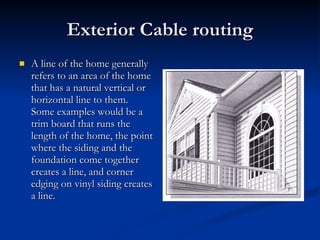
Exterior Cable routing A line of the home generally refers to an area of the home that has a natural vertical or horizontal line to them.  Some examples would be a trim board that runs the length of the home, the point where the siding and the foundation come together creates a line, and corner edging on vinyl siding creates a line.
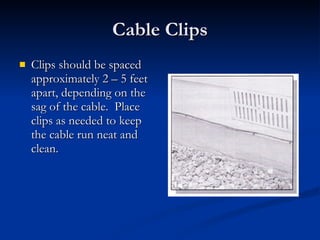
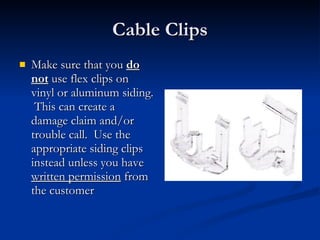
Cable Clips Clips should be spaced approximately 2 – 5 feet apart, depending on the sag of the cable.  Place clips as needed to keep the cable run neat and clean.
Cable Clips Make sure that you  do not  use flex clips on vinyl or aluminum siding.  This can create a damage claim and/or trouble call.  Use the appropriate siding clips instead unless you have  written permission  from the customer
Interior Cable Routing Drilling the Point of Entry Locating and drilling the point(s) of entry into the customer’s home requires a great deal of thought process, critical thinking, and mathematical measurements and analysis.
Drilling the Point of Entry (Pg 2) When a potential point of entry location near a receiver is identified, the location must be carefully measured.  Measure from a location that is easily identifiable from the outside of the house.  For example, on the inside of the home, you may have determined that the drill hole will be 18 inches below the picture window, and the drill hole is four feet west of the picture window.  Using these same measurements, this location can be accurately identified on the outside of the home.
Drilling the Point of Entry (Pg 3) On the outside of the home, at the point where you “thought” you would like to drill the hole, you may find a gas meter, an air  conditioning unit or another item to avoid.  If this happens, you will need to repeat the measurement process – using a new location.
Wall Penetration After confirming the point of entry (POE) is a safe location, determine whether to drill from the inside-out or from the outside-in.
Wall Penetration (Pg 2) Brick & Stucco – From outside to inside Damage to the brick may result of reversed Always use a masonry drill bit Ensure no items are located on the inside of the wall where hole will appear Place the hole at the same height as other receptacles in the vicinity.
Wall Penetration (Pg 3) Most other surfaces – from inside to outside Use a stud finder to avoid drilling through studs, electrical wiring and plumbing
Wall Penetration (Pg 4) Make sure there is enough cable slack outside the structure.  Not having enough slack in a cable will create problems and changes will need to be made to the installation. There cannot be more than a 90° bend in a cable at any time.
Waterproofing the Penetration When weatherproofing the wall penetration, the following rules apply: If feeding one or two wires through the penetration, feed-thru-bushings must be installed and sealed with silicone. If feeding three or four wires through the penetration, no feed-thru bushings are required, but the penetrations must be sealed with silicone. If the wires are to be fed through aluminum or metal siding, there is a maximum of only  two  wires per penetration and feed-thru bushings and silicone are required.
Attics & Crawlspaces Attics and crawlspaces can be some of the best places to run cables.  Cables are out of the way, hidden from view, and no one is going to mess with them very often.
Attics & Crawlspaces (Pg 2) Some special considerations should be taken when working in these areas: In attics, be sure to only step on the rafters, do not step on the sheetrock.  It will not support your weight and you will fall through. Beware of electrical wires and other cabling which could present a trip hazard or an electrical shock hazard. Be careful of animals and insects in attics and crawlspaces, something may have made a home and be willing to defend it. Be sure not to drop tools, you will have to go back for them.
Using a Cable Toner/Mapper A cable toner or cable mapper is frequently used in pre-wired situations to identify and tag the terminating point for a cable and to determine whether a splitter is located in a system.  The toner/mapper will determine continuity of a cable line.  A cable toner is used only for one line. The cable mapper can test up to 4 lines.
Steps to use a Cable Toner 1.  Attach male unit to one end of the cable. 2.  Use the toner unit at other end to find the correct cable. 3.  Place the toner unit on one cable at a time until the toner unit sounds. Once the unit sounds, you know you have the correct cable.
Steps to use a Cable Mapper 1.  Connect the remotes to the cable lines. 2.  Connect the master unit to the other end of the cable lines. 3.  Press the TEST button The TESTING LED will flash quickly. 4.  If no failures are detected, the remote(s) will be identified in the PASS area by lighting an LED for each remote found. If no remote is found, or the cable is shorted, the OPEN or SHORT LEDs will light respectively.
Routing Cable through Carpet If routing through an unfinished basement, the one major consideration is the flooring you may be coming up through.  Ideally, you should be wall fishing the cable and installing a wall plate at the receiver location. However, there may be instances where you have no alternative other than to drill through the flooring.  Keep in mind, this must be a  last resort  for routing the cabling.
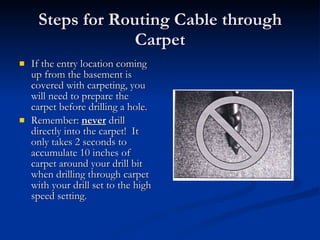
Steps for Routing Cable through Carpet If the entry location coming up from the basement is covered with carpeting, you will need to prepare the carpet before drilling a hole. Remember:  never  drill directly into the carpet!  It only takes 2 seconds to accumulate 10 inches of carpet around your drill bit when drilling through carpet with your drill set to the high speed setting.
Steps for Routing Cable through Carpet (Pg 2) Using a carpet coupler can reduce the possible damage claims that can result from directly drilling into the carpet.  This tool allows you to safely drill through carpet without getting the carpet fibers wrapped around the drill bit.
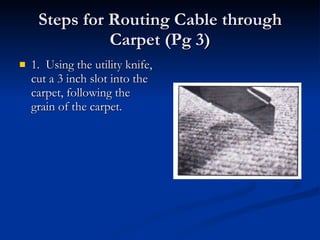
Steps for Routing Cable through Carpet (Pg 3) 1.  Using the utility knife, cut a 3 inch slot into the carpet, following the grain of the carpet.
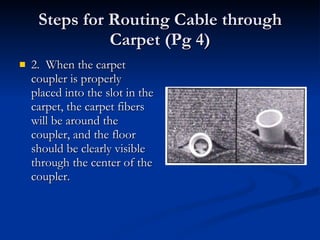
Steps for Routing Cable through Carpet (Pg 4) 2.  When the carpet coupler is properly placed into the slot in the carpet, the carpet fibers will be around the coupler, and the floor should be clearly visible through the center of the coupler.
Steps for Routing Cable through Carpet (Pg 5) 3.  Place the drill bit through the center of the coupler and slowly drill through the floor.
Steps for Routing Cable through Carpet (Pg 6) 4.  Remove the drill bit and the carpet coupler.
Steps for Routing Cable through Carpet (Pg 7) 5.  Route cables through the hole and flatten carpet back down.
Steps for Routing Cable through Carpet (Pg 8) 6.  A feed through bushing can be placed on the cable and back into the hole to better hold the carpet down.
Wall Fishing When a receiver is located on an interior wall, a wall fish through a crawl space or an attic is often the best technique to use.  Before considering a wall fish, confirm that the routing cannot be completed through a better location. However, keep in mind that if the receiver is located on an interior wall, wall fishing may be the best and/or only option.
Wall Fishing (Pg 2) The tools that will be necessary for a wall fish include: A cordless drill with 3/8- or ½-inch bit A stud finder Measuring tape An adequate length of glow rod or fish chain Flashlights (large and small) Wire cutters Electrical tape Safety glasses Safety mask (always worn in attics) A hard hat Water – especially if the attic is warm or hot
Wall Fishing (Pg 3) When working in an attic, dehydration is a consideration.  Frequent breaks and water are required.  You must be aware of how to avoid heat stress and heat stroke.
Wall Fishing (Pg 4) Safety glasses are required during all work – and are especially important during wall fishes.  Dust particles can fall down from the attic. Wear a safety mask for protection against insulation, dust and other elements. A hard hat is worn as protection from sharp nails that may protrude from roofing.
Wall Fishing (Pg 5) You must walk very carefully on 2 x 4 ceiling joists in the attic.  The greatest concern is that, if you do not walk on the joists, you could fall through the ceiling and injure yourself severely. In addition, damage reports in early 2002 indicate that ceiling damage – caused by stepping through the ceiling – cost an average of $1400 per accident.
Wall Fishing (Pg 6) It is important to note:  You will not be able to perform a wall fish and/or route the cabling inside the wall of houses without an attic, such as a vaulted ceiling, or a house with a finished basement where you cannot access the inside of the wall, floor or ceiling. You will need to discuss other possibilities with the customer.
Wall Fishing Tools

Dish4You Cable Routing

  • 1.
    Dish 4 YouCable Routing
  • 2.
    Cable Routing Ifyou were installing at your own home, how would you like the cable runs to look when you finished? This section will cover the process for selecting the best option for which cable to use, how to identify the lines of a home, and to best hide cable runs. The steps for doing a cabling wall fish will also be covered.
  • 3.
    The Walk-Through Duringthe walk-through, you will explain the best route for cabling with the customer. The customer will need to approve your plan before any work can be done. You want the customer to accept your plan as the best way to complete the install. You have to convince them that this is the best plan for their needs.
  • 4.
    Cable Pre-Wired SystemsWhy do you need a certain rating on the coaxial cable you use? Without a correctly rated cable, the receiver will not receive all the transponders it needs and some channels will not be viewable. How do you tell the difference between a high-frequency barrel or wall plate and one that is not rated for the higher frequencies? If you are uncertain about the ratings of existing cabling or hardware during an installation, it is best to replace all existing hardware in a system to ensure every component is a DNS approved item.
  • 5.
    Exterior Cable routingA line of the home generally refers to an area of the home that has a natural vertical or horizontal line to them. Some examples would be a trim board that runs the length of the home, the point where the siding and the foundation come together creates a line, and corner edging on vinyl siding creates a line.
  • 6.
    Cable Clips Clipsshould be spaced approximately 2 – 5 feet apart, depending on the sag of the cable. Place clips as needed to keep the cable run neat and clean.
  • 7.
    Cable Clips Makesure that you do not use flex clips on vinyl or aluminum siding. This can create a damage claim and/or trouble call. Use the appropriate siding clips instead unless you have written permission from the customer
  • 8.
    Interior Cable RoutingDrilling the Point of Entry Locating and drilling the point(s) of entry into the customer’s home requires a great deal of thought process, critical thinking, and mathematical measurements and analysis.
  • 9.
    Drilling the Pointof Entry (Pg 2) When a potential point of entry location near a receiver is identified, the location must be carefully measured. Measure from a location that is easily identifiable from the outside of the house. For example, on the inside of the home, you may have determined that the drill hole will be 18 inches below the picture window, and the drill hole is four feet west of the picture window. Using these same measurements, this location can be accurately identified on the outside of the home.
  • 10.
    Drilling the Pointof Entry (Pg 3) On the outside of the home, at the point where you “thought” you would like to drill the hole, you may find a gas meter, an air conditioning unit or another item to avoid. If this happens, you will need to repeat the measurement process – using a new location.
  • 11.
    Wall Penetration Afterconfirming the point of entry (POE) is a safe location, determine whether to drill from the inside-out or from the outside-in.
  • 12.
    Wall Penetration (Pg2) Brick & Stucco – From outside to inside Damage to the brick may result of reversed Always use a masonry drill bit Ensure no items are located on the inside of the wall where hole will appear Place the hole at the same height as other receptacles in the vicinity.
  • 13.
    Wall Penetration (Pg3) Most other surfaces – from inside to outside Use a stud finder to avoid drilling through studs, electrical wiring and plumbing
  • 14.
    Wall Penetration (Pg4) Make sure there is enough cable slack outside the structure. Not having enough slack in a cable will create problems and changes will need to be made to the installation. There cannot be more than a 90° bend in a cable at any time.
  • 15.
    Waterproofing the PenetrationWhen weatherproofing the wall penetration, the following rules apply: If feeding one or two wires through the penetration, feed-thru-bushings must be installed and sealed with silicone. If feeding three or four wires through the penetration, no feed-thru bushings are required, but the penetrations must be sealed with silicone. If the wires are to be fed through aluminum or metal siding, there is a maximum of only two wires per penetration and feed-thru bushings and silicone are required.
  • 16.
    Attics & CrawlspacesAttics and crawlspaces can be some of the best places to run cables. Cables are out of the way, hidden from view, and no one is going to mess with them very often.
  • 17.
    Attics & Crawlspaces(Pg 2) Some special considerations should be taken when working in these areas: In attics, be sure to only step on the rafters, do not step on the sheetrock. It will not support your weight and you will fall through. Beware of electrical wires and other cabling which could present a trip hazard or an electrical shock hazard. Be careful of animals and insects in attics and crawlspaces, something may have made a home and be willing to defend it. Be sure not to drop tools, you will have to go back for them.
  • 18.
    Using a CableToner/Mapper A cable toner or cable mapper is frequently used in pre-wired situations to identify and tag the terminating point for a cable and to determine whether a splitter is located in a system. The toner/mapper will determine continuity of a cable line. A cable toner is used only for one line. The cable mapper can test up to 4 lines.
  • 19.
    Steps to usea Cable Toner 1. Attach male unit to one end of the cable. 2. Use the toner unit at other end to find the correct cable. 3. Place the toner unit on one cable at a time until the toner unit sounds. Once the unit sounds, you know you have the correct cable.
  • 20.
    Steps to usea Cable Mapper 1. Connect the remotes to the cable lines. 2. Connect the master unit to the other end of the cable lines. 3. Press the TEST button The TESTING LED will flash quickly. 4. If no failures are detected, the remote(s) will be identified in the PASS area by lighting an LED for each remote found. If no remote is found, or the cable is shorted, the OPEN or SHORT LEDs will light respectively.
  • 21.
    Routing Cable throughCarpet If routing through an unfinished basement, the one major consideration is the flooring you may be coming up through. Ideally, you should be wall fishing the cable and installing a wall plate at the receiver location. However, there may be instances where you have no alternative other than to drill through the flooring. Keep in mind, this must be a last resort for routing the cabling.
  • 22.
    Steps for RoutingCable through Carpet If the entry location coming up from the basement is covered with carpeting, you will need to prepare the carpet before drilling a hole. Remember: never drill directly into the carpet! It only takes 2 seconds to accumulate 10 inches of carpet around your drill bit when drilling through carpet with your drill set to the high speed setting.
  • 23.
    Steps for RoutingCable through Carpet (Pg 2) Using a carpet coupler can reduce the possible damage claims that can result from directly drilling into the carpet. This tool allows you to safely drill through carpet without getting the carpet fibers wrapped around the drill bit.
  • 24.
    Steps for RoutingCable through Carpet (Pg 3) 1. Using the utility knife, cut a 3 inch slot into the carpet, following the grain of the carpet.
  • 25.
    Steps for RoutingCable through Carpet (Pg 4) 2. When the carpet coupler is properly placed into the slot in the carpet, the carpet fibers will be around the coupler, and the floor should be clearly visible through the center of the coupler.
  • 26.
    Steps for RoutingCable through Carpet (Pg 5) 3. Place the drill bit through the center of the coupler and slowly drill through the floor.
  • 27.
    Steps for RoutingCable through Carpet (Pg 6) 4. Remove the drill bit and the carpet coupler.
  • 28.
    Steps for RoutingCable through Carpet (Pg 7) 5. Route cables through the hole and flatten carpet back down.
  • 29.
    Steps for RoutingCable through Carpet (Pg 8) 6. A feed through bushing can be placed on the cable and back into the hole to better hold the carpet down.
  • 30.
    Wall Fishing Whena receiver is located on an interior wall, a wall fish through a crawl space or an attic is often the best technique to use. Before considering a wall fish, confirm that the routing cannot be completed through a better location. However, keep in mind that if the receiver is located on an interior wall, wall fishing may be the best and/or only option.
  • 31.
    Wall Fishing (Pg2) The tools that will be necessary for a wall fish include: A cordless drill with 3/8- or ½-inch bit A stud finder Measuring tape An adequate length of glow rod or fish chain Flashlights (large and small) Wire cutters Electrical tape Safety glasses Safety mask (always worn in attics) A hard hat Water – especially if the attic is warm or hot
  • 32.
    Wall Fishing (Pg3) When working in an attic, dehydration is a consideration. Frequent breaks and water are required. You must be aware of how to avoid heat stress and heat stroke.
  • 33.
    Wall Fishing (Pg4) Safety glasses are required during all work – and are especially important during wall fishes. Dust particles can fall down from the attic. Wear a safety mask for protection against insulation, dust and other elements. A hard hat is worn as protection from sharp nails that may protrude from roofing.
  • 34.
    Wall Fishing (Pg5) You must walk very carefully on 2 x 4 ceiling joists in the attic. The greatest concern is that, if you do not walk on the joists, you could fall through the ceiling and injure yourself severely. In addition, damage reports in early 2002 indicate that ceiling damage – caused by stepping through the ceiling – cost an average of $1400 per accident.
  • 35.
    Wall Fishing (Pg6) It is important to note: You will not be able to perform a wall fish and/or route the cabling inside the wall of houses without an attic, such as a vaulted ceiling, or a house with a finished basement where you cannot access the inside of the wall, floor or ceiling. You will need to discuss other possibilities with the customer.
  • 36.