Windowing in Apache Apex
Yogi Devendra
yogidevendra@apache.org
(with comparison to micro-batch)
Agenda
● Windowing : Why? What?
● Example
● Window sizes : Apex terminologies
● Windowing : Internals
● Windowing : Operator callbacks
● Rolling statistics using sliding windows
● Comparison:
○ Apex windowing with micro-batches
2
Image ref [4]3
Calculate Amount of water
Image ref [5]4
Streams?
Windowing: Why?
● Data in motion ⇒ Unbounded datasets[1]
○ No beginning, No end
● Compute expects finite data
● Failure recovery requires book keeping
● We need some frame of reference for tracking
5
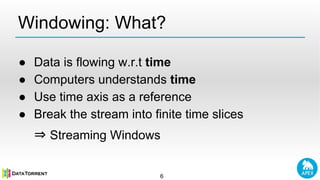
Windowing: What?
● Data is flowing w.r.t time
● Computers understands time
● Use time axis as a reference
● Break the stream into finite time slices
⇒ Streaming Windows
6
Example 1
7 Image ref [6]
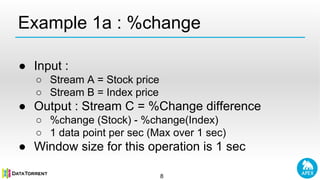
Example 1a : %change
8
● Input :
○ Stream A = Stock price
○ Stream B = Index price
● Output : Stream C = %Change difference
○ %change (Stock) - %change(Index)
○ 1 data point per sec (Max over 1 sec)
● Window size for this operation is 1 sec
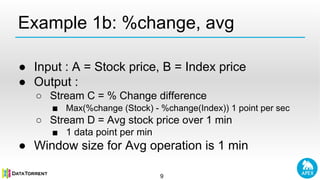
Example 1b: %change, avg
9
● Input : A = Stock price, B = Index price
● Output :
○ Stream C = % Change difference
■ Max(%change (Stock) - %change(Index)) 1 point per sec
○ Stream D = Avg stock price over 1 min
■ 1 data point per min
● Window size for Avg operation is 1 min
Apex Computation model (recap)[9]
● Directed Acyclic Graph ⇒ Application [DAG]
● Nodes ⇒ Computation units [Operators]
● Edges ⇒ Sequence of data tuples [Streams]
10
Filtered
Stream
Output StreamTuple Tuple
FilteredStream
Enriched
Stream
Enriched
Stream
er
Operator
er
Operator
er
Operator
er
Operator
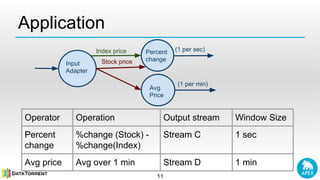
Application
11
Operator Operation Output stream Window Size
Percent
change
%change (Stock) -
%change(Index)
Stream C 1 sec
Avg price Avg over 1 min Stream D 1 min
Input
Adapter
Percent
change
Avg.
Price
Index price
Stock price
(1 per sec)
(1 per min)
12
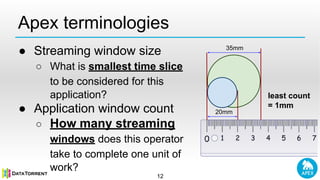
Apex terminologies
● Streaming window size
○ What is smallest time slice
to be considered for this
application?
● Application window count
○ How many streaming
windows does this operator
take to complete one unit of
work?
35mm
20mm
least count
= 1mm
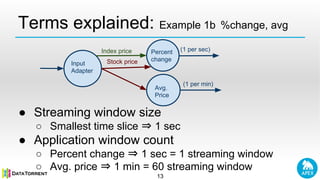
Terms explained: Example 1b %change, avg
13
● Streaming window size
○ Smallest time slice ⇒ 1 sec
● Application window count
○ Percent change ⇒ 1 sec = 1 streaming window
○ Avg. price ⇒ 1 min = 60 streaming window
Input
Adapter
Percent
change
Avg.
Price
Index price
Stock price
(1 per sec)
(1 per min)
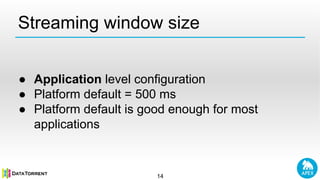
Streaming window size
● Application level configuration
● Platform default = 500 ms
● Platform default is good enough for most
applications
14
● Operator level configuration
● Platform default = 1
● If the operator is not doing special operations
over multiple streaming window
⇒ use default
Application window count
15
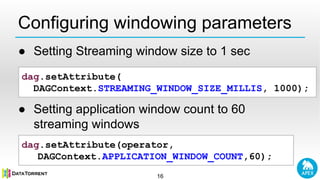
Configuring windowing parameters
16
dag.setAttribute(
DAGContext.STREAMING_WINDOW_SIZE_MILLIS, 1000);
dag.setAttribute(operator,
DAGContext.APPLICATION_WINDOW_COUNT,60);
● Setting Streaming window size to 1 sec
● Setting application window count to 60
streaming windows
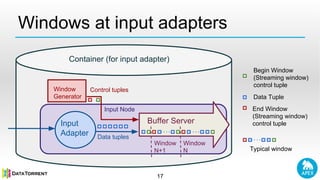
Windows at input adapters
17
Container (for input adapter)
Begin Window
(Streaming window)
control tuple
Data Tuple
End Window
(Streaming window)
control tuple
Window
N
Buffer Server
Window
N+1
Window
Generator
Control tuples
Input
Adapter Data tuples
Input Node
Typical window
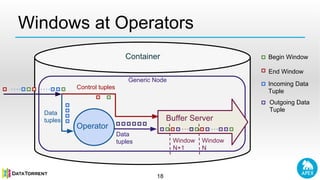
Windows at Operators
18
Container
Control tuples
Operator
Data
tuples
Generic Node
Window
N
Buffer Server
Window
N+1
Begin Window
Incoming Data
Tuple
Outgoing Data
Tuple
Data
tuples
End Window
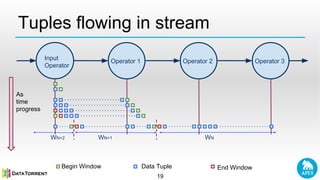
Tuples flowing in stream
19
Input
Operator
Operator 1 Operator 2 Operator 3
Begin Window Data Tuple End Window
WNWN+1WN+2
As
time
progress
Windowing : Operator callbacks
20
● If operator wish to do some processing at
window level:
○ Configure APPLICATION_WINDOW_COUNT
○ Implement :
■ beginWindow(long windowId)
■ endWindow()
Windowing : Operator callbacks (continued)
21
● Platform wraps operators inside Node
(InputNode, GenericNode)
○ looks at the control tuples for streaming windows
boundaries
○ Invokes operator beginWindow(), endWindow()
based on APPLICATION_WINDOW_COUNT
Examples: Per window operations
22
● Aggregate computations
○ Avg over last 1 min
○ Max over last 1 sec
● Writing to external store in batch
○ Data written file system e.g. HDFS
Example 2 : Rolling statistics
23
● Twitter trends
○ show top 10 URLs mentioned in the tweets
○ Results over last 5 mins
○ Update results every half second
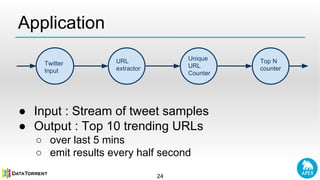
Application
24
● Input : Stream of tweet samples
● Output : Top 10 trending URLs
○ over last 5 mins
○ emit results every half second
Twitter
Input
URL
extractor
Unique
URL
Counter
Top N
counter
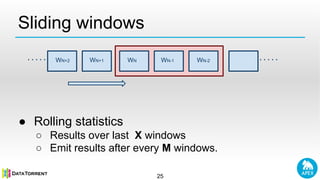
Sliding windows
25
● Rolling statistics
○ Results over last X windows
○ Emit results after every M windows.
WN-2WN-1WNWN+1WN+2
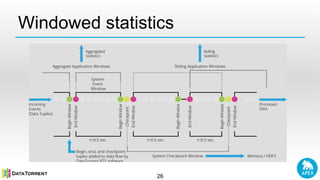
Windowed statistics
26
Slide-by Window count [11]
27
● Operator level configuration
● App developer should specify:
○ After how many streaming windows should
operator emit rolling statistics?
○ How to merge results across windows (unifier)
● Value between : 1 to APPLICATION_WINDOW_COUNT
● Default
○ Turned off : Tumbling window
○ Non-overlapping stats for each window
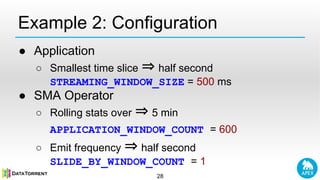
Example 2: Configuration
28
● Application
○ Smallest time slice ⇒ half second
STREAMING_WINDOW_SIZE = 500 ms
● SMA Operator
○ Rolling stats over ⇒ 5 min
APPLICATION_WINDOW_COUNT = 600
○ Emit frequency ⇒ half second
SLIDE_BY_WINDOW_COUNT = 1
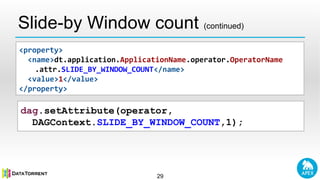
Slide-by Window count (continued)
29
<property>
<name>dt.application.ApplicationName.operator.OperatorName
.attr.SLIDE_BY_WINDOW_COUNT</name>
<value>1</value>
</property>
dag.setAttribute(operator,
DAGContext.SLIDE_BY_WINDOW_COUNT,1);
Comparison with micro-batch
30
Gol gappa ⇒ micro-batch
image ref [8]
Gol gappa ⇒ Streaming windows
image ref [7]
Apex windows : Highlights
31
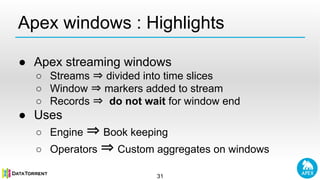
● Apex streaming windows
○ Streams ⇒ divided into time slices
○ Window ⇒ markers added to stream
○ Records ⇒ do not wait for window end
● Uses
○ Engine ⇒ Book keeping
○ Operators ⇒ Custom aggregates on windows
Micro-batch engines
32
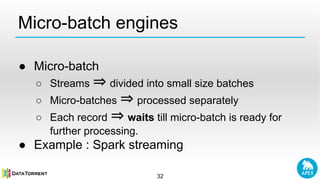
● Micro-batch
○ Streams ⇒ divided into small size batches
○ Micro-batches ⇒ processed separately
○ Each record ⇒ waits till micro-batch is ready for
further processing.
● Example : Spark streaming
Comparison
33
Micro batch engines Apex streaming windows
Waiting time Records waits till micro-batch
is ready for further processing
Records do not wait for
end of window
Additional latency Artificial latency introduced
because of records waiting for
micro-batch boundaries
No additional latency
involved. Records are
immediately forwarded to
next stage of processing.
Limits Sub-second latencies only for
simple applications.System
with multiple network shuffle
leads multi-seconds latencies.
[14]
Even latencies like 2ms
achievable [13]
34
Questions
Image ref [2]
35
Resources
36
● Apache Apex Page
○ http://apex.incubator.apache.org
● Mailing Lists
○ dev@apex.incubator.apache.org
○ users@apex.incubator.apache.org
● Repository
○ https://github.com/apache/incubator-apex-core
○ https://github.com/apache/incubator-apex-malhar
● Issue Tracking
○ https://issues.apache.org/jira/browse/APEXCORE
○ https://issues.apache.org/jira/browse/APEXMALHAR
● @ApacheApex
● /groups/7020520
References
1. Thank You | planwallpaper http://www.planwallpaper.com/thank-you
2. Question | clipartpanda http://www.clipartpanda.com/clipart_images/how-to-answer-the-question-46954146
3. Streaming 101 | oreilly http://radar.oreilly.com/2015/08/the-world-beyond-batch-streaming-101.html
4. Swimming Pool Design | homesthetics http://homesthetics.net/backyard-landscaping-ideas-swimming-pool-design/
5. Mountain Stream | freebigpictures http://freebigpictures.com/river-pictures/mountain-stream/
6. Yahoo Finance http://finance.yahoo.com/
7. Crispy Chaat | grabhouse http://grabhouse.com/urbancocktail/11-crispy-chaat-joints-food-lovers-hyderabad/
8. Paani puri stall | citiyshor http://www.cityshor.com/pune/food/street-food/camp/murali-paani-puri-stall/
9. Application Developement | DataTorrent http://docs.datatorrent.com/application_development/
10. Malhar demos | Apache apex malhar | https://github.com/apache/incubator-apex-
malhar/blob/master/demos/yahoofinance/src/main/java/com/datatorrent/demos/yahoofinance/YahooFinanceApplication.java
11. Malhar demos | Apache apex malhar https://github.com/apache/incubator-apex-
malhar/blob/master/demos/twitter/src/main/java/com/datatorrent/demos/twitter/TwitterTopCounterApplication.java
12. https://github.com/apache/incubator-apex-malhar/blob/master/demos/yahoofinance/src/main/resources/META-INF/properties.xml#L28
13. ilganeli | slideshare http://www.slideshare.net/ilganeli/nextgen-decision-making-in-under-2ms
14. teamblog | cakesolutions http://www.cakesolutions.net/teamblogs/spark-streaming-tricky-parts
37

Windowing in apex

  • 1.
    Windowing in ApacheApex Yogi Devendra yogidevendra@apache.org (with comparison to micro-batch)
  • 2.
    Agenda ● Windowing :Why? What? ● Example ● Window sizes : Apex terminologies ● Windowing : Internals ● Windowing : Operator callbacks ● Rolling statistics using sliding windows ● Comparison: ○ Apex windowing with micro-batches 2
  • 3.
    Image ref [4]3 CalculateAmount of water
  • 4.
  • 5.
    Windowing: Why? ● Datain motion ⇒ Unbounded datasets[1] ○ No beginning, No end ● Compute expects finite data ● Failure recovery requires book keeping ● We need some frame of reference for tracking 5
  • 6.
    Windowing: What? ● Datais flowing w.r.t time ● Computers understands time ● Use time axis as a reference ● Break the stream into finite time slices ⇒ Streaming Windows 6
  • 7.
  • 8.
    Example 1a :%change 8 ● Input : ○ Stream A = Stock price ○ Stream B = Index price ● Output : Stream C = %Change difference ○ %change (Stock) - %change(Index) ○ 1 data point per sec (Max over 1 sec) ● Window size for this operation is 1 sec
  • 9.
    Example 1b: %change,avg 9 ● Input : A = Stock price, B = Index price ● Output : ○ Stream C = % Change difference ■ Max(%change (Stock) - %change(Index)) 1 point per sec ○ Stream D = Avg stock price over 1 min ■ 1 data point per min ● Window size for Avg operation is 1 min
  • 10.
    Apex Computation model(recap)[9] ● Directed Acyclic Graph ⇒ Application [DAG] ● Nodes ⇒ Computation units [Operators] ● Edges ⇒ Sequence of data tuples [Streams] 10 Filtered Stream Output StreamTuple Tuple FilteredStream Enriched Stream Enriched Stream er Operator er Operator er Operator er Operator
  • 11.
    Application 11 Operator Operation Outputstream Window Size Percent change %change (Stock) - %change(Index) Stream C 1 sec Avg price Avg over 1 min Stream D 1 min Input Adapter Percent change Avg. Price Index price Stock price (1 per sec) (1 per min)
  • 12.
    12 Apex terminologies ● Streamingwindow size ○ What is smallest time slice to be considered for this application? ● Application window count ○ How many streaming windows does this operator take to complete one unit of work? 35mm 20mm least count = 1mm
  • 13.
    Terms explained: Example1b %change, avg 13 ● Streaming window size ○ Smallest time slice ⇒ 1 sec ● Application window count ○ Percent change ⇒ 1 sec = 1 streaming window ○ Avg. price ⇒ 1 min = 60 streaming window Input Adapter Percent change Avg. Price Index price Stock price (1 per sec) (1 per min)
  • 14.
    Streaming window size ●Application level configuration ● Platform default = 500 ms ● Platform default is good enough for most applications 14
  • 15.
    ● Operator levelconfiguration ● Platform default = 1 ● If the operator is not doing special operations over multiple streaming window ⇒ use default Application window count 15
  • 16.
    Configuring windowing parameters 16 dag.setAttribute( DAGContext.STREAMING_WINDOW_SIZE_MILLIS,1000); dag.setAttribute(operator, DAGContext.APPLICATION_WINDOW_COUNT,60); ● Setting Streaming window size to 1 sec ● Setting application window count to 60 streaming windows
  • 17.
    Windows at inputadapters 17 Container (for input adapter) Begin Window (Streaming window) control tuple Data Tuple End Window (Streaming window) control tuple Window N Buffer Server Window N+1 Window Generator Control tuples Input Adapter Data tuples Input Node Typical window
  • 18.
    Windows at Operators 18 Container Controltuples Operator Data tuples Generic Node Window N Buffer Server Window N+1 Begin Window Incoming Data Tuple Outgoing Data Tuple Data tuples End Window
  • 19.
    Tuples flowing instream 19 Input Operator Operator 1 Operator 2 Operator 3 Begin Window Data Tuple End Window WNWN+1WN+2 As time progress
  • 20.
    Windowing : Operatorcallbacks 20 ● If operator wish to do some processing at window level: ○ Configure APPLICATION_WINDOW_COUNT ○ Implement : ■ beginWindow(long windowId) ■ endWindow()
  • 21.
    Windowing : Operatorcallbacks (continued) 21 ● Platform wraps operators inside Node (InputNode, GenericNode) ○ looks at the control tuples for streaming windows boundaries ○ Invokes operator beginWindow(), endWindow() based on APPLICATION_WINDOW_COUNT
  • 22.
    Examples: Per windowoperations 22 ● Aggregate computations ○ Avg over last 1 min ○ Max over last 1 sec ● Writing to external store in batch ○ Data written file system e.g. HDFS
  • 23.
    Example 2 :Rolling statistics 23 ● Twitter trends ○ show top 10 URLs mentioned in the tweets ○ Results over last 5 mins ○ Update results every half second
  • 24.
    Application 24 ● Input :Stream of tweet samples ● Output : Top 10 trending URLs ○ over last 5 mins ○ emit results every half second Twitter Input URL extractor Unique URL Counter Top N counter
  • 25.
    Sliding windows 25 ● Rollingstatistics ○ Results over last X windows ○ Emit results after every M windows. WN-2WN-1WNWN+1WN+2
  • 26.
  • 27.
    Slide-by Window count[11] 27 ● Operator level configuration ● App developer should specify: ○ After how many streaming windows should operator emit rolling statistics? ○ How to merge results across windows (unifier) ● Value between : 1 to APPLICATION_WINDOW_COUNT ● Default ○ Turned off : Tumbling window ○ Non-overlapping stats for each window
  • 28.
    Example 2: Configuration 28 ●Application ○ Smallest time slice ⇒ half second STREAMING_WINDOW_SIZE = 500 ms ● SMA Operator ○ Rolling stats over ⇒ 5 min APPLICATION_WINDOW_COUNT = 600 ○ Emit frequency ⇒ half second SLIDE_BY_WINDOW_COUNT = 1
  • 29.
    Slide-by Window count(continued) 29 <property> <name>dt.application.ApplicationName.operator.OperatorName .attr.SLIDE_BY_WINDOW_COUNT</name> <value>1</value> </property> dag.setAttribute(operator, DAGContext.SLIDE_BY_WINDOW_COUNT,1);
  • 30.
    Comparison with micro-batch 30 Golgappa ⇒ micro-batch image ref [8] Gol gappa ⇒ Streaming windows image ref [7]
  • 31.
    Apex windows :Highlights 31 ● Apex streaming windows ○ Streams ⇒ divided into time slices ○ Window ⇒ markers added to stream ○ Records ⇒ do not wait for window end ● Uses ○ Engine ⇒ Book keeping ○ Operators ⇒ Custom aggregates on windows
  • 32.
    Micro-batch engines 32 ● Micro-batch ○Streams ⇒ divided into small size batches ○ Micro-batches ⇒ processed separately ○ Each record ⇒ waits till micro-batch is ready for further processing. ● Example : Spark streaming
  • 33.
    Comparison 33 Micro batch enginesApex streaming windows Waiting time Records waits till micro-batch is ready for further processing Records do not wait for end of window Additional latency Artificial latency introduced because of records waiting for micro-batch boundaries No additional latency involved. Records are immediately forwarded to next stage of processing. Limits Sub-second latencies only for simple applications.System with multiple network shuffle leads multi-seconds latencies. [14] Even latencies like 2ms achievable [13]
  • 34.
  • 35.
  • 36.
    Resources 36 ● Apache ApexPage ○ http://apex.incubator.apache.org ● Mailing Lists ○ dev@apex.incubator.apache.org ○ users@apex.incubator.apache.org ● Repository ○ https://github.com/apache/incubator-apex-core ○ https://github.com/apache/incubator-apex-malhar ● Issue Tracking ○ https://issues.apache.org/jira/browse/APEXCORE ○ https://issues.apache.org/jira/browse/APEXMALHAR ● @ApacheApex ● /groups/7020520
  • 37.
    References 1. Thank You| planwallpaper http://www.planwallpaper.com/thank-you 2. Question | clipartpanda http://www.clipartpanda.com/clipart_images/how-to-answer-the-question-46954146 3. Streaming 101 | oreilly http://radar.oreilly.com/2015/08/the-world-beyond-batch-streaming-101.html 4. Swimming Pool Design | homesthetics http://homesthetics.net/backyard-landscaping-ideas-swimming-pool-design/ 5. Mountain Stream | freebigpictures http://freebigpictures.com/river-pictures/mountain-stream/ 6. Yahoo Finance http://finance.yahoo.com/ 7. Crispy Chaat | grabhouse http://grabhouse.com/urbancocktail/11-crispy-chaat-joints-food-lovers-hyderabad/ 8. Paani puri stall | citiyshor http://www.cityshor.com/pune/food/street-food/camp/murali-paani-puri-stall/ 9. Application Developement | DataTorrent http://docs.datatorrent.com/application_development/ 10. Malhar demos | Apache apex malhar | https://github.com/apache/incubator-apex- malhar/blob/master/demos/yahoofinance/src/main/java/com/datatorrent/demos/yahoofinance/YahooFinanceApplication.java 11. Malhar demos | Apache apex malhar https://github.com/apache/incubator-apex- malhar/blob/master/demos/twitter/src/main/java/com/datatorrent/demos/twitter/TwitterTopCounterApplication.java 12. https://github.com/apache/incubator-apex-malhar/blob/master/demos/yahoofinance/src/main/resources/META-INF/properties.xml#L28 13. ilganeli | slideshare http://www.slideshare.net/ilganeli/nextgen-decision-making-in-under-2ms 14. teamblog | cakesolutions http://www.cakesolutions.net/teamblogs/spark-streaming-tricky-parts 37