Win32 Programming Basic Concepts
Ping-Lun Liao
Outline
● Windows Message
● Resources
● Samples Demo
Windows and Applications
• Mechanisms to starts/terminate the application
Windows Application Components
Message Everywhere
● Event-Driven
● Message-Based Action
What is Windows Message?
● System-Defined Message
● Application-Defined Message
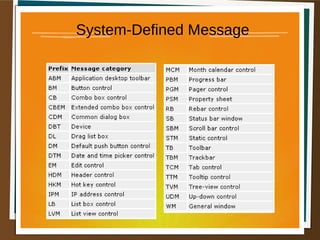
System-Defined Message
● The system sends or posts a system-
defined message when it communicates
with an application.
● It uses these messages to control the
operations of applications and to provide
input and other information for
applications to process.
System-Defined Message
● An application can also send or post syste
m-defined messages.
● Applications generally use these message
s to control the operation of control windo
ws created by using preregistered window
classes.
System-Defined Message
Application-Defined Message
● An application can create messages to be
used by its own windows or to
communicate with windows in other
processes.
● If an application creates its own messages,
the window procedure that receives them
must interpret the messages and provide
appropriate processing.
Steps For Creating A Window
● Step 1: Registering the Window Class
● Step 2: Creating the Window
● Step 3: The Message Loop
● Step 4: the Window Procedure
A Simple Window
● A Simple Window
Message Handling
● Message Loop
● Window Procedure
The Message Loop
• retrieves message from
the message queue
• sends message to the
Windows procedure
where the messages are
processed
• loops back and repeats
the procedure
The Message Loop
• Programs generally don't call window procedures directly.
• The window procedure is almost always called from Windows itself.
• A program can indirectly call its own window procedure by calling a function named
SendMessage().
The Message Loop
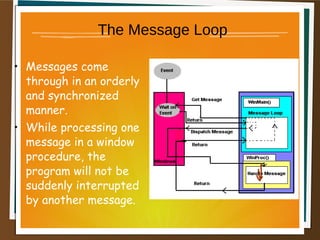
• Messages come
through in an orderly
and synchronized
manner.
• While processing one
message in a window
procedure, the
program will not be
suddenly interrupted
by another message.
Message Handling
WM_LBUTTONDOWNWM_DESTROYWM_PAINTWM_CREATE
The Message Loop
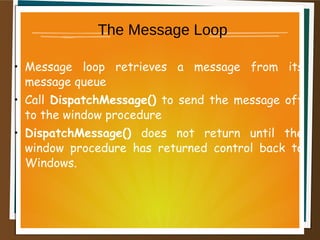
• Message loop retrieves a message from its
message queue
• Call DispatchMessage() to send the message off
to the window procedure
• DispatchMessage() does not return until the
window procedure has returned control back to
Windows.
The Message Loop
Windows Class and Registration
Windows Dialog Box
Windows Application Lifecycle
Resources
• Standard - icon, cursor, menu, dialog box,
bitmap, enhanced metafile, font, accelerator
table, message-table entry, string-table entry,
or version
• Custom - any kind of data that doesn't fall into
the previous category (for example a mp3 file
or a dictionary database).
Three dynamic-link libraries
● Kernel32.dll
– File I/O, System,…
● User32.dll
– User Interface…
● Gdi32.dll
– Fonts, Brushes…
First Windows Program
• Win32 API
● Win32ASM
● Visual C++
– MFC (Microsoft Foundation Classes)
● BCB (Borland C++ Builder)
– VCL (Visual Component Library)
● VB(???)
● .Net(C#, J#, C++, VB.NET)
– Windows Form
• 但是不論用那種方式,都是可以呼叫 Win32 API
Numeric identifiers
● In header file (always called resource.h)
● Example
– #define IDMAINMENU 300
– #define IDM_FILE_NEW 301
– #define IDM_FILE_OPEN 302
– #define IDM_FILE_SAVE 303
– #define IDM_FILE_EXIT 304
– #define IDM_HELP_ABOUT 305
Something about GetMessage
• Warning : Because the return value can be
nonzero, zero, or -1, avoid code like this:
while (GetMessage( lpMsg, hWnd, 0, 0)) ...
Solution
BOOL bRet;
while( (bRet = GetMessage( &msg, NULL, 0, 0 )) != 0)
{
if (bRet == -1)
{
// handle the error and possibly exit
}
else
{
TranslateMessage(&msg);
DispatchMessage(&msg);
}
}
Reference
● 深入淺出 MFC
● theForger's Win32 API Programming Tutorial

Win32 視窗程式設計基礎

  • 1.
    Win32 Programming BasicConcepts Ping-Lun Liao
  • 2.
    Outline ● Windows Message ●Resources ● Samples Demo
  • 3.
    Windows and Applications •Mechanisms to starts/terminate the application
  • 4.
  • 5.
  • 6.
    What is WindowsMessage? ● System-Defined Message ● Application-Defined Message
  • 7.
    System-Defined Message ● Thesystem sends or posts a system- defined message when it communicates with an application. ● It uses these messages to control the operations of applications and to provide input and other information for applications to process.
  • 8.
    System-Defined Message ● Anapplication can also send or post syste m-defined messages. ● Applications generally use these message s to control the operation of control windo ws created by using preregistered window classes.
  • 9.
  • 10.
    Application-Defined Message ● Anapplication can create messages to be used by its own windows or to communicate with windows in other processes. ● If an application creates its own messages, the window procedure that receives them must interpret the messages and provide appropriate processing.
  • 11.
    Steps For CreatingA Window ● Step 1: Registering the Window Class ● Step 2: Creating the Window ● Step 3: The Message Loop ● Step 4: the Window Procedure
  • 12.
    A Simple Window ●A Simple Window
  • 13.
    Message Handling ● MessageLoop ● Window Procedure
  • 14.
    The Message Loop •retrieves message from the message queue • sends message to the Windows procedure where the messages are processed • loops back and repeats the procedure
  • 15.
    The Message Loop •Programs generally don't call window procedures directly. • The window procedure is almost always called from Windows itself. • A program can indirectly call its own window procedure by calling a function named SendMessage().
  • 16.
    The Message Loop •Messages come through in an orderly and synchronized manner. • While processing one message in a window procedure, the program will not be suddenly interrupted by another message.
  • 17.
  • 18.
    The Message Loop •Message loop retrieves a message from its message queue • Call DispatchMessage() to send the message off to the window procedure • DispatchMessage() does not return until the window procedure has returned control back to Windows.
  • 19.
  • 20.
    Windows Class andRegistration
  • 21.
  • 22.
  • 23.
    Resources • Standard -icon, cursor, menu, dialog box, bitmap, enhanced metafile, font, accelerator table, message-table entry, string-table entry, or version • Custom - any kind of data that doesn't fall into the previous category (for example a mp3 file or a dictionary database).
  • 24.
    Three dynamic-link libraries ●Kernel32.dll – File I/O, System,… ● User32.dll – User Interface… ● Gdi32.dll – Fonts, Brushes…
  • 25.
    First Windows Program •Win32 API ● Win32ASM ● Visual C++ – MFC (Microsoft Foundation Classes) ● BCB (Borland C++ Builder) – VCL (Visual Component Library) ● VB(???) ● .Net(C#, J#, C++, VB.NET) – Windows Form • 但是不論用那種方式,都是可以呼叫 Win32 API
  • 26.
    Numeric identifiers ● Inheader file (always called resource.h) ● Example – #define IDMAINMENU 300 – #define IDM_FILE_NEW 301 – #define IDM_FILE_OPEN 302 – #define IDM_FILE_SAVE 303 – #define IDM_FILE_EXIT 304 – #define IDM_HELP_ABOUT 305
  • 27.
    Something about GetMessage •Warning : Because the return value can be nonzero, zero, or -1, avoid code like this: while (GetMessage( lpMsg, hWnd, 0, 0)) ...
  • 28.
    Solution BOOL bRet; while( (bRet= GetMessage( &msg, NULL, 0, 0 )) != 0) { if (bRet == -1) { // handle the error and possibly exit } else { TranslateMessage(&msg); DispatchMessage(&msg); } }
  • 29.
    Reference ● 深入淺出 MFC ●theForger's Win32 API Programming Tutorial

Editor's Notes