Why you should use
Common Data Service (CDS)
/ 2/ 2
Joel Lindstrom • Founder of CRM Audio
• Crmtipoftheday.com
• jlindstrom@hitachisolutions.com
• 12 time Business Applications MVP
• @joellindstrom
Principal Architect and MVP
Speaker
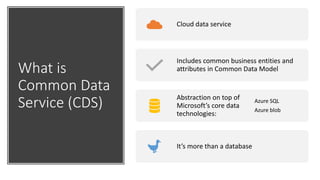
What is
Common Data
Service (CDS)
Cloud data service
Includes common business entities and
attributes in Common Data Model
Abstraction on top of
Microsoft’s core data
technologies:
Azure SQL
Azure blob
It’s more than a database
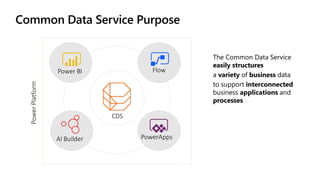
Common Data Service Purpose
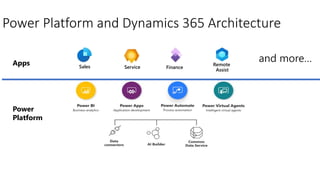
Power Platform and Dynamics 365 Architecture
Power
Platform
Apps Service Finance
Remote
Assist
Sales
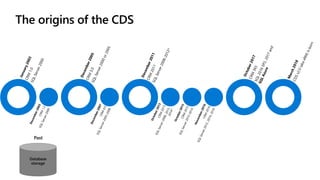
The origins of the CDS
Database
storage
Past
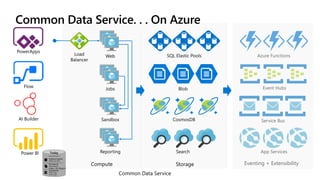
Compute Eventing + ExtensibilityStorage
Common Data Service
Common Data Service. . . On Azure
Today
Storage capacity flavors:
Database Capacity
Relational data
File Capacity
Attachments
Image + File Datatypes
Log capacity
Audit Logs
Trace Logs
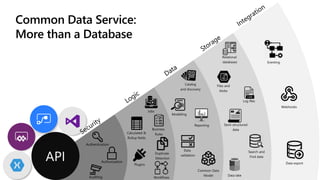
Common Data Service:
More than a Database
Jobs
Calculated &
Rollup fields
Business
Rules
Data
validation
Duplicate
Detection
Plugins
Workflows
Catalog
and discovery
Modelling
Reporting
Common Data
Model
Relational
databases
Files and
blobs
Log files
Semi-structured
data
Search and
Find data
Data lake
Eventing
Webhooks
Data export
Why you should use Common
Data Service (CDS)
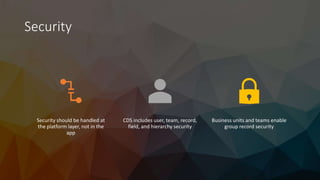
Security
Security should be handled at
the platform layer, not in the
app
CDS includes user, team, record,
field, and hierarchy security
Business units and teams enable
group record security
Bob
• Manufacturing engineer
• Needs to be able to see quality
issues reported by clients
• Should not be able to see the
name of the client
• Should not be able to see issues
for other plants
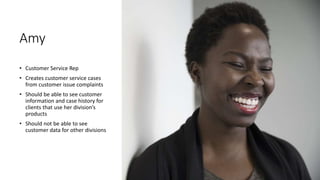
Amy
• Customer Service Rep
• Creates customer service cases
from customer issue complaints
• Should be able to see customer
information and case history for
clients that use her division’s
products
• Should not be able to see
customer data for other divisions
Roy
• Sales Manager
• Needs to see his direct report’s
records
• Should not see sales data for other
sales managers
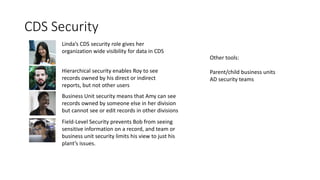
Linda
• General Manager
• Needs visibility for all customer
data and related issues
This Photo by Unknown Author is licensed under CC BY-SA
CDS Security
Linda’s CDS security role gives her
organization wide visibility for data in CDS
Hierarchical security enables Roy to see
records owned by his direct or indirect
reports, but not other users
Business Unit security means that Amy can see
records owned by someone else in her division
but cannot see or edit records in other divisions
Field-Level Security prevents Bob from seeing
sensitive information on a record, and team or
business unit security limits his view to just his
plant’s issues.
Other tools:
Parent/child business units
AD security teams
Localization
Multi-language
Multi-currency
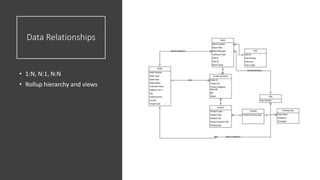
Data Relationships
• 1:N, N:1, N:N
• Rollup hierarchy and views
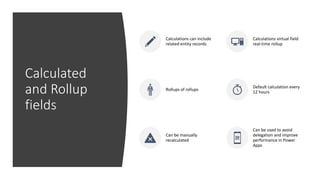
Calculated
and Rollup
fields
Calculations can include
related entity records
Calculations virtual field
real-time rollup
Rollups of rollups
Default calculation every
12 hours
Can be manually
recalculated
Can be used to avoid
delegation and improve
performance in Power
Apps
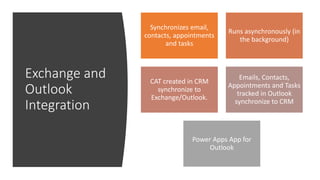
Exchange and
Outlook
Integration
Synchronizes email,
contacts, appointments
and tasks
Runs asynchronously (in
the background)
CAT created in CRM
synchronize to
Exchange/Outlook.
Emails, Contacts,
Appointments and Tasks
tracked in Outlook
synchronize to CRM
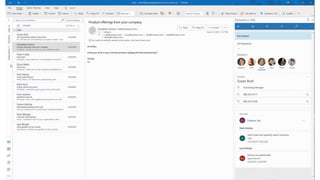
Power Apps App for
Outlook
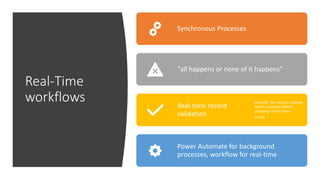
Real-Time
workflows
Synchronous Processes
“all happens or none of it happens”
Real-time record
validation
Example: You want to validate
data is complete before
changing record status
Emails
Power Automate for background
processes, workflow for real-time
Model-Driven Apps and
Portals
The other Power Apps
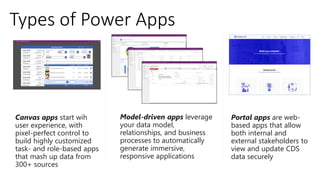
Types of Power Apps
Model-driven apps leverage
your data model,
relationships, and business
processes to automatically
generate immersive,
responsive applications
Canvas apps start wih
user experience, with
pixel-perfect control to
build highly customized
task- and role-based apps
that mash up data from
300+ sources
Portal apps are web-
based apps that allow
both internal and
external stakeholders to
view and update CDS
data securely
© Hitachi Solutions, Ltd. | All Rights Reserved | us.hitachi-solutions.com
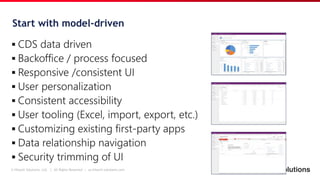
Start with model-driven
© Hitachi Solutions, Ltd. | All Rights Reserved | us.hitachi-solutions.com
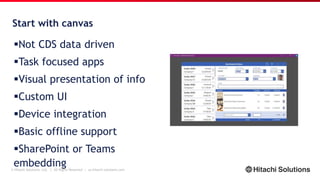
Start with canvas
Not CDS data driven
Task focused apps
Visual presentation of info
Custom UI
Device integration
Basic offline support
SharePoint or Teams
embedding
© Hitachi Solutions, Ltd. | All Rights Reserved | us.hitachi-solutions.com
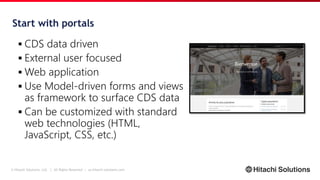
Start with portals
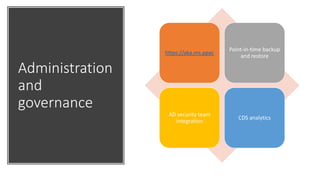
Administration
and
governance
https://aka.ms.ppac
Point-in-time backup
and restore
AD security team
integration
CDS analytics
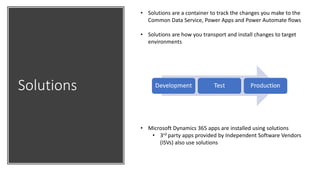
Solutions
• Solutions are a container to track the changes you make to the
Common Data Service, Power Apps and Power Automate flows
• Solutions are how you transport and install changes to target
environments
• Microsoft Dynamics 365 apps are installed using solutions
• 3rd party apps provided by Independent Software Vendors
(ISVs) also use solutions
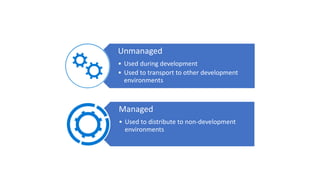
Unmanaged
• Used during development
• Used to transport to other development
environments
Managed
• Used to distribute to non-development
environments
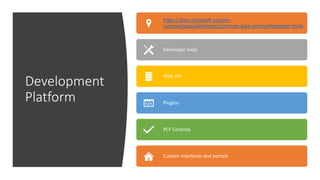
Development
Platform
https://docs.microsoft.com/en-
us/powerapps/developer/common-data-service/developer-tools
Developer tools
Web API
Plugins
PCF Controls
Custom interfaces and portals
Tools
Since Common Data Service comes from the legacy of
Dynamics, there are many tools that makers and
administrators can use to make their lives easier
XrmToolBox: https://www.xrmtoolbox.com/
Configuration Data Migration Utility:
https://docs.microsoft.com/en-us/power-
platform/admin/manage-configuration-data
Andrew Butenko’s Ultimate Workflow Toolkit:
https://butenko.pro/category/ultimate-workflow-
toolkit/
SharePoint and
CDS can be
friends
• CDS includes SharePoint integration
• SharePoint is great for quickly building apps
• SharePoint is great for apps with few data relationships
• SharePoint is a better choice for collaboration file storage

Why you should use common data service final

  • 1.
    Why you shoulduse Common Data Service (CDS)
  • 2.
    / 2/ 2 JoelLindstrom • Founder of CRM Audio • Crmtipoftheday.com • jlindstrom@hitachisolutions.com • 12 time Business Applications MVP • @joellindstrom Principal Architect and MVP Speaker
  • 3.
    What is Common Data Service(CDS) Cloud data service Includes common business entities and attributes in Common Data Model Abstraction on top of Microsoft’s core data technologies: Azure SQL Azure blob It’s more than a database
  • 4.
  • 5.
    Power Platform andDynamics 365 Architecture Power Platform Apps Service Finance Remote Assist Sales
  • 6.
    The origins ofthe CDS Database storage Past
  • 7.
    Compute Eventing +ExtensibilityStorage Common Data Service Common Data Service. . . On Azure Today Storage capacity flavors: Database Capacity Relational data File Capacity Attachments Image + File Datatypes Log capacity Audit Logs Trace Logs
  • 8.
    Common Data Service: Morethan a Database Jobs Calculated & Rollup fields Business Rules Data validation Duplicate Detection Plugins Workflows Catalog and discovery Modelling Reporting Common Data Model Relational databases Files and blobs Log files Semi-structured data Search and Find data Data lake Eventing Webhooks Data export
  • 9.
    Why you shoulduse Common Data Service (CDS)
  • 10.
    Security Security should behandled at the platform layer, not in the app CDS includes user, team, record, field, and hierarchy security Business units and teams enable group record security
  • 11.
    Bob • Manufacturing engineer •Needs to be able to see quality issues reported by clients • Should not be able to see the name of the client • Should not be able to see issues for other plants
  • 12.
    Amy • Customer ServiceRep • Creates customer service cases from customer issue complaints • Should be able to see customer information and case history for clients that use her division’s products • Should not be able to see customer data for other divisions
  • 13.
    Roy • Sales Manager •Needs to see his direct report’s records • Should not see sales data for other sales managers
  • 14.
    Linda • General Manager •Needs visibility for all customer data and related issues This Photo by Unknown Author is licensed under CC BY-SA
  • 15.
    CDS Security Linda’s CDSsecurity role gives her organization wide visibility for data in CDS Hierarchical security enables Roy to see records owned by his direct or indirect reports, but not other users Business Unit security means that Amy can see records owned by someone else in her division but cannot see or edit records in other divisions Field-Level Security prevents Bob from seeing sensitive information on a record, and team or business unit security limits his view to just his plant’s issues. Other tools: Parent/child business units AD security teams
  • 16.
  • 17.
    Data Relationships • 1:N,N:1, N:N • Rollup hierarchy and views
  • 18.
    Calculated and Rollup fields Calculations caninclude related entity records Calculations virtual field real-time rollup Rollups of rollups Default calculation every 12 hours Can be manually recalculated Can be used to avoid delegation and improve performance in Power Apps
  • 19.
    Exchange and Outlook Integration Synchronizes email, contacts,appointments and tasks Runs asynchronously (in the background) CAT created in CRM synchronize to Exchange/Outlook. Emails, Contacts, Appointments and Tasks tracked in Outlook synchronize to CRM Power Apps App for Outlook
  • 21.
    Real-Time workflows Synchronous Processes “all happensor none of it happens” Real-time record validation Example: You want to validate data is complete before changing record status Emails Power Automate for background processes, workflow for real-time
  • 22.
  • 23.
    Types of PowerApps Model-driven apps leverage your data model, relationships, and business processes to automatically generate immersive, responsive applications Canvas apps start wih user experience, with pixel-perfect control to build highly customized task- and role-based apps that mash up data from 300+ sources Portal apps are web- based apps that allow both internal and external stakeholders to view and update CDS data securely
  • 24.
    © Hitachi Solutions,Ltd. | All Rights Reserved | us.hitachi-solutions.com Start with model-driven
  • 25.
    © Hitachi Solutions,Ltd. | All Rights Reserved | us.hitachi-solutions.com Start with canvas Not CDS data driven Task focused apps Visual presentation of info Custom UI Device integration Basic offline support SharePoint or Teams embedding
  • 26.
    © Hitachi Solutions,Ltd. | All Rights Reserved | us.hitachi-solutions.com Start with portals
  • 27.
  • 28.
    Solutions • Solutions area container to track the changes you make to the Common Data Service, Power Apps and Power Automate flows • Solutions are how you transport and install changes to target environments • Microsoft Dynamics 365 apps are installed using solutions • 3rd party apps provided by Independent Software Vendors (ISVs) also use solutions
  • 29.
    Unmanaged • Used duringdevelopment • Used to transport to other development environments Managed • Used to distribute to non-development environments
  • 30.
  • 31.
    Tools Since Common DataService comes from the legacy of Dynamics, there are many tools that makers and administrators can use to make their lives easier XrmToolBox: https://www.xrmtoolbox.com/ Configuration Data Migration Utility: https://docs.microsoft.com/en-us/power- platform/admin/manage-configuration-data Andrew Butenko’s Ultimate Workflow Toolkit: https://butenko.pro/category/ultimate-workflow- toolkit/
  • 32.
    SharePoint and CDS canbe friends • CDS includes SharePoint integration • SharePoint is great for quickly building apps • SharePoint is great for apps with few data relationships • SharePoint is a better choice for collaboration file storage

Editor's Notes

  • #6 The goal of this is to define what the Power Platform is. Power Platform is Microsoft’s suite of low code application development, cross-platform workflow, and business analytics. In this session we will look at how the healthcare industry can use the Power Platform to digitally transform and automate their processes.
  • #7 The ancestors from CRM 1.0 and 3.0 till today The SQL Server Basis SQL Server 2005 (MAX) and Row Overflow SQL Server 2008 datetime2 SQL Server 2008 Wide Tables
  • #8 7
  • #9 If you aren’t familiar with the common data service, let’s take a look at what’s inside. The Common Data Service is API first – everything you do in CDS creates an API. CLICK These are the same APIs are consumed by PowerApps, Power Automate, AI Builder, and PowerBI. CLICK But, these APIs can also be consumed via custom applications built in Visual Studio or Xamarin. CLICK Immediately below the API, we have a rich security layer – ensuring that the right people can see the right data, and auditing all access along the way. CLICK From there we get to our logic layer, where you can implement custom business logic. Because this logic is below the API, this ensures consistent business logic across ALL applications accessing your data. CLICK Then we get to the heart of CDS – our data tier. This allows you to define the structure of your complex business data, without writing code. CLICK And, behind the scenes, we’re putting your data in the right place, using the optimal storage services provided by Azure. This allows us to seamlessly support practically any time of data – from relational data to log data to file data to search indexes to data stored in Azure Data Lake. CLICK Finally, no deployment of CDS lives alone – it must be integrated with other systems. We provide many ways to integrate CDS with external systems – from eventing to WebHooks to Data Export.
  • #24 Today there are 3 main types of Power Apps; canvas apps, model-driven apps and portal apps. Historically, model-driven apps are an evolution of applications built on Dynamics CRM (aka xRM). Power Apps Portals evolved from Dynamics 365 Portals. Power Apps Portals can now be run on vanilla CDS instances.
  • #27 Portals are a type of CMS (Content Management System) built on CDS with components that can surface CDS data. Portals are primarily for external facing audiences.