PowerApps and Flow
Making No Code Mobile Applications a Reality
SharePoint Saturday DC
Saturday, June 10, 2017
Microsoft Chevy Chase,
5404 Wisconsin Avenue NW, Chevy Chase, MD
Level: 300
Track: IT Pro, Developer, Business
Thanks to our Sponsors!!!
Housekeeping…
• You must be present to win at the wrap-up…
• Remember to stop by to say hi to our sponsors
Credentials
2201 Cooperative Way, Suite 550
Herndon, VA 20171
Office Phone: 703.635.2627 | Web: www.procentrix.com
Twitter #hemsoft2010
LinkedIn https://www.linkedin.com/in/hemendrapatel
• Microsoft Certified Solutions Expert - SharePoint 2013 Core & Advanced Solutions
• MCITP - SharePoint 2010
• Microsoft Certified Solution Developer (MCSD) - .NET
• M.S Computer Applications, Gold Medalist
Hemendra Patel
Fun Facts
• Travel
• Investing
• Problem Solving
About Me
About Procentrix Inc
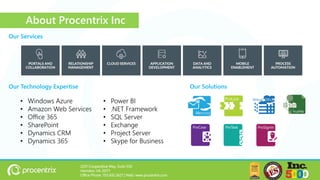
Our SolutionsOur Technology Expertise
• Windows Azure
• Amazon Web Services
• Office 365
• SharePoint
• Dynamics CRM
• Dynamics 365
• Power BI
• .NET Framework
• SQL Server
• Exchange
• Project Server
• Skype for Business
Our Services
2201 Cooperative Way, Suite 550
Herndon, VA 20171
Office Phone: 703.635.2627 | Web: www.procentrix.com
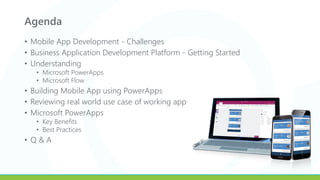
Agenda
• Mobile App Development - Challenges
• Business Application Development Platform - Getting Started
• Understanding
• Microsoft PowerApps
• Microsoft Flow
• Building Mobile App using PowerApps
• Reviewing real world use case of working app
• Microsoft PowerApps
• Key Benefits
• Best Practices
• Q & A
Mobile App Development
Understanding Challenges
Mobile App Development Challenges
• Delivery Schedules
• Extremely complex coding
• Compliance for hosting on iTune/Play Stores
• Managing Size of Screen Real Estate
• Making the App Interactive & Self-explanatory
• Managing Multiple Data connections
• Managing Application and Data Security
• Maximizing data plan and Minimizing data transfers
• Sharing/Collecting Usage Analytics
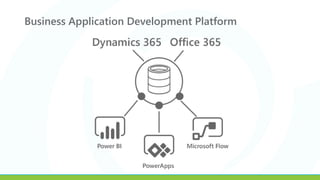
Business Application Development Platform
Getting Started
Business Application Development Platform
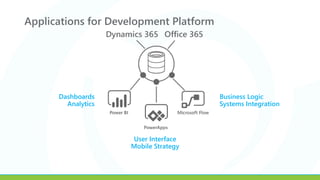
Applications for Development Platform
Business Logic
Systems Integration
Dashboards
Analytics
User Interface
Mobile Strategy
Understanding Microsoft PowerApps
Development Approach & Solution Components
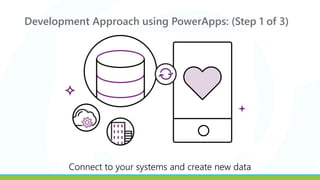
Development Approach using PowerApps: (Step 1 of 3)
Connect to your systems and create new data
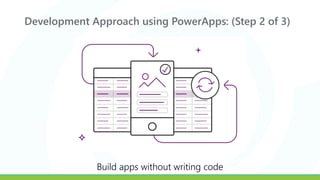
Development Approach using PowerApps: (Step 2 of 3)
Build apps without writing code
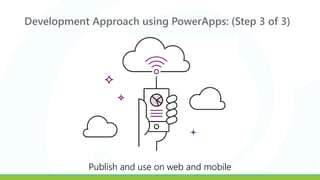
Development Approach using PowerApps: (Step 3 of 3)
Publish and use on web and mobile
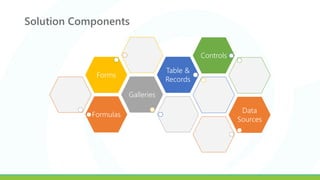
Solution Components
Formulas
Galleries
Forms
Table &
Records
Controls
Data
Sources
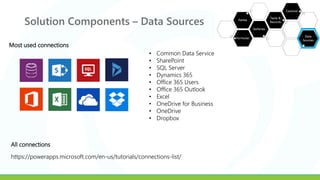
Solution Components – Data Sources
https://powerapps.microsoft.com/en-us/tutorials/connections-list/
• Common Data Service
• SharePoint
• SQL Server
• Dynamics 365
• Office 365 Users
• Office 365 Outlook
• Excel
• OneDrive for Business
• OneDrive
• Dropbox
Most used connections
All connections
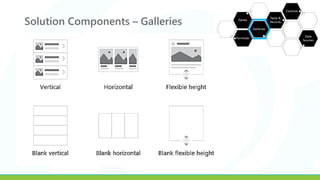
Solution Components – Galleries
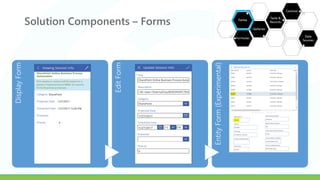
DisplayForm
EditForm
EntityForm(Experimental)
Solution Components – Forms
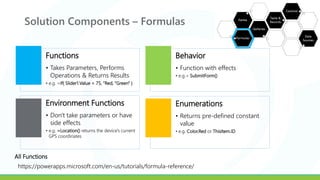
Solution Components – Formulas
https://powerapps.microsoft.com/en-us/tutorials/formula-reference/
Functions
• Takes Parameters, Performs
Operations & Returns Results
• e.g. =If( Slider1.Value < 75, “Red, “Green" )
Behavior
• Function with effects
• e.g.= SubmitForm()
Environment Functions
• Don't take parameters or have
side effects
• e.g. =Location() returns the device's current
GPS coordinates
Enumerations
• Returns pre-defined constant
value
• e.g. Color.Red or ThisItem.ID
All Functions
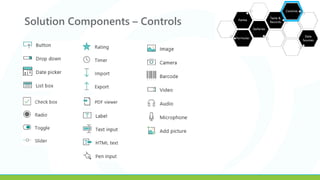
Solution Components – Controls
Understanding Microsoft Flow
Solution Components
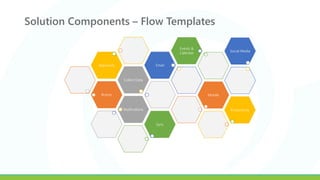
Solution Components – Flow Templates
Button
Collect Data
Approvals Email
Events &
Calendar
Mobile
Notifications Productivity
Social Media
Sync
Building Mobile App using PowerApps
1st Mobile App
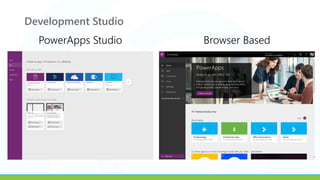
Development Studio
PowerApps Studio Browser Based
Creating 1st Mobile App from SharePoint List
DEMO
Reviewing real world use cases
ProInterview App
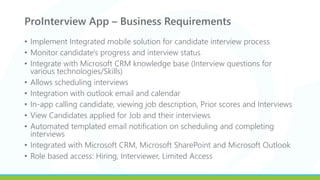
ProInterview App – Business Requirements
• Implement Integrated mobile solution for candidate interview process
• Monitor candidate's progress and interview status
• Integrate with Microsoft CRM knowledge base (Interview questions for
various technologies/Skills)
• Allows scheduling interviews
• Integration with outlook email and calendar
• In-app calling candidate, viewing job description, Prior scores and Interviews
• View Candidates applied for Job and their interviews
• Automated templated email notification on scheduling and completing
interviews
• Integrated with Microsoft CRM, Microsoft SharePoint and Microsoft Outlook
• Role based access: Hiring, Interviewer, Limited Access
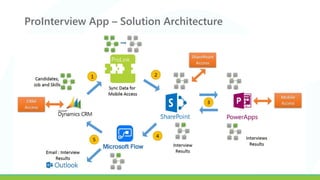
ProInterview App – Solution Architecture
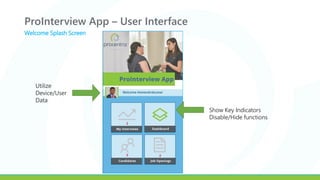
ProInterview App – User Interface
Show Key Indicators
Disable/Hide functions
Utilize
Device/User
Data
Welcome Splash Screen
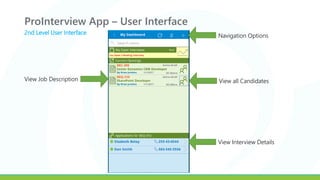
ProInterview App – User Interface
2nd Level User Interface
Navigation Options
View all CandidatesView Job Description
View Interview Details
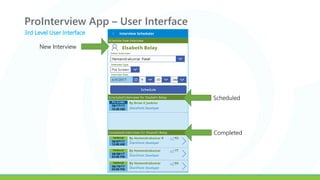
ProInterview App – User Interface
New Interview
Scheduled
Completed
3rd Level User Interface
ProInterview App – Walkthru
DEMO
PowerApps
Key Benefits to IT, Users and Developers
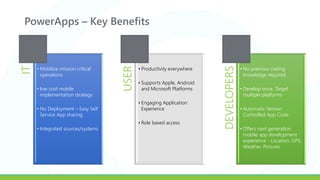
PowerApps – Key BenefitsIT
• Mobilize mission critical
operations
• low cost mobile
implementation strategy
• No Deployment – Easy Self
Service App sharing
• Integrated sources/systems USER
• Productivity everywhere
• Supports Apple, Android
and Microsoft Platforms
• Engaging Application
Experience
• Role based access
DEVELOPERS
• No previous coding
knowledge required
• Develop once, Target
multiple platforms
• Automatic Version
Controlled App Code
• Offers next generation
mobile app development
experience - Location, GPS,
Weather, Pictures
PowerApps
Common Practices/ Guidance
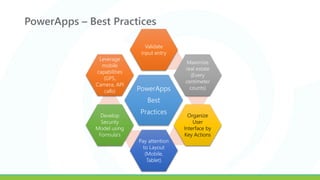
PowerApps – Best Practices
PowerApps
Best
Practices
Validate
input entry
Maximize
real estate
(Every
centimeter
counts)
Organize
User
Interface by
Key Actions
Pay attention
to Layout
(Mobile,
Tablet)
Develop
Security
Model using
Formula’s
Leverage
mobile
capabilities
(GPS,
Camera, API
calls)
Q & A
Hemendra Patel, SharePoint Solutions Architect
Twitter #hemsoft2010
LinkedIn https://www.linkedin.com/in/hemendrapatel
Join us at #SharePint after the conference!
Why? To network with fellow SharePoint professionals
What? SharePint!!!
When? 4:45 PM
Where? Announced at Conference Wrap-Up

SPSDC PowerApps and Flow by Hemendra Patel

  • 1.
    PowerApps and Flow MakingNo Code Mobile Applications a Reality SharePoint Saturday DC Saturday, June 10, 2017 Microsoft Chevy Chase, 5404 Wisconsin Avenue NW, Chevy Chase, MD Level: 300 Track: IT Pro, Developer, Business
  • 2.
    Thanks to ourSponsors!!!
  • 3.
    Housekeeping… • You mustbe present to win at the wrap-up… • Remember to stop by to say hi to our sponsors
  • 4.
    Credentials 2201 Cooperative Way,Suite 550 Herndon, VA 20171 Office Phone: 703.635.2627 | Web: www.procentrix.com Twitter #hemsoft2010 LinkedIn https://www.linkedin.com/in/hemendrapatel • Microsoft Certified Solutions Expert - SharePoint 2013 Core & Advanced Solutions • MCITP - SharePoint 2010 • Microsoft Certified Solution Developer (MCSD) - .NET • M.S Computer Applications, Gold Medalist Hemendra Patel Fun Facts • Travel • Investing • Problem Solving About Me
  • 5.
    About Procentrix Inc OurSolutionsOur Technology Expertise • Windows Azure • Amazon Web Services • Office 365 • SharePoint • Dynamics CRM • Dynamics 365 • Power BI • .NET Framework • SQL Server • Exchange • Project Server • Skype for Business Our Services 2201 Cooperative Way, Suite 550 Herndon, VA 20171 Office Phone: 703.635.2627 | Web: www.procentrix.com
  • 6.
    Agenda • Mobile AppDevelopment - Challenges • Business Application Development Platform - Getting Started • Understanding • Microsoft PowerApps • Microsoft Flow • Building Mobile App using PowerApps • Reviewing real world use case of working app • Microsoft PowerApps • Key Benefits • Best Practices • Q & A
  • 7.
  • 8.
    Mobile App DevelopmentChallenges • Delivery Schedules • Extremely complex coding • Compliance for hosting on iTune/Play Stores • Managing Size of Screen Real Estate • Making the App Interactive & Self-explanatory • Managing Multiple Data connections • Managing Application and Data Security • Maximizing data plan and Minimizing data transfers • Sharing/Collecting Usage Analytics
  • 9.
    Business Application DevelopmentPlatform Getting Started
  • 10.
  • 11.
    Applications for DevelopmentPlatform Business Logic Systems Integration Dashboards Analytics User Interface Mobile Strategy
  • 12.
    Understanding Microsoft PowerApps DevelopmentApproach & Solution Components
  • 13.
    Development Approach usingPowerApps: (Step 1 of 3) Connect to your systems and create new data
  • 14.
    Development Approach usingPowerApps: (Step 2 of 3) Build apps without writing code
  • 15.
    Development Approach usingPowerApps: (Step 3 of 3) Publish and use on web and mobile
  • 16.
  • 17.
    Solution Components –Data Sources https://powerapps.microsoft.com/en-us/tutorials/connections-list/ • Common Data Service • SharePoint • SQL Server • Dynamics 365 • Office 365 Users • Office 365 Outlook • Excel • OneDrive for Business • OneDrive • Dropbox Most used connections All connections
  • 18.
  • 19.
  • 20.
    Solution Components –Formulas https://powerapps.microsoft.com/en-us/tutorials/formula-reference/ Functions • Takes Parameters, Performs Operations & Returns Results • e.g. =If( Slider1.Value < 75, “Red, “Green" ) Behavior • Function with effects • e.g.= SubmitForm() Environment Functions • Don't take parameters or have side effects • e.g. =Location() returns the device's current GPS coordinates Enumerations • Returns pre-defined constant value • e.g. Color.Red or ThisItem.ID All Functions
  • 21.
  • 22.
  • 23.
    Solution Components –Flow Templates Button Collect Data Approvals Email Events & Calendar Mobile Notifications Productivity Social Media Sync
  • 24.
    Building Mobile Appusing PowerApps 1st Mobile App
  • 25.
  • 26.
    Creating 1st MobileApp from SharePoint List DEMO
  • 27.
    Reviewing real worlduse cases ProInterview App
  • 28.
    ProInterview App –Business Requirements • Implement Integrated mobile solution for candidate interview process • Monitor candidate's progress and interview status • Integrate with Microsoft CRM knowledge base (Interview questions for various technologies/Skills) • Allows scheduling interviews • Integration with outlook email and calendar • In-app calling candidate, viewing job description, Prior scores and Interviews • View Candidates applied for Job and their interviews • Automated templated email notification on scheduling and completing interviews • Integrated with Microsoft CRM, Microsoft SharePoint and Microsoft Outlook • Role based access: Hiring, Interviewer, Limited Access
  • 29.
    ProInterview App –Solution Architecture
  • 30.
    ProInterview App –User Interface Show Key Indicators Disable/Hide functions Utilize Device/User Data Welcome Splash Screen
  • 31.
    ProInterview App –User Interface 2nd Level User Interface Navigation Options View all CandidatesView Job Description View Interview Details
  • 32.
    ProInterview App –User Interface New Interview Scheduled Completed 3rd Level User Interface
  • 33.
    ProInterview App –Walkthru DEMO
  • 34.
    PowerApps Key Benefits toIT, Users and Developers
  • 35.
    PowerApps – KeyBenefitsIT • Mobilize mission critical operations • low cost mobile implementation strategy • No Deployment – Easy Self Service App sharing • Integrated sources/systems USER • Productivity everywhere • Supports Apple, Android and Microsoft Platforms • Engaging Application Experience • Role based access DEVELOPERS • No previous coding knowledge required • Develop once, Target multiple platforms • Automatic Version Controlled App Code • Offers next generation mobile app development experience - Location, GPS, Weather, Pictures
  • 36.
  • 37.
    PowerApps – BestPractices PowerApps Best Practices Validate input entry Maximize real estate (Every centimeter counts) Organize User Interface by Key Actions Pay attention to Layout (Mobile, Tablet) Develop Security Model using Formula’s Leverage mobile capabilities (GPS, Camera, API calls)
  • 38.
    Q & A HemendraPatel, SharePoint Solutions Architect Twitter #hemsoft2010 LinkedIn https://www.linkedin.com/in/hemendrapatel
  • 39.
    Join us at#SharePint after the conference! Why? To network with fellow SharePoint professionals What? SharePint!!! When? 4:45 PM Where? Announced at Conference Wrap-Up