What’s Happening?
This fast paced session will walk you through new ways (and
remind you of ones you've forgotten about) to collaborate with
teachers and engage students.
Stephanie Brucks
bruckst@k12.tulsaschools.org
Tina Ham
Will Rogers Early College JH & HS
Tulsa Public Schools
Tulsa, Oklahoma
918-833-9008
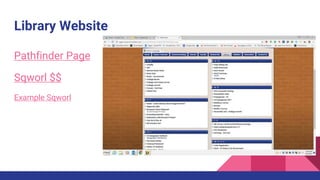
Library Website
Pathfinder Page
Sqworl $$
Example Sqworl
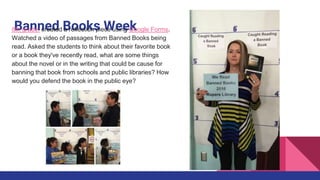
Banned Books Week8th grade: created a reflection piece using Google Forms.
Watched a video of passages from Banned Books being
read. Asked the students to think about their favorite book
or a book they've recently read, what are some things
about the novel or in the writing that could be cause for
banning that book from schools and public libraries? How
would you defend the book in the public eye?
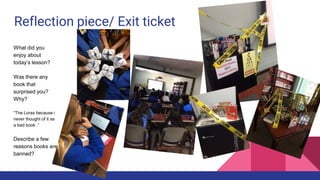
Reflection piece/ Exit ticket
What did you
enjoy about
today’s lesson?
Was there any
book that
surprised you?
Why?
“The Lorax because i
never thought of it as
a bad book .”
Describe a few
reasons books are
banned?
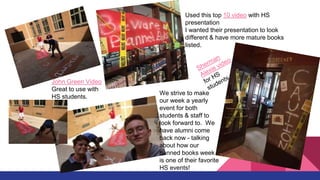
Used this top 10 video with HS
presentation
I wanted their presentation to look
different & have more mature books
listed.
John Green Video
Great to use with
HS students.
We strive to make
our week a yearly
event for both
students & staff to
look forward to. We
have alumni come
back now - talking
about how our
banned books week
is one of their favorite
HS events!
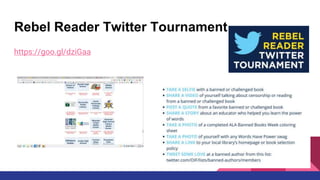
Rebel Reader Twitter Tournament
https://goo.gl/dziGaa
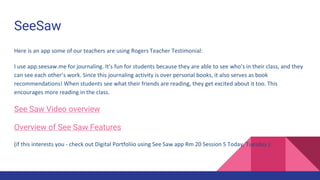
SeeSaw
Here is an app some of our teachers are using Rogers Teacher Testimonial:
I use app.seesaw.me for journaling. It’s fun for students because they are able to see who’s in their class, and they
can see each other’s work. Since this journaling activity is over personal books, it also serves as book
recommendations! When students see what their friends are reading, they get excited about it too. This
encourages more reading in the class.
See Saw Video overview
Overview of See Saw Features
(if this interests you - check out Digital Portfoliio using See Saw app Rm 20 Session 5 Today, Tuesday.)
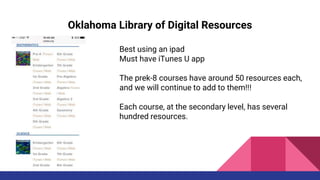
Oklahoma Library of Digital Resources
Launched in August by the Oklahoma State School Boards Association (OSSBA)
Library offers free digital textbooks, lectures, activities and lesson plans.
Housed in iTunes U, accessed at okdigitalresources.com by all 584 Oklahoma
school districts at no cost. Most of the resources are free, although some —
including some apps or eBooks — have a nominal charge.
Teachers from across Oklahoma have been involved in vetting resources in their
areas of expertise Best on an Ipad
https://goo.gl/KhhUWT
Oklahoma Library of Digital Resources
Best using an ipad
Must have iTunes U app
The prek-8 courses have around 50 resources each,
and we will continue to add to them!!!
Each course, at the secondary level, has several
hundred resources.
The Google Teacher Tribe Podcast
Matt Miller, from DitchThatTextbook.com
Kasey Bell website and blog, ShakeUpLearning.com
https://goo.gl/7eQMwW
Sounds interesting.
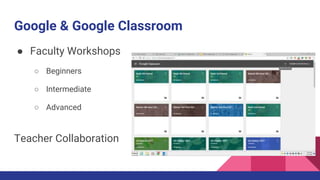
Google & Google Classroom
● Faculty Workshops
○ Beginners
○ Intermediate
○ Advanced
Teacher Collaboration
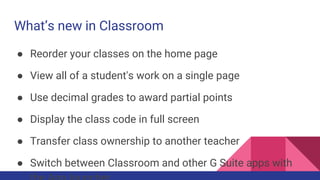
What’s new in Classroom
● Reorder your classes on the home page
● View all of a student's work on a single page
● Use decimal grades to award partial points
● Display the class code in full screen
● Transfer class ownership to another teacher
● Switch between Classroom and other G Suite apps with
Google Orientations
For 8th grade and up
Quick orientation & review & then we featured
Google Docs scavenger Hunt - 8th-11th
Google Slides Scavenger Hunt - 9th & 10th & one social studies
Success! Within a week social studies were coming in with other classes and we
could see them applying what they’d learned.
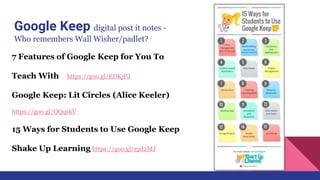
Google Keep digital post it notes -
Who remembers Wall Wisher/padlet?
7 Features of Google Keep for You To
Teach With https://goo.gl/EDKjPJ
Google Keep: Lit Circles (Alice Keeler)
https://goo.gl/QQqskV
15 Ways for Students to Use Google Keep
Shake Up Learning https://goo.gl/zgd2MJ
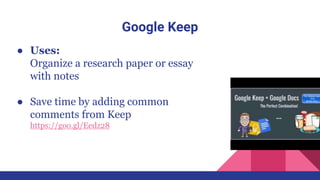
Google Keep
● Uses:
Organize a research paper or essay
with notes
● Save time by adding common
comments from Keep
https://goo.gl/Eedz28
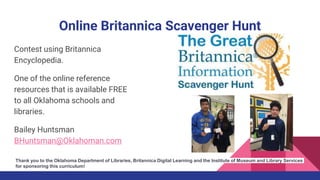
Online Britannica Scavenger Hunt
Contest using Britannica
Encyclopedia.
One of the online reference
resources that is available FREE
to all Oklahoma schools and
libraries.
Bailey Huntsman
BHuntsman@Oklahoman.com
Thank you to the Oklahoma Department of Libraries, Britannica Digital Learning and the Institute of Museum and Library Services
for sponsoring this curriculum!
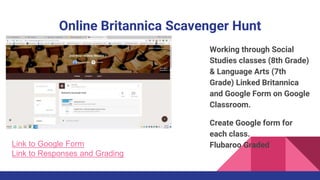
Online Britannica Scavenger Hunt
Working through Social
Studies classes (8th Grade)
& Language Arts (7th
Grade) Linked Britannica
and Google Form on Google
Classroom.
Create Google form for
each class.
Flubaroo GradedLink to Google Form
Link to Responses and Grading
Pinterest
Rogers JH/HS Pinterest
https://goo.gl/byLtuj
TPS Libraries
https://goo.gl/Jhj1QG
TPS School Librarians
https://goo.gl/aQlixb
OKCPS LMS
https://goo.gl/GPqhci
Library of Congress
https://goo.gl/oO9fHl
14 Ways Students Can Use
Pinterest in the Classroom
https://goo.gl/DZo4uN
Resources
Snapwire On Demand Photos high-quality custom photos
Unsplash Free (do whatever you want) high-resolution photos.
Creative Commons helps you legally share your knowledge and creativity to build
a more equitable, accessible, and innovative world. We unlock the full potential of
the internet to drive a new era of development, growth, and productivity."
Photos For Class Creative Commons photos for school!
SimpleK12 Professional Development For Teachers
Resources
AASL Best Websites for Teaching and Learning
https://goo.gl/fXwGp3
Canva.com Remix designs for presentations, infographics, handouts, posters,
basically everything ever!
TechBlog http://www.techycoach.com/
Zamzar Free online video converter, audio converter, image converter, eBook
converter. No download or account required.
PrintFriendly Make a Printer Friendly & PDF version of any webpage.
Resources
Instructables Learn how to make anything with Instructables. Easy to follow step-
by-step instructions, online classes, and a vibrant maker community.
Remind Remind, formerly Remind101, is a communication tool that helps teachers
reach students and parents where they are.
Checkology space where students discover how to effectively navigate today's
challenging information landscape by mastering the core skills and concepts of
news literacy.
GoNoodle makes movement and mindfulness an integral part of the day, at school
and at home.
Resources
Snapguide Discover and create how-to guides on all your favorite topics.
YALSA Book Finder: Similar to the Teen Book Finder app, the database will be
updated every year following the announcements of the book awards and lists.
YALSA Handouts and Flyers
https://goo.gl/bgxyXL
Biteable The World’s Simplest Video Maker

What’s happening2

  • 1.
    What’s Happening? This fastpaced session will walk you through new ways (and remind you of ones you've forgotten about) to collaborate with teachers and engage students. Stephanie Brucks bruckst@k12.tulsaschools.org Tina Ham Will Rogers Early College JH & HS Tulsa Public Schools Tulsa, Oklahoma 918-833-9008
  • 2.
  • 3.
    Banned Books Week8thgrade: created a reflection piece using Google Forms. Watched a video of passages from Banned Books being read. Asked the students to think about their favorite book or a book they've recently read, what are some things about the novel or in the writing that could be cause for banning that book from schools and public libraries? How would you defend the book in the public eye?
  • 4.
    Reflection piece/ Exitticket What did you enjoy about today’s lesson? Was there any book that surprised you? Why? “The Lorax because i never thought of it as a bad book .” Describe a few reasons books are banned?
  • 5.
    Used this top10 video with HS presentation I wanted their presentation to look different & have more mature books listed. John Green Video Great to use with HS students. We strive to make our week a yearly event for both students & staff to look forward to. We have alumni come back now - talking about how our banned books week is one of their favorite HS events!
  • 6.
    Rebel Reader TwitterTournament https://goo.gl/dziGaa
  • 7.
    SeeSaw Here is anapp some of our teachers are using Rogers Teacher Testimonial: I use app.seesaw.me for journaling. It’s fun for students because they are able to see who’s in their class, and they can see each other’s work. Since this journaling activity is over personal books, it also serves as book recommendations! When students see what their friends are reading, they get excited about it too. This encourages more reading in the class. See Saw Video overview Overview of See Saw Features (if this interests you - check out Digital Portfoliio using See Saw app Rm 20 Session 5 Today, Tuesday.)
  • 8.
    Oklahoma Library ofDigital Resources Launched in August by the Oklahoma State School Boards Association (OSSBA) Library offers free digital textbooks, lectures, activities and lesson plans. Housed in iTunes U, accessed at okdigitalresources.com by all 584 Oklahoma school districts at no cost. Most of the resources are free, although some — including some apps or eBooks — have a nominal charge. Teachers from across Oklahoma have been involved in vetting resources in their areas of expertise Best on an Ipad https://goo.gl/KhhUWT
  • 9.
    Oklahoma Library ofDigital Resources Best using an ipad Must have iTunes U app The prek-8 courses have around 50 resources each, and we will continue to add to them!!! Each course, at the secondary level, has several hundred resources.
  • 10.
    The Google TeacherTribe Podcast Matt Miller, from DitchThatTextbook.com Kasey Bell website and blog, ShakeUpLearning.com https://goo.gl/7eQMwW Sounds interesting.
  • 11.
    Google & GoogleClassroom ● Faculty Workshops ○ Beginners ○ Intermediate ○ Advanced Teacher Collaboration
  • 12.
    What’s new inClassroom ● Reorder your classes on the home page ● View all of a student's work on a single page ● Use decimal grades to award partial points ● Display the class code in full screen ● Transfer class ownership to another teacher ● Switch between Classroom and other G Suite apps with
  • 13.
    Google Orientations For 8thgrade and up Quick orientation & review & then we featured Google Docs scavenger Hunt - 8th-11th Google Slides Scavenger Hunt - 9th & 10th & one social studies Success! Within a week social studies were coming in with other classes and we could see them applying what they’d learned.
  • 14.
    Google Keep digitalpost it notes - Who remembers Wall Wisher/padlet? 7 Features of Google Keep for You To Teach With https://goo.gl/EDKjPJ Google Keep: Lit Circles (Alice Keeler) https://goo.gl/QQqskV 15 Ways for Students to Use Google Keep Shake Up Learning https://goo.gl/zgd2MJ
  • 15.
    Google Keep ● Uses: Organizea research paper or essay with notes ● Save time by adding common comments from Keep https://goo.gl/Eedz28
  • 16.
    Online Britannica ScavengerHunt Contest using Britannica Encyclopedia. One of the online reference resources that is available FREE to all Oklahoma schools and libraries. Bailey Huntsman BHuntsman@Oklahoman.com Thank you to the Oklahoma Department of Libraries, Britannica Digital Learning and the Institute of Museum and Library Services for sponsoring this curriculum!
  • 17.
    Online Britannica ScavengerHunt Working through Social Studies classes (8th Grade) & Language Arts (7th Grade) Linked Britannica and Google Form on Google Classroom. Create Google form for each class. Flubaroo GradedLink to Google Form Link to Responses and Grading
  • 18.
    Pinterest Rogers JH/HS Pinterest https://goo.gl/byLtuj TPSLibraries https://goo.gl/Jhj1QG TPS School Librarians https://goo.gl/aQlixb OKCPS LMS https://goo.gl/GPqhci Library of Congress https://goo.gl/oO9fHl 14 Ways Students Can Use Pinterest in the Classroom https://goo.gl/DZo4uN
  • 19.
    Resources Snapwire On DemandPhotos high-quality custom photos Unsplash Free (do whatever you want) high-resolution photos. Creative Commons helps you legally share your knowledge and creativity to build a more equitable, accessible, and innovative world. We unlock the full potential of the internet to drive a new era of development, growth, and productivity." Photos For Class Creative Commons photos for school! SimpleK12 Professional Development For Teachers
  • 20.
    Resources AASL Best Websitesfor Teaching and Learning https://goo.gl/fXwGp3 Canva.com Remix designs for presentations, infographics, handouts, posters, basically everything ever! TechBlog http://www.techycoach.com/ Zamzar Free online video converter, audio converter, image converter, eBook converter. No download or account required. PrintFriendly Make a Printer Friendly & PDF version of any webpage.
  • 21.
    Resources Instructables Learn howto make anything with Instructables. Easy to follow step- by-step instructions, online classes, and a vibrant maker community. Remind Remind, formerly Remind101, is a communication tool that helps teachers reach students and parents where they are. Checkology space where students discover how to effectively navigate today's challenging information landscape by mastering the core skills and concepts of news literacy. GoNoodle makes movement and mindfulness an integral part of the day, at school and at home.
  • 22.
    Resources Snapguide Discover andcreate how-to guides on all your favorite topics. YALSA Book Finder: Similar to the Teen Book Finder app, the database will be updated every year following the announcements of the book awards and lists. YALSA Handouts and Flyers https://goo.gl/bgxyXL Biteable The World’s Simplest Video Maker