What to Expect When Expecting User Interviews
OVERVIEW
Undertaking user experience (UX) research for the first time is an exciting time in an organization’s
lifetime. It can also be a slightly scary time since you may not know what to expect. This brief document
aims to inform stakeholders about the project timeline and what to expect during your study.
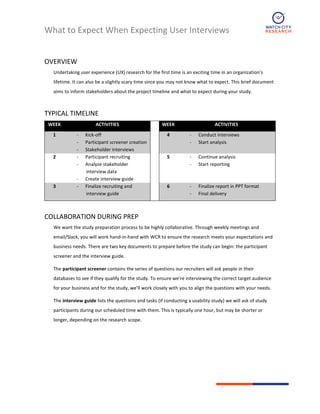
TYPICAL TIMELINE
WEEK ACTIVITIES WEEK ACTIVITIES
1 ‐ Kick-off
‐ Participant screener creation
‐ Stakeholder interviews
4 ‐ Conduct interviews
‐ Start analysis
2 ‐ Participant recruiting
‐ Analyze stakeholder
interview data
‐ Create interview guide
5 ‐ Continue analysis
‐ Start reporting
3 ‐ Finalize recruiting and
interview guide
6 ‐ Finalize report in PPT format
‐ Final delivery
COLLABORATION DURING PREP
We want the study preparation process to be highly collaborative. Through weekly meetings and
email/Slack, you will work hand-in-hand with WCR to ensure the research meets your expectations and
business needs. There are two key documents to prepare before the study can begin: the participant
screener and the interview guide.
The participant screener contains the series of questions our recruiters will ask people in their
databases to see if they qualify for the study. To ensure we’re interviewing the correct target audience
for your business and for the study, we’ll work closely with you to align the questions with your needs.
The interview guide lists the questions and tasks (if conducting a usability study) we will ask of study
participants during our scheduled time with them. This is typically one hour, but may be shorter or
longer, depending on the research scope.
Harvard Business Publishing Potential Research Projects | Engagement Sketch
2
USABILITY STUDIES
A usability study is a special type of interview session where we not only ask participants questions, but
also ask them to perform tasks on an interface. To uncover their thought process for accomplishing the
tasks, we ask them to “think aloud” and explain what they are thinking as they go. Usability studies can
range from very tactical (Does the UI design support users’ ability to accomplish this?) to strategic (Does
the UI have the information or functionality users want and need?).
DURING THE STUDY
WCR will provide you with access to our Slack so one person from your team may ask the moderator to
ask questions of the participants that may come to mind during the study. The moderator may not ask
your question right away but will work it into the session. Please funnel all in-situ feedback through one
person so the moderator doesn’t get overloaded.
If the study is online, we ask that you use your initials instead of your full name in the Zoom meeting.
This helps ensure the participant isn’t distracted by observers. Also, please stay on mute and never ask a
question directly to participants – use Slack to have the moderator ask your question.
HOW THE REPORT WILL HELP
The final deliverable is typically a PowerPoint report which outlines what we did, what we
observed/heard, and the associated design recommendations. We make the recommendations as
actionable as possible for your design team. The report may include screenshots or pictures of the user
interface in question to help elucidate findings, or just bulleted words, depending on the subject matter.

What to Expect with UXR

  • 1.
    What to ExpectWhen Expecting User Interviews OVERVIEW Undertaking user experience (UX) research for the first time is an exciting time in an organization’s lifetime. It can also be a slightly scary time since you may not know what to expect. This brief document aims to inform stakeholders about the project timeline and what to expect during your study. TYPICAL TIMELINE WEEK ACTIVITIES WEEK ACTIVITIES 1 ‐ Kick-off ‐ Participant screener creation ‐ Stakeholder interviews 4 ‐ Conduct interviews ‐ Start analysis 2 ‐ Participant recruiting ‐ Analyze stakeholder interview data ‐ Create interview guide 5 ‐ Continue analysis ‐ Start reporting 3 ‐ Finalize recruiting and interview guide 6 ‐ Finalize report in PPT format ‐ Final delivery COLLABORATION DURING PREP We want the study preparation process to be highly collaborative. Through weekly meetings and email/Slack, you will work hand-in-hand with WCR to ensure the research meets your expectations and business needs. There are two key documents to prepare before the study can begin: the participant screener and the interview guide. The participant screener contains the series of questions our recruiters will ask people in their databases to see if they qualify for the study. To ensure we’re interviewing the correct target audience for your business and for the study, we’ll work closely with you to align the questions with your needs. The interview guide lists the questions and tasks (if conducting a usability study) we will ask of study participants during our scheduled time with them. This is typically one hour, but may be shorter or longer, depending on the research scope.
  • 2.
    Harvard Business PublishingPotential Research Projects | Engagement Sketch 2 USABILITY STUDIES A usability study is a special type of interview session where we not only ask participants questions, but also ask them to perform tasks on an interface. To uncover their thought process for accomplishing the tasks, we ask them to “think aloud” and explain what they are thinking as they go. Usability studies can range from very tactical (Does the UI design support users’ ability to accomplish this?) to strategic (Does the UI have the information or functionality users want and need?). DURING THE STUDY WCR will provide you with access to our Slack so one person from your team may ask the moderator to ask questions of the participants that may come to mind during the study. The moderator may not ask your question right away but will work it into the session. Please funnel all in-situ feedback through one person so the moderator doesn’t get overloaded. If the study is online, we ask that you use your initials instead of your full name in the Zoom meeting. This helps ensure the participant isn’t distracted by observers. Also, please stay on mute and never ask a question directly to participants – use Slack to have the moderator ask your question. HOW THE REPORT WILL HELP The final deliverable is typically a PowerPoint report which outlines what we did, what we observed/heard, and the associated design recommendations. We make the recommendations as actionable as possible for your design team. The report may include screenshots or pictures of the user interface in question to help elucidate findings, or just bulleted words, depending on the subject matter.