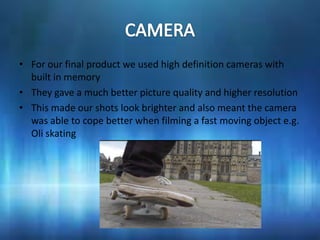
• For our final product we used high definition cameras with
  built in memory
• They gave a much better picture quality and higher resolution
• This made our shots look brighter and also meant the camera
  was able to cope better when filming a fast moving object e.g.
  Oli skating
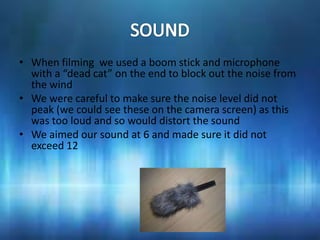
• When filming we used a boom stick and microphone
  with a “dead cat” on the end to block out the noise from
  the wind
• We were careful to make sure the noise level did not
  peak (we could see these on the camera screen) as this
  was too loud and so would distort the sound
• We aimed our sound at 6 and made sure it did not
  exceed 12
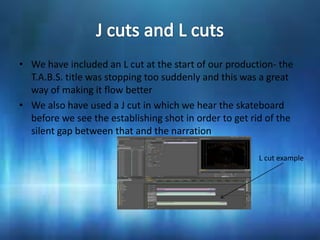
• We have included an L cut at the start of our production- the
  T.A.B.S. title was stopping too suddenly and this was a great
  way of making it flow better
• We also have used a J cut in which we hear the skateboard
  before we see the establishing shot in order to get rid of the
  silent gap between that and the narration

                                                        L cut example
• We asked a friend to write our music for us but made sure he was well
  aware of what we wanted before he did it- some indie, up beat music
  without vocals
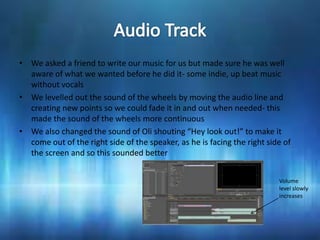
• We levelled out the sound of the wheels by moving the audio line and
  creating new points so we could fade it in and out when needed- this
  made the sound of the wheels more continuous
• We also changed the sound of Oli shouting “Hey look out!” to make it
  come out of the right side of the speaker, as he is facing the right side of
  the screen and so this sounded better


                                                                          Volume
                                                                          level slowly
                                                                          increases
• After filming we had to upload all our videos onto the
  computer, each clip was already separated but we had to go
  through and name them as well as deciding which ones we
  liked best
• We made sure not to delete any footage as it may be needed
  later
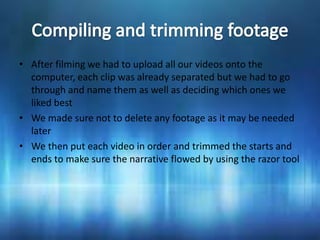
• We then put each video in order and trimmed the starts and
  ends to make sure the narrative flowed by using the razor tool
• We had to record our voiceover twice, our first one did not
   have enough of an emotive voice and so did not sound like
   the character would
   http://www.youtube.com/watch?v=UUbmv0W9bXQ
• When we recorded the second time we told our actor how to
   say it and when to pause so it ended up how we wanted it, we
   were also careful to make sure the sound did not peak as we
   had done when recording the film
http://www.youtube.com/watch?v=Uk7Z0FEq_0A
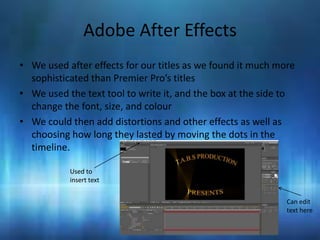
Adobe After Effects
• We used after effects for our titles as we found it much more
  sophisticated than Premier Pro’s titles
• We used the text tool to write it, and the box at the side to
  change the font, size, and colour
• We could then add distortions and other effects as well as
  choosing how long they lasted by moving the dots in the
  timeline.

           Used to
           insert text


                                                             Can edit
                                                             text here

What I have learnt about technologies

  • 2.
    • For ourfinal product we used high definition cameras with built in memory • They gave a much better picture quality and higher resolution • This made our shots look brighter and also meant the camera was able to cope better when filming a fast moving object e.g. Oli skating
  • 3.
    • When filmingwe used a boom stick and microphone with a “dead cat” on the end to block out the noise from the wind • We were careful to make sure the noise level did not peak (we could see these on the camera screen) as this was too loud and so would distort the sound • We aimed our sound at 6 and made sure it did not exceed 12
  • 4.
    • We haveincluded an L cut at the start of our production- the T.A.B.S. title was stopping too suddenly and this was a great way of making it flow better • We also have used a J cut in which we hear the skateboard before we see the establishing shot in order to get rid of the silent gap between that and the narration L cut example
  • 5.
    • We askeda friend to write our music for us but made sure he was well aware of what we wanted before he did it- some indie, up beat music without vocals • We levelled out the sound of the wheels by moving the audio line and creating new points so we could fade it in and out when needed- this made the sound of the wheels more continuous • We also changed the sound of Oli shouting “Hey look out!” to make it come out of the right side of the speaker, as he is facing the right side of the screen and so this sounded better Volume level slowly increases
  • 6.
    • After filmingwe had to upload all our videos onto the computer, each clip was already separated but we had to go through and name them as well as deciding which ones we liked best • We made sure not to delete any footage as it may be needed later • We then put each video in order and trimmed the starts and ends to make sure the narrative flowed by using the razor tool
  • 7.
    • We hadto record our voiceover twice, our first one did not have enough of an emotive voice and so did not sound like the character would http://www.youtube.com/watch?v=UUbmv0W9bXQ • When we recorded the second time we told our actor how to say it and when to pause so it ended up how we wanted it, we were also careful to make sure the sound did not peak as we had done when recording the film http://www.youtube.com/watch?v=Uk7Z0FEq_0A
  • 8.
    Adobe After Effects •We used after effects for our titles as we found it much more sophisticated than Premier Pro’s titles • We used the text tool to write it, and the box at the side to change the font, size, and colour • We could then add distortions and other effects as well as choosing how long they lasted by moving the dots in the timeline. Used to insert text Can edit text here