Bleep Testing!

How we edited the strong language
       used in our video.
• As there were several uses of strong language
  in our video we decided to use ‘Bleepers’ to
  edit this out.
• As I couldn’t find any suitable ‘bleepers’ in
  iMovie (the programme I used to edit our
  video), I decided to browse online.
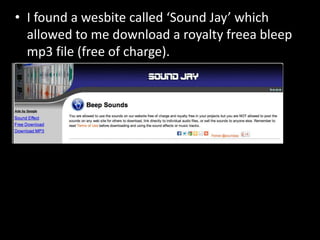
• I found a wesbite called ‘Sound Jay’ which
  allowed to me download a royalty freea bleep
  mp3 file (free of charge).
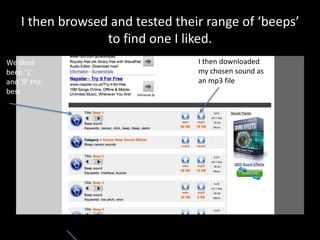
I then browsed and tested their range of ‘beeps’
                  to find one I liked.
We liked                          I then downloaded
beep ‘1’                          my chosen sound as
and ‘9’ the                       an mp3 file
best
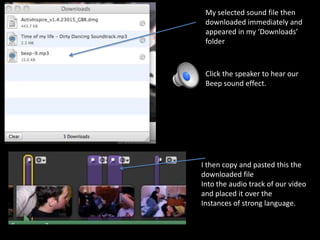
My selected sound file then
 downloaded immediately and
 appeared in my ‘Downloads’
 folder


 Click the speaker to hear our
 Beep sound effect.


I then copy and pasted this the
downloaded file
Into the audio track of our video
and placed it over the
Instances of strong language.

Beep testing

  • 1.
    Bleep Testing! How weedited the strong language used in our video.
  • 2.
    • As therewere several uses of strong language in our video we decided to use ‘Bleepers’ to edit this out. • As I couldn’t find any suitable ‘bleepers’ in iMovie (the programme I used to edit our video), I decided to browse online.
  • 3.
    • I founda wesbite called ‘Sound Jay’ which allowed to me download a royalty freea bleep mp3 file (free of charge).
  • 4.
    I then browsedand tested their range of ‘beeps’ to find one I liked. We liked I then downloaded beep ‘1’ my chosen sound as and ‘9’ the an mp3 file best
  • 5.
    My selected soundfile then downloaded immediately and appeared in my ‘Downloads’ folder Click the speaker to hear our Beep sound effect. I then copy and pasted this the downloaded file Into the audio track of our video and placed it over the Instances of strong language.