Programming for Data
Analysis
Week 9
Dr. Ferdin Joe John Joseph
Faculty of Information Technology
Thai – Nichi Institute of Technology, Bangkok
Today’s lesson
Faculty of Information Technology, Thai - Nichi Institute of
Technology, Bangkok
2
• Linear Regression
Prerequisite
• Pandas
• Numpy
Faculty of Information Technology, Thai - Nichi Institute of
Technology, Bangkok
3
New Library needed
• Scikit Learn
Faculty of Information Technology, Thai - Nichi Institute of
Technology, Bangkok
4
Regression
• Regression analysis is one of the most important fields in statistics
and machine learning.
• There are many regression methods available.
• Linear regression is one of them.
Faculty of Information Technology, Thai - Nichi Institute of
Technology, Bangkok
5
Linear Regression
• Linear regression is probably one of the most important and widely
used regression techniques.
• It’s among the simplest regression methods.
• One of its main advantages is the ease of interpreting results.
Faculty of Information Technology, Thai - Nichi Institute of
Technology, Bangkok
6
Types of Linear Regression
• Simple Linear Regression
• Multiple Linear Regression
• Polynomial Regression
Faculty of Information Technology, Thai - Nichi Institute of
Technology, Bangkok
7
Simple Linear Regression
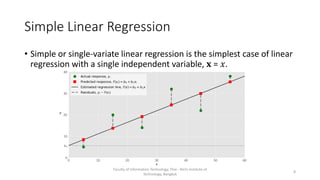
• Simple or single-variate linear regression is the simplest case of linear
regression with a single independent variable, 𝐱 = 𝑥.
Faculty of Information Technology, Thai - Nichi Institute of
Technology, Bangkok
8
Simple Linear Regression
• It starts with a given set of input-output (𝑥-𝑦) pairs (green circles).
• These pairs are your observations.
• For example, the leftmost observation (green circle) has the input 𝑥 =
5 and the actual output (response) 𝑦 = 5.
• The next one has 𝑥 = 15 and 𝑦 = 20, and so on.
Faculty of Information Technology, Thai - Nichi Institute of
Technology, Bangkok
9
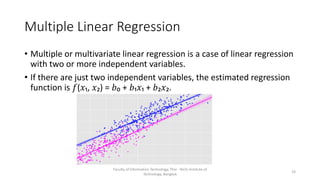
Multiple Linear Regression
• Multiple or multivariate linear regression is a case of linear regression
with two or more independent variables.
• If there are just two independent variables, the estimated regression
function is 𝑓(𝑥₁, 𝑥₂) = 𝑏₀ + 𝑏₁𝑥₁ + 𝑏₂𝑥₂.
Faculty of Information Technology, Thai - Nichi Institute of
Technology, Bangkok
10
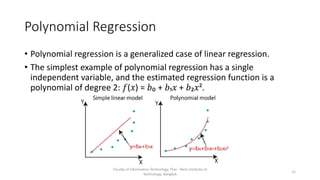
Polynomial Regression
• Polynomial regression is a generalized case of linear regression.
• The simplest example of polynomial regression has a single
independent variable, and the estimated regression function is a
polynomial of degree 2: 𝑓(𝑥) = 𝑏₀ + 𝑏₁𝑥 + 𝑏₂𝑥².
Faculty of Information Technology, Thai - Nichi Institute of
Technology, Bangkok
11
Underfitting and Overfitting
• Underfitting occurs when a model can’t accurately capture the
dependencies among data, usually as a consequence of its own
simplicity.
• Overfitting happens when a model learns both dependencies among
data and random fluctuations.
Faculty of Information Technology, Thai - Nichi Institute of
Technology, Bangkok
12
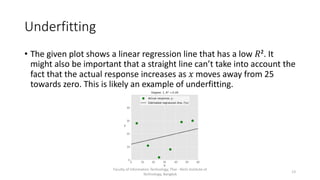
Underfitting
• The given plot shows a linear regression line that has a low 𝑅². It
might also be important that a straight line can’t take into account the
fact that the actual response increases as 𝑥 moves away from 25
towards zero. This is likely an example of underfitting.
Faculty of Information Technology, Thai - Nichi Institute of
Technology, Bangkok
13
Overfitting
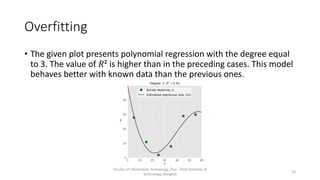
• The given plot presents polynomial regression with the degree equal
to 3. The value of 𝑅² is higher than in the preceding cases. This model
behaves better with known data than the previous ones.
Faculty of Information Technology, Thai - Nichi Institute of
Technology, Bangkok
14
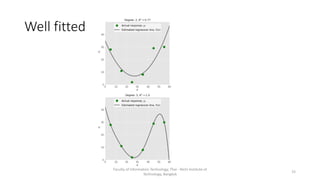
Well fitted
Faculty of Information Technology, Thai - Nichi Institute of
Technology, Bangkok
15
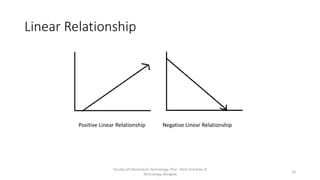
Linear Relationship
Faculty of Information Technology, Thai - Nichi Institute of
Technology, Bangkok
16
Positive Linear Relationship Negative Linear Relationship
Simple Linear Regression With scikit-learn
There are five basic steps when you’re implementing linear regression:
• Import the packages and classes you need.
• Provide data to work with and eventually do appropriate transformations.
• Create a regression model and fit it with existing data.
• Check the results of model fitting to know whether the model is
satisfactory.
• Apply the model for predictions.
• Visualize
Faculty of Information Technology, Thai - Nichi Institute of
Technology, Bangkok
17
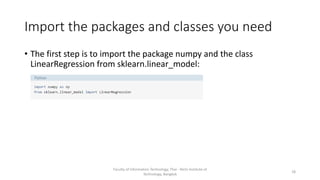
Import the packages and classes you need
• The first step is to import the package numpy and the class
LinearRegression from sklearn.linear_model:
Faculty of Information Technology, Thai - Nichi Institute of
Technology, Bangkok
18
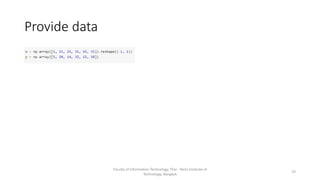
Provide data
Faculty of Information Technology, Thai - Nichi Institute of
Technology, Bangkok
19
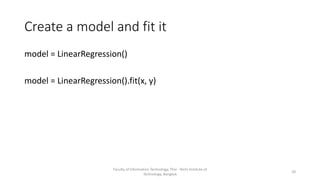
Create a model and fit it
model = LinearRegression()
model = LinearRegression().fit(x, y)
Faculty of Information Technology, Thai - Nichi Institute of
Technology, Bangkok
20
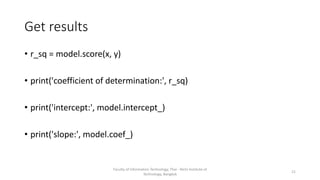
Get results
• r_sq = model.score(x, y)
• print('coefficient of determination:', r_sq)
• print('intercept:', model.intercept_)
• print('slope:', model.coef_)
Faculty of Information Technology, Thai - Nichi Institute of
Technology, Bangkok
21
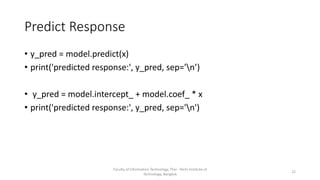
Predict Response
• y_pred = model.predict(x)
• print('predicted response:', y_pred, sep='n’)
• y_pred = model.intercept_ + model.coef_ * x
• print('predicted response:', y_pred, sep='n')
Faculty of Information Technology, Thai - Nichi Institute of
Technology, Bangkok
22
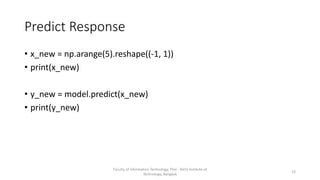
Predict Response
• x_new = np.arange(5).reshape((-1, 1))
• print(x_new)
• y_new = model.predict(x_new)
• print(y_new)
Faculty of Information Technology, Thai - Nichi Institute of
Technology, Bangkok
23
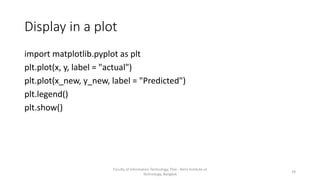
Display in a plot
import matplotlib.pyplot as plt
plt.plot(x, y, label = "actual")
plt.plot(x_new, y_new, label = "Predicted")
plt.legend()
plt.show()
Faculty of Information Technology, Thai - Nichi Institute of
Technology, Bangkok
24
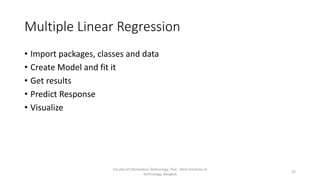
Multiple Linear Regression
• Import packages, classes and data
• Create Model and fit it
• Get results
• Predict Response
• Visualize
Faculty of Information Technology, Thai - Nichi Institute of
Technology, Bangkok
25
Get Data
x = [[0, 1], [5, 1], [15, 2], [25, 5], [35, 11], [45, 15], [55, 34], [60, 35]]
y = [4, 5, 20, 14, 32, 22, 38, 43]
x, y = np.array(x), np.array(y)
Faculty of Information Technology, Thai - Nichi Institute of
Technology, Bangkok
26
Create Model and fit
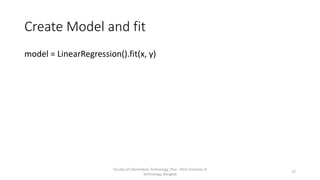
model = LinearRegression().fit(x, y)
Faculty of Information Technology, Thai - Nichi Institute of
Technology, Bangkok
27
Get Results
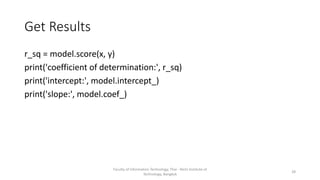
r_sq = model.score(x, y)
print('coefficient of determination:', r_sq)
print('intercept:', model.intercept_)
print('slope:', model.coef_)
Faculty of Information Technology, Thai - Nichi Institute of
Technology, Bangkok
28
Predict Response
y_pred = model.predict(x)
print('predicted response:', y_pred, sep='n’)
y_pred = model.intercept_ + np.sum(model.coef_ * x, axis=1)
print('predicted response:', y_pred, sep='n’)
y_pred=model.predict(x)
y_pred=model.intercept_+np.sum(model.coef_*x,axis=1)
x_new = [[0, 1], [5, 1], [15, 2], [25, 5], [35, 11], [45, 15], [55, 34], [60,
35]]
y_new = model.predict(x_new)
Faculty of Information Technology, Thai - Nichi Institute of
Technology, Bangkok
29
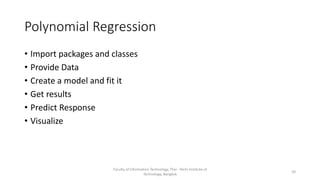
Polynomial Regression
• Import packages and classes
• Provide Data
• Create a model and fit it
• Get results
• Predict Response
• Visualize
Faculty of Information Technology, Thai - Nichi Institute of
Technology, Bangkok
30
Import packages and classes
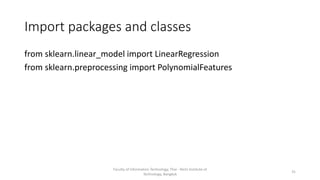
from sklearn.linear_model import LinearRegression
from sklearn.preprocessing import PolynomialFeatures
Faculty of Information Technology, Thai - Nichi Institute of
Technology, Bangkok
31
Provide Data
x = np.array([5, 15, 25, 35, 45, 55]).reshape((-1, 1))
y = np.array([15, 11, 2, 8, 25, 32])
Faculty of Information Technology, Thai - Nichi Institute of
Technology, Bangkok
32
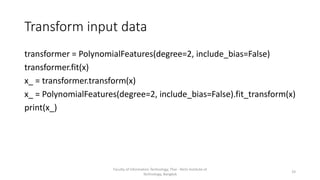
Transform input data
transformer = PolynomialFeatures(degree=2, include_bias=False)
transformer.fit(x)
x_ = transformer.transform(x)
x_ = PolynomialFeatures(degree=2, include_bias=False).fit_transform(x)
print(x_)
Faculty of Information Technology, Thai - Nichi Institute of
Technology, Bangkok
33
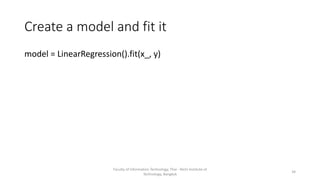
Create a model and fit it
model = LinearRegression().fit(x_, y)
Faculty of Information Technology, Thai - Nichi Institute of
Technology, Bangkok
34
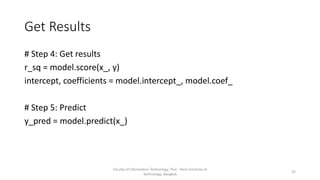
Get Results
# Step 4: Get results
r_sq = model.score(x_, y)
intercept, coefficients = model.intercept_, model.coef_
# Step 5: Predict
y_pred = model.predict(x_)
Faculty of Information Technology, Thai - Nichi Institute of
Technology, Bangkok
35
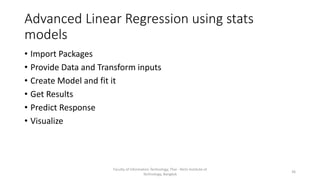
Advanced Linear Regression using stats
models
• Import Packages
• Provide Data and Transform inputs
• Create Model and fit it
• Get Results
• Predict Response
• Visualize
Faculty of Information Technology, Thai - Nichi Institute of
Technology, Bangkok
36
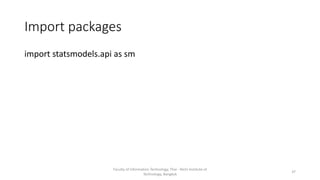
Import packages
import statsmodels.api as sm
Faculty of Information Technology, Thai - Nichi Institute of
Technology, Bangkok
37
Provide data and transform inputs
x = [[0, 1], [5, 1], [15, 2], [25, 5], [35, 11], [45, 15], [55, 34], [60, 35]]
y = [4, 5, 20, 14, 32, 22, 38, 43]
x, y = np.array(x), np.array(y)
x = sm.add_constant(x)
Faculty of Information Technology, Thai - Nichi Institute of
Technology, Bangkok
38
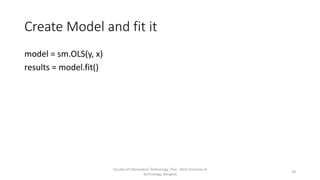
Create Model and fit it
model = sm.OLS(y, x)
results = model.fit()
Faculty of Information Technology, Thai - Nichi Institute of
Technology, Bangkok
39
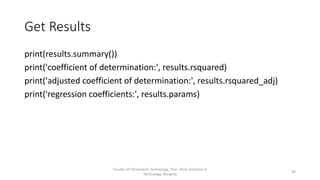
Get Results
print(results.summary())
print('coefficient of determination:', results.rsquared)
print('adjusted coefficient of determination:', results.rsquared_adj)
print('regression coefficients:', results.params)
Faculty of Information Technology, Thai - Nichi Institute of
Technology, Bangkok
40
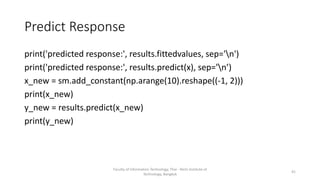
Predict Response
print('predicted response:', results.fittedvalues, sep='n')
print('predicted response:', results.predict(x), sep='n’)
x_new = sm.add_constant(np.arange(10).reshape((-1, 2)))
print(x_new)
y_new = results.predict(x_new)
print(y_new)
Faculty of Information Technology, Thai - Nichi Institute of
Technology, Bangkok
41
DSA 207 – Linear Regression
• Linear Regression
Faculty of Information Technology, Thai - Nichi Institute of
Technology, Bangkok
42

Week 9: Programming for Data Analysis

  • 1.
    Programming for Data Analysis Week9 Dr. Ferdin Joe John Joseph Faculty of Information Technology Thai – Nichi Institute of Technology, Bangkok
  • 2.
    Today’s lesson Faculty ofInformation Technology, Thai - Nichi Institute of Technology, Bangkok 2 • Linear Regression
  • 3.
    Prerequisite • Pandas • Numpy Facultyof Information Technology, Thai - Nichi Institute of Technology, Bangkok 3
  • 4.
    New Library needed •Scikit Learn Faculty of Information Technology, Thai - Nichi Institute of Technology, Bangkok 4
  • 5.
    Regression • Regression analysisis one of the most important fields in statistics and machine learning. • There are many regression methods available. • Linear regression is one of them. Faculty of Information Technology, Thai - Nichi Institute of Technology, Bangkok 5
  • 6.
    Linear Regression • Linearregression is probably one of the most important and widely used regression techniques. • It’s among the simplest regression methods. • One of its main advantages is the ease of interpreting results. Faculty of Information Technology, Thai - Nichi Institute of Technology, Bangkok 6
  • 7.
    Types of LinearRegression • Simple Linear Regression • Multiple Linear Regression • Polynomial Regression Faculty of Information Technology, Thai - Nichi Institute of Technology, Bangkok 7
  • 8.
    Simple Linear Regression •Simple or single-variate linear regression is the simplest case of linear regression with a single independent variable, 𝐱 = 𝑥. Faculty of Information Technology, Thai - Nichi Institute of Technology, Bangkok 8
  • 9.
    Simple Linear Regression •It starts with a given set of input-output (𝑥-𝑦) pairs (green circles). • These pairs are your observations. • For example, the leftmost observation (green circle) has the input 𝑥 = 5 and the actual output (response) 𝑦 = 5. • The next one has 𝑥 = 15 and 𝑦 = 20, and so on. Faculty of Information Technology, Thai - Nichi Institute of Technology, Bangkok 9
  • 10.
    Multiple Linear Regression •Multiple or multivariate linear regression is a case of linear regression with two or more independent variables. • If there are just two independent variables, the estimated regression function is 𝑓(𝑥₁, 𝑥₂) = 𝑏₀ + 𝑏₁𝑥₁ + 𝑏₂𝑥₂. Faculty of Information Technology, Thai - Nichi Institute of Technology, Bangkok 10
  • 11.
    Polynomial Regression • Polynomialregression is a generalized case of linear regression. • The simplest example of polynomial regression has a single independent variable, and the estimated regression function is a polynomial of degree 2: 𝑓(𝑥) = 𝑏₀ + 𝑏₁𝑥 + 𝑏₂𝑥². Faculty of Information Technology, Thai - Nichi Institute of Technology, Bangkok 11
  • 12.
    Underfitting and Overfitting •Underfitting occurs when a model can’t accurately capture the dependencies among data, usually as a consequence of its own simplicity. • Overfitting happens when a model learns both dependencies among data and random fluctuations. Faculty of Information Technology, Thai - Nichi Institute of Technology, Bangkok 12
  • 13.
    Underfitting • The givenplot shows a linear regression line that has a low 𝑅². It might also be important that a straight line can’t take into account the fact that the actual response increases as 𝑥 moves away from 25 towards zero. This is likely an example of underfitting. Faculty of Information Technology, Thai - Nichi Institute of Technology, Bangkok 13
  • 14.
    Overfitting • The givenplot presents polynomial regression with the degree equal to 3. The value of 𝑅² is higher than in the preceding cases. This model behaves better with known data than the previous ones. Faculty of Information Technology, Thai - Nichi Institute of Technology, Bangkok 14
  • 15.
    Well fitted Faculty ofInformation Technology, Thai - Nichi Institute of Technology, Bangkok 15
  • 16.
    Linear Relationship Faculty ofInformation Technology, Thai - Nichi Institute of Technology, Bangkok 16 Positive Linear Relationship Negative Linear Relationship
  • 17.
    Simple Linear RegressionWith scikit-learn There are five basic steps when you’re implementing linear regression: • Import the packages and classes you need. • Provide data to work with and eventually do appropriate transformations. • Create a regression model and fit it with existing data. • Check the results of model fitting to know whether the model is satisfactory. • Apply the model for predictions. • Visualize Faculty of Information Technology, Thai - Nichi Institute of Technology, Bangkok 17
  • 18.
    Import the packagesand classes you need • The first step is to import the package numpy and the class LinearRegression from sklearn.linear_model: Faculty of Information Technology, Thai - Nichi Institute of Technology, Bangkok 18
  • 19.
    Provide data Faculty ofInformation Technology, Thai - Nichi Institute of Technology, Bangkok 19
  • 20.
    Create a modeland fit it model = LinearRegression() model = LinearRegression().fit(x, y) Faculty of Information Technology, Thai - Nichi Institute of Technology, Bangkok 20
  • 21.
    Get results • r_sq= model.score(x, y) • print('coefficient of determination:', r_sq) • print('intercept:', model.intercept_) • print('slope:', model.coef_) Faculty of Information Technology, Thai - Nichi Institute of Technology, Bangkok 21
  • 22.
    Predict Response • y_pred= model.predict(x) • print('predicted response:', y_pred, sep='n’) • y_pred = model.intercept_ + model.coef_ * x • print('predicted response:', y_pred, sep='n') Faculty of Information Technology, Thai - Nichi Institute of Technology, Bangkok 22
  • 23.
    Predict Response • x_new= np.arange(5).reshape((-1, 1)) • print(x_new) • y_new = model.predict(x_new) • print(y_new) Faculty of Information Technology, Thai - Nichi Institute of Technology, Bangkok 23
  • 24.
    Display in aplot import matplotlib.pyplot as plt plt.plot(x, y, label = "actual") plt.plot(x_new, y_new, label = "Predicted") plt.legend() plt.show() Faculty of Information Technology, Thai - Nichi Institute of Technology, Bangkok 24
  • 25.
    Multiple Linear Regression •Import packages, classes and data • Create Model and fit it • Get results • Predict Response • Visualize Faculty of Information Technology, Thai - Nichi Institute of Technology, Bangkok 25
  • 26.
    Get Data x =[[0, 1], [5, 1], [15, 2], [25, 5], [35, 11], [45, 15], [55, 34], [60, 35]] y = [4, 5, 20, 14, 32, 22, 38, 43] x, y = np.array(x), np.array(y) Faculty of Information Technology, Thai - Nichi Institute of Technology, Bangkok 26
  • 27.
    Create Model andfit model = LinearRegression().fit(x, y) Faculty of Information Technology, Thai - Nichi Institute of Technology, Bangkok 27
  • 28.
    Get Results r_sq =model.score(x, y) print('coefficient of determination:', r_sq) print('intercept:', model.intercept_) print('slope:', model.coef_) Faculty of Information Technology, Thai - Nichi Institute of Technology, Bangkok 28
  • 29.
    Predict Response y_pred =model.predict(x) print('predicted response:', y_pred, sep='n’) y_pred = model.intercept_ + np.sum(model.coef_ * x, axis=1) print('predicted response:', y_pred, sep='n’) y_pred=model.predict(x) y_pred=model.intercept_+np.sum(model.coef_*x,axis=1) x_new = [[0, 1], [5, 1], [15, 2], [25, 5], [35, 11], [45, 15], [55, 34], [60, 35]] y_new = model.predict(x_new) Faculty of Information Technology, Thai - Nichi Institute of Technology, Bangkok 29
  • 30.
    Polynomial Regression • Importpackages and classes • Provide Data • Create a model and fit it • Get results • Predict Response • Visualize Faculty of Information Technology, Thai - Nichi Institute of Technology, Bangkok 30
  • 31.
    Import packages andclasses from sklearn.linear_model import LinearRegression from sklearn.preprocessing import PolynomialFeatures Faculty of Information Technology, Thai - Nichi Institute of Technology, Bangkok 31
  • 32.
    Provide Data x =np.array([5, 15, 25, 35, 45, 55]).reshape((-1, 1)) y = np.array([15, 11, 2, 8, 25, 32]) Faculty of Information Technology, Thai - Nichi Institute of Technology, Bangkok 32
  • 33.
    Transform input data transformer= PolynomialFeatures(degree=2, include_bias=False) transformer.fit(x) x_ = transformer.transform(x) x_ = PolynomialFeatures(degree=2, include_bias=False).fit_transform(x) print(x_) Faculty of Information Technology, Thai - Nichi Institute of Technology, Bangkok 33
  • 34.
    Create a modeland fit it model = LinearRegression().fit(x_, y) Faculty of Information Technology, Thai - Nichi Institute of Technology, Bangkok 34
  • 35.
    Get Results # Step4: Get results r_sq = model.score(x_, y) intercept, coefficients = model.intercept_, model.coef_ # Step 5: Predict y_pred = model.predict(x_) Faculty of Information Technology, Thai - Nichi Institute of Technology, Bangkok 35
  • 36.
    Advanced Linear Regressionusing stats models • Import Packages • Provide Data and Transform inputs • Create Model and fit it • Get Results • Predict Response • Visualize Faculty of Information Technology, Thai - Nichi Institute of Technology, Bangkok 36
  • 37.
    Import packages import statsmodels.apias sm Faculty of Information Technology, Thai - Nichi Institute of Technology, Bangkok 37
  • 38.
    Provide data andtransform inputs x = [[0, 1], [5, 1], [15, 2], [25, 5], [35, 11], [45, 15], [55, 34], [60, 35]] y = [4, 5, 20, 14, 32, 22, 38, 43] x, y = np.array(x), np.array(y) x = sm.add_constant(x) Faculty of Information Technology, Thai - Nichi Institute of Technology, Bangkok 38
  • 39.
    Create Model andfit it model = sm.OLS(y, x) results = model.fit() Faculty of Information Technology, Thai - Nichi Institute of Technology, Bangkok 39
  • 40.
    Get Results print(results.summary()) print('coefficient ofdetermination:', results.rsquared) print('adjusted coefficient of determination:', results.rsquared_adj) print('regression coefficients:', results.params) Faculty of Information Technology, Thai - Nichi Institute of Technology, Bangkok 40
  • 41.
    Predict Response print('predicted response:',results.fittedvalues, sep='n') print('predicted response:', results.predict(x), sep='n’) x_new = sm.add_constant(np.arange(10).reshape((-1, 2))) print(x_new) y_new = results.predict(x_new) print(y_new) Faculty of Information Technology, Thai - Nichi Institute of Technology, Bangkok 41
  • 42.
    DSA 207 –Linear Regression • Linear Regression Faculty of Information Technology, Thai - Nichi Institute of Technology, Bangkok 42