Data Wrangling
Week 5
Dr. Ferdin Joe John Joseph
Faculty of Information Technology
Thai – Nichi Institute of Technology, Bangkok
Today’s Lesson
• Introduction to XML
• XML - Theories
• XML parsing using Python
• Text files parsing using Python
• Demonstration
Faculty of Information Technology, Thai - Nichi Institute of
Technology, Bangkok
2
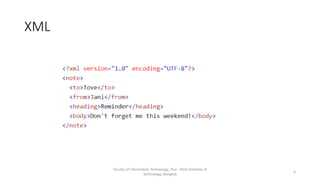
XML Introduction
• XML stands for eXtensible Markup Language
• Used for storing and transmitting data
• It is readable by both human and machine
Faculty of Information Technology, Thai - Nichi Institute of
Technology, Bangkok
3
XML
Faculty of Information Technology, Thai - Nichi Institute of
Technology, Bangkok
4
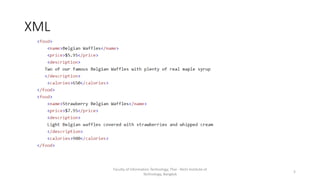
XML
Faculty of Information Technology, Thai - Nichi Institute of
Technology, Bangkok
5
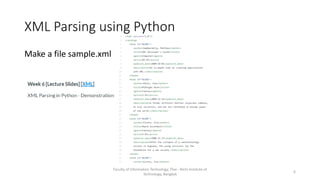
XML Parsing using Python
Make a file sample.xml
Faculty of Information Technology, Thai - Nichi Institute of
Technology, Bangkok
6
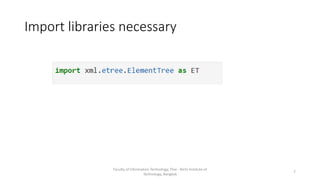
Import libraries necessary
Faculty of Information Technology, Thai - Nichi Institute of
Technology, Bangkok
7
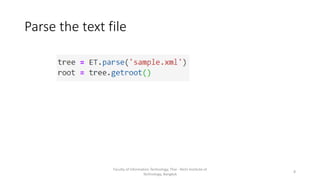
Parse the text file
Faculty of Information Technology, Thai - Nichi Institute of
Technology, Bangkok
8
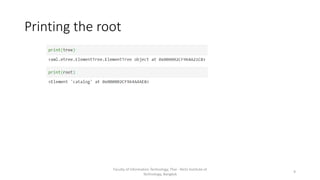
Printing the root
Faculty of Information Technology, Thai - Nichi Institute of
Technology, Bangkok
9
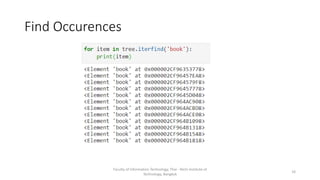
Find Occurences
Faculty of Information Technology, Thai - Nichi Institute of
Technology, Bangkok
10
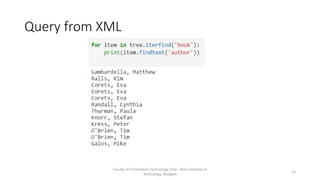
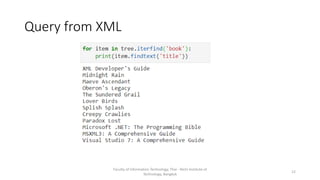
Query from XML
Faculty of Information Technology, Thai - Nichi Institute of
Technology, Bangkok
11
Query from XML
Faculty of Information Technology, Thai - Nichi Institute of
Technology, Bangkok
12
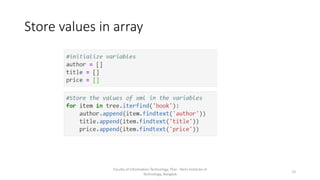
Store values in array
Faculty of Information Technology, Thai - Nichi Institute of
Technology, Bangkok
13
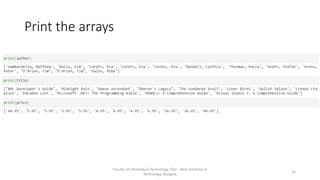
Print the arrays
Faculty of Information Technology, Thai - Nichi Institute of
Technology, Bangkok
14
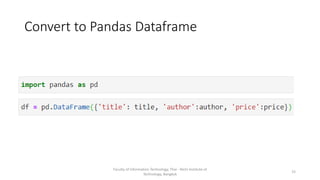
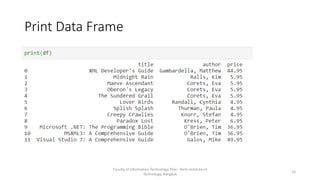
Convert to Pandas Dataframe
Faculty of Information Technology, Thai - Nichi Institute of
Technology, Bangkok
15
Print Data Frame
Faculty of Information Technology, Thai - Nichi Institute of
Technology, Bangkok
16
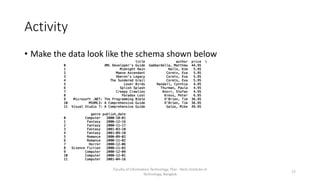
Activity
• Make the data look like the schema shown below
Faculty of Information Technology, Thai - Nichi Institute of
Technology, Bangkok
17
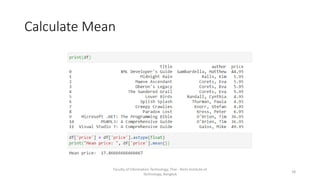
Calculate Mean
Faculty of Information Technology, Thai - Nichi Institute of
Technology, Bangkok
18
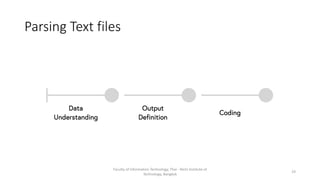
Parsing Text files
Faculty of Information Technology, Thai - Nichi Institute of
Technology, Bangkok
19
Procedure
• Most of the text file tables are comma separated
• CSV parsing in pandas can be used
Faculty of Information Technology, Thai - Nichi Institute of
Technology, Bangkok
20
Activity
• Save a csv file you used in your previous lectures in txt format
• Use the same pandas library to parse through the text
Faculty of Information Technology, Thai - Nichi Institute of
Technology, Bangkok
21
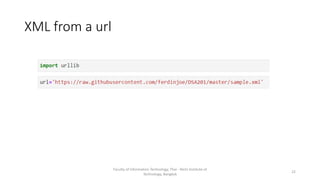
XML from a url
Faculty of Information Technology, Thai - Nichi Institute of
Technology, Bangkok
22
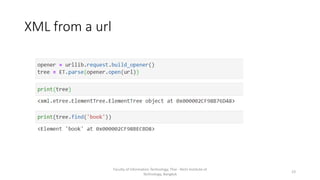
XML from a url
Faculty of Information Technology, Thai - Nichi Institute of
Technology, Bangkok
23
Activity
• Copy the news XML. Convert this xml into pandas data frame
• Perform data analysis on the given dataframe
Faculty of Information Technology, Thai - Nichi Institute of
Technology, Bangkok
24
Lesson for Next Week
Faculty of Information Technology, Thai - Nichi Institute of
Technology, Bangkok
https://github.com/ferdinjoe/DSA201
25

Data wrangling week 6

  • 1.
    Data Wrangling Week 5 Dr.Ferdin Joe John Joseph Faculty of Information Technology Thai – Nichi Institute of Technology, Bangkok
  • 2.
    Today’s Lesson • Introductionto XML • XML - Theories • XML parsing using Python • Text files parsing using Python • Demonstration Faculty of Information Technology, Thai - Nichi Institute of Technology, Bangkok 2
  • 3.
    XML Introduction • XMLstands for eXtensible Markup Language • Used for storing and transmitting data • It is readable by both human and machine Faculty of Information Technology, Thai - Nichi Institute of Technology, Bangkok 3
  • 4.
    XML Faculty of InformationTechnology, Thai - Nichi Institute of Technology, Bangkok 4
  • 5.
    XML Faculty of InformationTechnology, Thai - Nichi Institute of Technology, Bangkok 5
  • 6.
    XML Parsing usingPython Make a file sample.xml Faculty of Information Technology, Thai - Nichi Institute of Technology, Bangkok 6
  • 7.
    Import libraries necessary Facultyof Information Technology, Thai - Nichi Institute of Technology, Bangkok 7
  • 8.
    Parse the textfile Faculty of Information Technology, Thai - Nichi Institute of Technology, Bangkok 8
  • 9.
    Printing the root Facultyof Information Technology, Thai - Nichi Institute of Technology, Bangkok 9
  • 10.
    Find Occurences Faculty ofInformation Technology, Thai - Nichi Institute of Technology, Bangkok 10
  • 11.
    Query from XML Facultyof Information Technology, Thai - Nichi Institute of Technology, Bangkok 11
  • 12.
    Query from XML Facultyof Information Technology, Thai - Nichi Institute of Technology, Bangkok 12
  • 13.
    Store values inarray Faculty of Information Technology, Thai - Nichi Institute of Technology, Bangkok 13
  • 14.
    Print the arrays Facultyof Information Technology, Thai - Nichi Institute of Technology, Bangkok 14
  • 15.
    Convert to PandasDataframe Faculty of Information Technology, Thai - Nichi Institute of Technology, Bangkok 15
  • 16.
    Print Data Frame Facultyof Information Technology, Thai - Nichi Institute of Technology, Bangkok 16
  • 17.
    Activity • Make thedata look like the schema shown below Faculty of Information Technology, Thai - Nichi Institute of Technology, Bangkok 17
  • 18.
    Calculate Mean Faculty ofInformation Technology, Thai - Nichi Institute of Technology, Bangkok 18
  • 19.
    Parsing Text files Facultyof Information Technology, Thai - Nichi Institute of Technology, Bangkok 19
  • 20.
    Procedure • Most ofthe text file tables are comma separated • CSV parsing in pandas can be used Faculty of Information Technology, Thai - Nichi Institute of Technology, Bangkok 20
  • 21.
    Activity • Save acsv file you used in your previous lectures in txt format • Use the same pandas library to parse through the text Faculty of Information Technology, Thai - Nichi Institute of Technology, Bangkok 21
  • 22.
    XML from aurl Faculty of Information Technology, Thai - Nichi Institute of Technology, Bangkok 22
  • 23.
    XML from aurl Faculty of Information Technology, Thai - Nichi Institute of Technology, Bangkok 23
  • 24.
    Activity • Copy thenews XML. Convert this xml into pandas data frame • Perform data analysis on the given dataframe Faculty of Information Technology, Thai - Nichi Institute of Technology, Bangkok 24
  • 25.
    Lesson for NextWeek Faculty of Information Technology, Thai - Nichi Institute of Technology, Bangkok https://github.com/ferdinjoe/DSA201 25