Data Wrangling
Week 4
Dr. Ferdin Joe John Joseph
Faculty of Information Technology
Thai – Nichi Institute of Technology, Bangkok
Today’s Lesson
• Introduction to Pandas
• Read Data from Excel/CSV
• Store Data in Excel/CSV
• Demonstration
Faculty of Information Technology, Thai - Nichi Institute of
Technology, Bangkok
2
Pandas
• Pandas is the backbone of most of the data science projects
• Derived from the term "panel data", an econometrics term for data
sets that include observations over multiple time periods for the
same individuals.
Faculty of Information Technology, Thai - Nichi Institute of
Technology, Bangkok
3
Pandas
• Explores datasets and read CSV and Excel sheets
• Calculate Statistics
• Clean the data by doing things like removing missing values and
filtering rows or columns by some criteria
• Visualize the data with help from Matplotlib. Plot bars, lines,
histograms, bubbles, and more.
• Store the cleaned, transformed data back into a CSV, other file or
database
Faculty of Information Technology, Thai - Nichi Institute of
Technology, Bangkok
4
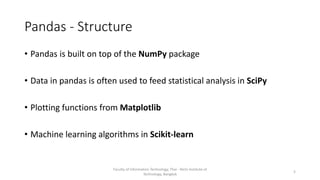
Pandas - Structure
• Pandas is built on top of the NumPy package
• Data in pandas is often used to feed statistical analysis in SciPy
• Plotting functions from Matplotlib
• Machine learning algorithms in Scikit-learn
Faculty of Information Technology, Thai - Nichi Institute of
Technology, Bangkok
5
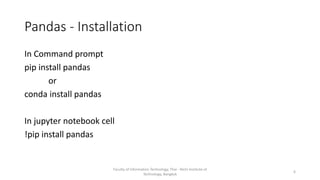
Pandas - Installation
In Command prompt
pip install pandas
or
conda install pandas
In jupyter notebook cell
!pip install pandas
Faculty of Information Technology, Thai - Nichi Institute of
Technology, Bangkok
6
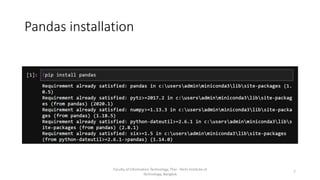
Pandas installation
Faculty of Information Technology, Thai - Nichi Institute of
Technology, Bangkok
7
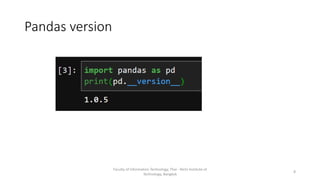
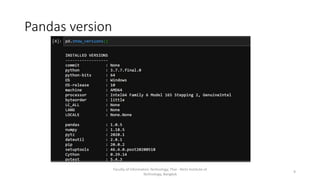
Pandas version
Faculty of Information Technology, Thai - Nichi Institute of
Technology, Bangkok
8
Pandas version
Faculty of Information Technology, Thai - Nichi Institute of
Technology, Bangkok
9
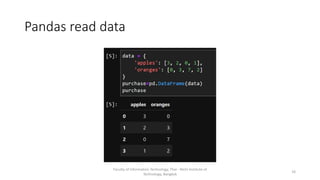
Pandas read data
Faculty of Information Technology, Thai - Nichi Institute of
Technology, Bangkok
10
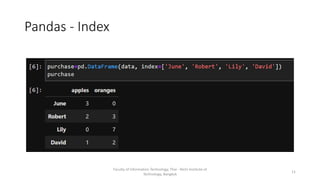
Pandas - Index
Faculty of Information Technology, Thai - Nichi Institute of
Technology, Bangkok
11
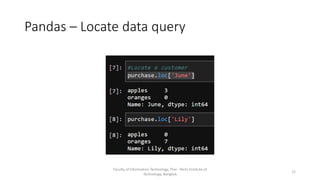
Pandas – Locate data query
Faculty of Information Technology, Thai - Nichi Institute of
Technology, Bangkok
12
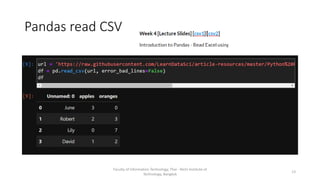
Pandas read CSV
Faculty of Information Technology, Thai - Nichi Institute of
Technology, Bangkok
13
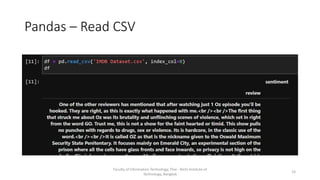
Pandas – Read CSV
Faculty of Information Technology, Thai - Nichi Institute of
Technology, Bangkok
14
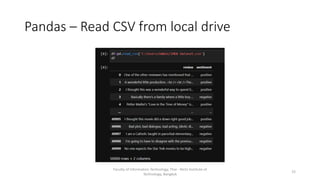
Pandas – Read CSV from local drive
Faculty of Information Technology, Thai - Nichi Institute of
Technology, Bangkok
15
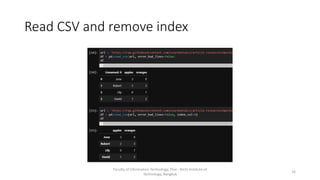
Read CSV and remove index
Faculty of Information Technology, Thai - Nichi Institute of
Technology, Bangkok
16
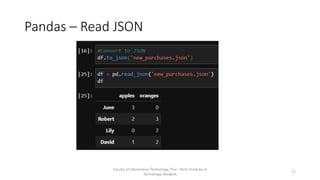
Pandas – Read JSON
Faculty of Information Technology, Thai - Nichi Institute of
Technology, Bangkok
17
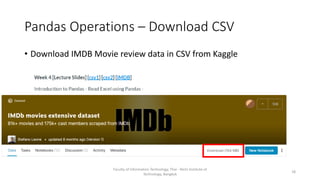
Pandas Operations – Download CSV
• Download IMDB Movie review data in CSV from Kaggle
Faculty of Information Technology, Thai - Nichi Institute of
Technology, Bangkok
18
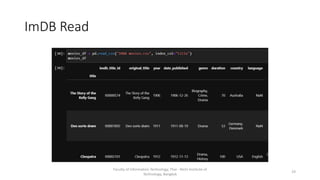
ImDB Read
Faculty of Information Technology, Thai - Nichi Institute of
Technology, Bangkok
19
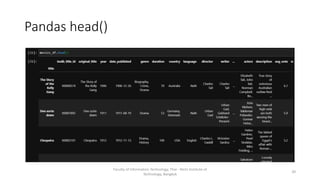
Pandas head()
Faculty of Information Technology, Thai - Nichi Institute of
Technology, Bangkok
20
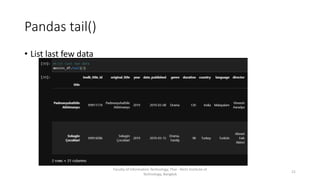
Pandas tail()
• List last few data
Faculty of Information Technology, Thai - Nichi Institute of
Technology, Bangkok
21
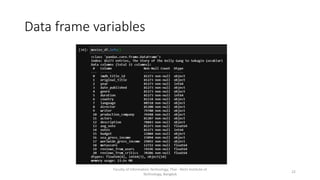
Data frame variables
Faculty of Information Technology, Thai - Nichi Institute of
Technology, Bangkok
22
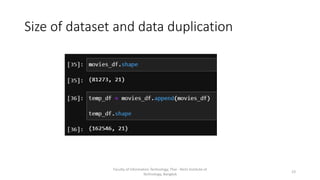
Size of dataset and data duplication
Faculty of Information Technology, Thai - Nichi Institute of
Technology, Bangkok
23
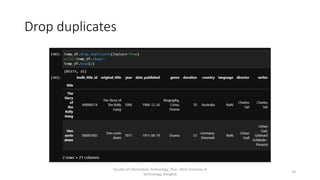
Drop duplicates
Faculty of Information Technology, Thai - Nichi Institute of
Technology, Bangkok
24
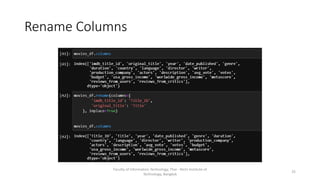
Rename Columns
Faculty of Information Technology, Thai - Nichi Institute of
Technology, Bangkok
25
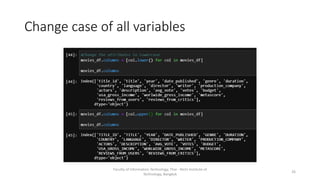
Change case of all variables
Faculty of Information Technology, Thai - Nichi Institute of
Technology, Bangkok
26
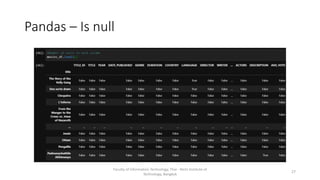
Pandas – Is null
Faculty of Information Technology, Thai - Nichi Institute of
Technology, Bangkok
27
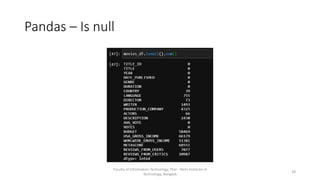
Pandas – Is null
Faculty of Information Technology, Thai - Nichi Institute of
Technology, Bangkok
28
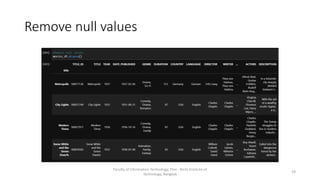
Remove null values
Faculty of Information Technology, Thai - Nichi Institute of
Technology, Bangkok
29
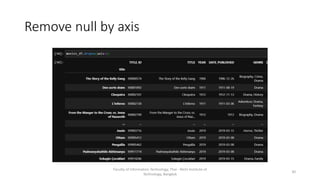
Remove null by axis
Faculty of Information Technology, Thai - Nichi Institute of
Technology, Bangkok
30
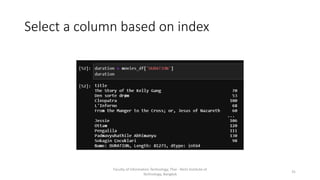
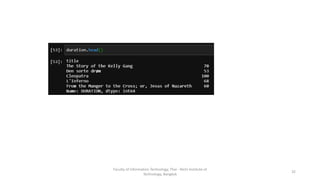
Select a column based on index
Faculty of Information Technology, Thai - Nichi Institute of
Technology, Bangkok
31
Faculty of Information Technology, Thai - Nichi Institute of
Technology, Bangkok
32
Faculty of Information Technology, Thai - Nichi Institute of
Technology, Bangkok
33
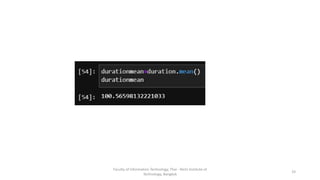
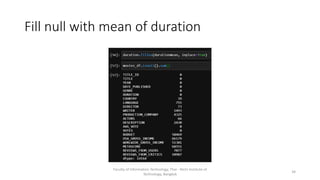
Fill null with mean of duration
Faculty of Information Technology, Thai - Nichi Institute of
Technology, Bangkok
34
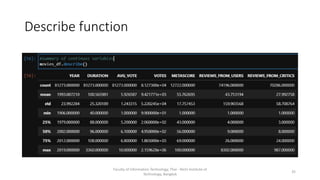
Describe function
Faculty of Information Technology, Thai - Nichi Institute of
Technology, Bangkok
35
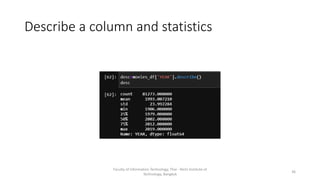
Describe a column and statistics
Faculty of Information Technology, Thai - Nichi Institute of
Technology, Bangkok
36
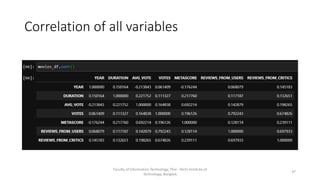
Correlation of all variables
Faculty of Information Technology, Thai - Nichi Institute of
Technology, Bangkok
37
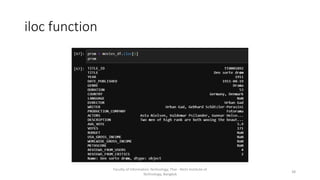
iloc function
Faculty of Information Technology, Thai - Nichi Institute of
Technology, Bangkok
38
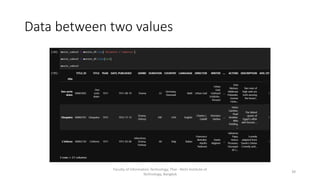
Data between two values
Faculty of Information Technology, Thai - Nichi Institute of
Technology, Bangkok
39
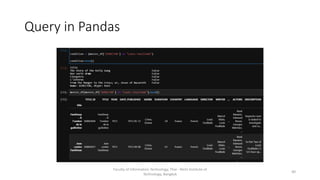
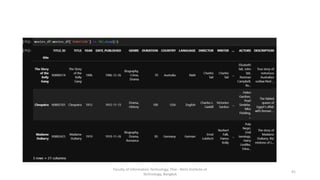
Query in Pandas
Faculty of Information Technology, Thai - Nichi Institute of
Technology, Bangkok
40
Faculty of Information Technology, Thai - Nichi Institute of
Technology, Bangkok
41
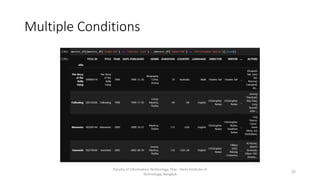
Multiple Conditions
Faculty of Information Technology, Thai - Nichi Institute of
Technology, Bangkok
42
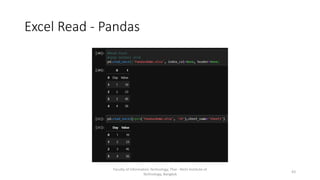
Excel Read - Pandas
Faculty of Information Technology, Thai - Nichi Institute of
Technology, Bangkok
43
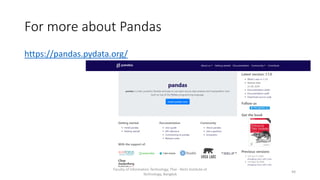
For more about Pandas
https://pandas.pydata.org/
Faculty of Information Technology, Thai - Nichi Institute of
Technology, Bangkok
44
Lesson for Next Week
Faculty of Information Technology, Thai - Nichi Institute of
Technology, Bangkok
https://github.com/ferdinjoe/DSA201
45

Data Wrangling Week 4

  • 1.
    Data Wrangling Week 4 Dr.Ferdin Joe John Joseph Faculty of Information Technology Thai – Nichi Institute of Technology, Bangkok
  • 2.
    Today’s Lesson • Introductionto Pandas • Read Data from Excel/CSV • Store Data in Excel/CSV • Demonstration Faculty of Information Technology, Thai - Nichi Institute of Technology, Bangkok 2
  • 3.
    Pandas • Pandas isthe backbone of most of the data science projects • Derived from the term "panel data", an econometrics term for data sets that include observations over multiple time periods for the same individuals. Faculty of Information Technology, Thai - Nichi Institute of Technology, Bangkok 3
  • 4.
    Pandas • Explores datasetsand read CSV and Excel sheets • Calculate Statistics • Clean the data by doing things like removing missing values and filtering rows or columns by some criteria • Visualize the data with help from Matplotlib. Plot bars, lines, histograms, bubbles, and more. • Store the cleaned, transformed data back into a CSV, other file or database Faculty of Information Technology, Thai - Nichi Institute of Technology, Bangkok 4
  • 5.
    Pandas - Structure •Pandas is built on top of the NumPy package • Data in pandas is often used to feed statistical analysis in SciPy • Plotting functions from Matplotlib • Machine learning algorithms in Scikit-learn Faculty of Information Technology, Thai - Nichi Institute of Technology, Bangkok 5
  • 6.
    Pandas - Installation InCommand prompt pip install pandas or conda install pandas In jupyter notebook cell !pip install pandas Faculty of Information Technology, Thai - Nichi Institute of Technology, Bangkok 6
  • 7.
    Pandas installation Faculty ofInformation Technology, Thai - Nichi Institute of Technology, Bangkok 7
  • 8.
    Pandas version Faculty ofInformation Technology, Thai - Nichi Institute of Technology, Bangkok 8
  • 9.
    Pandas version Faculty ofInformation Technology, Thai - Nichi Institute of Technology, Bangkok 9
  • 10.
    Pandas read data Facultyof Information Technology, Thai - Nichi Institute of Technology, Bangkok 10
  • 11.
    Pandas - Index Facultyof Information Technology, Thai - Nichi Institute of Technology, Bangkok 11
  • 12.
    Pandas – Locatedata query Faculty of Information Technology, Thai - Nichi Institute of Technology, Bangkok 12
  • 13.
    Pandas read CSV Facultyof Information Technology, Thai - Nichi Institute of Technology, Bangkok 13
  • 14.
    Pandas – ReadCSV Faculty of Information Technology, Thai - Nichi Institute of Technology, Bangkok 14
  • 15.
    Pandas – ReadCSV from local drive Faculty of Information Technology, Thai - Nichi Institute of Technology, Bangkok 15
  • 16.
    Read CSV andremove index Faculty of Information Technology, Thai - Nichi Institute of Technology, Bangkok 16
  • 17.
    Pandas – ReadJSON Faculty of Information Technology, Thai - Nichi Institute of Technology, Bangkok 17
  • 18.
    Pandas Operations –Download CSV • Download IMDB Movie review data in CSV from Kaggle Faculty of Information Technology, Thai - Nichi Institute of Technology, Bangkok 18
  • 19.
    ImDB Read Faculty ofInformation Technology, Thai - Nichi Institute of Technology, Bangkok 19
  • 20.
    Pandas head() Faculty ofInformation Technology, Thai - Nichi Institute of Technology, Bangkok 20
  • 21.
    Pandas tail() • Listlast few data Faculty of Information Technology, Thai - Nichi Institute of Technology, Bangkok 21
  • 22.
    Data frame variables Facultyof Information Technology, Thai - Nichi Institute of Technology, Bangkok 22
  • 23.
    Size of datasetand data duplication Faculty of Information Technology, Thai - Nichi Institute of Technology, Bangkok 23
  • 24.
    Drop duplicates Faculty ofInformation Technology, Thai - Nichi Institute of Technology, Bangkok 24
  • 25.
    Rename Columns Faculty ofInformation Technology, Thai - Nichi Institute of Technology, Bangkok 25
  • 26.
    Change case ofall variables Faculty of Information Technology, Thai - Nichi Institute of Technology, Bangkok 26
  • 27.
    Pandas – Isnull Faculty of Information Technology, Thai - Nichi Institute of Technology, Bangkok 27
  • 28.
    Pandas – Isnull Faculty of Information Technology, Thai - Nichi Institute of Technology, Bangkok 28
  • 29.
    Remove null values Facultyof Information Technology, Thai - Nichi Institute of Technology, Bangkok 29
  • 30.
    Remove null byaxis Faculty of Information Technology, Thai - Nichi Institute of Technology, Bangkok 30
  • 31.
    Select a columnbased on index Faculty of Information Technology, Thai - Nichi Institute of Technology, Bangkok 31
  • 32.
    Faculty of InformationTechnology, Thai - Nichi Institute of Technology, Bangkok 32
  • 33.
    Faculty of InformationTechnology, Thai - Nichi Institute of Technology, Bangkok 33
  • 34.
    Fill null withmean of duration Faculty of Information Technology, Thai - Nichi Institute of Technology, Bangkok 34
  • 35.
    Describe function Faculty ofInformation Technology, Thai - Nichi Institute of Technology, Bangkok 35
  • 36.
    Describe a columnand statistics Faculty of Information Technology, Thai - Nichi Institute of Technology, Bangkok 36
  • 37.
    Correlation of allvariables Faculty of Information Technology, Thai - Nichi Institute of Technology, Bangkok 37
  • 38.
    iloc function Faculty ofInformation Technology, Thai - Nichi Institute of Technology, Bangkok 38
  • 39.
    Data between twovalues Faculty of Information Technology, Thai - Nichi Institute of Technology, Bangkok 39
  • 40.
    Query in Pandas Facultyof Information Technology, Thai - Nichi Institute of Technology, Bangkok 40
  • 41.
    Faculty of InformationTechnology, Thai - Nichi Institute of Technology, Bangkok 41
  • 42.
    Multiple Conditions Faculty ofInformation Technology, Thai - Nichi Institute of Technology, Bangkok 42
  • 43.
    Excel Read -Pandas Faculty of Information Technology, Thai - Nichi Institute of Technology, Bangkok 43
  • 44.
    For more aboutPandas https://pandas.pydata.org/ Faculty of Information Technology, Thai - Nichi Institute of Technology, Bangkok 44
  • 45.
    Lesson for NextWeek Faculty of Information Technology, Thai - Nichi Institute of Technology, Bangkok https://github.com/ferdinjoe/DSA201 45