Mobile and Ubiquitous Computing​
ISB37703
Location-Aware Computing
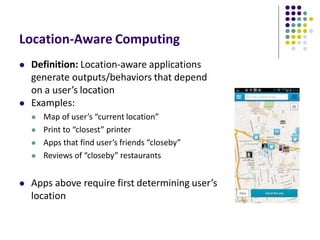
 Definition: Location-aware applications
generate outputs/behaviors that depend
on a user’s location
 Examples:
 Map of user’s “current location”
 Print to “closest” printer
 Apps that find user’s friends “closeby”
 Reviews of “closeby” restaurants
 Apps above require first determining user’s
location
Determining User Location on
Smartphones
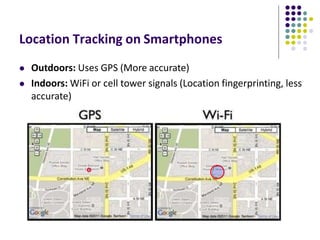
Location Tracking on Smartphones
 Outdoors: Uses GPS (More accurate)
 Indoors: WiFi or cell tower signals (Location fingerprinting, less
accurate)
Global Positioning System (GPS)
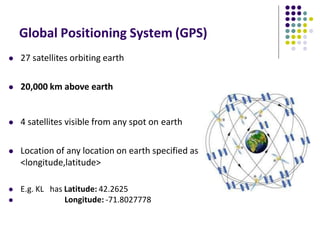
 27 satellites orbiting earth
 20,000 km above earth
 4 satellites visible from any spot on earth
 Location of any location on earth specified as
<longitude,latitude>
 E.g. KL has Latitude: 42.2625
 Longitude: -71.8027778
GPS User Segment
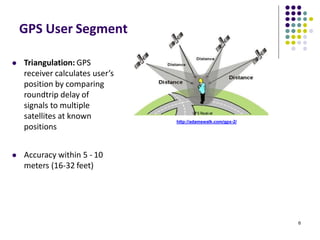
 Triangulation: GPS
receiver calculates user’s
position by comparing
roundtrip delay of
signals to multiple
satellites at known
positions
 Accuracy within 5 - 10
meters (16-32 feet)
6
http://adamswalk.com/gpx-2/
Determining User Location
 GPS reasonably accurate but
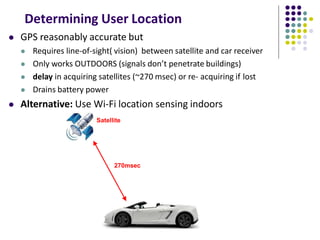
 Requires line-of-sight( vision) between satellite and car receiver
 Only works OUTDOORS (signals don’t penetrate buildings)
 delay in acquiring satellites (~270 msec) or re- acquiring if lost
 Drains battery power
 Alternative: Use Wi-Fi location sensing indoors
Satellite
270msec
WiFi Location Fingerprinting
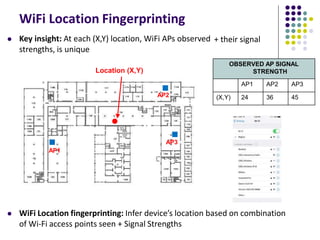
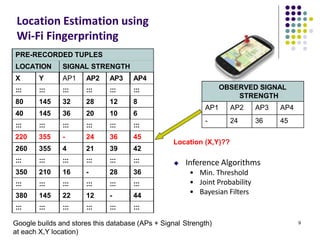
 WiFi Location fingerprinting: Infer device’s location based on combination
of Wi-Fi access points seen + Signal Strengths
+ their signal
OBSERVED AP SIGNAL
STRENGTH
AP1 AP2 AP3
(X,Y) 24 36 45
AP1
 Key insight: At each (X,Y) location, WiFi APs observed
strengths, is unique
Location (X,Y)
AP2
AP3
OBSERVED SIGNAL
STRENGTH
AP1 AP2 AP3 AP4
- 24 36 45
9
PRE-RECORDED TUPLES
LOCATION SIGNAL STRENGTH
X Y AP1 AP2 AP3 AP4
::: ::: ::: ::: ::: :::
80 145 32 28 12 8
40 145 36 20 10 6
::: ::: ::: ::: ::: :::
220 355 - 24 36 45
260 355 4 21 39 42
::: ::: ::: ::: ::: :::
350 210 16 - 28 36
::: ::: ::: ::: ::: :::
380 145 22 12 - 44
::: ::: ::: ::: ::: :::
Location Estimation using
Wi-Fi Fingerprinting
Google builds and stores this database (APs + Signal Strength)
at each X,Y location)
Location (X,Y)??
 Inference Algorithms
• Min. Threshold
• Joint Probability
• Bayesian Filters
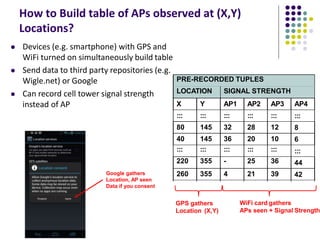
How to Build table of APs observed at (X,Y)
Locations?
 Devices (e.g. smartphone) with GPS and
WiFi turned on simultaneously build table
 Send data to third party repositories (e.g.
Wigle.net) or Google
 Can record cell tower signal strength
instead of AP
::: :::::: :::::: :::::: ::::::
::::::
350350 210210 1616 -- 2828
3636
:::::: :::::: :::::: :::::: ::::::
::::::
42
44
:::
6
8
:::
PRE-RECORDED TUPLES
LOCATION SIGNAL STRENGTH
X Y AP1 AP2 AP3 AP4
::: ::: ::: ::: :::
80 145 32 28 12
40 145 36 20 10
::: ::: ::: ::: :::
220 355 - 25 36
260 355 4 21 39
GPS gathers
Location (X,Y)
WiFi card gathers
APs seen + Signal Strength
Google gathers
Location, AP seen
Data if you consent
Location Sensing
in Android Apps
Google Location APIs
https://developer.android.com/guide/topics/location/strategies.html
 Android now has 2 location APIs (older vs newer)
 Newer nocation API is now part of Google Play Services
 Older Android framework location APIs (android.location)
 Used by most books, online sources. We will use that
 http://developer.android.com/guide/topics/location/strategies.html
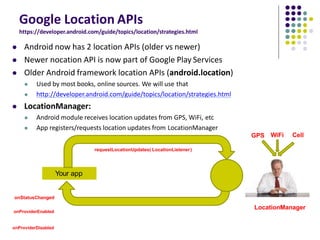
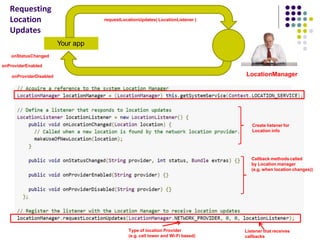
 LocationManager:
 Android module receives location updates from GPS, WiFi, etc
 App registers/requests location updates from LocationManager
Your app
LocationManager
requestLocationUpdates( LocationListener)
onStatusChanged
onProviderEnabled
onProviderDisabled
GPS WiFi Cell
Your app
LocationManager
requestLocationUpdates( LocationListener )
onStatusChanged
onProviderEnabled
onProviderDisabled
Create listener for
Location info
Callback methods called
by Location manager
(e.g. when location changes))
Type of location Provider
(e.g. cell tower and Wi-Fi based)
Listener that receives
callbacks
Requesting
Location
Updates
Requesting User Permissions
https://developer.android.com/guide/topics/location/strategies.html
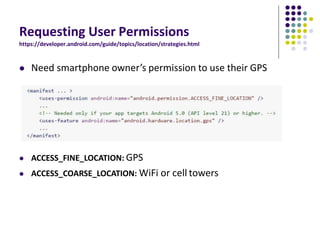
 Need smartphone owner’s permission to use their GPS
 ACCESS_FINE_LOCATION: GPS
 ACCESS_COARSE_LOCATION: WiFi or cell towers
Getting Cached Copy of Location (Fast)
https://developer.android.com/guide/topics/location/strategies.html
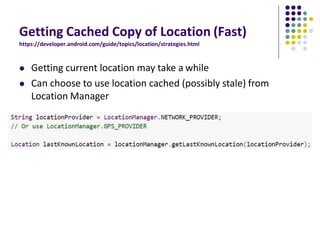
 Getting current location may take a while
 Can choose to use location cached (possibly stale) from
Location Manager
Stopping Listening for Location Updates
https://developer.android.com/guide/topics/location/strategies.html
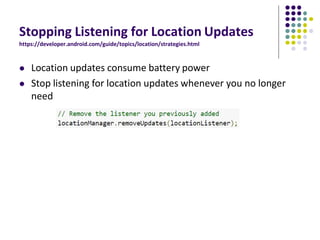
 Location updates consume battery power
 Stop listening for location updates whenever you no longer
need
Distance Travelled Updates
Example: Odometer (Distance Travelled)
updates as a Services
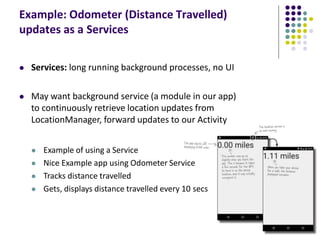
 Services: long running background processes, no UI
 May want background service (a module in our app)
to continuously retrieve location updates from
LocationManager, forward updates to our Activity
 Example of using a Service
 Nice Example app using Odometer Service
 Tracks distance travelled
 Gets, displays distance travelled every 10 secs
Odometer (Distance Travelled) updates as a
Services
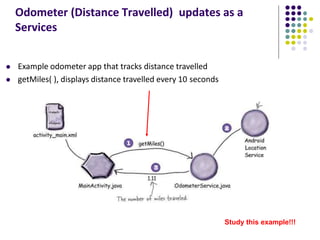
 Example odometer app that tracks distance travelled
 getMiles( ), displays distance travelled every 10 seconds
Study this example!!!
Location Representation
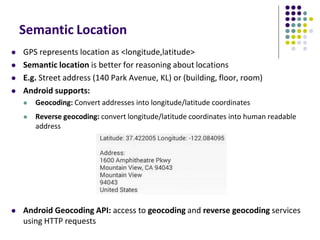
Semantic Location
 GPS represents location as <longitude,latitude>
 Semantic location is better for reasoning about locations
 E.g. Street address (140 Park Avenue, KL) or (building, floor, room)
 Android supports:
 Geocoding: Convert addresses into longitude/latitude coordinates
 Reverse geocoding: convert longitude/latitude coordinates into human readable
address
 Android Geocoding API: access to geocoding and reverse geocoding services
using HTTP requests
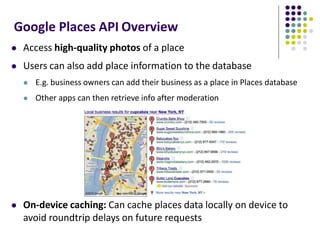
Google Places API Overview
 Access high-quality photos of a place
 Users can also add place information to the database
 E.g. business owners can add their business as a place in Places database
 Other apps can then retrieve info after moderation
 On-device caching: Can cache places data locally on device to
avoid roundtrip delays on future requests
Google Places
 Place: physical space that has a name (e.g. local businesses, points of
interest, geographic locations)
 E.g KL airport, place type is airport
 API: Provides Contextual information about places near device.
 E.g: name of place, address, geographical location, place ID, phone
number, place type, website URL, etc.
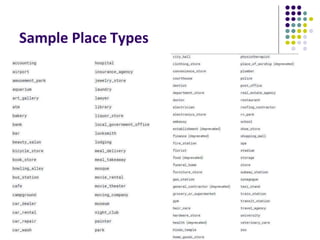
Sample Place Types
Google Places API Overview
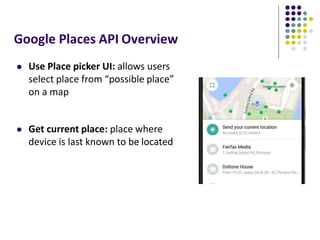
 Use Place picker UI: allows users
select place from “possible place”
on a map
 Get current place: place where
device is last known to be located
Google Places API Overview
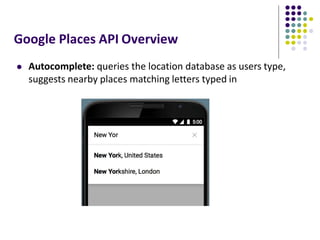
 Autocomplete: queries the location database as users type,
suggests nearby places matching letters typed in
Learning Google Places API
 Official Google Places website is “decent”, up to date:
 https://developers.google.com/places/
 Two great references:
a) Getting started with Google Places API
https://developers.google.com/places/android-api/start
b) Tutorial by Paul Trebilcox-Ruiz may be more readable:
 http://code.tutsplus.com/articles/google-play-services-using-the-places-api--
cms-23715
Other Useful Google Maps/Location
APIs
GeoFencing
https://developer.android.com/training/location/geofencing.html
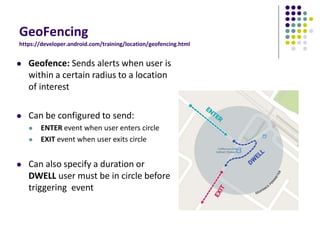
 Geofence: Sends alerts when user is
within a certain radius to a location
of interest
 Can be configured to send:
 ENTER event when user enters circle
 EXIT event when user exits circle
 Can also specify a duration or
DWELL user must be in circle before
triggering event
GeoFencing
https://developer.android.com/training/location/geofencing.html
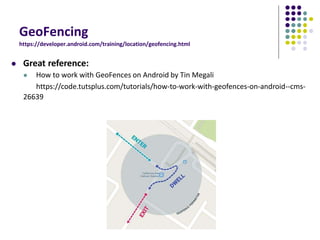
 Great reference:
 How to work with GeoFences on Android by Tin Megali
https://code.tutsplus.com/tutorials/how-to-work-with-geofences-on-android--cms-
26639
Other Maps/Useful Location APIs
 Maps Directions API: calculates directions between locations
(walking, driving) as well as public transport directions
 Distance Matrix API: Calculate travel time and distance for
multiple destinations
Other Useful Maps/Location APIs
 Time Zone API: request time zone for location on earth
GPS Clustering & Analytics
Determining Points of Interest from GPS
Location Sequences
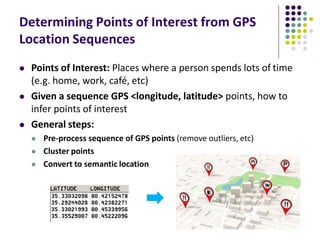
 Points of Interest: Places where a person spends lots of time
(e.g. home, work, café, etc)
 Given a sequence GPS <longitude, latitude> points, how to
infer points of interest
 General steps:
 Pre-process sequence of GPS points (remove outliers, etc)
 Cluster points
 Convert to semantic location
Step 1: Pre-Processing GPS Points
(Remove Noise and Outliers)
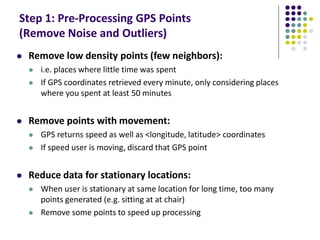
 Remove low density points (few neighbors):
 i.e. places where little time was spent
 If GPS coordinates retrieved every minute, only considering places
where you spent at least 50 minutes
 Remove points with movement:
 GPS returns speed as well as <longitude, latitude> coordinates
 If speed user is moving, discard that GPS point
 Reduce data for stationary locations:
 When user is stationary at same location for long time, too many
points generated (e.g. sitting at at chair)
 Remove some points to speed up processing
Step 2: Cluster GPS Points
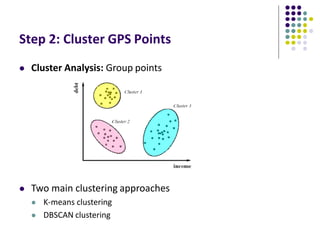
 Cluster Analysis: Group points
 Two main clustering approaches
 K-means clustering
 DBSCAN clustering
K-Means Clustering
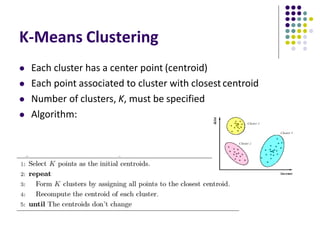
 Each cluster has a center point (centroid)
 Each point associated to cluster with closest centroid
 Number of clusters, K, must be specified
 Algorithm:
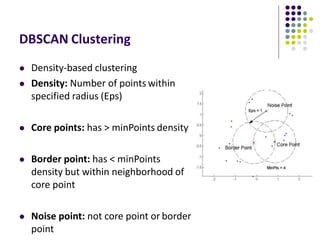
DBSCAN Clustering
 Density-based clustering
 Density: Number of points within
specified radius (Eps)
 Core points: has > minPoints density
 Border point: has < minPoints
density but within neighborhood of
core point
 Noise point: not core point or border
point
Converting Clusters to Semantic Locations
 Can simply call reverse geocoding or Google Places on the
centroid of the clusters
 Determining work? Cluster where user spends longest time
most time (9-5pm)
 Determining home? Cluster where user spends most time
6pm – 6am
Visualizing Points of Interests visited
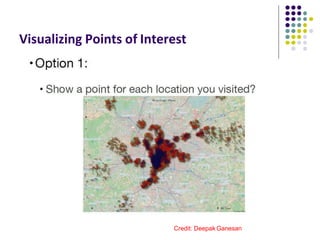
Visualizing Points of Interest
Credit: Deepak Ganesan
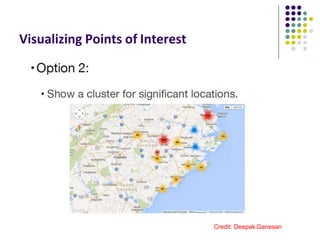
Visualizing Points of Interest
Credit: Deepak Ganesan
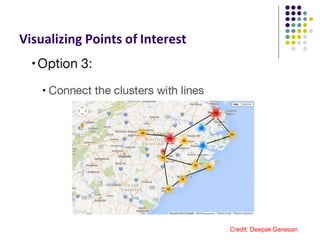
Visualizing Points of Interest
Credit: Deepak Ganesan
Location-Aware Apps examples
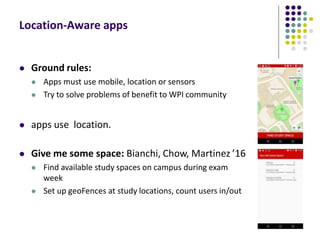
Location-Aware apps
 Ground rules:
 Apps must use mobile, location or sensors
 Try to solve problems of benefit to WPI community
 apps use location.
 Give me some space: Bianchi, Chow, Martinez ’16
 Find available study spaces on campus during exam
week
 Set up geoFences at study locations, count users in/out
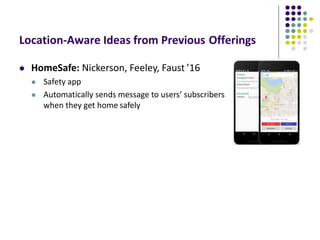
Location-Aware Ideas from Previous Offerings
 HomeSafe: Nickerson, Feeley, Faust ’16
 Safety app
 Automatically sends message to users’ subscribers
when they get home safely
Some Interesting Location-Aware
Apps
MileIQ
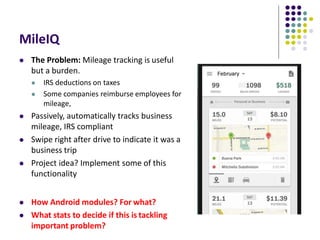
 The Problem: Mileage tracking is useful
but a burden.
 IRS deductions on taxes
 Some companies reimburse employees for
mileage,
 Passively, automatically tracks business
mileage, IRS compliant
 Swipe right after drive to indicate it was a
business trip
 Project idea? Implement some of this
functionality
 How Android modules? For what?
 What stats to decide if this is tackling
important problem?
References
 John Corpuz, 10 Best Location Aware Apps
 Liane Cassavoy, 21 Awesome GPS and Location-Aware Apps
for Android,
 Head First Android
 Android Nerd Ranch, 2nd edition
 Busy Coder’s guide to Android version 6.3
 CS 65/165 slides, Dartmouth College, Spring 2014
 CS 371M slides, U of Texas Austin, Spring 2014

Week 4

  • 1.
    Mobile and UbiquitousComputing​ ISB37703 Location-Aware Computing
  • 2.
    Location-Aware Computing  Definition:Location-aware applications generate outputs/behaviors that depend on a user’s location  Examples:  Map of user’s “current location”  Print to “closest” printer  Apps that find user’s friends “closeby”  Reviews of “closeby” restaurants  Apps above require first determining user’s location
  • 3.
  • 4.
    Location Tracking onSmartphones  Outdoors: Uses GPS (More accurate)  Indoors: WiFi or cell tower signals (Location fingerprinting, less accurate)
  • 5.
    Global Positioning System(GPS)  27 satellites orbiting earth  20,000 km above earth  4 satellites visible from any spot on earth  Location of any location on earth specified as <longitude,latitude>  E.g. KL has Latitude: 42.2625  Longitude: -71.8027778
  • 6.
    GPS User Segment Triangulation: GPS receiver calculates user’s position by comparing roundtrip delay of signals to multiple satellites at known positions  Accuracy within 5 - 10 meters (16-32 feet) 6 http://adamswalk.com/gpx-2/
  • 7.
    Determining User Location GPS reasonably accurate but  Requires line-of-sight( vision) between satellite and car receiver  Only works OUTDOORS (signals don’t penetrate buildings)  delay in acquiring satellites (~270 msec) or re- acquiring if lost  Drains battery power  Alternative: Use Wi-Fi location sensing indoors Satellite 270msec
  • 8.
    WiFi Location Fingerprinting WiFi Location fingerprinting: Infer device’s location based on combination of Wi-Fi access points seen + Signal Strengths + their signal OBSERVED AP SIGNAL STRENGTH AP1 AP2 AP3 (X,Y) 24 36 45 AP1  Key insight: At each (X,Y) location, WiFi APs observed strengths, is unique Location (X,Y) AP2 AP3
  • 9.
    OBSERVED SIGNAL STRENGTH AP1 AP2AP3 AP4 - 24 36 45 9 PRE-RECORDED TUPLES LOCATION SIGNAL STRENGTH X Y AP1 AP2 AP3 AP4 ::: ::: ::: ::: ::: ::: 80 145 32 28 12 8 40 145 36 20 10 6 ::: ::: ::: ::: ::: ::: 220 355 - 24 36 45 260 355 4 21 39 42 ::: ::: ::: ::: ::: ::: 350 210 16 - 28 36 ::: ::: ::: ::: ::: ::: 380 145 22 12 - 44 ::: ::: ::: ::: ::: ::: Location Estimation using Wi-Fi Fingerprinting Google builds and stores this database (APs + Signal Strength) at each X,Y location) Location (X,Y)??  Inference Algorithms • Min. Threshold • Joint Probability • Bayesian Filters
  • 10.
    How to Buildtable of APs observed at (X,Y) Locations?  Devices (e.g. smartphone) with GPS and WiFi turned on simultaneously build table  Send data to third party repositories (e.g. Wigle.net) or Google  Can record cell tower signal strength instead of AP ::: :::::: :::::: :::::: :::::: :::::: 350350 210210 1616 -- 2828 3636 :::::: :::::: :::::: :::::: :::::: :::::: 42 44 ::: 6 8 ::: PRE-RECORDED TUPLES LOCATION SIGNAL STRENGTH X Y AP1 AP2 AP3 AP4 ::: ::: ::: ::: ::: 80 145 32 28 12 40 145 36 20 10 ::: ::: ::: ::: ::: 220 355 - 25 36 260 355 4 21 39 GPS gathers Location (X,Y) WiFi card gathers APs seen + Signal Strength Google gathers Location, AP seen Data if you consent
  • 11.
  • 12.
    Google Location APIs https://developer.android.com/guide/topics/location/strategies.html Android now has 2 location APIs (older vs newer)  Newer nocation API is now part of Google Play Services  Older Android framework location APIs (android.location)  Used by most books, online sources. We will use that  http://developer.android.com/guide/topics/location/strategies.html  LocationManager:  Android module receives location updates from GPS, WiFi, etc  App registers/requests location updates from LocationManager Your app LocationManager requestLocationUpdates( LocationListener) onStatusChanged onProviderEnabled onProviderDisabled GPS WiFi Cell
  • 13.
    Your app LocationManager requestLocationUpdates( LocationListener) onStatusChanged onProviderEnabled onProviderDisabled Create listener for Location info Callback methods called by Location manager (e.g. when location changes)) Type of location Provider (e.g. cell tower and Wi-Fi based) Listener that receives callbacks Requesting Location Updates
  • 14.
    Requesting User Permissions https://developer.android.com/guide/topics/location/strategies.html Need smartphone owner’s permission to use their GPS  ACCESS_FINE_LOCATION: GPS  ACCESS_COARSE_LOCATION: WiFi or cell towers
  • 15.
    Getting Cached Copyof Location (Fast) https://developer.android.com/guide/topics/location/strategies.html  Getting current location may take a while  Can choose to use location cached (possibly stale) from Location Manager
  • 16.
    Stopping Listening forLocation Updates https://developer.android.com/guide/topics/location/strategies.html  Location updates consume battery power  Stop listening for location updates whenever you no longer need
  • 17.
  • 18.
    Example: Odometer (DistanceTravelled) updates as a Services  Services: long running background processes, no UI  May want background service (a module in our app) to continuously retrieve location updates from LocationManager, forward updates to our Activity  Example of using a Service  Nice Example app using Odometer Service  Tracks distance travelled  Gets, displays distance travelled every 10 secs
  • 19.
    Odometer (Distance Travelled)updates as a Services  Example odometer app that tracks distance travelled  getMiles( ), displays distance travelled every 10 seconds Study this example!!!
  • 20.
  • 21.
    Semantic Location  GPSrepresents location as <longitude,latitude>  Semantic location is better for reasoning about locations  E.g. Street address (140 Park Avenue, KL) or (building, floor, room)  Android supports:  Geocoding: Convert addresses into longitude/latitude coordinates  Reverse geocoding: convert longitude/latitude coordinates into human readable address  Android Geocoding API: access to geocoding and reverse geocoding services using HTTP requests
  • 22.
    Google Places APIOverview  Access high-quality photos of a place  Users can also add place information to the database  E.g. business owners can add their business as a place in Places database  Other apps can then retrieve info after moderation  On-device caching: Can cache places data locally on device to avoid roundtrip delays on future requests
  • 23.
    Google Places  Place:physical space that has a name (e.g. local businesses, points of interest, geographic locations)  E.g KL airport, place type is airport  API: Provides Contextual information about places near device.  E.g: name of place, address, geographical location, place ID, phone number, place type, website URL, etc.
  • 24.
  • 25.
    Google Places APIOverview  Use Place picker UI: allows users select place from “possible place” on a map  Get current place: place where device is last known to be located
  • 26.
    Google Places APIOverview  Autocomplete: queries the location database as users type, suggests nearby places matching letters typed in
  • 27.
    Learning Google PlacesAPI  Official Google Places website is “decent”, up to date:  https://developers.google.com/places/  Two great references: a) Getting started with Google Places API https://developers.google.com/places/android-api/start b) Tutorial by Paul Trebilcox-Ruiz may be more readable:  http://code.tutsplus.com/articles/google-play-services-using-the-places-api-- cms-23715
  • 28.
    Other Useful GoogleMaps/Location APIs
  • 29.
    GeoFencing https://developer.android.com/training/location/geofencing.html  Geofence: Sendsalerts when user is within a certain radius to a location of interest  Can be configured to send:  ENTER event when user enters circle  EXIT event when user exits circle  Can also specify a duration or DWELL user must be in circle before triggering event
  • 30.
    GeoFencing https://developer.android.com/training/location/geofencing.html  Great reference: How to work with GeoFences on Android by Tin Megali https://code.tutsplus.com/tutorials/how-to-work-with-geofences-on-android--cms- 26639
  • 31.
    Other Maps/Useful LocationAPIs  Maps Directions API: calculates directions between locations (walking, driving) as well as public transport directions  Distance Matrix API: Calculate travel time and distance for multiple destinations
  • 32.
    Other Useful Maps/LocationAPIs  Time Zone API: request time zone for location on earth
  • 33.
  • 34.
    Determining Points ofInterest from GPS Location Sequences  Points of Interest: Places where a person spends lots of time (e.g. home, work, café, etc)  Given a sequence GPS <longitude, latitude> points, how to infer points of interest  General steps:  Pre-process sequence of GPS points (remove outliers, etc)  Cluster points  Convert to semantic location
  • 35.
    Step 1: Pre-ProcessingGPS Points (Remove Noise and Outliers)  Remove low density points (few neighbors):  i.e. places where little time was spent  If GPS coordinates retrieved every minute, only considering places where you spent at least 50 minutes  Remove points with movement:  GPS returns speed as well as <longitude, latitude> coordinates  If speed user is moving, discard that GPS point  Reduce data for stationary locations:  When user is stationary at same location for long time, too many points generated (e.g. sitting at at chair)  Remove some points to speed up processing
  • 36.
    Step 2: ClusterGPS Points  Cluster Analysis: Group points  Two main clustering approaches  K-means clustering  DBSCAN clustering
  • 37.
    K-Means Clustering  Eachcluster has a center point (centroid)  Each point associated to cluster with closest centroid  Number of clusters, K, must be specified  Algorithm:
  • 38.
    DBSCAN Clustering  Density-basedclustering  Density: Number of points within specified radius (Eps)  Core points: has > minPoints density  Border point: has < minPoints density but within neighborhood of core point  Noise point: not core point or border point
  • 39.
    Converting Clusters toSemantic Locations  Can simply call reverse geocoding or Google Places on the centroid of the clusters  Determining work? Cluster where user spends longest time most time (9-5pm)  Determining home? Cluster where user spends most time 6pm – 6am
  • 40.
    Visualizing Points ofInterests visited
  • 41.
    Visualizing Points ofInterest Credit: Deepak Ganesan
  • 42.
    Visualizing Points ofInterest Credit: Deepak Ganesan
  • 43.
    Visualizing Points ofInterest Credit: Deepak Ganesan
  • 44.
  • 45.
    Location-Aware apps  Groundrules:  Apps must use mobile, location or sensors  Try to solve problems of benefit to WPI community  apps use location.  Give me some space: Bianchi, Chow, Martinez ’16  Find available study spaces on campus during exam week  Set up geoFences at study locations, count users in/out
  • 46.
    Location-Aware Ideas fromPrevious Offerings  HomeSafe: Nickerson, Feeley, Faust ’16  Safety app  Automatically sends message to users’ subscribers when they get home safely
  • 47.
  • 48.
    MileIQ  The Problem:Mileage tracking is useful but a burden.  IRS deductions on taxes  Some companies reimburse employees for mileage,  Passively, automatically tracks business mileage, IRS compliant  Swipe right after drive to indicate it was a business trip  Project idea? Implement some of this functionality  How Android modules? For what?  What stats to decide if this is tackling important problem?
  • 49.
    References  John Corpuz,10 Best Location Aware Apps  Liane Cassavoy, 21 Awesome GPS and Location-Aware Apps for Android,  Head First Android  Android Nerd Ranch, 2nd edition  Busy Coder’s guide to Android version 6.3  CS 65/165 slides, Dartmouth College, Spring 2014  CS 371M slides, U of Texas Austin, Spring 2014

Editor's Notes

  • #3 Closeby pp such as snapcht , instgogarm , …… u‧biq‧ui‧tous
  • #10 Bayesian بيزين