1/82
2/82
WebSphere Application Server on z/OS
(Based on Version 5)
3/82
Chapter objectivesChapter objectives
Be able to:
• List the six qualities of the J2EE Application
model
• Give three reasons for running WebSphere
Application Server under z/OS
• Name three connectors to CICS, DB2, and
IMS
3
4/82
Key terms in this chapterKey terms in this chapter
• cell
• CR
• CGI
• EIS
• JMX
• J2EE
• SR
• cluster
• node
4
5/82
Introduction to Web applications on z/OSIntroduction to Web applications on z/OS
5
 Past:
– Many applications are tied to z/OS (CICS, DB2)
– New developments made on other platforms
 Now:
– Integrate both on z/OS
6/82
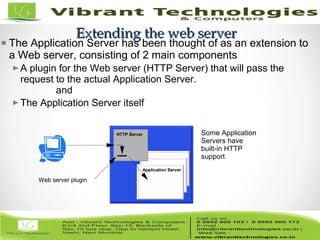
Extending the web serverExtending the web server
HTTP Server
Web server plugin
Application Server
Some Application
Servers have
built-in HTTP
support
The Application Server has been thought of as an extension to
a Web server, consisting of 2 main components
A plugin for the Web server (HTTP Server) that will pass the
request to the actual Application Server.
and
The Application Server itself
6
7/82
J2EE Application Model in z/OSJ2EE Application Model in z/OS
7
Same as on other platforms, following SDK:
 Functional
 Reliable
 Usable
 Efficient
 Maintainable
 Portable
8/82
Running WebSphere Application Server for z/OSRunning WebSphere Application Server for z/OS
8
 Basics of WebSphere on z/OS
 Consolidation of workloads
 WebSphere for z/OS Security
 Continuous availability
 Performance
9/82
9
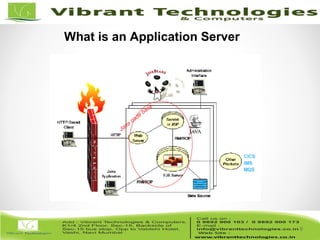
What is an Application Server
10/82
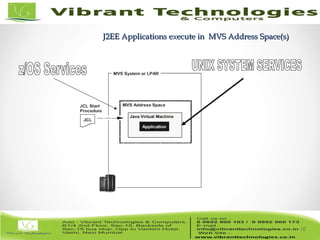
J2EE Applications execute in MVS Address Space(s)J2EE Applications execute in MVS Address Space(s)
10
11/82
11
platform specific
code
(C code)
Shared C code
Java application
Shared Java code
awt
Posix interface
C runtime library
X11
net
sockets
bytecodes
bytecodes
This layer has
the calls to the
C runtime library
C statements
Unicode
ASCII
EBCDIC
Java
Virtual
Machine
UNIX
System
Services
SAF DFSMS
Address
Space
z/OS
SMH
WLM
RRS
HFS
MVS
Dataset
ZFS
DB
z/OS UNIX
Language Environment
RACF
JVM
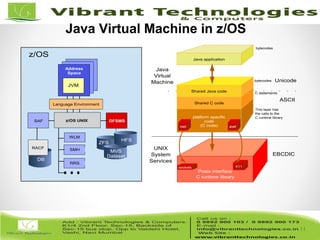
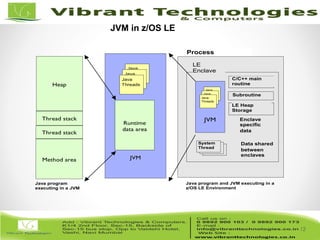
Java Virtual Machine in z/OS
12/82
12
Heap
JVM
Runtime
data area
Method area
Thread stack
Thread stack
Java program and JVM executing in a
z/OS LE Environment
Java program
executing in a JVM
Process
Enclave
specific
data
Data shared
between
enclaves
System
Thread
System
Thread
System
Thread
JVM
LE
Enclave
C/C++ main
routine
Subroutine
LE Heap
Storage
Java
ThreadsJava
ThreadsJava
Threads
Java
ThreadsJava
ThreadsJava
Threads
JVM in z/OS LE
13/82
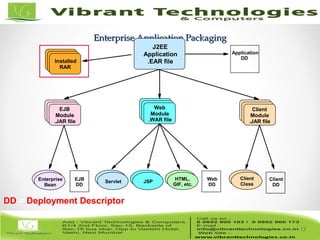
Enterprise Application PackagingEnterprise Application Packaging
13
EJB
DD
Web
DD
Client
DD
HTML,
GIF, etc.
Application
DD
Enterprise
Bean
Client
Class
Servlet JSP
EJB
Module
.JAR file
Web
Module
.WAR file
Client
Module
.JAR file
J2EE
Application
.EAR fileInstalled
RAR
DD = Deployment Descriptor
14/82
14
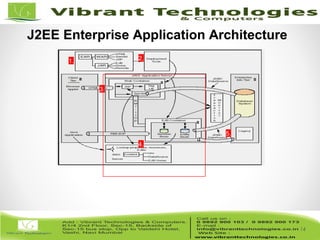
J2EE Enterprise Application Architecture
1. 2.
3.
4.
5.
15/82
WebSphere Application Server for z/OSWebSphere Application Server for z/OS
15
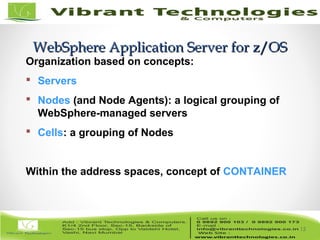
Organization based on concepts:
 Servers
 Nodes (and Node Agents): a logical grouping of
WebSphere-managed servers
 Cells: a grouping of Nodes
Within the address spaces, concept of CONTAINER
16/82
16
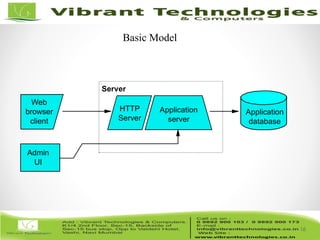
HTTP
Server
Application
database
Application
server
Admin
UI
Web
browser
client
Server
Basic Model
17/82
WebSphere Application Server for z/OSWebSphere Application Server for z/OS
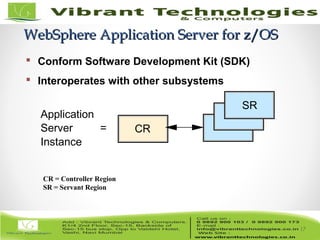
Application
Server =
Instance
CR
SR
17
 Conform Software Development Kit (SDK)
 Interoperates with other subsystems
CR = Controller Region
SR = Servant Region
18/82
18
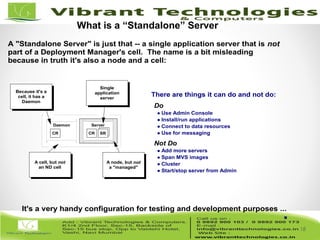
A "Standalone Server" is just that -- a single application server that is not
part of a Deployment Manager's cell. The name is a bit misleading
because in truth it's also a node and a cell:
CR SR
Server
CR
Daemon
Single
application
server
A node, but not
a "managed"
A cell, but not
an ND cell
Because it's a
cell, it has a
Daemon
There are things it can do and not do:
Do
Use Admin Console
Install/run applications
Connect to data resources
Use for messaging
Not Do
Add more servers
Span MVS images
Cluster
Start/stop server from Admin
It's a very handy configuration for testing and development purposes ...
What is a “Standalone” Server
19/82
19
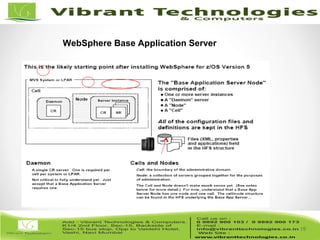
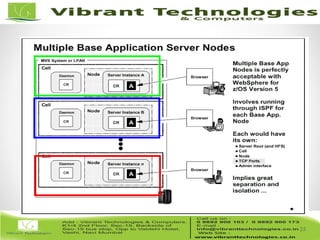
WebSphere Base Application Server
20/82
20
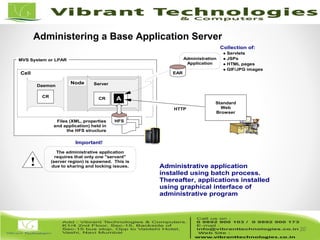
Administrative application
installed using batch process.
Thereafter, applications installed
using graphical interface of
administrative program
MVS System or LPAR
Daemon
CR
Node
Cell
Server
CR SRA
Administration
Application
EAR
Collection of:
Servlets
JSPs
HTML pages
GIF/JPG images
Files (XML, properties
and application) held in
the HFS structure
HFS
Standard
Web
Browser
HTTP
The administrative application
requires that only one "servant"
(server region) is spawned. This is
due to sharing and locking issues.
Important!
!
Administering a Base Application Server
21/82
21
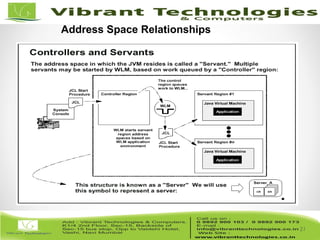
Address Space Relationships
22/82
22
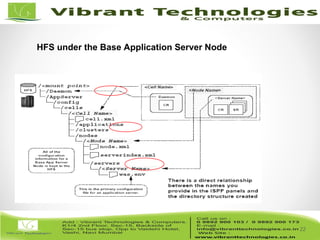
HFS under the Base Application Server Node
23/82
23
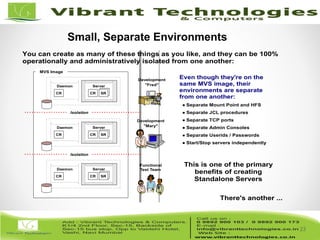
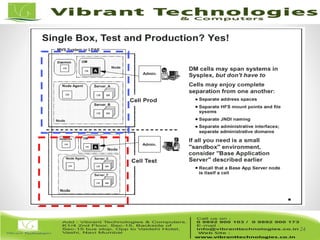
You can create as many of these things as you like, and they can be 100%
operationally and administratively isolated from one another:
CR SR
Server
CR
Daemon
CR SR
Server
CR
Daemon
CR SR
Server
CR
Daemon
MVS Image
Development
"Fred"
Development
"Mary"
Functional
Test Team
Even though they're on the
same MVS image, their
environments are separate
from one another:
Separate Mount Point and HFS
Separate JCL procedures
Separate TCP ports
Separate Admin Consoles
Separate Userids / Passwords
Start/Stop servers independently
Isolation
Isolation
This is one of the primary
benefits of creating
Standalone Servers
There's another ...
Small, Separate Environments
24/82
24
25/82
25
26/82
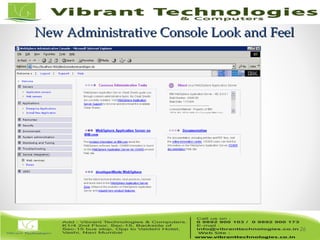
New Administrative Console Look and FeelNew Administrative Console Look and Feel
26
27/82
27
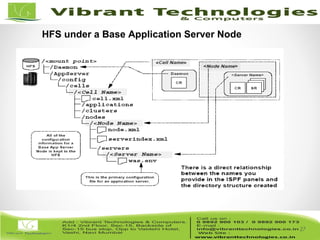
HFS under a Base Application Server Node
28/82
28
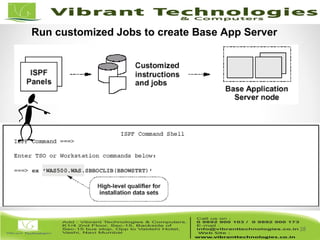
Run customized Jobs to create Base App Server
29/82
29
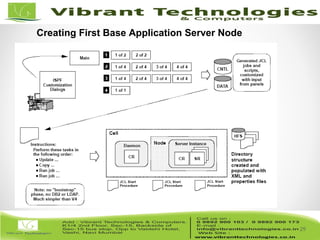
Creating First Base Application Server Node
30/82
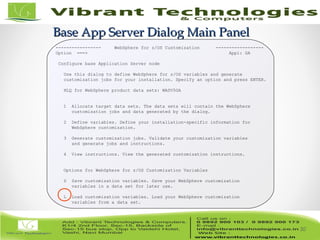
Base App Server Dialog Main PanelBase App Server Dialog Main Panel
30
----------------- WebSphere for z/OS Customization ------------------
Option ===> Appl: GA
Configure base Application Server node
Use this dialog to define WebSphere for z/OS variables and generate
customization jobs for your installation. Specify an option and press ENTER.
HLQ for WebSphere product data sets: WASV5GA
1 Allocate target data sets. The data sets will contain the WebSphere
customization jobs and data generated by the dialog.
2 Define variables. Define your installation-specific information for
WebSphere customization.
3 Generate customization jobs. Validate your customization variables
and generate jobs and instructions.
4 View instructions. View the generated customization instructions.
Options for WebSphere for z/OS Customization Variables
S Save customization variables. Save your WebSphere customization
variables in a data set for later use.
L Load customization variables. Load your WebSphere customization
variables from a data set.
31/82
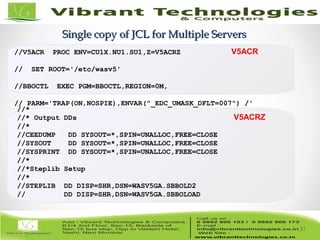
Single copy of JCL for Multiple ServersSingle copy of JCL for Multiple Servers
31
//V5ACR PROC ENV=CU1X.NU1.SU1,Z=V5ACRZ
// SET ROOT='/etc/wasv5'
//BBOCTL EXEC PGM=BBOCTL,REGION=0M,
// PARM='TRAP(ON,NOSPIE),ENVAR("_EDC_UMASK_DFLT=007") /'
//BBOENV DD PATH='&ROOT/&ENV/was.env'
// INCLUDE MEMBER=&Z
//*
//* Output DDs
//*
//CEEDUMP DD SYSOUT=*,SPIN=UNALLOC,FREE=CLOSE
//SYSOUT DD SYSOUT=*,SPIN=UNALLOC,FREE=CLOSE
//SYSPRINT DD SYSOUT=*,SPIN=UNALLOC,FREE=CLOSE
//*
//*Steplib Setup
//*
//STEPLIB DD DISP=SHR,DSN=WASV5GA.SBBOLD2
// DD DISP=SHR,DSN=WASV5GA.SBBOLOAD
V5ACR
V5ACRZ
32/82
ThankThank You !!!You !!!
For More Information click below link:
Follow Us on:
http://vibranttechnologies.co.in/websphere-classes-in-mumbai.html

Websphere - application server on z/os

  • 1.
  • 2.
    2/82 WebSphere Application Serveron z/OS (Based on Version 5)
  • 3.
    3/82 Chapter objectivesChapter objectives Beable to: • List the six qualities of the J2EE Application model • Give three reasons for running WebSphere Application Server under z/OS • Name three connectors to CICS, DB2, and IMS 3
  • 4.
    4/82 Key terms inthis chapterKey terms in this chapter • cell • CR • CGI • EIS • JMX • J2EE • SR • cluster • node 4
  • 5.
    5/82 Introduction to Webapplications on z/OSIntroduction to Web applications on z/OS 5  Past: – Many applications are tied to z/OS (CICS, DB2) – New developments made on other platforms  Now: – Integrate both on z/OS
  • 6.
    6/82 Extending the webserverExtending the web server HTTP Server Web server plugin Application Server Some Application Servers have built-in HTTP support The Application Server has been thought of as an extension to a Web server, consisting of 2 main components A plugin for the Web server (HTTP Server) that will pass the request to the actual Application Server. and The Application Server itself 6
  • 7.
    7/82 J2EE Application Modelin z/OSJ2EE Application Model in z/OS 7 Same as on other platforms, following SDK:  Functional  Reliable  Usable  Efficient  Maintainable  Portable
  • 8.
    8/82 Running WebSphere ApplicationServer for z/OSRunning WebSphere Application Server for z/OS 8  Basics of WebSphere on z/OS  Consolidation of workloads  WebSphere for z/OS Security  Continuous availability  Performance
  • 9.
    9/82 9 What is anApplication Server
  • 10.
    10/82 J2EE Applications executein MVS Address Space(s)J2EE Applications execute in MVS Address Space(s) 10
  • 11.
    11/82 11 platform specific code (C code) SharedC code Java application Shared Java code awt Posix interface C runtime library X11 net sockets bytecodes bytecodes This layer has the calls to the C runtime library C statements Unicode ASCII EBCDIC Java Virtual Machine UNIX System Services SAF DFSMS Address Space z/OS SMH WLM RRS HFS MVS Dataset ZFS DB z/OS UNIX Language Environment RACF JVM Java Virtual Machine in z/OS
  • 12.
    12/82 12 Heap JVM Runtime data area Method area Threadstack Thread stack Java program and JVM executing in a z/OS LE Environment Java program executing in a JVM Process Enclave specific data Data shared between enclaves System Thread System Thread System Thread JVM LE Enclave C/C++ main routine Subroutine LE Heap Storage Java ThreadsJava ThreadsJava Threads Java ThreadsJava ThreadsJava Threads JVM in z/OS LE
  • 13.
    13/82 Enterprise Application PackagingEnterpriseApplication Packaging 13 EJB DD Web DD Client DD HTML, GIF, etc. Application DD Enterprise Bean Client Class Servlet JSP EJB Module .JAR file Web Module .WAR file Client Module .JAR file J2EE Application .EAR fileInstalled RAR DD = Deployment Descriptor
  • 14.
    14/82 14 J2EE Enterprise ApplicationArchitecture 1. 2. 3. 4. 5.
  • 15.
    15/82 WebSphere Application Serverfor z/OSWebSphere Application Server for z/OS 15 Organization based on concepts:  Servers  Nodes (and Node Agents): a logical grouping of WebSphere-managed servers  Cells: a grouping of Nodes Within the address spaces, concept of CONTAINER
  • 16.
  • 17.
    17/82 WebSphere Application Serverfor z/OSWebSphere Application Server for z/OS Application Server = Instance CR SR 17  Conform Software Development Kit (SDK)  Interoperates with other subsystems CR = Controller Region SR = Servant Region
  • 18.
    18/82 18 A "Standalone Server"is just that -- a single application server that is not part of a Deployment Manager's cell. The name is a bit misleading because in truth it's also a node and a cell: CR SR Server CR Daemon Single application server A node, but not a "managed" A cell, but not an ND cell Because it's a cell, it has a Daemon There are things it can do and not do: Do Use Admin Console Install/run applications Connect to data resources Use for messaging Not Do Add more servers Span MVS images Cluster Start/stop server from Admin It's a very handy configuration for testing and development purposes ... What is a “Standalone” Server
  • 19.
  • 20.
    20/82 20 Administrative application installed usingbatch process. Thereafter, applications installed using graphical interface of administrative program MVS System or LPAR Daemon CR Node Cell Server CR SRA Administration Application EAR Collection of: Servlets JSPs HTML pages GIF/JPG images Files (XML, properties and application) held in the HFS structure HFS Standard Web Browser HTTP The administrative application requires that only one "servant" (server region) is spawned. This is due to sharing and locking issues. Important! ! Administering a Base Application Server
  • 21.
  • 22.
    22/82 22 HFS under theBase Application Server Node
  • 23.
    23/82 23 You can createas many of these things as you like, and they can be 100% operationally and administratively isolated from one another: CR SR Server CR Daemon CR SR Server CR Daemon CR SR Server CR Daemon MVS Image Development "Fred" Development "Mary" Functional Test Team Even though they're on the same MVS image, their environments are separate from one another: Separate Mount Point and HFS Separate JCL procedures Separate TCP ports Separate Admin Consoles Separate Userids / Passwords Start/Stop servers independently Isolation Isolation This is one of the primary benefits of creating Standalone Servers There's another ... Small, Separate Environments
  • 24.
  • 25.
  • 26.
    26/82 New Administrative ConsoleLook and FeelNew Administrative Console Look and Feel 26
  • 27.
    27/82 27 HFS under aBase Application Server Node
  • 28.
    28/82 28 Run customized Jobsto create Base App Server
  • 29.
    29/82 29 Creating First BaseApplication Server Node
  • 30.
    30/82 Base App ServerDialog Main PanelBase App Server Dialog Main Panel 30 ----------------- WebSphere for z/OS Customization ------------------ Option ===> Appl: GA Configure base Application Server node Use this dialog to define WebSphere for z/OS variables and generate customization jobs for your installation. Specify an option and press ENTER. HLQ for WebSphere product data sets: WASV5GA 1 Allocate target data sets. The data sets will contain the WebSphere customization jobs and data generated by the dialog. 2 Define variables. Define your installation-specific information for WebSphere customization. 3 Generate customization jobs. Validate your customization variables and generate jobs and instructions. 4 View instructions. View the generated customization instructions. Options for WebSphere for z/OS Customization Variables S Save customization variables. Save your WebSphere customization variables in a data set for later use. L Load customization variables. Load your WebSphere customization variables from a data set.
  • 31.
    31/82 Single copy ofJCL for Multiple ServersSingle copy of JCL for Multiple Servers 31 //V5ACR PROC ENV=CU1X.NU1.SU1,Z=V5ACRZ // SET ROOT='/etc/wasv5' //BBOCTL EXEC PGM=BBOCTL,REGION=0M, // PARM='TRAP(ON,NOSPIE),ENVAR("_EDC_UMASK_DFLT=007") /' //BBOENV DD PATH='&ROOT/&ENV/was.env' // INCLUDE MEMBER=&Z //* //* Output DDs //* //CEEDUMP DD SYSOUT=*,SPIN=UNALLOC,FREE=CLOSE //SYSOUT DD SYSOUT=*,SPIN=UNALLOC,FREE=CLOSE //SYSPRINT DD SYSOUT=*,SPIN=UNALLOC,FREE=CLOSE //* //*Steplib Setup //* //STEPLIB DD DISP=SHR,DSN=WASV5GA.SBBOLD2 // DD DISP=SHR,DSN=WASV5GA.SBBOLOAD V5ACR V5ACRZ
  • 32.
    32/82 ThankThank You !!!You!!! For More Information click below link: Follow Us on: http://vibranttechnologies.co.in/websphere-classes-in-mumbai.html