WebDev Crash
Course
by: César Cruz
Topics
• Tools
• Version Control
• Web servers
• Application Architecture
Tools
First things first, the
language.
JavaScript and
NodeJS
DISCLAIMER:
The purpose of today’s workshop is not to learn a new language or set of
frameworks, rather our focus will be to familiarize ourselves with the basic
terminology of the web and the tools that should be basic in a web developer.
JavaScript
• Dynamic
• Interpreted
• Java-like syntax
• Prototype Based
• The language of the Web
NodeJS
• Google V8 Engine
• Write JS outside the browser
• Create Web Servers using JS
• Event-Driven
• Asynchronous
Web Framework
• Abstracts most Web Concepts into an easy to use
bundle.
• Contains HTTP functionality right out of the box
• Most are the same, but not all of them,
architecture styles vary
• Works great for simple stuff
• hapiJS
Version Control
What?
• Simply put, it’s a piece of software that keeps
tabs on files. If all hell breaks lose, you can bring
back a project to a previous state.
Why?
• Isn’t it obvious? Proper use of version control
enables a programmer to restore a project to a
previous state.
Who?
Git
• Distributed Version Control System
• Flexible (big or small projects)
• Team-friendly
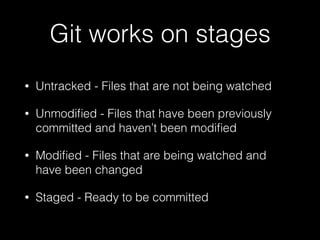
Git works on stages
• Untracked - Files that are not being watched
• Unmodified - Files that have been previously
committed and haven’t been modified
• Modified - Files that are being watched and
have been changed
• Staged - Ready to be committed
Git Commands
• Init - Create a new git repository in the current
director
• Clone - Clone a remote git repository into the
current directory
Git Commands
• Status - check the current status of the files in
the current directory with regards to the git
repository
Git Commands
• Add - Add files to the git stage, added files will
be monitored for future changes (if they were not
already being monitored), using the ‘u’ flag will
only add the updated files. The ‘A’ flag will add
all files in the current directory to the stage.
Git Commands
• Commit - Save all the files in the stage to the
repository. The ‘m’ flag is used to add a
message to the commit.
Git Commands
• Push - Send and save a copy of the local
repository to a remote repository.
Ignoring Files
• Create a .gitignore file
• Indicate which files you want git to overlook
• Useful, we don’t want to store libraries and
frameworks
GitHub
• Web-based Git hosting service
• Very big in the open source world
• For the hacker culture, more valuable than a
resume.
The Web: Concepts
HTTP
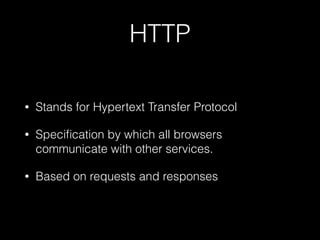
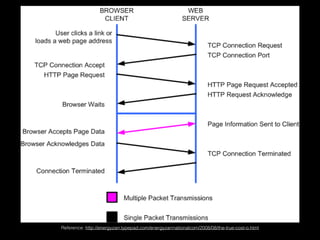
• Stands for Hypertext Transfer Protocol
• Specification by which all browsers
communicate with other services.
• Based on requests and responses
Reference: http://energyzarr.typepad.com/energyzarrnationalcom/2008/08/the-true-cost-o.html
Web Server
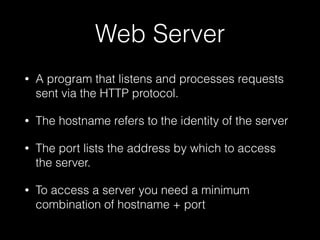
• A program that listens and processes requests
sent via the HTTP protocol.
• The hostname refers to the identity of the server
• The port lists the address by which to access
the server.
• To access a server you need a minimum
combination of hostname + port
Before we get into any
more details…
How should we structure
a web development
project?
Architecture
• This is important as we want to keep everything
organized in a way that makes sense to us. This
will later help separate concerns and help in
testing and debugging.
• There are MANY different opinions out there on
how to structure software, don’t just take one for
granted, try something out, replace what doesn’t
work.
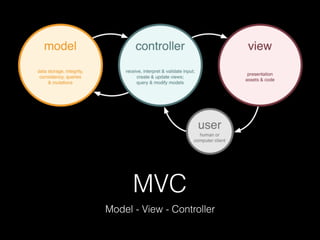
MVC
Model - View - Controller
Model
• What the application is about.
• Handles the data of an application
• Operates on the data of an application
• Informs the controller of changes in the data
Database + ORM/ODM
• Databases come in many flavors: relational, object based,
column based, key store, etc…
• An Object Relational Mapper facilitates the job of
communicating and interacting with a Relational Database
• The Object Data Mapper is the analogous system in the
non-relational case.
• We create a Model in our application that resembles the
structure of our database, and we use this model to
manipulate the data on the database.
CRUD
• Create, Read, Update, Delete
• Basic operations that we want to be able to
execute in our persistent data storage system, or
database.
Controller
• Handles all communication between the Model
and the View.
• Responds to events that occur in the view layer,
and communicates these events properly to the
Model layer.
• The controller is also responsible to respond to
events that are broadcasted by the Model layer.
Part of the Controller
layer’s responsibility is to
handle user requests…
So, how do we
communicate?
HTTP Terminology
• A controller has to be able to handle requests
and establish the proper responses.
• This is the key part of a Controller.
HTTP Messages
• An HTTP Message can be either a request or a
response, depending on the situation.
• Essentially they contain similar structures;
Message Headers, Message Body and
Message Length
• Most Web Frameworks abstract these concepts
for you.
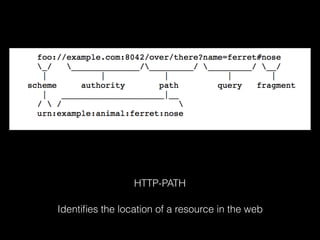
HTTP-PATH
Identifies the location of a resource in the web
HTTP Methods
Or verbs identify the action that we want to perform on
the HTTP Path.
HTTP Methods
• GET - Retrieve the resource located at the HTTP
path location (URL)
• POST - Create a resource (store) in the location
indicated by the http url.
• PUT - Update the resource identified by the http
url with the payload of the request
• DELETE - Destroy the resource indicated by the
http url.
MIME Type
• Can’t just send data however you want
• A standard must be used so both client and
server know how the data is to be encoded and
decoded
• JSON
• XML
View
• Displays the data
• Only knows how to display data, has NO logic.
• It is told when to represent itself by the controller
• Only communicates with the Controller, never
with the Model.
HTML
• Markup language
• Used to structure static contents in a web page
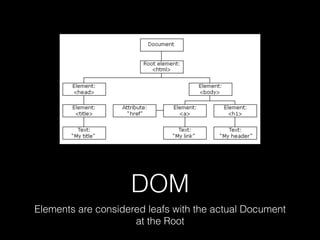
• DOM - Document Object Model
• Tree Structure
DOM
Elements are considered leafs with the actual Document
at the Root
CSS
• Used to style contents in the web
• Very powerful tool
• High learning curve
Template Engines
• Used to dynamically create web pages
• template + data + assets = static page
• There are many options for templating styles.
Questions?

WebDev Crash Course

  • 1.
  • 2.
    Topics • Tools • VersionControl • Web servers • Application Architecture
  • 3.
  • 5.
    First things first,the language.
  • 6.
  • 7.
    DISCLAIMER: The purpose oftoday’s workshop is not to learn a new language or set of frameworks, rather our focus will be to familiarize ourselves with the basic terminology of the web and the tools that should be basic in a web developer.
  • 8.
    JavaScript • Dynamic • Interpreted •Java-like syntax • Prototype Based • The language of the Web
  • 9.
    NodeJS • Google V8Engine • Write JS outside the browser • Create Web Servers using JS • Event-Driven • Asynchronous
  • 10.
    Web Framework • Abstractsmost Web Concepts into an easy to use bundle. • Contains HTTP functionality right out of the box • Most are the same, but not all of them, architecture styles vary • Works great for simple stuff • hapiJS
  • 11.
  • 12.
    What? • Simply put,it’s a piece of software that keeps tabs on files. If all hell breaks lose, you can bring back a project to a previous state.
  • 13.
    Why? • Isn’t itobvious? Proper use of version control enables a programmer to restore a project to a previous state.
  • 14.
  • 15.
    Git • Distributed VersionControl System • Flexible (big or small projects) • Team-friendly
  • 16.
    Git works onstages • Untracked - Files that are not being watched • Unmodified - Files that have been previously committed and haven’t been modified • Modified - Files that are being watched and have been changed • Staged - Ready to be committed
  • 17.
    Git Commands • Init- Create a new git repository in the current director • Clone - Clone a remote git repository into the current directory
  • 18.
    Git Commands • Status- check the current status of the files in the current directory with regards to the git repository
  • 19.
    Git Commands • Add- Add files to the git stage, added files will be monitored for future changes (if they were not already being monitored), using the ‘u’ flag will only add the updated files. The ‘A’ flag will add all files in the current directory to the stage.
  • 20.
    Git Commands • Commit- Save all the files in the stage to the repository. The ‘m’ flag is used to add a message to the commit.
  • 21.
    Git Commands • Push- Send and save a copy of the local repository to a remote repository.
  • 22.
    Ignoring Files • Createa .gitignore file • Indicate which files you want git to overlook • Useful, we don’t want to store libraries and frameworks
  • 23.
    GitHub • Web-based Githosting service • Very big in the open source world • For the hacker culture, more valuable than a resume.
  • 24.
  • 25.
    HTTP • Stands forHypertext Transfer Protocol • Specification by which all browsers communicate with other services. • Based on requests and responses
  • 26.
  • 27.
    Web Server • Aprogram that listens and processes requests sent via the HTTP protocol. • The hostname refers to the identity of the server • The port lists the address by which to access the server. • To access a server you need a minimum combination of hostname + port
  • 28.
    Before we getinto any more details…
  • 29.
    How should westructure a web development project?
  • 30.
    Architecture • This isimportant as we want to keep everything organized in a way that makes sense to us. This will later help separate concerns and help in testing and debugging. • There are MANY different opinions out there on how to structure software, don’t just take one for granted, try something out, replace what doesn’t work.
  • 31.
    MVC Model - View- Controller
  • 32.
    Model • What theapplication is about. • Handles the data of an application • Operates on the data of an application • Informs the controller of changes in the data
  • 33.
    Database + ORM/ODM •Databases come in many flavors: relational, object based, column based, key store, etc… • An Object Relational Mapper facilitates the job of communicating and interacting with a Relational Database • The Object Data Mapper is the analogous system in the non-relational case. • We create a Model in our application that resembles the structure of our database, and we use this model to manipulate the data on the database.
  • 34.
    CRUD • Create, Read,Update, Delete • Basic operations that we want to be able to execute in our persistent data storage system, or database.
  • 35.
    Controller • Handles allcommunication between the Model and the View. • Responds to events that occur in the view layer, and communicates these events properly to the Model layer. • The controller is also responsible to respond to events that are broadcasted by the Model layer.
  • 36.
    Part of theController layer’s responsibility is to handle user requests…
  • 37.
    So, how dowe communicate?
  • 38.
    HTTP Terminology • Acontroller has to be able to handle requests and establish the proper responses. • This is the key part of a Controller.
  • 39.
    HTTP Messages • AnHTTP Message can be either a request or a response, depending on the situation. • Essentially they contain similar structures; Message Headers, Message Body and Message Length • Most Web Frameworks abstract these concepts for you.
  • 40.
    HTTP-PATH Identifies the locationof a resource in the web
  • 41.
    HTTP Methods Or verbsidentify the action that we want to perform on the HTTP Path.
  • 42.
    HTTP Methods • GET- Retrieve the resource located at the HTTP path location (URL) • POST - Create a resource (store) in the location indicated by the http url. • PUT - Update the resource identified by the http url with the payload of the request • DELETE - Destroy the resource indicated by the http url.
  • 43.
    MIME Type • Can’tjust send data however you want • A standard must be used so both client and server know how the data is to be encoded and decoded • JSON • XML
  • 44.
    View • Displays thedata • Only knows how to display data, has NO logic. • It is told when to represent itself by the controller • Only communicates with the Controller, never with the Model.
  • 45.
    HTML • Markup language •Used to structure static contents in a web page • DOM - Document Object Model • Tree Structure
  • 46.
    DOM Elements are consideredleafs with the actual Document at the Root
  • 47.
    CSS • Used tostyle contents in the web • Very powerful tool • High learning curve
  • 48.
    Template Engines • Usedto dynamically create web pages • template + data + assets = static page • There are many options for templating styles.
  • 49.