Performance of
Web Technologies
Thanos Theodoridis
@attheodo - http://attheo.do
Τετάρτη, 11 Ιανουαρίου 2012
What is web performance?
Τετάρτη, 11 Ιανουαρίου 2012
What is web performance?
Τετάρτη, 11 Ιανουαρίου 2012
“The delay perceived by the user between an action
and a meaningful response”
What is web performance?
Τετάρτη, 11 Ιανουαρίου 2012
What causes the delay?
Web technologies are mostly client-server AND/OR server-server
architectures over the network
Client
• bad hardware
• front-end (app/website/browser) sucks
Server
• bad hardware
• back-end (operating system, web server, database
software, your code) sucks
Network
• bad hardware (routers, switches, WiFi antennas)
• limited availability & bandwidth (ever heard of 3G?)
• dodgy ISPs & datacenters
Τετάρτη, 11 Ιανουαρίου 2012
Why delay matters?
Τετάρτη, 11 Ιανουαρίου 2012
Why delay matters?
Τετάρτη, 11 Ιανουαρίου 2012
Why delay matters?
It costs money to
EVERYONE!
Τετάρτη, 11 Ιανουαρίου 2012
Why delay matters?
Τετάρτη, 11 Ιανουαρίου 2012
Why delay matters?
Amazon Offline: $1M/hour
Τετάρτη, 11 Ιανουαρίου 2012
Why delay matters?
Amazon Offline: $1M/hour
eBay Offline: $90K/hour
Τετάρτη, 11 Ιανουαρίου 2012
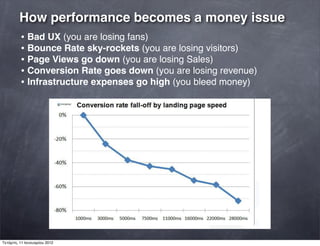
How performance becomes a money issue
• Bad UX (you are losing fans)
• Bounce Rate sky-rockets (you are losing visitors)
• Page Views go down (you are losing Sales)
• Conversion Rate goes down (you are losing revenue)
• Infrastructure expenses go high (you bleed money)
Τετάρτη, 11 Ιανουαρίου 2012
4 Laws of web performance
Τετάρτη, 11 Ιανουαρίου 2012
The Law of Stickiness
If your website performs, users stick with it.
If your website disappoints users, they move to another and
stick with that.
Τετάρτη, 11 Ιανουαρίου 2012
The Law of User Perspective
Measure performance from the end-userʼs point of view
Τετάρτη, 11 Ιανουαρίου 2012
The Law of Responsibility
Whatever happens, itʼs your fault. Even if hell breaks loose.
Τετάρτη, 11 Ιανουαρίου 2012
The Law of Expectations
Users expect your website to perform at least as well or
better that a similar website theyʼve used
Τετάρτη, 11 Ιανουαρίου 2012
The law of the laws
“Premature optimization is the root of all
evil.”
Τετάρτη, 11 Ιανουαρίου 2012
Server-side performance
Τετάρτη, 11 Ιανουαρίου 2012
Server-side performance
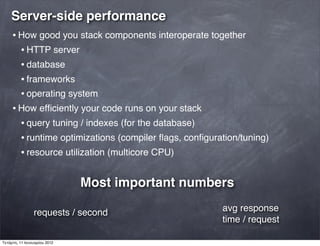
• How good you stack components interoperate together
• HTTP server
• database
• frameworks
• operating system
• How efficiently your code runs on your stack
• query tuning / indexes (for the database)
• runtime optimizations (compiler flags, configuration/tuning)
• resource utilization (multicore CPU)
requests / second avg response
time / request
Most important numbers
Τετάρτη, 11 Ιανουαρίου 2012
Load Testing
ab - Apache HTTP server benchmarking tool
$ ab -n 1000 -c 5 http://www.inf.uth.gr
[...]
Requests per second: 0.59 [#/sec] (mean)
Time per request: 1688.597 [ms] (mean)
[...]
... or Apache JMeter
... or httperf (HP labs)
... or OpenSTA (heavyweight tool)
... or even cloud services like Blitz.io (paid)
Τετάρτη, 11 Ιανουαρίου 2012
Application Level (code profiling)
- PHP - XDebug, PECL APD Extension
- Python - cProfile, timeit
- Java Servlets - JProfiler
- ....Good old gettime();
Database Level (optimize queries)
- MySQL
mysql> SET profiling=1;
SELECT * FROM `table_name`;
mysql> SHOW PROFILES;
- MongoDB
mongostat
Operating System Level (resource monitoring)
./top (general)
./vmstat (Virtual Memory Statistics, paging, block I/O)
./iostat (disk I/O)
Networking Level
- tcpdump
- netstat
Τετάρτη, 11 Ιανουαρίου 2012
Client-side performance
Τετάρτη, 11 Ιανουαρίου 2012
Client-side performance
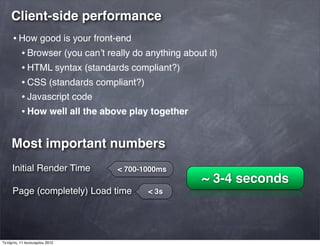
• How good is your front-end
• Browser (you canʼt really do anything about it)
• HTML syntax (standards compliant?)
• CSS (standards compliant?)
• Javascript code
• How well all the above play together
Most important numbers
Initial Render Time
Page (completely) Load time
~ 3-4 seconds
< 700-1000ms
< 3s
Τετάρτη, 11 Ιανουαρίου 2012
Client-side performance
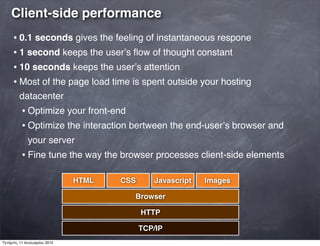
• 0.1 seconds gives the feeling of instantaneous respone
• 1 second keeps the userʼs flow of thought constant
• 10 seconds keeps the userʼs attention
• Most of the page load time is spent outside your hosting
datacenter
• Optimize your front-end
• Optimize the interaction bertween the end-userʼs browser and
your server
• Fine tune the way the browser processes client-side elements
HTML CSS Javascript Images
Browser
HTTP
TCP/IP
Τετάρτη, 11 Ιανουαρίου 2012
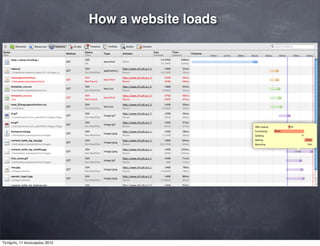
How a website loads
Τετάρτη, 11 Ιανουαρίου 2012
Page Load Time
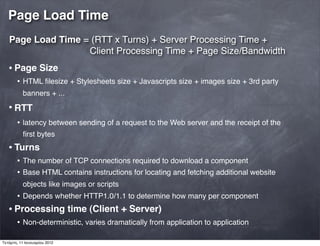
Page Load Time = (RTT x Turns) + Server Processing Time +
Client Processing Time + Page Size/Bandwidth
• Page Size
• HTML filesize + Stylesheets size + Javascripts size + images size + 3rd party
banners + ...
• RTT
• latency between sending of a request to the Web server and the receipt of the
first bytes
• Turns
• The number of TCP connections required to download a component
• Base HTML contains instructions for locating and fetching additional website
objects like images or scripts
• Depends whether HTTP1.0/1.1 to determine how many per component
• Processing time (Client + Server)
• Non-deterministic, varies dramatically from application to application
Τετάρτη, 11 Ιανουαρίου 2012
Web Performance Best Practices
Every kid on the block has a set of rules and a tool
•Google
•PageSpeed Extension
•http://code.google.com/speed/page-speed/docs/rules_intro.html
•Yahoo
•YSlow Extension
•http://developer.yahoo.com/yslow/help/#guidelines
6 Rules to rule them all
•Reduce page size to < 500kb
•Enable gzip compression
•Minify and merge CSS and javascript files
•Reduce RTTs (<40 per page)
•Structure properly: CSS first, javascript last (not always possible)
•CACHE, CACHE, CACHE, OMG OMG CACHE!!!
If you apply these properly, page download times will
drop by 40-50%
Τετάρτη, 11 Ιανουαρίου 2012
DEMO
YSlow in action
Τετάρτη, 11 Ιανουαρίου 2012
Questions?
Τετάρτη, 11 Ιανουαρίου 2012

Ch. x web performance

  • 1.
    Performance of Web Technologies ThanosTheodoridis @attheodo - http://attheo.do Τετάρτη, 11 Ιανουαρίου 2012
  • 2.
    What is webperformance? Τετάρτη, 11 Ιανουαρίου 2012
  • 3.
    What is webperformance? Τετάρτη, 11 Ιανουαρίου 2012
  • 4.
    “The delay perceivedby the user between an action and a meaningful response” What is web performance? Τετάρτη, 11 Ιανουαρίου 2012
  • 5.
    What causes thedelay? Web technologies are mostly client-server AND/OR server-server architectures over the network Client • bad hardware • front-end (app/website/browser) sucks Server • bad hardware • back-end (operating system, web server, database software, your code) sucks Network • bad hardware (routers, switches, WiFi antennas) • limited availability & bandwidth (ever heard of 3G?) • dodgy ISPs & datacenters Τετάρτη, 11 Ιανουαρίου 2012
  • 6.
    Why delay matters? Τετάρτη,11 Ιανουαρίου 2012
  • 7.
    Why delay matters? Τετάρτη,11 Ιανουαρίου 2012
  • 8.
    Why delay matters? Itcosts money to EVERYONE! Τετάρτη, 11 Ιανουαρίου 2012
  • 9.
    Why delay matters? Τετάρτη,11 Ιανουαρίου 2012
  • 10.
    Why delay matters? AmazonOffline: $1M/hour Τετάρτη, 11 Ιανουαρίου 2012
  • 11.
    Why delay matters? AmazonOffline: $1M/hour eBay Offline: $90K/hour Τετάρτη, 11 Ιανουαρίου 2012
  • 12.
    How performance becomesa money issue • Bad UX (you are losing fans) • Bounce Rate sky-rockets (you are losing visitors) • Page Views go down (you are losing Sales) • Conversion Rate goes down (you are losing revenue) • Infrastructure expenses go high (you bleed money) Τετάρτη, 11 Ιανουαρίου 2012
  • 13.
    4 Laws ofweb performance Τετάρτη, 11 Ιανουαρίου 2012
  • 14.
    The Law ofStickiness If your website performs, users stick with it. If your website disappoints users, they move to another and stick with that. Τετάρτη, 11 Ιανουαρίου 2012
  • 15.
    The Law ofUser Perspective Measure performance from the end-userʼs point of view Τετάρτη, 11 Ιανουαρίου 2012
  • 16.
    The Law ofResponsibility Whatever happens, itʼs your fault. Even if hell breaks loose. Τετάρτη, 11 Ιανουαρίου 2012
  • 17.
    The Law ofExpectations Users expect your website to perform at least as well or better that a similar website theyʼve used Τετάρτη, 11 Ιανουαρίου 2012
  • 18.
    The law ofthe laws “Premature optimization is the root of all evil.” Τετάρτη, 11 Ιανουαρίου 2012
  • 19.
  • 20.
    Server-side performance • Howgood you stack components interoperate together • HTTP server • database • frameworks • operating system • How efficiently your code runs on your stack • query tuning / indexes (for the database) • runtime optimizations (compiler flags, configuration/tuning) • resource utilization (multicore CPU) requests / second avg response time / request Most important numbers Τετάρτη, 11 Ιανουαρίου 2012
  • 21.
    Load Testing ab -Apache HTTP server benchmarking tool $ ab -n 1000 -c 5 http://www.inf.uth.gr [...] Requests per second: 0.59 [#/sec] (mean) Time per request: 1688.597 [ms] (mean) [...] ... or Apache JMeter ... or httperf (HP labs) ... or OpenSTA (heavyweight tool) ... or even cloud services like Blitz.io (paid) Τετάρτη, 11 Ιανουαρίου 2012
  • 22.
    Application Level (codeprofiling) - PHP - XDebug, PECL APD Extension - Python - cProfile, timeit - Java Servlets - JProfiler - ....Good old gettime(); Database Level (optimize queries) - MySQL mysql> SET profiling=1; SELECT * FROM `table_name`; mysql> SHOW PROFILES; - MongoDB mongostat Operating System Level (resource monitoring) ./top (general) ./vmstat (Virtual Memory Statistics, paging, block I/O) ./iostat (disk I/O) Networking Level - tcpdump - netstat Τετάρτη, 11 Ιανουαρίου 2012
  • 23.
  • 24.
    Client-side performance • Howgood is your front-end • Browser (you canʼt really do anything about it) • HTML syntax (standards compliant?) • CSS (standards compliant?) • Javascript code • How well all the above play together Most important numbers Initial Render Time Page (completely) Load time ~ 3-4 seconds < 700-1000ms < 3s Τετάρτη, 11 Ιανουαρίου 2012
  • 25.
    Client-side performance • 0.1seconds gives the feeling of instantaneous respone • 1 second keeps the userʼs flow of thought constant • 10 seconds keeps the userʼs attention • Most of the page load time is spent outside your hosting datacenter • Optimize your front-end • Optimize the interaction bertween the end-userʼs browser and your server • Fine tune the way the browser processes client-side elements HTML CSS Javascript Images Browser HTTP TCP/IP Τετάρτη, 11 Ιανουαρίου 2012
  • 26.
    How a websiteloads Τετάρτη, 11 Ιανουαρίου 2012
  • 27.
    Page Load Time PageLoad Time = (RTT x Turns) + Server Processing Time + Client Processing Time + Page Size/Bandwidth • Page Size • HTML filesize + Stylesheets size + Javascripts size + images size + 3rd party banners + ... • RTT • latency between sending of a request to the Web server and the receipt of the first bytes • Turns • The number of TCP connections required to download a component • Base HTML contains instructions for locating and fetching additional website objects like images or scripts • Depends whether HTTP1.0/1.1 to determine how many per component • Processing time (Client + Server) • Non-deterministic, varies dramatically from application to application Τετάρτη, 11 Ιανουαρίου 2012
  • 28.
    Web Performance BestPractices Every kid on the block has a set of rules and a tool •Google •PageSpeed Extension •http://code.google.com/speed/page-speed/docs/rules_intro.html •Yahoo •YSlow Extension •http://developer.yahoo.com/yslow/help/#guidelines 6 Rules to rule them all •Reduce page size to < 500kb •Enable gzip compression •Minify and merge CSS and javascript files •Reduce RTTs (<40 per page) •Structure properly: CSS first, javascript last (not always possible) •CACHE, CACHE, CACHE, OMG OMG CACHE!!! If you apply these properly, page download times will drop by 40-50% Τετάρτη, 11 Ιανουαρίου 2012
  • 29.
    DEMO YSlow in action Τετάρτη,11 Ιανουαρίου 2012
  • 30.