Wazuh: Installation & Configuration
all our microphones are muted
ask your questions in Q&A, not in the Chat
use Chat for discussion, networking or applause
Intro
1
Agenda
Wazuh indexer
2
Wazuh server
3
Wazuh dashboard & agents
4
Demo
5
Intro
1
Wazuh: Installation & Configuration
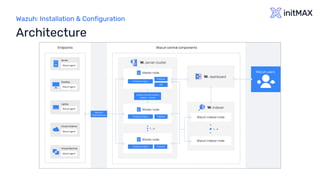
Architecture
Wazuh: Installation & Configuration
Hardware – all in one
The minimum requirements for 25 agents and 90
days of history are as follows:
4 CPU
8 GB RAM
50 GB available disk space – preferably SSD
Recommended operating systems
CentOS 7, 8
Ubuntu 16.04, 18.04, 20.04, 22.04
Red Hat Enterprise Linux 7, 8, 9
Amazon Linux 2
Requirements
Wazuh: Installation & Configuration
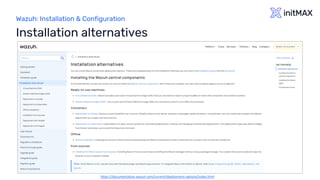
Installation alternatives
https://documentation.wazuh.com/current/deployment-options/index.html
Wazuh: Installation & Configuration
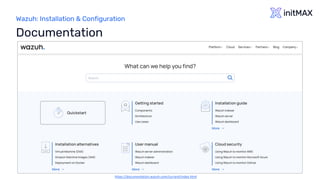
Documentation
https://documentation.wazuh.com/current/index.html
Wazuh indexer
2
Wazuh: Installation & Configuration
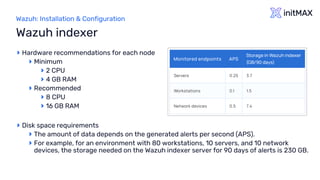
Hardware recommendations for each node
Minimum
2 CPU
4 GB RAM
Recommended
8 CPU
16 GB RAM
Disk space requirements
The amount of data depends on the generated alerts per second (APS).
For example, for an environment with 80 workstations, 10 servers, and 10 network
devices, the storage needed on the Wazuh indexer server for 90 days of alerts is 230 GB.
Wazuh indexer
Wazuh server
3
Wazuh: Installation & Configuration
Hardware recommendations for each node
Minimum
2 CPU
2 GB RAM
Recommended
8 CPU
4 GB RAM
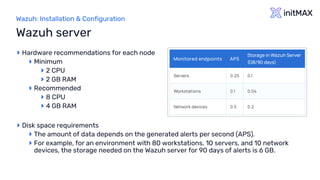
Disk space requirements
The amount of data depends on the generated alerts per second (APS).
For example, for an environment with 80 workstations, 10 servers, and 10 network
devices, the storage needed on the Wazuh server for 90 days of alerts is 6 GB.
Wazuh server
Wazuh dashboard & agents
4
Wazuh: Installation & Configuration
Hardware recommendations for each node
Minimum
2 CPU
4 GB RAM
Recommended
4 CPU
8 GB RAM
Browser compatibility
Chrome 95 or later
Firefox 93 or later
Safari 13.7 or later
Other Chromium-based browsers might also work.
Internet Explorer 11 is not supported
Wazuh dashboard
Wazuh: Installation & Configuration
The agent was developed considering the need to
monitor a wide variety of different endpoints without
impacting their performance
Agent supported on the most popular operating systems
Requires 35 MB of RAM on average
Wazuh agents
Demo time
Wazuh: Installation & Configuration
Wazuh Indexer installation
firewall-cmd --permanent --add-port={514,443,1514,1515,1516,55000}/tcp
firewall-cmd --permanent --add-port={514,1514}/udp
firewall-cmd --reload
# Download the wazuh-certs-tool.sh script and the config.yml configuration file.
# This creates the certificates that encrypt communications between the Wazuh central components.
curl -sO https://packages.wazuh.com/4.5/wazuh-certs-tool.sh
curl -sO https://packages.wazuh.com/4.5/config.yml
# Edit ./config.yml and replace the node names and IP values with the corresponding names and IP addresses.
nano ./config.yml
# Run ./wazuh-certs-tool.sh to create the certificates
bash ./wazuh-certs-tool.sh -A
# Compress all the necessary files for future usage
tar -cvf ./wazuh-certificates.tar -C ./wazuh-certificates/ .
# Install the following packages if missing
yum install coreutils
# Adding the Wazuh repository
rpm --import https://packages.wazuh.com/key/GPG-KEY-WAZUH
echo -e '[wazuh]ngpgcheck=1ngpgkey=https://packages.wazuh.com/key/GPG-KEY-WAZUHnenabled=1nname=EL-$releasever -
Wazuhnbaseurl=https://packages.wazuh.com/4.x/yum/nprotect=1' | tee /etc/yum.repos.d/wazuh.repo
Wazuh: Installation & Configuration
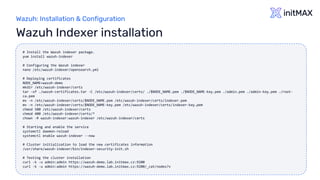
Wazuh Indexer installation
# Install the Wazuh indexer package.
yum install wazuh-indexer
# Configuring the Wazuh indexer
nano /etc/wazuh-indexer/opensearch.yml
# Deploying certificates
NODE_NAME=wazuh-demo
mkdir /etc/wazuh-indexer/certs
tar -xf ./wazuh-certificates.tar -C /etc/wazuh-indexer/certs/ ./$NODE_NAME.pem ./$NODE_NAME-key.pem ./admin.pem ./admin-key.pem ./root-
ca.pem
mv -n /etc/wazuh-indexer/certs/$NODE_NAME.pem /etc/wazuh-indexer/certs/indexer.pem
mv -n /etc/wazuh-indexer/certs/$NODE_NAME-key.pem /etc/wazuh-indexer/certs/indexer-key.pem
chmod 500 /etc/wazuh-indexer/certs
chmod 400 /etc/wazuh-indexer/certs/*
chown -R wazuh-indexer:wazuh-indexer /etc/wazuh-indexer/certs
# Starting and enable the service
systemctl daemon-reload
systemctl enable wazuh-indexer --now
# Cluster initialization to load the new certificates information
/usr/share/wazuh-indexer/bin/indexer-security-init.sh
# Testing the cluster installation
curl -k -u admin:admin https://wazuh-demo.lab.initmax.cz:9200
curl -k -u admin:admin https://wazuh-demo.lab.initmax.cz:9200/_cat/nodes?v
Wazuh: Installation & Configuration
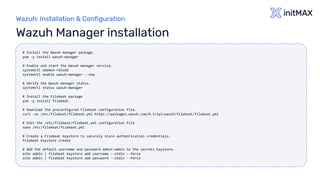
Wazuh Manager installation
# Install the Wazuh manager package.
yum -y install wazuh-manager
# Enable and start the Wazuh manager service.
systemctl daemon-reload
systemctl enable wazuh-manager --now
# Verify the Wazuh manager status.
systemctl status wazuh-manager
# Install the Filebeat package
yum -y install filebeat
# Download the preconfigured Filebeat configuration file.
curl -so /etc/filebeat/filebeat.yml https://packages.wazuh.com/4.5/tpl/wazuh/filebeat/filebeat.yml
# Edit the /etc/filebeat/filebeat.yml configuration file
nano /etc/filebeat/filebeat.yml
# Create a Filebeat keystore to securely store authentication credentials.
filebeat keystore create
# Add the default username and password admin:admin to the secrets keystore.
echo admin | filebeat keystore add username --stdin --force
echo admin | filebeat keystore add password --stdin --force
Wazuh: Installation & Configuration
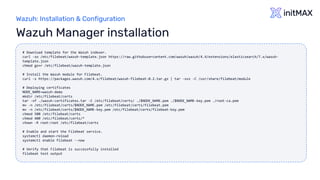
Wazuh Manager installation
# Download template for the Wazuh indexer.
curl -so /etc/filebeat/wazuh-template.json https://raw.githubusercontent.com/wazuh/wazuh/4.4/extensions/elasticsearch/7.x/wazuh-
template.json
chmod go+r /etc/filebeat/wazuh-template.json
# Install the Wazuh module for Filebeat.
curl -s https://packages.wazuh.com/4.x/filebeat/wazuh-filebeat-0.2.tar.gz | tar -xvz -C /usr/share/filebeat/module
# Deploying certificates
NODE_NAME=wazuh-demo
mkdir /etc/filebeat/certs
tar -xf ./wazuh-certificates.tar -C /etc/filebeat/certs/ ./$NODE_NAME.pem ./$NODE_NAME-key.pem ./root-ca.pem
mv -n /etc/filebeat/certs/$NODE_NAME.pem /etc/filebeat/certs/filebeat.pem
mv -n /etc/filebeat/certs/$NODE_NAME-key.pem /etc/filebeat/certs/filebeat-key.pem
chmod 500 /etc/filebeat/certs
chmod 400 /etc/filebeat/certs/*
chown -R root:root /etc/filebeat/certs
# Enable and start the Filebeat service.
systemctl daemon-reload
systemctl enable filebeat --now
# Verify that Filebeat is successfully installed
filebeat test output
Wazuh: Installation & Configuration
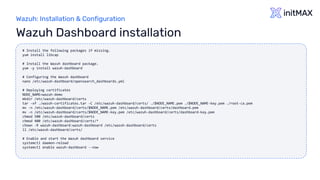
Wazuh Dashboard installation
# Install the following packages if missing.
yum install libcap
# Install the Wazuh dashboard package.
yum -y install wazuh-dashboard
# Configuring the Wazuh dashboard
nano /etc/wazuh-dashboard/opensearch_dashboards.yml
# Deploying certificates
NODE_NAME=wazuh-demo
mkdir /etc/wazuh-dashboard/certs
tar -xf ./wazuh-certificates.tar -C /etc/wazuh-dashboard/certs/ ./$NODE_NAME.pem ./$NODE_NAME-key.pem ./root-ca.pem
mv -n /etc/wazuh-dashboard/certs/$NODE_NAME.pem /etc/wazuh-dashboard/certs/dashboard.pem
mv -n /etc/wazuh-dashboard/certs/$NODE_NAME-key.pem /etc/wazuh-dashboard/certs/dashboard-key.pem
chmod 500 /etc/wazuh-dashboard/certs
chmod 400 /etc/wazuh-dashboard/certs/*
chown -R wazuh-dashboard:wazuh-dashboard /etc/wazuh-dashboard/certs
ll /etc/wazuh-dashboard/certs/
# Enable and start the Wazuh dashboard service
systemctl daemon-reload
systemctl enable wazuh-dashboard --now
Wazuh: Installation & Configuration
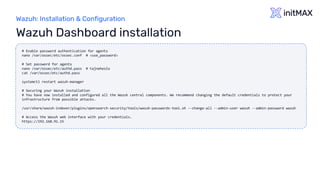
Wazuh Dashboard installation
# Enable password authentication for agents
nano /var/ossec/etc/ossec.conf # <use_password>
# Set password for agents
nano /var/ossec/etc/authd.pass # tajneheslo
cat /var/ossec/etc/authd.pass
systemctl restart wazuh-manager
# Securing your Wazuh installation
# You have now installed and configured all the Wazuh central components. We recommend changing the default credentials to protect your
infrastructure from possible attacks.
/usr/share/wazuh-indexer/plugins/opensearch-security/tools/wazuh-passwords-tool.sh --change-all --admin-user wazuh --admin-password wazuh
# Access the Wazuh web interface with your credentials.
https://192.168.91.15
Questions?
Wazuh: Installation & Configuration
Contact us:
Phone: +420 800 244 442
Web: https://www.initmax.cz
Email: tomas.hermanek@initmax.cz
LinkedIn: https://www.linkedin.com/company/initmax
Twitter: https://twitter.com/initmax
Tomáš Heřmánek: +420 732 447 184

wazuh-installation-and-configuration.pdf

  • 1.
    Wazuh: Installation &Configuration all our microphones are muted ask your questions in Q&A, not in the Chat use Chat for discussion, networking or applause
  • 2.
  • 3.
  • 4.
    Wazuh: Installation &Configuration Architecture
  • 5.
    Wazuh: Installation &Configuration Hardware – all in one The minimum requirements for 25 agents and 90 days of history are as follows: 4 CPU 8 GB RAM 50 GB available disk space – preferably SSD Recommended operating systems CentOS 7, 8 Ubuntu 16.04, 18.04, 20.04, 22.04 Red Hat Enterprise Linux 7, 8, 9 Amazon Linux 2 Requirements
  • 6.
    Wazuh: Installation &Configuration Installation alternatives https://documentation.wazuh.com/current/deployment-options/index.html
  • 7.
    Wazuh: Installation &Configuration Documentation https://documentation.wazuh.com/current/index.html
  • 8.
  • 9.
    Wazuh: Installation &Configuration Hardware recommendations for each node Minimum 2 CPU 4 GB RAM Recommended 8 CPU 16 GB RAM Disk space requirements The amount of data depends on the generated alerts per second (APS). For example, for an environment with 80 workstations, 10 servers, and 10 network devices, the storage needed on the Wazuh indexer server for 90 days of alerts is 230 GB. Wazuh indexer
  • 10.
  • 11.
    Wazuh: Installation &Configuration Hardware recommendations for each node Minimum 2 CPU 2 GB RAM Recommended 8 CPU 4 GB RAM Disk space requirements The amount of data depends on the generated alerts per second (APS). For example, for an environment with 80 workstations, 10 servers, and 10 network devices, the storage needed on the Wazuh server for 90 days of alerts is 6 GB. Wazuh server
  • 12.
  • 13.
    Wazuh: Installation &Configuration Hardware recommendations for each node Minimum 2 CPU 4 GB RAM Recommended 4 CPU 8 GB RAM Browser compatibility Chrome 95 or later Firefox 93 or later Safari 13.7 or later Other Chromium-based browsers might also work. Internet Explorer 11 is not supported Wazuh dashboard
  • 14.
    Wazuh: Installation &Configuration The agent was developed considering the need to monitor a wide variety of different endpoints without impacting their performance Agent supported on the most popular operating systems Requires 35 MB of RAM on average Wazuh agents
  • 15.
  • 16.
    Wazuh: Installation &Configuration Wazuh Indexer installation firewall-cmd --permanent --add-port={514,443,1514,1515,1516,55000}/tcp firewall-cmd --permanent --add-port={514,1514}/udp firewall-cmd --reload # Download the wazuh-certs-tool.sh script and the config.yml configuration file. # This creates the certificates that encrypt communications between the Wazuh central components. curl -sO https://packages.wazuh.com/4.5/wazuh-certs-tool.sh curl -sO https://packages.wazuh.com/4.5/config.yml # Edit ./config.yml and replace the node names and IP values with the corresponding names and IP addresses. nano ./config.yml # Run ./wazuh-certs-tool.sh to create the certificates bash ./wazuh-certs-tool.sh -A # Compress all the necessary files for future usage tar -cvf ./wazuh-certificates.tar -C ./wazuh-certificates/ . # Install the following packages if missing yum install coreutils # Adding the Wazuh repository rpm --import https://packages.wazuh.com/key/GPG-KEY-WAZUH echo -e '[wazuh]ngpgcheck=1ngpgkey=https://packages.wazuh.com/key/GPG-KEY-WAZUHnenabled=1nname=EL-$releasever - Wazuhnbaseurl=https://packages.wazuh.com/4.x/yum/nprotect=1' | tee /etc/yum.repos.d/wazuh.repo
  • 17.
    Wazuh: Installation &Configuration Wazuh Indexer installation # Install the Wazuh indexer package. yum install wazuh-indexer # Configuring the Wazuh indexer nano /etc/wazuh-indexer/opensearch.yml # Deploying certificates NODE_NAME=wazuh-demo mkdir /etc/wazuh-indexer/certs tar -xf ./wazuh-certificates.tar -C /etc/wazuh-indexer/certs/ ./$NODE_NAME.pem ./$NODE_NAME-key.pem ./admin.pem ./admin-key.pem ./root- ca.pem mv -n /etc/wazuh-indexer/certs/$NODE_NAME.pem /etc/wazuh-indexer/certs/indexer.pem mv -n /etc/wazuh-indexer/certs/$NODE_NAME-key.pem /etc/wazuh-indexer/certs/indexer-key.pem chmod 500 /etc/wazuh-indexer/certs chmod 400 /etc/wazuh-indexer/certs/* chown -R wazuh-indexer:wazuh-indexer /etc/wazuh-indexer/certs # Starting and enable the service systemctl daemon-reload systemctl enable wazuh-indexer --now # Cluster initialization to load the new certificates information /usr/share/wazuh-indexer/bin/indexer-security-init.sh # Testing the cluster installation curl -k -u admin:admin https://wazuh-demo.lab.initmax.cz:9200 curl -k -u admin:admin https://wazuh-demo.lab.initmax.cz:9200/_cat/nodes?v
  • 18.
    Wazuh: Installation &Configuration Wazuh Manager installation # Install the Wazuh manager package. yum -y install wazuh-manager # Enable and start the Wazuh manager service. systemctl daemon-reload systemctl enable wazuh-manager --now # Verify the Wazuh manager status. systemctl status wazuh-manager # Install the Filebeat package yum -y install filebeat # Download the preconfigured Filebeat configuration file. curl -so /etc/filebeat/filebeat.yml https://packages.wazuh.com/4.5/tpl/wazuh/filebeat/filebeat.yml # Edit the /etc/filebeat/filebeat.yml configuration file nano /etc/filebeat/filebeat.yml # Create a Filebeat keystore to securely store authentication credentials. filebeat keystore create # Add the default username and password admin:admin to the secrets keystore. echo admin | filebeat keystore add username --stdin --force echo admin | filebeat keystore add password --stdin --force
  • 19.
    Wazuh: Installation &Configuration Wazuh Manager installation # Download template for the Wazuh indexer. curl -so /etc/filebeat/wazuh-template.json https://raw.githubusercontent.com/wazuh/wazuh/4.4/extensions/elasticsearch/7.x/wazuh- template.json chmod go+r /etc/filebeat/wazuh-template.json # Install the Wazuh module for Filebeat. curl -s https://packages.wazuh.com/4.x/filebeat/wazuh-filebeat-0.2.tar.gz | tar -xvz -C /usr/share/filebeat/module # Deploying certificates NODE_NAME=wazuh-demo mkdir /etc/filebeat/certs tar -xf ./wazuh-certificates.tar -C /etc/filebeat/certs/ ./$NODE_NAME.pem ./$NODE_NAME-key.pem ./root-ca.pem mv -n /etc/filebeat/certs/$NODE_NAME.pem /etc/filebeat/certs/filebeat.pem mv -n /etc/filebeat/certs/$NODE_NAME-key.pem /etc/filebeat/certs/filebeat-key.pem chmod 500 /etc/filebeat/certs chmod 400 /etc/filebeat/certs/* chown -R root:root /etc/filebeat/certs # Enable and start the Filebeat service. systemctl daemon-reload systemctl enable filebeat --now # Verify that Filebeat is successfully installed filebeat test output
  • 20.
    Wazuh: Installation &Configuration Wazuh Dashboard installation # Install the following packages if missing. yum install libcap # Install the Wazuh dashboard package. yum -y install wazuh-dashboard # Configuring the Wazuh dashboard nano /etc/wazuh-dashboard/opensearch_dashboards.yml # Deploying certificates NODE_NAME=wazuh-demo mkdir /etc/wazuh-dashboard/certs tar -xf ./wazuh-certificates.tar -C /etc/wazuh-dashboard/certs/ ./$NODE_NAME.pem ./$NODE_NAME-key.pem ./root-ca.pem mv -n /etc/wazuh-dashboard/certs/$NODE_NAME.pem /etc/wazuh-dashboard/certs/dashboard.pem mv -n /etc/wazuh-dashboard/certs/$NODE_NAME-key.pem /etc/wazuh-dashboard/certs/dashboard-key.pem chmod 500 /etc/wazuh-dashboard/certs chmod 400 /etc/wazuh-dashboard/certs/* chown -R wazuh-dashboard:wazuh-dashboard /etc/wazuh-dashboard/certs ll /etc/wazuh-dashboard/certs/ # Enable and start the Wazuh dashboard service systemctl daemon-reload systemctl enable wazuh-dashboard --now
  • 21.
    Wazuh: Installation &Configuration Wazuh Dashboard installation # Enable password authentication for agents nano /var/ossec/etc/ossec.conf # <use_password> # Set password for agents nano /var/ossec/etc/authd.pass # tajneheslo cat /var/ossec/etc/authd.pass systemctl restart wazuh-manager # Securing your Wazuh installation # You have now installed and configured all the Wazuh central components. We recommend changing the default credentials to protect your infrastructure from possible attacks. /usr/share/wazuh-indexer/plugins/opensearch-security/tools/wazuh-passwords-tool.sh --change-all --admin-user wazuh --admin-password wazuh # Access the Wazuh web interface with your credentials. https://192.168.91.15
  • 22.
  • 23.
    Wazuh: Installation &Configuration Contact us: Phone: +420 800 244 442 Web: https://www.initmax.cz Email: tomas.hermanek@initmax.cz LinkedIn: https://www.linkedin.com/company/initmax Twitter: https://twitter.com/initmax Tomáš Heřmánek: +420 732 447 184