1 | P a g e
AN
INTERNSHIP REPORT
ON
WATER SUPPLY MANAGEMENT SYSTEM PROJECT
BY
KAMAL ACHARYA
(Tribhuvan University)
Date: 2024/01/17
2 | P a g e
1. INTRODUCTION
1.1 OVERVIEW OF THE PROJECT
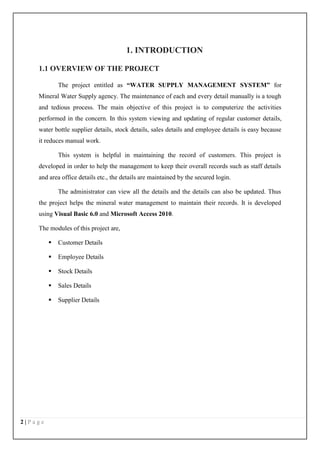
The project entitled as “WATER SUPPLY MANAGEMENT SYSTEM” for
Mineral Water Supply agency. The maintenance of each and every detail manually is a tough
and tedious process. The main objective of this project is to computerize the activities
performed in the concern. In this system viewing and updating of regular customer details,
water bottle supplier details, stock details, sales details and employee details is easy because
it reduces manual work.
This system is helpful in maintaining the record of customers. This project is
developed in order to help the management to keep their overall records such as staff details
and area office details etc., the details are maintained by the secured login.
The administrator can view all the details and the details can also be updated. Thus
the project helps the mineral water management to maintain their records. It is developed
using Visual Basic 6.0 and Microsoft Access 2010.
The modules of this project are,
 Customer Details
 Employee Details
 Stock Details
 Sales Details
 Supplier Details
3 | P a g e
MODULE DESCRIPTION
CUSTOMER MODULE
This module is used to maintain the details regarding the customers of the water plant.
EMPLOYEE MODULE
This module is used to maintain the details regarding the employees who work in the
water plant.
STOCK MODULE
This module is used to maintain the details regarding the water plant stock present in
the warehouse.
SALES MODULE
This module is used to maintain the details regarding the sales occurred during every
day and year of the water plants.
SUPPLIER DETAILS
This module is used to maintain the details regarding the water plant suppliers.
4 | P a g e
2. SYSTEM ANALYSIS
System analysis is a process of gathering and interpreting facts, diagnosing problems
and the information to recommend improvements on the system. It is a problem solving
activity that requires intensive communication between the system users and system
developers. System analysis or study is an important phase of any system development
process. The system is studied to the minutes detail and analyzed. The system analyst plays
the role of the interrogator and dwells deep into the working of the present system. The
system is viewed as a whole and the input to the system are identified. The outputs from the
organizations are traced to the various processes. System analysis is concerned with
becoming aware of the problem, identifying the relevant and decisional variables, analyzing
and synthesizing the various factors and determining an optimal or at least a satisfactory
solution or program of action.
2.1 EXISTING SYSTEM
In the existing system, all the operations are done only manually and hence take many
efforts in the process of information passing. Since all the details have to be maintain to
manage the system each and every records like customer details, courier details, and shipping
details, return details and payment details have to be maintained. In the existing system
though making entries is easy but recollecting information about courier or customer details
is a tough task. Hence a new system has to be developed to maintain all the data.
2.1.1 DRAWBACKS OF THE EXISTING SYSTEM
 Manual record is maintained.
 Finding of specific information is a tedious process.
 Daily transactions will not be updated.
 Consumes more time.
 Requires large man power.
 Records will not be safe and secure.
To avoid all these limitations and make the working more accurately the system needs to
be computerized.
5 | P a g e
2.2 PROPOSED SYSTEM
The aim of proposed system is to develop a system of improved facilities. The
proposed system can overcome all the limitations of the existing system. The system provides
proper security and reduces the manual work. The new system can maintain all the data easily
like customer details, employee details, stock details, sales details, etc,. Retrieval of any
information from the system is very quick and easy process.
2.2.1 ADVANTAGES OF THE PROPOSED SYSTEM
The system is very simple in design and to implement. The system requires very low
system resources and the system will work in almost all configurations. It has got following
features
 All the details are stored according to their id in every module for easy retrieval.
 Computerized maintenance of records.
 Daily transactions and payment details are updated daily.
 Records are safe and secure.
 Consumes very small amount of time.
 Requires low man power.
 Any information can be fetched easily.
 If any water bottle product had been damaged or not delivered on time or any other
reasons, the reason for bottle return will be updated.
6 | P a g e
2.3 SYSTEM SPECIFICATION
2.3.1 HARDWARE REQUIREMENTS
Processor : Intel Pentium Dual core
Hard disk : 40 GB
CD drive : 680 MB
Printer : Laser Printer (Canon)
Ram : 256 MB
Mouse : Logitech
Monitor : 17” color monitor
Keyboard : 110 keys
2.3.2 SOFTWARE REQUIREMENTS
Operating system : Windows 7
Front end : Visual Basic 6.0
Back end : Microsoft Access 2010
2.3.3 ABOUT THE SOFTWARE
ABOUT THE FRONT END
Visual Basic
Visual Basic is an ideal programming language for developing sophisticated
professional applications in Microsoft windows. It makes use of the Graphical User Interface
for creating robust and powerful applications. The Graphical User Interface uses
illustrations to enable users to interact with the applications. This feature makes it easier to
comprehend things in a quicker and easier way. Programmers everywhere use this dynamic
and efficient tool to create professional quality applications for the windows desktop. With its
sleek approach to development, Visual Basic inspires creativity, resulting in programs that
look better and work more reliably.
MARVEL functionality provided Visual Basic
7 | P a g e
Modular Programming – Visual Basic allows modularization through user-defined
sub routines and functions. The Visual environment forces a certain amount of modularity.
The VBX files provided by the various vendors allow easy access in hung pieces of
functionality, with little coding.
Automated Interfaces – Visual Basic supports automated interfaces through
argument passing, which allow subroutines and functions to be called from another program.
Rethinking - Visual Basic does for programmers what Windows does for users. It
makes their job easier and less tedious. The visual environment allows the programmer to
focus much more on the problem at hand rather than the structure of interfaces.
Visual Development Environment – Visual Basic is one of the easiest visual
environments to use. All of its controls work in a consistent way. Their properties and events
can be easily selected from a list box. It does not force a programmer to remember much
more than the basics.
Extensibility – Visual Basic has by far the most complete extensibility of any product
on the market. VBX files are being designed and written by a multitude of third-party
vendors to interface their own products. While each of these VBX files performs dramatically
different functions, all are implemented and used by Visual Basic Programmer in the same
way.
Linking – Visual Basic supports all the necessary forms of DDE to link whole
applications modularly into a single application. Visual Basic also supports OLE as a client,
which allows modular use of data from another program.
Programming Using Visual Basic
Coding in GUI environment is quite a transition from traditional linear programming
methods, where the user is guided through a linear path of execution and is limited to a small
set of operations. In a GUI environment, the number of options open to the user is much
greater, allowing more freedom to the user. Features such as easier comprehension, user-
friendliness, faster application development and many other aspects make Visual Basic an
interesting tool to work with. Using Visual Basic, we can create powerful, full-featured
applications that exploit the key features of Microsoft Windows, including Multiple
Document Interfaces.
8 | P a g e
Visual Basic is not exclusively designed for technical experts. It meets the need of
anyone, programmer or not, who has the creative impetus to design a new application. We
could still use the tools of VB to shape our program. Working in VB is much more easier
than using any other Windows applications.
Program development in VB is a three-step process. Only the final step-coding-
requires the expertise and experience of a programmer. The first two steps can be carried out
by anyone who has an idea for a program – small or large, simple or complex, single-purpose
or multifaceted. The three steps are as follows:
 Designing the appearance of the programs
 Assigning properties to the objectives of the program
 Writing the code to carry out the specific tasks
Multiple Document Interfaces
The Multiple Document Interfaces (MDI) allows a developer to create applications
that maintain forms within a single container form. Applications such as Windows Program
Manager, Windows File Manager etc., have MDI’s. An MDI application allows the user to
display multiple documents at the same time, with each document displayed in its own
window. Document windows are contained in parent window, which provides a workspace
for all windows in the application.
ABOUT THE BACK END
MICROSOFT ACCESS
A database is a collection of data and object related to particular purpose. MS Access
is a Relational Database Management System [RDBMS]. A database is a program for storing
and manipulating data.
Microsoft Office Access, previously known as Microsoft Access, is a database
management system from Microsoft that combines the relational Microsoft Jet Database
Engine with a graphical user interface and software-development tools. It is a member of the
Microsoft Office suite of applications, included in the Professional and higher editions or sold
separately.
Software developers and data architects can use Microsoft Access to develop
application software, and "power users" can use it to build software applications. Like other
Office applications, Access is supported by Visual Basic for Applications, an object-oriented
9 | P a g e
programming language that can reference a variety of objects including DAO (Data Access
Objects), ActiveX Data Objects, and many other ActiveX components. Visual objects used in
forms and reports expose their methods and properties in the VBA programming
environment, and VBA code modules may declare and call Windows operating-system
functions.
MS Access stores data in its own format based on the Access Jet Database Engine. It
can also import or link directly to data stored in other applications and databases.
Entity
This is to describe the conceptual data units or objects represented rectangles.
Relationship
It represents real-world associates among one or more entities. These are represented
as diamonds.
Uniqueness and keys
In MS-Access, the Master Database (MDB) file contains number of tables. Each table
contains rows and columns. The relational model dictates that every row in a database must
be unique.
Primary key
A primary key is made up of one or more attributes whose value uniquely identified
each record in the table. In a relationship, a primary key is used to refer to specific records in
a table. A primary key is called a foreign key, when it is referred from another table.
Data integrity
Enforcing data integrity involves presenting the consistency and correctness of data stored in
the database by,
 Validating the contents of individual fields.
 Validating data in one table with respect to one another.
Data types in Ms Access
The following are the data types are used in MS Access,
 Text
10 | P a g e
 Currency
 Data/time
 Logical
 OLE Object Picture
Queries
Query is used to extract information from the table based on performing certain
conditions. This is mainly used for reports. In this query we can include more than one table
at a time.
Forms
A form is used to get a record from user in specific format. Using forms we can display
records in specific manner. In forms we can set layout properties and data properties. Using
forms we can design the fields in text box and check box for selecting a list of options and
radio or push buttons used for selecting a single option at a time.
Reports
In MS Access, the records in database are prepared for reports. Each record is set in
specific place. In the reports, we can include needed fields only. After viewing the reports,
the records can be printed in a specific manner.
11 | P a g e
3. SYSTEM DESIGN
3.1 DESIGN NOTATIONS
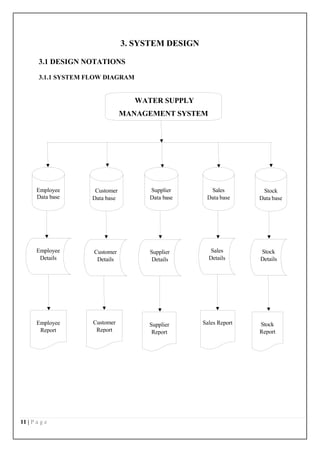
3.1.1 SYSTEM FLOW DIAGRAM
WATER SUPPLY
MANAGEMENT SYSTEM
Employee
Data base
Customer
Data base
Supplier
Data base
Sales
Data base
Stock
Data base
Employee
Details
Customer
Details
Supplier
Details
Sales
Details
Stock
Details
Employee
Report
Customer
Report
Supplier
Report
Sales Report Stock
Report
12 | P a g e
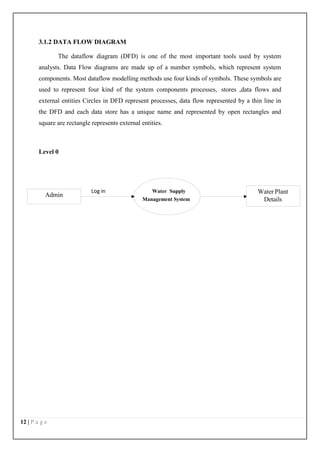
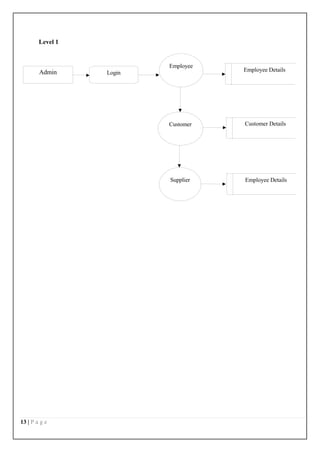
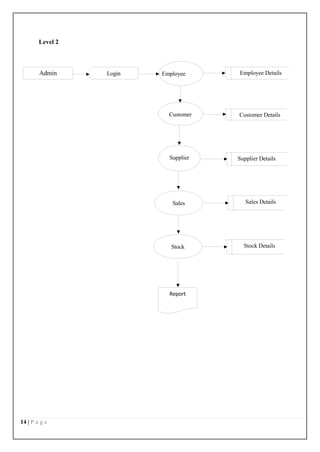
3.1.2 DATA FLOW DIAGRAM
The dataflow diagram (DFD) is one of the most important tools used by system
analysts. Data Flow diagrams are made up of a number symbols, which represent system
components. Most dataflow modelling methods use four kinds of symbols. These symbols are
used to represent four kind of the system components processes, stores ,data flows and
external entities Circles in DFD represent processes, data flow represented by a thin line in
the DFD and each data store has a unique name and represented by open rectangles and
square are rectangle represents external entities.
Level 0
Log in Water Supply
Management System
Admin
Water Plant
Details
13 | P a g e
Level 1
Employee
Login Employee Details
Customer Customer Details
Supplier Employee Details
Admin
14 | P a g e
Level 2
Login Employee Employee Details
Customer Customer Details
Supplier Supplier Details
Sales Sales Details
Stock Stock Details
Admin
Report
15 | P a g e
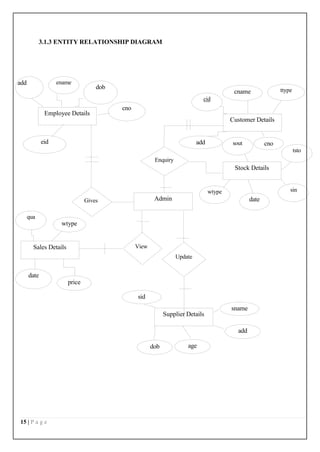
3.1.3 ENTITY RELATIONSHIP DIAGRAM
price
Gives
qua
wtype
ename
Employee Details
add
cno
Sales Details
eid
Admin
age
dob
dob
add
sname
Supplier Details
sid
Update
View
date
cname
cid
ttype
Customer Details
add sout cno
tsto
Enquiry
wtype sin
Stock Details
date
16 | P a g e
3.2 DESIGN PROCESS
Design should improve the system’s relationship with the user and help in decision-
making. It is primarily required to communicate the user’s input from client side to the server
where a program will be run to process the input. Once the output requirements are
determined, the system design can decide what to include in the system.
The most creative and challenging phase of the system life cycle is system design.
System design is a process of developing specifications for a candidate system that meet the
criteria established in the system analysis. Design requires a full understanding of the
problem and hence there is need for analysis of requirement and resources.
3.2.1 INPUT DESIGN
Data Structuring is defined through a process called normalization. Data are grouped
in the simplest way, so that later changes can be made with a minimum impact on the data
structure. The normalization of these entities into attributes linked by common data elements
to form relationships improves the effectiveness of database management system.
Mineral Water Distribution System considered the following facts while designing the input.
They are
 Types of inputs user going to enter.
 User may do an error while entering the input data or values.
 Automatic validation process to the input data should undergo
 Make user easy to understand what to enter.
 User can fail to spot one or two fields without entering the data in that fields.
A good input design should have the following qualities above mentioned. Here in Mineral
Water Distribution System all these qualities are included while designing the input forms.
Mineral Water Distribution System has the following input forms they are
 Customer Details
 Employee Details
 Supplier Details
 Stock Details
17 | P a g e
 Sales Details
Customer Details [fig:3]
This module is used to maintain the details regarding the customers of the water plant.
Employee Details [fig:4]
This module is used to maintain the details regarding the employees who work in the
water plant.
Supplier Details [fig:5]
This module is used to maintain the details regarding the water plant suppliers.
Stock Details [fig:8]
This module is used to maintain the details regarding the water plant stock present in
the warehouse.
Sales Details [fig:6]
This module is used to maintain the details regarding the sales occurred during every
day/week and year of the water plants.
.
3.2.2 OUTPUT DESIGN
The important objective of a system is to generate reports based on queries; outputs form
computer systems are primarily to communicate the result of processing to the users. The
output design should be well formatted, so that it contains all the required information and
should be well formatted and avoiding all complexity in getting information resulting from
processing.
The output design was done so that the result of processing could be communicated to the
users. The accuracy requirement of the data was also defined in the output.
REPORTS
The Data Report is known as an ActiveX Designer, meaning that it is a specialized
ActiveX object that integrates into the VB environment. Data report enable one to easily
18 | P a g e
display a print preview screen, with print and export buttons. To add information to the
report, first draw the report control in the appropriate section of the report and then set its
properties, just like any other control. The Data Report includes some predefined
placeholders, which allow including several dynamic elements on a report.
Several screens can perform it. Computer output is most important and direct source
of information to the user. Efficient, intelligible output design should improve the system’s
relationship with the user and help in decision making. A major form of output is the hard
copy from the printer.
The various output screens in the project are
Customer Details Report [fig:9]
This module is used to maintain the details regarding the customers report of the water
plant.
Employee Details Report [fig:10]
This module is used to maintain the details regarding the employees report who work
in the water plant.
Supplier Details Report [fig:11]
This module is used to maintain the details regarding the water plant suppliers report.
Stock Details Report [fig:12]
This module is used to maintain the details regarding the water plant stock report.
Sales Details Report [fig:13]
This module is used to maintain the details regarding the sales occurred during every
day/week and year of the water plants.
3.2.3 DATABASE DESIGN
The database design involves creation of tables. Tables are represented in physical
database as stored files. They have their own independent existence. A table consists of rows
and columns. Each column corresponds to a piece of information called field. A set of fields
constitutes a record. The record contains the entire information specific to a particular item.
19 | P a g e
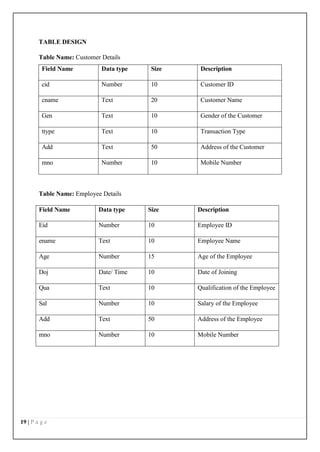
TABLE DESIGN
Table Name: Customer Details
Field Name Data type Size Description
cid Number 10 Customer ID
cname Text 20 Customer Name
Gen Text 10 Gender of the Customer
ttype Text 10 Transaction Type
Add Text 50 Address of the Customer
mno Number 10 Mobile Number
Table Name: Employee Details
Field Name Data type Size Description
Eid Number 10 Employee ID
ename Text 10 Employee Name
Age Number 15 Age of the Employee
Doj Date/ Time 10 Date of Joining
Qua Text 10 Qualification of the Employee
Sal Number 10 Salary of the Employee
Add Text 50 Address of the Employee
mno Number 10 Mobile Number
20 | P a g e
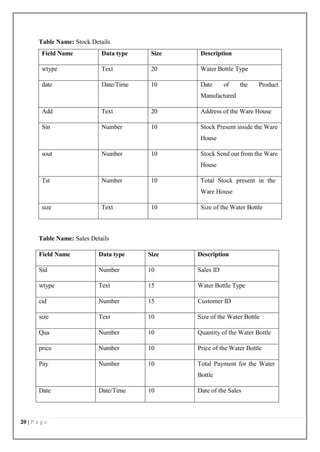
Table Name: Stock Details
Field Name Data type Size Description
wtype Text 20 Water Bottle Type
date Date/Time 10 Date of the Product
Manufactured
Add Text 20 Address of the Ware House
Sin Number 10 Stock Present inside the Ware
House
sout Number 10 Stock Send out from the Ware
House
Tst Number 10 Total Stock present in the
Ware House
size Text 10 Size of the Water Bottle
Table Name: Sales Details
Field Name Data type Size Description
Sid Number 10 Sales ID
wtype Text 15 Water Bottle Type
cid Number 15 Customer ID
size Text 10 Size of the Water Bottle
Qua Number 10 Quantity of the Water Bottle
price Number 10 Price of the Water Bottle
Pay Number 10 Total Payment for the Water
Bottle
Date Date/Time 10 Date of the Sales
21 | P a g e
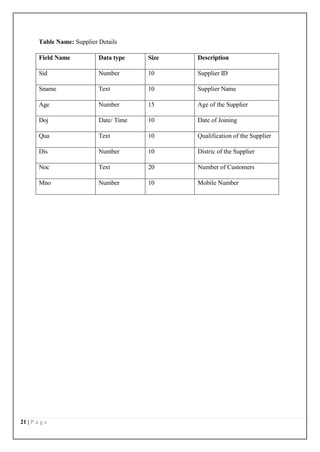
Table Name: Supplier Details
Field Name Data type Size Description
Sid Number 10 Supplier ID
Sname Text 10 Supplier Name
Age Number 15 Age of the Supplier
Doj Date/ Time 10 Date of Joining
Qua Text 10 Qualification of the Supplier
Dis Number 10 Distric of the Supplier
Noc Text 20 Number of Customers
Mno Number 10 Mobile Number
22 | P a g e
4. SYSTEM TESTING AND IMPLEMENTATION
4.1 SYSTEM TESTING
Software testing is a critical element of software quality assurance and represents the
ultimate review of specification, design and coding. Testing is a process of executing a
program with the intent of finding errors. The user tests the developed system and change is
made according to their needs. The testing phase involves the testing of developed system
using various kinds of data.
The term implementation has different meanings, ranging from the basic application,
to a complete replacement of a computer system. Implementation used here is to mean the
process of converting a new system design into an operational one. Conversion is one aspect
of implementation.
SYSTEM DEVELOPMENT
Maintenance is the engine of the system development. It holds the software industry
captive, trying up programming resources. Analysts and programmers spent far more time
problems, than they do writing them. Maintenance is not as rewarding and exciting as
developing a system. Software maintenance is the process of modifying a software or
component after its delivery in order to correct faults, improve the performance and other
attributes, or to adapt to the changed element.
Maintenance covers a wide range of activities including correcting the coding and
design errors, updating the documentation and test data and upgrading the user support. An
aging process calls for periodic maintenance of hardware and software. Maintenance is
always necessary to keep the software useful and reusable.
4.1.1 TESTING METHODOLOGIES
After each program passes its own test, it is linkage to the other programs is
scrutinized with a program integration test. This ensures that the program work together as
intended. Before the implementation phase the designed system should be tested with raw
data to ensure that all modules of the system work correctly and satisfactorily. If some bug is
found they can be removed before the implementation phase. The testing has the four kind of
testing that is as follows.
UNIT TESTING
23 | P a g e
In unit testing, each program unit is tested individually. So any errors in a unit are
debugged. Sample data is given for unit testing. The testing was carried out during
programming stage itself. In this testing each and every module of the program is tested
individually. It also checked if any text box is empty. This condition was tested successfully
by pressing enter key without entering any character. During unit testing, the tester locates
the errors locates errors in coding and logic that are contained within a single module alone.
This condition was tested successfully by pressing enter key without entering any character.
INTEGRATION TESTING
In this testing all modules of the application are combined together and test running is
made. This ensures the co-ordinate between different modules of the program. All the
modules are combined and tested as whole. Here correction is difficult because the isolation
of causes is complicated by the vast expanse of the entire program. Thus in the integration
testing step, all the uncovered for the next testing steps.
VALIDATION TESTING
Validation tests can be defined in many ways, but a simple definition is that validation
succeeds when software functions in a manner that can be reasonably expected by client. The
rough data is given to all the application modules where they contain the table to enter the
data. It is then tested with the real data and an error in the application is observed. This
testing is done until all the errors are corrected. In validation testing the user give the input
are tested as valid or invalid before it in stored in the database. In this project the patient
name should be entered only in alphabets. If the user types other than the alphabets the error
message will be displayed.
OUTPUT TESTING
After performing the validation tests the next step is the output testing of the proposed
system. No system is useful, if it does not produce the required output format in the specified
format. Considering the format required by the user tests outputs generated or displayed by
the system under consideration. Here all, the output format is Data. The output format on the
screen is found to be the user needs. For the hard copy also the output as specified
requirements by user. Hence output comes out as specified requirements by user. Hence
output testing does not result in any corrections in the system.
ACCEPTANCE TESTING
24 | P a g e
The acceptance testing is the final stage of testing. The user does this. The
development is given to the user and tests the system with live data. The various possibilities
of the data are entered and response from the system is tested. Once the client signs off the
acceptance testing, and then we can successfully implement the system. It is performed to
ensure that they are satisfied with their performance.
4.2 SYSTEM IMPLEMENTATION
The implementation view of software requirements presents the real world
manifestation of processing function and information structures. In some case, a physical
representation is developed as the first step in software design.
The analyst must recognize the constraints imposed by predefined system elements in
and consider the implementation view of function and information when such view is
appropriate.
IMPLEMENTATION PROCEDURES
System implementation is the process of making the newly designed system fully
operational. The system is implemented after careful testing. Implementation is a stage in the
project where theoretical design is turned into working system in order to maximize
efficiency and productivity. The most critical stage in achieving a new system is in getting
the approval from the system manager. The newly designed system put into work process,
after the testing is over. The system will be implemented in phase along with existing system
and it take over happens when the full testing is defined to be perfect, till then the parallel run
is done.
The implementation stage is a system project in its own right. It involves careful
planning, investigation of the current system and its constraints on implementation, design of
method to active the change over procedures and evaluation of change over methods.
25 | P a g e
5. CONCLUSION AND FUTURE ENHANCEMENT
5.1 CONCLUSION
This project "WATER SUPPLY MANAGEMENT SYSTEM" is designed and
developed as per the requirements of the information passing for customer and higher
officials during needed situation. The implementation of this package is to maintain the
required details in the system. This package has a number of facilities to solve the people’s
difficulties in getting the product related information.
This project makes way to store and manipulate the details of customer, employee,
supplier details and collection details. The reports like customer report, sales report and stock
report generated by this system have proved to be useful and acceptable by the user.
5.2 FUTURE ENHANCEMENT
This system is very flexible and changes can be made without much difficulty. Future
extension in this system can be made to add the features in Internet advertisements.
Likewise, the system also informs the user about various aspects of mass media ad’s,
Electronic media ad’s, Outdoor ad’s and gives periodical reports and when required. This
system is developed using powerful tools and technology. So, even after the development
phase, new applications can be applied and integrated very easily with the existing system.
.
26 | P a g e
6. BIBLIOGRAPHY
References
1. Acharya, Kamal, Attendance Management System Project (April 28, 2024).
Available at
SSRN: https://ssrn.com/abstract=4810251 or http://dx.doi.org/10.2139/ssrn.4810251
2. Acharya, Kamal, Online Food Order System (May 2, 2024). Available at
SSRN: https://ssrn.com/abstract=4814732 or http://dx.doi.org/10.2139/ssrn.4814732
3. Acharya, Kamal, University management system project. (May 1, 2024). Available at
SSRN: https://ssrn.com/abstract=4814103 or http://dx.doi.org/10.2139/ssrn.4814103
4. Acharya, Kamal, Online banking management system. (May 1, 2024). Available at
SSRN: https://ssrn.com/abstract=4813597 or http://dx.doi.org/10.2139/ssrn.4813597
5. Acharya, Kamal, Online Job Portal Management System (May 5, 2024). Available at
SSRN: https://ssrn.com/abstract=4817534 or http://dx.doi.org/10.2139/ssrn.4817534
6. Acharya, Kamal, Employee leave management system. (May 7, 2024). Available
at SSRN: https://ssrn.com/abstract=4819626 or http://dx.doi.org/10.2139/ssrn.4819626
7. Acharya, Kamal, Online electricity billing project report. (May 7, 2024). Available at
SSRN: https://ssrn.com/abstract=4819630 or http://dx.doi.org/10.2139/ssrn.4819630
8. Acharya, Kamal, POLICY MANAGEMENT SYSTEM PROJECT REPORT. (December 10, 2023).
Available at SSRN: https://ssrn.com/abstract=4831694 or http://dx.doi.org/10.2139/ssrn.4831694
9. Acharya, Kamal, Online job placement system project report. (January 10, 2023). Available at
SSRN: https://ssrn.com/abstract=4831638 or http://dx.doi.org/10.2139/ssrn.4831638
10. Acharya, Kamal, Software testing for project report. (May 16, 2023). Available at
SSRN: https://ssrn.com/abstract=4831028 or http://dx.doi.org/10.2139/ssrn.4831028
11. Acharya, Kamal, ONLINE CRIME REPORTING SYSTEM PROJECT. (August 10, 2022). Available at
SSRN: https://ssrn.com/abstract=4831015 or http://dx.doi.org/10.2139/ssrn.4831015
12. Acharya, Kamal, Burger ordering system project report. (October 10, 2022). Available at
SSRN: https://ssrn.com/abstract=4832704 or http://dx.doi.org/10.2139/ssrn.4832704
13. Acharya, Kamal, Teachers Record Management System Project Report (December 10, 2023).
Available at SSRN: https://ssrn.com/abstract=4833821 or http://dx.doi.org/10.2139/ssrn.4833821
14. Acharya, Kamal, Dairy Management System Project Report (December 20, 2020). Available at
SSRN: https://ssrn.com/abstract=4835231 or http://dx.doi.org/10.2139/ssrn.4835231
15. Acharya, Kamal, Electrical Shop Management System Project (December 10, 2019). Available at
SSRN: https://ssrn.com/abstract=4835238 or http://dx.doi.org/10.2139/ssrn.4835238
16. Acharya, Kamal, Online book store management system project report. (Febuary 10, 2020). Available
at SSRN: https://ssrn.com/abstract=4835277 or http://dx.doi.org/10.2139/ssrn.4835277
17. Acharya, Kamal, Paint shop management system project report. (January 10, 2019). Available at
SSRN: https://ssrn.com/abstract=4835441 or http://dx.doi.org/10.2139/ssrn.4835441
18. Acharya, Kamal, Supermarket billing system project report. (August 10, 2021). Available at
SSRN: https://ssrn.com/abstract=4835474 or http://dx.doi.org/10.2139/ssrn.4835474
27 | P a g e
19. Acharya, Kamal, Online taxi booking system project report. (March 10, 2022). Available at
SSRN: https://ssrn.com/abstract=4837729 or http://dx.doi.org/10.2139/ssrn.4837729
20. Acharya, Kamal, Online car servicing system project report. (March 10, 2023). Available at
SSRN: https://ssrn.com/abstract=4837832 or http://dx.doi.org/10.2139/ssrn.4837832
21. Acharya, Kamal, School management system project report. (July 10, 2021). Available at
SSRN: https://ssrn.com/abstract=4837837 or http://dx.doi.org/10.2139/ssrn.4837837
22. Acharya, Kamal, Furniture Showroom Management System Project Report (March 21, 2021).
Available at SSRN: https://ssrn.com/abstract=4839422 or http://dx.doi.org/10.2139/ssrn.4839422
23. Acharya, Kamal, Online Vehicle Rental System Project Report (March 21, 2019). Available at
SSRN: https://ssrn.com/abstract=4839429 or http://dx.doi.org/10.2139/ssrn.4839429
24. Acharya, Kamal, Fruit Shop Management System Project Report (August 10, 2023). Available at
SSRN: https://ssrn.com/abstract=4841048 or http://dx.doi.org/10.2139/ssrn.4841048
25. Acharya, Kamal, Hall Booking Management System Project Report (December 21, 2023). Available
at SSRN: https://ssrn.com/abstract=4841055 or http://dx.doi.org/10.2139/ssrn.4841055
26. Acharya, Kamal, Lundry Management System Project Report (October 21, 2023). Available at
SSRN: https://ssrn.com/abstract=4841059 or http://dx.doi.org/10.2139/ssrn.4841059
27. Acharya, Kamal, A CASE STUDY OF CINEMA MANAGEMENT SYSTEM PROJECT (September 25,
2023). Available at
SSRN: https://ssrn.com/abstract=4841209 or http://dx.doi.org/10.2139/ssrn.4841209
28. Acharya, Kamal, A CASE STUDY ON ONLINE TICKET BOOKING SYSTEM PROJECT (May 25,
2024). Available at
SSRN: https://ssrn.com/abstract=4841210 or http://dx.doi.org/10.2139/ssrn.4841210
29. Acharya, Kamal, ONLINE DATING MANAGEMENT SYSTEM PROJECT REPORT. (April 25, 2023).
Available at SSRN: https://ssrn.com/abstract=4842066 or http://dx.doi.org/10.2139/ssrn.4842066
30. Acharya, Kamal, ONLINE RESUME BUILDER MANAGEMENT SYSTEM PROJECT REPORT.
(April 25, 2021). Available at
SSRN: https://ssrn.com/abstract=4842071 or http://dx.doi.org/10.2139/ssrn.4842071
31. Acharya, Kamal, TOLL TEX MANAGEMENT SYSTEM PROJECT REPORT (August 21, 2023).
Available at SSRN: https://ssrn.com/abstract=4842082 or http://dx.doi.org/10.2139/ssrn.4842082
32. Acharya, Kamal, Chat Application Through Client Server Management System Project Report (June
25, 2023). Available at
SSRN: https://ssrn.com/abstract=4842761 or http://dx.doi.org/10.2139/ssrn.4842761
33. Acharya, Kamal, Web Chatting Application Management System Project Report (April 25, 2022).
Available at SSRN: https://ssrn.com/abstract=4842771 or http://dx.doi.org/10.2139/ssrn.4842771
34. Acharya, Kamal, Automobile management system project report (May 25, 2022). Available at
SSRN: https://ssrn.com/abstract=4846917 or http://dx.doi.org/10.2139/ssrn.4846917
35. Acharya, Kamal, College bus management system project report (April 25, 2023). Available at
SSRN: https://ssrn.com/abstract=4846920 or http://dx.doi.org/10.2139/ssrn.4846920
36. Acharya, Kamal, Courier management system project report (May 25, 2023). Available at
SSRN: https://ssrn.com/abstract=4846922 or http://dx.doi.org/10.2139/ssrn.4846922
37. Acharya, Kamal, Event management system project report (April 25, 2021). Available at
SSRN: https://ssrn.com/abstract=4846927 or http://dx.doi.org/10.2139/ssrn.4846927
38. Acharya, Kamal, Library management system project report II (May 25, 2020). Available at
SSRN: https://ssrn.com/abstract=4848857 or http://dx.doi.org/10.2139/ssrn.4848857
28 | P a g e
39. Kamal Acharya. Teacher record management system project report. Authorea. August 02, 2024.
DOI: https://doi.org/10.22541/au.172261514.46787329/v1
40. Kamal Acharya. POST OFFICE MANAGEMENT SYSTEM PROJECT REPORT. Authorea. August
02, 2024.
DOI: https://doi.org/10.22541/au.172261514.44494375/v1
41. Kamal Acharya. Fruit shop management system project report. Authorea. August 02, 2024.
DOI: https://doi.org/10.22541/au.172261514.42227675/v1
42. Kamal Acharya. Dairy management system project report. Authorea. August 02, 2024.
DOI: https://doi.org/10.22541/au.172261513.39402347/v1
43. Kamal Acharya. DATA COMMUNICATION AND COMPUTER NETWORK MANAGEMENT
SYSTEM PROJECT REPORT. Authorea. August 01, 2024.
DOI: https://doi.org/10.22541/au.172254873.37480177/v1
44. Kamal Acharya. School management system project report. Authorea. August 01, 2024.
DOI: https://doi.org/10.22541/au.172254873.34023165/v1
45. Kamal Acharya. A CASE STUDY OF CINEMA MANAGEMENT SYSTEM
PROJECT. Authorea. August 01, 2024.
DOI: https://doi.org/10.22541/au.172254873.30191075/v1
46. Kamal Acharya. A CASE STUDY ON ONLINE TICKET BOOKING SYSTEM
PROJECT. Authorea. August 01, 2024
DOI: https://doi.org/10.22541/au.172254872.26972790/v1
47. Kamal Acharya. Web chatting application project report management system. Authorea. August 01,
2024.
DOI: https://doi.org/10.22541/au.172254871.18588592/v1
48. Kamal Acharya. RETAIL STORE MANAGEMENT SYSTEM PROJECT REPORT. Authorea. August
01, 2024.
DOI: https://doi.org/10.22541/au.172254871.14590154/v1
49. Kamal Acharya. SUPERMARKET MANAGEMENT SYSTEM PROJECT REPORT. Authorea. August
01, 2024.
DOI: https://doi.org/10.22541/au.172252491.19145062/v1
50. Kamal Acharya. SOCIAL MEDIA MANAGEMENT SYSTEM PROJECT REPORT. Authorea. August
01, 2024.
DOI: https://doi.org/10.22541/au.172252491.11210579/v1
51. Kamal Acharya. Online music portal management system project report. Authorea. August 01, 2024.
DOI: https://doi.org/10.22541/au.172252488.89734698/v1
52. Kamal Acharya. COLLEGE BUS MANAGEMENT SYSTEM PROJECT REPORT. Authorea. July 31,
2024.
DOI: https://doi.org/10.22541/au.172245277.70798942/v1
53. Kamal Acharya. AUTOMOBILE MANAGEMENT SYSTEM PROJECT REPORT. Authorea. July 31,
2024.
DOI: https://doi.org/10.22541/au.172245276.67982593/v1
54. Kamal Acharya. Ludo management system project report. Authorea. July 31, 2024
DOI: https://doi.org/10.22541/au.172243999.98091616/v1
55. Kamal Acharya. Literature online quiz system project report. Authorea. July 31,
2024
DOI: https://doi.org/10.22541/au.172243825.53562953/v1
56. Kamal Acharya. Avoid waste management system project. Authorea. July 29, 2024
DOI: https://doi.org/10.22541/au.172228528.85022205/v1
29 | P a g e
57. Kamal Acharya. CHAT APPLICATION THROUGH CLIENT SERVER MANAGEMENT SYSTEM
PROJECT. Authorea. July 29, 2024.
DOI: https://doi.org/10.22541/au.172228527.74316529/v1
58. Kamal Acharya. Parking allotment system project report. Authorea. July 29, 2024.
DOI: https://doi.org/10.22541/au.172227078.89966943/v1
59. Kamal Acharya. HEALTH INSURANCE CLAIM MANAGEMENT SYSTEM. Authorea. July 26, 2024.
DOI: https://doi.org/10.22541/au.172202020.06707762/v1
60. Kamal Acharya. ONLINE TRAIN BOOKING SYSTEM PROJECT REPORT. Authorea. July 22, 2024.
DOI: https://doi.org/10.22541/au.172167914.45160406/v1
61. Kamal Acharya. COVID MANAGEMENT SYSTEM PROJECT REPORT. Authorea. July 16, 2024.
DOI: https://doi.org/10.22541/au.172116616.60220024/v1
62. Kamal Acharya. COVID MANAGEMENT SYSTEM PROJECT REPORT. Authorea. July 16, 2024.
DOI: https://doi.org/10.22541/au.172116616.60220024/v1
30 | P a g e
APPENDIX
SCREEN SHOTS
LOGIN FORM
[fig:1]
MDI FORM
[fig:2]
31 | P a g e
CUSTOMER DETAILS
[fig:3]
EMPLOYEE DETAILS
[fig:4]
32 | P a g e
SUPPLIER DETAILS
[fig:5]
SALES DETAILS
[fig:6]
33 | P a g e
STOCK DETAILS
[fig:8]
CUSTOMER REPORT
[fig:9]
34 | P a g e
EMPLOYEE REPORT
[fig:10]
SUPPLIER REPORT
[fig:11]
35 | P a g e
STOCK REPORT
[fig:12]
SALES REPORT
[fig:13]
36 | P a g e
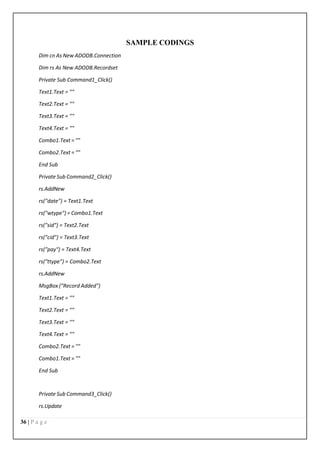
SAMPLE CODINGS
Dim cn As New ADODB.Connection
Dim rs As New ADODB.Recordset
Private Sub Command1_Click()
Text1.Text = ""
Text2.Text = ""
Text3.Text = ""
Text4.Text = ""
Combo1.Text = ""
Combo2.Text = ""
End Sub
Private Sub Command2_Click()
rs.AddNew
rs("date") = Text1.Text
rs("wtype") = Combo1.Text
rs("sid") = Text2.Text
rs("cid") = Text3.Text
rs("pay") = Text4.Text
rs("ttype") = Combo2.Text
rs.AddNew
MsgBox ("Record Added")
Text1.Text = ""
Text2.Text = ""
Text3.Text = ""
Text4.Text = ""
Combo2.Text = ""
Combo1.Text = ""
End Sub
Private Sub Command3_Click()
rs.Update
37 | P a g e
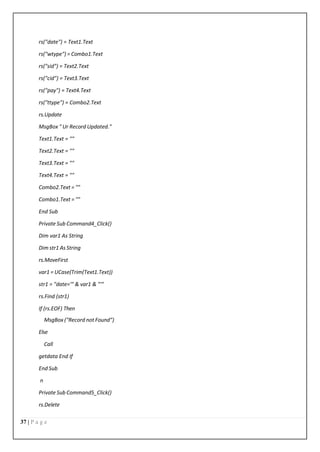
rs("date") = Text1.Text
rs("wtype") = Combo1.Text
rs("sid") = Text2.Text
rs("cid") = Text3.Text
rs("pay") = Text4.Text
rs("ttype") = Combo2.Text
rs.Update
MsgBox " Ur Record Updated."
Text1.Text = ""
Text2.Text = ""
Text3.Text = ""
Text4.Text = ""
Combo2.Text = ""
Combo1.Text = ""
End Sub
Private Sub Command4_Click()
Dim var1 As String
Dim str1 As String
rs.MoveFirst
var1 = UCase(Trim(Text1.Text))
str1 = "date='" & var1 & "'"
rs.Find (str1)
If (rs.EOF) Then
MsgBox ("Record not Found")
Else
Call
getdata End If
End Sub
n
Private Sub Command5_Click()
rs.Delete
38 | P a g e
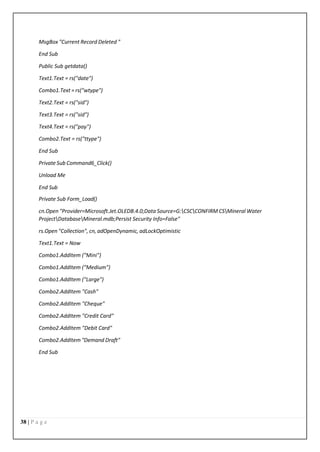
MsgBox "Current Record Deleted "
End Sub
Public Sub getdata()
Text1.Text = rs("date")
Combo1.Text = rs("wtype")
Text2.Text = rs("sid")
Text3.Text = rs("sid")
Text4.Text = rs("pay")
Combo2.Text = rs("ttype")
End Sub
Private Sub Command6_Click()
Unload Me
End Sub
Private Sub Form_Load()
cn.Open "Provider=Microsoft.Jet.OLEDB.4.0;Data Source=G:CSCCONFIRM CSMineral Water
ProjectDatabaseMineral.mdb;Persist Security Info=False"
rs.Open "Collection", cn, adOpenDynamic, adLockOptimistic
Text1.Text = Now
Combo1.AddItem ("Mini")
Combo1.AddItem ("Medium")
Combo1.AddItem ("Large")
Combo2.AddItem "Cash"
Combo2.AddItem "Cheque"
Combo2.AddItem "Credit Card"
Combo2.AddItem "Debit Card"
Combo2.AddItem "Demand Draft"
End Sub
39 | P a g e

Water supply management system project report.pdf

  • 1.
    1 | Pa g e AN INTERNSHIP REPORT ON WATER SUPPLY MANAGEMENT SYSTEM PROJECT BY KAMAL ACHARYA (Tribhuvan University) Date: 2024/01/17
  • 2.
    2 | Pa g e 1. INTRODUCTION 1.1 OVERVIEW OF THE PROJECT The project entitled as “WATER SUPPLY MANAGEMENT SYSTEM” for Mineral Water Supply agency. The maintenance of each and every detail manually is a tough and tedious process. The main objective of this project is to computerize the activities performed in the concern. In this system viewing and updating of regular customer details, water bottle supplier details, stock details, sales details and employee details is easy because it reduces manual work. This system is helpful in maintaining the record of customers. This project is developed in order to help the management to keep their overall records such as staff details and area office details etc., the details are maintained by the secured login. The administrator can view all the details and the details can also be updated. Thus the project helps the mineral water management to maintain their records. It is developed using Visual Basic 6.0 and Microsoft Access 2010. The modules of this project are,  Customer Details  Employee Details  Stock Details  Sales Details  Supplier Details
  • 3.
    3 | Pa g e MODULE DESCRIPTION CUSTOMER MODULE This module is used to maintain the details regarding the customers of the water plant. EMPLOYEE MODULE This module is used to maintain the details regarding the employees who work in the water plant. STOCK MODULE This module is used to maintain the details regarding the water plant stock present in the warehouse. SALES MODULE This module is used to maintain the details regarding the sales occurred during every day and year of the water plants. SUPPLIER DETAILS This module is used to maintain the details regarding the water plant suppliers.
  • 4.
    4 | Pa g e 2. SYSTEM ANALYSIS System analysis is a process of gathering and interpreting facts, diagnosing problems and the information to recommend improvements on the system. It is a problem solving activity that requires intensive communication between the system users and system developers. System analysis or study is an important phase of any system development process. The system is studied to the minutes detail and analyzed. The system analyst plays the role of the interrogator and dwells deep into the working of the present system. The system is viewed as a whole and the input to the system are identified. The outputs from the organizations are traced to the various processes. System analysis is concerned with becoming aware of the problem, identifying the relevant and decisional variables, analyzing and synthesizing the various factors and determining an optimal or at least a satisfactory solution or program of action. 2.1 EXISTING SYSTEM In the existing system, all the operations are done only manually and hence take many efforts in the process of information passing. Since all the details have to be maintain to manage the system each and every records like customer details, courier details, and shipping details, return details and payment details have to be maintained. In the existing system though making entries is easy but recollecting information about courier or customer details is a tough task. Hence a new system has to be developed to maintain all the data. 2.1.1 DRAWBACKS OF THE EXISTING SYSTEM  Manual record is maintained.  Finding of specific information is a tedious process.  Daily transactions will not be updated.  Consumes more time.  Requires large man power.  Records will not be safe and secure. To avoid all these limitations and make the working more accurately the system needs to be computerized.
  • 5.
    5 | Pa g e 2.2 PROPOSED SYSTEM The aim of proposed system is to develop a system of improved facilities. The proposed system can overcome all the limitations of the existing system. The system provides proper security and reduces the manual work. The new system can maintain all the data easily like customer details, employee details, stock details, sales details, etc,. Retrieval of any information from the system is very quick and easy process. 2.2.1 ADVANTAGES OF THE PROPOSED SYSTEM The system is very simple in design and to implement. The system requires very low system resources and the system will work in almost all configurations. It has got following features  All the details are stored according to their id in every module for easy retrieval.  Computerized maintenance of records.  Daily transactions and payment details are updated daily.  Records are safe and secure.  Consumes very small amount of time.  Requires low man power.  Any information can be fetched easily.  If any water bottle product had been damaged or not delivered on time or any other reasons, the reason for bottle return will be updated.
  • 6.
    6 | Pa g e 2.3 SYSTEM SPECIFICATION 2.3.1 HARDWARE REQUIREMENTS Processor : Intel Pentium Dual core Hard disk : 40 GB CD drive : 680 MB Printer : Laser Printer (Canon) Ram : 256 MB Mouse : Logitech Monitor : 17” color monitor Keyboard : 110 keys 2.3.2 SOFTWARE REQUIREMENTS Operating system : Windows 7 Front end : Visual Basic 6.0 Back end : Microsoft Access 2010 2.3.3 ABOUT THE SOFTWARE ABOUT THE FRONT END Visual Basic Visual Basic is an ideal programming language for developing sophisticated professional applications in Microsoft windows. It makes use of the Graphical User Interface for creating robust and powerful applications. The Graphical User Interface uses illustrations to enable users to interact with the applications. This feature makes it easier to comprehend things in a quicker and easier way. Programmers everywhere use this dynamic and efficient tool to create professional quality applications for the windows desktop. With its sleek approach to development, Visual Basic inspires creativity, resulting in programs that look better and work more reliably. MARVEL functionality provided Visual Basic
  • 7.
    7 | Pa g e Modular Programming – Visual Basic allows modularization through user-defined sub routines and functions. The Visual environment forces a certain amount of modularity. The VBX files provided by the various vendors allow easy access in hung pieces of functionality, with little coding. Automated Interfaces – Visual Basic supports automated interfaces through argument passing, which allow subroutines and functions to be called from another program. Rethinking - Visual Basic does for programmers what Windows does for users. It makes their job easier and less tedious. The visual environment allows the programmer to focus much more on the problem at hand rather than the structure of interfaces. Visual Development Environment – Visual Basic is one of the easiest visual environments to use. All of its controls work in a consistent way. Their properties and events can be easily selected from a list box. It does not force a programmer to remember much more than the basics. Extensibility – Visual Basic has by far the most complete extensibility of any product on the market. VBX files are being designed and written by a multitude of third-party vendors to interface their own products. While each of these VBX files performs dramatically different functions, all are implemented and used by Visual Basic Programmer in the same way. Linking – Visual Basic supports all the necessary forms of DDE to link whole applications modularly into a single application. Visual Basic also supports OLE as a client, which allows modular use of data from another program. Programming Using Visual Basic Coding in GUI environment is quite a transition from traditional linear programming methods, where the user is guided through a linear path of execution and is limited to a small set of operations. In a GUI environment, the number of options open to the user is much greater, allowing more freedom to the user. Features such as easier comprehension, user- friendliness, faster application development and many other aspects make Visual Basic an interesting tool to work with. Using Visual Basic, we can create powerful, full-featured applications that exploit the key features of Microsoft Windows, including Multiple Document Interfaces.
  • 8.
    8 | Pa g e Visual Basic is not exclusively designed for technical experts. It meets the need of anyone, programmer or not, who has the creative impetus to design a new application. We could still use the tools of VB to shape our program. Working in VB is much more easier than using any other Windows applications. Program development in VB is a three-step process. Only the final step-coding- requires the expertise and experience of a programmer. The first two steps can be carried out by anyone who has an idea for a program – small or large, simple or complex, single-purpose or multifaceted. The three steps are as follows:  Designing the appearance of the programs  Assigning properties to the objectives of the program  Writing the code to carry out the specific tasks Multiple Document Interfaces The Multiple Document Interfaces (MDI) allows a developer to create applications that maintain forms within a single container form. Applications such as Windows Program Manager, Windows File Manager etc., have MDI’s. An MDI application allows the user to display multiple documents at the same time, with each document displayed in its own window. Document windows are contained in parent window, which provides a workspace for all windows in the application. ABOUT THE BACK END MICROSOFT ACCESS A database is a collection of data and object related to particular purpose. MS Access is a Relational Database Management System [RDBMS]. A database is a program for storing and manipulating data. Microsoft Office Access, previously known as Microsoft Access, is a database management system from Microsoft that combines the relational Microsoft Jet Database Engine with a graphical user interface and software-development tools. It is a member of the Microsoft Office suite of applications, included in the Professional and higher editions or sold separately. Software developers and data architects can use Microsoft Access to develop application software, and "power users" can use it to build software applications. Like other Office applications, Access is supported by Visual Basic for Applications, an object-oriented
  • 9.
    9 | Pa g e programming language that can reference a variety of objects including DAO (Data Access Objects), ActiveX Data Objects, and many other ActiveX components. Visual objects used in forms and reports expose their methods and properties in the VBA programming environment, and VBA code modules may declare and call Windows operating-system functions. MS Access stores data in its own format based on the Access Jet Database Engine. It can also import or link directly to data stored in other applications and databases. Entity This is to describe the conceptual data units or objects represented rectangles. Relationship It represents real-world associates among one or more entities. These are represented as diamonds. Uniqueness and keys In MS-Access, the Master Database (MDB) file contains number of tables. Each table contains rows and columns. The relational model dictates that every row in a database must be unique. Primary key A primary key is made up of one or more attributes whose value uniquely identified each record in the table. In a relationship, a primary key is used to refer to specific records in a table. A primary key is called a foreign key, when it is referred from another table. Data integrity Enforcing data integrity involves presenting the consistency and correctness of data stored in the database by,  Validating the contents of individual fields.  Validating data in one table with respect to one another. Data types in Ms Access The following are the data types are used in MS Access,  Text
  • 10.
    10 | Pa g e  Currency  Data/time  Logical  OLE Object Picture Queries Query is used to extract information from the table based on performing certain conditions. This is mainly used for reports. In this query we can include more than one table at a time. Forms A form is used to get a record from user in specific format. Using forms we can display records in specific manner. In forms we can set layout properties and data properties. Using forms we can design the fields in text box and check box for selecting a list of options and radio or push buttons used for selecting a single option at a time. Reports In MS Access, the records in database are prepared for reports. Each record is set in specific place. In the reports, we can include needed fields only. After viewing the reports, the records can be printed in a specific manner.
  • 11.
    11 | Pa g e 3. SYSTEM DESIGN 3.1 DESIGN NOTATIONS 3.1.1 SYSTEM FLOW DIAGRAM WATER SUPPLY MANAGEMENT SYSTEM Employee Data base Customer Data base Supplier Data base Sales Data base Stock Data base Employee Details Customer Details Supplier Details Sales Details Stock Details Employee Report Customer Report Supplier Report Sales Report Stock Report
  • 12.
    12 | Pa g e 3.1.2 DATA FLOW DIAGRAM The dataflow diagram (DFD) is one of the most important tools used by system analysts. Data Flow diagrams are made up of a number symbols, which represent system components. Most dataflow modelling methods use four kinds of symbols. These symbols are used to represent four kind of the system components processes, stores ,data flows and external entities Circles in DFD represent processes, data flow represented by a thin line in the DFD and each data store has a unique name and represented by open rectangles and square are rectangle represents external entities. Level 0 Log in Water Supply Management System Admin Water Plant Details
  • 13.
    13 | Pa g e Level 1 Employee Login Employee Details Customer Customer Details Supplier Employee Details Admin
  • 14.
    14 | Pa g e Level 2 Login Employee Employee Details Customer Customer Details Supplier Supplier Details Sales Sales Details Stock Stock Details Admin Report
  • 15.
    15 | Pa g e 3.1.3 ENTITY RELATIONSHIP DIAGRAM price Gives qua wtype ename Employee Details add cno Sales Details eid Admin age dob dob add sname Supplier Details sid Update View date cname cid ttype Customer Details add sout cno tsto Enquiry wtype sin Stock Details date
  • 16.
    16 | Pa g e 3.2 DESIGN PROCESS Design should improve the system’s relationship with the user and help in decision- making. It is primarily required to communicate the user’s input from client side to the server where a program will be run to process the input. Once the output requirements are determined, the system design can decide what to include in the system. The most creative and challenging phase of the system life cycle is system design. System design is a process of developing specifications for a candidate system that meet the criteria established in the system analysis. Design requires a full understanding of the problem and hence there is need for analysis of requirement and resources. 3.2.1 INPUT DESIGN Data Structuring is defined through a process called normalization. Data are grouped in the simplest way, so that later changes can be made with a minimum impact on the data structure. The normalization of these entities into attributes linked by common data elements to form relationships improves the effectiveness of database management system. Mineral Water Distribution System considered the following facts while designing the input. They are  Types of inputs user going to enter.  User may do an error while entering the input data or values.  Automatic validation process to the input data should undergo  Make user easy to understand what to enter.  User can fail to spot one or two fields without entering the data in that fields. A good input design should have the following qualities above mentioned. Here in Mineral Water Distribution System all these qualities are included while designing the input forms. Mineral Water Distribution System has the following input forms they are  Customer Details  Employee Details  Supplier Details  Stock Details
  • 17.
    17 | Pa g e  Sales Details Customer Details [fig:3] This module is used to maintain the details regarding the customers of the water plant. Employee Details [fig:4] This module is used to maintain the details regarding the employees who work in the water plant. Supplier Details [fig:5] This module is used to maintain the details regarding the water plant suppliers. Stock Details [fig:8] This module is used to maintain the details regarding the water plant stock present in the warehouse. Sales Details [fig:6] This module is used to maintain the details regarding the sales occurred during every day/week and year of the water plants. . 3.2.2 OUTPUT DESIGN The important objective of a system is to generate reports based on queries; outputs form computer systems are primarily to communicate the result of processing to the users. The output design should be well formatted, so that it contains all the required information and should be well formatted and avoiding all complexity in getting information resulting from processing. The output design was done so that the result of processing could be communicated to the users. The accuracy requirement of the data was also defined in the output. REPORTS The Data Report is known as an ActiveX Designer, meaning that it is a specialized ActiveX object that integrates into the VB environment. Data report enable one to easily
  • 18.
    18 | Pa g e display a print preview screen, with print and export buttons. To add information to the report, first draw the report control in the appropriate section of the report and then set its properties, just like any other control. The Data Report includes some predefined placeholders, which allow including several dynamic elements on a report. Several screens can perform it. Computer output is most important and direct source of information to the user. Efficient, intelligible output design should improve the system’s relationship with the user and help in decision making. A major form of output is the hard copy from the printer. The various output screens in the project are Customer Details Report [fig:9] This module is used to maintain the details regarding the customers report of the water plant. Employee Details Report [fig:10] This module is used to maintain the details regarding the employees report who work in the water plant. Supplier Details Report [fig:11] This module is used to maintain the details regarding the water plant suppliers report. Stock Details Report [fig:12] This module is used to maintain the details regarding the water plant stock report. Sales Details Report [fig:13] This module is used to maintain the details regarding the sales occurred during every day/week and year of the water plants. 3.2.3 DATABASE DESIGN The database design involves creation of tables. Tables are represented in physical database as stored files. They have their own independent existence. A table consists of rows and columns. Each column corresponds to a piece of information called field. A set of fields constitutes a record. The record contains the entire information specific to a particular item.
  • 19.
    19 | Pa g e TABLE DESIGN Table Name: Customer Details Field Name Data type Size Description cid Number 10 Customer ID cname Text 20 Customer Name Gen Text 10 Gender of the Customer ttype Text 10 Transaction Type Add Text 50 Address of the Customer mno Number 10 Mobile Number Table Name: Employee Details Field Name Data type Size Description Eid Number 10 Employee ID ename Text 10 Employee Name Age Number 15 Age of the Employee Doj Date/ Time 10 Date of Joining Qua Text 10 Qualification of the Employee Sal Number 10 Salary of the Employee Add Text 50 Address of the Employee mno Number 10 Mobile Number
  • 20.
    20 | Pa g e Table Name: Stock Details Field Name Data type Size Description wtype Text 20 Water Bottle Type date Date/Time 10 Date of the Product Manufactured Add Text 20 Address of the Ware House Sin Number 10 Stock Present inside the Ware House sout Number 10 Stock Send out from the Ware House Tst Number 10 Total Stock present in the Ware House size Text 10 Size of the Water Bottle Table Name: Sales Details Field Name Data type Size Description Sid Number 10 Sales ID wtype Text 15 Water Bottle Type cid Number 15 Customer ID size Text 10 Size of the Water Bottle Qua Number 10 Quantity of the Water Bottle price Number 10 Price of the Water Bottle Pay Number 10 Total Payment for the Water Bottle Date Date/Time 10 Date of the Sales
  • 21.
    21 | Pa g e Table Name: Supplier Details Field Name Data type Size Description Sid Number 10 Supplier ID Sname Text 10 Supplier Name Age Number 15 Age of the Supplier Doj Date/ Time 10 Date of Joining Qua Text 10 Qualification of the Supplier Dis Number 10 Distric of the Supplier Noc Text 20 Number of Customers Mno Number 10 Mobile Number
  • 22.
    22 | Pa g e 4. SYSTEM TESTING AND IMPLEMENTATION 4.1 SYSTEM TESTING Software testing is a critical element of software quality assurance and represents the ultimate review of specification, design and coding. Testing is a process of executing a program with the intent of finding errors. The user tests the developed system and change is made according to their needs. The testing phase involves the testing of developed system using various kinds of data. The term implementation has different meanings, ranging from the basic application, to a complete replacement of a computer system. Implementation used here is to mean the process of converting a new system design into an operational one. Conversion is one aspect of implementation. SYSTEM DEVELOPMENT Maintenance is the engine of the system development. It holds the software industry captive, trying up programming resources. Analysts and programmers spent far more time problems, than they do writing them. Maintenance is not as rewarding and exciting as developing a system. Software maintenance is the process of modifying a software or component after its delivery in order to correct faults, improve the performance and other attributes, or to adapt to the changed element. Maintenance covers a wide range of activities including correcting the coding and design errors, updating the documentation and test data and upgrading the user support. An aging process calls for periodic maintenance of hardware and software. Maintenance is always necessary to keep the software useful and reusable. 4.1.1 TESTING METHODOLOGIES After each program passes its own test, it is linkage to the other programs is scrutinized with a program integration test. This ensures that the program work together as intended. Before the implementation phase the designed system should be tested with raw data to ensure that all modules of the system work correctly and satisfactorily. If some bug is found they can be removed before the implementation phase. The testing has the four kind of testing that is as follows. UNIT TESTING
  • 23.
    23 | Pa g e In unit testing, each program unit is tested individually. So any errors in a unit are debugged. Sample data is given for unit testing. The testing was carried out during programming stage itself. In this testing each and every module of the program is tested individually. It also checked if any text box is empty. This condition was tested successfully by pressing enter key without entering any character. During unit testing, the tester locates the errors locates errors in coding and logic that are contained within a single module alone. This condition was tested successfully by pressing enter key without entering any character. INTEGRATION TESTING In this testing all modules of the application are combined together and test running is made. This ensures the co-ordinate between different modules of the program. All the modules are combined and tested as whole. Here correction is difficult because the isolation of causes is complicated by the vast expanse of the entire program. Thus in the integration testing step, all the uncovered for the next testing steps. VALIDATION TESTING Validation tests can be defined in many ways, but a simple definition is that validation succeeds when software functions in a manner that can be reasonably expected by client. The rough data is given to all the application modules where they contain the table to enter the data. It is then tested with the real data and an error in the application is observed. This testing is done until all the errors are corrected. In validation testing the user give the input are tested as valid or invalid before it in stored in the database. In this project the patient name should be entered only in alphabets. If the user types other than the alphabets the error message will be displayed. OUTPUT TESTING After performing the validation tests the next step is the output testing of the proposed system. No system is useful, if it does not produce the required output format in the specified format. Considering the format required by the user tests outputs generated or displayed by the system under consideration. Here all, the output format is Data. The output format on the screen is found to be the user needs. For the hard copy also the output as specified requirements by user. Hence output comes out as specified requirements by user. Hence output testing does not result in any corrections in the system. ACCEPTANCE TESTING
  • 24.
    24 | Pa g e The acceptance testing is the final stage of testing. The user does this. The development is given to the user and tests the system with live data. The various possibilities of the data are entered and response from the system is tested. Once the client signs off the acceptance testing, and then we can successfully implement the system. It is performed to ensure that they are satisfied with their performance. 4.2 SYSTEM IMPLEMENTATION The implementation view of software requirements presents the real world manifestation of processing function and information structures. In some case, a physical representation is developed as the first step in software design. The analyst must recognize the constraints imposed by predefined system elements in and consider the implementation view of function and information when such view is appropriate. IMPLEMENTATION PROCEDURES System implementation is the process of making the newly designed system fully operational. The system is implemented after careful testing. Implementation is a stage in the project where theoretical design is turned into working system in order to maximize efficiency and productivity. The most critical stage in achieving a new system is in getting the approval from the system manager. The newly designed system put into work process, after the testing is over. The system will be implemented in phase along with existing system and it take over happens when the full testing is defined to be perfect, till then the parallel run is done. The implementation stage is a system project in its own right. It involves careful planning, investigation of the current system and its constraints on implementation, design of method to active the change over procedures and evaluation of change over methods.
  • 25.
    25 | Pa g e 5. CONCLUSION AND FUTURE ENHANCEMENT 5.1 CONCLUSION This project "WATER SUPPLY MANAGEMENT SYSTEM" is designed and developed as per the requirements of the information passing for customer and higher officials during needed situation. The implementation of this package is to maintain the required details in the system. This package has a number of facilities to solve the people’s difficulties in getting the product related information. This project makes way to store and manipulate the details of customer, employee, supplier details and collection details. The reports like customer report, sales report and stock report generated by this system have proved to be useful and acceptable by the user. 5.2 FUTURE ENHANCEMENT This system is very flexible and changes can be made without much difficulty. Future extension in this system can be made to add the features in Internet advertisements. Likewise, the system also informs the user about various aspects of mass media ad’s, Electronic media ad’s, Outdoor ad’s and gives periodical reports and when required. This system is developed using powerful tools and technology. So, even after the development phase, new applications can be applied and integrated very easily with the existing system. .
  • 26.
    26 | Pa g e 6. BIBLIOGRAPHY References 1. Acharya, Kamal, Attendance Management System Project (April 28, 2024). Available at SSRN: https://ssrn.com/abstract=4810251 or http://dx.doi.org/10.2139/ssrn.4810251 2. Acharya, Kamal, Online Food Order System (May 2, 2024). Available at SSRN: https://ssrn.com/abstract=4814732 or http://dx.doi.org/10.2139/ssrn.4814732 3. Acharya, Kamal, University management system project. (May 1, 2024). Available at SSRN: https://ssrn.com/abstract=4814103 or http://dx.doi.org/10.2139/ssrn.4814103 4. Acharya, Kamal, Online banking management system. (May 1, 2024). Available at SSRN: https://ssrn.com/abstract=4813597 or http://dx.doi.org/10.2139/ssrn.4813597 5. Acharya, Kamal, Online Job Portal Management System (May 5, 2024). Available at SSRN: https://ssrn.com/abstract=4817534 or http://dx.doi.org/10.2139/ssrn.4817534 6. Acharya, Kamal, Employee leave management system. (May 7, 2024). Available at SSRN: https://ssrn.com/abstract=4819626 or http://dx.doi.org/10.2139/ssrn.4819626 7. Acharya, Kamal, Online electricity billing project report. (May 7, 2024). Available at SSRN: https://ssrn.com/abstract=4819630 or http://dx.doi.org/10.2139/ssrn.4819630 8. Acharya, Kamal, POLICY MANAGEMENT SYSTEM PROJECT REPORT. (December 10, 2023). Available at SSRN: https://ssrn.com/abstract=4831694 or http://dx.doi.org/10.2139/ssrn.4831694 9. Acharya, Kamal, Online job placement system project report. (January 10, 2023). Available at SSRN: https://ssrn.com/abstract=4831638 or http://dx.doi.org/10.2139/ssrn.4831638 10. Acharya, Kamal, Software testing for project report. (May 16, 2023). Available at SSRN: https://ssrn.com/abstract=4831028 or http://dx.doi.org/10.2139/ssrn.4831028 11. Acharya, Kamal, ONLINE CRIME REPORTING SYSTEM PROJECT. (August 10, 2022). Available at SSRN: https://ssrn.com/abstract=4831015 or http://dx.doi.org/10.2139/ssrn.4831015 12. Acharya, Kamal, Burger ordering system project report. (October 10, 2022). Available at SSRN: https://ssrn.com/abstract=4832704 or http://dx.doi.org/10.2139/ssrn.4832704 13. Acharya, Kamal, Teachers Record Management System Project Report (December 10, 2023). Available at SSRN: https://ssrn.com/abstract=4833821 or http://dx.doi.org/10.2139/ssrn.4833821 14. Acharya, Kamal, Dairy Management System Project Report (December 20, 2020). Available at SSRN: https://ssrn.com/abstract=4835231 or http://dx.doi.org/10.2139/ssrn.4835231 15. Acharya, Kamal, Electrical Shop Management System Project (December 10, 2019). Available at SSRN: https://ssrn.com/abstract=4835238 or http://dx.doi.org/10.2139/ssrn.4835238 16. Acharya, Kamal, Online book store management system project report. (Febuary 10, 2020). Available at SSRN: https://ssrn.com/abstract=4835277 or http://dx.doi.org/10.2139/ssrn.4835277 17. Acharya, Kamal, Paint shop management system project report. (January 10, 2019). Available at SSRN: https://ssrn.com/abstract=4835441 or http://dx.doi.org/10.2139/ssrn.4835441 18. Acharya, Kamal, Supermarket billing system project report. (August 10, 2021). Available at SSRN: https://ssrn.com/abstract=4835474 or http://dx.doi.org/10.2139/ssrn.4835474
  • 27.
    27 | Pa g e 19. Acharya, Kamal, Online taxi booking system project report. (March 10, 2022). Available at SSRN: https://ssrn.com/abstract=4837729 or http://dx.doi.org/10.2139/ssrn.4837729 20. Acharya, Kamal, Online car servicing system project report. (March 10, 2023). Available at SSRN: https://ssrn.com/abstract=4837832 or http://dx.doi.org/10.2139/ssrn.4837832 21. Acharya, Kamal, School management system project report. (July 10, 2021). Available at SSRN: https://ssrn.com/abstract=4837837 or http://dx.doi.org/10.2139/ssrn.4837837 22. Acharya, Kamal, Furniture Showroom Management System Project Report (March 21, 2021). Available at SSRN: https://ssrn.com/abstract=4839422 or http://dx.doi.org/10.2139/ssrn.4839422 23. Acharya, Kamal, Online Vehicle Rental System Project Report (March 21, 2019). Available at SSRN: https://ssrn.com/abstract=4839429 or http://dx.doi.org/10.2139/ssrn.4839429 24. Acharya, Kamal, Fruit Shop Management System Project Report (August 10, 2023). Available at SSRN: https://ssrn.com/abstract=4841048 or http://dx.doi.org/10.2139/ssrn.4841048 25. Acharya, Kamal, Hall Booking Management System Project Report (December 21, 2023). Available at SSRN: https://ssrn.com/abstract=4841055 or http://dx.doi.org/10.2139/ssrn.4841055 26. Acharya, Kamal, Lundry Management System Project Report (October 21, 2023). Available at SSRN: https://ssrn.com/abstract=4841059 or http://dx.doi.org/10.2139/ssrn.4841059 27. Acharya, Kamal, A CASE STUDY OF CINEMA MANAGEMENT SYSTEM PROJECT (September 25, 2023). Available at SSRN: https://ssrn.com/abstract=4841209 or http://dx.doi.org/10.2139/ssrn.4841209 28. Acharya, Kamal, A CASE STUDY ON ONLINE TICKET BOOKING SYSTEM PROJECT (May 25, 2024). Available at SSRN: https://ssrn.com/abstract=4841210 or http://dx.doi.org/10.2139/ssrn.4841210 29. Acharya, Kamal, ONLINE DATING MANAGEMENT SYSTEM PROJECT REPORT. (April 25, 2023). Available at SSRN: https://ssrn.com/abstract=4842066 or http://dx.doi.org/10.2139/ssrn.4842066 30. Acharya, Kamal, ONLINE RESUME BUILDER MANAGEMENT SYSTEM PROJECT REPORT. (April 25, 2021). Available at SSRN: https://ssrn.com/abstract=4842071 or http://dx.doi.org/10.2139/ssrn.4842071 31. Acharya, Kamal, TOLL TEX MANAGEMENT SYSTEM PROJECT REPORT (August 21, 2023). Available at SSRN: https://ssrn.com/abstract=4842082 or http://dx.doi.org/10.2139/ssrn.4842082 32. Acharya, Kamal, Chat Application Through Client Server Management System Project Report (June 25, 2023). Available at SSRN: https://ssrn.com/abstract=4842761 or http://dx.doi.org/10.2139/ssrn.4842761 33. Acharya, Kamal, Web Chatting Application Management System Project Report (April 25, 2022). Available at SSRN: https://ssrn.com/abstract=4842771 or http://dx.doi.org/10.2139/ssrn.4842771 34. Acharya, Kamal, Automobile management system project report (May 25, 2022). Available at SSRN: https://ssrn.com/abstract=4846917 or http://dx.doi.org/10.2139/ssrn.4846917 35. Acharya, Kamal, College bus management system project report (April 25, 2023). Available at SSRN: https://ssrn.com/abstract=4846920 or http://dx.doi.org/10.2139/ssrn.4846920 36. Acharya, Kamal, Courier management system project report (May 25, 2023). Available at SSRN: https://ssrn.com/abstract=4846922 or http://dx.doi.org/10.2139/ssrn.4846922 37. Acharya, Kamal, Event management system project report (April 25, 2021). Available at SSRN: https://ssrn.com/abstract=4846927 or http://dx.doi.org/10.2139/ssrn.4846927 38. Acharya, Kamal, Library management system project report II (May 25, 2020). Available at SSRN: https://ssrn.com/abstract=4848857 or http://dx.doi.org/10.2139/ssrn.4848857
  • 28.
    28 | Pa g e 39. Kamal Acharya. Teacher record management system project report. Authorea. August 02, 2024. DOI: https://doi.org/10.22541/au.172261514.46787329/v1 40. Kamal Acharya. POST OFFICE MANAGEMENT SYSTEM PROJECT REPORT. Authorea. August 02, 2024. DOI: https://doi.org/10.22541/au.172261514.44494375/v1 41. Kamal Acharya. Fruit shop management system project report. Authorea. August 02, 2024. DOI: https://doi.org/10.22541/au.172261514.42227675/v1 42. Kamal Acharya. Dairy management system project report. Authorea. August 02, 2024. DOI: https://doi.org/10.22541/au.172261513.39402347/v1 43. Kamal Acharya. DATA COMMUNICATION AND COMPUTER NETWORK MANAGEMENT SYSTEM PROJECT REPORT. Authorea. August 01, 2024. DOI: https://doi.org/10.22541/au.172254873.37480177/v1 44. Kamal Acharya. School management system project report. Authorea. August 01, 2024. DOI: https://doi.org/10.22541/au.172254873.34023165/v1 45. Kamal Acharya. A CASE STUDY OF CINEMA MANAGEMENT SYSTEM PROJECT. Authorea. August 01, 2024. DOI: https://doi.org/10.22541/au.172254873.30191075/v1 46. Kamal Acharya. A CASE STUDY ON ONLINE TICKET BOOKING SYSTEM PROJECT. Authorea. August 01, 2024 DOI: https://doi.org/10.22541/au.172254872.26972790/v1 47. Kamal Acharya. Web chatting application project report management system. Authorea. August 01, 2024. DOI: https://doi.org/10.22541/au.172254871.18588592/v1 48. Kamal Acharya. RETAIL STORE MANAGEMENT SYSTEM PROJECT REPORT. Authorea. August 01, 2024. DOI: https://doi.org/10.22541/au.172254871.14590154/v1 49. Kamal Acharya. SUPERMARKET MANAGEMENT SYSTEM PROJECT REPORT. Authorea. August 01, 2024. DOI: https://doi.org/10.22541/au.172252491.19145062/v1 50. Kamal Acharya. SOCIAL MEDIA MANAGEMENT SYSTEM PROJECT REPORT. Authorea. August 01, 2024. DOI: https://doi.org/10.22541/au.172252491.11210579/v1 51. Kamal Acharya. Online music portal management system project report. Authorea. August 01, 2024. DOI: https://doi.org/10.22541/au.172252488.89734698/v1 52. Kamal Acharya. COLLEGE BUS MANAGEMENT SYSTEM PROJECT REPORT. Authorea. July 31, 2024. DOI: https://doi.org/10.22541/au.172245277.70798942/v1 53. Kamal Acharya. AUTOMOBILE MANAGEMENT SYSTEM PROJECT REPORT. Authorea. July 31, 2024. DOI: https://doi.org/10.22541/au.172245276.67982593/v1 54. Kamal Acharya. Ludo management system project report. Authorea. July 31, 2024 DOI: https://doi.org/10.22541/au.172243999.98091616/v1 55. Kamal Acharya. Literature online quiz system project report. Authorea. July 31, 2024 DOI: https://doi.org/10.22541/au.172243825.53562953/v1 56. Kamal Acharya. Avoid waste management system project. Authorea. July 29, 2024 DOI: https://doi.org/10.22541/au.172228528.85022205/v1
  • 29.
    29 | Pa g e 57. Kamal Acharya. CHAT APPLICATION THROUGH CLIENT SERVER MANAGEMENT SYSTEM PROJECT. Authorea. July 29, 2024. DOI: https://doi.org/10.22541/au.172228527.74316529/v1 58. Kamal Acharya. Parking allotment system project report. Authorea. July 29, 2024. DOI: https://doi.org/10.22541/au.172227078.89966943/v1 59. Kamal Acharya. HEALTH INSURANCE CLAIM MANAGEMENT SYSTEM. Authorea. July 26, 2024. DOI: https://doi.org/10.22541/au.172202020.06707762/v1 60. Kamal Acharya. ONLINE TRAIN BOOKING SYSTEM PROJECT REPORT. Authorea. July 22, 2024. DOI: https://doi.org/10.22541/au.172167914.45160406/v1 61. Kamal Acharya. COVID MANAGEMENT SYSTEM PROJECT REPORT. Authorea. July 16, 2024. DOI: https://doi.org/10.22541/au.172116616.60220024/v1 62. Kamal Acharya. COVID MANAGEMENT SYSTEM PROJECT REPORT. Authorea. July 16, 2024. DOI: https://doi.org/10.22541/au.172116616.60220024/v1
  • 30.
    30 | Pa g e APPENDIX SCREEN SHOTS LOGIN FORM [fig:1] MDI FORM [fig:2]
  • 31.
    31 | Pa g e CUSTOMER DETAILS [fig:3] EMPLOYEE DETAILS [fig:4]
  • 32.
    32 | Pa g e SUPPLIER DETAILS [fig:5] SALES DETAILS [fig:6]
  • 33.
    33 | Pa g e STOCK DETAILS [fig:8] CUSTOMER REPORT [fig:9]
  • 34.
    34 | Pa g e EMPLOYEE REPORT [fig:10] SUPPLIER REPORT [fig:11]
  • 35.
    35 | Pa g e STOCK REPORT [fig:12] SALES REPORT [fig:13]
  • 36.
    36 | Pa g e SAMPLE CODINGS Dim cn As New ADODB.Connection Dim rs As New ADODB.Recordset Private Sub Command1_Click() Text1.Text = "" Text2.Text = "" Text3.Text = "" Text4.Text = "" Combo1.Text = "" Combo2.Text = "" End Sub Private Sub Command2_Click() rs.AddNew rs("date") = Text1.Text rs("wtype") = Combo1.Text rs("sid") = Text2.Text rs("cid") = Text3.Text rs("pay") = Text4.Text rs("ttype") = Combo2.Text rs.AddNew MsgBox ("Record Added") Text1.Text = "" Text2.Text = "" Text3.Text = "" Text4.Text = "" Combo2.Text = "" Combo1.Text = "" End Sub Private Sub Command3_Click() rs.Update
  • 37.
    37 | Pa g e rs("date") = Text1.Text rs("wtype") = Combo1.Text rs("sid") = Text2.Text rs("cid") = Text3.Text rs("pay") = Text4.Text rs("ttype") = Combo2.Text rs.Update MsgBox " Ur Record Updated." Text1.Text = "" Text2.Text = "" Text3.Text = "" Text4.Text = "" Combo2.Text = "" Combo1.Text = "" End Sub Private Sub Command4_Click() Dim var1 As String Dim str1 As String rs.MoveFirst var1 = UCase(Trim(Text1.Text)) str1 = "date='" & var1 & "'" rs.Find (str1) If (rs.EOF) Then MsgBox ("Record not Found") Else Call getdata End If End Sub n Private Sub Command5_Click() rs.Delete
  • 38.
    38 | Pa g e MsgBox "Current Record Deleted " End Sub Public Sub getdata() Text1.Text = rs("date") Combo1.Text = rs("wtype") Text2.Text = rs("sid") Text3.Text = rs("sid") Text4.Text = rs("pay") Combo2.Text = rs("ttype") End Sub Private Sub Command6_Click() Unload Me End Sub Private Sub Form_Load() cn.Open "Provider=Microsoft.Jet.OLEDB.4.0;Data Source=G:CSCCONFIRM CSMineral Water ProjectDatabaseMineral.mdb;Persist Security Info=False" rs.Open "Collection", cn, adOpenDynamic, adLockOptimistic Text1.Text = Now Combo1.AddItem ("Mini") Combo1.AddItem ("Medium") Combo1.AddItem ("Large") Combo2.AddItem "Cash" Combo2.AddItem "Cheque" Combo2.AddItem "Credit Card" Combo2.AddItem "Debit Card" Combo2.AddItem "Demand Draft" End Sub
  • 39.
    39 | Pa g e