E-Voting
(Online Voting System)
Developed by
Saurabh Kheni
Enrollment No 003003142545
Made By Saurabh Kheni
1
Index
 Project Profile
 System Information
 Existing System
 Proposed System
 Overview of the System
 Modules of the System
 Front End of the System
 Overview `
 Importance
 Limitations
 Back End of the System
 Definition
 Importance
Made By Saurabh Kheni
2
 Hardware and Software Requirement
 Hardware Requirement
 Software Requirement
 Diagram
 Data Flow Diagram
 Class Diagram
 Use Case Diagram
 E-R Diagram
 Machine State
 Database Diagram
 Testing
 Description of Testing
 Screenshots
 Bibliography
Made By Saurabh Kheni
3
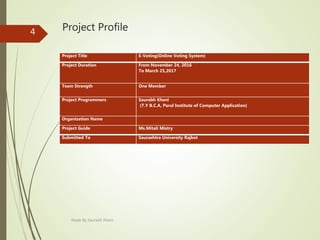
Project Profile
Project Title E-Voting(Online Voting System)
Project Duration From November 24, 2016
To March 25,2017
Team Strength One Member
Project Programmers Saurabh Kheni
(T.Y B.C.A, Parul Institute of Computer Application)
Organization Name
Project Guide Ms.Mitali Mistry
Submitted To Saurashtra University Rajkot
Made By Saurabh Kheni
4
System Information
Made By Saurabh Kheni
5
Existing System
 In existing system, if you wish to vote for someone, then
you have to go to the destination where the voting
procedure is going on and then only you can vote for him
or her.
 Existing system does not provide people the way in which
they can get the details about the nominees as well. They
can’t get to know the history of the people for whom they
are standing in queue for giving their votes.
 The problems of the existing manual system of voting
include among others the following:
 Expensive and Time Consuming
 Too Much Paper Work
 Errors during data Entry
 Loss of registration forms
Made By Saurabh Kheni
6
Proposed System
 Proposed system is highly automated and greatly technical.
In this system, not even you can vote via sitting at your own
place but also you can learn about laws and regulations
related to voting.
 Also not only this but you can access the profile of the
nominees through which you can learn about their history,
their education, and their personal details and so on.
 Using this online voting based project, end users do not
faces any difficulties as because they don’t have to make
registration before submitting their answers.
Made By Saurabh Kheni
7
Overview of the System
 The voting system is an application which is a new process of
casting votes from any place and at any time.
 The proposed system is a flexible means of casting the votes
irrespective of the place and time of the day.
 This technique is best suited for the modern day organizations
where the management can get the opinion of the employees
regarding introduction of new policies or rules by taking votes
through this system.
 So there are less chances of multiple voting by single voter and
hence less chances of manipulation in this system of voting.
Made By Saurabh Kheni
8
 The voting system is an system that provides a new
technique of casting votes using mobile phones.
 This application is especially developed for organizations,
corporations and commercial businesses to get employees
opinions whenever there is any new policy implemented or
any issue being investigated or during controversies. The
project provides an effective solution in resolving all the
arguments that occurs in organizations by considering all
employees opinions.
Made By Saurabh Kheni
9
Modules of the System
 Voter Module:
 In this module, user who is going to give his or her vote have
to make his or her account in order to get access to the voting
system and into the modules which contains details about the
nominees.
 Admin Module:
 Admin checks the data and the valid voter.Admin also gives the
result once the Voting is conducted.Only Admin is authorised
to check the Result.
 Voting Module:
 In this module, all the process related to voting and votes are
given into this module. Voters can access to this module via
their personal account only.
Made By Saurabh Kheni
10
Front End of the System
Made By Saurabh Kheni
11
Overview of PHP
 PHP development began in 1995 when Rasmus
Lerdorf wrote several Common Gateway Interface (CGI)
programs in C, which he used to maintain his personal
homepage.
 He extended them to work with web forms and to
communicate with databases, and called this
implementation "Personal Home Page/Forms Interpreter" or
PHP/FI.
Made By Saurabh Kheni
12
Importance of PHP
 PHP can generate dynamic page content.
 PHP can create, open, read, write, delete, and close files on
the server.
 PHP can collect form data.
 PHP can send and receive cookies.
 PHP can add, delete, modify data in your database.
 PHP can be used to control user-access.
 PHP can encrypt data.
Made By Saurabh Kheni
13
Limitations of PHP
 PHP is NOT 100 % pure Object Oriented scripting language.
But in near future PHP may support 100% object oriented
scripting.
 PHP already imitates some features of Java language.
 PHP will NOT give the performance of "C" or "C++"
language.
 Because it is scripting language and is interpreted it will be
a bit slower than the optimized "C++" programs.
 For top performance, you should use "C++" and fast-CGI
with database/webserver connection pooling and use C++
compiler optimizer "-O3" options.
 Zend optimizer in PHP 4 will speed up the performance of
PHP and bring it very close to optimized "C" code .
Made By Saurabh Kheni
14
Overview of CSS
 CSS was first proposed by Håkon Wium Lie on October 10,
1994.
 At the time, Lie was working with Tim Berners-Lee at
CERN(Conseil Européen pour la Recherche Nucléaire
originally known as ”European Organisation for Nuclear
Research”).
 Several other style sheet languages for the web were
proposed around the same time, and discussions on public
mailing lists and inside World Wide Web Consortium
resulted in the first W3C(World Wide Web Constrium) CSS
Recommendation (CSS1) being released in 1996.
 In particular, Bert Bos' proposal was influential; he became
co-author of CSS1 and is regarded as co-creator of CSS.
Made By Saurabh Kheni
15
Limitations of CSS
 Selectors are unable to ascend.
 Cannot explicitly declare new scope independently of
position.
 Pseudo-class dynamic behaviour not controllable.
 Cannot name rules.
 Cannot include styles from a rule to another Rule.
 Cannot target specific text without altering markup.
Made By Saurabh Kheni
16
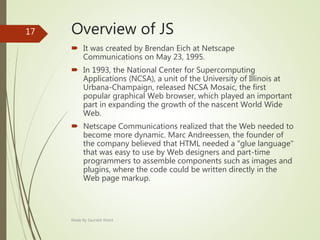
Overview of JS
 It was created by Brendan Eich at Netscape
Communications on May 23, 1995.
 In 1993, the National Center for Supercomputing
Applications (NCSA), a unit of the University of Illinois at
Urbana-Champaign, released NCSA Mosaic, the first
popular graphical Web browser, which played an important
part in expanding the growth of the nascent World Wide
Web.
 Netscape Communications realized that the Web needed to
become more dynamic. Marc Andreessen, the founder of
the company believed that HTML needed a "glue language"
that was easy to use by Web designers and part-time
programmers to assemble components such as images and
plugins, where the code could be written directly in the
Web page markup.
Made By Saurabh Kheni
17
Importance of JS
 Imperative and Structured
 Dynamic
 Prototype Based (Object Oriented)
 Functional
 Delegative
 Miscellaneous
 Vender Specific Extension
Made By Saurabh Kheni
18
Limitations of JS
 Client-side JavaScript does not allow the reading or writing
of files. This has been kept for security reason.
 JavaScript cannot be used for networking applications
because there is no such support available.
 JavaScript doesn't have any multithreading or
multiprocessor capabilities.
Made By Saurabh Kheni
19
Back End of the System
Made By Saurabh Kheni
20
Overview of MySQL
 It is an open-source relational database management
system.
 It was developed by Allan Larsson, Michael Widenius and
David Axmark.
 Its first version was released on 23 May 1995.
 MySQL was developed in Software Company named MySQL
AB. It is now acquired by Sun Microsystems (acquired by
Oracle Corporation).
 It is named after co-founder Michael Widenius' daughter,
My. The SQL phrase stands for Structured Query Language.
Made By Saurabh Kheni
21
Importance of MySQL
 A broad subset of ANSI SQL 99, as well as extensions
 Cross-platform support
 Stored procedures, using a procedural language that closely adheres to
SQL/PSM[61]
 Triggers
 Cursors
 Updatable views
 Online DDL when using the InnoDB Storage Engine.
 Information schema
 Performance Schema that collects and aggregates statistics about server
execution and query performance for monitoring purposes.[62]
 A set of SQL Mode options to control runtime behavior, including a strict
mode to better adhere to SQL standards.
 X/Open XA distributed transaction processing (DTP) support; two phase
commit as part of this, using the default InnoDB storage engine
 Transactions with savepoints when using the default InnoDB Storage Engine.
The NDB Cluster Storage Engine also supports transactions.
 ACID compliance when using InnoDB and NDB Cluster Storage Engines[63]
Made By Saurabh Kheni
22
Hardware and
Software Requirement
Made By Saurabh Kheni
23
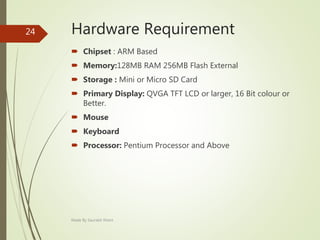
Hardware Requirement
 Chipset : ARM Based
 Memory:128MB RAM 256MB Flash External
 Storage : Mini or Micro SD Card
 Primary Display: QVGA TFT LCD or larger, 16 Bit colour or
Better.
 Mouse
 Keyboard
 Processor: Pentium Processor and Above
Made By Saurabh Kheni
24
Software Requirement
 Adobe Dreamweaver
 Notepad ++
 Google Chrome
 Wampserver
 XAMPP Server
Made By Saurabh Kheni
25
Diagrams
Made By Saurabh Kheni
26
DFD Diagram
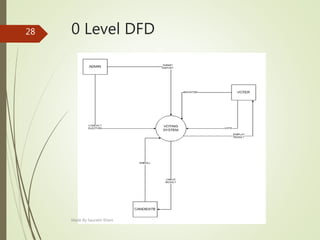
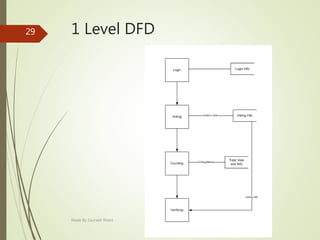
 A data flow diagram (DFD) is a graphical representation of
the "flow" of data through an information system,
modelling its process aspects.
 A DFD is often used as a preliminary step to create an
overview of the system, which can later be elaborated.
Made By Saurabh Kheni
27
0 Level DFD
Made By Saurabh Kheni
28
1 Level DFD
Made By Saurabh Kheni
29
Class Diagram
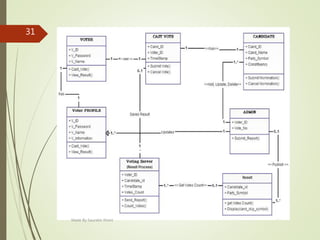
 In software engineering, a class diagram in the Unified
Modelling Language (UML) is a type of static structure
diagram that describes the structure of a system by showing
the system's classes, their attributes, operations (or
methods), and the relationships among objects.
 The class diagram is the main building block of object-
oriented modelling. It is used both for general conceptual
modelling of the systematic of the application, and for
detailed modelling translating the models
into programming code.
Made By Saurabh Kheni
30
Made By Saurabh Kheni
31
Use Case Diagram
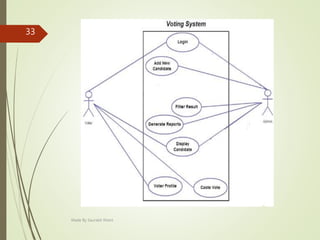
 Use case diagrams are usually referred to as behaviour
diagrams used to describe a set of actions (use cases) that
some system or systems (subject) should or can perform in
collaboration with one or more external users of the system
(actors).
 Each use case should provide some observable and valuable
result to the actors or other stakeholders of the system.
Made By Saurabh Kheni
32
Made By Saurabh Kheni
33
E-R Diagram
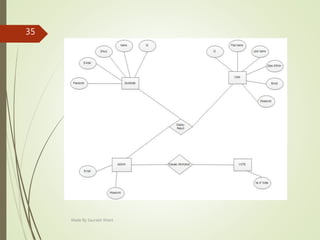
 An entity relationship diagram (ERD) shows the
relationships of entity sets stored in a database. An entity in
this context is a component of data.
 In other words, ER diagrams illustrate the logical structure
of databases.
 At first glance an entity relationship diagram looks very
much like a flowchart. It is the specialized symbols, and the
meanings of those symbols, that make it unique.
Made By Saurabh Kheni
34
Made By Saurabh Kheni
35
Machine State
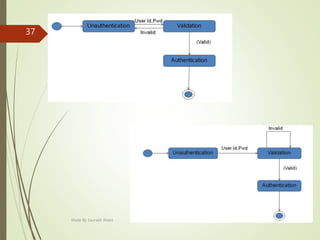
 A Statechart diagram describes a state machine. Now to
clarify it state machine can be defined as a machine which
defines different states of an object and these states are
controlled by external or internal events
 Following are the main purposes of using Statechart
diagrams:
 To model dynamic aspect of a system.
 To model life time of a reactive system.
 To describe different states of an object during its life time.
 Define a state machine to model states of an object.
Made By Saurabh Kheni
36
Made By Saurabh Kheni
37
Activity Diagram
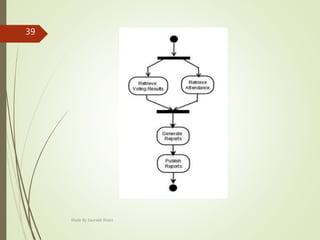
 Activity diagram is another important diagram in UML to
describe dynamic aspects of the system.
 Activity diagram is basically a flow chart to represent the
flow from one activity to another activity. The activity can be
described as an operation of the system.
 So the control flow is drawn from one operation to another.
This flow can be sequential, branched or concurrent. Activity
diagrams deals with all type of flow control by using
different elements like fork, join etc.
Made By Saurabh Kheni
38
Made By Saurabh Kheni
39
Database Diagram
 The Database Designer is a visual tool that allows you to
design and visualize a database to which you are connected.
 When designing a database, you can use Database Designer
to create, edit, or delete tables, columns, keys, indexes,
relationships, and constraints.
 To visualize a database, you can create one or more
diagrams illustrating some or all of the tables, columns,
keys, and relationships in it.
Made By Saurabh Kheni
40
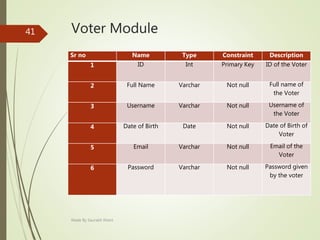
Voter Module
Sr no Name Type Constraint Description
1 ID Int Primary Key ID of the Voter
2 Full Name Varchar Not null Full name of
the Voter
3 Username Varchar Not null Username of
the Voter
4 Date of Birth Date Not null Date of Birth of
Voter
5 Email Varchar Not null Email of the
Voter
6 Password Varchar Not null Password given
by the voter
Made By Saurabh Kheni
41
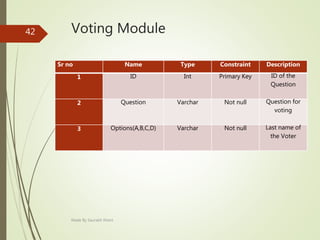
Voting Module
Sr no Name Type Constraint Description
1 ID Int Primary Key ID of the
Question
2 Question Varchar Not null Question for
voting
3 Options(A,B,C,D) Varchar Not null Last name of
the Voter
Made By Saurabh Kheni
42
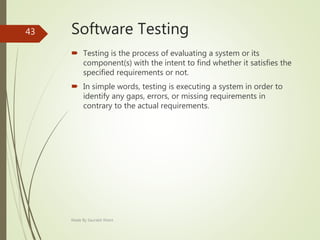
Software Testing
 Testing is the process of evaluating a system or its
component(s) with the intent to find whether it satisfies the
specified requirements or not.
 In simple words, testing is executing a system in order to
identify any gaps, errors, or missing requirements in
contrary to the actual requirements.
Made By Saurabh Kheni
43
Screenshots
Made By Saurabh Kheni
44
Made By Saurabh Kheni
45
Made By Saurabh Kheni
46
Made By Saurabh Kheni
47
Made By Saurabh Kheni
48
Made By Saurabh Kheni
49
Thank You
Made By Saurabh Kheni
50

E voting(online voting system)

  • 1.
    E-Voting (Online Voting System) Developedby Saurabh Kheni Enrollment No 003003142545 Made By Saurabh Kheni 1
  • 2.
    Index  Project Profile System Information  Existing System  Proposed System  Overview of the System  Modules of the System  Front End of the System  Overview `  Importance  Limitations  Back End of the System  Definition  Importance Made By Saurabh Kheni 2
  • 3.
     Hardware andSoftware Requirement  Hardware Requirement  Software Requirement  Diagram  Data Flow Diagram  Class Diagram  Use Case Diagram  E-R Diagram  Machine State  Database Diagram  Testing  Description of Testing  Screenshots  Bibliography Made By Saurabh Kheni 3
  • 4.
    Project Profile Project TitleE-Voting(Online Voting System) Project Duration From November 24, 2016 To March 25,2017 Team Strength One Member Project Programmers Saurabh Kheni (T.Y B.C.A, Parul Institute of Computer Application) Organization Name Project Guide Ms.Mitali Mistry Submitted To Saurashtra University Rajkot Made By Saurabh Kheni 4
  • 5.
  • 6.
    Existing System  Inexisting system, if you wish to vote for someone, then you have to go to the destination where the voting procedure is going on and then only you can vote for him or her.  Existing system does not provide people the way in which they can get the details about the nominees as well. They can’t get to know the history of the people for whom they are standing in queue for giving their votes.  The problems of the existing manual system of voting include among others the following:  Expensive and Time Consuming  Too Much Paper Work  Errors during data Entry  Loss of registration forms Made By Saurabh Kheni 6
  • 7.
    Proposed System  Proposedsystem is highly automated and greatly technical. In this system, not even you can vote via sitting at your own place but also you can learn about laws and regulations related to voting.  Also not only this but you can access the profile of the nominees through which you can learn about their history, their education, and their personal details and so on.  Using this online voting based project, end users do not faces any difficulties as because they don’t have to make registration before submitting their answers. Made By Saurabh Kheni 7
  • 8.
    Overview of theSystem  The voting system is an application which is a new process of casting votes from any place and at any time.  The proposed system is a flexible means of casting the votes irrespective of the place and time of the day.  This technique is best suited for the modern day organizations where the management can get the opinion of the employees regarding introduction of new policies or rules by taking votes through this system.  So there are less chances of multiple voting by single voter and hence less chances of manipulation in this system of voting. Made By Saurabh Kheni 8
  • 9.
     The votingsystem is an system that provides a new technique of casting votes using mobile phones.  This application is especially developed for organizations, corporations and commercial businesses to get employees opinions whenever there is any new policy implemented or any issue being investigated or during controversies. The project provides an effective solution in resolving all the arguments that occurs in organizations by considering all employees opinions. Made By Saurabh Kheni 9
  • 10.
    Modules of theSystem  Voter Module:  In this module, user who is going to give his or her vote have to make his or her account in order to get access to the voting system and into the modules which contains details about the nominees.  Admin Module:  Admin checks the data and the valid voter.Admin also gives the result once the Voting is conducted.Only Admin is authorised to check the Result.  Voting Module:  In this module, all the process related to voting and votes are given into this module. Voters can access to this module via their personal account only. Made By Saurabh Kheni 10
  • 11.
    Front End ofthe System Made By Saurabh Kheni 11
  • 12.
    Overview of PHP PHP development began in 1995 when Rasmus Lerdorf wrote several Common Gateway Interface (CGI) programs in C, which he used to maintain his personal homepage.  He extended them to work with web forms and to communicate with databases, and called this implementation "Personal Home Page/Forms Interpreter" or PHP/FI. Made By Saurabh Kheni 12
  • 13.
    Importance of PHP PHP can generate dynamic page content.  PHP can create, open, read, write, delete, and close files on the server.  PHP can collect form data.  PHP can send and receive cookies.  PHP can add, delete, modify data in your database.  PHP can be used to control user-access.  PHP can encrypt data. Made By Saurabh Kheni 13
  • 14.
    Limitations of PHP PHP is NOT 100 % pure Object Oriented scripting language. But in near future PHP may support 100% object oriented scripting.  PHP already imitates some features of Java language.  PHP will NOT give the performance of "C" or "C++" language.  Because it is scripting language and is interpreted it will be a bit slower than the optimized "C++" programs.  For top performance, you should use "C++" and fast-CGI with database/webserver connection pooling and use C++ compiler optimizer "-O3" options.  Zend optimizer in PHP 4 will speed up the performance of PHP and bring it very close to optimized "C" code . Made By Saurabh Kheni 14
  • 15.
    Overview of CSS CSS was first proposed by Håkon Wium Lie on October 10, 1994.  At the time, Lie was working with Tim Berners-Lee at CERN(Conseil Européen pour la Recherche Nucléaire originally known as ”European Organisation for Nuclear Research”).  Several other style sheet languages for the web were proposed around the same time, and discussions on public mailing lists and inside World Wide Web Consortium resulted in the first W3C(World Wide Web Constrium) CSS Recommendation (CSS1) being released in 1996.  In particular, Bert Bos' proposal was influential; he became co-author of CSS1 and is regarded as co-creator of CSS. Made By Saurabh Kheni 15
  • 16.
    Limitations of CSS Selectors are unable to ascend.  Cannot explicitly declare new scope independently of position.  Pseudo-class dynamic behaviour not controllable.  Cannot name rules.  Cannot include styles from a rule to another Rule.  Cannot target specific text without altering markup. Made By Saurabh Kheni 16
  • 17.
    Overview of JS It was created by Brendan Eich at Netscape Communications on May 23, 1995.  In 1993, the National Center for Supercomputing Applications (NCSA), a unit of the University of Illinois at Urbana-Champaign, released NCSA Mosaic, the first popular graphical Web browser, which played an important part in expanding the growth of the nascent World Wide Web.  Netscape Communications realized that the Web needed to become more dynamic. Marc Andreessen, the founder of the company believed that HTML needed a "glue language" that was easy to use by Web designers and part-time programmers to assemble components such as images and plugins, where the code could be written directly in the Web page markup. Made By Saurabh Kheni 17
  • 18.
    Importance of JS Imperative and Structured  Dynamic  Prototype Based (Object Oriented)  Functional  Delegative  Miscellaneous  Vender Specific Extension Made By Saurabh Kheni 18
  • 19.
    Limitations of JS Client-side JavaScript does not allow the reading or writing of files. This has been kept for security reason.  JavaScript cannot be used for networking applications because there is no such support available.  JavaScript doesn't have any multithreading or multiprocessor capabilities. Made By Saurabh Kheni 19
  • 20.
    Back End ofthe System Made By Saurabh Kheni 20
  • 21.
    Overview of MySQL It is an open-source relational database management system.  It was developed by Allan Larsson, Michael Widenius and David Axmark.  Its first version was released on 23 May 1995.  MySQL was developed in Software Company named MySQL AB. It is now acquired by Sun Microsystems (acquired by Oracle Corporation).  It is named after co-founder Michael Widenius' daughter, My. The SQL phrase stands for Structured Query Language. Made By Saurabh Kheni 21
  • 22.
    Importance of MySQL A broad subset of ANSI SQL 99, as well as extensions  Cross-platform support  Stored procedures, using a procedural language that closely adheres to SQL/PSM[61]  Triggers  Cursors  Updatable views  Online DDL when using the InnoDB Storage Engine.  Information schema  Performance Schema that collects and aggregates statistics about server execution and query performance for monitoring purposes.[62]  A set of SQL Mode options to control runtime behavior, including a strict mode to better adhere to SQL standards.  X/Open XA distributed transaction processing (DTP) support; two phase commit as part of this, using the default InnoDB storage engine  Transactions with savepoints when using the default InnoDB Storage Engine. The NDB Cluster Storage Engine also supports transactions.  ACID compliance when using InnoDB and NDB Cluster Storage Engines[63] Made By Saurabh Kheni 22
  • 23.
  • 24.
    Hardware Requirement  Chipset: ARM Based  Memory:128MB RAM 256MB Flash External  Storage : Mini or Micro SD Card  Primary Display: QVGA TFT LCD or larger, 16 Bit colour or Better.  Mouse  Keyboard  Processor: Pentium Processor and Above Made By Saurabh Kheni 24
  • 25.
    Software Requirement  AdobeDreamweaver  Notepad ++  Google Chrome  Wampserver  XAMPP Server Made By Saurabh Kheni 25
  • 26.
  • 27.
    DFD Diagram  Adata flow diagram (DFD) is a graphical representation of the "flow" of data through an information system, modelling its process aspects.  A DFD is often used as a preliminary step to create an overview of the system, which can later be elaborated. Made By Saurabh Kheni 27
  • 28.
    0 Level DFD MadeBy Saurabh Kheni 28
  • 29.
    1 Level DFD MadeBy Saurabh Kheni 29
  • 30.
    Class Diagram  Insoftware engineering, a class diagram in the Unified Modelling Language (UML) is a type of static structure diagram that describes the structure of a system by showing the system's classes, their attributes, operations (or methods), and the relationships among objects.  The class diagram is the main building block of object- oriented modelling. It is used both for general conceptual modelling of the systematic of the application, and for detailed modelling translating the models into programming code. Made By Saurabh Kheni 30
  • 31.
  • 32.
    Use Case Diagram Use case diagrams are usually referred to as behaviour diagrams used to describe a set of actions (use cases) that some system or systems (subject) should or can perform in collaboration with one or more external users of the system (actors).  Each use case should provide some observable and valuable result to the actors or other stakeholders of the system. Made By Saurabh Kheni 32
  • 33.
  • 34.
    E-R Diagram  Anentity relationship diagram (ERD) shows the relationships of entity sets stored in a database. An entity in this context is a component of data.  In other words, ER diagrams illustrate the logical structure of databases.  At first glance an entity relationship diagram looks very much like a flowchart. It is the specialized symbols, and the meanings of those symbols, that make it unique. Made By Saurabh Kheni 34
  • 35.
  • 36.
    Machine State  AStatechart diagram describes a state machine. Now to clarify it state machine can be defined as a machine which defines different states of an object and these states are controlled by external or internal events  Following are the main purposes of using Statechart diagrams:  To model dynamic aspect of a system.  To model life time of a reactive system.  To describe different states of an object during its life time.  Define a state machine to model states of an object. Made By Saurabh Kheni 36
  • 37.
  • 38.
    Activity Diagram  Activitydiagram is another important diagram in UML to describe dynamic aspects of the system.  Activity diagram is basically a flow chart to represent the flow from one activity to another activity. The activity can be described as an operation of the system.  So the control flow is drawn from one operation to another. This flow can be sequential, branched or concurrent. Activity diagrams deals with all type of flow control by using different elements like fork, join etc. Made By Saurabh Kheni 38
  • 39.
  • 40.
    Database Diagram  TheDatabase Designer is a visual tool that allows you to design and visualize a database to which you are connected.  When designing a database, you can use Database Designer to create, edit, or delete tables, columns, keys, indexes, relationships, and constraints.  To visualize a database, you can create one or more diagrams illustrating some or all of the tables, columns, keys, and relationships in it. Made By Saurabh Kheni 40
  • 41.
    Voter Module Sr noName Type Constraint Description 1 ID Int Primary Key ID of the Voter 2 Full Name Varchar Not null Full name of the Voter 3 Username Varchar Not null Username of the Voter 4 Date of Birth Date Not null Date of Birth of Voter 5 Email Varchar Not null Email of the Voter 6 Password Varchar Not null Password given by the voter Made By Saurabh Kheni 41
  • 42.
    Voting Module Sr noName Type Constraint Description 1 ID Int Primary Key ID of the Question 2 Question Varchar Not null Question for voting 3 Options(A,B,C,D) Varchar Not null Last name of the Voter Made By Saurabh Kheni 42
  • 43.
    Software Testing  Testingis the process of evaluating a system or its component(s) with the intent to find whether it satisfies the specified requirements or not.  In simple words, testing is executing a system in order to identify any gaps, errors, or missing requirements in contrary to the actual requirements. Made By Saurabh Kheni 43
  • 44.
  • 45.
  • 46.
  • 47.
  • 48.
  • 49.
  • 50.
    Thank You Made BySaurabh Kheni 50