Corporate Social Responsibility
Suppliers Guide to VSIB
Volvo IT
2 Date
Department, Name, Security Class
Corporate Social Responsibility
Suppliers Guide to VSIB
CSR Overview
• Corporate Social Responsibility (CSR) is a requirement Volvo has on their suppliers.
– This requirement is regulated in Key Element Procedures no 6 (please see Supplier Portal).
• Included in KEP 6 is a evaluation intended for the suppliers.
– This evaluation shall be made by the suppliers via the Supplier Portal and the VSIB-application
Presentation Content
• Update of the suppliers CSR.
– Walk-through of the CSR functionality
• Update of Activity Plans
– If the supplier has an action plan for improvement of the CSR, this can be uploaded to VSIB.
Volvo IT
3 Date
Department, Name, Security Class
Corporate Social Responsibility
Suppliers Guide to VSIB - CSR Update
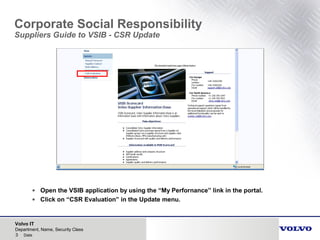
• Open the VSIB application by using the “My Perfornance” link in the portal.
• Click on “CSR Evaluation” in the Update menu.
Volvo IT
4 Date
Department, Name, Security Class
Corporate Social Responsibility
Suppliers Guide to VSIB - CSR Update
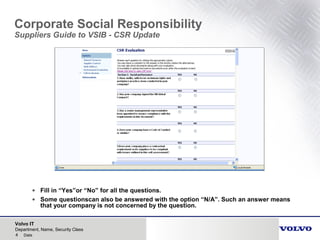
• Fill in “Yes”or “No” for all the questions.
• Some questionscan also be answered with the option “N/A”. Such an answer means
that your company is not concerned by the question.
Volvo IT
5 Date
Department, Name, Security Class
Corporate Social Responsibility
Suppliers Guide to VSIB - CSR Update
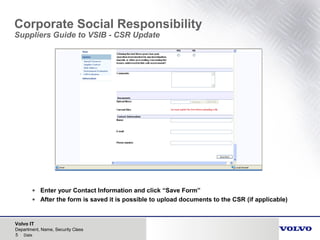
• Enter your Contact Information and click “Save Form”
• After the form is saved it is possible to upload documents to the CSR (if applicable)
Volvo IT
6 Date
Department, Name, Security Class
Corporate Social Responsibility
Suppliers Guide to VSIB - CSR Update (Scorecard)
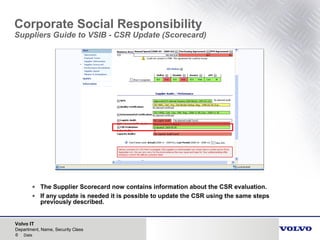
• The Supplier Scorecard now contains information about the CSR evaluation.
• If any update is needed it is possible to update the CSR using the same steps
previously described.
Volvo IT
7 Date
Department, Name, Security Class
Corporate Social Responsibility
Suppliers Guide to VSIB – Action Plan for CSR
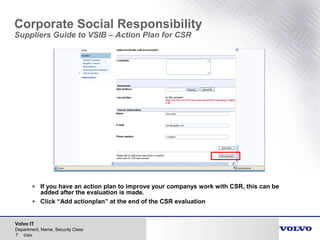
• If you have an action plan to improve your companys work with CSR, this can be
added after the evaluation is made.
• Click “Add actionplan” at the end of the CSR evaluation
Volvo IT
8 Date
Department, Name, Security Class
Corporate Social Responsibility
Suppliers Guide to VSIB – Action Plan for CSR
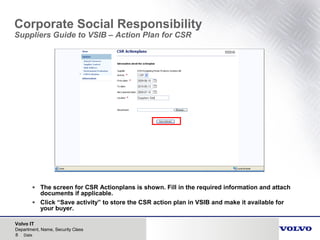
• The screen for CSR Actionplans is shown. Fill in the required information and attach
documents if applicable.
• Click “Save activity” to store the CSR action plan in VSIB and make it available for
your buyer.
Volvo IT
9 Date
Department, Name, Security Class
Corporate Social Responsibility
Suppliers Guide to VSIB – Action Plan for CSR
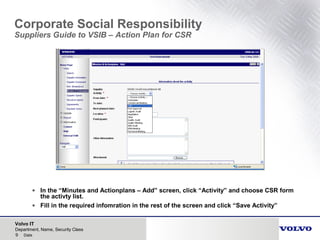
• In the “Minutes and Actionplans – Add” screen, click “Activity” and choose CSR form
the activty list.
• Fill in the required infomration in the rest of the screen and click “Save Activity”
Volvo IT
10 Date
Department, Name, Security Class
Corporate Social Responsibility
Suppliers Guide to VSIB – Activity Plan for CSR
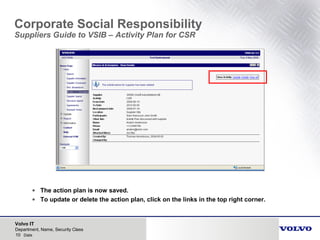
• The action plan is now saved.
• To update or delete the action plan, click on the links in the top right corner.
Corporate Social Responsibility
Suppliers Guide to VSIB

Volvo csr suppliers guide vsib

  • 1.
  • 2.
    Volvo IT 2 Date Department,Name, Security Class Corporate Social Responsibility Suppliers Guide to VSIB CSR Overview • Corporate Social Responsibility (CSR) is a requirement Volvo has on their suppliers. – This requirement is regulated in Key Element Procedures no 6 (please see Supplier Portal). • Included in KEP 6 is a evaluation intended for the suppliers. – This evaluation shall be made by the suppliers via the Supplier Portal and the VSIB-application Presentation Content • Update of the suppliers CSR. – Walk-through of the CSR functionality • Update of Activity Plans – If the supplier has an action plan for improvement of the CSR, this can be uploaded to VSIB.
  • 3.
    Volvo IT 3 Date Department,Name, Security Class Corporate Social Responsibility Suppliers Guide to VSIB - CSR Update • Open the VSIB application by using the “My Perfornance” link in the portal. • Click on “CSR Evaluation” in the Update menu.
  • 4.
    Volvo IT 4 Date Department,Name, Security Class Corporate Social Responsibility Suppliers Guide to VSIB - CSR Update • Fill in “Yes”or “No” for all the questions. • Some questionscan also be answered with the option “N/A”. Such an answer means that your company is not concerned by the question.
  • 5.
    Volvo IT 5 Date Department,Name, Security Class Corporate Social Responsibility Suppliers Guide to VSIB - CSR Update • Enter your Contact Information and click “Save Form” • After the form is saved it is possible to upload documents to the CSR (if applicable)
  • 6.
    Volvo IT 6 Date Department,Name, Security Class Corporate Social Responsibility Suppliers Guide to VSIB - CSR Update (Scorecard) • The Supplier Scorecard now contains information about the CSR evaluation. • If any update is needed it is possible to update the CSR using the same steps previously described.
  • 7.
    Volvo IT 7 Date Department,Name, Security Class Corporate Social Responsibility Suppliers Guide to VSIB – Action Plan for CSR • If you have an action plan to improve your companys work with CSR, this can be added after the evaluation is made. • Click “Add actionplan” at the end of the CSR evaluation
  • 8.
    Volvo IT 8 Date Department,Name, Security Class Corporate Social Responsibility Suppliers Guide to VSIB – Action Plan for CSR • The screen for CSR Actionplans is shown. Fill in the required information and attach documents if applicable. • Click “Save activity” to store the CSR action plan in VSIB and make it available for your buyer.
  • 9.
    Volvo IT 9 Date Department,Name, Security Class Corporate Social Responsibility Suppliers Guide to VSIB – Action Plan for CSR • In the “Minutes and Actionplans – Add” screen, click “Activity” and choose CSR form the activty list. • Fill in the required infomration in the rest of the screen and click “Save Activity”
  • 10.
    Volvo IT 10 Date Department,Name, Security Class Corporate Social Responsibility Suppliers Guide to VSIB – Activity Plan for CSR • The action plan is now saved. • To update or delete the action plan, click on the links in the top right corner.
  • 11.