








VoIP (VOICE OVER
INTERNET PROTOCOL)
www.fonebell.in
VoIP (VOICE OVER
INTERNET PROTOCOL)
TELEPHONY SERVICE
In a nutshell – “Voice communication over the Internet”
www.fonebell.in
VoIP: How it Works
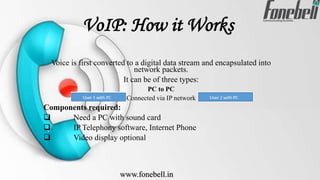
Voice is first converted to a digital data stream and encapsulated into
network packets.
It can be of three types:
PC to PC
Connected via IP network
Components required:
 Need a PC with sound card
 IP Telephony software, Internet Phone
 Video display optional
www.fonebell.in
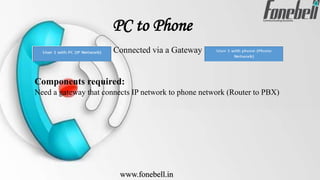
PC to Phone
Connected via a Gateway
Components required:
Need a gateway that connects IP network to phone network (Router to PBX)
www.fonebell.in
Phone to Phone
Components required:
 Need a gateway that connects IP network to phone network
(Router to PBX)
 Components required:
 Need more gateways that connect IP network to phone
networks.
 The IP network could be dedicated intra-net or the Internet.
 The phone networks could be intra-company PBXs or the
carrier switches.
www.fonebell.in
VoIP: Features
 Business Phone System Basic (IVR, Key press codes,
Auto-Answer, Voice Prompts, music on hold.)
 Inbound Recording
 Scheduler
 Powerful Reporting
 Call Parking
 Custom Caller ID’s
 Voicemail to Email
 Intercom
 Web Based Control Panel
 Blacklist Whitelist Caller
www.fonebell.in
VoIP: More Features
 Skills-Based Routing
 Ring-All (Blast Group)
 ACD (Automatic Call Distribution)
 Queue Management
 CRM Integration
 Voicemail Transcription
 HD Video Collaboration with Screen Sharing
 Web Browser Click to Dian Plugin
 Audio Conferencing
 On-Demand Recording (For Outbound + Inbound both)
www.fonebell.in
VoIP: What it Can Do
 Welcome inbound calls with a customized greeting.
 Engage callers in a sales or support discussions.
 Generate leads, customer-service requests and complaint tickets.
 Initiate outbound calls directly from your CRM.
 Send transactional or promotional SMS from your CRM.
 Creates a call record with details on persons involved and link to the
entire conversation recording in your CRM.
 SMS (Text Messages) that you have received from your customers
can be synched with your CRM.
 And more.
www.fonebell.in
VoIP: Business Value
Prepositions (Benefits)
 Simplicity (Plug-n-play phone)
 Affordability (No cabling, no upfront cost)
 Higher availability (No cable drops)
 More capabilities
 Better call management
www.fonebell.in
VoIP: Challenges
 Constraint Internet bandwidth
 Poor Quality of Service (QoS)
 NAT and firewall traversal
 Identity and trust concerns
 Spam over Internet telephony
 Regulatory forbearance
www.fonebell.in
www.fonebell.in

Voip (voice over internet protocol)

  • 1.
    VoIP (VOICE OVER INTERNETPROTOCOL) www.fonebell.in
  • 2.
    VoIP (VOICE OVER INTERNETPROTOCOL) TELEPHONY SERVICE In a nutshell – “Voice communication over the Internet” www.fonebell.in
  • 3.
    VoIP: How itWorks Voice is first converted to a digital data stream and encapsulated into network packets. It can be of three types: PC to PC Connected via IP network Components required:  Need a PC with sound card  IP Telephony software, Internet Phone  Video display optional www.fonebell.in
  • 4.
    PC to Phone Connectedvia a Gateway Components required: Need a gateway that connects IP network to phone network (Router to PBX) www.fonebell.in
  • 5.
    Phone to Phone Componentsrequired:  Need a gateway that connects IP network to phone network (Router to PBX)  Components required:  Need more gateways that connect IP network to phone networks.  The IP network could be dedicated intra-net or the Internet.  The phone networks could be intra-company PBXs or the carrier switches. www.fonebell.in
  • 6.
    VoIP: Features  BusinessPhone System Basic (IVR, Key press codes, Auto-Answer, Voice Prompts, music on hold.)  Inbound Recording  Scheduler  Powerful Reporting  Call Parking  Custom Caller ID’s  Voicemail to Email  Intercom  Web Based Control Panel  Blacklist Whitelist Caller www.fonebell.in
  • 7.
    VoIP: More Features Skills-Based Routing  Ring-All (Blast Group)  ACD (Automatic Call Distribution)  Queue Management  CRM Integration  Voicemail Transcription  HD Video Collaboration with Screen Sharing  Web Browser Click to Dian Plugin  Audio Conferencing  On-Demand Recording (For Outbound + Inbound both) www.fonebell.in
  • 8.
    VoIP: What itCan Do  Welcome inbound calls with a customized greeting.  Engage callers in a sales or support discussions.  Generate leads, customer-service requests and complaint tickets.  Initiate outbound calls directly from your CRM.  Send transactional or promotional SMS from your CRM.  Creates a call record with details on persons involved and link to the entire conversation recording in your CRM.  SMS (Text Messages) that you have received from your customers can be synched with your CRM.  And more. www.fonebell.in
  • 9.
    VoIP: Business Value Prepositions(Benefits)  Simplicity (Plug-n-play phone)  Affordability (No cabling, no upfront cost)  Higher availability (No cable drops)  More capabilities  Better call management www.fonebell.in
  • 10.
    VoIP: Challenges  ConstraintInternet bandwidth  Poor Quality of Service (QoS)  NAT and firewall traversal  Identity and trust concerns  Spam over Internet telephony  Regulatory forbearance www.fonebell.in
  • 11.