Voice controlled Home
Automation
Using Amazon Alexa and PubNub
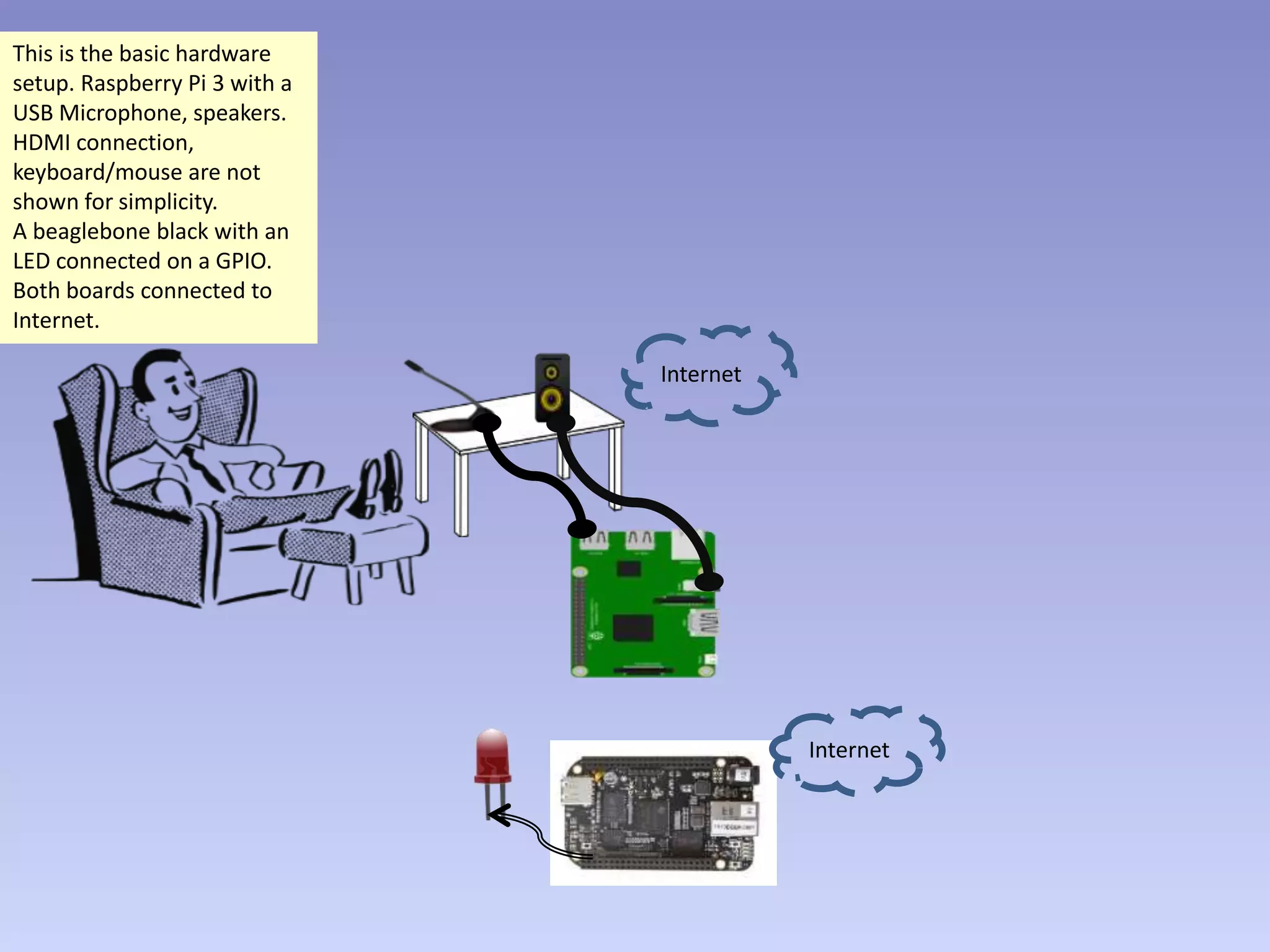
This is the basic hardware
setup. Raspberry Pi 3 with a
USB Microphone, speakers.
HDMI connection,
keyboard/mouse are not
shown for simplicity.
A beaglebone black with an
LED connected on a GPIO.
Both boards connected to
Internet.
Internet
Internet
We also need accounts on
Amazon developer, Heroku
and PubNub.
Amazon hosts Alexa voice
service and our skill.
Heroku hosts our skill
adapter code.
PubNub is used for message
passing from skill adapter to
beaglebone.
Skill adapter code
as web service
Publish /
Subscribe
architecture
Internet
Internet
•Alexa voice service
•Alexa Skill (‘My home’)
Subscribed to PubNub
channel ‘alexa_world’
Skill adapter code
as web service
Publish /
Subscribe
architecture
Running Alexa app
with wakeword agent
Internet
Internet
•Alexa voice service
•Alexa Skill (‘My home’)
Run the Alexa app on
Raspberry Pi.
Run the PubNub subscribing
and GPIO controller code on
beaglebone.
Alexa app is continuously
listening for the keyword
‘Alexa’. When user speaks
the keyword, the app listens
to the voice until a pause. In
this case it is the sentence
‘Alexa, ask my home to turn
on bedroom light’.
•Alexa voice service
•Alexa Skill (‘My home’)
Skill adapter code
as web service
Publish /
Subscribe
architecture
Alexa, ask
My Home
to turn on
bedroom
light
Running Alexa app
with wakeword agent
Subscribed to PubNub
channel ‘alexa_world’
Internet
Internet
Alexa app sends the audio to
Alexa voice service running
in Amazon cloud
(developer.amazon.com)
along with device
authentication details and
other metadata.
Audio
Skill adapter code
as web service
Publish /
Subscribe
architecture
Alexa, ask
My Home
to turn on
bedroom
light
Running Alexa app
with wakeword agent
Subscribed to PubNub
channel ‘alexa_world’
Internet
Internet
•Alexa voice service
•Alexa Skill (‘My home’)
In this case, the intent is
to ‘turn on’ something and
the slot is ‘bedroom light’.
This data is then passed on
to Heroku web service
endpoint running skill
adapter code.
Alexa voice service
interprets the voice and
determines that this is a
request for the skill ‘My
home’. It then further
decodes the voice data and
parses it into an intent
(action to be done)
and slot (object to be
acted upon).
Audio
Skill adapter code
as web service
Publish /
Subscribe
architecture
Alexa, ask
My Home
to turn on
bedroom
light
Parsed data to Skill adapter
Intent: “Turn on”
Slot: “Bedroom light”
Running Alexa app
with wakeword agent
Subscribed to PubNub
channel ‘alexa_world’
Internet
Internet
•Alexa voice service
•Alexa Skill (‘My home’)
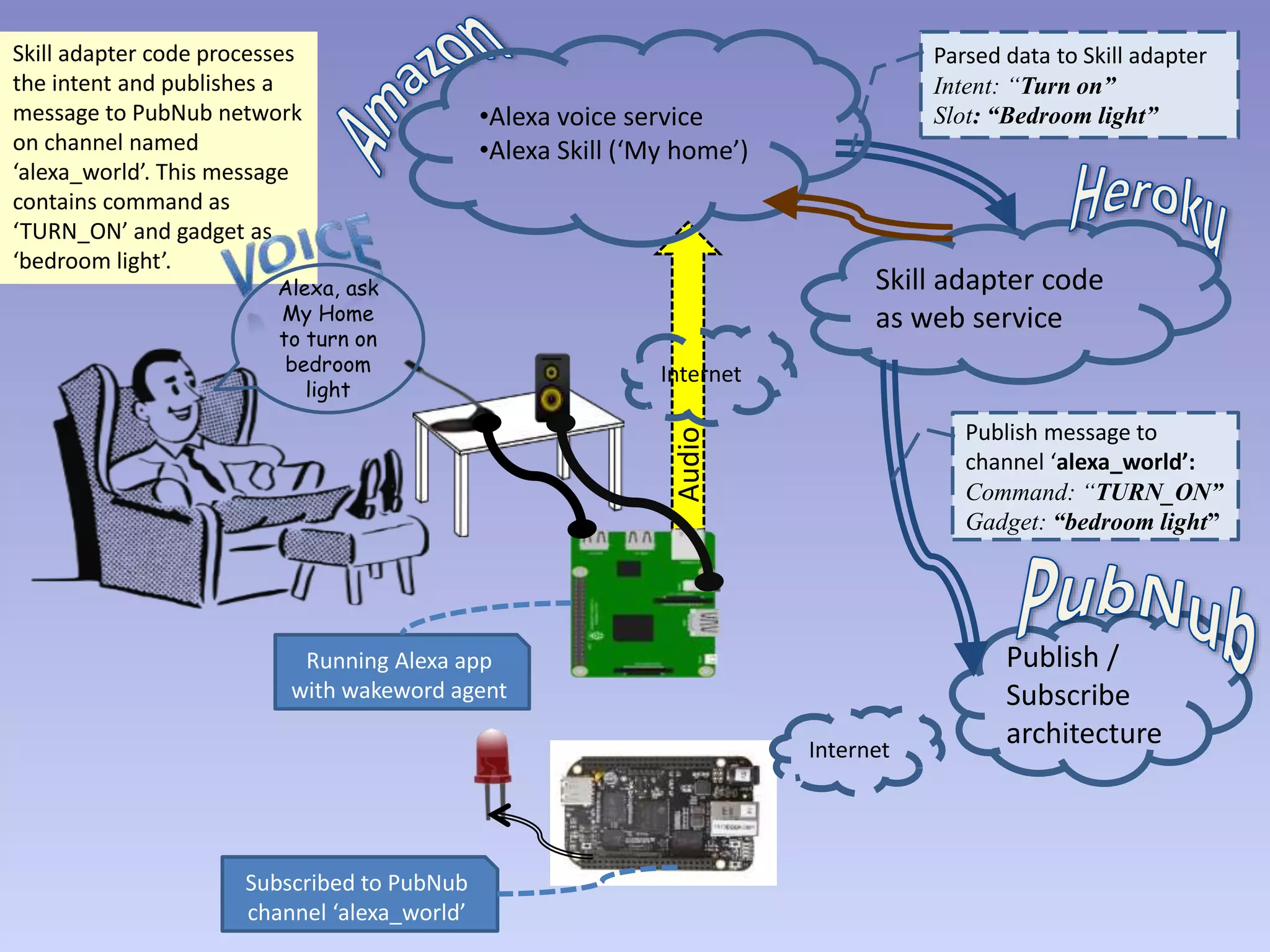
Skill adapter code processes
the intent and publishes a
message to PubNub network
on channel named
‘alexa_world’. This message
contains command as
‘TURN_ON’ and gadget as
‘bedroom light’.
Audio
Skill adapter code
as web service
Publish /
Subscribe
architecture
Alexa, ask
My Home
to turn on
bedroom
light
Parsed data to Skill adapter
Intent: “Turn on”
Slot: “Bedroom light”
Publish message to
channel ‘alexa_world’:
Command: “TURN_ON”
Gadget: “bedroom light”
Running Alexa app
with wakeword agent
Subscribed to PubNub
channel ‘alexa_world’
Internet
Internet
•Alexa voice service
•Alexa Skill (‘My home’)
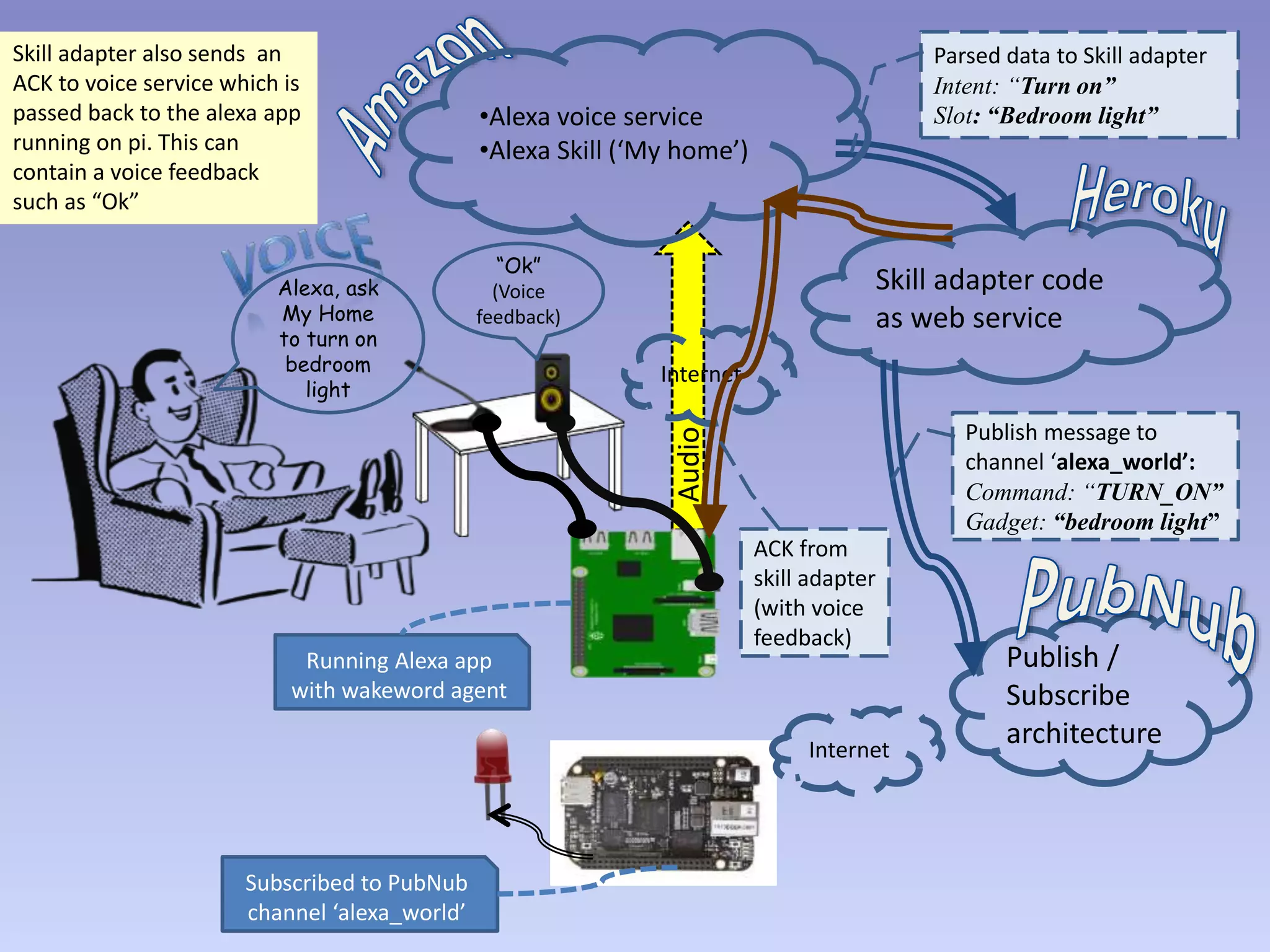
Skill adapter also sends an
ACK to voice service which is
passed back to the alexa app
running on pi. This can
contain a voice feedback
such as “Ok”
Audio
Skill adapter code
as web service
Publish /
Subscribe
architecture
Alexa, ask
My Home
to turn on
bedroom
light
Parsed data to Skill adapter
Intent: “Turn on”
Slot: “Bedroom light”
Publish message to
channel ‘alexa_world’:
Command: “TURN_ON”
Gadget: “bedroom light”
Running Alexa app
with wakeword agent
Subscribed to PubNub
channel ‘alexa_world’
Internet
Internet
•Alexa voice service
•Alexa Skill (‘My home’)
“Ok”
(Voice
feedback)
ACK from
skill adapter
(with voice
feedback)
PubNub network sends out
the same message to all
devices subscribed to
channel ‘alexa_world’. In this
case, the beaglebone is
subscribed to this channel
and hence receives the
message.
Audio
Skill adapter code
as web service
Publish /
Subscribe
architecture
Alexa, ask
My Home
to turn on
bedroom
light
Parsed data to Skill adapter
Intent: “Turn on”
Slot: “Bedroom light”
Publish message to
channel ‘alexa_world’:
Command: “TURN_ON”
Gadget: “bedroom light”
Send message to subscribers
of channel ‘alexa_world’:
Command: “TURN_ON”
Gadget: “bedroom light”
Running Alexa app
with wakeword agent
Subscribed to PubNub
channel ‘alexa_world’
Internet
Internet
•Alexa voice service
•Alexa Skill (‘My home’)
ACK from
skill adapter
(with voice
feedback)
Audio
Skill adapter code
as web service
Publish /
Subscribe
architecture
Alexa, ask
My Home
to turn on
bedroom
light
Parsed data to Skill adapter
Intent: “Turn on”
Slot: “Bedroom light”
Publish message to
channel ‘alexa_world’:
Command: “TURN_ON”
Gadget: “bedroom light”
Send message to subscribers
of channel ‘alexa_world’:
Command: “TURN_ON”
Gadget: “bedroom light”
Running Alexa app
with wakeword agent
Subscribed to PubNub
channel ‘alexa_world’
Internet
Internet
•Alexa voice service
•Alexa Skill (‘My home’)
Beaglebone then processes
received message and turns
on the GPIO corresponding
to ‘bedroom light’.
ACK from
skill adapter
(with voice
feedback)

Voice controlled home automation

  • 1.
  • 2.
    This is thebasic hardware setup. Raspberry Pi 3 with a USB Microphone, speakers. HDMI connection, keyboard/mouse are not shown for simplicity. A beaglebone black with an LED connected on a GPIO. Both boards connected to Internet. Internet Internet
  • 3.
    We also needaccounts on Amazon developer, Heroku and PubNub. Amazon hosts Alexa voice service and our skill. Heroku hosts our skill adapter code. PubNub is used for message passing from skill adapter to beaglebone. Skill adapter code as web service Publish / Subscribe architecture Internet Internet •Alexa voice service •Alexa Skill (‘My home’)
  • 4.
    Subscribed to PubNub channel‘alexa_world’ Skill adapter code as web service Publish / Subscribe architecture Running Alexa app with wakeword agent Internet Internet •Alexa voice service •Alexa Skill (‘My home’) Run the Alexa app on Raspberry Pi. Run the PubNub subscribing and GPIO controller code on beaglebone.
  • 5.
    Alexa app iscontinuously listening for the keyword ‘Alexa’. When user speaks the keyword, the app listens to the voice until a pause. In this case it is the sentence ‘Alexa, ask my home to turn on bedroom light’. •Alexa voice service •Alexa Skill (‘My home’) Skill adapter code as web service Publish / Subscribe architecture Alexa, ask My Home to turn on bedroom light Running Alexa app with wakeword agent Subscribed to PubNub channel ‘alexa_world’ Internet Internet
  • 6.
    Alexa app sendsthe audio to Alexa voice service running in Amazon cloud (developer.amazon.com) along with device authentication details and other metadata. Audio Skill adapter code as web service Publish / Subscribe architecture Alexa, ask My Home to turn on bedroom light Running Alexa app with wakeword agent Subscribed to PubNub channel ‘alexa_world’ Internet Internet •Alexa voice service •Alexa Skill (‘My home’)
  • 7.
    In this case,the intent is to ‘turn on’ something and the slot is ‘bedroom light’. This data is then passed on to Heroku web service endpoint running skill adapter code. Alexa voice service interprets the voice and determines that this is a request for the skill ‘My home’. It then further decodes the voice data and parses it into an intent (action to be done) and slot (object to be acted upon). Audio Skill adapter code as web service Publish / Subscribe architecture Alexa, ask My Home to turn on bedroom light Parsed data to Skill adapter Intent: “Turn on” Slot: “Bedroom light” Running Alexa app with wakeword agent Subscribed to PubNub channel ‘alexa_world’ Internet Internet •Alexa voice service •Alexa Skill (‘My home’)
  • 8.
    Skill adapter codeprocesses the intent and publishes a message to PubNub network on channel named ‘alexa_world’. This message contains command as ‘TURN_ON’ and gadget as ‘bedroom light’. Audio Skill adapter code as web service Publish / Subscribe architecture Alexa, ask My Home to turn on bedroom light Parsed data to Skill adapter Intent: “Turn on” Slot: “Bedroom light” Publish message to channel ‘alexa_world’: Command: “TURN_ON” Gadget: “bedroom light” Running Alexa app with wakeword agent Subscribed to PubNub channel ‘alexa_world’ Internet Internet •Alexa voice service •Alexa Skill (‘My home’)
  • 9.
    Skill adapter alsosends an ACK to voice service which is passed back to the alexa app running on pi. This can contain a voice feedback such as “Ok” Audio Skill adapter code as web service Publish / Subscribe architecture Alexa, ask My Home to turn on bedroom light Parsed data to Skill adapter Intent: “Turn on” Slot: “Bedroom light” Publish message to channel ‘alexa_world’: Command: “TURN_ON” Gadget: “bedroom light” Running Alexa app with wakeword agent Subscribed to PubNub channel ‘alexa_world’ Internet Internet •Alexa voice service •Alexa Skill (‘My home’) “Ok” (Voice feedback) ACK from skill adapter (with voice feedback)
  • 10.
    PubNub network sendsout the same message to all devices subscribed to channel ‘alexa_world’. In this case, the beaglebone is subscribed to this channel and hence receives the message. Audio Skill adapter code as web service Publish / Subscribe architecture Alexa, ask My Home to turn on bedroom light Parsed data to Skill adapter Intent: “Turn on” Slot: “Bedroom light” Publish message to channel ‘alexa_world’: Command: “TURN_ON” Gadget: “bedroom light” Send message to subscribers of channel ‘alexa_world’: Command: “TURN_ON” Gadget: “bedroom light” Running Alexa app with wakeword agent Subscribed to PubNub channel ‘alexa_world’ Internet Internet •Alexa voice service •Alexa Skill (‘My home’) ACK from skill adapter (with voice feedback)
  • 11.
    Audio Skill adapter code asweb service Publish / Subscribe architecture Alexa, ask My Home to turn on bedroom light Parsed data to Skill adapter Intent: “Turn on” Slot: “Bedroom light” Publish message to channel ‘alexa_world’: Command: “TURN_ON” Gadget: “bedroom light” Send message to subscribers of channel ‘alexa_world’: Command: “TURN_ON” Gadget: “bedroom light” Running Alexa app with wakeword agent Subscribed to PubNub channel ‘alexa_world’ Internet Internet •Alexa voice service •Alexa Skill (‘My home’) Beaglebone then processes received message and turns on the GPIO corresponding to ‘bedroom light’. ACK from skill adapter (with voice feedback)

Editor's Notes

  • #3 This is the basic hardware setup needed. Raspberry Pi 3 with a USB Microphone, speakers. HDMI connection, keyboard/mouse are not shown for simplicity. A beaglebone black with an LED connected on a GPIO. Both boards connected to Internet.
  • #4 We also need accounts on Amazon developer site, Heroku and PubNub. Amazon hosts the Alexa voice service and our skill. Heroku hosts the skill adapter code. PubNub is used for message passing between skill adapter and beaglebone.
  • #5 Run the Alexa app on Raspberry Pi. Run the PubNub subscribing and GPIO controller code on beaglebone.
  • #6 Alexa app is continuously looking for the keyword ‘Alexa’. When the user speaks with the keyword, the app listens to the voice until a pause. In this case it is the sentence ‘Alexa, ask my home to turn on bedroom light’.
  • #7 Alexa app sends the audio to Alexa voice service running in Amazon cloud (developer.amazon.com) along with device authentication details and other metadata required.
  • #8 Alexa voice service interprets the voice and finds out that this is a voice data meant for the skill ‘My home’. It then further decodes the voice data and parses it into an intent (action to be done) and a slot (object to be acted upon). In this case, the intent is to ‘turn on’ something and the slot is ‘bedroom light’. This data is then passed on to and Heroku endpoint running the skill adapter code called as Lambda function.
  • #9 The adapter Lambda function processes this intent and publishes a message to the PubNub network on a particular channel named ‘alexa_world’. This message contains data with the command as ‘TURN_ON’ and gadget as ‘bedroom light’.
  • #10 Simultaneously the skill adapter also sends back an acknowledgment to the voice service which is passed on back to the alexa app running on pi. This ack contains a voice feedback such as “Ok” which the user hears from speakers.
  • #11 PubNub network then sends out the same message to all devices who are subscribed to channel ‘alexa_world’. In this case, the beaglebone is subscribed to this channel and hence receives the message.
  • #12 Beaglebone then processes received message and turns on the GPIO corresponding to ‘bedroom light’.